HE220A - Humidifier HONEYWELL - Free user manual and instructions
Find the device manual for free HE220A HONEYWELL in PDF.


User questions about HE220A HONEYWELL
0 question about this device. Answer the ones you know or ask your own.
Ask a new question about this device
Download the instructions for your Humidifier in PDF format for free! Find your manual HE220A - HONEYWELL and take your electronic device back in hand. On this page are published all the documents necessary for the use of your device. HE220A by HONEYWELL.
USER MANUAL HE220A HONEYWELL
HE220A,B and HE260A,B By-Pass Flow-Through Humidifiers
OWNER'S GUIDE
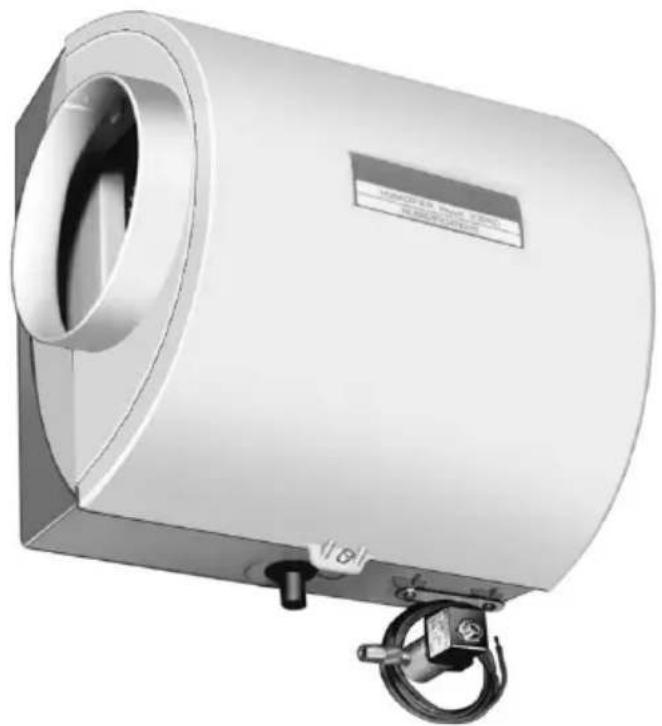
natural_image
3D rendering of a cylindrical industrial device with a side-mounted hook and label (no readable text or symbols beyond the label)American Lung Association® Health House® Program and Honeywell Working Together For Better Air
Did you know that the average person breathes 3400 gallons(12,870 liters) of air each day * and spends 90% of that day inside?**
Indoor air quality products from Honeywell are designed to help make your home more comfortable—from zoning products that allow you to control the temperature in individual areas of the home to humidifiers and comfort control centers that help balance the moisture content of your indoor air.
Honeywell is proud to be a partner of the American Lung Association® Health House® program that provides guidelines for constructing homes with improved air quality and ventilation.
For more information on ways to improve the air inside your home, please visit the Health House website at: www.healthhouse.org
and the American Lung Association website at: www.lungusa.org
The American Lung Association and its Health House program do not endorse products.
For more information about Honeywell Indoor Air Quality products, visit: www.honeywell.com/yourhome
or call: 1-800-345-6770 x531
*EPA.National Air Quality 1999 Status & Trends.
**Indoor Air Pollution, An Introduction for Health Professionals, EPA, US Government Printing Office #1994-523-217/81322.
IMPORTANT
Please read these instructions and keep them in your records.
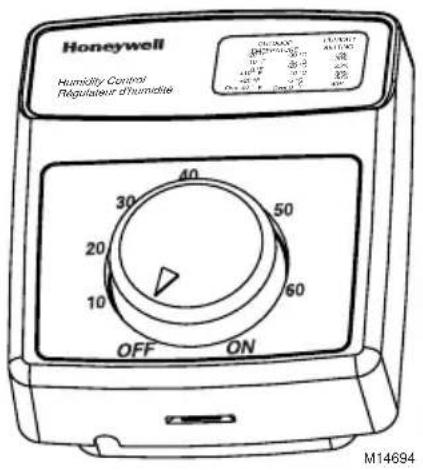
Your Honeywell HE220A and HE260A Humidifiers are controlled by the H8908A Convertible Humidity Control installed on either an interior wall in the living area or on the return air duct. Choose the humidity control setting using the combination relative humidity/outdoor temperature setting scale on your humidity control. Match the dial setting to the outdoor temperature for optimizing the humidity level while reducing the moisture condensation on your windows. Use the table below to adjust the humidity control to the recommended setting.
text_image
Honeywell Humidity Control Regulateur d'humidie OFF ON 30 20 10 40 50 60 ON ON M14694| At Outside Temperature | Recommended Setting | At Outside Temperature | Recommended Setting |
| -20°F (-29°C) 15 | +10°F (-12°C) 30 | ||
| -10°F (-23°C) 20 | +20°F (-7°C) 35 | ||
| 0°F (-18°C) 25 A | above 20°F (-7°C) 40 |
NOTE: As the outside temperature drops, the recommended humidity control setting is lowered to accommodate for dewpoint effects. These settings should reduce the accumulation of moisture and ice on your windows and in other areas of your home.
Some indoor activities such as cooking, showering and clothes drying can cause excessive levels of humidity and start the accumulation of moisture on your windows.
NOTE: If this condition persists for more than a few hours, set the humidity control to the lowest setting to turn off the humidifier. If the condition does not improve, ventilate your home to remove the moisture.
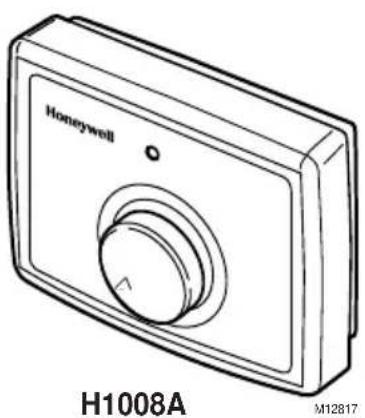
Your Honeywell HE220B and HE260B Humidifiers are controlled by the Honeywell H1008 Automatic Humidity Control with HumidiCalc+™ Software. The automatic humidity control is mounted in the return air duct where it can be exposed to the return air airstream. The HumidiCalc+™ Software inside your automatic humidity control is designed to automatically adjust the humidity level based on indoor temperature and humidity, inferred or measured outdoor temperature, and the frost factor dial setting. The frost factor allows for variations in furnace size, window insulation and average daily climate temperature.
text_image
Honeywell H1008A M12817The Automatic Humidity Control with HumidiCalc+™ Software requires an initial adjustment period. Set the frost factor dial on 5 and use the following table to adjust the frost factor—only one setting at a time—increasing the dial setting if you feel you need more humidity, or reducing the setting if you see moisture on the inside of your windows. For more precise humidity adjustment, set the frost factor between dial settings. Allow two days for the humidity level to subside before making further adjustments. Once you have tuned in the proper setting, you should never have to adjust it again. HumidiCalc+™ Software takes over and makes any future adjustments caused by varying outdoor temperatures, thus reducing moisture build-up on windows while maintaining the optimal humidity level.
| Humidity Level Recommended Adjustment | |
| Insufficient humidity Increase the frost | factor dial by one setting. |
| Condensation on windows Decrease the frost factor dial by one setting. | |
Your Honeywell humidifier uses the principle that vapor (evaporated water) is created when warm air blows over a water soaked area. As the vapor circulates, the relative humidity rises.
Your humidity control monitors the relative humidity and activates the humidifier accordingly. The humidifier water supply disburses water evenly over the humidifier pad. The warm dry air from the furnace passes over the humidifier pad and picks up the moist air to circulate it through your home.
Humidified air feels warmer and more comfortable so you may be able to lower your thermostat heating setpoint and save money on your heating fuel bills. The end result is that your humidifier gives you a comfortable environment that is also energy efficient.
MAINTAINING YOUR HUMIDIFIER
A regular maintenance program prolongs the life of your humidifier and provides a more comfortable home. Frequency of cleaning depends on the condition of your water.
You can use either hard or soft water in your humidifier, but hard water mineral deposits are more difficult to clean than soft water deposits.
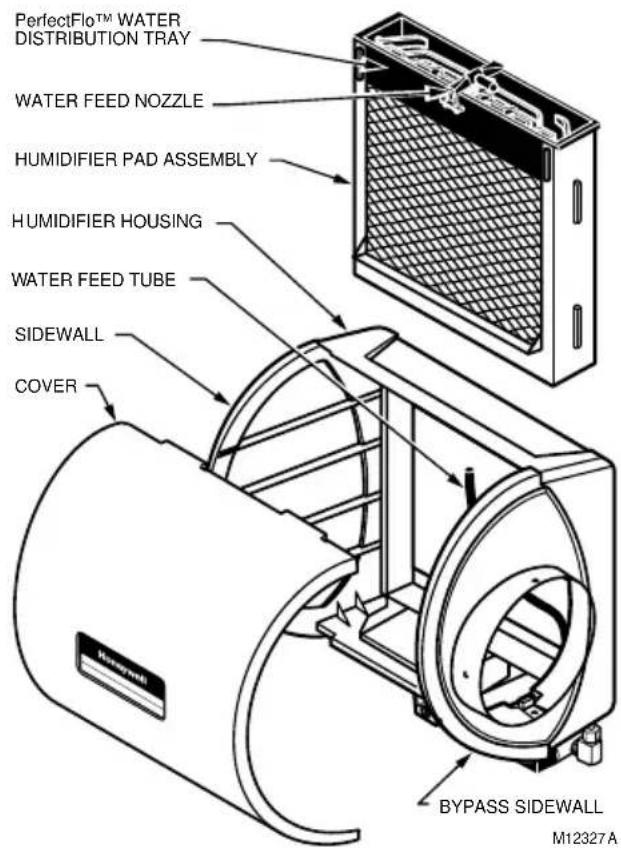
text_image
PerfectFlo™ WATER DISTRIBUTION TRAY WATER FEED NOZZLE HUMIDIFIER PAD ASSEMBLY HUMIDIFIER HOUSING WATER FEED TUBE SIDEWALL COVER BYPASS SIDEWALL M12327AEvery 1 to 3 Months (Depending on Water Quality)

WARNING
Voltage Hazard.
Can cause electrical shock and equipment damage.
Disconnect power and shut off water supply before installing or servicing.
IMPORTANT
Never oil any part of the humidifier.
Use the following procedure to clean your Honeywell humidifier:
- Disconnect the power and turn off the humidifier water supply.
- Remove the humidifier cover.
- Remove the humidifier pad assembly from the humidifier by grasping the tray and pulling it toward you.
- Pull one side of the humidifier pad assembly frame toward you and remove the tray from the frame.
- Gently pinch the water nozzle catches inward until you can lift the water nozzle off the tray.
-
Slide the humidifier pad out of the frame.
-
Carefully scrape any mineral deposits from the tray and frame. Be sure the frame drain hole has nothing blocking it.
- Clean the humidifier pad with a putty knife.
NOTE: If excessive mineral deposits are present, replace with a new pad.
- Disconnect the drain hose from the drain fitting on the bottom of the humidifier housing.
- Clean the drain fitting, if necessary.
- Bend the drain hose to loosen any mineral deposits.
- lush the drain hose with pressurized water (a running tap) to clean the hose.
- Reattach the drain hose to the drain fitting.
- Slide the humidifier pad back into the frame.
- Snap the water nozzle back onto the tray.
- Reattach the tray to the frame.
- Place the humidifier pad assembly in the humidifier housing and press until the assembly is completely seated. Be careful not to pinch or kink the water feed tube.
- Replace the humidifier cover.
- Verify the humidifier operation by following the steps in the Checking the Humidifier for Proper Operation section.
End of Humidification Season
Clean the humidifier and shut it off at the end of the heating season. Use the Every 1 to 3 Months section, steps 1 through 18 to shut down for the season.
IMPORTANT
Be sure the humidifier power is off.
Vacation
When leaving on vacation, turn off the humidifier water supply and your humidity control. Turn on the water supply and reset your humidity control when you return.
After winter startup or servicing, check the humidifier operation:
- Turn on the humidifier power and water supply.
- Turn the H908A Convertible Humidity Control to the highest setting, or the H1008A Automatic Humidity Control to the test position, and set the thermostat to 10^ F ( 6^ C) above the room temperature.
NOTE: The H1008A Automatic Humidity Control stays in the test mode for thirty minutes. After thirty minutes, the control automatically resets to the maximum frost factor setting. If system checkout has not been completed in thirty minutes, the test mode can be extended by turning the dial back to one of the dial settings and then returning it to the test mode.
- Observe that water is flowing out of the drain hose.
NOTE: The furnace blower must be on to activate the humidifier.
- Reset the thermostat and H8908A Convertible Humidity Control to a comfortable setting or the H1008A Automatic Humidity Control to the desired frost factor setting, for automatic operation.
TROUBLESHOOTING YOUR HUMIDIFIER
| Problem What to Look for What to Do | ||
| Low humidity F | Furnace blower not operating. •Reset circuit breaker or check for blown fuse.•Check that the furnace power is on.•Check all external wiring connections.•Check the humidity control setting.•Call a professional heating contractor. | |
| Rapid air changes. Drafts (cold air is dry and is an added load to the humidifier). | •Keep doors and windows closed.•Close fireplace damper when not in use.•Keep exhaust fan running time to a minimum.•Seal around doors and windows. | |
| High humidity Condensation on walls. •Turn off | the humidity control and water until condensation is completely evaporated. | |
ADDING PERFECT CLIMATE® CONTROLS FOR COMFORT AND CONVENIENCE
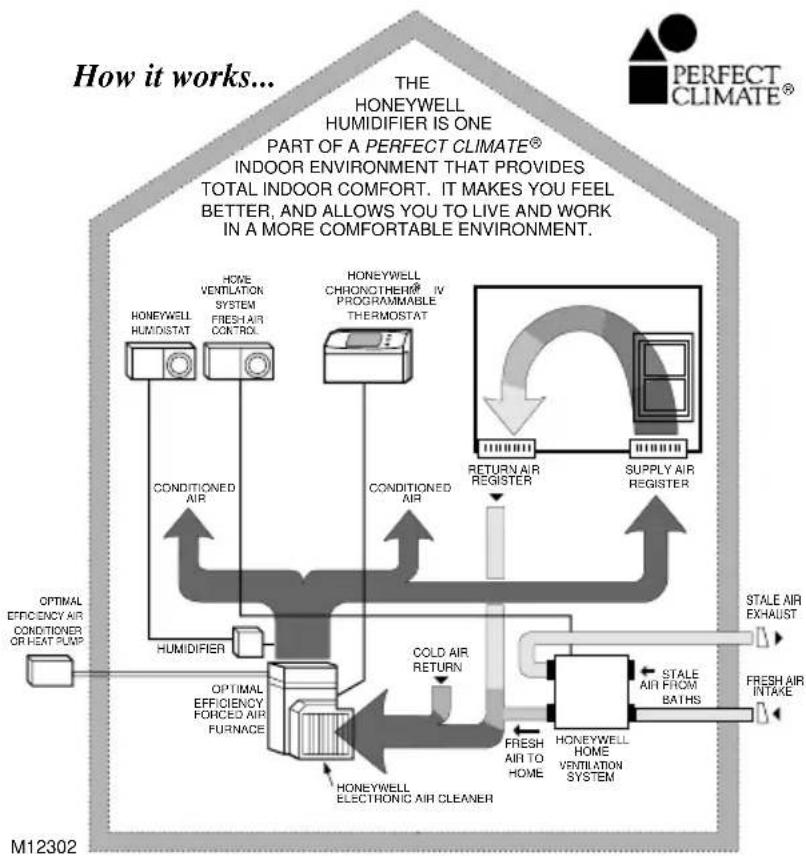
flowchart
graph TD
    A["OPTIMAL EFFICIENCY AIR CONDITIONER OR HEAT PUMP"] --> B["HUMIDIFIER"]
    B --> C["CONDITIONED AIR"]
    C --> D["HONEYWELL ELECTRONIC AIR CLEANER"]
    D --> E["COLD AIR RETURN"]
    E --> F["HONEYWELL HOME VENTILATION SYSTEM"]
    F --> G["FRESH AIR TO HOME"]
    G --> H["STALE AIR FROM BATHS"]
    H --> I["STALE AIR EXHAUST"]
    I --> J["FRESH AIR INTAKE"]
    J --> K["HONEYWELL HOME VENTILATION SYSTEM"]
    K --> L["COLD AIR RETURN"]
    L --> M["HONEYWELL CHRONOTHER® IV PROGRAMMABLE THERMOSTAT"]
    M --> N["RETURN AIR REGISTER"]
    N --> O["SUPPLY AIR REGISTER"]
    O --> P["PERFECT CLIMATE®"]
    P --> Q["THE HONEYWELL HUMIDIFIER IS ONE PART OF A PERFECT CLIMATE® INDOOR ENVIRONMENT THAT PROVIDES TOTAL INDOOR COMFORT. IT MAKES YOU FEEL BETTER, AND ALLOWS YOU TO LIVE AND WORK IN A MORE COMFORTABLE ENVIRONMENT."]
- Honeywell Perfect Climate® Comfort Center™ controls or Chronotherm® IV Programmable Thermostats.
- Honeywell media air cleaner or electronic air cleaners.
- Honeywell humidity controls.
- Honeywell humidifiers.
- Honeywell home ventilation systems.
Describing Perfection
The most convenient, most energy efficient, cleanest, healthiest and most comfortable indoor environment possible today! Perfect climate is achieved when the five core components of a home's climate system work together:
- Optimal efficiency heating and cooling equipment,
- Precise, programmable temperature control,
• Effective indoor air quality control,
• Controlled humidity,
• Proper ventilation and air distribution.
Contact your local Perfect Climate® dealer for an evaluation of your home.
WARRANTY
Honeywell warrants this product, excluding humidifier pad, to be free from defects in the workmanship or materials, under normal use and service, for a period of one (1) year from the date of purchase by the consumer. If, at any time during the warranty period, the product is defective or malfunctions, Honeywell shall repair or replace it (at Honeywell's option) within a reasonable period of time.
If the product is defective, return it, with a bill of sale or other dated proof of purchase, to the place where you purchased it.
This warranty does not cover removal or reinstallation costs. This warranty shall not apply if it is shown by Honeywell that the defect or malfunction was caused by damage which occurred while the product was in the possession of a consumer.
Honeywell's sole responsibility shall be to repair or replace the product within the terms stated above. HONEYWELL SHALL NOT BE LIABLE FOR ANY LOSS OR DAMAGE OF ANY KIND, INCLUDING ANY INCIDENTAL OR CONSEQUENTIAL DAMAGES RESULTING, DIRECTLY OR INDIRECTLY, FROM ANY BREACH OF ANY WARRANTY, EXPRESS OR IMPLIED, OR ANY OTHER FAILURE OF THIS PRODUCT. Some states do not allow the exclusion or limitation of incidental or consequential damages, so this limitation may not apply to you.
THIS WARRANTY IS THE ONLY EXPRESS WARRANTY HONEYWELL MAKES OTHIS PRODUCT. THE DURATION OF ANY IMPLIED WARRANTIES, INCLUDING THE WARRANTIES OF MERCHANTABILITY AND FITNESS FOR A PARTICULAR PURPOSE, IS HEREBY LIMITED TO THE ONE YEAR DURATION OF THIS WARRANTY. Some states do not allow limitations on how long an implied warranty lasts, so the above limitation may not apply to you.
This warranty gives you specific legal rights, and you may have other rights which vary from state to state.
If you have any questions concerning this warranty, please write Honeywell Customer Care, 1985 Douglas Dr N, Golden Valley, MN 55422 or call 1-800-468-1502. In Canada, write Retail Products, ON15, Honeywell Limited/Honeywell Limitée, 35 Dynamic Dr, Scarborough, Ontario M1V 4Z9.
Honeywell
Automation and Control Solutions
Honeywell International Inc. Honeywell Limited-Honeywell Limitée
1985 Douglas Drive North 35 Dynamic Drive
Golden Valley, MN 55422 Scarborough, Ontario
M1V 4Z9

Printed in U.S.A. on recycled paper containing at least 10% post-consumer paper fibers.
Honeywell
Proud Partner

AMERICAN
LUNG
ASSOCIATION®
HEALTH HOUSE®
natural_image
3D rendering of a cylindrical industrial device with a flanged handle and mounting bracket (no visible text or symbols)*EPA.National Air Quality 1999 Status & Trends.
**Indoor Air Pollution, An Introduction for Health Professionals, EPA, US Government Printing Office, #1994-523-217/81322.
IMPORTANT
natural_image
Line drawing of a Honeywell digital camera with labeled model H1008A (no additional text or symbols)1985 Douglas Drive North 35, Dynamic Drive
Golden Valley, MN 55422 Scarborough (Ontario)
M1V 4Z9
