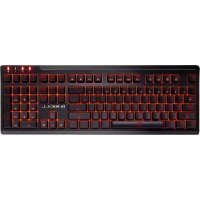
RIPJAWS KM570 MX - Keyboard G.Skill - Free user manual and instructions
Find the device manual for free RIPJAWS KM570 MX G.Skill in PDF.



| Product Type | Mechanical Gaming Keyboard |
| Brand | G.Skill |
| Model | RIPJAWS KM570 MX |
| Switch Type | Cherry MX Mechanical |
| Rollover | Full NKRO and 100% Anti-Ghosting |
| Backlighting | Red, with customizable effects |
| Onboard Memory | Yes, 1 profile |
| Polling Rate | 1000 Hz (1 ms) |
| Cable Length | 2.0 m, braided |
| Warranty | 2-Year Limited Warranty |
| Package Contents | Keyboard, keycap puller, quick start guide, warranty guide |
| System Requirements | Windows 7, 8, 8.1, 10; USB port |
| Main Features | On-the-fly macro recording, combined function keys, game mode, dedicated volume control |
| Backlight Customization | Per-key via Fn+F8 |
| Factory Reset | Hold Left Ctrl + Left Alt + Right Ctrl for 3 seconds |
| Power | Via USB port |
| Maintenance and Cleaning | Clean with a slightly damp soft cloth; avoid solvents |
| Safety | Do not expose to moisture or extreme temperatures |
| Spare Parts and Repairability | Keycap puller included; no spare parts specified |
Frequently Asked Questions - RIPJAWS KM570 MX G.Skill
User questions about RIPJAWS KM570 MX G.Skill
0 question about this device. Answer the ones you know or ask your own.
Ask a new question about this device
Download the instructions for your Keyboard in PDF format for free! Find your manual RIPJAWS KM570 MX - G.Skill and take your electronic device back in hand. On this page are published all the documents necessary for the use of your device. RIPJAWS KM570 MX by G.Skill.
USER MANUAL RIPJAWS KM570 MX G.Skill
Mechanical Gaming Keyboard
Quick Start Guide
Introduction
Congratulations! You are the proud owner of the G.SKILL RIPJAWS KM570 series mechanical gaming keyboard, designed with simplicity and fully packed with features.
Features
• Cherry MX mechanical keyswitches
• Full n-key rollover & 100% anti-ghosting keys
• Per-key lighting & customizable lighting effects
• Function combo keys
• Dedicated volume control
- On-the-fly macro recording & per-key macro support
• Gaming mode Windows key lock
- Braided USB cable design for durability and style
- Five levels of ergonomically contoured keycaps
Technical Specifications
| Model Number KM570 MX | |
| Key Type Cherry MX Mechanical | |
| Illumination Red | |
| On-board Memory Yes (1 Profile) | |
| Polling Rate 1000Hz (1 ms) | |
| Rollover n-Key Rollover & 100% Anti-Ghosting | |
| Cable Length 2.0m, Braided | |
| Warranty 2 Year Limited Warranty | |
Package Contents
• G.SKILL RIPJAWS KM570 MX Mechanical Gaming Keyboard
• Keycap Puller Tool
- Quick Start Guide
- Warranty Guide
System Requirements
- Windows 7, 8, 8.1, 10
- USB port
Installation
- Turn on your computer.
- Connect the keyboard USB connector to a USB 2.0 or USB 3.0 port.
- Wait for the system to detect and install the basic device drivers.
- Your keyboard is ready to use!
1 | ENGLISH ENGLISH | 2
Keyboard Hardware

- "Fn" key
- Function combo keys (use with "Fn" key)
- Volume control keys (Mute / Volume Down / Volume Up)
- Num Lock/Caps Lock/Scroll Lock/Windows Lock indicator lights
- On-the-fly macro recording key ("MR" key)
- Preset lighting brightness and speed control (use with "Fn" key)
Customize Lighting
The KM570 MX keyboard allows you to enable or disable the lighting of each individual key. To customize single-key lighting, follow the instructions below.
- Press "Fn + F8" to enter light customization mode. The Windows lock indicator light in the top right corner of the keyboard will flash while in the light customization mode.
- Press the key or keys you wish to enable or disable lighting. Key functions will be disabled while in the light customization mode.
- When complete, press "Fn + F8" again to complete the customization. The Windows lock indicator light will stop flashing.
Note: By default, the QWERASDF, 1-6 keys, and space bar key will light up in the per-key light customization profile. The per-key light customization profile is saved in the keyboard, and can be accessed by pressing "Fn + F7" to cycle through the preset lighting patterns.
Function Combo Keys
The KM570 MX mechanical gaming keyboard supports function combo keys to provide Windows shortcuts, media control, and lighting customization.
| Key Combination F | Function Category | |
| Fn + F1 Open | "My Computer" Windows Shortcut | |
| Fn + F2 Open | default Internet browser Windows Shortcut | |
| Fn + F3 Open | default email application Windows Shortcut | |
| Fn + F4 Open | "Calculator" Windows Shortcut | |
| Fn + F5 Toggle | "Windows Key Lock" Keyboard Control | |
| Fn + F6 Toggle | n-key rollover and 6-key rollover Keyboard Control | |
| Fn + F7 Cycles | through lighting effects Lighting | |
| Fn + F8 | Customize per-key lighting | Lighting |
| Fn + F9 | Previous Track | Media Control |
| Fn + F10 | Play/Pause | Media Control |
| Fn + F11 | Stop | Media Control |
| Fn + F12 | Next Track | Media Control |
| Fn + → | Increase lighting effect speed | Lighting |
| Fn + ← Decrease | lighting effect speed Lighting | |
| Fn + ↑ | Increase lighting brightness | Lighting |
| Fn + ↓ | Decrease lighting brightness | Lighting |
Note: Pressing the "Fn" key on its own will not have any functions.
How to Toggle NKRO
N-key rollover (NKRO) is a function that allows multiple keys to be pressed and registered simultaneously. Typically, USB keyboards support 6-key rollover by default, so when a 7th key is pressed, it would not be registered. In some legacy software environment or BIOS environment, only the default 6-key rollover is supported, so n-key rollover function would need to be disabled.
On the KM570, n-key rollover is enabled by default. To toggle between NKRO and 6-key rollover, press "Fn + F6".
On-the-Fly Macro Recording (OTF Macro)
Macro is a sequence of key combination that can be set to activate with a single key press. The KM570 allows on-the-fly macro recording to any key (except the "MR" and "Fn" key) without additional software. Macros are typically used to repeat a complex action that uses two or more keys, which may be useful in games and document processing. To record macro on-the-fly:
- Press the "MR" key.
- Select and press a key to program. (e.g. "F1" key)
- Press the key combination you wish to program as macro to the key. (e.g. "Ctrl+C")
- Press the "MR" key to end macro recording. (Now pressing "F1" will function as "Ctrl+C")
Note: To clear the macro from a key, press "MR", then press the key, and press "MR" again to reset the key to its default function. To stop a macro while it is running, press the "MR" key once to interrupt and end the macro sequence.
Macro Record (MR) function key is locked by default. To unlock, press "Fn" + "MR".
How to Reset Keyboard Settings
To reset all keyboard settings, press and hold "Left Ctrl" + "Left Alt" + "Right Ctrl" keys for at least three seconds. The four indicator lights on the top right corner will flash on and off to indicate that the keyboard settings are being reset to default. The lights will stop flashing when the reset is complete. The following settings will be reset to its default values:
- All per-key macro settings
• Per-key lighting settings - Lighting effect speed
• Keyboard backlight brightness
• n-Key/6-key rollover function - Windows key lock
Limited Product Warranty
The G.SKILL RIPJAWS KM570 MX Mechanical Gaming Keyboard is covered under a 2 year limited product warranty. For more warranty information, please visit the official G.SKILL website at http://www.gskill.com/en/warranty.
See Also
For more information, please visit: http://www.gskill.com/en Technical support email: techsupport@gskill.com
Einleitung
Comment activer/désactiver NKRO


Brand : G.Skill
Model : RIPJAWS KM570 MX
Category : Keyboard