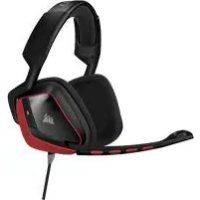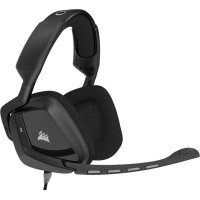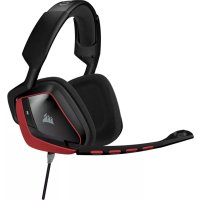
CA9011144AP - Earphones CORSAIR - Free user manual and instructions
Find the device manual for free CA9011144AP CORSAIR in PDF.


| Product type | Surround gaming headset with microphone |
| Brand | Corsair |
| Model | Void SURROUND (CA9011144AP) |
| Connectivity | USB 2.0+ (via Dolby 7.1 adapter) |
| Weight | Approximately 350 g |
| Dimensions (L x W x H) | 20 x 18 x 10 cm (estimated) |
| Speakers | 50 mm, frequency response 20 Hz - 20 kHz |
| Microphone | Unidirectional, flexible boom, detachable |
| Built-in controls | Volume wheel, mute button |
| Control software | Corsair Utility Engine (CUE) for EQ, Dolby, microphone settings |
| Surround sound | Dolby 7.1 enabled via CUE |
| Compatibility | Windows 7, 8, 10 (requires CUE) |
| Cushion material | Microfiber, thick padding |
| Headband | Adjustable with cantilever hinge |
| Power | USB (high-power port required) |
| Maintenance | Clean with a soft, dry cloth |
| Hearing safety | Avoid prolonged listening at high volume |
| Box contents | Headset, Dolby 7.1 USB adapter, quick start guide |
| Warranty | 2 years (depending on country) |
Frequently Asked Questions - CA9011144AP CORSAIR
User questions about CA9011144AP CORSAIR
0 question about this device. Answer the ones you know or ask your own.
Ask a new question about this device
Download the instructions for your Earphones in PDF format for free! Find your manual CA9011144AP - CORSAIR and take your electronic device back in hand. On this page are published all the documents necessary for the use of your device. CA9011144AP by CORSAIR.
USER MANUAL CA9011144AP CORSAIR
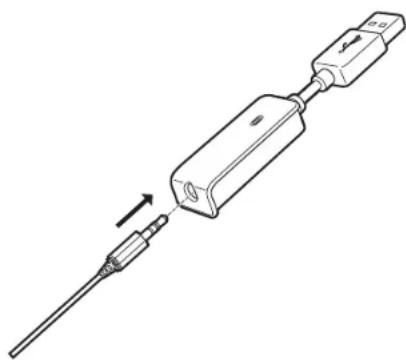
Remember that powering the USB Dolby 7.1 Adapter requires a high power (USB 2.0 or better) port. Some USB ports on older keyboards and monitors do not support high-power devices.
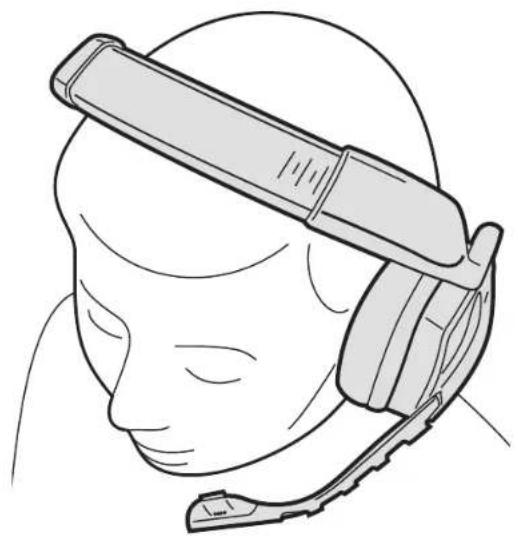
Place the headset on your head and adjust the headband for a comfortable fit. The extra-large ear pads and deep earcups enable the Corsair VOID Headset to fit comfortably so you can play for hours without fatigue.
To use the microphone, rotate it down and adjust it so that it's between 1-2 inches (2.5cm to 5cm) away from your mouth.
- Go to corsair.com/support/downloads to download the Corsair Utility Engine ('CUE') Software.
Using CUE software will enable the full feature set of the Void Surround Headset.
Install the software on a PC running Windows 7, 8 or 10.
After installation is complete, reboot your PC, and launch CUE.
You can use it to:
- Select and customize audio equalizer (EQ) settings.
- Adjust headset volume, microphone input volume, and microphone feedback.
- Enable Dolby Headphone, and set it to on or off.
The software's built-in documentation explains how to use the Void SURROUND Headset features in greater detail.
6
ENGLISH

7
1 + u7 = 7019
ENGL5H

ADJUSTMENTGENERAL TIPS
GENERAL TIPS
For the best audio performance:
- Download the Corsair Utility Engine software from corsair.com/support/downloads
- Don't be afraid to use the software equalizer to adjust the audio quality to your liking. EQ presets have been provided for popular gaming and media types.
Prolonged listening at high volumes may adversely affect your hearing. Take breaks between sessions and always begin with the volume at the lowest possible level before increasing.
Place the headset on your head and adjust the headband for a comfortable fit. The extra-large ear pads and deep earcups enable the Corsair VOID headset to fit comfortably so you can play for hours without fatigue.
As with any audio product, reduce the volume before trying it with an audio source the first time.
You can adjust the volume with:
- The "CUE Control" is the digital volume controller on the headset at the bottom corner of your left earcup: hold or repeatedly toggle it downwards to reduce volume, and upwards in short increments to increase volume.
The standard Windows audio controller can also be used to adjust volume. - Once and audio source is playing, set the volume to a comfortable level.
To use the microphone, rotate it down and adjust it so that it's between 1-2 inches (2.5cm to 5cm) away from your mouth.
8

9
E
MICROPHONE ADJUSTMENT
Your new Void Headset features a high performance "unidirectional" microphone designed to reject noise other than your voice, but it must be pointed directly at your mouth to function correctly.
- Bend the flexible microphone boom to best fit near to the left corner of your mouth.
The microphone should be about 1.5 inches / 4cm away from your mouth for best performance.
We've found that about a 30 degree bend is a good place to start, but feel free to increase or decrease this if your mic is too loud or too soft.
Enjoy your Corsair Void SURROUND Headset! If you have any questions or comments, see the back panel of this guide for contact information.
10
1

1
FANCA15
CONTENU DU PAQUET
Note on environmental protection
After the implementation of the European Directive 2002/96/EU in the national legal system, the following applies: Electrical and electronic devices may not be disposed of with domestic waste.
Consumers are obligated by law to return electrical and electronic devices at the end of their service lives to the public collecting points set up for this purpose of point of sale. Details to this are defined by the national law of the respective country. This symbol on the product, the instruction manual or the package indicates that a product is subject to these regulations. By recycling, reusing the materials or other forms of utilizing old devices, you are making an important contribution to protecting our environment.

Umweltschutzhinweis
Pancetectomomy is a family Epinecillaceae, Bacteriophyta 2002/93
EC is a bacterium. Leuconostoc hutchinsonianum has cytogenetic similarity
-3nextpnecknE anenponbible yctpoBtea HennbrynnnnpoBto
COPHIMNNTANMYSCOO
Kanak obaeabane nnonaonanae anananaananaananaananaananaananaananaananaananaananaananaananaananaananaananaananaananaananaananaananaananaananaananaananaananaananaananaananaananaananaananaananaananaananaananaananaananaananaananaananaananaananaananaananaananaananaananaananaananaananaan ana aannnnaa anannnnnnaa anannnnnnaa anannnnnnaa anannnnnnaa anannnnnnaa anannnnnnaa anannnnnnaa anannnnnnaa anannnnnnaa anannnnnnaa anannnnnnaa anannnnnnaa anannnnnnaa anannnnnnaa anannnnnnaa anannnnnnaa anannnnnnaa nanannnnnnaa anannnnnnaa anannnnnnaa anannnnnnaa anannnnnnaa anannnnnnaa anannnnnnaa anannnnnnaa anannnnnnaa anannnnnnaa anannnnnnaa anannnnnnaa anannnnnnaa anannnnnnaa anannnnnnaa anannnnnnaa anannnnnha aennnnnnaa anannnnnnaa anannnnnnaa anannnnnnaa anannnnnnaa anannnnnnaa anannnnnnaa anannnnnnaa anannnnnnaa anannnnnnaa anannnnnnaa anannnnnnaa anannnnnnaa anannnnnnaa anannnnnnaa anannnnnnaa anannnnnnaaa
CAUTION!
The manufacturer is not responsible for any radio or TV interference caused by unauthorized modifications to this equipment. Such modifications could void the user authority to operate the equipment.
FCC STATEMENT
This equipment has been tested and found to comply with the limits for a Class B digital device, pursuant to part 15 of the FCC Rules. These limits are designed to provide reasonable protection against harmful interference in a residential installation. This equipment generates, uses and can radiate radio frequency energy and, if not installed and used in accordance with the instructions, may cause harmful interference to radio communications. However, there is no guarantee that interference will not occur in a particular installation. If this equipment does cause harmful interference to radio or television reception, which can be determined by turning the equipment off and on, the user is encouraged to try to correct the interference by one or more of the following measures:
Reorient or relocate the receiving antenna.
- Increase the separation between the equipment and receiver.
Connect the equipment into an outlet on a circuit different from that to which the receiver is connected.
- Consult the dealer or an experienced radio/TV Technician for help.
This device must not be co-located or operating in conjunction with any other antenna or transmitter.
Operation is subject to the following two conditions:
1. this device may not cause harmful interference, and
2. this device must accept any interference received, including interference that may cause undesired operation.

support@corseir.com
WEB
consair.com
BLOG
corsair.com/blog
FORUM
forum.corsair.com
FACEROOK
fbacbook.com/Corseir
M
Twitter.com/Consair
YOUTUBE
youtube.com/Corso
© 2015 Corsair Components, Inc.
All rights reserved.
Corsair and the sells logo are registered trademarks, and Corsair Gaming and the Corsair Gaming logo are trademarks of Corsair in the United States and/or other countries. All other trademarks are the property of their respective owners.
F/N:49-001437 Rev A