BackPack RAR1BP - Radio Ruark Audio - Free user manual and instructions
Find the device manual for free BackPack RAR1BP Ruark Audio in PDF.



| Product type | Rechargeable battery for radio and Bluetooth speakers |
| Compatibility | Ruark R1 radio and MR1 speakers |
| Battery capacity | 2000 mAh NiMH |
| Output voltage | 9.6 V (nominal) |
| Input voltage | 14 V DC |
| Input current | 500 mA |
| Charging time | Up to 5 hours |
| Charge indicator | Yellow LED flashing slowly (normal) or quickly (error) |
| Low battery indicator | Red LED flashing, then automatic shutdown |
| Switch | ON / OFF |
| Installation | Remove plastic tab, slide over antenna, plug in connector, secure with two screws and provided hex key |
| Usage | Set switch to ON, then turn on radio |
| Shutdown | Set switch to OFF (alarm does not work in OFF) |
| Autonomy optimization | Turn off BackPack when not in use, avoid standby mode |
| Cleaning | Use a slightly damp lint-free cloth; do not use spray or abrasive substances |
| Precautions | Do not expose to splashes, flames, heat sources; avoid dust, vibrations, and extreme temperatures |
| Ventilation | Maintain at least 10 cm distance from surrounding objects |
| Operating temperature | 5 to 40 °C |
| Repairability | No user-serviceable parts – do not disassemble |
| Warranty | 2 years from date of purchase, subject to proper use and maintenance |
| Manufacturing | Designed and manufactured in the UK by Ruark Audio |
| Kit contents | BackPack, two screws, hex key, power adapter (not included in some versions) |
Frequently Asked Questions - BackPack RAR1BP Ruark Audio
User questions about BackPack RAR1BP Ruark Audio
0 question about this device. Answer the ones you know or ask your own.
Ask a new question about this device
Download the instructions for your Radio in PDF format for free! Find your manual BackPack RAR1BP - Ruark Audio and take your electronic device back in hand. On this page are published all the documents necessary for the use of your device. BackPack RAR1BP by Ruark Audio.
USER MANUAL BackPack RAR1BP Ruark Audio
Rechargeable battery pack for the R1 radio and MR1 Bluetooth speakers
User guide
EN
Brugervejledning
DA
Bedienungsanleitung
DE
Fitting instructions
Please read this manual carefully before using your Backpack and retain for future reference.
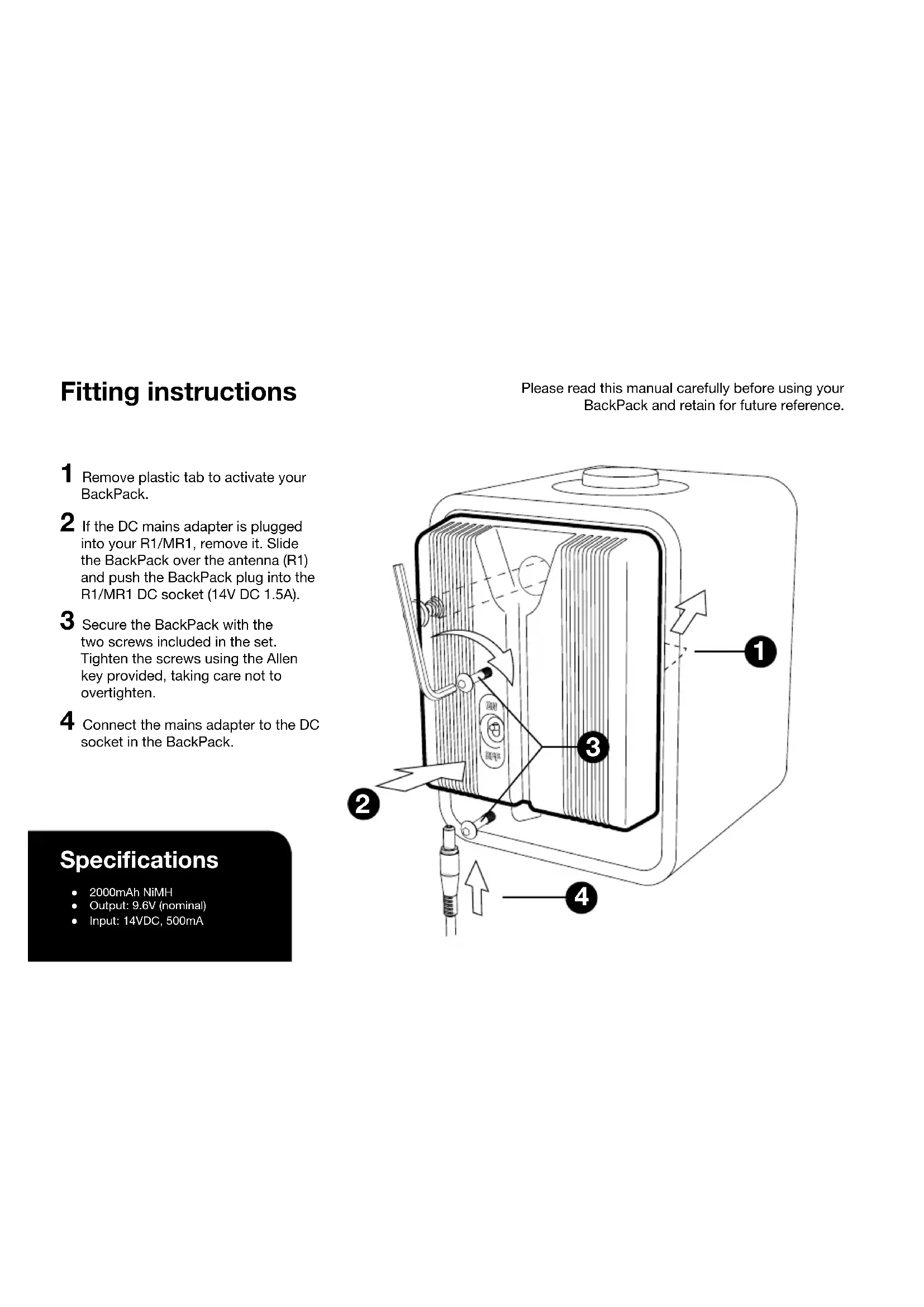
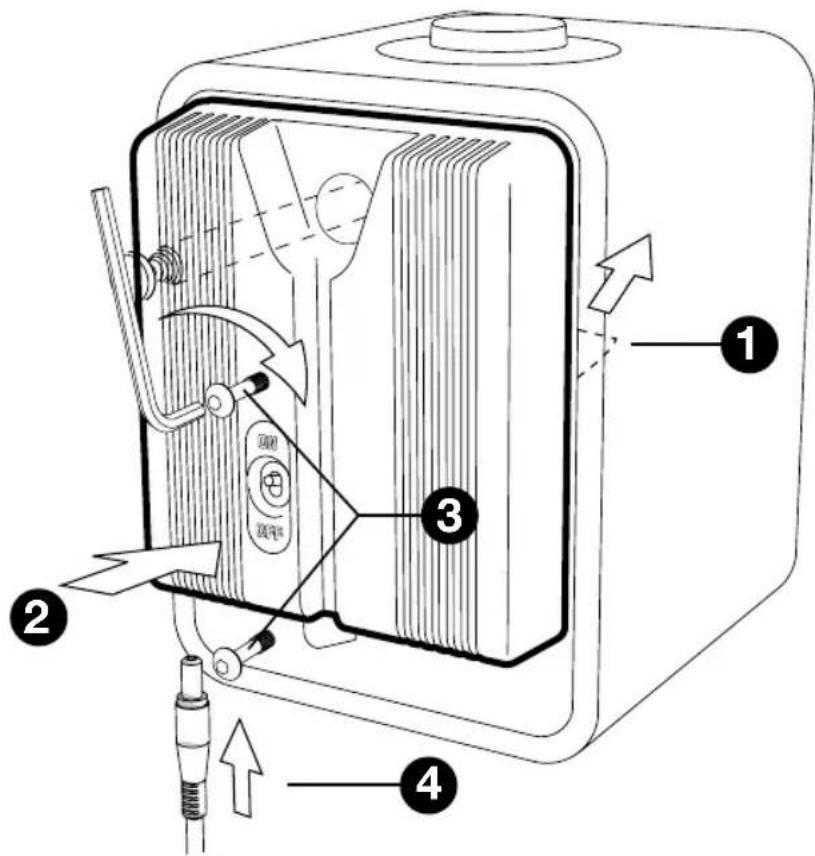
1 Remove plastic tab to activate your Backpack.
2 If the DC mains adapter is plugged into your R1/MR1, remove it. Slide the Backpack over the antenna (R1) and push the Backpack plug into the R1/MR1 DC socket (14V DC 1.5A).
3 Secure the Backpack with the two screws included in the set. Tighten the screws using the Allen key provided, taking care not to overtighten.
4 Connect the mains adapter to the DC socket in the Backpack.
Specifications
2000mAh NiMH
Output: 9.6V (nominal)
Input: 14VDC, 500mA
Using your Backpack
The Backpack must be charged before use (you can still use the R1/MR1 normally whilst your Backpack charges).
Charging
Your Backpack charges whenever the DC adapter is plugged into the mains.
Charging takes up to 5h.
The yellow light (A) flashes slowly to indicate normal charging and turns off when your Backpack is charged.
If there is a fault the yellow light flashes quickly (4 times a second), please contact your retailer.
When batteries are very low the red light (B) flashes and
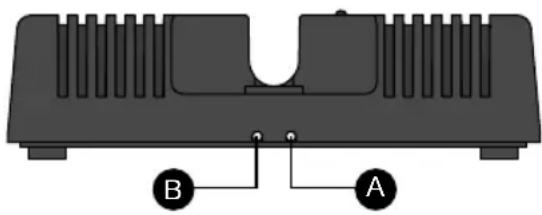
the power to the radio is automatically switched off.
As a reminder, the red light (B) continues to flash until the switch is moved to the OFF position.
Turn on
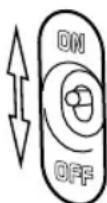
Move the Backpack switch to ON. Press the volume knob to listen to your R1/MR1.
Turn off
Move the Backpack switch to OFF.
Please note that when the Backpack is off (and the R1 is not plugged into the mains) the R1 alarm will not function.

Maximising battery life
To get the maximum life from your Backpack when not plugged into the mains ensure you switch it OFF when not listening to the R1/MR1.
Leaving the R1/MR1 in standby when not plugged into the mains will drain the batteries.
Guarantee information
We guarantee this product to be free from defects for a period of two years from date of purchase, providing due care and attention has been paid. Product failure through accidental damage (however caused), excessive wear and tear, negligence or unauthorised modification will void your guarantee.
Should you experience a problem please contact us via our website www.ruarkaudio.com or by calling directly on 01702 601410 where we will advise the course of action. If your product needs to be returned it should be packaged in its original packing along with proof of purchase. If it is not possible to return the product by hand, then it should be sent carriage prepaid by a reputable parcel carrier. If the original packing is not available, replacement packing can be purchased from us.
Guarantee for overseas sales
The distributor in the country of purchase guarantees products purchased outside the UK. For details, please contact your local Ruark distributor or outlet.
THIS GUARANTEE IN NO WAY VARIOUS OR REMOVS THE PURCHASER'S STATUTORY RIGHTS. E&OE
Cautions
- Only charge your Backpack with the R1/MR1 Mains Adapter (14VDC 2A).
- The unit should not be exposed to dripping or splashing and no objects containing liquids, such as vases, should be placed on the unit.
- Keep the unit away from naked flames such as lighted candles and heat sources such as radiators.
- The unit should be positioned at least 10cm away from adjacent objects to ensure adequate ventilation.
General care
- The Backpack will get warm during charging. This is normal.
- The BackPack gradually loses its charge when not in use and performance may be impaired if left discharged for an extended period of time. To prolong battery life please keep the BackPack charged.
- Clean with a soft, lint-free duster or slightly dampened cloth. Do not use wax sprays or other substances as these may damage the surface finish or impair performance.
- Do not expose your unit to direct sunlight, high humidity, dust, excessive vibration or extreme temperatures, all of which can affect the finish, performance and reliability of the unit.
The recommended operating temperature range is 5^ to 40^ . - There are no serviceable parts inside, do not dismantle the Backpack.

ruarkaudio
59 Tailors Court, Temple Farm Industrial Estate, Southend on Sea, Essex, SS2 5TH, UK
+44 (0) 1702 601 410 www.ruarkaudio.com
Designed and engineered in Britain

© 2013 Ruark Audio. All rights reserved. Ruark Audio, the Ruark Audio logo, and other Ruark Audio marks are owned by Ruark Audio and may be registered. All other trademarks are the property of their respective owners. Ruark Audio assumes no responsibility for any errors that may appear in this manual and the information contained in it may change without notice.
BackPack
RA-R1BP
59 Tailors Court, Temple Farm Industrial Estate, Southend on Sea, Essex, SS2 5TH, UK
+44 (0) 1702 601 410 www.ruarkaudio.com
59 Tailors Court, Temple Farm Industrial Estate, Southend on Sea, Essex, SS2 5TH, UK
+44 (0) 1702 601 410 www.ruarkaudio.com
59 Tailors Court, Temple Farm Industrial Estate, Southend on Sea, Essex, SS2 5TH, UK
+44 (0) 1702 601 410 www.ruarkaudio.com