RoadRunner 315 - Dashcam PRESTIGIO - Free user manual and instructions
Find the device manual for free RoadRunner 315 PRESTIGIO in PDF.


| Product type | Dashcam |
| Brand | Prestigio |
| Model | RoadRunner 315 |
| Video resolution | 1080 FHD (1920x1080), 720P (1280x720), WVGA (848x480), VGA (640x480), QVGA (320x240) |
| Photo resolution | Up to 12 MP (4000x3000) |
| Loop recording | Yes, with adjustable duration |
| Motion detection | Yes, can be enabled/disabled |
| Accelerometer (G-sensor) | Yes, adjustable sensitivity |
| Screen | Built-in (not specified, typical) |
| Power supply | 12V car charger |
| Storage | microSD card (not included) |
| Connectivity | Mini USB for PC |
| Functions | Video recording, photo capture, preview mode |
| Dimensions | Approximately 60 x 50 x 30 mm (estimate) |
| Weight | Approximately 60 g (estimate) |
| Care and cleaning | Clean with a soft, dry cloth |
| Safety | Do not expose to moisture, excessive heat, or magnetic fields |
| Spare parts and repairability | Repair by certified technician only |
| General information | Compliant with EU directive 1999/5/EC |
Frequently Asked Questions - RoadRunner 315 PRESTIGIO
User questions about RoadRunner 315 PRESTIGIO
0 question about this device. Answer the ones you know or ask your own.
Ask a new question about this device
Download the instructions for your Dashcam in PDF format for free! Find your manual RoadRunner 315 - PRESTIGIO and take your electronic device back in hand. On this page are published all the documents necessary for the use of your device. RoadRunner 315 by PRESTIGIO.
USER MANUAL RoadRunner 315 PRESTIGIO
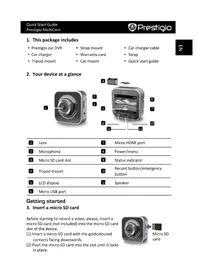
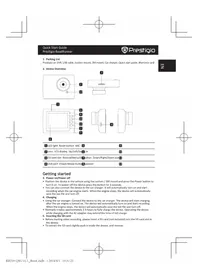
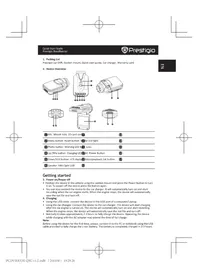
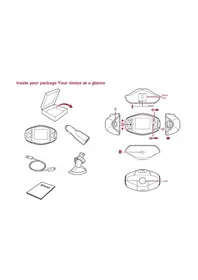
Inside your package Your device at a glance
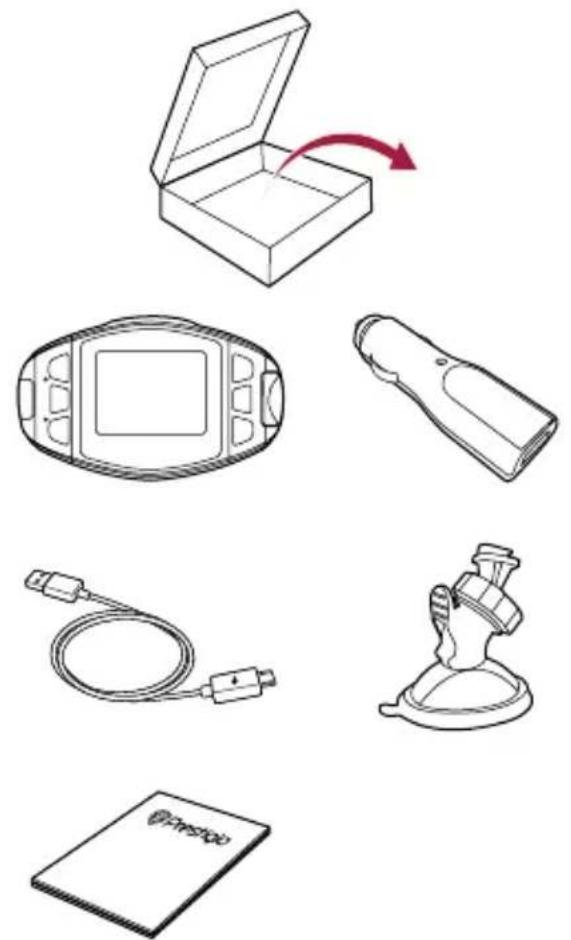
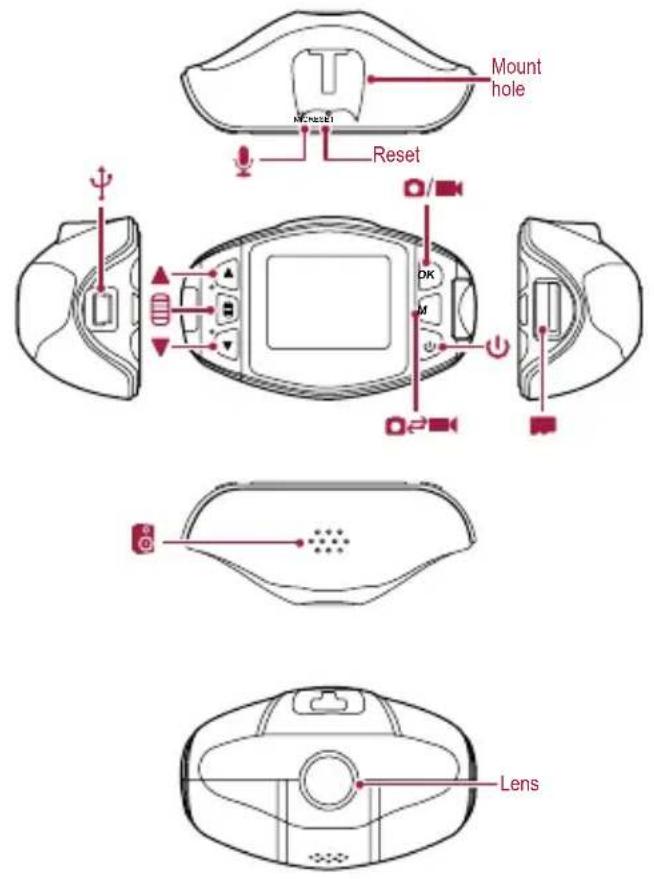
Getting started Technical specifications
| Display 1.5", 320 x 240 pixels | |
| Processor NOVATEK NT96620 | |
| Image sensor 1 Mp CMOS 1/4" | |
| View angle 100° | |
| Video resolution | 1920x1080p (25 fps); 1280x720 (30 fps); 640x480 (30 fps); |
| Photo resolution 12 M, 10 M, 8 M, 5 M, 3 M | |
| Video format AVI | |
| Picture format.JPG | |
| Memory | up to 32 GB (high-speed SD card recommended, SDHC) |
| Microphone Built-in | |
| Motion Detection Yes | |
| Power source Built-in battery, car charger | |
| Interfaces Mini USB | |
| Operating temperature | 0°C~45°C |
| Dimension 74 x 46 x 31 mm (H x W x D) | |
| Weight 46 g | |
Quick Start Guide
Prestigio RoadRunner

Prestigio
Getting started
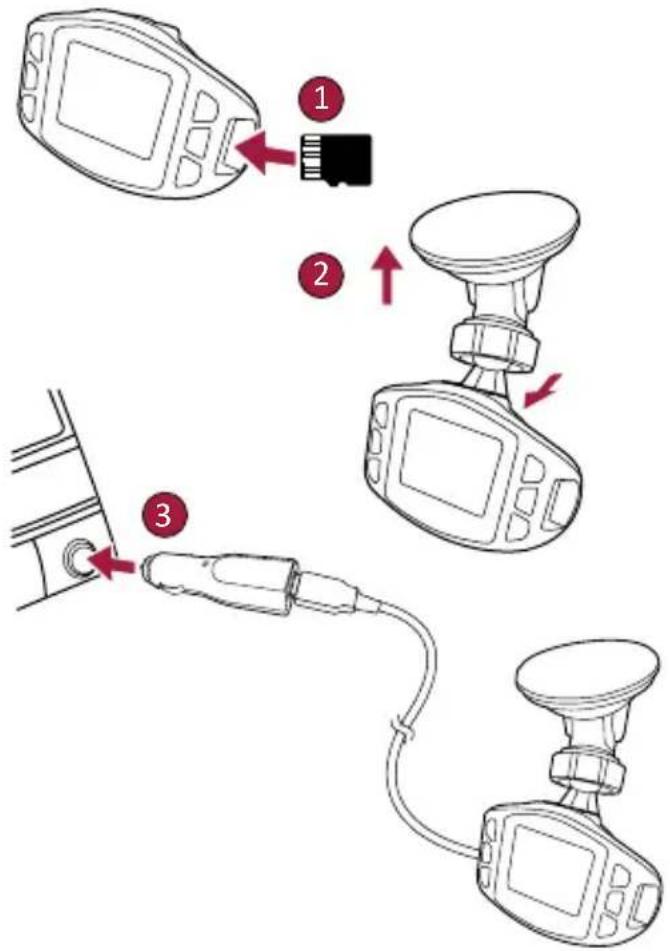
Start recording
- Insert a micro SD card (not included).
- Connect the device to the car charger. When the car engine starts, the device will begin loop recording.
Taking photos
- Press [M] to select the picture mode, and then press [OK] to take photos.
Settings
In preview mode, press [to enter settings. Use []t navigate the menu.
Video settings
- Resolution: Select the resolution of recorded video: 1080FHD / 1920x1080, 720P / 1280x720, WVGA / 848x480, VGA / 640x480, QVGA / 320x240.
- Loop recording: Set the video duration for loop recording. When the micro SD card is full, the device will delete the first unlocked video file automatically.
- Motion detection: Turn on or off motion detection. If there is any motion detected while the car engine is stopped, your car DVR will start recording automatically.
G-sensor: Select the sensitivity of the G-sensor.
Picture settings
- Timer: Select the capture Mode from Single/2S Timer/5S Timer/10S Timer.
- Resolution: Select the picture image size from 12M / 4000x3000, 10M / 3648x2736, 7.5M / 3200x2400, 5M / 2592x1944, 3M / 2048x1536.
- Sequence: Select to turn the sequence on or off.
- Quality: Select quality from Fine / Normal / Economy.
General settings
In preview mode, double press [to enter general settings.
Playback and media connection
Playback mode
In preview mode, press [M] to select playback mode.
- Press [A[] to scroll through the files.
- Press [OK] to start playback.
- Press [M] again to exit playback mode.
Note:
While viewing the file list, you can press [ ] to select to:
- Delete one file or all the files.
- Protect or unprotect the selected file.

Prestigio
Quick Start Guide Prestigio RoadRunner
#
Connect to your PC
- Connect the car DVR to a PC with the included mini-USB cable.
- Find video files under "My computer\Removable Disk\".
- Copy, move, delete, or playback your videos on your PC.
Safety precautions
Please read all safety precautions before using the device.
- Only PRESTIGIO certified technicians are qualified to repair your device.
- To prevent fire or shock hazard, do not expose your device to rain or moisture.
- Do not allow the device to come in close contact with a flame.
- Do not put, store or leave your device in or near sources of heat, in direct strong sunlight, in a high temperature location, in a pressurized container or in a microwave oven.
- Keep the device away from magnets or magnetic fields.
Disclaimer
As Prestigio continuously updates and improves its products, your device's software and hardware may have a slightly different appearance or modified functionalities than those presented in this quick start guide.
Prestigio hereby states that this device complies to basic requirements and other relevant regulations given by the EU directive 1999/5/EC. Full version of the declaration of conformity is available at: www.prestigio.com/certificates.
KpaTkoe pyKOBOCTBO noJIb3ObaTeIa
Prestigio RoadRunner

Prestigio
Hauano pa60tby
Hauano 3annc
- UctaHOBuTe KapTu naMaTn micro SD (He BXoJNT B KOMnJIeK T NOCTaBKn).
2.ПОДКЛIOUHTe yCTpoIcTBO K PO3eTke aBTOMO6HbHO npKUPnBaTeIa.Ipn 3aNycke DBuRatela yCTpoIcTBO NaHHT cIKJIuYeCKyIO 3aNNCb BINOEO.
ΦOTOCbEMKa
- HaxmTe KhoNky [M]Iy Bb6opa peXnMOB cbeMK.
- 3aTeM HAXMITE KHOKNy [OK]ДЯ FOOTOCbEMKn.
HactpojuKu
BpeKIMe ppeBapntelbHoro npocMOTpa HaxMMTe KhoNky 1Iy BxOda B HacTpoiKn. Pnp NOMOu KHONOK [] OcyueCTbIaTeCn HabrAuaB MeHIO.
HacrpoKn Bndeo
- Pa3peuHHe: Bb6epHTe pa3peuHHe BnJeO: 1080FHD / 1920x1080, 720P / 1280x720, WVGA / 848x480, VGA / 640x480, QVGA / 320x240.
UKNKINHAR 3aNNcB: HAcTPOIte dInTeIbHocTb OdHOro
fai npu uNKINHOr 3aNcN. Pn3aOnHeHH KApTb
micro SD yCTPOiCTBO ABTomAtueeCKydaJIIT nepBbI
He3a6LokpOBaHHb BnDeOphiJ. - DeTeKTOp DBNKeHnB: BkIIOueHne NIN BbIKIOueHne DeTeKToppa DBNKeHnB. Bcnyae NOBLeHnDBNKeHn
nBbIKIOeHHOM DIBrAteIe BNDeOpERNCpTaTOP HaHHT BIDeo3aINCb aBTOMaTHueCKN.
G-cehcop: Bbl6epnte yBCTbnteNbHoctb G-cehcopa.
Hactpoikn n3o6paxeHH
Taimep: Bb6epnte Bpemcpa6aTbHaHn3aTBopa:Cpa3y /Yepe3 2 c./Yepe3 5 c./Yepe3 10 c.
- Pa3peSeHne: BbI6epnte pa3Mep n3o6paKeHn: 12M / 4000x3000, 10M / 3648x2736, 7.5M / 3200x2400, 5M / 2592x1944, 3M / 2048x1536.
- PocneDoBaTeNbHoctb: Bb6epnte DnB KIOUcHnN nn BbIKIOUcHnN PocJeDoBaTeNbHOCTn.
KauectBO:BbI6epnte KaueCTBO XopoOoe / HopMaJIbHoe/ 3KOHOOMnHoe.
06uue HacTpoiKu
BpeKnme npedBaupTeIbHoro npocMoTpa HaxMnte [Ba pa3a, yTo6bl 3aHTN B o6uhe hactpoKn.
PpocMOTp mMeHa-noKJIIOueHnA
Pekm npocMoTa
BpeKnme npocMToPa HaxmTe [M],yTo6bl BbI6paTb peKnM.
- HaxmTe [I] npepeMeueHn mKdy paJlaMn.
- HaxMMTe [OK], yTo6bHaayTaB npocMoTp.
- Haxmte [M] CHOBA, YTO6bI BbIytnn 13 peKmAm npocMoTpa.

Prestigio
KpaTkoe pyKOBOdCTBO noIb3ObaTeJIa
Prestigio RoadRunner
乙
BHHMaHHe:
PnnpocmoTe cncska aHIOB, HaxMNTe [HTo6bI:
- YdaHb OINH HIN BCE paHJIbl.
3aunntb n36paHHbHf aai, nn cHrtb C Hero 3aunty.
IopKIOUeHne K P
1.ПОДКИQUHTE abTOMO6NlbHbI BnDEopeRNCtpaTOP K ПКпрпnomoши ka6eJ mini-USB (В komPNeKTe).
2. BndeofoaaibI coepkaTbcaB napanke "MoKOMnbIoTepeCbeMHbI DnCK".
3. Bb MoKeTe KOnnPoBaTb, nepeMeaTaB, ydaIaTb nn BOCpOuN3BOuNTb BnDeoFaaiHa PIK.
HCTpykun no 6e3onacchoctn
BHHMaTeIbHo I3yUHe IHCTpyKcHn no 6e3oNaChocTn nepeD nCNoIb3OBAHmE yCTpoiCTBa.
- Pemont BaWero yCtpoNCTBa MoKeT OcyuIeCTBnTbCnTOIbKO B cepTNΦHcIupOBaHHOM cepBnCHOM ueHTpe PRESTIGIO.
- YTO6bI n36ExKaTb NOKapa nIN NopaKeHnE 3eKtpuYeCKm TOKOM, He NOBBepraTe yCTPOiCtBO BO3DeiCTBnIO DOxJr / NOBblHeHHo BnaXHOCTN.
He noDBepraIte yCTpoNcTBO B03DeIeCTBnO ORHa.
He noDBepraTe yCTPOIcTBO BO3DeIcTBIO BBICOKHX TemnepaTp, npMoro COJIHeHOro cBeTa, He XpaHnte ero B KOHTeHHepe NOd DaBHeHEm H He KlaIInTe B MIKPOBOJHOByIO ney.
He donyckaite KOHTAKTa C HCTOUYHKAMCnIbHOrO
JIeKpOMaHHTHOI3JIyHeHr.
PpimmeuHne
NocKoIbky KOMnHaHn Prestigio noCToHnHO COBepWeHCTByet CBOU yCTpoiCTBa, nporpamMhble n annapatthie fYHKcun BaWero yCTpoiCTBa MOrYT He3HaHTeNbHO OTNIuAaTbcr O TnpedCTabJIeHHbIX B DaHHOM PYKOBoDCTBe.
KOMnHaHn Prestigio 3aBnEeT, UTo DaHHoe yCTpoNCTBO COOTBeTcTByET HopMaM DnpeKTHBBI 1999/5/EC. POnHnA BepCn DeKlapaunn COOTBeTcTBn DOCTynHa Ha caIte:
www.prestigio.com/certificates.
Kratko uputstvo za
Prestigio RoadRunner

Prestigio
Početna uputstva
Pokretanje snimanja
- Ubacite mikro SD karticu (ne isporuceje se uz uredj).
- Spojite uredaj sa punjaem za vozilo. KadaPokrenete motor automobila, uredaj ce automatskiPokrenuti ciklicno smimanje.
Shimanje fotografia
- Pritisnite [M] da izaberete način rada za fotografisanje, a potom pritisnite [OK] da snimite fotografiju.
Podešavanja
Kada ste u načinu rada za pregled dokumenata, pritisnite [da pristupite poděsavanjima. Koristite [A] Za kretanje kroz meni.
Video postavke
- Rezolucija: Odaberite rezoluciju snimljenog video zapisa: 1080FHD / 1920x1080, 720P / 1280x720, WVGA / 848x480, VGA / 640x480, QVGA / 320x240.
- Beskonačno snimanje: Postavite trajanje video zapisa za beskonačno snimanje. Kada je mikro SD kartica puna, urežajće automatski obratisi prvi otklujčani video fajl.
- Detekcija Pokreta: Ukljucite ili iskljucite detekcjjuPokreta. Ako je primjecen bilo kakavPokret kada motor auta ne radi, DVR system vaseg auta ce pocti smimati automatiski.
G-senzor: Odaberite osjetljivost G-senzora.
Postavke slike
- Brojac: Odaberite rezim snimanja iz opcija Single /2S Timer/ 5S Timer/ 10S Timer (jednom/brojac od 2 sek./brojac od 5 sek./brojac od 10sek.).
- Rezolucija: Odaberite velicinu slike iz opcija 12M / 4000x3000, 10M / 3648x2736, 7.5M / 3200x2400, 5M / 2592x1944, 3M / 2048x1536.
- Sekvenca: Odaberite da biste uključili ili isključili sekvencu.
Kvalitet: Odaberite kvalitet iz opcija Fine / Normal / Economy (visoki/normalni/ekonomski).
Opé postavke
U rezimu pregleda, dvaput pritisnite [da biste ušli u opće postavke.
Reproduciranje i veza sa medijima
Rezim reprodukcije
U rezimu pregleda, pritisnite [M] da biste odabrali rezim reproduckije.
- Pritisnite [M] V a biste klizali prema dolje medu fajlovima.
- Pritisnite [OK] da počnete reproducćiju.
- Ponovo pritisnite [M] da biste izasli iz rezima za reprodukciju.

Prestigio
Kratko uputstvo za Prestigio RoadRunner
B
Napomena:
Kada je spisak fajlova prikazan, mozete pritisnuti [da bi odabrali da:
- Obrišete jeder ili sve fajlove.
- Zastitite ili ukonite zastitu sa odabranog fajla.
Povezivanje sa vašim računarom
- Povežite DVR system auta sa računarom pomocu mini-USB kabla.
- Pronadite video fajlove ispod "My computer\Removable Disk"*"Moj računar\Uklonjivi disk").
- Kopirajte, premjestite, izbrište ili reproducirajte video zapise na svom računaru.
Mjere preodosroznosti
Molimo Vas da pročitate sve mjere prepostrožnosti prije upotrebe urežaja.
- Samo tehniciari koje je ovlastio PRESTIGIO kvalifikovani su da poprave Vas uredaj.
Kako bisteprijeci opasnost od plamena ilie elektricnog udara, uredaj ne izlazte kisi ili vlazi. - Ne dozvolite da uredaj dode u dodir sa plamenom.
- Ne ostavljaje i ne cuvajte Vas uredaj blizu izvora toplote ili na direktnom uticaju sunca, na mestima gdje je visoka temperaturea, u posudama pod pritiskom ili u mikrotalasnu.
- Cuvajte uredaj dalje od magneta i magnetinih polja.
Izjava o ograničenju odgovornosti
Kako se proizvodi Prestigio neprekidno ažuriraju i unapreduju, softver i hardver Vaseg uredaja moze izgledati malo drugacije ili moze biti izmijenjene fungcionalosti u odnosu na to kakoje predstavljen u ovom kratkom uputstvu.
Prestigio ovim putem izjavljube da ovaj uredaj ispunjava osnovne uslove i ostale odgovarajuće propise date u direktivi EU br. 1999/5/EC. Puna verzija izjave o ispunjavanju uslova dostupna je na: www.prestigio.com/certificates.
KpaTKo pbKOBOCTBO
Prestigio RoadRunner

Prestigio
TbpBn CtbnKn
CTapHa 3anica
- NocTaBeTe micro SD KapTa (He e BkIIOUeHa B KOMIIeKtA).
2.CbpxHeYcTpoNCTBOTOKbM3apAnHOTaKoJa.Korato DnIraTeJIrCe CTAPtnpa,YcTPONCTBOTO 3anOyBa 3annC.
CHMMK
- HaTnCHete [M] 3a Da n36epepepeKMa ha cHmHaHe [OK] (BnDeo/CHmKn) n HaTnCHete NkOHKaTa.
Hactpoyn
BpeKIM npereIe, HAT. 3a da BJe3eTe B HAcTpoiKn.
H3noJ3BaIte cTpeKInTe [A[]3a Da HABnIpaTe B
MeHiOTo.
HactpoiknHaBvdeo3aNica
- Pe30JIouzH:ИЗбepeTe pe30JIIOUZHЯ Na BnIeO3aIINcIte: 1080FHD / 1920x1080,720P / 1280x720,WVGA / 848x480, VGA /640x480,QVGA /320x240.
3annc B 3aTbOpen Kpbr: HactpoNka Ha npOdbJIHKnTeHOCCTHa BnDeOTo 3a 3annc B 3aTbOpen KpbI. Korato naMeTTa Ha micro SD KapTaTa ce 3anbJIny cTpoiCTBOTO Ie N3Tpne PbPbN OTKHOueh BNDeo FAn ABTOMATUHO, 3a Da 3anNCBA Bbpx Hero. - PerncpupaHa nDbnKHeHb: BkIOUbaHe mNn N3KIOUbaHe Ha pernctpupaHTo Ha dbnKHeH. Pnp dOlaBHe Ha
DnHexHe, KOraTo MOTOpbT Ha KOlaTa e cnpn, Baunr DVR 3a aBtOMo6H Ie 3anOuHc ABTomuHOn Da 3annCba.
G-DAtUHK: H36Op Ha YyBCTBNTeHOCTTa Ha DaTUnKa 3a yckopeHne (G-DaTUnK).
HactpoKn Ha cHIMKITE
Taimep: 36epepepekma Ha 3acHeMaHe Ha eHHuHn cHmKn Single /2S Timer/ 5S Timer/ 10S Timer (eHHuHa/ cHmKn Ha 2 cek./ cHmKn Ha 5 cek./ cHmKn Ha 10 cek.).
- Pe30JIouzna:ИЗбepeTe pa3Mepa Ha cHIMKaTa:12M/4000x3000,10M/3648x2736,7.5M/3200x2400,5M/2592x1944,3M/2048x1536.
- NocleDoBaTeHNoCT: N36epeTe BKIOUbaHe nIIN N3KIOUBAHe Ha nocleDoBaTeHNoCTTa.
- KaueCTBO:ИЗбepete KaueCTBOTo - Fine / Normal / Economy (BICOKO/HOPMaJIHO/NKOHOMNUHO).
06uHaacTpoKn
Bpekm npereNd haTnchHeTe [BOHNO, 3a Da Bne3eTe BO6u HAcToKn.
Bb3npoN3BexJaHe Ha MyTImMeiHn ФаиноВи CBp3BaHe KbM PC
Pexm Bb3npo3BekdaHe
BpeKIM npereIeHaTncHeTe [M],3a da n36epeTe peKIM Bb3PON3BExKaHe.
1.C[[]NojkeTe da npereJkaTe faHIOBeTe.

Prestigio
KpaTKO pBkoBOOCTBO
Prestigio RoadRunner
B
- HatncheTe OK], 3a Da 3anOHTe Bb3npOn3BekKaHe.
- HatncheTe M] oTHOBO, 3a da n3ne3eTe OT peKIM Bb3npoN3BeKaDaHe.
3a6eJekka:
Pn npereHa cncsbka c faioBe, c [n36peTe:
grarabautomatically.