WCCH0703 - Air Conditioning Acson - Free user manual and instructions
Find the device manual for free WCCH0703 Acson in PDF.


| Product type | Reversible air conditioning (water/water heat pump) |
| Brand | Acson |
| Model | WCCH0703 |
| Main functions | Cooling (COOL) and heating (HEAT) via water temperature control |
| Control panel | LCD screen with main menu, submenus (Operations, Configurations, Timer, Alarms, Display) |
| Temperature ranges | Refrigeration: adjustable (default 12°C); Heating: adjustable (default 40°C) – water temperature |
| Timer / Programming | Clock, date, 7-day scheduling (on/off) |
| Alarm display | History up to 20 alarms with date, time and type |
| Integrated sensors | Defrost sensor, evacuation sensor, compressor runtime |
| Security | Password protection for configuration parameter changes; operations reserved for dealer/after-sales service |
| LCD panel power supply | 3V DC battery (type A cell) to keep time in case of power failure |
| Installation | Wall mounting of LCD panel; 4-wire cable for connection to PCB (appropriate length) |
| Multiple network | Ability to connect multiple chillers in a network |
| Maintenance and cleaning | Maintenance interventions reserved for qualified personnel (local dealer/after-sales service) |
| Spare parts and repairability | Contact the usual dealer or after-sales service for any repair or part |
Frequently Asked Questions - WCCH0703 Acson
User questions about WCCH0703 Acson
0 question about this device. Answer the ones you know or ask your own.
Ask a new question about this device
Download the instructions for your Air Conditioning in PDF format for free! Find your manual WCCH0703 - Acson and take your electronic device back in hand. On this page are published all the documents necessary for the use of your device. WCCH0703 by Acson.
USER MANUAL WCCH0703 Acson
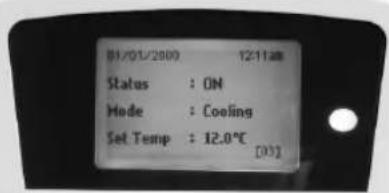
- Upon power on of the unit, the LCD displays the main display screen
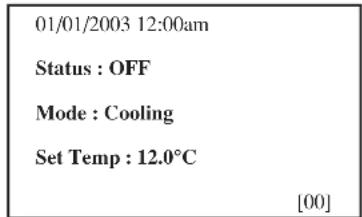
(Note: This is just an example for illustration)
- Press the ON/OFF button for 1 second to switch on the unit if the status shows OFF. The status will display ON. The ON/OFF LED will light up.
- Press the COOL button for 1 second if cooling is required or the HEAT button if heating is required.
- The Set Temp refers to water in temperature and the factory setting is 12^ for cooling and 40^ for heating.
- [00] refers to the factory setting for panel ID.
- Press the button once to view the compressor(s) on or off status.
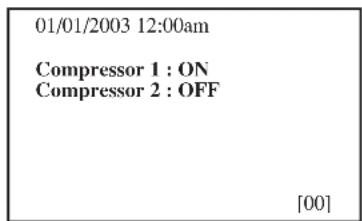
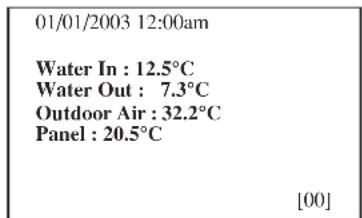
- Press the button twice to view the temperature for water in, water out, outdoor air and controller panel.
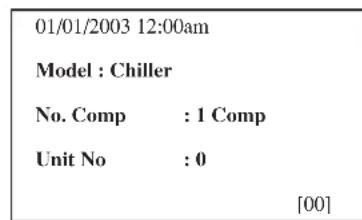
- Press the button thrice to view the model of the air conditioning unit, number of compressor used and unit no.
- Press the button to return to previous screens.
- Press the ALARM button to view or clear the alarm history. If alarm occurs, contact your dealer or serviceman.
B. Main Menu
- Changes can be made to the factory setting parameter. This is done in the Main Menu. Press ENTER button to go into the Main Menu.
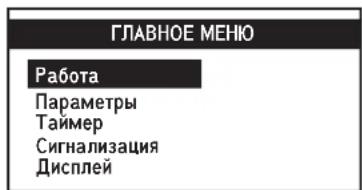
- The Main Menu consists of Operation Menu, Settings Menu, Timer Menu, Alarm Menu and Display Menu.
How to use the Main Menu?
Step 1
Press ENTER to view the sub-Menu under Main Menu.
Step 2
Go to the sub-Menu you want by pressing the or button. Press ENTER to select the sub-Menu.
Step 3
Go to the parameter you want to change or view by pressing the or button. Press ENTER to select this parameter.
Step 4
Change the parameter by pressing the or button. Once completed press ENTER. Press ESC to go back to previous screen until you see the initial display screen.
Note: The Set Parameter in the setting menu requires password for any changes to or to view its parameter.
CAUTION:
All the password entering must be done by local dealer / serviceman. User is not allowed to change the value of the set parameter as this may cause damage to unit or deter its operation.
Operation Menu
This menu enables us to set the units status (on or off), set the unit operation mode, set the water in temperature and manually defrost the unit (applicable for heating mode only).
Setting Menu
This menu enables us to set the panel ID (factory setting is [00]), set parameter for unit operation (requires password entering), change password and set panel option.
The panel option enables us to set the LCD backlight and contrast, set the alarm buzzer, enable and disable the screen saver and set a screen saver timeout and set the temperature display in ^ C or ^ F .
Timer Menu
This menu enables us to set the clock, set the date, set a 7 days schedule to start and stop the unit and enable or disable the set schedule.
Alarm Menu
This menu enables us to view the alarm history and also clear the record. The panel can keep up to 20 fault / alarm records.
Display Menu
This menu enables us to view the defrost sensor(s) temperature, discharge sensor(s) temperature and compressor(s) run time.




Main Menu
Press ENTER to go to this menu.
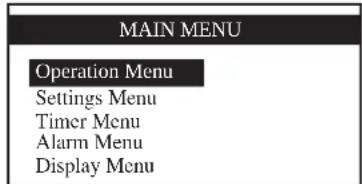
There are 5 sub menus in [MainMenu]. Press or to select sub menus, ENTER to enter into the sub menu or press ESC to exit to main display screen.
Operation Menu
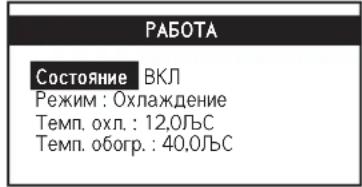
Select [Operation Menu] in [Main Menu] and press ENTER to go to this menu.
OPERATION MENU
Status ON
Mode:Cooling
Cool Temp: 12.0^
Heat Temp: 40.0^
Some normal settings can be found here. Press or to select the required setting, ENTER to enter into the setting or press ESC to exit to [Main Menu].
Settings Menu
Select [Settings Menu] in [Main Menu] and press ENTER to go to this menu.
SETTINGSMENU
Set Parameter
Change Password
Panel Option
Set Panel ID
Some advance settings can be found here. Press or to select the required setting, ENTER to enter into the setting or press ESC to exit to [Main Menu].
Panel Option
Select [Panel Option] in [Settings Menu] and press ENTER to go to this menu.
Backlight No
41
Buzzer:ON
Screen Saver: Disable
Timeout:5m
Contrast : 50%
Brightness : Medium
Temp Unit: ^ C
Press or to select the required setting, ENTER to enter into the setting.
Press or to select the required option, ENTER to select the option.
Press ESC to exit to [Settings Menu].



Timer Menu
Select [Timer Menu] in [Main Menu] and press ENTER to go to this menu.
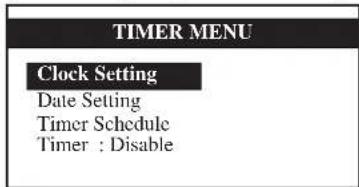
All the timer / schedule settings are included in this menu. Press or to select the required setting, ENTER to enter into the setting or press ESC to exit to [Main Menu].
Set Time
Select [Clock Setting] in [Timer Menu] and press ENTER to go to this menu.
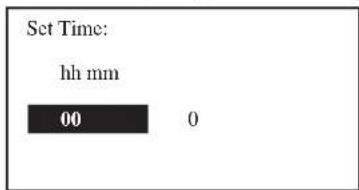
Press or to select the required option, ENTER to select the option. Press ESC to exit to [Timer Menu].
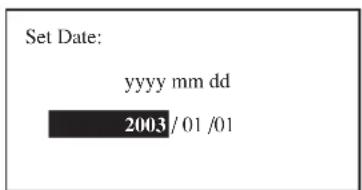
Set Date
Select [Date Setting] in [Timer Menu] and press ENTER to go to this menu.
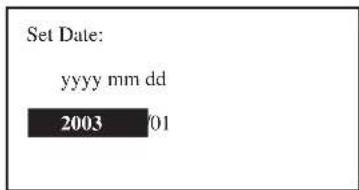
Press or to select the required option, ENTER to select the option. Press ESC to exit to [Timer Menu].
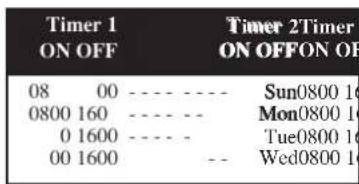
Set Schedule
Select [Schedule Timer] in [Timer Menu] and press ENTER to go to this menu.
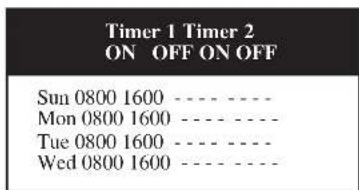
This is the 7 days programmable timer schedule menu. There are 2 ON/OFF events in one day. User can choose to set each day (Sunday - Saturday) ON/OFF timer. Before this schedule can function, user needs to set the [Timer] in [Timer Menu] to enable. Press ESC to exit to [Timer Menu].




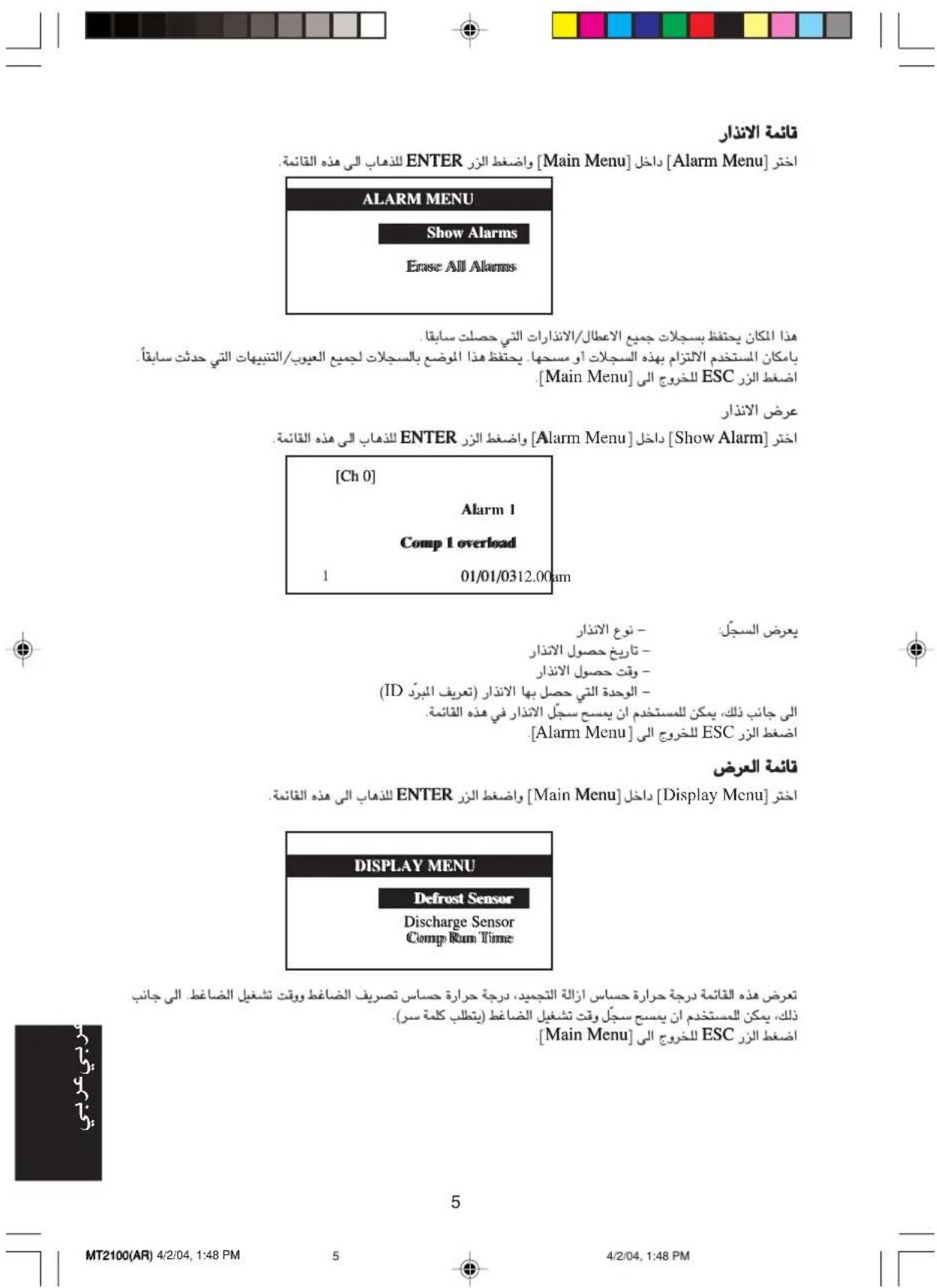
Alarm Menu
Select [Alarm Menu] in [Main Menu] and press ENTER to go to this menu.
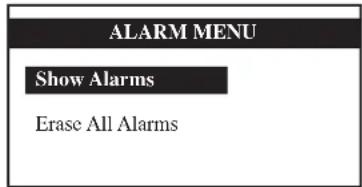
This place keeps records for all previous occurred faults / alarms.
User can view or clear these records. The panel can keep up to 20 faults / alarm records.
Press ESC to exit to [Main Menu].
Show Alarm
Select [Show Alarm] in [Alarm Menu] and press ENTER to go to this menu.
[Ch 0]
Alarm 1
Comp 1 overload
01/01/03 12.00am
The record shows: - Alarm Type
- Alarm occurred date
- Alarm occurred time
- Alarm occurred unit (Chiller ID)
Besides that, user can erase the alarm record in this menu.
Press ESC to exit to [Alarm Menu].
Display Menu
Select [Display Menu] in [Main Menu] and press ENTER to go to this menu.
DISPLAY MENU
Defrost Sensor
Discharge Sensor
Comp Run Time
This menu displays Defrost Sensor temperature, Compressor Discharge Sensor temperature and Compressor Run Time. Besides that, user can clear compressor run time record (Requires Password).
Press ESC to exit to [Main Menu].

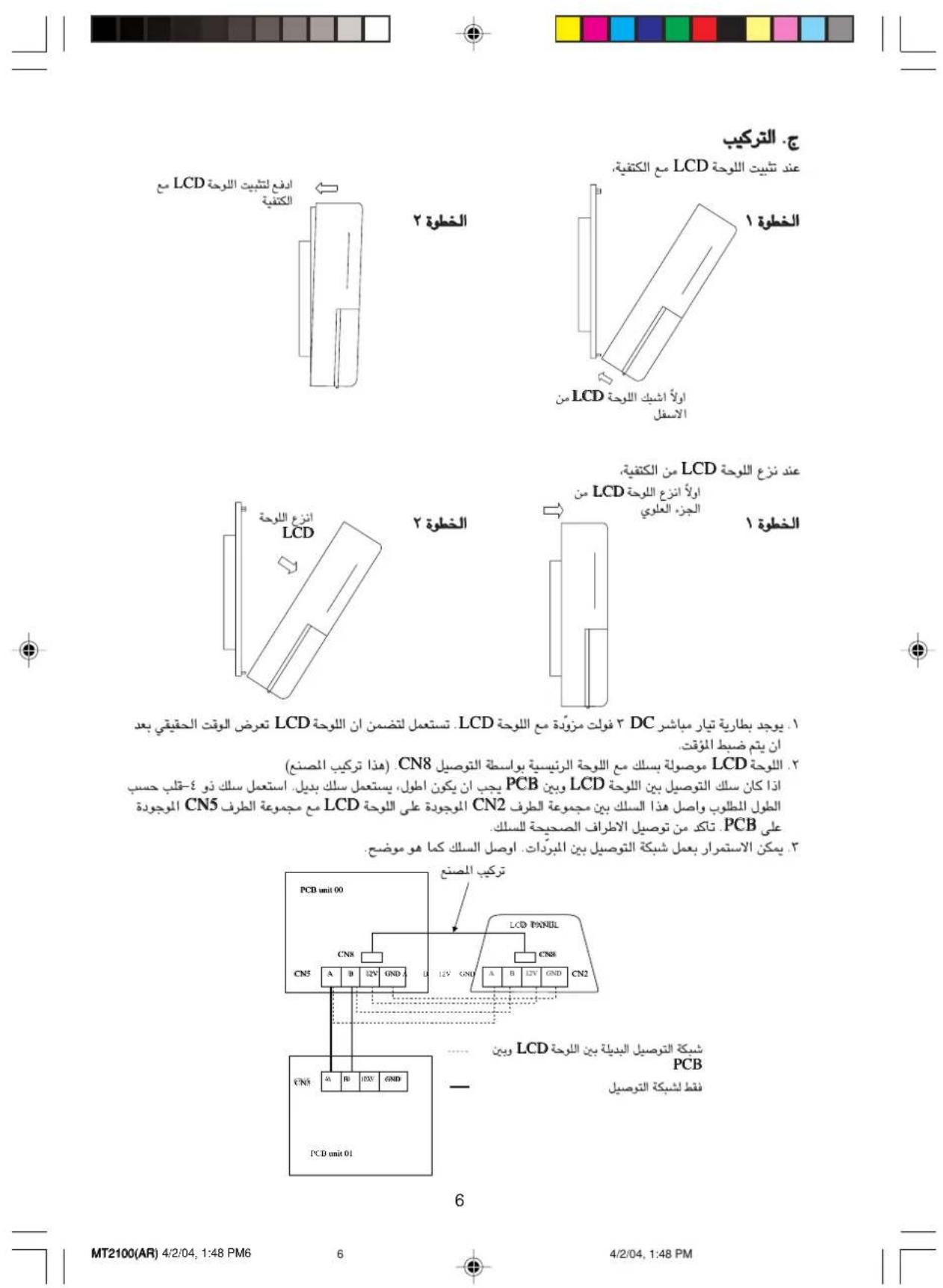
C. Installation
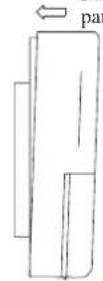
When fastening the LCD panel to the bracket,
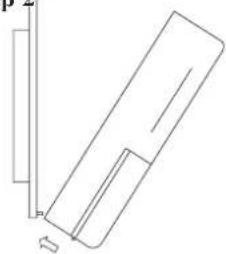
Step 1 Step 2
Hook the LCD panel from the bottom first

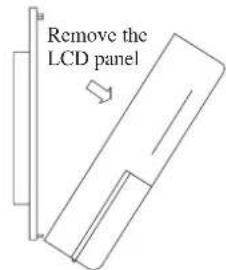
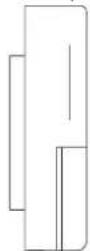
When removing the LCD panel from the bracket,
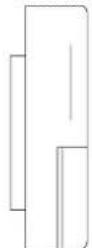
Step 1 Step2
Remove the LCD panel from the top part first
- A 3V DC battery is supplied with the LCD. It is used to ensure that the LCD displays real time once the timer is set.
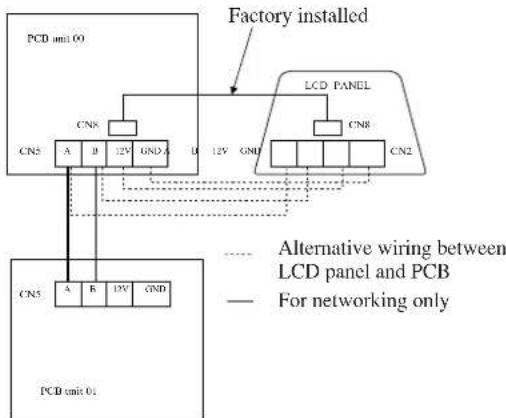
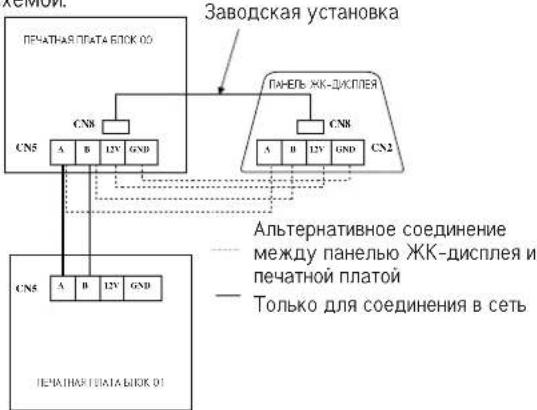
- The LCD is wired to the main board via CN8 connection. (This is factory installed) If the wiring between the LCD and PCB must be longer, an alternative is used. Use a 4-core wire of the desired length and connect this wire between the terminal block CN2 on the LCD to the terminal block CN5 on the PCB. Ensure that the correct wire terminals are connected.
- Networking between chillers can be carried out. Connect the wire as shown



Press ESC to exit to [Timer Menu].
Ajuste de Fecha
Selezione [Date Setting] en [Timer Menu] y pulse ENTER para acceder a este menu
Kak noJb30BaTbcra JnaBbIM MeHIO?
War 1
HaKMMTE BBOII, yTO6bI OTKpbITcNtCOK NOIMHeHIO B IaBHOm MeHIO.
War 2
HaKIMa KONKn ▲ nIN▼, nepeiIte K Tpe6yemomy noMeHIO. BbIbePte noMeHIO HaKaTneM KOnKn BBOJ.
War 3
HaKIMa KONKn ▲ nnn▼, nepeuNTe K npaMeTp, KOtOpb Bbl XOTne npocMOTpeTb nnn n3MeHnTb. Bblepnte 3TOT npaMeTp HxKaTHem KONKn BBOJ.
Uar 4
IIN3MeHnI npaMetpa HxKMaIe KHOKNI ▲NII N. 3aBepuINB OpeauHIO, HxKMITE BBOI. IINrTO, YTO6bI BepHyTbcra KnpEbluyEmy 3kpaHny, HxKMITE KONKy ESC. HxKMaIe 3Ty KONKy NocneIOBaTeJIbHO IO BO3Bpata KNCXODHomY 3kpaHny.
Ппмочи:ДпяпсмOTаИИЗМeнгИУсТановчогпapamETpaВMeH0 "NapaMetpbI"Heo6xOДIMOBBecTnnapoJIb.
BHIMAHINE:
Bboi npoI IOnJKeH pOu3BOUITcB TOnbKO KBaIIpOuPObAHbIM NepcoHaON MecTHOrO dIepe aN CepBnCHOH OprAn3aun. NOpb3OBaTeYAM 3anpeaaTcN 3MeHrTB 3Haehne yCTaHOBOUHorO npaMeTpA, Ta KAK 3TO MoKET PnBecTN K BbIXOy annapata N3 CTPOR INC60m B eropote.
MeHIO Pa60Ta
IaHHOe MeHIO NO3BOJAreT N3MeHARb COCTOAHne 6IOKa (BKNIOUaTb-BbIKIOUaTb), yCTaHaBnIBaTb peXIMero pa60tbl.
Mehio NapaMeTpbi
C nOMOJIbIO 3TOrO MeHIO MoXHO N3MeHrTb IeHTnOpKlauOnHHbI HOpE npHeIN (3aBOcKa yctaHOBaK [OO]),3NaueHne yCTaHOBOHOrO npaMetpaIra pAOBtI b6Nka (Tpe6yeTcBBOI npoJI,napoIb II hAcTpOKn paHEnI NaHEnI nO3BOJIoT yCTaHaBNIbATb IOCDCBTKy IN KOHTpactHOCTb XKN,HactPamBaTb 3ByKOByIO CnHAn3aUIO,AKTNBPoBaTb NOTKIOuA Tb 3KpaHHIO 3acTaBKy,yCTaHaBNIbATb 3aepKkY BkIIoueHn 3aCTaBKn NpeKIIIOaTb 0To6paXeHne TempepatypbMekJy JbC n JbF.
MeHIO TaMep
3To MeHIO No3BONReT yCTaHaBnBaT BpEm, DaTy, rpaqNK BKIOueHn/BBkIOueHn 6Ioka Ha 7 DHei, a TAKKe AKTNBnPOBaT n HNAKTNBnPOBaT yCTaHOBIEHHb IpaqNK.
MeHIO TpeBora
3To MeHIO No3BOJAErIPOcMaTpNBaTB NCTOpHIO cpa6aTbIBaHnR CnHaJIIN3aUmN IN POn3BOJNTB ee OuNCTKy. NaHeJIb MoKet XpaHITb Do 20 3aInCeN O HeWtAThbIX CnTyauInx / cpa6aTbIBaHnx CnHaJIIN3aUmN.
MehIO DnCnnnei
C NOMOUBI 3TOTO MEHIO MOXHO IPOCMATPBAbTe TMNEPATy pAaTHKa(OB) OTANBaHn, TMNEPATy DAHTKKA(OB) Bb6poc a BpeMpa0bTI KOMnPecccopa(OB).



JNaBHOe MeH0
IJIpePexoA B 3TO MeHIO HaKMITE BBOI.
[ΓnabHoe MeHIO]coepKNT 5 noMeHIO.ДЯ Bb6opa noMeHIO haKMaIte ▲ nI N▼,ДЯ BXOdaBnOdMeHIO hKaMITE BBOД,ДЯ BO3BpATA K rnaBHOmy kkpany - ESC.
Mehio Pa60Ta
Bb6epnte [Pa6oTa] B [TnabHom MeHIO] n HaxMMte BBO, qTO6bi BoNTu B30 MeHO.
3necb haoTcHekToPbIe obHbIe npaMeTpbl. BbIbePte Tpe6yeMbI npaMeTp hkaTHeM KHOOK AII N OTKpoTe erO, Hxab BBoD. IINBbIXOaB [IbaHoe MeHO] HaKMTe ESC.

Napametpbbl
BbIepnTe NoMeHIO [NapaMeTpbl] B [TnabHom MeHIO] nHaKmTE BBO, qTo6bI nepeuIN B Hero.
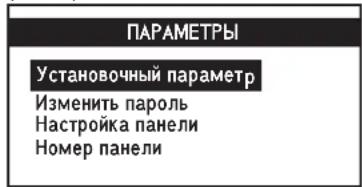
3To MeHIO CoepKNT HeKOTOpBie CneuaJIbHbIe HAcTPOIKN. BbIbepnte Tpe6yEmbl npaMeTp c NMOUHO KHOONK ▲nI N OTKpOte 3TOI npaMeTp, Haxab BBOI. IINBaBO3BpATA B[ΓnaBHOe MeHO] HaKMITE ESC.
Hactpoika nahein
Bb6epuTe [HacpoKa nanei] B MeHIO [NapaMeTpbl] n HaxMITE BBOI, nla BxoJa B 3TO MeHO.
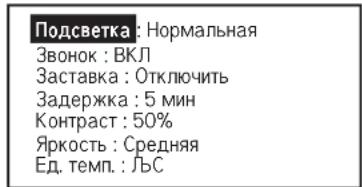
Bb6epntpe6yemblnapaMeTp c NOMOsbKHOHONOK △nINN ▼NOTKPOnTe 3OT npaMeTp,HaJKB BBOI. Bb6epnte Tpe6yEmIOUcNOc NOMOsbKHOHONOK △nINN ▼NBBeNTe 3Ty OUcIO,HaJKB BBOI. IJIb Bo3Bpata B MeHIO [Napametpb] HaXMITE ESC.




MeHIO TaIMep
B[ΓIaBHOM MeHIO] BbIepeTe[TaIMepe]nHaXMMTe BBOI nIpynepexoBa 3To MeHO.
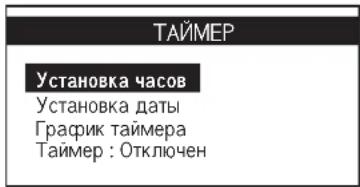
B DAnHOM MeHIO COePjxATcR Bce HAcTPOJKN TaIMepa /rpaCpNka pa6Otbl. BbIepnTe Tpe6yEmb npaMeTp C NMOUbK KHOJOK AIIIN▼.ДЯ BXOJa B HeRo HaxMITE KONky BBOД.ДЯ BbIXoJab [TnaBHOe MeHIO] HaxMITE ESC.
YcTaHOBka BpeMeHH
BbIepeTnyHKT[YcTaHObKa yacOB]MeHIO[TaMep]nHaXMMTe BBOII nla BXOJa BTO MeHIO.
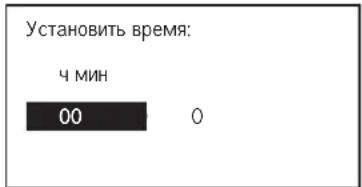
Bb6epTe Tpe6yemyo ONUc NOMOsbK HONOK ANIN BBEeNTe 3Ty OUNIO, Haxab BBO.ДлЯ BO3bpata B MeHIO [TaMep] haxmTE ESC.
YctaHObKa DaTbI
BbIepnTe nyHKT [YcTaHOBka daTb] B MeHIO[TaMep]HaXKMITE BBOД nla BXOda B 3To MeHIO.
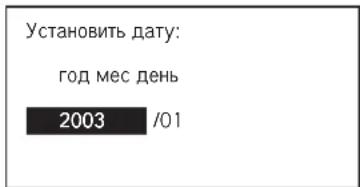
Bb6epTe Tpe6yemyo onuio C nmooubo Khoonok Aui N BBeNTe 3Ty onuio, Haxab BBOI. IJIa BO3bpata B MeHIO [TaMep] haxmTE ESC.
UcTaHOBKa rpaCpNka
BbIepe TnykT[Tpaqnk TaImepa]B MeHIO[TaImep]n HaxMnte BBOII nla BxoJa BTO MeHO.
Taimep1Taumep2
BKN BbIKN BKN BbIKN
Bc 0800 1600 - - - - - - -
HH08001600
Br 08001600
Cp 0800 1600 - - - - - - -
C nomoIbIO 3TOrO MeHIO MoXHO 3aIporpamMPOBaT TaIMep Ira pa60bI NO rpaPky B TeHeHne 7 dHeN. B cyTKn DOnyckcaeTrDba LcKNa BKIOUeHner /BbIKIOUeHner. Np3bOBeTeNb MoKeT yCTaHaJIbNAbTa TaIMep BKIOUeHner /BbIKIOUeHner Ha KaKDbI DeHb (C BCKpeCeHbeNo cy60ToY). IIra TOrO, YTObbl 3aDaHHBrrpaRnK BBIOJHnAChr, HeoXoDMIOy UcTAHOBHTyHKTT"TaIMep B MeHIO [TaImep] B noJooKeHne "BkIOUeH." Ira Bo3Bpata B MeHIO [TaImep] HaxKMnTe ESC.



MeHIO TpeBora
BbIbepeTe nyHKT [TpeBora] B [TnaBHOM MeHIO] n HaxMnTE BBOII nnBxAOJa B3To MeHO.
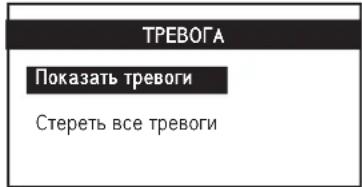
CtepeBt Bce TpeBOrn 3decx xpaHntcH INHcpOpMaunr O60 BCex HeWtTaHbIX CNTyaunx / cpabTbBaHnx CnHAn3aMn, KOTOpIe npOxCoDmN paHee. POnb3OBaTeMb MoKet POnb3OBaTeMb MoKet npocMatpNbTaH nn ydaNt b 3n 3anCn. DaHna NaHEnb XpaHnt Do 20 co6bItMn.
ДявОЗВБРАТВ [Главhoe MeHIO]нжмITE ESC.
TpeBorn
BbIepeNtpyHKT [Tokaatb TpeBorn] B MeHIO [TpeBorri n HaxMNTe BBOI n Ia BxoDa BTO MeHIO.
[Ch 0]
Tpebora 1
Ipeperpy3ka kOmN.1
01/01/03 12.00
3aIc bcoepKt CBeJeHnO: -Tne TpeBorN
-Date, B KOTOpyo CnUynIacb TpeBora
-BpemEnB KOTOpoe Cnylnacb TpeBora
-6JIOKe, B KOTOpOM cIyUInacb TpeBOra (Homep oxlaanTeTna)
Kpome toro, noB30BaTeNb MoKeT ydaJIITb BCE 3aIINCU B 3TOM MeHIO.
Pn KpeIeHnn KK-naHEn K KpoHHTeHy.
War 1 War 2
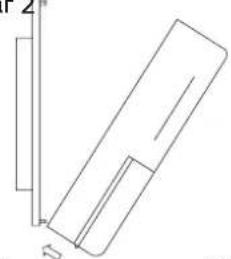
Haxatb qpnKcaun KKnahanK kpoohneHy.
PnCnTmXK-naHeNc KpoHtTeHa.
Chara ChnTB JK-naHeB 1 War C BepxHaeCTN
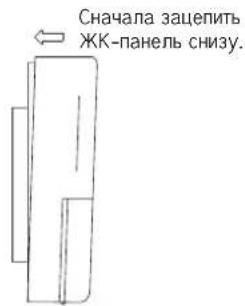
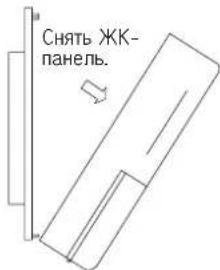
1.BKOMnneTe c KK-dncnneem noctabnetaeTc 6aatapeKa 3B.OHa Heo6xoDmua dIra TOrO, YTO6bI oecneuHb npaBnHoe OTo6paXeHHe TKyUeR BpeMeHn nocJe yCTahOBKn TaImepa.
2. KK-DnCnnne noKnIOaetcK OCHOBHOI pnte uepe3 coeHHeHne CN8 (yctaHOBHeHO Ha 3aBOJe).Ecnn Tpe6yeTc coeHNHTb KK-DnCnnne c neaTHO INaTOH ha 60nbWeM paCCToHHN, nCNOB3yTe anbTePAHNBH cnOCo: coeHNHTe KOHTAKTHYIO KOIOkCY CN2 Ha KK-DnCnnee c KOntAKTHOHN KOIOKOON CN5 HA neaTHO INaTe 4-KINbHbI npOBODm Tpe6yeMoI dInHbI. Co6nOdaTe npabHbHyIO paCuBETky npOBoOB.
3.OxnaJauoune annapaTb moXHO coeHHnB B ceTb. 3neKTPueckm MOHTAX BBINOJIHReTCB COOTBetCTBMn Co CXEMO.



In the event that there is any conflict in the interpretation of this manual and any translation of the same in any language, the English version of this manual shall prevail.
The manufacturer reserves the right to revise any of the specification and design contain herein at any time without prior notification.
- En cas de désaccord sur l'interprétation de ce manuel ou une de ses traductions, la version anglaise fera autorité.
Le fabriquant se reserve le droit de modifier à tout moment et sans préavis la conception et les caractéristiques techniques des apparêts représentés dans ce manuel.
- Im Falle einer widerspruchlichen Auslegung der vorliegenden Anleitung bzw. einer ihrer Übersetzungen gilt die Ausführung in Englisch.
- Änderungen von Design und technischen Merkmalen der in dieser Anleitung beschriebenen Geräte bliben dem Hersteller jederzeit vorbehalten.
- Nel caso ci fosso r conflitti nll'interpretazione di quosto manuale o delle sue stesse traduzioni in alte lingue, la versione in lingua inglse prevalc.
Il fabbricante mantiene il diritto di cui siastici specificazione e disegno contenuti qui sono precedente notifica.
En caso de conflicto en la interpretacion de este manual, y en su traduccion arialquier idiomaprevalecerla version inglcsa.
- El fabricante se reserva el correcho a modifierar referencia de las espécificaciones y diseños contentsados en el presente manual en在哪吒imcnto y sin Notification previa.
Bcnyae npotnbopeyna nepeboda daHnHoro pykooboctBa cdpyrnnnepebodamn Ondoro nTOrO Je TeKCTa, aHnnckn BapnAHT paccmatpnaeTcA KApnpntTeHbI.
3aBoI-N3rOToBHTbOCTaBnTc3aCobO npBO u3MeHATb xapaKTepeNtIKu KOnctpykuIO B IIOoe Bpem 6e3 npEbpntelbHorO yBeDOMHeHNA.
OYL MANUFACTURING COMPANY SDN. BHD.
JALAN PENGAPIT 15/19, P.O. BOX 7072, 40702 SHAH ALAM, SELANGOR DARUL EHSAN, MALAYSIA.

OM-WCCH-0703-Acson:
ACSOH.
International
1 6
1
一
(
(1)
ENTER
1
OF1
ALARM
aiai iiaiaaiii iis aie gai jiaai jia
Juaaallg as ay bileyIg



Jusss Jus.1
LCD
| 12:00am | 01/01/200312:00am | |
| OFF | : | Status:OFF |
| Cooling | : | Mode:Cooling |
| 12.0°C | : | Set Temp:12.0° |
| [00] | ||
(uaajill Jia bai li: jia xie)
ONJ 1
ON/OFFLED
HEAT COOL
iill i j 14. yll l j 12. gall b a j, jalll. ll jj j j j j j j j j j j j j j
ID 100]
(1) (bclgall) bcwlal lgl j 1
12:00am 01/01/200312:00am
ON Compressor 1:ON OFF :Compressor2:OFF
[00]
sallgjglalldg jglg jgld.1111111111111111111111
01/01/200312:0Pam
Water In:19.8 °C Water Out:25.6 °C : Outdoor Air:32.2 °C : Panel:20.5
aaii aiee iieae aiiee ae ie eae ee eae eae eae eae eae eae eae eae eae eae eae eae eae eae eae eae eae eae eae eae eae eae eae eae eae eae eae eae eae eae eae eae eae eae eae eae eae eae eae eae eae
| 12:00am Chiller 1 Comp 0 [00] | 01/01/200312:00am Model:Chiller No. Comp:1 Comp Unit No:0 |
aallllallllllll 1



zssssssssssssssssssssssssssssssssssssssssssssssssssssssssssssssssssssssssssssssssssss
ENTER jll 1j 1j 1j 1j 1j 1j 1j 1j
yall llll 111111111111111111111
yjill jll Jaiu
1
ENTER
y
ENTER jll bai ▲ jll bai aal yai jll aai
yogbi
ENTER jll bai ▲ jll bai aai yae gai jgi jai jai jai
{g}
ENTER jll bai lqill sie ▲ jll bai 1y jai jai
ESC
aaii iiaai i aaii i aai i aai i aai i aai i aai
:
psuall gaae jie iiall olesa no jasbi/gaii Jaa no Jssll gai kJae pni j
Enter [Timer Menu] [Schedule Timer]
ON/OFF 150 ON/OFF 150 ON/OFF 150 ON/OFF 150 ON/OFF 150 ON/OFF 150 ON/OFF 150 ON/OFF 150 ON/OFF 150 ON/OFF 150 ON/OFF 150 ON/OFF 150 ON/OFF 150 ON/OFF 150 ON/OFF 150 ON/OF 150 ON/OFF 150 ON/OFF 150 ON/OFF 150 ON/OFF 150 ON/OFF 150 ON/OFF 150 ON/OFF 150 ON/OFF 150 ON/OFF 150 ON/OFF 150 ON/OFF 150 ON/OFF 150 ON/OFF 150 ON/OFF 2 [Timer Menu] ES







1
OYL MANUFACTURING COMPANY SDN. BHD.
JALAN PENGAPIT 15/19, P.O. BOX 7072, 40702 SHAH ALAM, SELANGOR DARUL EHSAN, MALAYSIA.