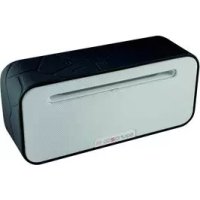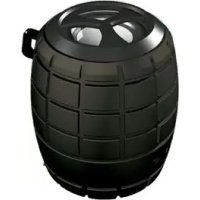
Cosmo Mini - Speaker Sound2Go - Free user manual and instructions
Find the device manual for free Cosmo Mini Sound2Go in PDF.


| Product type | Bluetooth speaker |
| Brand | Sound2Go |
| Model | Cosmo Mini |
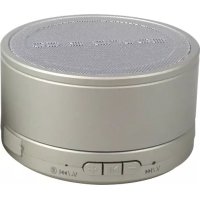
| Dimensions (diameter x height) | 6 cm x 8 cm |
| Weight | 195 g |
| Battery | Lithium-ion 400 mAh |
| Battery life | Approximately 6 hours |
| Charging time | 2 to 3 hours |
| Transmission type | Bluetooth 2.1 + EDR |
| Bluetooth range | Up to 10 m |
| RMS power | 3 W |
| Signal-to-noise ratio | ≥ 76 dB |
| Frequency response | 90 Hz to 20 kHz |
| Audio inputs | Bluetooth, NFC, AUX 3.5 mm, Micro SD |
| Functions | Hands-free, playback control (previous/next, volume, pause/play) |
| Safety | Do not open, do not throw into fire, do not immerse, charge only with supplied cable |
| Maintenance and cleaning | Wipe with a soft, dry cloth |
| Spare parts and repairability | Contact the manufacturer; repairs by authorized distributors |
| Warranty | 12/24 months depending on purchase date, 6 months for battery |
Frequently Asked Questions - Cosmo Mini Sound2Go
User questions about Cosmo Mini Sound2Go
0 question about this device. Answer the ones you know or ask your own.
Ask a new question about this device
Download the instructions for your Speaker in PDF format for free! Find your manual Cosmo Mini - Sound2Go and take your electronic device back in hand. On this page are published all the documents necessary for the use of your device. Cosmo Mini by Sound2Go.
USER MANUAL Cosmo Mini Sound2Go
This document is protected by copyright. Any reproduction or reprint, even in parts, and any reproduction of the illustrations, even in a changed state, is strictly prohibited without the written consent of the manufacturer.
Information on environmental protection

The packaging material used is recyclable. Dispos. of packaging material which is no longer needed in.
rderance with the locally applicable regulations.
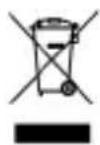
This product must not be disposed of in the normal household waste within the European Union.
points.
Dispose of the device via the communal collecting
COSMO

Guarantee / Warranty
This product has been thoroughly checked for quality and functionality before dispatch. 12 month warranty form the date of purchase for the speaker, 6 months for the integrated battery. We will replace or repair defective products free of charge during the guarantee period. The guarantee is not extended in the course of a repair or an exchange, exchanged parts become our property. Please contact us before sending a guarantee consignment. The guarantee is excluded in the following cases:
in the case of faulty installation,
in the case of changes to the system without our approval,
in the case of damages due to moisture, damages caused by dropping or damaged cables,
if there is no proof of purchase.

COSMO
Declaration of conformity
The CE declaration of conformity for this product can be downloaded from our website: www.mobiset.de
Symbols used
WARNING
Is used for a possible dangerous situation which could lead to serious injuries or death.
Follow the instructions given here in order to avoid danger.
NOTE
A note marks additional information which facilitates the handling of the product.
COSMO

Intended use
This device is only intended for the reproduction of audio signals of optional Bluetooth audio devices. Additionally, you can connect the device to a Bluetooth telephone and use the device as hands-free equipment.
Any other use or use beyond what is specified is regarded as not intended.

WARNING
The device can be dangerous in the case of unintended use and / or different use.
Only use the device as intended.
Comply with the procedures described in these operating instructions.

COSMO
Claims of any kind due to damages as a result of unintended use are excluded.
This risk is borne exclusively by the operator.
Limitation of liability
All technical information, data and notes for connection and operation contained in these operating instructions correspond to the latest status during printing and are carried out to the best of our knowledge, taking into consideration our experience and knowledge up to now. No claims can be derived from the data, illustrations and descriptions in these operation instructions.
The manufacturer does not assume any liability for damages due to non-compliance with the operating instructions, non-intended use, improper repairs, unauthorised changes or use of unauthorised spare parts.
Safety
Handling (storage) batteries

WARNING
The device must not be opened, thrown into fire, dipped in fluids or be short-circuited.
- Charge the device only with the delivered recharger cable. Using a wrong charger can lead to fire, explosion and acid burns.
In the case of damage and improper use of the storage battery, vapours can escape. Supply fresh air and consult a doctor in case of complaints. The vapours can irritate the airways.

COSMO
WARNING
In the case of a damaged storage battery, battery fluid can leak. If one of the storage batteries has leaked, please avoid contact of the skin, the eyes and the mucous membranes with the battery fluid. In the case of contact with the battery fluid, immediately rinse the corresponding spots with plenty of clear water and consult a doctor promptly.
Basic safety information
- Check the device for any visible external damage before use. Do not put into operation a damaged or fallen device.
- Persons, who are not in a position to safely operate the product due to their physical, mental or motor skills, may only use the device under supervision or instruction by a responsible person.
COSMO

Children are only allowed to use the device under supervision.
The device may only be repaired by authorised specialised companies or the customer service. Improper repairs can lead to significant dangers for the user, and to the expiry of the warranty claim.
- Protect the device from moisture and the penetration of fluids.
Avoid direct sun radiation.
Requirements concerning the installation site
For a safe and faultless operation of the device, the installation site has to meet the following requirements:
The device has to be placed on a firm, flat and horizontal base.
- Do not place the device in a hot, wet or very wet environment or near flammable material.

COSMO
Before first use
Unpacking
Take the device and the operating instructions out of the cardboard box.
Remove all packaging materials and protective films from the device before first use, especially the protective film at the bottom side of the device.
NOTE
- Keep the original packaging during the warranty and / or guarantee period of the device so that you can dispatch the device in case of warranty and / or guarantee properly packed. Transport damages will cause the warranty and / or guarantee claim to expire.
COSMO

Checking the scope of delivery
Check the content for completeness and visible damages.
Immediately inform your supplier about any incomplete or damaged delivery.
Device description
(Illustrations see front cover page)
1 ON/OFF switch
2 Jump back / Decrease volume
3 Play/Pause; accept/ end call; change the operating mode
4 Skip/Increase volume
5 Micro USB port / Charging port
6 AUX IN
7 Micro SD card slot
8 Blue LED, operation indicator
9 Red LED, charging indicator

COSMO
Operation
Charging the battery
(see illustration back cover page)
Turn off the device.
Connect the included recharger cable to the charger connection (5) of the device.
Connect the recharger cable to a free USB port of a computer or to a suited USB charger (max. input voltage 5V).
During the loading process, the indicator lamp (9) flashes red. After termination of the loading process the indicator lamp goes out.
NOTE
The charging time takes approx. 2 - 3 hours.
Description of control buttons
The COSMO Speaker support stereo audio transmission and audio control.
| Name Status | Operating | |
| Play / Pause | Operating mode switching; accept/end call in hands-free mode | Long press |
| Playback Short press: Pause/Play | ||
| Pause / stop Short press: Play / Pause | ||
| Next / Vol Up | Short press: play next song Long press: Volume up | |
| Prev / Vol Down | Short press: play previous song Long press: Volume down | |
| On-/ off button | Keep the button pressed to turn on the speaker; now it is in pairing mode. Keep the button pressed to turn off the speaker. | |
LED light indicator
| Device status LED Status | |
| Turn on blue light slow flash | |
| Charging | When charging, the light will turn red, when fully charged, light will turn off |
| Pairing blue light quick flash | |
| Connecting blue light slow flash | |
Play music with Micro-SD card
Insert a micro SD card (with the gold contacts facing up) into the intended slot. Turn on the speaker. The blue LED flashes. Wait until pairing mode has ended and press the Play/Pause button until the beep ack-
COSMO

knowledging change of operating mode is heard. Music playback is performed automatically from the storage medium. Device can be controlled from the speaker according to the button functions described above.
Pairing
Before you can use playback via Bluetooth, you must pair your player with the speaker. Procedure:
Turn the speaker on and then search for new Bluetooth accessories with your player.
Select the device "S2G Cosmo" and confirm the pairing. If you are asked for a password, use "0000" (four times the number zero). Pairing mode is available for 30 seconds after the speaker has been turned on. Turn the speaker off and on again to restart it.
Pairing via NFC
Activate NFC on your player and hold your player directly at the speaker. Confirm the pairing.

COSMO
Cable operation with 3.5 mm stereo cable
Keep the Play/Pause button pressed to disconnect a player connected via Bluetooth. You can then connect an audio source which is not Bluetooth-enabled via the supplied cable with the 3.5 ~mm input jack (AUX IN) of the speaker.
In this mode, the connected device cannot be controlled via the buttons on the speaker.
Music playback
After successful connection, you can play your music in the best possible quality via the speaker. In the case of a Bluetooth connection, you can even control the music playback directly on the speaker, without touching your player. Refer to the table listed above for the key functions.
In the case of cable connection, you can only control the volume from the speaker; all other operations must be performed on the connected player.
COSMO

Hands-free operation
When your mobile phone is connected to the speaker via Bluetooth, music playback is paused with incoming calls.
You can accept and end the call with the Play/Pause button on the speaker.
Troubleshooting - Pairing not possible
Confirm that the speaker is in pairing mode. If the blue LED does not flash, this indicates that the speaker is no longer in pairing mode.
In this case, turn the speaker off and on again to start pairing mode again.
Connection to a paired player not possible
Confirm that the Bluetooth function of the player is active and that the distance between the device and the speaker is less than 10m . Turn the Bluetooth function of the player off and on again.

COSMO
Technical Data
| Diameter 60 mm | |
| Height 8 cm | |
| Weight 195 g | |
| Battery | Lithium ion battery, 400 mAh |
| Operating time approx. 6 hours | |
| Transmission type Bluetooth Class 2.1 + EDR | |
| Range max. 10 m | |
| RMS power 3 W | |
| Signal-to-noise ratio ≥76 dB | |
| Frequency response 90 Hz - 20 kHz | |
Dentro de la Unión Europea, este producto noSEOSEOSEOSEOSEOSEOSEOSEOSEOSEOSEOSEOSEOSEOSEOSEOSEOSEOSEOSEOSEOSEOSEOSEOSEOSEOSEOSEOSEOSEOSEOSEOSEOSEOSEOSEOSEOSEOSEOSEOSEOSEOSEOSEOSEOSEOSEOSEOSEOSEOSEOSEOSEOSEOSEOSEOSEOSEOSEOSEOSEOSEOSEOSEOSEOSEOSEOSEOSEOSEOSEOSEOSEOSEOSEOSEOSEOSEOSEOSEOSEOSEOSEOSEOSEOSEOSEOSEOSEOSEOSEOSEOSEOSEOSEOSEOSEOSEOSEOSEO SEO