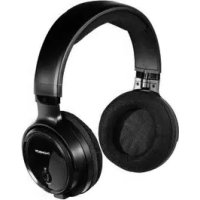
WHP3001 - Headphones THOMSON - Free user manual and instructions
Find the device manual for free WHP3001 THOMSON in PDF.



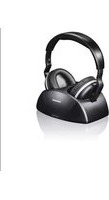
| Product Type | UHF Wireless Headphones |
| Brand | Thomson |
| Model | WHP3001 |
| Transmission technology | Stereo UHF |
| Frequency band | 863.53 - 864.53 MHz |
| Maximum range (outdoor) | 100 m |
| Indoor range | 20-30 m |
| Battery life | 8 h (at medium volume) |
| Operating voltage (transmitter) | 8 V, 70 mA |
| Operating voltage (receiver) | 2.4 V (2 LR03/AAA NiMH batteries 1.2 V) |
| Max RF power | <5 dBm |
| Frequency response | 20 Hz - 20 kHz |
| Distortion | <2% |
| Signal-to-noise ratio | >54 dB |
| Power supply | Power adapter 100-240 V, 50/60 Hz, output 8 V DC / 0.4 A |
| Battery type | 2 rechargeable NiMH LR03/AAA batteries |
| Initial charging time | 24 h (first use) |
| Subsequent charging time | Approx. 10 h |
| LED indicators | Charging (green), Power/signal (red), Headphone power (green) |
| Functions | Auto-scan (Auto-Tune), channel selector (1,2,3), volume control |
| Package contents | Headphones, transmitter/charging station, 2 NiMH batteries, power adapter, RCA/3.5 mm jack audio adapter cable, 6.3 mm/3.5 mm jack adapter |
| Usage | Indoor only, household |
| Cleaning | Slightly damp non-fibrous cloth, no harsh detergents |
| Safety | Do not open, do not use if damaged, keep away from children |
| Recycling | Compliant with WEEE 2012/19/EU and 2006/66/EC |
Frequently Asked Questions - WHP3001 THOMSON
User questions about WHP3001 THOMSON
0 question about this device. Answer the ones you know or ask your own.
Ask a new question about this device
Download the instructions for your Headphones in PDF format for free! Find your manual WHP3001 - THOMSON and take your electronic device back in hand. On this page are published all the documents necessary for the use of your device. WHP3001 by THOMSON.
USER MANUAL WHP3001 THOMSON
Takeyourtimeandreadthefollowinginstructionsandinformationcompletely. Pleasekeeptheseinstructionsinasafeplaceforfutrereference.Ifyouellthe device,pleasepassthesedeoperatingsinstructionsontothewowner.
1.ExplanationofWarningSymbolsandNotes

Riskofelectricshock
Thissymbolindicatesproductpartsenergizedwithadangerousvoltage of sufficientmagnitudetoconstituteariskofelecricshock.
Warning
Thissymbolisusedtoindicatesafetyinstructionsorttodrawyourattentiontospecifichazardsandrisks.

Note
This symbol is used to indicate additional information or important notes.

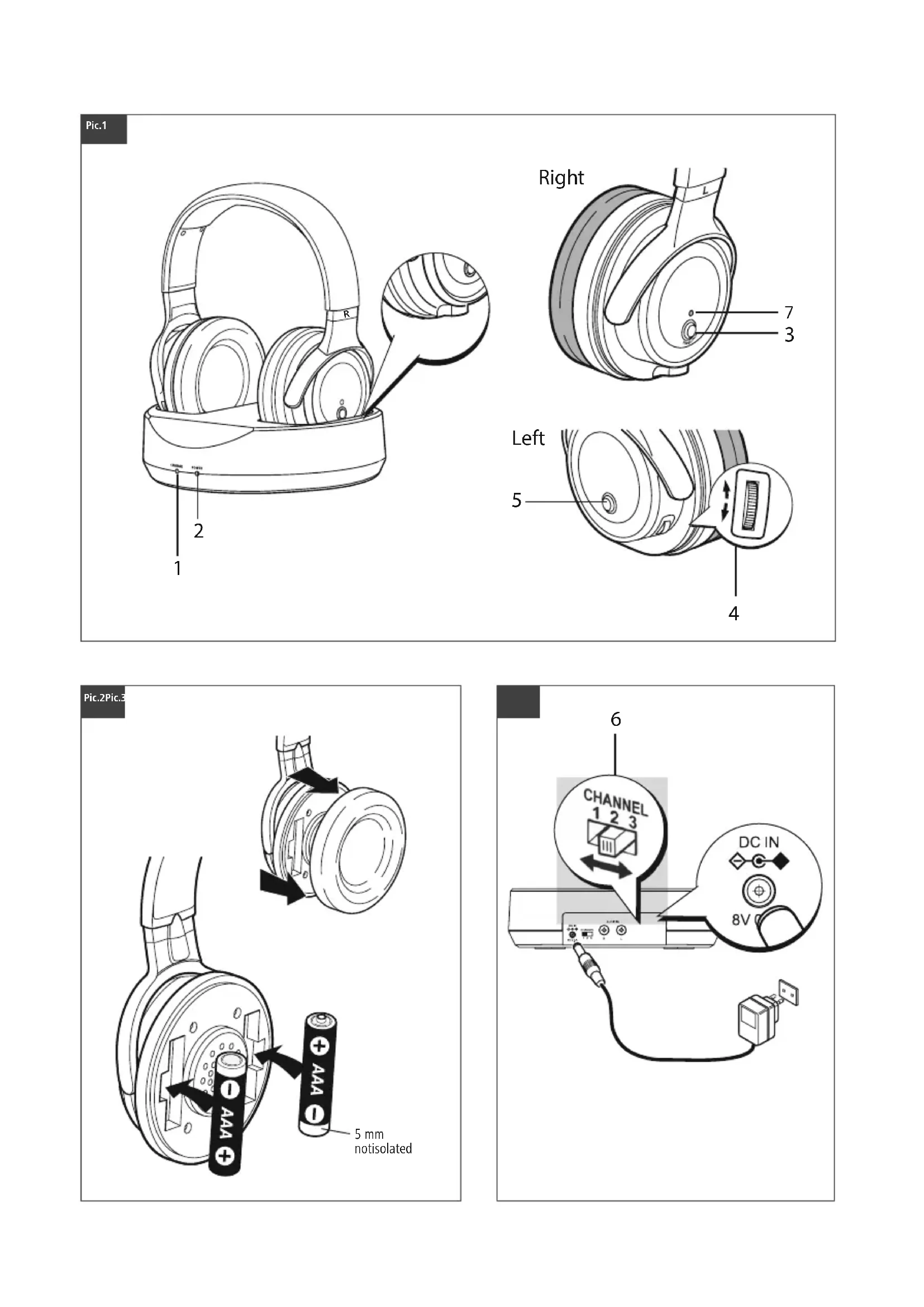
2.Controlsanddisplays,Fig.1+3
- ChargestatusLEDindicator(green)
- Power/signalLEDindicator(red)
3.Powerbutton
4.Volumecontrol
5.Auto-Tunebutton
6.Frequencychannelswitch
7.PowerLEDindicator(green)
3.Packagecontents
-1WHP3001BKAUHFWirelessheadphones
-1transmitterwithchargingstation
-2NiMHAAbatteries
-1powersupplyunit
-1 audioadapter cable, RCAstereoto 3.5mmjack
-1jackadapter6.3mm/3.5mm
4.SafetyNotes
The product is intended for private, non-commercial use only.
- Use the product for its intended purpose only.
Childrenshouldbesupervisedtoensurethattheydonotplaywiththedevice.
- Donotusetheproductinareaswheretheuseofelectronicdevicesisnot permitted.
Layallcablessothattheydonotposeatrippinghazard.
- Donotbendorcrushthecable.
- Donotdroptheproductanddonotexposeittoanymajorshocks.
- Disposefofpackagingmaterialimmediatelyaccordingtolocallyapplicableregulations.
- Donotmodifytheproductinyaway.Doingsovoidstewarry.
Thebatteriesandchargingstationincludedinthedeliverygotogethershouldalways beusedincombination.
The product is intended for indoor use only.
Protecttheproductfromdirt, moistureandoverheating, andonlyuseitinadry environment.
-Usetheitemonlyinmoderateclimaticconditions.
- Keep this product, as all electrical products, out of the reach of children!
- Do not operate the product outside the power limits given in the specifications.
- Donotusetheproductinmoistenvinronmentssandavoidsplashes.
- Donotplaceanyobjectsonthedevicandneveruseittokeepthingson.
Riskelectricshock

- Donotopenthedeviceorcontinuetooperateititifitbecomesdamaged.
Donotusetheproductifthe
ACadapter, theadapter cableorthemains cablearedamaged.
- Donotatempttoserviceorrepairtheproductyourself.Leaveanyandall serviceworktoqualifiedexperts.
Warning-Batteries

- When inserting batteries, notethe correct polarity (+and-markings) and insertthe batteries accordingly. Failure to do so could result in the batteries leaking or exploding.
Only use batteries (or rechargeable batteries) that match the specified type. - Beforeyouinsertthebatteries,cleanthebatterycontactsandthepolar contacts.
- Donotallowchildrenrentochangebatterieswithoutsupervision.
- Donotmixoldandnewbatteriesorbatteriesofadifferenttypeormake.
Removethebatteriesfromproductsthatarenotbeingusedforanextended period(unlessthesearebeingkeptreadyforanemergency). - Donotshort-circuitbatteries.
- Donotchargebatteries.
- Donotthrowbatteriesinafire.
- Keepbatteriesoutofthereachofchildren.
- Neveropen,damageorswallobatteriesorallowthemtoenterthe environment.Theycancontaintoxic,environmentallyharmfulheavymetals.
- Immediately remove and dispose of dead batteries from the product.
- Avoid storing, charging or using the device in extreme temperatures and extremely low atmospheric pressure (forexample, athigh altitudes).

Warning-Highvolumes
- Highsoundpressurelevel!
- Thereisariskofhearingdamage
- Toppreventhearingloss,avoidlisteningathighvolumelevelsforlongperiods.
Alwayskeep the volume atareasonablelevel. Loud volumes, even over short periods, cancause hearingloss. - Using this product limits your perception of ambient noise. For this reason, don't operate any vehicles or machines while using this product.
5.Technical specifications
SpecificationsinaccordancewithRegulation(EU)2019/1782
| TransmittingmodeUHFstereo | |
| Frequencyband(s)863.53-864.53MHz | |
| Maximumradio-frequencypower transmitted | <5dBm |
| Operatingvoltage | Transmitter:8V,70mA Receiver:2.4V, (2x1.2VNiMHAAA) |
| Frequencyrange20Hz-20KHz | |
| Distortion<2% | |
| Signal-to-noiseratio>54dB | |
| Range | 100mmax.(outdoors) 20-30m(indoors) |
| Operatingtime8hrs(atmediumvolume) | |

| Manufacturer'snameortrademark, commercialregistrationnumberand address | Thomson,HRA12159, DresdnerStr.9, 86653Monheim |
| ModelidentifierYLS0056A-E080040 | |
| Inputvoltage | 100-240V |
| InputACfrequency | 50/60Hz |
| Outputvoltage/ Outputcurrent/ Outputpower | 8.0VDC/0.4A/3.2W |
| Averageactiveefficiency | 76.8% |
Efficiencyatlowload(10%)65.1%
No-loadpowerconsumption0.04W
6.Installingthetransmitter/chargingstation,Fig.3

Warning
Only operator theproductfromasocketthathasbeenapprovedforthe device.Thesocketmustbeinstalledclosetotheproductandmustbeasily accessible.
- DisconnecttheproductfromthepowersupplyusingtheOn/Offswitch-if thisisnotavailable,unplugthepowercordfromthesocket.
- Ifusingamulti-socketpowerstrip, makesurethathetotalpower consumptionofallconnecteddevicesdoesnexceedthepowerstrip's maximumthroughputrating.
-Ifyouwillnotbeusingtheproductforaprolongedperiod,disconnectitfrom mainspower.
- Connectthepowersupp/tytothepowersocketontherearsideofthetransmitter.
- Connectthepowersupp/tyoamainsssocket.
ConnecttheRCAplugsfotheaudioadaptercabletotherCAsocketsontherearsideof thetransmitter. Connecttheotherend (jackplug) totheheadphone Jackofyour audio source(televison, hi-fisystem, DVDplayer, MP3player, etc.). - TheredLED(2)lightsup.
7.Installingthereceiver/headphones,Fig.2
Carefullypullofftheearpadontheright-handside.
-Insertthetwobatteriesupplied, makingsureyouobservercorrectpolarity.
- Reinserttheearpadunitilltaudiblyclicksintoplace.
8. Getting started
- Switchthetaudiosourceconnectedtothetransmitter(TVoraudioplayer).
- Switch the headphones by pressing the Power button (3). The LED (7) of the headphones light up green. Makes sure that the LED (2) is lit. This confirms that the rechargeable batteries are charged.
- Puttheheadphonesonandsetthevolumetothesesiredlevel.
Before using the headphones for the first time, make sure that the battery is fully charged. Charge the battery for at least 24 hours before the first use. - Switchofftheheadphonesiftheyarenotbeingusedandputthembackontothemessenger'schargingcontacts.

Note
- Ifyoucannotgetanoptimumssignalfrequency,presstheAuto-Tunebutton(5) ontheheadphones.
- Ifyoucannotgetanadequatefrequency,changethefrequencychannel thereardsideofthetransmitter.Thenconfirmthecorrespondingchannel theheadphonesbypressingtheAuto-Tunebutton.
Togetthebestsoundexperiencewithyourheadphones,youshouldsetthe volumeofthesoundsource(TV,stereosystem,etc.)ashighaspossibleand reducethevolumeontheheadphonesthemelves.
The transmitter will automatically switch off it receives noise audio signal for approximately 2 minutes, or the signal from the audio source is weak for flawless reception. As soon as the signal strength is sufficient, the transmitter will automatically switch back on. The head phones don't switch off automatically.
9.Charging,Fig.3
- Switchofftheheadphones.
- Placetheheadphonesinthechargingstationasshown, and makesurethatthechargings contactsofbothdevicesproperlytoucheachother.
ThegreenLED(1)lightsup.Chargingbeginsautomatically.

Note
- Topreventdamagetotheterbatteries,alwaysswitchofftheheadphoneswhen theyarenotinuse.
Before using the product for the first time, the batteries should be fully charged. Toguaranteeanacceptablecharge, the batterieesshouldinitially be chargedfor24hours.Subsequentchargingcycleslastapproximately 10hours.
Thebatterieswillnotbechargedifthetransmitterisoff.
10.Troubleshooting
10.1Nosound
- Checkthatthepowersupplyplugisfullyinsertedintothemainssocketandtheother endisproperlyconnectedtothepowersupplysocketonthertransmitter.
- Makesurehattheheadphonesareon.
The battery in the headphones may have insufficient remaining charge. Charge the battery. - Check that your TV, hi-fi system or audio source is switched on and a channel is correctly configured to send an audio signal.
-Increasethevolumeusingthecontrolthontheadphones.
The connected audio/ video devicemaynotbeinplaybackmode. Please start the playback.
The output volume of the audio source may be used to adjust the volume accordingly.
10.2 Distortion
- Press the Auto-Tune button.
-Setadifferentfrequencychannel(1,2or3).ThenpresstheAuto-Tunebuttonagain.
The battery in the headphones may have insufficient remaining charge. Charge the battery.
-Increase the volume using the control on the headphones.
The distance between the headphones and the transmitter may be great. Move the two devices closer together and turn the headphones in the direction of the transmitter.
Theinputleveloftheaudiosignalmaybetoolow.Increasethevolumeoftheaudi source.
11.CareandMaintenance
Note
Disconnectthe device from the powersupply before cleaning it is not going to be used for along period of time.
Onlycleanthisproductwithaslightlydamp,lint-freeclothhanddonotuse aggressivecleaningagents.
12.WarrantyDisclaimer
HamaGmbH&CoKGassumesnoliabilityandprovidesnowarrantyfordamage resultingfromimproperinstallation/mounting,improperuseoftheproductorm from failuretoobservetheoperatinginstructionsand/orsafetynotes.
13. Service and Support
Please contact HamaProduct Consulting if you have any questions about this product. Hotline:+499091502-0(German/English) Furthersupportinformation can be found here: www.hama.com
14.RecyclingInformation
Noteonenvironmentalprotection:

AftertheimplementationoftheEuropeanDirective2012/19/EUand 2006/66/EUinthenationallegalsystem,thefollowingapplies:Electric andelectronicdevicesaswellasbatteryismustnotbedisposedofwith householdwaste.Consumersareobligedbylawtoturnecricaland electronicdevicesaswellasbatteriesattheendoftheirservicelivesto
thepubliccollectingpointssetupforthispurposeo pointofsale.Detailstothisaredefinedbythenationalallawoftherespectivecountry.Thissymbolontheproduct, theinstructionmanualorthepackageindicatesthataprodutissubjecttotheseregulations.Byrecycling,reusingthematerialsorotherformsofutilisingolddevices/ Batteries,youaremakinganimportantcontributiontoprotectinggurenvironment.
15.DeclarationofConformity

Hereby, HamaGmbH&CoKGdeclaresthatheradioequipmenttype [00131957]isincompliancewithDirective2014/53/EU.Thefulltextof theEUdeclaration of conformity isavailableatthefollowinginternet
address:
www.hama.com->00131957->Downloads


m = 311
DesprésdelapuestaenmarchadeladirectivaEuropea2012/19/EUy 2006/66/EUnelenystemalegislavitonacional,seaplicarosaliguiente: Losaparatoselectricosyelectrnicos,asicomolasbaterias,nosedeben evacuarenlabasuradomestica.Elusuaroestalegalmenteobligado Ilevarlosaparatoselectricosyelectrnicos,asicomopilasyiplas
4.TexHmka6e3oNaCHOCTn
M3dennnepeepaHaHaeHcOToBkoDIOMAwHerOpnpMeHn.
3anpeaetcncnonb0abtbeHnha3Haehno.
He octabnTb deten be3 npncmoTpa BO n36bxahne nx doctyna k yctpoCTby.
-HePMMeHbB3anpeTHbIX3OHax.
KaBHeHHeOJIaXbIcO3JaBaTaBbIOMExnIpeMeJeHNOJIkoJei.
KaBebHbHeCnBbTaBnHE3aXMMaTb.
-HeponaB.BepenbocnHbHyxnpaB.
-THINHUPo8aTbyNaKO8yBCOETCTBMMCEHTbHHOpMaM
3anpeaetc BHOOCMb NmMeHHeB KxOHCTpyKIO.B npOTBHOM cnyae rapaHTNHBie 06baTebCTBaAHHynpyTO.
AkkymyTopbI 3apdHoe yctpoCTBO corlaocbaHbI pyr C dpYrOM, PO3tomy IX pa3peuaaTcnpmMeHTbTObKOcMAeCTHO.
3anpeaetc3kcnnyatnpoabaBbHenomeeHH.
3aunntte n3eJnne O T pRn, BnaH N nepepeba H cnoB3yTe erToTolbko B cynxX ycnoBax.
McnoIb3yIeH3dennTeNoBkooyMepeHHbIXKImMaTmueckxycnOBnx.
eababdtam!
CobnDatbTexHueckExapKaTepnCTK.
-BepeBb0TbnAarrn6pb3r.
He cTaBbTe ppeMETbHa HsEeHn He hCnOJb3yIte erO KaueCTBe nOcTAbKN.
OnachoctbIopaxhen3JneKTpnuecknMTOKOM

-HeotKpbBaiTneu3dennHnHcnoNb3yTeerOpnnHnHmNoBpeXdeHn.
HeinnoB3yIeun3dennnpn noBpeKdHnnaanTepanepeMeHHorotoKa6eHaanTepaunncTeBO Ra6eJ.
HenbtaTebcamocToTbeHoBbIIOJIHTbExHHueckoOeOcJyXBaHneHnpeMOHTN3dEINJIIObIepa6oTbInOTexHHueCKOMyOcJyXBaHnIOJ0NXHBblIOJIHTbIMACCCOTBeCTByUeJeINIOITOBKOINpa3peHneHMaDaHHbMIDaeTbHOCTN.
BHMaHne.BaTapeN

CobJIOaTbNoJIaRHOCTb6aTapei (+ - ) .HecOJIIOHeNIE NoJIaRHOCTMOKeT CTaBnPHUHOHB3PbBA6aTapei.
Pa3peaetcpanmEnHbKaKyMynTOpbToBkOyKa3aHHOROTnna.
-Perep3arpy3kOIBaTapeHnouchTbKoHTaKbI.
-3aPpeaaetcAETM3aMeHrTa6bTaPeHoe3nPncMoTpaB3pOcNbIX.
BHHMaHHe.BaTapeu

-He npmMeHrTaBpa3JnUHbIeTINbIMInHOBBbEICTabIe6aTepeNBmecTe.
Bcyae6bIwOrepepeBb3KcIyatauynydaIbIbIbApemn 8yctpoCTBa(KpOMeCnyAeB,KoTaAN3dEmnepmmeHETcBAkayectBe abapnHorO).
-He3akopaymbatkohtaKtbIbatapei.
06bHHhbe6atapenHe3apxata.
-Баразецьогоньнебрocath.
-5aatapeXpaHHTbB6e3onachOMMeCTeHHeJaBaTaBdETM.
He otkpbbaute, He pa3bpaute, He rtoatae Hne ytnmnyte 6atapem cboTobmmycopom.BoatapexMorytcoepkaTbcBpeHbietxKeIbIe Metanbl.
-ⅢpaxoOBAHHbE6aTapeHMeMeJIeHHOyIaIbIbIbIpaY ⅧIIN3np08aTb.
M36eataxpaenHn3apnKmNcnoB0AHn npn kctpeMaIbHbIX Temnepatypax NKTpeMaJIbHOHN3KOMaTMoccpepHomdaBneHN(HanpHMeP,Habon) Bicote).

BHMaHHe.TexHnka6e3oNaChOCTN
BbCkoe3BykOoEaBHeHneI
-OnachoctbnopeKdHnroopraHOBcnya
B0X36eKaHmNEoTePcNcyHaeCnYuAaTeBOcnpOaBeHeMaHa6oJIbOJrPoMkoCTBteEHHeDnTbeHOrOBpeMeHH.
He npBbIaTb HOpMaJIbHyrpoMkoCTb.Bo3dEICTBnepOMKOrO 3Byka, B T.H. TeHMeKOpOTKOROBpeMeHN, MOxETPiBecTKKnOBpeKDeHIOoPraHOBCnyxA.
BoBpMaKcNlYaTaUWnAeJHnCHmXaeTcTeHeHbOcnpIaMn OKpyXaOuX3ByKOBuUyMoB.3aIpeuaTcR NcIIOJIb3O8aBtBuM3dEMeBOBpMaBOxJeHn ABTOMOBnIynpBaNHeHMAuHAMn
5.TexHuecknHexapakTepeNtKu
7.YCTaHOBKaIpMeHHKa/HayHHKOB,pnc.2
CHMMTe npabyO aM6yHOpy, cObIIOaI OTOpOxHOCTb.
BCTaBbTe Da AkMyIaTopa (B KOMnneKTe),coBIOJIOa NOIAPHOCTb.
-YCTAHOBITEAMbyHUPyHAmecToD0fHKcaUHM
BbIKIOHHTe HAYUNKINIOKIOHHTe N K3apRHOmy yctpoCTBy (He Meee 12 aocob). BoSPMBApaIaIopnITkPaCHARlAmaI.
8.BvOdB3KcNpyataaHIO
BkIOHHTNEKTOHHK 38yka (TeJIeAIN3Op Mn ayIIOaIannapatpy), c KOTOpIM CoENHeH nepepaTNIK.
BKNIOHTe raphHNTpy, HXABK KHONKYIITAHN3. 3aROpHTc3eJIeHbCBeTOIDHOHINHINIKATOPrHNTpy7.Y6eDNTcB B TOM, 40 KpACHB CEBOTNOHNHINIKATOP (2)ropNT. OH YkAsBaEHaTo, 40 AKKyMnTOp 3apJxHc
HaHehTeHayuHmKmOtpepynpynterpomkocb.
- PpeH HauHOM 3KcNpyataaM NOHocTbO 3apAHTeakKyMyIATOp. PpeH PpeBIM KcNoJIb3oBaHMeMAKKyMITopPheo6QMDMO3ApArXaTHHeMeHee24ac08.
EChnHuyuHmHe HcnoB3yOTc,OTKIOUaHTeMX N yCTaHaBnBaIte Ha 3apAHybKeKTaKtBpeDpTaHka.

PpimmeuHne
YTO6bHnOITMnJIbHyNoCaTOnyIpepaHn,HaKMITEKNKNYABToMaTHueCKOTOKAHINPOBAAHn(5)HaHayuHKax.
EcnHa cactote He oecneuBaetc Hbeo6xOIMoe KaucTeBO, nepeKIOUHTEcb HapryoHactoTHbKaHaHn(enepeKIOHatebHaxOHTcHA3aHeNaHn HpeDaTHika).3aTeMaXmteKHOKNyABToMaTneCXCOrCKaHPOBAHnHa HayuHHkax,HTb6bIOJITBePNTbBbOpCOOTnetCTByUeRokaHana.
-ⅡIIOITIMMajBHOrOkaeCTBa38yHaHnHHeoXoDMOMaKCMaJIbHOyBEINHTb 38yK Ha NCTOCHNke 38yKa (TeNEBnOpe, CtepeocnCTeme N. T.) N yMeHbWNTb 38yKHacAMNXayUHNkAX.
IpeaacnHanaabTomatneckKIOKNHOaetcraepe32MmHytnpOCTBNNnn np cnaobnpme 3bkyoBOrO CNHaJa. KaT tonko ypoBeHb CHTHala BO3paTeT, nepeaTHaKaTOMaTHeCKMbIXOHTN3xUyuepeXMMa.HayuHNKeHOTKIOHAcOTcABTOMaTHeCKN.
15.DeknapaunnpounbOuNTen

HactoaumKomnaHamaGmbHCoKG3aBnAET,HTO paanoo6opdyobahnetnna[00131957]otbeaeTpeboBaHmM dnepkHBbl2014/53/EC.CnonhmtkctOMdeknapauno
COOTBETCTBUNTPpeBOBaHnEMECMOXHOO3HAKOOMTbC3DeccBwww.hama.com->00131957->Downloads
XpooionoeitayntnnpavonenlAevnI npoepovwnqavukw un06eEew.

2.Toiyeiaeipiooukoatevdeieic,oy.1+3
1.EvEeIgLEDKaataaTaOcΦpOioC(npaoiv)
2. Ev6e1Eg LED evepyoinan/iormuoc (Kokkivn)
3.Iaiktpoevepyooinananepeyoinon
4.Pubotncvtaonxou
5.ПлктpoautopatncavcTnong
6.1akontncavaiouuxvottw
7. EvdeiEg LED eveyponoinong/anevyponoinong (tpaovn)
3.πeptexóμevovoukeuaia
1-euyapiaopuaataaouotikwHP3001BKUHF
1mounocuebetaoanong
-2muatapecaAAANIMH
1Tpofoδotko
1 1epeoovko kaioio npocaooyra RCA oe iao bioua 3,5 mm
1πpoaapoyoeiaoiuβoata6,3mm/3,5mm
4.YnoδεiEicασφaλεiα
Tompovppoepetaiyaoaekoucoikxqxprnq.
To npioov npiei va xnpouonoei aionkaiotka yia to okiou npoBaei.
TanaiaipenevaBpikovtaunotnert(laekkanoiouevlukawotevayntCov uetnoakeun.
MnyponaionoiieetonpoioeepoxecconovoeventipenovainAekipovikec OOKEDEC.
TomoBTeHone oA ta kaAldia EtOI OoTe va mny unapxE kivovoc va Kovoiapei Kaveic.
Mnytaakietekaiyuvov0iBetetokaawio.
To npoiov dev emipeneo va nepei kato, oie ka vdo xetai duvaia tumjua.
AnoppiptekateueBiaovouokovkeuaocouphiwauotoucxovtecmokc kavowouocanoppips
Mny kavete metapontec onouokun. Kar' autov tov npono nae va 1oxy en yyyon.
Opiataieckaofoptntceivakatalayayxponkaikpeneva xpoanooovtauwootovapexoevoovvaoo.
Tompovmpoipcetanyayphonvtocktpiw.
PnepTeVipnooateeTo npoiov anpOpaUypaOaKu npepEpuovon KaVa to xponpoioitepeovoootewaneipalovva.
Xpnonononotetompovovoeiieckkaatkeovhke.
Mny ahyte ta naia va ayikov autn n oiaa hntote aaan naktpkiouakeun.
Mnyxionpoioteinoukeyntocwopiwantooonctounepypovtaota teykaxapaktnipiaika.
MynxpanoieTe npoiO ae npoP npipalov kai anoeuye te ataywecpeo.
MnytoTBeTeaivekejuewawotnuovdaekauynywnxponoicntoteoc enphiavatoon8tnc.
KivouocnλeKpOanηiαs

Mny avoiyete to npioiv kal mnu ouvexiete va to xpoiionoeite, av exouv npokAn0eKnuec.
MnVpnoipooiieTOnpoiov,avo avantopacAC,tokaiδioianpoapouyeahtopofo8otikóexiβλα
Mny npoanaeta va ouvtnpaeta n va eniokveaoe povoi aoc to npoiov. Oiepyaiaecouvtipnncpeneivanpaymuatoioovtaianotopapodio Eeiidekeuevonpoountko.
Hotline: +499091502-0 (Alm/Ing)
Diagerdestekbilgilericin,bkz:www.hama.com
13. Servicesisupport
Daca aveti intrebari adresati-va la Hama consultanţă privind produsul. Hotline:+499091502-0(Ger./Ang.)
Alte informatii de suport gasiti aici: www.hama.com
14.Informatipenturecicare
(S.A.)oritsaffiliatesusedunder
licensebyHAMAGmbH&CoKGin
86652Monheim/Germany


WHP3001BK/00131957

- 1.ExplanationofWarningSymbolsandNotes
- Riskofelectricshock
- Warning
- Note
- 2.Controlsanddisplays,Fig.1+3
- 3.Packagecontents
- 4.SafetyNotes
- Riskelectricshock
- Warning-Batteries
- Warning-Highvolumes
- 6.Installingthetransmitter/chargingstation,Fig.3
- 7.Installingthereceiver/headphones,Fig.2
- Getting started
- 9.Charging,Fig.3
- 10.Troubleshooting
- 10.1Nosound
- Distortion
- 11.CareandMaintenance
- 12.WarrantyDisclaimer
- Service and Support
- 14.RecyclingInformation
- Noteonenvironmentalprotection:
- 15.DeclarationofConformity
- 4.TexHmka6e3oNaCHOCTn
- OnachoctbIopaxhen3JneKTpnuecknMTOKOM
- BHMaHne.BaTapeN
- BHHMaHHe.BaTapeu
- BHMaHHe.TexHnka6e3oNaChOCTN
- 5.TexHuecknHexapakTepeNtKu
- 7.YCTaHOBKaIpMeHHKa/HayHHKOB,pnc.2
- 8.BvOdB3KcNpyataaHIO
- PpimmeuHne
- 15.DeknapaunnpounbOuNTen
- 2.Toiyeiaeipiooukoatevdeieic,oy.1+3
- 3.πeptexóμevovoukeuaia
- 4.YnoδεiEicασφaλεiα
- KivouocnλeKpOanηiαs
- Servicesisupport
- 14.Informatipenturecicare
Brand : THOMSON
Model : WHP3001
Category : Headphones