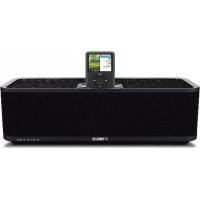
PDX30 - Speakers YAMAHA - Free user manual and instructions
Find the device manual for free PDX30 YAMAHA in PDF.



| Product Type | Docking station for portable player (iPod/iPhone) |
| Brand | YAMAHA |
| Model | PDX-30 |
| Dimensions (W x D x H) | 350 x 125 x 109 mm |
| Weight (without accessories) | 1.7 kg |
| Power supply | 100-240 V AC, 50/60 Hz (supplied AC adapter 15 V DC, 2.66 A) |
| Standby power consumption (without iPod/iPhone) | Less than 1 W |
| Output power | 15 W + 15 W (6 Ω, 1 kHz, 10% THD) |
| iPod compatibility | iPod (5th generation), iPod classic, iPod nano, iPod touch |
| iPhone compatibility | iPhone, iPhone 3G |
| Supplied accessories | Remote control, AC adapter, power cord, owner's manual, quick reference guide |
| Main functions | Docking station with charging, remote control, volume adjustment, audio playback |
| Maintenance and cleaning | Use a clean, dry cloth; do not use chemical solvents |
| Safety | Do not expose to moisture, do not open, use supplied adapter, unplug during thunderstorms |
| Spare parts and repairability | Contact a Yamaha authorized service center; do not open yourself |
| Warranty | 2 years in the European Economic Area and Switzerland (subject to conditions) |
| General information | Docking station for portable player with charging function and remote control; compatible with selected iPod and iPhone models |
Frequently Asked Questions - PDX30 YAMAHA
User questions about PDX30 YAMAHA
0 question about this device. Answer the ones you know or ask your own.
Ask a new question about this device
Download the instructions for your Speakers in PDF format for free! Find your manual PDX30 - YAMAHA and take your electronic device back in hand. On this page are published all the documents necessary for the use of your device. PDX30 by YAMAHA.
USER MANUAL PDX30 YAMAHA
CAUTION: Read this before operating your unit.
To assure the finest performance, please read this manual carefully. Keep it in a safe place for future reference.
1 Install this unit in a well ventilated, cool, dry, clean place - away from direct sunlight, heat sources, vibration, dust, moisture, and/or cold. (Do not use/keep this unit in a car etc.)
2 Locate this unit away from other electrical appliances, motors, or transformers to avoid humming sounds.
3 Do not expose this unit to sudden temperature changes from cold to hot, and do not locate this unit in an environment with high humidity (i.e. a room with a humidifier) to prevent condensation inside this unit, which may cause an electrical shock, fire, damage to this unit, and/or personal injury.
4 Avoid installing this unit where foreign objects may fall onto this unit and/or this unit may be exposed to liquid dripping or splashing. On the top of this unit, do NOT place:
- Other components, as they may cause damage and/or discoloration on the surface of this unit.
- Burning objects (i.e. candles), as they may cause fire, damage to this unit, and/or personal injury.
- Containers with liquid in them, as they may fall and liquid may cause electrical shock to the user and/or damage to this unit.
5 Do not cover this unit with a newspaper, tablecloth, curtain, etc. in order not to obstruct heat radiation. If the temperature inside this unit rises, it may cause fire, damage to this unit, and/or personal injury.
6 Do not operate this unit upside-down. They may overheat, possibly causing damage.
7 Do not use force on switches, knobs, and/or cords.
8 When disconnecting the power cable from the wall outlet, grasp the AC plug; do not pull the cord.
9 Do not clean this unit with chemical solvents; this might damage the finish. Use a clean, dry cloth.
10 Only the voltage specified on this unit must be used. Using this unit with a higher voltage than specified is dangerous and may cause fire, damage to this unit, and/or personal injury. Yamaha will not be held responsible for any damage resulting from use of this unit with a voltage other than that specified.
11 Do not attempt to modify or fix this unit. Contact qualified Yamaha service personnel when any service is needed. The cabinet should never be opened for any reason.
12 When not planning to use this unit for long periods of time (i.e. when going on vacation), disconnect the power cable from the AC wall outlet.
13 Be sure to read the "TROUBLESHOOTING" section regarding common operating errors before concluding that the unit is faulty.
14 Before moving this unit, disconnect the power cable from the wall outlet.
15 Be sure to use the AC adaptor supplied with this unit. Using an AC adaptor other than the one provided may cause fire or damage to this unit.
16 Install this unit near the wall outlet and where the power cable can be reached easily.
17 For added protection for this product during a lightning storm, or when it is left unattended and unused for long periods of time, unplug it from the wall outlet. This will prevent damage to the product due to lightning and power-line surges.
18 The batteries shall not be exposed to excessive heat such as sunshine, fire or the like.
There is a chance that placing this unit too close to a CRT-based (Braun tube) TV set might impair picture color. Should this happen, move this unit away from the TV set.
WARNING
TO REDUCE THE RISK OF FIRE OR ELECTRIC SHOCK, DO NOT EXPOSE THIS UNIT TO RAIN OR MOISTURE.
Even if an iPhone or iPod is not connected to this unit, this unit is not disconnected from the AC power source as long as it is connected to the wall outlet. In this state, this unit is designed to consume a very small quantity of power.
Information for Users on Collection and Disposal of Old Equipment and used Batteries

These symbols on the products, packaging, and/or accompanying documents mean that used electrical and electronic products and batteries should not be mixed with general household waste. For proper treatment, recovery and recycling of old products and used batteries, please take them to applicable collection points, in accordance with your national legislation and the Directives 2002/96/EC and 2006/66/EC.

By disposing of these products and batteries correctly, you will help to save valuable resources and prevent any potential negative effects on human health and the environment which could otherwise arise from inappropriate waste handling.
For more information about collection and recycling of old products and batteries, please contact your local municipality, your waste disposal service or the point of sale where you purchased the items.
[Information on Disposal in other Countries outside the European Union]
These symbols are only valid in the European Union. If you wish to discard these items, please contact your local authorities or dealer and ask for the correct method of disposal.
Note for the battery symbol (bottom two symbol examples): This symbol might be used in combination with a chemical symbol. In this case it complies with the requirement set by the Directive for the chemical involved.
CAUTION
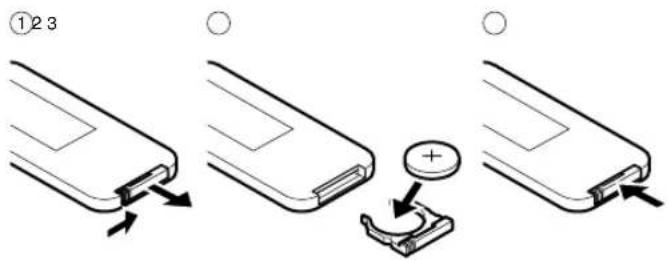
Danger of explosion if battery is incorrectly replaced. Replace only with the same or equivalent type.
For U.K. customers
If the socket outlets in the home are not suitable for the plug supplied with this appliance, it should be cut off and an appropriate 3 pin plug fitted. For details, refer to the instructions described below.
Note
The plug severed from the mains lead must be destroyed, as a plug with bared flexible cord is hazardous if engaged in a live socket outlet.
SPECIAL INSTRUCTIONS FOR U.K. MODEL
IMPORTANT
THE WIRES IN MAINS LEAD ARE COLOURED IN ACCORDANCE WITH THE FOLLOWING CODE:
Blue: NEUTRAL
Brown: LIVE
As the colours of the wires in the mains lead of this apparatus may not correspond with the coloured markings identifying the terminals in your plug, proceed as follows:
The wire which is coloured BLUE must be connected to the terminal which is marked with the letter N or coloured BLACK. The wire which is coloured BROWN must be connected to the terminal which is marked with the letter L or coloured RED.
Making sure that neither core is connected to the earth terminal of the three pin plug.
INTRODUCTION
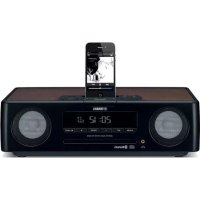
PDX-30 is a portable player dock designed for iPhone or iPod series. The unit can be operated by the remote control. Also the iPhone or iPod set into the unit is automatically charged so you can enjoy playing music as long as you want. Alphabetical letters below (a, b) can be used for reference to the illustrations on the separate sheet "Quick Manual" for details.
■ Supplied accessories
Remote control [a]....1
AC adaptor [b]....1
(DC 15V, 2.66A, model number: NU40-2150266-I3)
Power cable [C]....1
Owner's Manual (this manual) ....1
Quick Manual 1
■ Copyright and logo marks
iPhone ^TM , iPod ^TM
“iPhone” and “iPod” are trademarks of Apple Inc., registered in the U.S. and other countries.

REPLACING THE BATTERY IN THE REMOTE CONTROL
CONTROLS AND FUNCTIONS
Dock terminal [∅]
Connects the iPhone or iPod series. When the iPhone or iPod is connected, its battery will be charged. When the iPhone or iPod is disconnected, the unit will be in standby mode. The iPhone or iPod can be connected (or disconnected) anytime.
/ (Volume keys) [ ]
Adjusts the volume level.
Status indicator (LED) [Φ]
Indicates the current status of the unit.
| LED status The current status of this unit | |
| Off The unit is in standby mode. | An iPhoneor iPod is not connected, or has stopped playing. (However, lights up for 30 seconds after connecting or stopping playback.) |
| Flashes green Connecting, please wait. | |
| Flashes green once Adjusting | the volume level with the volume keys on the unit or operating with the remote control. |
| Lights up green The unit turns | on. An iPhone or iPod is connected. |
| Lights up green and flashes red | Flashes red for 2 seconds: An unsupported iPod is connected.Keeps flashing red: Connection failed.(Connect again.) |
| Flashes red The protection circuitry has been activated.(Disconnect the AC adaptor and wait for a while.) | |
| Flashes red once | The volume of this unit is set to maximum or minimum. |
DC IN 15V jack [©]
Connect the AC adaptor to this jack to supply power. When the AC adaptor is connected, the unit will be in standby mode, consuming a small quantity of electricity. When an iPhone or iPod is connected to the unit in standby mode, the unit turns on. When the iPhone or iPod is disconnected, the unit returns to standby mode.
TROUBLESHOOTING
Refer to the table below if the unit does not function properly. If the problem you are experiencing is not listed below, or if the instruction below does not help, turn off this unit, disconnect the power cable, and contact the nearest authorized Yamaha dealer or service center.
| Problem | Cause | Remedy |
| No sound | The iPhone or iPod is not connected firmly. | Connect the iPhone or iPod firmly. |
| The iPhone or iPod software version has not been updated. | Download the latest iTunes software to update the iPhone or iPod firmware version to the latest. | |
| The power of the unit is off. | Connect the AC adaptor correctly. | |
| The volume is turned down. | Turn up the volume. | |
| The protection circuitry has been activated by excessive volume. | Turn down the volume. | |
| Cannot change the volume of this unit by changing the volume of the iPhone or iPod. | The iPhone or iPod being used is not supported by this unit, or the iPhone or iPod is not connected firmly. | Use the supported iPhone or iPod. Connect the iPhone or iPod firmly. |
| The iPhone or iPod display does not change by pressing the remote control volume keys. | ||
| The unit cannot be operated by the remote control. |
SPECIFICATIONS
Supported iPod....iPod (5th generation), iPod classic, iPod nano, iPod touch
Supported iPhone....iPhone, iPhone 3G
Maximum RMS output power per channel (6 Ω 1 kHz, 10% THD).... 15 W + 15 W
Power Supply
U.S.A. and Canada models....AC 120 V, 60 Hz
Other models ......AC 100 to 240 V, 50/60 Hz
Power Consumption....10 W
Power Consumption without connecting iPod/iPhone....less than 1 W
Dimensions (W x D x H) 350 x 125 x 109 mm
(13-12/16" x 4-15/16" x 4-5/16")
Weight (without accessories)....1.7 kg (3.7 lbs)
iPod (4th generation or before), iPod without Dock connector, iPod photo or iPod mini are not supported by this unit.
*Specifications are subject to change without notice.
Limited Guarantee for European Economic Area (EEA) and Switzerland
Thank you for having chosen a Yamaha product. In the unlikely event that your Yamaha product needs guarantee service, please contact the dealer from whom it was purchased. If you experience any difficulty, please contact Yamaha representative office in your country. You can find full details on our website (http://www.yamaha-hifi.com/ or http://www.yamaha-uk.com/ for U.K. resident).
The product is guaranteed to be free from defects in workmanship or materials for a period of two years from the date of the original purchase. Yamaha undertakes, subject to the conditions listed below, to have the faulty product or any part(s) repaired, or replaced at Yamaha's discretion, without any charge for parts or labour. Yamaha reserves the right to replace a product with that of a similar kind and/or value and condition, where a model has been discontinued or is considered uneconomic to repair.
Conditions
- The original invoice or sales receipt (showing date of purchase, product code and dealer's name) MUST accompany the defective product, along with a statement detailing the fault. In the absence of this clear proof of purchase, Yamaha reserves the right to refuse to provide free of charge service and the product may be returned at the customer's expense.
- The product MUST have been purchased from an AUTHORISED Yamaha dealer within the European Economic Area (EEA) or Switzerland.
- The product must not have been the subject of any modifications or alterations, unless authorised in writing by Yamaha.
- The following are excluded from this guarantee:
a. Periodic maintenance and repair or replacement of parts due to normal wear and tear.
b. Damage resulting from:
(1) Repairs performed by the customer himself or by an unauthorised third party.
(2) Inadequate packaging or mishandling, when the product is in transit from the customer. Please note that it is the customer's responsibility to ensure the product is adequately packaged when returning the product for repair.
(3) Misuse, including but not limited to (a) failure to use the product for its normal purpose or in accordance with Yamaha's instructions on the proper use, maintenance and storage, and (b) installation or use of the product in a manner inconsistent with the technical or safety standards in force in the country where it is used.
(4) Accidents, lightning, water, fire, improper ventilation, battery leakage or any cause beyond Yamaha's control.
(5) Defects of the system into which this product is incorporated and/or incompatibility with third party products.
(6) Use of a product imported into the EEA and/or Switzerland, not by Yamaha, where that product does not conform to the technical or safety standards of the country of use and/or to the standard specification of a product sold by Yamaha in the EEA and/or Switzerland.
(7) Non AV (Audio Visual) related products.
(Products subject to “Yamaha AV Guarantee Statement” are defined in our website at http://www.yamaha-hifi.com/ or http://www.yamaha-uk.com/ for U.K. resident.)
- Where the guarantee differs between the country of purchase and the country of use of the product, the guarantee of the country of use shall apply.
- Yamaha may not be held responsible for any losses or damages, whether direct, consequential or otherwise, save for the repair or replacement of the product.
- Please backup any custom settings or data, as Yamaha may not be held responsible for any alteration or loss to such settings or data.
- This guarantee does not affect the consumer's statutory rights under applicable national laws in force or the consumer's rights against the dealer arising from their sales/purchase contract.
natural_image
Diagram showing a device with a plus button and an arrow pointing to it, no text or symbols present.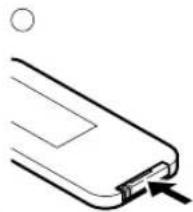
natural_image
Simple line drawing of a USB flash drive with an arrow indicating compression (no text or symbols)COMMANDES ET FONCTIONS
Borne d'accueil [¢]
Consommation....10 W
natural_image
Diagram showing a device with a plus button and an arrow pointing to it, no text or symbols present.![YAMAHA PDX30 - Borne d'accueil [¢] - 1](/content/2026/02/382768/images/75403e5f176d940b37f0db38e7cb06f3a87c48085cd7c40f912f3a541a6f89a3.jpg)
natural_image
Simple line drawing of a USB flash drive with an arrow pointing to the internal block (no text or symbols)BEDIENELEMENTE UND IHRE FUNKTION
Dock-Anschluss [d]
natural_image
Diagram showing a device with a plus button inserted into a clip (no text or symbols present)![YAMAHA PDX30 - Dock-Anschluss [d] - 1](/content/2026/02/382768/images/d85316145c534fa1b945e5f450c88842a9e7bd0cf560993076b5fd9c9f64db05.jpg)
natural_image
Simple line drawing of a USB flash drive with an arrow indicating compression (no text or symbols)REGLAGE OCH FUNKTIONER
Dockningsterminal [∅]
DC IN 15 V-ingång [g]
natural_image
Diagram showing a device with a plus sign and a circular button, no text or symbols present![YAMAHA PDX30 - DC IN 15 V-ingång [g] - 1](/content/2026/02/382768/images/e92a049044d062ef92acfe2133864e0cb81f7ae11339986dd0893205c9ea17d4.jpg)
natural_image
Simple line drawing of a USB flash drive with an arrow pointing to the tip (no text or symbols)COMANDI E FUNZIONI
Terminale dock [d]
Dimensioni (L x A x P)....350 x 125 x 109 mm
natural_image
Diagram showing a smartphone with a battery and a switch, no text or symbols present![YAMAHA PDX30 - Terminale dock [d] - 1](/content/2026/02/382768/images/a0c5ce3adb9c56bab9f0326914a0c5d565ed09324696711589ed87fefb0c53ff.jpg)
natural_image
Simple line drawing of a USB flash drive with an arrow pointing to the internal block (no text or symbols)BEDIENINGSELEMENTEN EN FUNCTIES
Status indicator (LED) [i]
natural_image
Diagram showing a device with a plus button and a circular symbol, no text or labels present![YAMAHA PDX30 - Status indicator (LED) [i] - 1](/content/2026/02/382768/images/f81847716507877e81ea2f5af12bf170df6d80b081b93113c632400d30cab3ea.jpg)