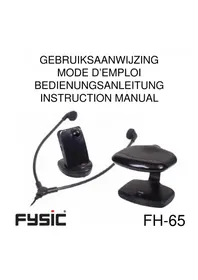
FH65 - Earphones Fysic - Free user manual and instructions
Find the device manual for free FH65 Fysic in PDF.



| Product type | Infrared wireless headset |
| Brand | Fysic |
| Model | FH65 |
| Category | Headphone |
| Transmission | Infrared |
| Maximum range | 10 meters (in the same room) |
| Emitter power supply | 12V DC power adapter (included) |
| Receiver power supply | 2 rechargeable batteries (included) |
| Battery charging | Automatic by placing the receiver in the charger |
| Charging time | Approximately 10 hours (solid green LED indicator) |
| Charge indicator | Flashing green/red LED during charging, solid green when charged |
| Volume control | Rotary dial on the receiver |
| On/off switch | On the emitter and receiver |
| Connectivity | Headphone jack (3.5mm) on the emitter |
| Included accessories | Emitter power adapter, charger power adapter, jack cable, SCART adapter (optional), rechargeable batteries |
| Care and cleaning | Wipe with a soft, dry cloth. Do not use chemical products. |
| Safety | Do not open the device. Use only the provided adapters. |
| Spare parts | Adapters, rechargeable batteries, cables available via customer service |
| Repairability | Contact Fysic customer service |
Frequently Asked Questions - FH65 Fysic
User questions about FH65 Fysic
0 question about this device. Answer the ones you know or ask your own.
Ask a new question about this device
Download the instructions for your Earphones in PDF format for free! Find your manual FH65 - Fysic and take your electronic device back in hand. On this page are published all the documents necessary for the use of your device. FH65 by Fysic.
USER MANUAL FH65 Fysic
The FH-65 is a cordless infra-red stethoset receiver system with which you can adjust the volume of your TV, radio, personal stereo and other hi-fi equipment to suit your individual needs. In addition, the system allows you to move around freely without the constrictions of cables within the room where the transmitter is placed.
The range is up to 10 meter in the same room in which the transmitter is located.
The receiver is powered by 2 rechargeable batteries. These batteries are charged by just placing the receiver in the included charger pod
INSTALLATION
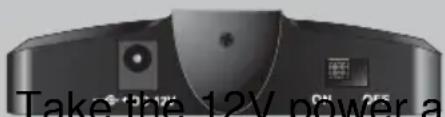
Take the 12V power adapter and connect it with the DC 12V jack on the backside of the transmitter. Put the power adapter in a 230V AC wall
Connect the audio core you want to listen to.
TRANSMITTER:
Chapter and connect it with a backside of the trans-dapter in a 230V AC wall socket.
with the audio device
Use the supplied transfer cord to connect your FH-65 with the RCA output on your TV-set. With this cord you can listen to the TV-sound with your desired sound-level while your house-mates listen to the sound with their own desired sound
level.
to your FH-65
In case your TV-set is equipped with a SCART connector only, consult the Fysic helpline ( for a SCART transfer plug.
+31 (0) 736411355
Take the 6V power adapter and connect it with the DC 6V jack on the backside of the charger pod. Put the power adapter is a 230V AC wall socket.
RECEIVER: Remove the batterycover and install 2 batteries in the receiver as indicated inside the battery compartment. Replace the cover
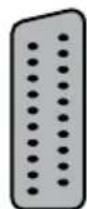
SCART connector
HEADPHONES:
Connect the cable of your headphone with the
PHONE jack of the receiver.
The FH-65 is now ready for use.
CHARGE
Place the receiver into
the charger pod.
The lamp will start flashing red/green, indicating quick charge.
After about 10 hours the lamp will light steady green, indicating trickle charge.
You might leave the receiver in the charger pod so that the batteries are charged the moment you want to use your headphone.
steady green: trickle charge
FUNCTIONING
TRANSMITTER
Use the ON/OFF switch on the backside of the transmitter to switch-on or switch-off the transmitter.
ON/OFF
RECEIVER
Use the ON/OFF switch on the left side of the receiver to switch-on or switch-off the receiver. The red lamp lights when the receiver is
ON/OFF:
VOLUME:
Use the rotating controller to set the volume to your desired level. Turn it clockwise to increase the volume, turn it anti clockwise to lower the volume.
switched-on.
In some cases it might transmitter to increase
CANT
be required to cant the the range.
TRANSMITTER:
PROBLEMS AND SOLUTIONS
FH-65 DOES NOT FUNCTION AT ALL:
- Problems with the power supply:
Check whether the power adapters are connected to the transmitter / receiver and if they are put in a 230V wall socket.
Check whether batteries are placed in the receiver and if they are fully charged.
Check whether the transmitter and receiver are switched-on.
- Problems with the sound source:
Check whether the transmitter is connected to a audio device.
Check the volume control of the connected audio-device.
Check whether the audio device is switched on.
tip: you might connect the headphone directly to the audio device to check its functionality.
SIGNAL DROPS:
- You are out of range of the transmitter:
Signals from the transmitter may reach your receiver directly or reflected by walls and ceiling. These signals however cannot pass closed doors and walls. Please make sure that the receiver can see the transmitter.
- The receiver is too close to the transmitter:
At distances of only a few centimeters the received signal is too strong to handle by the receiver. In such case please increase the distance
- The batteries in the receiver unit are (almost) empty:
Charge the batteries by placing the receiver into the charger pod.
The volume is set to 0 (zero):
Rotate the volume controller clockwise to increase the volume.
THE SIGNAL SOUNDS DEFORMED:
- Obstacles between the transmitter and receiver disturb the transmission:
Move yourself to obtain a clear sight between the transmitter and the receiver.
- Another electronic device (like a cordless (DECT) telephone) is used close to the transmitter:
If possible relocate the transmitter as far as possible from other electronic equipment.
If problems occur that are not listed here above or if the problems cannot be solved with the proposed solutions, please contact the Fysic service department at telephone number +31 (0) 73 6411 355 for assistance.
ENVIRONMENT
Exhausted batteries may never be disposed of in household waste but must be handed in at your local depot for chemical waste.
At the end of the product lifecycle, you should not throw this product into the normal household garbage but bring the product to a collection point for the recycling of electrical and electronic equipments.
DECLARATION OF NETWORKCOMPATIBILITY
The FYSIC FH-65 complies with the essential requirements and provisions
as described in the European Directive 1999/5/EC. The declaration of conformity is available on the website WWW.FYSIC.COM

GUARANTEE
You have a guarantee of 12 MONTHS after the date of purchase of the FYSIC FH-65. We guarantee during this period the free repair of defects caused by material- and construction faults. This at the importers discretion. It is only possible to claim to the guarantee when you enclose your purchase ticket with the FH-65.
HOW TO ACT:
If you notice a defect, consult the manual first. If this manual gives you no definite answer, consult your dealer with a clear description of your complaint. He will collect the device together with this guarantee card and the dated purchase ticket and he will take care of a prompt repair, respectively free sending to the importer.
THE GUARANTEE EXPIRES:
When used inexpert, faulty connections, leaking and faulty placed batteries, use of unoriginal parts or accessories, negligence and defects caused by fire, flood, stroke of lightning and natural disasters. With unqualified modifications or repairs by third persons. With incorrect transport without a suitable packing. If the device is not handed in with the correct filled in guarantee card and the purchase ticket.
NOT UNDER THIS GUARANTEE: cords, plugs and batteries.
All further responsibilities, in particular subsequent damages, are excluded.
Service

Help

FYSIC

+31 (0) 736411355
ver1.0