SonicFuel ATHAR3BT - Earphones AUDIO TECHNICA - Free user manual and instructions
Find the device manual for free SonicFuel ATHAR3BT AUDIO TECHNICA in PDF.



| Product Type | Closed-back over-ear wireless headphone |
| Brand | Audio-Technica |
| Model | SonicFuel ATH-AR3BT |
| Weight | Approx. 190 g (without cable) |
| Power Supply | Lithium-polymer (LiPo) 3.7 V DC battery, rechargeable via micro USB port |
| Charging voltage/current | 5 V / 200 mA |
| Charging time | Approx. 5 hours |
| Playback time | Up to 30 hours |
| Standby time | Up to 1000 hours |
| Transducer | 40 mm, dynamic |
| Frequency response | 5 to 35,000 Hz |
| Sensitivity | 97 dB/mW |
| Impedance | 41 ohms |
| Wireless technology | Bluetooth version 4.1, Class 2 |
| Supported Bluetooth profiles | A2DP, AVRCP, HFP, HSP |
| Supported audio codecs | Qualcomm aptX, AAC, SBC |
| Maximum range | Approx. 10 meters (line of sight) |
| NFC | Yes, for quick pairing |
| Microphone | Electret condenser, omnidirectional |
| Supplied cable | Detachable smartphone cable (1.2 m) with 3.5 mm 4-pole mini-jack and remote control |
| Main functions | Play/pause, volume control, track skip, call answering, voice recognition, foldable |
| Maintenance and cleaning | Wipe with a dry cloth; do not use alcohol or solvents; clean ear pads regularly |
| Safety | Do not use near medical equipment; do not expose to moisture or shocks; follow battery instructions |
| Spare parts and repairability | Ear pads and cable available as spare parts; battery not user-replaceable; contact customer service for repairs |
Frequently Asked Questions - SonicFuel ATHAR3BT AUDIO TECHNICA
User questions about SonicFuel ATHAR3BT AUDIO TECHNICA
0 question about this device. Answer the ones you know or ask your own.
Ask a new question about this device
Download the instructions for your Earphones in PDF format for free! Find your manual SonicFuel ATHAR3BT - AUDIO TECHNICA and take your electronic device back in hand. On this page are published all the documents necessary for the use of your device. SonicFuel ATHAR3BT by AUDIO TECHNICA.
USER MANUAL SonicFuel ATHAR3BT AUDIO TECHNICA
Thank you for purchasing this Audio-Technica product.
Before using the product, read through this user manual to ensure that you will use the product correctly.
Please keep this manual for future reference.
Safety precautions
Cautions for the product
- Do not use the product near medical equipment. Radio waves may affect cardiac pacemakers and medical electronic equipment. Do not use the product inside medical facilities.
- When using the product in aircraft, follow airline instructions.
- Do not use the product near automatic control devices such as automatic doors and fire alarms. Radio waves may affect electronic equipment and cause accidents due to malfunction.
- Do not disassemble, modify or attempt to repair the product to avoid electric shock, malfunction or fire.
- Do not subject the product to strong impact to avoid electric shock, malfunction or fire.
- Do not handle the product with wet hands to avoid electric shock or injury.
- Disconnect the product from a device if the product begins to malfunction, producing smoke, odor, heat, unwanted noise or showing other signs of damage. In such a case, contact your local Audio-Technica dealer.
-
Do not allow the product to get wet to avoid electric shock or malfunction.
-
Do not put foreign matter such as combustible materials, metal, or liquid in the product.
- Do not cover the product with a cloth to avoid fire or injury by overheating.
- Follow applicable laws regarding mobile phone and headphone use if using headphones while driving.
- Do not use the product in places where the inability to hear ambient sound presents a serious risk (such as at railroad crossings, train stations, and construction sites).
- To prevent damage to your hearing, do not raise the volume too high. Listening to loud sound for an extended period may cause temporary or permanent hearing loss.
- Discontinue use if skin irritation results from direct contact with the product.
- Be careful to avoid pinching yourself between the housing and the arm of product or at the joints.
Cautions for rechargeable battery
The product is equipped with a rechargeable battery (lithium polymer battery).
If battery fluid gets into eyes, do not rub them. Rinse thoroughly with clean water such as tap water and consult a doctor immediately.
- If battery fluid leaks, do not touch fluid with bare hands. If fluid remains inside the product, it may cause malfunction. If battery fluid leaks, contact your local Audio-Technica dealer.
- If fluid gets in your mouth, gargle thoroughly with clean water such as tap water and consult a doctor immediately.
- If your skin or clothing comes in contact with fluid, immediately wash the affected skin or clothing with water. If you experience skin irritation, consult a doctor.
- To avoid leakage, generation of heat or explosion:
- Never heat, disassemble or modify the battery, nor dispose of it in a fire.
- Do not attempt to pierce with a nail, hit with a hammer or step on the battery.
- Do not drop the product or subject it to strong impact.
- Do not get the battery wet.
- Do not use, leave or store the battery in the following places: - Area exposed to direct sunlight or high temperatures and humidity
- Inside of a car under the blazing sun
-
Near heat sources such as heat registers
-
Charge only with the included USB cable to avoid malfunction or fire.
- The internal rechargeable battery of this product cannot be replaced by the user. The battery may have reached the end of its service life if the usage time becomes significantly shorter even after the battery has been fully charged. If this is the case, the battery needs to be repaired. Contact your local Audio-Technica dealer for repair details.
- When the product is disposed of, the built-in rechargeable battery needs to be discarded properly. Contact your local Audio-Technica dealer to learn how to properly dispose of the battery.
For customers in the USA
FCC Notice
Warning
This device complies with Part 15 of the FCC Rules. Operation is subject to the following two conditions: (1)
This device may not cause harmful interference, and (2) this device must accept any interference received, including interference that may cause undesired operation.
Caution
You are cautioned that any changes or modifications not expressly approved in this manual could void your authority to operate this equipment.
Note: This equipment has been tested and found to comply with the limits for a Class B digital device, pursuant to part 15 of the FCC Rules. These limits are designed to provide reasonable protection against harmful interference in a residential installation. This equipment generates, uses and can radiate radio frequency energy and, if not installed and used in accordance with the instructions, may cause harmful interference to radio communications. However, there is no guarantee that interference will not occur in a particular installation. If this equipment does cause harmful interference to radio or television reception, which can be determined by turning the equipment off and on, the user is encouraged to try to correct the interference by one or more of the following measures:
- Reorient or relocate the receiving antenna.
- Increase the separation between the equipment and receiver.
- Connect the equipment to an outlet on a circuit different from that to which the receiver is connected.
- Consult the dealer or an experienced radio/TV technician for help.
RF Exposure Statement
This transmitter must not be co-located or operated in conjunction with any other antenna or transmitter used in other systems. This device complies with FCC radiation exposure limits set forth for an uncontrolled environment and meets the FCC radio frequency (RF) Exposure Guidelines. This equipment has very low levels of RF energy that is deemed to comply without testing of specific absorption rate (SAR).
For customers in Canada
IC statement
CANICES-3(B)/NMB-3(B)
This device complies with INDUSTRY CANADA R.S.S. 247.
Operation is subject to the following conditions: (1) This device may not cause harmful interference, and (2) this device must accept any interference received, including interference which may cause undesired operation.
Under Industry Canada regulations, this radio transmitter may only operate using an antenna of a type and maximum (or lesser) gain approved for the transmitter by Industry Canada. To reduce potential radio interference to other users, the antenna type and its gain should be so chosen that the equivalent isotropically radiated power (e.i.r.p.) is not more than that necessary for successful communication.
This device complies with RSS-102 radiation exposure limits set forth for an uncontrolled environment.
Notes on use
- Be sure to read the connected device's user manual before use.
- Audio-Technica will not be liable in any way for any loss of data in the unlikely event that such losses should occur while using the product.
- On public transportation or in other public places, keep the volume low so as not to disturb other people.
- Minimize the volume on your device before connecting the product.
- When using the product in a dry environment, you may feel a tingling sensation in your ears. This is caused by static electricity accumulated on your body, not by product malfunction.
- Do not subject the product to strong impact.
- Do not store the product in direct sunlight, near heating devices, or in hot, humid, or dusty places. Additionally, do not allow the product to get wet.
- When the product is used for a long time, the product may become discolored due to ultraviolet light (especially direct sunlight) and wear.
-
If the product is placed in a bag while the included cable or USB charging cable is still connected, the included cable or USB charging cable may become caught, severed, or broken.
-
Make sure to hold the plug when connecting and disconnecting the included cable or USB charging cable. The included cable or USB charging cable may become severed or an accident may occur if you pull on the cable itself.
- When you are not using the included cable or USB charging cable, disconnect it from the product.
- This product can be used to talk on the phone only when using a mobile telephone network. Support for telephony apps that use a mobile data network is not guaranteed.
- If you use the product near an electronic device or transmitter (such as a mobile phone), unwanted noise may be heard. In this case, move the product away from the electronic device or transmitter.
- If you use the product near a TV or radio antenna, noise may be seen or heard in the television or radio signal. In this case, move the product away from the TV or radio antenna.
- To protect the built-in rechargeable battery, charge it at least once every 6 months. If too much time passes between charges, the life of the rechargeable battery may be reduced, or the rechargeable battery may no longer be able to be charged.
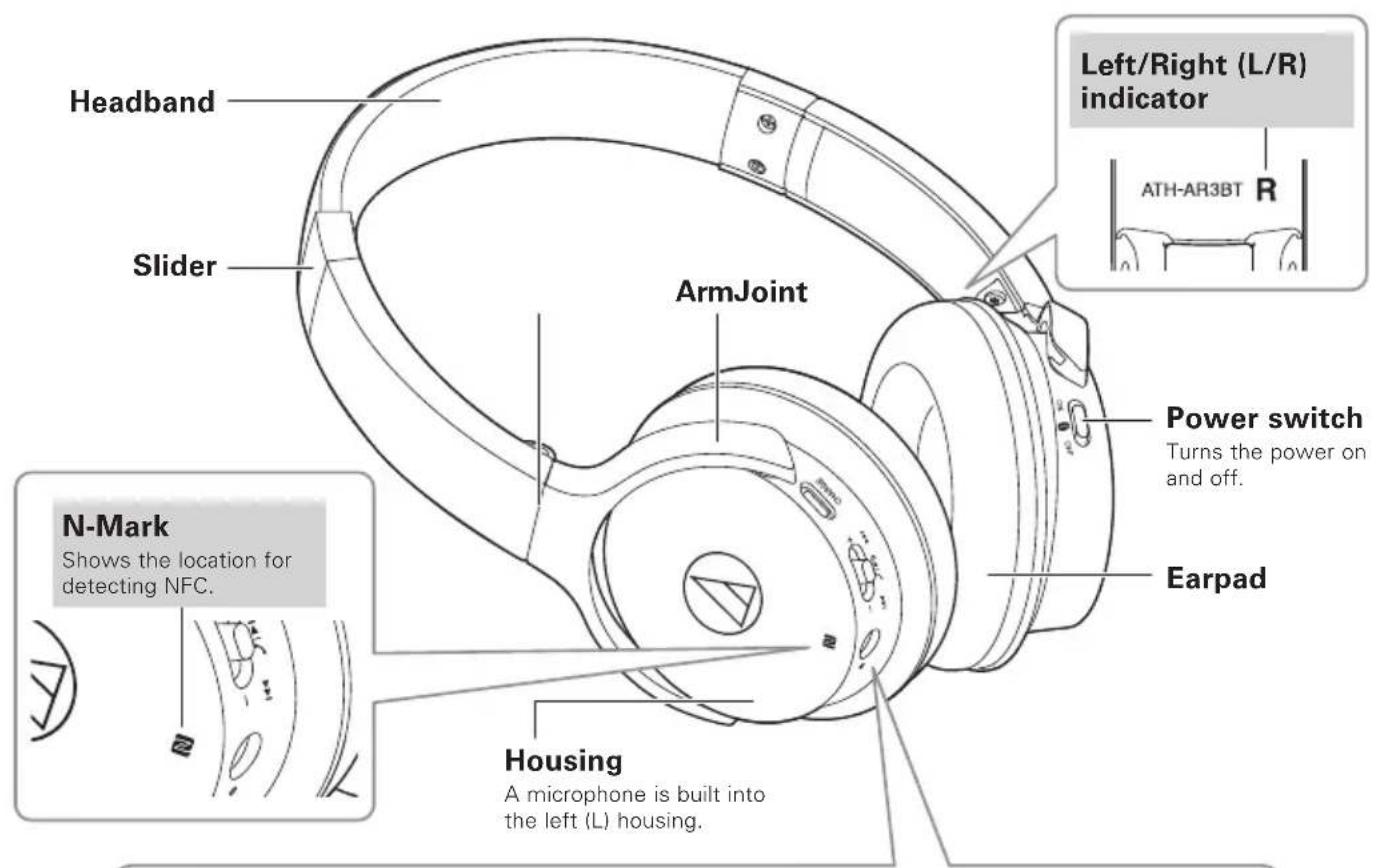
Part names and functions
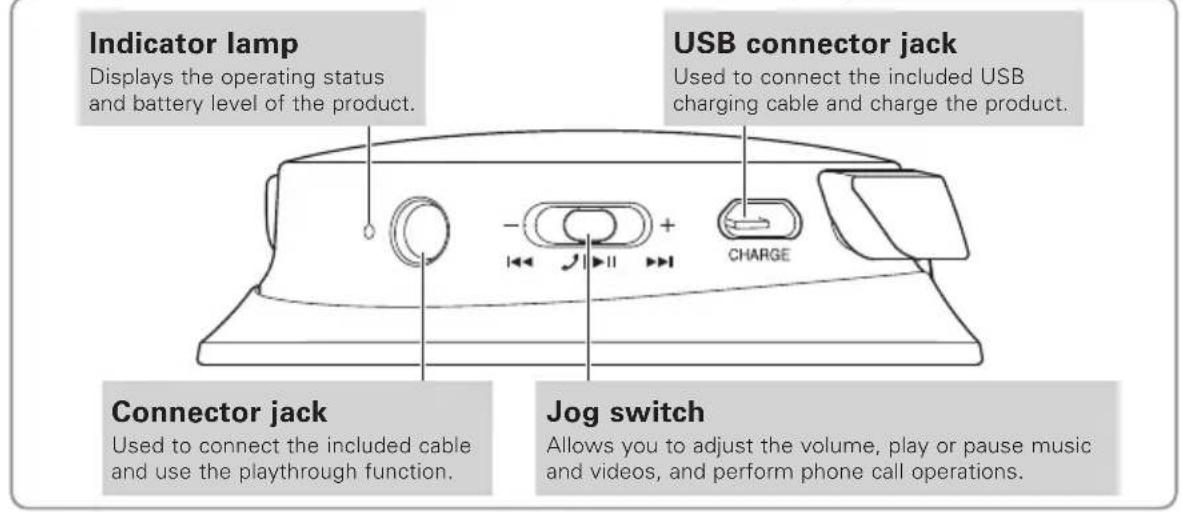
Charging the battery
- Fully charge the battery when using for the first time.
- When the rechargeable battery is running low, the product will sound 2 sets of 2 beeps and the indicator lamp will flash in red. When these beeps sound, charge the battery.
It takes about 5 hours to charge the battery fully. (This time may vary depending on usage conditions.) -
While the battery is charging, the product's Bluetooth connection remains disabled and therefore the product's Bluetooth feature cannot be used.
-
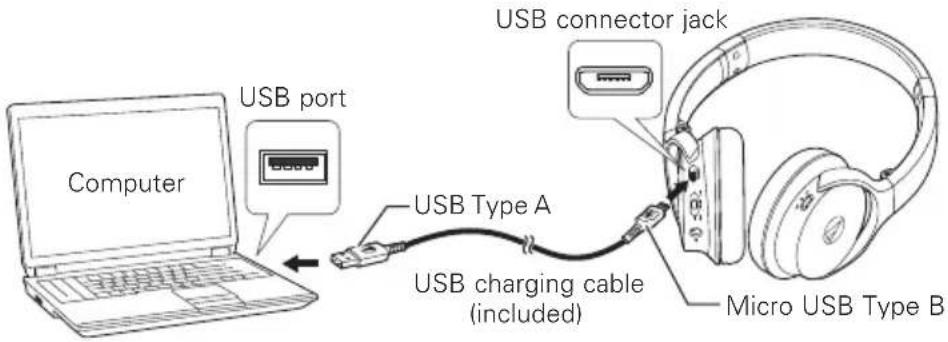
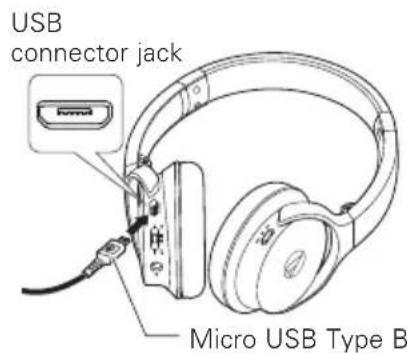
Connect the included USB charging cable (micro USB Type B) to the product's USB connector jack.
-
Connect the included USB charging cable (USB Type A) to the computer to start charging.
-
During charging, the indicator lamp lights as follows:
Lit in red : Charging
Lit in blue : Charging complete
- When charging is complete, disconnect the included USB charging cable (USB Type A) from the computer.
- Disconnect the included USB charging cable (micro USB Type B) from the product's USB connector jack.
About pairing
To connect the product to a Bluetooth device, the product needs to pair (register) with the device. Once they are paired, you do not need to pair them again.
However, you will need to pair again in the following cases:
- If the product is deleted from the Bluetooth device's connection history.
If the product is sent out for repair. - If the product is paired with 9 devices or more.
(The product can be paired with up to 8 devices. When you pair with a new device after pairing with 8 devices, pairing information for the device with the oldest connection date will be overwritten by the information for the new device.)
Pairing a Bluetooth device
- Read the user manual for the Bluetooth device.
-
Place the device within 1m (3.3') of the product to perform pairing correctly.
To confirm the progress of the pairing process, wear the product while performing this procedure and listen for the confirmation tone. -
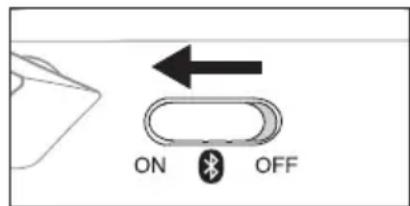
Starting with the product turned off, slide the power switch to the "ON" position.
-
The indicator lamp will light in blue, and then flash in red and blue.
The product sounds a confirmation tone when pairing begins.
- Use your Bluetooth device to begin the pairing process and search for the product.
-
For information about using your Bluetooth device, refer to the device's user manual.
-
Select "ATH-AR3BT" to pair the product and your Bluetooth device.
-
Some devices may ask for a passkey. In this case, enter "0000". The passkey may also be called a passcode, PIN code, PIN number, or password.
The product sounds a confirmation tone when pairing is complete.
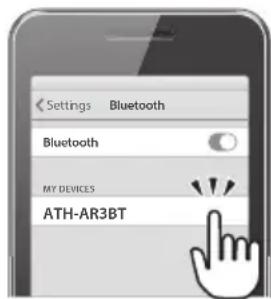
Connecting via Bluetooth wireless technology
Using NFC when pairing
NFC (Near Field Communication) is a technology that allows for short-range wireless communication between various devices, such as mobile phones and IC tags. It allows two devices to communicate when you simply touch them to each other. You can use NFC to pair your Bluetooth device with this product.
Compatible devices : NFC-compatible Bluetooth devices
Compatible OS : Android
Pairing an NFC-compatible Bluetooth device
To confirm the progress of the pairing process, wear the product while performing this procedure and listen for the confirmation tone.
- Turn on your NFC-compatible device's NFC feature.
Refer to your NFC-compatible device's user manual as necessary.
-
Starting with the product turned off, slide the power switch to the "ON" position.
-
Touch your NFC-compatible device to the N-Mark on the product, and then use your NFC-compatible device to complete the pairing process.
-
For the location of your NFC-compatible device's NFC antenna, or how to end the connection between the product and your device, refer to the device's user manual.
The product sounds a confirmation tone when pairing is complete.
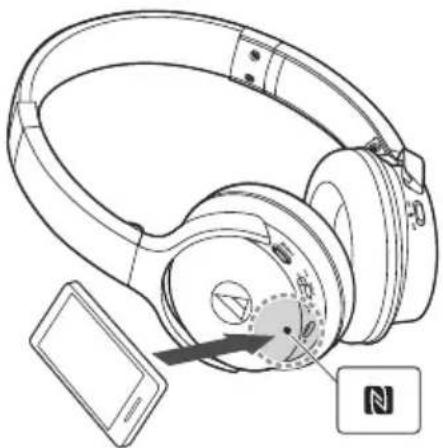
Disconnecting a device
Touch your NFC-compatible Bluetooth device to the part just above the N-Mark on the product again to disconnect the product from your device.
Switching the device
- If the product is connected to a Bluetooth device and you then touch an NFC-compatible Bluetooth device to it, the product will connect to the second device.
- If you have an NFC-compatible Bluetooth device connected with the product and touch that device to another NFC-compatible Bluetooth device, the device will disconnect from the product and connect with the second NFC-compatible Bluetooth device.
Indicator lamp display
The product's indicator lamps indicate the product's status as explained below.
| Status | Indicator lamp display pattern Red Blue | ||
| Pairing Searching for device | ●●●●●●●●●●●●●●●●●●●●●●●●●●●●●●●●●●●●●●●●●●●●●●●●●●●●●●●●●●●●●●●●●●●●●●●●●●●●●●●●●●●●●●●●●●●●●●●●●●●● ●●●●●●●●●●●●●●●●●●●●●●●●●●●●●●●●●●●●●●●●●●●●●●●●●●●●●●●●●●●●●●●●●●●●●●●●●●●●●●●●●●●●●●●●●●●●●●●●●●●● | ||
| Waiting to be connected | ●- - - - - - - - - - - - - - - - - - - - - - - - - - - - - - - - - - - - - - - - - - - - - - - - - - - - - - - - - - - - - - - - - - - - - - - - - - - - - - - - - - - - - - - - - - - - - - - - - - - - - | ||
| Connecting | ●- - - - - - - - - - - - - - - - - - - - - - - - - - - - - - - - - - - - - - - - - - - - - - - - - - - - - - - - - - - - - - - - - - - - - - - - - - - - - - - - - - - - - - - - - - - - - - - - - | ||
| Battery level Battery level low | ●- - - - - - - - - - - - - - - - - - - - - - - - - - - - - - - - - - - - - - - - - - - - - - - - - - - - - - - - - - - - - - - - - - - - - - - - - - - - - - - - - - - - - - - - - - - - - - - - - ●●●●●●●●●●●●●●●●●●●●●●●●●●●●●●●●●●●●●●●●●●●●●●●●●●●●●●●●●●●●●●●●●●●●●●●●●●●●●●●●●●●●●●●●●●●●●●●●●●● ● ● ● ● ● ● ● ● ● ● ● ● ● ● ● ● ● ● ● ● ● ● ● ● ● ● ● ● ● ● ● ● ● ● ● ● ● ● ● ● ● ● ● ● ● ● ● ● ● ● ● ● ● ● ● ● ● ● ● ● ● ● ● ● ● ● ● ● ● ● ● ● ● ● ● ● ● ● ● ● ● ● ● ● ● ● ● ● ● ● ● ● ● ● ● ● ● ● ● ●●●●●●●●●●●●●●●●●●●●●●●●●●●●●●●●●●●●●●●●●●●●●●●●●●●●●●●●●●●●●●●●●●●●●●●●●●●●●●●●●●●●●●●●●●●●●●●●●●●▪ ● ● ● ● ● ● ● ● ● ● ● ● ● ● ● ● ● ● ● ● ● ● ● ● ● ● ● ● ● ● ● ● ● ● ● ● ● ● ● ● ● ● ● ● ● ● ● ● ● ● ● ● ● ● ● ● ● ● ● ● ● ● ● ● ● ● ● ● ● ● ● ● ● ● ● ● ● ● ● ● ● ● ● ● ● ● ● ● ● ● ● ● ● ● ● ● ● ● ● —— ● ● ● ● ● ● ● ● ● ● ● ● ● ● ● ● ● ● ● ● ● ● ● ● ● ● ● ● ● ● ● ● ● ● ● ● ● ● ● ● ● ● ● ● ● ● ● ● ● ● ● ● ● ● ● ● ● ● ● ● ● ● ● ● ● ● ● ● ● ● ● ● ● ● ● ● ● ● ● ● ● ● ● ● ● ● ● ● ● ● ● ● ● ● ● ● ● ● ● �● ● ● ● ● ● ● ● ● ● ● ● ● ● ● ● ● ● ● ● ● ● ● ● ● ● ● ● ● ● ● ● ● ● ● ● ● ● ● ● ● ● ● ● ● ● ● ● ● ● ● ● ● ● ● ● ● ● ● ● ● ● ● ● ● ● ● ● ● ● ● ● ● ● ● ● ● ● ● ● ● ● ● ● ● ● ● ● ● ● ● ● ● ● ● ● ● ● ●● ● ● ● ● ● ● ● ● ● ● ● ● ● ● ● ● ● ● ● ● ● ● ● ● ● ● ● ● ● ● ● ● ● ● ● ● ● ● ● ● ● ● ● ● ● ● ● ● ● ● ● ● ● ● ● ● ● ● ● ● ● ● ● ● ● ● ● ● ● ● ● ● ● ● ● ● ● ● ● ● ● ● ● ● ● ● ● ● ● ● ● ● ● ● ● ● ● ● �±● ● ● ● ● ● ● ● ● ● ● ● ● ● ● ● ● ● ● ● ● ● ● ● ● ● ● ● ● ● ● ● ● ● ● ● ● ● ● ● ● ● ● ● ● ● ● ● ● ● ● ● ● ● ● ● ● ● ● ● ● ● ● ● ● ● ● ● ● ● ● ● ● ● ● ● ● ● ● ● ● ● ● ● ● ● ● ● ● ● ● ● ● ● ● ● ● ● ● —±● ● ● ● ● ● ● ● ● ● ● ● ● ● ● ● ● ● ● ● ● ● ● ● ● ● ● ● ● ● ● ● ● ● ● ● ● ● ● ● ● ● ● ● ● ● ● ● ● ● ● ● ● ● ● ● ● ● ● ● ● ● ● ● ● ● ● ● ● ● ● ● ● ● ● ● ● ● ● ● ● ● ● ● ● ● ● ● ● ● ● ● ● ● ● ● ● ● �±■● ● ● ● ● ● ● ● ● ● ● ● ● ● ● ● ● ● ● ● ● ● ● ● ● ● ● ● ● ● ● ● ● ● ● ● ● ● ● ● ● ● ● ● ● ● ● ● ● ● ● ● ● ● ● ● ● ● ● ● ● ● ● ● ● ● ● ● ● ● ● ● ● ● ● ● ● ● ● ● ● ● ● ● ● ● ● ● ● ● ● ● ● ● ● ● ● ● ● \( \bullet \) 一一 - - - - - - - - - - - - - - - - - - - - - - - - - - - - - - - - - - - - - - - - - - - - - - - - - - - - - - - - - - - - - - - - - - - - - - - - - - - - - - - - - - - - - - - - - - - - - - - - - - - - - - - - - - - - - - - - - - - - - - - - - - - - - - - - - - - - - - - - - - - - - - - - - - - - - - - - - - - - - - - - - - - - - - - - - - - - - - - - - - - - - - - - - - - - - - - - - - - - - - - - - - - - - - - - - - - - - - - - - - - - - - - - - - - - - - - - - - - - - - - - - - - - - - - - - - - - - - - - - - - - - - - - - - - - - - - - - - - - - - - - - - - - - - - - - - - - - - - - - - - E N E N E N E N E N E N E N E N E N E N E N E N E N E N E N E N E N E N E N E N E N E N E N E N E N E N E N E N E N E N E N E N E N E N E N E N E N E N E N E N E N E N E N E N E N E N E N E N E N E N E N N E N E N E N E N E N E N E N E N E N E N E N E N E N E N E N E N E N E N E N E N E N E N E N E N E N E N E N E N E N E N E N E N E N E N E N E N E N E N E N E N E N E N E N E N E N E N E N E N E N EN E N E N E N E N E N E N E N E N E N E N E N E N E N E N E N E N E N E N E N E N E N E N E N E N E N E N E N E N E N E N E N E N E N E N E N E N E N E N E N E N E N E N E N E N E N E N E N E N E N E E N E N E N E N E N E N E N E N E N E N E N E N E N E N E N E N E N E N E N E N E N E N E N E N E N E N E N E N E N E N E N E N E N E N E N E N E N E N E N E N E N E N E N E N E N E N E N E N E N E A N E N E N E N E N E N E N E N E N E N E N E N E N E N E N E N E N E N E N E N E N E N E N E N E N E N E N E N E N E N E N E N E N E N E N E N E N E N E N E N E N E N E N E N E N E N E N E N E N E N F I G. 1. The following are the characteristics of the device: • Pairing Searching for device • Waiting to be connected • Connecting • Battery level Battery level low • Charging • Charging complete | ||
Using the product
The product can use Bluetooth wireless technology to connect to your device and play music, receive phone calls, etc. Use the product for whichever of these purposes suits your needs. Note that Audio-Technica cannot guarantee compatible operation with connected Bluetooth devices.
Power supply
| Power supply | Switch operation Indicator lamp | |
| ON*1 | ← ON OFF | Lights in red and blue simultaneously (appears purple), then flashes in red and blue*2 |
| OFF*1 | → ON OFF | Lights in red and blue simultaneously (appears purple), then turns off |
1 If you are wearing the product, you will hear a beep to indicate when the product has turned on and off.
2 It may take several seconds for the indicator lamp to light.
Wearing the product
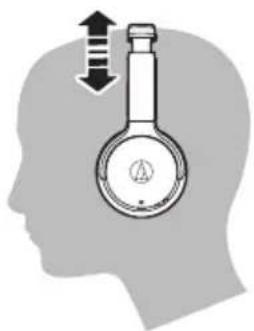
Place the product with the side marked "L" over your left ear and the side marked "R" over your right ear, and adjust the headband length by sliding the adjustable slider so that the earpads cover your ears.
Folding compactly
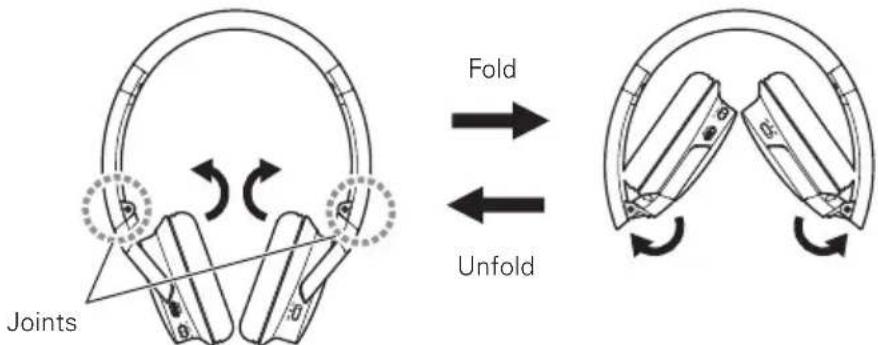
Using the joint as a fulcrum, the housing can be folded into the headband.
- When folding the product, detach the included cable.
- Be careful not to pinch your fingers, etc. in the joint.
- Be sure to return the housing to its original position before using the product.
Using the product
Listening to audio
- To connect for the first time, pair the product and your device by using either the Bluetooth wireless technology or NFC. If you have already paired the product and your Bluetooth device, turn on the product and turn on your device's Bluetooth connection.
- Use your Bluetooth device to start playback, referring to the device's user manual as necessary.

Jog switch
| Press Plays or pauses music and video playback.* | 1 | |
| Press and hold | Depending on the connected device, activates the device's speech recognition feature (such as Siri for compatible iOS devices). | |
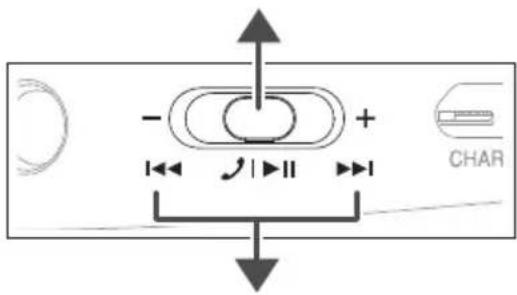
| Slide toward + | Slide and release Increases the volume by 1 level.*2 | |
| Slide and hold (about 2 seconds) Plays the next track.*1 | ||
| Slide toward - | Slide and release Decreases the volume by 1 level.*2 | |
| Slide and hold (about 2 seconds) Plays the previous track.*1 | ||
1 Some controls may not be available for music and video playback on some smartphones.
2 A confirmation tone sounds each time you slide the jog switch. A low confirmation tone is heard when the volume is at the maximum or minimum level.
Using the product
Talking on the phone
- If your Bluetooth device supports telephone features, you can use the product's built-in microphone to talk on the phone.
- When your Bluetooth device receives a phone call, the product sounds a ring tone.
- If a call is received while you are listening to music, music playback is paused. When you finish the call, music playback resumes.
| When | Switch operation Function | |
| Receiving a call | Press the jog switch. Answers the call. | |
| Press and hold the jog switch (about 2 seconds). | Rejects the call. | |
| Talking on a call | Press the jog switch. Ends the call. | |
| Press and hold the jog switch (about 2 seconds). | Each time you press and hold the button (about 2 seconds), you switch the call to your mobile phone or to the product.* | |
| Slide the jog switch toward + or -. Adjusts | the volume of the call. |
- When you hear the confirmation tone, release the jog switch.
Otherfunctions
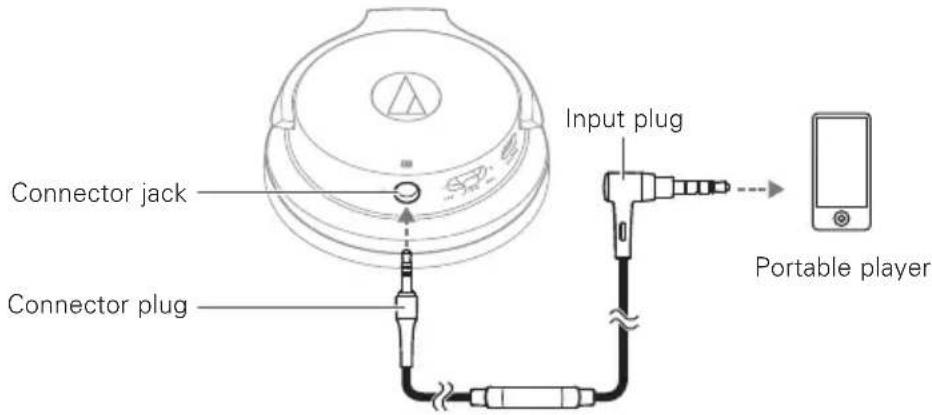
Playthrough function
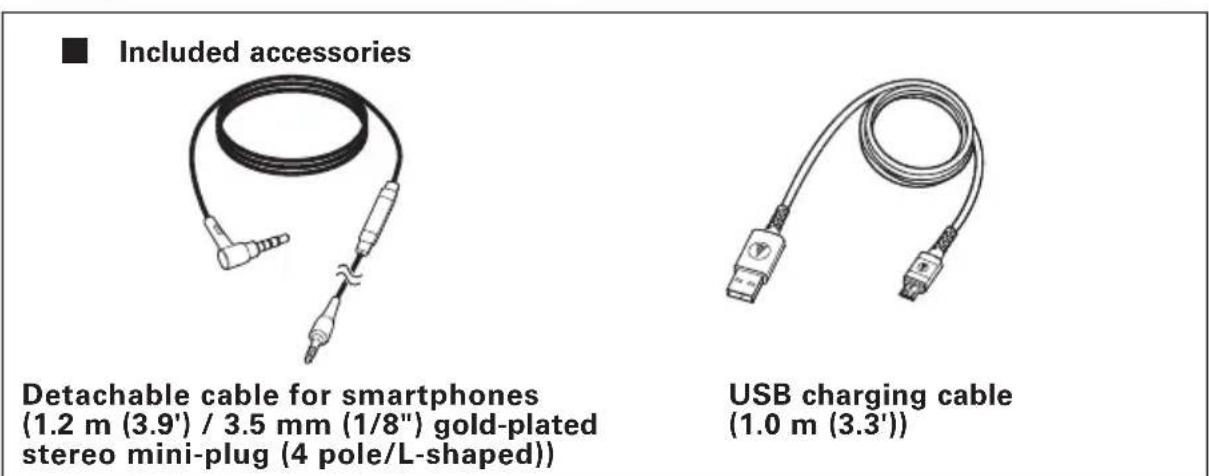
This product features a playthrough function that allows it to be used as a pair of traditional headphones, even if the battery becomes depleted. To connect the product to your portable player, simply connect the connector plug of the included cable to the product's connector jack, and connect the input plug to your portable player.
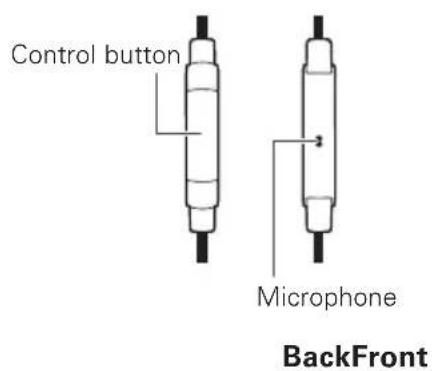
Using the remote control with mic for smartphones
| Control button | Operation |
| Press the control button once. | Playback/pause for music/videos Answering/ending phone calls |
- Some smartphones do not support playback and pause functionality for music/video files.
- Audio-Technica does not provide support for how to use smartphones.
Auto power off function
The product automatically turns off after 5 minutes of not being connected to a device that has its power turned on.
Resetfunction
If the product does not work or other malfunctions occur, make sure the product is turned off and then connect the included USB charging cable. Make sure the cable is carrying power.
Disconnecting and then reconnecting the included USB charging cable will reset the product and should resolve any problem you are experiencing. If the problem persists, please contact your local Audio-Technica dealer.
Cleaning
Get into the habit of regularly cleaning the product to ensure that it will last for a long time. Do not use alcohol, paint thinners or other solvents for cleaning purposes.
To clean, wipe with a dry cloth.
- Wipe away perspiration and any other dirt from the cable with a dry cloth immediately after use. Failure to clean the cable may cause it to deteriorate and harden over time, resulting in malfunction.
- Wipe the plug with a dry cloth if dirty. Failure to clean the plug may cause the sound to cut out and may cause noise.
- Wipe the earpads and headband with a dry cloth if dirty. Perspiration or water on the earpads or headband may cause discoloration. Wipe with a dry cloth and allow to dry in the shade.
- If the product will not be used for an extended period of time, store it in a well-ventilated place free from high temperatures and humidity.
- Earpads are consumable items. They will deteriorate over time due to use and storage, so replace them when necessary. For information about replacing earpads or other parts, or for information about other serviceable parts, contact your local Audio-Technica dealer.
Troubleshooting
| Problem Solution | |
| Power is not supplied. • Charge the product. | |
| Unable to pair. • Devices that communicate usingBluetooth ver. 2.1+EDR or higher can be used with the product. • Place the product and the Bluetooth device within 1 m (3.3') of each other. • Set the profiles for the Bluetooth device. For procedures on how to set profiles, refer to the Bluetooth device's user manual. | |
| Unable to pair using NFC. • Make sure your device is an NFC-compatibleBluetooth device. • Turn on your NFC-compatible Bluetooth device's NFC feature. • Touch the product to the correct location of your NFC-compatible Bluetooth device. • Depending on the NFC-compatible Bluetooth device you are using, the NFC sensitivity may not be strong enough to connect to the product with just one touch. In this case, refer to the NFC-compatible Bluetooth device's user manual. • Depending on the NFC-compatible Bluetooth device you are using, it may take some time to communicate via NFC. Keep the product and your NFC-compatible Bluetooth device touching until the connection is completed. • Remove your NFC-compatible Bluetooth device from its case so that it can communicate via NFC. | |
| No sound is heard / Sound is faint. | • Turn on the power of the product and the Bluetooth device. • Turn up the volume of the product and the Bluetooth device. • If the Bluetooth device is set to the HFP/HSP connection, switch to the A2DP connection. • Remove obstacles between the product and the Bluetooth device and place them closer together. • Switch the output of the Bluetooth device to the Bluetooth connection. |
| Sound is distorted / Noise is heard / Sound cuts out. | • Turn down the volume of the product and the Bluetooth device. • Keep microwaves and other devices such as wireless routers away from the product. • Keep TVs, radios, and devices with built-in tuners away from the product. These devices can also be affected by the product. • Turn off the equalizer settings of the Bluetooth device. • Remove obstacles between the product and the Bluetooth device and place them closer together. |
| Sound cuts out when using the aptX codec. | • Adjust your Bluetooth device's settings to disable the aptX codec. |
| Cannot hear the voice of the caller / Voice of the caller is too quiet. | • Turn on the power of the product and the Bluetooth device. • Turn up the volume of the product and the Bluetooth device. • If the Bluetooth device is set to the A2DP connection, switch to the HFP/HSP connection. • Switch the output of the Bluetooth device to the Bluetooth connection. |
| The product cannot be charged. | • Securely connect the included USB charging cable and charge the product. |
- For details about how to operate your Bluetooth device, refer to the device's user manual.
- If the problem still remains, reset the product. To reset the product, refer to "Reset function" (p.12).
Specifications
Communication specifications
| Communication system | Bluetooth version 4.1 |
| Output | Bluetooth Specification Power Class 2 1.8 mW EIRP |
| Maximum communication range | Line of sight - approx. 10 m (33') |
| Frequency band | 2.402 GHz to 2.480 GHz |
| Modulation method | FHSS |
| Compatible Bluetooth profiles | A2DP, AVRCP, HFP, HSP |
| SupportCodec | Qualcomm® aptX™ audio, AAC, SBC |
| Supported content protection method | SCMS-T |
| Transmission band | 20 to 20,000 Hz |
Headphones
| Type | Closed-back dynamic |
| Driver | 40 mm |
| Sensitivity | 97 dB/mW |
| Frequency response | 5 to 35,000 Hz |
| Impedance | 41 ohms |
| Input jack | 3.5 mm (1/8") stereo mini-jack |
Microphone (on the cable for smartphones)
| Type | Electret condenser |
| Polar pattern | Omnidirectional |
| Sensitivity | -44 dB (1 V/Pa, at 1 kHz) |
| Frequency response | 50 to 4,000 Hz |
Other
| Power supply | DC 3.7 V lithium polymer battery |
| Charging voltage/current | 5 V = 200 mA |
| Charging time | Approx. 5 hours* |
| Operating time Continuous transmission | time including music playback time: Max. approx. 30 hours* Continuous standby time: Max. approx. 1,000 hours* |
| Weight (without cable) Approx. 190 g (6.7 oz) | |
| Operating temperature | 5°C to 40°C (41°F to 104°F) |
| Included accessories Detachable cable for smartphones (1.2 m (3.9') / 3.5 mm (1/8") gold-plated stereo mini Plug (4 pole/L-shaped)), USB charging cable (1.0 m (3.3')) | |
| Sold separately | Earpads, Cable for smartphones |
- The above figures depend on operating conditions.
For product improvement, the product is subject to modification without notice.
Specifications
The Bluetooth® word mark and logos are owned by Bluetooth SIG, Inc. and any use of such marks by Audio-Technica Corporation is under license. All other trademarks are property of their respective owners.
- "AAC" logo is a trademark of Dolby Laboratories.
Qualcomm is a trademark of Qualcomm Incorporated, registered in the United States and other countries, used with permission. aptX is a trademark of Qualcomm Technologies International, Ltd., registered in the United States and other countries, used with permission.
The N-Mark is a trademark or registered trademark of NFC Forum, Inc. in the United States and in other countries.
Android is a trademark of Google Inc.

Introduction
Para clients no Canada
| Status | Padão de exibições do indicator ● Vermelho Azul | ||
| Emparelhamento | Buscando um dispositalo | ● ● ● ● ● ● ● ● ● ● ● ● ● ● ● ● ● ● ● ● ● ● ● ● ● ● ● ● ● ● ● ● ● ● ● ● ● ● ● ● ● ● ● ● ● ● ● ● ● ● ● ● ● ● ● ● ● ● ● ● ● ● ● ● ● ● ● ● ● ● ● ● ● ● ● ● ● ● ● ● ● ● ● ● ● ● ● ● ● ● ● ● ● ● ● ● ● ● ● ● ●● ● ● ● ● ● ● ● ● ● ● ● ● ● ● ● ● ● ● ● ● ● ● ● ● ● ● ● ● ● ● ● ● ● ● ● ● ● ● ● ● ● ● ● ● ● ● ● ● ● ● ● ● ● ● ● ● ● ● ● ● ● ● ● ● ● ● ● ● ● ● ● ● ● ● ● ● ● ● ● ● ● ● ● ● ● ● ● ● ● ● ● ● ● ● ● ● ● ●●● ● ● ● ● ● ● ● ● ● ● ● ● ● ● ● ● ● ● ● ● ● ● ● ● ● ● ● ● ● ● ● ● ● ● ● ● ● ● ● ● ● ● ● ● ● ● ● ● ● ● ● ● ● ● ● ● ● ● ● ● ● ● ● ● ● ● ● ● ● ● ● ● ● ● ● ● ● ● ● ● ● ● ● ● ● ● ● ● ● ● ● ● ● ● ● ● ● ● —— ● ● ● ● ● ● ● ● ● ● ● ● ● ● ● ● ● ● ● ● ● ● ● ● ● ● ● ● ● ● ● ● ● ● ● ● ● ● ● ● ● ● ● ● ● ● ● ● ● ● ● ● ● ● ● ● ● ● ● ● ● ● ● ● ● ● ● ● ● ● ● ● ● ● ● ● ● ● ● ● ● ● ● ● ● ● ● ● ● ● ● ● ● ● ● ● ● ● ● ——— ● ● ● ● ● ● ● ● ● ● ● ● ● ● ● ● ● ● ● ● ● ● ● ● ● ● ● ● ● ● ● ● ● ● ● ● ● ● ● ● ● ● ● ● ● ● ● ● ● ● ● ● ● ● ● ● ● ● ● ● ● ● ● ● ● ● ● ● ● ● ● ● ● ● ● ● ● ● ● ● ● ● ● ● ● ● ● ● ● ● ● ● ● ● ● ● ● ● ● -●●●●●●●●●●●●●●●●●●●●●●●●●●●●●●●●●●●●●●●●●●●●●●●●●●●●●●●●●●●●●●●●●●●●●●●●●●●●●●●●●●●●●●●●●●●●●●●●●●●●▪●●●●●●●●●●●●●●●●●●●●●●●●●●●●●●●●●●●●●●●●●●●●●●●●●●●●●●●●●●●●●●●●●●●●●●●●●●●●●●●●●●●●●●●●●●●●●●●●●●● | |
| Conexão | Esperando para ser connectado | ● — — — — — — — — — — — — — — — — — — — — — — — — — — — — — — — — — — — — — — — — — — — — — — — — — — — — — — — — — — — — — — — — — — — — — — — — — — — — — — — — — — — — — — — — — — — — — — — — — — — — | Intermitente |
| Conectando | ● — — — — — — — — — — — — — — — — — — — — — — — — — — — — — — — — — — — — — — — — — — — — — — — — — — — — — — — — — — — — — — — — — — — — — — — — — — — — — — — — — — — — — — — — — — — — — — — — — | Intermitente | |
| Nível de bateria Baixo nível de bateria | ● — — — — — — — — — — — — — — — — — — — — — — — — — — — — — — — — — — — — — — — — — — — — — — — — — — — — — — — — — — — — — — — — — — — — — — — — — — — — — — — — — — — — — — — — — — — — — — — — — – | Aceso | |
| Carregar | Carregando | ● — — — — — — — — — — — — — — — — — — — — — — — — — — — — — — — — — — — — — — — — — — — — — — — — — — — — — — — — — — — — — — — — — — — — — — — — — — — — — — — — — — — — — — — — — — — — — — — — | Aceso |
| Carregamentopleteo | ● — — — — — — — — — — — — — — — — — — — — — — — — — — — — — — — — — — — — — — — — — — — — — — — — — — — — — — — — — — — — — — — — — — — — — — — — — — — — — — — — — — — — — — — — — — — — — — — — — | ||
Uso do produto
©2017 Audio-Technica Corporation
Global Support Contact: www.at-globalsupport.com
中国大陆客户联系资料
制造商:鐵三角有限公司
代理商:广州市德讯贸易有限公司