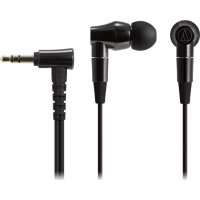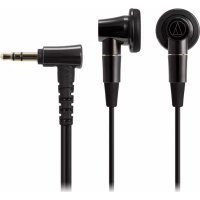
ATHCM2000Ti - Earphones AUDIO TECHNICA - Free user manual and instructions
Find the device manual for free ATHCM2000Ti AUDIO TECHNICA in PDF.



| Brand | AUDIO TECHNICA |
| Model | ATHCM2000Ti |
| Category | In-ear headphones |
| Transducer type | Dynamic |
| Transducer diameter | 15.4 mm |
| Sensitivity | 102 dB/mW |
| Frequency response | 10 Hz - 45,000 Hz |
| Impedance | 16 ohms |
| Maximum input power | 100 mW |
| Connector | Detachable A2DC |
| Weight (without cable) | Approx. 11 g |
| Included cable | 3.5 mm mini-jack (1.2 m) and 4.4 mm balanced (1.2 m) |
| Included accessories | Carrying case, cleaning cloth, ear tips |
| Maintenance | Clean with a dry cloth; avoid alcohol and solvents |
| Safety | Do not use while driving; adjust volume moderately |
| Detachable and replaceable cable | Yes |
| Sold separately | Balanced cable, standard cable |
Frequently Asked Questions - ATHCM2000Ti AUDIO TECHNICA
User questions about ATHCM2000Ti AUDIO TECHNICA
0 question about this device. Answer the ones you know or ask your own.
Ask a new question about this device
Download the instructions for your Earphones in PDF format for free! Find your manual ATHCM2000Ti - AUDIO TECHNICA and take your electronic device back in hand. On this page are published all the documents necessary for the use of your device. ATHCM2000Ti by AUDIO TECHNICA.
USER MANUAL ATHCM2000Ti AUDIO TECHNICA
Thank you for purchasing this product. Before using the product, read through the user manual to ensure that you will use the product correctly. Please keep this manual for future reference.
Caution
- Follow applicable laws regarding mobile phone and headphone use if using the product while driving.
- Do not use the product in places where the inability to hear ambient sound presents a serious risk (such as at railroad crossings, train stations, construction sites).
- The product effectively shields external sound, so you may not hear sound around you clearly while wearing the product. Adjust the volume to a level where you can still hear background sound and monitor the area around you while listening to music.
If you begin to feel unwell while using the product, discontinue use immediately. - To prevent damage to your hearing, do not raise the volume too high. Listening to loud sound for an extended period may cause temporary or permanent hearing loss.
-
Discontinue use if skin irritation results from direct contact with the product.
-
Do not disassemble, modify or attempt to repair the product.
Notes on use
- To ensure compatibility and correct usage, always consult the user manual of any device before connecting the product to it.
- Audio-Technica will not be liable in any way for any loss of data in the unlikely event that such losses should occur while using the product.
- On public transport systems or in other public places, keep the volume low so as not to disturb other people.
- Minimize the volume on your audio device before connecting the product in order to avoid hearing damage from sudden exposure to excessive volume.
- When using the product in a dry environment, you may feel a tingling sensation in your ears. This is caused by static electricity accumulated on your body, not by product malfunction.
- Do not subject the product to strong impact.
- Do not store the product under direct sunlight, near heating devices or in a hot, humid or dusty place. Do not allow the product to get wet.
-
When the product is used for a long time, the product may become discolored due to ultraviolet light (especially direct sunlight) or wear.
-
The included cable may become caught or severed if the product is placed in a bag or pocket without adequate protection.
- Connect/disconnect the cable by holding the plug. Pulling directly on the cable can result in a broken wire and the risk of electric shock.
- Always store the product in the included case.
- Do not wind the cable around your portable audio device. This may damage or sever the cable.
-
Use only the included cable. Using a different cable may result in product malfunction.
-
Lengthening the headphone cable requires a separate extension cable available from your dealer.
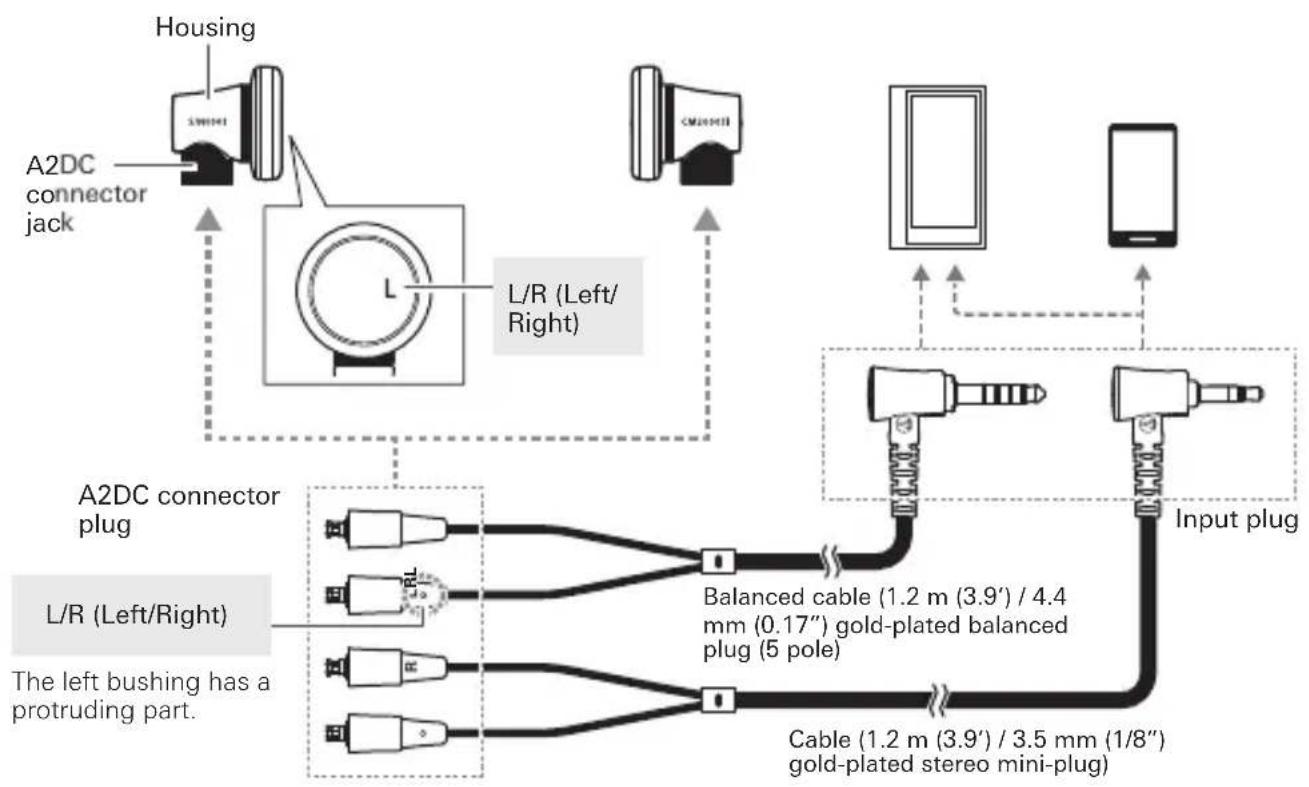
Name of each part
Confirm each part before using the product.
Using the headphones
- Identify the left (L) and right (R) connectors on the included detachable cable and plug each into the appropriate connector jack until it clicks.
Refer to "About the detachable cable" for detailed information. - Lower the volume on the device you intend to use, then connect the "Input plug" to the device's headphone jack.
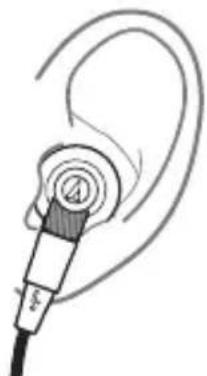
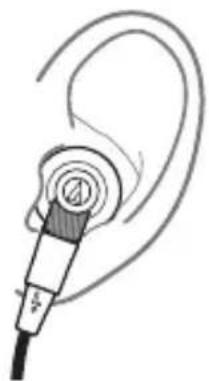
- Insert the side of the product marked "L" (LEFT) into the left ear and the side marked "R" (RIGHT) into the right ear.
-
Turn on your audio device, and adjust volume as necessary.
-
Also read the user manual of your audio device.
Care
Get into the habit of regularly cleaning the product to ensure that it will last for a long time. Do not use alcohol, paint thinners or other solvents for cleaning purposes.
- Use a dry cloth to clean the headphones.
- Use a dry cloth to clean the cable of any sweat or dirt. Failure to clean the cable may cause it to deteriorate and harden over time, resulting in malfunction.
- Wipe the plugs on cable with a dry cloth if dirty. Using the plugs without cleaning them can cause sound interruption or distortion.
- For long-time storage, keep the product in a well-ventilated place without high temperatures and humidity.
About the detachable cable
The cable on the product is detachable. If there are signs of deterioration, replace the cable (sold separately).
* Do not detach the cable except when replacing it with a new cable.
How to replace the detachable cable
The detachable connector is very delicate. Only pull or attach in a straight motion to prevent malfunction.
How to detach the cable
Hold the connector and pull straight out in the direction shown by the arrow.
How to attach the cable
Plug the left or right connector in as shown in the illustration until it clicks.
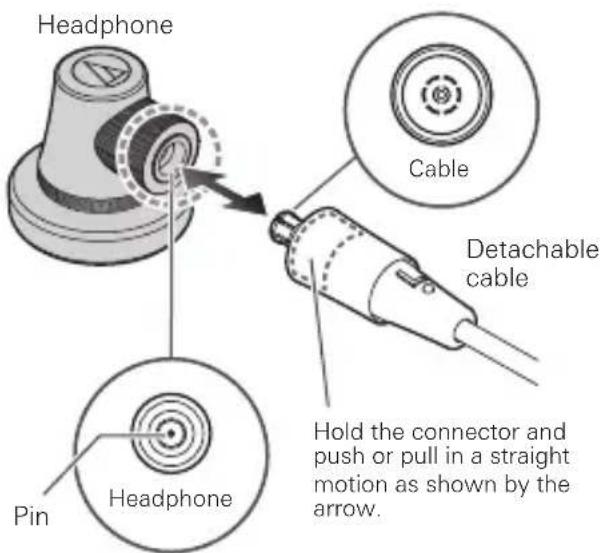
* Take care not to damage the pin in the headphone.
Specifications
| Type | Dynamic | |
| Driver | 15.4 mm | |
| Sensitivity | 102 dB/mW | |
| Frequency response | 10 to 45,000 Hz | |
| Maximum input power | 100 mW | |
| Impedance | 16 ohms | |
| Input jack | A2DC connector jack | |
| Weight (without cable) | Approx. 11 g (0.38 oz) | |
| Included accessories | Cable (1.2 m (3.9') / 3.5 mm (1/8") gold-plated stereomini-plug (L-shaped)), Balanced cable (1.2 m (3.9') / 4.4mm (0.17") gold-plated balanced plug (5 pole / L-shaped)), Case, Cleaning cloth, Earpads | |
| Sold separately | Balanced cable, Cable | |
For product improvement, the product is subject to modification without notice.
PpMueaHnOTHoCHTeIbHO HcNoIb3OBaHHN
-Дяобеспоченя COBmecTIMOCTN npabunbHOrO nCNoIb3OBaHnB Bcerda ObaaNTecb KpykoBoDCTBy NOIb3OBaTeJIЯ NIO6Oro yCTpOINCTBa Nepei NOIcoeINHeHnEM K HEmy daHHoro n3denn.
KOMnAHHa Audio-Technica HIKoM 6pa30m He HeceT OTBeTCTBeHHOCTN 3a IIObIe NOTepN daHHbIX B CInyae BO3HnKHOBeHn TaKOrO MaIOBepoTHO Co6bITn BO BpemN cNoJIb3OBaHn DaHHOro N3dEINr.
He npebbwaIte rpoMKocTb B o6ueCTBeHHOM TpaHCnOpTe NIN BdpyRnx O6ueCTBeHHbIX MecTaX, YTO6bl He MeWaTb dpYrIM IIOJAM.
- Ymehbinte rpoMkoCTb Ha ayDnooyctpOncTBe npei noDCoeHNHeHem DaHHoro N3dEInn BO n36ekHne NOBpeKdEHNr Cnyxu N3-3a BO3dEInCTBnq Hpe3MePHo rpoMkOrO 3Byka.
- Pn nCnoJb3OBAHnn daHHoro n3dEInna B cyXoN OKpykaHoue CpeDe B yuaX MoKeT BO3HnKaTb OuUyueHne NOKaIbIBaHn. 3TO BblBaHO CTaTHueCKm 3NeKTPnueCTBOM, HAKaIIINBaIOUIMcHa BaWem Tepe, a He HApuyeneHem pa60tbi n3deJIin.
- He noDBeprAteu3dEneCnIbHbIM ydapaM.
- HexapHNTe 3dEJIne NOI pRMBIM COJHeYbIM CBETOM, pAOM CHaPBeBaTeJIbHbIM NpBOpAMN INB XApKOM, BIAJXHOM ININ IIbIHOM MecTe. He dOnyckaHTe IONaDaHnBlaTn Ha 3dEJIne.
-ПиИСПОЛБ3OBAHINI3ДENNIBTEYEHNEДПNTELBHO BpeMeHn BO3MOXHO erO O6ecUBeHNBaHne NOI BO3DcICTBnEM yIbTPaΦHNoJETOBOrO CBETA (OCo6eHNO IIOI pIpMbIM COJIHeHbIM CBETOM) IIN I3HaWbAHNIA.
EcnI NOMEcTbN3dJIeBnKaTeNnKapMaH6e3 HndJexKauee 3aunTbI, npunaRaembl KaBeMb MoKeT 3aueNTbcraNNOTOpBaTcbc.
- PoiocoeHnHrTe/OTcoeHNHnTe Ka6eIb, B3aBwncb 3a WTekep. Ecnn NotaHyTb HenocpeDCTBeHHo 3a Ka6eIb, 3TO MOKeT npNBecTn K O6pbBy NpoBOda n NopaxHeHIO 3JIeKTPnueckm TOKOM.
Bcerda xpaHnte n3deneN B npnlaeraemom cyTlpe.
Ha 6MaTaBaIe Ka6eIb BOKpyr NopTaTINBHO ayuOyctpoiCTBa.3To MoKet PnIBecTn K NOBpeKdHIO IIN O6pbBy Ka6eIa.
IcnoIb3yTeToJIbKO npnlaeraMbi Ka6eJI. PnI cNoJIb3OBAHmI pyrTO KabeJBO3MOKHO HApUWeHpe pa60TbI N3dJIa.
ДяунHeHЯKaBЯHayuHnKOB HeoXoIMO nNoIb3OBaTb OTdJIbHbI KaBЯ-yDnHHTeIb, KOtOpbl MoKHO npnoBpctu y DnIepa.
Ha3BaHne KaKdoJ DeTaJI
PpOBepbTe KaKdyIO deTaNb nepeN uCNoJb3OBAHEm n3JeNIA.
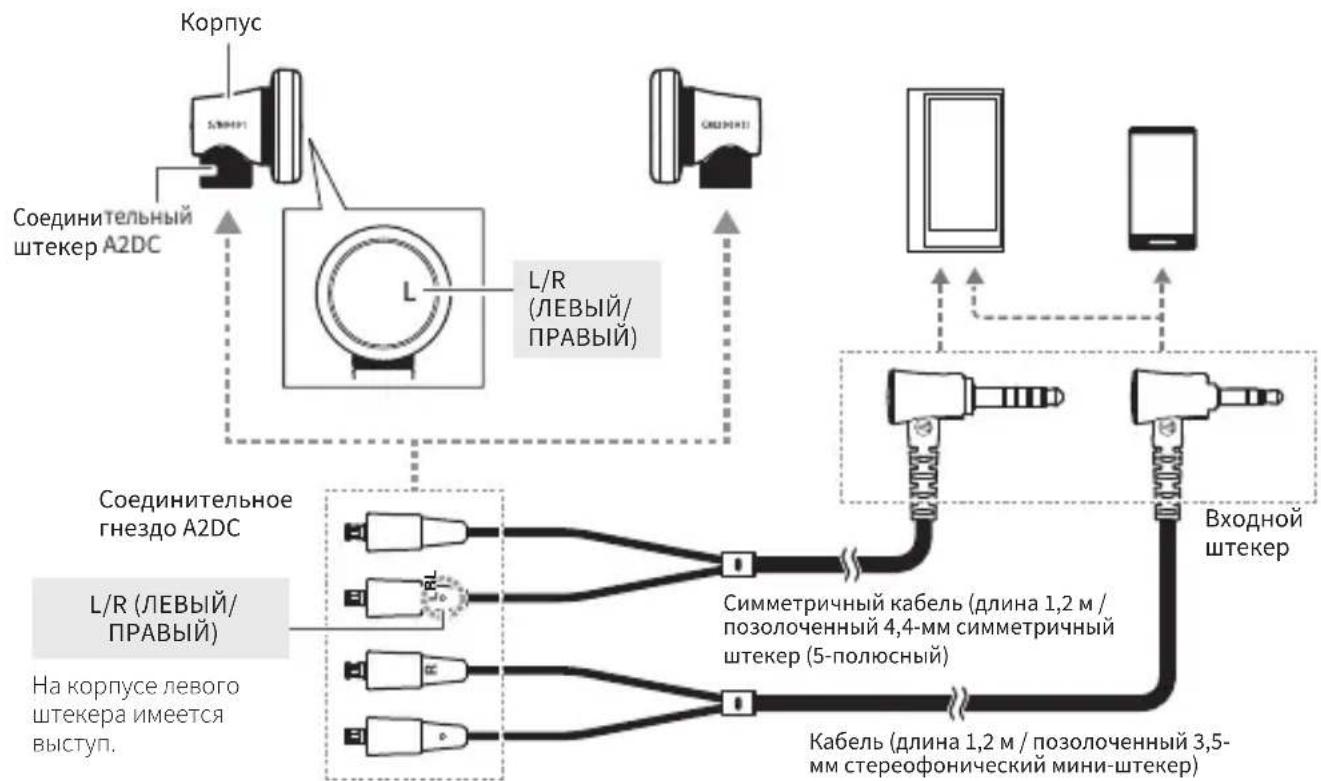
McnoJIb3ObaHne HayuHNKOB
- HauHnte IeBbI (LEFT) n npabI (RIGHT) COeHNHTeIbHbIe ITeKepeI Ha npunaemOM CbeHMOM KaBeI N BCTaBbTe KaJdbI B COOTBetCTByOuee COeHNHTeIbHOe THe3IO DO UeJIKA.
PpO6HeCm.Bpa3eNe"HOpMaunOcBemHom Ka6ene". - YmehbwnTe rpmKocb Ha yctpoNCTBe, KOtOpoe Bbl co6npaetecb nCNOJb3OBaTb, 3aTe mNoDcoEHNHTe "BxOHOH WTEKepe" K rHe3y dJa HayuHKnOB yctpoNCTBa.
3.BctaBte n3dene TaKIM o6pa3OM,HTo6bI CTopoHa co 3HaKOM.L.(JIEBbl) HaxOuNacb Ha IeBOM yxe,a CTopoHa co 3HaKOM.R.(PAPBl)一Ha npabom. - BkHIOHTe ayDIOyCTpOINCTBO uYCTaHOBIne HxKHBn yPOBeHb rPOMKocTn.
Takke npHTte pykoBOCTBO NO knuatau aynooyctpoCTBa.
YxOa 3a n3dennem
Perynno Ounuau Te n3dene nn oecnehenia IInTeIbHOrO cpoKa erO kcnnyatau. He nCnObl3yIte IInOnCTKn Cnpt, pa36abnte nn Kpackn nn npyrne pactBopnte.
-Дя OунstКи HayшнкOB Исплььзут ecxут KaHb.
Дя OуNTK Ka6JIЯ OT Nota n rpr3n HcnoJb3yIte cyxyIO TkaHB. Ecn He OuNtA b Ka6JIb, co BpeMeHem 3TO MOKeT npNBecTn K HapyuWeHIO ero pa6OTo I3-3a yxUdWeHnX xaApKTePncTn K OTBepDeBaHnI.
Bcnyae 3arp3HeHn BbITpnte 7TeKepeHa Ka6ene cyxon TkaHbIO. NcnoJIb3OBAHne 3arpy3HeHHbx 7TeKePOB MoXET IIpNBecT K IIpepbIBaHIO IIN NCKaJKeHnIO 3ByKa.
BoBpemrdoJROBpeMeHHoroXpaHHeNn u3dennne JOnKHO HaxoHTbcra BXopoO npOBetPnBaemOM MeCTe H He DoJxHo NOBepRaTbCra BO3dEYCTBnBO BlicOKHX Tempeatyp N BlaXHOCTN.
06 oTcoeHnHaemom ka6eJe
Ka6eHbHa DaHHOM H3eHNn YBnEeTcO TCOeHNHReMbIM.
Pn HaUNuCneOB NOBpeKdHn 3aMeHnTe Ka6eHb
( npdaetc OTDenbHO).
OTcoeHnHnTeKa6bToIbKO Bcnyaeero3aMeHbHOBbIM Ka6enm.
3aMeHa oTcoeHnHemoro ka6eJra
OToCoeINHReMb coeHNHTeB tpe6yET OeyHb 6epekHO o6paueHn.Bo n36eKaHne NOBpeXdEHHn3BKeKaIte IIN npKpEnIe ero,TOJbKO BInONHnnpaMOJIHeHoe DnHexHne.
OToeunHeHneKa6eNa
Bo3bMNTecb 3a coeHNHTeIb N NOTAHTE ero npraMo B HappaBJIeHnn, yKa3aHHOM CTpeIKoN.
Pnpkpenenne Ka6eJra
Bctabte do ueyka lebbl nnil npabbi coeHHntel, kak noka3aHO Ha pncyHke.

*CobnoaTe ocToPOKHOCTb BO 36eKaHne NOBpeKDeHn WtBtpbKa B rHe3e HayuHNka.