
TP5001M - Thermostat DANFOSS - Free user manual and instructions
Find the device manual for free TP5001M DANFOSS in PDF.



| Brand | Danfoss |
| Model | TP5001M |
| Product type | Programmable room thermostat |
| Power supply | Alkaline batteries (2 x type 357) |
| Display | LCD screen with indicators |
| Programming | 5/2 days, 24h or A/B |
| Number of events per day | Up to 6 |
| Comfort temperature range | 5°C to 30°C (adjustable) |
| Frost protection temperature range | 5°C to 40°C |
| Override function | Yes, temporary until the next programmed event |
| Optimum start control (OSC) | Yes (optional) |
| Clock | Real-time with calendar, automatic summer/winter change |
| Frost protection | Integrated, adjustable |
| Reset | RESET button (partial or full) |
| Low battery indicator | Yes (symbol) |
| Battery life | Approximately 1 year (estimate) |
| Maintenance | Battery replacement after warning (15 days) |
| Safety | Heating stops in case of battery failure (configurable) |
| Operating ambient temperature | 0°C to 40°C (estimate) |
| Compatibility | Standard heating systems |
Frequently Asked Questions - TP5001M DANFOSS
User questions about TP5001M DANFOSS
0 question about this device. Answer the ones you know or ask your own.
Ask a new question about this device
Download the instructions for your Thermostat in PDF format for free! Find your manual TP5001M - DANFOSS and take your electronic device back in hand. On this page are published all the documents necessary for the use of your device. TP5001M by DANFOSS.
USER MANUAL TP5001M DANFOSS
An introduction to your programmable room thermostat
Your programmable room thermostat allows you to programme different temperatures at different time periods. You can programme one set of times and temperatures for week days with a different set of temperatures for weekend days, this is referred to as 5/2 day operation.
The thermostat can also be set up by your installer to provide one set of times and temperatures that are repeated each day of the week. This is referred to as 24 hour operation.
The thermostat can also be set by you to provide two different programming blocks which can then be assigned to any day of the week, this is referred to as A/B programme operation.
All thermostats can be set by your installer to provide up 2, 4 or 6 time and temperature settings each day.
All thermostats feature useful overrides, including a programmable frost setting.
Your thermostat has some advanced features which the installer will set-up if they are required. There are also a number of advanced features which can be set up by you. These advanced settings alter the way that your thermostat operates, some also affect the programming functions and the user overrides. Please read the User Advanced Programming instructions before programming the unit (see page 10).
Preset programmes
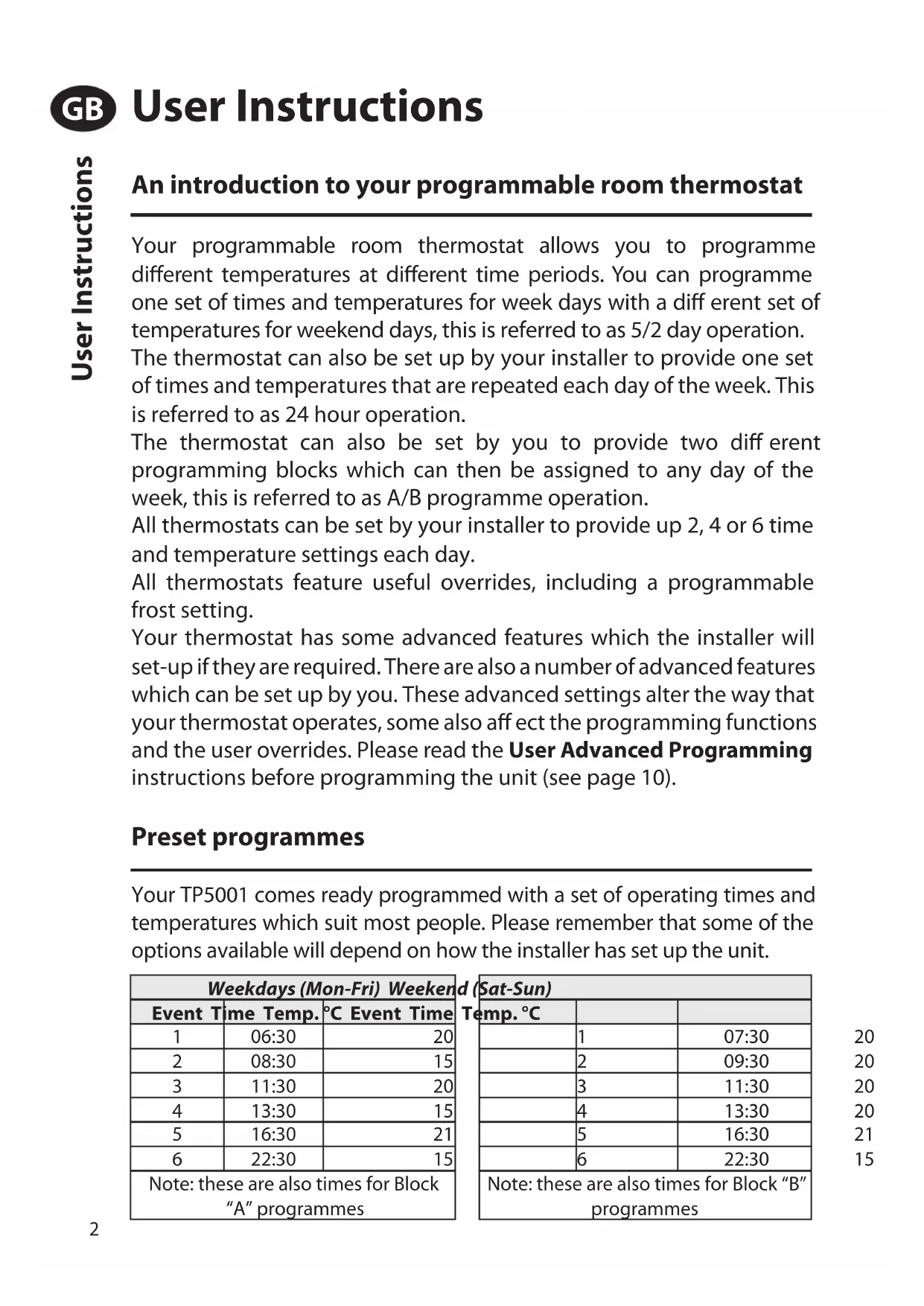
Your TP5001 comes ready programmed with a set of operating times and temperatures which suit most people. Please remember that some of the options available will depend on how the installer has set up the unit.
| Weekdays (Mon-Fri) Weekend (Sat-Sun) | ||
| Event Time Temp. | °C Event Time | Temp. °C |
| 1 | 06:30 | 20 |
| 2 | 08:30 | 15 |
| 3 | 11:30 | 20 |
| 4 | 13:30 | 15 |
| 5 | 16:30 | 21 |
| 6 | 22:30 | 15 |
| Note: these are also times for Block “A” programmes | Note: these are also times for Block “B” programmes | |
Note: If set up for 4 events per day, events 3 & 4 are skipped. If set up for 2 events per day, events 2, 3, 4 & 5 are skipped. In both cases the events are re-numbered.
Before you start
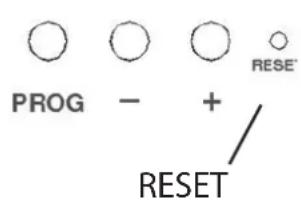
Open the flap on the front of the programmer and press the RESET button with a non-metallic object until the display goes blank. This will ensure that the factory programmes are set and that the microcomputer in the product is operating correctly.
Customising the display
For the sake of clarity, the instructions assume that the display setting uses a 24 hour clock, ^ C and that days of the week are numbered 1-7, (where 1 is Monday). All of these settings can be personalised after the thermostat has been programmed, see pages 8 and 9.
Setting the correct date and time
Your TP5001 incorporates a real time clock with calendar function that automatically changes time in both Spring and Autumn. The time and date is set in the factory for the CET time zone, and does not normally require adjustment. If you live in another time zone refer to "Time zone off set" on page 11. However, should it be found necessary to adjust time or date for any other reason refer to the following instructions.
Setting the date
Press and hold ±b and PROG for 3 seconds, to display date in dd/mm/yy format.
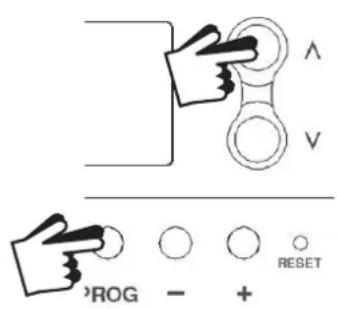
The YEAR number will flash, use A or V to correct the year.
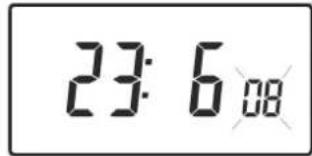
Use - or + to move to MONTH, then use A or V to correct month.
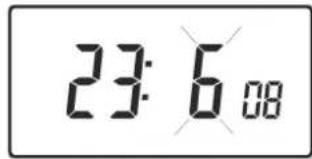
Use - or + to move to DATE in month, then use A or V to correct day in month.
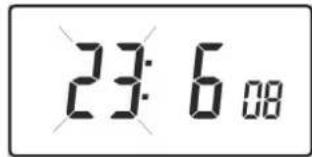
If you attempt to select an invalid date the unit software will reject it and apply the nearest valid date. It is recommended that date is set in the order, yy/mm/dd.
Setting the correct time
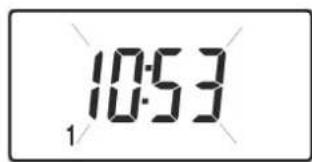
After setting the date, press PROG to display the time. The time display will flash on and off.

Use the + and - buttons to set the correct time (press and hold to change in 10 min. increments).
Setting the correct day
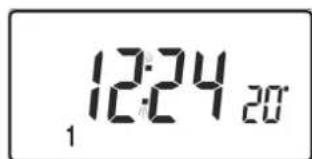
The day of the week is set automatically. Press PROG to return to normal operation (RUN).
Accepting the preset programmes
If you are happy with the preset times shown in the table on page 2 you need take no further action.
Before you change the preset programmes
Your installer will have set the unit to operate in one of the following modes:
- 5/2 day - one set of programmes for weekdays and another for weekends (page 5-6).
- 24 hr - one set of programmes for the whole of the week (page 6).
Alternatively
- A/B - The unit can also be set by you to provide two programme blocks, either of which can be applied to different days of the week. If this is required refer to page 6 for instructions on how to turn on this feature.
Please Note
The unit must be programmed in sequence, event times cannot be set out of sequence.
If you want to leave a preset time as it is, simply press PROG to move to the next setting.
If you want to return the unit to RUN, press PROG and hold until the colon in the display blinks. Alternatively leave alone and the unit will automatically return to RUN after 2 minutes.
Your installer will have set your unit to programme 6, 4 or 2 events per day. This will determine the number of events per day that you are able to programme.
Changing the preset programmes in 5/2 day mode
For Days 1-5 (weekdays)
a) Press PROG until the first preset time and temperature (Event 1 Days 1, 2, 3, 4, 5) appears in display.
b) Use the + and - buttons to adjust the TIME
(press and hold to change in 10 minute increments).
c) Use the ±b and V buttons to adjust the required TEMPERATURE.
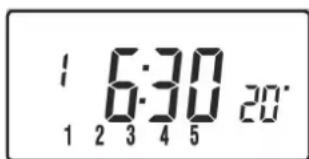
d) Press PROG to move to the next preset time and temperature (Event 2).
e) Repeat steps b, c, & d to programme the remaining weekday events.
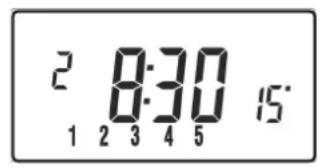
For Days 6-7 (weekends)
Press PROG until the first preset time and temperature (Event 1 Days 6-7) appears in display. Repeat steps b, c, & d above to programme the remaining weekend events.
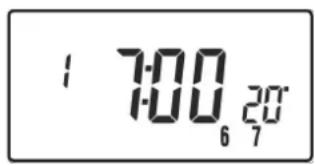
Changing the preset programmes in 24 hour mode
a) Press PROG until the first preset time and temperature (Event 1 for all days of the week) appears in display.
b) Use the + and - buttons to adjust the TIME (press and hold to change in 10 min increments).
c) Use the and V buttons to adjust the required TEMPERATURE.
d) Press PROG to move to the next preset time and temperature (Event 2).
e) Repeat steps b, c, & d to programme the remaining events.
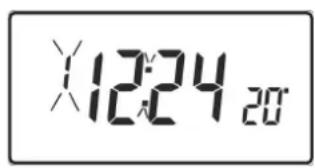
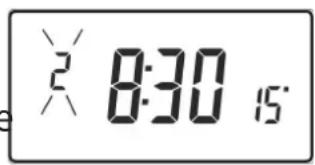
Changing preset programmes for AB programming (Installer setting must be in 5/2 day mode)
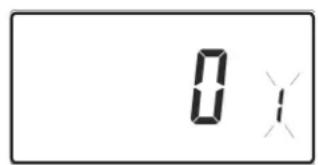
Press and hold PROG and V for 3 seconds. The display will change to the figure opposite. This will take you into User Advanced Programming option 1.
Use ±b and V keys to enable or disable the function (1=enabled, 0=disabled).
Press PROG for 5 seconds until the display changes and the colon in the display flashes to confirm that you are in RUN.
Press PROG once, the display will change to show the default days assigned to programme "A" (days 1, 2, 3, 4 & 5).
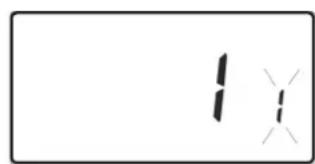
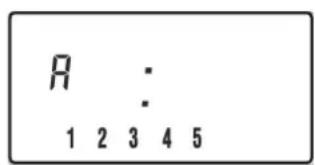
Use the + and - keys to scroll forwards or backwards through the days of the week.
To deselect a day press V , (for example Day 2). To select a day press ±b (for example Day 7).
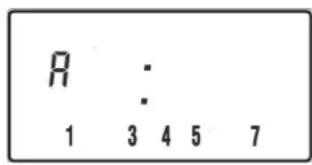
Any deselected days are automatically assigned to programme "B".
Programming "A" programme days and events
a) Press PROG until the first preset time and temperature (Event 1 for
Programme A) appears in display.
b) Use the + and - buttons to adjust the TIME (press and hold to change in 10 minute increments).
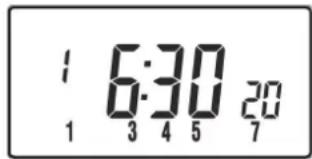
c) Use the ±b and V buttons to adjust the required TEMPERATURE.
d) Press PROG to move to the next preset time and temperature (Event 2).
e) Repeat steps b, c, & d to programme the remaining events.
Programming "B" programme days and events
a) Press PROG until the first preset time and temperature (Event 1 for Programme B) appears in the display.
b) Use the + and - buttons to adjust the TIME (press and hold to change in 10 minute increments).
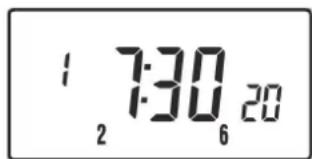
c) Use the ±b and V buttons to adjust the required TEMPERATURE.
d) Press PROG to move to the next preset time and temperature (Event 2).
e) Repeat steps b, c, & d to programme the remaining events.
Running the programme
Press PROG to return to RUN, the colon in the display will blink. The
heating will now follow the times and temperatures programmed.
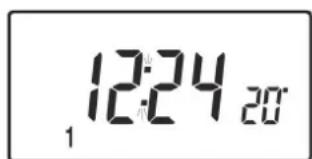
Altering the display to show time or temperature
Press + and - together to change between settings.
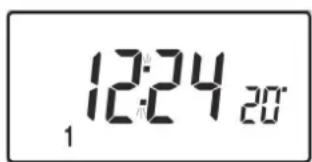
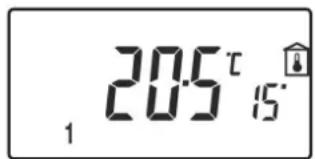
Temporarily alter current programmed temperature
Press ±b or V until required temperature is displayed. Please note that your installer may have restricted both upper and lower temperature settings and the temperature override limits.
This override will automatically be cancelled at the beginning of the next programmed event. Please note that your installer may have restricted the duration of the override to something other than next event.
To change day of week legends from numbers to text
Press ±b and - together to toggle between day numbers and text.
To change time display between 12 & 24 hour clock
Press ±b and ^+ together to toggle between 12 and 24 hour clock.
To change between ^ C and ^ F scaling
Press V and - together to toggle between ^ C and ^ F temperature scaling.
Thermostat mode
a) A constant temperature of between 5 - 30^ can be selected if required. This can provide frost protection for periods away from home, it can also be used to provide untimed higher temperatures if, for example, a family member is sick.
b) Press ±b and V together to enter thermostat mode. The default setting is 8^ , but this can be reprogrammed, see User Advanced Programming, step 10, (page 11).
c) A snowflake symbol will appear in the display when the selected temperature is equal to or less than the programmed frost protection setting.
d) Use the ±b or V buttons to change the temperature away from the programmed temperature to another value.
e) To return to automatic programming press both ±b and V together.

Changing the clock forwards and backwards
This is handled automatically, however, if the manual changeover has been selected follow the instructions below.
To change from Summer to Winter (clocks back)
Press and hold - button.
To change from Winter to Summer (clocks forward)
Press and hold + button.
Remote override into and out of thermostat mode
Selected models are available with a feature which allows a telephone activated switch or window contacts to step the unit into or out of thermostat mode.
The required temperature to be maintained when the building is unoccupied, or when windows are open, must first be set up in User Advanced Programming, step 10, (page 11).
To locally override this feature press both A and V together.
Delay start feature
Your thermostat includes an optional delay start feature to hold off the heating for a time on mild days when the room temperature at the start of an event is close to the programmed value. If you have enabled this function it can be overridden by pressing either or V buttons. To enable this feature, please refer to User Advanced Programming, step 11, (page 12).
Your thermostat includes an optional optimum start control. This feature allows you to set the time at which you require a room temperature by. The thermostat then calculates how soon before the event time the system must be turned up to ensure that the room is at the temperature by the required time. A full description of this and how to enable it and set it up is given in User Advanced Programming, steps 12 & 13, (page 12 and 13).
Battery replacement (battery models only)
When batteries are low a battery symbol will appear on the display. You have 15 days to replace the batteries before the unit shuts down. When replacing batteries ensure that only high quality alkaline cells are use.
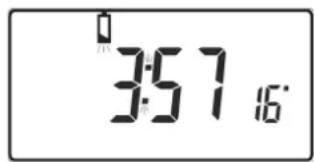
IMPORTANT: After replacing the batteries press and release the RESET button to restart the unit. All date, time, programming and override settings are maintained for the life of the product.
User Advanced Programming Options
Important: The thermostat has been set in the factory to suit most situations, however, there are additional optional settings which can improve the comfort, convenience and energy eff ectiveness of your thermostat. These are set in the User Advanced Programming and Installer Advanced Programming modes.
To access User Advanced Programming
Press and hold V and PROG for 3 seconds. This will take you into User Advanced Programming. Use + and - keys to scroll backwards and forwards between options then and V keys to change option settings. The flashing digit on the right hand of the display indicates the number of the selected option.
| Option 1 - Enable or disable A/B programming (Option 41 set to 5/2) | |
| This enables or disables the A/B programming option. Press + until Option 1 is displayed, use Λ and V to select required setting. | 0 |
| Setting 0 | Disabled, unit operates as 5/2 or 24 hour product depending on installer settings (factory setting) |
| Setting 1 Enabled: activates A/B programming | |
| Option 3 - Calendar clock rules | |
| This establishes the rules that the automatic calendar clock follows to calculate changes between summer and winter time. Press + until Option 3 is displayed, use A and V to select required setting. | |
| Setting 0 Disabled. | |
| Setting 1 | Manual: user must change using + to advance and - to retard displayed time. |
| Setting 2 European rules. (Factory Setting) | |
| Setting 3 US A rules (2007 onwards) | |
| Setting 4 US A rules (pre-2007) | |
| Option 4 - Time zone off set | |
| This feature allows the time zone to be established and corrects time display. Press + until Option 4 is displayed, use ∧ and V to select required setting | 000 y |
| Setting 0 UK | models: this feature should be left at the factory setting of 0. |
| Setting 1 | Central European time models: this feature should be left at the factory setting of +1:00. |
| -12 Hours +14 HoursRest of World: use ∧ and V keys to select offset from Universal time (GMT) for the location in which the thermostat is being installed. | |
| Option 10 - Frost/ thermostat mode setting |
| This feature allows the default frost/thermostat mode temperature to be set. Press + until Option 10 is displayed, use A and V to select required setting. |
| 5-40°C - Factory setting is 8°C, but can be changed to any value between 5 -40°C. |
Option 11 - Start-up method
Your thermostat can start up the system in three different ways. Press + until Option 11 is displayed, use A and V to select required setting.
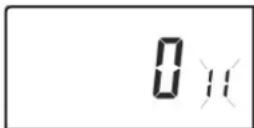
Setting 0 - Normal: Heating is turned up or down at the programmed times.
Setting 1 - Optimum start control (OSC) or Comfort Setting: This allows you to programme the time at which you would like to be up to the required temperature. The thermostat then calculates how soon before the required time the heating is turned up. This will vary with weather conditions ranging from a maximum of 120 minutes to 0 minutes before the programmed event time. This setting must be used together with option 12 to match the optimiser setting to the building in which it is installed.
Setting 2 - Delay start or Economy Setting: This is an alternative to OSC. Set the event times in the normal way taking into account the time that the building takes to heat on an average day. The thermostat monitors switch on time, actual temperature and wanted temperature and delays the start of the heating if the actual temperature is close to the programmed temperature.
Option 12 - Optimum start control pre-heat setting (Option 11 set to 1)
Press + until Option 12 is displayed, use ±b and V to select required setting (only active if Option 11 is set to 1). The optimum start control must be adjusted to match the building energy characteristics. Use the ±b and V keys to selected the required pre-heat period. The table below suggests If the building fails to reach temperature on time, increase minute steps each day until the correct setting is found. If the building reaches temperature ahead of time, decrease minute steps each day until the correct setting is found.
015
0:15 15 mins, warm air system, well insulated building
0:30 30 mins, warm air system, well insulated building.
0:45 45 mins, warm air system poorly insulated building.
1:00 60 mins, radiator system, light weight well insulated building. (Factory Setting)
1:15 75 mins, radiator system, light weight medium insulation.
1:30 90 mins, radiator system, medium weight poorly insulation.
1:45 05 mins, radiator system, heavy weight building, well insulated.
2:00 20 mins, radiator system, heavy weight building, poorly insulated.
| Option 13 - Optimum start control/Delayed start event setting (Option 11 set to 1 or 2) | |
| The Optimum start or delayed start control can be applied to event 1 only or to each event of the day which requires a higher temperature than the previous event. Press + until Option 13 is displayed, use A and V to select required setting (only active if Option 11 is set to 1 or 2). | |
| Setting 0 Ap | plies only to first event of day. (Factory Setting) |
| Setting 1 Ap | plies to each event of the day that requires a higher temperature compared to previous event. |
Overview of installer selectable features which may affect the operation of your thermostat
Temperature range limitation
This allows the installer to programme both upper and lower temperature limits. It may limit the upper and lower temperature that you are able to set on the thermostat.
Temperature override limitation
This allows the installer to limit the number of degrees that you can override the programmed temperature by, it also allows the installer to set rules regarding how long a temperature override will remain in place.
Keyboard lock
This allows the installer to limit or lock the keyboard to prevent unauthorised changes to programme values and limits overrides.
If batteries are not changed within 15 days of a low battery warning, the unit shuts down. In normal circumstances the thermostat turns off the valve or the boiler it is controlling. In extreme climates turning off the heating is likely to result in the building freezing up. To prevent this, the installer can set up the unit to turn ON rather than turn OFF the heating on battery failure. This will consume more fuel but will prevent damage occurring to the building. If appropriate please check that the installer has set this function correctly.
Please note: If you replace the batteries and the LCD does not come on immediately please check battery orientation. Do not leave batteries in the product if the display is not active.
If, after changing the batteries, the screen remains blank it is necessary to carry out a partial reset. See overleaf for details.
Resetting the unit
Partial reset: Press RESET (used to restart micro-computer) if display freezes for any reason. This does not reset any programme, clock or date. It is recommended that this is done at time of installation.
User full reset: Press RESET whilst holding down PROG button. This resets event times and any User Advanced Programme setting, but does not reset time or date.
Installer full reset: This is only available to the installer. In addition to the above all of the Installer Advanced Programming settings are returned to factory settings, however, time, date and service due date are not reset.
Bedienungsanleitung
Programmierbarer Raumthermostat TP5001 + RF - Einführung
For dag 6-7 (weekender)
Dagen 6-7 (weekends)
www.danfoss.com/BusinessAreas/Heating
This product complies with the following EC Directives: Electro-Magnetic Compatibility Directive.
(EMC) (2004/108/EC)
Low Voltage Directive.
(LVD) (2006/95/EC)


Danfoss Ltd.
Ampthill Road
Bedford MK42 9ER
Tel: 0845 1217 400
Fax: 08451217515
Email: danfossrandall@danfoss.com
Website: www.heating.danfoss.co.uk


- An introduction to your programmable room thermostat
- Preset programmes
- Before you start
- Customising the display
- Setting the correct date and time
- Setting the date
- Setting the correct time
- Setting the correct day
- Accepting the preset programmes
- Before you change the preset programmes
- Alternatively
- Please Note
- Changing the preset programmes in 5/2 day mode
- For Days 1-5 (weekdays)
- For Days 6-7 (weekends)
- Changing the preset programmes in 24 hour mode
- Changing preset programmes for AB programming (Installer setting must be in 5/2 day mode)
- Programming "A" programme days and events
- Programming "B" programme days and events
- Running the programme
- Altering the display to show time or temperature
- Temporarily alter current programmed temperature
- To change day of week legends from numbers to text
- To change time display between 12 & 24 hour clock
- To change between ° C and ° F scaling
- Thermostat mode
- Changing the clock forwards and backwards
- To change from Summer to Winter (clocks back)
- To change from Winter to Summer (clocks forward)
- Remote override into and out of thermostat mode
- Delay start feature
- Battery replacement (battery models only)
- User Advanced Programming Options
- To access User Advanced Programming
- Option 11 - Start-up method
- Option 12 - Optimum start control pre-heat setting (Option 11 set to 1)
- Overview of installer selectable features which may affect the operation of your thermostat
- Temperature range limitation
- Temperature override limitation
- Keyboard lock
- Resetting the unit
- Bedienungsanleitung
- For dag 6-7 (weekender)
- Dagen 6-7 (weekends)
- www.danfoss.com/BusinessAreas/Heating
- Danfoss Ltd.
Brand : DANFOSS
Model : TP5001M
Category : Thermostat