IDK832 - Pan Pelgrim - Free user manual and instructions
Find the device manual for free IDK832 Pelgrim in PDF.


| Product type | Induction hob |
| Brand | Pelgrim |
| Model | IDK832 |
| Number of cooking zones | 2 |
| Front zone | 1.4 kW (Ø160 mm) |
| Rear zone | 1.4 kW (Ø160 mm) |
| Power supply | 230 V - 50 Hz, single-phase |
| Total connected power | 2800 W (L1) |
| Built-in dimensions (W x D) | 380 x 510 mm |
| Built-in height | 70 mm |
| Cutout dimensions (W x D) | 350 x 490 mm |
| Minimum distance to rear wall | 40 mm |
| Minimum distance to side wall | 40 mm |
| Power cable length | 120 cm |
| Control type | Touch |
| Functions | Kitchen timer/countdown timer, automatic preheating, residual heat indicator, pan detection, child lock |
| Safety | Overheating protection, cooking time limiter, lock, automatic shut-off |
| Care and cleaning | Mild cleaner and soft cloth; scraper for stubborn residues; avoid abrasives |
| Required cookware type | Ferromagnetic base, min diameter 12 cm |
| Electrical connection | By a qualified installer |
Frequently Asked Questions - IDK832 Pelgrim
User questions about IDK832 Pelgrim
0 question about this device. Answer the ones you know or ask your own.
Ask a new question about this device
Download the instructions for your Pan in PDF format for free! Find your manual IDK832 - Pelgrim and take your electronic device back in hand. On this page are published all the documents necessary for the use of your device. IDK832 by Pelgrim.
USER MANUAL IDK832 Pelgrim
$$ x > = 7 0 m m: y = 0 m m $$
Dimensions d-installation
$$ x > = 7 0 m m: y = 0 m m $$
$$ x > = 7 0 m m: y = 0 m m $$
What you should pay attention to 6
Connection and repair 6
During use 6
Temperature safety 8
Cooking-time limiter 8
Use
Using the touch controls 9
Induction cooking 9
How does induction work 10
Induction noises 10
Pans 11
Operation
Switching on the hob 13
Setting the power 13
Switching off 13
Residual warmth indicator 14
Pandetection 14
Child lock 14
Kitchen / Egg timer 15
Automatic heat-up function 18
Cooking
Healthy cooking 19
Cooking settings 19
Maintenance
Cleaning 21
Faults
General 22
Troubleshooting table 22
Installation
What you need to consider 24
Building in 28
Technical details 29
Environmental aspects
Disposal of packaging and appliance 30
Introduction
This hob has been designed for the real lover of cooking. Cooking on an induction hob has a number of advantages. It is easy, because the hob reacts quickly and can also be set to a very low power level. Because, moreover, it can also be set to a high power level, it can bring things to the boil very quickly. The ample space between the cooking zones makes cooking comfortable.
Cooking on an induction hob is different from cooking on a traditional appliance. Induction cooking makes use of a magnetic field to generate heat. This means that you cannot use just any pan on it. The pans section gives more information about this.
For optimum safety the induction hob is equipped with several temperature protections and a residual heat indicator, which shows which cooking zones are still hot.
This manual describes how you can make the best possible use of the induction hob. In addition to information about operation, you will also find background information that can assist you in using this product. You will also find cooking tables and maintenance tips.
Read the manual thoroughly before using the appliance, and store these instructions in a safe place for future reference.
The manual also serves as reference material for service technicians. Please, therefore, stick the appliance identification card in the space provided, at the back of the manual. The appliance identification card contains all the information that the service technician will need in order to respond appropriately to your needs and questions.
Enjoy your cooking!
Description
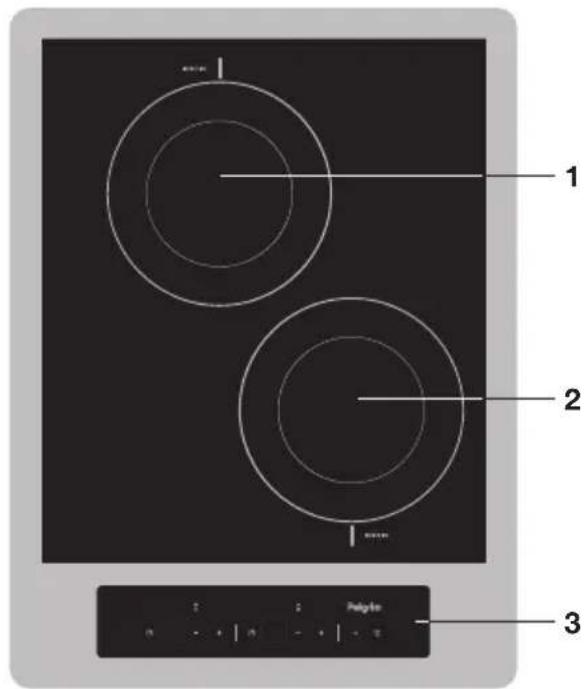
- Cooking zone rear 0160 1,4 kW
- Cooking zone front 0160 1,4 kW
- Control panel
Control panel
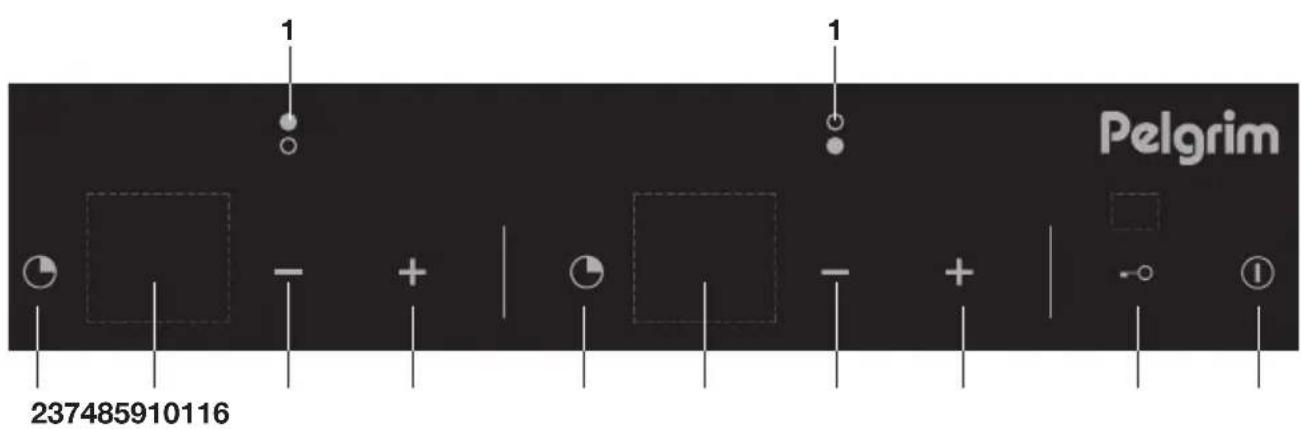
- Cooking zone indicator
- Timer button cooking zone rear
- Indicator level/timer cooking zone rear
-
- button cooking zone rear
-
- button cooking zone rear
-
Timer button cooking zone front
-
Indicator level/timer cooking zone front
-
- button cooking zone front
-
- button cooking zone front
- Child lock button
- On/off button
What you should pay attention to

- Induction cooking is extremely safe. Various safety devices have been incorporated in the hob such as a residual heat indicator and a cooking time limiter. There are nevertheless a number of precautions you should take.
Connection and repair

- This appliance may only be connected by a qualified installer.
- Never open the casing. The casing may only be opened by the service technician.
- Disconnect the electricity from the appliance before starting any repair work. Preferably unplug the appliance, switch the (automatic) fuse(s) off or, in the event of a permanent connection, set the switch in the power supply lead to zero.
During use

- Do not use the hob in temperatures below 5^ .
- This cooking appliance is designed for household use. It is to be used for food preparation only.
- When you use the hob for the first time you will notice a "new smell". This is normal. If the kitchen is well ventilated the smell will soon disappear.
- Remember that if the hob is used on a high setting the heating time will be incredibly short. Do not leave the hob unattended if you are using a zone on a high setting.
- Ensure there is adequate ventilation while the hob is in use. Keep all natural ventilation openings open.
- Do not allow pans to boil dry. The hob itself is protected against overheating but the pan will get very hot indeed and could be damaged. The guarantee does not cover any damage caused by a pan boiling dry.
- Do not use the cooking area as storage space.
- Ensure that there is several centimetres clearance between the hob and the contents of the drawer.
- Do not keep anything combustible in the drawer under the hob.
-
Make sure that flexes of electrical appliances, such as a mixer, cannot touch the hot cooking zone.
-
The zones heat up during use and stay hot for a while afterwards. Keep young children away from the hob during and immediately after cooking.
- Grease and oil are inflammable when overheated. Do not stand too close to the pan. Should oil catch fire, never try to extinguish the fire with water. Put a lid on the pan immediately and switch the cooking zone off.
- Never flambé food under the cooker hood. The high flames could cause a fire, even if the cooker hood is switched off.
- The ceramic top is extremely strong, but not unbreakable. A spice jar or pointed utensil falling on it, for example, could cause it to break.
- Stop using the hob if a break or crack appears. Switch the appliance off immediately, unplug it to avoid electric shocks, and call the service department.
- Never put any metal objects such as baking trays, biscuit tins, saucepan lids or cutlery on the hob. These can heat up extremely quickly and cause burns.
- Keep magnetizable objects (credit cards, bank cards, floppy disks, etc.) away from the appliance. We advise anyone with a pacemaker to consult their cardiologist before using an induction hob.
- Never use a pressure cleaner or steam cleaner to clean the hob.
- This appliance is not intended for use by persons (including children) with reduced physical, sensory or mental capabilities, or lack of experience and knowledge, unless they have been given supervision or instruction concerning use of the appliance by a person responsible for their safety.
- As soon as you remove the pan from the hob, the cooking zone automatically stops. Accustom yourself to stop the cooking zone or hob manually to avoid unintended switching on of the induction hob.
- Never let an empty pan stand on a hotplate that is switched on. While the hotplate is protected and will switch itself off, the pan will be extremely hot. The pan could be damaged.
-
A small object like a pan that is too small (diameter of bottom smaller than 12cm ), a fork or a knife will not be recognised by the appliance. The display continues to flash and the cooking zone will not switch on.
-
The appliance is not intended to be operated by means of an external timer or separate remote-control system.
- If the connecting cable is damaged, it may only be replaced by the manufacturer, the manufacturer's service organisation or equivalently qualified persons, in order to avoid dangerous situations.
Temperature safety
- A sensor continuously measures the temperature of certain parts of the hob. Every cooking zone is equipped with a sensor that measures the temperature of the bottom of the pan to avoid any risk of overheating when a pan boils dry. In case of temperatures rising too high, the power is reduced automatically or the hob switches off automatically.
Cooking-time limiter

- The cooking-time limiter is a safety function of your cooking appliance. It will operate if you forget to switch off your hob.
- Depending on the setting you have chosen, the cooking time will be limited as follows:
| Setting The cooking zone switches automatically off after: | |
| 1 8,5 hours | |
| 2 6,5 hours | |
| 3 5 hours | |
| 4 4 hours | |
| 5 3,5 hours | |
| 6 3 hours | |
| 7 2,5 hours | |
| 8 2 hours | |
| 9 1,5 hours | |
The cooking-time limiter switches the cooking zones off if the time in the table has elapsed.
Using the touch controls
The touch controls may take some getting used to if you are used to other (rotary) controls. Place the tip of your finger flat on the control to achieve the best results. You do not have to apply any pressure.
The touch sensors only react to the light pressure of a fingertip. Do not operate the controls with any other objects. The hob will not switch on when your pet walks over it.
Induction cooking
Induction cooking is fast
- To start you will be surprised by the speed of induction cooking. Especially at higher settings, foods and liquids will boil very rapidly. It is best not to leave pans unattended to avoid them boiling over or boiling dry.
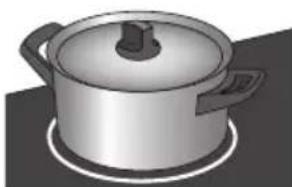
No heat loss and cold handles with induction cooking.
The power will be adjusted
- In the case of induction cooking, it is only the part of the zone on which the pan stands that is used. If you use a small pan on a large zone, the power will be adjusted to the diameter of the pan. The power will thus be lower and it will take longer before the food in the pan comes to the boil.
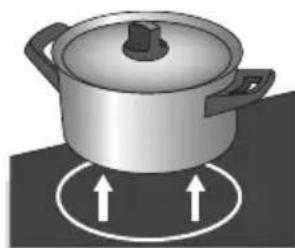

Attention
Grains of sand may cause scratches which cannot be removed. Only put pans with a clean base on the cooking surface and always pick pans up to move them.
- Do not use the hob as a worktop.
- Always keep the lid on the pan when cooking, in order to avoid energy loss.
How does induction work
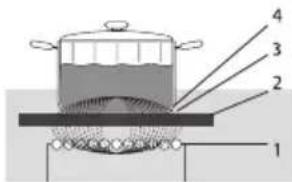
The coil (1) in the hob (2) generates a magnetic field (3). By placing a pan with an iron base (4) on the coil, a current is induced in the base of the pan.
A magnetic field is generated in the appliance. By placing a pan with an iron base on a cooking zone, a current is induced in the pan base. This induced current generates heat in the base of the pan.
Easy
The electronic controls are accurate and easy to set. On the lowest setting, you can melt chocolate directly in the pan, for example, or cook ingredients that you would normally heat in a bain-marie.
Fast
Thanks to the induction hob's high power levels, bringing food to the boil is very quick. Cooking food through takes just as long as for other types of cooking.
Clean
The hob is easy to clean. Because the cooking zones do not get any hotter than the pans themselves, food spills cannot burn on.
Safe
The heat is generated in the pan itself. The glass top does not get any warmer than the pan. This means that the cooking zone is considerable cooler compared to that from a Ceramic hob or a gasburner. Once a pan has been taken away, the cooking zone cools down quickly.
Induction noises
A ticking sound
This is caused by the capacity limiter on the front and back zones. Ticking can also occur at lower settings.
Pans are making noise
Pans can make some noise during cooking. This is caused by the energy flowing from the hob to the saucepan. At high settings this is perfectly normal for some pans. It will not damage either the pans or the hob.
The fan is making noise
To enlarge the lifespan of the electronics, the appliance is equipped with a fan. If you use the appliance intense, the fan is activated to cool down the appliance and you will hear a buzzing sound. The fan runs on for several minutes after the hob has been switched off.
Pans

Pans for induction cooking
Induction cooking requires a particular quality of pan.
Attention
- Pans that have already been used for cooking on a gas hob are no longer suitable for use on an induction hob.
- Only use pans that are suitable for electric and induction cooking with:
a thick base (minimum 2.25 mm);
a flat base.
- The best are pans with the 'Class Induction' quality mark.

Tip
You can check for yourself whether your pans are suitable using a magnet. A pan is suitable if the base of the pan is attracted by the magnet.
| Suitable Unsuitable | |
| Special stainless steel pans Earthe | hware |
| Class Induction Stainless steel | |
| Hard-wearing enamelled pans Porcelain | |
| Enamelled cast-iron pans Copper | |
| Plastic | |
| Aluminium |
One is advised to use the pans recommended by Pelgrim for the automatic cooking programs (see www.pelgrimservice.nl).

Attention
Be careful with enamelled sheet-steel pans:
- the enamel may chip (the enamel comes loose from the steel), if you switch the hob on at a high setting when the pan is (too) dry;
- the base of the pan may warp - due, for example, to overheating or to the use of too high a power level.

Attention
Never use pans with a misshapen base. A hollow or rounded base can interfere with the operation of the overheating protection, so that the appliance becomes too hot. This may lead to the glass top cracking and the pan base melting. Damage arising from the use of unsuitable pans or from boiling dry is excluded from the guarantee.
Minimum pan diameter
The diameter of the bottom of the pan must be at least 12cm . You will achieve the best results by using a pan with the same diameter as the zone. If a pan is too small the zone will not work.
Pressure cookers
Induction cooking is very suitable for cooking in pressure cookers. The cooking zone reacts very quickly, and so the pressure cooker is quickly up to pressure. As soon as you switch a cooking zone off, the cooking process stops immediately.
Switching on

The cooking zones have 9 levels.
- Place a pan on a cooking zone.
- Touch the On/Off button.
The display shows '0'. If no further action is taken, the hob automatically switches off after 10 seconds.
Setting the power

- Tap the + button or - button of the desired cooking zone.
Tapping the + button for the first time displays setting '4'.
Tapping the - button for the first time displays setting '9'.
- Use the + or the - button of the desired cooking zone to choose the correct setting.
The hob will automatically start in the chosen setting.

Tip
- You can touch and hold the - button and the + button to set the desired level faster.
Switching off
Switching off one cooking zone
The cooking zone is switched on. The display shows a power setting between 1 and 9.
- Touch and hold the + button and the - button of the cooking zone you wish to switch off for one second.
Or:
- Select setting "0." by touching the - button.
Switching off all of the cooking zones at the same time
The hob is in stand-by mode, or one or more of the cooking zones are switched on.
- Briefly touch the On/Off button to switch off all of the cooking zones at the same time.
You will hear a single beep. No lights are illuminated except for (possibly) the residual heat indicator "H". The hob is now switched off.
Residual heat indicator
The zone can remain hot for some time after having been used. An 'H' remains on the display as long as the cooking zone is hot.
Pandetection

If the hob does not detect a (ferrous) pan after the cooking power has been set, the display will blink and the hob will remain cold. If a (ferrous) pan is not placed on the cooking zone within 1 minute, the cooking zone will automatically switch off (see also page 11 and 12 'Pans').
Child lock
You can secure the hob with the (child)lock. With this setting, the hob cannot be switched on and the cooking zone settings cannot be changed.
The child lock button gives you access to the following two functions:
- The (standard) lock mode: prevents settings from being accidentally changed, all of the set cooking processes remain active.
- The child lock mode: prevents the hob from being accidentally switched on, all of the cooking zones and the cooking timers/egg timers must be switched off.

Switch the hob to (standard) lock mode
One or more cooking zones are active.
- Touch and hold the child lock button. Attention! All of the set cooking processes remain active. The red light above the child lock button is constantly illuminated. All of the buttons are inactive, except the child lock button and the On/Off button.
- Touch and hold the child lock button again to switch off lock mode and unlock the control panel.
Switching on the child lock
The hob is in stand-by mode. The display for each cooking zone shows '0.'
- Touch and hold the child lock button to switch on the child lock. The red light above the child lock button is constantly illuminated.

- If no buttons are touched within 10 seconds, the cooking zone will automatically switch off. The child lock remains active. You can even switch off the hob.
Tip
Switch the hob to child lock mode before cleaning it to prevent it accidentally switching on.
Kitchen / Egg timer
A kitchen timer can be set for each cooking zone. All of the kitchen timers can be used at the same time. The hob also has an egg timer. Both the kitchen timer and the egg timer can be set to a maximum of 99 minutes.
The egg timer works the same way as the kitchen timer, but is not linked to a cooking zone. If set, the egg timer will continue to run after the hob has been switched off. The egg timer can only be switched off when the hob is switched on.
| The kitchen timer The egg timer | |
| The kitchen timer must be linked to a cooking zone. This means that the cooking zone switches off when the set time elapses. | The egg timer is not linked to a cooking zone. The egg timer continues after the hob has been switched off. |

Attention
- When a cooking zone has an activated egg timer, the cooking zone cannot be activated.
- When two digits are visible in the display, the elapsed or remaining time of a kitchen timer or egg timer is displayed.
- When one digit is visible in the display, the level of a cooking zone is displayed.
- A blinking LED-light above the displays shows that the set time of a kitchen timer or egg timer is visible and adjustable.
- A statically illuminated LED-light above the displays shows a kitchen timer or egg timer is active, but not currently being displayed.
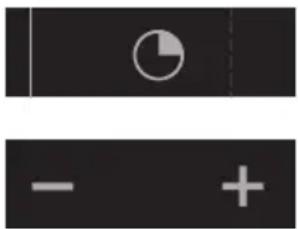
Switching on the egg timer
The hob is switched on, the cooking zone is not switched on.
- Press the kitchen / egg timer button.
The red light above the middle of the displays is blinking.
- Set the desired cooking time using the + button and - button.
The time starts counting down as soon as the + button or - button is released. De egg timer remains visible, the red indicator light is blinking and the time remains adjustable. When no time is set with the + button or - button, the egg timer will automatically switch off after 10 seconds.
- When no zones are active, de hob switches off after 10 seconds.
The egg timer remains visible and the red light above the displays is statically illuminated.
Switching off the egg timer (when no cooking zones are active)
- Press the On/Off button.
The LED-light above the display starts blinking.
- Touch and hold the - button until "01." shows in the display. Then press the - button again until "00." shows in the display.
The egg timer is now in stand-by mode. The egg timer automatically switches off after 10 seconds.
Switching off the egg timer (when 1 or more cooking zones are active)
- Touch and hold the - button off the egg timer you wish to turn off until "01." shows in the display. Then press the - button again until "00." shows in the display.
The egg timer is now in stand-by mode. The egg timer automatically switches off after 10 seconds.
Assigning and switching on the kitchen timer
The hob is switched on. The kitchen timer can only be linked to cooking zones that are active
- Press the kitchen / egg timer button of the desired cooking zone to activate the kitchen timer.
- Use the + button and - button to set the desired cooking time. The kitchen timer can be set as long as the LED-light above the displays is blinking. After 10 seconds, the power level of the

cooking zone appears in the display. An active kitchen timer can be recognised by a statically illuminated LED-light above the displays. If you do not use the + button and - button to set a time, the kitchen timer will automatically switch off after 10 seconds.
- Repeat the steps above to set a kitchen timer for another active cooking zone.
Attention
- By pressing the kitchen / egg timer button of a running kitchen timer, the remaining time becomes visible. The LED-light starts blinking and the set time may be adjusted.
- 10 seconds before the set time elapses, the remaining 10 seconds count down in the display.
Switching off the kitchen timer
- Press the kitchen / egg timer button to show the kitchen timer. The LED-light above the set time starts blinking.
- Touch and hold the - button for the kitchen timer/egg timer until "01." shows in the display. Touch the - button again.
The kitchen timer is now in stand-by mode. The selected kitchen timer automatically switches off after 10 seconds.
Switching off the kitchen timer/egg timer alarm
When the set time/cooking time has elapsed, the alarm rings and the red light for the active kitchen timer/egg timer flashes "00".
- Touch any button to switch off the alarm.

Tip
- You can touch and hold the - button and the + button to set the desired cooking time faster.
- If you press the - button immediately after switching on the kitchen timer/egg timer, you can set the desired cooking time starting at 30 minutes (the display shows '30.).
Automatic heat-up function
The automatic heat-up function temporarily increases the power (setting '9.) to heat the contents of the pan faster. This function is available in all settings except setting '9.'
Switching on the automatic heat-up function
The hob is switched on.
- Use the + button to select setting 'A.' (comes after '9.').
- 'A.' and '9.' flash alternately in the display.
- Use the - or the + button to set the desired power. If you select power setting 4, '4.' and 'A.' will flash alternately in the display. (Attention! After 10 seconds, the cooking zone needs to be reactivated before the + button can be used to increase the setting. The - button then works as an off button).
- When the pan has reached the desired temperature, the automatic heat-up function automatically switches off and the cooking zone continues at the set power.

Tip
A quick way of setting 'A.' is by setting the cooking zone to '9.' using the - button and then touching the + button once for setting 'A.'
The below table shows the duration of the automatic heat-up function for each power setting:
| Setting 1 2 3 | 4 5 6 | 7 8 | ||||||
| Seconds 50 | 90 150 | 220 32 | 0 540 | 150 240 |
Switching off the automatic heat-up function
The hob is switched on. 'A.' and the power setting flash alternately in the display. The cooking zone is active.
- Touch the - button of the cooking zone.
A different power setting is shown in the display and 'A.' stops flashing. Or:
- Select setting '9'. Or:
- Touch the - and the + button for the cooking zone at the same time.
The display shows setting '0.','A.' stops flashing and the cooking zone is switched off.
Healthy cooking
Burning point of different types of oil
To ensure your food is fried as healthily as possible, Atag recommends choosing the type of oil according to the frying temperature. Each oil has a different burning point at which toxic gasses are released. The below table shows the burning points for various types of oil.
| Oil Smoke point ℃ | |
| Extra virgin olive oil 160 ℃ | |
| Butter 177 ℃ | |
| Coconut oil 177 ℃ | |
| Canola oil 204 ℃ | |
| Virgin olive oil 216 ℃ | |
| Sunflower oil 227 ℃ | |
| Corn oil 232 ℃ | |
| Peanut oil 232 ℃ | |
| Rice oil 255 ℃ | |
| Olive oil 242 ℃ |
Cooking settings
Because the settings depend on the quantity and composition of the contents of the pan, the table below is intended as a guideline only.
Use setting 9 to:
- bring the food or liquid to the boil quickly;
- 'shrink' greens;
heat oil and fat; - bring a pressure cooker up to pressure.
Use setting 8 to:
sear meats;
- fry flatfish;
- fry omelettes;
- fry boiled potatoes;
- deep fry foods.
Use setting 7 to:
- fry thick pancakes;
- fry thick slices of breaded meat;
- fry bacon (fat);
- fry raw potatoes;
make French toast; - frybreadedfish.
Use settings 6 and 5 to:
complete the cooking of large quantities;
defrost hard vegetables;
- fry thin slices of breaded meat.
Use settings 4-1 to:
simmer bouillon;
stew meats;
simmer vegetables;
- melting chocolate;
- melting cheese.
Cleaning
Tip
Set the child lock before you start cleaning the hob.
Daily cleaning
- Although food spills cannot burn into the glass, we nevertheless recommend you to clean the hob immediately after use.
- Best for daily cleaning is a damp cloth with a mild cleaning agent.
- Dry with kitchen paper or a dry teacloth.
Stubborn stains
- Stubborn stains can also be removed with a mild cleaning agent such as washing-up liquid.
- Remove water marks and lime scale with vinegar.
- Metal marks (caused by sliding pans) can be difficult to remove. Special agents are available.
- Use a glass scraper to remove food spills. Melted plastic and sugar is also best removed with a glass scraper.

Never use
- Never use abrasives. They leave scratches in which dirt and lime scale can accumulate.
- Never use anything sharp such as steel wool or scourers.
General
If you notice a crack in the glass top (however small), switch the hob off immediately, unplug the hob, turn off the (automatic) fuse switch(es) in the meter cupboard or, in the event of a permanent connection, set the switch in the power supply lead to zero.) Contact the service department.
Troubleshooting table
If the appliance does not work properly, this does not always mean that it is defective. Try to deal with the problem yourself first by checking the points mentioned below or check for more information the website 'www.pelgrimservice.nl'.
| Symptom Possible cause Solution | ||
| The display lights up when the hob is activated for the first time. | This is the standard set-up routine. | Normal operation. |
| The fan runs on for several minutes after the hob has been switched off. | The hob is cooling. Normal operation. | |
| A slight smell is noticeable the first few times the hob is used. | The new appliance is heating up. | This is normal and will disappear once it has been used a few times. Ventilate the kitchen. |
| You can hear a ticking sound in your hob. | This is caused by the capacity limiter on the front and back zones. Ticking can also occur at lower settings. | Normal operation. |
| The pans make a noise while cooking. | This is caused by the energy flowing from the hob to the saucepan. | At high settings this is perfectly normal for some pans. It will not damage either the pans or the hob. |
| You have switched on a cooking zone, but the display keeps flashing. | The pan you are using is not suitable for induction cooking. or has a diameter of less than 12 cm. | Use a suitable pan, see page 11 and 12. |
| A cooking zone suddenly stops working and you hear a signal. | The preset time has ended. Switch | Switch the bleep off by pressing the + or - button of the timer. |
| Symptom Possible cause Solution | ||
| The hob is not working and nothing appears in the display. | There is no power supply due to a defective cable or a faulty connection. | Check the fuses or the electric switch (if there is no plug). |
| A fuse blows as soon as the hob is switched on. | The hob has been wrongly connected. | Check the electrical connections. |
| Error code ER22. | The control panel is dirty or has water lying on it. | Clean the control panel. |
| Error code F0 up to and including F6 and FC. | Defective generator. Contact the service department. | |
| Error code E2. | Appliance over heated. The appliance has been switched off because of over heating. Let the appliance cool down and start again on a lower setting. | |
| Error code U400. | The appliance has been connected incorrectly and/or the mains voltage is too high. | Let your connection be changed. |
| Error code ↙. | You touched and hold a button too long. | Do not hold and touch the button too long. |
| Other error codes. | Defective generator. Contact the service department. | |
What you need to consider
Safety instructions for the installation
- The connection must comply with national and local regulations.
The appliance must always be earthed. - This appliance may only be connected by a competent electrical installer.
- The connection cable must hang freely and is not to be fed through a drawer.
- If you want to make a fixed connection, make sure that a multipolar switch with a contact separation of at least 3mm is fitted in the supply line.
- The worktop the hob is built into must be flat.
- The walls and the worktop surrounding the appliance must be heat resistant up to at least 85^ . Even though the appliance itself does not get hot, the heat of the hot pan could discolour or deform the wall.
- Damage caused by incorrect connection, installation or use, will not be covered by the guarantee.
- The wall socket and plug must be accessible at all times.
- Ensure that the power cord will not come in contact with parts that can become hot.
- Do not use an adapter or an extension lead to connect the device to the electrical mains. Safe use of the device cannot be guaranteed with these accessories.
- Installation, maintenance or repairs should only be carried out by professionals who are authorized by the manufacturer, as failure to do so will void the warranty.
- Disconnect the electricity from the appliance before starting any repair work. Preferably unplug the appliance, switch the (automatic) fuse(s) off or, in the event of a permanent connection, set the switch in the power supply lead to zero.
- Faulty parts may only be replaced by original Pelgrim parts. Only those parts are guaranteed by Pelgrim to meet the safety requirements.
- If the connecting cable is damaged, it may only be replaced by the manufacturer, the manufacturer's service organisation or equivalently qualified persons, in order to avoid dangerous situations.
Clearance
Sufficient all-round clearance is essential to the safe use of the hob. Check that there is enough clearance.
The dimensions and recesses are shown in the illustrations beneath.
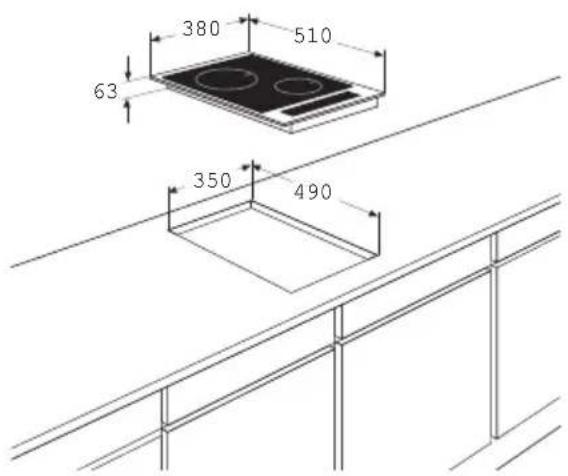
Installation dimensions
inside the cabinet
x < 70mm:y = 70mm - x
x> = 70mm:y = 0mm
If the hob is wider than the cupboard, with a worktop less than 70mm thick, saw a cut-out in both sides of the cupboard, so the appliance is detached from the cupboard.
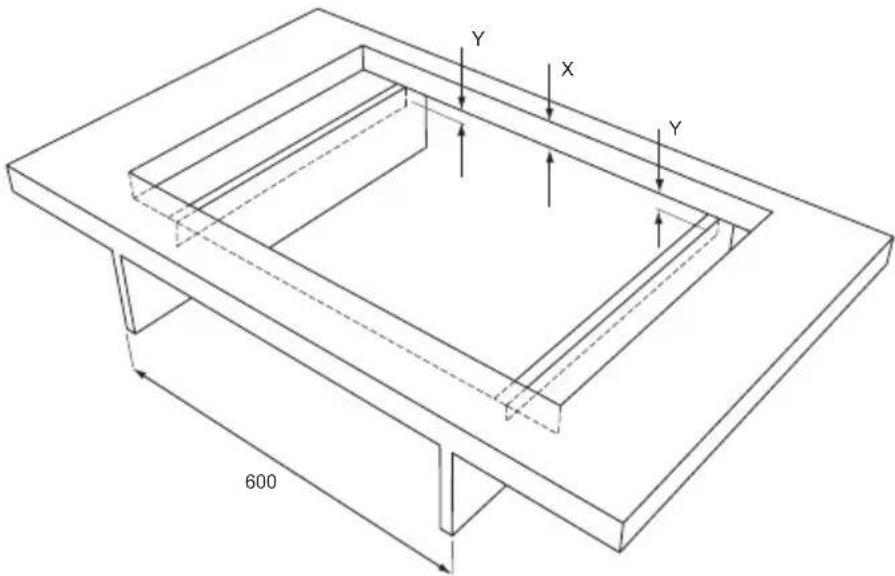
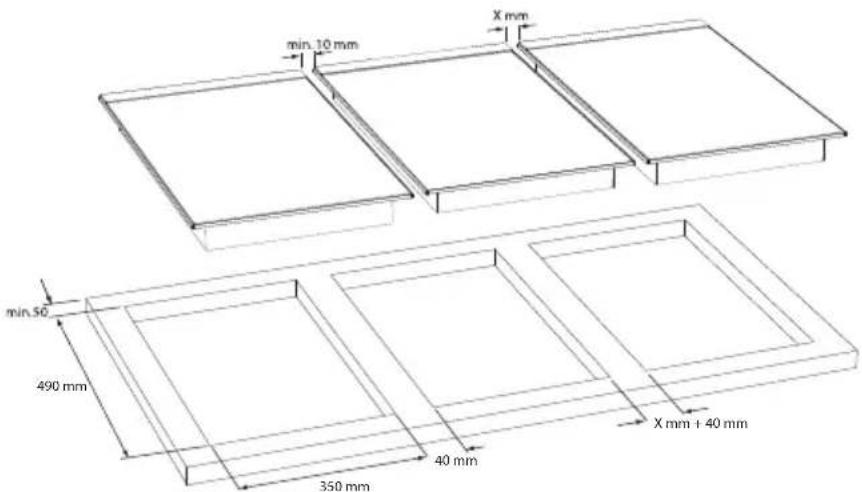
Fitted-unit situation with space
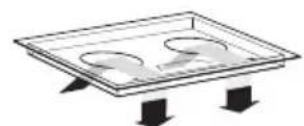
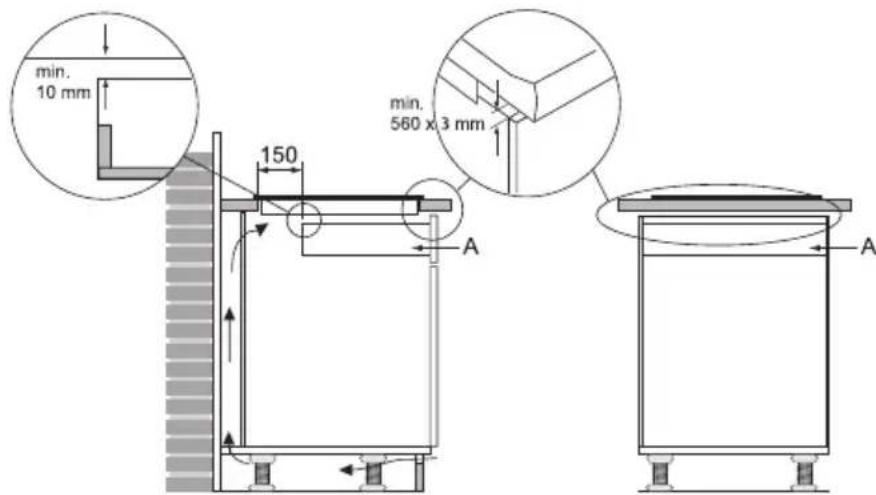
Ventilation
The electronics in the appliance need cooling. The appliance will automatically switch off if there is insufficient air circulation. There are ventilation openings on the underside of the appliance. It must be possible for cool air to be drawn in through these openings. There are outlet openings on the underside and at the front of the appliance.
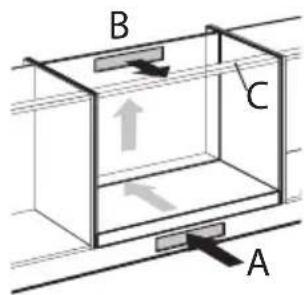
Constructing above a load or an oven or fixed pannel
Ventilation occurs through the plinth (A) and the back of the cupboard (B). Saw out the ventilation openings (min. 100cm^2 ). Air supply A is not necessary if there is another opening that can supply air together with opening B.
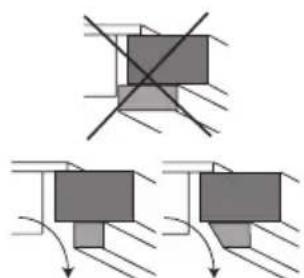
Make sure the crossbar does not impede the airflow. Plane or saw the crossbar C diagonally if necessary.
Do not allow a drawer to block the ventilation openings on the bottom of the appliance. If there is a drawer under the hob, a gap of at least the width of the hob should be made at the front. The distance between the drawer A and the hob should be at least 10mm .
Building in
Cut opening in worktop
- Saw the opening in the worktop. This should be done very accurately (see building in dimensions on p. 25).
- If the woodtop is made of treated wood, then coat the sawn surfaces of the top with sealing varnish, to prevent moisture causing the top to swell.
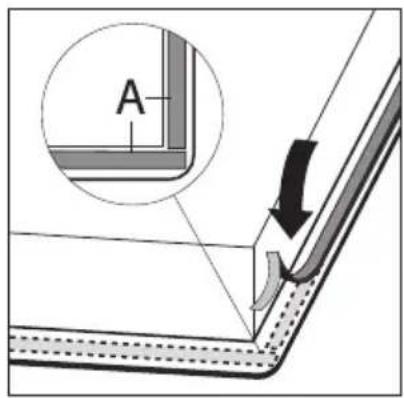
Placing the sealing tape
Remove the protective foil of the sealing tape (A) and attach the sealing strip in the edge of the rvs plate. Do not attach the sealing strip through the corner. Instead, cut 4 pieces that fit tightly together in the corners.
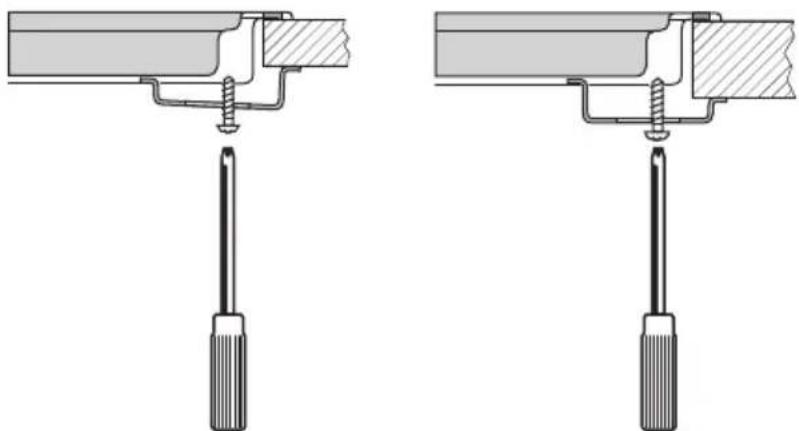
Install appliance and make connections
- Place the appliance in the worktop and secure it using the mounting brackets and screws supplied.
- Connect the appliance to the mains.
Technical details
This appliance complies with all relevant CE directives.
| Hob type IDK832RVS | |
| Induction x | |
| Connection 230V - 50Hz | |
| Phases 1 | |
| Maximum capacity cooking zones | |
| Front 1,4 kW (Ø160) | |
| Rear 1,4 kW (Ø160) | |
| Connected load | |
| L1 2800 W | |
| Total connected load 2800 W | |
| (Building in) dimensions | |
| Appliance width x depth 380 x 510 mm | |
| Build-in height from top of worktop 70 mm | |
| Cut-out width x depth 350 x 490 mm | |
| Minimal distance cut-out to back wall 40 mm | |
| Minimal distance cut-out to side wall 40 mm | |
| Length cord 120 cm | |
Disposal of packaging and appliance
In the manufacturing of this appliance durable materials were used. Make sure to dispose of this equipment responsibly at the end of its lifecycle. Ask the authorities for more information regarding this.
The appliance packaging is recyclable. The following may have been used:
cardboard;
polythene film (PE);
CFC-free polystyrene (PS hard foam).
Dispose of these materials in a responsible manner and in accordance with government regulations.
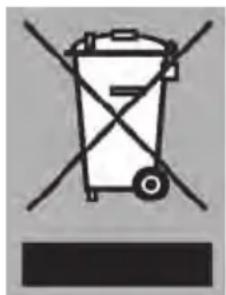
As a reminder of the need to dispose of household appliances separately, the product is marked with the symbol of a crossed-out wheeled dustbin. This means that at the end of its working life, the product must not be disposed of as urban waste. It must be taken to a special local authority differentiated waste collection centre or to a dealer providing this service.
Disposing of a household appliance separately avoids possible negative consequences for the environment and health deriving from inappropriate disposal and enables the constituent materials to be recovered to obtain significant savings in energy and resources.
Declaration of conformity
We declare that our products meet the applicable European Directives, Decisions and Regulations and the requirements listed in the standards referenced.