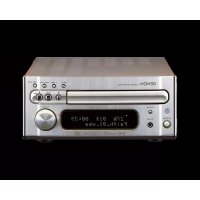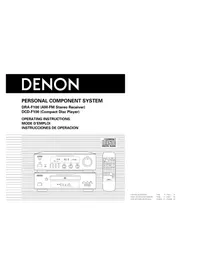
DF100MC - Hi-Fi System DENON - Free user manual and instructions
Find the device manual for free DF100MC DENON in PDF.



| Product type | Hi-Fi stereo system |
| Brand | DENON |
| Model | DF100MC |
| Amplifier output power | 30 W + 30 W (4 Ω, DIN) |
| Tuner bands | AM / FM |
| CD player | Yes, programmable, repeat, random |
| Number of preset stations | 40 (AM or FM) |
| Dimensions (amplifier) | 270 × 84 × 269 mm |
| Dimensions (CD player) | 270 × 84 × 264 mm |
| Weight (CD player) | 2.7 kg |
| Weight (remote control) | 130 g (with batteries) |
| Power supply | AC 120 V, 60 Hz |
| Power consumption | 130 W (total) |
| Remote control | Yes, model RC-829, R6P/AA batteries |
| Supplied antennas | Indoor FM antenna, AM loop |
| Audio inputs | Phono (MM), CD, Tape, MD, AUX |
| Audio outputs | Speakers (4 Ω min), headphones, recording |
| Timer functions | Daily and sleep (10-60 min) |
| Disc cleaning | Soft cloth from center to edge |
| Protection | Short-circuit protection circuit |
Frequently Asked Questions - DF100MC DENON
User questions about DF100MC DENON
0 question about this device. Answer the ones you know or ask your own.
Ask a new question about this device
Download the instructions for your Hi-Fi System in PDF format for free! Find your manual DF100MC - DENON and take your electronic device back in hand. On this page are published all the documents necessary for the use of your device. DF100MC by DENON.
USER MANUAL DF100MC DENON
DRA-F100 (AM-FM Stereo Receiver)
DCD-F100 (Compact Disc Player)
OPERATING INSTRUCTIONS
MODE D'EMPLOI
text_image
DENON FRY-1000 VCC RDC 50 FM 90.0 P30. 1200 C: 1000 A: 70 RDC 50 RDC 40 RDC 30 RDC 20 RDC 10 RDC 5 RDC 3 RDC 2 RDC 1 RDC 5 RDC 3 RDC 2 RDC 1 RDC 5 RDC 3 RDC 2 RDC 1 RDC 5 RDC 3 RDC 2 RDC 1 RDC 5 RDC 3 RDC 2 RDC 1 RDC 5 RDC 3 RDC 2 RDC 2 RDC 1 RDC 5 RDC 3 RDC 2 RDC 1 RDC 5 RDC 3 RDC 2 RDC 1 RDC 5 RDC 3 RDC 2 RDC 1 RDC 5 RDC 3 RDC 2 RDC 1 RDC 5 RDC 4 RDC 3 RDC 2 RDC 1 RDC 5 RDC 3 RDC 2 RDC 1 RDC 5 RDC 3 RDC 2 RDC 1 RDC 5 RDC 3 RDC 2 RDC 1 RDC 5 RDC 3 RDC 2 RDC 1 RDC 4 RDC 3 RDC 2 RDC 1 RDC 5 RDC 3 RDC 2 RDC 1 RDC 4 RDC 3 RDC 2 RDC 1 RDC 5 RDC 3 RDC 2 RDC 1 RDC 4 RDC 3 RDC 2 RDC 1 RDC 4 RDC 3 RDC 2 RDC 1 RDC 4 RDC 3 RDC 2 RDC 1 RDC 4 RDC 3 RDC 2 RDC 1 RDC 4 RDC 3 RDC 2 RDC 1 RDC 5 RDC 3 RDC 2 RDC 1 RDC 4 RDC 3 RDC 2 RDC 1 RDC 4 RDC 3 RDC 2 RDC 1 RDC 5 RDC 3 RDC 2 RDC 1 RDC 4 RDC 3FOR ENGLISH READERS
- Read Instructions - All the safety and operating instructions should be read before the appliance is operated.
- Retain Instructions - The safety and operating instructions should be retained for future reference.
- Hood Warnings – All warnings on the appliance and in the operating instructions should be adhered to.
- Follow Instructions - All operating and use instructions should be followed.
- Water and Moisture - The appliance should not be used near water - for example, near a bathtub, washbowl, kitchen sink, laundry tub, in a wet basement, or near a swimming pool, and the like.
- Carts and Stands - The appliance should be used only with a cart or stand that is recommended by the manufacturer.
6A. An appliance and cart combination should be moved with cars. Quick stops, excessive force, and uneven surfaces may cause the appliance and cart combination to overturn - Wall or Ceiling Mounting - The appliance should be mounted to a wall or ceiling only as recommended by the manufacturer.
- Ventilation - The appliance should be situated so that its location or position does not interfere with its proper ventilation. For example, the appliance should not be situated on a bed, sofa, rug, or similar surface that may block the ventilation openings, or, placed in a built-in installation, such as a bookcase or cabinet that may impede the flow of air through the ventilation openings.
- Heat - The appliance should be situated away from heat sources such as radiators, heat registers, stoves, or other appliances (including amplifiers) that produce heat.
- Power Sources - The appliance should be connected to a power supply only of the type described in the operating instructions or as marked on the appliance.
- Grounding or Polarization – Precautions should be taken so that the grounding or polarization means of an appliance is not defeated.

text_image
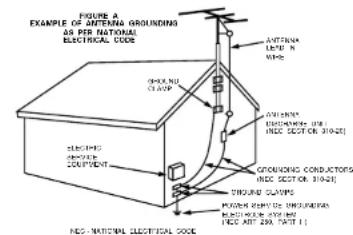
FIGURE A EXAMPLE OF ANTERNA GROUNDING AN PER NATIONAL ELECTRICAL CODE ANTenna LAMP N WBS GROUNING CLOTHING ANTenna LEMONITOR (FIRE) INCE SECTOR 310-25 GROUNDING CONDUCTORS INCE SECTOR 310-24 TURURE CLAPINGS PUMSURE PLUMBING CONDUCTORS BEANS FOR INCE ANT. 29A, 310-11 NEO-NATIONAL ELECTRICAL CODE- Power Cord Protection - Power supply cords should be routed so that they are not likely to be walked on or pinched by items placed upon or against them, paying particular attention to cords at plugs, convenience receptacles, and the point where they exit from the spoliance.
- Cleaning - The appliance should be cleaned only as recommended by the manufacturer.
- Power Lines - An outdoor antenna should be located away from power lines.
- Outdoor Antenna Grounding - It on outside antenna is connected to the receiver, but sure the antenna system is grounded so as to provide some protection against voltage surges and built-up static charges. Article 810 of the National Electrical Code, ANSINFRA 70, provides information with regard to proper grounding of the mast and supporting structure, grounding of the lead wire to an antenna-discharge unit, size of grounding conductors, location of antenna-discharge unit, connection to grounding electrodes, and requirements for the grounding electrode. See Figure A.
- Nonuse Periods – The power cord of the appliance should be unplugged from the outlet when left unused for a long period of time.
- Object and Liquid Entry - Care should be taken so that objects do not fall and liquids are not spilled into the enclosure through openings.
- Damage Requiring Service – The appliance should be serviced by qualified service personnel when:
A. The power-supply cord or the plug has been damaged, or
B. Objects have fallen, or liquid has been spilled into the appliance; or
C. The appliance has been exposed to rain; or
D. The appliance does not appear to operate normally or exhibits a marked change in performance; or
E. The appliance has been dropped, or the enclosure damaged.
- Servicing – The user should not attempt to service the appliance beyond that described in the operating instructions. All other servicing should be referred to qualified service personnel.
IMPORTANT TO SAFETY
WARNING:
TO PREVENT FIRE OR SHOCK HAZARD, DO NOT EXPOSE THIS APPLIANCE TO RAIN OR MOIS-TURE.
CAUTION:
- Handle the power supply cord carefully
Do not damage or deform the power supply cord. If it is damaged or deformed, it may cause electric shock or malfunction when used. When removing from wall outlet, be sure to remove by holding the plug attachment and not by pulling the cord.
- Do not open the top cover
In order to prevent electric shock, do not open the top cover.
If problems occur, contact your DENON DEALER.
- Do not place anything inside
Do not place metal objects or spill liquid inside the system.
Electric shock or malfunction may result.

CAUTION RISK OF ELECTRIC SHOCK DO NOT OPEN

CAUTION:
TO REDUCE THE RISK OF ELECTRIC SHOCK, DO NOT REMOVE COVER (OR BACK). NO USER-SERVICEABLE PARTS INSIDE. REFER SERVICING TO QUALIFIED SERVICE PERSONNEL.

The lightning flash with arrowhead symbol, within an equilateral triangle, is intended to alert the user to the presence of uninsulated "dangerous voltage" within the product's enclosure that may be of sufficient magnitude to constitute a risk of electric shock to persons.

The exclamation point within an equilateral triangle is intended to alert the user to the presence of important operating and maintenance (servicing) instructions in the literature accompanying the appliance.
NOTE:
This system uses the semiconductor laser. To allow you to enjoy music at a stable operation, it is recommended to use this in a room of 5 °C (41 °F) - 35 °C (95 °F).
CAUTION:
USE OF CONTROLS OR ADJUSTMENTS OR REFOR-MANCE OF PROCEDURES OTHER THAN THOSE SPECIFIED HEREIN MAY RESULT IN HAZARDOUS RADIATION EXPOSURE.
THE COMPACT DISC PLAYER SHOULD NOT BE ADJUSTED OR REPAIRED BY ANYONE EXCEPT PROPERLY QUALIFIED SERVICE PERSONNEL.
This device complies with Part 15 of the FCC Rules. Operation is subject to the following two conditions: (1) This device may not cause harmful interference, and (2) this device must accept any interference received, including interference that may cause undesired operation.
This Class B digital apparatus meets all requirements of the Canadian Interference-Causing Equipment Regulations.
TO PREVENT ELECTRIC SHOCK DO NOT USE THIS (POLARIZED) PLUG WITH AN EXTENSION CORD, RECEPTACLE OR OTHER OUTLET UNLESS THE BLADES CAN BE FULLY INSERTED TO PREVENT BLADE EXPOSURE.
ATTENTION
POUR PREVENIR LES CHOCS ELECTRIQUES NE PAS UTILISER CETTE FICHE POLARISEE AVEC UN PROLONGATEUR UNE PRISE DE COURANT OU UNE AUTRE SORTIE DE COURANT, SAUF SI LES LAMES PEUVENT ETRE INSEREES A FOND SANS EN LAISSER AUCUNE PARTIE A DECOUVERT.
ENGLISH FRANCAIS ESPAÑOL
FRONT PANEL / PANNEAU AVANT / PANEL FRONTAL
AM-FM STEREO RECEIVER
SINTO AMPLIFICATORE STEREO AM-FM RECEPTOR ESTEREOFÓNICO AM-FM
See ENGLISH Page 7
* (For sets with ventilation holes)
- Do not obstruct the ventilation holes.
- Ne pas obatruer les trous d'acration.
- No obstruys los orificios de ventilación.
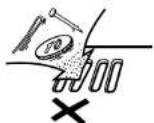
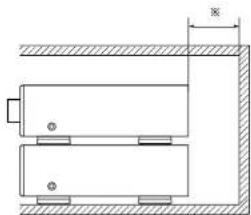
For heat dispersal, leave at least 10 cm of space between the top, back and sides of this unit and the wall or other components.
• PRECAUTIONS D'INSTALLATION
text_image
Diagram of a device control panel with labeled ports and indicators* Wall Mur Pared
natural_image
Pure mechanical diagram showing a rectangular component with mounting holes and a dimension line (no text or symbols)"SERIAL NO.
PLEASE RECORD UNIT SERIAL NUMBER ATTACHED TO THE REAR OF THE CABINET FOR FUTURE REFERENCE"
ENGLISH
CONTENTS
1 Main Features ....5
2 Before Using 5
3 Connecting the Included Antennas 5
4 Connections 6
5 Part Names, Functions and Displays .....7, 8
- Receiver 7
• CD Player ....8
6 Remote Control Unit 9,10
7 Listening to Radio Programs 1
8 Using the Timer 12 - 14
9 | Playing CDs ....15
- About Compact Discs ....15
• Normal Playback 15, 16
- Various Playback Functions .....16 - 18
10 Other Information....19
11 Specifications 19
12 Troubleshooting 20
DENON Service Network....53, 54
Check that the following parts are included in the package aside from the main unit:
• DRA-F100 (AM-FM stereo receiver)
- Remote control unit (RC-829) ....1
■ R6P/AA batteries ....2
- Operating instructions ....1
■ FM antenna .... 1
- AM loop antenna ....1
• DCD-F100 (Compact disc player)
- System connector cable .... 1
- RCA pin-plug cord....1
1 MAIN FEATURES
• Quality power for high quality sound
30 W + 30 W |4 Ω/ohms, DINI high quality amplifier and terminals for large speakers.
- High sound quality, multi-function CD player
- Two types of timers
Two timer settings can be made - everyday and sleep - Easy-to-use remote control unit
2 BEFORE USING
Read the following before using the system.
• Before turning on the power
Check again that all connections are correct and that there are no problems with the connection cords. Be sure to unlock the power cord before connecting or disconnecting the connection cords.
- Humming may be produced if this system is set near a TV or other audio equipment.
If this happens, try changing the position of the equipment or the connection cords.
- Moving the system
Be sure to remove CDs before moving the system. If a CD is left in the CD player, it may be scratched. To prevent short-circuits or damage to the connection cords, always unplug the power cord and disconnect all connection cords to other audio equipment.
• Condensation (dew)
Condensation (water droplets) may be produced on internal optical lenses or discs in the following cases:
- Directly after a heater is turned on.
- When the system is in a steamy or humid room.
- When the system is moved abruptly from a cold place (room) to a warm room.
- Should condensation occur;
The signals on the disc cannot be read and the system will not function properly. Remove the disc than let the system set with the power on. The condensation will evaporate in one hour or less, at which time the system will function normally.
- Note that some of the illustrations used for explanations in this manual may differ from the actual system.
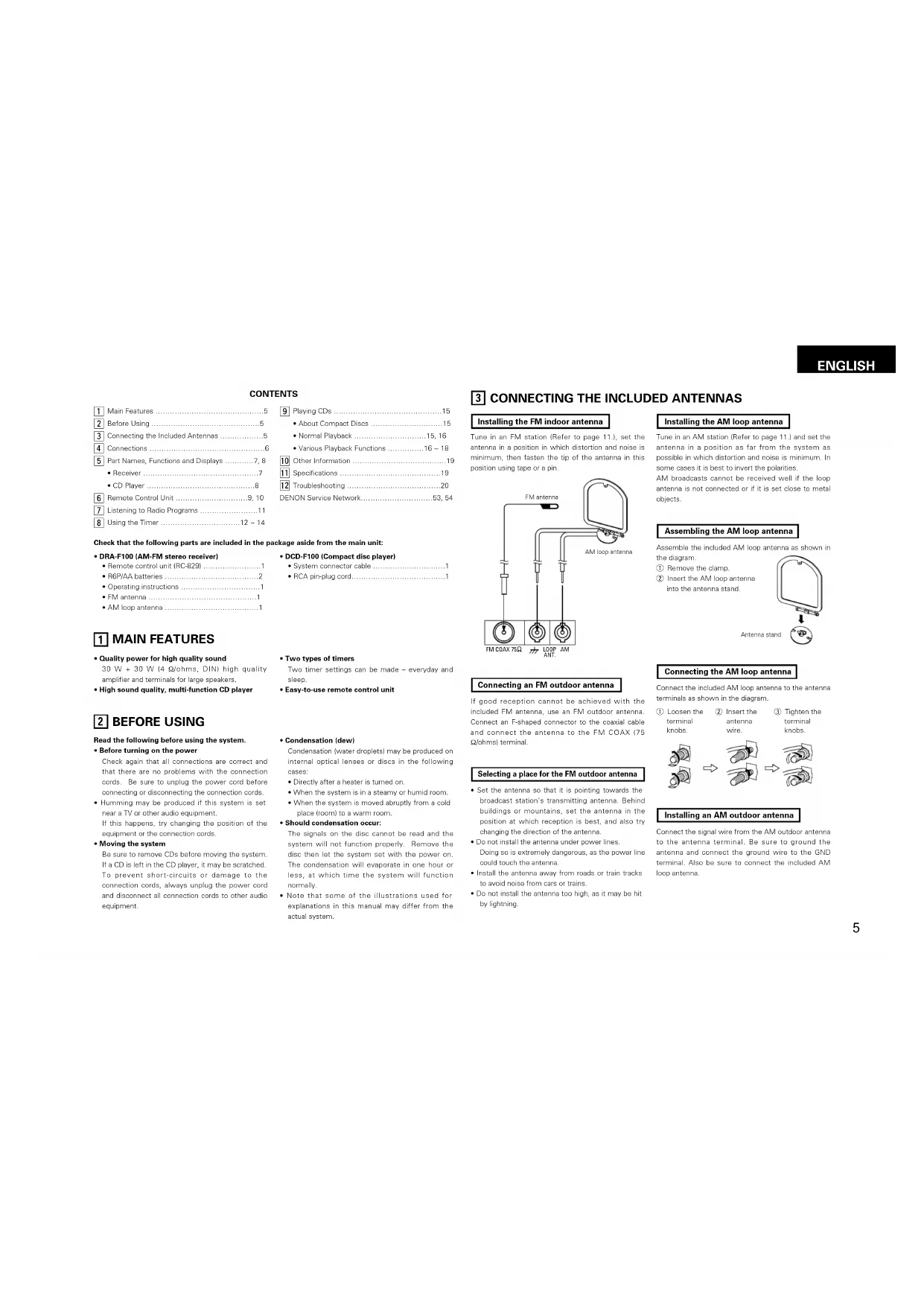
3 CONNECTING THE INCLUDED ANTENNAS
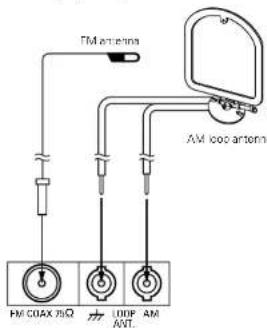
Installing the FM indoor antenna
Tune in an FM station (Refer to page 11.1, set the antenna in a position in which distortion and noise is minimum, then fasten the tip of the antenna in this position using tape or a pin.
text_image
FM antennas AM 1000 antennas FM COAX 75Ω LOOP ANT AMConnecting an FM outdoor antenna
If good reception cannot be achieved with the included FM antenna, use an FM outdoor antenna. Connect an F-shaped connector to the cosxial cable and connect the antennas to the FM COAX (75 Q/ohms) terminal.
Selecting a place for the FM outdoor antenna
- Set the antenna so that it is pointing towards the broadcast station's transmitting antenna. Behind buildings or mountains, set the antenna in the position at which reception is best, and also try changing the direction of the antenna
- Do not install the antenna under power lines. Doing so is extremely dangerous, as the power line could touch the antenna.
• Install the antenna away from roads or train tracks to avoid noise from cars or trains. - Do not install the antenna too high, as it may be hit by lightning.
Installing the AM loop antenna
Tune in an AM station (Refer to page 11.) and set the antenna in a position as far from the system as possible in which distortion and noise is minimum. In some cases it is best to invert the polarities. AM broadcasts cannot be received well if the logo antenna is not connected or if it is set close to metal objects.
Assembling the AM loop antenna
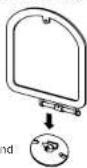
Assemble the included AM loop antenna as shown in the diagram.
① Remove the clamp. ② Insert the AM loop antenna into the antenna stand.
Antenna stand
Connecting the AM loop antenna
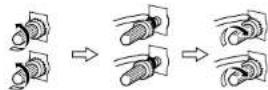
Connect the included AM loop antenna to the antenna terminals as shown in the diagram.
① Loosen the terminal knobs. ② Insert the antenna wire. ③ Tighten the terminal knobs.
Installing an AM outdoor antenna
Connect the signal wire from the AM outdoor antenna to the antenna terminal. Be sure to ground the antenna and connect the ground wire to the GND terminal. Also be sure to connect the included AM loop antenna.
ENGLISH

CONNECTIONS
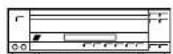
LD player, video deck, etc
FM
antenna
AM loop
antenna
Speaker systems
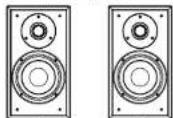
Connecting the speaker systems
Connect the speaker system for the left channel, the left side as seen from the front to the "L" terminals, the speaker system for the right channel to the "R" terminals. Be sure to use speaker systems with an impedance of 4 Qichms or greater.
CAUTION
Whenever the power switch is in the STANDBY position, the unit is still connected on AC line voltage.
Please be sure to unplug the cord when you leave home for, say, a vacation.
PRECAUTIONS FOR
INSTALLATION
For heat dispersal, leave at least 10 cm of space between the top, back and sides of this unit and the wall or other components.
- Disconnect the ground cord if humming or noise is produced when it is connected.
AM-FM Stereo Receiver (DRA-F100)
Ground cord
Record player
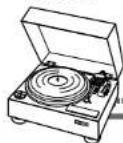
Use a record payer with an MV cartridge.
NOTE
This system includes digital circuitry which may cause interference such as color blotching or changes in the color on TVs. If this happens, move the system and the TV as far apart as possible.
AC Outlets
• SWITCHED outlet (DBA-F100)
The power of this outlet is switched on and off by the receiver's SYSTEM power operation switch.
This outlet will also be switched on when the power is set to ON-STANDBY with the remote control. When the receiver is in the standby mode, the outlet switches off after approximately 20 seconds.
• UNSWITCHED outlets (DCD-F100)
These outlets remain on at all times, regardless of the setting of the CD player's and cassette's power operation switch.
* Do not correct the receiver's AC cord to the outlets on the CD player (DCD-F100). Doing so could result in damage.
Note to CATV system installer:
This reminder is provided to call the CATV system installer's attention to Article 820-40 of the NFC which provides guidelines for proper grounding and, in particular, specifies that the cable ground shall be connected to the grounding system of the building, as close to the point of cable entry as practice.
System operations
Such system operations as the timer and the auto on functions, as well as remote control operations cannot be performed unless all the RCA pin-plug cords and system connector cords are connected between the units, so be sure to make all the connections properly as shown in the diagram. Also, disconnecting system connectors while the system is operating may result in malfunction. Be sure to unplug the power cord before changing connections.
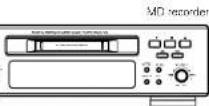
Connecting a MD recorder
Connections for recording
Connect the tape rack's recording input jacks LINE IN or REC to this unit's tape recording IOLTJ jacks using pin plug cards.
Connections for playback:
Connect the tape deck's playback output jacks LINE OUT or PBI to this unit a tape playback, iINJ jacks using pin plug cards.

Connecting a tape deck
Connections for recording
Connect the tape deck's recording input jacks LINE IN or REC to the unit's tape recording REC jacks using pin plug cords.
Connections for playback
Connect the tape deck's keyback output, jacks (LINE 00' or PB), to this unit's tape playback. IPBI jacks using pin plug cords.
NOTES
- Do not plug the power cord into the power outlet until all connections are completed. Be sure to interconnect the channels (L to L (white) and R to R (red)) properly, as shown on the diagram.
- Insert the plugs securely. Incomplete connections may result in noise.
- Be sure to connect the speaker cords between the speaker terminals and the speaker systems with the same polarities (+ to -, - to +). If the polarites are switched, the sound at the center will be weak, the position of the different instruments will be unclear, and the stop effect will be lost.
- After unplugging the power cord, wait about 5 seconds before plugging it back in.
- Note that setting the connection cords (pin plug cords) next to the power cords may result in numming or other noise.
5 PART NAMES, FUNCTIONS AND DISPLAYS
RECEIVER
① SYSTEM power operation switch (ON/STANDBY)
This turns the power for the entire system on and off.
Press this once to turn the power on, then press again to set the power to the standby mode.
② REMOTE SENSOR
When operating the remote control unit, point it at this sensor.
③ TUNING UP and DOWN buttons
These buttons are used to select AM and FM stations and to set the clock and timer.
④ BAND (AM/FM) selector button
The band switches between AM and FM each time this button is pressed.
⑤ MONO/STEREO selector button AUTO mode:
Use this mode to receive programs in stereo. The sound and the indicators on the display automatically switch between monaural ("MONO") and stereo ("STEREO") according to whether the program is being broadcast in monaural or stereo.
MONO mode:
Use this mode to receive programs in monaural, regardless of whether they are being broadcast in monaural or stereo.
Set this mode if there is much noise or if the signals are weak when receiving stereo programs (when "AUTO" is lit).
6 Display
⑦ VOLUME control
Use this to adjust the overall volume.
The volume increases when the control is turned clockwise (Ω) and decreases when it is turned counterclockwise (Ω).
⑧ PHONES (headphones jack)
Plug the headphones into this jack.
No sound is produced from the speakers when headphones are plugged in.
9 TIMER button
Press this when setting the timer and to turn the timer on so that it operates at the set times. When the button is pressed after the timer has been set, the timer standby mark 1" appears on the display. Press again to turn the mark off.
The timer will not operate when the " ©mark is off.
⑩ DISPLAY button
This button is used to switch the display between the reception frequency (function) and the clock.
⑪ MEMORY button
This button is used to preset AM and FM stations and when setting the timer.
12 FUNCTION (input) selector button
Use this to select the input (function)
The input changes in the following order each time this button is pressed: CD, TAPE, TUNER, PHONO, MD and AUX. (The function changes automatically when the system's CD player or cassette deck is played or when a preset channel is recalled on the tuner.)
13 BASS control
Use this to adjust the volume of the low frequencies.
14 TREBLE control
Use this to adjust the volume of the high frequencies.
15 BALANCE control
Use this to adjust the balance of the volume between the left and right channels. When set at the center position, the volume is the same for the left and right channels
RECEIVER DISPLAY
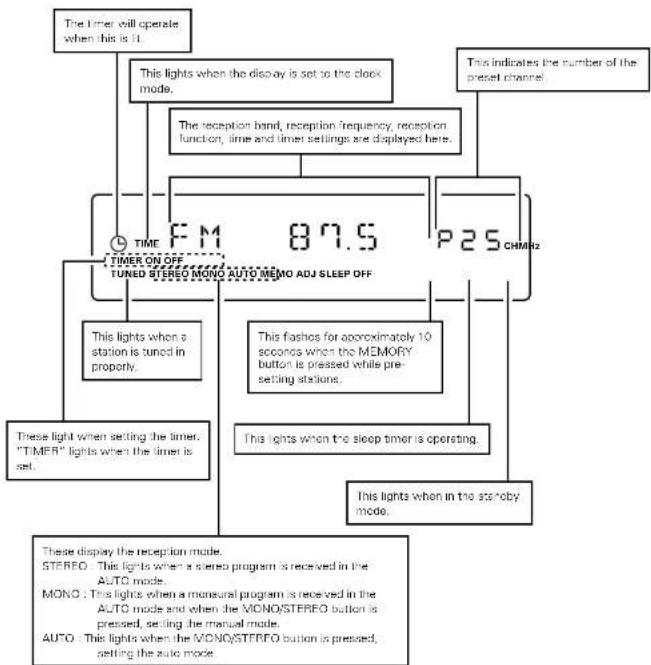
flowchart
graph TD
    A["The timer will operate when this is 1"] --> B["This lights when the display is set to the clock mode."]
    B --> C["The reception band, reception frequency, reception function, time and timer settings are displayed here."]
    C --> D["TIMER ON OFF TUNED STEREO MONO AUTO MEMO ADJ SLEEP OFF"]
    D --> E["This lights when a station is tuned in properly."]
    D --> F["This flashes for approximately 10 seconds when the MEMORY button is pressed while pre-setting stations."]
    D --> G["This lights when the sleep timer is operating."]
    D --> H["This lights when in the standby mode."]
    D --> I["These display the reception mode. STEREO: This lights when a stereo program is received in the AUTO mode. MONO: This lights when a monaural program is received in the AUTO mode and when the MONO/STEREO button is pressed, setting the manual mode. AUTO: This lights when the MONO/STEREO button is pressed, setting the auto mode."]
    D --> J["This indicates the number of the preset channel."]
NOTE:
The timer standby mark (" ©" does not light if the current time and the timer have not been set.
ENGLISH
ENGLISH
CD PLAYER CD PLAYER DISPLAY

Power operation switch (ON/STANDBY)
When the switch is pressed, the standby mode is set and "OFF" appears on the display. When pressed again, the power turns off. (This operation is not performed when the receiver system power operation switch is off.)

OPEN/CLOSE button (▲)
Press this to open and close the disc tray.
When pressed once, the disc tray opens out, and when pressed again, the disc tray closes. If a disc is loaded, the total number of tracks and total playing time of the disc are displayed several seconds after the disc tray is closed.

Disc tray
Load discs here.

▶(play) button
Press this button to start playing the disc. Even when the disc tray is open, the disc tray closes and playback begins when this button is pressed.

II(pause) button
Press this button to stop playback temporarily. Press the play button (▶) to cancel the pause mode and resume playback.

■(stop) button
Press this button to stop playback

Display

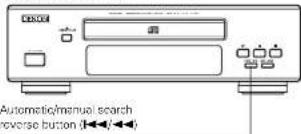
|◀◀/◀◀(automatic/manual search reverse) button
Use this to move to the beginning of a specific track.
When pressed during playback or in the pause mode, the pickup moves backward a number of tracks equal to the number of times the button is pressed.

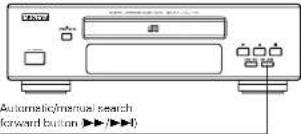
▶▶/▶▶I(automatic/manual search forward) button
Use this to move to the beginning of a specific track.
When pressed during playback or in the pause mode, the pickup moves forward a number of tracks equal to the number of times the button is pressed.
- The automatic search mode is set if the ⑧ or ⑨ button is released within 0.5 seconds, and the manual search mode is set if the button is held for over 0.5 seconds.
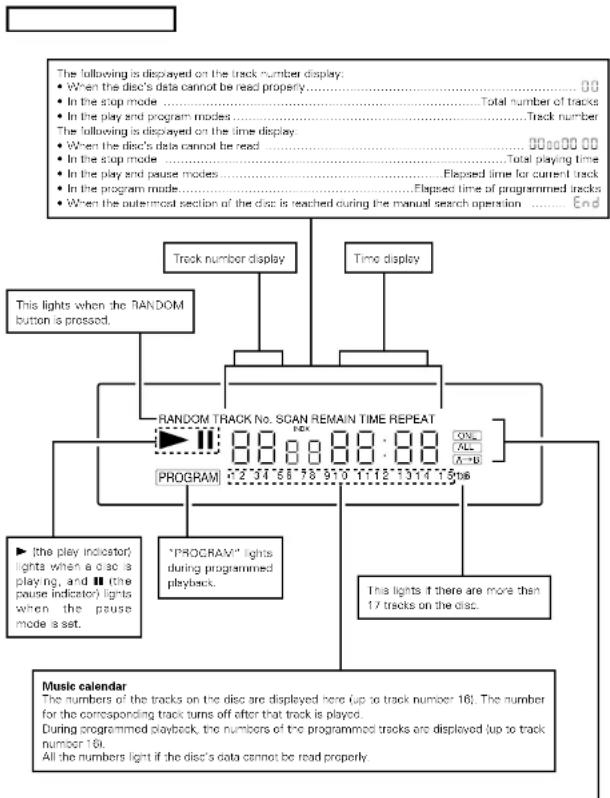
flowchart
graph TD
    A["Track number display"] --> B["RANDOM TRACK No. SCAN REMAIN TIME REPEAT"]
    C["Time display"] --> B
    B --> D["PROGRAM"]
    B --> E[""PROCRAV" lights during programmed playback"]
    B --> F["The play indicator lights when a disc is playing, and the pause indicator lights when the pause mode is set"]
    B --> G["ONE ALL A-B"]
    B --> H["This lights if there are more than 17 tracks on the disc"]
    B --> I["All the numbers light if the disc's data cannot be read properly"]
    J["Music calendar"] --> K["The numbers of the tracks on the disc are displayed here up to track number 16; The number for the corresponding track turns off after that track is played. During programmed playback, the numbers of the programmed tracks are displayed up to track number 16. All the numbers light if the disc's data cannot be read properly."]
This changes as follows each time the REPEAT button is pressed:
1st press : REPEAT ONE (single-track repeat) is displayed and the number of the track to be repeated on the music calendar lights.
2nd press : REPEAT ALL (all-track repeat) is displayed.
3rd press : REPEAT A→ is displayed. 4th press : REPEAT A→D is displayed.
5th press : Nothing is displayed.
{Only REPEAT ONE and REPEAT ALL are displayed in the stop mode.}

REMOTE CONTROL UNIT
The DRA-F100 comes with a system remote control unit (RC-829).
Inserting the batteries
NOTES:
• Use R6P (AA) batteries in this remote control unit.
- Replace the batteries with new ones approximately once each year, though this depends on how frequently the remote control unit is used.
- Replace the batteries with new ones earlier if the remote control unit does not operate even from a short distance.
- Insert the batteries in the proper + and - direction, following the marks in the battery compartment.
- Remove the batteries when not using the remote control unit for extended periods of time.
• To avoid damage and leakage:
- Do not use a new battery with an old one.
- Do not use two different types of batteries
- Do not short-circuit, take apart, heat or dispose of batteries in flames.
- If the batteries should leak, carefully wipe the fluid out of the battery compartment, then insert new batteries.
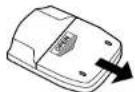
(1) Open the battery compartment cover on the back of the remote control unit.
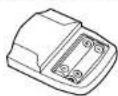
②Insert the two PSP (AA) batteries, following the + and - marks in the battery compartment.
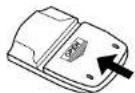
③ Close the cover of the battery compartment.
Using the Remote Control Unit
Cautions on Use
- The remote control unit may not operate if the remote sensor is exposed to direct sunlight or the strong light from a lighting fixture, or if there is an obstacle between the remote control unit and the remote sensor.
- Do not press buttons on the remote control unit and on the set at the same time. Doing so could result in malfunction.
- If the remote control unit is pointed away from the remote sensor during continuous operations such as when turning the volume up or down, the operation will stop. If this happens, point the remote control unit at the remote sensor and press the button again.
text_image
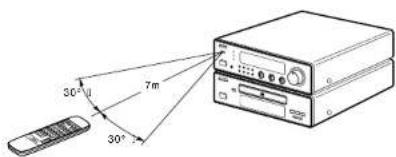
30° 7m 30°- The remote sensor is located on the receiver. Point the remote control unit at the remote sensor as shown on the diagram when operating t.
The remote control unit will operate from a direct distance of approximately 7 meters, but this distance will be shortened if obstacles are present or it operated at an angle.
(The remote control unit will operate at an angle of up to 30^ in either direction.)
ENGLISH
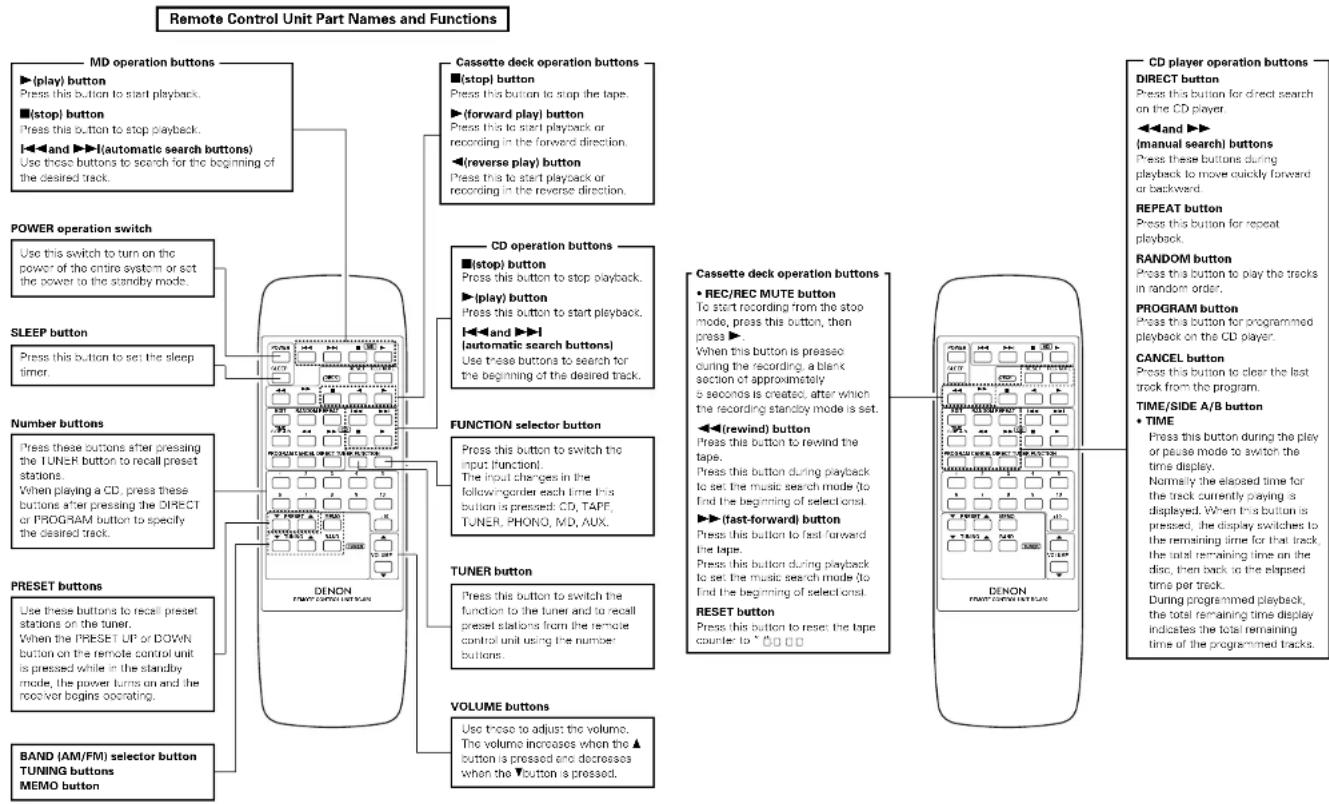
flowchart
graph TD
    A["Remote Control Unit Part Names and Functions"] --> B["MD operation buttons"]
    A --> C["Cassette deck operation buttons"]
    A --> D["CD operation buttons"]
    A --> E["FUNCTION selector button"]
    A --> F["TUNER button"]
    A --> G["VOLUME buttons"]

    B --> B1["(play) button"]
    B --> B2["(stop) button"]
    B --> B3["and"] --> B3["automatic search buttons"]
    B --> B4["use these buttons to search for the beginning of the desired track"]

    C --> C1["(stop) button"]
    C --> C2["(forward play) button"]
    C --> C3["reverse play) button"]
    C --> C4["step"] --> C4
    C --> C5["(automatic search buttons)"]
    C --> C6["use these buttons to start playback or recording in the forward direction"]

    D --> D1["(stop) button"]
    D --> D2["(play) button"]
    D --> D3["and"] --> D3
    D --> D4["automatic search buttons"]
    D --> D5["use these buttons to search for the beginning of the desired track"]

    E --> E1["(stop) button"]
    E --> E2["(forward play) button"]
    E --> E3["reverse play) button"]
    E --> E4["step"] --> E4

    F --> F1["(stop) button"]
    F --> F2["(forward play) button"]
    F --> F3["reverse play) button"]
    F --> F4["step"] --> F4

    G --> G1["(stop) button"]
    G --> G2["(forward play) button"]
    G --> G3["reverse play) button"]
    G --> G4["step"] --> G4

    H["Power operation switch"] --> I["Use this switch to turn on the power of the entire system or set the power to the standby mode"]

    J["SLEEP button"] --> K["Press this button to set the sleep timer"]

    L["Number buttons"] --> M["Press these buttons after pressing the TUNER button to recall preset stations. When playing a CD, press these buttons after pressing the DIRECT or PROGRAM button to specify the desired track"]

    N["PRESET buttons"] --> O["Use these buttons to recall preset stations on the tuner. When the PRESET UP or DOWN button on the remote control unit is pressed while in the standby mode, the power turns on and the receiver begins operating"]

    O --> P["Use these buttons to recall preset stations on the tuner. When the PRESET UP or DOWN button on the remote control unit is pressed while in the standby mode, the power turns on and the receiver begins operating"]

    Q["BAND (AM/FM) selector button TUNING buttons MEMO button"] --> R["Use these buttons to adjust the volume. The volume increases when the ▲ button is pressed and decreases when the ▼ button is pressed"]

    S["Cassette deck operation buttons"] --> T["(stop) button"]
    S --> U["(forward play) button"]
    S --> V["reverse play) button"]
    S --> W["step"] --> W
    S --> X["step"] --> X
    S --> Y["step"] --> Y
    S --> Z["step"] --> Z
    S --> AA["step"] --> AA
    S --> AB["step"] --> AB
    S --> AC["step"] --> AB
    S --> AD["step"] --> AB
    S --> AE["step"] --> AB
    S --> AF["step"] --> AB
    S --> AG["step"] --> AB
    S --> AH["step"] --> AB
    S --> AI["step"] --> AB
    S --> AJ["step"] --> AB
    S --> AK["step"] --> AB
    S --> AL["step"] --> AB
    S --> AM["step"] --> AB
    S --> AN["step"] --> AB
    S --> AO["step"] --> AB
    S --> AP["step"] --> AB
    S --> AQ["step"] --> AB
    S --> AR["step"] --> AB
    S --> AS["step"] --> AB
    S --> AT["step"] --> AB
    S --> AU["step"] --> AB
    S --> AV["step"] --> AB
    S --> AW["step"] --> AB
    S --> AX["step"] --> AB
    S --> AY["step"] --> AB
    S --> AZ["step"] --> AB
    S --> BA["step"] --> AB
    S --> BB["step"] --> AB
    S --> BC["step"] --> AB
    S --> BD["step"] --> AB
    S --> BE["step"] --> AB
    S --> BF["step"] --> AB
    S --> BG["step"] --> AB
    S --> BH["step"] --> AB
    S --> BI["step"] --> AB
    S --> BJ["step"] --> AB
    S --> BK["step"] --> AB
    S --> BL["step"] --> AB
    S --> BM["step"] --> AB
    S --> BN["step"] --> AB
    S --> BO["step"] --> AB
    S --> BP["step"] --> AB
    S --> BQ["step"] --> AB
    S --> BR["step"] --> AB
    S --> BS["step"] --> AB
    S --> BT["step"] --> AB
    S --> BU["step"] --> AB
    S --> BV["step"] --> AB
    S --> BW["step"] --> AB

LISTENING TO RADIO PROGRAMS
[Check the connections on pages 5 and 6.]
TUNING
(DRA-Γ100)
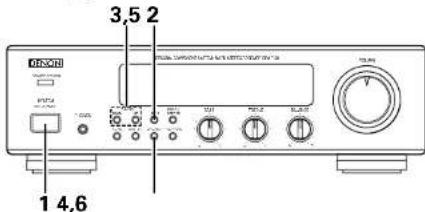
text_image
3.5 2 1 4,6Example: Tuning in FM 87.5 MHz
IAM stations are tuned in using the same procedure.
| 1 | Set the VOLUME control on the receiver to the minimum position, then press the SYSTEM power operation switch (SYSTEM CN/ STANDBY) to turn on the power. |  | |
| 2 | Press the BAND button on the receiver to select the FM band. |  | FM 90.0 |
| 3 | Use the TUNING UP and DOWN buttons to tune the frequency to 87.50. Once the frequency is tuned in, adjust the volume to the desired level using the VOLUME control. |  | This lights when a station is tuned in.FM 80.5 |
Auto Tuning
- When one of the TUNING buttons is pressed, the frequency changes in steps of 50kHz in the FM band, 9kHz in the AM band.
- If one of the TUNING buttons is held in for over 1 second, the frequency continues to change when the button is released is to tuning! and stops when a station is tuned in. Tuning will not stop at stations whose reception is poor.
• To stop the auto tuning function, press the UP or DOWN button once
Presetting AM and FM Stations
Example: Presetting FM 87.5 (currently tuned in) at preset number 3
| 4 | Press the MEMORY button. The MEMO indicator flashes for 10 seconds. |  | |
| 5 | Use the TUNING UP and DOWN buttons to call out the number at which you want to preset the station (3), or simply press the corresponding number button "3" on the remote control unit. |  | |
| 6 | Press the MEMORY button while the MEMO indicator is flashing. |  |
Auto Preset Memory Function
(FM ONLY)
This function automatically stores the FM stations which can be received in the area in which the set is being used in the preset memory. Also note that the channel memories can be changed at will even after the preset stations have been stored with this function.
| 1 | Connect the FM antenna and set it so that FM stations can be received. | Refer to page 5. | |
| 2 | Press the SYSTEM power operation switch (SYSTEM ONSTANDBY) to turn on the power while holding at the MEMORY button. | 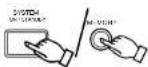 | AUTO"AUTO" is displayed and the MEMD indicator flashes during this operation. |
| 3 | Scarching begins automatically, and stations are stored in the preset memory in order, beginning from channel 1 (The operation automatically stops once 40 stations have been set in the memory.) | FM 87.5 P I###When the operation is completed, the station stored at preset number 1 is tuned in. |
NOTES:
- In addition to the reception frequency, the reception mode (moneural or auto) is also preset, so check the display when presetting stations.
- If a station is preset at a number where a station is already preset, the previous station is replaced with the new station.
- The preset memory is not cleared immediately when the power cord is unplugged, but is cleared if the cord is left unplugged for an extended period of time. If this happens, preset the station again.
Listening to Preset Stations
The preset stations can be recalled using the number buttons on the remote control unit.
Also, if the following operation is performed when the system power is off, the power automatically turns on and the radio is played. (Auto on function)
Example: Listening to the station preset at number 3
(This operation is only possible from the remote control unit.)
| 1 | Press the TUNER button on the remote control unit | 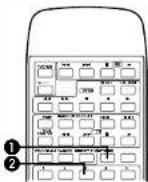 | 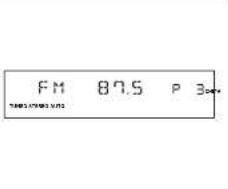 |
| 2 | Press button "3" on the remote control unit |
ENGLISH
ENGLISH

USING THE TIMER
The time and timer functions are incorporated in the receiver.
Timer Settings
■Types of timer operations
TIMFR: Use this to turn the power on and off at the same times every day. SLEEP TIMFR: Use this to set the power to turn off after 10 to 60 minutes, in steps of 10 minutes (operated from the remote control unit).
■Notes on timer settings
- Be sure to set the current time beforehand. - To listen to or record a radio program ("air check") using the timer, be sure to preset the station beforehand. (Refer to "Presetting AM and TV Stations" on page 11.)
Power Failures
Should there be a power failure or should the power cold be unplugged, the time display will fast at 0.0000 happens, reset the current time. Also check the timer and timer presettings, and reset them if they have been cleared.
Checking the Settings
To check the timer settings, press the TIMER button for at least 3 seconds. (This can also be done when the tuner's power is off.) Next, press the MEMORY button repeatedly to display the timer start mode, the reception band and onset channel number when in the tuner mode, the on time and the off time. Press the MEMORY button once more to return to the current mode display.
Changing the Settings
Repeat the timer setting operation to erase the previous settings and set the new settings.
Clearing the Settings
Press the TIVER button for at least 3 seconds, then press it for at least 3 seconds again while "FUNC" is displayed to clear the timer settings.
Note on Setting the Timer
If the time set with the timer is reached while the system power is on, the operation switches to the operation set by the timer.
Turning the Timer Off
Press the TIMER button to turn the Cork off.
Setting the Current Time
The Time is displayed in the 12-hour mode
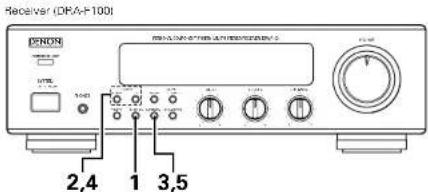
text_image
Receiver (DRAF1001) 2,4 1 3,5Example: Setting to 7:30 p.m.
| 1 | Press the DISPLAY button for at least 3 seconds. | ||
| 2 | Use the TUNING UP and DOWN buttons to set the hours. | ||
| 3 | Press the MEMORY button. | ||
| 4 | Use the TUNING UP and DOWN buttons to set the minutes. | ||
| 5 | Press the MEMORY button at the sound of a time service's crime. The time display stops fashing and the clock starts running. |
• The current time can be set even when the power is off.
Setting the Timer
The power can be set to turn on and off every day at the same time in any of five modes: tuner, CD, cassette deck, MD player and air check (recording from the radio). (Preset the AM or FM station beforehand.)
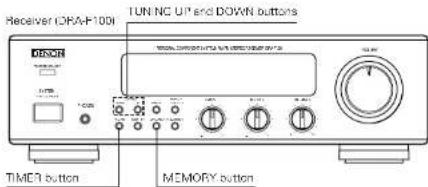
text_image
Receiver ORA-100I TUN NC UP and DOWN buttons TIME1 button MEMORY buttonExample: Setting the tuner to turn on at 2:35 p.m., off at 2:56 p.m. (with FM 87.5 MHz preset at channel "3")
| 1 | Press the SYSTEM power operation switch (SYSTEM ON STANDOY) on the receiver to turn on the system's power. |  | FM 90.0 P I### |
| Say that FM 30.00 MHz is tuned in at preset channel number *1. | |||
| 2 | Press the TIMER button for at least 3 seconds to set the timer setting mode. |  | FUNC |
| 3 | Use the TUNING UP and DOWN buttons to set the "TUNER" mode. |  | TUNER |
| 4 | Press the MEMORY button. |  | Flashes |
| 5 | Use the TUNING UP and DOWN buttons to set the preset channel number. |  | |
| 6 | Press the MEMORY button. |  | IF the timer has already been set, that number flashes.I |
| 7 | Use the TUNING UP and DOWN buttons to set the hours for the timer on time. |  | PM |
| 8 | Press the MEMORY button. |  | 200PMFashesIf the timer has already seen sat, that number flashes.) |
| 9 | Use the TUNING UP and DOWN buttons to set the minutes for the timer on time. |  | 235PMFashes |
| 10 | Press the MEMORY button. |  | 200 RMFashes |
| 11 | Use the TUNING UP and DOWN buttons to set the hours for the timer off time. |  | 200 PMFashes |
| 12 | Press the MEMORY button. |  | 200 PMFashesIf the timer has already seen sat, that number flashes.) |
| 13 | Use the TUNING UP and DOWN buttons to set the minutes for the timer off time. |  | 256 PMFashesIf the timer has already been set, that number flashes.) |
| 14 | Press the MEMORY button. |  | FM 90.0 P I###The display returns to as it was before the timer as long mode was as.. |
| 15 | Press the TIMER button. |  | LighsFM 90.0 P I### |
| 16 | Press the SYSTEM power operation switch (SYSTEM ON/STANDBY) on the receiver to turn off the system's power. |  | 10:15 AM### |
| If the Park is displayed after the TIMER button is pressed, the timer will operate at the same times every day. To turn the timer off, press the TIMER button again to turn the ### off | |||
ENGLISH
ENGLISH
Various Timer Operations
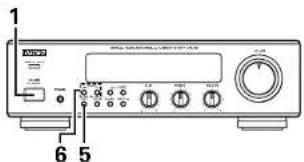
text_image
1 6 5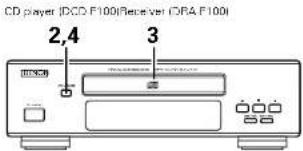
text_image
CD player (DCD F100) Receiver (CBA F100) 2,4 3Example: Playing a compact disc with the timer
| 1 | Press the SYSTEM power operation switch (SYSTIV ON/STANDBY) on the receiver to turn on the system's power. | ||
| 2 | Press the CD player's OPEN/CLOSE button (▲) to open the disc tray. | ||
| 3 | Load the disc in the disc tray. Refer to page 15. | 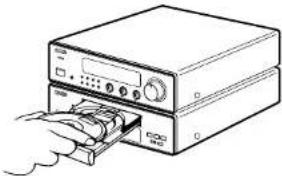 | |
| 4 | Press the CD player's OPEN/CLOSE button (▲) again to close the disc tray. |  | |
| 5 | Press the receiver's TIMER button for at least 3 seconds. |  | FUNC |
| 6 | Use the receiver's TUNING UP and DOWN buttons to set the 'CD' mode. |  | C D |
| 7 | Now follow steps 8 to 16 under "Setting the timer" on page 13. | ||
Setting the Sleep Timer
With this function, the power can be set to turn off after 10 to 60 minutes, in steps of 10 minutes, using the remote control unit
Example: Setting the power to turn off in 50 minutes
(This operation is only possible from the remote control unit.)
| 1 | Tuner currently set to FM 87.5 MHz. | FM 87.5 | |
| 2 | Press the SLEEP button | 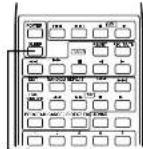 | Flashes60 |
| 3 | Press the SLEEP button again while the "SLEEP" indicator is flashing. | 50 | |
| 4 | The previous display reappears after 5 seconds.The "SLEEP" indicator remains lit, indicating that the sleep timer is functioning. | FM 87.5 | |
- The time is reset to "60" (60 minutes) if the SLEEP button is pressed again while the sleep timer is functioning.
Cancelling the Sleep Timer
Press the SLEEP button repeatedly until the "SLEEP" indicator turns off.
The sleep timer is also cancelled if the receiver's SYSTEM power operation switch or the POWER operation switch on the remote control unit is pressed, turning the system power off.
NOTE:
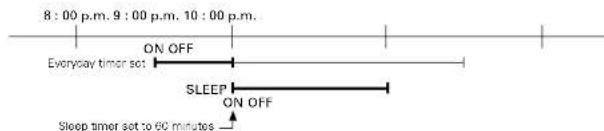
If the times set with the sleep and everyday timers overlap, the sleep timer has priority.
Order of priority of the sleep and everyday timers
The sleep time has priority for the off-time. (The system operates as indicated by the bold lines.)
text_image
8:00 p.m. 9:00 p.m. 10:00 p.m. Everyday timer set ON OFF SLEEP ON OFF Sleep timer set to 60 minutesEven when the power was turned on with the timer, the power turns off if the remaining time of the sleep timer reaches "Before the off time set with the everyday timer is reached. If the everyday timer's on time is reached while the sleep timer is functioning, the everyday timer does not function.

PLAYING CDs
About Compact Discs

Only discs with the mark shown left can be played on the DCD-F100.

Use compact discs that include the heart-shaped CD's. CD's with special shapes (heart-shaped CD's, octagonal CD's etc.) cannot be played on this set. Attempting to do so may damage the set. Do not use such CD's.


| Disc Remarks | |
| CD | |
| CDV | Only the audio part is played |
| CD singles (8 cm discal) |
- For CDVs, only the audio part is played. (The video part is not played.)
■Removing discs from their cases
As shown on the diagram, grasp the outer edge of the disc with your fingers, insert a finger in the center hole, press gently, then lift the disc out of the case.
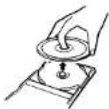
■Loading discs in the disc tray
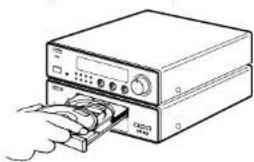
natural_image
Line drawing of a computer tower with an open drive and cable being inserted (no text or symbols)Be sure to load the disc with the labelled side facing up. ICompact discs only play on one side. For 3 cm CDs, set the disc in the sunken section in the center of the tray.
NOTES:
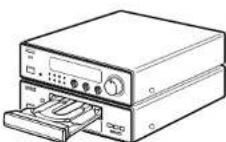
- The disc tray opens when the OPEN/CLOSE button (▲) is pressed once and closes when it is pressed again.
- When the disc tray is closed, the disc turns automatically for several seconds, then the total number of tracks and total playing time of that disc appear on the display.
- The disc tray can also be closed by pressing the play button (▶), in which case playback automatically starts from the first track on the disc (or if tracks are programmed, from the first programmed track).
Handling the Disc Tray
Do not turn off the power, stop the disc trey by hand or pull on it when it is moving. Doing so may damage it.
If the headphones' cord or some other object accidentally gets caught in the disc tray while it is closing and the disc tray stops, press the OPEN/CLOSE button [▲] again to open the tray and remove the obstacle.
Do not set objects other than discs on the disc tray. Doing so may damage it.
Normal Playback
CD player (DCD-F100)
2.435
text_image
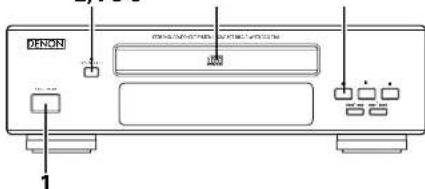
DINION 1Example: Playing a disc containing 15 tracks and with a playing time of 62 minutes, 03 seconds, starting from the first track
| TheBlock indicates operations which can also be performed on the remote control unit. | |||
| 1 | Press the SYSI EV power operation switch (SYSI EV ON/STANDBY) on the receiver to turn on the system's power. |  | |
| 2 | Press the OPEN/CLOSE button (▲) to open the disc tray. |  | OPEN |
| 3 | Load the CD in the disc tray. | 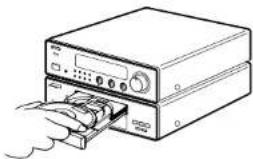 | |
| 4 | Press the OPFNCI OSF button (▲). The disc tray closes. The d-play appears after several seconds. |  | 15 62:0312 24 50 78 89 1112 1314 15 |
| 5 | Press the play button (▲). |  | 0 10:00:0112 24 50 78 89 1112 1314 15 |
ENGLISH
ENGLISH
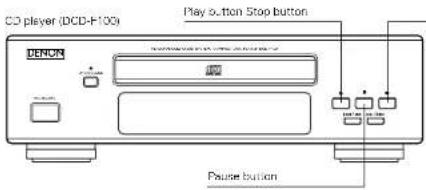
text_image
CD player (DCD-F100) Play button Stop button DENON Pause buttonInterrupting playback temporarily
| Press the pause button 10. |  | The "11" mark copers on the display, and playback stops at the point where the button was pressed. |
Resuming playback
| Press the play button ▶. |  | The "III" mark turns off on the display, and playbook resumes from the point where the pause button (III) was prossed. |
Stopping playback
| Press the stop button ■. |  | 15 62:0312 82 84 10 115 125 135 145 |
- When a disc is loaded, "1.5 was stayed on the display for several seconds while the data on the number of tracks and total playing time is being read from the innermost side of the disc, after which the number of tracks and total playing time appears.
- If no disc is loaded, if the disc is upside down, or if the data cannot be read properly due to scratches or dirt; the display reads as shown below and the disc will not play
000000
Various Playback Functions
In addition the regular playback, the DCD-F100 also offers the following playback functions:
Playing a specific track
Direct Search
(Using the remote control unit) Example: Playing the 8th track
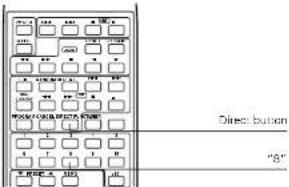
flowchart
graph TD
    A["Start"] --> B["Process Box 1"]
    B --> C["Process Box 2"]
    C --> D["Process Box 3"]
    D --> E["Process Box 4"]
    E --> F["Process Box 5"]
    F --> G["Process Box 6"]
    G --> H["Process Box 7"]
    H --> I["Process Box 8"]
    I --> J["Process Box 9"]
    J --> K["Process Box 10"]
    K --> L["Process Box 11"]
    L --> M["Process Box 12"]
    M --> N["Process Box 13"]
    N --> O["Process Box 14"]
    O --> P["Process Box 15"]
    P --> Q["Process Box 16"]
    Q --> R["Process Box 17"]
    R --> S["Process Box 18"]
    S --> T["Process Box 19"]
    T --> U["Process Box 20"]
    U --> V["Process Box 21"]
    V --> W["Process Box 22"]
    W --> X["Process Box 23"]
    X --> Y["Process Box 24"]
    Y --> Z["Process Box 25"]
①Press the DIRECT button.
②Press the button corresponding to the number of the track 8. "8" appears on the track number display and playback of track number 8 begins.
- When the end of the track is reached, playback continues on the next track.
- To specify a track number of 11 or greater, say track 15, press +10, a to specify a track number of 20 or greater, say track 23, press +12, -10 then 3. To play track 20, press +10 then 10.
② Playing a single track repeatedly
Single-track Repeat
(Using the remote control unit)
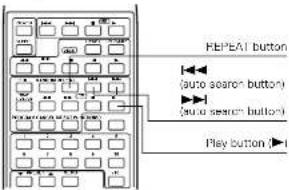
text_image
REPEAT button (auto search button) (auto search button) Play button①When the REPEAT button is pressed once, REPEAT ONE appears on the display and the single-track repeat mode is set.
②Use the ◀◀◀ and ▶▶▶ buttons to select the track to be repeated.
①Press the play button (▶) to start playback.
- When the end of the specified track is reached, payback starts over from the beginning of the track.
- The single-track repeat mode can also be set by pressing the REPEAT button once curing playback.
- To cancel the single track repeat mode, press the REPEAT button repeatedly until the "REPEAT" indicator turns off.
③ Playing all the tracks repeatedly
All-track Repeat
(Using the remote control unit)
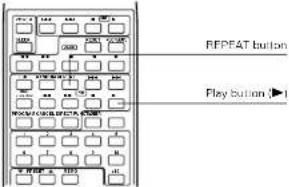
text_image
REPEFAT button Play ButtonWhen the REPEAT button is pressed twice, REPEAT A.L appears on the display and the all-track repeat mode is set.
②Press the play button (▶) to start playback.
- The all-track repeat mode can also be set by pressing the REPEAT button twice during playback.
- To cancel the all-track repeat mode, press the REPEAT button to turn the "REPEAT" indicator off.
- If the REPEAT button is pressed during programmed playback, the tracks are played repeatedly in the programmed order.
ENGLISH
4 Playing a certain section repeatedly
A-B Repeat
⑤ Playing the tracks in a certain order
Programmed Playback
Example: Using a CD containing 15 tracks
| 1st press | (1) When pressed during playback: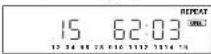 | The single-track repeat mode is set and "REPEAT" and "CNEH" |
(2) When pressed before playback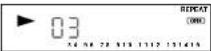 | The single track repeat mode is set and "REPEAT" and "CNEH"Next.1Press the play button (▶) to play the first track repeatedly2If physpack is started using the direct search buttons on the remote control unit or the ▶▶/▶▶and ◀◀/◀◀ butons on the CD player, the specified track is played repeatedly | |
| 2nd press | (1) When pressed during playback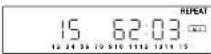 | The all-track repeat mode is set and "REPEAT" and "A-L" light. |
(2) When pressed before playback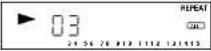 | The all-track repeat mode is set and "REPEAT" and "A-L" light.Then press the play button (▶) or direct search buttons on the remote control unit to play. | |
| 3rd press | When pressed during playback: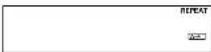 | "REPEAT" and "A-●" light. |
| 4th press | When pressed during playback: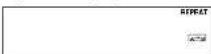 | "REPEAT" and "[A-0]" light, and the section between points A and B is played repeatedly. |
| Press the REPEAT button again to return to normal playback. | ||
(Using the remote control unit)
Example: Programming the 3rd track to play first, the 18th track to play second, using a CD containing 18 tracks and with a playing time of 62 minutes, 03 seconds
Procedure
| 1 | Press the P30G7AM button. | 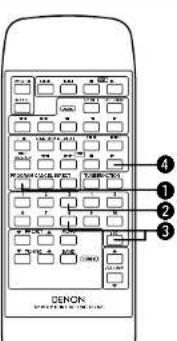 | -- P-01 |
| 2 | Press "3" to set the 3rd track at the first place in the program | 03 P-01After 2 seconds--P-02display when the 3rd track is set at the first place | |
| 3 | Press "+10" and "8" to set the 18th track at the second place in the program. | 18 P-02After 2 seconds--P-03Display when the 18th track is set at the second place | |
| 4 | Press the play button ▶. | The tracks are played in the programmed order. |
- When the TIME/SIDE A/B button is pressed before playback, the total playback time of programmed tracks is displayed.
- Press the DIRECT button to resume normal playback during the programmed playback.
• To cancel the entire program, press the DIRECT button or cancel the program one by one using the CANCEL button. - If you want to correct the programmed track, press the automatic/manual search reverse button (▶◀◀◀◀) to display the track to correct and press the desired number button on the remote control unit. Press the CANCEL button instead of the number button to cancel the displayed track. After finishing the correction, press the autometromanual forward button (▶▶/▶▶▶) repeatedly until “—” is displayed on the track number display.
Other operations possible during programmed playback:
Such operations as quick search, pause and skip monitor are also possible during programmed playback.
For the quick search function, press the automatic/manual search reverse button (▶◀◀◀◀) to move back to the beginning of the track, then press it again while the time display reads "0000" to move back to the beginning of the preceding track.
To move ahead to the beginning of the next track, press the automatic/manual search forward button (▶▶/▶▶), regardless of the time display.
NOTES:
• The numbers of the programmed tracks on the music calendar turn off after the tracks have been played.
- With this CD player, up to 20 tracks with any track number between 1 and 99 can be programmed.
- If a number greater than the total number of tracks on the disc is specified, that number will not be displayed.
- Programming is also possible with the disc tray open. In this case it is possible to program a track number not included on the disc, but when the program is played, that track number will be skipped.
- The entire program is cancelled when the OPEN/CLOSE button (▲) is pressed.
- If you make a mistake when programming, press the CANCEL button to cancel the mistake. (The last track in the program is cancelled each time the CANCEL button is pressed.)
• The A-B repeat functions do not work during programmed playback.
- Set the stop mode when canceling tracks from the program.
ENGLISH
6 Moving ahead to the next track during playback
Quick Search
CD player (DCD-F100)
text_image
Automatic/manual search forward button ▶▶/▶▶)Press the automatic/manual search forward button (▶▶/▶▶).
7 Moving back to the beginning of the track during playback
Quick Search
CD player (DCD-F100)
text_image
Automatic/manual search reverse button (←←→)Press the automatic/manual search reverse button (◄◄◄/◄◄◄).
8 Finding a certain spot on the disc while listening to the sound
Skip Monitor
- Use this function to skip through the disc while listening to the sound.
- When the desired spot is reached using the skip monitor function, release the automatic/manual search forward button (▶▶/▶▶) or automatic/manual search reverse button (◀◀/◀◀) to resume normal playback from that point.
(1) Forward skip monitor
CD player (DCD F100)
text_image
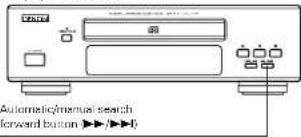
Automatic/manual search forward button ▶▶/▶▶)- The track currently being monitored and the elapsed time for that track are indicated on the display.
- If the end of the last track on the disc is reached while pressing the automatic/manual search forward button (▶▶/▶▶), * 5 appears on the display and the manual search operation stops.
To continue playback, press and hold in the automatic/manual search reverse button (■◀◀/◀◀) until a track number appears on the display, then perform the desired operation.
During playback, press and hold in the automatic/manus search forward button (▶▶/▶▶) to skip through the disc in the forward direction while listening to the sound.
(2) Reverse skip monitor
CD player (DCD-F100)
text_image
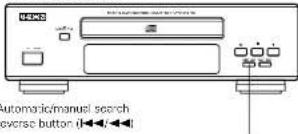
自动 automatic/manual search reverse button (←←←)- The track currently being monitored and the elapsed time for that track are indicated on the display.
- If the automatic/manual search reverse button (1◄◄/◄◄) is pressed continuously, it will reach the beginning of the first track on the disc.
Release the automatic/manual search reverse button (1◄◄◄) to resume normal playback.
During playback, press and hold in the automatic/manual search reverse button (1◄◄/◄◄) to skip through the disc in the reverse direction while listening to the sound.
If the automatic/manual search forward or automatic/manual search reverse button is pressed during programmed playback then released at a track not in the program, instantly the next track in the program is searched and played.
9 Playing the tracks in random order
Random Playback
[Using the remote control unit]
- Use this function to play all the tracks on the disc once in random order.
![DENON DF100MC - [Using the remote control unit] - 1](/content/2026/02/380339/images/5c9bfdf073e984365e2d79a498a51cf36e14e8261e34057930062f07886c83fa.jpg)
- The programmed tracks can be played in random order by pressing the RANDOM button when tracks are programmed.
- If the RANDOM button is pressed while the repeat mode is set, the tracks are each played once in random order, then played again in another order, and so on.
- Random playback cannot be set in the A-E repeat mode.
- While the next track is being searched for, any numbers of the tracks on the disc are not displayed on the track number display so it is not possible to know which track will be played next.
- The repeat mode is set to the all-track repeat mode when the RANDOM button is pressed during the single-track repeat mode.
- Press the RANDOM button to turn on the "RANDOM" indicator, then press the play button to start random playback in the programmed playback mode.
- In the normal playback mode, simply press the RANDOM button to start random playback
NOTES:
- The total remaining time cannot be displayed during the random playback mode.
• The random playback mode cannot be set during editing

OTHER INFORMATION
Cleaning Discs
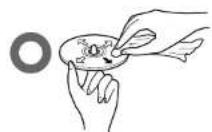
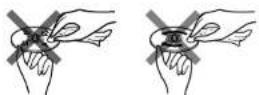
NOTES:
- Do not wipe discs in the direction opposite the arrow or in a circular motion as with regular records.
- The disc's signal surface is easily damaged, so do not wipe it with a hard cloth or rub it strongly.
Dust, fingerprints or spit on the disc will result in noise or skipping. If the disc is dirty or if the CD player does not operate properly, use the following procedure to clean the disc:
- Hold the disc with the signal surface (the side opposite the labelled side) facing up, as shown in the diagram.
- Wise the disc gently from the center towards the edge (in the direction of the arrow) with a soft cloth.
Do not clean discs with the following
• Benzene, alcohol or other solvents
- Cleaner including an abrasive
- Sprays or cleaners designed for records
- Arti-static

SPECIFICATIONS
■Receiver (DRA-F100)
Practical maximum output: 30 W - 30 W /4 Ω/ohms, DINI
Low frequency adjustment range: 100 Hz +8 dB
High frequency adjustment range: 10 kH ±8 dB
Reception frequency band: FM: 87.5 MHz - 108.0 MHz
AM: 520 kHz \~1710 kHz
Reception sensitivity:
FM: 1.5 u75 Oichm
AM: 20 μV
FM stereo separation: 35 dB (1 kHz)
Audio input/output jacks: CD input jacks, tape input/output jacks
MD input/output jacks, Aux input jacks.
3.5 mm headphones jack and phone input: jacks
Power supply: AC 120 V, 60 Hz
Power consumption: 130 V
Maximum external dimensions: 270 (W) × 84 (H) × 289 (D) mm
(10-6/8" x 3-5/16" x 11-3/8")
(including feet, controls and terminal)
Mass: 4.1 kg 19 lbs. 1 oz
■CD player (DCD-F100)
Wow & flutter: Below measurable limits
(±0.001 % W. peak)
Sampling frequency:
44.1 kHz
Optical source
Semiconductor
Power supply: AC 120 V, 60 Hz
Power consumption: 10 W
Maximum external dimensions: 270 (W) x 84 (H) x 264 (D) mm
10 6/8'' × 3 6/16'' × 10 25/64''
(including feet, controls and terminals)
Mass: 2.7 kg (5 lbs, 15 oz)
■Remote control unit (RC-829)
Remote control system: Infrared pulse
Number of buttons:
Power supply: Two DC 1.5 V HBP/AA batteries
Maximum external dimensions: 64 (W) x 195 (H) x 18 (D) mm
|2-1/2'' × 7-43/64'' × 23/32''|
Mass: 130 g (including batteries) Approx. 4.5 oz
* Maximum dimensions include controls, jacks, and covers.
(A) = width, (H) = height, (O) = depth
- For improvement purposes, specifications and functions are subject to change without advanced notice.
ENGLISH
ENGLISH
12 TROUBLESHOOTING
Check the following once more before assuming there is a problem with the system.
-
Are connections proper
-
Is the system being operated as explained in the operating instructions?
If the system does not seem to be operating properly, check as shown on the table below. If none of these checks apply to the problem, the system may be malfunctioning. Disconnect the power cord immediately and contact your store of purchase.
| Symptom Cause Countermeasure Page | ||||
| GeneralRecover(C) Player | Power does not turn on when power switch is pressed. | Power card is not plugged into a power button. | Plug the power card securely into an output. | 6 |
| No sound is produced from the speakers. | VOI UMF control is turned down.Headphones are connected.Speaker cords are not securely connected. | Set the control to an appropriate position.Disconnect the headphonesConnect securely. | 776 | |
| No treble sound is produced, or the position of the instruments a unclear. | Speaker polarities (θ and θ) are inverted. | Connect the speaker cords properly. 6 | ||
| A source other than the dashed one is heard. | Function is not properly set. Set the desired function using the FUNCTION button. | 7 | ||
| Hissing sound is heard in FM programs. | Antenna direction is poor.Signals from the broadcast station are weak. | Change the direction of the antenna.Install an outdoor antenna. | 55 | |
| Hissing sound is heard in AM programs. | Noise from a TV or interference from a broadcast station. | Turn the TV off.Change the direction of the loop antenna.Install an outdoor antenna. | - -5 | |
| Humming sound is heard in AM programs. | Signals on the power card are being modulated by the power source frequency. | Insert the power card in the opposite direction.Install an outdoor antenna. | -5 | |
| Total number of tracks not displayed when disc is loaded. | Disc is loaded: upside-down.Disc is dirty.Disc is not of the specified type. | Reloud the disc.Clean the disc.Replace with a disc of the specified type. | 1519- | |
| Nothing happens when operating buttons are pressed.Disc stops in the middle of a track and will not play properly. | Disc is loaded: upside down.Foreign reject an disc tray.Disc is dirty.Disc is scratched. | Reloud the disc.Remove the disc and the foreign object.Clean the disc.Replace with an unscratched disc. | 151519- | |
| Sound is broken. | Dirt. fingerprints, scittle, etc. on disc.Disc is scratched.Player is in an unstable pace and vibrées strongly. | Clean the disc.Replace with an unscratched disc.Place the player in a stable pace with no vibrations. | 19- | |
| Humming sound is heard when disc is played. | Signals on the power card are being modulated by the power source frequency. | Insert the power card in the open source direction. | - | |
- Protector circuit
The DRA-F100 is equipped with a high speed protector circuit.
This circuit protects internal parts from being damaged by strong currents generated in the set should the set be operated when the speaker terminals are incompletely connected or short-circuited.
If this protector circuit is activated, a relay sound is produced, the output to the speakers is interrupted, and the function and power LEDs flash to indicate that there is a problem. If this should happen, unplug the power cord, check the speaker connections, then plug in the power cord and turn the power back on. After several seconds, a relay sound is heard and the set starts operating properly
- The set may not operate properly due to such external influences as lightning or static electricity. If this happens, either turn off the power with the receiver's SYSTEM power operation switch or unplug the power cord, wait approximately 5 seconds, then plug the power cord back in.
FRANCAIS
TABLE DES MATIERES
[Non-Text]
[Non-Text]
[Non-Text]
- Condensation
text_image
Antenna FM Antenna CMN 4M FM COJAX 750100A AMtext_image
30° 7m 30°natural_image
Line drawing of a computer setup with an open drive and ports (no text or symbols)(including "eet, controls and terminals)
Polds: 1.1
Flatne de video, actor LD (laser disc), etc.


text_image
30° 7m 30°compact disc (CD), cinta (TAPE).
text_image
3.5 2 1 4.6natural_image
Line drawing of a CD-ROM drive with ports and cable (no text or symbols)text_image
DENON 1.0 GB 1.0 GB 1.0 GB 1.0 GB 1.0 GB 1.0 GB 1.0 GB 1.0 GB 1.0 GB 1.0 GB 1.0 GB 1.0 GB 1.0 GB 1.0 GB 1.0 GB 1.0 GB 1.0 GB 1.0 GB 1.0 GB 1.0 GB 1.0GB 1.0GB 1.0GB 1.0GB 1.0GB 1.0GB 1.0GB 1.0GB 1.0GB 1.0GB 1.0GB 1.0GB 1.0GB 1.0GB 1.0GB 1.0GB 1.0GB 1.0GB 1.0GB 1.0GB 1.0GFM: 87.5 MHz \~ 108.0 MHz
AM: 520 kHz \~ 1710 kHz
FM: 1,5 μ/75 Ω/onmios
AM: 20 V
35 dB (1 kHz)
Australia Audio Products Australia Pty Ltd. 67 O'Riordan Street, Alexandria NSW 2015, Australia
Tel: (02) 9669-3477 Fax: (02) 9578-0140
Denon Canada Inc. 17 Denison Street, Markham Ontario, Canada L3R 1B5 Tel: 905-475-4085 Fax: 905-475-4159
New Zealand Avalon Audio Corpn. Limited 630B Great South Road Ellerslie Auckland, New Zealand Tel: 64-9-579-1280 Fax: 64-9-579-3350
Norway Hi-Fi Klubben AS Sandakerveien 64 0483 Oslo Tel: 47 22 79 66 66 Fax: 47 22 79 66 67
Poland HORN DISTRIBUTION S.A. Ulica Kurantow 34, 02-873 Warszawa Poland
Tel: +48 22 649 30 71 Fax: +48 22 649 31 99
Singapore Hwee Seng (Electronics) Pte Ltd. 81 Genting Lane #02-02, Everich Industrial Building Singapore 349566 Tel: 65-746-3355 Fax: 65-743-1704
South Africa Mandarin Distributors S.A. 10 Thora Crescent, Wynberg Ext.3 Sandton, P.O.Box 5137, Johannesburg Republic of South Africa Tel: 27-11-444-8445 Fax: 27-11-444-8363
Spain Gaplasa S.A.AV. Ing. Conde de Torroja, 25, 28022 Madrid Tel: 91-329-29-60 Fax: 91-329-16-75 Sweden Sveriges Hi-Fi Klubb Box 5116, S-402 23 Göteborg Tel: 031-200040
Switzerland Diethelm & Co., AG. Grindelstrasse 5, 8303 Bassersdorf Tel: 01-306-1611 Fax: 01-306-1690 Taiwan R.O.C. KOLIN-DENON ENTERTAINEMENTY INC. 5th FL., NO.63, Po-Ai Road, Taipei, Taiwan, R.O.C. Tel: (02)2381-5876 Fax: (02)2381-5811
Thailand, 10110 Tel: 66-2-256-0020 Fax: 66-2-253-1696 United Hayden Laboratories Ltd. Hayden House, Chiltern Hill, Chalfont St F
Kingdom & Eire Gerrards Cross, Bucks, SL9 9UG Tel: 01753-888447 Fax: 01753-880109
DENON ELECTRONICS, a Division of Denon Corporation (U.S.A.) 19 Chapin Road, Pine Brook, NJ 07058-9777 Tel: 973-396-7499, Fax: 888-544-8434
• If there is no service center in your local area, consult the outlet where the equipment was purchased.
Printed in Korea 511 3706 005 047