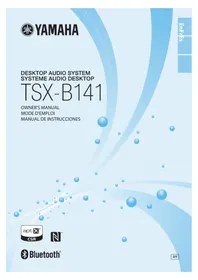
TSXB141 - Audio System YAMAHA - Free user manual and instructions
Find the device manual for free TSXB141 YAMAHA in PDF.


| Product type | Audio system |
| Brand | YAMAHA |
| Model | TSXB141 |
| Dimensions (W × H × D) | 400 × 180 × 137 mm |
| Weight | 3.0 kg |
| Power supply | 100–120 V AC, 50/60 Hz |
| Power consumption | 17 W (operation), 2.4 W (standby), 0.4 W (eco standby) |
| Compatible audio formats | CD audio, CD-R/RW, MP3, WMA |
| Wireless connectivity | Bluetooth (A2DP, SBC, AAC, aptX) with max. range 10 m |
| Connectors | 1 × USB (5 V/1 A), 1 × AUX (3.5 mm), FM antenna, AM antenna |
| Functions | CD player, FM/AM radio, Bluetooth, USB charging, IntelliAlarm alarm, timer, 3-band equalizer (bass, midrange, treble), NFC |
| Display | Front display with brightness adjustment (Auto, 3 levels) |
| Remote control | Yes, with CR2025 battery included |
| Maintenance | Clean with a dry, clean cloth |
| Safety | Class 1 laser, do not open, do not expose to water or humidity |
| Included accessories | Remote control, power adapter, power cord, FM antenna, AM antenna, USB cap |
| Eco standby consumption | 0.4 W |
| Dedicated app | DTA CONTROLLER (free) for iOS and Android |
Frequently Asked Questions - TSXB141 YAMAHA
User questions about TSXB141 YAMAHA
0 question about this device. Answer the ones you know or ask your own.
Ask a new question about this device
Download the instructions for your Audio System in PDF format for free! Find your manual TSXB141 - YAMAHA and take your electronic device back in hand. On this page are published all the documents necessary for the use of your device. TSXB141 by YAMAHA.
USER MANUAL TSXB141 YAMAHA
IMPORTANT SAFETY INSTRUCTIONS
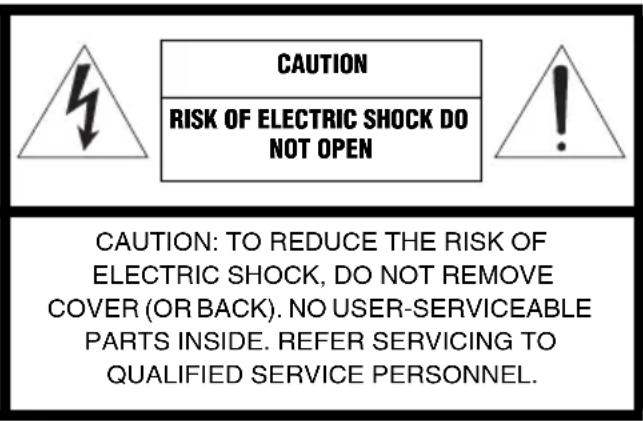
- Explanation of Graphical Symbols
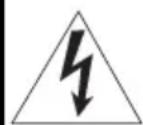
The lightning flash with arrowhead symbol, within an equilateral triangle, is intended to alert you to the presence of uninsulated "dangerous voltage" within the product's enclosure that may be of sufficient magnitude to constitute a risk of electric shock to persons.
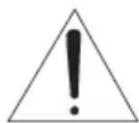
The exclamation point within an equilateral triangle is intended to alert you to the presence of important operating and maintenance (servicing) instructions in the literature accompanying the appliance.
IMPORTANT
Please record the serial number of this unit in the space below.
MODEL:
Serial No.:
The serial number is located on the rear of the unit. Retain this Owner's Manual in a safe place for future reference.
1 Read these instructions.
2 Keep these instructions.
3 Heed all warnings.
4 Follow all instructions.
5 Do not use this apparatus near water.
6 Clean only with dry cloth.
7 Do not block any ventilation openings. Install in accordance with the manufacturer's instructions.
8 Do not install near any heat sources such as radiators, heat registers, stoves, or other apparatus (including amplifiers) that produce heat.
9 Do not defeat the safety purpose of the polarized or grounding-type plug. A polarized plug has two blades with one wider than the other. A grounding type plug has two blades and a third grounding prong. The wide blade or the third prong are provided for your safety. If the provided plug does not fit into your outlet, consult an electrician for replacement of the obsolete outlet.
10 Protect the power cord from being walked on or pinched particularly at plugs, convenience receptacles, and the point where they exit from the apparatus.
11 Only use attachments/accessories specified by the manufacturer.
12 Use only with the cart, stand, tripod, bracket, or table specified by the manufacturer, or sold with the apparatus. When a cart is used, use caution when moving the cart/appar combination to avoid injury from tip
13 Unplug this apparatus during lightning storms or when unused for long periods of time.
14 Refer all servicing to qualified service personnel. Servicing is required when the apparatus has been damaged in any way, such as power-supply cord or plug is damaged, liquid has been spilled or objects have fallen into the apparatus, the apparatus has been exposed to rain or moisture, does not operate normally, or has been dropped.
We Want You Listening For A Lifetime
Yamaha and the Electronic Industries Association's Consumer Electronics Group want you to get the most out of your equipment by playing it at a safe level. One that lets the sound come through loud and clear without annoying blaring or distortion – and, most importantly, without affecting your sensitive hearing. Since hearing damage from loud sounds is often undetectable until it is too late, Yamaha and the Electronic Industries Association's Consumer Electronics Group recommend you to avoid prolonged exposure from excessive volume levels.
FCC INFORMATION (for US customers)
1 IMPORTANT NOTICE: DO NOT MODIFY THIS UNIT!
This product, when installed as indicated in the instructions contained in this manual, meets FCC requirements. Modifications not expressly approved by Yamaha may void your authority, granted by the FCC, to use the product.
2 IMPORTANT: When connecting this product to accessories and/or another product use only high quality shielded cables. Cable/s supplied with this product MUST be used. Follow all installation instructions. Failure to follow instructions could void your FCC authorization to use this product in the USA.
3 NOTE: This product has been tested and found to comply with the requirements listed in FCC Regulations, Part 15 for Class "B" digital devices. Compliance with these requirements provides a reasonable level of assurance that your use of this product in a residential environment will not result in harmful interference with other electronic devices. This equipment generates/uses radio frequencies and, if not installed and used according to the instructions found in the users manual, may cause interference harmful to the operation of other electronic devices.
Compliance with FCC regulations does not guarantee that interference will not occur in all installations. If this product is found to be the source of interference, which can be determined by turning the unit "OFF" and "ON", please try to eliminate the problem by using one of the following measures:
Relocate either this product or the device that is being affected by the interference.
Utilize power outlets that are on different branch (circuit breaker or fuse) circuits or install AC line filter/s.
In the case of radio or TV interference, relocate/ reorient the antenna. If the antenna lead-in is 300 ohm ribbon lead, change the lead-in to coaxial type cable.
If these corrective measures do not produce satisfactory results, please contact the local retailer authorized to distribute this type of product. If you can not locate the appropriate retailer, please contact Yamaha Corporation of America A/V Division, 6660 Orangethorpe Ave., Buena Park, CA 90620.
The above statements apply ONLY to those products distributed by Yamaha Corporation of America or its subsidiaries.
This device complies with Part 15 of the FCC Rules and RSSGen of IC Rules.
Operation is subject to the following two conditions: 1) this device may not cause harmful interference, and 2) this device must accept any interference received including interference that may cause undesired operation.
NOTICE
This equipment has been tested and found to comply with the limits for a Class B digital device, pursuant to part 15 of the FCC Rules. These limits are designed to provide reasonable protection against harmful interference in a residential installation.
This equipment generates, uses and can radiate radio frequency energy and, if not installed and used in accordance with the instructions, may cause harmful interference to radio communications. However, there is no guarantee that interference will not occur in a particular installation. If this equipment does cause harmful interference to radio or television reception, which can be determined by turning the equipment off and on, the user is encouraged to try to correct the interference by one or more of the following measures:
- Reorient or relocate the receiving antenna.
- Increase the separation between the equipment and receiver.
- Connect the equipment into an outlet on a circuit different from that to which the receiver is connected.
- Consult the dealer or an experienced radio/TV technician for help.
This equipment compiles with FCC/IC radiation exposure limits set forth for uncontrolled equipment and meets the FCC radio frequency (RF) Exposure Guidelines and RSS-102 of the IC radio frequency (RF) Exposure rules. This equipment has very low levels of RF energy that it deemed to comply without maximum permissive exposure evaluation (MPE). But it is desirable that it should be installed and operated with at least 20cm and more between the radiator and person's body. This transmitter must not be co-located or operated in conjunction with any other antenna or transmitter.
FCC CAUTION
Change or modifications not expressly approved by the party responsible for compliance could void the user's authority to operate the equipment.
FOR CANADIAN CUSTOMERS
To prevent electric shock, match wide blade of plug to wide slot and fully insert. CAN ICE-3 (B)/NMB-3 (B)
CAUTION: READ THIS BEFORE OPERATING YOUR UNIT.
1 To assure the finest performance, please read this manual carefully. Keep it in a safe place for future reference.
2 Install this unit in a well ventilated, cool, dry, clean place - away from direct sunlight, heat sources, vibration, dust, moisture and cold. For proper ventilation, allow the following minimum clearances. Top: 15cm (6 in) Rear: 10cm (4 in) Sides: 10cm (4 in)
3 Locate this unit away from other electrical appliances, motors, or transformers to avoid humming sounds.
4 Do not expose this unit to sudden temperature changes from cold to hot (or vice versa), and do not locate this unit in an environment with high humidity (i.e., a room with a humidifier) to prevent condensation inside this unit, which may cause an electrical shock, fire, damage to this unit, and/or personal injury.
5 Avoid installing this unit where foreign object may fall onto this unit and/or this unit may be exposed to liquid dripping or splashing. On the top of this unit, do not place:
- Other components, as they may cause damage and/or discoloration on the surface of this unit.
- Burning objects (i.e., candles), as they may cause fire, damage to this unit, and/or personal injury.
- Containers with liquid in them, as they may fall and liquid may cause electrical shock to the user and/or damage to this unit.
6 Do not cover this unit with a newspaper, tablecloth, curtain, etc. in order not to obstruct heat radiation. If the temperature inside this unit rises, it may cause fire, damage to this unit, and/or personal injury.
7 Do not plug in this unit to a wall outlet until all connections are complete.
8 Do not operate this unit upside-down. It may overheat, possibly causing damage.
9 Do not use force on switches, knobs and/or cords.
10 When disconnecting the power cable from the wall outlet, grasp the plug; do not pull the cable.
11 Do not clean this unit with chemical solvents; this might damage the finish. Use a clean, dry cloth.
12 Only voltage specified on this unit must be used. Using this unit with a higher voltage than specified is dangerous and may cause fire, damage to this unit, and/or personal injury. Yamaha will not be held responsible for any damage resulting from use of this unit with a voltage other than specified.
13 To prevent damage by lightning, keep the power cable and outdoor antennas disconnected from a wall outlet or this unit during a lightning storm.
14 Do not attempt to modify or fix this unit. Contact qualified Yamaha service personnel when any service is needed. The cabinet should never be opened for any reasons.
15 When not planning to use this unit for long periods of time (i.e., vacation), disconnect the AC power plug from the wall outlet.
16 Be sure to read the "TROUBLESHOOTING" section on common operating errors before concluding that this unit is faulty.
17 Before moving this unit, press to set the unit to off, and disconnect the AC power plug from the wall outlet.
18 Condensation will form when the surrounding temperature changes suddenly. Disconnect the power cable from the outlet, then leave this unit alone.
19 When using this unit for a long time, this unit may become warm. Turn the unit off, then leave this unit alone for cooling.
20 Install this unit near the wall outlet and where the AC power plug can be reached easily.
21 The batteries shall not be exposed to excessive heat such as sunshine, fire or the like.
- Keep the batteries in a location out of reach of children. Batteries can be dangerous if a child were to put in his or her mouth.
- If the batteries grow old, the effective operation range of the remote control decreases considerably. If this happens, replace the batteries with two new ones as soon as possible.
- Do not use old batteries together with new ones.
- Do not use different types of batteries (such as alkaline and manganese batteries) together. Read the packaging carefully as these different types of batteries may have the same shape and color.
- Exhausted batteries may leak. If the batteries have leaked, dispose of them immediately. Avoid touching the leaked material or letting it come into contact with clothing, etc. Clean the battery compartment thoroughly before installing new batteries.
- If you plan not to use the unit for a long period of time, remove the batteries from the unit. Otherwise, the batteries will wear out, possibly resulting in a leakage of battery liquid that may damage the unit.
- Do not throw away batteries with general house waste. Dispose of them correctly in accordance with your local regulations.
22 Be sure to use the AC adaptor supplied with this unit. Using an AC adaptor other than the one provided may cause fire or damage to this unit.
23 Excessive sound pressure from earphones and headphones can cause hearing loss.
This unit is not disconnected from the AC power source as long as it is connected to the wall outlet, even if this unit itself is turned off by in this state, this unit is designed to consume a very small quantity of power.
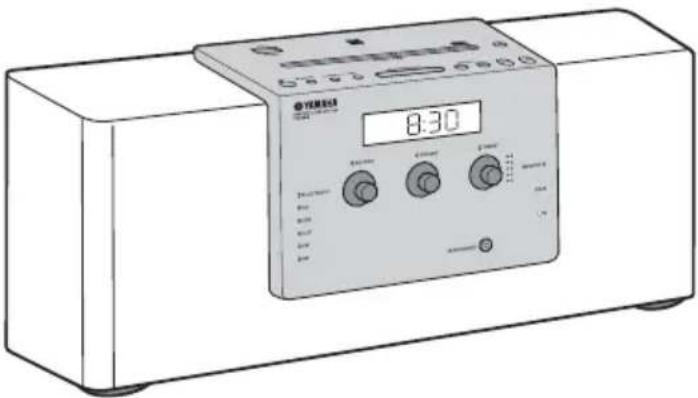
Various music sources that emphasize sound quality
- Play back music on external devices such as audio/data CDs, USB devices (USB flash drives), and those connected via AUX, and tune in to the radio.
- By the Bluetooth technology, you can enjoy clear sound without wired connections (P. 11).
The 3-band equalizer (bass, middle, treble) can be set so that music sounds exactly how you want it (P. 15).
Convenient functions with enhanced usability
- One touch pairing (C P. 12).
- Storing/calling your five favorite radio stations easily.
- Charging smartphones, tablets, etc., via the USB port on the top panel.
Start your days with your favorite music (IntelliAlarm)
Use your favorite music or set of beeps as an alarm. The music you select is played at a volume of your own choice at the set alarm time, giving you the best possible start to the day (P. 16).
Easy operations using a dedicated application
By using the free application, "DTA CONTROLLER," you can operate the unit on the application or use various alarm features (P. 2).
Supplied accessories
Remote control
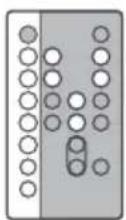
With CR2025 battery
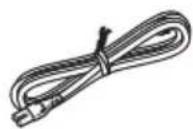
Power cable
AC adaptor
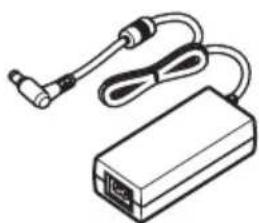
(DC 15 V, more than 2.56 A
Model number:
EADP-38EB A or
NU40-R1150-300S)
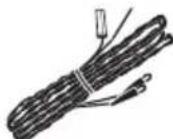
FM antenna
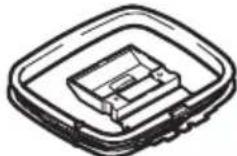
AM antenna
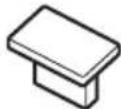
USB cap
Note
Keep the USB cap out of reach of children so as to ensure that it is not mistakenly swallowed.
CONTENTS
GETTING STARTED
INSTALLING“DTA
CONTROLLER" 2
NAMES OF PARTS AND THEIR
FUNCTIONS 3
OTHER FUNCTIONS AND INFORMATION
USING ALARM FUNCTION.16
USING THE SLEEP TIMER. 21
NOTES ON DISCS AND USB
DEVICES 26
SPECIFICATIONS. 27
About this manual
- If both the unit and remote control buttons can be used to operate a feature, the manual will describe steps using the buttons on the unit.
Note: supplementary explanations for better use. - indicates precautions for use of the unit and its feature limitations.
INSTALLING "DTA CONTROLLER"
Installing the DTA CONTROLLER application on a mobile device, such as a smartphone, iPhone, or tablet computer, allows you to use a variety of additional convenient features of this unit.
Features
- Changing the source
- Controlling the volume and tone
- Setting of the alarm function (IntelliAlarm) (e P. 19)
- Playing back songs stored in a smartphone/iPhone/tablet computer.
The mobile device needs to be connected with the unit via Bluetooth connection (P. 11).
Due to product improvements, specifications and appearance are subject to change without notice.

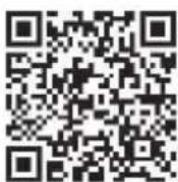
Available on the
App Store
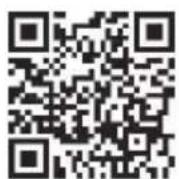
http://itunes.com/app/dtacontroller
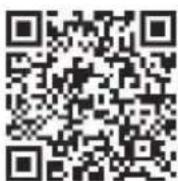
(For users in the U.S.A.)
https://itunes.apple.com/us/app/dta
controller-us/id549333293?mt=8
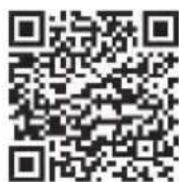
Google PlayTM
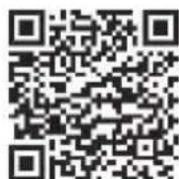
https://play.google.com/store/
apps/details?id=com.yamaha.av.
dto-controller
Note
If you cannot access the above information, search for "DTA CONTROLLER" on App Store or Google Play.
Remote control
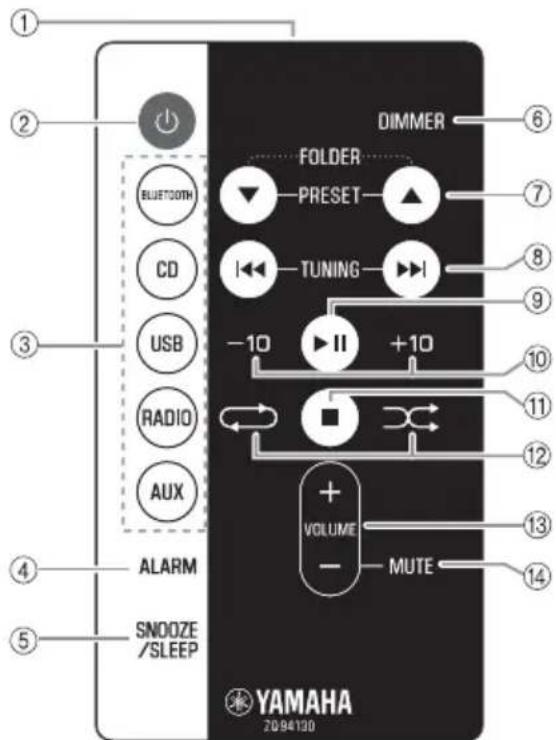
① Infrared signal transmitter
② (Power)
Press to turn on the system or enter standby mode.
③ Source buttons
Changes sources.
④ALARM
Turns on/off the alarm.
⑤SNOOZE/SLEEP
Sets snooze/sleep (P. 18, 21).
⑥ DIMMER
Adjusts the brightness of the front panel display (P. 21).
- PRESET
Selects the preset radio station when using the radio.
FOLDER
Switches the playback folder during playback of CDs or USB devices.
During playback: Skips the playback track/file.
Holding the button down while playing a track/file will search backward/forward the track/file
$$ (\text {P}. 8). \tag {P.8} $$
During receiving radio: Tunes radio (P. 14).

Play/pause.
Skipping 10 tracks.

Stops playback.

(Repeat)/ (Shuffle)
Plays music on an audio/data CD or USB device in repeat/shuffle (P. 10).
Controls volume.
Mutes/resumes the sound.
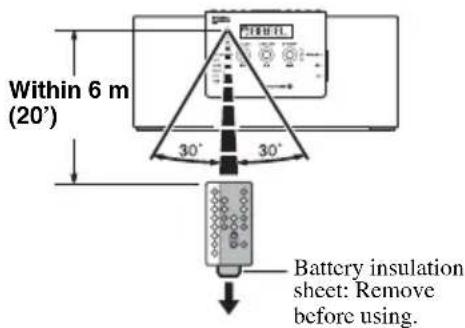
Using the remote control
Point the remote control at the remote control signal receiver (on the front panel) and use within the range shown below.
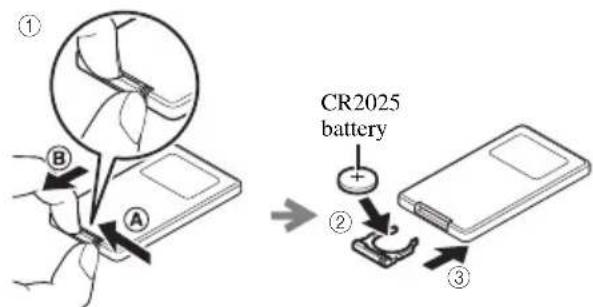
Replacing the remote control battery
While pushing the release tab in direction Aide out the battery holder in direction B
Top panel
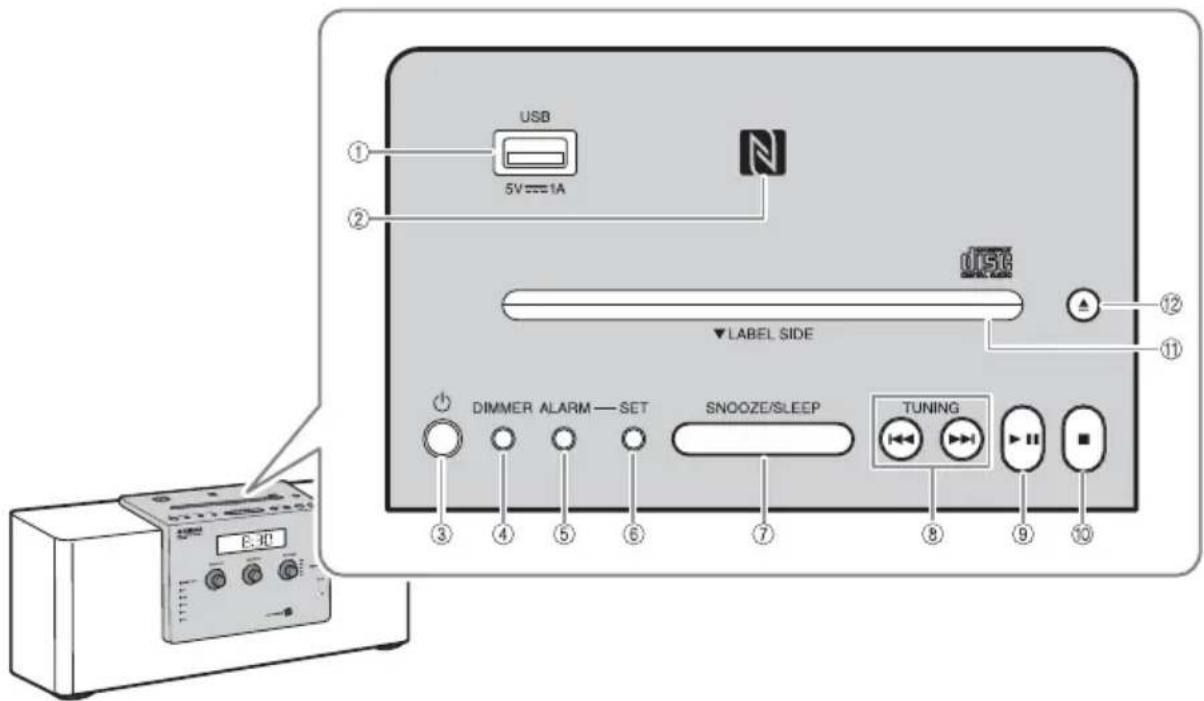
①USB port
- Connect a USB device for playback (P. 9).
- Supplies 5 V/1 A to a portable device, such as a smartphone, when it is connected with a USB cable (P. 10).
② Cmark
Allows easy pairing with NFC technology (P. 12).
③ (Power)
Press to turn on the unit or enter standby mode. Time is displayed on the front panel even when the unit is in standby mode.
#
- Press and hold on the unit for more than 3 seconds to set the unit to Eco Standby mode. No information on the front panel is displayed in this mode. This can reduce power consumption. To cancel Eco Standby mode, press again.
Even in standby mode or Eco Standby mode, the alarm function is available. - (U.S.A. and Canada models) When the clock is set to the factory setting and no time has been set, the unit enters Eco Standby instead of standby mode.
④ DIMMER
Sets brightness of the front panel display (P. 21).
A (auto) B (brightest) 2 1 (darkest) back to A
#
When A (auto) is set, the brightness of the front panel display is adjusted automatically depending on the brightness of the room.
⑤ALARM
Turns the alarm on/off (P. 18).
⑥SET
Use to configure the alarm setting (P. 17,20).
⑦SNOOZE/SLEEP
Sets the sleep timer or switches the alarm to snooze mode (P. 18, 21).
⑧TUNING
Skipping the playback track/file, or tunes the radio. Holding the button down while playing a track/file will search backward/forward the track/file (P.8,14).
(9)
Plays/pauses the track being played (P. 8).
10
Stops playback.
iDisc slot
Insert a CD (P.8).
12
Ejects the CD (P. 8).
Front panel
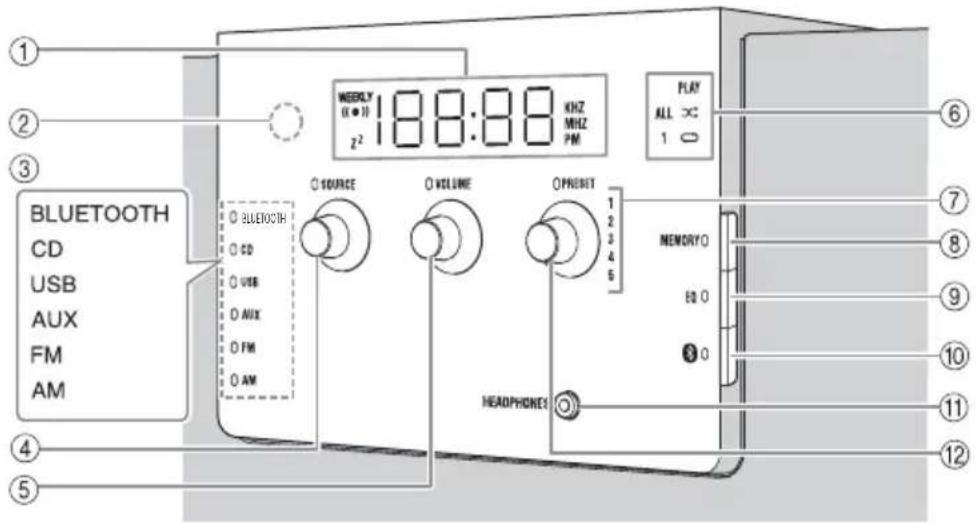
① Front panel display
Displays the clock and various information.
② Illumination sensor
Measures surrounding illuminance. Do not cover this sensor.
③Source indicator
Shows the selected source.
④SOURCE
Changes sources.
⑤ VOLUME
Controls volume.
⑥PLAYindicator
Shuffle indicator
Repeat indicator
Shows playback status (P. 9).
⑦ Presetindicator
Shows preset radio station number (P. 14).
⑧MEMORY
Memorizes radio stations (P. 14).
EQ
Controls tone (P. 15).
10 Bluetooth)
Connect/disconnect Bluetooth devices (P.13).
10HEADPHONES
Connect headphones.
12 PRESET
-
During playing data CD/USB: Changes folders (P.9).
-
During receiving radios: Selects the preset radio station (P. 14).
Auto Standby
-
With the Auto Standby function, the unit behaves as described below when the unit is turned on (default setting):
-
This unit enters standby mode when playback of CD/USB is paused, when no signal is input from the tuner or a connected device, or when playback continues at quite a low volume for a certain period of time (about 20 minutes).
-
This unit enters standby mode when no operation is performed for more than 8 hours.
-
Activating/Deactivating Auto Standby
1 Plug in the unit while pressing and holding
2 Keep holding
The Auto Standby status changes, the TUNING, SOURCE, VOLUME, and PRESET LEDs blink, and the message is displayed on the front panel display.
- When activating Auto Standby: On
- When deactivating Auto Standby: Off
中
(U.S.A. and Canada models) When the clock is set to the factory setting and no time has been set, this operation is not available. Set the time before the operation (P. 7).
Rear panel
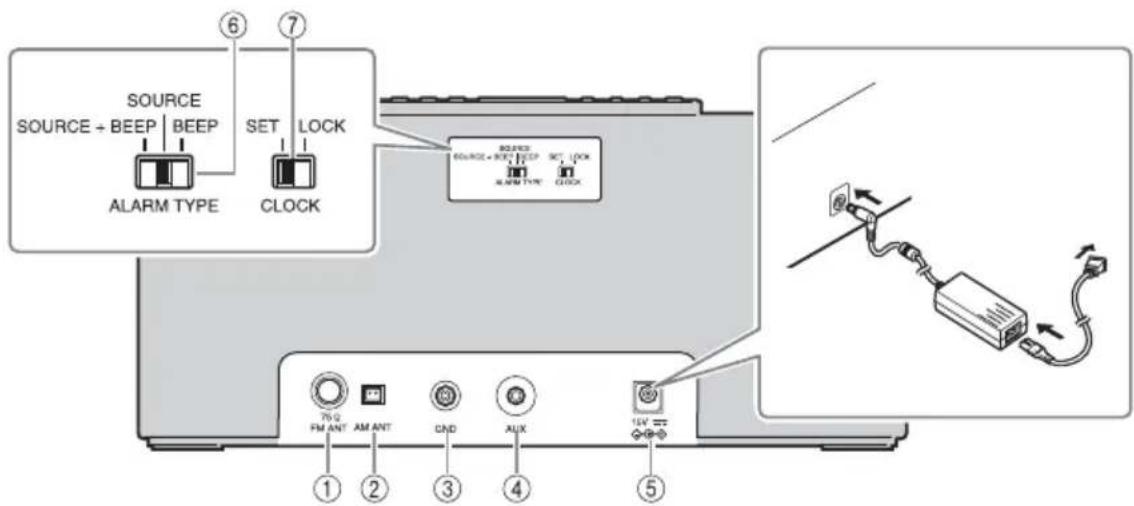
① FM antenna terminal
Connect the supplied FM antenna.
②AM antenna terminal
(U.S.A. and Canada models)
Connect the supplied AM antenna.
③GND
Connect the cable core of the FM antenna (see below).
4AUX
Connect an external device (P. 15).
⑤ 15 V
Connect the supplied AC adaptor and power cable.
⑥ALARM TYPE
Sets the alarm type of the IntellAlarm function P.17).
⑦CLOCK
Adjusts the clock (P.7).
Connecting the FM antenna
It is recommended to connect the FM antenna to the GND terminal before connecting to the FM antenna terminal.
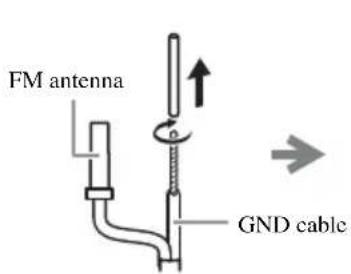
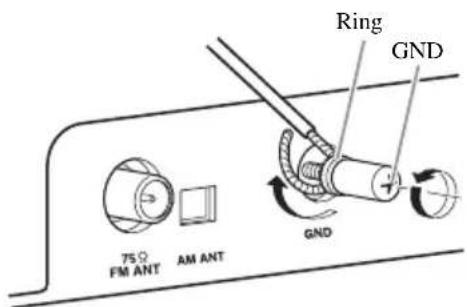

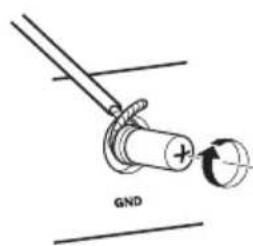
1 Remove insulation and twist the edge of the cord.
2 Fully unscrew the GND terminal, then wind the cord inside the ring part of the GND terminal.
3 Tighten the GND terminal taking care not to slip the cord off from the terminal.
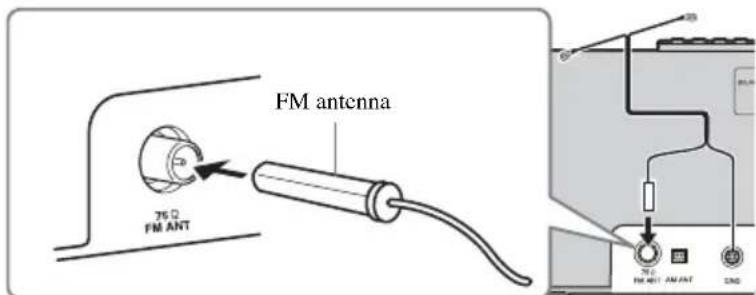
4Connect the supplied FM antenna to the unit.
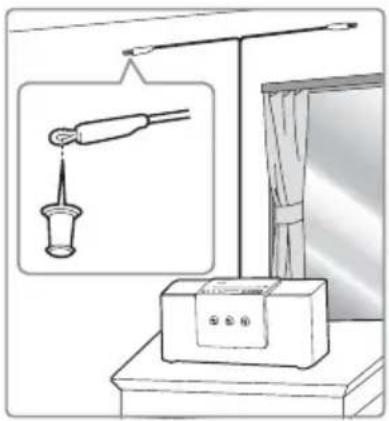
5Pin the antenna where the best reception is obtained.
Note
The antenna should be stretched out.
- If you use an outdoor antenna instead of the supplied antenna, reception will be better.
If radio reception is poor, change the height, direction, or placement of the antenna.
- If you listen to an FM radio station while USB charging, noise may interfere with the radio reception. In this case, disconnect the USB cable from the unit.
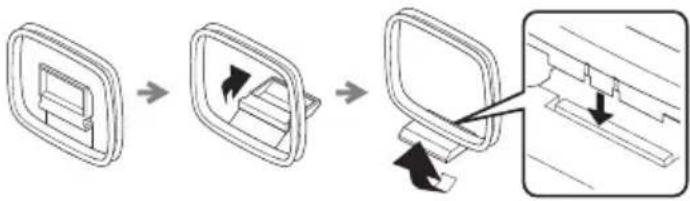
Connecting the AM antenna (U.S.A. and Canada models)
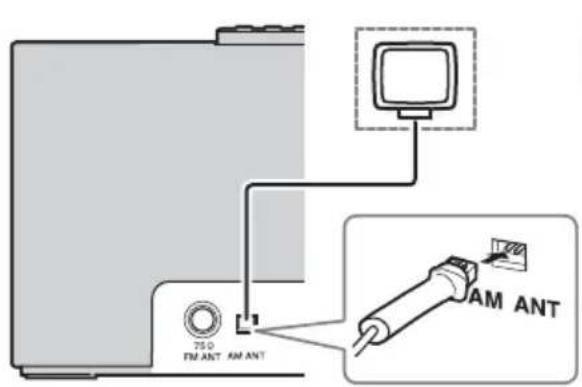
Assembling the AM antenna
Note
- Place the antenna in a location with good signal reception.
- Signal reception may be inadvertently affected if a digital device is located near the antenna.
ADJUSTING THE CLOCK
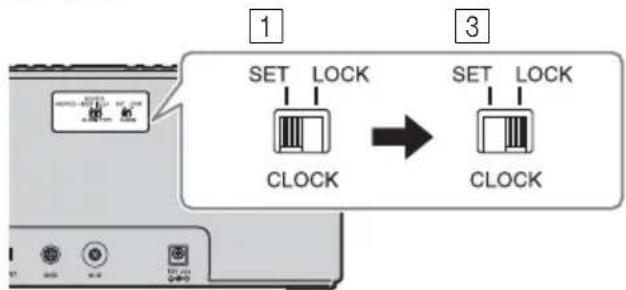
Rear panel
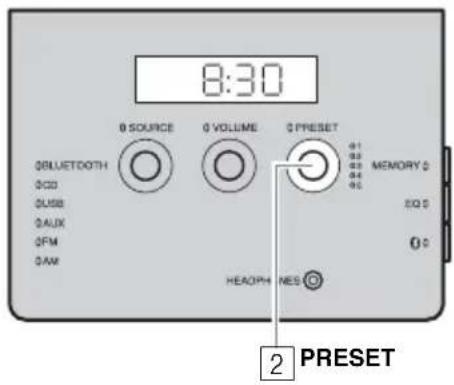
Front panel
1Set CLOCK to SET.
2 Set the time.
Set the time with PRESET.

- Press SNOOZE/SLEEP in step 2 to switch between the 12 and 24 hour clock display.
- The "PM" indicator will be shown only when you select the 12 hour clock display.
3 Set CLOCK to LOCK to complete.
At the time LOCK is set, it will be 00 second and time count starts.
Note
The time settings are lost about one week after unplugging the unit.
LISTENING TO CD AND USB DEVICE
The unit will operate as follows when playing back tracks/files on CD/USB devices.
- If the CD/USB device being played back is stopped, the track that was being played back will start playing from the beginning of the track the next time playback begins.
-
If you press on the remote control while playback is stopped, the next time playback begins, the unit will play tracks as follows:
-
For audio CD: from the first track of the CD.
-
For data CD/USB device: from the first track of the folder that contains the track that was played last.
-
When Auto Standby is activated, this unit enters standby mode automatically if no operation is performed for 20 minutes after CD/USB device playback is stopped.

For details on playable discs and files, refer to "NOTES ON DISCS AND USB DEVICES" (p. 26).
Use the following buttons to control the unit while playing back tracks on CD/USB devices.
| Button Function | tion | |
| Top panel/Remote control | II | Play/Pause |
| \(\text{山}\) / \(\text{山}\) | Skip Search backward/forward (press and hold down) | |
| ■ | Stop | |
| Top panel | ▲ | Eject the CD |
| Button Function | ||
| Remote control | ←→ | Repeat playback (P.3) |
| → | Shuffle playback (P.3) | |
| +10/Stop | 10 tracks/files | |
| ▲/Change | folder to play (only for data CDs or USB devices) | |
Listening to CD
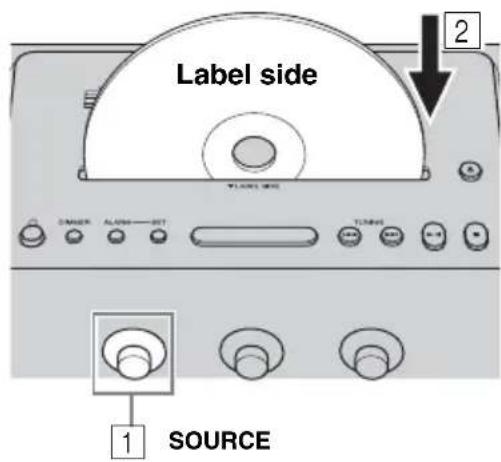
Top/front panel
1 Set SOURCE to CD.
2 Insert the CD into the disc slot with the label side facing toward the front of the unit.
Playback starts automatically. Playback operations are available with the remote control or this unit.
Note
- Insert the CD with the label side facing toward the front of the unit.
- CDs cannot be inserted or ejected when the system is in Eco Standby mode (P. 4).
Listening to USB device
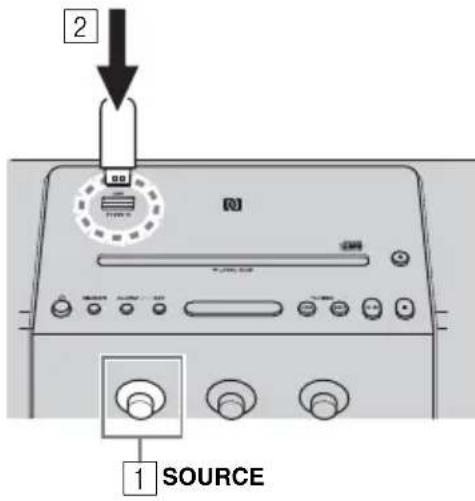
Top/front panel
Display information
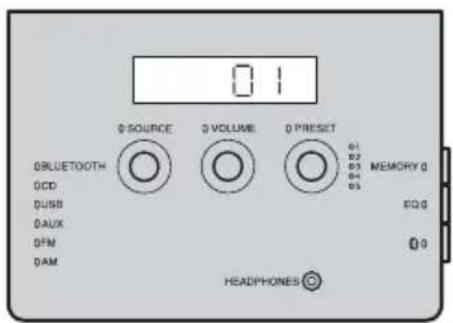
Front panel

Skip folders to select the desired one with PRESET while the data CD/USB device is played back.
1 Set SOURCE to USB.
2 Connect a USB device.
Playback starts automatically. Playback operations are available with the remote control or this unit.

Stop playback before disconnecting the USB device.
Track or folder and file numbers appear for a while when playback starts.
Playing back audio CD
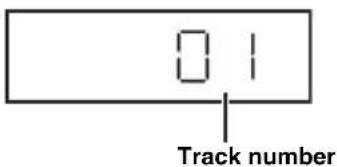
Playing back data CD/USB device
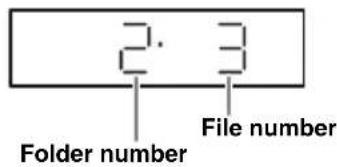
Repeat/shuffle playback
The playback mode can be checked with the play/shuffle/repeat indicator on the front panel display.
Remote control
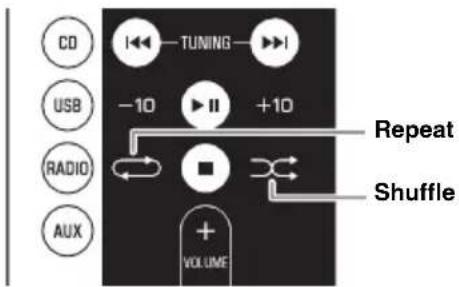

If the selected source contains folders, the playback mode of repeat/shuffle can also be set by folder.
Repeat playback
Press Repeat) on the remote control to select a playback mode from the following.
1:1 track
: All tracks within the folder (data CD/USB device only)
ALL:All tracks
No display:Repeat mode off
Shuffle playback
Press shuffle) on the remote control to select a playback mode from the following.
: All tracks within the folder (data CD/USB device only)
ALL:All tracks
No display:Shuffle mode off
Notes about power supply via the USB port
Supplies 5V / 1 A to a portable device, such as a smartphone, when it is connected with a USB cable.
Top panel
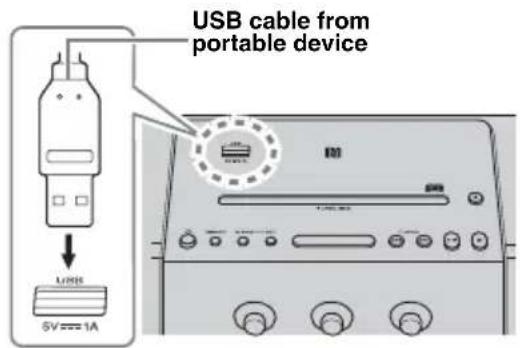
Note
- Charging may not be possible depending on the portable device.
- This unit does not support iPad charging.
- The power is supplied while the unit is turned on (no matter what source is selected), even in standby mode.
- Yamaha will not be held responsible for any damage to the portable device or data loss occurred while using this unit.
- Disconnect the USB cable immediately after charging completes, since power continues to be supplied to the connected device.
LISTENING TO MUSIC FROM YOUR Bluetooth DEVICE
This unit provides Bluetooth functionality. You can enjoy wireless music playback from your Bluetooth device (smartphone, digital audio player, etc.). Please also refer to the owner's manual of your Bluetooth device.
Pairing this unit with your Bluetooth device
Pairing is an operation that registers the communicating device (hereafter called "the connecting device") with this unit. You'll need to perform the pairing operation the first time you use your Bluetooth device with this unit, or if the pairing settings have been deleted. Once pairing has been completed, subsequent reconnection will be easy even after the Bluetooth connection is disconnected. If pairing is not successful, refer to the item "Bluetooth" in "TROUBLESHOOTING" (P. 24).

This unit can be paired with up to eight connecting devices. When pairing with the ninth device has succeeded, pairing data for the device with the oldest connection date will be deleted.
- If this unit is connected via Bluetooth to another device, disconnect the Bluetooth connection before you perform the pairing operation (P. 13).
Note
Yamaha does not guarantee all connections between this unit and Bluetooth device.
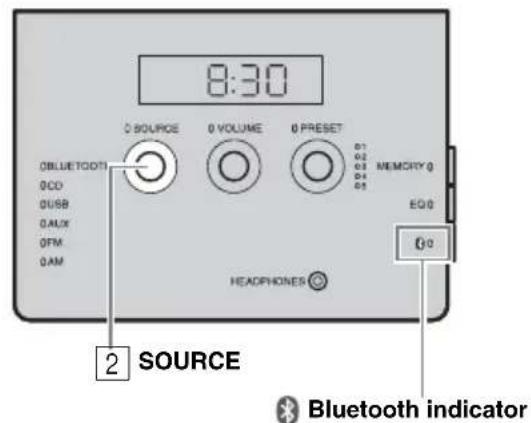
Front panel
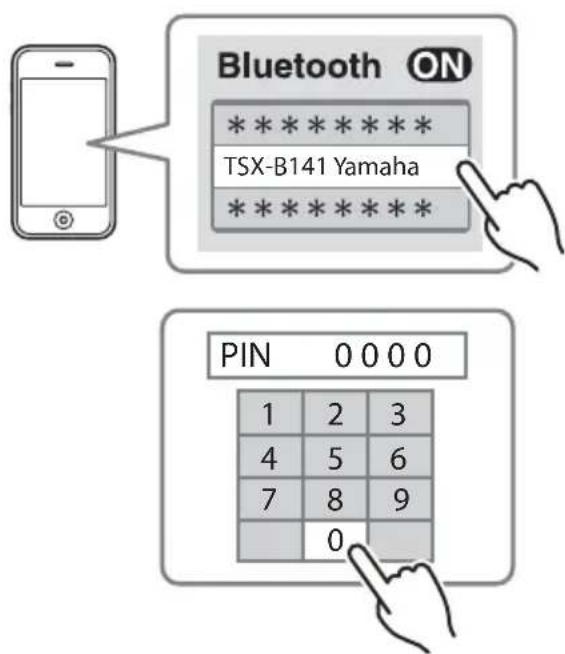
1 Press turn on the unit.
2 Set SOURCE to BLUETOOTH.
If using an iPod touch/iPhone/iPad
3On your iPod touch/iPhone/iPad, tu [Settings] [Bluetooth] on.
The Bluetooth connection list will appear in [Devices]. (This procedure or display may differ depending on the type of your iPod touch/ iPhone/iPad.)
4 From the Bluetooth connection list of the connecting device, choose this unit (TSX-B141 Yamaha).
When pairing has been completed, your iPod touch/iPhone/iPad will indicate "Connected". The Bluetooth indicator on the front panel display of this unit will light.
If using other than an iPod touch/ iPhone/iPad
3 Perform Bluetooth pairing on the connecting device.
For details refer to the owner's manual of the connecting device.
4 From the Bluetooth connection list of the connecting device, choose this unit (TSX-B141 Yamaha).
When pairing has been completed, the Bluetooth indicator on the front panel display of this unit will light for about 1 second.

If you are asked to enter a password, enter the numerals "0000".
Easy pairing
For the smartphone with NFC (Near Field Communication) function, you can easily perform the pairing operation just by holding the smartphone over the NFC mark (you need to turn the unit on and turn on the NFC function of the smartphone beforehand).
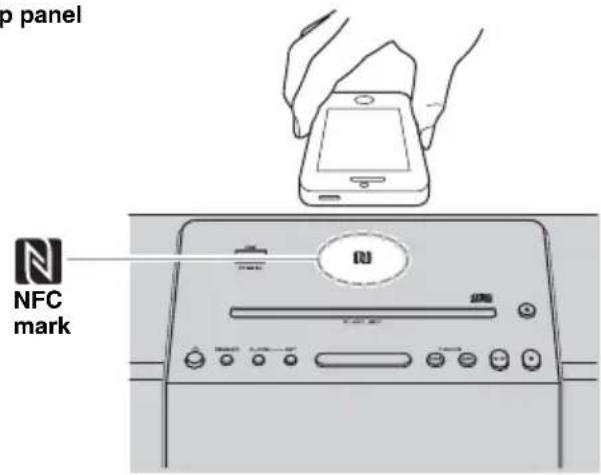
Top panel
1 Press turn the unit on.
2Hold the smartphone over the NFC mark.
3 Perform the pairing operation at the smartphone (for details, please read the owner's manual of the smartphone).
This unit is indicated as "TSX-B141 Yamaha" on the smartphone.

- If you are prompted for a passkey, enter the numerals "0000".
- If the connection fails, move the smartphone slowly on the NFC mark.
- If the smartphone is equipped with a case, remove the case.
Listening to a Bluetooth device
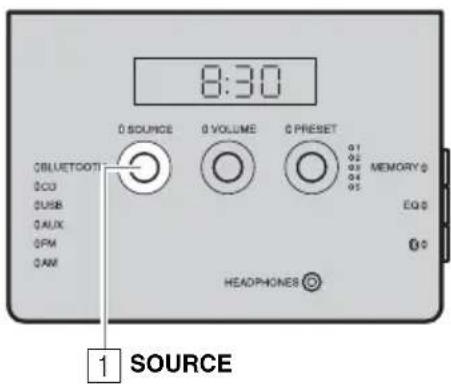
Front panel
1 Set SOURCE to BLUETOOTH.
2 Connect this unit and your connecting device via Bluetooth.
3 Play back music from your Bluetooth device.
Note
Take care that the volume setting of this unit is not too high.
中
- If you connect via Bluetooth from your connecting device and play back music while the unit is in standby mode, the unit will automatically turn on.
- If you disconnect the Bluetooth connection from your connecting device while the playback source is set to Bluetooth, the unit will automatically enter standby mode.
- If the Auto Standby is enabled and Bluetooth is selected as the playback source, 20 minutes with no Bluetooth connection and no operation makes the unit enter standby mode automatically.
Connecting an already-paired device via Bluetooth
Once pairing has been completed, connecting a Bluetooth will be easy the next time.
Connecting from this unit
Front panel
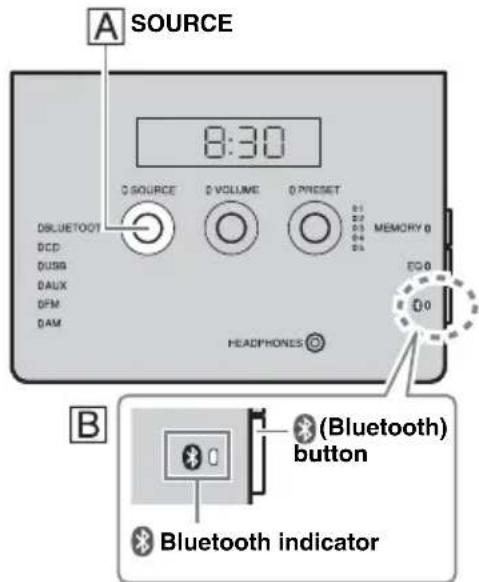
Follow procedure A to connect the device.
A Set SOURCE to BLUETOOTH.
Press the (Bluetooth) button on the right side of the front control panel.
The Bluetooth indicator will blink on the front panel display; this unit will search for the connecting device that was most recently connected via Bluetooth, and will then establish a connection (You must first turn on the Bluetooth setting of the connecting device).
When the Bluetooth connection has been established, the Bluetooth indicator will light.
Connecting from the connecting device
1 In the Bluetooth settings of the connecting device, turn Bluetooth on.
2 From the Bluetooth connection list of the connecting device, choose this unit (TSX-B141 Yamaha).
The Bluetooth connection will be established, and the Bluetooth indicator on the front panel display of this unit will light.
Connecting with the NFC function
When using an already-paired smartphone with the NFC function, holding it over the NFC mark establishes a Bluetooth connection.
Note
Bluetooth connections cannot be established from the connecting device when this unit is in Eco Standby mode. Turn the unit on.
Disconnecting a Bluetooth connection
If any of the following operations are performed while a Bluetooth connection is established, the Bluetooth connection will be disconnected.
- Press the (Bluetooth) button on the unit. (Or hold down ( BLEUTooth BLEUTooth ) on the remote control.)
- Set the unit to standby mode.
- Turn off the Bluetooth setting of the connecting device.
- Hold the smartphone with the NFC function over the NFC mark during Bluetooth connection.
LISTENING TO RADIO STATIONS
Tuning radio stations
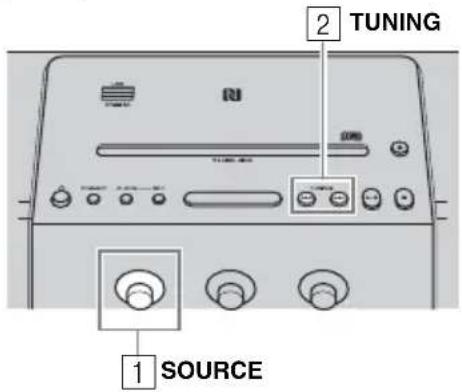
Top/front panel
1 Set SOURCE to FM/AM (U.S.A. and Canada models).
Press /to tune the FM/AM station.
| Tuning type O | operation of TUNING |
| Automatic tuning | Press and hold down |← or ➔. |
| Manual tuning | Press |← ➔ repeatedly. |
Note
If you tune to an FM station manually, the sound will be in monaural.
Storing FM/AM stations (preset)
You can store 5 favorite FM/AM stations respectively with the preset functions.
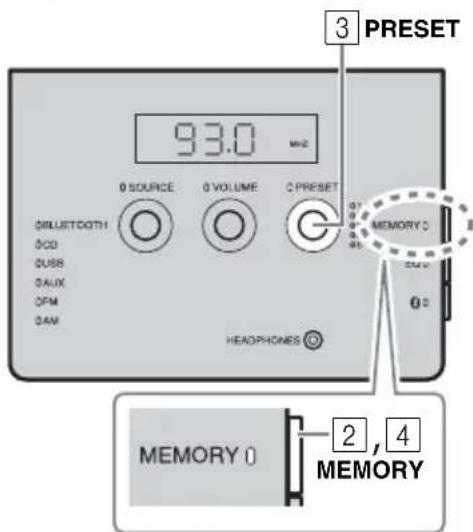
Front panel
1 Tune into a favorite radio station.
2 Press MEMORY.
3 Select the preset number you want to store to with PRESET.

To cancel the preset, press TUNING again.
4 Press MEMORY to complete.
Presetting completes.
Selecting preset radio stations
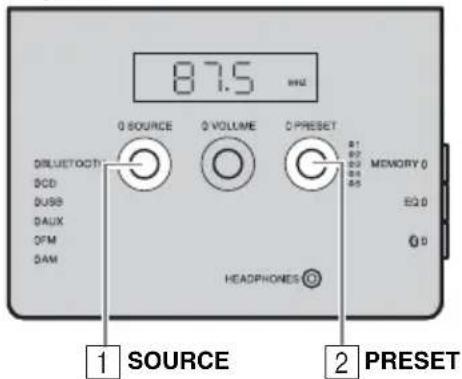
Front panel
1 Set SOURCE to FM/AM.
2 Select the preset radio station with PRESET.
(Or press /An the remote control.)
LISTENING TO EXTERNAL SOURCE
Rear panel
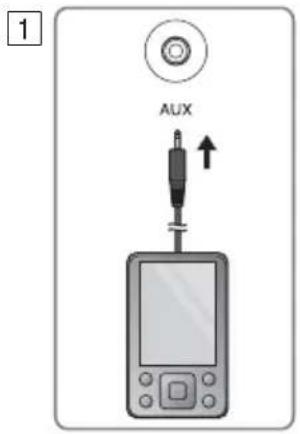
Top/front panel
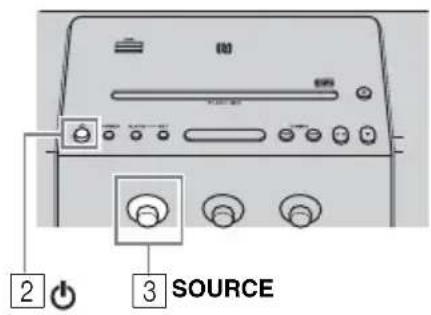
Set the unit to standby mode before connecting audio cables.
1 Connect external audio device to AUX on the rear panel using a commercially available 3.5mm (1/8 in) stereo mini plug cable.
Note
Turn down the volume of the unit and your external audio device before connection.
Press turn the unit on.
3 Set SOURCE to AUX.
4 Start playback on the connected external audio device.
TONE CONTROL
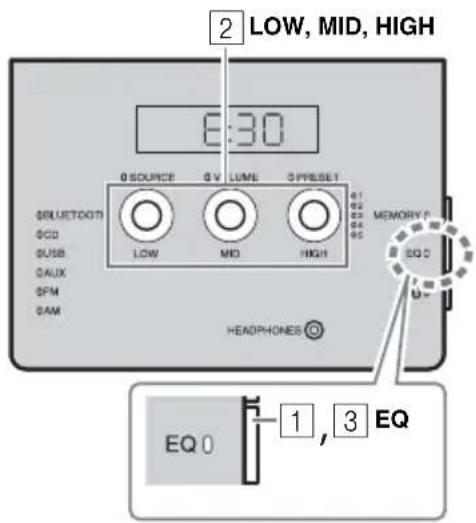
Front panel
1 Press EQ during playback. LOW, MID and HIGH flash.
2 Adjust the tone with LOW, MID and HIGH. Each tone can be adjusted from -5 to +5 .
3 Press EQ to complete.
USING ALARM FUNCTION
IntelliAlarm
The unit includes an alarm function (IntelliAlarm) that plays back music sources or set of beeps (built-in alarm) at the set time in a variety of different methods. The alarm function has following features.
3 types of alarms
Select from 3 alarm types, combining music and beep sounds.
| SOURCE + BEEP | The selected audio source and beep sound are played at the set time. This mode is recommended for the best possible start to the day. 3 minutes before the set time: the source music begins to fade in and the volume gradually increases as the alarm time approaches. Alarm time: a beeping sound also begins playing. |
| SOURCE | The selected audio source is played at the set time. The volume fades in gradually and increases to the set volume. |
| BEEP | Only beep sound is played back at the set time. |
Music sources
Audio CD, data CD, USB device and radio can be selected. The following can also be selected depending on the audio source:
| Source Playback | method Function | |
| Audio CD | Track The selected track is played repeatedly. | |
| Resume The track you listened to last time is played back. | ||
| Data CD/USB | Folder The selected folder is played repeatedly. | |
| Resume The track you listened to last time is played back. | ||
| FM/AM radio | Preset station The selected preset radio station is played. | |
| Resume The radio station you listened to last time is played back. | ||
Snooze
The snooze function can be enabled to replay the alarm after 5 minutes (P. 18).
Alarm setting
Setting the alarm time and sound
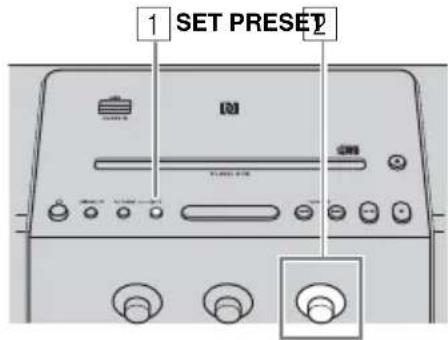
Top/front panel
Rear panel
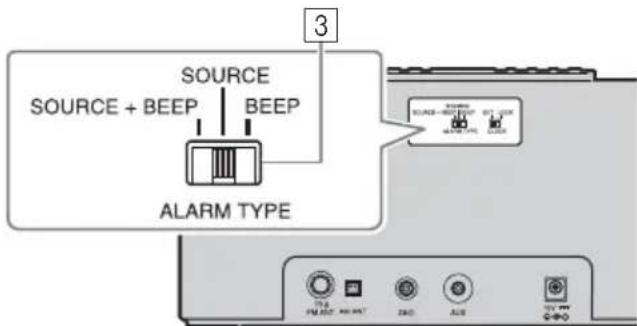
Top/front panel
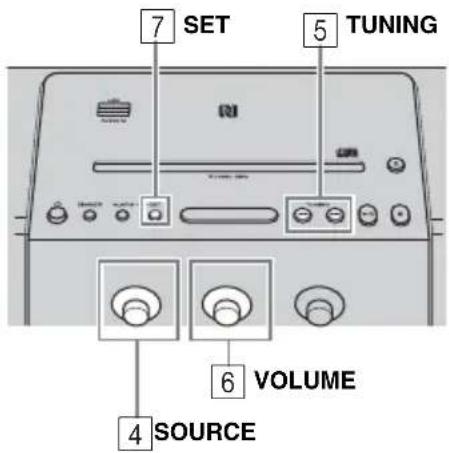
1 Press SET.
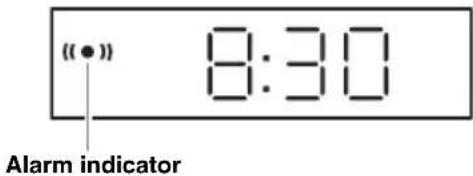
Alarm indicator (1) and setting items flash.
2 Set the alarm time with PRESET.
3 Set the alarm type with ALARM TYPE.
Select from SOURCE+BEEP, SOURCE or BEEP. For the details on alarm type, refer to "3 types of alarms" (P. 16).
4 Select the source with SOURCE (as required).
When you select SOURCE+BEEP or SOURCE, select the music source. A source other than Bluetooth or AUX can be selected.
5 Select a track, folder or radio station with TUNING (as required).
When the source is CD/USB/FM/AM, select a track, folder or radio station for alarm with
#
- When CD/USB is selected and "0" is set as track/folder number, the track you listened to last time is resumed.
- When FM/AM is selected and no preset indicator (P. 5) is lit, the radio station you listened to last time is played.
6 Set the alarm volume with VOLUME.
7 Press SET to complete.
Alarm is set and the alarm indicator (1) lights up.
Turning the alarm on/off
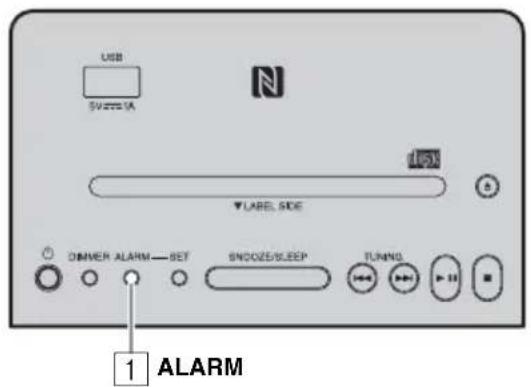
Top panel
1 Press ALARM.
When the alarm is on, the alarm indicator (1) shown, and the alarm time is shown for a while. If you press ALARM again, the alarm indicator (2) the alarm will turn off.
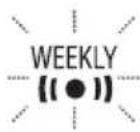
When alarm mode is Weekly Alarm (P. 19), the Weekly Alarm indicator (WEEKLY also turn on/off.

The alarm setting will be saved even if the alarm is turned off. If the alarm is turned on again by pressing ALARM, the alarm will sound with the previous alarm settings.
Operations while alarm is sounding
At the set time, the alarm sounds. During playback, the following operations are available.
Stopping the alarm for a short time (snoopze)
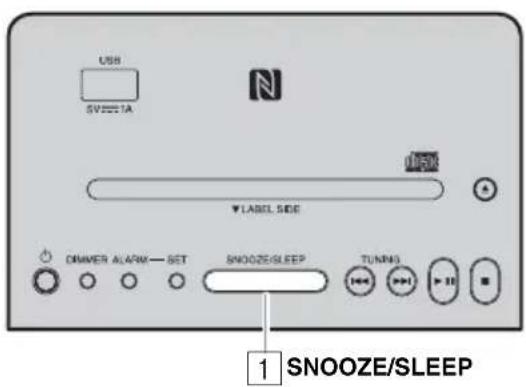
Top panel
1 Press SNOOZE/SLEEP.
Snoopze function will stop the alarm and resume again in 5 minutes.

- Press SNOOZE/SLEEP.
Once: Beep stops.
Twice: Music source stops (snoopze function).
Four minutes after the music source is stopped, it will start fading in.

After one additional minute after the music source starts fading in, the beep is emitted.
The alarm indicator will flash when the snooze function is activated.
Turning the alarm off
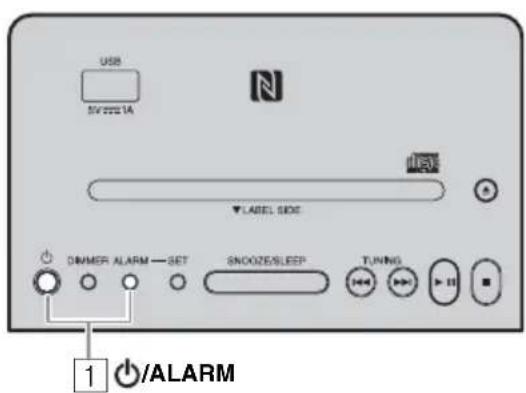
Top panel
1 Press ALARM or

The alarm stops automatically after 60 minutes unless you stop the alarm.
- The alarm setting will be saved even if the alarm is turned off. If the alarm is turned on again by pressing ALARM, the alarm will sound with the previous alarm settings.
Setting Weekly Alarm
Setting Weekly Alarm with DTA CONTROLLER
With DTA CONTROLLER (P. 2), you can use Weekly Alarm, which allows you to set alarm times respectively for each day of the week. First, make the Weekly Alarm settings on DTA CONTROLLER.
IntelliAlarm setting screen
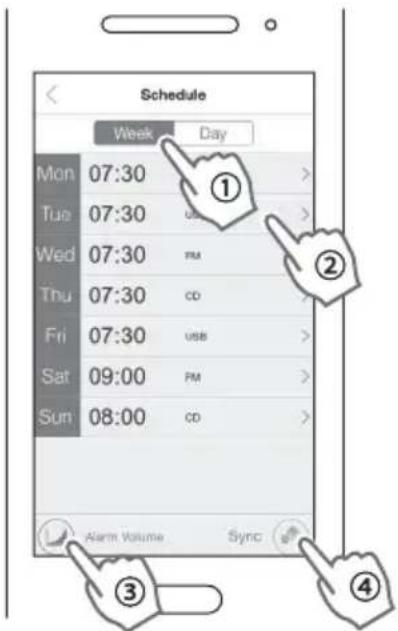
1 Tap (IntelliAlarm icon) in DTA CONTROLLER to open the IntelliAlarm setting screen.
2 Perform the operations below on the IntelliAlarm setting screen.
① Select [Week] (Weekly Alarm).
② Set the alarm time for each day of the week.
③ Set the alarm volume or IntellAlarm advanced settings.
④ Tap [Sync] to transfer the settings to the unit. The Weekly Alarm function is activated and the alarm indicator (1) Weekly Alarm indicator (WEEKLY).
Setting Weekly Alarm on the unit
Once you have set Weekly Alarm by DTA CONTROLLER, you can select the Weekly Alarm mode in the alarm mode select display of this unit.
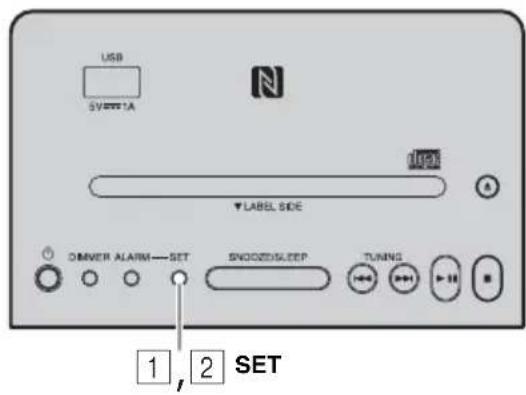
Top panel
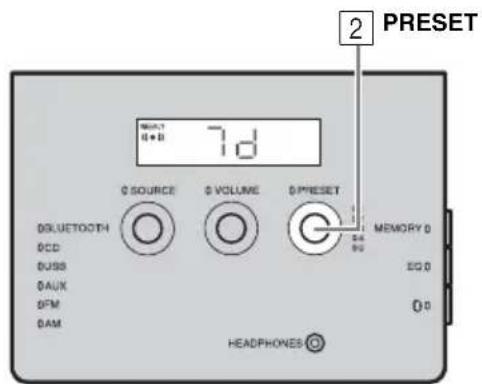
Front panel
1 Press SET.
The alarm indicator (wi) flash and the alarm mode select display will appear.
2 Select the alarm mode.
Rotate PRESET to select the alarm mode, and press SET to confirm it.
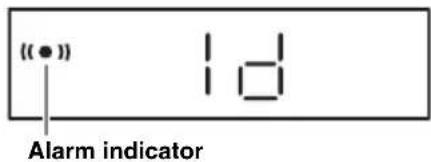
1d (One Day Alarm mode):
An alarm that sounds only once at the specified time.
7d (Weekly Alarm mode):
An alarm whose time can be specified for each day of the week (settable only using "DTA CONTROLLER").
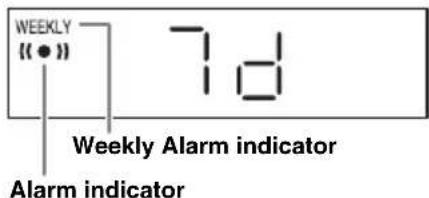
If you have chosen Weekly Alarm mode, this completes the alarm setting. The alarm indicator (the Weekly Alarm indicator) WEEKLY will light up.
Note
The Weekly Alarm mode cannot be selected when all the days of the Weekly Alarm setting are turned off. Turn on any day of the Weekly Alarm setting.
USING THE SLEEP TIMER
You can set the time until the unit automatically enters standby mode.
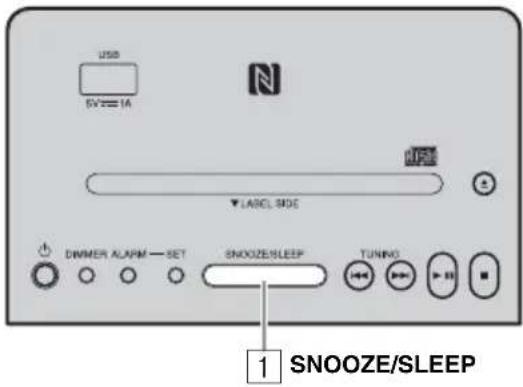
Top panel
Press SNOOZE/SLEEP a number of times to set the time until the system enters standby mode.
The sleep timer can be set to 30, 60, 90 and 120 minutes.
When the time is set, the sleep indicator (24) shown on the front panel display.
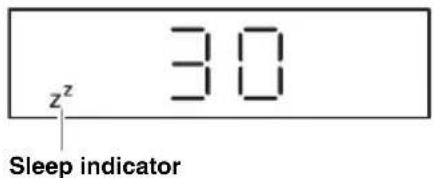

If you press SNOOZE/SLEEP while the sleep timer is activated, the sleep timer setting will be canceled.
ADJUSTING BRIGHTNESS OF FRONT PANEL DISPLAY
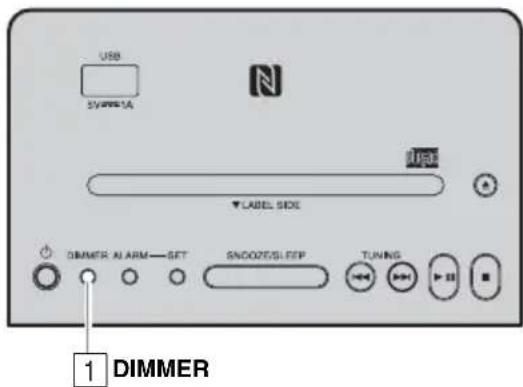
Top panel
1 Press DIMMER.
Each time the button is pressed, the setting changes in the following order:
A (auto) B (brightest) 2 1 (darkest) back to A
Note
When AUTO is set, the brightness of the front panel display is adjusted automatically with the illumination sensor (P.5). Ensure that the sensor is not covered.
TROUBLESHOOTING
If there is a problem with the unit, check the following list first. If the problem you are experiencing is not listed below or if the instructions below do not help, turn off the unit, disconnect the power cable, and contact the nearest authorized Yamaha dealer or service center.
General
| Problem Cause Solution | ||
| Cannot turn on the unit. | The power cable is not connected firmly. | Reconnect the power cable into the wall outlet and the unit firmly. |
| The unit may have received a strong electrical shock such as lightning or excessive static electricity. | Disconnect the power cable. Wait about 30 seconds, reconnect the power cable, and turn on the unit. | |
| The speakers make no sound. | The volume may be set to the minimum level. | Adjust the volume level. |
| The source may be incorrect. Select the correct source. | ||
| Auto Standby is activated. Turn on the unit again. | ||
| Sound suddenly turns off. | The sleep function (P.21) may be set. | Turn on the unit and play the source again. |
| Auto Standby is activated. Turn on the unit again. | ||
| Sound is cracked/distorted or there is abnormal noise. | Input source volume is excessive, or volume of this unit is excessive (especially Bass). | Adjust volume with VOLUME, or adjust Bass with EQ (P.15). |
| The unit does not operate properly. | The unit may have received a strong electrical shock such as lightning or excessive static electricity, or power supply may have dropped. | Set the unit to standby mode and disconnect the power cable. Wait about 30 seconds, reconnect the power cable, and turn the unit on. |
| The unit turns on but immediately enters standby mode. | ||
| A digital or high-frequency equipment produces noises. | The unit may be placed too close to the digital or high-frequency equipment. | Place the unit further away from the equipment. |
| The clock setting has been cleared. | The unit is left more than one week after you disconnect the power cable from the wall outlet. | Plug the power cable into the wall outlet firmly, and set the clock again (P.7). |
| The selected source does not play back at the alarm time. | No CD or USB device is inserted. Insert a CD or USB device. | |
| ALARM TYPE switch is set to BEEP. | Set ALARM TYPE to SOURCE + BEEP or SOURCE (P.16). | |
| Clock flashes and the unit cannot be operated. | CLOCK switch on the rear panel is set to SET, and this unit is in clock setting mode. | Set CLOCK switch to LOCK (P.7). |
| Auto Standby is inactive. | The unit may have picked up ambient noise. | If the unit is close to portable phones, wireless devices, microwave ovens, fluorescent light, place the unit further away from them. |
| The front display becomes dim. | The front display setting is set to AUTO. Set the brightness of the front panel display to a setting other than AUTO. Or, do not cover the illumination sensor. | |
| Cannot charge the connected portable USB device. | An incompatible USB device is connected to the unit. Or the USB device is not connected to this unit properly. | Press enter standby mode, and reconnect the USB device to the unit. If it does not resolve the problem, the USB device is not chargeable with the unit. |
CD playback
| Problem Cause Solution | ||
| Disc cannot be inserted. | The unit is set to Eco Standby mode. Press to cancel Eco Standby mode (P.4). | |
| A disc is already inserted. Press to eject the disc▲ | ||
| Some button operations do not work. | The disc loaded into the unit may not be compatible. | Use a disc supported by the unit (P.26). |
| Playback does not start after pressing playback stops immediately. | The disc may be dirty. Wipe the disc clean. | |
| The disc loaded into the unit may not be compatible. | Use a disc supported by the unit (P.26). | |
| If the unit was moved from a cold to warm place, condensation may have formed on the disc reading lens. | Wait for an hour or two until the unit adjusts to the room temperature, and try again. | |
| The CD indicator flashes twice, and repeated 3 times, and the disc is ejected. | The disc loaded into the unit may not be compatible. | Use a disc supported by the unit (P.26). |
| The disc may be dirty. Wipe the disc clean. | ||
| The disc does not contain playable files. Use a disc contains playable files (P.26, 27). | ||
| The disc is loaded back to front. Insert a disc facing the label side to near side. | ||
| “Err” is displayed in the front panel display after loading a disc. | An error occurs in the unit. Eject the disc with .▲ | |
USB device playback
| Problem Cause Solution | ||
| MP3/WMA file in the USB device does not play. | The USB device is not recognized. Set the | unit to standby mode and disconnect the USB device. Then, turn the unit on and reconnect the USB device. |
| Connect an AC adaptor if supplied with the device. | ||
| The USB indicator flashes twice, and repeated 3 times, after connecting a USB device. | An incompatible USB device is connected to the unit. | Set the unit to standby mode and reconnect the USB device to the unit. If it does not resolve the problem, the USB device is not playable on the unit. |
| The USB device does not contain playable files. | Use a USB device contains playable files (P. 26, 27). | |
Bluetooth
| Problem Cause Solution | ||
| Cannot make this unit paired with the connecting device. | The unit is already connected with another device. | Disconnect the already connected Bluetooth device. |
| The connecting device does not support A2DP. | Perform pairing operations with a device which supports A2DP. | |
| A Bluetooth adaptor, etc. that you want to pair with this unit has a password other than “0000”. | Use a Bluetooth adaptor, etc. whose password is “0000”. | |
| This unit and the connecting device are too far apart. | Move the connecting device closer to this unit. | |
| There is a device (microwave oven, wireless LAN, etc.) outputs signals in the 2.4 GHz frequency band nearby. | Move this unit away from the device that is emitting radio-frequency signals. | |
| Cannot establish a Bluetooth connection. | This unit is not registered on the connecting device's Bluetooth connection list. | Perform pairing operations again (P.11). |
| Another Bluetooth device is already connected. | Terminate the current Bluetooth connection. | |
| The Bluetooth function of the device is turned off. | Turn on the Bluetooth function of the device. | |
| The pairing information has been deleted. | Perform pairing again (P.11). This unit can be paired with up to eight connecting devices. When pairing with the ninth device has succeeded, pairing data for the device with the oldest connection date will be deleted.On iPhone, iPad, or iPod touch, delete the pairing history with this unit and perform pairing again. | |
| No sound is produced or the sound is interrupted during playback. | The Bluetooth connection of this unit with the connecting device is disconnected. | Perform Bluetooth connection operations again (P.13). |
| This unit and the connecting device are too far apart. | Move the connecting device closer to this unit. | |
| There is a device (microwave oven, wireless LAN, etc.) outputs signals in the 2.4 GHz frequency band nearby. | Move this unit away from the device that is emitting radio-frequency signals. | |
| The connecting device's Bluetooth function is off. | Turn on the Bluetooth function of the connecting device. | |
| The connecting device is not set to send Bluetooth audio signals to this unit. | Check that the Bluetooth function of the connecting device is set properly. | |
| The pairing setting of the connecting device is not set to this unit. | Set the pairing setting of the connecting device to this unit. | |
| The connecting device's volume is too low. | Increase the volume level. | |
FM/AM radio reception
| Problem Cause Solution | ||
| Too much noise. | The antenna may be connected improperly. | Make sure the antenna is connected properly (P. 6, 7) or use a commercially available outdoor antenna. |
| Too much noise during stereo broadcast | The radio station you selected may be far from your area, or the radio wave reception is weak in your area. | Try manual tuning to improve the signal quality (P. 14) or use a commercially available outdoor antenna. |
| Even with an outdoor antenna, radio wave reception is weak. (Sound is distorted.) | Multipath reflection or other radio interferences may have occurred. | Change the height, direction, or placement of the antenna. |
Remote control
| Problem Cause Solution | |
| The remote control does not work properly. | The remote control may be operated outside its operation range. |
| The remote control signal receiver on the unit (P. 3) may be exposed to direct sunlight or lighting. | |
| The battery may be worn out. Replace the | |
| There are obstacles between the remote control signal receiver on the unit and the remote control. |
NOTES ON DISCS AND USB DEVICES
CD information
This unit is designed for use with audio CD, CD-R, and CD-RW with the logos followings.






- ISO 9660 format CD-R/RW

A disc logo mark is printed on the disc and the disc jacket.
Note
- Do not load any other type of disc into this unit. Doing so may damage this unit.
- CD-R/RW cannot be played back unless finalized.
- Some discs cannot be played back depending on the disc characteristics or recording conditions.
- Do not use any non-standard shaped discs such as a heart-shaped disc.
- Do not use discs with many scratches on their surface.
- Do not load a cracked, warped, or glued disc.
- Do not use 8-cm discs.
Handling a disc
- Do not touch the surface of the disc. Hold a disc by its edge (and the center hole).
- Do not use a pencil or pointed marker to write on the disc.
- Do not put a tape, seal, glue, etc., on a disc.
- Do not use a protective cover to prevent scratches.
- Do not load more than one disc into this unit at one time. This can cause damage to both this unit and the discs.
- Do not insert any foreign objects into the disc slot.
- Do not expose a disc to direct sunlight, high temperature, high humidity, or a lot of dust.
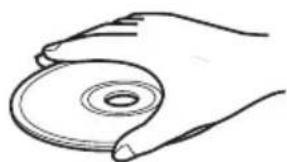
Caution
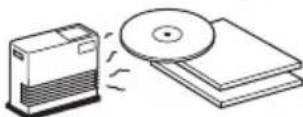
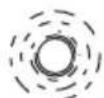
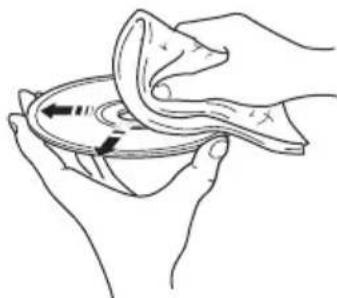
- If a disc becomes dirty, wipe it with a clean, dry cloth from the center out to the edge. Do not use record cleaner or paint thinner.
- To avoid malfunction, do not use a commercially available lens cleaner.
USB device information
About the USB devices playable with this unit This unit supports USB mass storage class devices (e.g., flash memories or portable audio players) using FAT16 or FAT32 format.
About power supply to USB devices: This unit supplies power (max. 1A) to USB devices (other than in Eco standby mode).
Note
- Some devices may not work properly even if they meet the requirements.
- Do not connect devices other than USB mass storage class devices (such as USB chargers or USB hubs), PCs, card readers, an external HDD, etc.
- Yamaha will not be held responsible for any damage to or data loss on the USB device occurring while the device is connected to this unit.
- Playability of and power supply to all kind of USB devices are not guaranteed.
- USB devices with encryption cannot be used.
About MP3 or WMA files
Note
- The unit can play back:
| File Bitrate (kbps) | Sampling frequency (kHz) |
| MP3 | 8 - 320** 16 - 48 |
| WMA | 16 - 320** 22.05 - 48 |
** Both constant and variable bitrates are supported.
- The maximum numbers of files/folders that can be played on the unit are as follows.
| Data CD USB | |
| Maximum total number of file | 512 999 |
| Maximum folder number | 255 128 |
| Maximum file number per folder | 511 255 |
Copyright-protected files cannot be played back.
SPECIFICATIONS
PLAYER
CD
Media CD, CD-R/RW
Audio format Audio CD, MP3, WMA
Laser
- Type .Semiconductor laser GaAs/GaAlAs
- Wave length ..... 790 nm
Output power. .7 mW
USB
Audio format MP3, WMA
AUX
- Input connector .3.5 mm (1/8 in) STEREO mini jack
Bluetooth
- Bluetooth version. Ver. 2.1 +EDR
Supported protocols .A2DP
Supported codescs .SBC,AAC,aptX - Wireless output ..............................................Bluetooth Class 2
Maximum communication distance 10 m (without obstructions)
NFC (Near Field Communication)
- Supported model
- ...NFC-ready Android device Ver. 4.1 or later
- Some models may not work or be different in the required distance for connection.
TUNER
Tuning range FM U.S.A.and Canada models.87.5 to 107.9 MHz Other models .87.5 to 108.0 MHz AM. 531 to 1611 kHz
GENERAL
- Power Supply. AC 100 to 120V , 50/60Hz
Power consumption 17 W - Standby consumption (clock display on, Bluetooth Ready) 2.4 W
- Eco Standby consumption (clock display off)......0.4 W
Time of power management (Auto Standby) No signal input: about 20 minutes .No operation: about 8 hours - Headphones. 3.5 mm STEREO mini Jack (Adaptive Impedance 16 to 32 Ω)
- Dimensions (W × H × D) 400 × 180 × 137 mm (15 3/4 × 7 1/8 × 5 3/8 in)
Weight. 3.0 kg (6.6 lbs.)
Specifications are subject to change without notice.
iPad, iPhone, and iPod touch are trademarks of Apple Inc., registered in the U.S.and other countries.
Android and Google Play are trademarks of Google, Inc.

© 2013 CSR plc and its group companies.
The aptX® mark and the aptX logo are trade marks of CSR plc or one of its group companies and may be registered in one or more jurisdictions.
WARNING
TO REDUCE THE RISK OF FIRE OR ELECTRIC SHOCK,DO NOT EXPOSE THIS UNIT TO RAIN OR MOISTURE.
CAUTION
Danger of explosion if battery is incorrectly replaced. Replace only with the same or equivalent type.
- This unit's speakers use magnets. Do not place items that are sensitive to magnetism, such as CRT-type TVs, clocks, credit cards, floppy disks, etc., on or beside this unit.
- There is a chance that placing this unit too close to a CRT-based (Braun tube) TV set might impair picture color. Should this happen, move this unit away from the TV set.
CAUTION
Use of controls or adjustments or performance of procedures other than those specified herein may result in hazardous radiation exposure.
Bluetooth
- Bluetooth is a technology for wireless communication between devices within an area of about 10 meters (33 ft) employing the 2.4GHz frequency band, a band which can be used without a license.
- Bluetooth is a registered trademark of the Bluetooth SIG and is used by Yamaha in accordance with a license agreement.
Handling Bluetooth communications
- The 2.4 GHz band used by Bluetooth compatible devices is a radio band shared by many types of equipment. While Bluetooth compatible devices use a technology minimizing the influence of other components using the same radio band, such influence may reduce the speed or distance of communications and in some cases interrupt communications.
- The speed of signal transfer and the distance at which communication is possible differs according to the distance between the communicating devices, the presence of obstacles, radio wave conditions and the type of equipment.
- Yamaha does not guarantee all wireless connections between this unit and devices compatible with Bluetooth function.
LASER SAFETY
This unit employs a laser. Due to possible eye injury, only a qualified service person should remove the cover or attempt to service this device.
DANGER
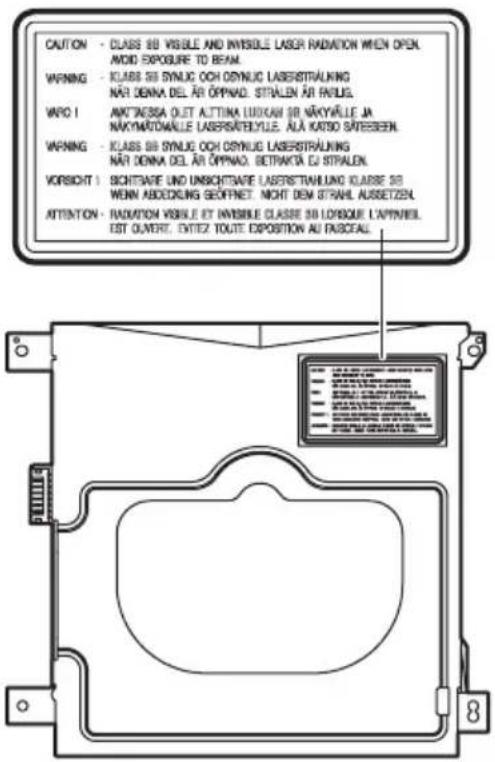
This unit emits visible laser radiation when open. Avoid direct eye exposure to beam. When this unit is plugged into the wall outlet, do not look inside the unit through the disc slot and other openings.
The laser component in this product is capable of emitting radiation exceeding the limit for Class 1.
If there should be color blotching or noise when used near a TV, move this unit away from the TV when using it.
Do not use this unit within 22cm (9 inches) of persons with a heart pacemaker implant or defibrillator implant.
Radio waves may affect electro-medical devices.
Do not use this unit near medical devices or inside medical facilities.
The user shall not reverse engineer, decompile, alter, translate or disassemble the software used in this unit, whether in part or in whole. For corporate users, employees of the corporation itself as well as its business partners shall observe the contractual bans stipulated within this clause. If the stipulations of this clause and this contract cannot be observed, the user shall immediately discontinue using the software.
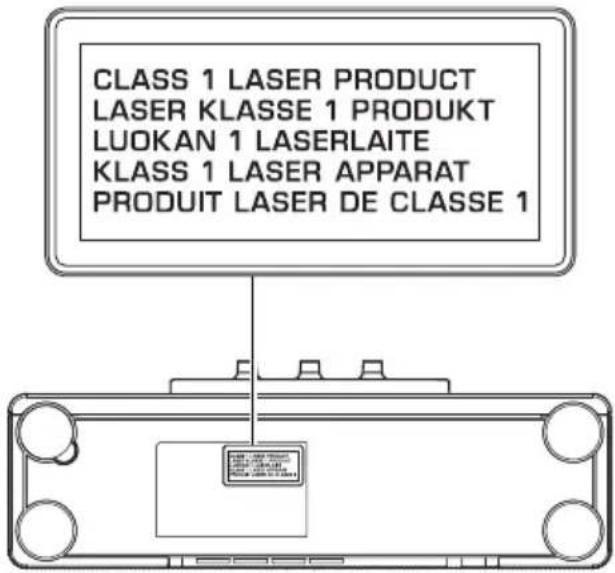
The name plate is located on the bottom of the unit.
PRECAUTIONS CONCERNANT LA SECURITE
CAUTION
RISK OF ELECTRIC SHOCK DO NOT OPEN
ATTENTION:POUR REDUIRE LES RISQUES D'INCENDIE ET DE DECHARGE ELECTRIQUE,NE PAS RETIRER LE COUVERCLE (OU LE PANNEAU ARRIERE). AUCUNE PIECE INTERNE NE POT ETRE CHANGEE PAR L'UTILISATEUR. POUR L'ENTRETIEN,S'ADRESSER A UN PERSONNEL QUALIFIÉ.
2 Conserverces instructions.
http://itunes.com/app/dtacontroller
https://itunes.apple.com/us/app/
dto controller-us/id549333293?mt=8
Google PlayTM
https://play.google.com/store/
apps/details?id=com.yamaha.av.
dto-controller
Remarque
1d (mode One Day Alarm) :
Supports CD, CD-R/RW
- Format audio CD audio, MP3, WMA
Laser
- Format audio... MP3, WMA
AUX
NFC (Near Field Communication)
http://itunes.com/app/dtacontroller
https://itunes.apple.com/us/app/
dtacntroller-us/id549333293?mt=8
Google Play™
https://play.google.com/store/
apps/details?id=com.yamaha.av.
dto-controller
Nota
1 Pulse SNOOZE/SLEEP.
Programar Weekly Alarm
Programar Weekly Alarm con DTA CONTROLLER
1d (modulo One Day Alarm):
7d (modulo Weekly Alarm):
NFC (Near Field Communication)
- IMPORTANT SAFETY INSTRUCTIONS
- - Explanation of Graphical Symbols
- IMPORTANT
- We Want You Listening For A Lifetime
- FCC INFORMATION (for US customers)
- IMPORTANT NOTICE: DO NOT MODIFY THIS UNIT!
- NOTICE
- FCC CAUTION
- FOR CANADIAN CUSTOMERS
- CAUTION: READ THIS BEFORE OPERATING YOUR UNIT.
- Various music sources that emphasize sound quality
- Convenient functions with enhanced usability
- Start your days with your favorite music (IntelliAlarm)
- Easy operations using a dedicated application
- Supplied accessories
- Note
- CONTENTS
- GETTING STARTED
- OTHER FUNCTIONS AND INFORMATION
- About this manual
- INSTALLING "DTA CONTROLLER"
- Features
- Google PlayTM
- Remote control
- ⑥ DIMMER
- Using the remote control
- Replacing the remote control battery
- Top panel
- ①USB port
- ② Cmark
- ③ (Power)
- #
- ④ DIMMER
- ⑤ALARM
- ⑥SET
- ⑦SNOOZE/SLEEP
- ⑧TUNING
- (9)
- 10
- iDisc slot
- 12
- Front panel
- Auto Standby
- Plug in the unit while pressing and holding
- Keep holding
- 中
- Rear panel
- Connecting the FM antenna
- Connecting the AM antenna (U.S.A. and Canada models)
- ADJUSTING THE CLOCK
- LISTENING TO CD AND USB DEVICE
- Listening to CD
- Listening to USB device
- Display information
- Repeat/shuffle playback
- Repeat playback
- Shuffle playback
- Notes about power supply via the USB port
- LISTENING TO MUSIC FROM YOUR Bluetooth DEVICE
- Pairing this unit with your Bluetooth device
- Easy pairing
- Listening to a Bluetooth device
- Connecting an already-paired device via Bluetooth
- Connecting from this unit
- Connecting from the connecting device
- Connecting with the NFC function
- Disconnecting a Bluetooth connection
- LISTENING TO RADIO STATIONS
- Tuning radio stations
- Storing FM/AM stations (preset)
- Selecting preset radio stations
- LISTENING TO EXTERNAL SOURCE
- TONE CONTROL
- USING ALARM FUNCTION
- IntelliAlarm
- types of alarms
- Music sources
- Snooze
- Alarm setting
- Setting the alarm time and sound
- Top/front panel
- Press SET.
- Set the alarm type with ALARM TYPE.
- Select the source with SOURCE (as required).
- Select a track, folder or radio station with TUNING (as required).
- Set the alarm volume with VOLUME.
- Press SET to complete.
- Turning the alarm on/off
- Press ALARM.
- Operations while alarm is sounding
- Stopping the alarm for a short time (snoopze)
- Press SNOOZE/SLEEP.
- Turning the alarm off
- Press ALARM or
- Setting Weekly Alarm
- Setting Weekly Alarm with DTA CONTROLLER
- IntelliAlarm setting screen
- Setting Weekly Alarm on the unit
- Select the alarm mode.
- 1d (One Day Alarm mode):
- 7d (Weekly Alarm mode):
- USING THE SLEEP TIMER
- ADJUSTING BRIGHTNESS OF FRONT PANEL DISPLAY
- TROUBLESHOOTING
- General
- CD playback
- USB device playback
- FM/AM radio reception
- NOTES ON DISCS AND USB DEVICES
- CD information
- Handling a disc
- USB device information
- About MP3 or WMA files
- SPECIFICATIONS
- PLAYER
- CD
- Laser
- USB
- AUX
- Bluetooth
- NFC (Near Field Communication)
- TUNER
- WARNING
- CAUTION
- Handling Bluetooth communications
- LASER SAFETY
- DANGER
- PRECAUTIONS CONCERNANT LA SECURITE
- RISK OF ELECTRIC SHOCK DO NOT OPEN
- Remarque
- Google Play™
- Nota
- Pulse SNOOZE/SLEEP.
- Programar Weekly Alarm
- Programar Weekly Alarm con DTA CONTROLLER
- 1d (modulo One Day Alarm):
- 7d (modulo Weekly Alarm):
Brand : YAMAHA
Model : TSXB141
Category : Audio System