TU1000 - Audio Receiver CONRAD - Free user manual and instructions
Find the device manual for free TU1000 CONRAD in PDF.


User questions about TU1000 CONRAD
0 question about this device. Answer the ones you know or ask your own.
Ask a new question about this device
Download the instructions for your Audio Receiver in PDF format for free! Find your manual TU1000 - CONRAD and take your electronic device back in hand. On this page are published all the documents necessary for the use of your device. TU1000 by CONRAD.
USER MANUAL TU1000 CONRAD
100%
recycling paper.
Bioached without chlorine.

100% papler recyclc. Bianchi sans chloro.
100% Peking
Peking
Chinatown
gobleek.

Impressum
Copyright 2007 by Conrad Electronic SE. Printed in Germany.

Imprint
These operating instructions are published by Corrad Electronic SE, Klaus-Corrad-Str. 1, D-92240 Hirschau/Germany.
No reproduction (including translation) is permitted in whole or part e.g. photoloosc, microfilering or storage in electronic data processing equipment, without the express written consent of the publisher. The operating instructions reflect the current technical specifications at time of print. We reserve the right to change the technical or physical specifications.
Copyright 2007 by Conrad Electronic SE. Printed in Germany.

Note de I'éditeur
Copyright 2007 by Conrad Electronic Benelux B.V. Printed in Germany.
Version 09/07 C∈

RENKFORCE
Inhaltsverzeichnis
Seite
Explanation of symbols 20
Safety instructions 21
Setup 23
Connection 23
Connection of cinch outputs, remote control and antenna 24
Connecting the power supply 25
Operation 25
First time switch on 26
Sender search 27
Programming of Stations 27
RDS-Features 28
Retrieval of display information 29
PTY search 29
Control through system remote 30
Handling 30
Maintenance 31
Cleaning 31
Disposal 31
Troubleshooting 32
Technical data 33
Introduction
Dear Customer,
thank you for purchasing this product.
This product complies with the applicable National and European specifications. To maintain this status and to ensure risk-free operation, the user must comply with the following operating instructions.
These operating instructions relate to this product. They contain important notices on commissioning and handling. Please bear this in mind when passing on the product to a third party. Keep these operating instructions for future reference.
All company names and product designations contained herein are trademarks of the respective owners. All rights reserved.
For a fast response of your technical enquiries please use the e-mail address listed below.

Fon. +49 9604 / 40 88 80
Fax +49 9604/40 88 48
e-mail: tkb@conrad.de
Mon to Thurs 8.00am to 4.30pm
Fri 8.00am to 2.00pm
Intended Use
This Renkforce Tuner TU-1000 is used to receive AM and FM radio transmissions and to display RDS data from UKW stations.
The low-level audio output signal must be transferred to an external amplifier. The appliance should not be connected directly to loudspeakers.
This product is only approved for the connection to 230V / 50Hz alternating voltage.
It may only be used indoors; never outdoors. Contact with moisture, such as in bathrooms, must be avoided.
Any use other than that described above could lead to damage to this product and involves the risk of short circuits, fire, electric shock, etc.
No part of the product should be altered or modified, and the housing must not be opened.

Place the device in operation in compliance with all safety instructions.
Explanation of Symbols
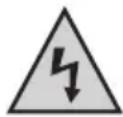
The lightening symbol in a triangle warns you against unprotected live components or elements inside the housing or "live" connection points. Coming into contact with these components or connection points may be fatal.
Cables connected to such connection points may only be connected by an expert or you have to use ready to connect cables.
The device contains no parts that should be serviced by the user. Therefore, do not open the device.

The exclamation mark symbol on the device indicates that the user should read these operating instructions prior to using the product.

The "Hand" symbol indicates special tips and operating information.

Damage due to non-compliance with these operating instructions renders the warranty void. We will not assume any responsibility for any consequential damage.
We shall not accept liability for damage to property or personal injury caused by incorrect handling or non-compliance with the safety instructions. Any claim to warranty will lapse in such cases!
Dear customer, The safety instructions and danger warnings below are not only for the protection of the device but also to protect your well being. Please read through the following points attentively:
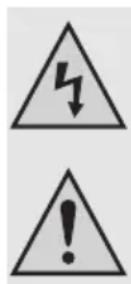
- For safety and licensing (CE) reasons, unauthorised conversion and/or modifications to the product are not permitted.
- All persons operating, installing, setting up, commissioning or servicing this device must be trained and qualified correspondingly and observe these operating instructions.
- The device is designed according to protection class II. As the source of voltage only a correct mains socket (230V/50Hz) of the public supply system may be used.
The device must be set up correctly. Please follow the operating instructions carefully in doing so. - Make sure the mains cable is not squashed, bent, damaged through sharp edges or otherwise subjected to mechanical strain. Avoid excess thermal stress on the mains cable through excess heat or cold. Do not modify the mains cable. This may damage the mains cable. A damaged power cord can result in a life-threatening electric shock.
- If the device or its connection cable is damaged, do not touch it. First of all, de-energize the corresponding mains socket (e.g. via the respective circuit-breaker) and afterwards carefully pull the mains plug from the socket. Do not operate the device any more. Take it to a specialist workshop.
- In order to completely separate the device from the electricity net, you have to pull the mains plug out of the wall socket. It is not sufficient to turn the device off with the on/off switch.
- The device is not a toy and has no place in the hands of children. Children do not understand how dangerous electrical devices can be.
- Never position vessels or containers containing liquids, such as buckets, vases or plants, either on the product or in its direct vicinity. Liquids could seep into the interior of the housing and in doing so impair the electrical safety of the device. Apart from that, there is a great risk of a fire or a fatal electric shock. If this is the case, de-energize the respective socket (e.g. switch off circuit breaker) and only then pull the plug-in mains unit from the socket. Disconnect all cables from the device. The product must not be operated any longer. Take it to a specialist workshop.
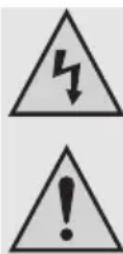
- Never touch the mains plug of the device with wet or damp hands. There is a risk of a fatal electric shock.
- Make sure the device is adequately ventilated when in operation. Do not cover the ventilation openings with magazines, blankets, curtains or similar. Keep a minimum distance of approx. 15 cm to other devices.
- Do not expose the device to high temperatures, dripping or splashing water, strong vibrations or high mechanical stress.
- Do not place open sources of fire such as burning candles alongside the appliance.
- Consult an expert when in doubt about the operation, the safety or the connection of the device.
- Do not operate the light when it is unattended.
- Only use the appliance in a moderate climate, and avoid a tropical environment.
- Do not leave packaging material lying around carelessly. It may be dangerous for children to play with.
- Please also observe further safety instructions in the individual chapters of this operating manual.
- Comply with the safety and operating instructions of any other appliances that are connected to the device.
- If you are not sure about the correct connection or if questions arise which are not covered by the operating instructions, please do not hesitate to contact our technical support or another specialist.
Setup
When selecting the installation site, consider the room conditions, meaning the location of the next outlet, etc. Also prevent direct sunlight, vibrations, dust, heat, cold and dampness. Keep the appliance away from strong transformers or motors.

Operate the device only on a stable, level surface. There must be enough space around the system for air circulation to permit dissipation of the generated heat. Therefore, only place the device on a level surface and not on carpets, etc. Do not cover up the ventilation slots in the casing.
If you do not heed these instructions, the device may be damaged.
Do not drill extra holes or screw any extra screws for mounting purposes into the case. This will damage the device.
Make sure you position the appliance in a safe and stable place, away from objects that might fall on it, thereby avoiding unwanted accidents.

Because of the variety of used lacquers and polishes for furniture, the device base might leave residues on furniture due to a chemical reaction. That's why do not place the device without appropriate protection on the valuable furniture surfaces.
Connection

Make sure before connection that the cables are disconnected from the mains. Disconnect all other devices from the mains which are also to be connected.

Make sure that the cables are connected to the right side, that is, left to left and right to right.
Connection of cinch outputs, remote control and antenna

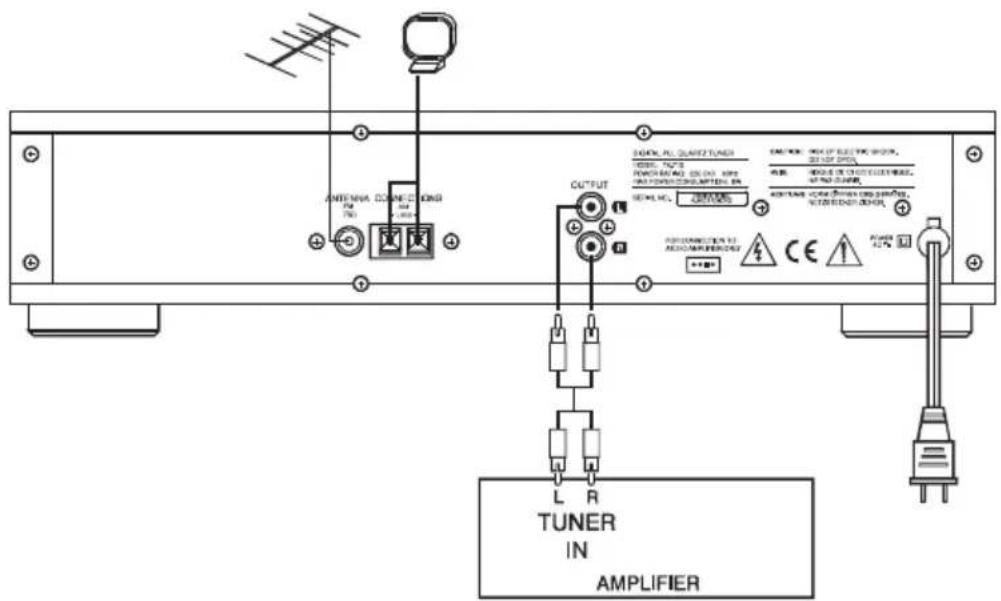
For the connection of the cinch sockets only use the cinch wires provided or other suitably isolated cinch wires. The use of other cables may lead to interference. To avoid distortion or mismatching which could damage the device, only devices with cinch outputs may be connected to cinch inputs.
Use the enclosed remote wires for connection of remote control elements
The white cinch socket is to be connected with the left cinch connection of the amplifier.
The red cinch socket is to be connected with the right cinch connection of the amplifier.
-
Connect the connection OUTPUT to the TUNER input on your amplifier.
-
If you're using the HiFi amplifier A-1000, connect the remote control input REMOTE SYSTEM TO AMP with the corresponding control socket REMOTE SYSTEM TUNER on the amplifier. You can the control the tuner with the system remote control.
-
Attach the enclosed projection aerial to the inner contact of the connection ANTENNA FM 75U. Position the aerial so as to attain the best reception.

For better reception, this connection can also be connected to your house aerial or cable connection. For this purpose, use an unsymmetrical 75 Ohm aerial cable.
- Attach the enclosed frame aerial to the ANTENNA AM LOOP connection Position the AM frame aerial so as to attain the best reception. The AM frame aerial may be placed on a level surface or mounted on a wall.

Position the aerial as far away as possible from all possible sources of interference (motors, power cables, radion installations etc.).
Connecting the power supply

The POWER key (1) does not disconnect the device fully from the mains. To disconnect the device completely, it should be unplugged.
- Plug the tuner into the public power supply (230V~/50Hz).
Operation
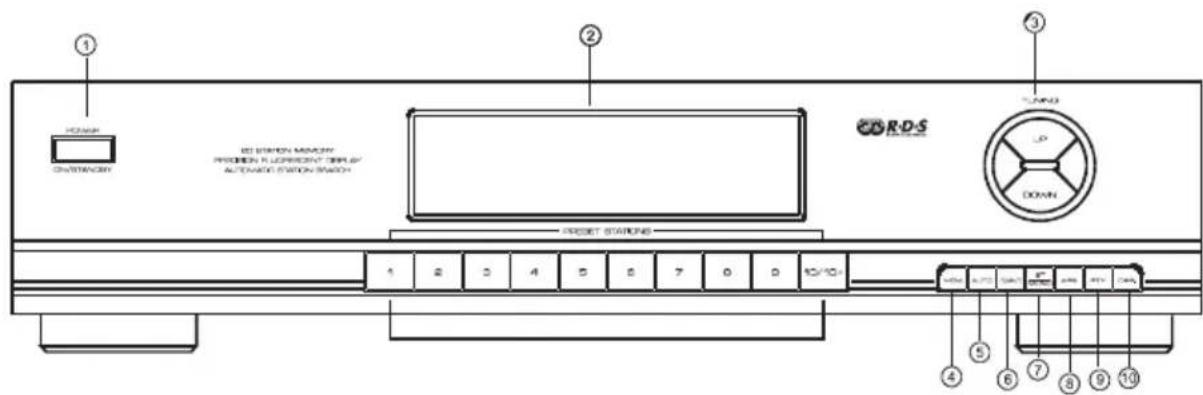
(1) POWER button
This button switches the radio on and off.
1x press > Device is turned on.
2x press > Device is placed in standby mode
(2) Display
The display indicates the station frequency as well as other information.
(3) TUNING buttons
Use these keys to change reception frequency.
(4) MEM key
This button is for saving the frequencies of favourite stations.
(5) AUTO key
The button switches between automatic and manual frequency search.
(6) BAND button
The button switches between AM and FM frequencies.
(7) ST/MONO button
The button switches between stereo and mono reception.
(8) APS button
This button activates automatic station saving.
(9) PTY button
This button starts PTY search (search according to programme type).
(10)DISP button
This key is used to select the various information from the station shown on the display.
Switching on for the first time
- Check again that all connections are correct.
- Switch the tuner on with the POWER button (1).
- Switch the amplifier on and select tuner input.
- Select the desired frequency wave (AM or FM) with the BAND key.
Sender search
- Use the buttons TUNING UP/DOWN (3) to change the reception frequency. Here there are two kinds of station search available.
- The manual search changes the reception frequency as long as one of the buttons TUNING (3) is held down. The display (2) does not show the indication AUTO. Release the key as soon as the desired frequency is reached.
To activate the automatic search, press the AUTO (5) button so that the word AUTO appears in the display (2). - Press and release the button TUNING (3) to start the search.
- The auto-scan beings and stops only at the next station that can be received well.
- Where reception is bad, it may be the case that the auto-search function does not stop at the desired station. In this case we recommend the manual search run (see above).

Where reception is bad, you can switch reception to mono using the ST/MONO (7) button (the display (2) will then show MONO). In this mode of operation, reception is less sensitive to interference.
Programming of Stations
Manual saving
- Select the desired station, either with the manual or automatic search (see above).
- Press the MEM key (4).
- The indication "MEMORY" will flash in the display (2).
- Press the station key under which you would like to save the station frequency.
- You may choose the station keys 1-10 directly.
- In order to select a station number 11-20, first press the 10 button (to select numbers between 11-20) and then the corresponding button for the second digit.
Automatic Saving
- Alternatively, stations can also be stored automatically. This feature automatically stores all receivable stations on the station keys.
- To begin the auto-save feature, press the button APS (8).
- The word SEARCHING appears in the display (2) during the auto-search.
To interrupt the search, press APS (8) again.
RDS-Features
The abbreviation RDS stands for Radio Data Syste, that is, inaudible coded additional information is transmitted through the UKW-RDS transmitter. With your tuner, you own a TU-1000 device which is able to process these coded data transmitted by many stations.
Programme Service (PS)
Information consisting of a max. of 8 alphanumeric characters. They identify which radio station is presently being received. This information is shown directly in the display of the device (e.g. BAYERN 3).
Programme type (PTY)
This code gives the receiver information about the type of the transmitted programme (e.g. sports, classic, news etc.). The listener can select his favourite programme purposefully.
Some stations used the radio text (RT) function to send messages. The message then runs from left to right across the display.
A national disaster alarm can also be prepared this way. However, not all the radio stations offer the PTY service.
The following list shows the PTY-codes contained in the RDS data:
NONE No selection made
NEWS News
AFFAIRS Economy
INFO Information, Weather Forecast, Advice
SPORT Sport
EDUCATE Education
DRAMADrama
CULTURE Art and Culture
SCIENCE Natural World, Science
VARIED Light entertainment
POP M: Pop music
ROCK M: Rock music
M.O.R. M. Travel music
LIGHT M Light music
CLASSICS Symphonies, Opera
OTHER M Jazz, Folk music
ALARM Catastrophe reports
Clock time (CT)
The current time is also transmitted by some radio stations.
Retrieval of display information
- Push the button DISP (10) to see the various information in the display (2):
1x press > indicated station name (PS)
2x press >Programme type (PTY)
3x press > Clock time (CT)
4x press > Radio ext (RT)
5x press > reception frequency
PTY search
- Press the PTY (9) button to activate this feature.
- Use the TUNING (3) button to select the desired programme type (see list below).
- Press the PTY (9) key again in order to start the search run. The words PTY SEARCH appears in the display (2).
- The search function will stop only at stations transmitting the selected programme.
- Should the display (2) show the words No PTY, no station with the selection prgramme category can be received.
- To interrupt the search, press PTY (9) again during the search.
Control through system remote
The remote control sold together with the HiFi amplifier A-1000 allows you to operate all main functions of the tuner and further devices of the Renkforce HiFi series from the comfort of your armchair.
The remote control has the following buttons:
BAND
The button switches between AM and FM frequencies.(same function as the BAND (6) button on the device itself).
- MEMO SCAN
This button plays the stations saved to the tuner's memory for a short while before moving on to the next saved station.
- MEMO HOLD
This button stops the MEMO SCAN search. The last station played is then held and play continues from this station.
Handling
- Never plug the power plug into a mains socket immediately after the device was taken from a cold to a warm environment. The condensation water created thereby may damage the device.
Allow the device to reach room temperature before connecting it. Wait until the condensation water has evaporated.
- Never pull the mains plug by pulling the cable from the socket. Always only use the thus provided grip area.
- Remove the mains plug from the electrical outlet if the device is not in use for a longer period of time.
- For safety reasons always pull the mains plug from the socket during a thunderstorm.
- Do not listen to excessively loud music for long periods of time. This may damage your hearing.
Maintenance
Periodically check the technical safety of the device, e.g. check for damage to the power cable or the housing.
If you have a reason to believe that the device can no longer be operated safely, disconnect it immediately and secure it against being operated unintentionally. Pull the power plug out of the socket outlet!
It can be assumed that safe operation is no longer possible if:
- there is visible damage to the device or to the power line,
- the device no longer works
- it has been stored for a long time under unfavourable conditions
- it was exposed to extraordinary stress caused by transport
Always observe the following safety instructions before cleaning or servicing the device:
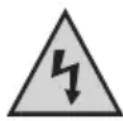
Live components may be exposed if the covering is opened or components are removed.
Prior to start of maintenance or repair works, the device must be disconnected from all voltage sources.
Capacitors in the device can still be in the process of charging even if it has been disconnected from all voltage sources.
Repair work must only be carried out by specialists familiar with the hazards involved and with the relevant regulations.
Cleaning
The outside of the device should only be cleaned with a soft dry cloth or a soft brush. Do not use abrasive cleaning agents or chemical solutions which could damage the housing or impair operation.
Disposal
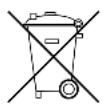
If the appliance is irreparable or unusable, dispose of it in accordance with current statutory regulations.
In purchasing the device you have acquired a product which has been designed to the state of the art and is operationally reliable. Problems and malfunctions may, however, still arise.
We would therefore like to describe how you can eliminate certain malfunctions yourself.

Always observe the safety instructions!
No sound is audible:
- A device in the playback chain is not turned on.
- The wrong input was selected on the amplifier.
- The volume control is set to minimum.
Noise interference disrupts reception:
The transmission frequency is not set properly.
- The aerial is not optimally positioned.
- A weak station is received and FM reception is set to „stereo".
RDS-data cannot be received:
- The station doesn't transmit RDS data.
See also: "Noise interference disrupts reception".
One channel does not function:
- A cinch cable has come loose from the tuner or the amplifier.
- A load speaker cable has come loose.
There is a buzzing sound:
A cinch cable is defective

Repairs other than those described above should only be performed by an authorised specialist.
Technical data
General information:
Operating voltage: 230V / 50Hz
Power input: 7W
Output voltage 220mV / 2.2kOhm
Dimensions: 420 × 95 × 215mm
Weight: 3.2kg
FMtuner
Reception range: 87.5-108.0MHz
Sensitivity: 3,9 V (IHF)
Signal-to-noise distance (@ 65dBf): Mono 70dB
Disruption (@75dBf): Mono <0.15%@1kHz
Channel separation at 400kHz: 30dB
Stereo separation at 1kHz: 40dB
Frequency curve: 40-14.000Hz (+/-3dB)
AMtuner
Reception range: 522-1629kHz
Sensitivity: 68dB/m (446μV/m)
Signal-to-noise distance: 40dB
Stereo 70dB
Stereo < 0.2% @1kHz
Table des matieres
Page
Chere cliente, cher client,