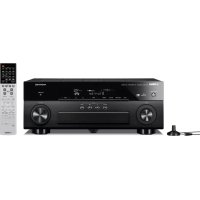
RXA840 - Home cinema amp YAMAHA - Free user manual and instructions
Find the device manual for free RXA840 YAMAHA in PDF.


| Product type | Home theater amplifier |
| Brand | YAMAHA |
| Model | RXA840 |
| Dimensions (W x H x D) | 435 x 171 x 367 mm |
| Weight | 10.5 kg |
| Power supply | 220-240 V, 50/60 Hz |
| Power consumption | 350 W (standby: 0.3 W) |
| Output power | 7 x 115 W (8 ohms, 1 kHz, 1% distortion) |
| Supported audio formats | Dolby Atmos, DTS:X, Dolby TrueHD, DTS-HD Master Audio |
| Network functions | Wi-Fi, Bluetooth, AirPlay, JUKE service, Spotify Connect |
| HDMI inputs | 6 inputs, 1 output (ARC) |
| Speaker outputs | 7 pairs of screw terminals (5-way) |
| Video resolution | Up to 4K Ultra HD (60p) |
| Maintenance and cleaning | Wipe with a soft, dry cloth. Do not use solvents. |
| Safety | Do not expose to moisture. Ensure adequate ventilation. |
| Spare parts and repairability | Contact an authorized YAMAHA service center. |
| General information | User manual available in 32 pages. Compatible with JUKE service. |
Frequently Asked Questions - RXA840 YAMAHA
User questions about RXA840 YAMAHA
0 question about this device. Answer the ones you know or ask your own.
Ask a new question about this device
Download the instructions for your Home cinema amp in PDF format for free! Find your manual RXA840 - YAMAHA and take your electronic device back in hand. On this page are published all the documents necessary for the use of your device. RXA840 by YAMAHA.
USER MANUAL RXA840 YAMAHA
Using the JUKE service
The JUKE service is available in the Germany, Switzerland, Italy, Austria, Belgium, and Netherlands only. (as of June 2014) See myjuke.com for service area information.
Music streaming service JUKE offers access to one of the most comprehensive music libraries in the world. 25 million songs from all genres from more than 80,000 labels are available to you.
Enjoy your favorite songs in the best sound quality thanks to Dolby Pulse technology and play music wherever and whenever you want.
JUKE works as an app on your smartphone and tablet or on the internet at myjuke.com.
JUKE offer a free, non-binding 7-day test phase to everyone who registers at JUKE for the first time. To continue using JUKE after the test phase, you can take out a JUKE subscription.
For more information, visit myjuke.com.

- If you do not have a JUKE account, please register your account on the web site of JUKE in advance.
To use this function, this unit must be connected to the Internet. For detail on connections and network settings, refer to "Owner's Manual". - The actual display may be partly different from display images used on this document depending on the model.
- In this guide, illustrations of English menu screens are used as examples.
Supplement for JUKE
BGF
English
JUKE account sign-in
If you have not signed in to your JUKE account yet, the sign-in screen appears when you select "JUKE". To start using the service on this unit, follow the procedure below to sign in to your JUKE account.
1 Press NET repeatedly to select "JUKE" as the input source.
The following screen is displayed on the TV.
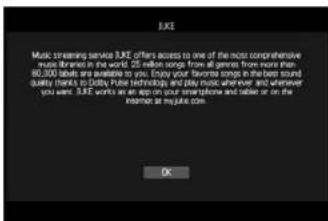
2 Read the description and press ENTER.
3 Use the cursor keys to select "Sign In" and press ENTER.
4 Press ENTER to enter the username entry screen.
5 Use the cursor keys and ENTER to enter your username and select "OK".
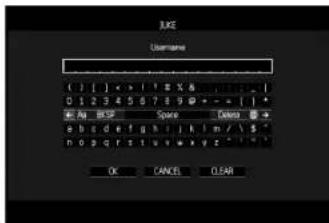

To clear the entry, select "CLEAR".
6 Press ENTER to enter the password entry screen.
7 Use the cursor keys and ENTER to enter your password and select "OK".
The following screen appears if you have successfully logged into your account.
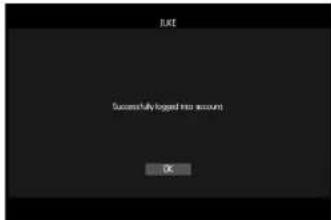

- If sign-in failed, the error screen appears. In this case, read the on-screen message and start all over again.

Press ENTER.
The browse screen is displayed on the TV.
Playback of JUKE contents
Follow the procedure below to operate the JUKE contents and start playback.
1 Press NET repeatedly to select "JUKE" as the input source.
The browse screen is displayed on the TV.
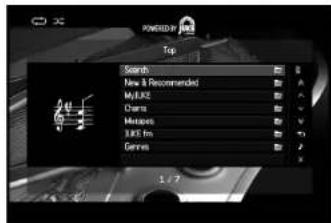
| Search | Use the software keyboard to search the desired item (artist, album and track) by keyword. |
| New & Recommended | Select newly released albums selected by JUKE. |
| MyJUKE | Select a track from items (artist, album, etc.) added to "MyJUKE".You can edit your playlists "My Mixtapes" on the JUKE website. |
| Charts Select TCP albums and tracks. | |
| Mixtapes | Select a Playlist of JUKE (or any other user). |
| JUKE.fm | Select a network radio channel from the lists of the channels provided by JUKE. |
| Genres Select an album or a track from genres. | |

- If playback of any JUKE content is ongoing, the playback screen is displayed.
2 Use the cursor keys to select an item and press ENTER.
If a track or a radio channel is selected, playback starts and the playback screen is displayed.
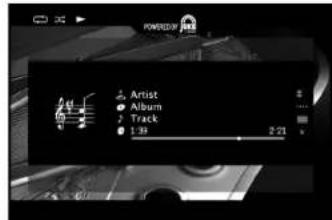

To return to the previous screen, press RETURN.
Browse screen
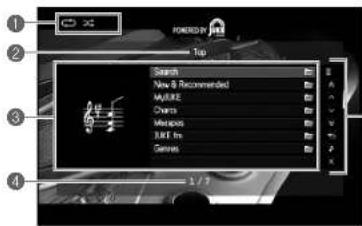
Status indicators
Display the current shuffle/repeat settings and playback status (play/pause).
List name
Content list
Displays the list of JUKE contents.
Item number/total
Operation menu
Use the cursor keys to select an item and press ENTER to confirm the selection. To close the submenu, press RETURN.
Menu Submenu Function
Play Track
(Play Album)
(Play Playist)
Starts playback of the selected track.
album or playlist

Add Track to Aids the track selected in the list to My.JUKE "My.JUKE".
Add Album to: Adds the album selected in the list to MyJUKE "MyJUKE".

Moves to the previous/next page of the list


Moves to 0 pages forward/backward.

Returns to the higher-level list.


Moves to the playback screen.

Closes the screen display and shows the background. Press one of the menu operation keys to redisplay it.

- By adding your favorite JUKE contents to "MyJUKE", you can access to them quickly from "MyJUKE".
To remove items from MyJuke, select the item in "MyJuke" and then "Remove Track from MyJuke" or "Remove Album from MyJuke" in
- Submenus available in * -arry depending on the list.
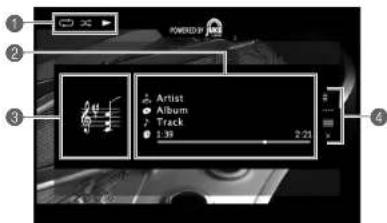
Playback screen
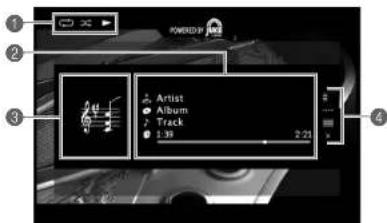
Status indicators
Display the current shuffle/repeat settings and playback status (play/pause).
Playback information
Displays the artist name, album name, track title and elapsed/total time.
Use the cursor keys to select information to be scrolled.
Album Image
Operation menu
Use the cursor keys to select an item and press ENTER to confirm the selection. To close the submenu, press RETURN.
Menu Submenu Function
Add Track to My.JUKE Add the current track to "MyJUKE".
Add Album to Add the current album to MyJUKE "MyJUKE".

- You can also use the external device operation keys (▶▶▶) on the remote control to control playback.
Shuffle/repeat settings
You can configure the shuffle/repeat settings for playback of JUKE contents.
1 When "JUKE" is selected as the input source, press OPTION.
2 Use the cursor keys to select "Repeat" or "Shuffle" and press ENTER.
3 Use the cursor keys (<1/) to select a setting.
Switching information on the front display
1 Press INFO.
Each time you press the key, the display item switches.
Display items
Track (track title), Artist (artist name), Album (album name), DSP Program (sound mode name), Audio Decoder (decoder name)
Checking the account status of the JUKE account
Follow the procedure below to check the status of your JUKE account
1 Press ON SCREEN.
2 Use the cursor keys to select "Input" and press ENTER.
3 Use the cursor keys ( / ) to select "JUKE" and press the cursor key () .
4 Use the cursor keys ( /) to select "Account Status" and press ENTER.
The status of your JUKE account is displayed.
Log out of the JUKE account
To log out of your JUKE account, follow "Checking the account status of the JUKE account" and select "Log Out" in step 4.

JUKE and JUKE logo are registered trademarks of Media-Saturn-Holding GmbH

YAMAHA
commander la lecture.
HJCNCKA BOCNPOMABEDEHM

Dobabntb
3aNNcbB
MyJuke
DobapnneBbpaHnon
HhopmaaOBOCppon3BeDeHHN
HndkaTopbI COCTOHH
OToBpaXHeN TeKuXn XnapaTePOBocPOn3BcDEHnB CnyAHIOM npaRdNo/8oTropHO BocPOn3BeHnHn COCTONHBOCpON3BcEHn (BOcPOn3BcEHnne/Nay3a).
OToBpaKHeHIMeHHCIOHInTeHJI, HsAHHaJIbA bLObOMa, HABAHnI KMOm3N3HmI N MCT6KIIuOg IINMlOBoBpEeMHMeC. C nOmoiIO KJIaBNI KYPcOba II BOpBeTI INHOpMaIHOIINI pNOpcMOTAI.
3N3o6paXeHne aIb6oma
C NOMOJIH KHOKN KYPOPA BbIe6PeITe NHTH IN HAKMMTE ENTER, YTOBbIO NOITBePertb IbOp. YoBb 3akpItb NOIMEHIO.HAKMMTERETURN.
MEnIO PmEHO FyHKnH
IobabNTb IobabHIO NekTuKOMKOJIIMn 3aNtBb8 a paJdenn "MyJuke".

MeHou ynpaBneHH

MxHOK TAKKEXNIOIIBOATB KNAHINYIPANBEHNH BHEUHM YCTPOHCTOB( H) HA NylteDACTAHUMHOHORO YPANPAHHT,NTO6bIYPANBRTBOCNPONDEEHNM.
HactpoiKu Bocnpo3BeDeHnB CnyaHOM nopAKe/NoBTOphoro Bocnpo3BeDeHnA
MoxhoHactpoNTbnapaMetpblBocnpo3BedeHNBA CyuahOM npAke/NoBTOHRo BCnPON3BedeHNDA copedxHMOr cepbcaJUKE.
1 Ecnn B KaueCTBe NcToCHnKa BxOaHoro CunHana BbIbpaH BapuHaT "JUKE", Haxmnte OPTION.
2 C nOmoUbIO KJIaBnI Kypcopa Bbl6epnte "NoBTopeHne"nn "Nepemewatb" n Haxmnte ENTER.
3 C nOMOuBHO KnaBnKypcopa (</>) BbIbepuTe napaMeTp.
IpeeknoueHne HOpMaun Ha dincnnee nepedne nahei
1 Haxmte KnaBnuy INFO.
PnKaJdOM HaxaTm 3ToH KOnKn OTObpaXaembl 3nEMeHT N3MeHReTc.
OTo6paxaemblc3nEMeHTbl
Track (Ha3BaHne KOMno3uIN), Artist (nMa nnonHnTeJI), Album (Ha3BaHne anb6oma), DSP Program (Ha3BaHne pexmna 3byaHnra), Audio Decoder (Ha3BaHne deKoepa)




