S3 Active - Speaker SCANSONIC - Free user manual and instructions
Find the device manual for free S3 Active SCANSONIC in PDF.



| Product Type | Active speaker (amplified) |
| Brand | Scansonic |
| Model | S3 Active |
| Power | Mains (grounded plug) |
| Wireless connectivity | Bluetooth |
| Audio inputs | Stereo RCA (AUX1), 3.5mm mini-jack (AUX2), optical |
| Speaker output | Binding posts (right/left) |
| Remote control functions | Standby, volume, source selection, play/pause, previous/next, Bluetooth, optical, LOUD |
| LED indicators | Red (standby), green (normal), blue (Bluetooth) |
| Compatibility | iPod, MP3 player, TV, DVD player, game console, computer |
| Cleaning | Soft dry cloth (no solvent) |
| Safety | Do not expose to water, excessive heat, or block ventilation |
| Warranty | 2 years (parts and labor) |
| Repairability | Entrust to a qualified technician; use of original parts recommended |
| Recommended break-in period | 24 to 48 hours before final adjustment |
Frequently Asked Questions - S3 Active SCANSONIC
User questions about S3 Active SCANSONIC
0 question about this device. Answer the ones you know or ask your own.
Ask a new question about this device
Download the instructions for your Speaker in PDF format for free! Find your manual S3 Active - SCANSONIC and take your electronic device back in hand. On this page are published all the documents necessary for the use of your device. S3 Active by SCANSONIC.
USER MANUAL S3 Active SCANSONIC
Congratulations on your new Scansonic S3 Active speakers.
Please take a moment to read this manual.
Enjoy
Safety Instructions
- Read these instructions.
- Keep these instructions.
Heed all warnings. - Follow all instructions.
- Do not use this apparatus near water.
Clean only with dry cloth. - Do not block any ventilation openings. Install in accordance with the manufacturer's instructions.
- Do not install near any heat sources such as radiators, heat registers, stoves, or other apparatus (including amplifiers) that produce heat.
- Do not defeat the safety purpose of the polarized or grounding-type plug.
A polarized plug has two blades with one wider than the other. A grounding type plug has two blades and a third grounding prong. The wide blade or the third prong is provided for your safety. If the provided plug does not fit into your outlet, consult an electrician for replacement of the obsolete outlet.
- Protect the power cord from being walked on or pinched particularly at plugs, Convenience receptacles and the point where they exit from the apparatus.
- Only use attachments/accessories specified by the manufacturer.
- Use only with the cart, stand, tripod, bracket, or table specified by the manufacturer, or sold with the apparatus.
- Unplug this apparatus during lightning storms or when unused for long periods of time.
- Refer all servicing to qualified service personnel. Servicing is required when the apparatus has been damaged in any way, such as power-supply cord or plug is damaged, liquid has been spilled or objects have fallen into the apparatus, the apparatus has been exposed to rain or moisture, does not operate normally, or has been dropped.
- Apparatus shall be connected to a MAINS socket outlet with a protective earthing connection.
- An appliance inlet coupler is used as the disconnect device, the disconnect device shall remain readily operable.
- Batteries or batteries packs shall not be exposed to excessive heat such as sunshine, fire or the like.
Information
Unpacking
These speakers were carefully tested and inspected during production, packaging and shipping. After unpacking please check for any damage. It is rare that a unit is damaged during shipping, but if this does happen, please contact your retailer immediately.
We recommend that you keep the original carton and packing material for future shipping.
Recommended Speaker Setup
Correct speaker placement has a huge impact on sound quality. There are many different theories, but all rooms and tastes are different so it's impossible to specify a correct placement. We do suggest you experiment with a few different locations see what is best for you.
For the best bass response on, we recommend that you keep a minimum distance of 20-25 cm between the speakers and the rear wall. Align the speakers with the tweeters at eye level according to your most common listening position.
Speaker Conditioning and Break-in
Although a break-in period is not required, we recommend that you play between 24 to 48 hours of music through the speakers before doing any critical listening or speaker placement.
Speaker Cleaning
We don't recommend using any solvents or cleaners on cabinets or speaker drive units. Just wipe down with a soft, dry cloth.
Control panel and rear panel
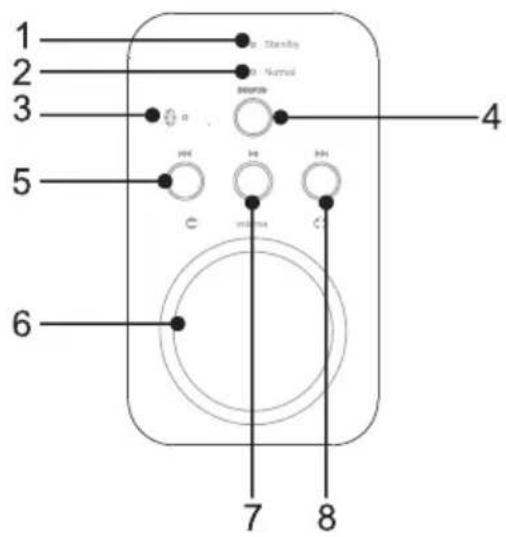
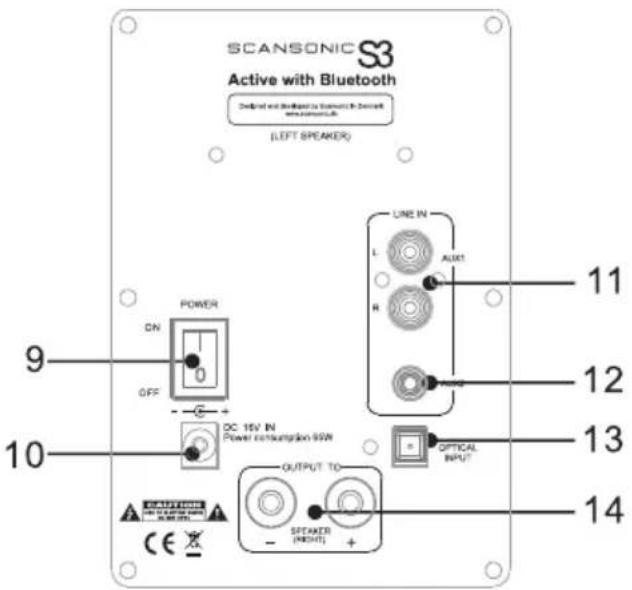
- Red LED indicator light (Standby)
- Green LED indicator light (Normal)
- Blue LED indicator light (Bluetooth mode)
- Input mode selector
- PREV
- Volume
-
Play/pause
-
NEXT
- POWER ON/OFF
- Power supply input
- AUX IN For right/left RCA stereo plugs, from CD/DVD player, TV etc.
- 3.5mm audio in
- Optical audio in
- Right speaker output
Remote control
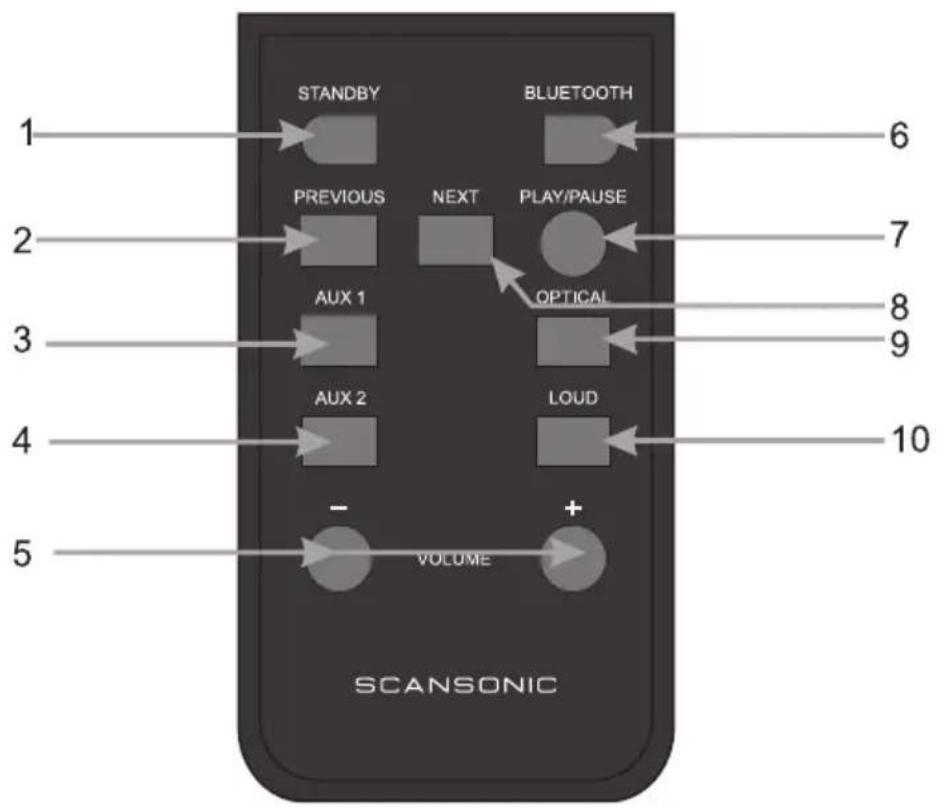
- Standby mode
- PREV
- AUX 1 For right/left RCA stereo plugs, from CD/DVD player, TV etc.
- AUX 2 3.5 mm audio in
-
Volume Volume decrease (-) Volume increase (+)
-
Bluetooth input mode
- Play/pause
- NEXT
- Optical input mode
- LOUD Enhances the treble and bass effects at low volume
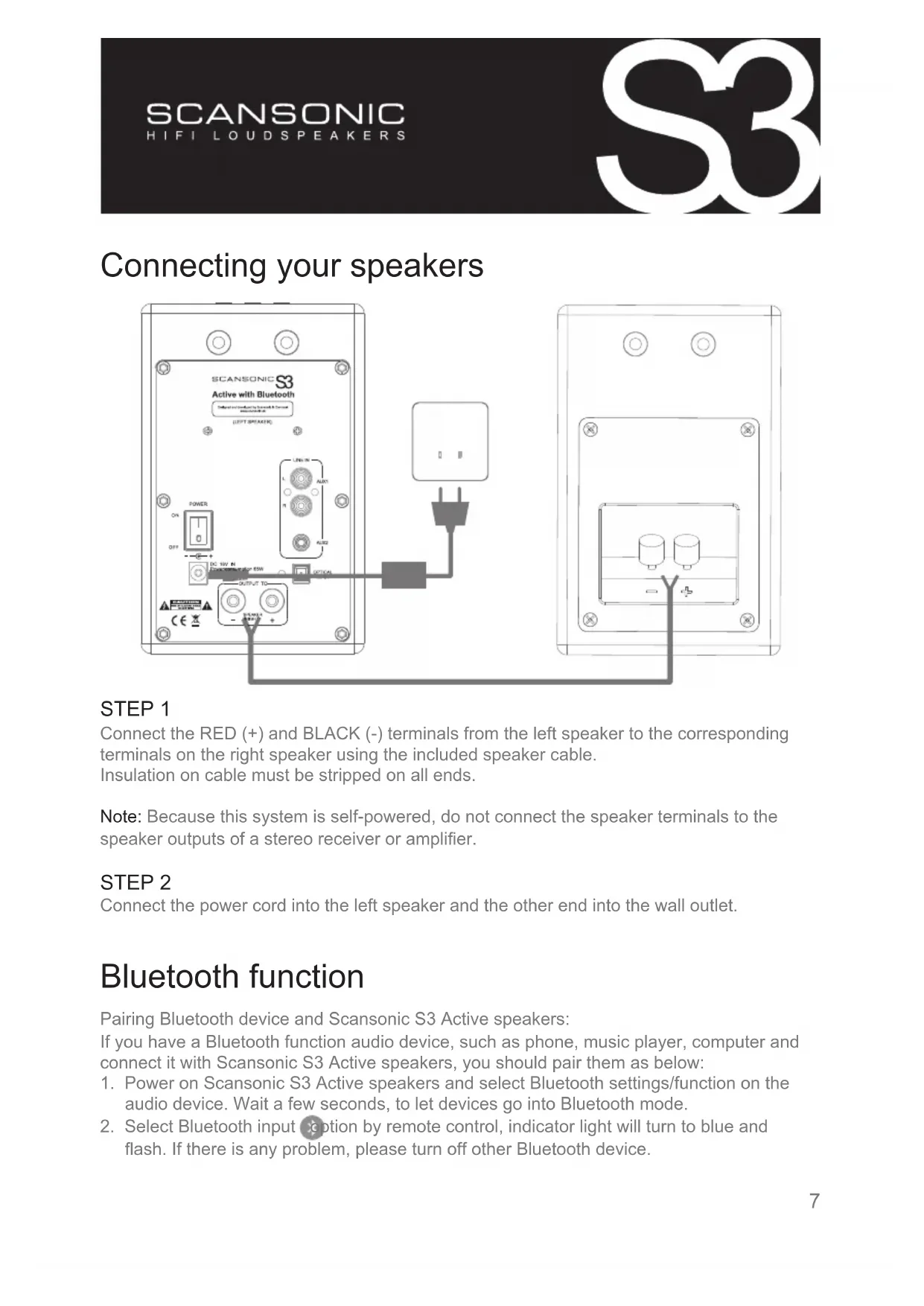
Connecting your speakers
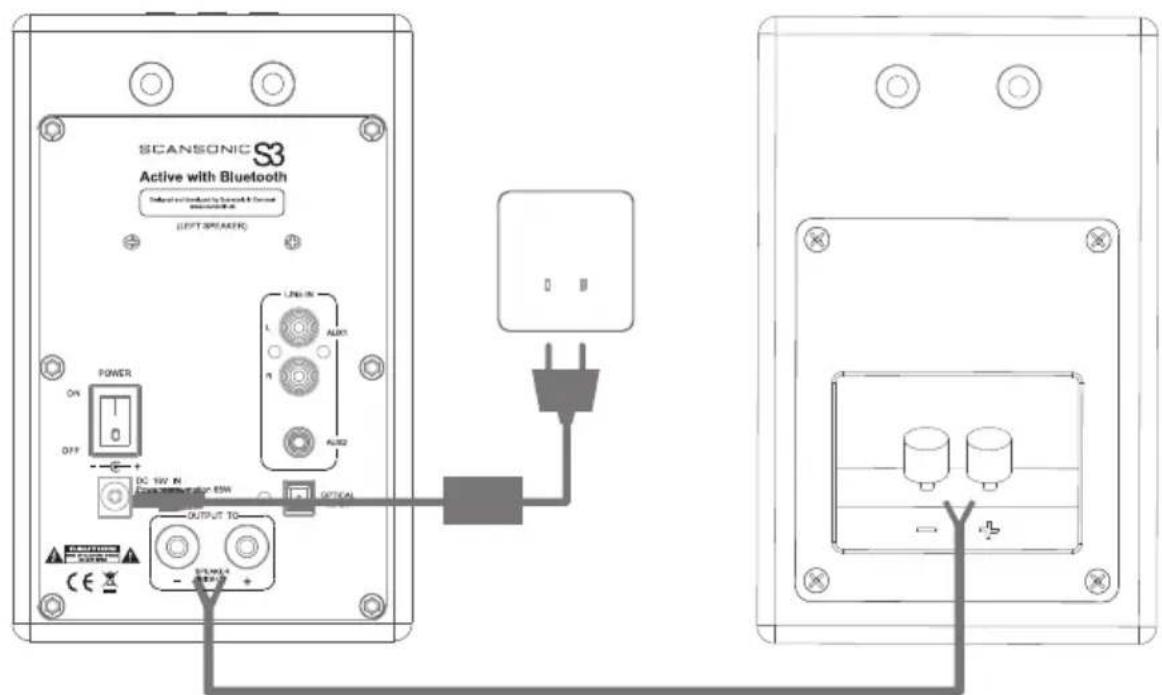
STEP1
Connect the RED (+) and BLACK (-) terminals from the left speaker to the corresponding terminals on the right speaker using the included speaker cable. Insulation on cable must be stripped on all ends.
Note: Because this system is self-powered, do not connect the speaker terminals to the speaker outputs of a stereo receiver or amplifier.
STEP2
Connect the power cord into the left speaker and the other end into the wall outlet.
Bluetooth function
Pairing Bluetooth device and Scansonic S3 Active speakers:
If you have a Bluetooth function audio device, such as phone, music player, computer and connect it with Scansonic S3 Active speakers, you should pair them as below:
-
Power on Scansonic S3 Active speakers and select Bluetooth settings/function on the audio device. Wait a few seconds, to let devices go into Bluetooth mode.
-
Select Bluetooth input option by remote control, indicator light will turn to blue and flash. If there is any problem, please turn off other Bluetooth device.
-
Please use your Bluetooth device to search the Bluetooth device named "Scansonic S3 Active speakers". If pairing code is needed, enter "0000" or "1234".
- If pairing successfully, indicator will turn blue, pairing is now finished.
- Once paired the same Bluetooth device work again, no need of pairing one more time, Scansonic S3 Active speakers will auto connect with the device pairing last time.
Operation Bluetooth function
- Connect your Bluetooth device as above.
- Select Bluetooth input mode by remote control, or select Bluetooth input mode using "Source" on control panel. When in Bluetooth input mode, blue light will be on.
- If your Bluetooth device support AVRCP agreement, you can use your remote control to select "PLAY/PAUSE PREV /NEXT".
Use with iPod/MP3 player
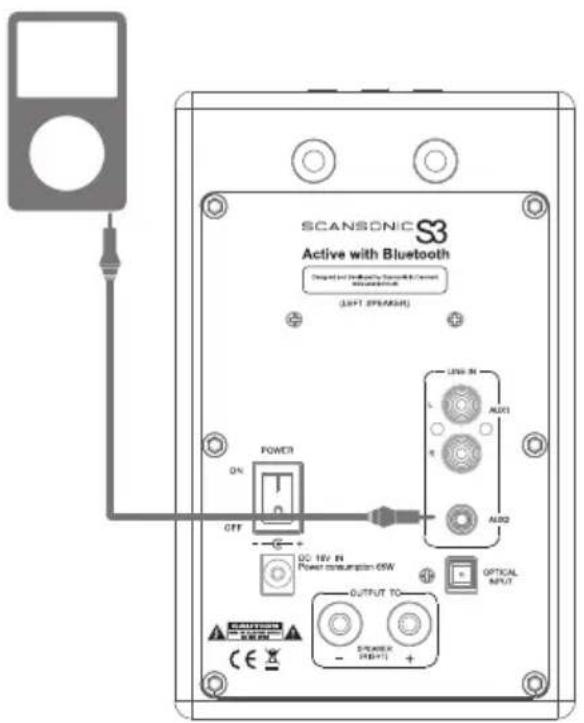
A
B
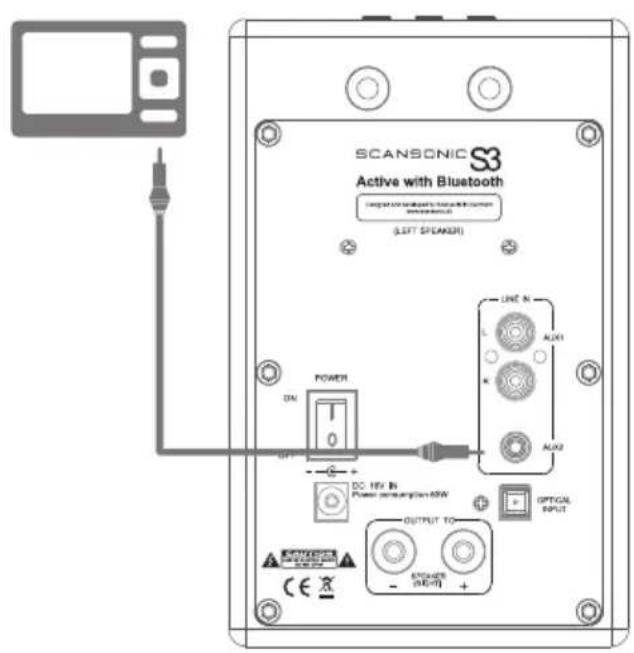
Connect the RCA L/R to your TV, DVD etc. and the RCA L/R to the Stereo Input on rear panel of the Scansonic S3 Active speakers.
Note: Some TV remote controls can adjust the Scansonic S3 active speaker volume if connected to variable TV audio out.
CONFIGURATION B (PC):
Connect the mini jack to your PC and the RCA L/R to the Stereo Input on rear panel of the Scansonic S3 Active speakers.
CONFIGURATION A (for use with iPod):
Connect the 3.5 mm mini jack audio cable from iPod headphone jack to the AUDIO IN jack on the rear panel of Scansonic S3 Active speakers.
CONFIGURATION B (all products with 3.5mm mini jack outputs):
Connect the STEREO INPUT L/R from any audio source with RCA L/R audio outputs.
Connect the 3.5 mm mini jack audio cable from 3.5 mini jack output to the AUDIO IN jack on the rear panel.
Attention: When connecting audio cables the power switch must be turned OFF.
After connecting all cables the power can be turned ON and the system is now ready to use.
Use with docking station
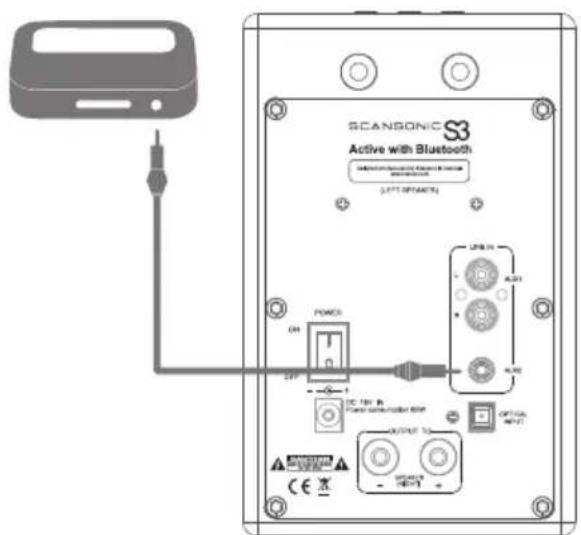
A
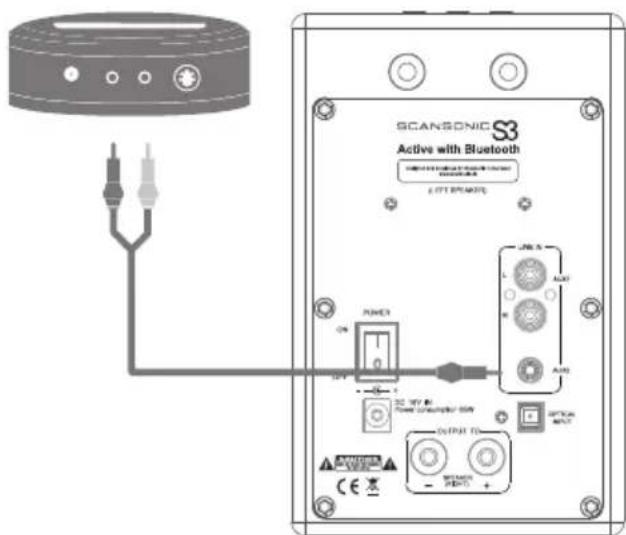
B
CONFIGURATION A (For use with iPod Universal Dockingstation):
Place the docking station next to your Scansonic S3 Active speakers. Connect the Apple
Connect the included 3.5mm mini jack audio cable from the dock to AUDIO IN jack on rear panel.
Insert you iPod in dock, set the volume and enjoy.
Attention: When connecting audio cables the power switch must be turned OFF.
After connecting all cables the power can be turned ON and the system is now ready to use.
Limited Warranty
Dear Customer,
This product has been designed and manufactured to the highest quality standards; however should you encounter any problems with this product please contact your local dealer or your country distributor.
This limited warranty is valid for the original owner for a period of two years from the date of purchase, it is not transferable.
What is covered by the limited warranty: The limited warranty covers all production and material defects of the product, except for the damages stated below.
What is not covered by the limited warranty:
Damages caused by packing and transport
Defects caused by accidents, misuse, normal wear and tear, mis-maintenance, voltage variation and overloading.
Damages caused by incorrect installation or operation Damages caused by modification or repair by a non-authorised service centre and use of non-original spare parts.
Other damages due to conditions beyond the supplier's control such as fire, rain, strode of lightning, war and other force majeure events.
How to claim parts or repair under warranty:
To have your product serviced under warranty, you must contact the dealer from where you bought the product.
You will need to produce this warranty booklet completed and stamped by your dealer on the date of purchase.
Alternatively, you will need the original sales invoice or other proof of ownership and date of purchase.
The supplier is liable only to repair or replace defective parts of products and the supplier is not responsible for indirect losses or damages arising from the use of the product.
Transportation costs for servicing are not covered by the warranty.
A service repair or replacement cannot exceed the value of the product under warranty; in no event shall the supplier be responsible or liable for special, incidental, consequential or indirect damages.
Dealer name and stamp: Date of purchase:
SCANSONIC