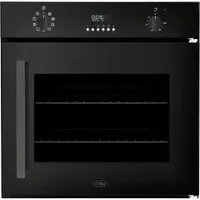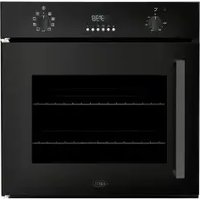
BPOP60 - Oven BORETTI - Free user manual and instructions
Find the device manual for free BPOP60 BORETTI in PDF.


User questions about BPOP60 BORETTI
0 question about this device. Answer the ones you know or ask your own.
Ask a new question about this device
Download the instructions for your Oven in PDF format for free! Find your manual BPOP60 - BORETTI and take your electronic device back in hand. On this page are published all the documents necessary for the use of your device. BPOP60 by BORETTI.
USER MANUAL BPOP60 BORETTI
2006/95/CE (LVD), 2004/108/CE (EMC), 2002/95/CE
(RoHS), 2002/96/CE (WEEE), 2002/40/CE.
text_image
Min 200 cm² E B A C Min 200 cm² F H G E B A D Min 200 cm²text_image
Technical diagram of a mechanical device with numbered components and internal structure annotationsAfb. 2
GEBRUIKSAANWIJZING
Ovenbakplaten
WAARSCHUWING
text_image
190 12:35 A B C D E F G H I J K L M N O P Q R S T U V W X Y ZAfb. 8
text_image
Technical diagram showing labeled mechanical components with numbered parts, likely illustrating a mechanical assembly or assembly.Afb.
INSTALLATION DU FOUR
(RoHS), 2002/96/CE (WEEE), 2002/40/CE.
text_image
Min 200 cm² E B A C Min 200 cm² E H F G E B A D Min 200 cm² Dimensions sont en centimètres Four A B C D E F G H Fig. 1text_image
Technical diagram of a mechanical device with labeled components and exploded viewFig. 2
INSTRUCTIONS POUR L'UTILISATION
Grilles de four
ATTENTION
The control is continuously checking the status of the system. If an abnormal condition is detected for more than 1 minute, a failure occurs:
text_image
Technical diagram showing labeled mechanical components with numbered parts, likely illustrating a gear or bracket assembly.Fig. 10
natural_image
Diagram of a microwave oven with labeled component (no text or symbols present)

Fig. 11
SAFETY INSTRUCTIONS....48
INSTALLATION OF THE OVEN....49
Electricals.... 49
Connection to the electrical power mains.... 51
INSTRUCTIONS FOR USE....52
Oven Racks....52
Oven extendable racks (if present)....53
Cooking functions....54
Electronic control....56
DOOR LOCKING SYSTEM....64
Automatic door locking during pyrolytic cycle.... 64
Oven lights....64
CLEANING AND MAINTENANCE....65
Self-cleaning cycle (pyrolytic cycles)....65
Oven door removal....66
Replacement of the oven light.... 67
GUIDANCE TEMPERATURE AN TIME SCHEDULE FOR COOKING....68
At the end of the product life cycle, the products equipped with electronics, which have not gone through a selection process, are potentially dangerous for the environment and for human health due to the presence of dangerous materials. This appliance cannot be thrown in the domestic waste at the end of its life cycle. Therefore it must be delivered to an authorised waste collecting center to make it safe and to recycle its parts in order to respect the environment.
SAFETY INSTRUCTIONS
- Do not disassemble any parts prior to having disconnected the oven from the mains.
- Do not use the appliance if any part is broken (for example a glass). Disconnect it from the mains and call service.
- Before using the oven, it is recommended to make it operate at no load at the maximum temperature for an hour to eliminate the insulating material odour.
- In all models, leave the door closed when the grill is used.
- The cooling fan may remain in operation so long as the oven is hot, even after it has been switched off.
- During the use the appliance becomes very hot; don't touch the heating elements inside the oven.
- During the oven operation, the front is heated as well; consequently keep children clear of the oven, specially during self-cleaning.
- Parents and adults should pay particular attention when using the product in presence of children.
- Children should be overseen so as to ensure that they don't play with the equipment.
- This appliance is not intended for use by persons (included children) with reduced physical sensory or mental capabilities, or lack of experience and knowledge, unless they have been given supervision or instruction concerning use of the appliance by a person responsible for their safety.
- In order to avoid damage to the oven enamel coat, do not cover the oven muffle sole with any item (e.g. aluminum foil, pans and the likes).
INSTALLATION OF THE OVEN
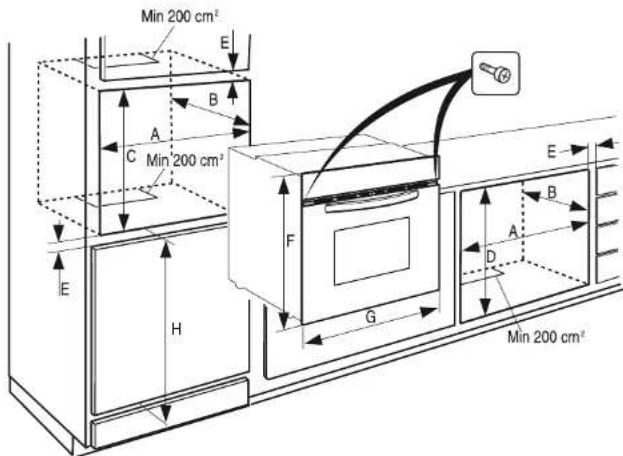
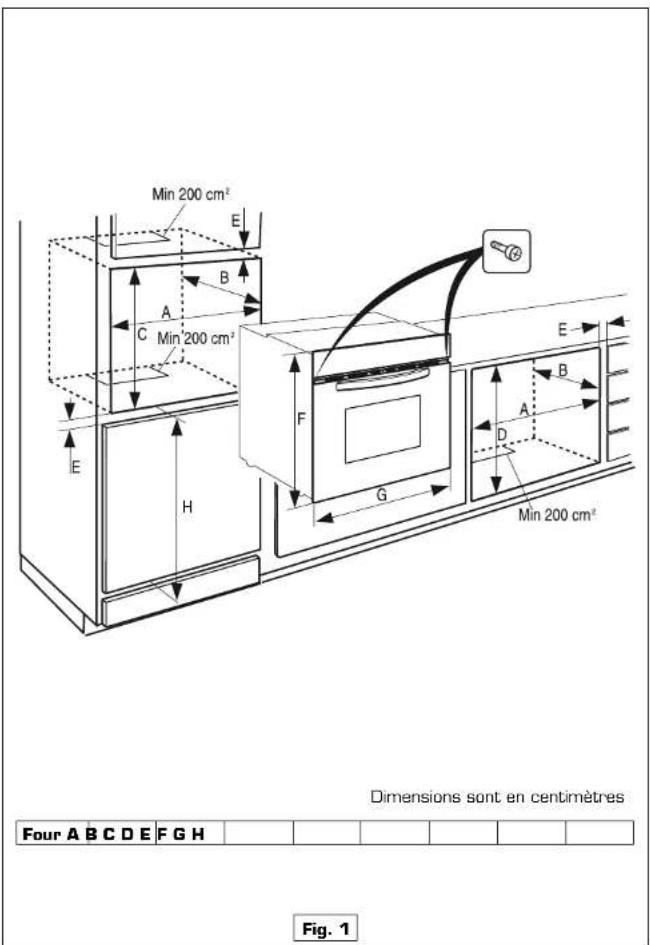
To install the oven into the kitchen a cutout should be made in accordance with the dimensions shown in Fig. 1.
The apparatus is to be fastened to the top by means of the two screws provided in the kit through the holes made on the oven uprights.
The cabinet in which the apparatus is installed shall be open on the back side to ensure a sufficient air circulation and prevent overheating.
Leave a gap of at least 200 cm ^2 (see Fig. 1) for air circulation if the oven is installed in a column; this is not necessary if the oven is installed under the work top.
WARNING
As the apparatus is to be fitted in your kitchen furniture, make sure that all surfaces in contact with the oven can resist a temperature of approx 90^ C.
Electricals
- Absorbed power:
| oven top element: | 2400 W |
| oven bottom element: | 2100 W |
| round element [hot air]: | 2300 W [on some models] |
| roasting jack motor: | 4 W [on some models] |
| lamp: | 25 W |
| hot air fan motor: | 25 W |
| cooling fan motor: | 25 W |
- Maximum absorbed power: (see data plate).
- Supply voltage: (see data plate).
NOTE
This appliance is in compliance with following European directives: 2006/95/CE (LVD), 2004/108/CE (EMC), 2002/95/CE (RoHS), 2002/96/CE (WEEE), 2002/40/CE.

text_image
Min 200 cm² E B A C Min 200 cm² E H F G E B A D Min 200 cm² Appliances A B C D E F G H Singleoven 56 55 58,5 59,5 Min 1.3 58.9 59.5 86.5 Fig. 1 Dimensions are in centimetersConnection to the electrical power mains
WARNING
This apparatus must be earthed.
The oven is only for domestic use.
The feed voltage and the absorbed power are as indicated on the data plate attached to the left-hand side upright, which can be seen when the oven door is open. Connecting must be carried out by qualified personnel and in accordance with the regulations currently in force.
The manufacturer can not be held responsible for any damages to persons or objects caused by failure to observe these instructions.
If the supply cord is damaged, it must be replaced by the manufacturer, its service agent or similarly qualified persons in order to avoid a hazard.
The oven must be connected to the mains through a multipole circuit breaker with a contact-to-contact gap of at least 3 mm, making sure that the earth wire is not disconnected. For connecting use a flexible cable of the H05V2V2-F 3x1.5 mm² type remembering to make it long enough to allow the oven to be removed from its housing unit when maintenance work is required.
To connect the cable to the oven proceed as follows (see Fig. 2):
- Remove the lid (1) by unfastening the three screws (2). Unfasten the two screws (3) for the cable holder and feed the cable through the opening immediately below the cover.
- Remove about 12 cm of the outside insulation from the cable and shorten the two active wires (live and neutral) to 6 cm, leaving long the one to be connected to the main earth terminal on the terminal box; remove about 1 cm
of the main insulation from the three wires and connect them correctly to the terminal box, remembering to respect the polarities.
- Tighten the two screws (3) of the cable holder and put the lid (1) back on with the three screws (2).

text_image
Technical diagram of a mechanical device with numbered components and internal structure annotationsINSTRUCTIONS FOR USE Oven Racks
WARNING
Never use aluminum foil to cover the oven racks or to line the oven. It can cause damage to the oven liner if heat is trapped under the foil.
WARNING
Make sure you do not force it to avoid damage to the enamel.
The oven has rack guides at four levels. Rack positions are numbered from the bottom rack guide [#1] to the top [#4]. Check cooking charts for best rack positions to use when cooking.
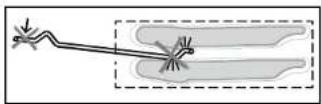
Fig. 3
Each level guide consists of paired Fig. 3 supports formed in the walls on each side of the oven cavity. Always be sure to position the oven racks before turning on the oven. Make sure that the racks are level once they are in position. The racks are designed to stop when pulled forward to their limit.
To remove oven rack from the oven (see Fig. 4):
1 Pull rack forward. 2 Lift rack up at front and then remove it.

text_image
1 2Fig. 4
To replace an oven rack (see Fig. 5):
1 Place rear of rack between rack level guides. 2 While lifting front of rack, slide rack in all the way while lowering the front.

text_image
1 2Fig. 5
Oven extendable racks (if present)
The extendable rack allows for easier access to cooking foods. It extends beyond the standard flat rack bringing he food closer to the user.
WARNING
Make suite that:
- When the rack is outside of the oven, slide arms do not lock. They could unexpectedly extend if the rack is carried incorrectly. Extending slide arms could cause injury. Rack should only be held or carried by grasping the sides.
• To avoid burns, pull rack all the way out and lift above handle when transferring food to and from oven.
NOTE
Always remove the extendable rack before self-cleaning the oven.
NL
FR
EN
DE
To remove extendable rack from the oven (see Fig. 6):
1 Lift of rack slightly and push it until the stop release.
2 Raise back of rack until frame and stop clear rack guide.
3 Pull rack down and out.

text_image
1 2 3Fig. 6
To replace an extendable rack (see Fig. 7):
1 Grasp rack firmly on both sides. Place rack (including frame) above desired rack guide.
2 Push all the way in until the back of the rack drops into place.
3 Pull both sections forward until stops activates. Rack should be straight and flat, not crooked.

text_image
1 2 3Fig. 7
Cooking functions
Each type of oven is provided for various cooking systems.
Icon Mode Description Used for...
| The light is on only. — | ||
| In this mode only the internal oven convection fan is ON i.e. there is no oven heating | This mode is used to defrost deepfrozen food. | |
| Only the lower (bottom) oven heating element is activated. | This mode is used to keep foods warm. | |
| In this mode both upper (top) and lower (bottom) oven heating elements are used to heat the oven air. However, no fan is used to circulate the heat. | This is the traditional mode of cooking on one shelf. Therefore only one rack can be used when selecting the Bake mode. Ideal for Appetizers, Biscuits, Coffee Cakes | |
| This mode is intended to save energy. In particular the oven cooling fan works only when needed e.g. when the oven is hot and the electronics require cooling. | Ideal for frozen or precooked food, and small portions-mealsThe preheat time is very short and cooking tends to be slower.It is not recommended for heavy loads e.g. large portions or big meal | |
| The Convection bake mode uses the upper (top) oven heating element, the lower (bottom) heating element and the convection fan inside the | It can also be used for baking-cooking Appetizers, Biscuits, Coffee Cakes and Cookies on one or more levels. | |
| The Convection Roast mode uses the Intense upper (top) oven heating element, the lower (bottom) heating element and the convection fan inside the oven. | Ideal for the roasting of whole chickens or turkey. | |
| The True Convection Bake mode uses the circular or third heating element hidden behind the baffle at the back wall of the oven. The heat is circulated throughout the oven by the convection fan. | Consequently different foods can be cooked simultaneously (maximum three levels) and is suitable for preparing a complete dinner (small portions). Mixing of flavours is avoided and an important energy saving is obtained. | |
The Ring + Down Convection mode Useful for multilevel cooking of uses the lower + circular heating soufflés and pizzas. elements and internal fan.
The Convection Down mode uses Useful for soufflés, pizzas and the lower (Bottom) heating element pastry dishes. and internal fan.
suitable for preparing a complete Ideal for steak, hamburgers, dinner (small portions). Mixing of chicken quarters or chicken flavours is avoided and an important breasts. energy saving is obtained.
The Grill mode uses intense heat. Ideal for preparing toast, browning radiated from the upper (top) and grilling.
heating element.
If the spit device is fitted it is also used with the spit motor. If the spit motor is fitted the spit roasting of a whole chicken or turkey is possible.
The Ring + Down Convection mode Useful for multilevel cooking of uses the lower + circular heating soufflés and pizzas. elements and internal fan.
The Convection Down mode uses Useful for soufflés, pizzas and the lower (Bottom) heating element pastry dishes. and internal fan.
suitable for preparing a complete Ideal for steak, hamburgers, dinner (small portions). Mixing of chicken quarters or chicken flavours is avoided and an important breasts.
energy saving is obtained.
The Grill mode uses intense heat. Ideal for preparing toast, browning radiated from the upper (top) and grilling.
heating element.
The standard time is 1.30 h and can be changed. (see page 14) PYRO or self-cleaning mode. Here the oven is automatically cleaned by burning-off cooking residues at high temperature (about 475 °C) from 1h to 3h. During the self-cleaning cycle all fumes produced are filtered and then expelled to ambient.
Electronic control
Control panel description
The oven control panel is made by three displays and eight touch sensor keys. The displays show:
Time.
Temperature.
Function.

text_image
890° 12:35 AβCD[FG] □□□□□Fig. 8
➢ [A] Touch this key to enable the fast preheat
➢ [B] This key is used to set the clock, the minute minder and the buzzer volume.
➢ [C] This key is used to set the cooking duration and the stop time.
➢ [D] Touch or hold this key in order to decrease the displayed value.
➢ [E] Touch or hold this key in order to increase the displayed value.
➢ [F] Touch this key to switch the oven lights on/off.
➢ [G] This key is used to set the oven functions and the related temperature.
➢ [F] Touch this key in order to switch the oven on and make it available for any
➢ activity or touch it to switch the oven off when it's active.
Power-up
At every power-up, wait for about 7 seconds until a triple beep sounds: the special touch circuit performs a self-calibration and it's important to avoid any touch during this phase.
The latch mechanism runs an automatic self-test: the oven door locks and unlocks. This operation takes about half a minute. The lock symbol on the temperature display turns on:
- It flashes while the action is in progress.
- It's steadily on when the door is fully locked.
- It's off when the door has been unlocked.
Do not try to open the door until the lock symbol has disappeared.
The control shows the time of day blinking, set at 12:00 as the initial value. The time increases every minute, all oven operations are inhibited until the time of day is set.
Setting the time of day
The time of day is always displayed in the 24 hours format.
Touch the [B] key (clock/timer) until the word "hour" appears on the clock display. Wait until the time value appears then touch [D]/[E] keys in order to set the proper value. Hold the keys to fasten the decrease/increase operations
After a few seconds the whole time of day value starts flashing: wait until the new time of day is steady.
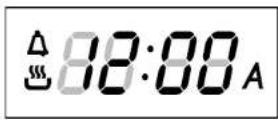
Fig. 9a
Setting the minute minder
Touch the [B] key [clock/timer] until the word "bell" appears on the clock display. Wait until the time value appears again then touch or hold [D]/[E] keys to edit and modify the value. Hold the keys to fasten the decrease/increase operations.
The standard value is 30 minutes, it's possible to modify it in the range between 0 and 240 minutes. The timer has no influence on the oven activities and can be set also when the oven is off.
The time of day is displayed with priority in any case, the bell symbol 🔒 in the upper left corner of the clock display shows that the minute minder is set.
When the time expires, the symbol flashes and the buzzer sounds a warning sequence (two short beeps repeated every 3 seconds) to recall the user attention. Touch any key to stop it.
The buzzer stops in any case after a 5 minutes time-out.
Setting an oven function manually
- Touch the [H] key (On/Off) to awake the oven and make it ready for use. A square appears on the icon display and the "On" writing on the clock display.
- Touch the [G] key (function/temperature) in order to select the desired cooking mode. The clock display shows "PrOD" which correspond to the Light mode.
- Touch [D] or [E] keys (- / + ) in order to browse the list of the available functions. The icon display shows the oven elements used in every function, the temperature display shows the preset temperature per every function.
- Touch the [G] key again in order to change the temperature. The
temperature starts flashing on its own display, touch [D] or [E] keys (- / + ) in order to select the desired value, in a range between a minimum and a maximum, depending on the mode. Check the value on the temperature display.
- Touch the [G] key once more to confirm the selection otherwise it will be confirmed automatically after a short time.
- Once the mode is selected, touch [A] key (booster) if you need to fasten the oven preheat. Normally the food must be introduced after the end of preheat in this case.
The oven will work until a maximum time 12 hours. Depending on the oven model, the number and type of available functions can be different.
If the selected function works using any heating elements, the symbol is displayed (it doesn't appear in defrost position).
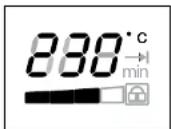
Fig.
As soon as the oven starts, the preheat bar on the temperature display turns on, step by step, showing when the oven is at 25%, 50%, 75% and finally 100% of the set-point. As soon as each level is reached, its step becomes steady, the next one start flashing. All the four segments become steadily on when the preheat ends.

Fig 9c
The icon display shows the oven elements in use (heaters, working fan, turnspit) whenever any function is active.
Touch the [H] key (On/Off) to stop any oven activity immediately. The "OFF" writing appears on the clock display.
Setting an automatic oven function
After having selected a function as described before, the control can be programmed in order to set timed cooking activities. The time program remains active even if the function is changed (exception: pyrolyse). The following options are available:
-
Timed cooking setting the cooking time (duration).
-
Timed cooking setting the end of cooking time (stop time).
-
Delayed cooking setting duration and stop time.
Touch the [C] in order to toggle between cooking duration (cook time) and end of cooking time (stop time): the words "dur" or "End" are displayed respectively.
Touch [D] or [E] keys [-/+] to edit the duration or the stop time when the proper word is displayed:
- When the word "dur" is displayed, the control shows 30' as the standard cooking duration. Touch [D] or [E] in order to set the actually desired cooking time in a range between D and 240 minutes. As soon as the value is accepted the display switches to clock mode. It will show the time of day, the pot symbol and the A letter to indicate that a timed cooking is active. The end of cooking time is updated automatically.
- When the word "End" is displayed, the control shows the current time as the initial stop time. In order to set the actually desired end of cooking time in a 24 hours range. As soon as the value is accepted the display switches to clock mode. It will show the time of day, the pot symbol and the letter to indicate that a timed cooking is active. The cooking time is updated automatically.
- Repeat the same operations of point 1 then touch [C] key until End appears. The control shows the "current time + cooking time" as the initial stop time. It's not possible to lower the end of cooking time below this value.
Touch [D] or [E] keys (- / + ) in order to set the actually desired end of cooking time in a 24 hours range. The display will flash End and its value alternatively for a few seconds then it will show the time of day and the letter to indicate that a delayed cooking has been programmed. As soon as the delay time expires, the oven starts and works for the programmed cooking time. The symbol is displayed.
At the end of any timed activity the control shuts down the oven, the buzzer sounds a warning sequence (two short beeps repeated every 3 seconds) to recall the user attention, for a maximum time of 5 minutes and makes the time related icons (☐)
, Aflash on the display.
Touch any keys to silent the buzzer and reset the warning message.
The buzzer doesn't sound between 22:00 and 8:00 (night mode).
Touch the [H] key in order to stop any activity.
Oven functions
The control can manage many cooking functions, their number and availability
depends on the oven model. The temperature range is between 75°C and 250°C for most functions. Preset temperatures are mainly 190°C for convection modes, 210°C for thermal modes and 230°C for grill functions.
Exceptions are Eco-Bake (preset=190°C), Pyrolyse (fixed 475°C), and warming mode which range is between 50°C and 120°C.
Booster (Fast Preheat)
This function allows to fasten the oven preheating, saving time. When the oven temperature reaches the set-point a continuous acoustic warning signal, about 5 seconds long, recall the attention of the user. Fast Preheat is not available in Grill, Pyrolyse, Eco-Bake, Keep Warm and Defrost. Touch [A] key to enable the function, the writing "Prh" appears on the clock display, the "°C" symbol on the temperature display flashes until the oven reaches the set temperature.
Eco-Bake
This function is defined in order to obtain a consistent energy saving. The cooling fan is initially off and turns on only when the inner parts temperature gets high, then it works with the heating elements. Cooking might be a little bit slower than the standard Bake, especially when the oven is heavily loaded. When this function is active, the writing "Eco" flashes every 5 seconds on the temperature display.
Defrost
This function is used to defrost frozen food in a short time. It doesn't heat up the oven, only the convection fan works. The temperature display shows dEF to indicate that this special mode is active.
Pyrolyse (Self-Clean)
Select the proper program to start a cleaning cycle. The temperature display show the writing -P- and the icon display shows the elements in use. The clock display starts showing "Pyro" for a few seconds.
The clean time can be set according to the same rules of the automatic functions, and therefore the pyrolitic cycle can be delayed.
The maximum allowed clean time is 3 hours, the minimum 1 hour. The standard time is 1h:30min, the clock display shows P1:30. At the end of the self-cleaning activity the display shows “—” steady and A flashing as long as the oven is cooling and the door remains locked. Once the oven is cool enough, the door unlocks and the display shows “End”.
Touch [H] key in any moment to stop the oven.
The door remains locked until the oven temperature drops below the safety threshold, at this time the control unlocks the door.
The cooling fan starts as soon as the function is selected and turns to its higher speed when the inner parts get hot. The oven temperature is automatically set to 475^ C in order to perfectly clean the cavity.

Fig 9d
The control also locks immediately the door in order to guarantee the user safety, given that the temperature inside gets very hot. A lock icon on the temperature display shows the status of the latch mechanism at any time:
➢ Door unlocked, lock symbol off.
➢ Door locked, lock symbol always on.
➢ Latch moving, transition in progress, lock symbol flashing.
Eco-Pyrolyse
When this function is active, the writing "Eco" flashes every 5 seconds on the temperature display. The standard time is 1h:30min and can never be changed, the clock display shows P1:30. It is used in case a light cleaning action is requested.
Door and commands lock for children safety (pyro)
This is an additional safety functions. The door latch mechanism, managed automatically during pyrolyse can be actuated manually by the user in order to lock the oven door and prevent children from having free access to the oven.
Hold — and + keys simultaneously for about 3 seconds to lock/unlock the door manually. Also the keyboard is disabled while this function is actuated: the display shows a key on the clock display in case of any attempt to touch inactive keys.
Buzzer volume
The buzzer volume can be set, when the control is in stand-by mode, touching first the [B] key until the writing "L1", "L2" or "L3" is displayed (depending on the set volume) then touching the [O]/[E] key. At any touch the buzzer sounds a double beep, selecting the volume out of three available levels.
Night mode
This mode is active between 22:00 and 8:00 overnight. During this period, the buzzer is always silent and the background blue light of the clock display reduces its brightness. Touching any keys will not cause any acoustic feedback.
Failure declarations and error codes
The control is continuously checking the status of the system. If an abnormal condition is detected for more than 1 minute, a failure occurs:
- The heaters and the other loads are disabled.
- The display shows a "E" letter flashing, followed by a numeric code that depends on the kind of failure.
- The control emits an acoustic warning signal that will last for some minutes.
To reset a failure declaration, first remove the cause of the failure then touch the [H] key (OFF).
Error code table.
| Error | Description |
| E001 | Temperature sensor shorted. |
| E008 | Latch time-out overflow. |
| E016 | Oven cavity overheating |
| E017 | Temperature sensor disconnected or broken |
| E032 | Wrong oven model configuration |
Cooking mode table with preset, minimum, maximum temperatures (°C) and nominal power (Watt)
| T MIN(°C) | PRESET(°C) | T MAX(°C) | HEATING ELEMENTS(W) | NAME | |||
| Pr00 | Pr00 | # # # | LIGHT | ||||
| Pr01 | Pr01 | # # # | DEFROST | ||||
| Pr02 | Pr02 | 50 75 120 2100 | KEEP WARM | ||||
| Pr03 | Pr03 | 120 190 250 2400 | ECO-BAKE | ||||
| Pr04 | Pr04 | 120 210 250 2400 | BAKE | ||||
| Pr05 | Pr05 | 75 190 250 2400 | CONVECTION BAKE | ||||
| Pr06 | Pr06 | 75 190 250 2400 | CONVECTION ROAST | ||||
| Pr07 | Pr07 | 75 190 250 2100 | LOWER CONVECTION | ||||
| Pr08 | Pr08 | 75 190 250 2400 | CONVECTION GRILL | ||||
| Pr09 | Pr09 | L1 L2 L3 2400 | GRILL | ||||
| Pr10 | Pr10 | L1 L2 L3 2400 | GRILL WITH TURNSPIT | ||||
| Pr11 | NA | 75 190 250 2300 | TRUE CONVECTION BAKE | ||||
| Pr12 | NA | 75 190 250 2300 | SPECIAL (RING + LOWER) | ||||
| Pr13 | Pr11 | 475 | 2400 | ECO PYRO | |||
| Pr14 | Pr12 | 475 | 2400 | PYRO | |||
| Prh | Prh | C^ | VARIOUS | FAST PREHEAT | |||
DOOR LOCKING SYSTEM
Automatic door locking during pyrolytic cycle
For safety reasons, the door is locked automatically as soon as self-clean mode is selected [both standard, both eco clean]. The door is also unlocked automatically when the clean time has expired but only after the temperature has fallen below the safety threshold.
NOTE
It is not possible to exclude the door locking device during self-cleaning i.e. manually unlock the door since the self-cleaning mode has the highest priority and overrides all other selections.
The lock symbol (☐) on the display is:
ON When the door is fully locked
OFF When the door is fully unlocked
FLASHING When the latch mechanism is moving. (After self clean the sym
bol will flash until the temperature will be safe and the door
Oven lights
They turn on during all cooking activities but they are always disabled in self-clean.
CLEANING AND MAINTENANCE
Prior to taking any action for cleaning, make sure the apparatus is cut-out from the mains.
It is recommended that the oven interior be frequently cleaned. In particular, it should be cleaned every time the grill is used to prevent excessive fouling of the oven interior that may generate fumes or odours during subsequent cooking. Abrasive detergents and steam cleaning equipment should not be used for cleaning.
WARNING
Do not use harsh abrasive cleaners or sharp metal scrapers to clean the oven door glass since they can scratch the surface, which may result in shattering of the glass.
Ovens provided with the hot air system are less subject to dirt inside.
Self-cleaning cycle (pyrolytic cycles)
Although it is not necessary to perform the cleaning operation each time the oven has been used, do not let the oven get too dirty.
Before performing self-cleaning, take out all accessories (grills, dishes, pans) to avoid damaging them, remove large cooking residues and then close the door, ensuring that it is closed properly.
NOTE
Usually self-cleaning requires 2.30 to 3 hours according to the amount of residue to be removed.
WARNING
Ensure that the door is in the closed position before the self-cleaning cycle starts, otherwise automatic door locking will not be completed. See paragraphs that follows.
When the cycle is finished and the oven has COOLED COMPLETELY, remove the burned-off residues of the self-cleaning cycle with a damp cloth.
Oven door removal
WARNING
Make sure that:
- The oven is cool and power to the oven has been turned off before removing the door. Failure to do so could result in electrical shock or burns.
- The oven door is heavy and fragile. Use both hands to remove the oven door. The door front is glass. Handle care-fully to avoid breakage.
- Grasp only the sides of the oven door. Do not grasp the handle as it may swing in your hand and cause damage or injury.
- Failure to grasp the oven door firmly and properly could result in personal injury or product damage.
To remove the oven door (see Fig. 10):
1 Open the door completely.
2 Lift up the hinge bracket (1) into the slot (2).
3 Hold the door firmly on both sides using both hands and close the door.
4 Hold firmly; the door is heavy.
5 Place the door in a convenient location.
To replace the oven door (see Fig. 10):
1 Insert the upper arms (3) of both hinges into the upper slots (6) and the lower arms (4) into the lower slots (7). The recesses (5) must hook on the lips (8).
2 Move the hinge brackets (1) back down into position.
3 Close and open the door slowly to assure that it is correctly and securely in place.

text_image
Technical diagram showing labeled mechanical components with numbered parts, likely illustrating a assembly or assembly process.Fig. 10
Replacement of the oven light
WARNING
Make sure that:
- The oven and lights are cool and power to the oven has been turned off before replacing the light bulb(s). Failure to do so could result in electrical shock or burns.
- The lenses must be in place when using the oven.
- The lenses serve to protect the light bulb from breaking.
- The lenses are made of glass. Handle carefully to avoid breakage. Broken glass could cause an injury.


Fig. 11
1 Turn off power at the main power supply (fuse or breaker box).
2 Remove the lens [1] by unscrewing it.
3 Remove the light bulb (2) from its socket (3).
4 Replace the bulb (2) with a new one. Avoid touching the bulb with fingers, as oils from hands can damage the bulb when it becomes hot.
5 Use one with the same Volt and Watt [see Fig. 11].
6 Screw the lens (1) back on.
7 Turn power back on at the main power supply (fuse or breaker box).
GUIDANCE TEMPERATURE AN TIME SCHEDULE FOR COOKING
| FOOD Mode | Rack position(from the bottom) | Traditional cooking system | ||||||
| Temperature °C | Cooking timein minutes | Temperature °C | Cooking time inminutes | |||||
| Pork, calf (roost)etc. | | _ | | | | | | | | | | | | | | | | | | | | | | | | | | | | | | | | | | | | | | | | | | | | | | | | | | | | | | | | | | | | | | | | | | | | | | | | | | | | | | | | | | | | | | | | | | | | | | | | | | | | | 2nd 200 ÷ | 225 100 ÷ 150 175 ÷ 180 90 ÷ 120 | |||||
| Fillet, rosebeef | | _ | | | | | | | | | | | | | | | | | | | | | | | | | | | | | | | | | | | | | | | | | | | | | | | | | | | | | | | | | | | | | | | | | | | | | | | | | | | | | | | | | | | | | | | | | | | | | | | | | 2nd200 ÷ | 240 60 ÷ 90 210 ÷ 225 40 ÷ 70 | |||||
| Poultry (pose, duck,turkey, chicken)whole (4) | | | | | | | | | | | | | | | | | | | | | | | | | | | | | | | | | | | | | | | | | | | | | | | | | | | | | | | | | | | | | | | | | | | | | | | | | | | | | | | | | | | | | | | | | | | | | | | | | | | | | ||| ||| ||| ||| ||| ||| ||| ||| ||| ||| ||| ||| ||| ||| ||| ||| ||| ||| ||| ||| ||| ||| ||| ||| ||| ||| ||| ||| ||| ||| ||| ||| ||| ||| ||| ||| ||| ||| ||| ||| ||| ||| ||| ||| ||| ||| ||| ||| ||| ||| |||^||| ||| ||| ||| ||| ||| ||| ||| ||| ||| ||| ||| ||| ||| ||| ||| ||| ||| ||| ||| ||| ||| ||| ||| ||| ||| ||| ||| ||| ||| ||| ||| ||| ||| ||| ||| ||| ||| ||| ||| ||| ||| ||| ||| ||| ||| ||| ||| ||| ||| | ||| ||| ||| ||| ||| ||| ||| ||| ||| ||| ||| ||| ||| ||| ||| ||| ||| ||| ||| ||| ||| ||| ||| ||| ||| ||| ||| ||| ||| ||| ||| ||| ||| ||| ||| ||| ||| ||| ||| ||| ||| ||| ||| ||| ||| ||| ||| ||| ||| | | ||| ||| ||| ||| ||| ||| ||| ||| ||| ||| ||| ||| ||| ||| ||| ||| ||| ||| ||| ||| ||| ||| ||| ||| ||| ||| ||| ||| ||| ||| ||| ||| ||| ||| ||| ||| ||| ||| ||| ||| ||| ||| ||| ||| ||| ||| ||| ||| |||^|||^|||^|||^|||^|||^|||^|||^|||^|||^|||^|||^|||^|||^|||^|||^|||^|||^|||^|||^|||^|||^|||^|||^|||^|||^|||^|||^|||^|||^|||^|||^|||^|||^|||^|||^|||^|||^|||^|||^|||^|||^|||^|||^|||^|||^|||^|||^|||^|||^|||^ |||^|||^|||^|||^|||^|||^|||^|||^|||^|||^|||^|||^|||^|||^|||^|||^|||^|||^|||^|||^|||^|||^|||^|||^|||^|||^|||^|||^|||^|||^|||^|||^|||^|||^|||^|||^|||^|||^|||^|||^|||^|||^|||^|||^|||^|||^|||^|||^|||^||^|||^|||^|||^|||^|||^|||^|||^|||^|||^|||^|||^|||^|||^|||^|||^|||^|||^|||^|||^|||^|||^|||^|||^|||^|||^|||^|||^|||^|||^|||^|||^|||^|||^|||^|||^|||^|||^|||^|||^|||^|||^|||^|||^|||^|||^|||^|||^|||^|||^||^ |||^|||^|||^|||^|||^|||^|||^|||^|||^|||^|||^|||^|||^|||^|||^|||^|||^|||^|||^|||^|||^|||^|||^|||^|||^|||^|||^|||^|||^|||^|||^|||^|||^|||^|||^|||^|||^|||^|||^|||^|||^|||^|||^|||^|||^|||^|||^|||^|||^||]^|||^|||^|||^|||^|||^|||^|||^|||^|||^|||^|||^|||^|||^|||^|||^|||^|||^|||^|||^|||^|||^|||^|||^|||^|||^|||^|||^|||^|||^|||^|||^|||^|||^|||^|||^|||^|||^|||^|||^|||^|||^|||^|||^|||^|||^|||^|||^|||^|||^||]^ |||^|||^|||^|||^|||^|||^|||^|||^|||^|||^|||^|||^|||^|||^|||^|||^|||^|||^|||^|||^|||^|||^|||^|||^|||^|||^|||^|||^|||^|||^|||^|||^|||^|||^|||^|||^|||^|||^|||^|||^|||^|||^|||^|||^|||^|||^|||^|||^|||^||| |||^|||^|||^|||^|||^|||^|||^|||^|||^|||^|||^|||^|||^|||^|||^|||^|||^|||^|||^|||^|||^|||^|||^|||^|||^|||^|||^|||^|||^|||^|||^|||^|||^|||^|||^|||^|||^|||^|||^|||^|||^|||^|||^|||^|||^|||^|||^|||^|||^)|||^|||^|||^|||^|||^|||^|||^|||^|||^|||^|||^|||^|||^|||^|||^|||^|||^|||^|||^|||^|||^|||^|||^|||^|||^|||^|||^|||^|||^|||^|||^|||^|||^|||^|||^|||^|||^|||^|||^|||^|||^|||^|||^|||^|||^|||^|||^|||^|||^|||^|||||^|||^|||||^|||^|||||^|||^|||||^|||^|||||^|||^|||||^|||^|||||^|||^|||||^|||^|||||^|||^|||||^|||^|||||^|||^|||||^|||^|||||^|||^|||||^|||^|||||^|||^|||||^|||^|||||^|||^|||||^|||^|||||^|||^|||||^|||^|||||^|||^|||||^|||^|||||^|||^|||||^|||^|||||^|||^|||^|||||^|||^|||||^|||^|||||^|||^|||||^|||^|||||^|||^|||||^|||^|||||^|||^|||||^|||^|||||^|||^|||||^|||^|||||^|||^|||||^|||^|||||^|||^|||||^|||^|||||^|||^|||||^|||^|||||^|||^|||||^|||^|||||^|||^|||||^|||^|||||^|||^|||||^|||^|||||^|||^|||||^|||||^|||^|||||^|||^|||||^|||^|||||^|||^|||||^|||^|||||^|||^|||||^|||^|||||^|||^|||||^|||^|||||^|||^|||||^|||^|||||^|||^|||||^|||^|||||^|||^|||||^|||^|||||^|||^|||||^|||^|||||^|||^|||||^|||^|||||^|||^|||||^|||^|||||^|||^|||||^|||^|||||^|||^|||||^|||||^|||||^|||||^|||||^|||||^|||||^|||||^|||||^|||||^|||||^|||||^|||||^|||||^|||||^|||||^|||||^|||||^|||||^|||||^|||||^|||||^|||||^|||||^|||||^|||||^|||||^|||||^|||||^|||||^|||||^|||||^|||||^|||||^|||||^|||||^|||||^|||||^|||||^|||||^|||||^|||||^|||||^|||||^|||||^|||||^|||||^|||||^|||||^|||||^normal|^| | | | | | | | | | | | | | | | | | | | | | | | | | | | | | | | | | | | | | | | | | | | | | | | | | | | | | | | | | | | | | | | | | | | | | | | | | | | | | | | | | | | | | | | | | | | | | | | | | | - - - - - - - - - - - - - - - - - - - - - - - - - - - - - - - - - - - - - - - - - - - - - - - - - - - - - - - - - - - - - - - - - - - - - - - - - - - - - - - - - - - - - - - - - - - - - - - - - - - - | 2nd or 2nd or 2nd or 2nd or 2nd or 2nd or 2nd or 2nd or 2nd or 2nd or 2nd or 2nd or 2nd or 2nd or 2nd or 2nd or 2nd or 2nd or 2nd or 2nd or 2nd or 2nd or 2nd or 2nd or 2nd or 2nd or2nd 210 ÷ | 230 80 ÷ 100 180 ÷ 200 60 ÷ 100 | |||||
| Came [4] | | _ | | | | | | | | | | | | | | | | | | | | | | | | | | | | | | | | | | | | | | | | | | | | | | | | | | | | | | | | | | | | | | | | | | | | | | | | | | | | | | | | | | | | | | | | | | | | | | | | ||| ||^||^||^||^||^||^||^||^||^||^||^||^||^||^||^||^||^||^||^||^||^||^||^||^||^||^||^||^||^||^||^||^||^||^||^||^||^||^||^||^||^||^||^||^||^||^||^||^||^||^||^)||^||^||^||^||^||^||^||^||^||^||^||^||^||^||^||^||^||^||^||^||^||^||^||^||^||^||^||^||^||^||^||^||^||^||^||^||^||^||^||^||^||^||^||^||^||^||^||^||^||^ ||^||^ ||^||^ ||^ ||^ ||^ ||^ ||^ ||^ ||^ ||^ ||^ ||^ ||^ ||^ ||^ ||^ ||^ ||^ ||^ ||^ ||^ ||^ ||^ ||^ ||^ ||^ ||^ ||^ ||^ ||^ ||^ ||^ ||^ ||^ ||^ ||^ ||^ ||^ ||^ ||^ ||^ ||^ ||^ ||^ ||^ ||^ ||^ ||^ ||^ ||^ ||^ ||^)||^ ||^ ||^ ||^ ||^ ||^ ||^ ||^ ||^ ||^ ||^ ||^ ||^ ||^ ||^ ||^ ||^ ||^ ||^ ||^ ||^ ||^ ||^ ||^ ||^ ||^ ||^ ||^ ||^ ||^ ||^ ||^ ||^ ||^ ||^ ||^ ||^ ||^ ||^ ||^ ||^ ||^ ||^ ||^ ||^ ||^ ||^ ||^ ||^ ||^||^ ||^ ||^ ||^ ||^ ||^ ||^ ||^ ||^ ||^ ||^ ||^ ||^ ||^ ||^ ||^ ||^ ||^ ||^ ||^ ||^ ||^ ||^ ||^ ||^ ||^ ||^ ||^ ||^ ||^ ||^ ||^ ||^ ||^ ||^ ||^ ||^ ||^ ||^ ||^ ||^ ||^ ||^ ||^ ||^ ||^ ||^ ||^)||^ ||^||^ ||^ ||^ ||^ ||^ ||^ ||^ ||^ ||^ ||^ ||^ ||^ ||^ ||^ ||^ ||^ ||^ ||^ ||^ ||^ ||^ ||^ ||^ ||^ ||^ ||^ ||^ ||^ ||^ ||^ ||^ ||^ ||^ ||^ ||^ ||^ ||^ ||^ ||^ ||^ ||^ ||^ ||^ ||^ ||^ ||^ ||^ ||^ | ||^ ||^ ||^ ||^ ||^ ||^ ||^ ||^ ||^ ||^ ||^ ||^ ||^ ||^ ||^ ||^ ||^ ||^ ||^ ||^ ||^ ||^ ||^ ||^ ||^ ||^ ||^ ||^ ||^ ||^ ||^ ||^ ||^ ||^ ||^ ||^ ||^ ||^ ||^ ||^ ||^ ||^ ||^ ||^ ||^ ||^ ||^ ||^ ||^ ||^{||} ||^{||} ||^{||} ||^{||} ||^{||} ||^{||} ||^{||} ||^{||} ||^{||} ||^{||} ||^{||} ||^{||} ||^{||} ||^{||} ||^{||} ||^{||} ||^{||} ||^{||} ||^{||} ||^{||} ||^{||} ||^{||} ||^{||} ||^{||} ||^{||} ||^{||}| ||^{||} ||^{||} ||^{||} ||^{||} ||^{||} ||^{||} ||^{||} ||^{||} ||^{||} ||^{||} ||^{||} ||^{||} ||^{||} ||^{||} ||^{||} ||^{||} ||^{||} ||^{||} ||^{||} ||^{||} ||^{||} ||^{||} ||^{||} ||^{||} ||^{||}$ | 2nd 210 ÷ | 230 80 ÷ 100 180 ÷ 200 60 ÷ 100 | |||||
| Fish | | _ | | | | | | | | | | | | | | | | | | | | | | | | | | | | | | | | | | | | | | | | | | | | | | | | | | | | | | | | | | | | | | | | | | | | | | | | | | | | | | | | | | | | | | | | | | | | | | | | | | Cakes | | _ | | | | | | | | | | | | | | | | | | | | | | | | | | | | | | | | | | | | | | | | | | | | | | | | | | | | | | | | | | | | | | | | | | | | | | | | | | | | | | | | | | | | | | | | | | | | | | | | :| :| :| :| :| :| :| :| :| :| :| :| :| :| :| :| :| :| :| :| :| :| :| :| :| :| :| :| :| :| :| :| :| :| :| :| :| :| :| :| :| :| :| :| :| :| :| :| :| :| :| | Biscuits | 2nd 170 ÷ | 200 35 ÷ 45 175 ÷ | 165 ÷ 190 ÷ | 30 ÷ 60 ÷ | ||
| Pizza | | _ | | | | | | | | | | | | | | | | | | | | | | | | | | | | | | | | | | | | | | | | | | | | | | | | | | | | | | | | | | | | | | | | | | | | | | | | | | | | | | | | | | | | | | | | | | | | | | | | | |||||||
| Pizza multilevel | | *| *| *| *| *| *| *| *| *| *| *| *| *| *| *| *| *| *| *| *| *| *| *| *| *| *| *| *| *| *| *| *| *| *| *| *| *| *| *| *| *| *| *| *| *| *| *| *| *| *|*| *| *| *| *| *| *| *| *| *| *| *| *| *| *| *| *| *| *| *| *| *| *| *| *| *| *| *| *| *| *| *| *| *| *| *| *| *| *| *| *| *| *| *| *| *| *| *| *| *| **| **| **| **| **| **| **| **| **| **| **| **| **| **| **| **| **| **| **| **| **| **| **| **| **| **| **| **| **| **| **| **| **| **| **| **| **| **| **| **| **| **| **| **| **| **| **| **| **| **| ***| ***| ***| ***| ***| ***| ***| ***| ***| ***| ***| ***| ***| ***| ***| ***| ***| ***| ***| ***| ***| ***| ***| ***| ***| ***| ***| ***| ***| ***| ***| ***| ***| ***| ***| ***| ***| ***| ***| ***| ***| ***| ***| ***| ***| ***| ***| ***| ***| ***| ****| ****| ****| ****| ****| ****| ****| ****| ****| ****| ****| ****| ****| ****| ****| ****| ****| ****| ****| ****| ****| ****| ****| ****| ****| ****| ****| ****| ****| ****| ****| ****| ****| ****| ****| ****| ****| ****| ****| ****| ****| ****| ****| ****| ****| ****| ****| ****| ****| ****|****| ****| ****| ****| ****| ****| ****| ****| ****| ****| ****| ****| ****| ****| ****| ****| ****| ****| ****| ****| ****| ****| ****| ****| ****| ****| ****| ****| ****| ****| ****| ****| ****| ****| ****| ****| ****| ****| ****| ****| ****| ****| ****| ****| ****| ****| ****| ****| ****| ****| *****| ****| ****| ****| ****| ****| ****| ****| ****| ****| ****| ****| ****| ****| ****| ****| ****| ****| ****| ****| ****| ****| ****| ****| ****| ****| ****| ****| ****| ****| ****| ****| ****| ****| ****| ****| ****| ****| ****| ****| ****| ****| ****| ****| ****| ****| ****| ****| ****| ****| ***| ***| ***| ***| ***| ***| ***| ***| ***| ***| ***| ***| ***| ***| ***| ***| ***| ***| ***| ***| ***| ***| ***| ***| ***| ***| ***| ***| ***| ***| ***| ***| ***| ***| ***| ***| ***| ***| ***| ***| ***| ***| ***| ***| ***| ***| ***| ***| ***|***| ***| ***| ***| ***| ***| ***| ***| ***| ***| ***| ***| ***| ***| ***| ***| ***| ***| ***| ***| ***| ***| ***| ***| ***| ***| ***| ***| ***| ***| ***| ***| ***| ***| ***| ***| ***| ***| ***| ***| ***| ***| ***| ***| ***| ***| ***| ***| ***| ***| **| ***| ***| ***| ***| ***| ***| ***| ***| ***| ***| ***| ***| ***| ***| ***| ***| ***| ***| ***| ***| ***| ***| ***| ***| ***| ***| ***| ***| ***| ***| ***| ***| ***| ***| ***| ***| ***| ***| ***| ***| ***| ***| ***| ***| ***| ***| ***| ***| ****| ***| ***| ***| ***| ***| ***| ***| ***| ***| ***| ***| ***| ***| ***| ***| ***| ***| ***| ***| ***| ***| ***| ***| ***| ***| ***| ***| ***| ***| ***| ***| ***| ***| ***| ***| ***| ***| ***| ***| ***| ***| ***| ***| ***| ***| ***| ***| ***| ****| **| ***| ***| ***| ***| ***| ***| ***| ***| ***| ***| ***| ***| ***| ***| ***| ***| ***| ***| ***| ***| ***| ***| ***| ***| ***| ***| ***| ***| ***| ***| ***| ***| ***| ***| ***| ***| ***| ***| ***| ***| ***| ***| ***| ***| ***| ***| ***| ***| **|^2|^2|^2|^2|^2|^2|^2|^2|^2|^2|^2|^2|^2|^2|^2|^2|^2|^2|^2|^2|^2|^2|^2|^2|^2|^2|^2|^2|^2|^2|^2|^2|^2|^2|^2|^2|^2|^2|^2|^2|^2|^2|^2|^2|^2|^2|^2|^2|^2|^2|^4|^2|^2|^2|^2|^2|^2|^2|^2|^2|^2|^2|^2|^2|^2|^2|^2|^2|^2|^2|^2|^2|^2|^2|^2|^2|^2|^2|^2|^2|^2|^2|^2|^2|^2|^2|^2|^2|^2|^2|^2|^2|^2|^2|^2|^2|^2|^2|^2|^2|^3|^2|^2|^2|^2|^2|^2|^2|^2|^2|^2|^2|^2|^2|^2|^2|^2|^2|^2|^2|^2|^2|^2|^2|^2|^2|^2|^2|^2|^2|^2|^2|^2|^2|^2|^2|^2|^2|^2|^2|^2|^2|^2|^2|^2|^2|^2|^2|^2|^2|^5|^2|^2|^2|^2|^2|^2|^2|^2|^2|^2|^2|^2|^2|^2|^2|^2|^2|^2|^2|^2|^2|^2|^2|^2|^2|^2|^2|^2|^2|^2|^2|^2|^2|^2|^2|^2|^2|^2|^2|^2|^2|^2|^2|^2|^2|^2|^2|^2|^2|^1|^2|^2|^2|^2|^2|^2|^2|^2|^2|^2|^2|^2|^2|^2|^2|^2|^2|^2|^2|^2|^2|^2|^2|^2|^2|^2|^2|^2|^2|^2|^2|^2|^2|^2|^2|^2|^2|^2|^2|^2|^2|^2|^2|^2|^2|^2|^2|^2|^2|^b|^2|^2|^2|^2|^2|^2|^2|^2|^2|^2|^2|^2|^2|^2|^2|^2|^2|^2|^2|^2|^2|^2|^2|^2|^2|^2|^2|^2|^2|^2|^2|^2|^2|^2|^2|^2|^2|^2|^2|^2|^2|^2|^2|^2|^2|^2|^2|^2|^2|^c|^2|^2|^2|^2|^2|^2|^2|^2|^2|^2|^2|^2|^2|^2|^2|^2|^2|^2|^2|^2|^2|^2|^2|^2|^2|^2|^2|^2|^2|^2|^2|^2|^2|^2|^2|^2|^2|^2|^2|^2|^2|^2|^2|^2|^2|^2|^2|^2|^2|^d|^2|^2|^2|^2|^2|^2|^2|^2|^2|^2|^2|^2|^2|^2|^2|^2|^2|^2|^2|^2|^2|^2|^2|^2|^2|^2|^2|^2|^2|^2|^2|^2|^2|^2|^2|^2|^2|^2|^2|^2|^2|^2|^2|^2|^2|^2|^2|^2|^2|^a|^2|^2|^2|^2|^2|^2|^2|^2|^2|^2|^2|^2|^2|^2|^2|^2|^2|^2|^2|^2|^2|^2|^2|^2|^2|^2|^2|^2|^2|^2|^2|^2|^2|^2|^2|^2|^2|^2|^2|^2|^2|^2|^2|^2|^2|^2|^2|^2|^2|^cc|^2|^2|^2|^2|^2|^2|^2|^2|^2|^2|^2|^2|^2|^2|^2|^2|^2|^2|^2|^2|^2|^2|^2|^2|^2|^2|^2|^2|^2|^2|^2|^2|^2|^2|^2|^2|^2|^2|^2|^2|^2|^2|^2|^2|^2|^2|^2|^2|^2|^bb|^2|^2|^2|^2|^2|^2|^2|^2|^2|^2|^2|^2|^2|^2|^2|^2|^2|^2|^2|^2|^2|^2|^2|^2|^2|^2|^2|^2|^2|^2|^2|^2|^2|^2|^2|^2|^2|^2|^2|^2|^2|^2|^b|^b|^b|^b|^b|^b|^b|^b|^b|^b|^b|^b|^b|^b|^b|^b|^b|^b|^b|^b|^b|^b|^b|^b|^b|^b|^b|^b|^b|^b|^b|^b|^b|^b|^b|^b|^b|^b|^b|^b|^b|^b|^b|^b|^b|^b|^b|^b|^b|^b|^c|^b|^b|^b|^b|^b|^b|^b|^b|^b|^b|^b|^b|^b|^b|^b|^b|^b|^b|^b|^b|^b|^b|^b|^b|^b|^b|^b|^b|^b|^b|^b|^b|^b|^b|^b|^b|^b|^b|^b|^b|^b|^b|^b|^b|^b|^b|^b|^b|^b|^d|^b|^b|^b|^b|^b|^b|^b|^b|^b|^b|^b|^b|^b|^b|^b|^b|^b|^b|^b|^b|^b|^b|^b|^b|^b|^b|^b|^b|^b|^b|^b|^b|^b|^b|^b|^b|^b|^b|^b|^b|^b|^b|^b|^b|^b|^b|^b|^b|^b|^a|^b|^b|^b|^b|^b|^b|^b|^b|^b|^b|^b|^b|^b|^b|^b|^b|^b|^b|^b|^b|^b|^b|^b|^b|^b|^b|^b|^b|^b|^b|^b|^b|^b|^b|^b|^b|^b|^b|^b|^b|^b|^b|^b|^b|^b|^b|^b|^b|^b|^ b|^b|^b|^b|^b|^b|^b|^b|^b|^b|^b|^b|^b|^b|^b|^b|^b|^b|^b|^b|^b|^b|^b|^b|^b|^b|^b|^b|^b|^b|^b|^b|^b|^b|^b|^b|^b|^b|^b|^b|^b|^b|^b|^b|^b|^b|^b|^b|^b|^b|^bb|^b|^b|^b|^b|^b|^b|^b|^b|^b|^b|^b|^b|^b|^b|^b|^b|^b|^b|^b|^b|^b|^b|^b|^b|^b|^b|^b|^b|^b|^b|^b|^b|^b|^b|^b|^b|^b|^b|^b|^b|^b|^b|^b|^b|^b|^b|^b|^b|^b|^h|^b|^b|^b|^b|^b|^b|^b|^b|^b|^b|^b|^b|^b|^b|^b|^b|^b|^b|^b|^b|^b|^b|^b|^b|^b|^b|^b|^b|^b|^b|^b|^b|^b|^b|^b|^b|^b|^b|^b|^b|^b|^b|^b|^b|^b|^b|^b|^b|^b|^*|content_end|> | |||||||
Warning for hot-air cooking - Position of pans:
- For cooking on 1 plane make use on 2nd holder from the bottom (using
- For cooking on 2 planes make use of 2nd - 4th holders from the bottom (using ÷ ÷ )
- For cooking on 3 planes make use of 2nd - 3th and 4th holders from the bottom (using * * *)
- (4) The time depends of poultry dimension, (40 ÷ 45 mins for kg).
IMPORTANT: The cooking times are considered with oven preheated.
INDEX
text_image
Technical diagram of a device with numbered components and labeled parts, including a magnified view of internal structure.Abb. 2
text_image
Technical diagram showing labeled mechanical components with numbered parts, likely illustrating a gear or valve assembly.Abb. 10
natural_image
Interior view of a microwave oven with ventilation grilles and mounting holes (no text or symbols)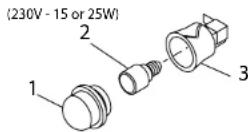
Abb. 11
S +31(0)20-4363525 (service)
E info@boretti.com
The Netherlands
N.V. BORETTI S.A.
Rupelweg 16
2850 Boom
T +32(0)3-4508180
F +32(0)3-4586847
E info.be@boretti.com
Belgium