Optichef A BH3 - Convection Oven MOULINEX - Free user manual and instructions
Find the device manual for free Optichef A BH3 MOULINEX in PDF.



| Product type | Convection oven |
| Brand | Moulinex |
| Model | Optichef A BH3 |
| Capacity | 16 L |
| Total power | 2200 W |
| Power in oven mode | 2200 W |
| Power in grill mode | 1100 W |
| Wall coating | Aluminized (model BH3) |
| Cooking functions | Conventional oven, Grill |
| Controls | Thermostat knob, on/off switch, temperature control indicator |
| Supplied accessories | Reversible rack (high and low rack), optional tray |
| Cooking levels | 3 levels |
| Energy consumption (rise to 200°C) | 0.11 kWh |
| Energy consumption (maintaining 1h at 200°C) | 0.67 kWh |
| Total energy consumption | 0.78 kWh |
| Power supply | 220-240 V, 10 A minimum |
| Cleaning | Damp soapy sponge, do not use metal scouring pads |
| Safety | Grounded outlet required, do not touch hot surfaces, keep children away |
| Maximum temperature | 270°C |
Frequently Asked Questions - Optichef A BH3 MOULINEX
User questions about Optichef A BH3 MOULINEX
0 question about this device. Answer the ones you know or ask your own.
Ask a new question about this device
Download the instructions for your Convection Oven in PDF format for free! Find your manual Optichef A BH3 - MOULINEX and take your electronic device back in hand. On this page are published all the documents necessary for the use of your device. Optichef A BH3 by MOULINEX.
USER MANUAL Optichef A BH3 MOULINEX
natural_image
Line drawing of a portable air conditioner unit with a grid-patterned vent (no text or symbols)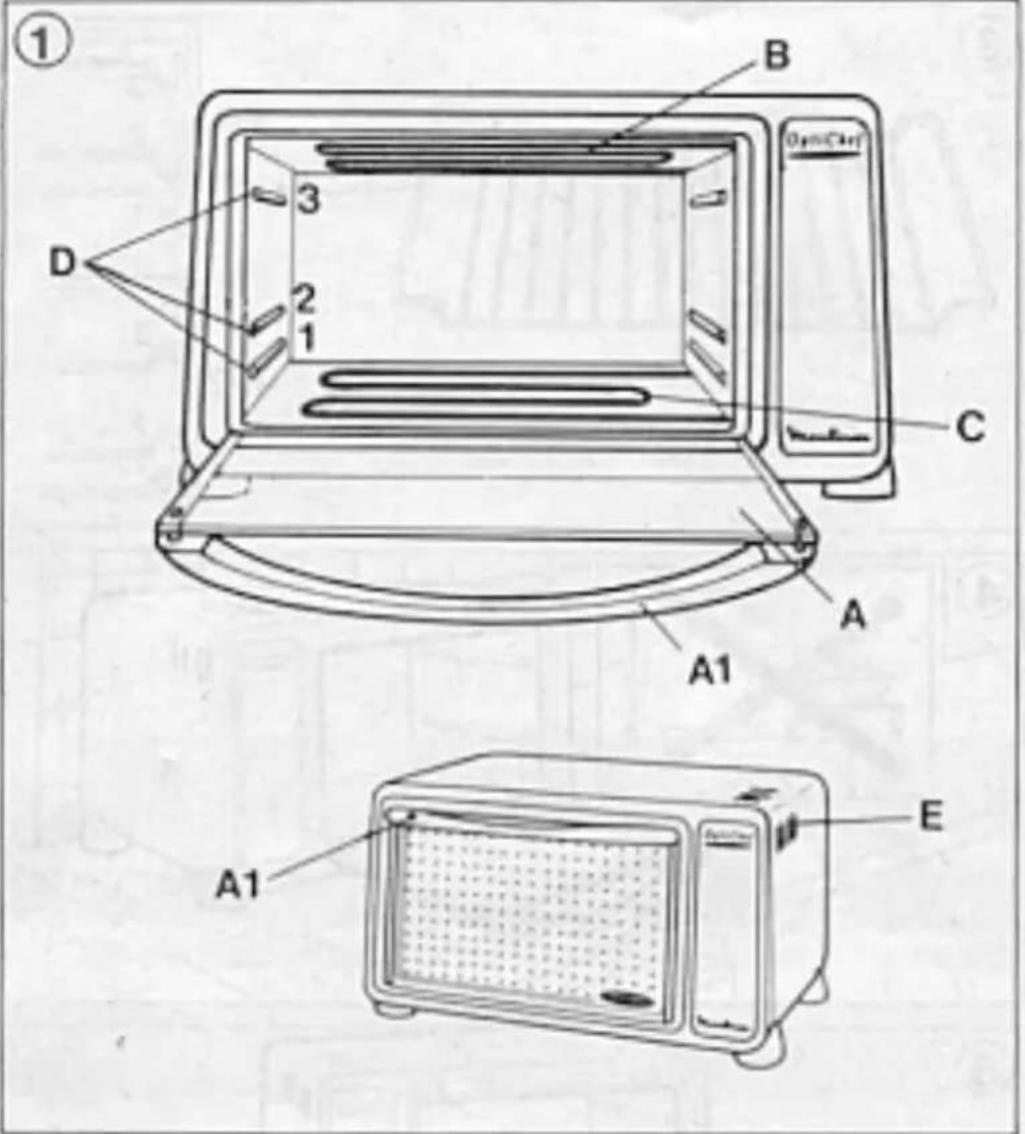
natural_image
Line drawing of a microwave oven with open lid and tray, no text or symbols present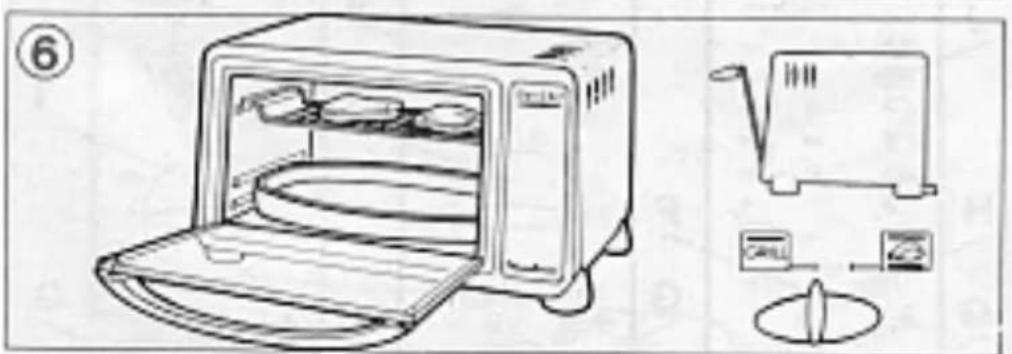
Thank you for choosing this Moulinex OPTICHEF Oven. It is just one of a complete range of cleverly designed, safe and practical products which will help to make your life easier.
Your OPTICHEF oven has several advantages:
- 16l capacity with hinged heating elements for easier cleaning and the following additional functions:-
. Model BH3 - Aluminium coated walls
. Model BH4 - Self-cleaning walls
. Model BH5 - Self-cleaning walls and timer
. Model BH6 - Self-cleaning walls, timer and snack function.
Contents
Description page 14
Technical characteristics page 15
Safety advice page 15
Before using your appliance for the first time page 16
How to use your appliance page 17
Oven cooking page 17
Grill cooking page 17
Practical advice page 18
Cleaning page 19
Maintenance page 19
Cooking tables page 19
Description
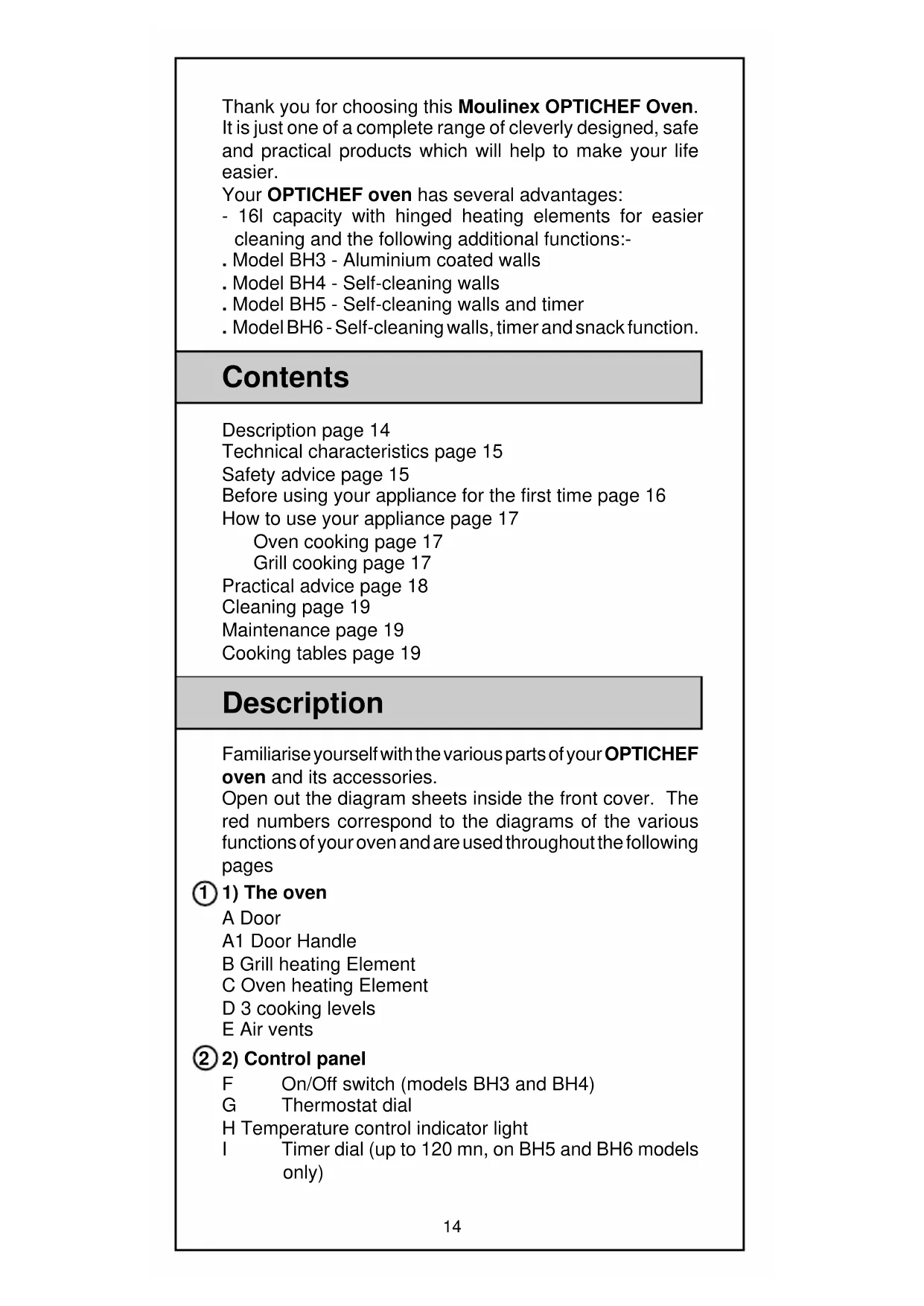
Familiarise yourself with the various parts of your OPTICHEF oven and its accessories.
Open out the diagram sheets inside the front cover. The red numbers correspond to the diagrams of the various functions of your oven and are used throughout the following pages
① 1) The oven
A Door
A1 Door Handle
B Grill heating Element
C Oven heating Element
D 3 cooking levels
E Air vents
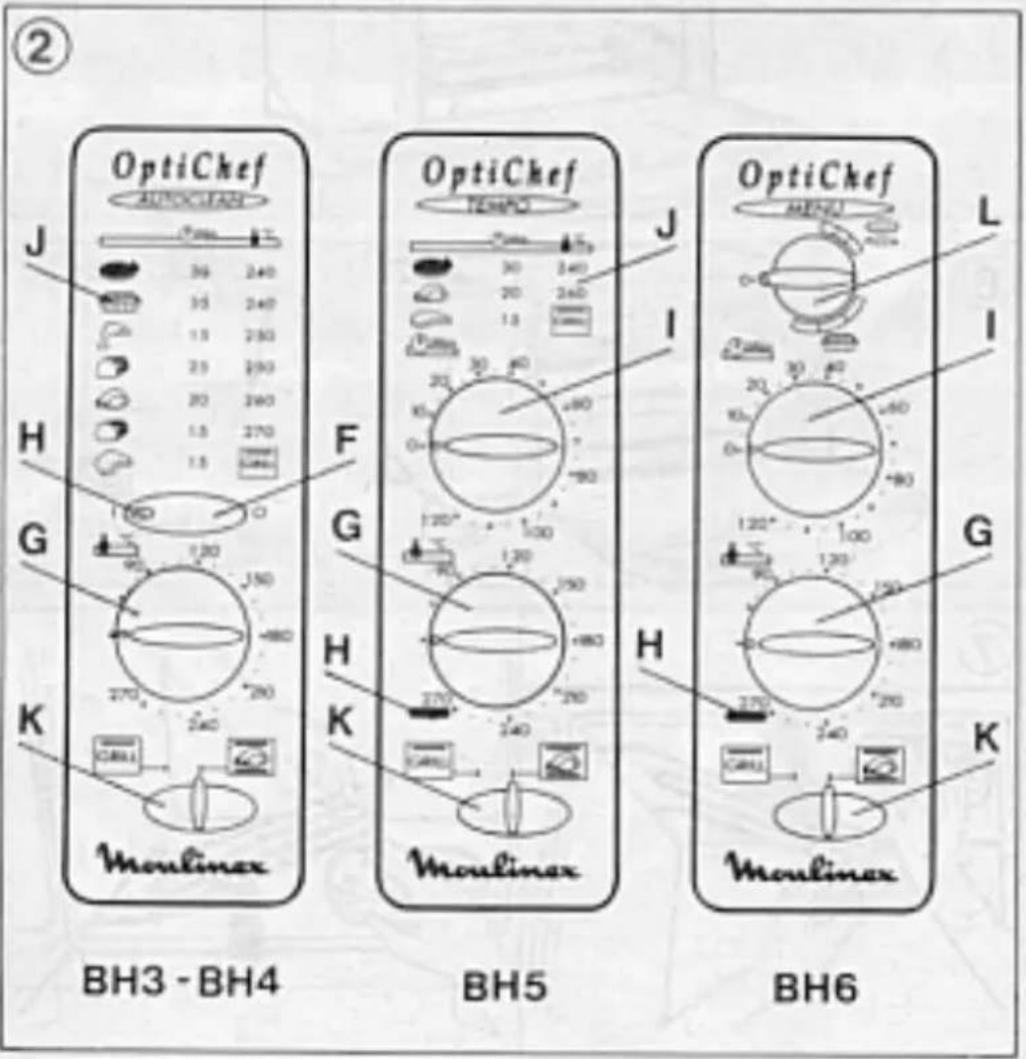
② 2) Control panel
F On/Off switch (models BH3 and BH4)
G Thermostat dial
H Temperature control indicator light
I Timer dial (up to 120 mn, on BH5 and BH6 models only)
J 500gr cooking guide (models BH3, BH4 and BH5)
K Oven/Grill selector button
L Snack button
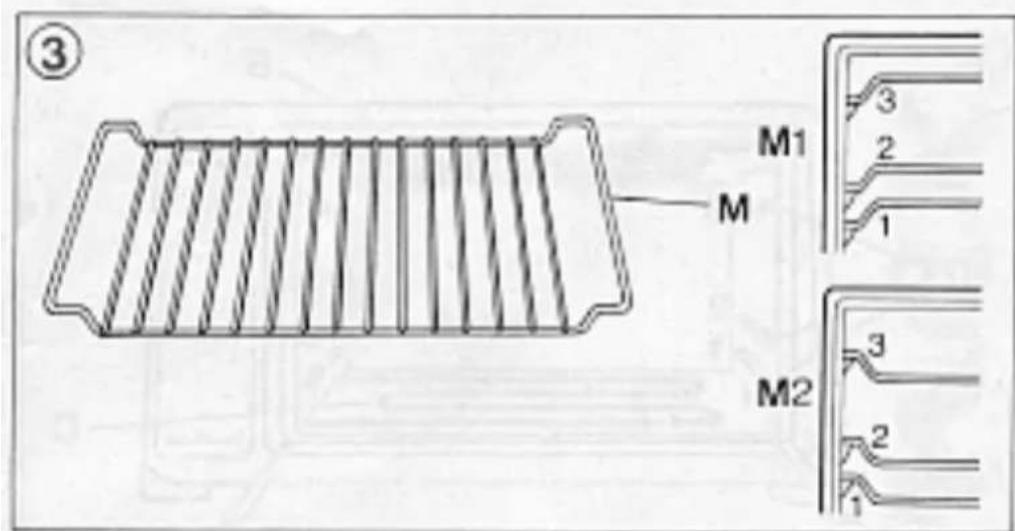
③ 3) Accessories
M Reversible grid shelf
M1 Highest grid shelf position
M2 Lowest grid shelf position
N Optional dish with certain models
Technical characteristics
- Walls with self-cleaning enamel lining (BH4, BH5 and BH6)
- 16l Capacity
- Total power : 2200W
- Oven power : 2200W
- Grill power : 1100W
- Energy consumption: BH3 BH4-BH5-BH6
. heating to 200°C 0,11 Kwh 0,12 Kwh
. maintaining 200°C for 1hr 0,67 Kwh 0,73 Kwh
TOTAL 0,78 KWh 0,85 KWh
Safety advice
1) Connection
- Check that the appliance's rating plate corresponds to the voltage marked on your mains supply meter. This appliance must be earthed.
Any error in connecting the appliance invalidates the guarantee.
Wiring instructions for U.K and Ireland only : APPLIANCES WITH FITTED PLUG
Important : For your convenience this appliance is supplied complete with a plug incorporating a 13 amp fuse.
In the event of replacing a fuse in the plug supplied, a 13 amp fuse approved by ASTA to BS1362 must be used.
If the socket outlets are not of the 13A BS 1363 type, and therefore do not accept the plug connected to this appliance, cut off the plug.
When cut off, this plug is a shock hazard if inserted into a socket outlet and must therefore be disposed of safely.
If the fuse cover is detachable, never use the plug with the cover omitted. Replacement covers can be obtained from your Moulinex service agent.
Fit the appropriate plug according to the instructions in paragraph "Fitting a plug". With alternative plugs a 15 amp fuse must be fitted either in the plug or adaptor or at the main fuse box.
APPLIANCES WITHOUT FITTED PLUG FITTING A PLUG - IMPORTANT
The wires in the mains lead are coloured in accordance with the following code:
GREEN & YELLOW : EARTH
BLUE : NEUTRAL
BROWN : LIVE
As the colours in the mains lead of this appliance may not correspond with the coloured markings identifying the terminals in your plug, proceed as follows:
The wire which is coloured GREEN & YELLOW must be connected to the terminal in the plug which is marked with the letter 'E' or by the earth symbol or coloured green or green and yellow. The wire which is coloured BLUE must be connected to the terminal which is marked with the letter 'N' or coloured black. The wire which is coloured BROWN must be connected to the terminal which is marked with the letter 'L' or coloured red.
This appliance is manufactured to conform to the Low Voltage Electrical Equipment (Safety) Regulations 1989 and is designed to comply with BS 3456. It complies with the requirements of the EEC Directive (89/336/EEC).
2) Installation
- Place your oven on a work surface or kitchen unit able to withstand a temperature of at least 90^ C. This appliance must not be built in or placed inside a cupboard.
- Ensure that there is nothing covering the air vents (E) of the oven: do not place tea towels or dishes on top of your appliance.
3) Precautions
- This domestic appliance is exclusively for the cooking of food.
- Avoid touching the hot surfaces of the oven, particularly the glass in the door, whilst the oven is in use.
- For safety reasons, keep out of the reach of children.
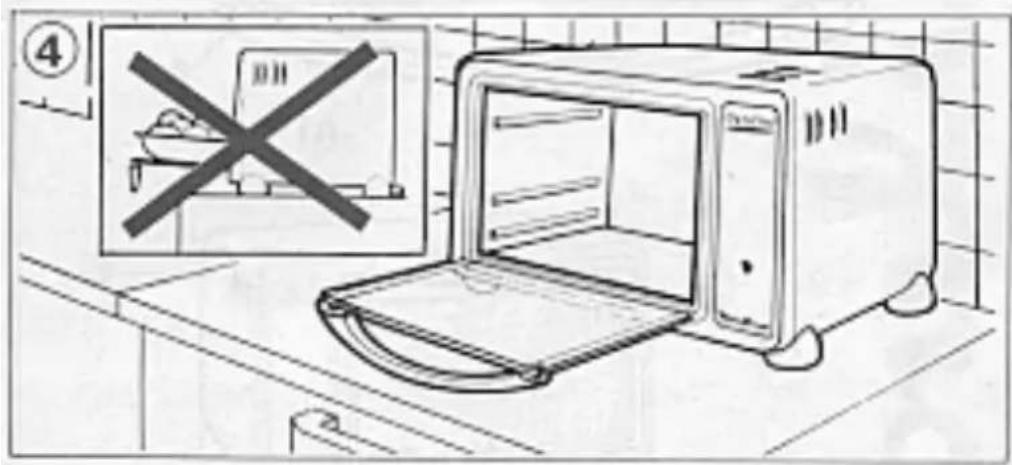
④ - Do not place anything on the open door of the oven if the handle is not resting on a work surface.
- Do not line the inside of your oven as this could cause serious damage by preventing the thermostat from functioning properly.
Before using your appliance for the first time
- Unpack the accessories. Wash and dry them.
- Switch on the empty oven leaving the door open and turning the thermostat dial (G) to 270°C for 15 minutes to get rid of the «new» smell.
How to use your appliance
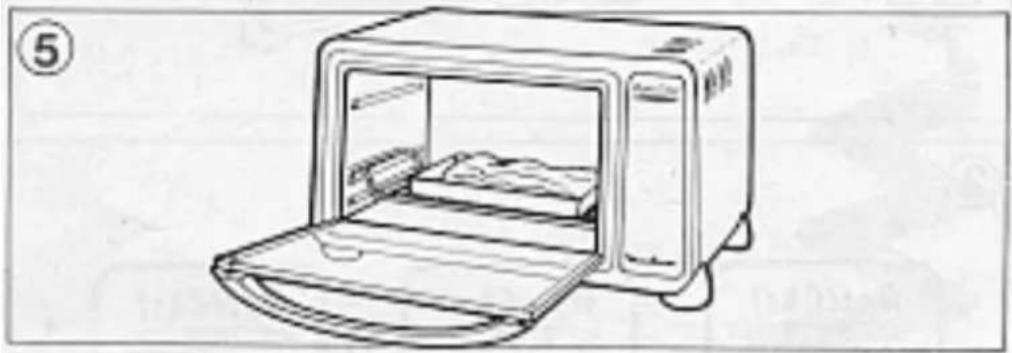
⑤ 1) Oven cooking
- Set the Oven/Grill selector button (K) to Oven setting
a) Conventional oven mode
- Select the cooking temperature by turning the thermostat dial (G)
. For models BH3 and BH4 put the on/off switch (F) on to «|»
. For models BH5 and BH6 set the timer dial (I) to the required cooking time allowing if needed extra time for pre-heating (between 2 and 4 minutes depending on the temperature).
Note: For a cooking time less than 25 minutes, set the timer dial (I) to 30 minutes and turn it back to the required cooking time.
The temperature control indicator light (H) will light up. When the selected temperature is reached the light will go out.
- Place your food inside the oven on the grid shelf (M) at a height to suit the food to be cooked (see cooking tables)
- Close the oven door
. For models BH3 and BH4 - The oven is switched off by the on/off switch (F) to the «O» position when you consider the cooking time to be complete.
. For models BH5 and BH6 with timer, when the cooking time is complete the oven will switch off automatically (the oven gives off an audible signal to indicate the end of the cooking time). - Open the door and remove your food.
To choose cooking times refer to the cooking tables at the end of this leaflet, they will give you the cooking time for given dishes, the temperature and the position of the grid shelf.
Note : On conventional oven mode do not select «snack» position - these two functions cannot be used simultaneously.
b) Snack mode (model BH6 only)
To reheat pizzas and small pies simply turn the button (L) to the appropriate zone (see the Snack table at the end of this leaflet)
To avoid any risk of burning your food, we advise you to place a sheet of aluminium foil on the grid shelf to prevent any spillages from running on to the lower element.
⑥ 2) Grilling
The grill allows you to seal and cook meat and fish and to brown the top of cheese dishes.
- Open the door.
- Set the Oven/Grill Selector button (K) to Grill setting GRILL. A red spur will appear which prevents the door from
closing to enable the air to circulate during grilling. Do not try to force the door shut.
- Place a dish containing a little water on the lower element (this does not heat up during grilling) to catch any dripping fat during cooking.
. For models BH3 and BH4 turn the on/off switch (F) to position «I» (approximately 4 mins preheating time).
. For models BH5 and BH6, turn the timer dial to the required cooking time plus approximately 4 minutes preheating time.
Note : For a cooking time less than 25 minutes set the timer dial (I) to 30 minutes and turn it back to the required cooking time.
- The temperature control indicator light will light up.
- Place the food to be grilled on the grid shelf on level 3. The height and position of the grid shelf shall be determined by the size of the food to be grilled.
- Food should be at least 2 cm from the grill element.
- Keep an eye on your food and turn it half-way through the cooking process.
. For models BH3 and BH4, when the cooking time has elapsed switch the grill off by pressing the Stop/Start button (F) to the «0» position.
. For models BH5 and BH6 with timer, the grill will switch off automatically when the cooking time has elapsed (the oven gives off an audible signal to indicate the end of the cooking process). - Open the door and remove your food.
During cooking spitting fat which comes into contact with the grill element can catch fire. Do not worry. This will go out and will not cause any damage.
Once grilling is finished, clean any fat that may have spilled on to the lower element and the back wall of the oven.
Practical advice
Cooking food always produces steam and occasionally smoke from the front of the oven.
Smoke and smells can be reduced by always keeping the oven walls clean.
They can also be reduced by :
- placing a dish containing a little water at the start of cooking process,
- by using the correct cooking temperature and lowering it if it appears too hot,
- by preferably using earthenware dishes.
Cleaning
- Unplug the oven and allow it to cool completely before any cleaning.
- For ease of cleaning wipe a damp soapy sponge over the warm outside walls of the oven. Dry carefully.
- The interior walls are covered in a self-cleaning enamel (except model BH3). To preserve their efficiency and ensure that they will last, wipe any spills of fat or smoke with a damp, soapy sponge as soon as they appear and then set the oven for 30 mins on 270°C.
- The interior walls of model BH3 are aluminium coated and should be wiped with a sponge dipped in hot soapy water.
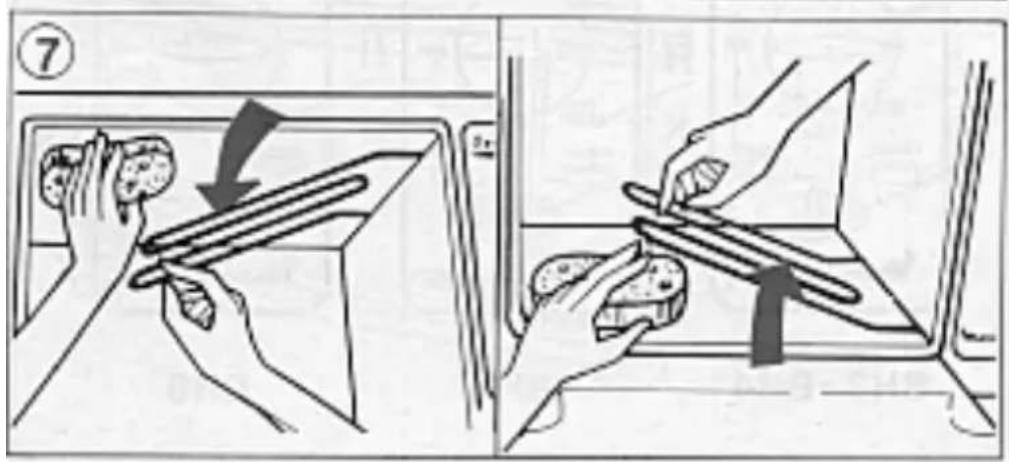
⑦ - To thoroughly clean the roof (top panel) pull down the grill element and wipe with a sponge dipped in hot soapy water.
- Replace the grill element to its proper position when cleaning is complete.
⑦. To thoroughly clean the base (lower panel), lift the lower element and wipe with a sponge dipped in hot soapy water.
. The grid shelf and the plate (on certain models) can be washed with hot water and washing-up liquid.
- Do not use abrasive pads or cloths, scouring powders or oven cleaning products to clean these ovens.
Maintenance
If your appliance does not work contact your local dealer or Moulinex Service Agent (see list in Moulinex Service leaflet).
Changing the Mains Lead : If the mains lead or the plug are damaged, do not use your appliance. In order to avoid any accident, they must be replaced by an approved Moulinex Centre (see list in the leaflet "Moulinex Service").
Cooking Tables
Table showing temperatures on the Optichef oven compared to temperatures shown in certain cookery books:
90^:1 - 2210^:7 - 8
All the times and temperatures stated are only to be used as a guideline. They can vary depending on which recipe or dish is being prepared.
Cooking in the Conventional Oven
| Type of Food Thermostat Cooking Shelf°C Time position | |||
| ENTREES | |||
| Cheese souffle 240 35 min 1 lowQuiche Lorraine 220 30 min 1 highStuffed tomatoes 240 30/40 min 1 highCauliflower cheese 240 30/40 min 1 highPizza 230 30 min 1 highPoached eggs 260 10 min 2 lowCheese strawsWelsh RarebitMEAT (for 500g)BeefLamb(shoulder, leg) 270 12/15 min 1 highPorkVealFISHSea BreamPOULTRYChicken 500 grRABBIT (500 gr) 240 30 min 1 highCAKESShortbreadFruit cakeClafoutisSponge cakeTartsBaked applesMeringues | 1 low1 high1 high1 high1 high1 high1 high1 high1 high1 high1 high1 high1 high1 high1 low10 min 1 low50 min 1 low220 45 min 2 low160 45/60 min 1 low240 30/35 min 1 high220 30 min 2 low110110 min2 high | ||
Grill mode - Oven door ajar Preheat approx. 4 min.
| Food | Cooking time Shelf | position | |
| 1st side | 2nd side | ||
| Steak | 5 min | 3 min | 3 high |
| Lamb chop | 8 min | 6 min | 3 high |
| Rib steak | 8 min | 6 min | 3 high |
| Rib of beef | 15 min 15 min 3 low | ||
| Pork chop | 10 min | 8 min | 3 high |
| Veal chop | 8 min | 6 min | 3 high |
| Sausages | 9 min | 7 min | 3 high |
| Kebabs | 15 min 10 min 3 low | ||
| Cod steaks | 10 min | 8 min | 3 high |
Cooking «Snack» Mode (model BH6 only)
| Food Dial position | on Shelf (Button (L)) | position |
| Cauliflower cheese (frozen) | 3  | |
| Fish pie (fresh) 2 2 high |  | |
| Welsh Rarebit 1 2 high |  | |
| Pizzas:Thin crust fresh 1 2 high | ||
 | ||
| Thin crust frozen 1 2 high |  | |
| Thin crust prepared 3 2 high |  | |
| Thick crust fresh 2 2 high |  | |
| Thick crust frozen 3 2 high |  |
- Contents
- Description
- ③ 3) Accessories
- Technical characteristics
- Safety advice
- 1) Connection
- Any error in connecting the appliance invalidates the guarantee.
- Wiring instructions for U.K and Ireland only : APPLIANCES WITH FITTED PLUG
- APPLIANCES WITHOUT FITTED PLUG FITTING A PLUG - IMPORTANT
- 2) Installation
- 3) Precautions
- Before using your appliance for the first time
- How to use your appliance
- ⑤ 1) Oven cooking
- a) Conventional oven mode
- b) Snack mode (model BH6 only)
- ⑥ 2) Grilling
- Practical advice
- Cleaning
- Maintenance
- Cooking Tables
Brand : MOULINEX
Model : Optichef A BH3
Category : Convection Oven