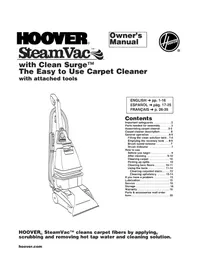
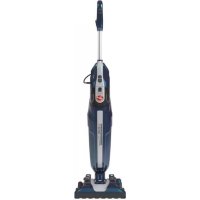
SteamVac CleanSurge - Steam cleaner HOOVER - Free user manual and instructions
Find the device manual for free SteamVac CleanSurge HOOVER in PDF.



| Product Type | Carpet steam cleaner (shampooer) |
| Brand | Hoover |
| Model | SteamVac CleanSurge |
| Power Supply | 120 V ~ 60 Hz |
| Clean Solution Tank Capacity | 4.5 L (1 gallon) |
| Recovery Tank Capacity | Approximately 4.5 L |
| Brush Speed | 3 positions: High, Low, Off |
| Main Functions | Deep cleaning of carpets, hard floors (optional accessory), stairs, upholstery; Clean Surge function for extra flow; pickup of spills |
| Included Accessories | Accessory holder, hose, stair/upholstery nozzle, removable brushes |
| Power Cord Length | Approximately 7.6 m (25 feet) |
| Weight | Approximately 7 kg |
| Safety | Automatic shut-off when recovery tank is full, mandatory grounding, electrocution precautions |
| Maintenance | Removable brushes washable with water, recovery tank filter to rinse |
| Warranty | 1 year (domestic use) |
Frequently Asked Questions - SteamVac CleanSurge HOOVER
User questions about SteamVac CleanSurge HOOVER
0 question about this device. Answer the ones you know or ask your own.
Ask a new question about this device
Download the instructions for your Steam cleaner in PDF format for free! Find your manual SteamVac CleanSurge - HOOVER and take your electronic device back in hand. On this page are published all the documents necessary for the use of your device. SteamVac CleanSurge by HOOVER.
USER MANUAL SteamVac CleanSurge HOOVER
with Clean Surge™ The Easy to Use Carpet Cleaner with attached tools
natural_image
Line drawing of a vacuum cleaner with handle and control panel (no text or symbols)ENGLISH → pp. 1-16
Important safeguards ....2
Parts needed for assembly ..... 3
Assembling carpet cleaner ..... 3-5
Carpet cleaner description ..... 6
General operation 6-9
Filling the clean solution tank . 7-8
Emptying the recovery tank .. 8-9
Brush speed selector .....7
Brush Indicator 7
How to use
Before you begin .....9
After cleaning 9-10
Cleaning carpet ..... 10
Picking up spills .... 10
Cleaning bare floors ..... 10-11
Using the tools ..... 11-14
Cleaning carpeted stairs .....13
Cleaning upholstery ..... 13-14
If you have a problem ..... 15
Lubrication 15
Service 16
Storage 16
Warranty 16
Parts & accessories mail order
form....35
HOOVER® SteamVac™ cleans carpet fibers by applying, scrubbing and removing hot tap water and cleaning solution.
hoover.com
Review this manual before operating carpet cleaner
Important Safeguards!
When using an electrical appliance, always follow basic precautions, including the following:
READ ALL INSTRUCTIONS BEFORE USING APPLIANCE.
WARNING:
To reduce the risk of fire, electric shock, or injury:
- Use indoors only.
- Use only on surfaces moistened by the cleaning process or small spills. Do not immerse product.
- Connect to a properly grounded outlet only. See "Grounding Instructions".
- Do not clean over floor electrical outlets.
- Do not use without tanks in place.
- Use extra care when cleaning on stairs. Do not place carpet cleaner on stairs.
- Use carpet cleaner only for its intended use as described in the instructions.
- Use only attachments recommended by Hoover; others may cause hazards.
- The use of an extension cord is not recommended. If an extension cord is absolutely necessary, use at least a 16 gauge 3-wire cord which has a 3-prong grounding type plug and a 3-pole receptacle that accepts the machine plug.
- Unplug carpet cleaner when not in use. Turn off all controls before unplugging.
- Unplug before connecting the powered hand tool.
- Always disconnect cord from electrical outlet before servicing the carpet cleaner.
- Do not unplug by pulling on cord. To unplug, grasp the plug, not the cord.
- Never handle plug or appliance with wet hands.
- Do not pull or carry by cord, use cord as a handle, close door on cord or pull cord around sharp edges or corners. Do not run appliance over cord. Keep cord away from heated surfaces.
- Do not use with damaged cord or plug. If appliance is not working as it should, has been dropped, damaged, left outdoors, or dropped into water, take it to a Hoover Sales and Service Center or Authorized Hoover Warranty Service Dealer.
- Close supervision is necessary when any appliance is used by or near children. Do not allow carpet cleaner to be used as a toy or to run unattended at any time.
- Do not point tools toward people or pets.
- Use only commercially available floor cleaners intended for machine application. Do not use any type of wax with carpet cleaner.
- When using recommended chemicals with this machine, be certain area is well ventilated.
- To assist in reducing drying time, be certain the area is well ventilated when using detergents and other cleaners with this machine.
- Keep detergents and other cleaners out of children's reach.
- Do not use to pick up flammable or combustible liquids such as gasoline or use in areas where they may be present.
- Do not pick up chlorine bleach, drain cleaner, gasoline or any other toxic material with this appliance.
- Do not pick up anything that is burning or smoking, such as cigarettes, matches, or hot ashes.
- Avoid picking up hard, sharp objects with the carpet cleaner. They may damage the machine.
- Keep hair, loose clothing, fingers, feet and all parts of body away from openings and moving parts.
- Do not put any object into openings. Do not use with any opening blocked; keep free of dust, lint, hair, and anything that may reduce air flow.
- To help prevent matting and resoiling, avoid contact with carpets until they are dry. Keep children and pets away from carpets until they are completely dry.
- Store in a dry place. Do not expose machine to freezing temperatures.
Save these instructions!
Fill in and Retain
This HOOVER carpet cleaner is designed for cleaning carpet, rugs, carpeted stairs and upholstery.
The model and serial numbers are located on the data label on the back of the handle.
For your personal records, please enter the COMPLETE model and serial numbers in the spaces provided and retain this information.
Your carpet cleaner is model no. ____ and has serial no. ____
It is suggested that you attach your sales receipt to this owner's manual.
Verification of date of purchase may be required for warranty service of your Hoover product.
Thank you for choosing a HOOVER product.
If you need any assistance:
Visit our website at hoover.com. Click on the "Service" button to find the service outlet nearest you OR
Call 1-800-944-9200 for an automated referral of service outlet locations (U.S. only) OR
Call 1-800-263-6376 to speak with a representative in our Consumer Response Center, Mon-Fri 8am-7pm EST.
PLEASE DO NOT RETURN THIS PRODUCT TO THE STORE.
Grounding Instructions
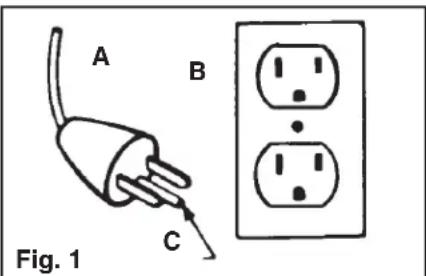
This appliance must be grounded. If it should malfunction or breakdown, grounding provides a path of least resistance for electrical current to reduce the risk of electric shock. This appliance is equipped with a cord having an equipment-grounding conductor (C) and grounding plug (A). The plug must be plugged into an appropriate outlet (B) that is properly installed and grounded in accordance with all local codes and ordinances.
DANGER-
Improper connection of the equipment-grounding conductor can result in the risk of electric shock. Check with a qualified electrician or service person if you are in doubt as to whether the outlet is properly grounded. Do not modify the plug provided with the appliance - if it will not fit the outlet, have a proper outlet installed by a qualified electrician. This appliance is for use on a nominal 120 volt circuit and has a grounding plug that looks like the plug (A) illustrated in sketch (Fig. 1).
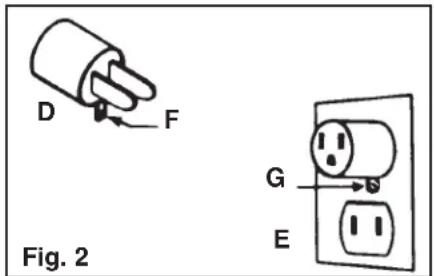
A temporary adapter (D) may be used to connect this plug to a 2-pole receptacle (E) if a properly grounded outlet is not available (Fig. 2). The temporary adapter should be used only until a properly grounded outlet (B) can be installed by a qualified electrician (Fig. 1). The green colored rigid ear, lug, or the like (F) extending from the adapter must be connected to a permanent ground (G) such as a properly grounded outlet box cover (Fig. 2). Whenever the adapter is used, it must be held in place by a metal screw. NOTE: In Canada, the use of a temporary adapter is not permitted by the Canadian Electrical Code.
1. Assembly
Carton contents
1-1
natural_image
Line drawing of a mechanical device with a top component and base (no text or symbols)A
B
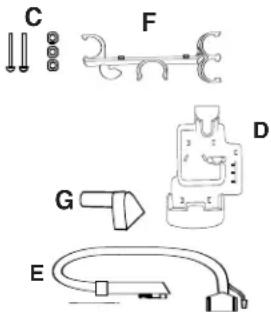
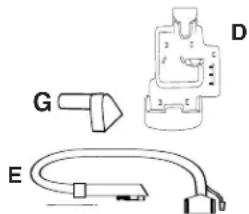
Accessories
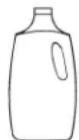
H
H. Carpet/Upholstery Detergent
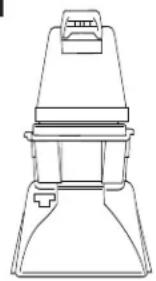
A. Carpet cleaner
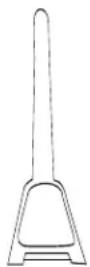
B. Upper handle
C. Handle bolts and nuts
D. Tool holder with screw
E. Hose
F. Hose holder
G. Stair/upholstery nozzle
Additional accessories not included with your model may be purchased separately using the order form located at the back of this manual.
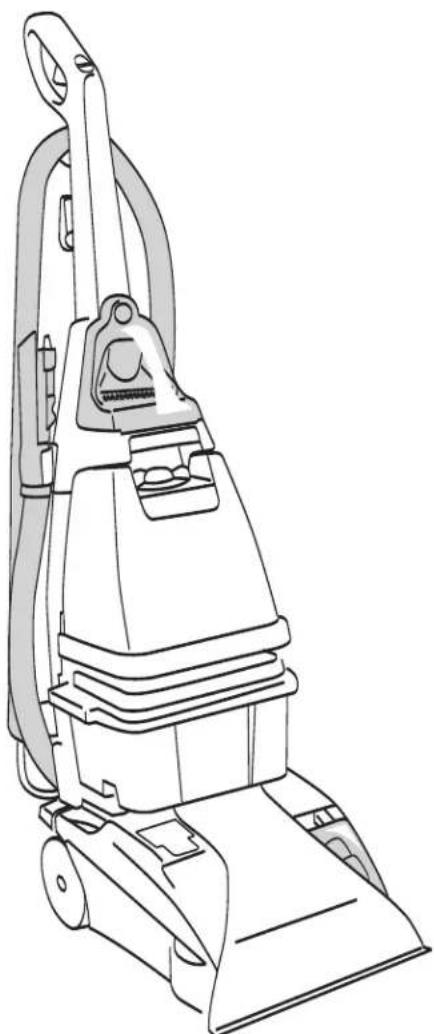
The assembled cleaner will look like this drawing.
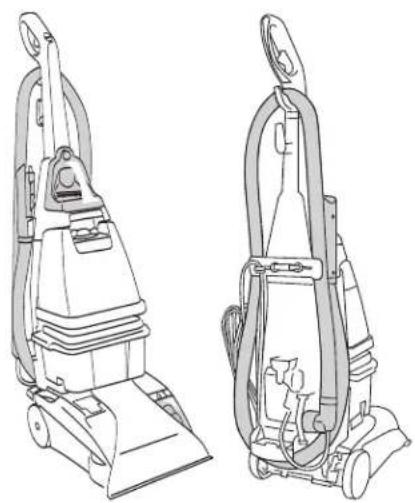
natural_image
Line drawings of two different vacuum cleaner units, shown from front and side views (no text or symbols)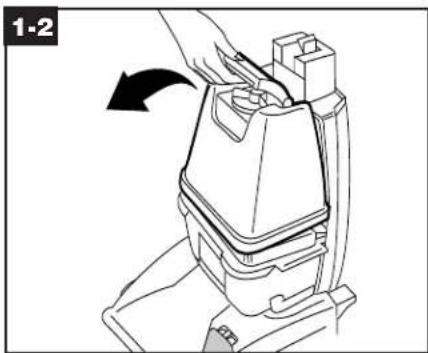
natural_image
Line drawing of a hand operating a mechanical device with a black arrow indicating rotation (no text or symbols)Attach upper handle
Remove clean solution tank (upper tank) from carpet cleaner.
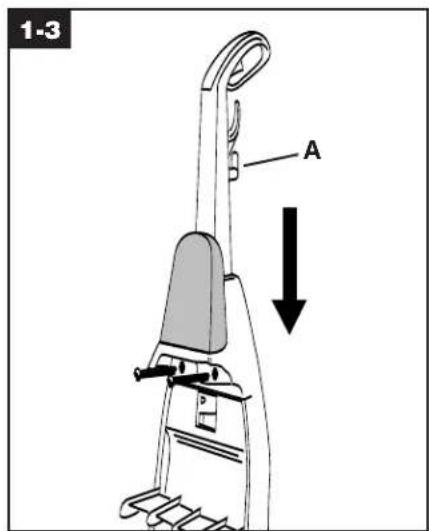
With cord hook (A) to back of carpet cleaner, push upper handle down onto lower handle. Push bolts into holes on front of handle. If bolts will not go through hole easily handle is not pushed completely down.
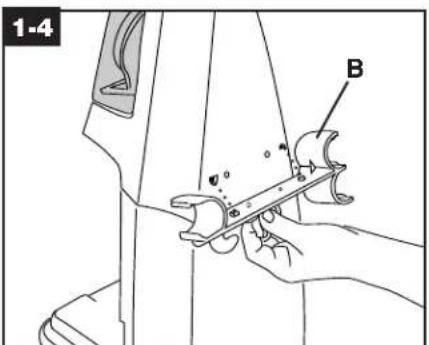
Attach hose holder
Position hose holder (B) onto handle by matching tabs on rack with openings on back of handle. Make sure bolts are through holes.
natural_image
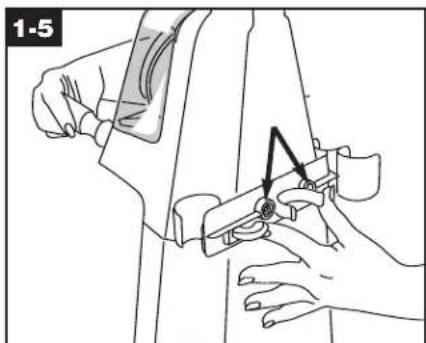
Line drawing of a person using a tool to adjust or install a mechanical component, no text or symbols presentPlace nuts in recessed areas on back of hose holder. Hold each nut in place while tightening each bolt securely (from the front of the handle) with a Phillips screwdriver. Only two nuts are needed on this model. The extra nut is not required but has been provided for your convenience.
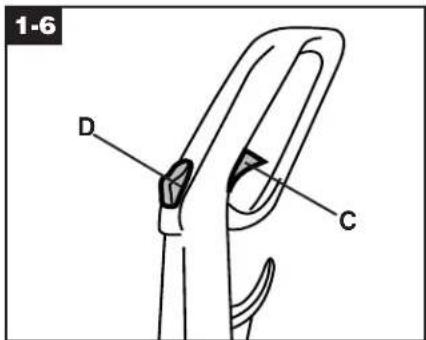
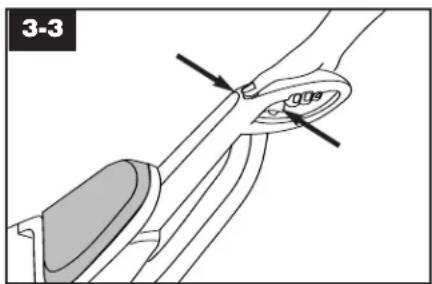
When handle sections are completely together, squeeze trigger (C) and depress Clean Surge™ button (D) on upper handle. You will hear a "snap" when the trigger rod is in place.
natural_image
Line drawing of a hand using a tool to adjust or install a mechanical component (no text or symbols visible)Attach tool holder
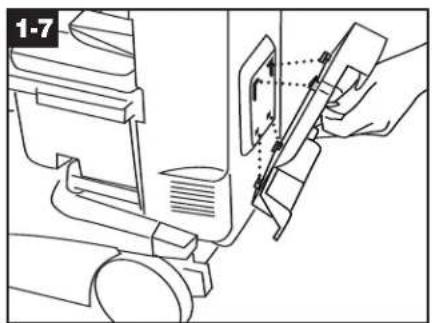
Remove tool and taped screw from holder. Insert projections on holder into slots on back of cleaner.
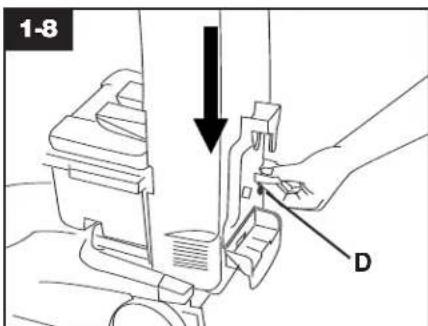
Slide holder down into place. Insert screw at (D) and tighten with a Phillips screwdriver.
natural_image
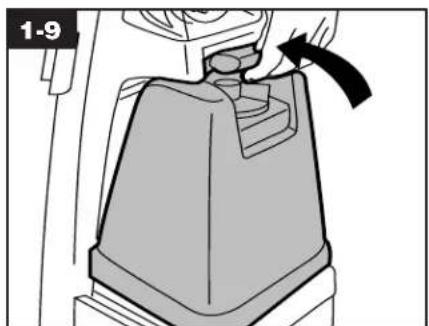
Mechanical component diagram showing a lever mechanism with a hand and arrow indicating motion (no text or symbols)Replace clean solution tank (upper tank) by positioning bottom first. Press on tank handle to snap top of tank into place.
Storing hose
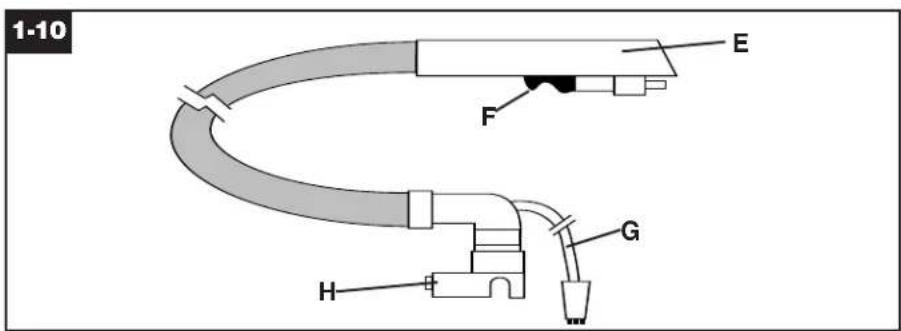
Stretch hose out and identify ends.
E. Nozzle connector end of hose G. Solution tube
F. Trigger H. Converter end of hose
Note: You may find it helpful when storing the hose to refer to the information on the back of the carpet cleaner and on the converter end of the hose.
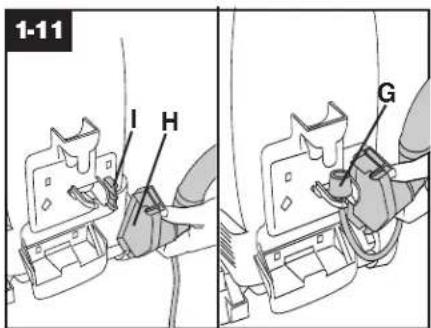
Start with converter end of hose (H). Fit converter over tab near tool holder (I). Press converter firmly to snap in place. Press solution tube (G) into clip next to converter as shown.
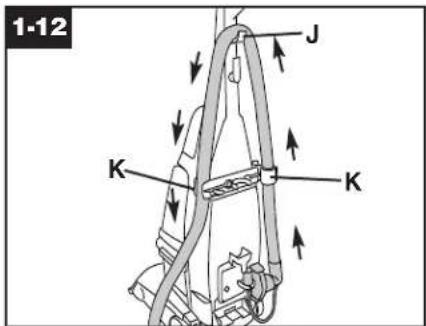
Wrap hose around hook on upper handle (J). Press hose into clips on upper hose holder (K).
natural_image
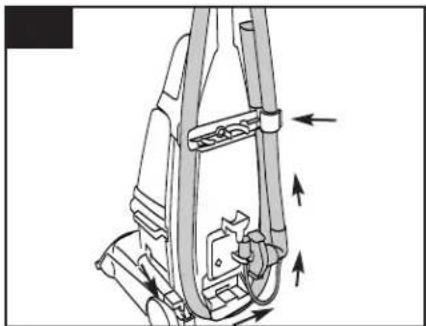
Mechanical assembly diagram showing a lever mechanism with directional arrows indicating motion (no text or symbols)Wrap hose around lower tool holder and continue until nozzle connector is near upper hose holder. Clip hose in place.
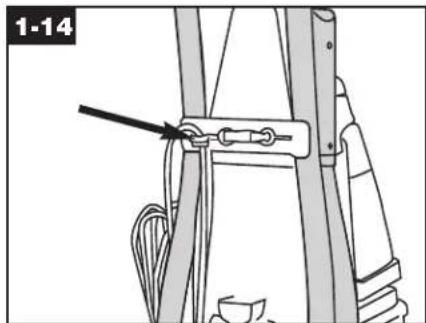
Press cord into cord clip on back of hose holder. Pull cord tight.
Upfront tool storage
natural_image
Line drawing of a hand adjusting a seatbelt buckle (no text or symbols)Stair/upholstery nozzle
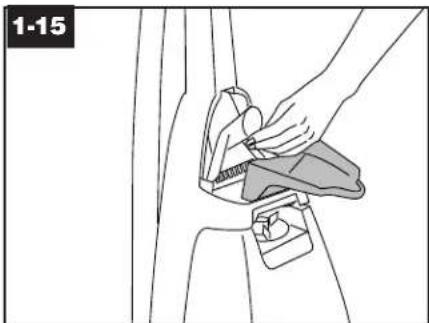
To store stair/upholstery nozzle, open tool door, place nozzle in bracket and fit it securely into position. To remove, reverse this procedure.
natural_image
Illustration of a person adjusting a mechanical component (no text or symbols visible)How to reattach tool cover
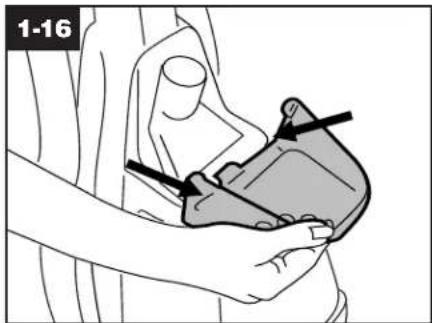
The tool cover is designed with a break-away feature which allows it to snap free if it is pushed open too far.
To reattach, align hinges of cover with slots on sides of tool storage area.
Push cover down to secure in place.
2. How to use
Carpet cleaner description
2-1
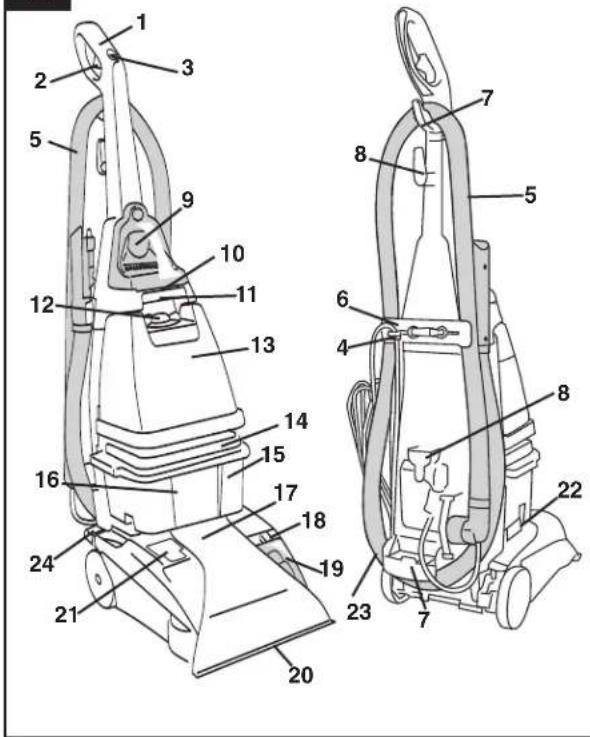
The assembled carpet cleaner will look like the drawing.
- Hand grip
- Solution trigger: press to release clean solution.
- Clean Surge™ button
- Cord clip: place cord in clip to keep it out of the way when using cleaner
- Hose
- Hose holder: wrap hose around holder and hooks for storage.
- Hose hooks
- Cord hooks: wrap cord around hooks for storage. The top hook can be rotated right or left for quick and easy cord release.
- Stair/upholstery nozzle
- Carrying handle
- Clean solution tank handle
- Clean solution tank cap/measuring cup
- Clean solution tank: holds cleaning solution.
- Recovery tank lid
-
Recovery tank: holds dirty solution.
-
Recovery tank front panel
- Hood
- Brush speed selector: slide selector to set brush speed on HI, LO, or OFF.
- Brush Indicator: spins when brushes are rotating.
- Nozzle
- Solution tube connection
22.Recovery tank latches - ON/OFF pedal
- Handle release pedal: step on pedal to lower handle to operating (floor) position.
This carpet cleaner is intended for household use.
Operate carpet cleaner only at voltage specified on data plate on back of cleaner. Plug carpet cleaner Into a properly grounded outlet.
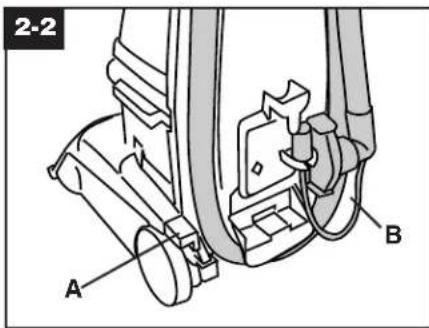
ON/OFF pedal & Handle release pedal
Step on pedal (A) to turn carpet cleaner on. Step on pedal again to turn carpet cleaner off.
Step on pedal (B) to lower handle to operating position. Handle does not lock into a single position but "floats" to allow convenient operation.
natural_image
Line drawing of a mechanical device with no visible text or symbolsTo transport
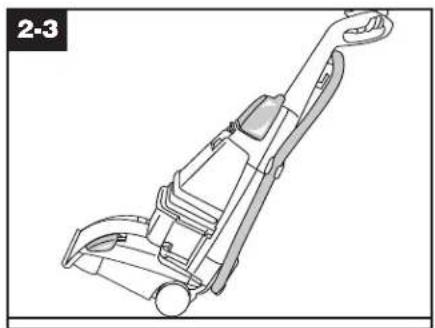
To move your carpet cleaner from room to room put handle in upright and locked position tilt carpet cleaner back on wheels and push forward.
natural_image
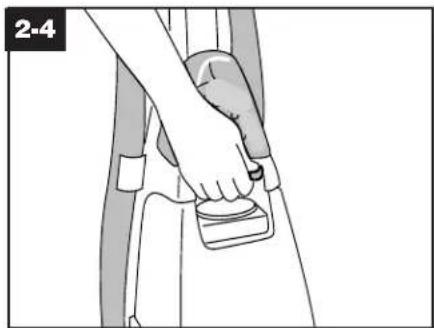
Illustration of a person using a belt buckle device (no text or symbols visible)The carpet cleaner may also be lifted by placing a hand under the upper clean solution tank handle as shown.
Automatic "shut off"
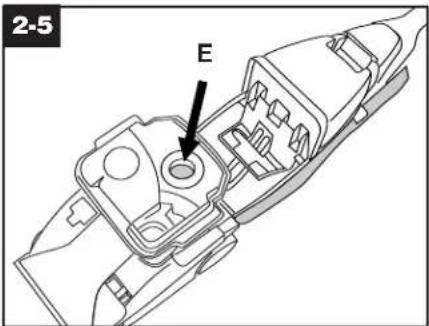
When the recovery tank (lower tank) is full the automatic shutoff mechanism will shut off the carpet cleaner suction (suction will be noticeably reduced).
At that time the yellow float disk will rise to the top of the recovery tank lid (E). The carpet cleaner will no longer pick up dirty solution and the motor sound will become noticeably higher in pitch.
When this happens turn carpet cleaner off and empty recovery tank before continuing use.
Check clean solution tank also; it may need to be refilled.
Brush speed selector
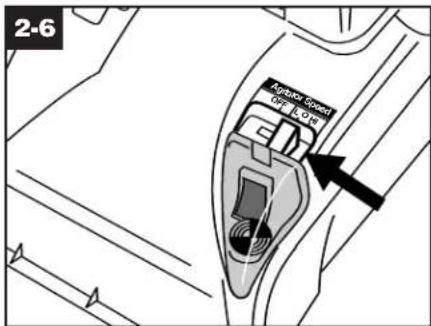
Your SteamVac™ carpet cleaner has three agitator brush settings.
HI - for normal cleaning of carpet and bare floors
LO - for gentle cleaning of carpets and bare floors
OFF - for cleaning carpets and bare floors when brushing is not desired. (Such as when picking up liquid spills. See page 11.)
Slide selector button to the desired setting before cleaning.
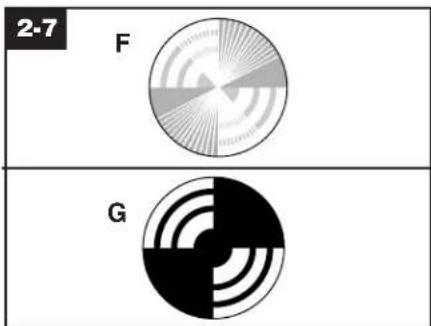
Brush indicator
The brush indicator will spin (F) when the carpet cleaner is turned ON and the brushes are rotating.
If the indicator does not spin and the pattern is visible (G) when the carpet cleaner is turned ON, the brushes are not rotating.
There are three reasons why the brushes may not be rotating:
-
Brush speed selector set on OFF (see previous section).
-
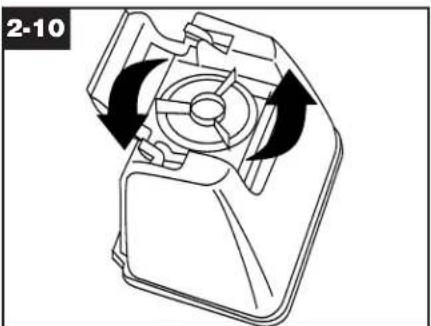
Solution tube connected (Fig. 3-10).
-
Brush indicator screen dirty (Fig. 2-8).
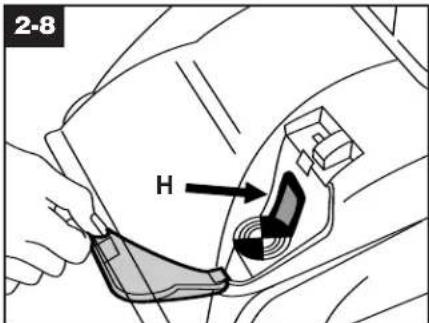
To clean screen (H), turn carpet cleaner off and disconnect from electrical outlet.
Remove clear cover and wipe off screen with a damp cloth. Snap cover back into position.
natural_image
Diagram of a hand using a tool to lift a mechanical component, showing a curved arrow indicating rotation (no text or symbols present)The tanks
Clean solution tank (upper tank)
The clean solution tank holds the cleaning solution that is to be dispersed onto the surface to be cleaned.
How to fill
Disconnect carpet cleaner from electrical outlet.
Place carpet cleaner handle in the upright, locked position.
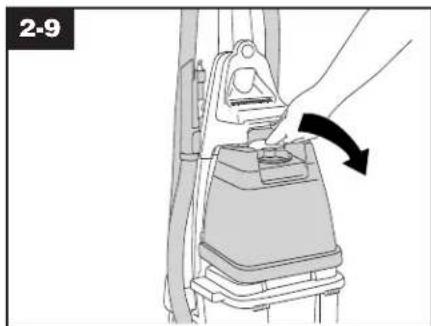
To remove tank, press down on handle and pull forward.
natural_image
Mechanical component diagram showing a rotating assembly with arrows indicating rotation (no text or symbols)Carry tank to a sink.
Rotate tank cap counterclockwise and lift up to remove cap.
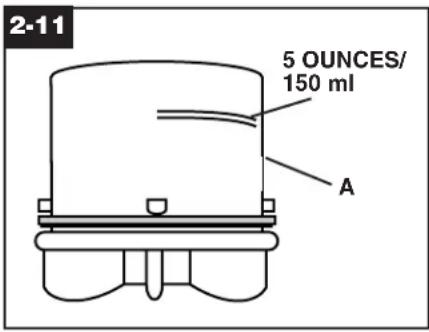
Turn cap (A) upside down to serve as a measuring cup.
Using cap, measure detergent following the chart below.
For carpet, carpeted stairs and upholstery:
Fill cap to fill line (5 ounces) with HOOVER Carpet/Upholstery Detergent.
For bare floors:
Fill cap to fill line (5 ounces) with HOOVER Hard Floor Cleaning Solution*.
Do not use Hard Floor Cleaning Solution on carpet or upholstery. Do not use any type of wax with your SteamVac™ carpet cleaner.
NOTE: Use only HOOVER deter- gents. They are specially formulated for use with your SteamVac™ carpet cleaner.
*Available at additional cost if not included with your model.
For heavy traffic areas: Pre-treat with HOOVER Spot and Stain Spray Cleaner. If you do not have access to the Spot and Stain Spray Cleaner, double the amount of HOOVER Carpet/ Upholstery Detergent (use 2 capfuls or 10 ounces per 1 gal- lon tank).
CAUTION: Detergents contain Anionic and Nonionic Surfactants. Avoid contact with eyes and skin. In case of contact with eyes, flush with cold water for 15 minutes. In case of contact with skin, wash with water. If Irritation persists, call a physician.
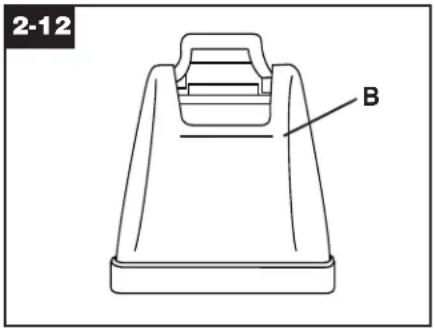
Pour detergent into tank. Fill tank to fill line (B) (1 gallon) with hot tap water.
To assure proper performance, use only HOOVER cleaning detergent.
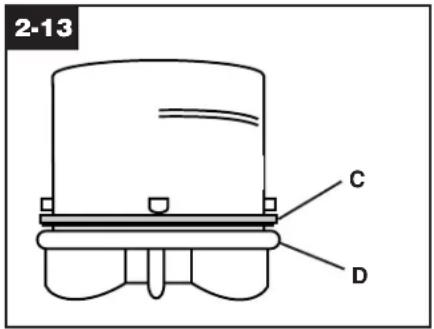
If rubber ring (C) on cap has become dislodged, reposition it with uneven side against ledge (D) as shown.
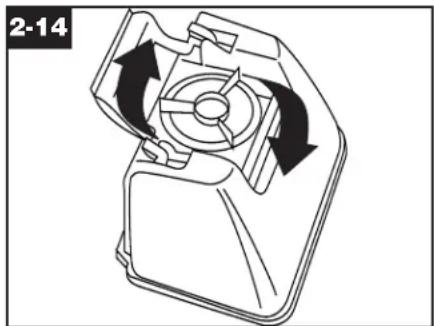
natural_image
Mechanical component diagram showing a rotating fan or housing with directional arrows indicating rotation (no text or symbols)Replace cap. Rotate cap clockwise until it locks in place. Cap must be locked in place for proper performance and to prevent leaking.
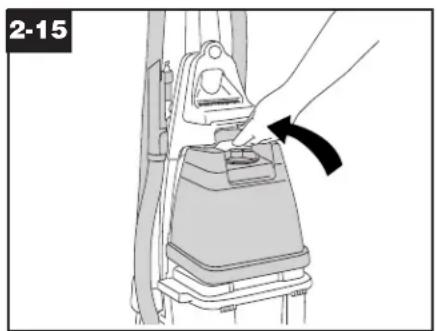
natural_image
Diagram of a hand placing a component into a device, showing a curved arrow indicating motion (no text or symbols present)Position bottom of tank into unit and press on tank handle to snap tank into place.
Recovery tank (lower tank)
The recovery tank holds the dirty solution that is picked up from the carpet.
When the recovery tank is full, the automatic shut-off will engage (see page 8) and the tank must be emptied.
How to empty
Turn carpet cleaner off and disconnect from electrical outlet.
To prevent possible leaking, remove clean solution tank (Fig. 2-9) by pressing down on tank handle and pulling forward; set tank aside (do not set tank on furniture).
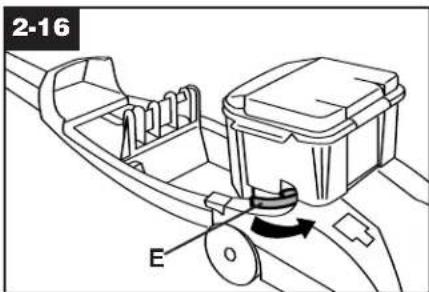
Step on handle release pedal and lower handle until it rests on the floor.
If cleaning stairs or upholstery, remove hose by reversing procedure as shown on pages 12 and 13.
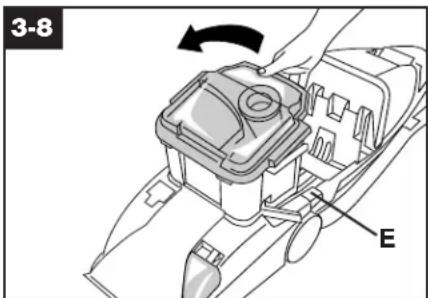
Rotate recovery tank latches (E) outward (one on each side of tank).
Lift tank off of carpet cleaner and carry it to a sink or drain.
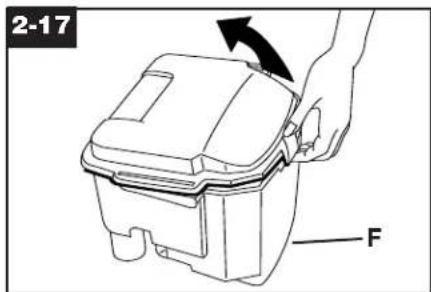
Unlatch back part of tank lid and remove lid.
Empty tank. Pour dirty water out from the rear of the tank (F).
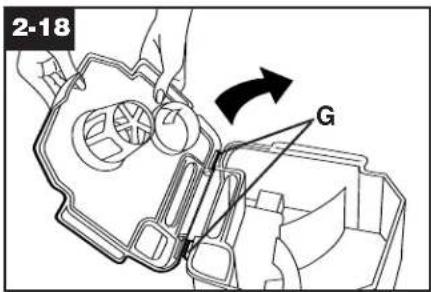
The lid replaces in a hinge-like manner. Position the front of lid under tabs (G) on front of tank. Rotate lid down onto tank. Make sure that the lid is secure on all sides before placing tank on cleaner.
For full suction, it is important that the recovery tank lid is properly secured before cleaning.
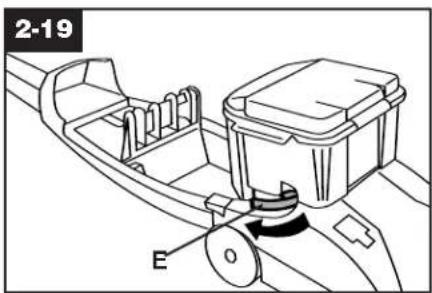
Replace tank and press down to ensure that it is properly seated in place.
Rotate latches (E) (one on each side of tank) inward to lock tank in place.
To continue cleaning stairs or upholstery, replace hose as shown on pages 12 and 13.
Raise handle to upright position and replace upper clean solution tank.
3. How to clean
Before you begin cleaning
a. Vacuum thoroughly - For carpet, use a vacuum cleaner with an agitator for best results. Vacuum upholstery with a vacuum cleaner with cleaning tool attachments. Use a crevice tool to reach into tufts and folds. Do not use the SteamVac™ carpet cleaner as a dry vacuum cleaner.
b. For upholstery, check cleaning code - Use your HOOVER
SteamVac™ carpet cleaner only if the upholstery fabric is marked with a "W" (for "wet" clean) or "S/W" (for "solvent/dry" or "wet" clean). Do not clean fabric marked "S" ("solvent/dry" clean only). If your upholstery does not have a code, seek professional assistance.
c. Test for colorfastness - Mix detergent and water according to the instruc-
tions under "Fill clean solution tank" on pages 8 and 9. Wet a white absorbent cloth with the solution. In a small, hidden area, gently rub the surface with the dampened cloth. Wait ten minutes and check for color removal or bleed with white paper towel or cloth. If surface has more than one color, check all colors.
d. When cleaning entire floor, move furniture out of area to be cleaned (may not be necessary if only high traffic areas are to be cleaned). For furniture too heavy to move, place aluminum foil or wax paper under legs. This will prevent wood finishes from staining carpet. Pin up furniture skirts and draperies.
e. Pretreat spots and heavy traffic areas with HOOVER® Spot and Stain Spray Cleaner*- Test Spot and Stain Spray Cleaner for colorfastness by first spraying it on a hidden area; wait ten minutes and blot with white paper towels or cloth.
If no color change is visible, spray Spot and Stain Spray Cleaner onto spots and traffic areas. Wait at least ten minutes. Use your SteamVac™ carpet cleaner to pick up Spot and Stain Spray Cleaner and spot. Repeat until spot is removed; carefully scrub with a household scrub brush if necessary.
Do not saturate carpet or upholstery with Spot and Stain Spray Cleaner. If you do not have access to the Spot and Stain Spray Cleaner, double the amount of HOOVER Carpet/ Upholstery Detergent (use 2 capfuls or 10 oz. per 1 gallon) in the clean solution tank.
No cleaning solution removes all stains from all carpets. Stain removal varies with the type of spill, time elapsed before removal, carpet material, and carpet type.
f. To prevent staining, use plastic or aluminum foil to protect wood or metal surfaces from possible water spray.
g. To avoid wetting and possible damage to wood floors underneath area rugs/carpet, either move area rugs/ carpet to a non-wood bare floor surface or place waterproof material (e.g. plastic) underneath them before cleaning.
See pages 11 and 12 for instructions on various cleaning tasks.
*Available at additional cost if not included with your model.
After cleaning
a. Allow carpet or upholstery to dry. To help prevent matting and resoiling the carpet, keep children and pets away from surface until it is completely dry. If it is necessary to walk on damp carpet, place towels or white cloths on the traffic areas.
If furniture must be replaced before the carpet is dry, use plastic or aluminum foil pads under legs of furniture so metal slides or wood finishes will not stain the carpet.
b. If desired, the carpet may be rinsed. Rinsing is not necessary for cleaning, but it may improve the surface's appearance after it is dry.
If rinsing is desired, be careful not to over-wet the carpet or upholstery.
Allow time for carpet or upholstery to dry completely between cleaning and rinsing. To rinse, follow the same procedure for cleaning only using hot tap water with no detergent in the upper clean solution tank.
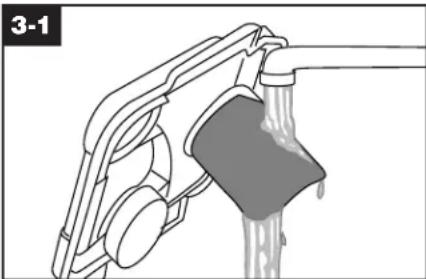
c. Empty tanks, rinse with clear water and let air dry. Rinse the solution tank cap and recovery tank lid and let air dry.
natural_image
Diagram of a mechanical device with a handle and lever, showing fluid flow or material movement (no text or symbols)d. Remove debris from recovery tank filter and rinse with clean water.
Note: If the filter must be removed for cleaning, it is easier to replace if the filter is wet.
e. Vacuum thoroughly after carpet has completely dried. This will help reduce any shading left by the carpet cleaner's brushes.
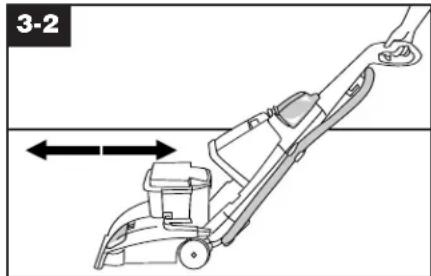
- Squeeze trigger to release cleaning solution and slowly push carpet cleaner forward (equals one wet stroke).
- Continue to squeeze trigger and slowly pull carpet cleaner back toward you (second wet stroke). Release trigger and slowly push carpet cleaner forward over area just sprayed with solution (dry stroke). Then slowly pull carpet cleaner back toward you without squeezing trigger (dry stroke).
- Overlap strokes by 1 inch to help prevent streaking. Keep nozzle flat on floor for both forward and reverse strokes.
- For heavily soiled areas, repeat steps 5-7.
- For particularly soiled carpet or spots, use the Clean Surge™ button (see following section). Avoid saturating carpet, as noted below.
Note: To avoid saturating carpet, do not use more than 4 wet strokes over one area. Always end with dry strokes.
It is best to alternate wet and dry strokes as described above.
For best cleaning results and to aid in faster drying of carpet, end with
To clean nozzle
If lint or other debris becomes lodged in nozzle, do not attempt to remove nozzle cover.
Pour one to two cups of clear water on a non-carpeted floor. Do not pour water onto a wood floor.
Pick up water with your SteamVac™ carpet cleaner. Repeat as necessary until debris is flushed out of nozzle. To clean the outside of the machine, wipe off dirt with a cloth dampened in warm water and mild detergent. Do not use solvent or petroleum based products to clean the machine.
more dry strokes. (Continue using dry strokes until little water is visible passing through the recovery tank lid.)
Empty recovery tank when the motor sound becomes higher pitched and there is a loss in suction (see "Automatic shut-off", page 8).
When finished cleaning, follow "After cleaning" instructions on pages 10 and 11.
natural_image
Diagram of a hand holding a cable with a switch, showing mechanical components and alignment (no text or symbols)Clean Surge™ Button
The Clean Surge™ button can be used to dispense extra solution when cleaning particularly soiled areas of carpet or spots.
To use, press Clean Surge™ button while squeezing solution trigger. For normal solution spray, release button and continue to squeeze solution trigger.
Carpet Cleaning
Read "Before you begin cleaning" instructions on page 10.
- Fill clean solution tank (upper tank) with HOOVER Carpet/Upholstery Detergent according to instructions on pages 8 and 9.
natural_image
Diagram of a lawn mower with directional arrows indicating movement (no text or symbols)- Move speed selector to LO for gentle cleaning or HI for normal cleaning.
- Dry hands and plug cord into a properly grounded outlet. Do not clean over floor electrical outlets.
- To avoid walking on damp carpet, start at the end of the room farthest from the door or path to sink where tanks will be emptied and filled.
Step on handle release pedal and lower handle to operating position; turn carpet cleaner ON.
Picking up spills
Your HOOVER SteamVac™ carpet cleaner may also be used to pick up small liquid spills (1 gallon or less, never to exceed 1/4 inch in depth) on carpet, upholstery, or bare floors.
For best results, pick up spills immediately by placing the stair/upholstery nozzle just above the spill and suction up any residue on top of the carpet. If the spill remains, place either the stair/ upholstery nozzle or floor nozzle with brushes turned OFF in front of the spill, pull the nozzle very slowly over the spill initially with suction only. Repeat with spray and suction.
When picking up spills on bare floors, use only the floor nozzle with the bare floor attachment in place and speed selector in the OFF position (this will help prevent spreading the spill).
If a spot is left, the stair/upholstery nozzle is generally more effective for removing it. Although no cleaning solution can completely remove all spots, they can be treated by following the instructions provided by the manufacturer of the carpet, upholstery, or bare floor surface being cleaned.
Cleaning bare floors
Do not use the SteamVac™ carpet cleaner to pick up flammable or combustible liquids or chemicals.
When finished, follow "After cleaning" instructions on pages 10 and 11.
How to attach bare floor attachment (available at additional cost)
Disconnect carpet cleaner from electrical outlet.
To prevent possible leaking, remove clean solution tank and recovery tank before positioning bare attachment.
Refer to Fig. 2-9 to remove clean solution tank. Set tank aside (do not set tank on furniture).
Refer to Fig. 2-16 to remove recovery tank.
With handle in upright position, tilt cleaner back so that handle rests on the floor.
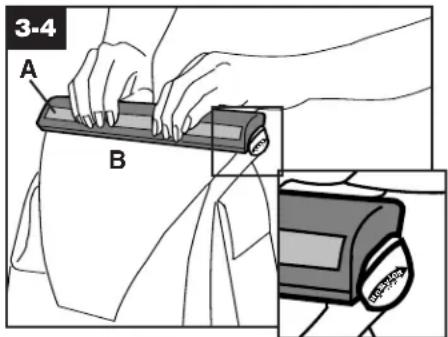
With foam strip (A) (located under the netting) in position as shown, place attachment on front of nozzle (B).
Make sure arrow on end of attachment points in the direction as shown.
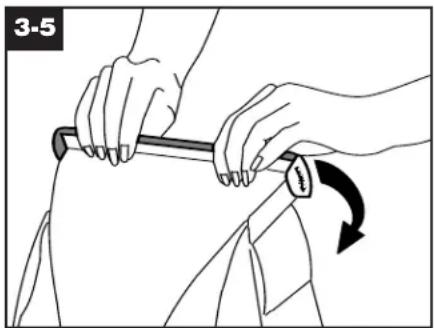
natural_image
Illustration of hands using a tool to adjust or press a garment, showing a curved arrow indicating rotation (no text or symbols present)Push attachment against nozzle while rotating attachment downward until both ends snap into place.
(Note: Some force may be required to rotate and snap attachment into place.) Return carpet cleaner to upright position. Lower handle and replace recovery tank.
Raise handle to upright position and reposition clean solution tank.
To clean floor
Read Before you begin cleaning instructions on page 10.
Do not use the SteamVac™ carpet cleaner on hardwood floors.
Fill clean solution tank with HOOVER Hard Floor Cleaning Solution (available at additional cost if not included with your model) according to instructions on pages 8 and 9.
Do not use any type of wax with your SteamVac™ carpet cleaner.
Move speed selector to the Lo or HI position for scrubbing or OFF if scrubbing is not desired.
Dry hands and plug carpet cleaner into a properly grounded outlet.
Step on handle release pedal and lower handle to operating position; turn carpet cleaner ON.
To release solution, press trigger. Slowly move carpet cleaner forward and backward over area to be cleaned.
To pick up dirty solution, release trigger and slowly move carpet cleaner over area where solution has just been dispersed. Use both forward and reverse strokes.
Empty recovery tank when the motor sound becomes higher pitched and there is a loss in suction (see "Automatic shut-off", page 8).
When finished cleaning, follow "After cleaning" instructions on pages 10 and 11.
Remove attachment from nozzle and rinse in clear water. Do not remove plastic screen or foam from attachment.
Stair/upholstery nozzle has a built-in brush to help provide the scrubbing action some spots may need for removal.
Using the tool
3-6
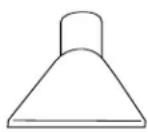
How to attach tool
All tools connect to the hose in the same manner.
How to attach hose Disconnect carpet cleaner from electrical outlet.
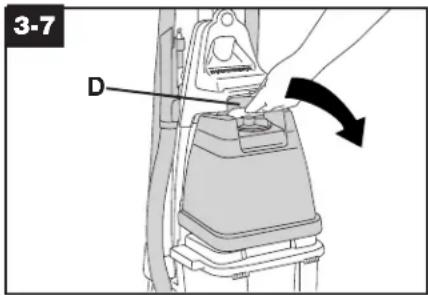
- To prevent possible leaking, remove clean solution tank by pressing down on tank handle (D) and pulling forward; set tank aside (do not set tank on furniture). Remove hose from storage rack.
- Step on handle release pedal (E) and lower deep cleaner handle until it rests on the floor.
Unlatch back part of recovery tank and remove lid.
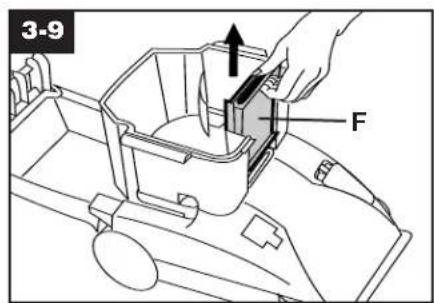
- Remove recovery tank front panel (F) by sliding it straight up.
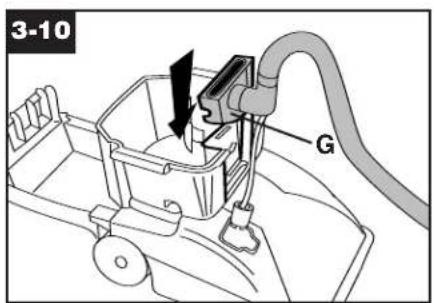
- Replace panel with converter (G). Slide converter halfway down opening until it is firmly in place.
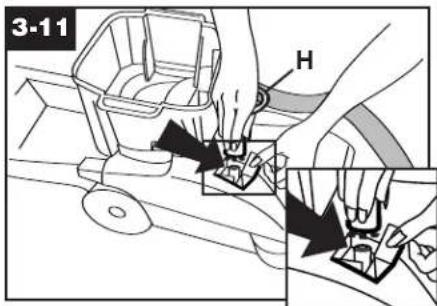
- Before connecting tube (H) to cleaner, make sure black tabs are extended by pulling tan collar toward tube.
Open door on hood labeled "Stair/ upholstery Cleaning Connection". Press round solution tube connector onto round projection inside door. Press connector collar down firmly to ensure that it is fully connected.
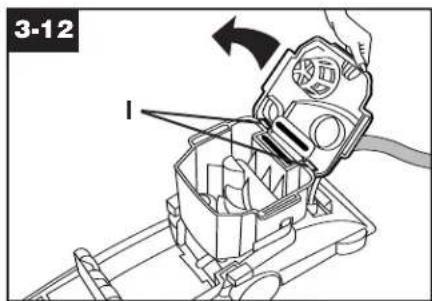
- The tank replaces in a hinge-like manner. Position front of lid under tabs (I) on front of tank. Rotate lid down onto tank. Make sure lid is secure on all sides before cleaning. For full suction, it is important that the recovery tank lid is properly secured before cleaning. Reverse procedure to remove hose and solution tube. Raise carpet cleaner handle to upright position.
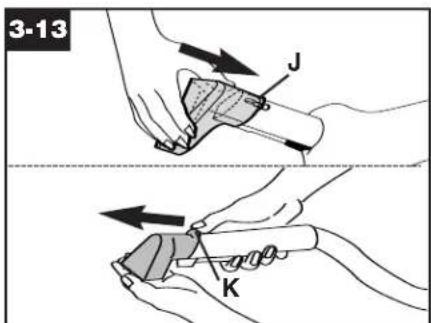
- Attach tool to connector end of hose by sliding it onto connector until the tab (J) locks it securely. Using your thumb, push forward and up on the latch (K) to remove tool as shown.
Before using tool
It may be necessary to remove air from the system ("prime the pump") so the clean solution will flow to the tool. Follow these steps:
-
Attach tool to hose and turn the carpet cleaner ON.
-
Put the tool on a hard surface or against your hand to block off the suction.
-
Wait a few seconds (can take up to 15 seconds). Then squeeze the trigger and begin cleaning.
Follow the instructions on pages 14 and 15 for the appropriate cleaning task.
natural_image
Line drawing of a person cleaning a kitchen sink with a hand mixer (no text or symbols)After using tool
- Follow steps a and b for "After cleaning" on pages 10 and 11.
- Drain suction hose by turning carpet cleaner ON and holding end of hose up for several seconds. Do not press trigger.
3. Disconnect carpet cleaner from electrical outlet.
-
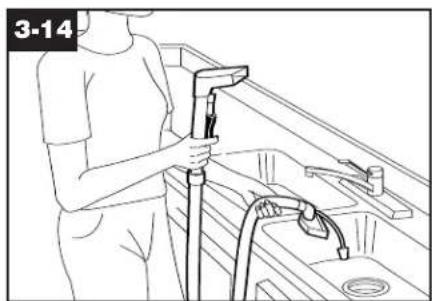
Drain solution tube by placing round end in sink and raising nozzle above your head. Press the trigger.
-
Proceed with steps c, d and e for "After cleaning" on pages 10 and 11.
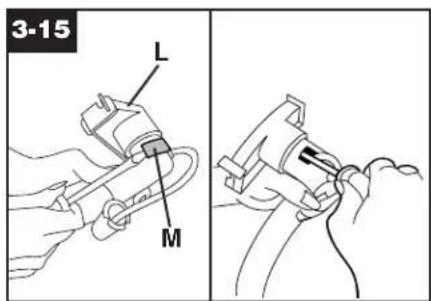
Occasionally, debris may become lodged inside of the hose at the converter end (L). To clean out the hose, lift bottom of converter clip (M) with a screwdriver and remove clip. Remove debris as shown.
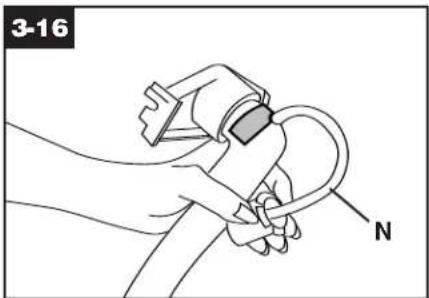
Snap clip back into position making sure solution hose (N) is not pinched and moves freely.
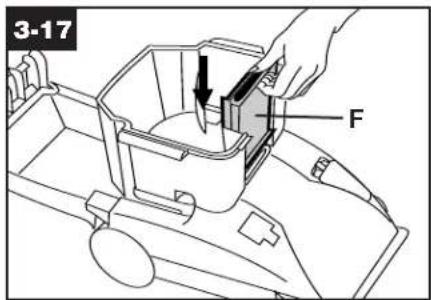
Replace recovery tank front panel (F). Slide panel down until it snaps firmly in place.
Cleaning carpeted stairs
Read "Before you begin cleaning" instructions on page 10.
- Place handle in upright position. Agitator brushes will not rotate while handle is in upright position.
- Fill clean solution tank with HOOVER Carpet/Upholstery Detergent according to instructions on pages 8 and 9.
- Attach tool to end of hose.
- Hose length may require that machine be placed at the top of the stairs to clean upper half of stairway and at bottom of stairs to clean lower half.
To prevent machine from falling, use extra caution when cleaning on stairs.
Do not place carpet cleaner on stairs.
Do not point tools toward people or pets.
- Dry hands and plug carpet cleaner into a properly grounded outlet.
- Turn carpet cleaner ON. If necessary, refer to "Before using tool" section to remove air from system.
-
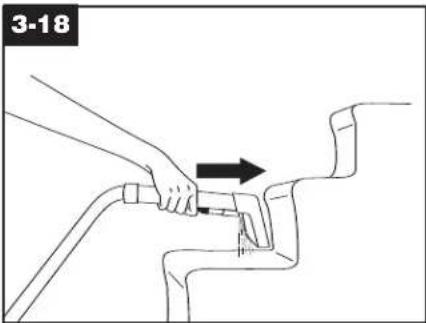
Pre-spray the carpeted stair by holding the tool about one inch above the carpet and push it forward while pressing the trigger (equals one wet stroke).
-
Position tool against the riser and slightly press it into carpet pile. Press the trigger and pull the tool slowly over the carpet (second wet stroke). Release trigger at end of stroke.

- Lift tool, and position it against riser. Pull tool slowly over carpet without pressing trigger (dry stroke). It is best to alternate wet and dry strokes as described above. End with more dry strokes to aid in faster drying of carpet.
- Overlap strokes by 1/2 inch to help prevent streaking.
To avoid saturating carpet, do not use more than 4 wet strokes over any one area. Always end with dry strokes.
If additional cleaning is necessary, wait until the carpet is completely dry before using the tool again.
11. Empty recovery tank when the motor sound becomes higher pitched and there is a loss in suction (see "Automatic shut-off", page 8).
When finished cleaning, follow "After cleaning" instructions on pages 10 and 11 and "After using tool" instructions on pages 13 and 14.
Cleaning upholstery
Read "Before you begin cleaning" Instructions on page 10.
Be sure to check the cleaning code on your upholstery. Use your HOOVER SteamVac™ carpet cleaner only on upholstery marked "W" or "W/S".
- Place handle in upright position. Agitator brushes will not rotate while handle is In upright position.
- Fill clean solution tank with HOOVER Carpet/Upholstery Detergent according to instructions on pages 8 and 9.
- Attach tool to end of hose.
Do not point tools toward people or pets.
4. Dry hands and plug carpet cleaner into a properly grounded outlet.
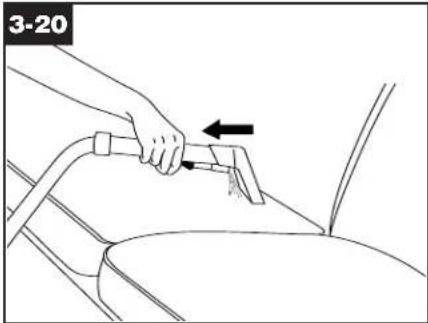
- Turn carpet cleaner on. If necessary, refer to "Before using tool" section to remove air from system.
- Gently press the tool onto the fabric. Press the trigger and slowly pull the nozzle over the fabric.
- Overlap strokes by 1/2 inch to help prevent streaking.
Make additional strokes without pressing the trigger to remove more moisture.
- To clean in corners or creases, lift the tool one-half inch from the fabric and press the solution trigger.
- Vacuum up the solution with the tool without pressing the trigger.
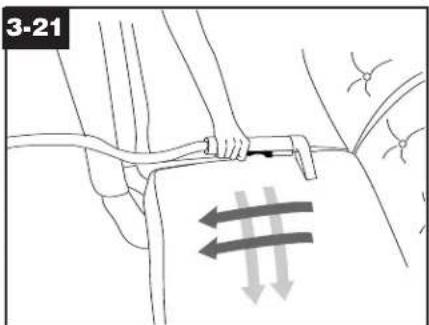
- For heavily soiled areas, it may be necessary to repeat the cleaning process. Make crisscrossing strokes to the original pattern; overlap each pass.
Make no more than 2 passes with the solution over any one area to prevent over-wetting and damage to fabric.
If additional cleaning is necessary, wait until the upholstery is completely dry before using the tool again.
- Empty recovery tank when the motor sound becomes higher pitched and there is a loss in suction (see "Automatic shut-off", page 8).
When finished cleaning, follow "After cleaning" instructions on pages 10 and 11 and "After using tool" instructions on pages 13 and 14.
4. Maintenance
Removable brushes
Your carpet cleaner is equipped with removable brushes for easy cleaning.
To remove brushes
Disconnect cleaner from electrical outlet.
To prevent possible leaking, remove clean solution tank and recovery tank. Set tanks aside.
natural_image
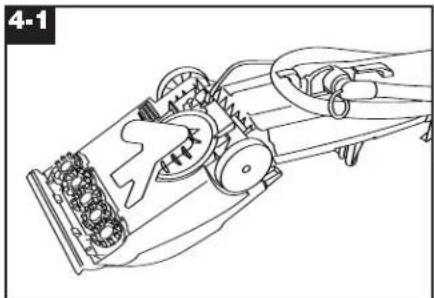
Technical line drawing of a mechanical device with gears and levers (no text or symbols)Press handle release pedal to lower handle. Turn cleaner over so bottom is facing up.
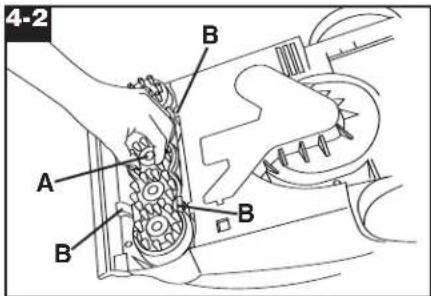
Grasp inner portion of brush (A) and pull brush assembly out slightly to reveal latches (B).
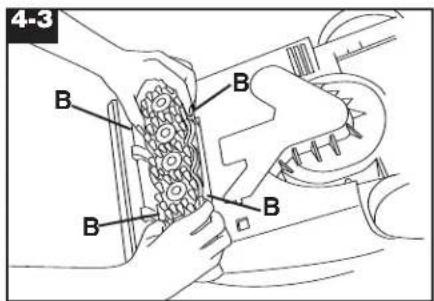
Press all four latches (B) and pull brush block out. The brushes can be cleaned under running water.
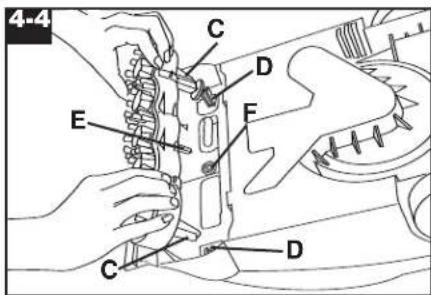
To replace brushes
Align posts (C) on both ends of brush assembly with slots (D) in cleaner housing.
Make sure that square post (E) also aligns with square hole (F). Turn brushes slightly until post fits easily into hole.
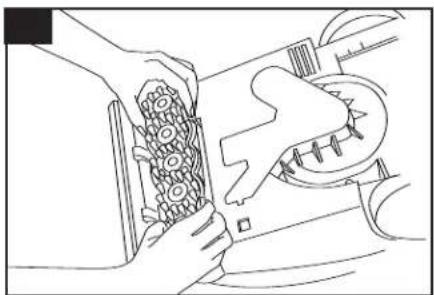
natural_image
Line drawing of a person holding a cup of bread with a knife inserted, no text or symbols presentPress brush assembly firmly to snap into place.
Storage
Before storing:
• Empty solution tank and rinse thoroughly with clean water.
- Replace empty solution tank and turn carpet cleaner ON. Squeeze trigger and push carpet cleaner forward and back several times to expel any solution remaining in the carpet cleaner's system. (Do not use carpet cleaner on wood floors.)
• Empty recovery tank and rinse thoroughly with clean water.
Allow brushes and underside of carpet cleaner to air dry thoroughly before storing carpet cleaner on a carpeted or wood surface.
Do not store carpet cleaner with a full solution tank In place.
Lubrication
The motor is equipped with bearings which contain sufficient lubrication for the life of the motor. The addition of lubricant could cause damage. Do not add lubricant to motor bearings.
Service
To obtain approved HOOVER service and genuine HOOVER parts, locate the nearest Hoover Sales and Service Center or Authorized Hoover Warranty Service Dealer (Depot) by:
- checking the Yellow Pages under Vacuum Cleaners - Household" OR
- calling 1-800-944-9200 for an automated referral of authorized service outlet locations (U.S. only) OR-
- checking the Service section of Hoover on-line at hoover.com
Please do not send your cleaner to Hoover in Glenwillow, Ohio for service, this will only result in delay.
If further assistance is needed, contact the Consumer Response Center, Phone: 1-800-263-6376, Mon-Fri 8am-7pm EST.
In Canada, contact Hoover Canada, Carson Building, 100 Carson Street, Etobicoke, Ontario M8W 3R9 Phone: 1-800-263-6376, Mon-Fri 8am-7pm EST.
Always identify your cleaner by the complete model number when requesting information or ordering parts. (The model number appears on the back of the cleaner.
5. If you have a problem
If a minor problem occurs, it usually can be solved quite easily when the cause is found by using the check list below.
Problem: Machine won't run
Possible cause
Possible solution
- Not firmly plugged in
- Plug unit in firmly
• No voltage In wall plug - Check fuse or breaker
- Blown fuse/tripped breaker
- Replace fuse/reset breaker
Problem: Low suction
Possible cause
Possible solution
• Recovery tank full/automatic shut off engaged
- Remove and empty recovery tank
- Blockage In tool on end of hose
- Remove tool and clear blockage
• Recovery tank lid not on correctly
• Make sure lid is on securely
• Recovery tank front panel not replaced after stair or upholstery cleaning
- Replace recovery tank front panel (page 13)
Problem: Clean solution won't dispense
Possible cause
Possible solution
- Solution tank not firmly in place
- Make sure tank is securely locked in position
- Solution tank empty
- Refill tank according to instructions for surface being cleaned
• Recovery tank lid not on correctly
• Make sure lid is firmly in place - Pump needs to be “primed” (when using tool)
• See "Before using tool" section, p. 12
Problem: Brushes/brush indicator won't rotate during floor cleaning
Possible cause
Possible solution
- Indicator screen dirty
- Remove clear cover over indicator and clean screen; replace cover
• Speed selector on OFF - Move speed selector to Low or Hi
Full One Year Warranty (Domestic Use)
Your HOOVER® appliance is warranted in normal household use, in accordance with the Owner's Manual against original defects in material and workmanship for a period of one full year from date of purchase. This warranty provides, at no cost to you, all labor and parts to place this appliance in correct operating condition during the warranted period. This warranty applies when the appliance is purchased in the United States including its territories and possessions, or in Canada or from a U.S. Military Exchange. Appliances purchased elsewhere are covered by a limited one year warranty which covers the cost of parts only. This warranty does not apply if the appliance is used in a commercial or rental application.
This warranty only applies when the product is in use in the country or territory in which it is purchased.
Warranty service can only be obtained by presenting the appliance to one of the following authorized warranty service outlets. Proof of purchase will be required before service is rendered.
- Hoover Sales and Service Centers.
- Hoover Authorized Warranty Service Dealers (Depots).
For an automated referral of authorized service outlets in the U.S.A., phone 1-800-944-9200 OR visit Hoover on-line at hoover.com
This warranty does not cover pick up delivery, or house calls; however, if you mail your appliance to a Hoover Sales and Service Center for warranty service, transportation will be paid one way.
While this warranty gives you specific legal rights, you may also have other rights which vary from state to state.
If further assistance is needed, or if there are questions concerning this warranty or the availability of warranty service outlets, contact the Consumer Response Center, Phone: 1-800-263-6376, Mon-Fri 8am-7pm EST.
In Canada, contact Hoover Canada, Carson Building, 100 Carson Street, Etobicoke, Ontario M8W 3R9 Phone: 1-800-263-6376, Mon-Fri 8am-7pm EST.
HOOVER SteamVac™
SHIP TO: Please print your name and address carefully in ink.
100%
SHIPPING & HANDLING + \$7.50 TOTAL COST
ADD YOUR APPLICABLE STATE TAX +
TOTAL MERCANDISE \$
| | |
| | | |
The Ground Truth image displays a single, solid horizontal line, which is a stylistic or background element (like a rule line on paper). According to Rule 2, such lines must be ignored by the OCR result. The provided OCR content is "____", which consists of underscores. Underscores are not equivalent to a solid line and are not permitted under the “Stylistic/Background Lines (Ignore)” rule. Outputting underscores for a stylistic line is incorrect because it misinterprets the line as a placeholder fill-in-the-blank area. Since the OCR output includes underscores for a stylistic line, this violates the “Stylistic/Background Lines (Ignore)” rule. Therefore, the OCR result is inconsistent with the Ground Truth.
The Ground Truth image displays a single, solid horizontal line, which is a stylistic or background element (like a rule line on paper). According to Rule 2, such lines must be ignored by the OCR result. The provided OCR content is "____", which consists of underscores. Underscores are not equivalent to a solid line and are not permitted under the “Stylistic/Background Lines (Ignore)” rule. Outputting underscores for a solid line constitutes an error, as it misrepresents the visual element and violates the instruction to ignore stylistic lines. Therefore, the OCR result is inconsistent with the Ground Truth.
(No text to output)
The Ground Truth image displays a single, continuous horizontal line, which is a stylistic or background element (like a ruled paper line). According to Rule 2, such lines must be ignored by the OCR result. The provided OCR content is "____", which consists of underscores. Underscores are not equivalent to a solid line and are not permitted under the “Stylistic/Background Lines (Ignore)” rule. Outputting underscores for a stylistic line is incorrect because it misinterprets the line as a fill-in-the-blank placeholder. Therefore, the OCR result is inconsistent with the Ground Truth.
66:4 \$50 7C0C0C0+
661\$00 700700+
40386032 15\$16.99
40321050 US\$14.99
4032016 US\$ 8.59
4032032 U\$513.99
40321049 | US\$12.99 |
40301448 U\$515.99
40321048 US\$11.99
40321128 U\$521.99
Part No. Per Back Backs Total
Cost No. of
THE WORLD'S LONDON
Athy. Sales & Services Center
7005 Cochran Road Screwley Ohio A139


Eastern Provinces) OR on-line at Hoover.ca
1-888-898-6055 (Ontario & Western Provinces) or 1-890-463-3923 (Quebec &
This mail order form is limited to U.S. residents only. In Canada, refer to
FORMULARIO DE PEDIDO DE PIEZAS Y ACCESORIOS POR CORREO

- For the following statement, please indicate whether you agree or disagree that the statement describes your approach to shopping for home cleaning appliances.
LES QUESTIONS SUVAINEES SONT FACULTATIVES LAS STUDENTS PRECUNITS SON OPIONALES
- Price paid (please do not include sales tax) / \$ Prix paye (a) refundion des taxes / Precio pagado: .00
The Ground Truth image displays a single, solid horizontal line, which is a stylistic or background element (like a rule line on paper). According to Rule 2, such lines must be ignored by the OCR result. The provided OCR content is "____", which consists of underscores. Underscores are not equivalent to a solid line and are not permitted under the “Stylistic/Background Lines (Ignore)” rule. Outputting underscores for a stylistic line is incorrect because it misinterprets the line as a fill-in-the-blank placeholder. Since the OCR output incorrectly rendered underscores for a stylistic line, this violates the rule. Therefore, the OCR result is inconsistent with the Ground Truth.
- Serial number (Ser. No./ for any of the week or days on your standard) (An Argentina se dos do not do queu se doso (en frigóretas se dos do not do queu se doso (en frigóretas se dos do queu se doso (en frigóretas se dos do queu se doso (en frigóretas se dos do queu se doso (en frigóretas se dos do queu se doso (en frigóretas se dos do queu se doso (en frigóretas se dos do queu se doso (en frigóretas se dos do queu se doso (en frugóretas se dos do queu se doso (en frugóretas se dos do queu se doso (en frugóretas se dos do queu se doso (en frugóretas se dos do queu se doso (en frugóretas se dos do queu se doso (en frugóretas se dos do queu se doso (en frugóretas se dos do queu se dona (en frugóretas se dos do queu se dona (en frugóretas se dos do queu se dona (en frugóretas se dos do queu se dona (en frugóretas se dos do queu se dona (en frugóretas se dos do queu se dona (en frugóretas se dos do queu se dona (en frugóretas se dos no
(2) 12 (3) 12 (4) 12 (5) 12 (6) 12 (7) 12 (8) 12 (9) 12 (10)
-
Model number/Numero de model/
-
Date of purchase: Month/Moals/Mes Day/Jour/Day Year/Annee/Ano
Month/Mois/Mes Year/Annee/Aho 4. Marital status: 1. □ Married 2. □ Single
- Your date of birth:
| 1. | 1. □ MR. | 2. □ MRS. | 3. □ MS. | 4. □ MISS | Y3 R01 - 01 |
| First Name/Pernom/Nombre | Initial | Last Name/Nom de Tamilie/Apellido | |||
| Street/Rue/Calle | |||||
| City/Ville/Cuudad | State/Province/Estado | Zip/Postal code/Code postal/CodIGO postal | |||
| City/Ville/Cuudad | |||||
| 2. E-mail Address: | |||||
En caso de período del inicio original, su número completo seriva como prueba de compra, y due ajustar el proceso de readero de su garancia. También servir o período de las requisitos adicionales nos avaluaron a cada declarar productos para statistically necesidades de limpieza en el tulturo, cicadas por seleccionar Hoover!
For example, we can see the same as you have been used as we do not use any other way to use your own way.
L'engagement sent de preuve d'achat au cas ou la actuare originale secti égarée ou pendant: Ténquistement peut également accepter le traitement d'un
préva d'achat qu cas de j'ai qu de cède ! Les questions approportées pour élément à pêtaire au port, dans le tîtr de pour-tienux produits pour nos les
Froper registration will serve as a proof of purchase in the event your original receipt is misheard or lost and may expicate the processing of your warranty of that or loss. The additional questions will help us to develop products to meet your clearing needs in years to come. Thank you for cleaning Hoort;

Hoover Product Registration Card
▼
| 13. Occupation (check all that apply) | ||||||
| 14. Are you or your spouse: | ||||||
| 15. Which group describes your annual family income? | ||||||
| 16. Level of education: (check highest level completed) | ||||||
| 17. Which credit cards do you use regularly? | ||||||
| 18. For your primary residence, do you: 1 □ Own? 2 □ Ren? | ||||||
| 19. How recently did you move into your current residence? | ||||||
| 20. Which of the following do you plan to do within the next 6 or 12 months? | ||||||
| 21. Please check all that apply to your household. | ||||||
| 22. Stop by Cafeteria/ | □ | 1 □ | ||||
| 23. Shop via the Incentr | □ | 2 □ | ||||
| 24. Member of a Parent Player Program | □ | 3 □ | ||||
| 25. Member of a Parent Player Program | □ | 4 □ | ||||
| 26. Member of a Parent Player Program | □ | 5 □ | ||||
| 27. Member of a Parent Player Program | □ | 6 □ | ||||
| 28. Member of a Parent Player Program | □ | 7 □ | ||||
| 29. Member of a Parent Player Program | □ | 8 □ | ||||
| 30. Member of a Parent Player Program | □ | 9 □ | ||||
| 31. Member of a Parent Player Program | □ | 10 □ | ||||
| 32. Member of a Parent Player Program | □ | 11 □ | ||||
| 33. Member of a Parent Player Program | □ | 12 □ | ||||
| 34. Member of a Parent Player Program | □ | 13 □ | ||||
| 35. Member of a Parent Player Program | □ | 14 □ | ||||
| 36. Member of a Parent Player Program | □ | 15 □ | ||||
| 37. Member of a Parent Player Program | □ | 16 □ | ||||
| 38. Member of a Parent Player Program | □ | 17 □ | ||||
| 39. Member of a Parent Player Program | □ | 18 □ | ||||
| 40. Member of a Parent Player Program | □ | 19 □ | ||||
| 41. Member of a Parent Player Program | □ | 20 □ | ||||
| 42. Member of a Parent Player Program | □ | 21 □ | ||||
| 43. Member of a Parent Player Program | □ | 22 □ | ||||
| 44. Member of a Parent Player Program | □ | 23 □ | ||||
| 45. Member of a Parent Player Program | □ | 24 □ | ||||
| 46. Member of a Parent Player Program | □ | 25 □ | ||||
| 47. Member of a Parent Player Program | □ | 26 □ | ||||
| 48. Member of a Parent Player Program | □ | 27 □ | ||||
| 49. Member of a Parent Player Program | □ | 28 □ | ||||
| 50. Member of a Parent Player Program | □ | 29 □ | ||||
| 51. Member of a Parent Player Program | □ | 30 □ | ||||
| 52. Member of a Parent Player Program | □ | 31 □ | ||||
| 53. Member of a Parent Player Program | □ | 32 □ | ||||
| 54. Member of a Parent Player Program | □ | 33 □ | ||||
| 55. Member of a Parent Player Program | □ | 34 □ | ||||
| 56. Member of a Parent Player Program | □ | 35 □ | ||||
| 57. Member of a Parent Player Program | □ | 36 □ | ||||
| 58. Member of a Parent Player Program | □ | 37 □ | ||||
| 59. Member of a Parent Player Program | □ | 38 □ | ||||
| 60. Member of a Parent Player Program | □ | 39 □ | ||||
| 61. Member of a Parent Player Program | □ | 40 □ | ||||
| 62. Member of a Parent Player Program | □ | 41 □ | ||||
| 63. Member of a Parent Player Program | □ | 42 □ | ||||
| 64. Member of a Parent Player Program | □ | 43 □ | ||||
| 65. Member of a Parent Player Program | □ | 44 □ | ||||
| 66. Member of a Parent Player Program | □ | 45 □ | ||||
| 67. Member of a Parent Player Program | □ | 46 □ | ||||
| 68. Member of a Parent Player Program | □ | 47 □ | ||||
| 69. Member of a Parent Player Program | □ | 48 □ | ||||
| 70. Member of a Parent Player Program | □ | 49 □ | ||||
| 71. Member of a Parent Player Program | □ | 50 □ | ||||
| 72. Member of a Parent Player Program | □ | 51 □ | ||||
| 73. Member of a Parent Player Program | □ | 52 □ | ||||
| 74. Member of a Parent Player Program | □ | 53 □ | ||||
| 75. Member of a Parent Player Program | □ | 54 □ | ||||
| 76. Member of a Parent Player Program | □ | 55 □ | ||||
| 77. Member of a Parent Player Program | □ | 56 □ | ||||
| 78. Member of a Parent Player Program | □ | 57 □ | ||||
| 79. Member of a Parent Player Program | □ | 58 □ | ||||
| 80. Member of a Parent Player Program | □ | 59 □ | ||||
| 81. Member of a Parent Player Program | □ | 60 □ | ||||
| 82. Member of a Parent Player Program | □ | 61 □ | ||||
| 83. Member of a Parent Player Program | □ | 62 □ | ||||
| 84. Member of a Parent Player Program | □ | 63 □ | ||||
| 85. Member of a Parent Player Program | □ | 64 □ | ||||
| 86. Member of a Parent Player Program | □ | 65 □ | ||||
| 87. Member of a Parent Player Program | □ | 66 □ | ||||
| 88. Member of a Parent Player Program | □ | 67 □ | ||||
| 89. Member of a Parent Player Program | □ | 68 □ | ||||
| 90. Member of a Parent Player Program | □ | 69 □ | ||||
| 91. Member of a Parent Player Program | □ | 70 □ | ||||
| 92. Member of a Parent Player Program | □ | 71 □ | ||||
| 93. Member of a Parent Player Program | □ | 72 □ | ||||
| 94. Member of a Parent Player Program | □ | 73 □ | ||||
| 95. Member of a Parent Player Program | □ | 74 □ | ||||
| 96. Member of a Parent Player Program | □ | 75 □ | ||||
| 97. Member of a Parent Player Program | □ | 76 □ | ||||
| 98. Member of a Parent Player Program | □ | 77 □ | ||||
| 99. Member of a Parent Player Program | □ | 78 □ | ||||
| 100. Member of a Parent Player Program | □ | 79 □ | ||||
- Occupation: (check all that apply)
Hoover®

RETURN THIS CARD NOW FOR:
• Warranty Confirmation
With the information you provide we can confirm the date of purchase of your product. This confirmation is of benefit to you, especially if your original proof of purchase is lost.
• Proof of Ownership
Your model number, serial number, and other information will be kept in our files for up to ten years.
- \$100,000 Give Away V
We'll automatically enter you for a chance to win \5,000, \25,000, or even \$50,000!
OFFICIAL SWEEPSTAKES RULES: NO PURCHASE NECESSARY TO WIN. Sweepstakes is sponsored by a number of different companies, will be offered in a number of different presentations, and will award the following prizes: one 1st Prize of \50,000; one 2nd Prize of \25,000; and five 3rd Prizes of \5,000. Sweepstakes begins May 19, 2003, and ends December 31, 2005. Enter by completing this product registration or a 3" x 5" card with your name, address, city, state, ZIP Code, and the words "\100,000 Give Away V" and mail to P.O. Box 173245, Dept. Y3R, Denver, CO 80217-3245. Entries must be received no later than December 31, 2005, and are limited to one per household. Mechanically reproduced entries not acceptable. Not responsible for late, lost or illegible entries. A random drawing held in January 2006, will select the winners from all entries collectively received by the sponsoring companies. Odds of winning depend on the number of eligible entries received from all sponsors' presentations. Open to U.S. residents at least 18 years old, except employees and their families of the sweepstakes judge, all of the sponsoring companies, and their respective subsidiaries. Each winner must submit a signed and notarized affidavit of eligibility within a specified time after being notified of their prospective winner status, and if a satisfactory affidavit is not received within the stated time, a new winner will be selected. By submitting an entry, winner agrees to the use of their name, address, and photograph for advertising/publicity purposes without compensation. All entries become the property of the sweepstakes judge. No transfer or substitution of prize is allowed. Winner is solely responsible for all taxes. All federal, state and local laws apply. Offer void in Florida and where prohibited by law. For notice of sweepstakes winners, send a self-addressed, stamped envelope to: "100,000 Give Away V". P.O. Box 173133, Denver, CO 80217-3133.
Fold here. Seal with tape (do not staple).
22. To help us understand our customers' lifestyles, please indicate the interests and activities in which you or your spouse enjoy participating on a regular basis:
-
□B icycling
-
□Golf
-
□P hysica
Fitness/Exercise
-
□R unning/Jogging
-
□S now Skiing
-
□ Tennis
-
□C ramping/Hiking
-
□Fishing
-
□H unting/Shooting
-
□ Powerboating
-
□S ailing
-
□ Grandchildren
-
□Needlework/Knitting
-
□S ewing
-
□ Flower Gardening
-
□V vegetable Gardening
-
□ Crafts
-
□B. uy Prerecorded Videos
-
□A automotive Work
-
□E lectronics
-
□Home Workshop/Do-It-Yourself
-
□ R ecreation Vehicles (RV's)
-
□ Listen to
Records/Tapes/CDs
-
□Avid Book Reading
-
□ B ible/Devotional Reading
-
□H ealth/Natural Foods
-
□ Photography
-
□C cultural/Arts Events
-
□ Fashion Clothing
-
□A r/ Antique Collecting
-
Foreign Travel
-
□C ruise Ship Vacations
-
□ Travel in USA
-
□G ourme! Cocking/Fine Foods
-
□Wines
-
□S tamp!Coin Collecting
-
□C ollectibles
-
L Our Nation's Heritage
-
□R real Estate Investments
-
Stocks/Bond Investments
-
□C ontests/Sweepstakes
-
□ Casino Gambling
-
□S cience Fiction
-
□ Wildlife Environmental Issues
-
□ Dieting/Weight Control
-
□S cience/New Technology
-
□ Self-Improvement
-
□W walking for Health
-
□ Watching Sports on TV
-
□ H ome Video Recording
-
□ Moneymaking Opportunities
23. Using the numbers in the above list, please indicate your 3 most important activities:

Thanks for taking the time to fill out this questionnaire. Your answers will be used for market research studies and reports. They will also allow you to receive important mailings and special offers from a number of fine companies whose products and services relate directly to the specific interests, hobbies, and other information indicated above. Through this selective program, you will be able to obtain more information about activities in which you are involved and less about those in which you are not. Please check here if, for some reason, you would prefer not to participate in this opportunity.
Failure to return this card will not diminish your warranty rights.
If you have any comments or suggestions about our product, please write to: Consumer Response Center, Hoover, Inc. 7005 Cochran Road • Glenwillow, Ohio 44139
Call 1-800-263-6376 Mon-Fri 8am-7pm EST or visit us online at: www.hoover.com
Copyright © 2003 All rights reserved
The image contains a decorative pattern of vertical lines, which are stylistic or background elements and not textual content. According to the correction guidelines, such lines must be ignored by the OCR result. Therefore, the corrected OCR text is:
[NO TEXT]
DEVER CO 80217-3245
P O BOX 173245
Hoover®
Y3R01-01
postage.
without proper
not deliver
Post Office will
Required
Postage
First-Clas

Glenwillow, Ohio 44139
7005 Cochran Road
Hoover, Inc.
Consumer Response Center
correspondence to:
Please send other
HOOVER and are registered trademarks

- with Clean Surge™ The Easy to Use Carpet Cleaner with attached tools
- Review this manual before operating carpet cleaner
- Important Safeguards!
- WARNING:
- Save these instructions!
- Fill in and Retain
- Thank you for choosing a HOOVER product.
- Grounding Instructions
- DANGER-
- Assembly
- Carton contents
- Storing hose
- Upfront tool storage
- Stair/upholstery nozzle
- How to reattach tool cover
- How to use
- Carpet cleaner description
- ON/OFF pedal & Handle release pedal
- To transport
- Automatic "shut off"
- Brush speed selector
- Brush indicator
- The tanks
- Clean solution tank (upper tank)
- How to fill
- Disconnect carpet cleaner from electrical outlet.
- Recovery tank (lower tank)
- How to empty
- Rotate latches (E) (one on each side of tank) inward to lock tank in place.
- How to clean
- Before you begin cleaning
- b. For upholstery, check cleaning code - Use your HOOVER
- After cleaning
- To clean nozzle
- Clean Surge™ Button
- Carpet Cleaning
- Picking up spills
- Cleaning bare floors
- To clean floor
- Using the tool
- How to attach tool
- Before using tool
- After using tool
- Disconnect carpet cleaner from electrical outlet.
- Cleaning carpeted stairs
- Cleaning upholstery
- Make no more than 2 passes with the solution over any one area to prevent over-wetting and damage to fabric.
- Maintenance
- Removable brushes
- To remove brushes
- To replace brushes
- Storage
- Lubrication
- Service
- If you have a problem
- Problem: Machine won't run
- Possible cause
- Problem: Low suction
- Problem: Clean solution won't dispense
- Problem: Brushes/brush indicator won't rotate during floor cleaning
- Full One Year Warranty (Domestic Use)
- For an automated referral of authorized service outlets in the U.S.A., phone 1-800-944-9200 OR visit Hoover on-line at hoover.com
- HOOVER SteamVac™
- Hoover Product Registration Card
- Hoover®
- RETURN THIS CARD NOW FOR:
- • Warranty Confirmation
- • Proof of Ownership
- - \$100,000 Give Away V
- To help us understand our customers' lifestyles, please indicate the interests and activities in which you or your spouse enjoy participating on a regular basis:
- Using the numbers in the above list, please indicate your 3 most important activities:
Brand : HOOVER
Model : SteamVac CleanSurge
Category : Steam cleaner