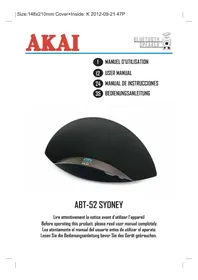
ABT52 - Speakers AKAI - Free user manual and instructions
Find the device manual for free ABT52 AKAI in PDF.



| Type of product | Bluetooth Speaker |
| Brand | AKAI |
| Model | ABT52 |
| Dimensions (L x H x D) | 384 mm x 178 mm x 187 mm |
| Weight | 1.525 kg |
| Power supply | AC/DC adapter: input 100-240 V, 50/60 Hz, 0.5 A; output 9 V, 2 A |
| Power consumption in operation | 15 W |
| Standby consumption | < 0.5 W |
| Audio output power | 2 x 10 W (2 x 5 W RMS) |
| Speaker impedance | 8 ohms |
| Wireless technology | Bluetooth |
| Bluetooth range | About 10 meters (without obstacles) |
| Main functions | Bluetooth audio playback, hands-free function, auxiliary input (3.5 mm), volume control, auto standby |
| Auxiliary input | 3.5 mm stereo jack |
| Built-in microphone | Yes, for hands-free calls |
| Maintenance and cleaning | Unplug before cleaning; use a soft, damp cloth; do not use aggressive products (benzene, thinner) |
| Safety | Do not expose to rain or humidity; do not open or disassemble; keep away from heat sources; unplug during storms |
| Spare parts and repairability | No user-serviceable parts; refer all repairs to qualified technicians |
| General information | Compliant with European directives; WEEE recycling; Bluetooth® trademark under license |
| Color | Not specified (usually black or grey) |
Frequently Asked Questions - ABT52 AKAI
User questions about ABT52 AKAI
0 question about this device. Answer the ones you know or ask your own.
Ask a new question about this device
Download the instructions for your Speakers in PDF format for free! Find your manual ABT52 - AKAI and take your electronic device back in hand. On this page are published all the documents necessary for the use of your device. ABT52 by AKAI.
USER MANUAL ABT52 AKAI
WARNING: TO REDUCE THE RISK OF FIRE OR SHOCK HAZARD, DO NOT EXPOSE THIS PRODUCT TO RAIN OR MOISTURE.
CAUTION
RISK OF ELECTRIC SHOCK DO NOT OPEN

CAUTION: TO PREVENT THE RISK OF ELECTRIC SHOCK, DO NOT REMOVE COVER OR BACK. NO USER-SERVICEABLE PARTS INSIDE. REFER SERVICING TO QUALIFIED PERSONNEL.
This symbol is intended to alert you to the presence of uninsulated dangerous voltage within the product's enclosure that might be of sufficient magnitude to constitute a risk of electric shock. Do not open the product's case.
This symbol is intended to inform you that important operating and maintenance instructions are included in the literature accompanying this product.
DRIPPING WARNING
The product shall not be exposed to dripping or splashing and that no objects filled with liquids, such as vases, shall be placed on the product.
VENTILATION WARNING
The normal ventilation of the product shall not be impeded for intended use.
Class II equipment symbol

This symbol indicates that the power adaptor has a double insulation system.
Warning: Changes or modifications to this unit not expressly approved by the party responsible for compliance could void the user's authority to operate the equipment.
This product bears the selective sorting symbol for waste electrical and electronic equipment (WEEE). This means that this product must be handled pursuant to European Directive 2002/96/EC in order to be recycled for dismantled to minimize its impact on the environment.
For further information, please contact your local or regional authorities.
Electronic products not included in the selective sorting process are potentially dangerous for the environment and human health due to the presence of hazardous substances.
C€0890

IMPORTANT SAFETY INSTRUCTIONS
- Read Instructions - All the safety and operating instructions should be read before the product is operated.
- Retain Instructions - The safety and operating instructions should be retained for future reference.
- Heed Warnings - All warnings on the product and in the operating instructions should be adhered to.
- Follow instructions - All operating and use instructions should be followed.
- Cleaning - Unplug this product from the wall outlet before cleaning. Do not use liquid cleaners or aerosol cleaners. Use a damp cloth for cleaning the exterior only. Do NOT attempt to clean the inside.
- Attachments - Do not use attachments not recommended by the product manufacturer as they may cause hazards.
- Water and Moisture - Do not use this product near water - for example, near a bath tub, wash bowl, kitchen sink, or laundry tub; in a wet basement, or near a swimming pool, and the like.
- Accessories - Do not place this product on an unstable cart, stand tripod, bracket, or table. The product may fall, causing serious injury to a child or adult, and serious damage to the product. Use only with a cart, stand, tripod, bracket, or table recommended by the manufacturer, or sold with the product. Any mounting of the product should follow the manufacturer's instructions, and should use a mounting accessory recommended by the manufacturer.
- A product and cart combination should be moved with care. Quick stops, excessive force, and uneven surfaces may cause the appliance and cart combination to overturn.

- Ventilation - Slots and openings in the cabinet are provided for ventilation and to ensure reliable operation of the product and to protect it from overheating, and these openings must not be blocked or covered. The openings should never be blocked by placing the product on a bed, sofa, rug, or other similar surface. This product should not be placed in a built-in installation such as a bookcase or rack unless proper ventilation is provided.
- Power sources - This product should be operated only from the type of power source indicated on the marking label. If you are not sure of the type of power supply to your home, consult your product dealer or local power company. For products intended to operate from battery power, or other sources, refer to the operating instruction.
- Grounding or Polarization - This product may be equipped with a polarized alternating current line plug (a plug having one blade wider than the other). This plug will fit into the power outlet only one way. This is a safety feature. If you are unable to insert the plug fully into the outlet, try reversing the plug. If the plug should still fail to fit, contact your electrician to replace your obsolete outlet. Do not defeat the safety purpose of the polarized plug.
AlternateWarnings - This product may be equipped with a three-wire grounding-type plug, a plug having a third (grounding) pin. This plug will only fit into a grounding-type power outlet. This is a safety feature. If you are unable to insert the plug into the outlet, contact your electrician to replace your obsolete outlet. Do not defect the safety purpose of the grounding-type plug.
- Power-Cord Protection - Power supply cords should be routed so that they are not likely to be walked on or pinched by items placed upon or against them, paying particular attention to cords at plugs, convenience receptacles, and the point where they exit from the product.
- Lightning - For added protection for this product during a lightning storm, or when it is left unattended and unused for long periods of time, unplug it from the wall outlet. This will prevent damage to the product due to lightning and power-line surges.
IMPORTANT SAFETY INSTRUCTIONS
- Overloading - Do not overload wall outlets, extension cords, or integral convenience receptacles as this can result in a risk of fire or electric shock.
- Object and Liquid Entry - Never push objects of any kind into this product through openings as they may touch dangerous voltage points or short-out parts that could result in a fire or electric shock. Never spill liquid of any kind on the product.
- Servicing - Do not attempt to service this product yourself as opening or removing covers may expose you to dangerous voltage or other hazards. Refer all servicing to qualified service personnel.
- Damage Requiring Service - Unplug this product from the wall outlet and refer servicing to qualified service personnel under the following condition:
a) When the power-supply cord or plug is damaged,
b) If liquid has been spilled, or objects have fallen into the product,
c) If the product has been exposed to rain or water,
d) If the product does not operate normally by following the operating instructions. Adjust only those controls that are covered by the operating instructions as an improper adjustment of other controls may result in damage and will often require extensive work by a qualified technician to restore the product to its normal operation.
e) If the product has been dropped or damaged in any way, and
f) When the product exhibits a distinct change in performance - this indicates a need for service.
- Replacement Parts - When replacement parts are required, be sure the service technician has used replacement parts specified by the manufacturer or have the same characteristics as the original part. Unauthorized substitutions may result in fire, electric shock, or other hazards.
- Safety Check - Upon completion of any service or repairs to this product, ask the service technician to perform safety checks to determine that the product is in proper operating condition.
- Heat - The product should be situated away from heat sources such as radiators, heat registers, stoves, or other products (including amplifiers) that produce heat.
- Unplug this apparatus during lighting storms or when unused for long periods of time.
- This appliance is not intended for use by persons (including children) with reduced physical, sensory or mental capabilities, or lack of experience and knowledge, unless they have been given supervision or instruction concerning use of the appliance by a person responsible for their safety.
- Children should be supervised to ensure that they do not play with the appliance.
- Ensure children and babies do not play with plastic bags or any packaging materials.
WARNING:
- To reduce the risk of fire or electric shock, do not expose this apparatus to rain or moisture.
- The apparatus shall not be exposed to dripping or splashing and that no objects filled with liquids, such as vases, shall be placed on apparatus.
- The MAINS plug / power adaptor is used as the disconnect device, it should remain readily operable during intended use. In order to disconnect the apparatus from the mains completely, the mains plug / power adaptor should be disconnected from the mains socket outlet completely.
BEFORE WE BEGIN
Thank you for purchasing the AKAI ABT-52 BLUETOOTH SPEAKER.
This is your assurance of quality, performance and value. This product was manufactured using the highest quality components and standards of workmanship. Our engineers have included many useful and convenient features in this product. Please be sure to read this Instruction Manual completely to make sure you are getting the maximum benefit from each feature.
It was tested by inspectors and found to be in perfect working order before it left our factory. If, after reading this manual, you experience any problems with the operation of this product, please refer to the instructions for obtaining services at the end of this Manual.
For future reference, record the serial number in the space provided.
Model No:AKAI ABT-52
Serial Number:
PREPARATION FOR USE
UNPACKING AND SET UP

Place your Bluetooth speaker ABT-52 on a flat and stable surface so that it cannot fall over.
- Carefully remove all the components from the carton and remove all packing materials from the components. Make sure noting is accidentally discarded with the packing materials.
- Save the carton and the packing materials, if possible, in the unlikely event that the unit ever needs to be returned for service. Using the original carton and packing material is the only proper way to protect the unit from shipping damage.
- Unwind the AC power cord on the back of the main unit and extend it to its full length.
CONTROL LOCATION
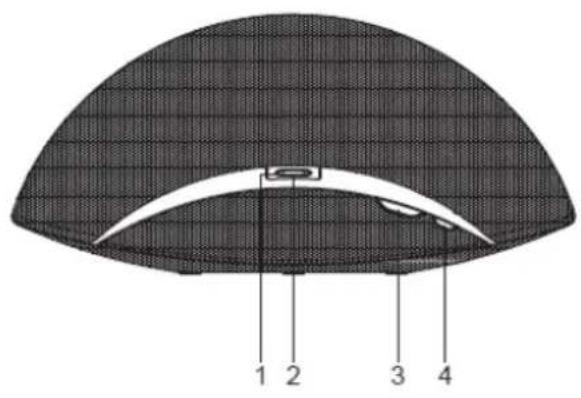
FRONTSIDE
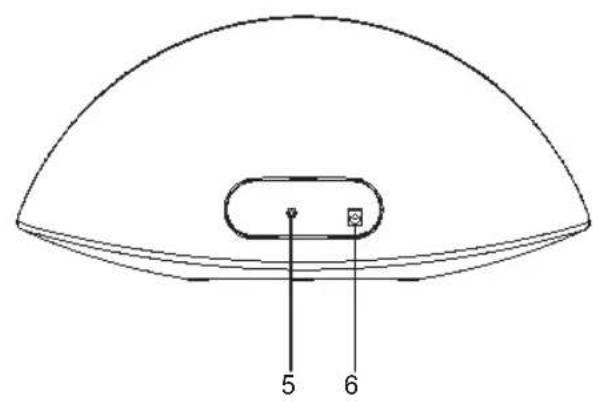
BACK SIDE
1 STATUS indicator light
2. PAIR / ANSWER / END × button
3. VOLUME +/- buttons
4. POWER button
5. AUX IN jack
6. DC IN jack
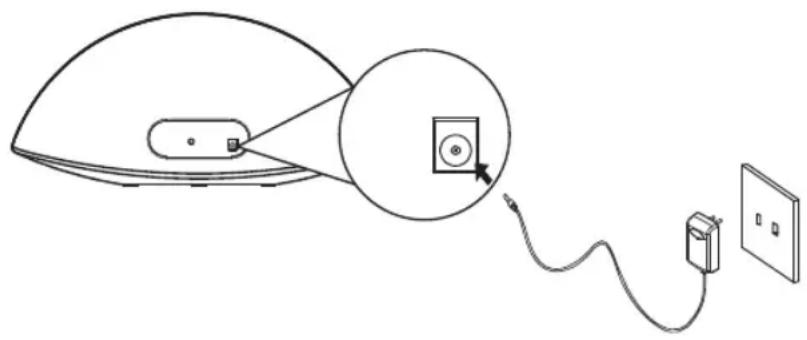
CONNECTING TO AC POWER
Before using your Bluetooth speaker, you should connect it to AC (mains) power.
- Plug the AC/DC adaptor into the AC (mains) power socket outlet.
- Plug the DC power cord on the AC/DC adaptor into the DC IN jack of the unit.
When the unit is not operated by the AC power or unused for long periods of the time, please remove the power adaptor from the wall outlet and unplug from the main unit.
POWERING ON/OFF THE UNIT
- After connecting the AC power, the STATUS indicator would light up in RED to indicator the unit is in standby mode.
- Press and hold the " " button for 2 seconds to turn on the unit.
- After using the unit, pressing and holding the " button for 2 seconds to switch the unit to standby mode.
NOTE:
If the unit is idle for 2 minutes after being powered on, it will be switched to standby mode automatically.
PAIRING YOUR BLUETOOTH DEVICE
ABOUT PAIRING
Pairing is the term used when two Bluetooth devices are connected wirelessly for the first time. This allows the devices to see each other and sets up a one-to-one communication channel between both devices.
To begin pairing with a Bluetooth device
- After powering on your unit, you can start pairing process to connect to your Bluetooth device.
-
If it is the first time setup after purchasing, the STATUS indicator will flash RED and BLUE alternatively to ask for pairing. BLUE / RED flashing indicates pairing attempt is in process.
-
Turn on Bluetooth functionality on your device and make it discoverable (see your device's instruc-tions to add or setup a Bluetooth device).
- Select ABT-52 on your Bluetooth device to make the pairing when it is found. If your device asks for a passkey, enter 1234 on the keyboard of your device. If no device is paired till 2 minutes, the unit will power off (switch to standby mode) accompanying by a long beep. If this occurs, retry step 1 - 4.
- Once paired with a device, a blue light on the STATUS indicator will glow steadily and two beep sound confirms that pairing is completed. On some devices, you must then select "use as a stereo audio device" or similar on the device's Bluetooth menu. Once paired, your device should connect to the ABT-52 whenever within the Bluetooth range (10 metres).
To connect previously paired Bluetooth device
- Your Bluetooth speaker can store one previously paired device for quick pairing during power on.
- To connect a previously paired device after power on, if the previously paired device is found with the range, the unit will pair the device automatically and the STATUS indicator will turn to BLUE steadily. Two beeps will confirm the pairing is completed.
To connect a new Bluetooth device
- If no previously paired device is found with the Bluetooth range (10 metres) after power on, the STATUS indicator would continue to flash in BLUE for 2 minutes before switching to standby mode.
- During this period, you can pair a new Bluetooth device. You can start the pairing process manually by pressing and holding the button on the unit until STATUS indicator would flash in RED and BLUE alternatively again to indicate pairing attempt is in process. Please follow step 3 - 5 in "To begin pairing with a Bluetooth device" section to complete the pairing of a new Bluetooth device.
NOTE:
- Due to different operating system of Bluetooth devices, the time taken by pairing process might be different. If the pairing cannot be successful in the first time, please try to restart the pairing process by pressing and holding the × button again until the indicator light flashes red and blue alternatively.
The pairing time might be longer for the first time pairing or pairing a new Bluetooth device. - Make sure you have the latest firmware for your Bluetooth mobile devices.
- Make sure your device is working properly. Check your device's manual for details on Bluetooth pairing and linking.
To listen to music streamed wirelessly from your paired Bluetooth device.
- Following the "PAIRING YOUR BLUETOOTH DEVICE" section to connect your Bluetooth device.
-
Start the audio playback and adjust the volume output on your Bluetooth device.
-
Press and release the Button to pause the audio playback from your Bluetooth device and press and release this button for resume the playback. You may also pause and resume the playback on your Bluetooth device.
NOTE: It is not recommended to pause the audio playback by press and release the × Button on the unit and then resume the playback on your Bluetooth device as it may have abnormal response for some Bluetooth devices. - Use the Volume + / - Buttons on the unit to adjust volume.
- When done listening, press and hold the button for 2 seconds to turn the unit off (switch to standby mode).
USING THE SPEAKERPHONE
To use your Bluetooth speaker as a speakerphone for receiving a phone call from a Bluetooth enabled phone.
- Following the "PAIRING YOUR BLUETOOTH DEVICE" section to set up the bluetooth connection.
- When a call is received during music is playing, music will be muted to hear the ringtone. STATUS indicator will flash in RED color to indicating the incoming call. Press the × Button to answer the call, or press the Button to ignore the call.
NOTE: The voice from the unit will be in "MONO" mode when the Speaker phone is being used and only the right hand side speaker will sound.
- Use the Volume + / - Buttons to adjust the desired volume level.
- When the call is completed, press the Button to end the call and resume previous function or music playback.
NOTE:
- The position of the built-in microphone of the unit is on the central of the front side. You are recommended to face the front side of the unit and at a short distance in order to have good voice quality and clarity.
USING THE AUX IN JACK
- Plug one end of the AUX IN cable (supplied) into the headphone jack (or audio out) of your audio device and the other end into the AUX IN jack of the unit.
- Press and hold the button for 2 seconds to turn on the unit (release when blue light appears).
- Use your audio device to control music playback and volume through the unit.
- Use the Volume + / - Buttons to adjust the desired volume level.
- When done listening, press and release the button for 2 seconds to turn the unit off (switch to standby mode) and unplug the AUX IN cable from the unit. Remember to turn off your audio device, too.
NOTE:
- Play/Pause control × only works in Bluetooth mode. It does not control the plugged-in device.
- When you plug in the AUX IN cable during Bluetooth playback, the Bluetooth playback will be interrupted and switched to the AUX mode. After unplugging the AUX IN cable from the unit, the music may be or may not be resumed depending on different Bluetooth devices. If the music has been paused on your device, please restart / resume playback on your device manually. Alternatively, you can restart Bluetooth playback following the "playing music via Bluetooth" section.
Only using AUX IN cable with standard 3.5mm stereo plug (do not use any cable with "mono" plug).
CARE AND MAINTENANCE
PLACING THE UNIT
Place the unit on a level surface away from sources of direct sunlight or excessive heat. Protect your furniture when placing your unit on a natural wood and lacquered finish. A cloth or other protective material should be placed between it and the furniture.
CLEANING THE UNIT
Clean your unit with a soft cloth moistened only with mild soap and water. Stronger cleaning agents, such as Benzene, thinner or similar materials can damage the surface of the unit.
TROUBLE SHOOTING
| NOITULOSE | ||
| No power when POWER is on | AC/DC adaptor is not plugged into a wall outlet or the connector is not plugged into the power supply jack on the back of the unit. | Plug the AC/DC adaptor into a wall outlet and plug the connector into the supply jack on the unit. |
| No power when plugged in | The AC outlet may not have power. | Check the outlet with a working lamp or other electrical appliance. |
| No sound when playing audio via Bluetooth | Your Bluetooth device has not been paired properly. | Pairing your Bluetooth device according to the “PAIRING YOUR BLUETOOTH DEVICE” section. |
| The volume control of your Bluetooth device is set at too low. | Increase the volume of your Bluetooth device. | |
| The volume control of the Bluetooth speaker is set at too low. | Increase the volume of the Bluetooth speaker by pressing the Volume “+” button. | |
| No sound when playing audio via AUX IN | Audio cable has not been connected properly. | Check the connection of audio cable at the Bluetooth speaker and the audio device. |
| Audio cable has breakage. | Use another audio cable for connection. | |
| The volume control of your Bluetooth device is set at too low. | Increase the volume of your Bluetooth device. | |
| The volume control of the Bluetooth speaker is set at too low. | Increase the volume of the Bluetooth speaker by pressing the Volume “+” button. | |
| Sound comes from only one speaker when playing audio via AUX IN | Mono audio cable is used. | Make sure the audio cable is a stereo type. |
| The audio cable was damaged. | Replace the audio cable of stereo type. | |
| The person whom you call via speakerphone cannot hear your voice clearly. | You are not facing to the front side of the Bluetooth speaker. | Face to the front side of the Bluetooth speaker. |
| You are too far from the Bluetooth speaker. | Close to the front side of the Bluetooth speaker. |
JAC ELBISSI
SPECIFICATION
| Power Supply Rating (AC/DC Power Adaptor) | Input: 100 – 240VAC, 50/60Hz, 0.5A Output: 9VDC, 2A |
| Power Consumption Working Mode : 15W | Standby Mode : < 0.5W |
| Audio Section Output Impedance | 2 x 10W (2 x 5W RMS)Output Power 8 ohms |
| Dimensions 15.1"L x 7.0"W x 7.4"H | (384mm x 178mm x 187mm) |
| Weight 3.36 lb. (1.525 kg) | |
| Bluetooth QD ID | B019905 |
The Bluetooth® word mark and logo are registered trademarks owned by Bluetooth SIG, Inc., and any use of such marks by Arts Digital Technology for AKAI is under license.
IMPORTANT: Due to continual revision and improvement on our products design, specifications are subject to change with further notice.
End of Life Disposal
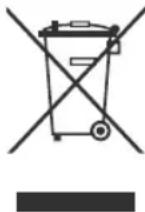
Warning! This logo set on the product means that the recycling of this apparatus comes within the framework of the Directive 2002/96/CEof January 27, 2003 concerning the Waste of Electrical and Electronic Equipment (WEEE). This symbol means that used electrical and electronic products should not be mixed with general household waste. There is a separate collection system for these products
If you want to dispose of this equipment, please do not use the ordinary dust bin!
The presence of dangerous substances in the electrical and electronic equipments can have potential consequences on the environment and human health in the cycle of reprocessing this product.
- Therefore, at the end of its lifetime, this product shall not be disposed with other non-recycled waste. Used electrical and electronic equipment must be treated separately and in accordance with legislation that requires proper treatment, recovery and recycling of used electrical and electronic equipment.
- Local authorities and resellers have set special procedures for the purpose of collecting and recycling this product (please contact your local authority for further details). You have the obligation to use the selective waste collection systems put in place by your local authority.
If your used electrical or electronic equipment has batteries or accumulators, please dispose of these separately beforehand according to local requirements.
- By disposing of this product correctly you will help ensure that the waste undergoes the necessary treatment, recovery and recycling and thus prevent potential negative effects on the environment and human health which could otherwise arise due to inappropriate waste handling.

This unit complies with European Council Directive 2006 / 95 CE (Electromagnetic Compatibility & Low Voltage Directives)



- CAUTION
- DRIPPING WARNING
- VENTILATION WARNING
- IMPORTANT SAFETY INSTRUCTIONS
- WARNING
- BEFORE WE BEGIN
- PREPARATION FOR USE
- CONTROL LOCATION
- FRONTSIDE
- BACK SIDE
- CONNECTING TO AC POWER
- POWERING ON/OFF THE UNIT
- NOTE
- PAIRING YOUR BLUETOOTH DEVICE
- ABOUT PAIRING
- TO BEGIN PAIRING WITH A BLUETOOTH DEVICE
- TO CONNECT PREVIOUSLY PAIRED BLUETOOTH DEVICE
- TO CONNECT A NEW BLUETOOTH DEVICE
- USING THE SPEAKERPHONE
- USING THE AUX IN JACK
- CARE AND MAINTENANCE
- PLACING THE UNIT
- CLEANING THE UNIT
- TROUBLE SHOOTING
- SPECIFICATION
- END OF LIFE DISPOSAL
Brand : AKAI
Model : ABT52
Category : Speakers