
ABTS-112 - Loudspeaker AKAI - Free user manual and instructions
Find the device manual for free ABTS-112 AKAI in PDF.


| Brand | AKAI |
| Model | ABTS-112 |
| Type | Portable Speaker System |
| Output Power | ≤60W |
| Input Sensitivity | 800±30mV |
| Signal-to-Noise Ratio | ≥71dB |
| Frequency Response | 20Hz – 20kHz |
| Power Supply | AC 100V-240V, 60/50Hz |
| Charging Time | Approx. 8-10 hours |
| Battery | Built-in rechargeable high-capacity battery |
| Bluetooth | Yes, up to 10m range, supports A2DP |
| Supported Audio Formats | MP3, WMA, WAV |
| Input Sources | Bluetooth, AUX, FM, USB, SD/MMC |
| Microphone Inputs | 1 x 6.35mm MIC jack, wireless microphone included |
| Guitar Input | 1 x 6.35mm guitar jack with dedicated volume control |
| Recording | Yes, records to USB/SD card in MP3 format |
| Remote Control | Yes, included |
| Superbass Modulation | Yes (SW button) |
| Dimensions | Not specified by manufacturer |
| Weight | Not specified by manufacturer |
Frequently Asked Questions - ABTS-112 AKAI
User questions about ABTS-112 AKAI
0 question about this device. Answer the ones you know or ask your own.
Ask a new question about this device
Download the instructions for your Loudspeaker in PDF format for free! Find your manual ABTS-112 - AKAI and take your electronic device back in hand. On this page are published all the documents necessary for the use of your device. ABTS-112 by AKAI.
USER MANUAL ABTS-112 AKAI
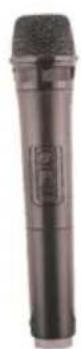
TROUBLESHOOTING
| Fault | Possible Cause | Solution |
| No sound | 1. No input sound source.2. Volume is too low. | 1. Use a better music signal.2. Adjust volume. |
| Distortion of sound | 1. Volume is too high.2. Speaker may be damaged. | 1. Turn down the volume.2. If speaker is damaged, repair or replace it. |
| Karaoke does not work | 1. Microphone plug is not fully inserted.2. Microphone switch is not on.3. Microphone volume knob is at the lowest position.4. Wireless microphone has low battery. | 1. Plug microphone properly into the socket.2. Turn on microphone switch.3. Adjust microphone volume properly.4. Replace battery. |
| MP3 does not play | 1. The song format in the USB stick is incorrect.2. Improper operation caused disorder process.3. USB stick/SD card/MMC are disconnected. | 1. Transform song format into Mp3 format.2. Reboot the machine.3. Insert USB stick/SD/MMC properly. |
MAIN TECHNICAL SPECIFICATIONS
Output Power—≤60W
Input Sensitivity 800±30mV
SNR ≥71dB
Frequency Response—20Hz-20 kHz
Power Supply AC100V-AC240V,60Hz/50Hz
***Above specifications are the specifications of the sampling machine and are for reference purpose only.
***Due to continuous product development, specifications may be subject to change without prior notification.
COMMON FUNCTIONS
● VOL: adjust volume up or down.
- TREBLE: adjust treble to influence treble sound.
● BASS: adjust bass to influence bass sound.
MIC.VOL: adjust microphone volume as needed.
- ECHO: adjust echo to increase/ decrease echo effect.
● MIC: Use to connect the microphone.
FEATURES OF THE MACHINE
This system can be used with personal computers, mobile phone, DVD, VCD, CD, LD, TV, MP3, radio, electronic piano and any devices which have audio output.
Amplifier circuit are using high-performance, high-fidelity design, coupled with high-quality professional speaker, in order to make the sound field to get positioned so clear, distinct levels effect.
The sound system is outstanding, with deep and powerful bass and the treble effects strong, with clear and bright pitch.
The professional electronic frequency division circuit enhances the machine's crossover point effect.
Using professional design and manufacture of high-capacity batteries, and dedicated audio power capacitors, to make the speaker's power reserve margin larger, more stable, better dynamics, higher signal to noise ratio.
When charging, connect a matched power adapter to AC100V - AC240V. Charging time is approximately 8 to 10 hours. Once fully charged unplug the power supply as eaving a full battery on charge may cause damage to the battery.
Battery Charge Indicator: LED panel has charging status indicator light.
When charging, the indicator light shows red; when fully charged, the indicator light shows green.
Warning: If the battery is under voltage, please fully charge it within 48 hours. If the speaker have to be left unused for a long time, please let the battery fully charged, otherwise it will cause damage to the battery!
In the process of playing, keep unit away from high temperature environments, high magnetic fields and high frequencies. If the system is fails to work, turn off the power source or pull out the USB/SD card/MMC card, then reinsert it and it will resume play.
REMOTE CONTROL FUNCTIONS
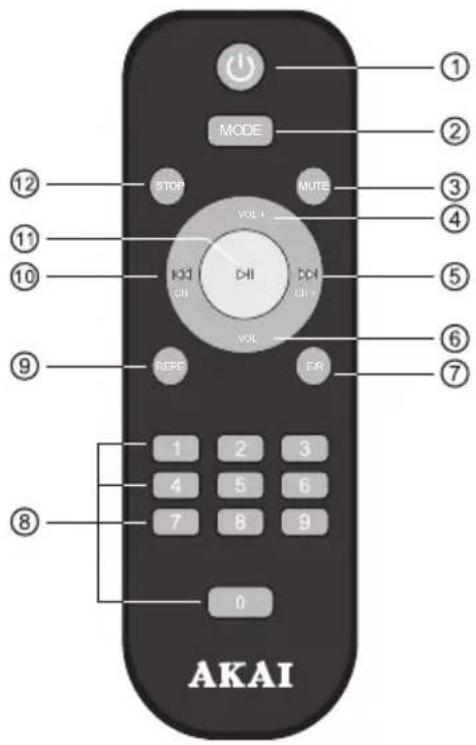
- Standby
2.Input selection
3.Mute
4.Increase the volume
5.Next
6.Decrease volume - Five sound field effects
8.Track number
9.Repeat
10.Previous
11.Paly/Pause
12.Stop
***This picture is for reference purposes only.
FUNCTIONS AND CONNECTIONS
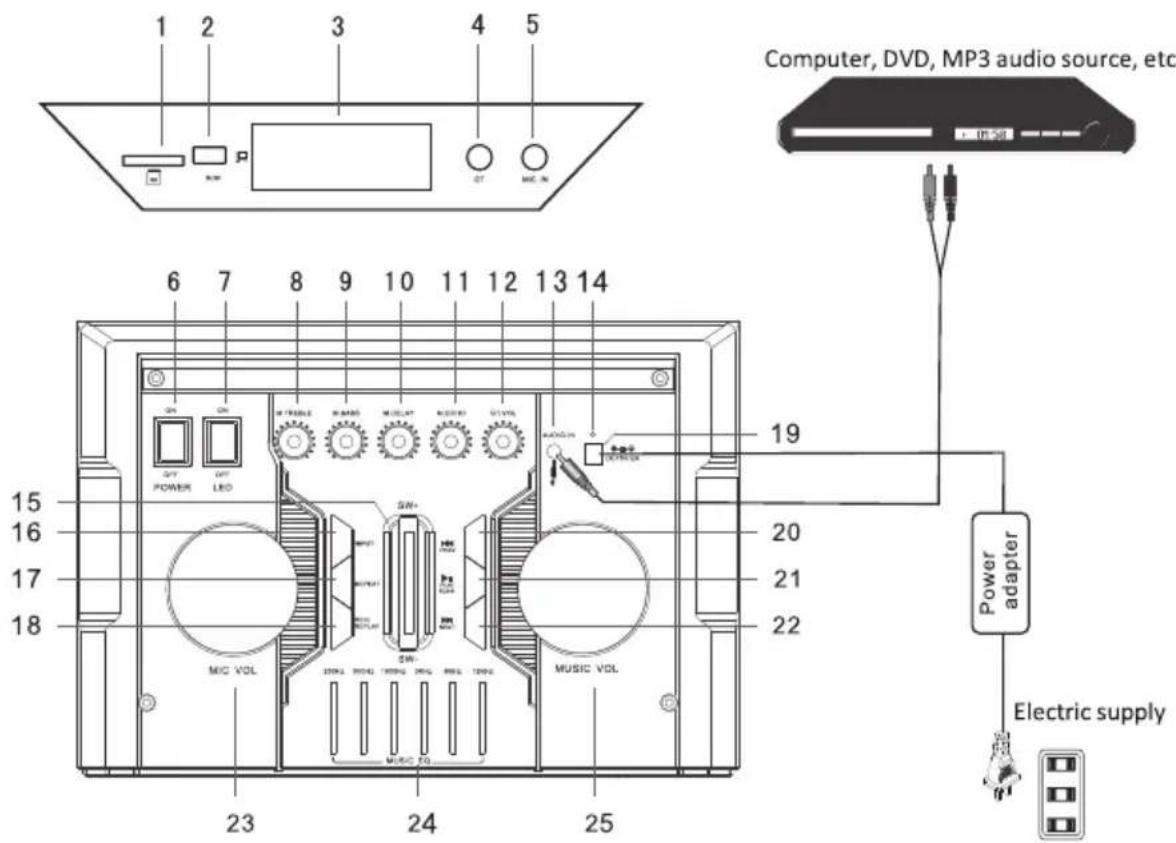
FUNCTIONS AND CONNECTIONS
-
SD (SD input jack)
-
USB (USB input jack)
3.LED (Digital display)
- Guitar (guitar input jack)
5.MIC (MIC input jack)
-
Power (control the power of the whole machine on or off)
-
Power LED (battery charge, red indicator light; the battery is full of electricity and the indicator is green)
-
Treble (adjust the MIC treble)
9.M.Bass (adjust the MIC bass)
10.M.Delay (adjust the MIC delay)
11.M.ECHO (adjust the MIC echo)
12.GT.VOL (adjust the guitar volume)
-
AUDIO IN (AUX input)
-
Charge LED
15.SW (Superbass modulation)
- INPUT (The input selection)
17.REPEAT (Single Song repeat/ All Repeat)
- REC/REPLAY(The recording function is used only when it is connected with MIC)
19.DC 15V/2A (DC 15V input jack)
20.PREV (Mp3 previous button or FM scan down button)
21.PALY/PAUSE (Mp3 play/pause button) (when in the bluetooth mode, if you do not need to use the current connected bluetooth device,long press this button to disconnect.)
22.NEXT (Mp3 next button or FM scan up button)
23.MIC VOLUME (Adjust MIC volume knob)
24.MUSIC EQ (Five tones)
25.MUSIC VOLUME (Adjust music volume knob)
GUITAR
● Guitar Jack: connect guitar.
● Guitar VOL: adjust guitar volume
USB AND SD/MMC
● TheUSB stick, SD card or MMC card should be formatted as FAT32 format on your computer.
- The playing sequence of the speaker is based on the file generating sequence. If the file name has keywords append by 01, 02 or 03... The speaker will play 01 file first.
- Copy MP3 or WMA format music files (download) to the root directory of a USB stick/SD card/MMC card. It is advisable to remove unnecessary files and the file catalog in order to read faster and reduce reading error when playing songs.
WIRELESS MICROPHONE
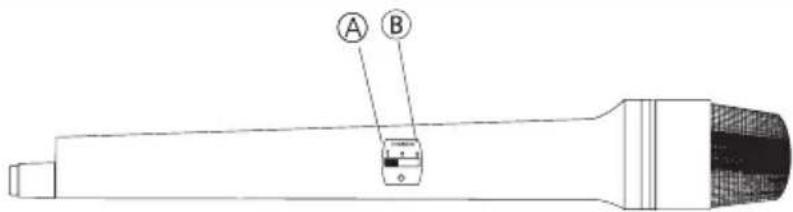
Ⓐ Microphone off
⑧ Microphone on
***This picture is for reference purposes only!
- Open the battery compartment, insert batteries and ensure that the polarities are correct.
- Switch ON the power switch on the microphone or ear microphone transmitters. If the power indicator light does not light up, check that the battery has been inserted correctly.
- Adjust the microphone volume knob on the stereo
RECORDING FUNCTION
● The recording function allows the microphone to input sound source mixed coding, and then stored in MP3 format on SD card or USB memory.
- In the case of SD cards and USB memory exist simultaneously, recording will preferentially store in the SD card
EN-ENGLISH
- Press RECORD to record the voice into the external memory like USB/SD/MMC on the speaker. If the external memory is first time used, the system will automatically built a new folder name RECORD, and recording files in it will be named Ac460000, Ac460001, and so on.
- In record mode, press RECORD/INPUT/RE.PLAY to stop record.
- Press RE.PLAY to play the recordings in the external memory, press PREV and NEXT to choose the recordings to play.
MP3, WMV AND WAV
- USB stick Jack: USB port, plug and play.
SD/MMC Jack: SD/MMC card socket, plug and play.
● Supports music formats of MP3, WMA and WAV with outstanding quality, giving a superior and brand-new music listening experience. - Input selector key (INPUT): Select different sound source input (Bleutooth/aux/ FM /usb/sd)
- PLAY/PAUSE Button: In play mode, press to suspend playing songs. Press this button again to continue play.
- The PREV/NEXT Button: In play mode, briefly press this button to select songs in the playlists up and down. in play mode, short press this button to select songs up and down in the playlist, long press to fast forward songs
BUILT-IN BT FUNCTIONS
- Choose the input signal source as BT channel when starting the machine.
- Please ensure the BT devices you want to connect is open. Then scan and connect the speaker with the device. When the connection is successful, "tick" tone will prompt. If the speaker can't be connected, please restart the speaker or the device and try again.
● After the mobile phone and the BT are successfully connected, you can play music. To ensure continuous stability of the music signal, try to keep the BT and the mobile phone facing one another. - This unit supports iPad, iPhone, Samsung, HTC, MOTOROLA, Nokia and other BT mobile devices wirelessly transmitting audio. It supports stereo playing of A2DP.
● The BT of the unit can be used up to 10 meters if there are no barriers.
FM FUNCTIONS
- Choose "INPUT" to switch to FM radio.
- Choose "SCAN" for automatic searching and saving.
- Choose "CH-" and "CH+" to switch channels.
DISPOSAL OF ELECTRICAL AND ELECTRONIC EQUIPMENT

This symbol on the product or packaging means that the product should not be treated as household waste. Do not throw garbage at the end of its life, but take it to a collection center for recycling. in this way you will help to protect the environment and be able to prevent any negative consequences that it would have on the environment and human health.
To find your nearest collection center:
- Contact local authorities
- Access the website: www.mmediu.ro
- Request additional information from the store where you purchased the product.
DEPANARE
FUNCTII INCORPORATE BT
Ⓐ Microphone off
B Microphone on

- MAIN TECHNICAL SPECIFICATIONS
- COMMON FUNCTIONS
- FEATURES OF THE MACHINE
- REMOTE CONTROL FUNCTIONS
- FUNCTIONS AND CONNECTIONS
- GUITAR
- USB AND SD/MMC
- WIRELESS MICROPHONE
- RECORDING FUNCTION
- EN-ENGLISH
- MP3, WMV AND WAV
- BUILT-IN BT FUNCTIONS
- FM FUNCTIONS
- DISPOSAL OF ELECTRICAL AND ELECTRONIC EQUIPMENT
- DEPANARE
- FUNCTII INCORPORATE BT
Brand : AKAI
Model : ABTS-112
Category : Loudspeaker