EasyManual
XPL100 - Speaker SAMSON - Free user manual and instructions
Find the device manual for free XPL100 SAMSON in PDF.



User questions about XPL100 SAMSON
0 question about this device. Answer the ones you know or ask your own.
Ask a new question about this device
Download the instructions for your Speaker in PDF format for free! Find your manual XPL100 - SAMSON and take your electronic device back in hand. On this page are published all the documents necessary for the use of your device. XPL100 by SAMSON.
USER MANUAL XPL100 SAMSON
TO PREVENT FIRE OR SHOCK HAZARD. DO NOT USE THIS PLUG WITH AN EXTENON CORD, RECEPTACLE OR OTHER OUTLET UNLESS THE BLADES CAN BE FULLY INSERTED TO PRESENT BLADE EXPOSURE. TO PREVENT FIRE OR SHOCK HAZARD. DO NOT EXPOSE THIS APPLIANCE TO RAIN OR MOISTURE. TO PRVENT ELECTRICAL SHOCK, MATCH WIDE BLADE PLUG TO WIDE SLOT FULLY INSERT.

This lightning flash with arrowhead symbol, within an equi-lateral triangle, is intended to alert the user to the presence of uninsulated "dangerous voltage" within the product's enclosure that may be of sufficient magnitude to constitute a risk of electric shock to persons.
CAUTION
RISK OF ELECTRIC SHOCK DO NOT OPEN
Warning: To reduce the risk of electric shock, do not rem cover (or back) no user serviceable parts inside. Refer serving to qualified service personnel.

The exclamation point within an equilateral triangle is intended to alert the user to the presence of important operating and maintenance (servicing) instructions in the literature accompanying the appliance.
IMPORTANT SAFETY INSTRUCTIONS

- Read these instructions.
- Keep these instructions.
- Heed all warnings.
- Follow all instructions.
- Do not use this apparatus near water.
- Clean only with dry cloth.
- Do not block any ventilation openings. Install in accordance with the manufacture's instructions.
- Do not install near any heat sources such as radiators, heat registers, stoves, (including amplifiers) that produce heat.
- Do not defeat the safety purpose of the polarized or grounding type plug. A polarized plug blades with one wider than the other. A grounding type plug has two blades and a third grounding prong. The wide blade or the third prong are provided for your safety. If the provided plug does not fit into your outlet, consult an electrician for replacement of the obsolete outlet.
- Protest the power cord from being walked on or pinched particularly at the plugs, convenience receptacles, and at the point where they exit from the apparatus.
- Only use attachments/accessories specified by the manufacturer.
- Use only with the cart, stand, tripod, bracket, or table specified by the manufacturer, or sold with the apparatus. When a cart is used, moving the cart/apparatus combination to avoid injury from tip-over.
- Unplug the apparatus during lightening sort or when unused for long periods of time. Refer all servicing to qualified personnel. Serving is required when the apparatus has been damaged in any way, such as power supply cord or plug is damaged, liquid has been spilled or objects have fallen into the apparatus has been exposed to rain or moisture, does not operate
- dropped. This appliance shall not be exposed to dripping or splashing water and that no object filled with liquid
- such as vases shall be placed on the apparatus.
- Caution-to prevent electrical shock, match wide blade plug wide slot fully insert.
- Please keep a good ventilation environment around the entire unit.
Safety Instructions/Consignes de sécurité/Sicherheitsvorkehrungen/Instrucciones de seguridad


WARNING: To reduce the risk of fire or electric shock, do not expose this unit to rain or moisture. To reduce the hazard of electrical shock, do not remove cover or back. No user serviceable parts inside. Please refer all servicing to qualified personnel. The lightning flash with an arrowhead symbol within an equilateral triangle, is intended to alert the user to the presence of uninsulated "dangerous voltage" within the products enclosure that may be of sufficient magnitude to constitute a risk of electric shock to persons. The exclamation point within an equilateral triangle is intended to alert the user to the presence of important operating and maintenance (servicing) instructions in the literature accompanying the product. Important Safety Instructions
- Please read all instructions before operating the unit.
- Keep these instructions for future reference.
- Please heed all safety warnings.
- Follow manufacturers instructions.
- Do not use this unit near water or moisture.
- Clean only with a damp cloth.
- Do not block any of the ventilation openings. Install in accordance with the manufacturers instructions.
- Do not install near any heat sources such as radiators, heat registers, stoves, or other apparatus (including amplifiers) that produce heat.
- Do not defeat the safety purpose of the polarized or grounding-type plug. A polarized plug has two blades with one wider than the other. A grounding type plug has two blades and a third grounding prong. The wide blade or third prong is provided for your safety. When the provided plug does not fit your outlet, consult an electrician for replacement of the obsolete outlet.
- Protect the power cord from being walked on and pinched particularly at plugs, convenience receptacles and at the point at which they exit from the unit.
- Unplug this unit during lightning storms or when unused for long periods of time.
- Refer all servicing to qualified personnel. Servicing is required when the unit has been damaged in any way, such as power supply cord or plug damage, or if liquid has been spilled or objects have fallen into the unit, the unit has been exposed to rain or moisture, does not operate normally, or has been dropped.
Positioning and Mounting Instructions 12
Expedition Pro Accessories 14
Specifications/Caracteristiques techniques 57
FRANÇAIS
Introduction 15
Printed September, 2007 v1
Samson Technologies Corp.
45 Gilpin Avenue
Hauppauge, New York 11788-8816
Phone: 1-800-3-SAMSON (1-800-372-6766)
Fax: 631-784-2201
www.samsontech.com
THIS DEVICE COMPLIES WITH PART 15 OF THE FCC RULES CLASS B. OPERATION IS SUBJECT TO THE FOLLOWING TWO CONDITIONS: (1) THIS DEVICE MUST NOT CAUSE HARMFUL INTERFERENCE, AND (2) THIS DEVICE MUST ACCEPT ANY INTERFERENCE RECEIVED INCLUDING INTERFERENCE THAT MAY CAUSE UNDESIRED OPERATION. SUITABLE FOR HOME OR OFFICE USE.
Welcome to Samson Expedition XPL series—the portable audio system for the new century! This exceptionally versatile system offers the perfect solution wherever you need portable, high-quality audio: as a main PA system or as onstage monitors in clubs and performance halls; in houses of worship; as a sound system for business presentations, mobile DJs at parties, or aerobics instruction; and for use in outdoor environments such as parks, beaches and flea markets. What's more, every Expedition XPL series system comes with a built-in telescoping handle and locking wheels, making it easy to take professional audio with you wherever you go!
There are three different Samson Expedition XPL series systems detailed in this manual. All utilize the same lightweight yet rugged two-way speaker enclosure that pairs a custom designed 12" woofer with a matched 1" compression driver. The Expedition XPL100 is a passive 8-ohm enclosure that can be used with any external power amplifier rated at up to 250 watts. The Expedition XPL200 is a powered version that includes a lightweight, "class D" power cell along with a precision designed crossover, speaker protection circuitry and built-in limiting. And the Expedition XPL300 is designed as a total all-in-one portable PA system, adding a four-channel stereo mixer—complete with digital effects—to the equation. In addition, a number of expansion options are available, including a 500-watt active subwoofer (our dB1500a or dB1800a); a rechargeable Lead-Acid GelCel battery pack; and a rear-panel MP3 docking station. There's even a pre-wired custom compartment that accommodates one of two different Samson wireless receivers!
In this manual, you'll find a detailed description of the features of all three Expedition Pro systems, as well as a guided tour through all components, step-by-step instructions for setting up your system and full specifications. If your Expedition Pro was purchased in the United States, you'll also find a warranty card enclosed—don't forget to fill it out and mail it! This will enable you to receive online technical support and will allow us to send you updated information about this and other Samson products in the future. If your Expedition Pro system was purchased outside of the U.S., contact your local distributor for warranty details. Also, be sure to check out our website www.samsontech.com for complete information about our full product line.
SPECIAL NOTE for U.S. purchasers: Should your Expedition Pro system ever require servicing, a Return Authorization number (RA) is necessary. Without this number, the unit will not be accepted. If your Expedition Pro system was purchased in the United States, please call Samson at 1-800-372-6766 for a Return Authorization number prior to shipping your system. If possible, return the unit in its original carton and packing materials. If your Expedition Pro system was purchased outside of the U. S., contact your local distributor for information.
System Features
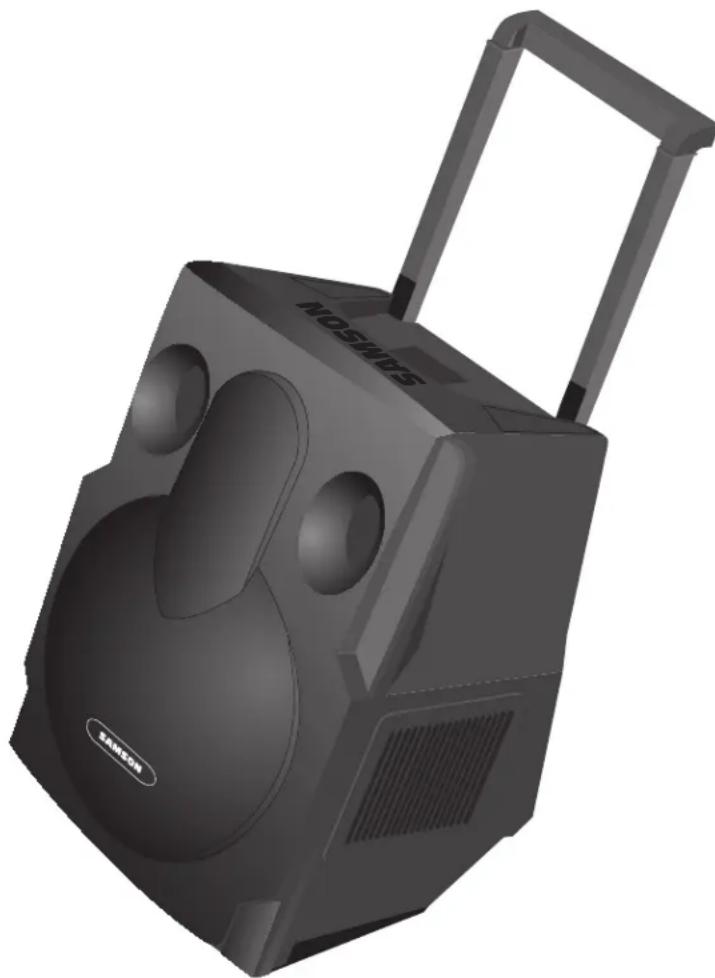
The Samson Expedition Pro system uses state-of-the-art technology to bring a revolutionary new degree of flexibility and portability to professional audio. Its main features include:
- A built-in telescoping handle and locking wheels that make it easier than ever before to transport your audio system.
- All Expedition Pro enclosures are lightweight and compact yet exceptionally durable and roadworthy. Injection-molded with Polypropylene, they feature substantial internal bracing to support a nearly 1/2'' thick side wall construction, making them strong and rigid enough to allow maximum energy to be delivered to the sound output. In addition, a steel grill and scuff-resistant textured finish makes for a rugged speaker enclosure that will deliver dependable performance in even the most demanding environments.
- The low frequency section includes a custom designed 12-inch low frequency driver with a 2.5-inch Kapton Former voice coil and 50 ounce barium ferrite magnet for accurate and super-tight bass response.
- A high frequency section that delivers clear, sweet top end thanks to its 1-inch compression driver with a specially designed 34mm titanium diaphragm for linear response and an elliptical wave guide horn design that reduces nearly all sonic diffraction.
- A tilt position that allows the Expedition Pro to be used as an onstage wedge monitor.
- Integral 1 3/8" pole-mount receptacle and convenient fly points allow the Expedition Pro to be pole-mounted or "flown" using standard PA hardware.
- The XPL100 is a passive cabinet that can be used with any power amplifier rated at up to 250 watts into 8 ohms.
It requires no power and provides dual Speakon™ and 1/4" connectors that allow multiple XPL100s to be daisy-chained where extended coverage is required.
- The XPL200 contains a 250 watt, light-weight, "class D" power amplifier and advanced crossover. Dual balanced XLR connectors allow daisy-chaining of multiple Expedition Pro enclosures, and a limiter circuit assures a clean output even when you're pushing the XPL200 to maximum levels. In addition, there are three stages of speaker protection, including relay switching for power on and off.
- The XPL300 includes all the features of the XPL200, and adds a flexible four-channel stereo mixer that provides two monophonic and one stereo mic/line channels with dual XLR and 1/4'' connectors. In addition, separate dual phono connectors allow you to hook up an external cassette, MP3 or CD player. Each mixer channel includes two-band equalization and independent volume control, and there's even built-in digital multi-effects processor for the addition of ten different reverb, delay and chorus presets. Balanced left and right XLR outputs allow daisy-chaining of multiple Expedition speakers (with a mono/stereo switch that allows operation in either mode), and a VU meter enables you to continuously monitor output levels. The XPL200 and XPL300 also include a meter that shows battery level when used with the optional RB 2030 rechargeable battery cartridge (see below).
System Features
- The top panel of both the XPL200 and XPL300 provides a rewired compartment that accommodates a variety of Samson wireless systems that offer superior RF and audio performance already proven on stages around the world. Receivers supported include the UM1 or AM1 models.
- A wide range of optional accessories, including: the MP1020 mounting bracket, which allows any Expedition Pro enclosure to be "flown" from the ceiling; the RB 2030 rechargeable battery cartridge, which provides up to two hours of power to either the XPL200 or XPL300 from its dual Lead-Acid GelCel batteries and TS50 and TS100 tripod speaker stands for portable set-ups.
- The db1500a and dB1800a are active subwoofoers that pair a massive 500-watt amplifier with heavy-duty 15-inch and 18-inch low frequency drivers. They're ideal complements to any Expedition XPL series enclosure or any loudspeaker system, when the application requires deep, powerful low-end response. The built-in stereo electronic crossover allows the db1500a and db1800a to operate either in mono or as a common subwoofer in a stereo system. They feature all-steel grills and rigid corners, as well as an integral pole mount.
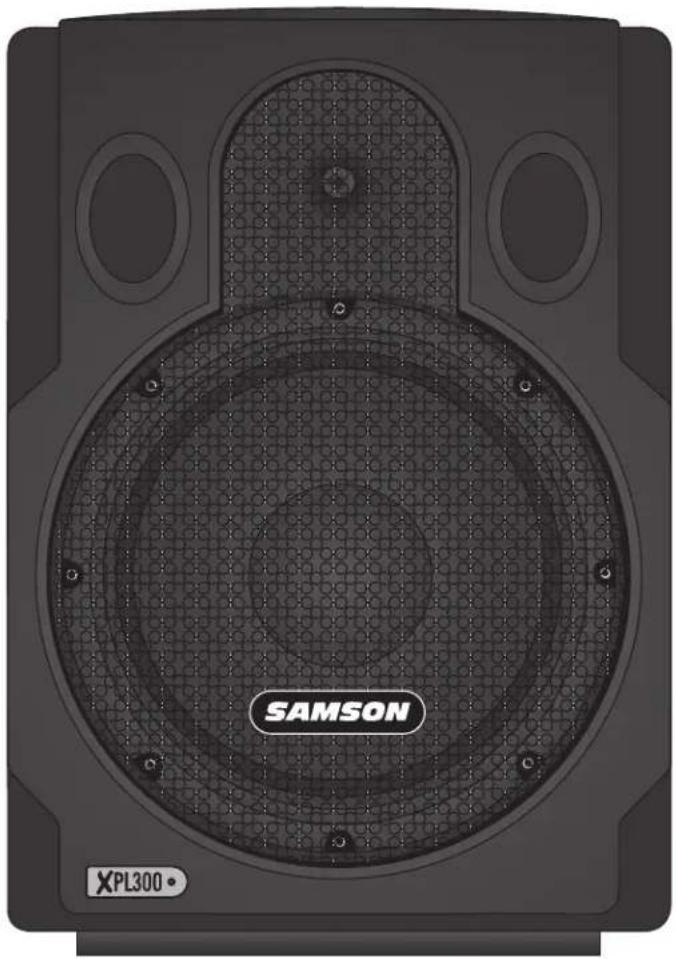
Expedition Pro XPL100
Guided Tour
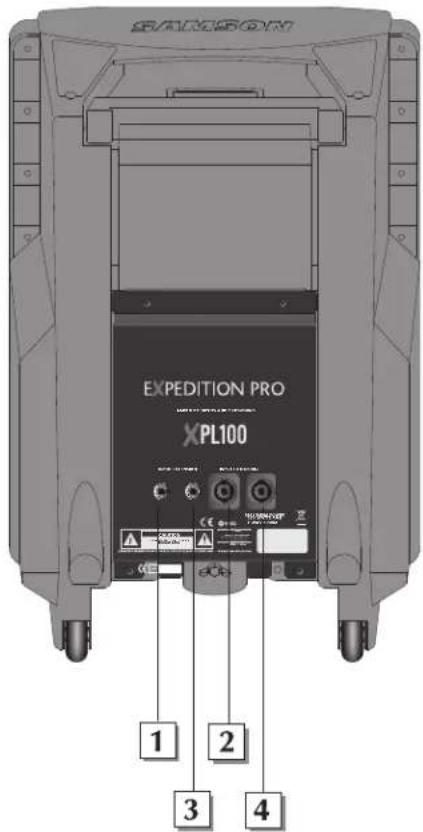
1: 1/4" input - Use this standard 1/4 connector to connect signal from a power amplifier (rated at up to 250 watts into 8 ohms) to the XPL100.
2: Speakon™ input - Alternatively, you can use this Speakon™ connector to connect signal from a power amplifier (rated at up to 250 watts into 8 ohms) to the XPL100.
3: 1/4" extension - Use this standard 1/4 connector to daisy-chain one XPL100 to another. See below for interconnection diagrams.
4: Speakon™ extension - Alternatively, you can use this Speakon™ connector to daisy-chain one XPL100 to another. See below for interconnection diagrams.
Speakon™ Wiring
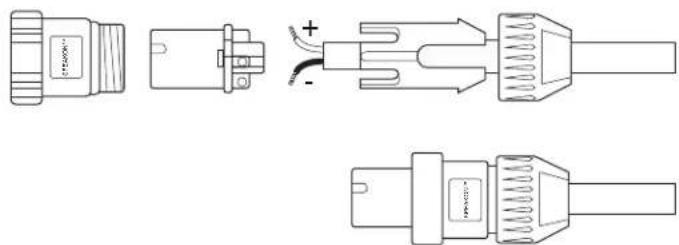
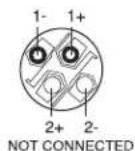
Interconnecting the XPL100
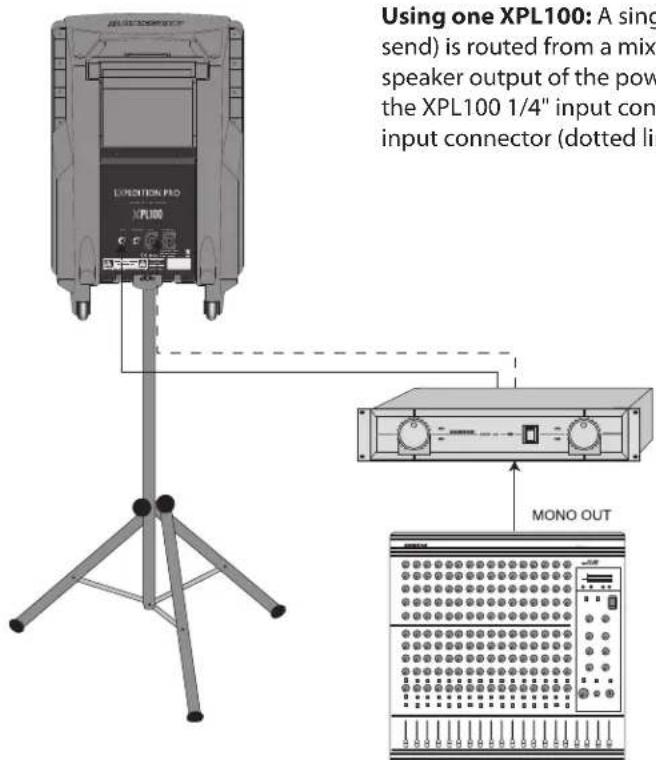
Using one XPL100: A single mono signal (bus or aux send) is routed from a mixer to a power amplifier. One speaker output of the power amplifier is connected to either the XPL100 1/4" input connector (solid line) or Speakon™ input connector (dotted line).
Expedition Pro XPL100
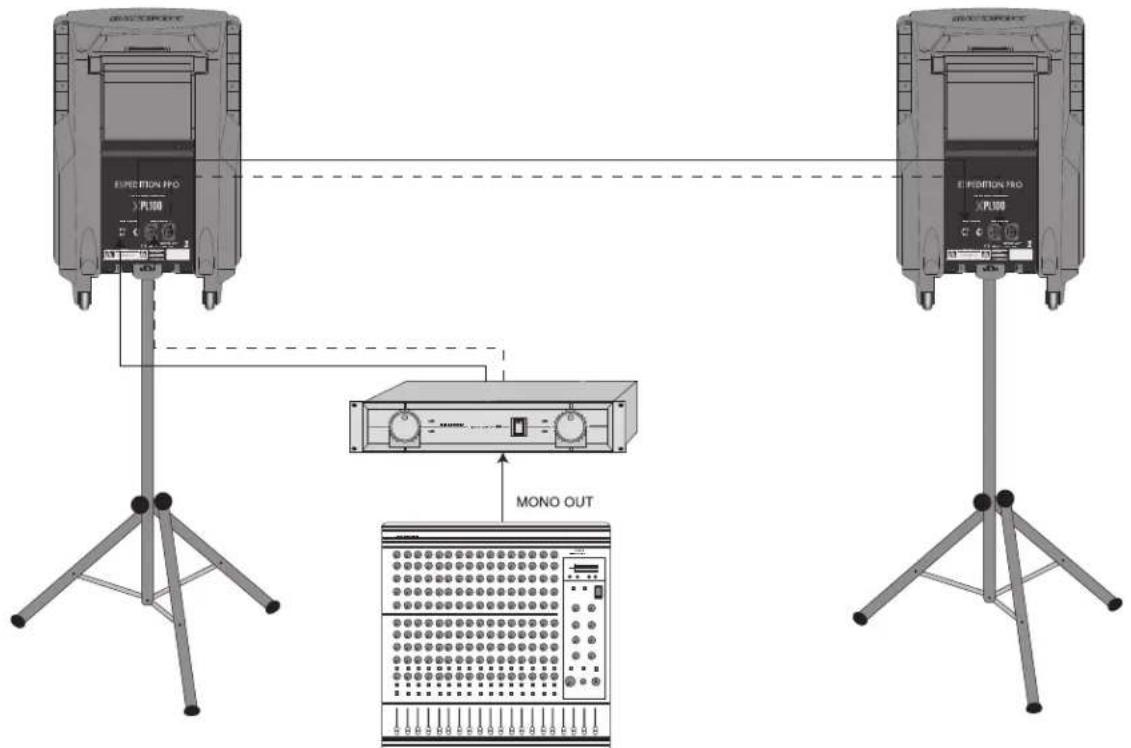
Using two XPL100s in mono: A single mono signal (bus or aux send) is routed from a mixer to a power amplifier. One speaker output of the power amplifier is connected to either the XPL100 1/4" input (solid line) or Speakon™ input (dotted line), and a connection is made between either the 1/4" extension to a second XPL100's input (solid line) or between the Speakon™ extension to a second XPL100's Speakon™ input (dotted line).
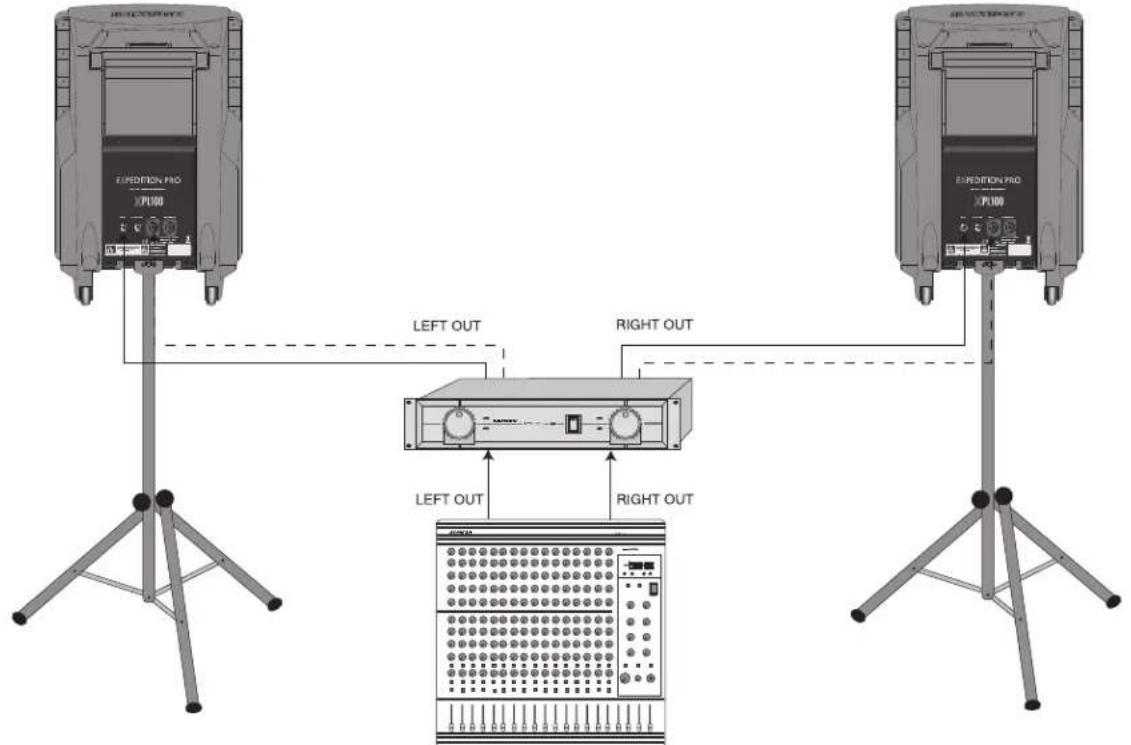
Using two XPL100s in stereo: A stereo signal (bus or aux send) is routed from a mixer to a power amplifier. The left speaker output of the power amplifier is connected to one XPL100 (using either the 1/4 input [solid line] or Speakon™ input [dotted line]), and the right speaker output of the power amplifier is connected to the other XPL100 (again using either the 1/4 input [solid line] or Speakon™ input [dotted line]).
Expedition Pro XPL200
Guided Tour
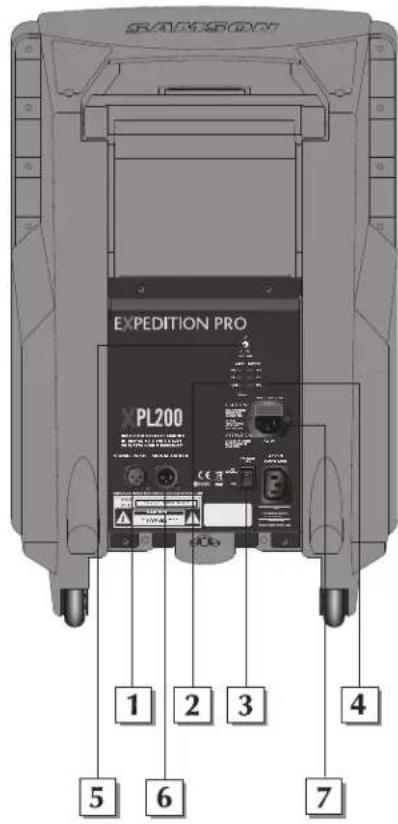
1: Input connector - Use this balanced female XLR connector to route line-level signal into the XPL200.
2: Output VU meter - This three-segment bar meter shows the XPL200 output level. For optimum signal-to-noise ratio, set the Volume control (see #6 below) so that program material is usually at or around 0 VU, with occasional but not steady excursions to the red +3 dB segment.
3: Power switch - Use this to turn power to the XPL200 on or off.
4: Battery VU meter - If an optional RB 2030 recharging battery pack is installed, this meter shows how much battery power remains as it is being charged (Power switch off) or depleted (Power switch on).
5: Volume control - This knob sets the level of the XPL200's built-in power amplifier.
6: Output connector- This balanced male XLR connector carries line-level output signal from the XPL200. It is used to send signal to a second XPL200 being daisy-chained (see interconnection diagram on the following page) or to an optional DB1500 subwoofer.
7: AC input - Connect the supplied heavy-gauge 3-pin "IEC" power cable here.
Interconnecting the XPL200
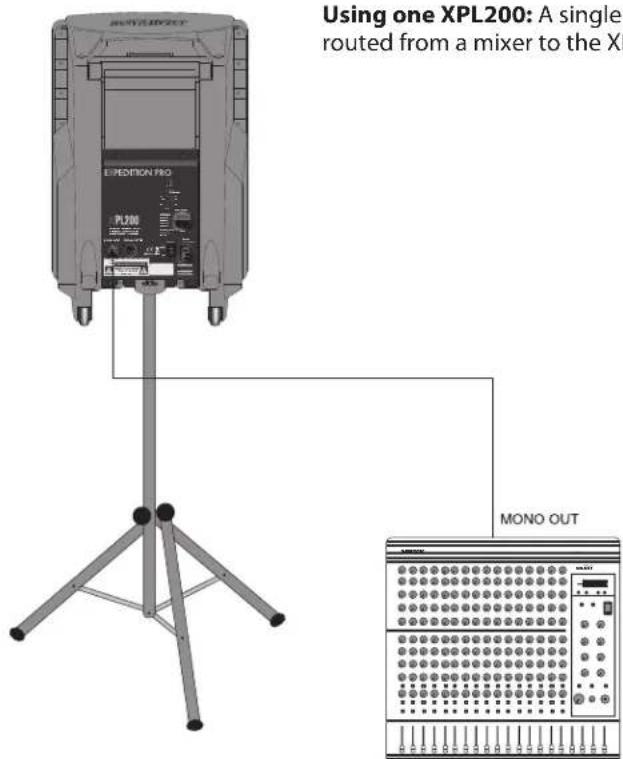
Expedition Pro XPL200
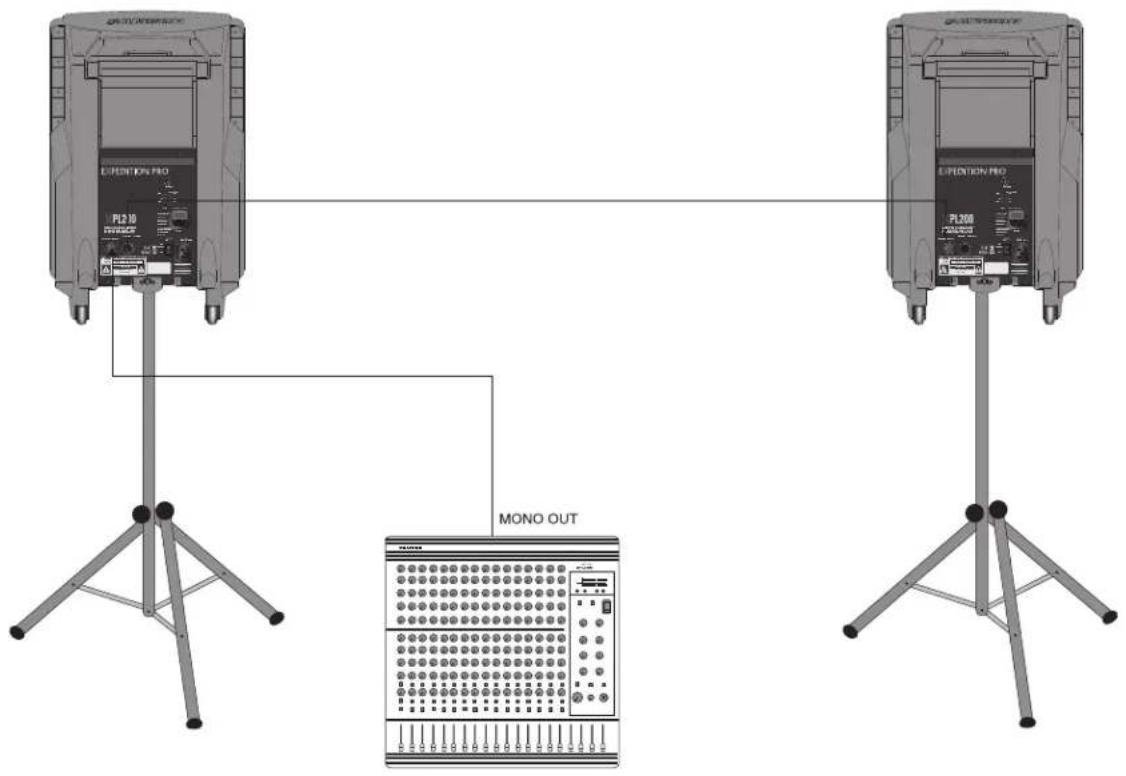
Using two XPL200s in mono: A single mono signal (bus or aux send) is routed from a mixer to one XPL200's XLR input, and a connection is made between that XPL200's XLR output to a second XPL100's XLR input.
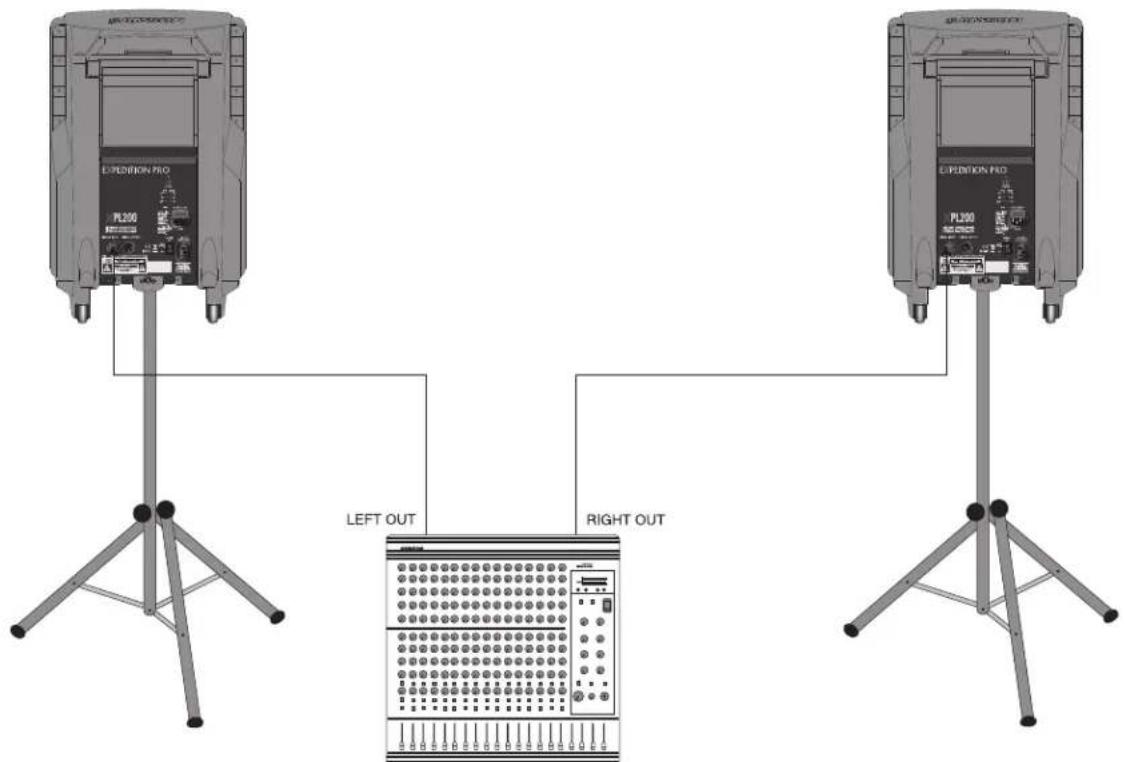
Using two XPL200s in stereo: A stereo signal (bus or aux send) is routed from a mixer, with the left side connected to one XPL200's XLR input, and the right side connected to the other XPL200's XLR input.
Expedition Pro XPL300
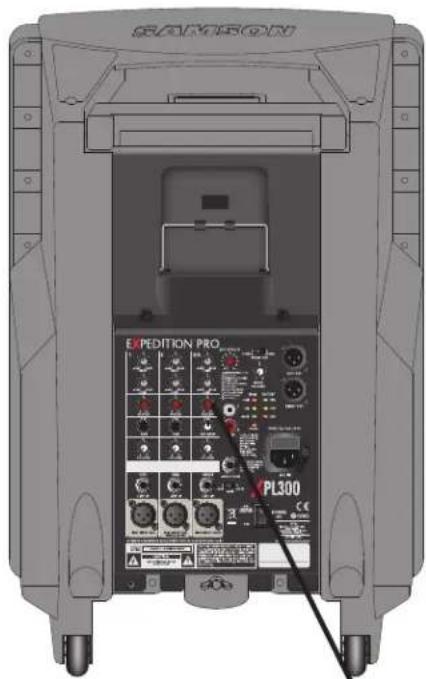
Guided Tour
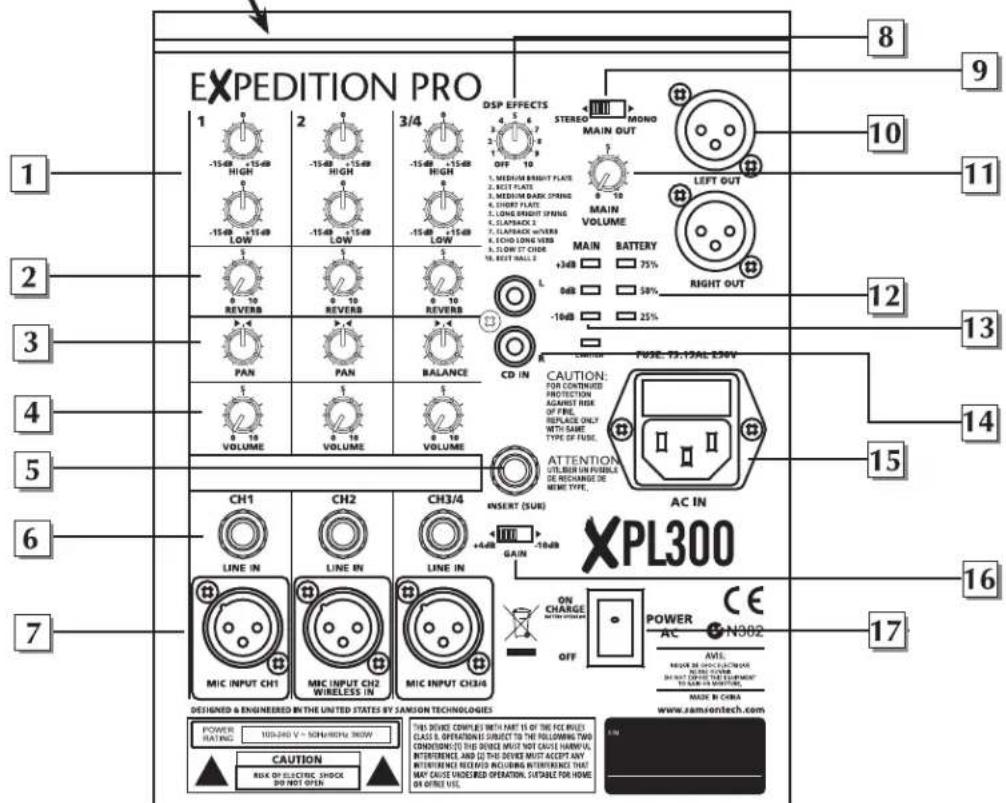
1: Equalizer - These controls allow you to shape your sound by boosting or cutting the amount of bass (at 100Hz ) or treble (at 10kHz ) by up to 15 dB. A center detent in each knob indicates no boost or cut (that is, flat response). As each knob is turned clockwise from the 12 o'clock position, the bass or treble is boosted; as it is turned counterclockwise from the 12 o'clock position, the bass or treble is reduced.
2: Reverb send - These knobs determine how much signal is being sent from the channel to the onboard DSP effects processor. As you move the knob clockwise from 0 to 10, more signal is sent. To hear the effect, one of the ten presets must be selected using the DSP Effects control (see #10 on the next page). Be careful not to send too much signal to the DSP, or a distorted sound will result.
3: Pan/Balance control - In channels 1 and 2, this knob acts as a Pan control, allowing you to place the signal anywhere in the left-right stereo spectrum, while keeping the overall signal level constant. When the knob is placed at its center (detented) position, the signal is sent equally to both the left and right outputs. To route a signal hard left or right, place the pan knob either fully counterclockwise or fully clockwise. In channel 3/4 (the stereo channel), this knob acts as a Balance control, allowing you to alter the relative levels of the two input signals. When the knob is placed at its center detented position, both signals are at equal strength. When moved left of center, you'll hear more of the left input signal; when moved right of center, you'll hear more right input signal.
4: Channel volume control - This knob determines the level of the channel In stereo channel 3/4, this knob simultaneously controls the level of both inputs (the relative levels of the two can be adjusted with the Balance knob, as described in #3 above). In practice, you'll use the channel volume controls to continuously adjust the levels of the various signals being blended together by the XPL300 mixer.
Expedition Pro XPL300
5: Insert (sub) connector - This 1/4^ connector brings line-level signal in directly before the XPL300 power amplifiers. It is normally used to return signal from an optional dB1500a or dB1800 subwoofer.
6: Line inputs - Use these 1/4'' jacks to connect line-level sources to the XPL300. Channels 1 and 2 are mono 1/4'' connectors; channel 3/4 uses a stereo (TRS) 1/4'' connector, with tip carrying left signal and ring carrying right signal. Stereo devices should always be connected to the stereo channel (channels 3/4). If a wireless receiver is connected to the XPL300 via its internal connectors (see page 14 in this manual), its output arrives at channel 2, which can also carry another line-level source connected to its line input, as well as signal from a microphone connected to its mic input. If an optional MP3 player is installed, its output arrives at channels 3/4, which can also carry another two line-level sources (one connected to its line input and a second connected to the CD inputs [see #15 on the following page]), as well as signal from a microphone connected to its mic input.
7: Mic inputs - Use these XLR jacks to connect microphones to the XPL300's built-in mic preamps. Each channel can carry both one or more line level sources (see #6 above) as well as a mic source.
8: DSP Effects control - Use this to select one of ten reverb presets (Medium Bright Plate, Best Plate, Medium Dark Plate, Short Plate, Long Bright Spring, Slapback 2, Slapback w/Verb, Slow St Chor or Best Hall). If you don't want to hear any reverb, set this switch to the "Off" position.
9: Mono/Stereo switch - When using one XPL300, set this switch to "Mono" so that the XPL300 power amp receives signal from both the left and right output sections. When using multiple Expedition Pro speaker enclosures, set this switch to "Stereo"; the XPL300 will then reproduce only signal from the left output section only (that is, signals panned left at the mixer); the Right output can then be used to send signal from the right output section (that is, signal panned right at the mixer) to a second enclosure. See the interconnection diagrams on pages 10 - 11 for more information.
10: Outputs - The dual XLR connectors carry line-level output signal from the XPL300. They are used to send signal to a second XPL300 (or XPL200) being daisy-chained (see the interconnection diagram on the following page) or to an optional DB1500 subwoofer. Note that the signal being output from these connectors is dependent upon the setting of the Mono/Stereo switch (see #9 above). When set to "Stereo," the Left XLR connector carries left signal only and the Right XLR connector carries right signal only; when set to "Mono," both the Left and Right connectors carry the same monophonic signal, summed from both the left and right output sections. See the interconnection diagrams on pages 10 - 11 for more information.
11: Main Volume control - This knob determines the final output signal level--you can think of this as being the "master fader." Signals from all four channels are routed here just before being routed to the XPL300's built-in power amplifiers and Left and Right output jacks (see #10 above).
12: Battery VU meter - If an optional RB 2030 rechargeable battery pack is installed, this meter shows how much battery power remains as it is being charged (Power switch off) or depleted (Power switch on). See #20 on the following page.
13: Output VU meter - This three-segment bar meter shows the continuous output level of the XPL300. For optimum signal-to-noise ratio, try to adjust all channel and main Volume controls so that program material is usually at or around 0 VU, with occasional but not steady excursions to the red +3 dB segment.
14: CD inputs - Connect the outputs of a CD or tape player to this set of dual phono jacks. Signal arriving here returns to stereo channel 3/4. If an optional MP3 player is installed, note that its output also arrives at channels 3/4, in addition to line-level signal arriving at its 1/4"TRS line input (see #6 on the preceding page) and signal from a microphone connected to its mic input (see #7 on the preceding page).
15: AC input - Connect the supplied heavy-gauge 3-pin "IEC" power cable here.
16: Voltage selector - Make sure this is set correctly for the country you are in before turning on the power to the XPL300.
17: Gain switch - Sets the line-level TRS input of channel 3/4 (see #6 on the preceding page) to either +4 (professional) or -10 (consumer) level.
18: Power switch - Use this to turn power to the XPL300 on or off. If an optional RB 2030 rechargeable battery pack is installed, it will charge when this switch is in the "Off" position.
Expedition Pro XPL300
Using The Docking Station
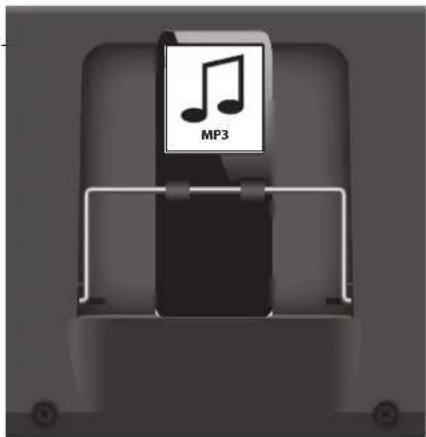
The XPL300 has a built-in MP3 docking station, which fits neatly into a special compartment above the XPL300's mixer allowing you to install an MP3 player to provide background music for meetings or performances. The XPL300's docking station is compatible with most popular MP3 players that have a 30-pin connector on the bottom. Follow the steps below to install your MP3 player.
- If your MP3 player came with a dock adapter, fit it in the XPL300's docking station.
- Pull the spring loaded retaining bracket forward and slide your MP3 player into place making sure it mates properly with the 30 pin connector.
- If you have a thin style MP3 player, remove your MP3 player and install the included thick EVA foam.
- Then, pull the spring loaded retaining bracket forward to re-install the MP3 player.
- Slowly lower the spring loaded retaining bracket to hold the MP3 player in place.
Interconnecting the XPL300
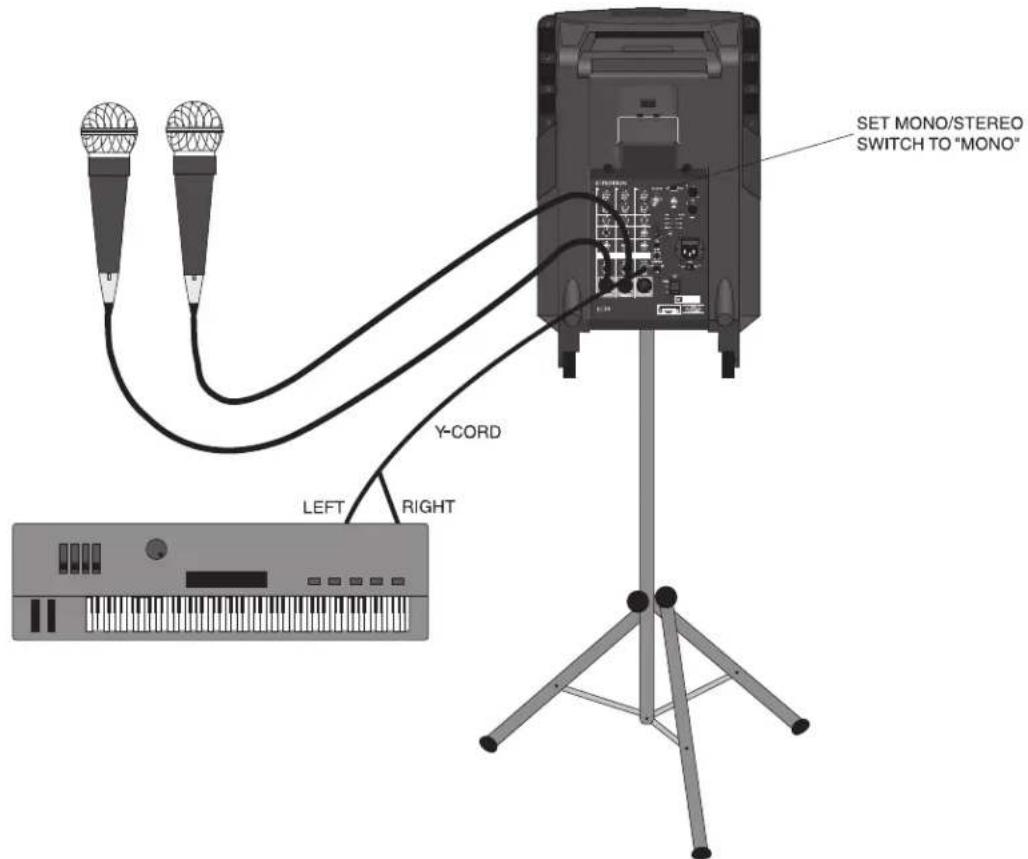
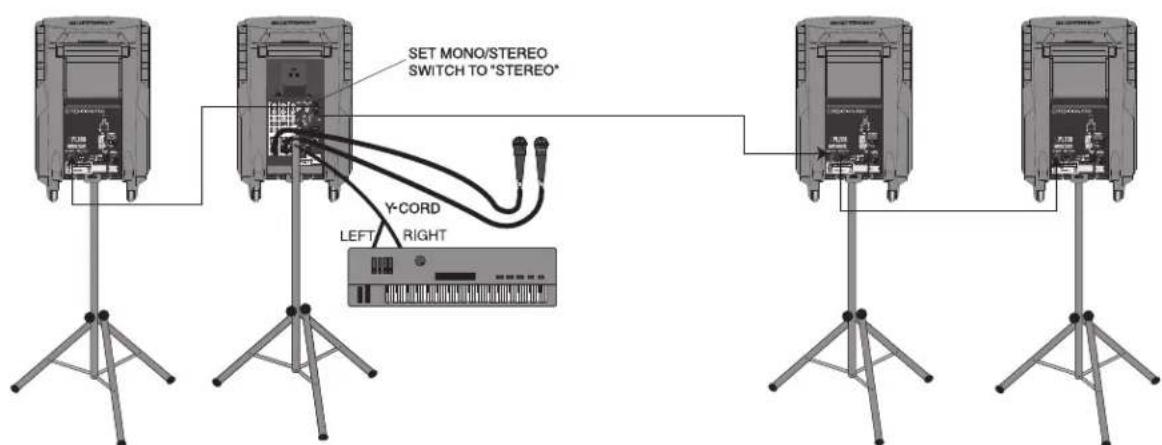
Using one XPL300: In this example, microphones are connected to the XLR mic inputs of channels 1 and 2, and a stereo keyboard is connected to the stereo 1/4 TRS connector of channel 3/4 (using a Y-cord, with the tip carrying the left signal and the ring carrying the right signal). IMPORTANT NOTE: When using just one XPL300, always be sure to set its Mono/Stereo switch to "Mono."
Expedition Pro XPL300
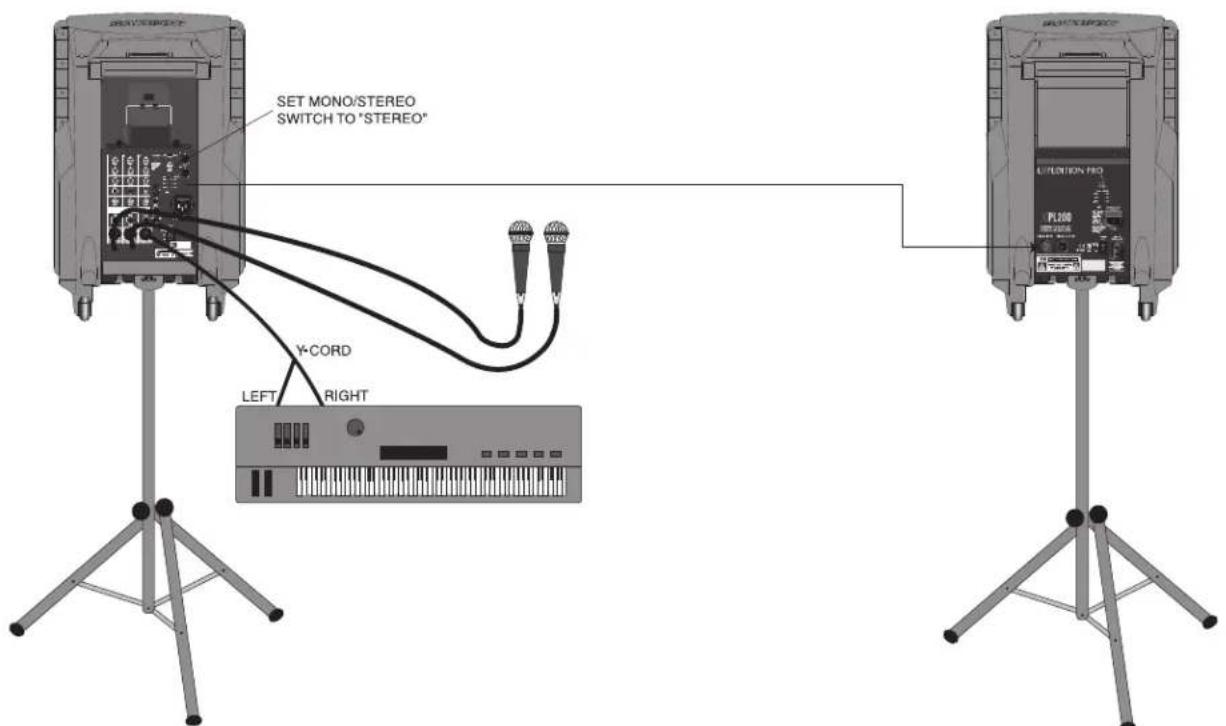
Using one XPL300 and an XPL200 (stereo operation): In this example, microphones are connected to the XLR mic inputs of channels 1 and 2 of an XPL300, and a stereo keyboard is connected to the stereo 1/4"TRS connector of channel 3/4 of the XPL300 (using a Y-cord, with the tip carrying the left signal and the ring carrying the right signal). A connection is then made between the Right output of the XPL300 to the XLR input of an XPL200. IMPORTANT NOTE: When using the XPL300 with additional Expedition Pro enclosures, always be sure to set the XPL300 Mono/Stereo switch to "Stereo."
Using one XPL300 and three XPL200s (extended range stereo operation): In this example, microphones are connected to the XLR mic inputs of channels 1 and 2 of an XPL300, and a stereo keyboard is connected to the stereo 1/4'' TRS connector of channel 3/4 of the XPL300 (using a Y-cord, with the tip carrying the left signal and the ring carrying the right signal). A connection is then made between the Left output of the XPL300 to the XLR input of an XPL200 (both will then carry the same left channel signal). Finally, a connection is made between the Right output of the XPL300 and an XPL200, and between that XPL200's XLR output and the XLR input of a third XPL200 (both will then carry the same right channel signal). IMPORTANT NOTE: When using the XPL300 with additional Expedition Pro enclosures, always be sure to set the XPL300 Mono/Stereo switch to "Stereo."
Positioning and Mounting Instructions
General Positioning Tips
- Operating a microphone or turntable in front of a speaker is a sure formula for feedback and/or rumble problems, so always place the Expedition Pro in front of any mics or turntables that are being used.
- Use the Expedition Pro upright for all "front-of-house" PA applications; use it in its tilt-back position only for onstage monitoring.
- Always raise the speakers as high above the audience as is practicable for maximum coverage.
- Use sufficient enclosures for the space you're in. The larger the space, the more speakers will be required.

Pole-Mounting
The underside of the Expedition Pro contains a 1-3/8" stand mount socket that allows it to be raised up on any standard speaker pole mounting (such as the Samson TS50 or TS100 speakers stands). Pole-mounting is generally advisable when you want to maximize the distance that the Expedition Pro covers (sometimes called speaker "throw").
If you are using an DB1500 subwoofer, you can use its integral pole mount to place an XPL100, XPL200 or XPL300 immediately above it, creating a complete column of sound.
Fly Mounting, Wall Mounting, and Ceiling Mounting
As shown in the illustration below, the top panel of the Expedition Pro contains a number of fly points, located in compartments to the left and right of the wireless receiver compartment. The covers placed over these compartments are simply attached with double-sided sticky tape, so just pull up to remove.
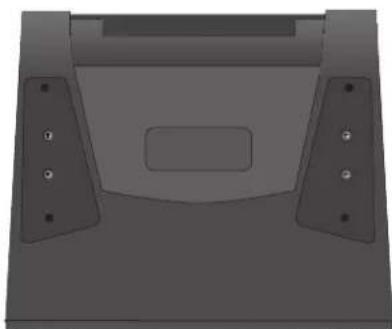
Expedition Pro fly-mount points
Positioning and Mounting Instructions
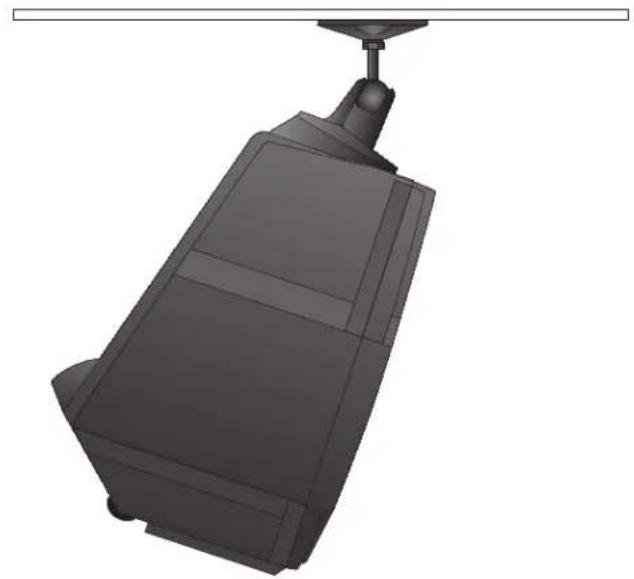
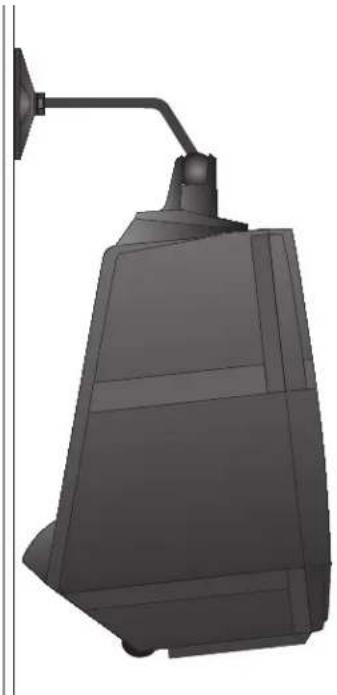
Before fly-mounting, wall-mounting or ceiling-mounting the Expedition Pro, you must first install a Samson MP1020 mounting bracket to the fly points, as shown in the illustrations on the right
Standard cabling and hardware can then be attached to the MP1020 mounting bracket in environments where the Expedition Pro needs to be "flown."
In fixed installations where you wish to mount the Expedition Pro to a ceiling, use the OmniMount model 100-STEMP mount, as shown in the illustration below:
In fixed installations where you wish to mount the Expedition Pro from a wall, use the OmniMount model 100-WB mount, as shown in the illustration below:
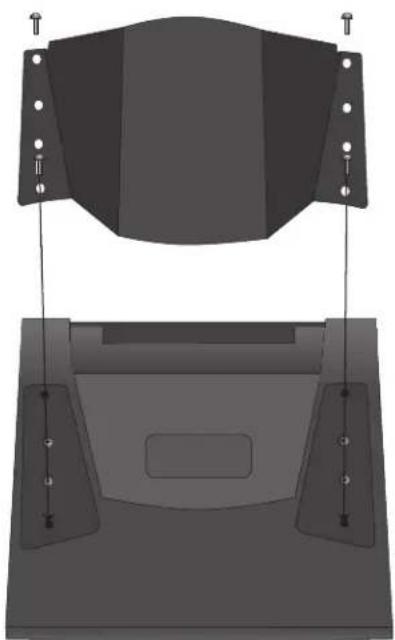
Installing the MP1020 mounting bracket (top view)
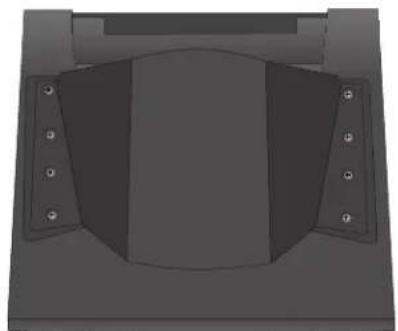
Top of Expedition Pro with MP1020 mounting bracket installed.
Expedition Pro Accessories
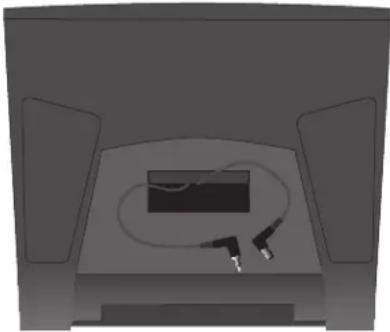
XPL200/XPL300 wireless compartment (top view)
As shown in the illustration on the left, the top panel of the Expedition Pro XPL200 and XPL300 provides a prewired compartment that accommodates Samson wireless receivers: AM1 or UMI. Output signal from a wireless receiver mounted in an XPL300 arrives at channel 2 of the onboard mixer.
In addition, a number of accessories are available from your local Samson dealer that allow you to expand the capabilities of your Expedition Pro system. These include:
- The DB1500 active subwoofer—the ideal complement to any Expedition Pro enclosure (or to any loudspeaker system, for that matter)—pairs a powerful 500-watt amplifier with a heavy-duty 15^ low frequency driver in order to provide deep low end response. A built-in stereo electronic crossover allows the DB1500 to operate either in mono or as a common subwoofer in a stereo system. It features an all-steel grill and rigid corners, as well as an integral 1 3/8'' pole-mount receptacle
- The RB 2030 recharging battery cartridge, which provides up to two hours of power to either the XPL200 or XPL300 from its dual Lead-Acid GelCel batteries.
- The MP1020 mounting bracket, which allows any Expedition Pro enclosure to be "flown" or mounted on the wall or ceiling using standard OmniMount hardware. For more information, see the "Positioning and Mounting the Expedition Pro" section on page 12.
Introduction
Power Rating: (@ 8Ω): XPL100 250 Watts Program; 400 Watts Max. Peak
XPL200,XPL300 250Watts
Frequency Response: (all models) 60 Hz - 15 kHz ± 3 dB
Sensitivity: XPL100. 97 dB SPL @ 1W/1m
Crossover Frequency:
XPL100. 2.3 kHz (12 dB Per Octave)
XPL200, XPL300. 2.3 kHz (24 dB Per Octave Linkwitz-Riley Constant Phase)
LF Driver: (all models) 12-inch heavy-duty driver,2.5-inch voice coil (Kapton Former),50
oz. barium ferrite magnet
HF Driver: (all models) 1-inch compression driver - 34mm diaphragm
Stereo Mixer Section: (XPL300 only) Inputs. 2 Mic/Line XLR/TRS,
1 Stereo Line w/Mic TRS/RCA/XLR Outputs +4 Balanced XLR
Frequency Response 10 Hz - 50 kHz
Crosstalk. 70 dB @ 1 kHz
Equalization Frequencies 100 Hz (Low), 10 kHz (High)
Effects DSP Reverb with 10 Presets
Mounting: (all models) Integral 1 3/8" Pole Mount Receptacle,
Fly Points
Specifications are subject to change without notice.
\section*{Caracteristiques techniques}
Puisance nominale: (dans 8
XPL100. 250 Watts programme; 400 Watts crête max.
XPL200,XPL300 250Watts
XPL100 97 dB SPL @ 1W/1m