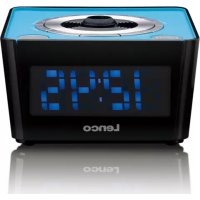
CR16 - Alarm Clock LENCO - Free user manual and instructions
Find the device manual for free CR16 LENCO in PDF.



| Product type | Clock radio |
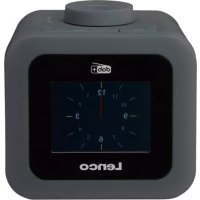
| Brand | Lenco |
| Model | CR16 |
| Power supply | 230 V AC, 50 Hz, 5 W |
| Backup battery | CR2032 (not included) |
| Radio frequency | FM 87.5 - 108 MHz |
| Radio presets | 10 stations (P01-P10) |
| Alarm functions | Dual alarm with buzzer or radio |
| Snooze | Yes, 9 minutes |
| Nap | 10 to 90 minutes |
| Sleep timer | 15, 30, 60, or 90 minutes |
| Projection | Yes, distance 90-270 cm, 180° inversion |
| Brightness adjustment | 3 levels (high, medium, low) |
| Alternating display | Time and date |
| Radio-controlled clock reception | DCF77, automatic in standby |
| Cleaning | Soft cloth, mild non-abrasive detergent |
| Safety | Do not ingest battery, keep out of reach of children |
| Spare parts | CR2032 battery |
| Warranty | Compliant with European legislation |
| After-sales service | www.lenco.com |
Frequently Asked Questions - CR16 LENCO
User questions about CR16 LENCO
0 question about this device. Answer the ones you know or ask your own.
Ask a new question about this device
Download the instructions for your Alarm Clock in PDF format for free! Find your manual CR16 - LENCO and take your electronic device back in hand. On this page are published all the documents necessary for the use of your device. CR16 by LENCO.
USER MANUAL CR16 LENCO
Outlook and Controls
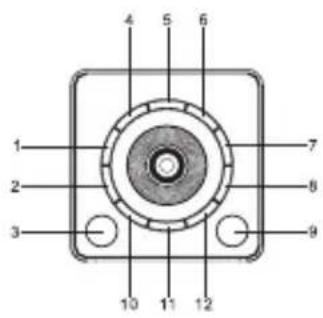
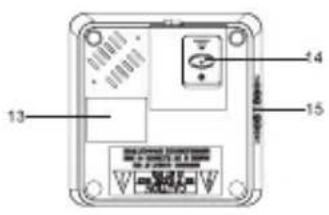
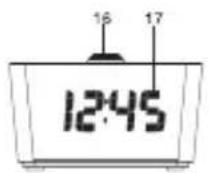
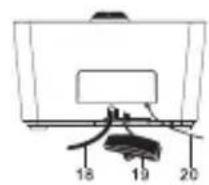
Item Description
- ALARM 1 ON-OFF SET
- << TUNE DOWN
- SNOOZE/SLEEP/DIMMER
- MEMORY/M+/NAP
- PROJECTION ON/OFF
6.PROJECTION TIME 180^ - ALARM 2 ON-OFF SET
- VOLUME UP/BETWEEN DISPLAY CONTENTS
- POWER ON - OFF/ALARM OFF
-
TUNE UP/YEAR-MONTH-DAY
- CLK.ADJ.
- VOLUME DOWN
- RATING LABEL (BOTTOM OF UNIT)
- BATTERY COMPARTMENT COVER (BOTTOM OF UNIT)
- SPEAKER
- ANGLE/SHARPNESS CONTROLLER
- LED DISPLAY
- AC POWER CORD
- RADIO CONTROLLED CLOCK ANTENNA
- FM ANTENNA
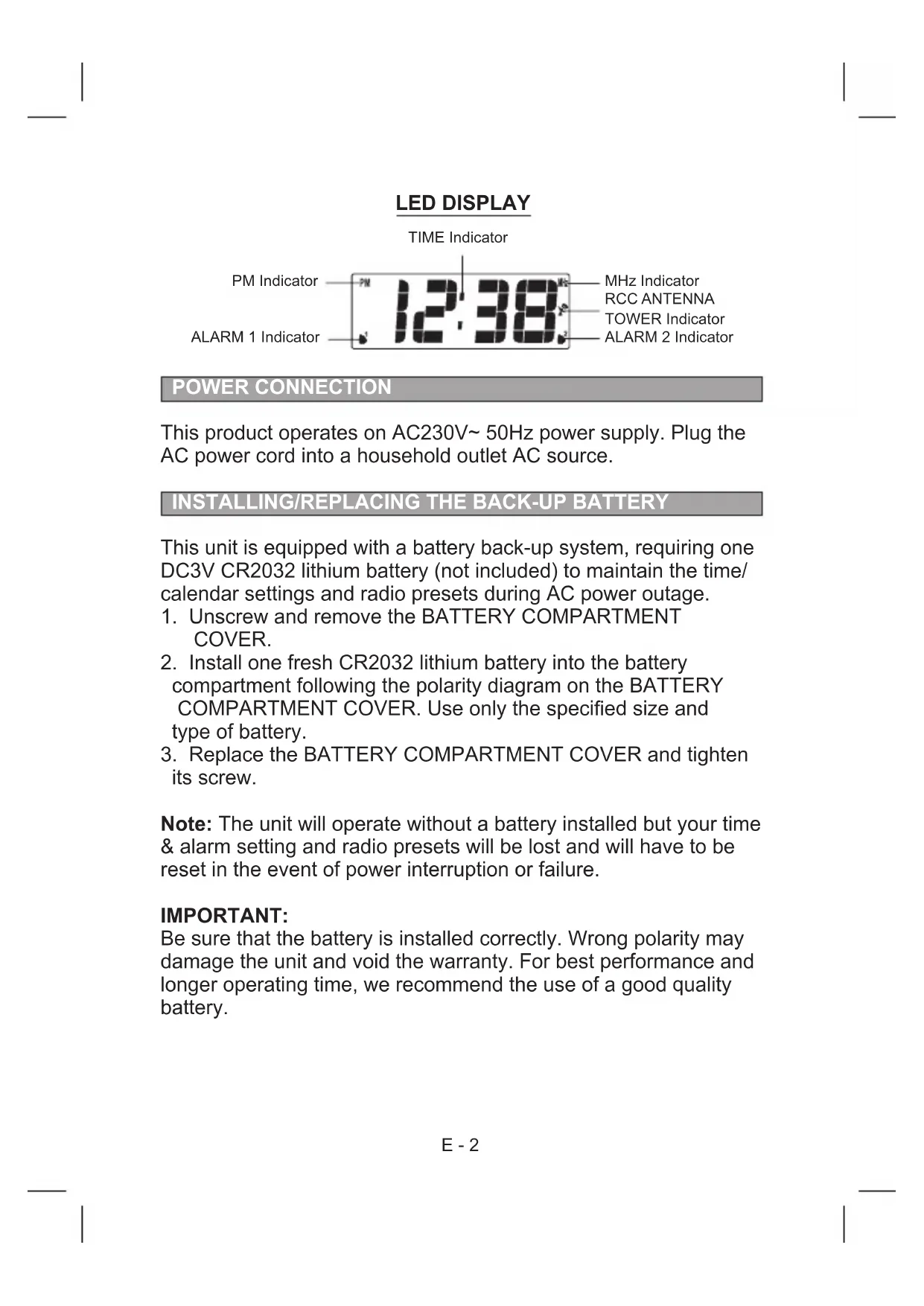
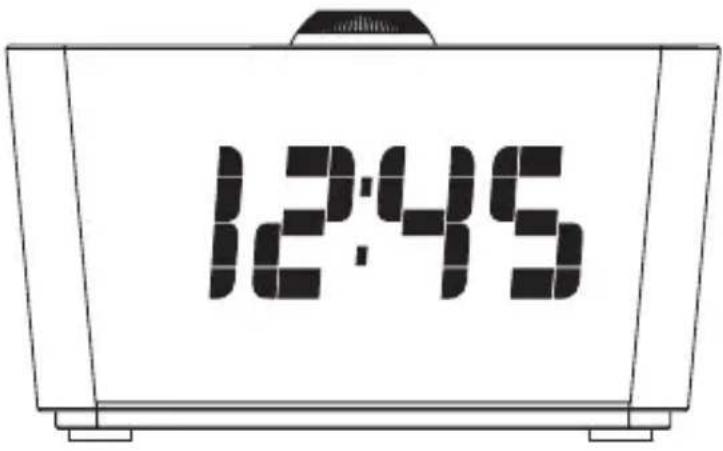
LED DISPLAY
TIME Indicator

POWER CONNECTION
This product operates on AC230V~ 50Hz power supply. Plug the AC power cord into a household outlet AC source.
INSTALLING/ REPLACING THE BACK-UP BATTERY
This unit is equipped with a battery back-up system, requiring one DC3V CR2032 lithium battery (not included) to maintain the time/ calendar settings and radio presets during AC power outage.
- Unscrew and remove the BATTERY COMPARTMENT COVER.
- Install one fresh CR2032 lithium battery into the battery compartment following the polarity diagram on the BATTERY COMPARTMENT COVER. Use only the specified size and type of battery.
- Replace the BATTERY COMPARTMENT COVER and tighten its screw.
Note: The unit will operate without a battery installed but your time & alarm setting and radio presets will be lost and will have to be reset in the event of power interruption or failure.
IMPORTANT:
Be sure that the battery is installed correctly. Wrong polarity may damage the unit and void the warranty. For best performance and longer operating time, we recommend the use of a good quality battery.
WARNING
DO NOT INGEST BATTERY, CHEMICAL BURN HAZARD
This product contains a coin/button cell battery. If the coin/button cell battery is swallowed, it can cause severe internal burns in just 2 hours and can lead to death.
Keep new and used batteries away from children. If the battery compartment does not close securely, stop using the product and keep it away from children.
If you think batteries might have been swallowed or placed inside any part of the body, seek immediate medical attention.
BATTERY CARE:
-
Use only the size and type of battery specified.
-
If the unit is not to be used for an extended period of time, remove the battery. Old or leaking batteries can cause damage to the unit and may void the warranty.
-
Do not try to recharge batteries that are not intended to be recharged; they can overheat and rupture (Follow battery manufacturer's directions).
-
Do not dispose of batteries in fire; they may leak or explode.
SETTING THE CLOCK
AUTOMATIC (IN STANDBY ONLY)
- After plugging the mains plug into the socket, the time date from the DCF77 station is automatically transferred after a few minutes. As long as the "RCC ANTENNA TOWER Indicator" symbol is flashing, the device is searching for the radio signal. If a radio signal has been found, the "RCC ANTENNA TOWER Indicator" symbol lights up. The correct time appears on the display.
- The time is automatically adjusted on the hour by the station signal.
NOTE:
The signal can be received without problems within a radius off approx. 2000 km around Frankfurt/Main, but interference may occur, depending on local conditions. This may occur especially in buildings containing a high percentage of metal, as well as in proximity to TV sets, PCs, mobile phones etc. which are switched
on! If the reception cannot be automatically adjusted after 10 minutes in spite of the alignment of the integrated antenna, the reception in the respective location is too weak. In this case, set the time manually or change location.
POWER ON/STANDBY
- In standby mode, tap the POWER ON-OFF button once to turn on the unit.
- Press the POWER ON-OFF button once to return the unit to standby mode.
CALENDAR AND TIME MANUAL SETTING
SETTING THE CALENDAR AND TIME
When the device is searching for a radio signal, it is not possible to adjust the time manually.
- Press the POWER ON-OFF button to switch the device into standby mode.
- Press and hold the SNOOZE/SLEEP/DIMMER button. The "RCC ANTENNA TOWER Indicator" symbol starts flashing in the display.
- Press and hold the SNOOZE/SLEEP/DIMMER button for about 2 seconds. The "RCC ANTENNA TOWER Indicator" symbol disappears from the display.
- Press and hold the CLK.ADJ. button for about 2 seconds to enter the calendar/time set mode.
- The year indicator will flash on the LED DISPLAY for up to 30 seconds prompting for a new entry.
- While the display is flashing, repeatedly tap the << or button to adjust to the correct year. Press and hold the << or button for faster scanning backward or forward. Tap the CLK.ADJ. button to confirm.
- Repeat steps #2 to #3 to adjust the month, day, time format, current hour and finally the current minutes in the same way.
Notes:
- The display sequence in calendar/time set mode will be as follows:
Year Month Date 12/24 Hour Time Format Real
Time Hour Real Time Min Normal Time
- To check the year while the current time is displayed, tap the YEAR-MONTH-DAY button once. The LED DISPLAY will change to the year display for 5 seconds and then revert to the current time automatically.
- To check the date while the current time is displayed, tap the YEAR-MONTH-DAY button twice. The LED DISPLAY will change to the date display for 5 seconds and then revert to the current time automatically.
- During the time set, if no button is being pressed within 10 seconds, the current display time will be automatically stored.
- Make sure the hour is set so that the PM indicator is displayed correctly for afternoon/night times.
ALARM SETTING
SETTING THE ALARMS (ALARM 1 and ALARM 2)
You can select either a Beeper Alarm or the FM Radio as the alarm source. Be sure to observe the PM indicator when setting the alarm to make sure the alarm time is set correctly for AM or PM. If the PM Indicator is 'On', the alarm time will be afternoon/night time. The setting sequence for ALARM 1 is as follows: Normal Time AL1 Hour AL1 Minute AL1 Weekday AL1 Beeper AL1 Radio AL1 final radio volume Normal Time
- In standby mode, tap the ALARM 1 (or ALARM 2) button to show the preset alarm time.
- Press and hold the ALARM 1 (or ALARM 2) button again for about 2 seconds until the Hour Indicator on the LED DISPLAY flashes. Press the << or >> button to obtain the desired Alarm Hour.
- Tap the ALARM 1 (or ALARM 2) button again to advance to the Minute Indicator. Press the << or >> button to obtain the desired Alarm Minutes.
- Tap the ALARM 1 (or ALARM 2) button again to advance to the Weekday Indicator.
Press the << or >> button to select the desired Alarm Weekday mode as follows:
1-5:Monday to Friday
1-7:Wholeweek
6-7: Saturday & Sunday
1-1: One day of week (you need to further select 1 for Monday, 2 for Tuesday and so on)
5. Tap the ALARM 1 (or ALARM 2) button again to advance to select the Alarm source between Beeper or Radio.
Notes:
- When the Beeper alarm begins, it will sound at a lower beeping rate and gradually increase to the normal rate within 30 seconds.
- If you want to choose the radio as the alarm source, you need to set the radio to your desired radio station in radio mode first.
- After selecting the Radio as the alarm source during alarm setting, you need to select FM radio and the preset alarm volume level (up to maximum level 15). When the radio is turned 'On' at the preset alarm time, the radio will begin to sound at a low volume and gradually increases to the preset volume level.
Note: it is not possible to adjust the volume level during the radio alarm. If volume adjustment is needed, you must turn 'Off' the radio first, and then turn it 'On' again using the POWER ON-OFF button. The alarm will also be stopped immediately.
- Press the ALARM 1 (or ALARM 2) button to finish setting and exit to normal time display.
- To disable ALARM 1 (or ALARM 2) from automatically sounding on the upcoming days, press and hold the ALARM 1 (or ALARM 2) button for about 2 seconds, the corresponding ALARM 1 (or ALARM 2) INDICATOR will go off.
- To resume ALARM 1 (or ALARM 2) from automatically sounding on the upcoming days, press and hold the ALARM 1 (or ALARM 2) button for about 2 seconds, the corresponding ALARM 1 (or ALARM 2) INDICATOR will turn on and the alarm will sound the following day at the set time.
TURNING OFF THE ALARM
When the preset alarm time is reached, the ALARM 1 (or ALARM 2) INDICATOR will flash on the LED DISPLAY and the beeper alarm or radio will sound for 30 minutes unless interrupted by pressing SNOOZE. To stop the alarm immediately, tap the corresponding ALARM 1 (or ALARM 2) button or POWER ON-
OFF button. The alarm will ring again at the same alarm time on the following day, or when set to go off based on your Alarm settings.
SNOOZE FUNCTION
When the alarm source is sounding, press the SNOOZE button to suspend the alarm and activate the snooze function. The Alarm will temporarily stop and sound again 9 minutes later but the ALARM 1 (or ALARM 2) indicator will keep flashing.
Notes:
- This manual snooze operation can be repeated again and again.
- To turn off the snooze function before it ends, tap the corresponding ALARM 1 (or ALARM 2) button or the POWER ON-OFF button. The ALARM 1 (or ALARM 2) INDICATOR will stop flashing.
- In standby mode, tap the POWER ON-OFF button to turn the unit "On".
- The LED DISPLAY will show the radio frequency for about 5 seconds and then revert to normal time display.
AUTOMATIC SEARCH FOR RADIO STATIONS
To automatically search for stations with strong signals, press and hold the TUNE UP >> or DOWN << button until the frequency readout on the display begins to scan. Release the button. The tuner will stop on the first strong station it finds.
MANUAL SEARCH FOR RADIO STATIONS
- Tap the << or >> button repeatedly to choose your desired radio station.
- Tap the VOLUME UP or DOWN button to set the desired volume level. The volume level reading will appear in the LED DISPLAY.
Notes:
- Use manual tuning to select weaker stations that might be
skipped during automatic tuning.
- If the automatic tuning does not stop on the exact frequency of the station, for example, it stops on 88.9 MHz instead of 88.8 MHz, use the manual tuning method to "fine tune" to the exact frequency of the desired station.
HINTS FOR BEST RECEPTION
FM - To insure maximum FM tuner reception, unwrap and fully extend the EXTERNAL FM WIRE ANTENNA for best FM radio reception.
TO SET/RECALL RADIO STATION PRESETS
- Press the << or >> button to select the desired radio station.
- Press and hold the MEMORY button, the next available preset memory number will flash on the LED display. (Note: "P01" will flash in the display if you are programming presets for the first time.)
- Press the << or >> button to change to the desired preset number P01 thru P10.
- Repeat steps #1 thru #3 to preset up to 10 FM stations.
- To recall one of the preset stations already programmed, tap the M+ button repeatedly until you reach the desired preset number/radio station.
The sleep timer allows you to turn the unit off after a designated time has elapsed.
- While listening to the radio, tap the SLEEP button and sleep time '90' (minutes) appears in the LED DISPLAY.
- Repeatedly tap the SLEEP button to select a sleep timer of 90, 60, 30 or 15 minutes. Wait for about 10 seconds after your selection for the unit to confirm the selection, the unit will play for the selected length of time then turn itself 'Off' automatically.
- To cancel the sleep timer, repeatedly tap the SLEEP button until you see the current time in the LED DISPLAY after last sleep timer option (15 minutes).
- To turn the unit 'Off' before the selected sleep time, press the POWER ON-OFF button at any time.
NAP ALARM
The nap alarm can be used for e.g. a short "nap". The function only operates in standby.
- Press the unit NAP button to select the time after which the device will beep. Select from 90 to 10 minutes or OFF (off) in steps of 10 minutes.
- After the selected time has elapsed, an increasingly fast beep will sound. Use the unit POWER ON-OFF button to turn off the beep.
DIMMER CONTROL
Tap the DIMMER button to set the brightness of the LED display to high, medium or low according to your ambient light conditions.
ALTERNATE DISPLAY BETWEEN TIME AND MONTH-DATE DISPLAY
- In radio off mode, press and hold the unit BETWEEN DISPLAY CONTENTS button for about 3 seconds until "ON" appears in the LED DISPLAY.
- The DISPLAY will alternate between the current Time for 10 seconds and month- date for 5 seconds as follows:
TIME Indicator MONTH Indicator DAY Indicator
12:38
12 18
PROJECTION FUNCTION
Notes:
- This appliance is featured with a projection function and can be used in either clock or radio mode. You can use this appliance to project time on the ceiling or wall.
- Optimal projection distance ranges from ca. 90 to 270cm
- Press PROJECTION ON/OFF button to illuminate the projection lens. Time is projected on the ceiling or wall.
- Use angle/sharppness controller to achieve optimal projection
sharpness and angle.
- Press PROJECTION 180^ FLIP button to flip the projected image.
- To deactivate projection function, simply press PROJECTION ON/OFF button. The projection lens goes off.
RESETTING THE UNIT
If the system does not respond or exhibits erratic or intermittent operation, you may have experienced an electrostatic discharge (ESD) or a power surge that triggered the internal microcontroller to shut down automatically. If this occurs, disconnect the AC POWER CORD from the wall and remove the backup battery from the compartment. Wait at least 3 minutes, and reinsert the battery for the back-up, and reattach the AC Cord to the wall. The unit is now reset, so you will need to setup the unit time and alarms again.
SPECIFICATIONS
Frequency: FM 87.5 - 108 MHz
Battery backup : 1 x 3V CR2032 flat lithium battery (not included)
Power source: AC 230V ~ 50Hz, 5W
Projection distance: ≤ approx. 90 to 270cm
Warning
- No naked flame sources, such as lighted candles, should be placed on the apparatus.
- Do not place the product in closed bookcases or racks without proper ventilation.
- The mains plug is used as the disconnect device, the disconnect device shall remain readily operable.
- The ventilation should not be impeded by covering the ventilation openings with items, such as newspapers, tablecloths, curtains, etc.
- It shall not be exposed to dripping or splashing and that no objects filled with liquids, such as vases, shall be placed on the apparatus.
- Do not connect FM antenna to outside antenna.
- The unit should not be exposed to direct sunlight, very high or low temperature, moisture, vibrations or placed in dusty environment.
- Do not use abrasive, benzene, thinner or other solvents to clean the surface of the unit. To clean, wipe it will mild non-abrasive detergent solution and clean soft cloth.
- Never attempt to insert wires, pins or other such objects into the vents or opening of the unit.
- Batteries shall not be exposed to excessive heat such as sunshine, fire or the like.
- Attention should be drawn to the environmental aspects of battery disposal.
- Do not dispose this product into usual household garbage at the end of its lifecycle; hand it over to a collection center for recycling the electrical and electronic appliances. By recycling, some of the materials can be reused. You are making an important contribution to protect our environment. Please inquire your community administration for the authorized disposal center.
- This device is not intended for use by people (including children) with physical, sensory or mental disabilities, or a lack of experience and knowledge, unless they're under supervision or have received instructions about the correct use of the device by the person who is responsible for their safety.
CAUTION
Danger of explosion if battery is incorrectly replaced
Replace only with the same or equivalent type
Guarantee
Lenco offers service and warranty in accordance with the European law, which means that in case of repairs (both during and after the warranty period) you should contact your local dealer.
Important note: It is not possible to send products that need repairs to Lenco directly.
Important note: If this unit is opened or accessed by a non-official service center in any way, the warranty expires.
This device is not suitable for professional use. In case of professional use, all warranty obligations of the manufacturer will be voided.
Disclaimer
Updates to Firmware and/or hardware components are made regularly. Therefore some of the instruction, specifications and pictures in this documentation may differ slightly from your particular situation. All items described in this guide for illustration purposes only and may not apply to particular situation. No legal right or entitlements may be obtained from the description made in this manual.
Disposal of the Old Device
This symbol indicates that the relevant electrical product or battery should not be disposed of as general household waste in Europe. To ensure the correct waste treatment of the product and battery, please dispose them in accordance to any applicable local laws of requirement for disposal of electrical equipment or batteries. In so doing, you will help to conserve natural resources and improve standards of environmental protection in treatment and disposal of electrical waste (Waste Electrical and Electronic Equipment Directive).
Service
For more information and helpdesk support, please visit www.lenco.com
Lenco Benelux BV, Thermiekstraat 1a, 6361 HB Nuth, The Netherlands.
Lenco
GEBRUIKERSHANDLEIDING
CR-16
KLOKRADIO MET RADIOSTURING
INSTALLATION/REPLACEMENT DE LA PILE DE SECOURS
- Pulse或其他方法使该脉冲的频率增加,而脉冲频率增加时,脉冲频率下降。Pulse other than pulse other than pulse other than pulse other than pulse other than pulse other than pulse other than pulse other than pulse other than pulse other than pulse other than pulse other than pulse other than pulse other than pulse other than pulse other than pulse other than pulse other than pulse other than pulse other than pulse other than pulse other than pulse other than pulse other than pulse other than pulse other than pulse other than pulse other than pulse other than pulse other than pulse other than pulse other than pulse other than pulse other than pulse
- Pulse或其他方法使它不能正常工作。

- Outlook and Controls
- Item Description
- LED DISPLAY
- POWER CONNECTION
- INSTALLING/ REPLACING THE BACK-UP BATTERY
- IMPORTANT:
- WARNING
- DO NOT INGEST BATTERY, CHEMICAL BURN HAZARD
- BATTERY CARE:
- SETTING THE CLOCK
- AUTOMATIC (IN STANDBY ONLY)
- NOTE:
- POWER ON/STANDBY
- CALENDAR AND TIME MANUAL SETTING
- SETTING THE CALENDAR AND TIME
- Notes:
- ALARM SETTING
- SETTING THE ALARMS (ALARM 1 and ALARM 2)
- TURNING OFF THE ALARM
- SNOOZE FUNCTION
- AUTOMATIC SEARCH FOR RADIO STATIONS
- MANUAL SEARCH FOR RADIO STATIONS
- HINTS FOR BEST RECEPTION
- TO SET/RECALL RADIO STATION PRESETS
- NAP ALARM
- DIMMER CONTROL
- ALTERNATE DISPLAY BETWEEN TIME AND MONTH-DATE DISPLAY
- PROJECTION FUNCTION
- RESETTING THE UNIT
- SPECIFICATIONS
- CAUTION
- Guarantee
- Disclaimer
- Disposal of the Old Device
- Service
- Lenco
- GEBRUIKERSHANDLEIDING
- KLOKRADIO MET RADIOSTURING
- INSTALLATION/REPLACEMENT DE LA PILE DE SECOURS
Brand : LENCO
Model : CR16
Category : Alarm Clock