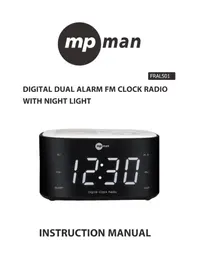
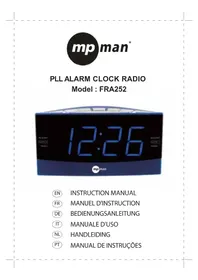
FRAL501 - Alarm Clock MPMAN - Free user manual and instructions
Find the device manual for free FRAL501 MPMAN in PDF.


| Product Type | Digital clock radio with dual alarm |
| Power supply | 230 V ~ 50 Hz |
| Power consumption | 5 W |
| FM reception range | 87,5 - 108,0 MHz |
| Number of radio presets | 20 stations (auto or manual) |
| Alarms | 2 independent alarms (AL1/AL2) with source selection (FM radio or buzzer) |
| Snooze | 9 minutes |
| Sleep timer | 5, 15, 30, 45, 60, 90, 120 minutes |
| Nap timer | 5, 15, 30, 45, 60, 90, 120 minutes |
| Night light | Yes, activate by long press on SNOOZE / NIGHT LIGHT |
| Screen brightness adjustment | 2 levels (high/low) via DIMMER button |
| Time display | 12 or 24 hours |
| Backup battery | 2 LR06/AA batteries (not included) for temporary time backup |
| Antenna | FM wire (fully extend for best reception) |
| Maintenance and cleaning | Unplug before cleaning; use a soft dry cloth; do not use liquids or aerosols |
| Safety | Do not expose to water; disconnect the mains plug to cut power; do not pull on the cord |
| Spare parts and repairability | Contact MPMAN / JME SA consumer service (address in manual); no user-serviceable parts |
| General information | Made in PRC; compliant with EU directives (EMC and R&TTE) |
Frequently Asked Questions - FRAL501 MPMAN
User questions about FRAL501 MPMAN
0 question about this device. Answer the ones you know or ask your own.
Ask a new question about this device
Download the instructions for your Alarm Clock in PDF format for free! Find your manual FRAL501 - MPMAN and take your electronic device back in hand. On this page are published all the documents necessary for the use of your device. FRAL501 by MPMAN.
USER MANUAL FRAL501 MPMAN
TO REDUCE THE RISK OF FIRE OR ELECTRIC SHOCK, DO NOT EXPOSE THIS APPARATUS TO RAIN OR MOISTURE.

The lighting flash with arrowhead symbol, with an equilateral triangle is intended to alert the user to the presence of uninsulated dangerous voltage within the products enclosure that may be of sufficient magnitude to constitute a risk of electric shock to persons.
CAUTION
RISK OF ELECTRIC SHOCK DO NOT OPEN
CAUTION: TO REDUCE THE RISK OF ELECTRIC SHOCK, DO NOT REMOVE COVER (OR BACK). NO USER SERVICEABLE PARTS INSIDE REFER SERVICING TO QUALIFIED SERVICE PERSONNEL.

The exclamation point within an equilateral triangle is intended to alert the user to the presence of important operating and maintenance (servicing) instruction in the literature accompanying the appliance.
CAUTION: THE CLOCK RADIO MUST NOT BE USED IN ANY ENVIRONMENT WHERE IT MAY BE SUBJECT TO THE DRIPPING OR SPLASHING OR WATER OR OTHER LIQUIDS.
DO NOT CONNECT THE ANTENNA WIRE ON THE BACK OF THIS SET TO ANY OUTDOOR ANTENNA
Mains plug is used as the disconnect device. It shall remain readily operable and should not be obstructed during intended used. To be completely disconnected the apparatus from supply mains, the mains plug of the apparatus shall be disconnected from the mains socket outlet completely.
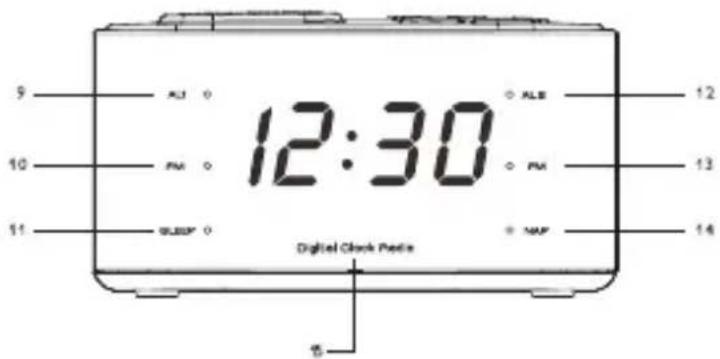
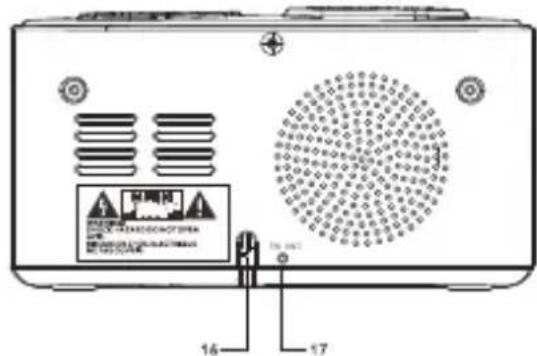
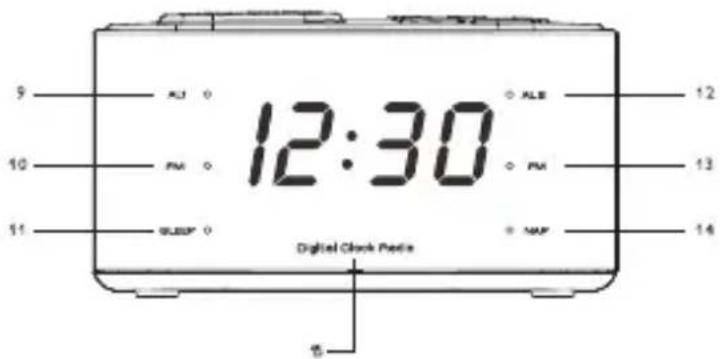
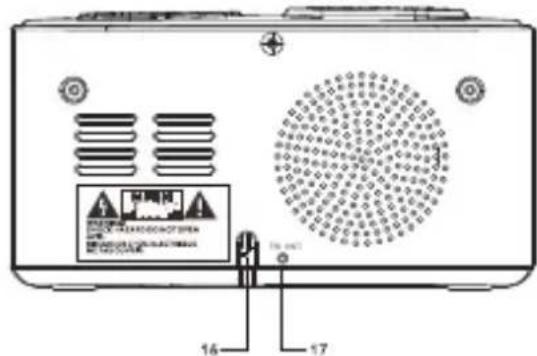
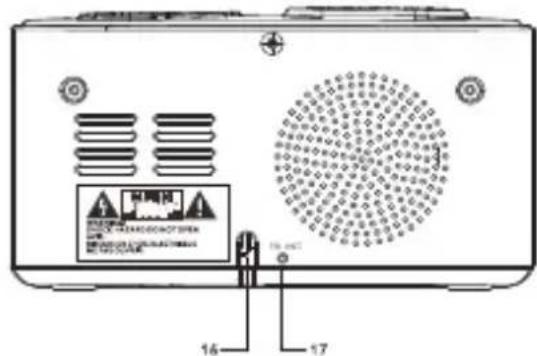
LOCATION OF CONTROL
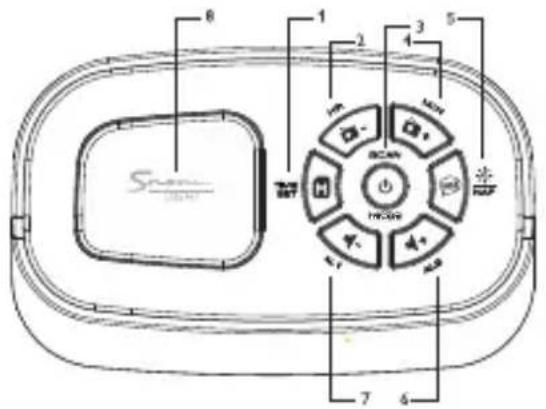
- MEMORY / TIME SET
- TUNING DOWN / HOUR
- ⏻ / AUTO
- TUNING UP / MINUTE
- DIMMER / SLEEP/ NAP
- VOLUME + / AL2
- VOLUME - / AL1
- SNOOZE / NIGHT LIGHT
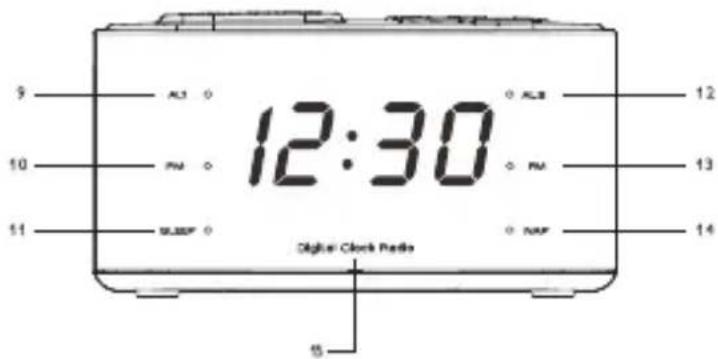
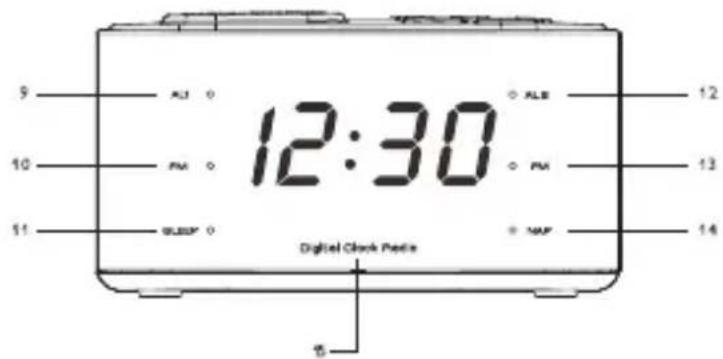
- AL1 INDICATOR
-
PM INDICATOR
-
SLEEP INDICATOR
- AL2 INDICATOR
- FM INDICATOR
- NAP INDICATOR
- DIGITAL DISPLAY
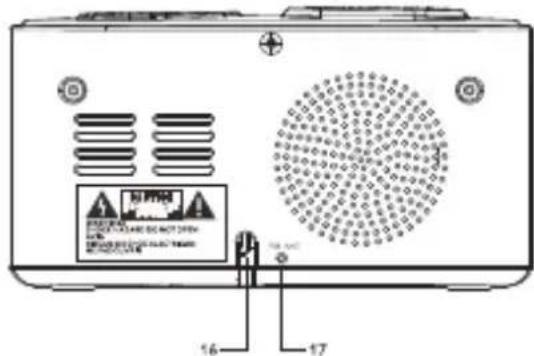
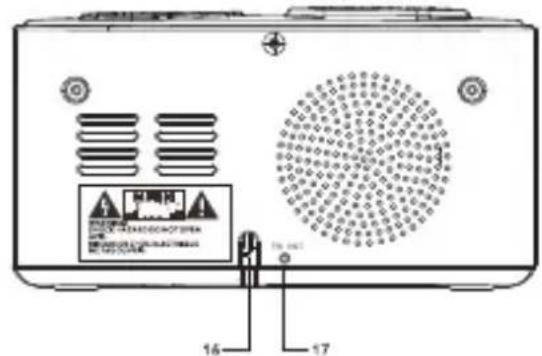
- AC CORD OUT
- FM ANTENNA WIRE
CONNECT POWER
CAUTION
Risk of product damage! Ensure that the power voltage corresponds to the voltage printed on the back or underside of the clock radio.
Risk of electric shock! When you unplug, always pull the plug from the socket. Never pull the cord.
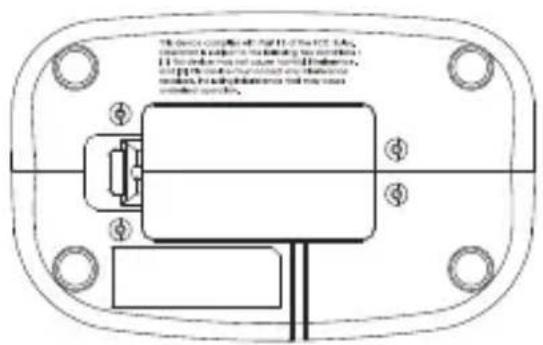
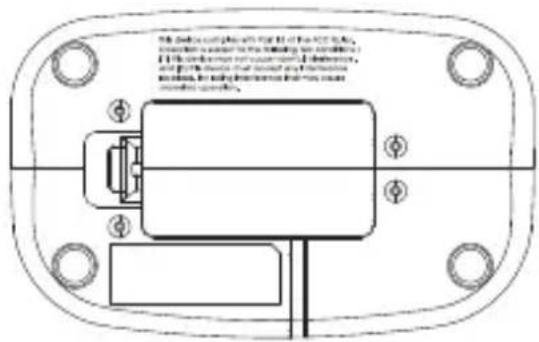
BOTTOM OF SET
Battery compartment for 1.5 volt (LR6, UM-3, AA) battery 2pcs. (not included) for temporary time storage.
SET TIME
Press and hold TIME SET for two seconds.
-
Preset 24 shows 24 hour mode.
-
Press TUNING + - to select 24 or 12 hour mode.
-
Press TIME SET to confirm 24 or 12 hour mode.
■ [0:00] Hour digit is blink or [12:00] Hour digit is blink. - Press TUNING - to set hour.
- Press TUNING + to set minute
- Press TIME SET again to confirm setting or the setting will be confirmed automatically if no button is used within 3 seconds.
LISTEN TO FM RADIO
For better reception, fully extend and adjust the position of the FM antenna wire.
- AUTO to turn on FM radio.
■ [FM frequency] is displayed and FM indicator is light up.
2. Press TUNING + - for two seconds.
■ The FM Tuner tunes to a station with strong reception automatically.
To search for a radio station manually:
Press TUNING repeatedly to tune to a radio station
STORE FM RADIO STATIONS
You can store up to 20 FM radio stations in preset channel automatically or manually.
STORE FM RADIO STATIONS AUTOMATICALLY (AUTO SCAN)
- Press ⏻/ AUTO to turn on FM radio for 2 seconds.
■ The received stations are automatically stored to preset numbers.
STORE FM RADIO STATIONS MANUALLY
- Tune to an FM radio station.
- Press MEMORY to activate the storing mode.
- Press TUNING + - to select the preset number.
- Press MEMORY again to store the radio station.
■ [P 01 \~ P 20] is preset station numbers.
■ If this position is occupied, the previous stored frequency will be displayed;
■ To remove a pre-stored FM radio station, store another station in its place.
LISTEN TO A PRESET FM RADIO STATION
- In FM mode, press MEMORY to select a preset number.
- Press TUNING + - to select preset station.
Note
The digit display return to clock display if no buttons is pressed for 10 seconds
SET ALARM TIMER
Make sure that you have set the clock correctly.
You can set two separate alarm timers. For the alarm sound, you can select the FM radio or the buzzer.
- Press ⏻/ AUTO to Clock mode.
- Press and hold AL1/AL2 for two seconds.
■ [0:00] Hour digit is blink. - Press TUNING - to set the alarm hour and TUNING + to set the alarm minute.
-
Press AL1/AL2 to confirm setting.
-
Press AL1/AL2 again to select a sound source: FM or BUZZER.
■ The current FM radio frequency is blink if FM radio source is selected and AL1 / AL2 indicator is light up.
■ [bb] is blink if the buzzer sound is selected and AL1 / AL2 indicator is light up.
■ Press AL1/AL2 to off alarm function and AL1/AL2 indicator is off.
■ Press TIME SET to confirm setting or the setting will be confirmed automatically if no button is used within 3 seconds.
SNOOZE ALARM
When alarm sounds, press SNOOZE / NIGHT LIGHT to activate the snooze time 9 minutes.
■ The AL1 / AL2 indicator keeps blinking.
SET SLEEP TIMER
- Press ⏻/ AUTO to radio mode.
- Press DIMMER/SLEEP/NAP multi-function button repeatedly to select the sleep timer period (in minutes).
■ When the sleep timer is activated, Sleep indicator is light on.
To deactivate the sleep timer, press DIMMER/SLEEP/NAP multi-function button repeatedly until back to radio frequency.
SET NAP TIMER
- Press ⏻/ AUTO to clock mode.
- Press DIMMER/SLEEP/NAP repeatedly to select the NAP timer period (in minutes).
■ When the nap timer is activated, NAP indicator is light up. To deactivate the nap timer, press DIMMER/SLEEP/NAP repeatedly until NAP indicator off.
Sleep / Nap Timer period circle as follow :

ADJUST VOLUME
While listening, press + VOLUME – to adjust volume.
TURN ON NIGHT LIGHT
Press SNOOZE / NIGHT LIGHT button to on and off the night light except during alarming as this button is worked as Snooze button.
Press and hold DIMMER for 2 seconds repeatedly to select high or low brightness levels.
BATTERY BACK-UP
(For Temporary Time Storage Only)
Install 2 x LR06, AA or EU-3 battery (not included) according to polarity shown inside the battery compartment. In the event of a power interruption, your set will not work normally from the mains supply but there is now the advantage that your clock will continue to work. The clock display will not light up, as the clock time will be held in the memory. This also enables you to move the set from place to place without re-setting the clock every time. The battery back-up system is only meant to be used from short temporary power interruption. For longer durations, the battery may become exhausted or there may be some deviation in accuracy. When the battery is exhausted, it should be removed from the set to prevent leakage. If you do not wish to take advantage of the battery back-up system, your set will work normally without a battery. However, if disconnected from the mains, the clock figures will flash when the mains are re-connected and you must re-set the clock as described in the Electronic Clock Operation paragraph.
Attention should be drawn to the environmental aspects of battery disposal. Don't throw used batteries in dustbin. Please contact your retailer in order to protect the environment.
Attention should be drawn to the environmental aspects of battery disposal.
Electrical products should not be disposal of with household waste. Please recycle where facilities exist. Check with your Local Authority of retailer for recycling device.
(Batteries pack or batteries installed) shall not be exposed to excessive heat such as sunshine, fire or the like.
SPECIFICATION
Power Source : 230V \~50Hz
Tuner Range : FM 87.5-108.0MHz
Power Consumption : 5W
Product information is subject to change without prior notice.

This is to certify that FRAL501 is in conformity with:
Council directive 89/336/EEC (EMC direction):
Applicable standards:
EN55013:2001+A1:2003+A2:2006
EN61000-3-2:2006+A1:2009+A2:2009
EN61000-3-3:2008
EN55020:2007
Made in PRC
For more information please visit our website
www.mpmaneurope.com

FRAL501
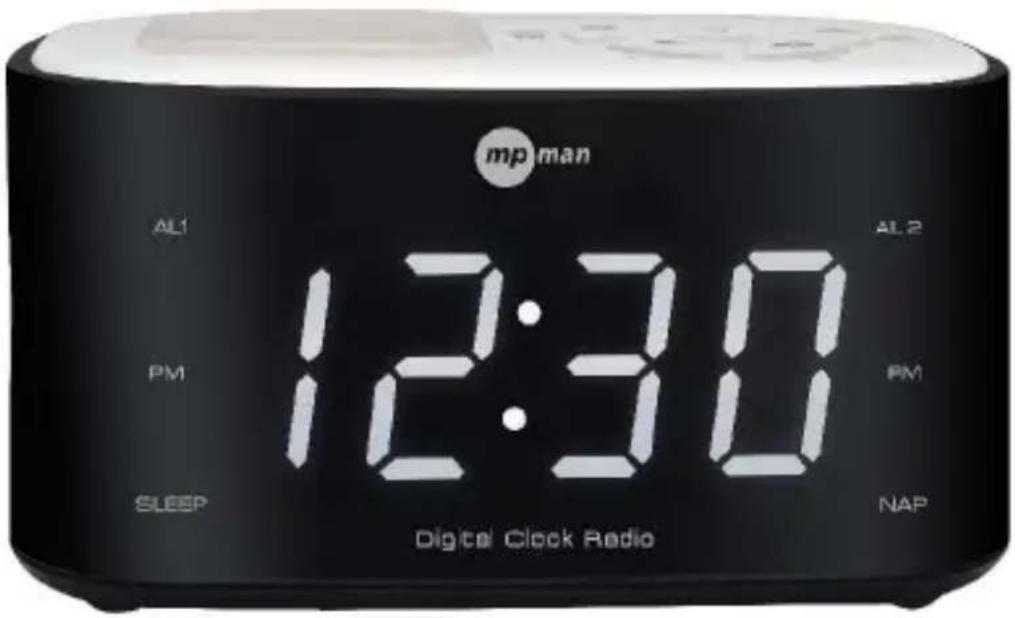
RADIO-RÉVEIL FM DOUBLE ALARME NUMÉRIQUE AVEC LUMIÈRE DE NUIT
MANUEL D'INSTRUCTION
AVERTISSEMENT :
POUR RÉDUIRE LE RISQUE D'INCENDIE OU DE CHOC ÉLECTRIQUE, N'EXPOSEZ PAS CET APPAREIL À LA PLUIE OU L'HUMIDITÉ.

RISQUE D'ELECTROCHOC NE PAS OUVRIR
PRÉCAUTION : POUR RÉDUIRE LE RISQUE DE CHOC ÉLÉCTRIQUE, N'ENLEVEZ PAS LA PROTECTION (OU L'ARRIÈRE). AUCUNE PIÈCE UTILISABLE PAR L'UTILISATEUR À L'INTÉRIEUR, CONFIEZ LES RÉPARATIONS À UN TECHNICIEN QUALIFIÉ.

- MÉMOIRE/ RÉGLAGE DE L'HEURE
- RÉGLAGE - / HEURE
- ⏻ / AUTO
- REGLAGE HAUT / MINUTE
- VARIATEUR / VEILLE / SIESTE
- VOLUME + / AL2
- VOLUME - / AL1
-
REPORT D'ALARME / LUMIÈRE DE NUIT
-
INDICATEUR AL1
- INDICATEUR PM
- INDICATEUR VEILLE
- INDICATEUR AL2
- INDICATEUR FM
- INDICATEUR DE SIESTE
- ÉCRAN NUMÉRIQUE
- SORTIE CORDON AC
- ANTENNE FM FIL
PRISE D'ALIMENTATION
ATTENTION
- MEMORY / TIME SET
- TUNING DOWN / HOUR
- ⏻ / AUTO
- TUNING UP / MINUTE
- DIMMER / SLEEP/ NAP
- VOLUME + / AL2
- VOLUME - / AL1
- SNOOZE / NIGHT LIGHT
-
AL1 INDICATOR
-
PM INDICATOR
- Einschlafanzeige
- AL2 -Anzeige
- UKW-Anzeige
- Countdown-Anzeige
- Digitalanzeige
- Netzkabel
- UKW-Antennendraht
- MEMORY / TIME SET
- TUNING DOWN / ORE
- ⏻ / AUTO
- TUNING UP / MINUTI
- DIMMER / SLEEP/ NAP
- VOLUME + / AL2
- VOLUME - / AL1
- SNOOZE / NIGHT LIGHT
-
INDICATORE AL1
-
INDICATORE PM
- INDICATORE SLEEP
- INDICATORE AL2
- INDICATORE FM
- NDICATORE NAP
- DISPLAY DIGITALE
- USCITA ALIMENTAZIONE
- CAVO ANTENNA FM
- MEMORY / TIME SET
- TUNING DOWN / HOUR
- ⏻ / AUTO
- TUNING UP / MINUTE
- DIMMER / SLEEP/ NAP
- VOLUME + / AL2
- VOLUME - / AL1
- SNOOZE / NIGHT LIGHT
-
AL1-INDICATOR
-
PM-INDICATOR
- SLAAPINDICATOR
- AL2-INDICATOR
- FM-INDICATOR
- NAP-INDICATOR
- DIGITAAL DISPLAY
- NETSNOER-UITGANG
- FM-ANTENNEDRAAD
STROOM AANSLUITEN
LET OP
MANUAL DE INSTRUÇÕES
ATENÇÃO:
PARA REDUZIR O RISCO DE INCÊNDIOS E CHOQUES ELÉTRICOS, NAO EXPONHA AS ESSE APARELHO A CHUVA OU UMIDADE.

- MEMÓRIA / AJUSTAR HORA
- SINTONIZAR ABAIXO / HORA
- ⏻ / AUTOMÁTICO
- SINTONIZAR ACIMA / MINUTO
- AJUSTAR BRILHO / DORMIR / COCHILO
-
- VOLUME / AL2
-
- VOLUME / AL1
-
SONECA / LUZ NOTURNA
-
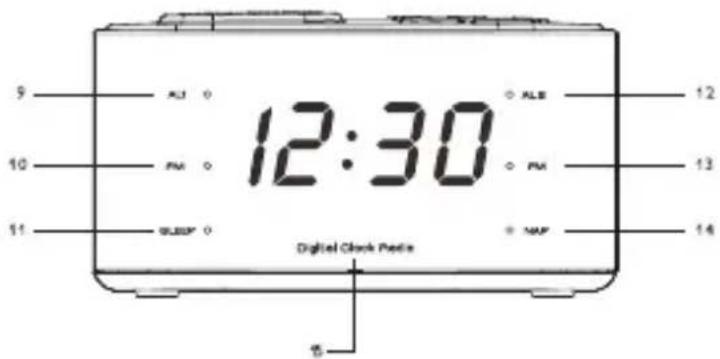
INDICADOR DO AL1
- INDICADOR DE PM
- INDICADOR DE DORMIR
- INDICADOR DO AL2
- INDICADOR DE RÁDIO
- INDICADOR DE COCHILO
- TELA DIGITAL
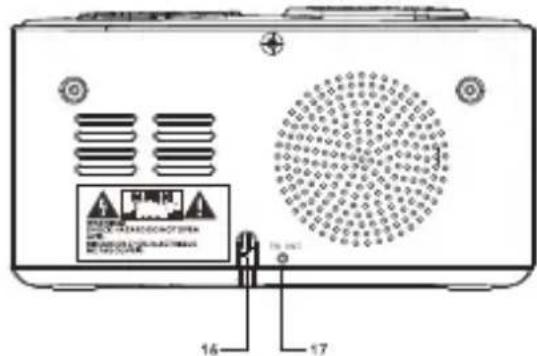
- SAÍDA DO FIO DE ENERGIA
- FIO DA ANTENA DO RÁDIO
CONECTANDO NA TOMADA
CUIDADO
Directiva de concelho 89/336/EEC (direcção EMC):
Padrões aplicáveis:
EN55013:2001+A1:2003+A2:2006
EN61000-3-2:2006+A1:2009+A2:2009
EN61000-3-3:2008
EN55020:2007
Fabricado na RPC

- CAUTION
- RISK OF ELECTRIC SHOCK DO NOT OPEN
- LOCATION OF CONTROL
- CONNECT POWER
- BOTTOM OF SET
- SET TIME
- LISTEN TO FM RADIO
- STORE FM RADIO STATIONS
- STORE FM RADIO STATIONS MANUALLY
- LISTEN TO A PRESET FM RADIO STATION
- Note
- SET ALARM TIMER
- SNOOZE ALARM
- SET SLEEP TIMER
- SET NAP TIMER
- ADJUST VOLUME
- TURN ON NIGHT LIGHT
- BATTERY BACK-UP
- SPECIFICATION
- RADIO-RÉVEIL FM DOUBLE ALARME NUMÉRIQUE AVEC LUMIÈRE DE NUIT
- MANUEL D'INSTRUCTION
- AVERTISSEMENT :
- RISQUE D'ELECTROCHOC NE PAS OUVRIR
- PRISE D'ALIMENTATION
- ATTENTION
- STROOM AANSLUITEN
- LET OP
- ATENÇÃO:
- CONECTANDO NA TOMADA
- CUIDADO
Brand : MPMAN
Model : FRAL501
Category : Alarm Clock