FRA115 - Alarm Clock MPMAN - Free user manual and instructions
Find the device manual for free FRA115 MPMAN in PDF.


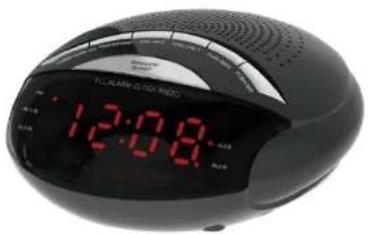
| Product Type | Clock Radio |
| Brand | MPMAN |
| Model | FRA115 |
| Power Supply | AC 230V 50Hz / DC 6V 200mA Adapter |
| Backup Batteries | 2 AA batteries (UM-3, LR6) |
| Radio Type | AM / FM |
| AM Frequency Range | 522 - 1620 kHz |
| FM Frequency Range | 87.5 - 108 MHz |
| Number of Preset Stations | 10 stations (AM and FM) |
| Alarm Functions | 2 independent alarms (AL1, AL2) with choice of buzzer or radio |
| Snooze Function | Yes (9-minute delay) |
| Sleep Function | Yes (adjustable timer up to 90 minutes) |
| Display | LED for clock and radio frequency |
| Speaker | Built-in |
| FM Antenna | Wire antenna |
| Maintenance | Clean with a dry, soft cloth |
| Safety | Do not expose to water, flames, or obstruct ventilation |
Frequently Asked Questions - FRA115 MPMAN
User questions about FRA115 MPMAN
0 question about this device. Answer the ones you know or ask your own.
Ask a new question about this device
Download the instructions for your Alarm Clock in PDF format for free! Find your manual FRA115 - MPMAN and take your electronic device back in hand. On this page are published all the documents necessary for the use of your device. FRA115 by MPMAN.
USER MANUAL FRA115 MPMAN
TO REDUCE THE RISK OF FIRE OR ELECTRIC SHOCK, DO NOT EXPOSE THIS APPARATUS TO RAIN OR MOISTURE.
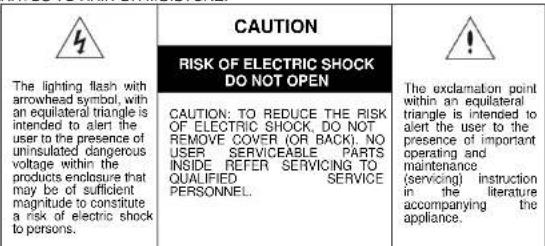
WARNING
The ventilation should not be impeded by covering the ventilation openings with items, such as newspapers, table-cloths, curtains, etc.
No naked flame sources, such as lighted candles, should be placed on the apparatus.
- It shall not be exposed to dripping or splashing and that no objects filled with liquids, such as vases, shall be placed on the apparatus.
Do not place the product in closed bookcases or racks without proper ventilation.
- The batteries (Battery pack or batteries installed) shall not be exposed to excessive heat such as sunshine, fire or the like.
- Excessive sound pressure from earphones and headphones can cause hearing loss.
- Where the mains plug or an appliance coupler is used as the disconnect device, the disconnect device shall remain readily operable.
QUICK REFERENCE
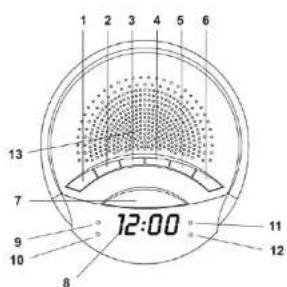
1. SOURCE/AL OFF
- Use this button to select AM or FM band.
- Use this button to turn the ALARM off after Alarm activates.
2. TIME/MEM/M+
Use this button to set the clock
Use this button to store radio stations in the memory.
3. VOL-/AL2
- Use this button to decrease the volume.
Use this button to set the alarm time in ALABM 2.
4. VOL+/AL1
Use this button to increase the volume.
- Use this button to set the alarm time in ALARM 1.
5.TUN-/MIN
- Use this button to search the radio station in backward direction.
Use this button to adjust the minute in CLOCK or ALARM time.
6. TUN +/HR
- Use this button to search the radio station in forward direction.
- Use this button to adjust the hour in CLOCK or ALARM time.
7. SNOOZE/SLEEP
- Use this button to temporarily suspend the ALARM for a short period.
Use this button to set the sleep time.
8. LED DISPLAY
- Display for the clock and the radio frequency.
9. AL1-B INDICATOR
This indicator shows that the unit is in ALARM-1 buzzer mode.
10. AL1-R INDICATOR
This indicator shows that the unit is in ALARM-1 radio mode.
11. AL2-BINDICATOR
This indicator shows that the unit is in ALARM-2 buzzer mode.
12. AL2-R INDICATOR
This indicator shows that the unit is in ALARM-2 radio mode.
13. SPEAKER
Sound output.
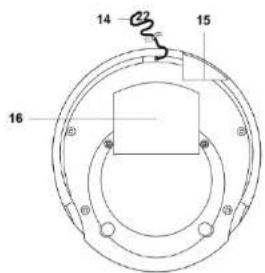
14. FM WIRE ANTENNA
- Extent this wire antenna to obtain better FM broadcasting.
15. DC JACK
- Connect the unit to the AC/DC adaptor.
16. BATTERY COMPARTMENT
- Compartment for the back-up battery.
CONNECTING THE UNIT TO POWER
Plug one end of the AC adaptor into the DC power Input, and then plug the other end into AC wall outlet. Before switching on the unit, make sure that the voltage of your electricity supply is the same as that indicated on the rating plate.
BATTERY Backup
Insert two pieces UM-3 batteries into the battery compartment. Be sure to observe the proper polarity (the "+" and "-" signs) as indicated inside the battery compartment.
In case of power failure or interrupted AC power, the current time and alarm time settings, the stored radio stations are preserved in the memory of the unit by means of battery back-up function.
SETTING THE CLOCK
- With the unit in CLOCK mode, press and hold the TIME/MEM/M+ button for about 1 second. The time will begin to flash on the LED display.
- Press the TUN+/HR button to adjust the hour.
- Press the TUN-MIN button to adjust the minute
- When the correct time is selected, press the TIME/MEM/M+ button again to confirm.
SETTING THE ALARMS
- With the unit in CLOCK mode, press the VOL+/AL1 or VOL-/AL2 button. The ALARM time will begin to flash on the LED display.
- Press the TUN- · HR button to adjust the alarm hour.
- Press the TUN-/MIN button to adjust the alarm minute.
- When the correct time is selected, press the VOL+/AL1 or VOL-/AL2 button to confirm.
- Press the VOL+AL1 or VOL-AL2 to select the ALARM sound mode - buzzer or currently set radio station. The alarm buzzer or radio indicator will light up.
SNOOZE FUNCTION
- Whenever the alarm (radio or buzzer) activates, it can be temporarily suspended for a short period of 9 minutes by pressing the SNOOZE button once.
- The buzzer or radio will then automatically activate again after the 9 minutes SNOOZE period has ended.
- This procedure can be repeated for up to approximately one hour.
TURN OFF THE ALARM
When the Alarm activate, press the SOURCE/AL. OFF button to turn off the Alarm.
LISTENING TO THE AM:FM RADIO
- Press the SOURCE/AL OFF button to select AM or FM band
- Press the TUN+HR or TUN-MIN buttons step by step to tune to the desired radio stations.
- Press and hold the TUN+/-HR or TUN-MIN buttons for approx. 1 second, it will start to search the next radio station in the direction of the search. The search operation simply finds stations with strong signals. Stations with weak reception can only be tuned in manually.
SAVING A RADIO STATION TO THE MEMORY
- Tune the radio to the desired station
- Press and hold the TIME/MEM/M+ button for approx... 1 second, it will store this radio station in the memory.
- Up to 10 AM and 10 FM radio stations can be stored in the memory.
TO LISTEN TO A SAVED RADIO STATION
- Press the SOURCE/AL. OFF button to select AM or FM band.
- Press the TIME/MEM/M+ button to select the stored radio station.
- This function allows you to listen to the radio while you fall asleep.
- Press the SNOOZE/SLEEP button, the display will show the default sleep time of 90 minutes and the SLEEP Indicator will start to flash.
- Press the SLEEP button again to adjust the desired sleep time.
- Now you can enjoy listening to the radio for the pre-set period of sleep time.
- After this pre-set time has elapsed, the unit will switch off automatically.
SPECIFICATIONS
Frequency Range: AM 522 - 1620 KHz
FM87.5-108
Power Supply: AC 230V ~ 50 Hz
AC/DC Adaptor DC6V 200mA
Back-Up Battery: 2 pc. UM3 AA size
Specifications are subject to change without prior notice.
-EN4

This is to certify that FRA115 is in conformity with:
Council directive 2004/108/EC (EMC direction):
Applicable standards:
EN55013:2001+A1:2003+A2:2006
EN61000-3-2:2006+A1:2009+A2:2009
EN61000-3-3:2008
EN55020:2007
Made In PRO
For more information please visit our website
www.mpmaneurope.com
-EN5
RADIO RÉVEIL ALARME PLL
Modèle:FRA115
MANUEL D'INSTRUCTION
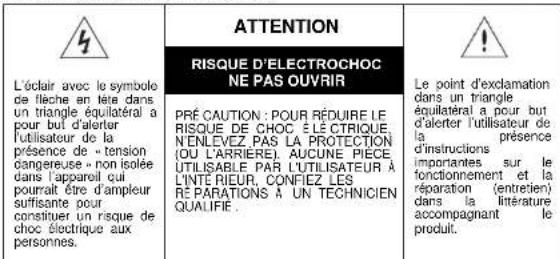
AVERTISSEMENT:
POUR RÉDUIRE LE RISQUE D'INCENDIE OU DE CHOC É LECTRIQUE, N'EXPOSEZ PAS CET APPAREIL À LA PLUIE OU L'HUMIDITÉ.
AVERTISSEMENT
Standard applicabill:
EN55013:2001+A1:2003+A2:2006
EN61000-3-2:2006+A1:2009+A2:2009
EN61000-3-3:2008
EN55020:2007
Costruito nella RPC
Directa de concelho 2004/108/EC (direcao EMC):
Padroes aplicaveis:
EN55013:2001+A1:2003+A2:2006
EN61000-3-2:2006+A1:2009+A2:2009
EN61000-3-3:2008
EN55020:2007
Fabricado na RPC

- WARNING
- QUICK REFERENCE
- SOURCE/AL OFF
- TIME/MEM/M
- VOL-/AL2
- VOL+/AL1
- 5.TUN-/MIN
- TUN +/HR
- SNOOZE/SLEEP
- LED DISPLAY
- AL1-B INDICATOR
- AL1-R INDICATOR
- AL2-BINDICATOR
- AL2-R INDICATOR
- SPEAKER
- FM WIRE ANTENNA
- DC JACK
- BATTERY COMPARTMENT
- CONNECTING THE UNIT TO POWER
- BATTERY BACKUP
- SETTING THE CLOCK
- SETTING THE ALARMS
- SNOOZE FUNCTION
- TURN OFF THE ALARM
- LISTENING TO THE AM:FM RADIO
- SAVING A RADIO STATION TO THE MEMORY
- TO LISTEN TO A SAVED RADIO STATION
- SPECIFICATIONS
- RADIO RÉVEIL ALARME PLL
- MODÈLE:FRA115
- MANUEL D'INSTRUCTION
- AVERTISSEMENT
Brand : MPMAN
Model : FRA115
Category : Alarm Clock