
SGYPM910H - Meter PIONEER - Free user manual and instructions
Find the device manual for free SGYPM910H PIONEER in PDF.


| Product Type | ANT+ Power Meter |
| Model | SGYPM910H |
| Brand | Pioneer |
| Total Weight | Approximately 66 g |
| Dimensions (right transmitter) | 58.3 mm (L) × 46.1 mm (H) × 21.3 mm (P) |
| Dimensions (junction box + cover) | 78 mm (L) × 36.7 mm (H) × 7.3 mm (P) |
| Dimensions (left pedal monitoring sensor) | 92.5 mm (L) × 34.7 mm (H) × 8.6 mm (P) |
| Power Supply | 2 CR2032 batteries (pre-installed) |
| Water Resistance Rating | IPX-6 / IPX-7 |
| Wireless Communication | ANT+ (2.4 GHz band) |
| Operating Temperature | -10 °C to 50 °C |
| Operating Modes | Pedal Monitor (with SGX-CA500/CA900) and Power Meter (standard ANT+) |
| Main Functions | Pedaling force analysis (tangential and radial), efficiency calculation, zero point calibration, thermal correction |
| Compatible Cranksets | Shimano FC-9000 (165-175 mm, 50-34T to 55-42T) and FC-6800 (165-175 mm, 50-34T, 52-36T, 53-39T) |
| Included Accessories | Right and left transmitters, strain gauge units, junction box, magnets (patch and arm type), connection cable, covers, screws, ties, pads, user manual, warranty card |
| LED Indication | Green (pedal monitor mode), orange (power meter mode), red (pairing error) |
| Maintenance | Wipe with a soft, dry or slightly damp cloth. Do not use benzene, thinner, or chemical cleaners. Remove batteries if not used for extended periods. |
| Warranty | Refer to included warranty card |
| Certification | ANT+™ certified |
Frequently Asked Questions - SGYPM910H PIONEER
User questions about SGYPM910H PIONEER
0 question about this device. Answer the ones you know or ask your own.
Ask a new question about this device
Download the instructions for your Meter in PDF format for free! Find your manual SGYPM910H - PIONEER and take your electronic device back in hand. On this page are published all the documents necessary for the use of your device. SGYPM910H by PIONEER.
USER MANUAL SGYPM910H PIONEER
Pedaling Monitor Sensor
SGY-PM910H
User's Manual
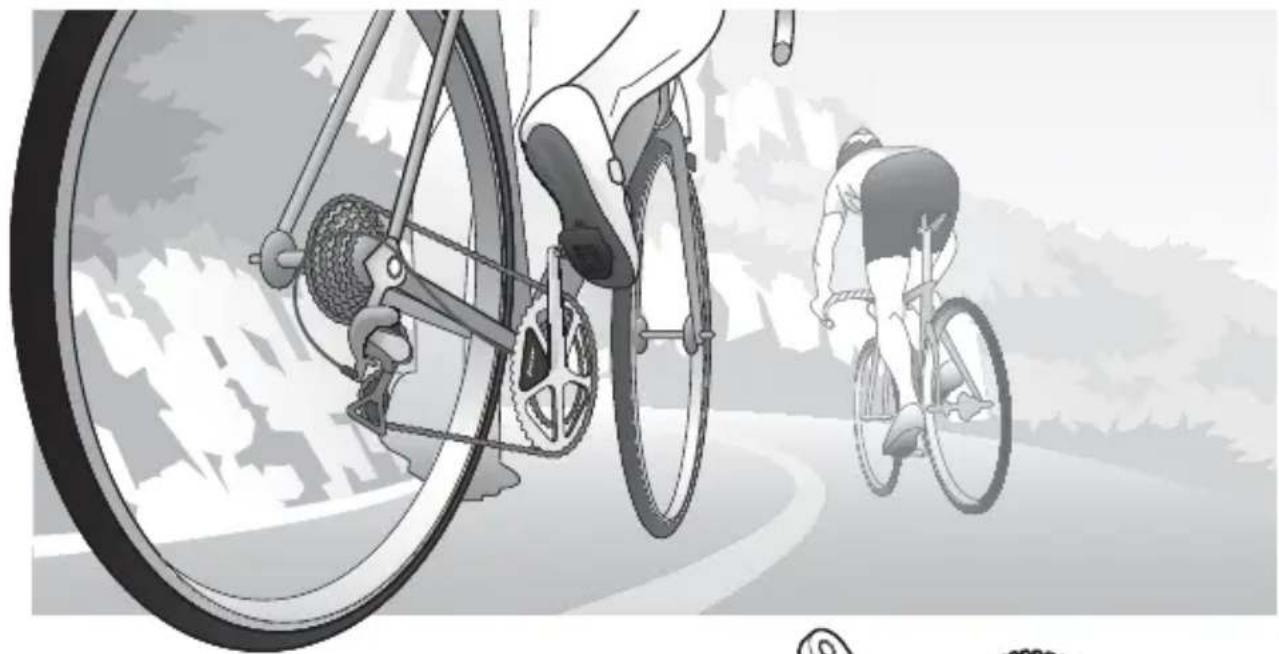
Please read the "Important Information for the User" in the product box for product warnings and other important safety information.
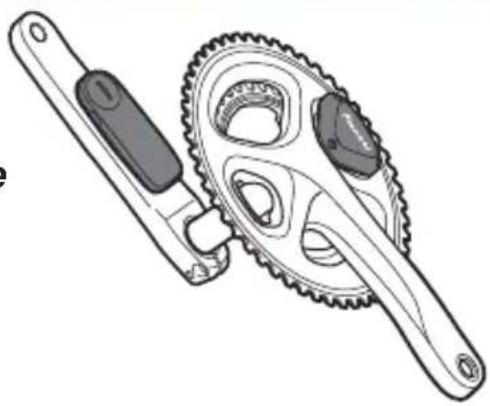
EN
Table of Contents
Introduction
Features 3
Manuals 3
Compatibility 4
Getting Started
Product Configuration 5
Accessories 5
7
Switching Modes 10
Pairing /Calibration
Pairing with the Cyclocomputer. 12
Calibrating the Sensors 14
Getting Ready 14
Calibrating the Zero Point 14
Checking the Zero Point 15
Calibrating in Power Meter Mode 15
Specifications and support
Troubleshooting 16
Care, Maintenance, and Storage 18
Specifications 19

This product is ANT + ^TM certified.
Visit http://www.thisisant.com/directory/ for a list of compatible products and apps.
Features
EN
This product is a sensor system that analyzes the pedaling of a bicycle in real time. It calculates the direction and intensity of the force acting on the pedals and calculates pedaling efficiency.
Description of components
Strain gauge unit: - Detects the strain on the crank and calculates the direction and intensity of the force on the crank.
Magnet: Transmitters:
- Used to detect the angle of rotation.
- Send information from the strain gauge unit and the magnet to the Cyclocomputer.
Switching modes
The push switch in the right transmitter changes the system to the following modes.
Pedaling monitor mode: Used in combination with the Cyclocomputer SGX-CA500/CA900. This mode calculates pedaling efficiency and maximizes the functionality of the product.
In this User's Manual, the case when it is used with SGX-CA500 is described as example.
Power meter mode: Used with a Cyclocomputer that supports ANT+.
Manuals
The product's manuals consist of this User's Manual, an Installation Manual, and Important Information for the User.
User's Manual:
Explains how to pair the product with the Cyclocomputer and calibrate the sensors.
Installation Manual:
[For American Users] http://www.pioneerelectronics.com
[For Canadian Users] http://www.pioneerelectronics.ca
[For European Users] http://www.pioneer.eu
Explains details about handling methods. The product installation methods
(for dealers) are also described as references.
Important Information for the User:
Important Information for the User provides detailed information related to safety.
Compatibility
Crank sets
The product is compatible with the following crank sets.
| Crank sets Remarks | |
| SHIMANO FC-9000 Crank lengths | of 165, 167.5, 170, 172.5, 175 mm, crank set · of 50-34T, 52-36T, 52-38T, 53-39T, 54-42T, 55-42T are compatible. * |
| SHIMANO FC-6800 Crank lengths | of 165, 170, 172.5, 175 mm, crank set of 50-· 34T, 52-36T, 53-39T are compatible. * |
- Descriptions in this manual are for a 170 mm crank set.
This product is designed to be used for recreational cycling and cycle training applications only and is not designed to withstand racing conditions.
Additionally, this product is designed to be used while cycling on paved roads only. Any damage or malfunction arising from use in racing or riding on dirt roads, cobblestone or any other unpaved roads will not be covered by the manufacturer's limited warranty.
Installing and calibrating the product requires specialized techniques and tools. If not already installed, ask the shop where you bought the product to install and calibrate it.
Product Configuration
EN
Accessories
This product contains the following parts.
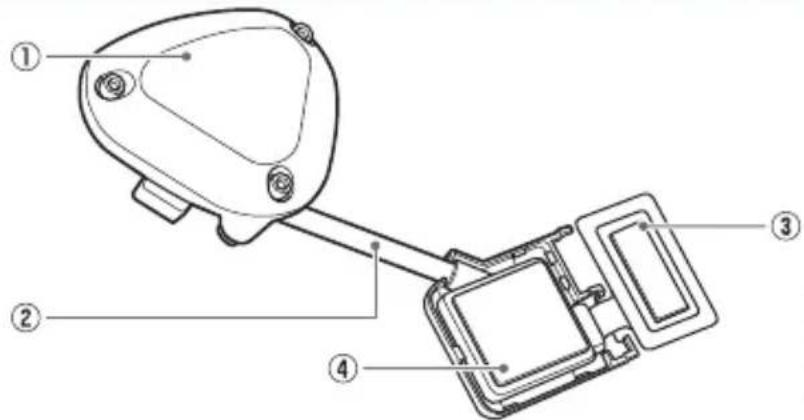
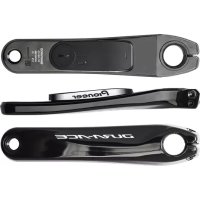
Pedaling monitor sensor (right side)
① Right transmitter
② Junction cable
③ Strain gauge unit
④ Junction box

Pedaling monitor sensor part (right side)
For FC-9000

For FC-6800
Strain gauge unit cover x 1
for each type
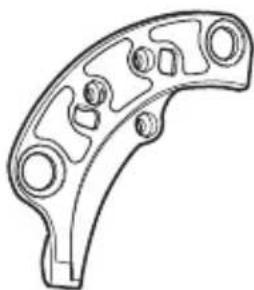
Chain ring adapter
Pedaling monitor sensor (left side)
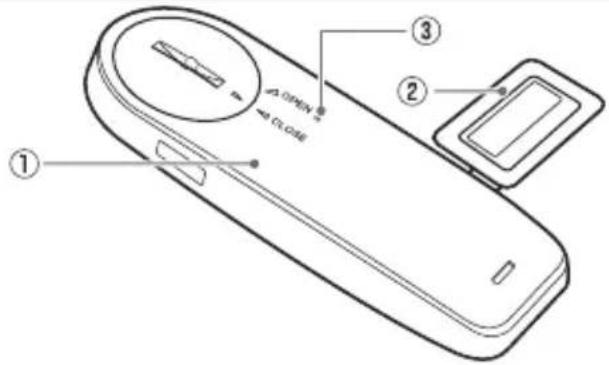
① Left transmitter
② Strain gauge unit
③ LED
Pedaling monitor sensor part (left side)
Magnet
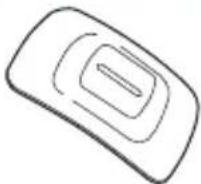
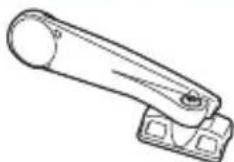
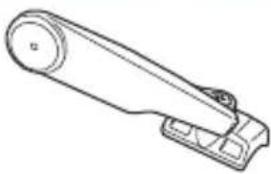
Patch type x 2 Arm type (right side) Arm type (left side)
Others
User's Manual (this document)
Warranty Card
Important Information for the User
Batteries (CR2032) x 2
(pre-installed in the left and right sensors)
Right transmitter cover (metallic gray)
Hex screws (M2.6 x 8mm) x 3
(for the right transmitter × 3
Hex screws (M2.6 x 5mm) x 3
(spare for the right transmitter cover x 3)
Cable ties x 10
(for the left magnet x 2, for the right magnet
× 2 spare × 6)
Cushions for the arm type magnet installation
X2
Installing and Removing the Batteries
EN
The batteries are pre-installed to this product. If the batteries are almost empty (see page 16), replace the batteries with new ones.
The product can be used as the ANT+ Power meter with the cyclocomputers of other companies (power meter mode).
The product starts in pedaling monitor mode when the batteries are installed. To use the product in power meter mode, switch the sensor mode (see page 10).
Replace the batteries of both the left and right sensors at the same time.
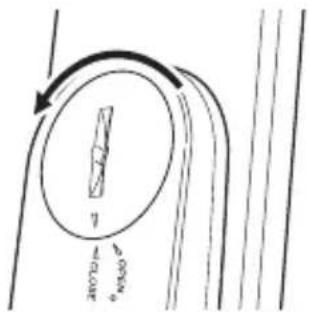
1. Remove the cover.
Be careful not to drop or lose the battery when removing the cover.
Right transmitter (screws: 3 x) Use a hex wrench (2 mm) to loos the screw and remove the cover.

Be careful not to lose the removed screw.
Left transmitter
Turn the cover to the left so the triangular arrow points to [OPEN] and remove it.
EN
Installing and Removing the Batteries
2. Remove the old battery.
Right transmitter
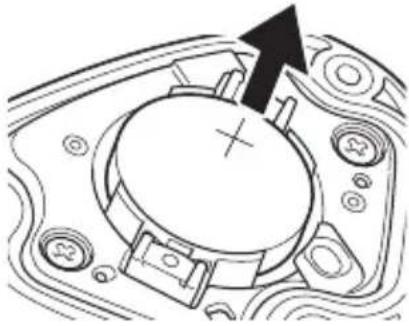
Left transmitter
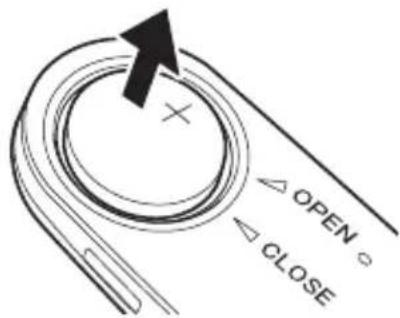
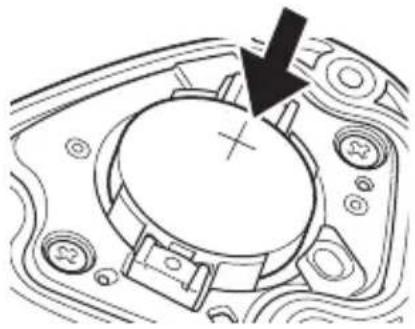
3. Install the new battery (CR2032).
Right transmitter
Left transmitter
After installing the battery, place the cover with the triangular arrow pointing to [OPEN], and turn it with coin to [CLOSE].
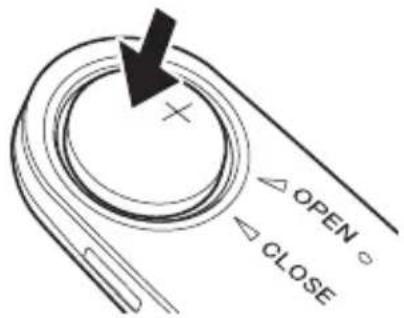
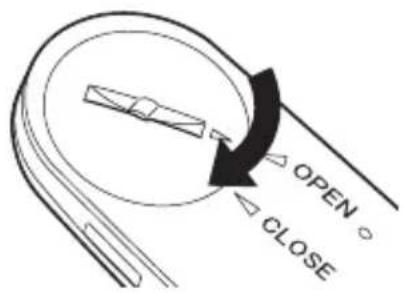
Be careful not to drop or lose the battery when installing it. Do not use batteries other than CR2032.
- Install the cover firmly to ensure water resistant performance.
4. Check the LED display.
The product starts in pedaling monitor mode when the batteries are installed. Check that the LEDs light green for 10 seconds.
If the LEDs do not light for more than 5 seconds after installing the batteries, remove the batteries once, and after more than 1 minute, install them again. If the LEDs still do not light, the battery may be almost empty. Replace the battery with a new one.
5. Install the right transmitter cover and tighten the screws to fix it in place.
Use a tool that can measure the torque to tighten the screws.
Tightening torque: 30cN· m
Install the transmitter cover and screw the screws in firmly to ensure water resistant performance.
Switching Modes
This section describes how to switch the sensor mode.
Please do not push the push switch in the right transmitter while calibrating the sensor or showing [Force Preview] with the Cyclocomputer SGX-CA500.
1. Loosen the screws on the right transmitter cover and remove the cover.
See page 7 to remove the right transmitter cover.
2. Start the sensors.
Rotate the bicycle's crank set more than three rotations to start the left and right transmitters.
3. Check the sensor modes.
By pushing the push switch in the right transmitter for less than 2 seconds, the LEDs on the right transmitter blink green. After then the LEDs on the left and right transmitters light as follows depending on the actual sensor mode.
Pedaling monitor mode:
The LEDs light green for 10 seconds.
Power meter mode:
The LEDs light orange for 10 seconds.
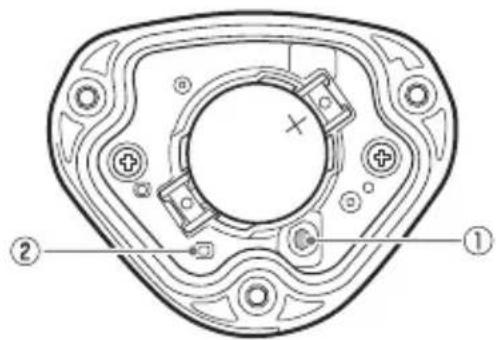
① Push switch
② LED
If the pairing between the left and right transmitters fails, the LEDs blink red 5 times.
4. Switch the sensor mode.
By pushing the push switch in the right transmitter for more than 2 seconds, the LEDs on the right transmitter blink green. After confirming the blink, release the push switch. When the blink stops, the LEDs on the left and right transmitters light as follows depending on the changed sensor mode.
Pedaling monitor mode:
The LEDs light green for 10 seconds.
Power meter mode:
The LEDs light orange for 10 seconds.
For use with Pioneer's SGX-CA500, set the sensor mode to pedaling monitor mode. For use with other cyclocomputer brands, set the sensor mode to power meter mode. Please do not push the push switch for more than 5 seconds. Doing so changes the mode to calibrate the magnet position. Refer to the Installation Manual for details. If the pairing between the left and right transmitters fails, the LEDs blink red 5 times.
It may take about 10 seconds to switch the sensor mode depending on the radio transmission conditions.
5. Install the right transmitter cover and tighten the screws to fix it in place.
Use a tool that can measure the torque to tighten the screws.
Tightening torque: 30cN· m
Install the transmitter cover and screw the screws in firmly to ensure water resistant performance.
Pairing with the Cyclocomputer
This section describes how to pair the installed SGY-PM910H pedaling monitor sensors on your bicycle to the SGX-CA500 Cyclocomputer.
- This pairing procedure may be different if you are using a cyclocomputer other than the Pioneer SGX-CA500/CA900. Please refer to your cyclocomputer's owner manual for sensor pairing.
1. Check the sensor modes.
Check that the right transmitter and the left transmitter are in "Pedaling monitor mode."
See page 10 to switch the modes.
2. Tap the [Sensors] icon in the home screen of the SGX-CA500.
The sensor list screen opens.
3. Rotate the bicycle's crank set more than three rotations to start the left and right transmitters.
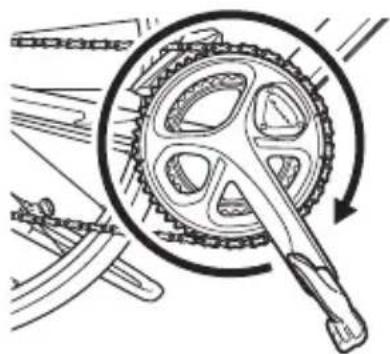
After the transmitters are activated, it may take more than 1 minute to pair with the Cyclocomputer.
Pair with the Cyclocomputer within 5 minutes after the transmitters are activated.
4. Tap [Connect New] in the sensor list screen of the SGX-CA500.
The sensor connection menu opens.
5. Tap [Device Type] and then [Pedaling Monitor R].
For the left transmitter, tap [Pedaling Monitor L].
If multiple sensors are activated, bring the main unit closer to the sensor, or specify the device number to pair the sensor you want to pair. Refer to the User's Guide of the Cyclocomputer SGX-CA500 regarding how to specify a device number to pair a sensor.
6. Tap [Search].
The search for the sensor starts.
A [Searching. Please wait.] message appears.
7. Check the information about the sensor.
Information about the sensors appears when the sensors are found.
Check the following items.
[Device Number]
Make sure that the device number is the same as the device number of the transmitter.
[Error Rate]
Make sure that "OK" is displayed.
| Pedaling Monitor R |
| Device Number 64 |
| Manufacturer Number 48 |
| Error Rate OK |
| Battery |
The device numbers are printed on the right junction box and on the side of the left sensor. Refer to the Installation Manual for details.
If the numbers that are displayed on [Device Number] are different from the transmitter device numbers, specify the device numbers to pair with the sensor.
Refer to the User's Guide of the Cyclocomputer SGX-CA500 regarding how to specify a device number to pair a sensor.
If "Processing..." is displayed in the [Error Rate] area, the information from the sensor is not being received correctly because transmission conditions are bad. Make sure that the sensor you are pairing is activated, then bring the SGX-CA500 closer to the sensor and perform the pairing operation again.
Pairing with the sensor may not be possible due to the influence of the 2.4 GHz frequency band. If "Processing..." is displayed even if the SGX-CA500 is moved closer to the sensor and paired with it, try again someplace where there is no interference from microwaves, radio waves, or wireless equipment.
Pairing of the right transmitter is completed.
Next, pair the left transmitter.
Calibrating the Sensors
This section describes how to use the Cyclocomputer SGX-CA500 to calibrate the zero point of the pedaling monitor sensor that is installed on the bicycle. Zero point calibration is a function to store the zero point (no-load), where no forces act on the crank, in the sensor memory.
The right-side pedaling monitor sensor is used as an example in this description. The procedure to calibrate the left side is the same as for the right side. Please do not push the push switch in the right transmitter while calibrating the sensor or showing [Force Preview] with the Cyclocomputer SGX-CA500.
Getting Ready
- Stop the bicycle on a flat safe place.
Calibrating the Zero Point
- Position the crank arm so it is perpendicular to the ground, pointing downward.
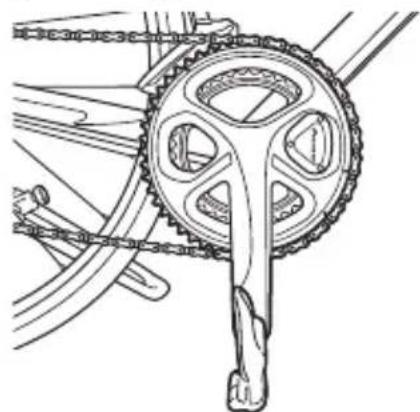
- Tap the [Sensors] icon in the home screen of the SGX-CA500.
The sensor list screen opens. - Tap [Pedaling Monitor R] and then [Calibration (Zero)].
- Tap [Start Calibration].
The calibration starts. If the calibration is successful, "Success" appears in the [Result] field. If "Failure" is displayed, the sensor may be calibrated in an unstable condition causing the crank to be moving during the calibration. Calibrate again with the crank stopped.
This product has a correction function for the zero point fluctuation caused by varying temperatures.
The accuracy of this function improves by calibrating the sensor when there is a difference in temperature of more than 4^ .
This function cannot measure correctly if you calibrate the sensor before it is acclimated to the outside temperature.
The sensor requires more than 20 minutes to become acclimated.
Checking the Zero Point
1. Position the crank arm so it is perpendicular to the ground, pointing downward.
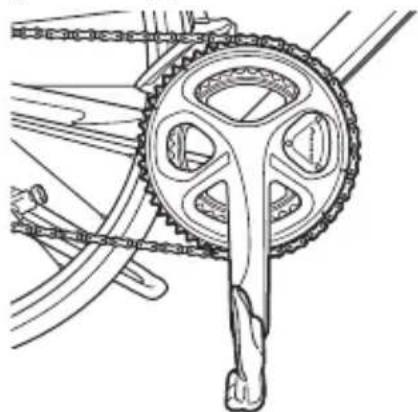
2. Tap [Pedaling Monitor R] in the sensor list screen of the SGX-CA500.
3. Confirm the value in [Force Preview].
Make sure that the [Tangential Direction Force] and [Radial Direction Force] values are as shown here. Tangential Direction Force: 0 ± 3N Radial Direction Force: 0 ± 3N
| Force Preview | |
| Tangential Force | ON |
| Radial Force | ON |
Calibration of the right side is finished. Calibrate the left side in the same way.
Calibrating in Power Meter Mode
When calibrating the sensors in power meter mode, position the crank arm so it is perpendicular to the ground, do the procedure to the left and right sides together. Refer to the User's Manual of the Cyclocomputer you are using for details.
Troubleshooting
Refer to the following suggestions if you have any problems installing or using the product. If you cannot find what you want to know here, ask the shop where you bought the product.
- I cannot pair with the Cyclocomputer in the power meter mode or pedaling monitor mode.
| Cause Solution | |
| The battery is almost empty. If the LEDs do not light for more than 5 seconds after installing the batteries, remove the batteries once, and after more than 1 minute, install them again. If the LEDs still do not light, the battery may be almost empty. Replace the battery with a new one. | |
| (+) or (-) side of the battery is installed in the opposite side. | Install the battery in the proper side (see page 7). |
| Pedaling monitor sensor mode is wrong. | Check the mode and pair with the Cyclocomputer again (see page 10). |
| There are other wireless equipment or microwave ovens near by. | Move away from other wireless equipment or microwave ovens. Move the sensor closer to the Cyclocomputer and pair them. |
| Another sensor is paired with the Cyclocomputer. | Move away from other sensors by more than 10 m or specify the device number to pair the Cyclocomputer. Refer to the Installation Manual. |
I cannot pair with the Cyclocomputer in the power meter mode.
| Cause Solution | |
| Pairing between right and left sensors fails. | Check the sensor mode by pushing the push switch. If the left and right LEDs do not light orange, push and hold the push switch to switch to power meter mode (see page 10). |
Zero point calibration fails.
| Cause Solution | |
| The crank is subjected to external force or moving. | Calibrate the sensor in still condition (see page 14). |
The Cyclocomputer display is not displaying correctly while I am riding.
| Cause Solution | |
| Zero point calibration fails. Calibrate the sensor when the values in [Force Preview] are more than ±3 N (see page 14). | |
There is a rattling noise when I am riding.
| Cause Solution | |
| Screws used to install the sensor are loose. | Retighten the screws. |
The magnet is rubbing against the sensor or transmitter while I am riding.
| Cause Solution | |
| Foreign objects are attached to the magnet and rub against the transmitter or the junction box. | Clean the transmitter, junction box, and magnet. |
Care, Maintenance, and Storage
Use a soft dry cloth or a cloth that has been dampened and wrung out to wipe dirt from the left and right transmitters, the strain gauge unit cover, the magnet, and other accessories.
Do not use benzene, paint thinner, or other volatile chemicals, cleansers, or chemically treated cloths. Doing so could damage the product or cause the paint to peel off.
If you are not going to use the product for a long period of time, remove the batteries.
Specifications
EN
Weight: About 66 g
Dimensions: Pedaling monitor sensor (right side):
Right transmitter:
58.3mm(W)× 46.1mm(H)× 21.3mm(D)
Junction box, Strain gauge unit cover:
78 mm(W) × 36.7 mm(H) × 7.3mm(D)
Pedaling monitor sensor (left side):
92.5mm(W)× 34.7mm(H)× 8.6mm(D)
Water resistant: This device has a water resistance rating of IPX-6/IPX-7.
Communications method (sensors): ANT+ wireless
Battery: CR2032
Operation temperature: -10 to 50^
ANT+ is a Wireless Personal Network protocol with very low power requirements using 2.4GHz frequency band.
For more information, visit http://www.thisisant.com/
- Specifications and design are subject to change without notice. Illustrations used in this manual may be different from actual appearance.
Inhalt
Einführung
Funktionen 21
Handbucher 21
Kompatibilität 22
Erste Schritte
Pedalsensor (links):
92,5 mm(B) × 34,7 mm(H) × 8,6 mm(T)
Visit www.pioneer.eu to register your product.
PIONEER ELECTRONICS (USA) INC.
P.O. Box 1540, Long Beach, California, 90801-1540, U.S.A.
TEL: (800) 421-1404
PIONEER ELECTRONICS OF CANADA INC.
340 Ferrier Street, Unit 2, Markham, Ontario, L3R 2Z5, Canada
TEL: 1-877-283-5901
TEL: 905-479-4411
PIONEER EUROPE NV
Haven 1087, Keetberglaan 1, B-9120 Melsele, Belgium/Belgique
TEL: +32 (0)3 570 05 11
©2013/2014 PIONEER CORPORATION.
All rights reserved.


- Pedaling Monitor Sensor
- SGY-PM910H
- Table of Contents
- Introduction
- Getting Started
- Pairing /Calibration
- Specifications and support
- Features
- Description of components
- Switching modes
- Manuals
- Compatibility
- Crank sets
- Product Configuration
- Accessories
- Pedaling monitor sensor (left side)
- Magnet
- Others
- Installing and Removing the Batteries
- Remove the cover.
- Left transmitter
- Remove the old battery.
- Install the new battery (CR2032).
- Check the LED display.
- Install the right transmitter cover and tighten the screws to fix it in place.
- Loosen the screws on the right transmitter cover and remove the cover.
- Start the sensors.
- Check the sensor modes.
- Switch the sensor mode.
- Pedaling monitor mode:
- Power meter mode:
- Pairing with the Cyclocomputer
- Check the sensor modes.
- Tap the [Sensors] icon in the home screen of the SGX-CA500.
- Rotate the bicycle's crank set more than three rotations to start the left and right transmitters.
- Tap [Connect New] in the sensor list screen of the SGX-CA500.
- Tap [Device Type] and then [Pedaling Monitor R].
- Tap [Search].
- Check the information about the sensor.
- Pairing of the right transmitter is completed.
- Calibrating the Sensors
- Getting Ready
- Calibrating the Zero Point
- Checking the Zero Point
- Position the crank arm so it is perpendicular to the ground, pointing downward.
- Tap [Pedaling Monitor R] in the sensor list screen of the SGX-CA500.
- Confirm the value in [Force Preview].
- Calibrating in Power Meter Mode
- Troubleshooting
- Care, Maintenance, and Storage
- Specifications
- Inhalt
- Einführung
- Erste Schritte
- PIONEER ELECTRONICS (USA) INC.
- PIONEER ELECTRONICS OF CANADA INC.
- PIONEER EUROPE NV
Brand : PIONEER
Model : SGYPM910H
Category : Meter