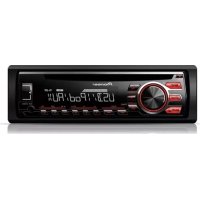
DEH2700UI - Car stereo PIONEER - Free user manual and instructions
Find the device manual for free DEH2700UI PIONEER in PDF.


User questions about DEH2700UI PIONEER
0 question about this device. Answer the ones you know or ask your own.
Ask a new question about this device
Download the instructions for your Car stereo in PDF format for free! Find your manual DEH2700UI - PIONEER and take your electronic device back in hand. On this page are published all the documents necessary for the use of your device. DEH2700UI by PIONEER.
USER MANUAL DEH2700UI PIONEER
REPRODUCTOR DE CD CON RECEPTOR RDS
CD RDS-EMPFANGER
CD RDS-ONTVANGER
CD RDS PPNEMHVK
DEH-X3700UI DEH-2700UI

Made for
iPod
iPhone
Owner's Manual
Mode d'emploi
ILLUMINATION settings. 11
MIXTRAX settings 12
Connections/Installation 13
Additional Information. 15
About this manual:
- In the following instructions, a USB memory or USB audio player are referred to as "USB device".
- In this manual, iPod and iPhone are referred to as "iPod".
Before You Start
Thank you for purchasing this PIONEER product
To ensure proper use, please read through this manual before using this product. It is especially important that you read and observe WARNINGs and CAUTIONs in this manual. Please keep the manual in a safe and accessible place for future reference.
If you want to dispose this product, do not mix it with general household waste. There is a separate collection system for used electronic products in accordance with legislation that requires proper treatment, recovery and recycling.
Private households in the member states of the EU, in Switzerland and Norway may return their used electronic products free of charge to designated collection facilities or to a retailer (if you purchase a similar new one).
For countries not mentioned above, please contact your local authorities for the correct method of disposal.
By doing so you will ensure that your disposed product undergoes the necessary treatment, recovery and recycling and thus prevent potential negative effects on the environment and human health.

WARNING
-
Do not attempt to install or service this product by yourself. Installation or servicing of this product by persons without training and experience in electronic equipment and automotive accessories may be dangerous and could expose you to the risk of electric shock, injury or other hazards.
-
Do not attempt to operate the unit while driving. Make sure to pull off the road and park your vehicle in a safe location before attempting to use the controls on the device.

CAUTION
- Do not allow this unit to come into contact with moisture and/or liquids. Electrical shock could result.
- Also, damage to this unit, smoke, and overheating could result from contact with liquids.
Always keep the volume low enough to hear outside sounds.
The Pioneer CarStereo-Pass is for use only in Germany.
CAUTION
This product is a class 1 laser product classified under the Safety of laser products, IEC 60825-1:2007

If you experience problems
Should this unit fail to work properly, please contact your dealer or nearest authorized PIONEER Service Station.

Getting Started
Basic operation
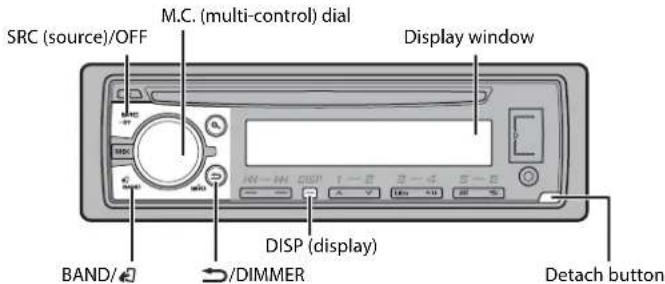
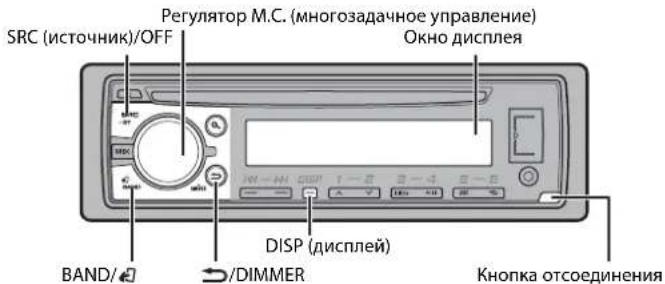
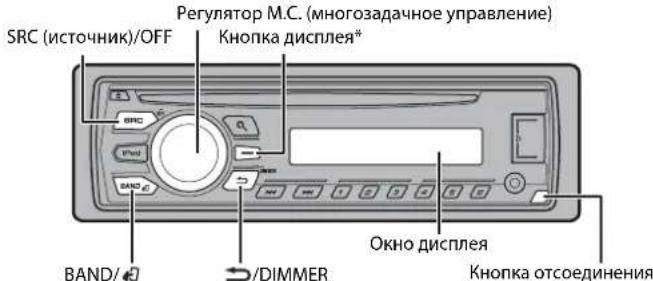
DEH-X3700UI
DEH-2700UI
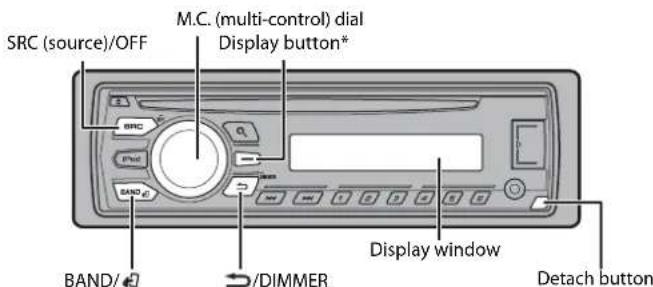
* This button is referred to as DISP in the manual.
Optional remote control
The remote control CD-R320 is sold separately.
The available buttons vary depending on the unit.
Frequently used operations
| Purpose Operation | |
| Turn on the power* | Press SRC/OFF to turn on the power. Press and hold SRC/OFF to turn off the power. |
| Adjust the volume Turn the M.C. dial. | |
| Select a source Press SRC/OFF repeatedly. | |
| Change the display information Press DISP repeatedly. | |
| Return to the previous display/list Press /DIMMER. | |
| Return to the normal display from the menu | Press BAND/ |
| *When this unit's blue/white lead is connected to the vehicle's auto-antenna relay control terminal, the vehicle's antenna extends when this unit's source is turned on. To retract the antenna, turn the source off. | |
Display indication
| Indication Description | |
| » Appears when a lower tier of the menu or folder exists. | |
| P | Appears when the button is pressed. |
| LOC Appears when the local seek tuning function is set (page 9). | |
| TP | Appears when a traffic program is received. |
| TA | Appears when traffic announcements are received (page 9). |
| SRTV | Appears when the sound retriever function is set (page 10). |
| XX | Appears when random/shuffle play is set. |
| ← | Appears when repeat play is set. |
| @ | Appears when the iPod control function is set (page 8). |
Detaching the front panel
Detach the front panel to prevent theft. Remove any cables and devices attached to the front panel and turn off the unit before detaching it.
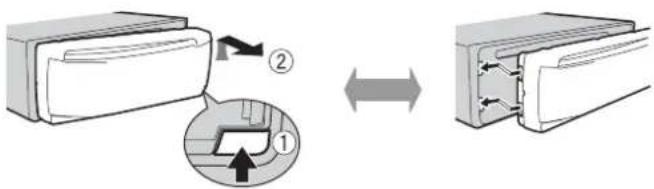
Detach Attach
Important
- Avoid subjecting the front panel to excessive shock.
- Keep the front panel out of direct sunlight and high temperatures.
Always store the detached front panel in a protective case or bag.
Setup menu
When you turn the ignition switch to ON after installation, [SET UP:YES] appears in the display.
1 Press the M.C. dial.
The setup menu disappears after 30 seconds of no operation. If you prefer not to set at this time, turn the M.C. dial to select [NO], then press to confirm.
2 Turn the M.C. dial to select the options, then press to confirm.
To proceed to the next menu option, you need to confirm your selection.
| Menu Item Description | |
| LANGUAGE Select the [ENG](English), [PYC](Russian), [TUR](Turkish) | the language to display the text information from a compressed audio file. |
| CLOCK SET Set the clock. | |
| FM STEP Select the FM tuning step from 100 kHz or 50 kHz. | |
| [100], [50] | |
3[QUT:YES] appears when all the settings have been made.
To return to the first item of the setup menu, turn the M.C. dial to select [QUIT:NO], then press to confirm.
4 Press the M.C. dial to confirm the settings.
NOTES
- You can cancel the menu setting by pressing SRC/OFF.
- These settings can be made at any time from the SYSTEM settings (page 10) and INITIAL settings (page 5).
Canceling the demonstration display (DEMO OFF)
Press the M.C. dial to display the main menu.
2 Turn the M.C. dial to select [SYSTEM], then press to confirm.
3 Turn the M.C. dial to select [DEMO OFF], then press to confirm.
4 Turn the M.C. dial to select [YES], then press to confirm.
INITIAL settings
1 Press and hold SRC/OFF until the unit turns off.
2 Press and hold SRC/OFF to display the main menu.
3 Turn the M.C. dial to select [INITIAL], then press to confirm.
4 Turn the M.C. dial to select an option, then press to confirm.
NOTE
The options vary depending on the unit.
| Menu Item Description |
| FM STEP Select the FM tuning step from 100 kHz or 50 kHz. [100], [50] |
| SP-P/O MODE Select when there is a full-range speaker connected to the rear [REAR/SUB.W] speaker output leads and there is a subwoofer connected to the RCA output. |
| [SUB.W/SUB.W] Select when there is a passive subwoofer connected directly to the rear speaker output leads and there is a subwoofer connected to the RCA output. |

| Menu Item | Description |
| [REAR/REAR] Select | when there are full-range speakers connected to the rear speaker output leads and RCA output. If there is a full-range speaker connected to the rear speaker output leads, and the RCA output is not used, you may select either [REAR/SUB.W] or [REAR/REAR]. |
| SYSTEM RESET[YES], [CANCEL] | Select [YES] to initialize the unit settings. The unit will be restarted automatically.(Some of the settings may be retained even after resetting the unit.) |
Radio
The tuner frequencies on this unit are allocated for use in Western Europe, Asia, the Middle East, Africa and Oceania. Use in other areas may result in poor reception. The RDS (radio data system) function only works in areas that broadcast RDS signals for FM stations.
Receiving preset stations
1 Press SRC/OFF to select [RADIO].
2 Press BAND/ to select the band from [FM1], [FM2], [FM3], [MW] or [LW].
3 Press a number button (1 / to 6 / 一
TIP
The button can be also used to select a preset station when [SEEK] is set to [PCH] in the FUNCTION settings (page 9).
Best stations memory (BSM)
The six strongest stations are stored on the number buttons (1/ A to 6/ C).
1 After selecting the band, press the M.C. dial to display the main menu.
2 Turn the M.C. dial to select [FUNCTION], then press to confirm.
3 Turn the M.C. dial to select [BSM], then press to confirm.
To seek a station manually
1 After selecting the band, press select a station. Press and hold release to seek an available station. Scanning stops when the unit receives a station. To cancel seek tuning, press
NOTE
[SEEK] needs to be set to [MAN] in the FUNCTION settings (page 9).
To store stations manually
1 While receiving the station you want to store, press and hold one of the number buttons (1/ to 6 / 2 ) until it stops flashing.
Using PTY functions
The unit searches for a station by PTY (program type) information.
Press dRing FM reception.
2 Turn the M.C. dial to select a program type from [NEWS/INFO], [POPULAR], [CLASSICS] or [OTHERS].
3 Press the M.C. dial.
The unit begins to search for a station. When it is found, its program service name is displayed.
NOTES
To cancel the search, press the M.C. dial.
The program of some stations may differ from that indicated by the transmitted PTY.
- If no station is broadcasting the type of program you searched for, [NOT FOUND] is displayed for about two seconds and then the tuner returns to the original station.
PTY list
For more details about PTY list, visit the following site:
http://www.pioneer.eu/eur/products/25/121/tech/CarAudio/PTY.html
CD/USB/iPod/AUX
Playing back
Disconnect headphones from the device before connecting it to the unit.
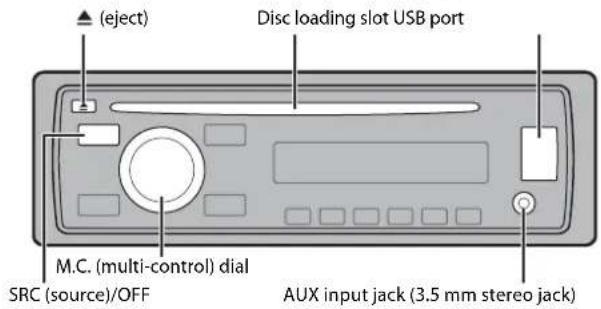
CD
1 Insert a disc into the disc loading slot with the label side up.
To eject a disc, stop playback first then press
USB device/iPod
1 Open the USB port cover.
2 Plug in the USB device/iPod using an appropriate cable.

CAUTION
Use an optional Pioneer USB cable (CD-U50E) to connect the USB device as any device connected directly to the unit will protrude out from the unit, which could be dangerous.
Before removing the device, stop playback.
MTP connection
A device installed with Android OS 4.0 or later can be connected to the unit via MTP, using the cable supplied with the device. However, depending on the connected device and the numbers of the files in the device, audio files/songs may not be able to be played back via MTP. Note that MTP connection is not compatible with WAV and FLAC* file formats, and cannot be used with the MIXTRAX function.
- The FLAC files are only compatible with DEH-2700UI.
AUX
1 Insert the stereo mini plug into the AUX input jack.
2 Press SRC/OFF to select [AUX] as the source.
NOTE
If [AUX] is set to [OFF] in the SYSTEM settings, [AUX] cannot be selected as a source (page 11).
Operations
You can make various adjustments in the FUNCTION settings (page 9).
Note that the following operations do not work for an AUX device. To operate an AUX device, use the device itself.
| Purpose Operation | |
| Select a folder/album*1 | Press 1/ ▲ or 2/ ▼. |
| Select a track/song (chapter) Press or . | |
| Fast forward or reverse Press and hold or . | |
| Search for a file from a list | 1 Press to display the list. 2 Turn the M.C. dial to select the desired file (folder) name or category, then press to confirm. 3 Turn the M.C. dial to select the desired file, then press to confirm. Playback starts. |
| View a list of the files in the selected folder/ category*1 | Press the M.C. dial when a folder/category is selected. |
| Play a song in the selected folder/ category*1 | Press and hold the M.C. dial when a folder/ category is selected. |
| Alphabetical search (iPod only) | 1 Press to display the list. 2 Turn the M.C. dial to select the desired category list, then press to enter the alphabetical search mode. (Turning the M.C. dial twice also enters the alphabetical search mode.) 3 Turn the M.C. dial to select a letter, then press to display the alphabetical list. To cancel alphabetical search, press ▷/ DIMMER. |
| Repeat play | Press 6/ ▼. |
| Random/shuffle play | Press 5/ △. |
| Purpose | Operation |
| Shuffle all play (iPod only) Press and hold 5/ | . |
| Pause/resume playback | Press 4/PAUSE. |
| Sound retriever*2 | Press 3/S.Rtrv. [1]: Effective for low compression rates [2]: Effective for high compression rates |
| Return to root folder (USB only)*1 | Press and hold BAND/ |
| Switch between compressed audio and CD-DA (CD only) | Press BAND/ |
| Change drives in USB device (Devices that support the USB mass storage device class protocol only) | Press BAND/ |
1 Compressed audio files only
2 This function is disabled when USB is selected as a source and the MIXTRAX function is on.
Useful functions for iPod
Link play mode
You can access songs based on the artist, album, or genre currently playing.
1 While listening to a song, press and hold enter the link play mode.
2 Tum the M.C. dial to select the mode ([ARTIST], [ALBUM], [GENRE]), then press to confirm.
The selected song/album will be played after the currently playing song.
NOTE
The selected song/album may be canceled if you use functions other than those from the link play mode (e.g. fast forward and reverse).
iPod control
You can control the unit via a connected iPod.
The following iPod models are not compatible with this function.
- iPod nano 1st generation, iPod with video
1 Press BAND/ during playback, then select the control mode.
[CONTROL iPod/CTRL iPod]: The unit's iPod function can be operated from the connected iPod.
[CONTROL AUDIO/CTRL AUDIO]: The unit's iPod function can only be operated by
the buttons on the unit. In this mode, the connected iPod cannot be turned on or off.
NOTES
- Pressing iPod can also switch the control mode (only for DEH-2700UI).
- Switching the control mode to [CONTROL iPod/CTRL iPod] pauses song playback. Use the connected iPod to resume playback.
The following operations are still accessible from the unit, even if the control mode is set to
[CONTROL iPod/CTRL iPod]. - Pause, fast forward/reverse, song/chapter selection
The volume can only be adjusted from the unit.
About MIXTRAX (USB/iPod only)
(Only for DEH-X3700UI)
The MIXTRAX function creates a non-stop mix of your music library, accompanied by illumination effects. For details on MIXTRAX settings, see page 12.
NOTES
This function is not compatible with an Android device connected via MTP.
- When USB is selected as a source and the MIXTRAX function is in use, the sound retriever function is
disabled.
- Depending on the file/song, sound effects may not be available.
- Turn the MIXTRAX function off if the illumination effects it produces interfere with driving.
1 Press MIX to turn MIXTRAX on/off.
App Mode
You can enjoy listening to an application on an iPhone via the unit. In some cases, you can control an application by using the unit.
For details on compatible devices, visit our website.

Important
Use of third party apps may involve or require the provision of personally identifiable information, whether through the creation of a user account or otherwise, and for certain applications, the provision of geolocation data.
ALL THIRD PARTY APPS ARE THE SOLE RESPONSIBILITY OF THE PROVIDERS, INCLUDING WITHOUT LIMITATION COLLECTION AND SECURITY OF USER DATA AND PRIVACY PRACTICES. BY ACCESSING THIRD PARTY APPS, YOU AGREE TO REVIEW THE TERMS OF SERVICE AND PRIVACY POLICIES OF THE PROVIDERS. IF YOU DO NOT AGREE WITH THE TERMS OR POLICIES OF ANY PROVIDER OR DO NOT CONSENT TO THE USE OF GEOLOCATION DATA WHERE APPLICABLE, DO NOT USE THAT THIRD PARTY APP.
For iPhone users
This function is compatible with iPhones and iPod touches installed with iOS 5.0 or later.
NOTE
PIONEER IS NOT LIABLE FOR ANY THIRD PARTY APPS OR CONTENT, INCLUDING WITHOUT LIMITATION THEIR ACCURACY OR COMPLETENESS. THE CONTENT AND FUNCTIONALITY OF SUCH APPS ARE THE SOLE RESPONSIBILITY OF THE APP PROVIDER.
Playback of an application via the unit
1Connect this unit with the mobile device.
iPhone via USB (page 7)
2 Press SRC/OFF to select [APP].
3Operate the mobile device to start up the application.
You can make various adjustments in the FUNCTION settings (page 9).
Basic operations
| Purpose Operation | |
| Select a track Press or . | |▶▶| |
| Fast forward or reverse Press and hold or . | |▶▶| |
| Pause/resume playback Press BAND/ . | □ |
Settings
You can adjust various settings in the main menu.
1 Press the M.C. dial to display the main menu.
2 Turn the M.C. dial to select one of the categories below, then press to confirm.
FUNCTION settings (page 9)
- AUDIO settings (page 10)
SYSTEM settings (page 10)
ILLUMINATION settings (page 11)
- MIXTRAX settings (page 12)
3 Turn the M.C. dial to select the options, then press to confirm.
FUNCTION settings
The menu items vary according to the source.
| Menu Item Description | |
| FM SETTING RADIO [TALK], [STANDARD], [MUSIC] Match the sound quality level with the broadcast signal conditions of the FM band signal. (Available only when FM band is selected.) | |
| BSM RADIO Store the six strongest stations on the number buttons (1/△ to 6/△) automatically. | |
| REGIONAL RADIO [ON], [OFF] Limit the reception to the specific regional programs when AF (alternative frequencies search) is selected. (Available only when FM band is selected.) | |
| LOCAL RADIO FM: [OFF], [LV1], [LV2], [LV3], [LV4] MW/LW: [OFF], [LV1], [LV2] Restrict the tuning station according to the signal strength. | |
| TA RADIO [ON], [OFF] Receive current traffic information if available. (Available only when FM band is selected.) | |
| AF RADIO [ON], [OFF] Allow the unit to retune to a different frequency providing the same station. (Available only when FM band is selected.) | |
| NEWS RADIO [ON], [OFF] Interrupt the currently selected source with news programs. (Available only when FM band is selected.) | |
| SEEK RADIO [MAN], [PCH] Assign it to seek the stations one by one (manual tuning) or select a station from the preset channels. | |
| S.RTRV CD USB iPod APP | |
| [1](effective for low compression rates), [2](effective for high compression rates), [OFF] | Enhance compressed audio and restore rich sound.Not available when; • USB is selected as a source and the MIXTRAX function is set to on.The FLAC file is played back. (DEH-2700UI only) |
| AUDIO BOOK iPod | |
| [FASTER], [NORMAL], [SLOWER] Change the playback speed. (Not available when [CONTROL iPod/CTRL iPod] is selected in the control mode.) | |
| PAUSE APP | Pause or resume playback. |
| AUDIO settings | |
| Menu Item Description | |
| FADER*1 | Adjust the front and rear speaker balance. |
| BALANCE | Adjust the left and right speaker balance. |
| EQ SETTING | |
| [SUPER BASS], [POWERFUL], [NATURAL], [IVOCAL], [CUSTOM1], [CUSTOM2], [FLAT] | Select or customize the equalizer curve. [CUSTOM1] can be set separately for each source.However, each of the below combinations are set to the same setting automatically. |
| Select an equalizer band and level for further customizing. Equalizer band: [80HZ], [250HZ], [800HZ], [2.5KHZ], [8KHZ] | • USB, iPod, and APP (iPhone) [CUSTOM2] is a shared setting used for all sources. |
| Equalizer level: [+6] to [-6] | |
| LOUDNESS | |
| [OFF], [LOW], [MID], [HI] Compensate for clear sound at low volume. | |
| SUB.W*2 | |
| [NOR], [REV], [OFF] Select the subwoofer phase. | |
| Menu Item Description | |
| SUB.W CTRL*2*3Cut-off frequency: [50HZ],[63HZ], [80HZ], [100HZ], [125HZ],[160HZ], [200HZ]Output level: [-24] to [+6]Slope level: [-12], [-24] | |
| BASS BOOST[0] to [+6] Select the bass boost level. | |
| HPF SETTINGCut-off frequency: [OFF], [50HZ],[63HZ], [80HZ], [100HZ], [125HZ],[160HZ], [200HZ]Slope level: [-12], [-24] | |
| SLA[+4] to [-4] Adjust the volume level for each source exceptFM.Each of the below combinations are set to the same setting automatically.USB, iPod, and APP (iPhone) | |
| *1 Not available when [SUB.W/SUB.W] is selected in [SP-P/O MODE] in the INITIAL settings (page 5).*2 Not available when [REAR/REAR] is selected in [SP-P/O MODE] in the INITIAL settings (page 5).*3 Not available when [OFF] is selected in [SUB.W]. | |
| SYSTEM settings | |
| You can also access to these menus when the unit is turned off. | |
| Menu Item Description | |
| LANGUAGE[ENG](English), [PYC](Russian),[TUR](Turkish) | Select the language to display the textinformation from a compressed audio file. |
| CLOCK SET | Set the clock (page 5). |
| 12H/24H[12H], [24H] Select the time notation. | |
Menu Item Description
| INFO DISPLAY (Only for DEH-X3700UI) |
| Display the item on the sub information display. Select from "SPEANA," "LEVEL METER," "SOURCE," "CLOCK," and "OFF." |
| AUTO PI |
| [ON], [OFF] Search for a different station with the same programming, even if using a preset station. |
| AUX |
| [ON], [OFF] Set to [ON] when using an auxiliary device connected to the unit. |
| MUTE MODE (Only for DEH-2700UI) |
| [MUTE], [20dB ATT], [10dB ATT] Mute or attenuate sound automatically when a signal from equipment with a mute function is received. |
| PW SAVE* |
| [ON], [OFF] Reduce the battery power consumption. Turning on the source is the only operation allowed when this function is on. |
- [PW SAVE] is canceled if the vehicle battery is disconnected and will need to be turned back on once the battery is reconnected. When [PW SAVE] is off, depending on connection methods, the unit may continue to draw power from the battery if your vehicle's ignition does not have an ACC (accessory) position.
ILLUMINATION settings
Menu Item Description
| COLOUR (Only for DEH-X3700UI) | |
| [KEY COLOUR], [DISP COLOUR], [BOTH COLOUR] | Select color for the keys/display of the unit from 12 preset colors, [SCAN] or [CUSTOM]*. ·[SCAN]: Cycle through a variety of colors automatically. ·[CUSTOM])*. 1 Press and hold the M.C. dial until the color setting display appears. 2Set the primary color (R (red)/G (green)/B (blue)) and brightness level (0) to [60]). You cannot select a level below 10 for all three of R (red), G (green), B (blue) at the same time. You can also customize the preset colors. Select one of the preset colors, then press and hold the M.C. dial until the color setting display appears. * The CUSTOM setting is only available for [KEY COLOUR] and [DISP COLOUR]. |
| DIM SETTING | |
| [SYNC ILLUMI]*, [SYNC CLOCK], [MANUAL] * Only for DEH-X3700UI | Change the display brightness. |
| BRIGHTNESS | |
| [1] to [10] Change the display brightness. The available setting ranges differ depending on [DIM SETTING]. | |
| ILLUMI FX (Only for DEH-X3700UI) | |
| [ON], [OFF] The illumination effect can be seen when; - there is an incoming call - you are on a phone call - a CD is inserted/ejected The illumination effect will activate when the ACC power is turned on/off regardless of this setting. | |
MIXTRAX settings
(Only for DEH-X3700UI)
Menu Item Description
SHORT PLAYBCK
[1.0 MIN], [1.5 MIN], [2.0 MIN], [2.5 MIN], [3.0 MIN], [OFF]
Select the length of the playback time.
FLASH AREA
[KEY/DISPLAY], [KEY], [OFF] Select the area for the illumination effect.
When [OFF] is selected, the color set under the ILLUMINATION settings (page 11) is used as the display color.
FLASH PATTERN
[SOUND LEVEL 1] to [SOUND LEVEL 6]
Change the illumination effect according to the sound and bass level. The flash pattern changes according to the sound level.
[LOW PASS 1] to [LOW PASS 6] The flash pattern changes according to the bass level.
[RANDOM1] The flash pattern changes randomly according
to the sound level mode and low pass mode.
[RANDOM2] The flash pattern changes randomly according
to the sound level mode.
[RANDOM3] The flash pattern change
randomly according
DISPLAYFX
[ON], [OFF] Set the MIXTRAX special effects on/off.
CUT IN FX
[ON], [OFF] Turn the MIXTRAX sound effects on/off while manually changing the tracks.
Connections/Installation
Connections
Important


- When installing this unit in a vehicle without an ACC (accessory) position on the ignition switch, failure to connect the red cable to the terminal that detects operation of the ignition key may result in battery drain.
ACC position No ACC position - Use of this unit in conditions other than the following could result in fire or malfunction.
Vehicles with a 12-volt battery and negative grounding. - Speakers with 50 W (output value) and 4 Ω to 8 Ω (impedance value).
- To prevent a short-circuit, overheating or malfunction, be sure to follow the directions below.
-Disconnect the negative terminal of the battery before installation. - Secure the wiring with cable clamps or adhesive tape. Wrap adhesive tape around wiring that comes into contact with metal parts to protect the wiring.
- Place all cables away from moving parts, such as the shift lever and seat rails.
-Place all cables away from hot places, such as near the heater outlet. - Do not connect the yellow cable to the battery by passing it through the hole to the engine compartment.
-Cover any disconnected cable connectors with insulating tape. -
Do not shorten any cables.
-
Never cut the insulation of the power cable of this unit in order to share the power with other devices. The current capacity of the cable is limited.
- Use a fuse of the rating prescribed.
- Never wire the negative speaker cable directly to ground.
-
Never band together negative cables of multiple speakers.
-
When this unit is on, control signals are sent through the blue/white cable. Connect this cable to the system remote control of an external power amp or the vehicle's auto-antenna relay control terminal (max. 300mA 12 V DC). If the vehicle is equipped with a glass antenna, connect it to the antenna booster power supply terminal.
- Never connect the blue/white cable to the power terminal of an external power amp. Also, never connect it to the power terminal of the auto antenna. Doing so may result in battery drain or a malfunction.
- The black cable is ground. Ground cables for this unit and other equipment (especially, high-current products such as power amps) must be wired separately. If they are not, an accidental detachment may result in a fire or malfunction.
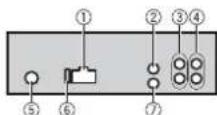
This unit
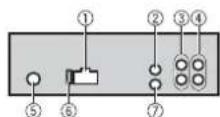
① Power cord input
② AUX2 input jack (3.5 mm stereo jack) (DEH-X3700UI only)
A dedicated input jack designed exclusively for use with devices equipped with a mute function.
Rear output or subwoofer output
④ Front output
⑤ Antenna input ⑥ Fuse (10A)
⑦ Wired remote input Hard-wired remote control adapter can be connected (sold separately).
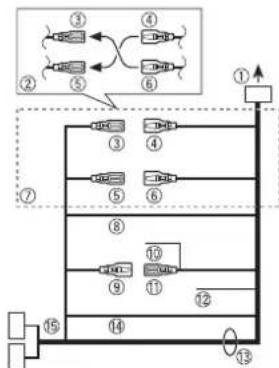
Power cord
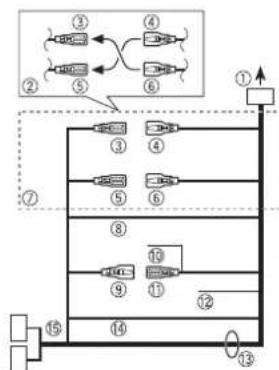
① To power cord input
② Depending on the kind of vehicle, the function of and may be different. In this case, be sure to connect to and
Yellow Back-up (or accessory)
4 Yellow Connect to the constant 12 V supply terminal.
⑤ Red Accessory (or back-up)
Red
Connect to terminal controlled by the ignition switch (12 V DC).
⑦ Connect leads of the same color to each other.
Black (chassis ground)
Blue/white
The pin position of the ISO connector will differ depending on the type of vehicle. Connect and when Pin 5 is an antenna control type. In another type of vehicle, never connect and
Blue/white
Connect to the system control terminal of the power amp (max. 300mA12V DC).
Blue/white
Connect to the auto-antenna relay control terminal (max. 300 mA 12 V DC).
Yellow/black
If you use equipment with a Mute function, wire this lead to the Audio Mute lead on that equipment. If not, keep the Audio Mute lead free of any connections.
Speaker leads
White:Front left 心 White/black:Front left
Gray:Front right
Gray/black: Front right
Green: Rear left or subwoofer Green/black: Rear left or subwoofer
Violet: Rear right or subwoofer Violet/black: Rear right or subwoofer
Orange/white
Connect to a car's illumination signal. ISO connector
In some vehicles, the ISO connector may be divided into two. In this case, be sure to connect to both connectors.

NOTES
- Change the initial menu of this unit. Refer to [SP-P/O MODEL] (page 5). The subwoofer output of this unit is monaural.
- When using a subwoofer of 70W (2Ω), be sure to connect the subwoofer to the violet and violet/black leads of this unit. Do not connect anything to the green and green/black leads.
Power amp (sold separately)
Perform these connections when using the optional amplifier.
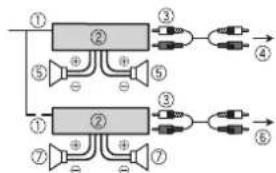
① System remote control Connect to blue/white
Power amp (sold separately)
Connect with RCA cables (sold separately)
④ To front output
⑤ Front speaker
To rear output or subwoofer output
Rear speaker or subwoofer
Installation
Important
- Check all connections and systems before final installation.
- Do not use unauthorized parts as this may cause malfunctions.
- Consult your dealer if installation requires drilling of holes or other modifications to the vehicle.
Do not install this unit where:
-it may interfere with operation of the vehicle.
-it may cause injury to a passenger as a result of a sudden stop.
- The semiconductor laser will be damaged if it overheats. Install this unit away from hot places such as near the heater outlet.
Optimum performance is obtained when the unit is installed at an angle of less than 60^ .
- When installing, to ensure proper heat dispersal when using this unit, make sure you leave ample space behind the rear panel and wrap any loose cables so they are not blocking the vents.
Leave ample space

DIN front/rear mount
This unit can be properly installed using either front-mount or rear-mount installation. Use commercially available parts when installing.
DIN Front-mount
1 Insert the mounting sleeve into the dashboard.
For installation in shallow spaces, use the supplied mounting sleeve. If there is enough space, use the mounting sleeve that came with the vehicle.
2 Secure the mounting sleeve by using a screwdriver to bend the metal tabs (90^) into place.
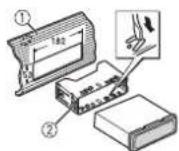
① Dashboard
② Mounting sleeve
- Make sure that the unit is installed securely in place. An unstable installation may cause skipping or other malfunctions.
DIN Rear-mount
1 Determine the appropriate position where the holes on the bracket and the side of the unit match.
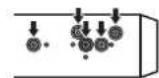
2 Tighten two screws on each side.
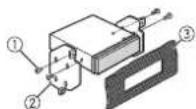
① Tapping screw (5 mm × 8 mm)
② Mounting bracket
③ Dashboard or console
Removing the unit
1 Remove the trim ring.
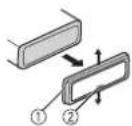
① Trim ring
Notched tab
- Releasing the front panel allows easier access to the trim ring.
- When reattaching the trim ring, point the side with the notched tab down.
2 Insert the supplied extraction keys into both sides of the unit until they click into place.
3 Pull the unit out of the dashboard.
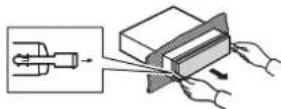
Additional Information
Troubleshooting
The display automatically returns to the normal display.
No operations have been made for about 30 seconds.
Perform an operation.
The repeat play range changes unexpectedly.
Depending on the repeat play range, the selected range may change when another folder or track is being selected or during fast forwarding/reversing.
- Select the repeat play range again.
A subfolder is not played back.
Subclusters cannot be played when [FLD] (folder repeat) is selected.
- Select another repeat play range.
The sound is intermittent.
You are using a device, such as a cellular phone, that may cause audible interference.
- Move electrical devices that may be causing the interference away from the unit.
Error messages
Common
AMP ERROR
This unit fails to operate or the speaker connection is incorrect.
The protective circuit is activated. Check the speaker connection.
Turn the ignition switch OFF and back to ON again. If the message remains, contact your dealer or an authorized Pioneer Service Station for assistance.
NO XXXX (NO TITLE, for example)
There is no embedded text information. Switch the display or play another track/file.
CD player
ERROR-07,11,12,17,30
→The disc is dirty. Clean the d
The disc is scratched. Replace the disc.
ERROR-07,10,11,12,15,17,30,A0
There is an electrical or mechanical error.
Turn the ignition switch OFF and back to ON, or switch to a different source, then back to the CD player.
ERROR-15
→The inserted disc is blank. Replace the disc.
ERROR-23
Unsupported CD format. Replace the disc.
FORMATREAD
Sometimes there is a delay between the start of playback and when you start to hear any sound.
Wait until the message disappears and you hear sound.
NO AUDIO
→The inserted disc does not contain any playable files.
Replace the disc.
SKIPPED
→The inserted disc contains DRM protected files.
-The protected files are skipped.
PROTECT
All the files on the inserted disc are embedded with DRM.
Replace the disc.
USB device/iPod
FORMATREAD
→Sometimes there is a delay between the start of playback and when you start to hear any sound.
- Wait until the message disappears and you hear sound.
NO AUDIO
→There are no songs.
- Transfer the audio files to the USB device and connect.
→The connected USB device has security enabled.
Follow the USB device instructions to disable the security.
SKIPPED
The connected USB device contains DRM protected files.
- The protected files are skipped.
PROTECT
→All the files on the connected USB device are embedded with DRM.
-Replace the USB device.
N/A USB
The connected USB device is not supported by this unit.
- Disconnect your device and replace it with a compatible USB device.
CHECK USB
-
The USB connector or USB cable has short-circuited.
-
Check that the USB connector or USB cable is not caught in something or damaged.
The connected USB device consumes more than maximum allowable current. Disconnect the USB device and do not use it. Turn the ignition switch OFF and back to ACC or ON. Connect only compliant USB devices.
→The iPod operates correctly but does not charge.
Make sure the connection cable for the iPod has not shorted out (e.g., not caught in metal objects). After checking, turn the ignition switch OFF and back to ON, or disconnect the iPod and reconnect.
ERROR-19
Communication failed.
Perform one of the following operations, then return to the USB source.
-
Turn the ignition switch OFF and back to ON.
-
Disconnect the USB device.
Change to a different source.
iPod failure.
-Disconnect the cable from the iPod.
Once the iPod's main menu is displayed, reconnect the iPod and reset it.
ERROR-23
USB device was not formatted properly. Format the USB device with FAT12, FAT16 or FAT32.
ERROR-16
- The iPod firmware version is old.
- Update the iPod version.
iPod failure.
- Disconnect the cable from the iPod. Once the iPod's main menu is displayed, reconnect the iPod and reset it.
STOP
there are no songs in the current list. -Select a list that contains songs.
NOT FOUND
→No related songs.
- Transfer songs to the iPod.
Apps
STARTUPAPP
The application has not started running yet.
- Operate the mobile device to start up the application.
Handling guidelines
Discs and player
- Use only discs that feature either of the following two logos.


- Use 12-cm discs.
- Use only conventional, fully circular discs.
- The following types of discs cannot be used with this unit:
-DualDiscs
-8-cm discs: Attempts to use such discs with an adaptor may cause the unit to malfunction.
-Oddly shaped discs
Discs other than CDs
Damaged discs, including discs that are cracked, chipped or warped CD-R/RW discs that have not been finalized
- Do not write on or apply chemicals to the surface of the discs.
To clean a CD, wipe the disc with a soft cloth outward from the center.
Condensation may temporarily impair the player's performance. Let it rest for about one hour to adjust to a warmer temperature. Also, wipe any damp discs off with a soft cloth.
- When using discs that can be printed on label surfaces, check the instructions and the warnings of the discs. Depending on the discs, inserting and ejecting may not be possible. Using such discs may result in damage to this equipment.
- Do not attach commercially available labels or other materials to the discs.
- The discs may warp making the disc unplayable.
The labels may come off during playback and prevent ejection of the discs, which may result in damage to the equipment.
USB storage device
- Connections via USB hubs are not supported.
- Firmly secure the USB storage device before driving. Do not let the USB storage device fall onto the floor, where it may become jammed under the brake or accelerator pedal.
Depending on the USB storage device, the following problems may occur. Operations may vary. - The storage device may not be recognized.
-Files may not be played back properly.
The device may cause audible interference when you are listening to the radio.
iPod
- Do not leave the iPod in places with high temperatures.
- Firmly secure the iPod when driving. Do not let the iPod fall onto the floor, where it may become jammed under the brake or accelerator pedal.
-
The settings of the iPod such as the equalizer and repeat play are changed automatically when the iPod is connected to the unit. Once the iPod is disconnected, those settings will return to the original settings.
-
Incompatible text saved on the iPod will not be displayed by the unit.
Compressed audio compatibility
- Only the first 32 characters can be displayed as a file name (including the file extension) or a folder name.
- The unit may not work properly depending on the application used to encode WMA files.
There may be a slight delay at the start of the playback of audio files embedded with image data, or audio files stored on a USB device with numerous folder hierarchies. - Russian text to be displayed on this unit should be encoded in one of the following character sets:
-Unicode (UTF-8, UTF-16)
A character set other than Unicode that is used in a Windows environment and is set to Russian in the multi-language setting
CAUTION
- Pioneer cannot guarantee compatibility with all USB mass storage devices, and assumes no responsibility for any loss of data on media players, smartphones, or other devices while using this product.
- Do not leave discs or a USB storage device in any place that is subject to high temperatures.
WMA files
| File extension .wma | |
| Bit rate 48 kbps to 320 | kbps(CBR), 48 kbps to 384 kbps (VBR) |
| Sampling frequency 32 | kHz, 44.1 kHz, 48 kHz |
| Windows MediaTM Audio Professional, Lossless, Voice/DRM Stream/Stream with video | Not compatible |
MP3 files
| File extension.mp3 | |
| Bit rate 8 kbps to 320 kbps | (CBR), VBR |
| Sampling frequency 8 kHz to 48 kHz (32 kHz, 44.1 kHz, 48 kHz for emphasis) | |
| Compatible ID3 tag version | 1.0, 1.1, 2.2, 2.3, 2.4 (ID3 tag Version 2.x is given priority over Version 1.x.) |
| M3u playlist Not compatible | |
| MP3i (MP3 interactive), mp3 PRO | Not compatible |
WAV files
WAV file formats cannot be connected via MTP.
| File extension .wav | |
| Quantization bits 8 and | 16 (LPCM), 4 (MSADPCM) |
| Sampling frequency 16 | kHz to 48 kHz (LPCM), 22.05 kHz and 44.1 kHz (MS ADPCM) |
FLAC files (DEH-2700UI only)
- FLAC file formats cannot be connected via MTP.
- FLAC files may not be playable, depending on the encoder.
| File extension .flac | |
| Sampling frequency 8/1 | 1.025/12/16/22.05/24/32/44.1/48 kHz |
| Quantization bit rate 16 bit | |
| Channel mode | 1/2 ch |
Disc
- Regardless of the length of the blank section between the songs from the original recording, compressed audio discs play with a short pause between songs.
| Playable folder hierarchy | Up to eight tiers (A practical hierarchy is less than two tiers.) |
| Playable folders Up to 99 | |
| Playable files Up to 999 | |
| File system ISO 9660 Level 1 and 2, Romeo, Joliet | |
| Multi-session playback | Compatible |
| Packet write data transfer | Not compatible |
USB device
- There may be a slight delay when starting playback of audio files on a USB storage device with numerous folder hierarchies.
| Playable folder hierarchy | Up to eight tiers (A practical hierarchy is less than two tiers.) |
| Playable folders Up to 500 | |
| Playable files Up to 1500 | |
| Playback of copyright-protected files | Not compatible |
| Partitioned USB device | Only the first partition can be played. |
iPod compatibility
This unit supports only the following iPod models. Supported iPod software versions are shown below. Older versions may not be supported.
Made for
iPod touch (1st through 5th generation)
-iPodclassic
-iPod with video
-iPod nano (1st through 7th generation)
-iPhone5s
-iPhone5c
-iPhone5
-iPhone4s
-iPhone4
-iPhone3GS
-iPhone3G
iPhone
- Operations may vary depending on the generation and/or software version of the iPod.
- Users of iPod with the Lightning Connector should use the Lightning to USB Cable (supplied with iPod).
- Users of iPod with the Dock Connector should use the CD-IU51. For details, consult your dealer.
Refer to the iPod manuals for information
about the file/format compatibility. - Audiobook, Podcast: Compatible
A CAUTION
Pioneer accepts no responsibility for data lost on the iPod, even if that data is lost while this unit is used.
Sequence of audio files
The user cannot assign folder numbers and specify playback sequences with this unit. Sequence of audio file depends on the connected device. Note that the hidden files in a USB device cannot be played back.
Example of a hierarchy
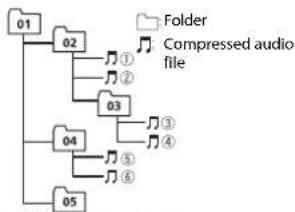
Level 1 Level 2 Level 3 Level 4
01 to 05: Folder number
① toPlayback sequence
Russian character chart
D:Display C:Character
| D: C | D: C | D: C |
| A: A | B: B | B: B |
| F: F | J: J | E: E, E |
| J: J | J: 3 | H: H, H |
| K: K | I: I | M: M |
| H: H | O: O | N: N |
| P: P | C: C | T: T |
| Y: Y | Φ: Φ | X: X |
| U: U | Y: Y | U: U, U |
| V: V | H: b1 | b: b |
| J: J | H: J0 | J: J |
Copyright and trademark
iTunes
Apple and iTunes are trademarks of Apple Inc., registered in the U.S. and other countries.
WMA
Windows Media is either a registered trademark or trademark of Microsoft Corporation in the United States and/or other countries.
This product includes technology owned by Microsoft Corporation and cannot be used or distributed without a license from Microsoft Licensing, Inc.
FLAC
Copyright © 2000-2009 Josh Coalson
Copyright © 2011-2013 Xiph.Org Foundation
Redistribution and use in source and binary forms, with or without modification, are permitted provided that the following conditions are met:
-Redistributions of source code must retain the above copyright notice, this list of conditions and the following disclaimer.
-Redistributions in binary form must reproduce the above copyright notice, this list of conditions and the following disclaimer in the documentation and/or other materials provided with the distribution.
Neither the name of the Xiph.org Foundation nor the names of its contributors may be used to endorse or promote products derived from this software without specific prior written permission.
THIS SOFTWARE IS PROVIDED BY THE Copyright HOLDERS AND
CONTRIBUTORS "AS IS" AND ANY EXPRESS OR IMPLIED WARRANTY, INCLUDING, BUT NOT LIMITED TO, THE IMPLIED
WARRANTIES OF MERCHANTABILITY AND FITNESS FOR A PARTICULAR PURPOSE ARE DISCLAIMED. IN NO EVENT SHALL THE FOUNDATION OR CORRUutors BE LIABLE FOR ANY DIRECT, INDIRECT,
INCIDENTAL, SPECIAL, EXEMPLARY, OR CONSEQUENTIAL DAMAGES (INCLUDING, BUT NOT LIMITED TO, PROCEDURE OF SUBSTITUTE GOODS OR SERVICES; LOSS OF USE, DATA, OR PROFITS; OR BUSINESS
INTERRUPTION) HOWEVER CAUSED AND ON ANY THEORY OF LIABILITY, WHETHER IN CONTRACT, STRICT LIABILITY, OR TORT (INCLUDING NEGLIGENCE OR OTHERWISE) ASING IN ANY WAY OUT OF THE USE OF THIS SOFTWARE, EVEN IF ADVISED OF THE POSSIBILITY OF SUCH DAMAGE.
iPod & iPhone
iPhone, iPod, iPod classic, iPod nano, and iPod touch are trademarks of Apple Inc., registered in the U.S. and other countries. Lightning is a trademark of Apple Inc.
"Made for iPod" and "Made for iPhone" mean that an electronic accessory has been designed to connect specifically to iPod or iPhone, respectively, and has been certified by the developer to meet Apple performance standards. Apple is not responsible for the operation of this device or its compliance with safety and
regulatory standards. Please note that the use of this accessory with iPod or iPhone may affect wireless performance.
AndroidTM
Android is a trademark of Google Inc.
MIXTRAX
MIXTRAX is a trademark of the PIONEER CORPORATION.
Specifications
General
Power source: 14.4 V DC (10.8 V to 15.1 V allowable)
Grounding system: Negative type
Maximum current consumption: 10.0 A
Dimensions (W× H× D)
DIN
Chassis: 178mm× 50mm× 165mm
Nose: 188mm× 58mm× 17mm
D
Chassis: 178mm× 50mm× 165mm
Nose: 170mm× 46mm× 17mm
Weight: 1 kg
Audio
Maximum power output:
50W×4
70W× 1 / 2 (for subwoofer)
Continuous power output:
22W×4(50Hz to 15000Hz,5%
THD, 4 Ω load, both channels driven)
Load impedance: 4 Ω (4 Ω to 8 Ω allowable)
Preout maximum output level: 2.0V
Loudness contour: +10 dB (100 Hz), +6.5
dB (10 kHz) (volume: -30 dB)
Equalizer (5-Band Graphic Equalizer):
Frequency: 80 Hz/250 Hz/800 Hz/2.5
kHz/8 kHz
Equalization range: ±12 dB (2 dB step)
Subwoofer (mono):
Frequency: 50 Hz/63 Hz/80 Hz/100
Hz/125 Hz/160 Hz/200 Hz
Slope: -12 dB/oct, -24 dB/oct
Gain: +6 dB to -24 dB
Phase: Normal/Reverse
CD player
System: Compact disc audio system
Usable discs: Compact disc
Signal-to-noise ratio: 94 dB (1 kHz) (IEC-A
network)
Number of channels: 2 (stereo)
MP3 decoding format: MPEG-1 & 2 Audio Layer 3
WMA decoding format:Ver.7,7.1,8,9,10
11, 12 (2 ch audio) (Windows Media
Player)
WAV signal format: Linear PCM & MS
ADPCM (Non-compressed)
USB
USB standard specification: USB 2.0 full
speed
Maximum current supply: 1 A
USB Class: MSC (Mass Storage Class)
11, 12 (2 ch audio) (Windows Media
Player)
FLAC decoding format: v1.3.0 (Free
Lossless Audio Codec) (DEH-2700UI)
WAV signal format: Linear PCM & MS
ADPCM (Non-compressed)
FMtuner
Frequency range: 87.5 MHz to 108.0 MHz
Usable sensitivity: 11 dBf (1.0 μV/75 Ω,
mono,S/N:30 dB)
Signal-to-noise ratio: 72 dB (IEC-A network)
MWtuner
Frequency range: 531 kHz to 1602 kHz
Usable sensitivity: 25 V (S/N: 20 dB)
Signal-to-noise ratio: 62 dB (IEC-A network)
LWTuner
Frequency range: 153 kHz to 281 kHz
Usable sensitivity: 28 V( S/N : 20 dB)
Signal-to-noise ratio: 62 dB (IEC-A network)
NOTE
Specifications and the design are subject
to modifications without notice.
Table des matieres
Raccordements/Installation. 14
Raccordements/Installation
Raccordements
Important
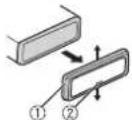
1 Retirez I'anneau de garniture.
| D: C | D: C | D: C |
| A:A | B:B | B:B |
| F:F | J:D | E:E,E |
| Z:X | J:3 | H:N,Y |
| K:K | A:N | H:M |
| H:H | O:O | N:N |
| P:P | C:C | T:T |
| Y:Y | Φ:Φ | X:X |
| U:U | Y:Y | U:U, U |
| ::b | H:bI | b:b |
| J:J | H:IO | J:J |
D: Afficheage C: Caractere
10, 11, 12 (2 canaux audio) (Windows Media Player)
Format de signal WAV: Linear PCM et MS
Best stations memory (BSM)
| D: C | D: C | D: C |
| A: A | B: B | B: B |
| F: F | J: J | E: E, E |
| Z: Z | J: 3 | H: H, H |
| K: K | I: I | M: M |
| H: H | O: O | N: N |
| P: P | C: C | T: T |
| Y: Y | Φ: Φ | X: X |
| U: U | Y: Y | W: W, W |
| '': b | H: b1 | b: b |
| J: J | H: 10 | J: J |
Copyright © 2000-2009 Josh Coalson
Copyright © 2011-2013 Xiph.Org Foundation
- España en 2018: En el context de la的政治, economic and social development of Spain, the European Union, the United States, the United Kingdom, the Netherlands, the Czech Republic, the Czech Republic, the Czech Republic, the Czech Republic, the Czech Republic, the Czech Republic, the Czech Republic, the Czech Republic, the Czech Republic, the Czech Republic, the Czech Republic, the Czech Republic, the Czech Republic, the Czech Republic, the Czech Republic, the Czech Republic, the Czech Republic, the Czech Republic, the Czech Republic, the Czech Republic, the Czech Republic, the Czech Republic, the Czech Republic, the Czech Republic, the Czech Republic, the Czech共和国, the Czech共和国, the Czech共和国, the Czech共和国, the Czech共和国, the Czech共和国, the Czech共和国, the Czech共和国, the Czech共和国, the Czech共和国, the Czech共和国, the Czech共和国, the Czech共和国, the Czech共和国, the Czech共和国, the Czech共和国, the Czech共和国, the Czech共和国, the Czech共和国, the Czech共和国, the Czech共和国, the Czech共和国, the Czech共和国, the Czech共和国, the Czech共和国, the Czech Republic, the Czech Republic, the Czech Republic, the Czech Republic, the Czech Republic, the Czech Republic, the Czech Republic, the Czech Republic, the Czech Republic, the Czech Republic, the Czech Republic, the Czech Republic, the Czech Republic, the Czech Republic, the Czech Republic, the Czech Republic, the Czech Republic, the Czech Republic, the Czech Republic, the Czech Republic, the Czech Republic, the Czech Republic, the Czech Republic, the Czech Republic, the CzechRepublic, the Czech Republic, the Czech Republic, the Czech Republic, the Czech Republic, the Czech Republic, the Czech Republic, the Czech Republic, the Czech Republic, the Czech Republic, the Czech Republic
- Mrientas USB esta的选择acion como fuente y se este utilizing lamerican MIXTRAX, lamerican de recuperacion de sonido está desactivada.
- En función del archivo o la canción, es posible que los efectos de sonido no estén disponibles.
- Desactive la funciona MIXTRAX si los efectos de iluminación generados interfieren con la conducccion.
1 Pulse MIX para activar o desactivar MIXTRAX.
Modo app
Ajustes de SYSTEM
Alternatively, you can choose to do the same as before.
CLOCK SET
| D: C | D: C | D: C |
| A:A | B:B | B:B |
| F:F | J:A | E:E,E |
| :K | J:3 | H:N, N |
| K:K | J:N | H:M |
| H:H | Q:O | N:N |
| P:P | C:C | T:T |
| Y:Y | Φ:Φ | X:X |
| U:U | Y:Y | W:W, W |
| ::b | H:bI | b:b |
| J:J | M:IO | R:R |
D: visor C: caracté
Copyright y marcas registradas
iTunes
Copyright © 2000-2009 Josh Coalson
Copyright © 2011-2013 Xiph.Org
Foundation
Curva: -12 dB/oct, -24 dB/oct
Ganancia: +6 dB a -24 dB
Fasc: normal/inversa
Reproductorde CD
(Windows Media Player)
Formato de senal WAV:PCM lineal y MS
ADPCM (sin comprimir)
NOTA
(Windows Media Player)
Formato de decodificacion FLAC: 1.3.0
(Free Lossless Audio Codec) (DEH
2700UI)
Formato de senal WAV:PCM lineal y MS
ADPCM (sin comprimir)
Sintonizador FM
Intervalo de frequencies: de 87,5 MHz a
108,0 MHz
Sensibilidadutilizable:11 dBf(1,0 V / 75
[2.5 MIN], [3.0 MIN], [OFF]
| D: C | D: C | D: C |
| A:A | B:B | B:B |
| F:F | J:D | E:E,E |
| I:X | J:3 | H:N、N |
| K:K | J:N | H:M |
| H:H | Q:O | J:N |
| P:P | C:C | T:T |
| Y:Y | Φ:Φ | X:X |
| U:U | Y:Y | U:U、U、U |
| ::b | H:bI | b:b |
| J:J | H:IO | J:J |
D:Anzeige C:Zeichen
KLASSE 1 LASERPRODUCT
Bij problemen
Best stations memory (BSM)
MW/LW: [OFF], [LV1], [LV2]
Reserve (of accessoire)
④ Geel
Groen: links acheter of subwoofer
Groen/zwart: links anschter @f
subwoofer
Violet: rechts acheer of subwoofer
Violet/zwart: rechts ache ter of
subwoofer
Oranje/wit
① Tappenche schroef (5 mm × 8 mm)
Montagebeugel
③ Dashboard of console
| D: C | D: C | D: C |
| A:A | B:B | B:B |
| F:F | J:D | E:E,E |
| I:X | J:3 | H:N,Y |
| K:K | J:N | M:M |
| H:H | Q:O | N:N |
| P:P | C:C | T:T |
| Y:Y | Φ:Φ | X:X |
| U:U | Y:Y | W:W, U |
| V:b | H:bI | b:b |
| Z:Z | M:IO | R:R |
D:Display C:Token
Copyright en handelsmerken
iTunes
Copyright © 2000-2009 Josh Coalson
Copyright © 2011-2013 Xiph.Org Foundation
Helling: -12 dB/oct, -24 dB/oct
Gain: +6 dB tot -24 dB
Fase: Normaal/tegengesteld
Cd-speler
System: Compact Disc Audio Bruikbare discs: Compact Disks
Signaal-ruisverhouding: 94 dB (1 kHz) (IEC-A-network)
(Windows Media Player)
(Windows Media Player)
FLAC-decoderingsformaat:v1.3.0(Free
Lossless Audio Codec (DEH-2700UI)
WAV-signaalformaat:Lineaire PCM & MS
JI3EPHbI IPODyKT KLIACC1
PpB03HMKHOBeHN npo6nem
Pirn HenoIaKx a 6 pabale 2TO rAeIzIeBNNZIeRbCte C TOrpoBIM npedctABtnenEM KOMAnHINpOIOIaDHTeN IIN C BcIIaIKaiiIM cBepCbIbM pyHKTOM PIONER.
Hauano pa60tbl
OchOBhble onepaum
DEH-X3700UI
DEH-2700UI
B pykoBOOCTBe JaHHa KHONKa Ha3bHaETcDISP.
DononHnteBhni npbT dY
Nyt DY CD-R320 npno6petaetc oTneBHO.
Hacto nnonb3yemble onepaun
Docynhble KONKMOYT OTNHaCBA B3aBcHMOCTN OYCTPOCTBA.
BbMOKETeOTMeHHTbHaCTPOIKynapaMeTpA MeHIO,HaXAB KHONKY SRC/OFF.
- HAcTpOntb NapaMeTpbl MeHIO MoKHO B HAcTpOoiKaX SYTEM (ctp. 11) n HAcTpOoiKaX INITIAL (ctp. 5).
OTmeHa dEmoHcTpaCnOHHorO nncnne (DEMO OFF)
1 HaKMITE M.C. JnO OTo6paKeHn rJnABHOrO MeHIO.
2 NobeprHne M.C. nBry Bb6opa [SYSTEM], 3aTeM HaxMMte Iy noTBePckdEHHN.
3 NobeprHne M.C. nBry Bb6opa [DEMO OFF], 3aTeM haxmte nIe noNTBepeXeHN.
4 Nobeprnte M.C. nBb6opa [YES], 3aTeM HAKMTne Iy noTBepeKdHn.
HactpojuN INITIAL
1 Haxmte n ydepknaBae SRC/OFF, noka yctpoicTBO he OTKIOUHTc.
2 HaxMMTE uYdepxMBAte SRC/OFF dIra OTO6paXeHn rnaBHOmeHo.
3 NobeprHne M.C. nBryb6opa [INITIAL], 3aTeM hAkmTne Iy noDtBePckdEHH.
4 NobeprnTe M.C. nBry Bb6opa npaametpa, 3aTeM haxmnTe nnoTbpexdHn.
IPMMEAHNE
NapameTpmyrOTnuaTbB 3aBnncMoCTn OT yctpoiCTBa.
3nemrMeHIOOnncAHe
| FM STEP Bыборшаразнадостюй в FM-дмалазоне (100 кг), пь (50 кг). | |
| [100], [50] | |
Ipei n3BneHem yctpoCTBA octaHOBNTe Bocnpn3BeHeHne.
PoiKluoyehne no MTP
YCTPOIIBTO C onepaHIOHOI CTSEMEO Android 4.0 IIN6Oe NOB3DnMOXoNOxKIOHOITb N
POTOKONy MTP C nOMOIOB KABEN, npNARaEMORO KYCTPOCTBY. Ondako B 3ABMCIOHTN OT
NDKOHNHOHRO YCTPOIBTBA N KOHNUECTBA qAIOIOB ayINOHOJbA/KOIMOnAIOMOYMTBb
HEODCYTNBI DBOCPONMBEDHNI UpeE3 MTP.O6PATITE BNMMANIE,QTNOKIOHOUHNE NO
NPOTOKONy MTP HECOBMEtMO C qaiIOOBHMn FOpMATAMM WAV IN FLAC IN He MOKET NcONBo3BaTbCn C
dyHKINMI MIXTRAX.
*FaJIbFLACcoBmecTmblToNbkoCDEH-2700UI.
AUX
1 BCTaBbTe MmHn-CTepeopaaBEM BxOHOH pa3bEm AUX.
2 HaxmTe SRC/OFFnBb6opa[AUX]BaueCTBe MTOUHaKa.
PIMMEYAHNE
EcnJINHAPAMETAUXYCTAHOBIEHOZAHNHICEOFF[FB]BAHCTPOKAXSYSTEM,6yJETHEBOAMOKHO BbBpAHT[AUX]KABCTEDETOCTHNOHCA(CTP,11).
Onepaun
BMOKETHEHACPTOHTBaNnHHe npAmeTbB HACPTOHAXFUNCTION(cpt.10).
OBpATNTeBHIMAHne,HTCpeLNOUHe OEPaONHe pa6oTAOT HaYCTPOIcTB AUX.DnPA6BOIT C YCTPOIcTBOM AUX MCNONb3yte YCTPOIcTBHO HenocpeDCTBEHNHO
| Наз havец Onepацья | |||
| Выбор пankи/албома*1 | НазмITE 1/А рпп 2/✓. | ||
| Выбор дорожки/KOMПОЗИМEN (раздени) НазмITE рпп | | | | | | | | | | | | | | | | | | | | | | | | | | | | | | | | | | | | | | | | | | | | | | | | | | | | | | | | | | | | | | | | | | | | | | | | | | | | | | | | | | | | | | | | | | | | | | | | | | | | | |||
| Быстая песмOTКа назади впебер НазмITE рп undерхимаупп . | | | | | | | | | | | | | | | | | | | | | | | | | | | | | | | | | | | | | | | | | | | | | | | | | | | | | | | | | | | | | | | | | | | | | | | | | | | | | | | | | | | | | | | | | | | | | | | | | | | | | | | | | | | | | | | | | | | | | | | | | | | | | | | | | | | | | | | | | | | | | | | | | | | | | | | | | | | | | | | | | | | | | | | | | | | | | | | | | | | | | | | | | | | | | | | | | | | | | | | | | | Поск сфальи зз спнда | 1НазмITE ,дд OTбраженьсчпка. 2ПовернITE M.C.дд Вьбор Сфальоро Имени Фальа (палки) Ил kateropни, Затем НазмITE Perултордд поТберхдени. 3ПовернITE M.C.дд Вьбор Сфальоро Фальа, Затем НазмITE Дд поТберхдени. Нauthетсь Вocрpondыевенice. |
Pexmm cbbiohoro Bocpon3BedeHn
BbMOXETeOcUyECTBtBIOCTyN KOMN03uINM H OCHOBE TEKUYeero NcNOHHTen, aIb6oMa nn KaHa.
1 Bo BpemBocnpn3BeEHN KOMNo3uHn HaxmTe uYpeKnBaTe nepexoA B pexkM CcblnoHOrO Bocnpn3BeEHN.
2 Nobepnnte M.C.ДЯ Bb6opa pexmma ([ARTIST], [ALBUM], [GENRE]), 3aTeM Haxmne TnNoTBePckDeHn. Bb6paHHa KOMno3uHa/ aJIb6oM 6dyT BocIpOn3BedeHb Iocne TeKyuEi KOMnO3uHn.
NIPUMEYAHNE
BbDpaHanyI KMOONHO/ABo5Mo KMOOHO MTMeHb4Pi NcIOIOb30aBHnIy FyHKUINOTNHNbIXO TpyHKUNPEKIMCA BcNoHOrOBO CnpOnBoBHeENHn (BanHPmepe, B6bTpcAn nepEMOTKa BnepeN HsA3d).
UnpaBHeHne iPod
Bb MoKETe ynpAaNtB YcTPOCTBOM C NOMOuIO NOdkHHeHORo iPod. Cnelyoune MOeIN iPOD HecOBMeTmBu C daHHOyHKUeI. -iPOD nano 1-ro noKoneHua, iPOD c BnDeo
1 Bo BpMa Bocnpn3BedeHna HaxmTe BAND/, 3aTeM Bb6epnte peKIMynpaBHeHH.
[CONTROL IPod/CTRL IPod]:Функием iPod yctpoiCTBa MOKHO ynpabJIb c noKIOUeHOrO iPod.
[CONTROL AUDIO/CTRL AUDIO]:Фунндзй Pod yctpoNTbMa MoxHo npabTb c NOMOHTbKHOPIOK NaYCTPOCTBe.ВДанHOM pexIMe NOKIOHHeHcE YCTPOCTBc IPD HENBJKIOHHTB NIII BHKIOHHTB.
PIMMEAHNA
-Пин Нжати iPod Takoke bblonHemTc BkIoHeyne peKmMa ynpaBHeHHa (ToIko dN DEH-2700UI). -ПинпетркнeунempeKmMa ynpaBHeHHa [CONTROL iPod/CTRI iPod] bblonHemTc
плостаюьб ВocPpO3BEdHn KOMO3vUu. NcIOnb3yTe nodknquHnni iPod dN
8036OBHnHnBocPpO3BEdHn.
CnDyouoineonepaun6yyTocdytnHbIINBbInOHeHHcYCTPOCTBA,dakEcnYCTHOBeHH peKHM ynpaBEnHH [CONTROL IOD/CTRL IOD]。 -Iaya3,6bctprnpeMePTKa HaaJbNpeep, bHbOp KOMNo3nnu/pasJa
POMKOCTMOKHO HAcPToNTbTOnbKOHa yCTPOINCTBE.
MΦopMaζη o MIXTRAX (TolbkoДЯ USB/iPod)
(Tonbko DnREH-X3700UI)
3 NIOBEPHNTe M.C. dIy BbIgopa npaMeTPOB, 3aTeM hAKMTe dIy NOITBepXeHIN.
| Hастroyн FUNCTION | |
| Земены Meно OTличадOTСВ 3авиимостТОИCTOЧИКА. | |
| ЗеменMuMeNo OписсUE | |
| FM SETTING RADIO [TALK], [STANDARD], [MUSIC] Hастroyka уровья качевая сизнala в cootTbetCTBmC ycNobRIMM сизнala Вessаня палocь FM. (Дoctуно Толък рпь Вьбор палocь FM.) | |
| BSM RADIO [ON], [OFF] Orpaшичес Кочаренье Шост разион_STANCUМС налuyшим Качевом піpresma пд чьвим KMONKAMM (c 1/Ä no 6/Ä). | |
| REGIONAL RADIO [ON], [OFF] Orpaшичес піpresma onpe煤�ньм pernoHaньньIMM рпограммam, ecnbl Вьбрано AF (пось сальератимьх часот). (Дoctуно Толък рпь Вьбор поLocь FM.) | |
| LOCAL RADIO FM: [OFF], [LV1], [LV2], [LV3], [LV4] MW/LW: [OFF], [LV1], [LV2] | Orpaшичес Настroyka STANCUЯВ COOTBETCTBm C MOUHOCTBIO сизнala. |
| TA RADIO [ON], [OFF] Палучес Информаши оTekушем Трафиke, ecnbl Достуно. (Дoctуно Толък рпь Вьбор палocь FM.) | |
| AF RADIO [ON], [OFF] Перашистroyka на другю часоту, на КOTOPО BEцьетя за ще.stа чьця. (ДocTyнно Толък при Вьбор поLocь FM.) | |
| NEWS RADIO [ON], [OFF] Перашивке Вьбанно Источиka пограммamн Новостел. (ДocTyнно ТOLьк рпь Вьбор поLocь FM.) | |
| 3nemenT MeHIO OnncanHe | |||
| SEEK RADIO [MAN], [PCH] Ha3nauHHe NkHOpOK | ПИД noOuepeHOro noNcKa CTaHcIe (HaCtpoHka BpyHyIO) ПИI BbIbOp CTaHcIe I3 CnIcKa npeUCTaHOBLeHNbIX KaHApO. | ||
| S.RTRV CD USB iPod APP | |||
| [1] (П配电и�анчeHо дЯ ИиЗКИХ скорocte сжатnia), [2] (П配电и�анчeHо дя БИСКИХ скорocte сжатnia), [OFF] | УлчшeHne KaueCTBa CkTaTOrA aydIno ВOCSTaHOBLeHne HacbUeHNoCTn 3Byka. HedocTyHNo B cIeDyUOxHx cIyuaX: eCIN B KaueCTBe IcToUHnKa BbIbPaHO USB n BknIouHema ΦYHKUma MIXTRAX. ВocpnOn3BODITcRФаI NFLAC. (Tolbko DEH- 2700UI) | ||
| AUDIO BOOK iPod | |||
| [FASTER], [NORMAL], [SLOWER] I3mEHeHne CkOpcSTn BocpOn3BedeHnry. (HedocTyHNo, eCIN BbIbpaH npaAMetp [CONTROL iPod/CTRL iPod] b peKIMme управлесь.) | |||
| PAUSE APP Пay3a ИИ ВОЗБнOвЕHne BOCpOn3BedeHnry. | |||
| Hactpoien Audio | |
| Земент мени Onисанne | |
| FADER*1 | Hactpoienka balaанca nepeДнeroи задно dINHaMnKa. |
| BALANCE | Hactpoienka balaanca leboro и павoro dINHaMnKa. |
| 3nemeHT MeHIO OmmcaHne | |
| EQ SETTING | |
| [SUPER BASS], [POWERFUL], [NATURAL], [VOCAL], [CUSTOM1], [CUSTOM2], [FLAT] | Выбөрпөдөлүнөдөдөдөдөдөдөдөдөдөдөдөдөдөдөдөдөдөдөдөдөдөдөдөдөдөдөдөдөдөдөдөдөдөдөдөдөдөдөдөдөдөдөдөдөдөдөдөдөдөдөсг. [CUSTOM1] можнө Вьбрайт олдөдөдөдөдөдөдөдөдөдөдөдөдөдөдөдөдөдөдөдөдөдөдөдөдөдөдөдөдөдөдөдөдөдөдөдөдөдөдөдөдөдөдөдөдөдөдөдөдөд线索. [Kakdлго�к�чоун�эл�я. ] [CUSTOM2] [FLAT] |
| Быбор палочи уровьяякаладиета дддьншейнскрочи. | Устанылваготсг одинakobьге��срочи. [USB, IPod�app (IPhone)] [CUSTOM2]�ялгетсг ообшeyн��срочи. [CUSTOM2]�ялгетсг ообшeyн��срочи. [8KHZ] [8KHZ] |
| Палоча�халадиета: [80HZ], [250HZ], [800HZ], [2.5KHZ], [8KHZ] [8KHZ] [8KHZ] [8KHZ] [8KHZ] [8KHZ] [8KHZ] [8KHZ] [8KHZ] [8KHZ] [8KHZ] [8KHZ] [8KHZ] [8KHZ] [8KHZ] [8KHZ] [8KHZ] [8KHZ] [8KHZ] [8KHZ] [8KHZ][8KHZ] [8KHZ] [8KHZ] [8KHZ] [8KHZ] [8KHZ] [8KHZ] [8KHZ] [8KHZ] [8KHZ] [8KHZ] [8KHZ] [8KHZ] [8KHZ] [8KHZ] [8KHZ] [8KHZ] [8KHZ] [8KHZ] [8KHZ] | ИсторьяяяяяяяяяяяяяяяяяяяяяяяяяяяяяяяяяяяяяяяяяяяяяяяяяяяяяяяяяяяяяяяяяяяяяяяяяяяяяяяяяяяяяяяяяяяяяяяяяяяяЯяяяяяяяяяяяяяяяяяяяяяяяяяяяяяяяяяяяяяяяяяяяяяяяяяяяяяяяяяяяяяяяяяяяяяяяяяяяяяяяяяяяяяяяяяяяяяяяяяяя��. [ONLAVS] [OFF], [LOW], [MID], [HI] Komпенсацигд�чтког� 3Bчун�чрп. [HN3KOM уровь�гомКоctи. |
| LOUDNESS | |
| [NOR], [REV], [OFF] Быбор Фасы сабвфера. | |
| SUB.W*2 | |
| [SUB.W CTRL*2*3] | |
| Частora срета: [50HZ], [63HZ], [80HZ], [100HZ], [125HZ], [160HZ], [200HZ] | На вьхODE сабвфера�б�чуг�всрпогиьс�чын. Толък�Te частъ, кOTьрь�н�чук �Укзаанного Диапазда�чacт. |
| Уровьь bьхODного смгнала: ot[-24]do[-6] | |
| Кутmaнha xapakтериснkn: [-12], [-24] | |
| BASS BOOST | |
| ot[0]do+6]Быбор усilileн�н�нжннx 3Bчkoььхчacт. | |
| HPF SETTING | |
| Частora срета: [OFF], [50HZ], [63HZ], [80HZ], [100HZ], [125HZ], [160HZ], [200HZ] | На динамки�б�чуг�ьcodьньс�тOLьк ЧастORA bь�ш,�чЕ�чус�н�чын. Высоки�чacтOT (HPF). |
| Кутmaнha xapakтериснkn: [-12], [-24] | |
| 3LemaNT MeHNO OINCAHHe |
| SLA ot [+4] do [-4] HacTpoIka yUOBHЯ rIpomKoCTn dIy KaJdoTOr NCTOChIka KpOMe FM. ДЯ ПIObIbX KOMbIbHaцIM, уKa3aHbIb X NJIke, ABTomAtuYeCKn UCTaHabLIbBAOTcA ODiHakOBbIe HacTpoIkn. • USB, iPod n APP (iPhone) |
| *1 HeIoctynHNo, ecIn BvIbpaH napAMetr [SUB.W/SUB.W] b [SP-P/O MODE] b HacTpoIkax INITIAL (ctrp. 6). *2 HeIoctynHNo, ecIn BvIbpaH napAMetr [REAR/REAR] b [SP-P/O MODE] b HacTpoIkax INITIAL (ctrp. 6) *3 HeIoctynHNo, ecIn BvIbpaH napAMetr [OFF] b [SUB.W]. |
| HAcTpoIkn SYSTEM |
| Bbl MoJcTe PONluyHb DoCTyn K 3TIm M MeHIO dIaJce ecIn yCtpoIcTBo BvIKIQUeHNo. |
| 3LemaNT MeHNo OINCAHne |
| LANGUAGE [ENG](AHIplnckn), [PUC] (Pycckn), [TUR](Typeckn) BvIbOp RaIbKa dIy OTObpaJKeHЯ TeKCTBOB HnΦopMaZn c SckTOrO aYdNHOaJa. |
| CLOCK SET HacTpoIka cIacOB (cTrp. 5). |
| 12H/24H [12H], [24H] BvIbop φOpMaTa BvEmENi. |
| INFO DISPLAY (ToIbko dIy DEH-X3700UI) ОТБраЖeHne 3LemaHTa Na 3IkpAne ДоюнltelbNoи ИнфopMaZn. BvIbepITE “SPEANA”, “LEVEL METER”, “SOURCE”, “CLOCK” Илс “OFF” |
| AUTOPI [ON], [OFF] ПОИСК dIpyroI CTaHzIM c TakiOи КпограмМо Ддже BO BvEma BvIbOba п徳ВарITelbNoH HacTpoIkn. |
| AUX [ON], [OFF] BvIbepITE [ON] pri pOdkILOUeHIM K DaHHomy уСтpoIcTBу BCnOMorATeIbHOrO yCtpoIcTBa. |
3eMeHT MeHIO OnncAHne
MUTE MODE (ToIbKO dIa DEH-2700UI)
[MUTE], [20dB ATT], [10dB ATT] ABTomatueckoe OTKIOUeHne nn
npnnyuweHne 3Byka npn noyueyen cnHana c
606pydoBaHnC yHKnueoTKnOeHn3Byka.
PW SAVE*
[ON], [OFF] Pexm3Heperc6epexeHnA.
PnBKnIOUeHmFyHKm6yETIOCTynHO
TOIbKO BKNIOHHeN NCTOCHKA.
*PekIM [PW SAVE] otknloaeta cpi nOtcoeHNHeHHn akKymJrTOpHoi batape aBtOMo6nJI; pni nOtdcOeHNHeHHn batape erno OTnpTe6yBCaKNIOuHTb CHOBA. Pbn bblKIOHcHm peKIMME [PW SAVE] BO3MOKHO, 10, B3ABNCMOnCTn oT metQaNo NkIOHcHnue, yctPOCTBO 6yETNtPOE6pIb tHeRPHNO AKyMOnTTOPA, cim 3zAKgHnA Hte AOMo6HnNE He IMeET NOLOXENHE ACC (akccecayp).
Hactpoikn ILLUMINATION
3nemrMeHIOOnncAHne
COLOUR(Tonbko nna DEH-X3700UI)
[KEY COLOUR], [DISP COLOUR].
[BOTH COLOUR]
Bb6epnte 4BETnKHOONOK/ncnnner
yctpoiCTBa n3 12 npedBapntelbHo
yctahOBnEHHbIX UBeTOB, [SCAN] nn [CUSTOM]*.
- [SCAN]: АВТOMАТЧЕСКOE УДКЛУСЕСКOE
peeknueHneuBeTob.
[CUSTOM]*:
1 HaKmTe u yepxnbaiTe M.C. noka He
OTOBa3NTCHdCnneHAcTpOKnuBETOB.
2YCTaHOBnTe OCHOBHou CBET (R (KpaChbI)/G
(3enébɪ)/B (cɪnɪn)ɪ) yʊpəbɛh yæpɑkɒctn (ɔːt [0]do [60]).
BbH MoKeTe Bbl6paT bypoBeHb MeHee 10
DnBCEXPETXUBetOB:R(Kpachoro),G
(3eHoro),B(cnHero)OdHOBpeMeHHo.
Bb TaKke MoKeTe HAcTPOHb npEdbapNTeBHO yctaHOBnHbte UeTa. Bb6pePte OuHn 3 npEdbapNTeBHO yctaHOBnHbX uteBO, 3aTeM haxMITE uNepKmbAte peryIITop M.C., noka He oTObpaNTcOKHO HACTPOKNUeTa.
*Napametp CUSTOM doctyneH toIbko dIn [KEY
COLOUR]n [DISPCOLOUR].
3nemt MeHIO OnncHne
DIM SETTING
[SYNCILLUMI]*, [SYNC CLOCK],
[MANUAL]
*Tobko dna DEH-X3700UI
N3MeHHeHpeApoKoCTnDnCnner.
BRIGHTNESS
ot[1]do[10]N3MeHeHneApKoCTnDnCnIeA.
Habop Hactpoek 3aBNCNT OT TORO, BKNIOueHa N
品 HK 山 山 [DIM SETTING].
ILLUMI FX (Tonbko dny DEH-X3700UI)
[ON], [OFF] NpOcBcTeKa aKtNbBnpyeTc B cneNyUoInx CnyaJx:
- npn noctynneHH BXoJHcero Bb3Oba
-BbINOHHeHmTeJIeOHHOro Bb3OBA
- YCTAHOBKE HIN N3BNECHEN KOMNaKT-DNCKA
PnDCBtKa aKTHBnpyETc npn BkIOueHm n
OTKIOUeyHINITaHNAccHe3aBNCMOOT
dAnHHoH HAcTPOKn.
Hactpoyn MIXTRAX
(Tonbdo DEH-X3700UI)
3nemrMeHIOOnncAHne
SHORT PLAYBCK
[1.0 MIN], [1.5 MIN], [2.0 MIN],
[2.5 MIN], [3.0 MIN], [OFF]
Bb6op npoDOnkntenbHOCTN
Bocipon3BeDHeHn.
FLASH AREA
[KEY/DISPLAY], [KEY], [OFF] Bb6op 0bnactn nI npmeneHH CBeTOBbx
300
PnBbIbOpcnapaMeTpa[OFF]UBeT B
Hactpoikax ILLUMINATION (ctp. 12) 6ydet
NCN0b3OBaTbcB KaueCTBe UBeTa DNcPiJeA.
FLASH PATTERN
OT [SOUND LEVEL 1] do [SOUND
LEVEL 6]
I3MeHeHHe CBeTOBOrO 000
COOTBETCTBUN CypOBHEm 3ByKa Hn3KNX
yactOT.
LBeToBa 3aCTaBka MeHReTcB 3aBNCIMOCTN
OTypOBHrPOMKoCTN.
3nmeHT MeHIO OnncAHne
| OT [LOW PASS 1] do [LOW PASS 6] ΚБeTOBAЯ 3aCTaBka MeHЯETcB 3aBICMnOCTH OT HN3KHX YaCTOT. |
| [RANDOM1] ΚБeTOBAЯ 3aCTaBka MeHЯETcPnoI3BOLbHOb B 3aBICMnOCTH OT yPOBbHЯ ΓPOMKoCTHи yPOB HN3KHX YaCTOT. |
| [RANDOM2] ΚБeTOBAЯ 3aCTaBka MeHЯETcPnoI3BOLbHOb B 3aBICMnOCTH OT yPOBbHЯ ΓPOMKoCTH. |
| [RANDOM3] ΚБeTOBAЯ 3aCTaBka MeHЯETcPnoI3BOLbHOb B 3aBICMnOCTH OT yPOBbHЯ HN3KHX YaCTOT. |
| PLAY FX |
| [ON], [OFF] BkIIOUeHHe/OTkIIOUeHHe ΕΦΦeKTob MIXTRAX. |
| IN FX |
| [ON], [OFF] BkIIOUeHHe/OTkIIOUeHHe 3bYKOBbIX ΕΦΦeKTob MIXTRAXПри ИЗMeHEnHДОрОжЕВВучH |
IopKJIoueHn/YcTaHOBka
PoiKJIIOUeHnA

Baxkho
-Пиуctановke Ддного yctpoicBBA b ABTOMO6Hn,KOrDA KInOu 3aKnaTHAHHe HaxoDITCB NnoJooHENACC (akceccyp),OTCYTBNe NOIIOJIeOHUe Kpachoro KaBEN K TepMHNany,KOTOpbIy KfKnCyPTNOJIOKeHNE KNIUcA 3aKmHaHn,MOkET pINBecT N KaPpIKe kAKMYMNTOPa.

B nonoxenHH ACC

BHeNoJIOKeHnA ACC
-NCN0B3OBAHNE daHHoro yCTPOHCTBA B YCIOBHX,OTNIHbIXOTYK3A3HHbIX, MOKET PnIBeCTN KIOKAPy HIN HCNCPaBOHOCTN.
AROMO6Mn CAKKYMNTOPHNO 6atapee 12 B OtpuataeNbHM 3a3eMeHHe.
DHNAMMKMOUHOCTbIO 60nee 50B (BbXIOHoe HapraKeHHe) IN copotNBHeHEm 4-8 Ω(3aHuHeNc cOpOTnBeHHe).
Bo n36ekahne KOPOTKORO 3aMbKaHn, neperpeba Hn HcnpabnHOCTn co6noaiTe cneYIOUe Nka3AHn. -Ipeep yctahOBKn OTKnIOHTe OTPaTeBHyN KEMMy 6aTapeN. -3akpeniTE npoBOJa C nMOUbTo 3aXMMOB IIN Ka6eNei NkNEKOJ NeHTb. O6epHnTe KneKYIOHtY BOKyr npoBOOB, KOtOpBe KACAOITc METaJIIMuecknx Aactei, DIn 3aunTbI npoBOOB.
-86epTe BCE kaBenn noJanaIbwe ot DnKUxNCHaCTe,TAKNX KAK pblar nepeKIOeHnnepeDau HnapabNIOOme CmEHNH.
-76peNTe KaEJIIN NOAINIeOT MCTO NOBBIUHHOI TEMPePArOy, HANVDIMEPNEKU.
-He noDkHouaIe JeNtB kA6bEn bK 6aTape nYTeM npocOBBaHnra eOpe3 OTBepCTne B DnRAtenBbHbIO OTECK.
-3aKneIe HnOeKnIOUeHbIpeBaBeMbI Ka6eJI MaHOENOTJ.
-HeykopauhbaTe ka6eni.
-He HapyuaiTe N3OnaHIO Ka6eN 1NTAHIN DAHNHOYCTPOCTBA JINNTAHM DpymX YCTPOCTB.EMKoCTb K6eN BAAETCER OPAHHEHNO
-ncnonb3yIe nnaBkn
npedoxpaaHnTeB cooTBeCTByIOUero
HOMNHA.
-He 3aMbKaIe OTe PnuaTeNbHbN Ka6Bb NAMMkoB HENOpCepDCTBeHHo Ha 3mMn
-HeCB3bBaaBe BMEcTe OPTNAteBbHeKabEn HeCKbBKnXn DnHAMKoK.
Korda yctpoiCTBO BKNIOUHc, CnHAnbI ynpabHEno OTpapBnOTc NO CnHEM/ Genomy Ka6enO NpKnIOuNTe DnHbN Ka6enb KyaDaeHNOy npabHEno CNTEmo BHeuHero YCnHTeRn NIN TepMHany peneHOro ynpabHEna ABOMATNUCKO AHTEHNBt ABOMOHN (MAKc.300mA,12B NoCT.TOKA).Ecn ABOMOBNb OCHauEN AHTeHHoB, BCTPOEHHO B NOBOOE CTKIO, NODKIOUYTE Ce K TEPMHANY PINTAHN AHTEHORO YCNNTeR.
HnKorda He noKIOHouaHTe CmH/6enbl npOoB K TepMHNy NITAHN BHeuHero yCnnTeTAE. TaKke NOKHOHa HE noKIOHauaTE cRO K TepMHNy NITAHN ABOTMAUweCKoA HTeHHb. B nPotINBHOM cnYae 3TO MOKET PnVBeCTN K nPoTeKaHN 6aTapen nnEe HnCnPABHOCTN
Yepnhk Kaebb 3aemn. Kaebn
3aemnHnna DAnDaHNOy CytpoCTBn A pyroe o6pOyDnBaHne (oc6oehno
ycypOCTBa BvICKORe HapPKeHHn,
HaNPmep ycuiNTeIN) Heo6xOJMo
NoKIOKnOHTb OTEnBO. B pOtnBHM
Cnyae CnyauHoe OTKIoueHne MoKeT
pnBnec K NoXApY nn HmEcnPabHOCTN.
DaHHoe yctpoiCTBO
Bxod shHpya nntaHn
2P3aBEm BxOa AUX2 (CTepeop3aBem 3,5 MM) (TolbKO DEH-X3700UI) Pa3aBEm BxOa npCnHaAen cIeuaIbHO Jn yCTpOCTb, OChauEHHbix FyHKuEn OTKIOUeHn 3Byka.
3aHnBbXoNmBbXoCabepe
PepeHnBbIXoD
BxOaTnayaHTeHHbI
6 Ppeoxpahntenb (10 A)
BxOJn npOBODHO npbTa DY CIOa MOXHO nOKnHOTb npOBODHO aapTep DY (npno6petaetcra OTdienHo).
Unyp nntaHn
① Bo BXOJ uHpya nHTaHn
B3aBNCIMOCTNOTTHNAABTOMOHNPAHKNMOPMTNNTNNTNATCB.N 3K
3XeHTBn Pe3EBHb (NtOnOpua)
4KeTbB BnnoHnreNoKIOuHHeN K TepMaHanyC NoCToHHBM HapJxHMe 12 B
Kpchrn Onpna (nnpe3epB)
6KpaChbH
BbnoHnTne npKIOUOHeN K TepMnHany, npMOHEMO NIOHOM 3aAHHnAHN (12 BNOCT. TOKA).
7BnOJHNAITE NOKIOHOUENHEPOBOOB DpyK TDPYRy OANDHOZUBEA.
UcpHbI("Macca")
⑨ CnHn/6enbii
PONJOKHENI KONTAKTA pa3bema ISO 6ydt OT NtUHbTcB h 3aBnCHMOCTN OT TINa ABTOMOHN. POnKIOHOTe
1,ecn5 KOHTKT OTByeaet3a ynpabnehe ahtehoHc. EcnIOJIb3yETcABOTMO6NIbIpyrTOI tna, HNKOrDa He NOKIOHouate
CnHn/6enbln
BbnoHnHrTe NoKIOHeHMe K TepMHAnyynpabneHnCnCTeMoY ycHnTeMa (MaKc.300MA,12BnOCT. TOKa).
CunH/Henb
BbINONHnIe NOkIOHOHeHc K TepMHANYpeENHOY npaJIeHHN ABOTMATMECKoAHTEHHb (MAKc. 300 MA,12 B NoCT.Toka).
19Kentb/uehbpB
Pnncnlo3bOaHnnOBOpDobAHn C
fYHKuei OTKIOUeHHN 3Byka
NoKIOHJeTae DAnHHN PNOBOK
npoBOyO OTKIOUeHHN 3Byka
OoOpDobAHn. B npOTIBHom cNYae
He noKIOUaHTe npoBD OTKIOUeHH N3Byka.
1PpOBoDAHnHaMnKa
Bebi:PepeHn neBn Bebi/epHbI:PepeHn neBn Cepb:PepeHn npBb Cepb/epHbI:PepeHn npBb 3eneHb:3aHn neBn mCab6yfeP
3eHb/uepHb:3aHnneBb 0nn ca6byep 念 OIOeTobB:3aHn npabBnn c6byep
BloKeHHa nKa He Bocnpou3BoDntc.
BnOKeHbIe nAnKHe BOCPOn3B0aTcE,ccn Bb6paH dnaaON [FLD] (NOBTOpHOE BOCPOn3B0eHne nAnKn).
BbEepaTe ApyroJnMaan3oNobTPhoHO BocnpOzBeHEnH.
MNEOTC NOMEX 38yka. →CNbEyTcY cTPOINCTBO, HANPMEP, COBOTBNI TENEFOH, KOTOPOE MOXET Bb3BAtB WIMMOBIE NOMEXN. -V6epHTe np6OpBI, Bb3BaHOIe NOMEXN, OT3TOY CTOPTOBa.
Coo6eHn8 o6 ow6kax
067ne
AMP ERROR
→YctpoCTBO He pa6oTaETmHn HENpaBnHbNO HOcEOeMHEN HINHAMK. →Cpa6oTana HEB 3aunTN.
-Поверпг,норлоченДИДНAMNK.
-NoBepHnTe KIOIaZKraHnB NOJNOKeHHe OFF H BepHnTe B NOJNOKeHHe ON.EcNI coo6eHHe He UcHcAeTc, CBXnJIteCb DnJIpeKcIM CEHTPOM WIM ABTOP3OBAHHbM CepBNCbHM yNKTOM PioneR.
NO XXXX (NO TITLE, Hanpnmep)
→HctrooHHN TeKTOBOH nHΦOUPMa.
-HepeKIOHHTe DnCNIe NINBocpOIm3BeDInTe DpyIyIO DOpOxy/
PpOurpbIbATEnb KOMnakTINCKOB
ERROR-07,11,12,17,30
ДнкЗаграньен. -Очирсту дис.
→DncknoapaanH.
-3aMeHHTeDnck
ERROR-07,10,11,12,15,17,30,A0
ENETKPNUeCKaN INMexAHueCKaN HEINCPABHOBCTb.
- YCTAHOBITE KIOJU 3AKINHANB NOIOKENIE OFF, a 3aTEM - B NOIOKENOE ON INN pepeKIOHNTecb HA dpyrO nctouHHK CnTHana, a 3aTEM 06pAHO Ha npONPbIBaTeNB KOMNaKTIMCKOB.
ERROR-15
→BCTaBneHnyctOu DNCK.
-3aMeHHTeDnCK.
ERROR-23
→ΦopMaTДСКИЗнЕ ПОДЕРЖИВАЕТСА. -ЗаменITEДСК.
FORMATREAD
VHOrda npOnCxOgiT 3aepKka MeKdy HauJOM BOCnPOmBcEHeHn NOBJIeHMe 38Yka.
- 3BUKNOBARBTCTCNOBO TOKA KIC
NO AUDIO
→HaNcKcOTcyTCTBMyOTfaiNb, KOTOpBte MoXHO BOCIPNO3BECTN. -3aMeHHTe DKKC.
SKIPPED
→NcK cOePkn kHnbl, 3aunneHHbteTexHOHnE DRM.
-3aunneHHbte kHnbl nponyckAOTcR.
PROTECT
Bce faaibny h naivcke 3aauinienbte texhonorne DRM.
-3aMeHHTe INCK
USB-ycTpoiCtBO/iPod
FORMATREAD
→HOrJa npOnxOJNIT 3aJePckKa Mekny Haanom BOCnPon3BedeHn I NOBJIeHm 3ByK.
- 3BKYONBAITCNOCTOROTOKACIMINCHNVCHE3ETHOO6UENHe.
NO AUDIO
→KMOH3NHNOTCYCTBHYOT. -PepHeNCnTe ayDNoaBnHa 7aONMnHaOooee yCtPOCTBO t noDKIOHNErEo.
→HaNoKdNcHeyHOM yCTpoIcTbe USB BKNIOHcA zauNTa.
- Cnnyute INHCTpyKUINYMCTPOYCTBA USB FOR CHTNTA 2AHTNtB.
SKIPPED
→IodKnIOUeHNOy eYCTPOIcTbO USB codePknTΦaINb,3aUNeHHeBte KxHONrE DRM.
-3aunueHHbIe aaiNb nponyckaTcra.
PROTECT
Bce faaHbNa HoNKnIOUeHHOM yctpoCTBe USB 3aunuHbNo no TexhoHOrn DRM.
-3aMeHHTeYcTpoiCTBOUSB
N/A USB
→IIOKIIIOHHeYCTPOICTOBUSBHE NOIDePKNBAETCDAHHBM YCTPOICTBOM.
-OTKJIHOHTNEYCTPOCTBOI 3AEMHETTE OER COBEMTbMbI YCPTOCTBOM USB
CHECK USB
Kopoktoe 3ambikahne Ha pa3beme USB nnn Kaene USB.
-86eintecb,HTo pa3bem USBnnn Ka6enb USB He 3aueemneH He NoBpexden.
→IpkKIOHHeHOe3aONMHaIOoee yctpoCTBO USB ntope6bIeT BoJIbe MAKCNMAHbO DOnyCTMOH CnBt TOKA.
-OTcoeMHHTaONMOHAAOoee yCTPOHCTBO USB HcNIOB3yIte erO.YCTAOHOBTE KINOH2AKHOHNA B NOLOXKeHNE OFF,3ATEM-B noLIOXKeHNE ACC ON ON. POKIOUaHTe ToNbKO CoMBecTmMbIE 3ANOMHAAOUIe YCTPOHCTBA USB
- iPod pabotet, Ho He noJ3apRkaetc.
- yEdntecb B OTCYTCTBn KOpOTKOrO
3aMbykAner BaKaEne iPod (Hapmep,
yTo KaebHe He 3axat Mekyd
MetaIaNueCKMN PpeDMaTN).
PiocNe IPOBEPKu KaEBN yCTAHOBITE
KnOy 3aKInaTHN B NIOLOKeHNE OFF, a
3aTeM - B NIOLOKeHNE ON, n16o
OTKIOHTe N 3aHOBO NOKNIIOHTe iPod.
ERROR-19
→C60HcB3N.
- BbINOHNTe cndyOuHne Onpaun, 3aTeM CNOBA bIbepeNTe USB KauCTBe NCTUKNHa.
- He octabnIe iPod B mectax c BbICOKo TMnepaTpyo BO3dyxa.
-Пидьнбеми АВТОМБИЕHAДЕЖН
ЗАКРENITE iPod. He дупсайе nаден
УCTPOTbIgA Pod Ha noI, Ге оно мочет
ЗАСТРТБ NOД ПЕДALBIgo RA3a ИИ
TOPMO3A.
HactpoKipO, Tadeke kak kKaBanaeep NOBTOPHOE BOCPON3BeDeneH, ImMHeHOTcA BOMATUeCKn PnP NOkKnOueHIn IPo KCTPOINCTBy. Pocne OTKIOUeHIp OAdTPOKn 6dyT BO3BaPaeHbIKXCOHbIM.
- TeKCT HECOBMECTMIMO OFOPOMATA, coxpaHHHbHa I Pod, He sbdET oTOsbpaKaTbCBA yCTPouCBTM.
PoeepKcKaTaBix aynnoaioB
B KauchCTBe HaaBaHnHg faIHa IIN nAnrnn MOryT OTOb6pKaHbCh TOnJIko nepBbte 32 CmBOBA (BKIOUaPacSIWpeHHe).
- 370 yctpoCTBO MOKET pa6oTAb HEKOPKEKTHO B3BUNCMOTN OT PnINIOXEHNI, INCNONb3OBAHbHbIX DnA KODIPOBAHH WMA.
-Пин hahane BocnpoBBeDENH ayuioaIIOB,copepkauxin HIO6bApKeHH,IApoNBI C3aONMHaIOUeero yCTPOIcTBa USB, copepkauaero pa3BETBHeHbIe MeaparxIMn nanok,MOKTe npOcnXoDInb He6bIblaa 3aepkKa.
- Pycckm TeKCT DnA OTo6paKeHnHa daHOM yCTPOiNCTe BoJINeH 6bIb 3aWmOpaBn B OHom n3 CneyuOuHX FOpmATOB:
-Unicode (UTF-8, UTF-16)
-DpYroN φopmat, OTnUHbIyOT Unicode, KToTobI NCnONbYeTcB CpeDe Windows nHaCTpoEHa pycKn AaBk.

BHIMAHNE
Pioneer He rapaHTnpyet COBmectMMOCTb co BCEMN yCTPOHCTBAMN USB Hne Hecet OTBETCBHHOCT3A JIOBOyTOpeTPO daHHbX Ha MeiAnpOnrPbBAteIAX, cMapTFOhAx HAprrYyCTPOHCTBax PnIN NcNBo3OBAHN 3T0R NOEINJ.
He octabnnte Dnckn nn 3aONMNAIOOe yCTPOIcTBo USB B MecTAC BbICOKOI TmpeAtpoi BO3Nyxa.
DaijblWMA
| Расшиpenи .wma | ot 48 K6nt/cdo320 K6nt/c (CBR), ot48 K6nt/cdo384 K6nt/c (VBR) |
| Скорость перацу dанных | |
| Частora дисретиздз� | 32 кг, 44,1 кг,48 кг |
| Windows MediaTM Audio Professional, Lossless, Voice/DRM Stream/Stream c noideprжк布局оe | He подержинецяетс |
Фальbl MP3
| Pacunipenije.mp3 | |
| Скорость поедаши даньх | ot 8 КИТ/cdo 320 KИТ/c(CBR), VBR |
| Частota дениреташи | ot 8 КД do 48 кД (32 КД, 44,1 кД, 48 КД пискаи) |
| Совмостmaя вcertma TEROB ID3 | 1.0,1.1,2.2,2.3,2.4 (Bерсmaя тетов ID3 2.x пметем рироротet пераевсян 1.x.) |
| Спсок вocponoiaBaDeHЯ M3u | He подажимbaTeç |
| MP3i(xinTepaikTuBHy MP3),mp3 PRO | He подажимbaTeç |
Daai ni b WAV
Nob3OBaTeB He MoKet Ha3HaVaTb
HOMepa nanok yCTAHAnBmBatb
NoCnOBeAteB NoHOCTb BOCpON3BeDEHcN A NOMooBb DaHHOrO YCTPOCTBA.
NoCnOBeAteB NoHOCTb AyHoNObA
3ABcINOT ONDKNIOEHORo YCTPOCTBA.
OBpaHTe BHIMAHHe, Yo CKpbItbe faHbIy
HaYCTPOICTBE USB BOCpON3BcETN
HEBO3MOKHO.
Pnpmepepaxn
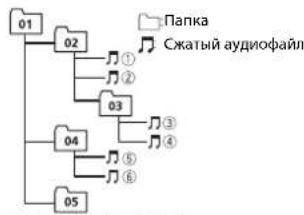
Level 1 Level 2 Level 3 Level 4
0T 01 do 05:Homep nankn
①do!focneBObaTeBbHOCTb
Bocnpon3BeDeHn
Ta6nua cunboIOB dna
pycckoro A3bika
| D: C | D: C | D: C |
| A:A | B:B | B:B |
| F:F | J:D | E:E,E |
| Z:X | J:3 | H:N、N |
| K:K | A:N | H:M |
| H:H | Q:O | N:Π |
| P:P | C:C | T:T |
| Y:Y | Φ:Φ | X:X |
| U:U | Y:Y | U:U、U、U |
| V:b | H:bl | b:b |
| J:J | H:IO | J:J |
D:ДиспелСБукВа
Abtopckoe npabo u
TOBapHbIe 3HaKn
iTunes
Apple II iTunes ABYABOTCT TOPROBIMN 3HAKAMI KOMPAHANy Apple Inc,
3aerntpnoBaanBmN B CIIA N pyrnx CTpaHAn
WMA
Windows Media-3TO
3aerntcnpoabaHnA Tropobar Mapka HnTropobar Mapka Microsoft Corporation B CIIUA w/wnn dpyrtns ctpahan.
B daHHOM n3deNNn NCNONb3yOTcA
TEXHONORIN, npnHaJnxKaunne
Kopnpaun Microsoft, KOTOpbIe He
pa3pewaaetcNcNOnb30BaTbnn
pacnpocTpaHraTb 6e3 liueh3nnOT
Microsoft Licensing, Inc.
FLAC
© 2000-2009 Josh Coalson
2011-2013 Xiph.org Foundation Pacnpoctpaehnne Hcnobnb0aHbN BHe NCxOHDhK codOB m6hApH 4aBnO, C moDuaFkaunmaA nn6peaTaTc np Co6nOeHN CNyUynx yCtobn
BpaacnpoctpaHemMxCOHomKoIe D0xHO6bTbCOXPaHEnOyBEOMnHeN 06ABTOPCOMNPabe,HACTOUINCNICOK yCIOBmNUCIOBnO6OrpAHHEN NOTBTCTBEHOCTN.
-Prn paNpocptpaHEn 6HApbHex
faiIOB 063aTeNbHO BOCpOuB3EHeHNE
BbIeUyONMAHYTO YEBODMENH N6
ABTOPCKmPbAe, HAcTOJIeFO CINCKA
ycOBnM INPpBEDeHHbIX HIXe YcIOBNI
OB ORPAHUNEH NOTBCTBEHNOCTN B
DOKcHMHTaUNIHN MnDpyTnx
CONPOBDNTBbNxMATEpMaJax.
HaMeHOBaHHe Xiph.org Founction H MeHbYaqcTHNkoB HeONJKBH NIOB03oBaTcIIN NOIDePJKN HIN PNOBnKCHNTOBAPOB,Co3aHbHbc X PIMHEHEMEN DAHHO NpOPTaMMHO O6ecneHEn,Be3npEdBaPntEhBO HO NMCbEHORO papeChHn
npaboo6nadaTena
DAHHOE IIO PNEIOCTABJRETCN
PAPBOOBJAATEIEMN COABTOPAMN
"KAK ECTb" NHE PDEIOCTABJRENT
HANKAKNX ABHbIX UIN
IPOPA3YMEBAEMbIXTAPAHNTN
NPIROHOCTINPPOJAXNIN
KOHRPHTIOIOCTIOIBOBAHIN.H
IPN KAKNX OBCTOIETJBCCTBAX
YAPABINIOIMU COAIBOTPBHE HECY OTBTCTBEHHOCTM3A PRMBIE,
KOCBEHNbE, CNYAHNBIE, WTPAΦHBe HINI NIOCENDEYIOUISE YBtkiu (BKIIOyAA HO HE OPAHYNUBARCb 3ATPATAMH H
TIPNIO6PENE3AMEHROUIXX
TOBAPOB IN YCNYT, YTPATOI
BO3MOXHOCTNIOLOB3OBAHAHNOIPOTEENDAHHbIX,YYUJIeEHOH
BbIIOblI NIObIMN yBblTKAMN B
PE3yIbTATE NPMOCTAHOBKIN
DAETENbHOCTN),BO3HNKAIOUHE HA
OCHOBE CORNAUHEHRA, HECEHRA
OTBETCTBEHHOCTNIMHAPUHEHNA
OB3ATEJIbCTB(BKIOU4A
HE6PEXHOCTb) PN INCNOJIb3OBAHIN
DAHHOTIPOPTAMMHO
OBCEIEHENIAJNDAKJECNKOMPAHIAJIbIJI PTEIDYIPEKDEHAEO
BO3MOXHOCTM TAKOTO yUIEP6A.
iPod & iPhone
iPhone, iPod, iPod classic, iPod nano i iPod touch JBNIOCTO BOPHMMI 3HAKAMM KOMNAHNNApple Incle
3aerntcpnpoBaanBmB CIIaNpyrtnx CTpaHAn
Lightning ABHETCRTOPBbIM 3hAKOM KOMannsApple Inc.
"Made for iPod" n "Made for iPhone"
0374aeta, TQI AEIEKPTPOHbI npB6p 6bln
pa3pa6o7an C cIeMbIONKnOuChENHn
onpeDcENHO K iPod mII iPOne
coOTBeTCTBEHNO, N MMeTeT
ceptnfouikauira pa3pa6oTuKa o
COOTBCTBUN CTXKNHECKMMXapakTepnKAMApple. Apple He HecetOTBECTBHeHOCTM 3a paOby DAHORO
yctpoCTBaHnneroCOOTBeTCTBNE CO CTaNaptamnNoTexhme6e2oanchoCTN NNpeyIANTHBHmHOPMAMn
PoxanyCTa, 06pAHTe BHIMAHme, yTO nCnObl3oBAHne DAHHORo pnp6pa cI Pod nnIPhone MoKet OTpnuAteBHO
CKa3bIbTaBaHa KaueCTBe 6ecnpoBDoHCB3n.
AndroidTM
Android AndroidTobaHbIM 3HAKOM KOMAnhuiyGoogle Inc.
MIXTRAX
MIXTRAX ABNETC TPOROB MApKoN
PIONEER CORPORATION.
CepnHbI Homep
Ha 30m pncyHke nokazha Hnfoepmaun O mecaue ngrode n3rotobneHH yctpOCTBa.
| 12 uinφp |
| 2 uinφpy |
| 10 uinφp |
Data n3rotobaneo6opdyobanra
P1-ΓoN3rTOBnEHn
| ТοД 2001 2002 | 2003 2004 | 2005 | 2006 | 2007 | 2008 | 2009 | 2010 | |||
| Симв养老金 | В СЕ | EFGHIJ |
| Год 2011 | 2012 | 2013 | 2014 | 2015 | 2016 | 2017 | 2018 | 2019 | 2020 | |||
| C | M | M | B | O | n | K | L | M | N | O | P |
P2-Mecn3roToBneHn
| Месац | 1 | 2 | 3 | 4 | 5 | 6 | 7 | 8 | 9 | 10 | 11 | 12 |
| Симв养老金 | A | B | C | D | E | F | G | H | I | J | K | L |
Texhueckne xapaKtepncTNUK
06nne
NCTOCHNKNTAHIN:14,4B NOCT.TOKA (DONYCTHMbI DNANA3OHOT 10,8Bdo 15,1B)
CINCTEMA3a3cEMHNEA3a3cEmEHNEOTPIATENbHORO NOIHOCA
MaKcIMaJIbHbI IOTpe6JIHemBtOK: 10,0A
PazMeBn (LI X B X Y) DIN
MaKcMmAbHaB BbIXoHHa MOuHOCTb:
50Br×4
(OTHOWeHHe CnHaJ/WhM:20d6)
Othoene CunHan/woM:62 5 (ceTB
IEC-A)
Tiohep LW
Huaonoh qacto:ot 153Ku do 281Ku
Pone3HnA yBCTBnTeNbHOCTb:28MKB
(OTHOWEHNE CnHnAn/WyM:20d5)
OthoWeHne cunHan/whm:62D5 (ceTb
IEC-A)
Приимechanical:
BcootBetCTBm co cTaTbeN 53aKoHa
PocnckoΦepaunnO3uTne npab
NOTpeBnteneN H NOCTaHOBNEHEM
npabntenbctBa Poccncko Fedepaunn N
720 ot 16.06.97 kommaHnaPioneer Europe NV
orOBaPbBaet CnedyuOuCpOK cnykbbl
m3en,0puiuHbHOnctabnEmbixHa
POCCNUCKPNBIOK.
Auroomowishah 3iektipohmka:6 let
P104H NEDN (naynnn, nnnpOon)
T.N.J.3 net
IPIMMEYAHNE
XapakTepeNTKIN KOHCTpyKUNMOrYT
6bItb 3MeHeHbI 6e3 npedBapntbHorO
yBEdOMJIeHH.
JaHHoe yctpoiCTBO npOn3BeDeHO B
TaNaHne.
http://www.pioneer.eu
Visit www.pioneer.co.uk (or www.pioneer.eu) to register your product.
Pioneer CarStereo-Pass
Please fill out immediately after purchase.
© 2014 PIONEER CORPORATION. All rights reserved.
PIONEER CORPORATION, 2014. Bce npaba 3aunuiehbl.
PIONEER CORPORATION
1-1, Shin-ogura, Saiwal-ku, Kawasaki-shi,
Kanagawa 212-0031, JAPAN
Kopnpaunna NaiOnn
1-1,CnH-Orypa, CaBaaN-Ky, r Kabacakn
npedeektpa Kaharaba,
212-0031,Anonn
Mmnprep OOO "TMOHEP PYC"
125040, Pocca, r. MockBa, yr. PpaBbl, 26
Ten.:+7(495)956-89-01
PIONEER EUROPE NY
Haven 1087, Keetberlaan 1, B-9120 Melsele, Belgium/Belgique
TEL: (0) 3/570.05.11
PIONEER ELECTRONICS (USA) INC.
P.O.Box 1540, Long Beach, California 90801-1540,U.S.A.
TEL: (800) 421-1404
PIONEER ELECTRONICS OF CANADA, INC.
340 Ferrier Street, Unit 2, Markham, Ontario L3R 2Z5, Canada
TEL:1-877-283-5901
TEL:905-479-4411
PIONEER ELECTRONICS ASIACENTRE PTE. LTD.
253 Alexandra Road, #04-01, Singapore 159936
TEL:65-6472-7555
PIONEER ELECTRONICS AUSTRALIA PTY. LTD.
5 Arco Lane, Heatherton, Victoria, 3202 Australia
TEL: (03) 9586-6300
PIONEER ELECTRONICS DE MEXICO, S.A. de C.V.
Blvd.Manuel Avila Camacho 138 10 piso
Col.Lomas de Chapultepec, Mexico, D.F. 11000
TEL:55-9178-4270
先锋股份有限公司
台北市内湖国瑞光路407號8樓
