TKG MG 1001 DGC - Microwave Oven KALORIK - Free user manual and instructions
Find the device manual for free TKG MG 1001 DGC KALORIK in PDF.

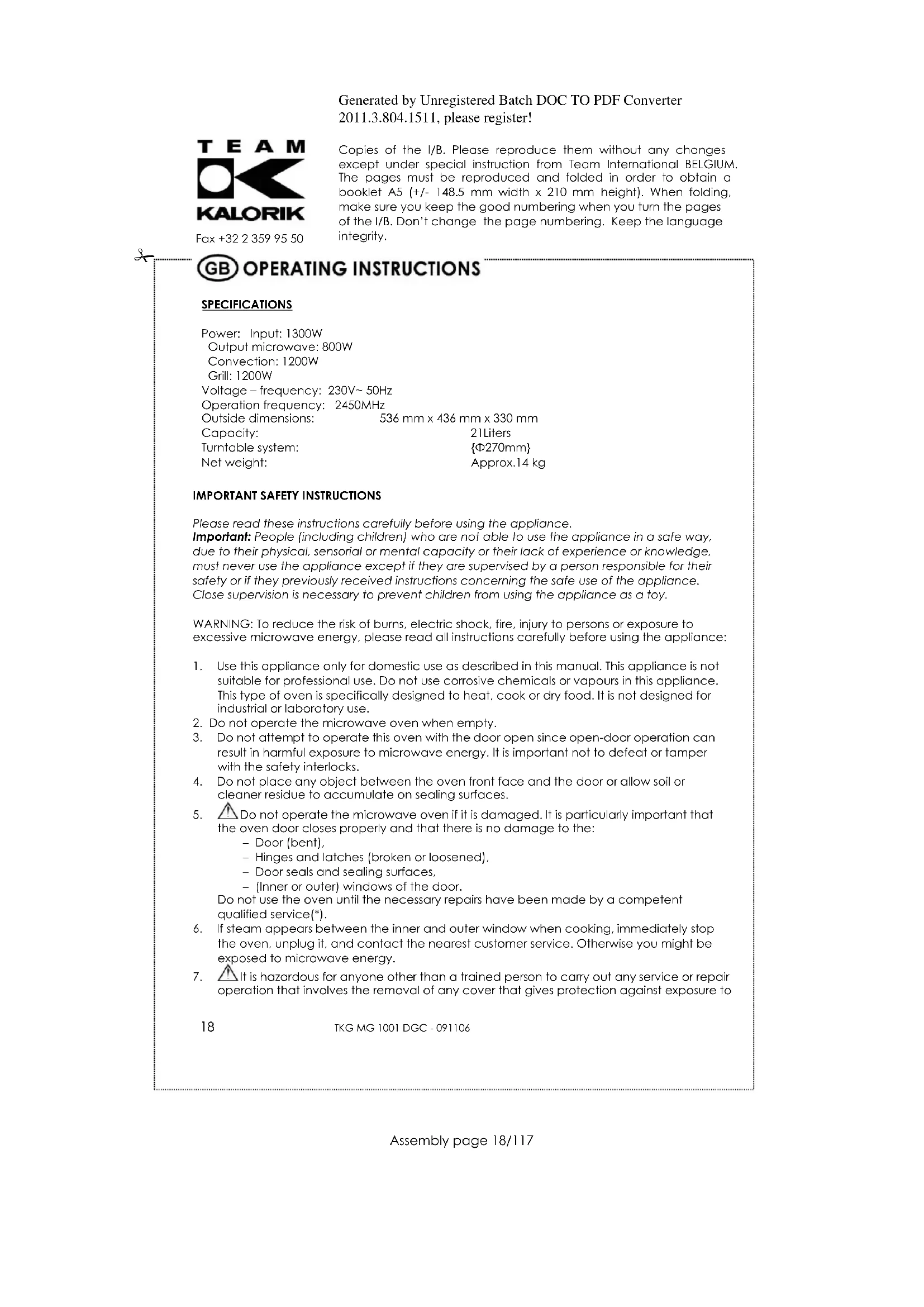


| Product Type | Microwave Oven |
| Brand | Kalorik |
| Model | TKG MG 1001 DGC |
| Power Consumption | 1300 W |
| Microwave Power | 800 W (5 levels: 100%, 80%, 50%, 30%, 10%) |
| Convection Power | 1200 W |
| Grill Power | 1200 W |
| Voltage / Frequency | 230 V ~ 50 Hz |
| Wave Frequency | 2450 MHz |
| External Dimensions (W x D x H) | 536 mm x 436 mm x 330 mm |
| Capacity | 21 liters |
| Turntable Diameter | 270 mm |
| Net Weight | Approximately 14 kg |
| Main Functions | Microwave, Grill, Convection (with or without preheating), Combi, Defrost by weight or by time, 10 auto menus |
| Control Type | Touch panel + rotary knob |
| Display | Digital (LED) |
| Interior Light | Yes |
| Child Lock | Yes (key lock) |
| Auto Shut-off | Yes (cooking end, door open, inactivity) |
| Included Accessories | Glass tray, rolling ring, metal cooking rack |
| Care and Cleaning | Clean with a soft damp cloth; do not use abrasive products; wash the glass tray in soapy water |
| Spare Parts and Repairability | Call a qualified service for any repair; do not disassemble yourself |
Frequently Asked Questions - TKG MG 1001 DGC KALORIK
User questions about TKG MG 1001 DGC KALORIK
0 question about this device. Answer the ones you know or ask your own.
Ask a new question about this device
Download the instructions for your Microwave Oven in PDF format for free! Find your manual TKG MG 1001 DGC - KALORIK and take your electronic device back in hand. On this page are published all the documents necessary for the use of your device. TKG MG 1001 DGC by KALORIK.
USER MANUAL TKG MG 1001 DGC KALORIK
Copies of the I/B. Please reproduce them without any changes except under special instruction from Team International BELGIUM. The pages must be reproduced and folded in order to obtain a booklet A5 (+/- 148.5 mm width x 210 mm height). When folding, make sure you keep the good numbering when you turn the pages of the I/B. Don't change the page numbering. Keep the language integrity.

Mikrowelle
Microwave Oven
Four à micro-ondes
Microgolfoven
Microondas
Microondas
Forno a microonde
Generated by Unregistered Batch DOC TO PDF Converter 2011.3.804.1511, please register!

Fax +32 2 359 95 50
Copies of the I/B. Please reproduce them without any changes except under special instruction from Team International BELGIUM. The pages must be reproduced and folded in order to obtain a booklet A5 (+/- 148.5 mm width x 210 mm height). When folding, make sure you keep the good numbering when you turn the pages of the I/B. Don't change the page numbering. Keep the language integrity.
2
TKG MG 1001 DGC - 091106

Fax +32 2 359 95 50
Copies of the I/B. Please reproduce them without any changes except under special instruction from Team International BELGIUM. The pages must be reproduced and folded in order to obtain a booklet A5 (+/- 148.5 mm width x 210 mm height). When folding, make sure you keep the good numbering when you turn the pages of the I/B. Don't change the page numbering. Keep the language integrity.
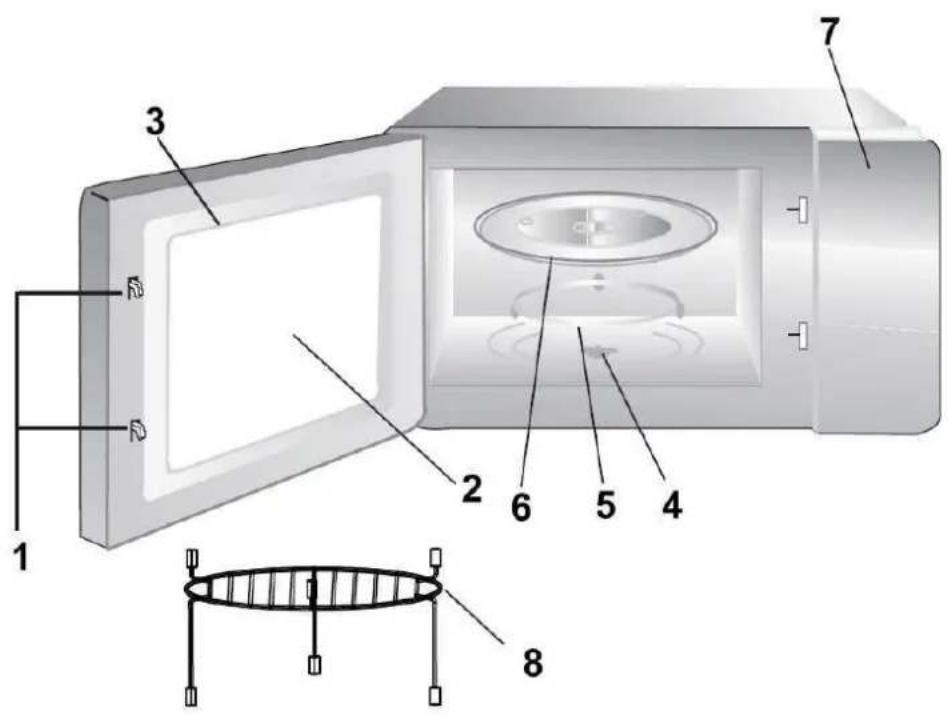
D
- Door safety lock system
- Oven window
- Oven door
- Motor shaft
- Roller ring
- Glass turntable
- Control panel
- Grill tray
P
Copies of the I/B. Please reproduce them without any changes except under special instruction from Team International BELGIUM. The pages must be reproduced and folded in order to obtain a booklet A5 (+/- 148.5 mm width x 210 mm height). When folding, make sure you keep the good numbering when you turn the pages of the I/B. Don't change the page numbering. Keep the language integrity.
Copies of the I/B. Please reproduce them without any changes except under special instruction from Team International BELGIUM. The pages must be reproduced and folded in order to obtain a booklet A5 (+/- 148.5 mm width x 210 mm height). When folding, make sure you keep the good numbering when you turn the pages of the I/B. Don't change the page numbering. Keep the language integrity.
Copies of the I/B. Please reproduce them without any changes except under special instruction from Team International BELGIUM. The pages must be reproduced and folded in order to obtain a booklet A5 (+/- 148.5 mm width x 210 mm height). When folding, make sure you keep the good numbering when you turn the pages of the I/B. Don't change the page numbering. Keep the language integrity.
Copies of the I/B. Please reproduce them without any changes except under special instruction from Team International BELGIUM. The pages must be reproduced and folded in order to obtain a booklet A5 (+/- 148.5 mm width x 210 mm height). When folding, make sure you keep the good numbering when you turn the pages of the I/B. Don't change the page numbering. Keep the language integrity.
KOCHEN IN DER MIKROWELLE
Copies of the I/B. Please reproduce them without any changes except under special instruction from Team International BELGIUM. The pages must be reproduced and folded in order to obtain a booklet A5 (+/- 148.5 mm width x 210 mm height). When folding, make sure you keep the good numbering when you turn the pages of the I/B. Don't change the page numbering. Keep the language integrity.
BEDIENELEMENT
Copies of the I/B. Please reproduce them without any changes except under special instruction from Team International BELGIUM. The pages must be reproduced and folded in order to obtain a booklet A5 (+/- 148.5 mm width x 210 mm height). When folding, make sure you keep the good numbering when you turn the pages of the I/B. Don't change the page numbering. Keep the language integrity.
GEBRAUCH
Copies of the I/B. Please reproduce them without any changes except under special instruction from Team International BELGIUM. The pages must be reproduced and folded in order to obtain a booklet A5 (+/- 148.5 mm width x 210 mm height). When folding, make sure you keep the good numbering when you turn the pages of the I/B. Don't change the page numbering. Keep the language integrity.
Copies of the I/B. Please reproduce them without any changes except under special instruction from Team International BELGIUM. The pages must be reproduced and folded in order to obtain a booklet A5 (+/- 148.5 mm width x 210 mm height). When folding, make sure you keep the good numbering when you turn the pages of the I/B. Don't change the page numbering. Keep the language integrity.

Copies of the I/B. Please reproduce them without any changes except under special instruction from Team International BELGIUM. The pages must be reproduced and folded in order to obtain a booklet A5 (+/- 148.5 mm width x 210 mm height). When folding, make sure you keep the good numbering when you turn the pages of the I/B. Don't change the page numbering. Keep the language integrity.
Auto-Menü
| Kode | Gebrauch | Gewicht | Leistung |
| A1 | Aufheizen | 200 | 100% (Mik.) |
| 300 | 100% (Mik.) | ||
| 400 | 100% (Mik.) | ||
| 500 | 100% (Mik.) | ||
| A2 | Kartoffeln | 230 | 100% (Mik.) |
| 460 | 100% (Mik.) | ||
| 690 | 100% (Mik.) | ||
| A3 | Gemüse | 200 | 100% (Mik.) |
| 300 | 100% (Mik.) | ||
| 400 | 100% (Mik.) | ||
| 500 | 100% (Mik.) | ||
| A4 | Pasta | 50 | 80% (Mik.) |
| 100 | 80% (Mik.) | ||
| 150 | 80% (Mik.) | ||
| A5 | Fleisch | 200 | 100% (Mik.) |
| 300 | 100% (Mik.) | ||
| 400 | 100% (Mik.) | ||
| 500 | 100% (Mik.) | ||
| A6 | Fisch | 200 | 80% (Mik.) |
| 300 | 80% (Mik.) | ||
| 400 | 80% (Mik.) | ||
| 500 | 80% (Mik.) | ||
| A7 | Pizza | 300 | 100% (Mik.)/100% (Gri.) |
| 400 | 100% (Mik.)/100% (Gri.) | ||
| A8 | Brot | 50 | 100% (Gri.) |
| 100 | 100% (Gri.) | ||
| A9 | Brathähnchen | 750 | C-2 |
| 1000 | C-2 | ||
| 1250 | C-2 | ||
| A10 | Kuchen | 475 | Erst vorwärmen auf 160°C |
BEMERKUNGEN:
Copies of the I/B. Please reproduce them without any changes except under special instruction from Team International BELGIUM. The pages must be reproduced and folded in order to obtain a booklet A5 (+/- 148.5 mm width x 210 mm height). When folding, make sure you keep the good numbering when you turn the pages of the I/B. Don't change the page numbering. Keep the language integrity.
Copies of the I/B. Please reproduce them without any changes except under special instruction from Team International BELGIUM. The pages must be reproduced and folded in order to obtain a booklet A5 (+/- 148.5 mm width x 210 mm height). When folding, make sure you keep the good numbering when you turn the pages of the I/B. Don't change the page numbering. Keep the language integrity.
Copies of the I/B. Please reproduce them without any changes except under special instruction from Team International BELGIUM. The pages must be reproduced and folded in order to obtain a booklet A5 (+/- 148.5 mm width x 210 mm height). When folding, make sure you keep the good numbering when you turn the pages of the I/B. Don't change the page numbering. Keep the language integrity.
Copies of the I/B. Please reproduce them without any changes except under special instruction from Team International BELGIUM. The pages must be reproduced and folded in order to obtain a booklet A5 (+/- 148.5 mm width x 210 mm height). When folding, make sure you keep the good numbering when you turn the pages of the I/B. Don't change the page numbering. Keep the language integrity.
Copies of the I/B. Please reproduce them without any changes except under special instruction from Team International BELGIUM. The pages must be reproduced and folded in order to obtain a booklet A5 (+/- 148.5 mm width x 210 mm height). When folding, make sure you keep the good numbering when you turn the pages of the I/B. Don't change the page numbering. Keep the language integrity.
Copies of the I/B. Please reproduce them without any changes except under special instruction from Team International BELGIUM. The pages must be reproduced and folded in order to obtain a booklet A5 (+/- 148.5 mm width x 210 mm height). When folding, make sure you keep the good numbering when you turn the pages of the I/B. Don't change the page numbering. Keep the language integrity.
GB OPERATING INSTRUCTIONS
SPECIFICATIONS
Power: Input: 1300W
Output microwave: 800W
Convection: 1200W
Grill: 1200W
Voltage - frequency: 230V\~50Hz
Operation frequency: 2450MHz
Outside dimensions: 536 mm x 436 mm x 330 mm
Capacity:
21 Liters
Turntable system:
{Φ270mm}
Net weight:
Approx.14 kg
IMPORTANT SAFETY INSTRUCTIONS
Please read these instructions carefully before using the appliance.
Important: People (including children) who are not able to use the appliance in a safe way, due to their physical, sensorial or mental capacity or their lack of experience or knowledge, must never use the appliance except if they are supervised by a person responsible for their safety or if they previously received instructions concerning the safe use of the appliance.
Close supervision is necessary to prevent children from using the appliance as a toy.
WARNING: To reduce the risk of burns, electric shock, fire, injury to persons or exposure to excessive microwave energy, please read all instructions carefully before using the appliance:
-
Use this appliance only for domestic use as described in this manual. This appliance is not suitable for professional use. Do not use corrosive chemicals or vapours in this appliance. This type of oven is specifically designed to heat, cook or dry food. It is not designed for industrial or laboratory use.
-
Do not operate the microwave oven when empty.
-
Do not attempt to operate this oven with the door open since open-door operation can result in harmful exposure to microwave energy. It is important not to defeat or tamper with the safety interlocks.
-
Do not place any object between the oven front face and the door or allow soil or cleaner residue to accumulate on sealing surfaces.
-
Do not operate the microwave oven if it is damaged. It is particularly important that the oven door closes properly and that there is no damage to the:
- Door (bent),
- Hinges and latches (broken or loosened),
- Door seals and sealing surfaces,
(Inner or outer) windows of the door.
Do not use the oven until the necessary repairs have been made by a competent qualified service(*).
-
If steam appears between the inner and outer window when cooking, immediately stop the oven, unplug it, and contact the nearest customer service. Otherwise you might be exposed to microwave energy.
-
It is hazardous for anyone other than a trained person to carry out any service or repair operation that involves the removal of any cover that gives protection against exposure to

Fax +32 2 359 95 50
Copies of the I/B. Please reproduce them without any changes except under special instruction from Team International BELGIUM. The pages must be reproduced and folded in order to obtain a booklet A5 (+/- 148.5 mm width x 210 mm height). When folding, make sure you keep the good numbering when you turn the pages of the I/B. Don't change the page numbering. Keep the language integrity.
microwave energy. Should the appliance or its power cord be damaged, do not use this appliance. All repairs should be made by a competent qualified service(*).
-
Do not attempt to disassemble the appliance or to remove feet, seals, screws etc.
-
To reduce the risk of fire in the oven cavity:
a. When heating food in a plastic or paper container, check the oven frequency to avoid any risk of fire.
b. Remove wire twist-ties from paper or plastic bags before placing the bag in the oven.
c. If smoke is observed, switch off or unplug the appliance and keep the door closed in order to stifle any flames.
d. Do not use the cavity for storage purposes. Do not leave paper products, cooking utensils or food in the cavity when not in use.
- IMPORTANT: UTENSILS THAT ARE NOT SUITABLE FOR MICROWAVE COOKING.
Always check if your utensils are microwave resistant before using them in the appliance.
- Never use utensils with a metal handle.
- Never use utensils with metal decorations.
- Never use iron locking clips (not even covered with paper).
- Never use melamine receptacles as these contain a substance that absorbs microwave energy. The receptacle might break or carbonise and the cooking process would be slower.
- The use of traditional thermometers is prohibited, use microwave resistant thermometers.
- In case of doubt, please contact the supplier of the utensil to know whether it is microwave resistant or not.
-
Do not prepare food in receptacles with too narrow an opening, as this might cause these receptacles to explode.
-
Liquid or other food must not be heated in sealed containers (such as receptacles with lid or feeding bottle with dummy) since they are liable to explode.
-
Should the symbol be indicated on a certain surface, you need to be careful when handling the product. This symbol means: CAUTION, this surface may get very hot during use.
-
Eggs in their shell or whole hard-boiled eggs must not be heated in the microwave oven as they might explode.
-
Microwave heating of beverage can result in delayed eruptive boiling, therefore care has to be taken when you handle the container.
-
CAUTION: Do not fry food in the oven. Hot oil can damage oven parts and utensils and even result in skin burns. Do not warm up greasy foods in the microwave oven, as it might catch fire.
-
Pierce foods with heavy skins such as potatoes, whole squash, apples and chestnuts before cooking. Otherwise they might explode.
-
The contents of feeding bottles and baby jars should be stirred or shaken and the temperature should be checked before serving in order to avoid burns.
-
Cooking utensils may become hot because of heat transferred from the heated food. Potholders may be needed to handle the utensil.
-
Before operating the oven, make sure the glass tray, the motor shaft and the roller ring are in correct position inside the oven.
-
Make sure the openings of microwave resistant receptacles are neither obstructed nor covered in order to avoid that they explode during operation.
-
Do not place the preparation directly on the glass tray, but put it in a microwave resistant receptacle.

Fax +32 2 359 95 50
Copies of the I/B. Please reproduce them without any changes except under special instruction from Team International BELGIUM. The pages must be reproduced and folded in order to obtain a booklet A5 (+/- 148.5 mm width x 210 mm height). When folding, make sure you keep the good numbering when you turn the pages of the I/B. Don't change the page numbering. Keep the language integrity.
- Food containing a mixture of water and grease should be left 30 to 60 seconds in the oven when switched off to allow the mixture to come down to avoid bubbling, especially when a beef cube is added.
1) Competent qualified service: after-sales department of the producer or importer or any person who is qualified, approved and competent to perform this kind of repairs in order to avoid all danger. In case of need you should return the appliance to this electrician.
INSTALLATION
- Make sure that all the packing materials are removed from the inside of the door.
- Check the oven for any damage, such as misaligned or bent door, damaged door seals and sealing surface, broken or loose door hinges and latches and dents inside the cavity or on the door. If there is any damage, do not operate the oven and contact a competent qualified service.
- This microwave oven must be placed on a flat, stable surface able to hold its weight (approximately 14 kg) and the heaviest food likely to be cooked in the oven.
- Do not place the oven where heat, moisture or high humidity are generated, or near combustible materials.
- Do not cover or block any openings on the appliance. Do not remove the feet.
- For correct operation, the oven must have sufficient airflow. Allow 30cm of space above the oven, 10cm at the back and 8cm at both sides.
- The socket must be readily accessible so that it can be easily unplugged in case of emergency.
- Do not use the oven outdoors.
WARNING: THIS APPLIANCE MUST BE GROUNDED.
Avoid using extension cords or make sure they are compatible with the power of your appliance.
We advise you to call for an electrician if you have any questions concerning the technical installation of your appliance.
This appliance is protected by a safety fuse. Should this fuse be replaced, please contact a competent qualified electrician (*).
RADIO INTERFERENCE
Operation of the microwave oven can cause interference to your radio, TV or similar equipment. When there is interference, it may be reduced or eliminated by taking the following measures:
- Clean the door and sealing surface of the oven.
- Reorient the receiving antenna of radio or television.
- Move the microwave oven away from the receiver.
- Plug the microwave oven into a different outlet so that microwave oven and receiver are on different branch circuits.
MICROWAVE COOKING PRINCIPLES
- Arrange food carefully. Place the thickest areas towards the outside of the dish.
- Watch the cooking time. Cook for the shortest amount of time indicated and add more as needed. Food severely overcooked can smoke or ignite.
20
TKG MG 1001 DGC - 091106

Fax +32 2 359 95 50
Copies of the I/B. Please reproduce them without any changes except under special instruction from Team International BELGIUM. The pages must be reproduced and folded in order to obtain a booklet A5 (+/- 148.5 mm width x 210 mm height). When folding, make sure you keep the good numbering when you turn the pages of the I/B. Don't change the page numbering. Keep the language integrity.
- Cover foods while cooking. Covers prevent spattering and help foods to cook evenly.
- Rearrange foods such as meatballs halfway through cooking both from top to bottom and from the centre of the dish to the outside.

Fax +32 2 359 95 50
Copies of the I/B. Please reproduce them without any changes except under special instruction from Team International BELGIUM. The pages must be reproduced and folded in order to obtain a booklet A5 (+/- 148.5 mm width x 210 mm height). When folding, make sure you keep the good numbering when you turn the pages of the I/B. Don't change the page numbering. Keep the language integrity.
UTENSILS GUIDE
- We advise you to use utensils that are specially conceived for microwave cooking as they allow energy to pass through the container and heat the food.
- Microwaves cannot penetrate metal, so metal utensils or dishes with metallic trim should not be used.
- Do not use recycled paper products when microwave cooking, as they may contain small metal fragments which may cause sparks and/or fire.
- Round/oval dishes rather than square/oblong ones are recommended, as food in corners tends to overcook.
The table below is a general guide to help you select the correct utensils.
| Cookware | Microwave Cooking | Grill Cooking | Convection | Combination Cooking |
| Heat-Resistant Glass | Yes | Yes | Yes | Yes |
| Non Heat-Resistant Glass | No | No | No | No |
| Heat-Resistant Ceramics | Yes | Yes | Yes | Yes |
| Microwave-Safe Plastic Dish | Yes | No | No | No |
| Kitchen Paper | Yes | No | No | No |
| Metal Tray | No | Yes | Yes | No |
| Metal Rack | No | Yes | Yes | No |
| Aluminum Foil & Foil Containers | No | Yes | Yes | No |

Fax +32 2 359 95 50
Copies of the I/B. Please reproduce them without any changes except under special instruction from Team International BELGIUM. The pages must be reproduced and folded in order to obtain a booklet A5 (+/- 148.5 mm width x 210 mm height). When folding, make sure you keep the good numbering when you turn the pages of the I/B. Don't change the page numbering. Keep the language integrity.
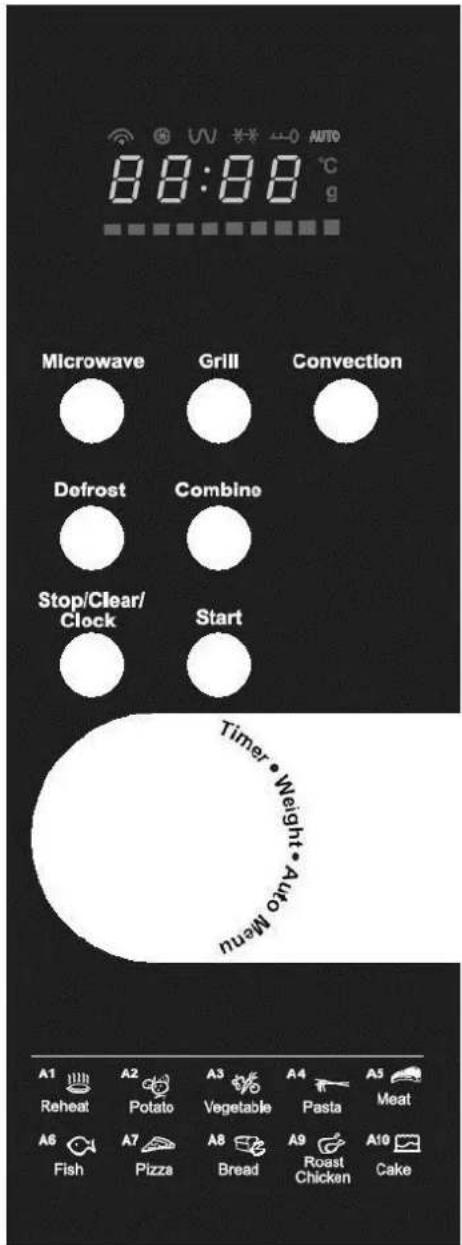
CONTROL PANEL
Please also refer to the OPERATION section.
23
TKG MG 1001 DGC - 091106
Diplay screen
Cooking time, power, indicators, and present time are displayed.
Microwave
Press to select microwave power level.
Grill
Press to set a grill cooking programme or a microwave and grill combination cooking programme.
Convection
Press to programme convection temperature.
Defrost
Press to select the defrost function.
Combine
Press to select combination cooking settings.
Stop/Clear/Clock
Touch to stop cooking programme or clear all previous settings before cooking starts and to set the clock.
Start
Press to start a cooking programme.
Timer/Weight/Auto Menu
Rotate to set cooking time, weight or select auto menu.

Fax +32 2 359 95 50
Copies of the I/B. Please reproduce them without any changes except under special instruction from Team International BELGIUM. The pages must be reproduced and folded in order to obtain a booklet A5 (+/- 148.5 mm width x 210 mm height). When folding, make sure you keep the good numbering when you turn the pages of the I/B. Don't change the page numbering. Keep the language integrity.
OPERATION
1. Setting the clock
When you plug in the microwave oven, the display will show "0:00", a beep will sound once and the appliance will be on standby. Its setting range is 0:00-23:59.
-
When on standby, press "STOP/CLEAR/CLOCK" and "00" will flash.
-
Turn " " to set the hours. The range is 0-23.
-
Press "START" to confirm the clock.
-
Turn " " to set the minutes. The range is 0-59.
-
Press "START" to confirm. ":" flashes.
To modify the clock: proceed as mentioned above.
Note:
1) If you do not set the clock after having plugged in the unit, the clock will not work. 2) If you press "STOP/CLEAR/CLOCK" while setting the clock, the setting will be cleared.
2. Microwave Cooking
Select the microwave power level and set the cooking time as you wish. There are five power levels available. Press "MICROWAVE" several times to choose the power.
-
Press "MICROWAVE", the display will show "P100" first, indicator "●" will appear. Press again until the desired power level is displayed. If you press "STOP/CLEAR/CLOCK", the unit will go back to standby.
-
Turn " 🔍" to set the cooking time. The max. time is 95 minutes.
-
If "STOP/CLEAR/CLOCK" is pressed, the unit will go back to the previous state.
-
Press "START" to start cooking. The " indicator will flash.
-
If you press "STOP/CLEAR/CLOCK", the unit stops working. If you press "STOP/CLEAR/CLOCK" again or if no button is pressed for more than 5 minutes, the appliance will go back to standby. If you want to continue the programme, press "START" within 5 minutes, the unit goes on working and the time counts down. If you want to check the microwave power level during use, press "MICROWAVE". The display will show the power level for 3 seconds and then return to the countdown state.
-
During cooking, each time you press "START" the cooking time will increase by 30 seconds.
-
When cooking is finished, five beeps will sound and the appliance will go back to standby.
Note: setting the "MICROWAVE" power level
| Press | LED display | Microwave power |
| Once | P100 | 100% |
| Twice | P80 | 80% |
| 3 times | P50 | 50% |
| 4 times | P30 | 30% |
| 5 times | P10 | 10% |
24
TKG MG 1001 DGC - 091106

Fax +32 2 359 95 50
Copies of the I/B. Please reproduce them without any changes except under special instruction from Team International BELGIUM. The pages must be reproduced and folded in order to obtain a booklet A5 (+/- 148.5 mm width x 210 mm height). When folding, make sure you keep the good numbering when you turn the pages of the I/B. Don't change the page numbering. Keep the language integrity.
3. Grill Cooking + Microwave and Grill Combination Cooking
By pressing the "GRILL" key you can select 3 cooking programmes: grill cooking programme G-1 and microwave and grill combination cooking programmes C-1 and C-2. For C-1 and C-2, the appliance will work in cycles: it will work 18 seconds on microwave power and then 15 seconds on grill power for C-1, 12 seconds on microwave power and then 21 seconds on grill power for C-2.
-
Press "GRILL" several times to choose the grill power. "G-1", "C-1" and "C-2" will be displayed in order. At this moment, " ' (for G-1) or " " and " ' (for C-1 and C-2) will be displayed.
-
Turn " 🔍" to set the cooking time. The maximum time is 95 minutes.
-
Press "START" to start cooking. "U U' (for G-1) or " " and " U U' (for C-1 and C-2) will flash. Time counts down. If you press "STOP/CLEAR/CLOCK", the unit stops working. If you press "STOP/CLEAR/CLOCK" again or if no button is pressed for more than 5 minutes, the appliance will go back to standby. If you want to continue the programme, press "START" within 5 minutes, the unit goes on working and the time counts down. If you want to check the grill setting during use, press "GRILL". The display will show the chosen grill setting for 3 seconds and then return to the countdown state.
-
During cooking, each time you press "START" the cooking time will increase by 30 seconds.
-
The buzzer sounds five times when cooking is finished.
4. Defrost by weight (DEF 1)
-
Press "DEFROST" once to choose the defrosting by weight function. "*** will appear." dEF1 will flash.
-
Turn " 🔍" to set the weight. "100", "200", "300", "400", "500", "600", "800", "1000", "1200", "1400", "1600", "1800" and "2000" will be displayed in cycle. "g" will appear.
-
Press "START" to start defrosting. "XXXX" is flashing and "g" will go out. Time will count down. If you press "STOP/CLEAR/CLOCK", the unit stops working. If you press "STOP/CLEAR/CLOCK" again or if no button is pressed for more than 5 minutes, the appliance will go back to standby. If you want to continue the programme, press "START" within 5 minutes, the unit goes on working and the time counts down. When defrosting is finished, the buzzer sounds five times and the display turns back to standby.
-
During defrosting, each time you press "START" the defrosting time will increase by 30 seconds.
-
When half the defrost time has passed, two beeps will sound to remind you to turn the food. If no action is taken, the unit will continue working but the defrost result may not be satisfactory.
5. Defrost by time (DEF 2)
-
Press "DEFROST" twice to choose the function of defrost by time. "*** will appear. "dEF2" will flash.
-
Turn " " to set the defrosting time.
25
TKG MG 1001 DGC - 091106

Fax +32 2 359 95 50
Copies of the I/B. Please reproduce them without any changes except under special instruction from Team International BELGIUM. The pages must be reproduced and folded in order to obtain a booklet A5 (+/- 148.5 mm width x 210 mm height). When folding, make sure you keep the good numbering when you turn the pages of the I/B. Don't change the page numbering. Keep the language integrity.
-
Press "START" to start defrosting. "***" indicators will flash. Time will count down. If you press "STOP/CLEAR/CLOCK", the unit stops working. If you press "STOP/CLEAR/CLOCK" again or if no button is pressed for more than 5 minutes, the appliance will go back to standby. If you want to continue the programme, press "START" within 5 minutes, the unit goes on working and the time counts down.
-
The defrosting power is P30. During this process, each time you press "START" the defrosting time will increase by 30 seconds. Five beeps will sound when defrosting is finished.
6. Auto Menu
- When the unit is on standby, turn " " to choose the auto menu directly. The display will show the codes from "A1" to "A10".
- Press "START" to confirm the menu.

- Turn " " to set the weight of the menu.
- Press "START" to start cooking.
- When finished, five beeps will sound and the unit turns back to standby.
Auto Menu Chart
| Menu code | Use | Weight (g) | Power |
| A1 | Reheat | 200 | 100% (Mic.) |
| 300 | 100% (Mic.) | ||
| 400 | 100% (Mic.) | ||
| 500 | 100% (Mic.) | ||
| A2 | Potato | 230 | 100% (Mic.) |
| 460 | 100% (Mic.) | ||
| 690 | 100% (Mic.) | ||
| A3 | Vegetable | 200 | 100% (Mic.) |
| 300 | 100% (Mic.) | ||
| 400 | 100% (Mic.) | ||
| 500 | 100% (Mic.) | ||
| A4 | Pasta | 50 | 80% (Mic.) |
| 100 | 80% (Mic.) | ||
| 150 | 80% (Mic.) | ||
| A5 | Meat | 200 | 100% (Mic.) |
| 300 | 100% (Mic.) | ||
| 400 | 100% (Mic.) | ||
| 500 | 100% (Mic.) | ||
| A6 | Fish | 200 | 80% (Mic.) |
| 300 | 80% (Mic.) | ||
| 400 | 80% (Mic.) | ||
| 500 | 80% (Mic.) | ||
| A7 | Pizza | 300 | 100% (Mic.)/100% (Gri.) |
| 400 | 100% (Mic.)/100% (Gri.) | ||
| A8 | Bread | 50 | 100% (Gri.) |
| 100 | 100% (Gri.) | ||
| A9 | Roast chicken | 750 | C-2 |
| 1000 | C-2 |
26
TKG MG 1001 DGC - 091106
Generated by Unregistered Batch DOC TO PDF Converter 2011.3.804.1511, please register!

Fax +32 2 359 95 50
Copies of the I/B. Please reproduce them without any changes except under special instruction from Team International BELGIUM. The pages must be reproduced and folded in order to obtain a booklet A5 (+/- 148.5 mm width x 210 mm height). When folding, make sure you keep the good numbering when you turn the pages of the I/B. Don't change the page numbering. Keep the language integrity.
| 1250 | C-2 | ||
| A10 | Cake | 475 | Preheat with 160°C first |
27
TKG MG 1001 DGC - 091106

Fax +32 2 359 95 50
Copies of the I/B. Please reproduce them without any changes except under special instruction from Team International BELGIUM. The pages must be reproduced and folded in order to obtain a booklet A5 (+/- 148.5 mm width x 210 mm height). When folding, make sure you keep the good numbering when you turn the pages of the I/B. Don't change the page numbering. Keep the language integrity.
Note:
1) The cake function is a convection cooking programme. The oven will first be preheated up to 160° C. When the oven has reached this temperature, it will stop working and the buzzer will sound to remind you to put the cake in. Then press "START" to start baking.
2) For the roast chicken function: during cooking, two beeps will sound to remind you to turn the food.
3) There are two different ways of putting the grill rack in the microwave oven. Depending on which one you choose, the grill will be more or less close to the food and therefore the food will be more or less grilled.
7. Convection (without preheating)
-
Press "CONVECTION" several times to choose the convection temperature. "110", "120"..."190" and "200" will be displayed in cycle. "UN" and "°C" will appear.
-
Set the convection time by turning " . The maximum time that can be set is 95 minutes.
-
Press "START"." ∪ ⓧ" will flash and time will count down.
-
If you press "STOP/CLEAR/CLOCK", the unit stops working. If you press "STOP/CLEAR/CLOCK" again or if no button is pressed for more than 5 minutes, the appliance will go back to standby. If you want to continue the programme, press "START" within 5 minutes, the unit goes on working and the time counts down.
-
If you press "CONVECTION", you check the status and the temperature will be displayed for 3 seconds, then the time counts down.
-
During this process, each time you press "START" the cooking time will increase by 30 seconds.
-
When the cooking time has elapsed, five beeps will sound and the unit will turn back to standby.
8. Convection (with preheating)
- In order to preheat the oven, do not put any food into the oven.
-
Press "CONVECTION" several times to choose the convection temperature. "110", "120"... "190" and "200" will be displayed in cycle. "UN" and "°C" will appear.
-
Press "START". The oven will start preheating.
-
When the selected preheating temperature has been reached, two beeps will sound to remind you to put the food into the oven. The preheating temperature flashes. Put the food into the oven and close the door.
-
Set the convection time within 5 minutes by turning " ☐". The maximum time that can be set is 95 minutes. Otherwise five beeps will sound and the unit will turn back to standby.
-
Press "START". " ∪ ⓧ" will flash and the time will count down.
-
If you press "STOP/CLEAR/CLOCK", the unit stops working. If you press "STOP/CLEAR/CLOCK" again or if no button is pressed for more than 5 minutes, the appliance will go back to standby. If you want to continue the programme, press "START" within 5 minutes, the unit goes on working and the time counts down.
-
If you press "CONVECTION", you check the status and the temperature will be displayed for 3 seconds, then the time counts down.

Fax +32 2 359 95 50
Copies of the I/B. Please reproduce them without any changes except under special instruction from Team International BELGIUM. The pages must be reproduced and folded in order to obtain a booklet A5 (+/- 148.5 mm width x 210 mm height). When folding, make sure you keep the good numbering when you turn the pages of the I/B. Don't change the page numbering. Keep the language integrity.
- During this process, each time you press "START" the cooking time will increase by 30 seconds.
- When the cooking time has elapsed, five beeps will sound and the unit will turn back to standby.
9. "Combine" Function (without preheating)
- Press "COMBINE" several times until the desired temperature appears. "C", "U" and "°C" will appear. "110", "120" ..."190" and "200" will be displayed in cycle. It will go back to standby by pressing "STOP/CLEAR/CLOCK".

-
Set the time by turning " 🔍". The maximum time is 95 minutes.
-
Press "START" to start the oven. "U U" and "●" will flash and the time will count down.
-
If you press "STOP/CLEAR/CLOCK", the unit stops working.
-
If you press "STOP/CLEAR/CLOCK" again or if no button is pressed for more than 5 minutes, the appliance will go back to standby. If you want to continue the programme, press "START" within 5 minutes, the unit goes on working and the time counts down.
-
Press "COMBINE" to check the status during operation. The temperature will be displayed for 3 seconds.
-
During this process, each time you press "START" the cooking time will increase by 30 seconds.
-
Five beeps will sound when cooking is finished and the unit will turn back to standby.
10. "Combine" Function (with preheating)
- In order to preheat the oven, do not put any food into the oven.
- Press "COMBINE" several times until the desired temperature appears. "☐", "☐" and "°C" will appear. "110", "120" ... "190" and "200" will be displayed in cycle. It will go back to standby by pressing "STOP/CLEAR/CLOCK".
- Press "START". The oven will start preheating.
-
When the selected preheating temperature has been reached, two beeps will sound to remind you to put the food into the oven. The preheating temperature flashes. Put the food into the oven and close the door.
-
Set the cooking time within 5 minutes by turning " 🔍". The maximum time is 95 minutes. Otherwise five beeps will sound and the unit will turn back to standby.
-
Press "START" to start the oven. "∩" and "", " will flash and the time will count down.
-
If you press "STOP/CLEAR/CLOCK", the unit stops working. If you press "STOP/CLEAR/CLOCK" again or if no button is pressed for more than 5 minutes, the appliance will go back to standby. If you want to continue the programme, press "START" within 5 minutes, the unit goes on working and the time counts down.
-
Press "COMBINE" to check the status during operation. The temperature will be displayed for 3 seconds.
-
During this process, each time you press "START" the cooking time will increase by 30 seconds.
-
Five beeps will sound when cooking is finished and the unit will turn back to standby.

Fax +32 2 359 95 50
Copies of the I/B. Please reproduce them without any changes except under special instruction from Team International BELGIUM. The pages must be reproduced and folded in order to obtain a booklet A5 (+/- 148.5 mm width x 210 mm height). When folding, make sure you keep the good numbering when you turn the pages of the I/B. Don't change the page numbering. Keep the language integrity.
11. Quick Start
- In the standby mode, press the "START" key to start cooking with 100% microwave power.
- Each time you press "START" the cooking time will increase by 30 seconds. The maximum time is 95 minutes.
12. Lock-out Function for Children
Lock: When the appliance is on standby, press "STOP/CLEAR/CLOCK" and "START" simultaneously, there will be a long beep indicating that the appliance is in the child-lock state and "0:00" or the current time will appear on the display. Unlock: In locked state, press "STOP/CLEAR/CLOCK" and "START" simultaneously, there will be a long beep indicating that the unit is unlocked.
13. Special Specifications
- The maximum cooking time of "MICROWAVE", "GRILL", "DEF2", "CONVECTION" and "COMBINE" is 95 minutes.
- When the door is open, the oven cavity will be illuminated. After 10 minutes, if the door is still open, the light will go out and the display will be on standby.
- When you open the door while the appliance is on standby or while setting a programme, the display will remain unchanged. You can continue to set the programme but the "START" key will not work.
- Close the door, the light goes out. The setting can be changed. And the "START" key can be pressed.
BEFORE YOU CALL FOR SERVICE
If the oven fails to operate:
a) Check to ensure that the oven is plugged in securely. If it is not, remove the plug from the outlet, wait 10 seconds and plug it in again securely.
b) Check for a blown circuit fuse or a tripped main circuit breaker. If these seem to be operating properly, test the outlet with another appliance.
c) Check to ensure that the control panel is programmed correctly and the timer is set.
d) Check to ensure that the door is securely closed. Otherwise the microwave energy will not flow into the oven.
IF NONE OF THE ABOVE RECTIFIES THE SITUATION, THEN CONTACT A COMPETENT QUALIFIED ELECTRICIAN. DO NOT TRY TO ADJUST OR REPAIR THE OVEN YOURSELF.
CLEANING AND CARE
- Turn off the oven and remove the power plug from the wall socket before cleaning.
- Keep the inside of the oven clean. When food splatters or spilled liquids adhere to oven walls, wipe with a damp cloth. Mild detergent may be used if the oven gets very dirty. Avoid the use of spray and other harsh cleaners as they may stain, streak or dull the door surface.
- The outside surfaces should be cleaned with a damp cloth. To prevent damage to the operating parts inside the oven, water should not be allowed to seep into the ventilation openings.
- Wipe the window on both sides with a damp cloth to remove any spills or spatters.
30
TKG MG 1001 DGC - 091106

Fax +32 2 359 95 50
Copies of the I/B. Please reproduce them without any changes except under special instruction from Team International BELGIUM. The pages must be reproduced and folded in order to obtain a booklet A5 (+/- 148.5 mm width x 210 mm height). When folding, make sure you keep the good numbering when you turn the pages of the I/B. Don't change the page numbering. Keep the language integrity.
- Do not allow the control panel to become wet. Clean with a soft, damp cloth. When cleaning the control panel, leave the oven door open to prevent the oven from accidentally turning on.
- If steam accumulates inside or around the outside of the oven door, wipe with a soft cloth. This may occur when the microwave oven is operated under high humidity conditions, this is normal.
- It is occasionally necessary to remove the glass tray for cleaning. Wash the tray in warm sudsy water or in a dishwasher.
- The roller ring and oven floor should be cleaned regularly to avoid excessive noise. Simply wipe the bottom surface of the oven with mild detergent. The roller ring may be washed in mild sudsy water or a dishwasher. When removing the roller ring from the cavity floor for cleaning, be sure to replace it in the proper position.
- Remove odours from your oven by combining a cup of water with the juice and skin of one lemon in a deep microwaveable bowl, microwave for 5 minutes. Wipe thoroughly and dry with a soft cloth.
- When it becomes necessary to replace the oven light, please consult a competent qualified electrician to have it replaced.
PROTECTION OF THE ENVIRONMENT – DIRECTIVE 2002/96/EC
In order to preserve our environment and protect human health, the waste electrical and electronic equipment should be disposed of in accordance with specific rules with the

implication of both suppliers and users. For this reason, as indicated by the symbol on the rating label or on the packaging, your appliance should not be disposed of as unsorted municipal waste. The user has the right to bring it to a municipal collection point performing waste recovery by means of reuse, recycling or use for other applications in accordance with the directive.

Fax +32 2 359 95 50
Copies of the I/B. Please reproduce them without any changes except under special instruction from Team International BELGIUM. The pages must be reproduced and folded in order to obtain a booklet A5 (+/- 148.5 mm width x 210 mm height). When folding, make sure you keep the good numbering when you turn the pages of the I/B. Don't change the page numbering. Keep the language integrity.

MODE D'EMPLOI
Copies of the I/B. Please reproduce them without any changes except under special instruction from Team International BELGIUM. The pages must be reproduced and folded in order to obtain a booklet A5 (+/- 148.5 mm width x 210 mm height). When folding, make sure you keep the good numbering when you turn the pages of the I/B. Don't change the page numbering. Keep the language integrity.
Copies of the I/B. Please reproduce them without any changes except under special instruction from Team International BELGIUM. The pages must be reproduced and folded in order to obtain a booklet A5 (+/- 148.5 mm width x 210 mm height). When folding, make sure you keep the good numbering when you turn the pages of the I/B. Don't change the page numbering. Keep the language integrity.
Copies of the I/B. Please reproduce them without any changes except under special instruction from Team International BELGIUM. The pages must be reproduced and folded in order to obtain a booklet A5 (+/- 148.5 mm width x 210 mm height). When folding, make sure you keep the good numbering when you turn the pages of the I/B. Don't change the page numbering. Keep the language integrity.
MESURES ANTIPARASITES
Copies of the I/B. Please reproduce them without any changes except under special instruction from Team International BELGIUM. The pages must be reproduced and folded in order to obtain a booklet A5 (+/- 148.5 mm width x 210 mm height). When folding, make sure you keep the good numbering when you turn the pages of the I/B. Don't change the page numbering. Keep the language integrity.
PANNEAU DE COMMANDE
Copies of the I/B. Please reproduce them without any changes except under special instruction from Team International BELGIUM. The pages must be reproduced and folded in order to obtain a booklet A5 (+/- 148.5 mm width x 210 mm height). When folding, make sure you keep the good numbering when you turn the pages of the I/B. Don't change the page numbering. Keep the language integrity.
UTILISATION
Copies of the I/B. Please reproduce them without any changes except under special instruction from Team International BELGIUM. The pages must be reproduced and folded in order to obtain a booklet A5 (+/- 148.5 mm width x 210 mm height). When folding, make sure you keep the good numbering when you turn the pages of the I/B. Don't change the page numbering. Keep the language integrity.
Copies of the I/B. Please reproduce them without any changes except under special instruction from Team International BELGIUM. The pages must be reproduced and folded in order to obtain a booklet A5 (+/- 148.5 mm width x 210 mm height). When folding, make sure you keep the good numbering when you turn the pages of the I/B. Don't change the page numbering. Keep the language integrity.
Copies of the I/B. Please reproduce them without any changes except under special instruction from Team International BELGIUM. The pages must be reproduced and folded in order to obtain a booklet A5 (+/- 148.5 mm width x 210 mm height). When folding, make sure you keep the good numbering when you turn the pages of the I/B. Don't change the page numbering. Keep the language integrity.
| 100 | 80% (Mic.) | ||
| 150 | 80% (Mic.) | ||
| A5 | Viande | 200 | 100% (Mic.) |
| 300 | 100% (Mic.) | ||
| 400 | 100% (Mic.) | ||
| 500 | 100% (Mic.) | ||
| A6 | Poisson | 200 | 80% (Mic.) |
| 300 | 80% (Mic.) | ||
| 400 | 80% (Mic.) | ||
| 500 | 80% (Mic.) | ||
| A7 | Pizza | 300 | 100% (Mic.)/100% (Gri.) |
| 400 | 100% (Mic.)/100% (Gri.) | ||
| A8 | Pain | 50 | 100% (Gri.) |
| 100 | 100% (Gri.) | ||
| A9 | Poulet grillé | 750 | C-2 |
| 1000 | C-2 | ||
| 1250 | C-2 | ||
| A10 | Gâteau | 475 | Préchauffer d'abord à 160°C |
REMARQUES:
Copies of the I/B. Please reproduce them without any changes except under special instruction from Team International BELGIUM. The pages must be reproduced and folded in order to obtain a booklet A5 (+/- 148.5 mm width x 210 mm height). When folding, make sure you keep the good numbering when you turn the pages of the I/B. Don't change the page numbering. Keep the language integrity.
Copies of the I/B. Please reproduce them without any changes except under special instruction from Team International BELGIUM. The pages must be reproduced and folded in order to obtain a booklet A5 (+/- 148.5 mm width x 210 mm height). When folding, make sure you keep the good numbering when you turn the pages of the I/B. Don't change the page numbering. Keep the language integrity.
Copies of the I/B. Please reproduce them without any changes except under special instruction from Team International BELGIUM. The pages must be reproduced and folded in order to obtain a booklet A5 (+/- 148.5 mm width x 210 mm height). When folding, make sure you keep the good numbering when you turn the pages of the I/B. Don't change the page numbering. Keep the language integrity.
Generated by Unregistered Batch DOC TO PDF Converter 2011.3.804.1511, please register!

Fax +32 2 359 95 50
Copies of the I/B. Please reproduce them without any changes except under special instruction from Team International BELGIUM. The pages must be reproduced and folded in order to obtain a booklet A5 (+/- 148.5 mm width x 210 mm height). When folding, make sure you keep the good numbering when you turn the pages of the I/B. Don't change the page numbering. Keep the language integrity.
PROTECTION DE L'ENVIRONNEMENT - DIRECTIVE 2002/96/CE
Copies of the I/B. Please reproduce them without any changes except under special instruction from Team International BELGIUM. The pages must be reproduced and folded in order to obtain a booklet A5 (+/- 148.5 mm width x 210 mm height). When folding, make sure you keep the good numbering when you turn the pages of the I/B. Don't change the page numbering. Keep the language integrity.
Copies of the I/B. Please reproduce them without any changes except under special instruction from Team International BELGIUM. The pages must be reproduced and folded in order to obtain a booklet A5 (+/- 148.5 mm width x 210 mm height). When folding, make sure you keep the good numbering when you turn the pages of the I/B. Don't change the page numbering. Keep the language integrity.
Copies of the I/B. Please reproduce them without any changes except under special instruction from Team International BELGIUM. The pages must be reproduced and folded in order to obtain a booklet A5 (+/- 148.5 mm width x 210 mm height). When folding, make sure you keep the good numbering when you turn the pages of the I/B. Don't change the page numbering. Keep the language integrity.
OPGELET: DIT APPARAAT MOET GEAARD WORDEN.
Copies of the I/B. Please reproduce them without any changes except under special instruction from Team International BELGIUM. The pages must be reproduced and folded in order to obtain a booklet A5 (+/- 148.5 mm width x 210 mm height). When folding, make sure you keep the good numbering when you turn the pages of the I/B. Don't change the page numbering. Keep the language integrity.
Generated by Unregistered Batch DOC TO PDF Converter 2011.3.804.1511, please register!

Fax +32 2 359 95 50
Copies of the I/B. Please reproduce them without any changes except under special instruction from Team International BELGIUM. The pages must be reproduced and folded in order to obtain a booklet A5 (+/- 148.5 mm width x 210 mm height). When folding, make sure you keep the good numbering when you turn the pages of the I/B. Don't change the page numbering. Keep the language integrity.

Fax +32 2 359 95 50
Copies of the I/B. Please reproduce them without any changes except under special instruction from Team International BELGIUM. The pages must be reproduced and folded in order to obtain a booklet A5 (+/- 148.5 mm width x 210 mm height). When folding, make sure you keep the good numbering when you turn the pages of the I/B. Don't change the page numbering. Keep the language integrity.
BEDIENINGSPANEEEL
Copies of the I/B. Please reproduce them without any changes except under special instruction from Team International BELGIUM. The pages must be reproduced and folded in order to obtain a booklet A5 (+/- 148.5 mm width x 210 mm height). When folding, make sure you keep the good numbering when you turn the pages of the I/B. Don't change the page numbering. Keep the language integrity.
GEBRUIK
Copies of the I/B. Please reproduce them without any changes except under special instruction from Team International BELGIUM. The pages must be reproduced and folded in order to obtain a booklet A5 (+/- 148.5 mm width x 210 mm height). When folding, make sure you keep the good numbering when you turn the pages of the I/B. Don't change the page numbering. Keep the language integrity.
Copies of the I/B. Please reproduce them without any changes except under special instruction from Team International BELGIUM. The pages must be reproduced and folded in order to obtain a booklet A5 (+/- 148.5 mm width x 210 mm height). When folding, make sure you keep the good numbering when you turn the pages of the I/B. Don't change the page numbering. Keep the language integrity.
Copies of the I/B. Please reproduce them without any changes except under special instruction from Team International BELGIUM. The pages must be reproduced and folded in order to obtain a booklet A5 (+/- 148.5 mm width x 210 mm height). When folding, make sure you keep the good numbering when you turn the pages of the I/B. Don't change the page numbering. Keep the language integrity.
| 400 | 100% (Mic.) | ||
| 500 | 100% (Mic.) | ||
| A4 | Pasta | 50 | 80% (Mic.) |
| 100 | 80% (Mic.) | ||
| 150 | 80% (Mic.) | ||
| A5 | Vlees | 200 | 100% (Mic.) |
| 300 | 100% (Mic.) | ||
| 400 | 100% (Mic.) | ||
| 500 | 100% (Mic.) | ||
| A6 | Vis | 200 | 80% (Mic.) |
| 300 | 80% (Mic.) | ||
| 400 | 80% (Mic.) | ||
| 500 | 80% (Mic.) | ||
| A7 | Pizza | 300 | 100% (Mic.)/100% (Gri.) |
| 400 | 100% (Mic.)/100% (Gri.) | ||
| A8 | Brood | 50 | 100% (Gri.) |
| 100 | 100% (Gri.) | ||
| A9 | Braadkip | 750 | C-2 |
| 1000 | C-2 | ||
| 1250 | C-2 | ||
| A10 | Cake | 475 | Voorverwarmen op 160°C |
OPMERKINGEN:
Copies of the I/B. Please reproduce them without any changes except under special instruction from Team International BELGIUM. The pages must be reproduced and folded in order to obtain a booklet A5 (+/- 148.5 mm width x 210 mm height). When folding, make sure you keep the good numbering when you turn the pages of the I/B. Don't change the page numbering. Keep the language integrity.
Copies of the I/B. Please reproduce them without any changes except under special instruction from Team International BELGIUM. The pages must be reproduced and folded in order to obtain a booklet A5 (+/- 148.5 mm width x 210 mm height). When folding, make sure you keep the good numbering when you turn the pages of the I/B. Don't change the page numbering. Keep the language integrity.
Copies of the I/B. Please reproduce them without any changes except under special instruction from Team International BELGIUM. The pages must be reproduced and folded in order to obtain a booklet A5 (+/- 148.5 mm width x 210 mm height). When folding, make sure you keep the good numbering when you turn the pages of the I/B. Don't change the page numbering. Keep the language integrity.
13. Specifieke gegevens
Copies of the I/B. Please reproduce them without any changes except under special instruction from Team International BELGIUM. The pages must be reproduced and folded in order to obtain a booklet A5 (+/- 148.5 mm width x 210 mm height). When folding, make sure you keep the good numbering when you turn the pages of the I/B. Don't change the page numbering. Keep the language integrity.
Generated by Unregistered Batch DOC TO PDF Converter 2011.3.804.1511, please register!
Copies of the I/B. Please reproduce them without any changes except under special instruction from Team International BELGIUM. The pages must be reproduced and folded in order to obtain a booklet A5 (+/- 148.5 mm width x 210 mm height). When folding, make sure you keep the good numbering when you turn the pages of the I/B. Don't change the page numbering. Keep the language integrity.
Fax +32 2 359 95 50
ESPECIFICACIONES
Copies of the I/B. Please reproduce them without any changes except under special instruction from Team International BELGIUM. The pages must be reproduced and folded in order to obtain a booklet A5 (+/- 148.5 mm width x 210 mm height). When folding, make sure you keep the good numbering when you turn the pages of the I/B. Don't change the page numbering. Keep the language integrity.
Copies of the I/B. Please reproduce them without any changes except under special instruction from Team International BELGIUM. The pages must be reproduced and folded in order to obtain a booklet A5 (+/- 148.5 mm width x 210 mm height). When folding, make sure you keep the good numbering when you turn the pages of the I/B. Don't change the page numbering. Keep the language integrity.
Copies of the I/B. Please reproduce them without any changes except under special instruction from Team International BELGIUM. The pages must be reproduced and folded in order to obtain a booklet A5 (+/- 148.5 mm width x 210 mm height). When folding, make sure you keep the good numbering when you turn the pages of the I/B. Don't change the page numbering. Keep the language integrity.
Copies of the I/B. Please reproduce them without any changes except under special instruction from Team International BELGIUM. The pages must be reproduced and folded in order to obtain a booklet A5 (+/- 148.5 mm width x 210 mm height). When folding, make sure you keep the good numbering when you turn the pages of the I/B. Don't change the page numbering. Keep the language integrity.
PRINCIPIOS DE COCINA EN EL MICROONDAS
Copies of the I/B. Please reproduce them without any changes except under special instruction from Team International BELGIUM. The pages must be reproduced and folded in order to obtain a booklet A5 (+/- 148.5 mm width x 210 mm height). When folding, make sure you keep the good numbering when you turn the pages of the I/B. Don't change the page numbering. Keep the language integrity.
PANEL DE MANDOS
Copies of the I/B. Please reproduce them without any changes except under special instruction from Team International BELGIUM. The pages must be reproduced and folded in order to obtain a booklet A5 (+/- 148.5 mm width x 210 mm height). When folding, make sure you keep the good numbering when you turn the pages of the I/B. Don't change the page numbering. Keep the language integrity.
UTILIZACIÓN
1. Ajuste del reloj
Copies of the I/B. Please reproduce them without any changes except under special instruction from Team International BELGIUM. The pages must be reproduced and folded in order to obtain a booklet A5 (+/- 148.5 mm width x 210 mm height). When folding, make sure you keep the good numbering when you turn the pages of the I/B. Don't change the page numbering. Keep the language integrity.
Copies of the I/B. Please reproduce them without any changes except under special instruction from Team International BELGIUM. The pages must be reproduced and folded in order to obtain a booklet A5 (+/- 148.5 mm width x 210 mm height). When folding, make sure you keep the good numbering when you turn the pages of the I/B. Don't change the page numbering. Keep the language integrity.
Copies of the I/B. Please reproduce them without any changes except under special instruction from Team International BELGIUM. The pages must be reproduced and folded in order to obtain a booklet A5 (+/- 148.5 mm width x 210 mm height). When folding, make sure you keep the good numbering when you turn the pages of the I/B. Don't change the page numbering. Keep the language integrity.
| A4 | Pasta | 50 | 80% (Mic.) |
| 100 | 80% (Mic.) | ||
| 150 | 80% (Mic.) | ||
| A5 | Carne | 200 | 100% (Mic.) |
| 300 | 100% (Mic.) | ||
| 400 | 100% (Mic.) | ||
| 500 | 100% (Mic.) | ||
| A6 | Pez | 200 | 80% (Mic.) |
| 300 | 80% (Mic.) | ||
| 400 | 80% (Mic.) | ||
| 500 | 80% (Mic.) | ||
| A7 | Pizza | 300 | 100% (Mic.)/100% (Gri.) |
| 400 | 100% (Mic.)/100% (Gri.) | ||
| A8 | Pan | 50 | 100% (Gri.) |
| 100 | 100% (Gri.) | ||
| A9 | Pollo asado | 750 | C-2 |
| 1000 | C-2 | ||
| 1250 | C-2 | ||
| A10 | Pastel | 475 | precalentar primero 160°C |
NOTA:
Copies of the I/B. Please reproduce them without any changes except under special instruction from Team International BELGIUM. The pages must be reproduced and folded in order to obtain a booklet A5 (+/- 148.5 mm width x 210 mm height). When folding, make sure you keep the good numbering when you turn the pages of the I/B. Don't change the page numbering. Keep the language integrity.
Copies of the I/B. Please reproduce them without any changes except under special instruction from Team International BELGIUM. The pages must be reproduced and folded in order to obtain a booklet A5 (+/- 148.5 mm width x 210 mm height). When folding, make sure you keep the good numbering when you turn the pages of the I/B. Don't change the page numbering. Keep the language integrity.
Copies of the I/B. Please reproduce them without any changes except under special instruction from Team International BELGIUM. The pages must be reproduced and folded in order to obtain a booklet A5 (+/- 148.5 mm width x 210 mm height). When folding, make sure you keep the good numbering when you turn the pages of the I/B. Don't change the page numbering. Keep the language integrity.
Copies of the I/B. Please reproduce them without any changes except under special instruction from Team International BELGIUM. The pages must be reproduced and folded in order to obtain a booklet A5 (+/- 148.5 mm width x 210 mm height). When folding, make sure you keep the good numbering when you turn the pages of the I/B. Don't change the page numbering. Keep the language integrity.
Copies of the I/B. Please reproduce them without any changes except under special instruction from Team International BELGIUM. The pages must be reproduced and folded in order to obtain a booklet A5 (+/- 148.5 mm width x 210 mm height). When folding, make sure you keep the good numbering when you turn the pages of the I/B. Don't change the page numbering. Keep the language integrity.
P MODO DE EMPREGO
CARACTERÍSTICAS TÉCNICAS
Copies of the I/B. Please reproduce them without any changes except under special instruction from Team International BELGIUM. The pages must be reproduced and folded in order to obtain a booklet A5 (+/- 148.5 mm width x 210 mm height). When folding, make sure you keep the good numbering when you turn the pages of the I/B. Don't change the page numbering. Keep the language integrity.
Copies of the I/B. Please reproduce them without any changes except under special instruction from Team International BELGIUM. The pages must be reproduced and folded in order to obtain a booklet A5 (+/- 148.5 mm width x 210 mm height). When folding, make sure you keep the good numbering when you turn the pages of the I/B. Don't change the page numbering. Keep the language integrity.
Copies of the I/B. Please reproduce them without any changes except under special instruction from Team International BELGIUM. The pages must be reproduced and folded in order to obtain a booklet A5 (+/- 148.5 mm width x 210 mm height). When folding, make sure you keep the good numbering when you turn the pages of the I/B. Don't change the page numbering. Keep the language integrity.
Copies of the I/B. Please reproduce them without any changes except under special instruction from Team International BELGIUM. The pages must be reproduced and folded in order to obtain a booklet A5 (+/- 148.5 mm width x 210 mm height). When folding, make sure you keep the good numbering when you turn the pages of the I/B. Don't change the page numbering. Keep the language integrity.
INTERFERÊNCIAS
Generated by Unregistered Batch DOC TO PDF Converter 2011.3.804.1511, please register!

Fax +32 2 359 95 50
Copies of the I/B. Please reproduce them without any changes except under special instruction from Team International BELGIUM. The pages must be reproduced and folded in order to obtain a booklet A5 (+/- 148.5 mm width x 210 mm height). When folding, make sure you keep the good numbering when you turn the pages of the I/B. Don't change the page numbering. Keep the language integrity.
alumínio
78
TKG MG 1001 DGC - 091106

Fax +32 2 359 95 50
Copies of the I/B. Please reproduce them without any changes except under special instruction from Team International BELGIUM. The pages must be reproduced and folded in order to obtain a booklet A5 (+/- 148.5 mm width x 210 mm height). When folding, make sure you keep the good numbering when you turn the pages of the I/B. Don't change the page numbering. Keep the language integrity.
PAINEL DE COMANDOS
Generated by Unregistered Batch DOC TO PDF Converter 2011.3.804.1511, please register!

Fax +32 2 359 95 50
Copies of the I/B. Please reproduce them without any changes except under special instruction from Team International BELGIUM. The pages must be reproduced and folded in order to obtain a booklet A5 (+/- 148.5 mm width x 210 mm height). When folding, make sure you keep the good numbering when you turn the pages of the I/B. Don't change the page numbering. Keep the language integrity.

Fax +32 2 359 95 50
Copies of the I/B. Please reproduce them without any changes except under special instruction from Team International BELGIUM. The pages must be reproduced and folded in order to obtain a booklet A5 (+/- 148.5 mm width x 210 mm height). When folding, make sure you keep the good numbering when you turn the pages of the I/B. Don't change the page numbering. Keep the language integrity.
UTILIZAÇÃO
Copies of the I/B. Please reproduce them without any changes except under special instruction from Team International BELGIUM. The pages must be reproduced and folded in order to obtain a booklet A5 (+/- 148.5 mm width x 210 mm height). When folding, make sure you keep the good numbering when you turn the pages of the I/B. Don't change the page numbering. Keep the language integrity.
Copies of the I/B. Please reproduce them without any changes except under special instruction from Team International BELGIUM. The pages must be reproduced and folded in order to obtain a booklet A5 (+/- 148.5 mm width x 210 mm height). When folding, make sure you keep the good numbering when you turn the pages of the I/B. Don't change the page numbering. Keep the language integrity.
Copies of the I/B. Please reproduce them without any changes except under special instruction from Team International BELGIUM. The pages must be reproduced and folded in order to obtain a booklet A5 (+/- 148.5 mm width x 210 mm height). When folding, make sure you keep the good numbering when you turn the pages of the I/B. Don't change the page numbering. Keep the language integrity.
| 100 | 80% (Microondas) | ||
| 150 | 80% (Microondas) | ||
| A5 | Carne | 200 | 100% (Microondas) |
| 300 | 100% (Microondas) | ||
| 400 | 100% (Microondas) | ||
| 500 | 100% (Microondas) | ||
| A6 | Peixe | 200 | 80% (Microondas) |
| 300 | 80% (Microondas) | ||
| 400 | 80% (Microondas) | ||
| 500 | 80% (Microondas) | ||
| A7 | Piza | 300 | 100% (Microondas) /100% (Grelhador) |
| 400 | 100% (Microondas) /100% (Grelhador) | ||
| A8 | Pão | 50 | 100% (Grelhador) |
| 100 | 100% (Grelhador) | ||
| A9 | Frango assado | 750 | C-2 |
| 1000 | C-2 | ||
| 1250 | C-2 | ||
| A10 | Bolo | 475 | Pré-aqueça a 160°C primeiro |
Nota:
Copies of the I/B. Please reproduce them without any changes except under special instruction from Team International BELGIUM. The pages must be reproduced and folded in order to obtain a booklet A5 (+/- 148.5 mm width x 210 mm height). When folding, make sure you keep the good numbering when you turn the pages of the I/B. Don't change the page numbering. Keep the language integrity.
Copies of the I/B. Please reproduce them without any changes except under special instruction from Team International BELGIUM. The pages must be reproduced and folded in order to obtain a booklet A5 (+/- 148.5 mm width x 210 mm height). When folding, make sure you keep the good numbering when you turn the pages of the I/B. Don't change the page numbering. Keep the language integrity.
Copies of the I/B. Please reproduce them without any changes except under special instruction from Team International BELGIUM. The pages must be reproduced and folded in order to obtain a booklet A5 (+/- 148.5 mm width x 210 mm height). When folding, make sure you keep the good numbering when you turn the pages of the I/B. Don't change the page numbering. Keep the language integrity.
Copies of the I/B. Please reproduce them without any changes except under special instruction from Team International BELGIUM. The pages must be reproduced and folded in order to obtain a booklet A5 (+/- 148.5 mm width x 210 mm height). When folding, make sure you keep the good numbering when you turn the pages of the I/B. Don't change the page numbering. Keep the language integrity.
Copies of the I/B. Please reproduce them without any changes except under special instruction from Team International BELGIUM. The pages must be reproduced and folded in order to obtain a booklet A5 (+/- 148.5 mm width x 210 mm height). When folding, make sure you keep the good numbering when you turn the pages of the I/B. Don't change the page numbering. Keep the language integrity.
① ISTRUZIONI PER L'USO
SPECIFICHE TECNICHE
Copies of the I/B. Please reproduce them without any changes except under special instruction from Team International BELGIUM. The pages must be reproduced and folded in order to obtain a booklet A5 (+/- 148.5 mm width x 210 mm height). When folding, make sure you keep the good numbering when you turn the pages of the I/B. Don't change the page numbering. Keep the language integrity.
Copies of the I/B. Please reproduce them without any changes except under special instruction from Team International BELGIUM. The pages must be reproduced and folded in order to obtain a booklet A5 (+/- 148.5 mm width x 210 mm height). When folding, make sure you keep the good numbering when you turn the pages of the I/B. Don't change the page numbering. Keep the language integrity.
Generated by Unregistered Batch DOC TO PDF Converter 2011.3.804.1511, please register!

Fax +32 2 359 95 50
Copies of the I/B. Please reproduce them without any changes except under special instruction from Team International BELGIUM. The pages must be reproduced and folded in order to obtain a booklet A5 (+/- 148.5 mm width x 210 mm height). When folding, make sure you keep the good numbering when you turn the pages of the I/B. Don't change the page numbering. Keep the language integrity.
ricezione.
92
TKG MG 1001 DGC - 091106

Fax +32 2 359 95 50
Copies of the I/B. Please reproduce them without any changes except under special instruction from Team International BELGIUM. The pages must be reproduced and folded in order to obtain a booklet A5 (+/- 148.5 mm width x 210 mm height). When folding, make sure you keep the good numbering when you turn the pages of the I/B. Don't change the page numbering. Keep the language integrity.
PRINCIPI DELLA COTTURA A MICROONDE
Copies of the I/B. Please reproduce them without any changes except under special instruction from Team International BELGIUM. The pages must be reproduced and folded in order to obtain a booklet A5 (+/- 148.5 mm width x 210 mm height). When folding, make sure you keep the good numbering when you turn the pages of the I/B. Don't change the page numbering. Keep the language integrity.
Copies of the I/B. Please reproduce them without any changes except under special instruction from Team International BELGIUM. The pages must be reproduced and folded in order to obtain a booklet A5 (+/- 148.5 mm width x 210 mm height). When folding, make sure you keep the good numbering when you turn the pages of the I/B. Don't change the page numbering. Keep the language integrity.
USO
Copies of the I/B. Please reproduce them without any changes except under special instruction from Team International BELGIUM. The pages must be reproduced and folded in order to obtain a booklet A5 (+/- 148.5 mm width x 210 mm height). When folding, make sure you keep the good numbering when you turn the pages of the I/B. Don't change the page numbering. Keep the language integrity.
Copies of the I/B. Please reproduce them without any changes except under special instruction from Team International BELGIUM. The pages must be reproduced and folded in order to obtain a booklet A5 (+/- 148.5 mm width x 210 mm height). When folding, make sure you keep the good numbering when you turn the pages of the I/B. Don't change the page numbering. Keep the language integrity.
Generated by Unregistered Batch DOC TO PDF Converter 2011.3.804.1511, please register!

Fax +32 2 359 95 50
Copies of the I/B. Please reproduce them without any changes except under special instruction from Team International BELGIUM. The pages must be reproduced and folded in order to obtain a booklet A5 (+/- 148.5 mm width x 210 mm height). When folding, make sure you keep the good numbering when you turn the pages of the I/B. Don't change the page numbering. Keep the language integrity.
| 100 | 80% (Microonde) | ||
| 150 | 80% (Microonde) | ||
| A5 | Carne | 200 | 100% (Microonde) |
| 300 | 100% (Microonde) | ||
| 400 | 100% (Microonde) | ||
| 500 | 100% (Microonde) | ||
| A6 | Pesce | 200 | 80% (Microonde) |
| 300 | 80% (Microonde) | ||
| 400 | 80% (Microonde) | ||
| 500 | 80% (Microonde) | ||
| A7 | Pizza | 300 | 100% (Microonde) /100% (Grill) |
| 400 | 100% (Microonde) /100% (Grill) | ||
| A8 | Pane | 50 | 100% (Grill) |
| 100 | 100% (Grill) | ||
| A9 | Pollo arrosto | 750 | C-2 |
| 1000 | C-2 | ||
| 1250 | C-2 | ||
| A10 | Torta | 475 | Preriscaldare a 160°C prima |
Nota:
Copies of the I/B. Please reproduce them without any changes except under special instruction from Team International BELGIUM. The pages must be reproduced and folded in order to obtain a booklet A5 (+/- 148.5 mm width x 210 mm height). When folding, make sure you keep the good numbering when you turn the pages of the I/B. Don't change the page numbering. Keep the language integrity.
Copies of the I/B. Please reproduce them without any changes except under special instruction from Team International BELGIUM. The pages must be reproduced and folded in order to obtain a booklet A5 (+/- 148.5 mm width x 210 mm height). When folding, make sure you keep the good numbering when you turn the pages of the I/B. Don't change the page numbering. Keep the language integrity.
Copies of the I/B. Please reproduce them without any changes except under special instruction from Team International BELGIUM. The pages must be reproduced and folded in order to obtain a booklet A5 (+/- 148.5 mm width x 210 mm height). When folding, make sure you keep the good numbering when you turn the pages of the I/B. Don't change the page numbering. Keep the language integrity.
Copies of the I/B. Please reproduce them without any changes except under special instruction from Team International BELGIUM. The pages must be reproduced and folded in order to obtain a booklet A5 (+/- 148.5 mm width x 210 mm height). When folding, make sure you keep the good numbering when you turn the pages of the I/B. Don't change the page numbering. Keep the language integrity.
Copies of the I/B. Please reproduce them without any changes except under special instruction from Team International BELGIUM. The pages must be reproduced and folded in order to obtain a booklet A5 (+/- 148.5 mm width x 210 mm height). When folding, make sure you keep the good numbering when you turn the pages of the I/B. Don't change the page numbering. Keep the language integrity.
PL INSTRUKCJA OBSŁUGI
Dane techniczne
Copies of the I/B. Please reproduce them without any changes except under special instruction from Team International BELGIUM. The pages must be reproduced and folded in order to obtain a booklet A5 (+/- 148.5 mm width x 210 mm height). When folding, make sure you keep the good numbering when you turn the pages of the I/B. Don't change the page numbering. Keep the language integrity.
Copies of the I/B. Please reproduce them without any changes except under special instruction from Team International BELGIUM. The pages must be reproduced and folded in order to obtain a booklet A5 (+/- 148.5 mm width x 210 mm height). When folding, make sure you keep the good numbering when you turn the pages of the I/B. Don't change the page numbering. Keep the language integrity.
Generated by Unregistered Batch DOC TO PDF Converter 2011.3.804.1511, please register!

Fax +32 2 359 95 50
Copies of the I/B. Please reproduce them without any changes except under special instruction from Team International BELGIUM. The pages must be reproduced and folded in order to obtain a booklet A5 (+/- 148.5 mm width x 210 mm height). When folding, make sure you keep the good numbering when you turn the pages of the I/B. Don't change the page numbering. Keep the language integrity.
Generated by Unregistered Batch DOC TO PDF Converter 2011.3.804.1511, please register!

Fax +32 2 359 95 50
Copies of the I/B. Please reproduce them without any changes except under special instruction from Team International BELGIUM. The pages must be reproduced and folded in order to obtain a booklet A5 (+/- 148.5 mm width x 210 mm height). When folding, make sure you keep the good numbering when you turn the pages of the I/B. Don't change the page numbering. Keep the language integrity.
PANEL STEROWANIA
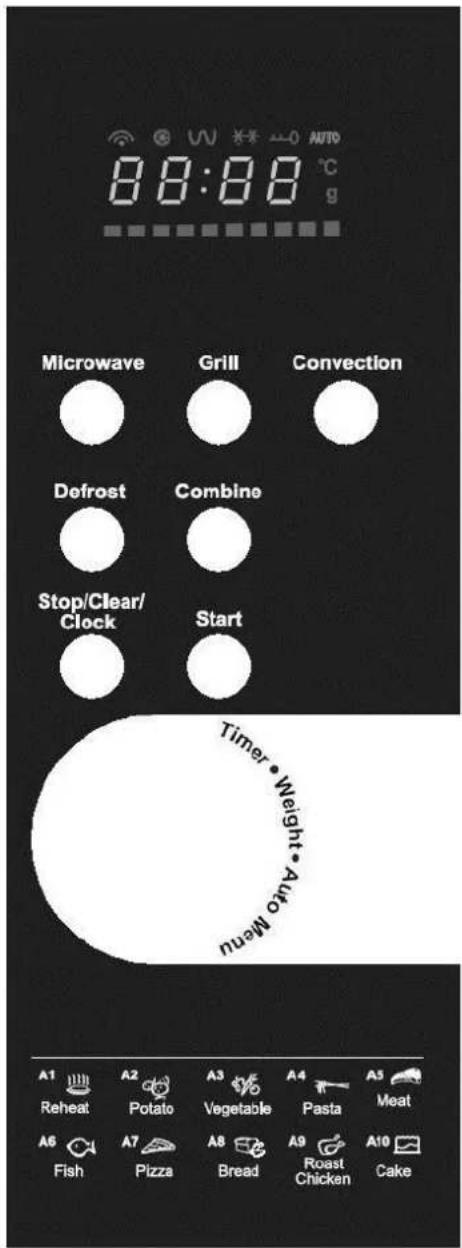
TKG MG 1001 DGC - 091106
Wyświetlacz
Copies of the I/B. Please reproduce them without any changes except under special instruction from Team International BELGIUM. The pages must be reproduced and folded in order to obtain a booklet A5 (+/- 148.5 mm width x 210 mm height). When folding, make sure you keep the good numbering when you turn the pages of the I/B. Don't change the page numbering. Keep the language integrity.
DZIAŁANIE URZĄDZENIA
Copies of the I/B. Please reproduce them without any changes except under special instruction from Team International BELGIUM. The pages must be reproduced and folded in order to obtain a booklet A5 (+/- 148.5 mm width x 210 mm height). When folding, make sure you keep the good numbering when you turn the pages of the I/B. Don't change the page numbering. Keep the language integrity.
Copies of the I/B. Please reproduce them without any changes except under special instruction from Team International BELGIUM. The pages must be reproduced and folded in order to obtain a booklet A5 (+/- 148.5 mm width x 210 mm height). When folding, make sure you keep the good numbering when you turn the pages of the I/B. Don't change the page numbering. Keep the language integrity.
Copies of the I/B. Please reproduce them without any changes except under special instruction from Team International BELGIUM. The pages must be reproduced and folded in order to obtain a booklet A5 (+/- 148.5 mm width x 210 mm height). When folding, make sure you keep the good numbering when you turn the pages of the I/B. Don't change the page numbering. Keep the language integrity.
Copies of the I/B. Please reproduce them without any changes except under special instruction from Team International BELGIUM. The pages must be reproduced and folded in order to obtain a booklet A5 (+/- 148.5 mm width x 210 mm height). When folding, make sure you keep the good numbering when you turn the pages of the I/B. Don't change the page numbering. Keep the language integrity.
Copies of the I/B. Please reproduce them without any changes except under special instruction from Team International BELGIUM. The pages must be reproduced and folded in order to obtain a booklet A5 (+/- 148.5 mm width x 210 mm height). When folding, make sure you keep the good numbering when you turn the pages of the I/B. Don't change the page numbering. Keep the language integrity.
Copies of the I/B. Please reproduce them without any changes except under special instruction from Team International BELGIUM. The pages must be reproduced and folded in order to obtain a booklet A5 (+/- 148.5 mm width x 210 mm height). When folding, make sure you keep the good numbering when you turn the pages of the I/B. Don't change the page numbering. Keep the language integrity.
Generated by Unregistered Batch DOC TO PDF Converter 2011.3.804.1511, please register!

Fax +32 2 359 95 50
Copies of the I/B. Please reproduce them without any changes except under special instruction from Team International BELGIUM. The pages must be reproduced and folded in order to obtain a booklet A5 (+/- 148.5 mm width x 210 mm height). When folding, make sure you keep the good numbering when you turn the pages of the I/B. Don't change the page numbering. Keep the language integrity.
Generated by Unregistered Batch DOC TO PDF Converter 2011.3.804.1511, please register!

Fax +32 2 359 95 50
Copies of the I/B. Please reproduce them without any changes except under special instruction from Team International BELGIUM. The pages must be reproduced and folded in order to obtain a booklet A5 (+/- 148.5 mm width x 210 mm height). When folding, make sure you keep the good numbering when you turn the pages of the I/B. Don't change the page numbering. Keep the language integrity.
TKG MG 1001 DGC
| Deutsch | 4 |
| English | 17 |
| Français | 29 |
| Nederlands | 42 |
| Español | 55 |
| Português | 68 |
| Italiano | 81 |
| Polska | 94 |

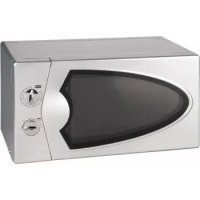
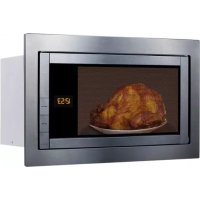
- D
- P
- KOCHEN IN DER MIKROWELLE
- BEDIENELEMENT
- GEBRAUCH
- BEMERKUNGEN
- GB OPERATING INSTRUCTIONS
- SPECIFICATIONS
- IMPORTANT SAFETY INSTRUCTIONS
- INSTALLATION
- RADIO INTERFERENCE
- MICROWAVE COOKING PRINCIPLES
- UTENSILS GUIDE
- CONTROL PANEL
- DIPLAY SCREEN
- MICROWAVE
- GRILL
- CONVECTION
- DEFROST
- COMBINE
- STOP/CLEAR/CLOCK
- START
- TIMER/WEIGHT/AUTO MENU
- OPERATION
- SETTING THE CLOCK
- NOTE
- MICROWAVE COOKING
- GRILL COOKING + MICROWAVE AND GRILL COMBINATION COOKING
- DEFROST BY WEIGHT (DEF 1)
- DEFROST BY TIME (DEF 2)
- AUTO MENU
- CONVECTION (WITHOUT PREHEATING)
- CONVECTION (WITH PREHEATING)
- COMBINE" FUNCTION (WITHOUT PREHEATING)
- COMBINE" FUNCTION (WITH PREHEATING)
- QUICK START
- LOCK-OUT FUNCTION FOR CHILDREN
- SPECIAL SPECIFICATIONS
- BEFORE YOU CALL FOR SERVICE
- CLEANING AND CARE
- PROTECTION OF THE ENVIRONMENT – DIRECTIVE 2002/96/EC
- MODE D'EMPLOI
- MESURES ANTIPARASITES
- PANNEAU DE COMMANDE
- UTILISATION
- REMARQUES
- PROTECTION DE L'ENVIRONNEMENT - DIRECTIVE 2002/96/CE
- BEDIENINGSPANEEEL
- GEBRUIK
- OPMERKINGEN
- SPECIFIEKE GEGEVENS
- GENERATED BY UNREGISTERED BATCH DOC TO PDF CONVERTER 2011.3.804.1511, PLEASE REGISTER
- ESPECIFICACIONES
- PRINCIPIOS DE COCINA EN EL MICROONDAS
- PANEL DE MANDOS
- UTILIZACIÓN
- AJUSTE DEL RELOJ
- NOTA
- P MODO DE EMPREGO
- CARACTERÍSTICAS TÉCNICAS
- INTERFERÊNCIAS
- PAINEL DE COMANDOS
- UTILIZAÇÃO
- ① ISTRUZIONI PER L'USO
- SPECIFICHE TECNICHE
- PRINCIPI DELLA COTTURA A MICROONDE
- USO
- PL INSTRUKCJA OBSŁUGI
- DANE TECHNICZNE
- WYŚWIETLACZ
- DZIAŁANIE URZĄDZENIA
- TKG MG 1001 DGC
Brand : KALORIK
Model : TKG MG 1001 DGC
Category : Microwave Oven