
MWI 424 - Microwave INDESIT - Free user manual and instructions
Find the device manual for free MWI 424 INDESIT in PDF.



| Product Type | Combination microwave oven |
| Brand | Indesit |
| Model | MWI 424 (TC944TEZ) |
| Dimensions (W x H x D) | 594 x 454,5 x 568 mm |
| Net weight | Approximately 41 kg |
| Power supply | 230 V ~ 50 Hz |
| Microwave power (output) | 900 W |
| Microwave power (input) | 1650 W |
| Grill power (input) | 1750 W |
| Convection power (input) | 1750 W |
| Oven capacity | 44 L |
| Turntable diameter | 360 mm |
| Cooking modes | Microwave, grill, convection, grill with ventilation, convection + lower heating element, microwave + grill, microwave + convection, microwave + grill with ventilation, microwave + lower heating element + convection |
| Automatic programs | 15 programs (P01 to P13 + defrost d01, d02) |
| Preheat function | Yes |
| Child safety | Yes (key lock) |
| Interior light | Yes |
| Included accessories | Enamel tray, turntable support, instruction manual |
| Cleaning | Clean the interior with a damp cloth; door frame and gasket should be cleaned carefully; do not use steam cleaners or abrasive detergents |
| Repairability | Any repair must be carried out by a qualified technician; do not disassemble the appliance |
| Main safety instructions | Do not operate with the door open; use only appropriate utensils; do not heat food in sealed containers; clean regularly |
Frequently Asked Questions - MWI 424 INDESIT
User questions about MWI 424 INDESIT
0 question about this device. Answer the ones you know or ask your own.
Ask a new question about this device
Download the instructions for your Microwave in PDF format for free! Find your manual MWI 424 - INDESIT and take your electronic device back in hand. On this page are published all the documents necessary for the use of your device. MWI 424 by INDESIT.
USER MANUAL MWI 424 INDESIT
The temperatures are: 100,105,110,115,120,125,130,135,140,145,150,155,160,165,170,175,180,185,190,195,200,205,210,215,220,225,230.
The temperatures are: 100,105,110,115,120,125,130,135,140,145,150,155,160,165,170,175,180,185,190,195,200,205,210,215,220,225,230.
- Small grid
- Large grid
- Tray
- Short grill rack
- Long grill rack
- Grill plate
- Short grill shelf
- Long grill shelf
- Grill plate
PT
- Short grill rack
- Long grill rack
- Grill pan
- Adjust the angle of the grill pan on the shaft.
Precautions and suggestions, 138
Oven installation, 142
Operating instructions, 147
Troubleshooting, 153
Installation, 145
indesit
Read these instructions carefully before using your microwave oven, and keep it carefully.
If you follow the instructions, your oven will provide you with many years of good service.
SAVE THESE INSTRUCTIONS CAREFULLY
PRECAUTIONS TO AVOID POSSIBLE EXPOSURE TO EXCESSIVE MICROWAVE ENERGY
GB
(a) Do not attempt to operate this oven with the door open since this can result in harmful exposure to microwave energy. It is important not to break or tamper with the safety interlocks. (b) Do not place any object between the oven front face and the door or allow soil or cleaner residue to accumulate on sealing surfaces. (c) WARNING: If the door or door seals are damaged, the oven must not be operated until it has been repaired by a competent person.
ADDENDUM
If the apparatus is not maintained in a good state of cleanliness, its surface could be degraded and affect the lifespan of the apparatus and lead to a dangerous situation.
Specifications
| Model: TC944TEZ | |
| Rated Voltage: 230V~50Hz | |
| Rated Input Power (Microwave): 1650W | |
| Rated Output Power(Microwave): | 900W |
| Rated Input Power (Grill): 1750W | |
| Rated Input Power(Convection): | 1750W |
| Oven Capacity: 44L | |
| Turntable Diameter: ∅ 360mm | |
| External Dimensions: 594 454.5 568 mm | |
| Net Weight: Approx. 41 kg | |
IMPORTANT SAFETY INSTRUCTIONS
WARNING
To reduce the risk of fire, electric shock, injury to persons or exposure to excessive microwave oven energy when using your appliance, follow basic precautions, including the following:
- Warning: Liquids and other foods must not be heated in sealed containers since they are liable to explode.
- Warning: It is hazardous for anyone other than a competent person to carry out any service or repair operation that involves the removal of a cover which gives protection against exposure to microwave energy.
- Warning: Only allow children to use the oven without supervision when adequate instructions have been given so that the child is able to use the oven in a safe way and understand the hazards of improper use.
- Warning: When the appliance is operated in the combination mode, children should only use the oven under adult supervision due to the temperatures generated. (only for grill series)
- Only use utensils suitable for use in microwave ovens.
- The oven should be cleaned regularly and any food deposits should be removed.
- Read and follow the specific: "PRECAUTIONS TO AVOID POSSIBLE EXPOSURE TO EXCESSIVE MICROWAVE ENERGY".
- When heating food in plastic or paper containers, keep an eye on the oven due to the possibility of ignition.
- If smoke is observed, switch off or unplug the appliance and keep the door closed in order to stifle any flames.
- Do not overcook food.
- Do not use the oven cavity for storage purposes. Do not store items, such as bread, cookies, etc. inside the oven.
- Remove wire twist-ties and metal handles from paper or plastic containers/bags before placing them in the oven.
- Install or locate this oven only in accordance with the installation instructions provided.
- Eggs in the shell and whole hard-boiled eggs should not be heated in microwave ovens since they may explode, even after microwave heating has ended.
- Use this appliance only for its intended uses as described in the manual. Do not use corrosive chemicals or vapors in this appliance. This oven is especially designed to heat. It is not designed for industrial or laboratory use.
- If the supply cord is damaged, it must be replaced by the manufacturer, its service agent or similarly qualified persons in order to avoid a hazard.
- Do not store or use this appliance outdoors.
- Do not use this oven near water, in a wet basement or near a swimming pool.
- The temperature of accessible surfaces may be high when the appliance is operating. The surfaces are liable to get hot during use. Keep the cord away from heated surfaces, and do not cover any vents on the oven.
- Do not let the cord hang over the edge of a table or counter.
- Failure to maintain the oven in a clean condition could lead to deterioration of the surface that could adversely affect the life of the appliance and possibly result in a hazardous situation.
- The contents of feeding bottles and baby food jars shall be stirred or shaken and the temperature checked before consumption, in order to avoid burns.
- Microwave heating of beverages can result in delayed eruptive boiling, therefore care must be taken when handling the container.
- The appliance is not intended for use by persons (including children) with reduced physical, sensory or mental capabilities, or lack of experience and knowledge, unless they have been given supervision or instruction concerning use of the appliance by a person responsible for their safety.
- Children should be supervised to ensure that they do not play with the appliance.
- The microwave oven shall not be placed in a cabinet unless it has been tested in a cabinet.
- The appliances are not intended to be operated by means of an external timer or separate remote-control system.
- WARNING: Ensure that the appliance is switched off before replacing the lamp to avoid the possibility of electric shock.
- Accessible parts may become hot during use. Young children should be kept away.
- Steam cleaner is not to be used.
- Surface of a storage drawer can get hot.
- Do not use harsh abrasive cleaners or sharp metal scrapers to clean the oven door glass since they can scratch the surface, which may result in shattering of the glass.
- During use the appliance becomes hot. Care should be taken to avoid touching heating elements inside the oven.
- Only use the temperature probe recommended for this oven. (for ovens provided with a facility to use a temperature-sensing probe.)
- During the first use there is a particular smell due to production oils to protect some components.
To Reduce the Risk of Injury to Persons Grounding Installation
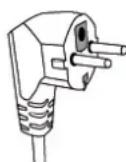
This appliance must be grounded. In the event of an electrical short circuit, grounding reduces the risk of electric shock by providing an escape wire for the electric current. This appliance is equipped with a cord having a grounding wire with a grounding plug. The plug must be plugged into an outlet that is properly installed and grounded.
Consult a qualified electrician or serviceman if the grounding instructions are not completely understood or if doubt exists as to whether the appliance is properly grounded. If it is necessary to use an extension cord, use only a 3-wire extension cord.
- A short power-supply cord is provided to reduce the risks resulting from becoming entangled in or tripping over a longer cord.
- If a long cord set or extension cord is used: 1) The marked electrical rating of the cord set or extension cord should be at least as great as the electrical rating of the appliance. 2) The extension cord must be a grounding type 3-wire cord. 3) The long cord should be arranged so that it will not drape over the counter top or tabletop where it can be pulled on by children or tripped over unintentionally.
DANGER
Electric Shock Hazard
Touching some of the internal components can cause serious personal injury or death. Do not disassemble this appliance.
WARNING
Electric Shock Hazard
Improper use of the grounding can result in electric shock. Do not plug into an outlet until appliance is properly installed and grounded.
CLEANING
Be sure to unplug the appliance from the power supply.
- Clean the inside of the oven after using with a slightly damp cloth.
- Clean the accessories in the usual way in soapy water.
- The door frame and seal and neighboring parts must be cleaned carefully with a damp cloth when they are dirty.
Two-round-pin plug
UTENSILS
See the instructions on "Materials you can use in microwave oven or to be avoided in microwave oven." There may be certain non-metallic utensils that are not safe to use for microwaving. If in doubt, you can test the utensil in question following the procedure below.
Utensil Test:
- Fill a microwave-safe container with 1 cup of cold water (250ml) along with the utensil in question.
- Cook on maximum power for 1 minute.
- Carefully feel the utensil. If the empty utensil is warm, do not use it for microwave cooking.
- Do not exceed 1 minute cooking time.
CAUTION
Personal Injury Hazard
It is hazardous for anyone other than a competent person to carry out any service or repair operation that involves the removal of a cover which gives protection against exposure to microwave energy.
Materials you can use in microwave oven Utensils Remarks
| Aluminum foil Shielding only. Small smooth pieces can be used to cover thin parts of meat or poultry to prevent overcooking. Arcing can occur if foil is too close to oven walls. The foil should be at least 1 inch (2.5cm) away from oven walls. | |
| Browning dish Follow manufacturer's instructions. The bottom of browning dish must be at least 3/16 inch (5mm) above the turntable. Incorrect usage may cause the turntable to break. | |
| Dinnerware Microwave-safe only. Follow manufacturer's instructions. Do not use cracked or chipped dishes. | |
| Glass jars Always remove lid. Use only to heat food until just warm. Most glass jars are not heat resistant and may break. | |
| Glassware Heat-resistant oven glassware only. Make sure there is no metallic trim.Do not use cracked or chipped dishes. | |
| Oven coking bags Follow manufacturer's instructions. Do not close with metal tie. Make slits to allow steam to escape. | |
| Paper plates and cups Use for short-term cooking/warming only. Do not leave oven unattended while cooking. | |
| Paper towels Use to cover food for reheating and absorbing fat. Use with supervision for a short-term cooking only. | |
| Parchment paper Use as a cover to prevent splattering or a wrap for steaming. | |
| Plastic Microwave-safe only. Follow the manufacturer's instructions. Should be labeled "Microwave Safe". Some plastic containers soften, as the food inside gets hot. "Boiling bags" and tightly closed plastic bags should be slit, pierced or vented as directed by package. | |
| Plastic wrap Microwave-safe only. Use to cover food during cooking to retain moisture. Do not allow plastic wrap to touch food. | |
| Thermometers Microwave-safe only (meat and candy thermometers). | |
| Wax paper Use as a cover to prevent splattering and retain moisture. |
Materials to be avoided in microwave oven Utensils Remarks
| Aluminum tray May cause arcing. Transfer food into microwave-safe dish. |
| Food carton with May cause arcing. Transfer food into microwave-safe dish.metal handle |
| Metal or Metal shields the food from microwave energy. Metal trim may cause arcing.metaltrimmed utensils |
| Metal twist ties May cause arcing and could cause a fire in the oven. |
| Paper bags May cause a fire in the oven. |
| Plastic foam Plastic foam may melt or contaminate the liquid inside when exposed to high temperature. |
| Wood Wood will dry out when used in the microwave oven and may split or crack. |
GB
GB
Names of Oven Parts and Accessories
Remove the oven and all materials from the carton and oven cavity.
Your oven comes with the following accessories:
Enamel Tray 1
Turntable ring assembly 1
Instruction Manual 1
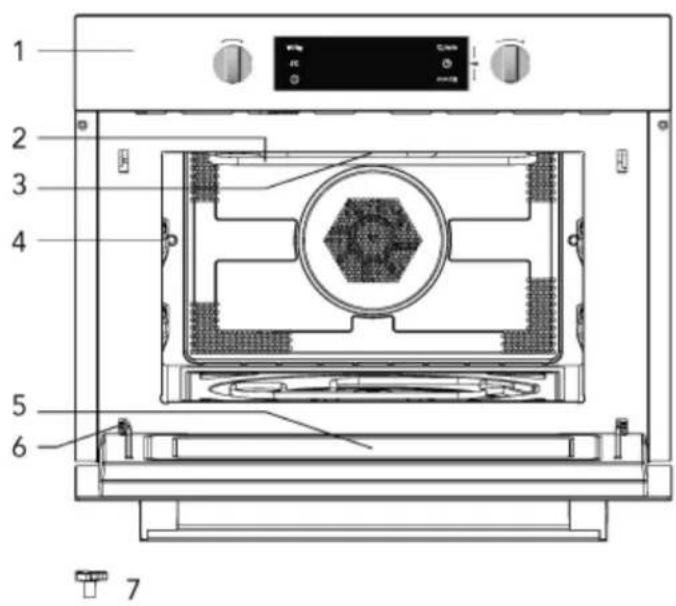
- Control panel
- Grill element
- Light
- Level
- Door glass
- Hinge
- Turntable shaft
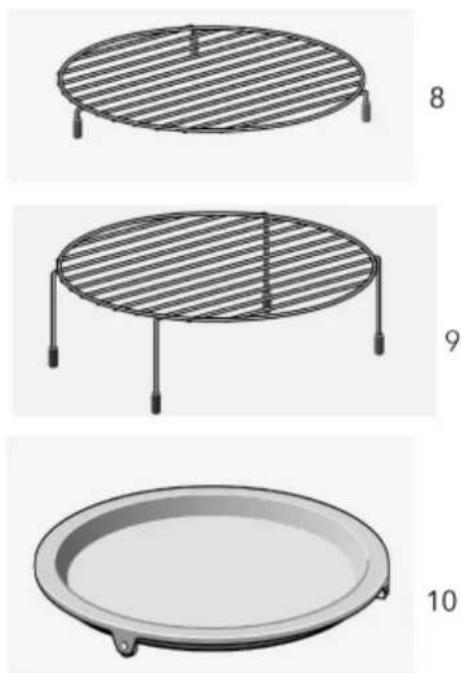
- Short Grill Rack
- Long Grill Rack
- Grill Pan
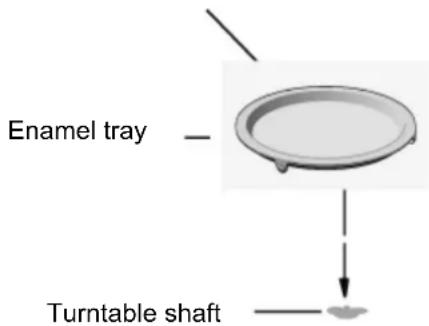
Turntable Installation
a. Never place the glass tray upside down. The glass tray should never be restricted. b. Both glass tray and turntable ring assembly must always be used during cooking. c. All food and containers of food are always placed on the glass tray for cooking. d. If glass tray or turntable ring assembly cracks or breaks, contact your nearest authorized service center.
Hub (underside)
Placement
- Danger! Do not disassemble this appliance. Touching internal components of this appliance can cause serious personal injury or death.
- Place the microwave oven on a firm, flat surface.
- Make sure that there is sufficient ventilation around the microwave oven. At the rear and sides keep at least 10 cm free.
- Do not cover the air vents.
- The adjustable feet should not be removed.
- Do not place the microwave oven near a heat source.
- Transmitting and receiving equipment such as radios and televisions can affect the operation of the microwave oven.
Important information about installing
- This appliance is NOT intended for use in a commercial environment.
- Please observe the installation instructions provided and note that this appliance
- should only be installed by a qualified technician.
- The appliance is fitted with a plug and must only be connected to a properly installed earthed socket.
- If a new socket is needed, installation and cable connection must only be done by a qualified electrician. If the plug is no longer accessible after installation, a pole-disconnecting device must be present on the installation site with a contact gap of at least 3 mm.
- Adapters, multiway strips, and extension cords must not be used. Overloading can result in fire.
- If the appliance is not fitted with a supply cord and a plug, the connection equipment must have a contact separation in all poles that provides full disconnection, and the appliance must be incorporated into the fixed wiring in accordance with the wiring rules.
The accessible surface may be hot during operation.
Installation dimensions
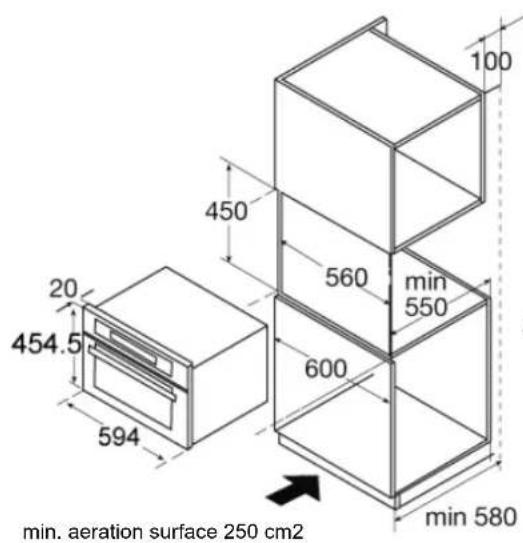
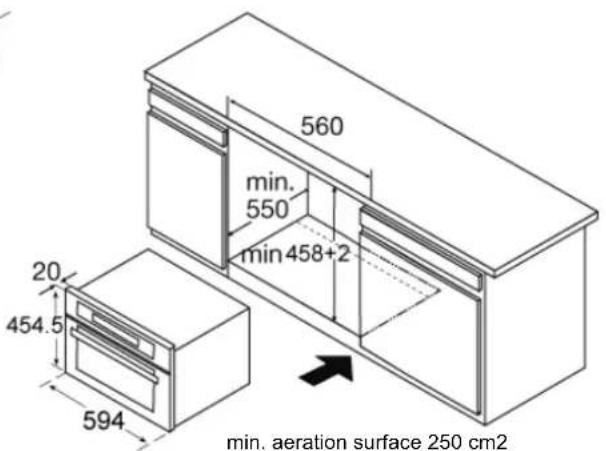
Note: There should be a gap above the oven.
Building in
- Do not hold or carry the appliance by the door handle. The door handle cannot hold the weight of the appliance and may break off.
- Carefully push the microwave into the box, making sure that it is in the centre.
- Open the door and fasten the microwave with the screws that were supplied.
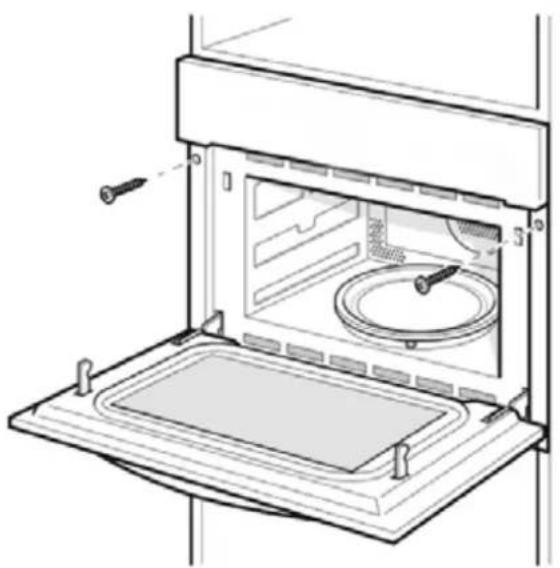
- Fully insert the appliance and centre it.
- Do not kink the connecting cable.
- Screw the appliance into place.
- The gap between the worktop and the appliance must not be closed by additional battens.
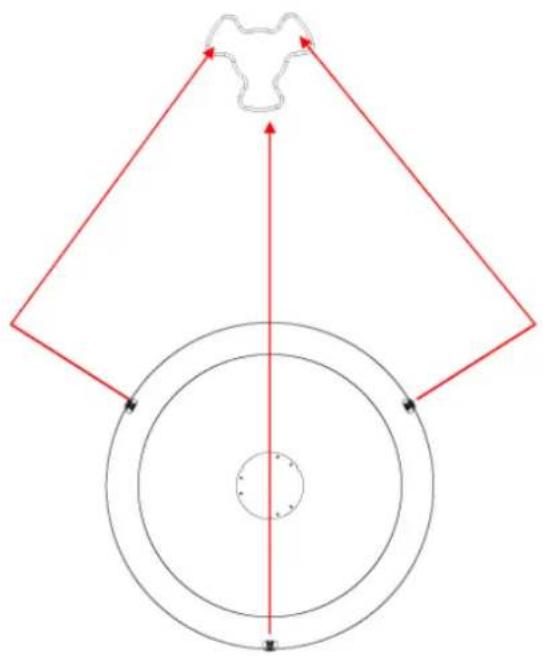
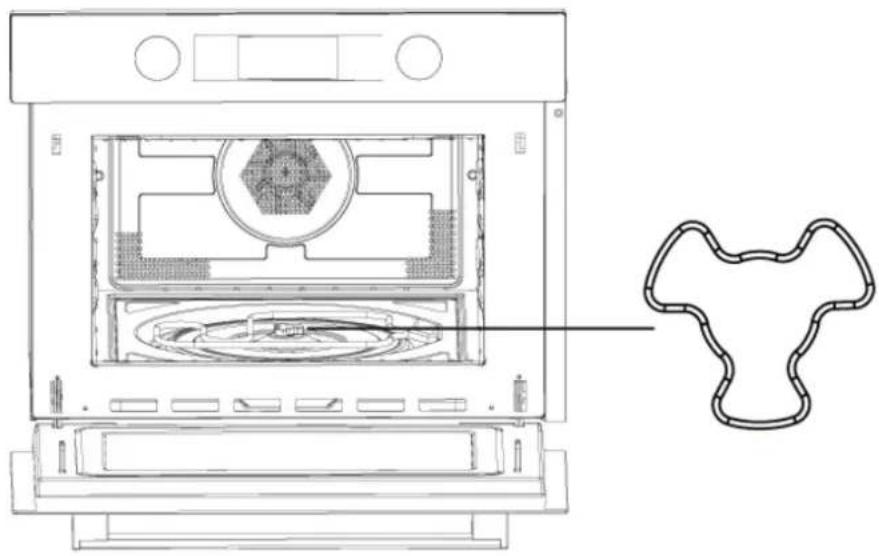
1. Be sure the angle of the shaft
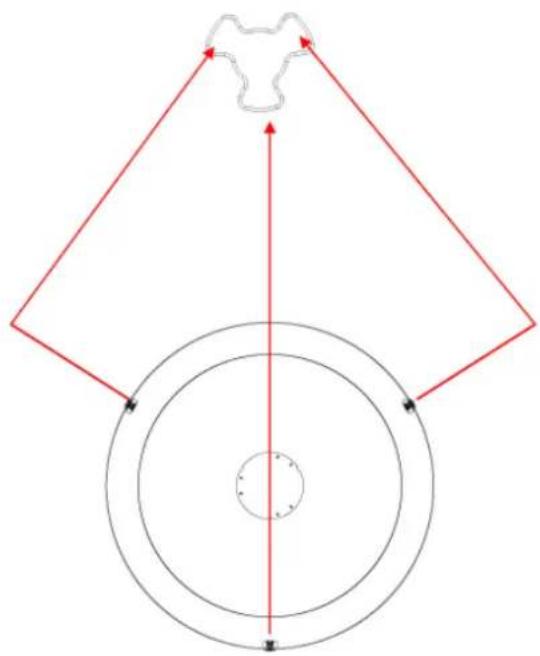
2. Adjust the angle of the grill pan and the shaft.
3. Put the pan into the cavity and adjust slightly.
Control Panel and Features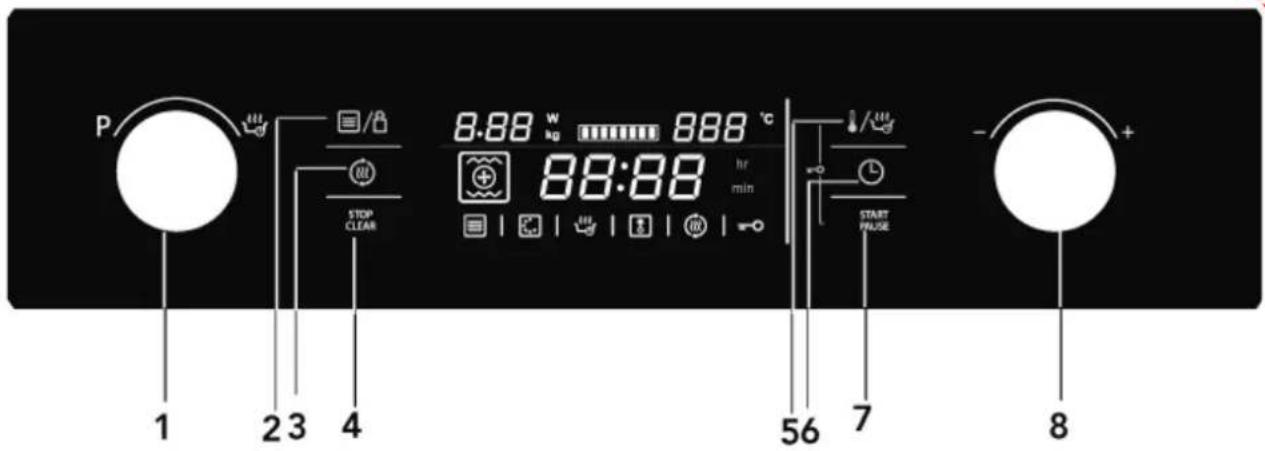
1) Function knob 2) Power/Weight button 3) Quick preheating button 4) On/Off Button 5) Temperature / auto menu button 6) Clock button 7) Start/Pause button 8) Selection knob
This microwave oven uses modern electronic control to adjust cooking parameters to meet your needs better for cooking.
1. Clock Setting
When the microwave oven is electrified, "00:00" will blink, and the buzzer will ring once.
1) Turn the "-" "+" knob to set the correct time (between 00:00 and 23:59). 2) After you have set the correct time, press "L". The clock has been set.
Note: 1) If you want to change the time, press and hold the "L" button for 3 seconds. The actual time disappears and then the time will blink in the display.
Turn the "-" "+" knob to set the new time and press the "L" button to confirm the setting.
2) If you do not want to see the clock in the display, press the "L" button briefly. The time disappears. Press "L" again, and the clock appears in the display again.
2. Microwave Cooking
1) Press the "STOP/CLEAR" button to activate the microwave function. "01:00" is blinking in the display and the microwave icon appears. If no operation in 10 seconds, the current power will be confirmed automatically. 2) Turn the "-" "+" knob to set the cooking time. The max. cooking time depends on the power that has been set. When the power is 900W, the MAX. time is 30 minutes and other powers are 90 minutes. 3) Press the "☐/☐" button to adjust the microwave power. 4) Turn the "-" "+" knob to set the microwave power (between 100W to 900W). 5) Press the "START/PAUSE" button to start cooking.
Microwave Power Chart
| Microwave Power 100% 80% 50% 30% | 10% | |||
| Display 900W 700W 450W 300W | 100W |
You can see from the table below from which power levels you can choose and for which foods the power levels are suitable.
| Power level Food | |
| 900W | - Boiling water, reheating- Cooking chicken, fish, vegetables |
| 700W | - Reheating- Cooking mushrooms, shellfish- Cooking dishes containing eggs and cheese |
| 450W - Cooking rice, soup | |
| 300W | - Defrosting- Melting chocolate and butter |
| 100W | - Defrosting sensitive/delicate foods- Defrosting irregularly-shaped foods- Softening ice cream- Allowing dough to rise |
Functions
| Function Mode | ||||
 | Microwave Microwave |  | MicrowaveUse the microwave function to cook and reheat vegetables, potatoes, rice, fish and meat. | |
 | Heating Hot air |  | Hot airWith hot air you can prepare meals in the same way as you do with a conventional oven.The microwave is not activated. You are advised to preheat the oven before putting the meal in the oven. | |
 | Grill with fan | Grill with fanUse this function to roast meals evenly and at the same time give the meal a brown crust. | ||
 | Grill | GrillThe grill is very suitable to prepare thin pieces of meat and fish. | ||
 | Heat |  | Hot air + Bottom heat | Use this function to roast big pieces of meat, pizza, etc. |
| + [KH4T] | Combination Hot air |  | Microwave + Hot airUse this function to roast meals quickly. | |
 | Grill with fan Microwave + Grill with Fan | |||
 |  | Grill | Microwave + GrillUse this function to cook meals quickly and at the same time give the meal a brown crust (also au gratin). The microwave and the grill are activated at the same time. The microwave is cooking and the grill is roasting. | |
 | Hot air + Bottom heat | Use this function to roast big pieces of meat, pizza, etc. | ||
 | Auto programs P01 - P13 Automatic cooking Programs | |||
 | Defrost d01 + d02 | Defrost | ||
3. Grill Cooking
1) Press "STOP/CLEAR" button to activate the microwave function. 2) Turn "P" to select the cooking mode. "indicator lights. 3) Turn "-" to select grill mode. The default grill power is the third level.
"~~~~" indicator will light when grill function is selected.
4) Press "!/∞" to enter to the grill level. 5) Turn "-○+" to select the level 3 (the MAX.), level 2 or level 1 (the MIN.).
Press "L" to select the time setting mode. The default time is 10 minutes.
6) Turn "-" to select the cooking time of grill. The MAX time is 90 minutes. 7) Press "START/PAUSE" button to start cooking.
4. Convection Cooking
1) Press "STOP/CLEAR" button to activate the microwave function. 2) Turn "o" to select the cooking mode. " indicator lights. 3) Turn "-" to select convection mode. "ights. The default temperature is 180 degrees. 4) Press "!/∞" to enter to the temperature mode. 5) Turn "-○*" to select temperature. The temperature is from 50 to 230 degrees.
Press "L" to select the time setting mode. The default time is 10 minutes.
6) Turn "-○+" to select the cooking time. The MAX time is 5 hours. 7) Press "START/PAUSE" button to start cooking.
5. Grill Fan Cooking
1) Press "STOP/CLEAR" button to activate the microwave function. 2) Turn "" to select the cooking mode. "" indicator lights. 3) Turn "-" to select grill fan mode. The default temperature is 180 degrees.
The "+" indicator will light when the grill fan function is selected.
4) Press "☐/☐" to enter temperature selection. 5) Turn "**" to select the temperature between 100 and 230 degrees.
The temperatures are 100, 105, 110, 115, 120, 125, 130, 135, 140, 145, 150, 155, 160, 165, 170, 175, 180, 185, 190, 195, 200, 205, 210, 215, 220, 225, 230.
Press "L" to select the time setting mode. The default time is 10 minutes.
6) Turn "" to select the cooking time. The maximum time is 5 hours. 7) Press the "START/PAUSE" button to start cooking.
6. Convection + Bottom Heat Cooking
1) Press the "STOP/CLEAR" button to activate the microwave function. 2) Turn "P" to select the cooking mode. The indicator lights. 3) Turn "-" to select bottom + convection mode. The default temperature is 180 degrees.
The "+" indicator will light when the convection + bottom function is selected.
4) Press "!/" to enter temperature selection. 5) Turn "- +" to select the temperature between 100 and 230 degrees.
The temperatures are 100, 105, 110, 115, 120, 125, 130, 135, 140, 145, 150, 155, 160, 165, 170, 175, 180, 185, 190, 195, 200, 205, 210, 215, 220, 225, 230.
Press "L" to select the time setting mode. The default time is 10 minutes.
6) Turn "- - - +" to select the cooking time. The maximum time is 5 hours. 7) Press the "START/PAUSE" button to start cooking.
7. Microwave + Grill Cooking
1) Press the "STOP/CLEAR" button to activate the microwave function.
2) Turn "P" to select the cooking mode. "and
" will light.
3) Turn “-○+” to select mode.
The default power is level 3.
The “~~” indicator will light when grill function is selected.
4) Press “!/” to enter the temperature selection.
5) Turn “-○+” to select the power.
6) Press “☐/☐” to select the power. The default power is 300W.
7) Turn “-○” to select 700W, 450W, 300W, and 100W.
8) Press “L” to select the time setting mode.
The default time is 10 minutes.
9) Turn “-○+” to select the cooking time.
The MAX time is 90 minutes.
10) Press "START/PAUSE" button to start cooking.
8. Microwave + Convection Cooking
1) Press "STOP/CLEAR" button to activate the microwave function.
2) Turn "P" to select the cooking mode. "and
“☐” will light.
3) Turn “ - ○+” to select convection mode.
The default temperature is 180 degrees.
“+” lights.
4) Press "☐/☐" to enter to the temperature selection.
5) Turn “-” to select the temperature between 50 to 230 degrees.
6) Press “☐/☐” to select the power. The default power is 300W
7) Turn “ - O + ” to select 700W,450W,300W and 100W.
8) Press "L" to select the time setting mode.
The default time is 10 minutes.
9) Turn “ - + ” to select the cooking time of grill. The MAX time is 90 minutes.
10) Press "START/PAUSE" button to start cooking.
9. Microwave + Grill Fan Cooking
1) Press "STOP/CLEAR" button to activate the microwave function.
2) Turn "P" to select the cooking mode.
and "" will light.
3) Turn "" to select cooking mode. The default temperature is 180 degrees.
The "+" indicator will light when this function is selected.
4) Press "☐/☐" to enter the temperature selection.
5) Turn "-" to select the temperature between 100 and 230 degrees.
6) Press "☐/☐" to select the power.
The default power is 300W.
7) Turn "- +" to select 700W, 450W, 300W, and 100W.
8) Press "L" to select the time setting mode.
The default time is 10 minutes.
9) Turn "- O +" to select the cooking time for grilling. The maximum time is 90 minutes.
10) Press the "START/PAUSE" button to start cooking.
10. Microwave + Bottom + Convection Cooking
1) Press the "STOP/CLEAR" button to activate the microwave function.
2) Turn “P” to select the cooking mode.
The “☐” indicator will light.
3) Press “-○+” to select convection mode.
The default temperature is 180 degrees.
The “+” indicator will light when this function is selected.
4) Press "!/###" to enter temperature selection.
5) Press “-” to select the temperature between 100 and 230 degrees.
6) Press "☐/☐" to select the power.
The default power is 300W.
7) Press “-” to select 700W, 450W, 300W, or 100W.
8) Turn “L” to select the time setting mode.
The default time is 10 minutes.
9) Press “-” to select the cooking time for grilling.
The maximum time is 90 minutes.
10) Press the "START/PAUSE" button to start cooking.
11. Auto Cook
There are 15 automatic cooking programs. You only have to choose the program and set the weight. The power, the time and the temperature are already set.
1) Press "STOP/CLEAR" button to activate the microwave function. 2) Turn "☐" to select the cooking mode. "or "☐" will light when defrost auto menu selected.
Time, weight, the first number of the automatic programs are shown in the display.
3) Turn "-" to select auto menu. "d01", "d02" or "P01", "P02"...."P13" will display. 4) Press "☐/☐" button. 5) Turn "-" and "+" to select weight of the menu. 6) Press "START/PAUSE" button to start cooking.
12. Preheating Function
The preheating function can be activated after you have chosen the functions:
Convection, Grill fan, bottom-convection, MW-convection, MW-Grill fan and Microwave-Bottom-convection.
1) Press "☐" button. The preheat icon appears in the display. 2) Press "START/PAUSE" button to start preheating. If the right temperature is reached, you will hear three beeps. You can stop the preheating by opening the oven door or by pressing the "STOP/CLEAR" button.
Note: 1. The preheating function only works if you have already chosen one of the modes above. During preheating, the microwave function is switched off.
- Only when you can hear alarm and preheating icon is blinking you can open the door and put food inside.
13. Lock-out Function for Children
Lock: In waiting state, press "START/PAUSE" and
"!/" at the same time, there will be a long "beep" denoting entering into the children-lock state and "○" indicator will light.
Unlock: In locked state, press "START/PAUSE" and
Press and hold “!/” for 3 seconds, there will be a long “beep” denoting that the lock is released, and the “-” indicator will disappear.
Note: Child lock can be selected only before selecting a function.
14. Display Specification
(1) When setting, if no other operation, it will confirm automatically after 10 seconds. Except clock setting for the first time. (2) During setting program, after adjusted for 3 seconds, it will confirm after 3 seconds. (3) When the oven is in setting state or pause state, including auto menu and defrost program, if no operation in 5 minutes, it will enter into the off state. (4) The oven lamp will light all the time if the door is open. (5) The oven lamp will light all the time if the oven is paused. (6) "START/PAUSE" button must be pressed to continue cooking if the oven door is open during cooking process.
| Program Category Item | ||
| d01 (defrost)** Meat, poultry | and fish | If you hear a beep, the combi microwave oven stops. Turn the food and press the start/pause button to continue the defrosting program. |
| d02 (defrost)** Bread, cake | and fruit | |
| P01** Vegetables Fresh vegetables | ||
| P02** Side dishes Potatoes | - peeled/cooked | |
| P03* Side dishes | Potatoes - roastedIf you hear a beep, turn the food. The combi microwave oven starts the next fase automatically. | |
| P04 Poultry/ Fish | Chicken pieces/ Fish piecesIf you hear a beep, turn the food. The combi microwave oven starts the next fase automatically. | |
| P05* Bakery Cake | ||
| P06* Bakery Apple pie | ||
| P07* Bakery Quiche | ||
| P08** Reheat Drink/soup | ||
| P09** Reheat Plated meal | ||
| P10** Reheat Sauce/stew/dish | ||
| P11* Convenience Frozen - pizza | ||
| P12* Convenience | Oven chipsIf you hear a beep, turn the food. The combi microwave oven starts the next fase automatically | |
| P13* Convenience Frozen - lasagne | ||
- The programmes with a * are preheated. During preheating, the cooking time pauses and the preheating symbol is on. After preheating, you will hear an alarm and the preheating symbol will blink.
- The programmes with ** only use the microwave function.
| Normal | |
| Microwave oven interfering TV reception | Radio and TV reception may be interfered when microwave oven operating. It is similar to the interference of small electrical appliances, like mixer, vacuum cleaner, and electric fan. It is normal. |
| Dim oven light In low power microwave cooking, oven light may become dim. It is normal. | |
| Steam accumulating on door, hot air out of vents | In cooking, steam may can out of food. Most will get out from vents. But some may accumulate on cool place like oven door. It is normal. |
| Oven started accidentally with no food in. | It is forbidden to run the unit without any food inside. It is very dangerous. |
| Trouble Possible Cause Remedy | ||
| Oven cannot be started | (1) Power cord not plugged in tightly | Unplug. Then plug again after 10 seconds. |
| (2) Fuse blowing or circuits breaker works. | Replace fuse or reset circuits breaker (repaired by professional personnel of your company) | |
| (3) Trouble with outlet | Test outlet with other electrical appliances. | |
| Oven does not head (4) Door not closed well Close door well | ||
| Glass turntable makes noise when microwave oven operates | (5) Dirty roller rest and oven bottom | Refer to “Maintenance of Microwave” to clean dirty parts. |

According to Waste of Electrical and Electronic Equipment (WEEE) directive, WEEE should be separately collected and treated. If at any time in future you need to dispose of this product please do NOT dispose of this product with household waste. Please send this product to WEEE collecting points where available.


- PT
- PRECAUTIONS TO AVOID POSSIBLE EXPOSURE TO EXCESSIVE MICROWAVE ENERGY
- ADDENDUM
- IMPORTANT SAFETY INSTRUCTIONS
- WARNING
- TO REDUCE THE RISK OF INJURY TO PERSONS GROUNDING INSTALLATION
- DANGER
- CLEANING
- TWO-ROUND-PIN PLUG
- UTENSILS
- UTENSIL TEST
- CAUTION
- PERSONAL INJURY HAZARD
- GB
- NAMES OF OVEN PARTS AND ACCESSORIES
- TURNTABLE INSTALLATION
- PLACEMENT
- IMPORTANT INFORMATION ABOUT INSTALLING
- INSTALLATION DIMENSIONS
- BUILDING IN
- BE SURE THE ANGLE OF THE SHAFT
- ADJUST THE ANGLE OF THE GRILL PAN AND THE SHAFT
- PUT THE PAN INTO THE CAVITY AND ADJUST SLIGHTLY
- CLOCK SETTING
- MICROWAVE COOKING
- GRILL COOKING
- CONVECTION COOKING
- GRILL FAN COOKING
- CONVECTION + BOTTOM HEAT COOKING
- MICROWAVE + GRILL COOKING
- MICROWAVE + CONVECTION COOKING
- MICROWAVE + GRILL FAN COOKING
- MICROWAVE + BOTTOM + CONVECTION COOKING
- AUTO COOK
- PREHEATING FUNCTION
- LOCK-OUT FUNCTION FOR CHILDREN
- DISPLAY SPECIFICATION
Brand : INDESIT
Model : MWI 424
Category : Microwave