AC300 - Baby monitors ANGELCARE - Free user manual and instructions
Find the device manual for free AC300 ANGELCARE in PDF.


User questions about AC300 ANGELCARE
0 question about this device. Answer the ones you know or ask your own.
Ask a new question about this device
Download the instructions for your Baby monitors in PDF format for free! Find your manual AC300 - ANGELCARE and take your electronic device back in hand. On this page are published all the documents necessary for the use of your device. AC300 by ANGELCARE.
USER MANUAL AC300 ANGELCARE
Angelcare® VOOR UW GEMOEDSRUS
GEBRUIKERSHANDBOEK
BEWEGINGSMONITOR
Model AC300
Angelcare
www.angelcarebaby.com
Angelcare
Tic
Alarm
Low batt.
DE
29
EN
45
NL
2
INHOUDSOPGAVE
WAARSCHUWINGEN 3
AC300 INSTELLINGEN 6
STAP 1 - Installeren van de sensormatjes 7
STAP 2 - Instellen van de babyunit. 10
STAP 3 - Test en kaik kennis van uw monitor. 11
Probleemoplossing. 13
Technische specifications. 13
BATTERIJWAARSCHUWING
WAARSCHUWING WURGINGSGSGEVAAR.
LAMPJE ALARMINDICATOR KNIPPERT ROOD (MONITOR NEEMT NAUWELIJKS BEWEGING WAAR)
ERFORDERLICHES ZUBEHÖR:
WARNING 47
AC300 SETUP REQUIREMENTS 50
STEP1-Installing the Sensor Pad 51
STEP 2 - Setting up the Nursery Unit. 54
STEP 3 - Testing and getting to know your monitor............55
Troubleshooting 57
Technical specifications 57
Limited warranty. 58
DUTCH 2
FRANÇAIS 15
DEUTsCH 29
OWNER'S MANUAL
KEEP YOUR OWNER'S MANUAL FOR FUTURE REFERENCE.
PLEASE READ THE WARNINGS AND INSTRUCTIONS CAREFULLY BEFORE ASSEMBLING & USING THE PRODUCT.
FAILURE TO FOLLOW THE WARNINGS AND THE INSTRUCTIONS COULD RESULT IN SERIOUS INJURY OR DEATH OR DAMAGES TO THE PRODUCT.
THE SENSOR PAD FEATURE IS NOT DESIGNED FOR USE WITH ADULTS, CHILDREN OR INFANTS OLDER THAN 24 MONTHS
THE SENSOR PAD IS NOT INTENDED TO BE USED TO DETERMINE IF A CHILD IS OUT OF THE CRIB.
WARNING
Adult assembly required.
Keep small parts away from children when assembling.
We, at Angelcare, stand behind all of our products.
If you are not completely satisfied or have any questions,
Belgium, The Netherlands, Luxemburg: Please contact us at: info@mykko.be.
Other countries: Please contact your local distributor.
- THIS PRODUCT CANNOT REPLACE RESPONSIBLE ADULT SUPERVISION. This product is designed to aid in the monitoring of your child. When using the monitor, you must still provide the supervision necessary for the continued safety of your child. Monitoring of premature babies, or those considered to be at risk, should always be carried out under the supervision of a health professional. This monitor SHOULD NOT be used as a medical device, nor as a device to prevent Sudden Infant Death Syndrome (SIDS)
- STRANGULATION Hazard - Children have STRANGLED in cords. NEVER use Sensor Pad(s) without the protective
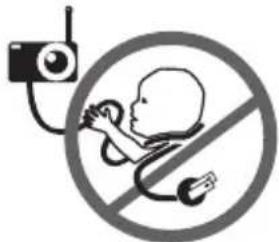
cord covering. Check protective cord covering before each use. Immediately discontinue use of Sensor Pad(s) if protective covering is damaged or broken.
- ALWAYS be sure to immediately check on baby whenever an alarm sounds.
- DO NOT use monitor near water (such as bath tub, sink, etc.).

- Keep monitor AWAY from heat sources (such as stoves, radiators, etc.).
- ALWAYS place the Nursery Unit on a flat surface in an upright position and allow for proper ventilation. DO NOT place on sofas, cushions, beds, etc. which may block ventilation.
- This product is NOT a toy. DO NOT allow children to play with it.
- This product contains small parts. Adult assembly required. Exercise care when unpacking and assembling the product and keep small parts away from children.
- When using the monitor, the room temperature should be between 10^ and 40^ .
BATTERYWARNING
- DO NOT mix old and new batteries. DO NOT mix alkaline, standard or rechargeable batteries. Insert batteries with correct polarity. DO NOT short-circuit supply terminals. ONLY use the recommended batteries or equivalent (volts and size). Remove batteries when product is stored for long periods of time or when batteries are exhausted. Dispose exhausted batteries properly.
11. IMPORTANT SAFETY INSTRUCTIONS
11.1 Read these instructions - All the safety instructions should be read before the product is operated.
11.2 Keep these instructions. The safety and operating instructions should be retained for future reference.
11.3 Heed all warnings - All warnings on the product and in the operating instructions should be adhered to.
11.4 Follow all instructions - All operating and use instructions should be followed.
11.5 Water and moisture - DO NOT use this apparatus near water. For example, near a bath tub, wash bowl, kitchen sink, laundry tub, in a wet environment or near a swimming pool and the like. Care should be taken so that objects DO NOT fall onto units and that liquids are not spilled into either unit or Sensor Pad through its openings.
11.6 Cleaning - Disconnect all units before cleaning. DO NOT immerse in water any part of the Nursery Unit, Clean only with dry cloth.
11.7 Ventilation - DO NOT block any ventilation openings. Allow for proper ventilation when unit is in use. DO NOT cover the Nursery Unit with any object such as a blanket. DO NOT place it in a drawer or in any location which would muffle the sound or interfere with the normal flow of air.
11.8 Heat sources - DO NOT install near any heat sources such as radiators, heat registers, stoves, TVs or other apparatus (including amplifiers) that produce heat. Heat can damage the case or electrical parts.
11.9 Power cord protection - Protect the Sensor Pad cord from being walked on or pinched by furniture or other items - Power supply cords should be routed so that they are not likely to be walked on or pinched by items upon or against them, paying particular attention to cords and plugs, convenience receptacle, and the point where they exit from the product.
11.10 Accessories - Only use attachments/ accessories specified by the manufacturer. DO NOT place this product on an unstable cart, stand, tripod, bracket or table. The product may fall, causing serious injury to a child or adult and serious damage to
the product. Use ONLY with a cart, stand, tripod, bracket or table recommended by the manufacturer or sold with the product. Any mounting of the product should follow the manufacturer's instructions.
11.11 Servicing - DO NOT attempt to service this product yourself as opening or removing covers (except battery doors) may expose you to dangerous voltage or other hazards.
11.12 Replacement parts - When replacement parts are required, be sure the replacement parts specified by the manufacturer have the same characteristic as the original part. Unauthorized substitution may result in fire, electric shock or other hazards.
11.13 Usage - This baby monitor is intended as an aid. It is NOT a substitute for responsible and proper adult supervision and should not be used as such. Use this appliance ONLY for its intended use as described in this manual.
11.14 Object and Liquid Entry - NEVER push objects of any kind into this product through casing slots as they may touch dangerous voltage points or short out parts that could result in a risk of fire or electric shock. NEVER spill liquid of any kind on the product.
11.15 STRANGULATION Hazard - Children
have STRANGLED in cords. NEVER use Sensor Pad(s) without the protective cord covering. Check protective cord covering before each use. Immediately discontinue use of
Sensor Pad(s) if protective covering is damaged or broken.
11.16 Vibration Source - When the monitor is in use, DO NOT use a crib mobile or other crib accessories that may produce vibrations. Other sources of vibrations may include fans, washing machines, loud
music, etc. These sources of vibration may interfere with the performance of your Angelcare monitor and the alarm will not sound if it continues to detect any movement other than your baby's. Be sure all vibration sources are eliminated before using the monitor.
You may experience false alarms for several reasons. The most common reason is the Nursery Unit has not been turned OFF after you have removed your baby from the crib. Another reason is the Sensor Pad has not been placed under the mattress properly.
Be sure the Sensor Pad is on a flat, firm surface with the printed side facing up. The sensitivity level may also need to be adjusted. Refer to Step 3.1. Always be sure to immediately check on baby whenever an alarm sounds.
11.17 Sensor Pad - If the crib has a spring or slat base, place a hard board between the crib base and the Sensor Pad measuring at least 33 × 33 cm and 6 ~mm thick. Only use your Angelcare monitor in a stationary sleeping environment such as a crib where the Sensor Pad can rest on a completely flat, firm surface.
The sensor pad is made of plastic and does not permit the air to circulate. Therefore, mildew build up could develop underneath the mattress in the sensor pad area. We suggest rotating the mattress regularly to prevent any mildew.
12. IMPORTANT SAFETY INSTRUCTIONS RELATED TO USE OF BATTERIES
12.1 Use ONLY the type and size of batteries specified in the owner's manual. There is a risk of explosion if batteries are replaced with an incorrect type.
12.2 DO NOT use rechargeable batteries in the Nursery Unit. Use alkaline batteries ONLY.
12.3 DO NOT dispose batteries in fire. They
may explode. Check with local regulations for possible special disposal instructions.
12.4 Exercise care in handling batteries in order not to short out the batteries with conducting materials such as rings, bracelets and keys. Overcharging, short circuiting, reverse charging, mutilation, or incineration of batteries must be avoided to prevent one or more of the following occurrences: release of toxic materials, release of hydrogen and/or oxygen gas, rise in surface temperature.
12.5 DO NOT attempt to rejuvenate the batteries provided with or identified for use with this product by heating them. Sudden release of battery electrolyte may occur, causing burns or irritation to eyes or skin.
12.6 If and when necessary, the batteries must be replaced with identical new ones or equivalent (volts and size). If a battery to be replaced is connected with other batteries in series, replace the other batteries at the same time as well. DO NOT mix old and new batteries.
12.7 Reverse polarity installation of the batteries in the end product must be avoided. Reverse insertion of batteries can cause charging, and that may result in leakage or explosion.
12.8 Remove batteries from this product if you store the product over 30 days because the batteries could leak and damage the product.
12.9 Discard 'dead' batteries as soon as possible since 'dead' batteries are more likely to leak in a product. If a battery has leaked or vented, it should be replaced immediately using protective gloves.
12.10 DO NOT store this product, or the batteries provided with or identified for use with this product, in high-temperature areas.
INCLUDED:
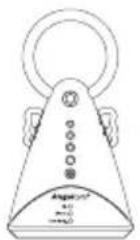
Nursery Unit 1 Sensor Pad (AC300) or
2 Sensor Pads (AC300-2SP)
with pre-installed cord covers
YOU MUST PREPARE:
One hardboard (not included)
Thickness: 6 mm
Minimum dimensions:
33 cm x 33 cm
Maximum dimensions:
equal to the mattress size
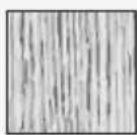
Hardboard
IMPORTANT
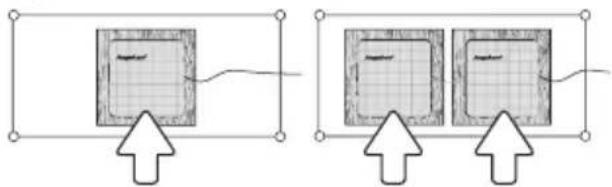
The hardboard must be larger than the Sensor Pad surface area or in the case of the AC300-2SP of two Sensor Pads.
WHAT YOU WILL NEED (NOT INCLUDED):
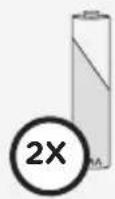
2 AA Alkaline Batteries
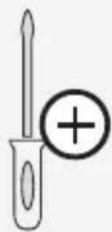
Miniature Philips Screwdriver
BABY'S ROOM:
IMPORTANT
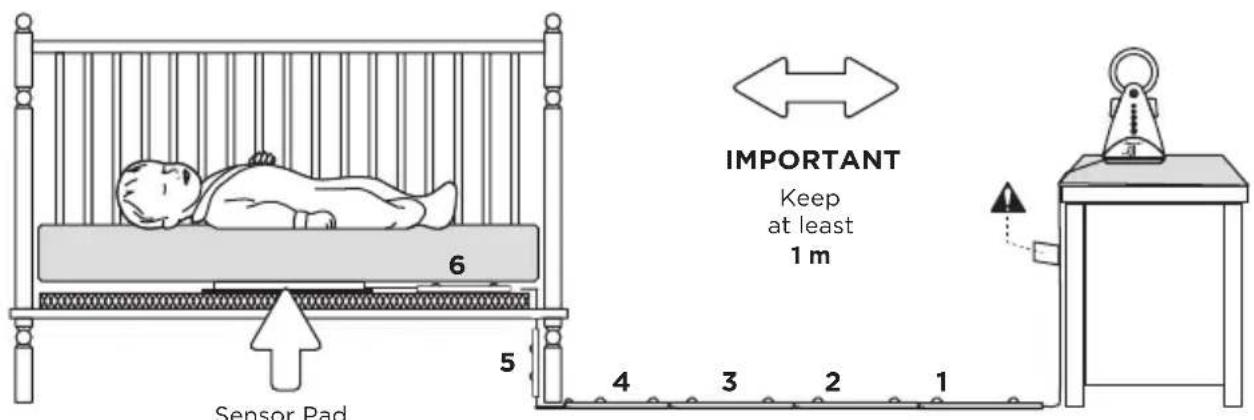
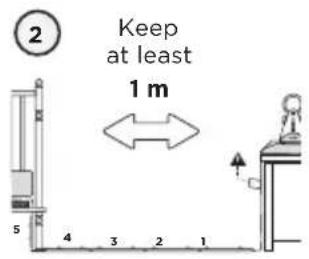
Place the crib near a supporting wall and far from air currents. Install the Nursery Unit on a flat, stable surface facing the crib at a distance of at least 1 meter.
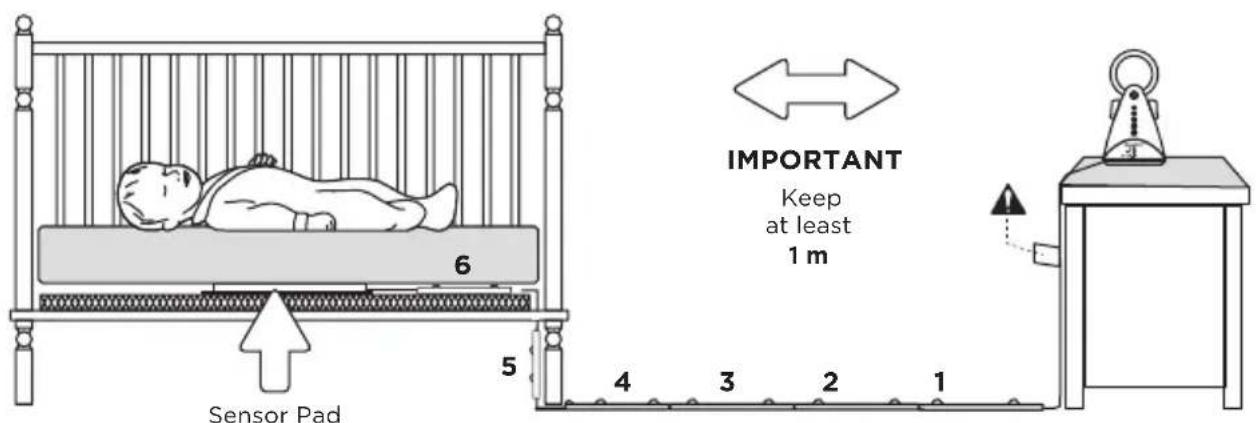
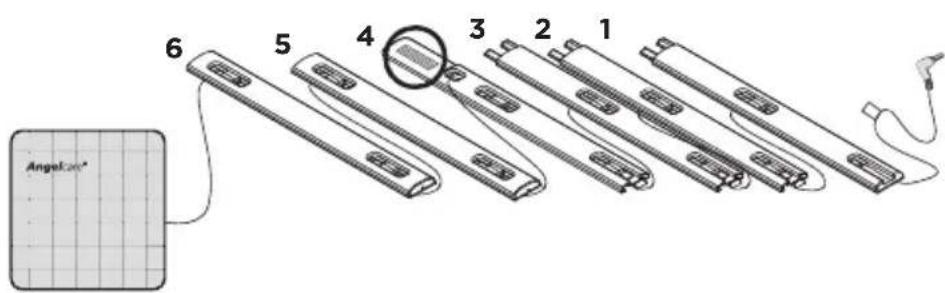
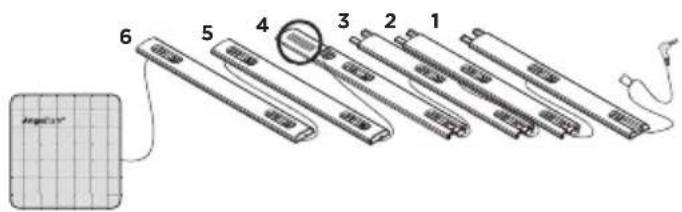
Sensor Pad with pre-installed cord covers
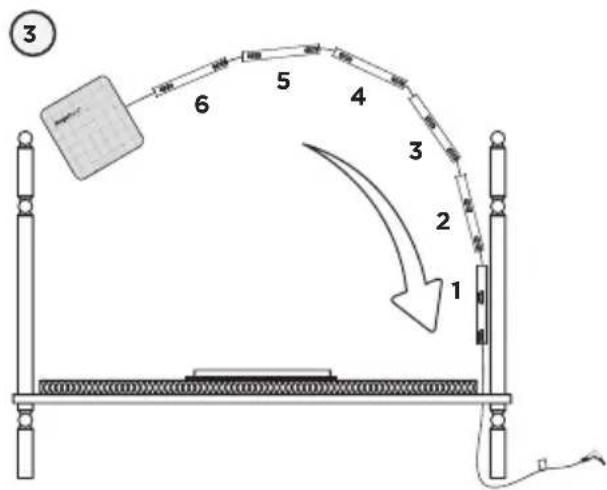
Cord covers 1, 2, 3, 4:
Position on floor
Cord cover 4:
Contains double sided tape to securely install beneath crib leg
Cord cover 5:
Position vertically between mattress support and floor
Cord cover 6:
Place under the mattress

WARNING
STRANGULATION HAZARD.
Children have STRANGLED in cords.
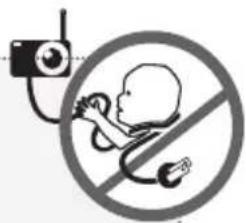
- Because of the serious strangulation risk to infants and toddlers, parents and caregivers should never place the Nursery Unit within 1 meter of a crib.
- NEVER use Sensor Pad without the cord covers. Check cord covers before each use to ensure it is securely placed under the leg of the crib. Discontinue use of Sensor Pad if any cord covers are damaged or broken.
1.1 - SELECT A LOCATION FOR THE NURSERY UNIT
Select a location for the Nursery Unit that is at least 1 meter away from the crib.
OR
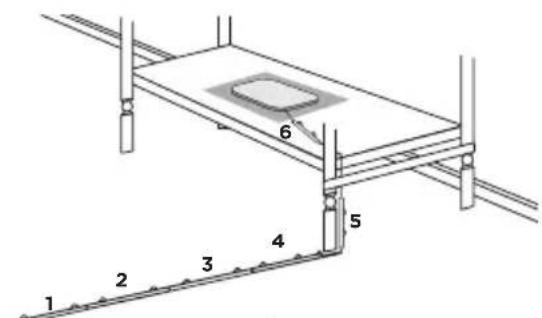
Fig 2
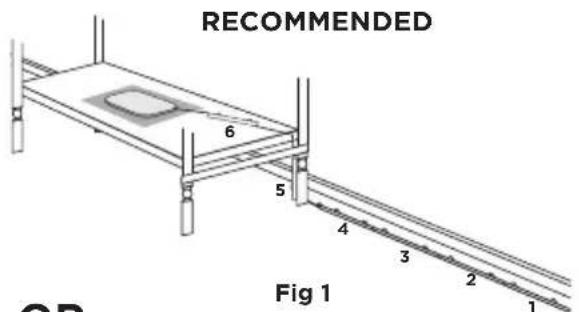
Use the crib leg by the wall closest to the Nursery unit (fig 1). In cases where the Nursery Unit is across the room, use the leg closest to the Nursery Unit to position the covered wire (fig 2). It is always preferable that the covered cord run along a wall.
1.3 - INSTALL THE SENSOR PAD ON THE MATTRESS SUPPORT
(2)
1 Sensor Pad or 2 Sensor Pads (Dependant on Model)
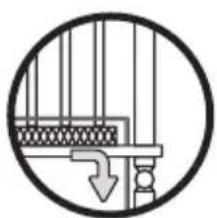
(4)
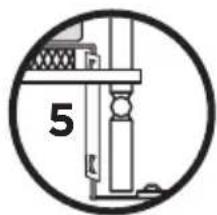
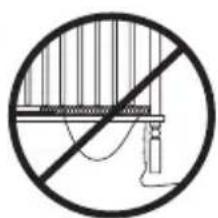
(5)
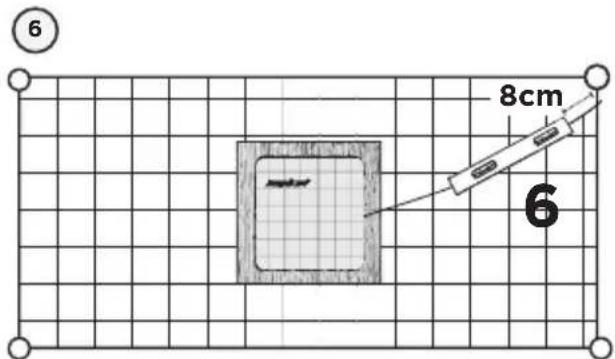
6) Place the 6^th cord cover approximately 8 cm from the edge of the mattress support.
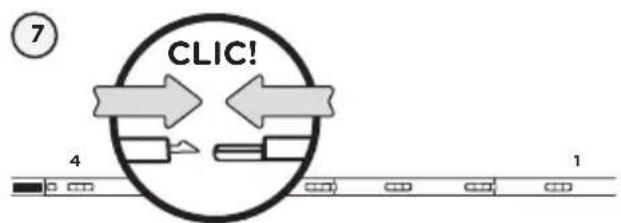
7) Snap together the remaining cord covers that will run along the floor.
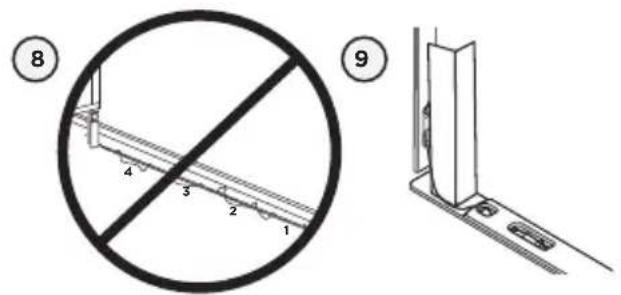
8) Remove any cord slack to make sure no parts of the cord are loose.
9) Peel off the double-sided tape on the 4^th cord cover and place it securely under the crib leg.
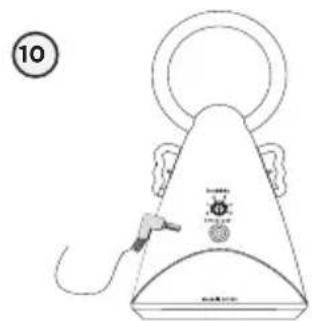
10) Install the Nursery Unit on a flat, stable surface facing the crib at a distance of at least 1 m and plug the Sensor Pad cord into the Nursery Unit.
11) Check to make sure the Sensor Pad has not moved from position.
12) Place the mattress back inside the crib.
The Sensor Pad functions with any size and type of mattress except memory-foam mattresses and hollow frame mattresses.
The hardboard maintains a constant pressure on the Sensor Pad, enabling it to detect the baby's movements even when the baby is at the edges of the crib.
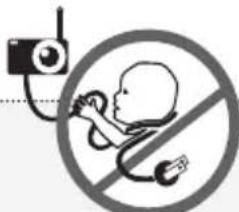
WARNING
STRANGULATION HAZARD
- Remove all slack from Sensor Pad Cord.
- When lowering the mattress support as your child grows, slide the vertical Cord Cover (5) upward so it remains approximately in the center between the mattress support and the floor. Slide the Sensor Pad Cord through the Floor Cover to eliminate any additional slack.
The Sensor Pad is not designed for use with adults, children or infants older than 24 months.
- Discontinue used of the Sensor Pad when child is older than 24 months. Remove sensor pad from crib and store for future use.
BEFORE FIRST TIME USE: To test that the unit is ready for use, refer to instruction manual on how to test that the installation has been done correctly.
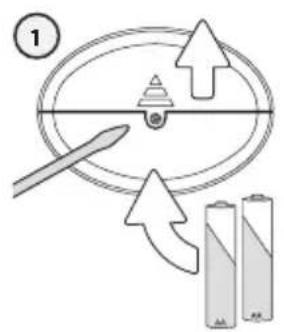
1) Remove the battery door and insert 2 AA Alkaline Batteries (not included).
2) Place the Nursery Unit at a minimum of 1 m away from the crib.
NURSERY UNIT:
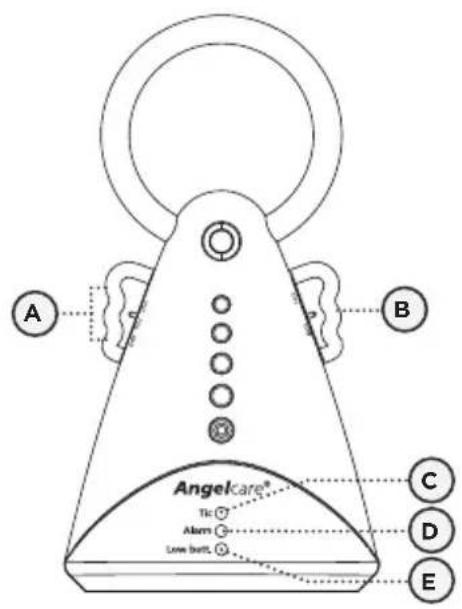
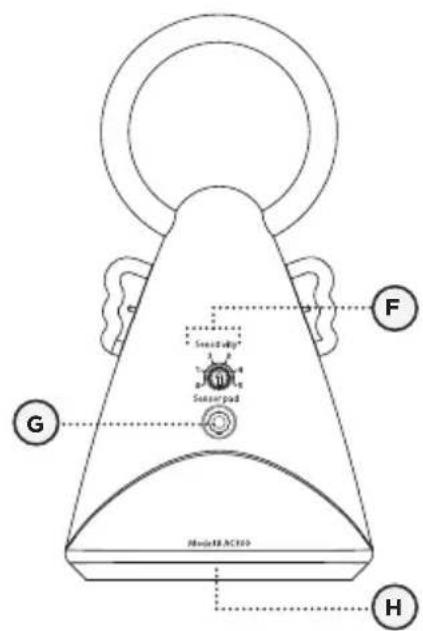
A) Movement 'TIC' ON/OFF button
B) POWER ON/OFF switch
C) Movement 'TIC' Indicator (flashing)
D) Alarm Indicator
E) Low battery indicator
F) Movement sensitivity adjustment dial
G) Sensor Pad socket
H) Battery Door (not shown)
Front Side Back Side
Test monitor when moving Sensor Pad to a new location to ensure sensitivity is adjusted correctly to the new padding or mattress.
3.1 - SENSOR PAD
TO TEST SENSOR PAD:
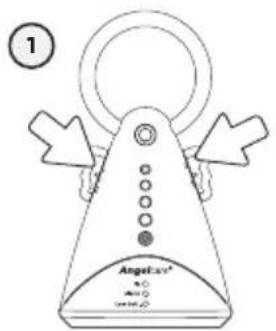
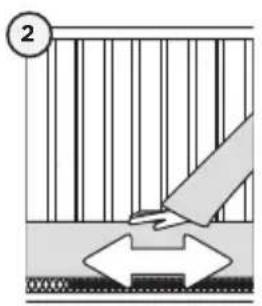
1) Turn ON Power/'TIC' switch
2) Move your hand lightly on the mattress.
3) Remove your hand from the mattress. After 15 seconds you will hear a 'TIC' pre-alarm sound.
4) 5 seconds later the alarm will sound and the red light (Alarm Indicator) will flash continuously.
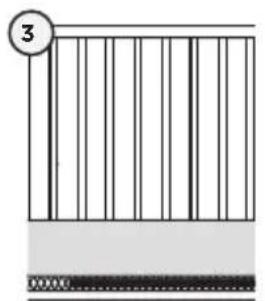
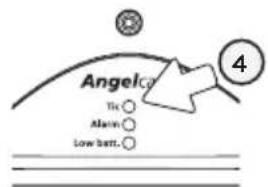
MOVEMENT ALARM
If NO movement is detected after 15 seconds you will hear a single TIC pre-alarm sound from the Nursery Unit.
If after a further 5 seconds there is still NO movement detected, Nursery Unit speakers will emit a loud warning sound.
IF THE ALARM DOES NOT SOUND
- Avoid contact with crib while Sensor Pad is in operation.
- Place crib near a supporting wall.
- Adjust Sensor Pad sensitivity level.
TO STOP THE ALARM
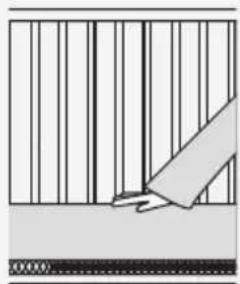
Place your hand back on the mattress.
OR
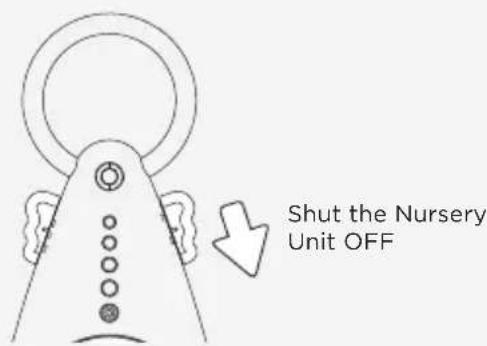
TO ADJUST SENSOR PAD SENSITIVITY LEVEL:
Turn the Nursery Unit sensitivity dial from less sensitive (0) to very sensitive (5).
For optimal results begin with the sensitivity level dial on the 3 bar, adjusting the sensitivity by half a bar increases or decreases as required.
IMPORTANT
- The Sensor Pad is not designed for use with adults, children or infants older than 24 months.
- Once you are finished using the Sensor Pad, please remove it from the baby's crib and store it away.

NOTE:
If you are experiencing false alarms, adjust the sensitivity level.
3.3 - BATTERIES
The Angelcare® Movement Monitor is battery operated.
- Batteries will last approximately 3 to 4 months.
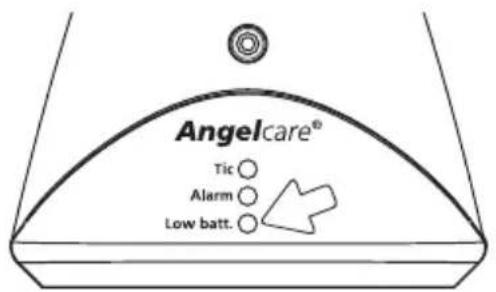
BATTERY ALARM
- When Nursery Unit produces a rapid clicking sound, change batteries promptly.
YOU ARE NOW READY TO USE YOUR MONITOR
3.4 - ACTIVATING THE TIC FUNCTION
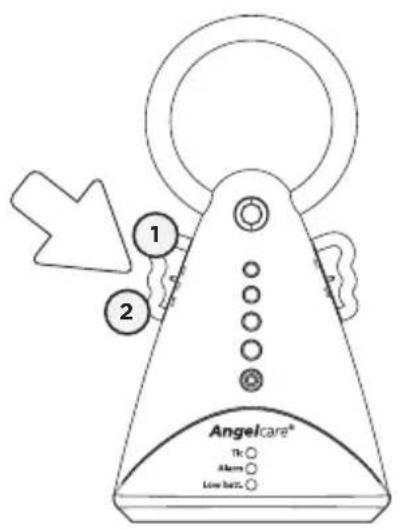
1) Slide switch ON to activate the 'TIC' function. A green light will flash as well to indicate movement.
2) Slide switch OFF to remove 'TIC' sound. The green light will continue to flash to indicate movement function is still working.
NOTE:
If the green light does not appear but a red light is flashing; or if there are false alarms, adjust the sensitivity level (Step 3).
FALSE ALARMS
- Turn OFF the Nursery Unit.
- Verify the connection between the Sensor Pad and the Nursery Unit. Unplug and reconnect the cord.
- Make sure there is no bedding between the mattress and the Sensor Pad.
- If the crib has a spring or slat base, place a hardboard between the crib base and the Sensor Pad measuring at least 33 × 33 cm and 6 ~mm thick.
- Make sure Sensor Pad is positioned as described under the setup requirements. Sensitivity may need to be adjusted, refer to Step 3.1.
ALARM WILL NOT SOUND
- Avoid contact with the crib when the monitor is ON.
- Place crib near a solid supporting wall to avoid Sensor Pad from detecting movement from outside the crib.
- Turn OFF crib mobile, fans, loud music or anything else that may cause vibration.
- You may need to decrease the sensitivity, refer to Step 3.1.
ALARM INDICATOR LIGHT IS FLASHING RED (MONITOR IS BARELY DETECTING MOVEMENT)
- Make sure there is no bedding between the mattress and the Sensor Pad.
- The Sensor Pad must rest on a completely flat and firm surface. If the crib has a spring or slat base, place a hard board between the crib base and the Sensor Pad measuring at least 33 × 33 cm and 6 ~mm thick.
- Make sure Sensor Pad is positioned as described under the setup requirements. Sensitivity may need to be adjusted, refer to Step 3.1.
NO POWER
- Check or replace batteries.
Make sure Monitor is ON.
If you experience a problem that is not noted in this manual, please do not return the product to the store. If you are not completely satisfied or have any questions:
Belgium, The Netherlands, Luxemburg: Please contact us at: info@mykko.be.
Other countries: Please contact your local distributor.
We may have a simple solution to your problem.
TECHNICAL SPECIFICATIONS
Power Supply:
2 AA alkaline batteries (not included)
Caution: To reduce the risk of electric shock, do not expose this product to rain or moisture.
Hereby, Angelcare Monitors Inc declares this baby monitor is in compliance with the essential requirements and other relevant previsions of Directive 2004/108/ EC.
The EU declaration of conformity can be obtained at: www.angelcarebaby.com.
Batteries:
DO NOT mix old and new batteries.
DO NOT mix alkaline and standard (carbon-zinc) batteries.
LIMITED WARRANTY
Angelcare® warrants to the original owner of this product that Angelcare®, Movement monitor (model AC300) is free from any material and workmanship defects, for a period of two (2) years from the date of the original purchase. If this monitoring system fails to function properly when used as directed under normal conditions within the two years period, Angelcare® will either repair or replace the product, at our discretion, free of charge. Please contact your distributor.
The product must be accompanied by a proof of purchase, either a bill of sale or other proof that the monitoring system is within the warranty period. Angelcare® will bear the cost of repairing or replacing the product and shipping it back to you.
This warranty does not apply to a product which has been damaged as a result of improper maintenance, an accident, improper voltage supply or any other form of misuse. The warranty is also void if the owner repairs or modifies the product in any way. Angelcare® is not liable for any incidental or consequential damages with regard to this product. The warranty also excludes any liability other than what is stated above. No other warranty is given.
This warranty does not cover products and accessories which are not Angelcare-branded, or any problems that result from usage that is not in accordance with product instructions, failure to follow the product instructions, or problems caused by using accessories, parts or components not supplied by Angelcare.
LEGAL RIGHTS VARY FROM COUNTRY TO COUNTRY. SOME COUNTRIES DO NOT ALLOW THE EXCLUSION OR LIMITATION OF INCIDENTAL OR CONSEQUENTIAL DAMAGES, SO THE ABOVE LIMITATIONS MAY NOT APPLY TO YOU.
WE ARE NOT IN ANY WAY RESPONSIBLE FOR ANY OUTCOME RESULTING FROM THE USE OF THIS PRODUCT.
IMPORTANT!
This Angelcare monitor is a personal care product. Please do not return this product to the store. If you have questions or need help, please call your distributor before returning this product.


PROTECT THE ENVIRONMENT
This electronic equipment contains reusable material and must not be disposed with domestic waste. Please take it to a collecting point for electric and electronic equipment (ask your local authorities for details).