
KXPRSA10 - Cordless phone PANASONIC - Free user manual and instructions
Find the device manual for free KXPRSA10 PANASONIC in PDF.
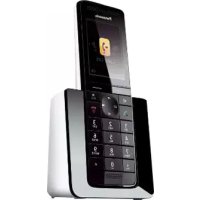



| Product type | Additional digital cordless handset |
| Brand | Panasonic |
| Model | KX-PRSA10 (compatible with KX-PRS110/KX-PRS120) |
| Power supply | Panasonic PNLV233CE AC adapter (100-240 V AC, 50/60 Hz) |
| Batteries | 2 supplied Ni-MH AAA (R03) rechargeable batteries, full charge in 7 hours |
| Battery life | Approximately 7 hours charging, standby and talk time not specified |
| Dimensions (handset) | Approximately 170 × 50 × 30 mm (estimated) |
| Weight (handset with battery) | Approximately 130 g (estimated) |
| Display | Backlit digital display, language selection (French, etc.) |
| Main functions | Base registration, battery charging, display language selection, phonebook and call list (via base) |
| Compatibility | Panasonic bases KX-PRS110/KX-PRS120 series (KX-PRSA10) and KX-PRW110/KX-PRW120 series (KX-PRWA10) |
| Maintenance and cleaning | Clean with a soft damp cloth. Do not use benzene, thinner or abrasive powder |
| Safety | Use only the supplied Ni-MH AAA batteries. Do not open the battery. Keep the AC adapter plugged in at all times. |
| Spare parts and repairability | Rechargeable batteries (see base manual for reference), charger, AC adapter. After-sales service: 08 92 35 05 05 (0.34 €/min) |
| General information | Instructions available in several languages. Compliant with directive 2014/53/EU. Manufactured by Panasonic France. |
Frequently Asked Questions - KXPRSA10 PANASONIC
User questions about KXPRSA10 PANASONIC
0 question about this device. Answer the ones you know or ask your own.
Ask a new question about this device
Download the instructions for your Cordless phone in PDF format for free! Find your manual KXPRSA10 - PANASONIC and take your electronic device back in hand. On this page are published all the documents necessary for the use of your device. KXPRSA10 by PANASONIC.
USER MANUAL KXPRSA10 PANASONIC
Additional Digital Cordless Handset
Model No. KX-PRSA10EX / KX-PRWA10EX
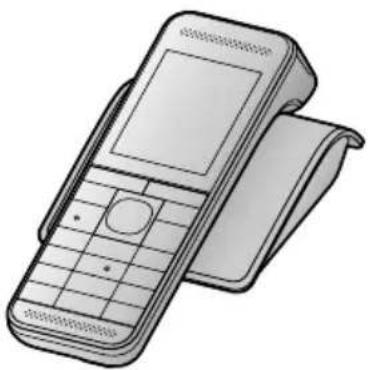
KX-PRSA10 / KX-PRWA10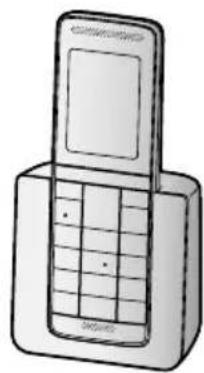
Thank you for purchasing a Panasonic product.
This unit is an additional handset compatible with the following series of
Panasonic Digital Cordless Phone:
- KX-PRS110 / KX-PRS120 (KX-PRSA10)
- KX-PRW110 / KX-PRW120 (KX-PRWA10)
(The corresponding models are subject to change without notice.)
You must register this handset with your base unit before it can be used.
This installation manual describes only the steps needed to register and begin using the handset. Please read the base unit's operating instructions for further details.
Please read this installation manual before using the unit and save it for future reference.
Español
Nos
English
Portuguese
Accessory information
Supplied accessories
| Accessory item/Part number Quantity | |
| Charger 1 | |
| AC adaptor/PNLV233CE 1 | |
| Rechargeable batteries*1 | 2 |
| Handset cover*2 | 1 |
1 Please read the base unit's operating instructions for replacement battery information. 2 The handset cover comes attached to the handset.
Note:
- Please read the base unit's operating instructions for additional/replacement accessories.
- Panasonic Corporation declares that the radio equipment type (KX-PRSA10/ KX-PRWA10) is in compliance with Directive 2014/53/EU. The full text of the EU declaration of conformity is available at the following internet address: http://www.ptc.panasonic.eu/doc
Setting up
Connections
① Connect the AC adaptor plug to the unit until you hear a click. ② Connect the AC adaptor to the power outlet. ③ KX-PRSA10: Fasten the cord by hooking it.
KX-PRSA10 KX-PRWA10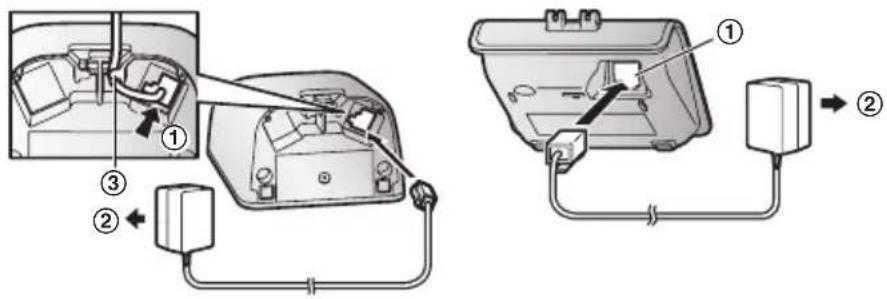
Note:
- Use only the supplied Panasonic AC adaptor PNLV233CE.
- The AC adaptor must remain connected at all times. (It is normal for the adaptor to feel warm during use.)
Battery installation/Battery charging
When the language selection is displayed after installing the batteries for the first time, you can select your desired language.
【】: Select your desired language. → [OK] → 【
Important:
- Use the supplied rechargeable batteries. For replacement, we recommend using the Panasonic rechargeable batteries noted in the base unit's operating instructions.
- USE ONLY rechargeable Ni-MH batteries AAA (R03) size (①).
- Do NOT use Alkaline/Manganese/Ni-Cd batteries.
- Confirm correct polarities ⊕,⊕
Charge for about 7 hours.
- Confirm "Charging" is displayed (②).
- When the batteries are fully charged, "Fully charged" is displayed.
Installation
KX-PRSA10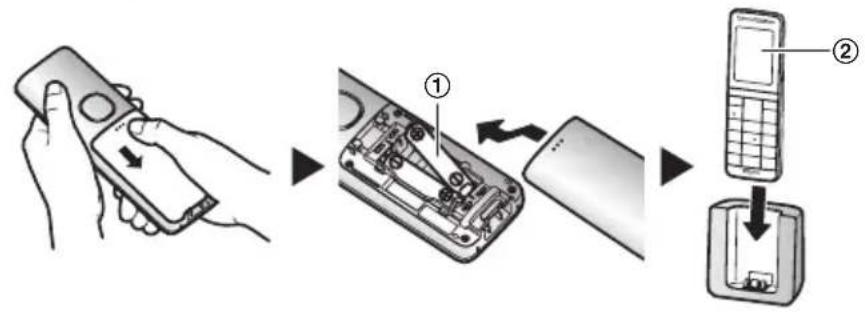
HK-PRWA10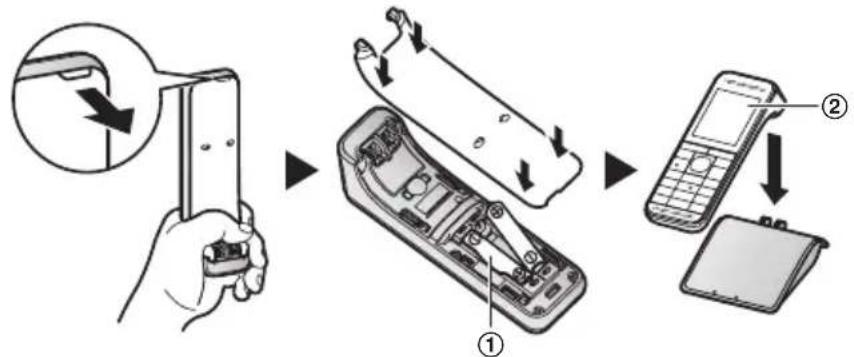
Note:
- The handset display may show "Please wait for 1 minute." when the handset is placed on the charger if it is not registered to the base unit.
- If the batteries are fully charged, but the operating time seems to be shorter, clean the battery ends (⊕) and the charge contacts with a dry cloth and charge again.
Display language
1 [Menu] (right soft key) #110 2 []: Select your desired language. → [OK] → [
Registering the handset to the base unit
Ensure that the handset is switched on. If it is not on, press and hold [+] for a few seconds to turn the handset on.
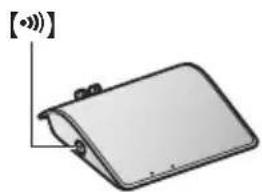
1 Handset:
Lift the handset and press [● ●]
2 Base unit:
Press and hold [ ] for about 5 seconds.
- If all registered handsets start ringing, press [·] again to stop, then repeat this step.
KX-PRSA10 KX-PRWA10
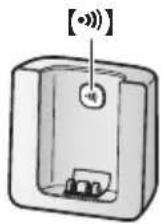
3 Handset:
Place the handset on the base unit or charger.
- Continue the operation even when the handset display shows "Please wait for 1 minute."
4 With the handset still on the base unit or charger, wait until a confirmation tone sounds and T is displayed.
Note:
- If an error tone sounds, or if Y is displayed, register the handset according to the base unit's operating instructions.
For your safety
To prevent severe injury and loss of life/property, read this section carefully before using the product to ensure proper and safe operation of your product.
WARNING
Power connection
- Completely insert the AC adaptor/power plug into the power outlet. Failure to do so may cause electric shock and/or excessive heat resulting in a fire.
- Regularly remove any dust, etc. from the AC adaptor/power plug by pulling it from the power outlet, then wiping with a dry cloth. Accumulated dust may cause an insulation defect from moisture, etc. resulting in a fire.
Installation
- Unplug the product from power outlets if it emits smoke, an abnormal smell, or makes an unusual noise. These conditions can cause fire or electric shock. Confirm that smoke has stopped emitting and contact an authorised service centre.
Installation
- To prevent the risk of fire or electrical shock, do not expose the product to rain or any type of moisture.
- Do not place or use this product near automatically controlled devices such as automatic doors and fire alarms. Radio waves emitted from this product may cause such devices to malfunction resulting in an accident.
CAUTION
Installation and location
- The AC adaptor is used as the main disconnect device. Ensure that the AC outlet is installed near the product and is easily accessible.
Battery
- We recommend using the supplied batteries or additional/replacement batteries noted in the base unit's operating instructions for replacement battery information. USE ONLY rechargeable Ni-MH batteries AAA (R03) size.
- Do not mix old and new batteries.
- Do not open or mutilate the batteries. Released electrolyte from the batteries is corrosive and may cause burns or injury to the eyes or skin. The electrolyte is toxic and may be harmful if swallowed.
- Exercise care when handling the batteries. Do not allow conductive materials such as rings, brackets, or keys to touch the batteries, otherwise a short circuit may cause the batteries and/or the conductive material to overheat and cause burns.
- Charge the batteries provided with or identified for use with this product only, in accordance with the instructions and limitations specified in this manual.
- Only use a compatible base unit (or charger) to charge the batteries. Do not tamper with the base unit (or charger). Failure to follow these instructions may cause the batteries to swell or explode.
Important safety instructions
When using your product, basic safety precautions should always be followed to reduce the risk of fire, electric shock, and injury to persons, including the following:
- Do not use this product near water for example, near a bathtub, washbowl, kitchen sink, or laundry tub, in a wet basement or near a swimming pool.
Installation
- Do not use the telephone to report a gas leak in the vicinity of the leak.
- Use only the power cord and batteries indicated in this manual. Do not dispose of batteries in a fire. They may explode. Check with local codes for possible special disposal instructions.
SAVE THESE INSTRUCTIONS
Other information
- Operating the product near electrical appliances may cause interference. Move away from the electrical appliances.
CAUTION: Risk of explosion if battery is replaced by an incorrect type. Dispose of used batteries according to the instructions.
Routine care
- Wipe the outer surface of the product with a soft moist cloth.
- Do not use benzine, thinner, or any abrasive powder.
Notice for product disposal, transfer, or return
- This product can store your private/confidential information. To protect your privacy/confidentiality, we recommend that you erase information such as phonebook or caller list entries from the memory before you dispose of, transfer, or return the product.
Disposal of Old Equipment and Batteries (Only for European Union and countries with recycling systems)
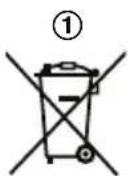
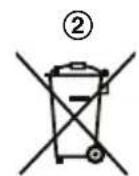

These symbols (①, ②) on the products, packaging, and/or accompanying documents mean that used electrical and electronic products and batteries must not be mixed with general household waste. For proper treatment, recovery and recycling of old products and batteries, please take them to applicable collection points in accordance with your national legislation.
By disposing of them correctly, you will help to save valuable resources and prevent any potential negative effects on human health and the environment.
Installation
For more information about collection and recycling, please contact your local municipality. Penalties may be applicable for incorrect disposal of this waste, in accordance with national legislation.
For business users in the European Union
If you wish to discard electrical and electronic equipment, please contact your dealer or supplier for further information.
Information on Disposal in other Countries outside the European Union
These symbols (①, ②) are only valid in the European Union. If you wish to discard these items, please contact your local authorities or dealer and ask for the correct method of disposal.
Note for the battery symbol
This symbol (②) might be used in combination with a chemical symbol. In this case it complies with the requirement set by the Directive for the chemical involved.
Note for the battery removal procedure
Refer to "Battery installation/Battery charging" on page 3.
Panasonic®
KEEP THESE INSTRUCTIONS
Read the instructions
- If you use the product near electrical appliances, it may cause interference. Keep the product away from electrical appliances.
CAUTION: There is a risk of explosion if the battery is replaced with an incorrect type. Used batteries must be disposed of according to the instructions.
Regular maintenance
Corded Telephone - Additional Handset Model No. KX-PRSA10EXW KX-PRWA10EXW
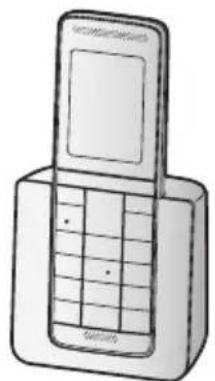
KX-PRSA10 KX-PRWA10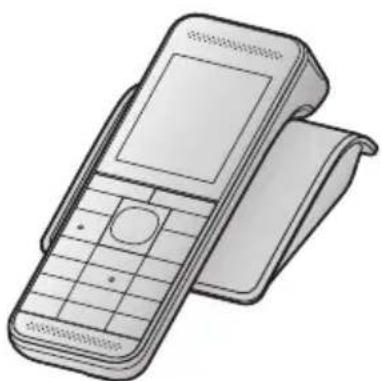
Declaration of Conformity
Document Number: PCTP-130116-05
Manufacturer
| Name | Panasonic System networks Co., Ltd. | |
| Address | 1-82, 4-chome, Minoshima, Hakata-ku, Fukuoka, 812-0531 Japan | |
| Object of Declaration | <A> | |
| Product Name | Digital Enhanced Cordless Telephone | |
| Trade Name | Panasonic | |
| Model Number | KX-PRS110yy; KX-PRS120yy; KX-PRSA10yy; (Base Unit); KX-PRS110yy KX-PRS120yy; (Portable Unit); KX-PRSA10yy; (Charger Cradle); PNLC1047 (AC adaptor); PNLV226yy; PNLV233yy | |
| OE Requirements | ||
| This declaration of conformity is issued under the sole responsibility of manufacturer. The object of the declaration described above is in conformity with the requirements of the following EU legislation and harmonized standards: | ||
| Council | 2014/53/EU | RED |
| Directive(s) | 2009/125/EC | ErP |
| 2011/85/EU | RoHS | |
| Commission | (EC) No.278/2008 | Implementing measures for ErP Directive |
| Regulation(s) | (EC) No.1275/2008 | Implementing measures for ErP Directive |
| (EU) No.801/2013 | Implementing measures for ErP Directive | |
| Council | 1999/519/EC | EMF |
| Recommendation(s) | ||
| Harmonized Standard(s): EN 60950-1:2006 +A11:2009 +A1:2010 +A12:2011 +A2:2013; EN 301 406 V2.1.1:2009 EN 301 406-1 V1.0.2:2011; EN 301 409-6 V1.4.1:2015; EN 50360:2001 +A1:2012 EN 50385:2002; EN 50563:2011 +A1:2013; EN 50564:2011; EN 50561:2012 | ||
| Additional Information <D> | ||
| Suffix "x" represents packing configuration with the number of handset can be any digits "0 to 9". Suffix "yy" represents country code, can be any combination of characters "A to Z". | ||
| 13 Jun, 2018 N_Serro Date of Issue / Signature | 1 3. Juni 2018 Wd. d | |
| Nobuhiro Sero no / Senior Tech. Reg. Maneger Printed Name / Title Authorised Representative PWM 13, 22525 Hamburg, Germany | ||
Installation
Panasonic
Panasonic Testing Centre
Panasonic
Declaration of Conformity
Document Number: PCTP-130115-05
Manufacturer
Name
Panasonic System Networks Co., Ltd.
1
Hakata-ku, Fukuoka, 812-8531
Japan
Object of Declaration
(A)
Product Name
Digital Enhanced Cordless Telephone
:Parasitic
: KX-PRW110yy; KX-PRW120yy; (Base Unit); KX-PRW110yy; KX-PRW120yy
(Portable Unit); KX-PRWA10yy; (Charger Cradle); PNLC1046; (AC adaptor)
PNLV238yy, PNLV233yy
CE Requirements
This declaration of conformity is issued under the sole responsibility of the manufacturer. The object of the declaration described above is in conformity with the requirements of the following EU legislation and harmonized standards:
Council
2014/53/EU
RED
(B)
Directive(s)
2009/125/EC
E.P.
2011/65/EU
RoHS
Commission
(EC) No. 278/2009
Implementing measures for ErP Directive
Regulation(a)
(EC) No.1275/2008
Implementing measures for ErP Directive
EU) No.801/
Implementing measures for ErP Directive
Council
1998/519/EC
EMF
Recommendation(s)
(0)
Harmonized Standard(s)
EN60950-1:2008+A11:2009+A12:2010+A12:2011+A2:2013; EN301408V2.1.1:2009
EN 300 328 V1.9.1:2015; EN 301 489-1 V1.9.2:2011; EN 301 489-6 V1.4.1:2015
EN301489-17V2.2.1:2012; EN50360:2001+A1:2012; EN50385:2002
EN 50563:2011 +A1:2013; EN 50584:2011; EN 50581:2012
Additional Information
(D)
Suffix "x" represents packing configuration with the number of handsets can be
any digits 0 to 9
Suffix "yy" represents country code, can be any combination of characters "A to Z".
13.2m-201
Ses
13 June 2016
N. Q
Date of Issue / Signature
Nielis Erdmann
Nobuhiro Senno / Senior Tech, Reg Manager
Authorised Representative
Printed Name / Title
Parasonic Testing Centre
Panatonic Marketing Europe GmbH
Winsbergring 15, 22525 Hamburg, Germany
Installation
Panasonic
Panasonic Testing Centre
Useful Information
Sales department/Vertrieb/Organisation Commerciale/Klantenservice/ Försäljning/Salgsavdeling/Maahantuonti/Departamento commercial/Tuŋμα Πωλησεων/Salgskontor/Departamento deVentas/Ufficio Vendite/Satis bolumü
Denmark
Panasonic Denmark, branch
of Panasonic Marketing
Europe GmbH, Germany
Produktionsvej 26
DK-2600 Glostrup
http://www.panasonic.dk
Germany
Europe GmbH, Germany
Ellipsvagen 12, SE-141 75
Kungens Kurva, Stockholm
http://www.panasonic.se
EAAaAs
INTERTECH S.A.
AIEOeis Texvoaoyies
Intertech S.A.
Avtippoos
Kevtpika Tpaepia
France
92238 Gennevilliers Cedex, France
Panafax: 210.9648.588
e-mail: info@intertech.gr
www.panasonic.gr
Italiana
Panasonic Italia - branch
office of Panasonic
Panasonic Norway, Branch of Panasonic Marketing Europe GmbH
Panasonic Switzerland
a branch of Panasonic
© Panasonic Corporation 2013
PNQX6060UA TT0513MG5018 (E)


- THANK YOU FOR PURCHASING A PANASONIC PRODUCT
- ACCESSORY INFORMATION
- NOTE
- SETTING UP
- CONNECTIONS
- BATTERY INSTALLATION/BATTERY CHARGING
- IMPORTANT
- CHARGE FOR ABOUT 7 HOURS
- INSTALLATION
- DISPLAY LANGUAGE
- REGISTERING THE HANDSET TO THE BASE UNIT
- HANDSET
- BASE UNIT
- FOR YOUR SAFETY
- WARNING
- POWER CONNECTION
- CAUTION
- INSTALLATION AND LOCATION
- BATTERY
- IMPORTANT SAFETY INSTRUCTIONS
- SAVE THESE INSTRUCTIONS
- OTHER INFORMATION
- ROUTINE CARE
- NOTICE FOR PRODUCT DISPOSAL, TRANSFER, OR RETURN
- FOR BUSINESS USERS IN THE EUROPEAN UNION
- INFORMATION ON DISPOSAL IN OTHER COUNTRIES OUTSIDE THE EUROPEAN UNION
- NOTE FOR THE BATTERY SYMBOL
- NOTE FOR THE BATTERY REMOVAL PROCEDURE
- PANASONIC®
- KEEP THESE INSTRUCTIONS
- READ THE INSTRUCTIONS
- REGULAR MAINTENANCE
- PANASONIC
- MANUFACTURER
- OBJECT OF DECLARATION
- CE REQUIREMENTS
- ADDITIONAL INFORMATION
- USEFUL INFORMATION
- DENMARK
- GERMANY
- EAAAAS
- INTERTECH S.A
- FRANCE
- ITALIANA
Brand : PANASONIC
Model : KXPRSA10
Category : Cordless phone