
KXTGA651EXT - Cordless phone PANASONIC - Free user manual and instructions
Find the device manual for free KXTGA651EXT PANASONIC in PDF.
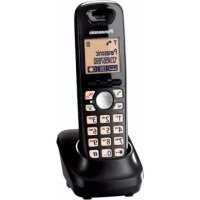



| Product Type | Additional DECT Cordless Handset |
| Brand | Panasonic |
| Model | KX-TGA651EXT |
| Compatibility | KX-TG6501, KX-TG6511, KX-TG6521, KX-TG6531, KX-TG6551, KX-TG6561 series |
| Dimensions (approx.) | 168 x 48 x 29 mm |
| Weight (approx.) | 130 g |
| Power Supply | AC adapter PQLV219CE (230 V, 50 Hz) permanently on the base |
| Battery type | 2 rechargeable Ni-MH AAA (R03) batteries supplied (HHR-55AAAB or N4DHYYYY0005) |
| Standby time | Approximately 150 hours (with fully charged batteries) |
| Talk time | Approximately 10 hours (with fully charged batteries) |
| Range | Up to 50 m indoors, up to 300 m outdoors (depending on environment) |
| Main features | Base registration, directory (up to 50 contacts), caller ID, silent mode, speakerphone |
| Built-in answering machine | No (available only if registered on a base with answering machine: KX-TG6521, KX-TG6531, KX-TG6561) |
| Maintenance and cleaning | Clean with a soft damp cloth. Do not use benzene, thinner, or abrasive powder. |
| Safety | Use only the provided adapter. Do not expose to moisture. Unplug if smoke or abnormal odor occurs. |
| Spare parts | AC adapter (PQLV219CE), rechargeable batteries (HHR-55AAAB), charger |
| Operating temperature | 0°C to 40°C |
| Color | Black (according to illustration) |
| Standards | DECT, GAP compatible |
Frequently Asked Questions - KXTGA651EXT PANASONIC
User questions about KXTGA651EXT PANASONIC
0 question about this device. Answer the ones you know or ask your own.
Ask a new question about this device
Download the instructions for your Cordless phone in PDF format for free! Find your manual KXTGA651EXT - PANASONIC and take your electronic device back in hand. On this page are published all the documents necessary for the use of your device. KXTGA651EXT by PANASONIC.
USER MANUAL KXTGA651EXT PANASONIC
Panasonic
Installation Manual
Bedienungsanleitung
Additional Digital Cordless Handset
Contents/Inhalt/Table des matieres/Inhoud/Innehäll/ Innholdsfortegnelse/Sisällysluettelo/Indice/Περιεύμενα/ Indholdsfortegnelse/Contenido/Indice/ζçindekiler
English 4
Deutsch 9
Francais. 14
Nederlands. 19
Svenska 24
Norsk 29
Suomi 34
Portugues 39
Dansk. 49
Espanol 54
Italiano 59
Türkce 64
English
PLEASE READ BEFORE USE AND SAVE
This unit is an additional handset compatible with the following series of Panasonic Digital Cordless Phone: KX-TG6501/KX-TG6511/KX-TG6521/ KX-TG6531/KX-TG6551/KX-TG6561
You must register this handset with your base unit before it can be used. This installation manual describes only the steps needed to register and begin using the handset. Please read the base unit's operating instructions for further details.
Supplied accessories
Charger. 1 AC adaptor (PQLV219CE) 1
Rechargeable batteries1 2 (HHR-55AAAB or N4DHYYYY00005)
Handset cover2 1
1 Please read the base unit's operating instructions for replacement battery information. 2 The handset cover comes attached to the handset.
Note:
- Please read the base unit's operating instructions for additional/replacement accessories.
- This equipment is designed for use in Germany, Spain, Portugal, Italy, Norway, Sweden, Denmark, Finland, France, Austria, Belgium, Netherlands, Greece, Switzerland, and Turkey.
- In the event of problems, you should contact your equipment supplier in the first instance.
- For use in other countries, please contact your equipment supplier.
Connection (page 2: 1)
- Use only the supplied Panasonic AC adaptor PQLV219CE.
- The AC adaptor must remain connected at all times. (It is normal for the adaptor to feel warm during use.)
- Make sure that the wall is strong enough to support the weight of the unit.
4
Battery installation/Battery charge (page 2: 2)
When the language selection is displayed after installing the batteries for the
first time, you can select your desired language
[7][A]: Select your desired language. → OK → [X]
Important:
- Use the supplied rechargeable batteries. For replacement, we recommend using the Panasonic rechargeable batteries noted in the base unit's operating instructions.
- Wipe the battery ends (⊕, ⊖) with a dry cloth.
- Avoid touching the battery ends (⊕, ⊖) or the unit contacts.
- Confirm correct polarities (⊕, ⊖).
- USE ONLY Ni-MH batteries AAA (R03) size.
- Do NOT use Alkaline/Manganese/Ni-Cd batteries.
Place the handset on the charger for about 7 hours before initial use.
Note:
The handset display may show "Please wait for 1 minute." when the handset is placed on the charger if it is not registered to the base unit. - If the batteries are fully charged, but the operating time seems to be shorter, clean the battery ends (⊕, ⊖) and the charge contacts with a dry cloth and charge again.
Registering the handset to the base unit
Ensure that the handset is switched on. If it is not on, press and hold [X] for a few seconds to turn the handset on.
1 Handset:
Lift the handset and press [×心]
2 Base unit:
Proceed with the operation for your model.
KX-TG6501/KX-TG6511
Press and hold [ ] for about 5 seconds. (No registration tone)
KX-TG6521/KX-TG6531/KX-TG6551/KX-TG6561
Press and hold [ ] for about 5 seconds, until the registration tone sounds.
- If all registered handsets start ringing, press the same button to stop. Then repeat this step.
5
3 Handset:
Place the handset on the base unit.
- Continue the operation even when the handset display shows
"Please wait for 1 minute."
4 With the handset still on the base unit, wait until a confirmation tone sounds and Y is displayed.
Note:
- If an error tone sounds, or if Y is displayed, register the handset according to the base unit's operating instructions. The KX-TG6501/KX-TG6511/KX-TG6551 does not feature an answering system.
- Answering system features are available only when this handset is registered to the KX-TG6521/KX-TG6531/KX-TG6561.
For your safety
To prevent severe injury and loss of life/property, read this section carefully before using the product to ensure proper and safe operation of your product.
WARNING
Power connection
- Completely insert the AC adaptor/power plug into the power outlet. Failure to do so may cause electric shock and/or excessive heat resulting in a fire.
- Regularly remove any dust, etc. from the AC adaptor/power plug by pulling it from the power outlet, then wiping with a dry cloth. Accumulated dust may cause an insulation defect from moisture, etc. resulting in a fire.
- Unplug the product from power outlets if it emits smoke, an abnormal smell, or makes an unusual noise. These conditions can cause fire or electric shock. Confirm that smoke has stopped emitting and contact an authorised service centre.
Installation
- To prevent the risk of fire or electrical shock, do not expose the product to rain or any type of moisture.
- Do not place or use this product near automatically controlled devices such as automatic doors and fire alarms. Radio waves emitted from this product may cause such devices to malfunction resulting in an accident.
CAUTION
Installation and location
- The AC adaptor is used as the main disconnect device. Ensure that the AC outlet is installed near the product and is easily accessible.
Battery
- We recommend using the supplied batteries or additional/replacement batteries noted in the base unit's operating instructions for replacement battery information. USE ONLY rechargeable NI-MH batteries AAA (R03) size.
- Do not mix old and new batteries.
- Do not open or mutilate the batteries. Released electrolyte from the batteries is corrosive and may cause burns or injury to the eyes or skin. The electrolyte is toxic and may be harmful if swallowed.
- Exercise care when handling the batteries. Do not allow conductive materials such as rings, bracelets, or keys to touch the batteries, otherwise a short circuit may cause the batteries and/or the conductive material to overheat and cause burns.
- Charge the batteries provided with or identified for use with this product only, in accordance with the instructions and limitations specified in this manual.
- Only use a compatible base unit (or charger) to charge the batteries. Do not tamper with the base unit (or charger). Failure to follow these instructions may cause the batteries to swell or explode.
Other information
- Operating the product near electrical appliances may cause interference. Move away from the electrical appliances.
- Use only the power cord and batteries indicated in this manual. Do not dispose of batteries in a fire. They may explode. Check with local codes for possible special disposal instructions.
Routine care
- Wipe the outer surface of the product with a soft moist cloth.
- Do not use benzine, thinner, or any abrasive powder.
Notice for product disposal, transfer, or return
- This product can store your private/confidential information. To protect your privacy/confidentiality, we recommend that you erase information such as phonebook or caller list entries from the memory before you dispose of, transfer, or return the product.
Information for Users on Collection and Disposal of Old Equipment and used Batteries
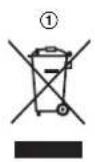
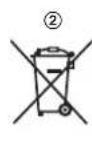
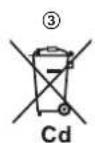
These symbols (1, 2, 3) on the products, packaging, and/or accompanying documents mean that used electrical and electronic products and batteries should not be mixed with general household waste. For proper treatment, recovery and recycling of old products and used batteries, please take them to applicable collection points, in accordance with your national
legislation and the Directives 2002/96/EC and 2006/66/EC.
By disposing of these products and batteries correctly, you will help to save valuable resources and prevent any potential negative effects on human health and the environment which could otherwise arise from inappropriate waste handling.
For more information about collection and recycling of old products and batteries, please contact your local municipality, your waste disposal service or the point of sale where you purchased the items.
Penalties may be applicable for incorrect disposal of this waste, in accordance with national legislation.
For business users in the European Union
If you wish to discard electrical and electronic equipment, please contact your dealer or supplier for further information.
Information on Disposal in other Countries outside the European Union
These symbols (①, ②, ③) are only valid in the European Union. If you wish to discard these items, please contact your local authorities or dealer and ask for the correct method of disposal.
Note for the battery symbol
This symbol (2) might be used in combination with a chemical symbol (3). In this case it complies with the requirement set by the Directive for the chemical involved.
German
Display language
1 Handset:
KX-TG6521/KX-TG6531/KX-TG6551/KX-TG6561
Installation
François
PLEASE READ THIS DOCUMENT BEFORE USE AND KEEP IT
KX-TG6521/KX-TG6531/KX-TG6551/KX-TG6561
ATTENTION
Dutch
READ THE INSTRUCTION MANUAL AND KEEP IT
AC adapter (PQLV219CE) .. 1
Rechargeable batteries* 2
(HHR-55AAAB or N4DHYYY00005)
Battery cover 2 1
Installing batteries/Charging the battery (page 2: ②)
2 Base unit:
KX-TG6521/KX-TG6531/KX-TG6551/KX-TG6561
Installation

Swedish
READ THE INFORMATION BEFORE USING THE UNITS AND SAVE IT FOR FUTURE USE
This unit is an additional handset that is compatible with the following series of Panasonic digital cordless phones: KX-TG6501/KX-TG6511/KX-TG6521/KX-TG6531/KX-TG6551/KX-TG6561
KX-TG6521/KX-TG6531/KX-TG6551/KX-TG6561
Battery
Norwegian
READ BEFORE USE AND KEEP FOR FUTURE REFERENCE
This unit is an extra handset that is compatible with the following series of Panasonic digital cordless phones: KX-TG6501/KX-TG6511/KX-TG6521/KX-TG6531/KX-TG6551/KX-TG6561. You must register the handset with the base unit before use. This installation guide describes only the necessary steps to register and use the handset. Read the base unit's operating instructions for more details.
Included accessories
Charger 1 AC adapter (PQLV219CE) 1
Rechargeable batteries 2 (HHR-55AAAB or N4DHYYY00005)
Handset cover 12 1
1 Read the base unit's operating instructions for information on replacing batteries. 2 The cover is attached to the handset.
Note:
Connection (page 2: 1)
Connection (page 2: 1)
29
Installing/charging the battery (page 2: ②)
When the language selection appears after inserting the batteries for the first time, you can choose the desired language. [V] [A]: Select the desired language. → OK → [X]
Important
- Use the supplied rechargeable batteries. We recommend using Panasonic rechargeable batteries, as listed in the base unit's operating instructions, when you need to replace batteries.
- Wipe the battery poles (⊕, ⊙) with a dry cloth.
- Avoid touching the battery poles (⊕, ⊙) or the charging contacts.
- Check that the polarity is correct ( ,)
- USE ONLY Ni-MH batteries, size AAA (R03).
- Do NOT use alkaline/manganese/Ni-Cd batteries.
3 Handset:
Place the handset on the base unit. Continue even if the handset display shows "Please wait for 1 min." 4 While the handset is still in the base unit, wait for a confirmation tone and for Y to stop blinking.
Note:
- Do not open or damage the batteries. Released electrolyte from batteries is corrosive and can cause burns or damage to eyes or skin. The electrolyte is toxic and may be harmful if swallowed. Be careful when handling batteries. Do not let conductive materials, such as rings, bracelets, or keys, touch the batteries, otherwise a short circuit may occur which could cause the batteries and/or the conductive material to overheat and cause burns.
- Charge the batteries that come with the product or are suitable for use with this product, only in accordance with the instructions and limitations stated in this manual.
- Only use a compatible base unit (or charger) when charging the batteries. Do not tamper with the base unit (or charger). If you do not follow these instructions, it may cause the batteries to swell or explode.
Other information
Suomi
READ THE INSTRUCTIONS BEFORE USE AND SAVE THEM
3 Handset:
Português
KX-TG6521/KX-TG6531/KX-TG6551/KX-TG6561
CAUTION
Greek
DIABASE TO PARON FYLLADIO PRIN TO CHRISIMOPOIISETE
This unit is a cordless handset that works with the following Panasonic Digital Cordless System units: KX-TG6501/KX-TG6511/KX-TG6521/KX-TG6531/KX-TG6511/KX-TG6561. You must register this handset to the base unit before it can be used. This installation manual describes how to install the handset and start using it. For more features, read the operating instructions of the base unit.
Included accessories
Charger 1
Rechargeable batteries (HHR-55AAAB or N4DHYY00005) 1
*1 Read the operating instructions of the base unit for information about replacing the batteries. 2 The handset cover is attached to the handset.
Note:
Read the operating instructions of the base unit before installing/using. The supplied installation is intended for use in Germany, Italy, Portugal, Norway, Sweden, Finland, Denmark, France, Austria, Belgium, Holland, Spain, Greece, Switzerland, and Turkey. If you encounter problems, contact your supplier. For use in other countries, contact your supplier.
Connection (page 2:1)
Use the included AC adaptor PQLV219CE of Panasonic.
44
TGA651EX(ex).book Page 45 Tuesday, September 21, 2010 4:17 PM
The AC adaptor must remain connected at all times. (It is normal for it to become warm during use.) Make sure the wall is strong enough to support the weight of the unit.
Battery installation/charging (page 2:2)
You can select the desired language. [1]: Select the desired language. → OK → [X]
Important:
Use the supplied batteries. For replacement, use the batteries indicated in the operating instructions. - Wipe the battery terminals (⊕, Θ) with a clean cloth. Do not touch the battery terminals ( ,) or the unit's contacts. - Ensure that the polarity is correct ( ,). Use only rechargeable Ni-MH batteries, not alkaline (R03). - Do not use rechargeable Ni-Cd batteries.
Charge the handset for 7 hours before using it for the first time.
Note:
When the handset is fully charged, if it has been left in the base unit, the charge indicator may show "Charge for 1 hour." If the batteries are fully charged but the operating time seems to have decreased, clean the battery terminals ( ,) and the unit's contacts with a dry cloth and repeat the charging.
Display language
1 → [#][1][1][0] 2[√](A)Select the display language.→OK→[xO]
Charging the handset in the base unit
Ensure that the handset is properly seated. If the handset is not properly seated, press and hold [X] for a few seconds to seat it properly.
1 HANDSET:
■KX-TG6521/KX-TG6531/KX-TG6551/KX-TG6561
Press and hold [)] for about 5 seconds until the charge tone sounds.
-If all the recorded messages start to play, press the same button to stop them. Then, repeat the same βηµ
3 AKOUOTIKO:
TOnToETrNoTe To aKouotIKo OTn oVadba Taang.
Mn diakotnte n aeitoupyia ts oukeuhs akopa kai av oto akouotiko eepaviote i evoeiIGN "NepipveTe yia 1 lento."
4 Me To akouotiko akoun otn movadba bao,piepieveTe vaakouote Evav nxo EtniBaeaiwongkai va eapaviote in evdoen Y.
Enueiowon:
EavakouoteiToVocospalatognavepawiatenEvoeinN Kataxwipite to akootiko oumuovuaeTic onyies xpnns nts movadacbaons. Hovada KX-TG6501/KX-TG6511/KX-TG6551 8ev diaeTei aeitoupyia autouatou mepwntn. Olaetoupyies Tou autopou Tou nApwntivai diaeoiusmoo av to aokoutiko evai kataxupioevo oK-TG6521/KX-TG6531/KX-TG6561.
TnV aσαλειασ
Tia va atopuyete oapapo tpaunatoo kai 6vato n UIukec zmuic, diafoate TPOOeKTKaTN V npoua evotnti, pivx npauoioanoe To TPOIOV, wate v diaopaalioete Tn Oawtnk aaoaaX npon Tou.
IPOEIAONOIH2H
Euovbeon mtpofoosia
BATEo tetaaonmuotn evaaaooeiouepuatoctoqic paooobaoiac xepi tepua eonvi Tpia. 2e avitetn tepiitwnuon utapexi kivduovns kektpoianias n'kai utepepavantis TIO uptopelva TPOKAEAE TUPKAYIA. Na apaipire taiknta n kovn k.t.a to to petaxynatiot evaaaooovou peuapocto 45pueutac,byacvtas to atto nTv npica ka oakouticovtacs to eoteyvo tvi.
Hauouoovonokvynovkoyevetai oanyohne aevanapkeia nts owwnac oywuypaalac k.l.. me atareaayva npoknepuayai.
46
| TGA651EX(ex).book Page 47 Tuesday, September 21, 2010 4:17 PM |
| • Atnouvobete Tn oukeun ato tvnpia, av byaivei ato autny katvoç n aoovhbiotn ooun n av kavei aoovthio tno bopuo. Mtopei va tpokanbei Tupkayia n neaktponlaia. BeBaowbte Iri Exei otapameta va byaivei katvoç kai etikovwnote me eouauodotnevo kevipto texviqns uotatniigc. |
| TotoBETNAn • Tia va attoptanei o kivouvoce tupkayiaç n neaktponlaiaic, myv ekbetete to tpoiov ole βpoxn n ce attoobntore elidoc uppaiaac. • Mny totoBete Ie xpnoiuotoeite to tpoiov kovta ole oukeues me autouato ouotnua eAeyou, ottus evai aiutouate cnc tiopctc n o ouvayepuoc Tupkayiac. Ta padiokjpatra tou ekitupovtai atto to tapov tpoiov evdexetai va tpokalaeouv bualetoupyia ole teioiec oukeues kai utopei va tpokanbei atouyina. |
| TPOSOXH Eykaraotan kai thean • O teraxnuataiattns evallaoojevou peuatoac (AC) xpraiuotoeiatai wc oukeun atoouvdeans ato to kupio biKTUo Tuppoabotnncs. Beaiuote i on n triqa evallaoojevou peuatoac bpoketai kovta on oukeun kai elvai eukola trpoobdaun. |
| Mtratapia • Suviatoume tnpnian twv napexoyevv mttapaniw n twv npdoetuwavtalaknkwv mtpatapiuyiou vouapovtai otis obinyics xphong ts novadac baang yia tvv avikataaon mttapaniw. XPHESIMONIOITE MONO Etavaopoptojevecs mttatapiec NI-MH pyebooc AAA (R03) • Mny ouvuaotene raies me kaviovypies mttatapies. • Mny avolye, oute va katoptepete tic mttatapies. O neaktpoantncn Tou atleuehepewvetai atto tic mttatapie csviai diaBPWTKcK kai utopei va tpokakaei eykauiatai n praupatiao sigma n to depua. O neaktpoantnc cviai togikos kai evdexetai va attoei emiibaaicc o treiptwn katiantoans. • Xepilote tic mttatapies me npoooy. Phovlgeite va my npexovrai ol mtatapies o erapn me ayuuiu ulika otuugdelta, bpaxiaia n kleeia, diyi utapxei to evdexoove bpaxukkawmuotc me attoletalemaa tvv utepheppavon tvv utatapiwv n /kai Tou aywiyiuou ulikou kai tv npokanyn eykaupatuv. • Φotlote tic mttatapies Tou TPaexovtai me tvn papoua ooukeun n Tou exouv kaohopiatel via xphan me autiyu movoewva me ts obnyiec kai ToussTrepiopioouc Tou avapopovta ato tapov evyepioio. • Xpvaiuotoe lmo vov ouubatn oovada baang (n ophtiot) ia va opopteetie tic umtatapiec. Mny enpdpente aalayec otin oovada baang (n tvpoptiatn). Eav dev nphteetie autes tic obnyiec, utapxei kivouco vaooukawouv n va ekpayouv oi mtatapiec. |
| AALLC TINPOPOpieC • Av xpvaiuotoe itre to tpoiov kovta ole nakektipkecs ouokeucs, evdexetai va tpokanboov tpapeufoaLc. Attopakpiveto TPoiov atto tic nakektipkecs ouokeucs. |
| • Xpvaiuotoe lmo vov to kalwioo tpoopooiaia, kai tic mttatapies Tou avapopovtai otto tpapov evyipioio. Mny tete atc tic taiales mtatapies ot tn pfwnia. Evdexetai va ekpayouv. Evnpewite rcyetika me touc ixuvovtec tottkouc kavoviaouc via tvt poto atoppipius tuiv eikuv atoppipuatuw. |
TGA651EX(ex).book Page 48 Tuesday, September 21, 2010 4:17 PM
Takriik povrida
Keep the equipment clean and free of dust. Do not use benzene, thinner, or other volatile solvents. For cleaning, use a soft cloth or a slightly dampened cloth.
The product may contain personal/confidential data. To protect the character of the product, it is recommended to delete the data from the internal memory before disposal, recycling, or returning the product.
Information for users on the disposal of waste electrical and electronic equipment (WEEE)
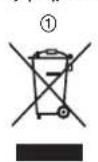
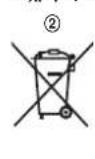
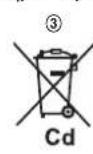
This symbol (①, ②, ③) on the product, accessories, and the user manual indicates that the product and its electronic accessories should not be disposed of with other household waste. Please dispose of them separately from other waste to promote recycling and resource recovery.
Please dispose of them at designated collection points for recycling of waste electrical and electronic equipment. For more information, contact your local authorities, your household waste disposal service, or the shop where you purchased the product.
By properly disposing of this product, you will help prevent potential negative consequences for the environment and human health, which could otherwise be caused by inappropriate waste handling. The recycling of materials will help to conserve natural resources.
For more detailed information about recycling of this product, please contact your local city office, your household waste disposal service, or the shop where you purchased the product.
The product and its electronic accessories should not be disposed of with other household waste. Please dispose of them separately from other waste to promote recycling and resource recovery.
For business users in the European Union
If you wish to discard electrical and electronic equipment, please contact your dealer or supplier for further information.
Information on Disposal in other countries outside the European Union This symbol (1,2,3) is only valid in the European Union. If you wish to discard this product, please contact your local authorities or dealer and ask for the correct method of disposal.
For disposal in other countries
This symbol (2) may be used in combination with a chemical symbol (3). In this case, it also complies with the requirement set by the Directive for the chemical concerned.
48

TGA651EX(ex).book Page 49 Tuesday, September 21, 2010 4:17 PM
Danish
READ BEFORE USE AND KEEP FOR FUTURE REFERENCE
This unit is an additional handset compatible with the following series of digital cordless Panasonic telephones: KX-TG6501/KX-TG6511/KX-TG6521/KX-TG6531/KX-TG6551/KX-TG6561
KX-TG6521/KX-TG6531/KX-TG6551/KX-TG6561
Press and hold [·] for about 5 seconds until the registration tone sounds.
Press the same button to stop if all registered handsets start ringing. Then repeat this step.
3 Handset:
Place the handset on the base unit.
- Continue the operation even if the handset display shows "Please wait for 1 minute".
Battery
Spanish
KX-TG6501/KX-TG6511
KX-TG6521/KX-TG6531/KX-TG6551/KX-TG6561

Italian
READ BEFORE USE AND KEEP
KX-TG6521/KX-TG6531/KX-TG6551/KX-TG6561
WARNING
Turkish
READ BEFORE USE AND KEEP FOR FUTURE REFERENCE
Registering the handset to the base unit
Make sure the handset is turned on. If it is not, press and hold the [ ] key for a few seconds to turn it on.
1 Handset:
Declaration of Conformity:
- Panasonic System Networks Co., Ltd. declares that this equipment is in compliance with the essential requirements and other relevant provisions of Radio & Telecommunications Terminal Equipment (R&TTE) Directive 1999/5/EC. Declarations of Conformity for the relevant Panasonic products described in this manual are available for download by visiting: http://www.doc.panasonic.de
Declaration of Conformity:
- Panasonic System Networks Co., Ltd. declares that this equipment is in compliance with the essential requirements and other relevant provisions of the Radio and Telecommunications Terminal Equipment (R&TTE) Directive 1999/5/EC. The declaration of conformity for the relevant Panasonic products described in this manual can be downloaded from: http://www.doc.panasonic.de
Declaration of Conformity
Panasonic
Panasonic System Networks Co., Ltd. 1-62, 4-chome, Minoohima, Hakata-Ku, Fukuoka 812-8531 Japan
Declaration of Conformity
Document No. PCTP-100079-02
Issuer's name & address:
Panasonic System Networks Co., Ltd.
Hakata-ku, Fukuoka, Japan
(Object of the declaration)
Product: Digital Enhanced Cordless Telephone
(Trade Name): Panasonic
(Model Nr.): Base unit: HLCG5511EJK, TGS6512FJK, TX.GT6513EJK, TGS6512EJK, TX.GT6522EJK, TGS6523EJK, TX.GT6524EJK, TX.GT6511EJK, TX.GT6522EJK, TX.GT6522EJK, TX.GT6523EJK, TX.GT6524EJK, TX.GT6524EJK, TX.GT6518EJK, TX.GT6519EJK, TX.GT6520EJK, TX.GT6521EJK, TX.GT6522EJK, TX.GT6523EJK, TX.GT6524EJK, TX.GT6517EJK, TX.GT6518EJK, TX.GT6519EJK, TX.GT6511EJK, TX.GT6512FJK, XK.TG6521FFK, XK.TG6521FFK, XK.TG6511FFK, XK.TG6512FFK, XK.TG6522FFK, XK.TG6511FFK, XK.TG6511NKL, KTXG6512NKL, XK.TG6523NKL, XK.TG6523NKL, XK.TG6511NKL, XK.TG6524NKL, XK.TG6524NKL, XK.TG6522AQR, KK.TG6512AQR, KK.TG6521AQR, KK.TG6511AQR, KK.TG6512AQR, KK.TG6511AQR, KK.TG6523AQR, KK.TG6523AQR, KK.TG6511AQR, KK.TG6524AQR, KK.TG6523AQR, KK.TG6511AQR, KK.TG6524AQR, KK.TG6512AQR, KK.TG6511AQR, KK.TG6523AQR, KK.TG6524AQR, KK.TG6511AQR, KK.TG6524AQR, KK.TG6512AQR, KK.TG6511AQR, KK.TG6523AQR, KK.TG6511AQR, KK.TG6524AQR, KK.TG6511AQR, KK.TG6524AQR, KK.TG6512AQR, KK.TG6511AQR, KK.TG6523AQR, KK.TG6511AQR, KK.TG6524AQR, KK.TG6511AQR, KK.TG6523AQR, KK.TG6511AQR, KK.TG6524AQR, KK.TG6511AQR, KK.TG6523AQR, KK.TG6511AQR, KK.TG6524AQR, KK.TG6511AQR, KK.TG6523AQR, KK.TG6511AQR, KK.TG6523AQR, KK.TG6511AQR, KK.TG6524AQR, KK.TG6511AQR, KK.TG6523AQR, KK.TG6511AQR, KK.TG6524AQR, KK.TG6511AQR, KK.TG6523AQR, KK.TG6511AQR, KK.TG6524AQR, KK.TG6511AQR, KK.TG652 Handset: KX-TGA851E, KX-TGA850E, KX-TGA851EX, KX-TGA850EX, KX-TGA851FX, KX-TGABSQFX AC Adaptor: POLV219E, POLV219CE Charger Unit: PNLC1010
(Country of Origin): China
The object of the declaration described above is in conformity with the requirements of the
following EU legislations and harmonized standards:
(Council Directive) (Council recommendation): 1999/519/EC (Harmonized Standards) EN 60950-1:2008-A11:2009, EN 301-406 V2.1.1, EN 301.489-1 V1.8.1, EN 302
(Council directive)
(Implementing Measure for EP Directive): Commission Regulation (EC) No 278/2009
The last two digits of the year in which the CE marking was affixed the first time, 10
Signed for and on behalf of

Printed Name: Hiroshi Matsuo
Title: Senior Technical Regulation Manager
Date of issue
June 3, 2010
Authorised Representative in EU: Panasonic Testing Centre, Panasonic Marketing Europe GmbH, Winsbergring 15, 22528 Hamburg, Germany
(Signature)
(Printed name) (1)
043012018
72


Panasonic
1-82, 4-chome, Minoshima, Hakata-ku, Fukuoka 812-8531 Japan
Declaration of Conformity
Declaration
Document No: PCTP-100079-02
(Company Name & Address)
Panasonic System Networks Co., Ltd.
Hakata-ku, Fukuoka, Japan
(Subject of Declaration)
(Product) Digital Enhanced Cordless Telephone
(Trade Name): Panasonic (Model No.) Base unit - KX-TG6511E, KX-TG6512E, KX-TG6513E, KX-TG6521E, KX-TG6522E, KX-TG6523E, KX-TG6524E, KX-TG6511G, KX-TG6512G, KX-TG6521G, KX-TG6522G, KX-TG6523G, KX-TG6524G, KX-TG6511SP, KX-TG6512SP, KX-TG6521SP, KX-TG6511JT, KX-TG6512JT, KX-TG6521JT, KX-TG6511NE, KX-TG6512NE, KX-TG6513NE, KX-TG6511FX, KX-TG6512FX, KX-TG6521FX, KX-TG6511FR, KX-TG6512FR, KX-TG6521FR, KX-TG6521FR, KX-TG6521FR, KX-TG6522FR, KX-TG6522FR, KX-TG6522FR, KX-TG6523FR, KX-TG6523FR, KX-TG6511TR, KX-TG6511PR, KX-TG6511PD, KX-TG6512PD, KX-TG6521PD, KX-TG6520NL, KX-TG6511NL, KX-TG6512NL, KX-TG6521NL, KX-TG6522NL, KX-TG6523NL, KX-TG6533NL, KX-TG6511AR, KX-TG6521AR, KX-TG6522AR, KX-TG6511HG, KX-TG6512HG, KX-TG6511GR, KX-TG6512GR, KX-TG6521GR, KX-TG6511BL, KX-TG6512BL, KX-TG6513BL, KX-TG6521BL, KX-TG6511SL, KX-TG6512TR, Mobile device - KX-TGA851E, KX-TGA850E, KX-TGA850EX, KX-TGA850EX, KX-TGA850FX, KX-TGA850FX AC adaptor - PQLV219E, PQLV218CE, Yellow Unisol - PNLC1010 (Origin): Qin
Sales department/Vertrieb/Organisation Commerciale/Klantenservice/Försäljning/Importör/Maahantuonti/Departamento Comercial/Τμήμα Πωλήσεων/Salgskontor/Departamento de Ventas/Ufficio Vendite/Satış Bölümü
Austria
Panasonic Austria
Laxenburgerstrasse 252, 1230 Vienna
www.panasonic.at
Information hotline number: 0810-10 18 00
Branch of Panasonic Nordic AB
Produktionsvej 26
DK-2600 Glostrup
http://www.panasonic.dk
Finland
Panasonic Finland
Branch of Panasonic Nordic AB
Sinimäentie 8 B
02630 Espoo
http://www.panasonic.fi
France
Panasonic France SAS
1-3 avenue François Mitterrand
93218 Saint-Denis La Plaine
Cedex France
INTERTECH5A
Intertech S.A.
Panafax: 210.9648.588
e-mail: info@intertech.gr
Northern Greece
K. Karamanli 11, 54638
THESSALONIKI
Call Center: 2310.245.840-3
Panafax: 2310.968.083
e-mail: intertech-th@intertech.gr
www.panasonic.gr
Italy
Panasonic Italia S.p.a
E-Care Repair Services
Fruitweg 34
2321 DH Leiden
Tel: 071-5723 439
Fax: 071-5323438
Homepage: www.panasonic.nl
E-mail: info-unit@e-care.nl
Customer service phone number:
073-6402802
Norway
Panasonic Norge
Branch of Panasonic Nordic AB
Karihaugsveien 89
N-1086 Oslo
http://www.panasonic.no
75

Portugal
Prosonic S.A.
Service Centre & Support
Littauerboden 1
CH-6014 Luzern
Support - Hotline
0900 809 809 (CHF 2.15/min.)
www.panasonic.ch
Switzerland
After-sales service:
John Lay Electronics AG
Service Centre & Support
Littauerboden 1
CH-6014 Lucerne
Support - Hotline
0900 809 809 (CHF 2.15/min.)
www.panasonic.ch
Switzerland
customer service:
John Lay Electronics AG
Service Centre & Support
Littauerboden 1
CH-6014 Lucerna
Support - Hotline
0900 809 809 (CHF 2.15/min.)
www.panasonic.ch
76

Sweden
Ellipsvagen 12, SE-141 75
Kungens Kurva, Stockholm
http://www.panasonic.se
■ Türkiye
Importer Company
Maslak Mah. Bilim Sokak
Sun Plaza Kat:16 Sisi Istanbul
Tel:02123679400
TGA651EX(ex).book Page 80 Tuesday, September 21, 2010 4:17 PM
C€0470
Manufacturer Firm/Herstellerfirma/Societe du fabricant/Fabrikant/ Tillverkare/Produsent/Valmistaja/Empresa fabricante/ Kaatokkaotikn etapia/Fremstillende virksomhed/Fabricante/ Azienda produtrice/Uretici Firma
Panasonic System Networks Co., Ltd. 1-62,4-chome, Minoshima,Hakata-ku,Fukuoka 812-8531,Japan
© Panasonic System Networks Co., Ltd. 2009
PNQX2503XA DC1209DC2090 (A)


- PANASONIC
- ENGLISH
- PLEASE READ BEFORE USE AND SAVE
- SUPPLIED ACCESSORIES
- NOTE
- CONNECTION (PAGE 2: 1)
- BATTERY INSTALLATION/BATTERY CHARGE (PAGE 2: 2)
- IMPORTANT
- PLACE THE HANDSET ON THE CHARGER FOR ABOUT 7 HOURS BEFORE INITIAL USE
- REGISTERING THE HANDSET TO THE BASE UNIT
- HANDSET
- BASE UNIT
- FOR YOUR SAFETY
- WARNING
- POWER CONNECTION
- INSTALLATION
- CAUTION
- INSTALLATION AND LOCATION
- BATTERY
- OTHER INFORMATION
- ROUTINE CARE
- INFORMATION FOR USERS ON COLLECTION AND DISPOSAL OF OLD EQUIPMENT AND USED BATTERIES
- GERMAN
- DISPLAY LANGUAGE
- FRANÇOIS
- PLEASE READ THIS DOCUMENT BEFORE USE AND KEEP IT
- KX-TG6521/KX-TG6531/KX-TG6551/KX-TG
- ATTENTION
- DUTCH
- READ THE INSTRUCTION MANUAL AND KEEP IT
- INSTALLING BATTERIES/CHARGING THE BATTERY (PAGE 2: ②)
- SWEDISH
- READ THE INFORMATION BEFORE USING THE UNITS AND SAVE IT FOR FUTURE USE
- NORWEGIAN
- READ BEFORE USE AND KEEP FOR FUTURE REFERENCE
- INCLUDED ACCESSORIES
- INSTALLING/CHARGING THE BATTERY (PAGE 2: ②)
- SUOMI
- READ THE INSTRUCTIONS BEFORE USE AND SAVE THEM
- PORTUGUÊS
- GREEK
- DIABASE TO PARON FYLLADIO PRIN TO CHRISIMOPOIISETE
- CONNECTION (PAGE 2:1)
- BATTERY INSTALLATION/CHARGING (PAGE 2:2)
- CHARGE THE HANDSET FOR 7 HOURS BEFORE USING IT FOR THE FIRST TIME
- CHARGING THE HANDSET IN THE BASE UNIT
- TNV AΣΑΛΕΙΑΣ
- IPOEIAONOIH2H
- TAKRIIK POVRIDA
- FOR BUSINESS USERS IN THE EUROPEAN UNION
- FOR DISPOSAL IN OTHER COUNTRIES
- DANISH
- SPANISH
- ITALIAN
- READ BEFORE USE AND KEEP
- TURKISH
- DECLARATION OF CONFORMITY
- DECLARATION
- DOCUMENT NO: PCTP
- SALES DEPARTMENT/VERTRIEB/ORGANISATION COMMERCIALE/KLANTENSERVICE/FÖRSÄLJNING/IMPORTÖR/MAAHANTUONTI/DEPARTAMENTO COMERCIAL/ΤΜΉΜΑ ΠΩΛΉΣΕΩΝ/SALGSKONTOR/DEPARTAMENTO DE VENTAS/UFFICIO VENDITE/SATIŞ BÖLÜMÜ
- AUSTRIA
- FINLAND
- FRANCE
- INTERTECH5A
- PORTUGAL
- SWITZERLAND
- SWEDEN
- TÜRKIYE
- C€
Brand : PANASONIC
Model : KXTGA651EXT
Category : Cordless phone