FFJ1650X - Fridge FAGOR - Free user manual and instructions
Find the device manual for free FFJ1650X FAGOR in PDF.


User questions about FFJ1650X FAGOR
0 question about this device. Answer the ones you know or ask your own.
Ask a new question about this device
Download the instructions for your Fridge in PDF format for free! Find your manual FFJ1650X - FAGOR and take your electronic device back in hand. On this page are published all the documents necessary for the use of your device. FFJ1650X by FAGOR.
USER MANUAL FFJ1650X FAGOR
1 Safety and the environment
- Safety instructions 23
- Respecting the environment and saving energy 24
BIOCARE - anti-bacterial walls 24
2 Description of your appliance 27
3 How to carry out your initial installation
- Reversing the direction the door opens 26
- Installing your appliance 28
Installation standards 29 - Electrical connection 30
4 How to use your refrigerator
- Starting and adjusting the appliance 31
- Mixed or regulated cold (depending on the model) 34
- Preparing food for the refrigerator 35
Arranging food in your refrigerator 35
Automatic defrosting 36
5 Ongoing maintenance of your appliance
- Cleaning your appliance 37
· Humidity filter 38 - Changing the light bulb 38
6 Noise, inconveniences and minor breakdowns
Normal operating noises 39
Inconveniences or minor breakdowns 39
This guide to installing and using your fridge is applicable to several models. There may be slight differences between your appliance's details and features and those described here.
As you read through the guide, you will come across the following symbols, to warn you of:
Safety precautions that must be observed
Danger of a gas bursting into flame
An electrical danger
Important information and advice
This appliance is intended for domestic use only. It has been designed for preserving food.
The following instructions are for your own safety and should be observed without fail. We can neither be held responsible, nor uphold the guarantee in case of failure to observe these recommendations, which may lead to material damage or physical injury.
- This appliance is not intended for use by persons (including children) with reduced physical, sensory or mental capabilities, or lack of experience and knowledge, unless they have been given supervision or instruction concerning use of the appliance by a person responsible for their safety.
- Children should be supervised to ensure that they do not play with the appliance.
- Your appliance must be installed, fixed if necessary and used in compliance with the instructions in this operating and installation instructions manual in order to avoid any damage and/or danger due to any lack of stability or faulty installation.
If the appliance has been delivered to your home in a horizontal position, stand it upright and then wait 2 hours before plugging it in. A small amount of oil may have flowed into the refrigeration circuit, and you must allow time for this to flow back towards the motor before connecting the appliance. Failure to do so may damage the appliance.
- If you appliance is fitted with castors, please remember that they are only designed to assist in small movements. Do not use them for longer journeys.
-
Carry out an initial cleaning operation (see the section on "Installing your appliance") before connecting your appliance to the electrical supply. Disconnect your appliance prior to performing any maintenance operation. Grasp the plug directly, instead of pulling on the power cable.
-
Do not use any other method than those we recommend in this manual for speeding up defrosting.
- Do not use electrical equipment inside compartments unless the manufacturer recommends otherwise.
- Do not let children play with the appliance and keep your pets well away from it.
- Worn out appliances must be rendered unusable. Unplug and cut the electric cable flush with the appliance. Render the door catch unusable or, better still, remove the door, so as to ensure that no child or animal risks being shut inside whilst playing.
- If a problem arises that you are unable to resolve using the advice given (see the "Noise, inconveniences, minor breakdowns" section), please contact an official after-sales service or a qualified professional.
Your appliance's refrigeration circuit is filled with isobutane refrigerant (R600a), a natural, non-polluting gas that is, however, inflammable. Ensure that none of the components in your appliance's refrigeration circuit have been damaged during transport or installation. If you detect any damage, keep your appliance away from flames or any type of source of heat or combustion and ventilate it location.
Respecting the environment and saving energy EN
To reduce your appliance's electrical consumption:
- Install it in a suitable place (see "Installation of your appliance" section).
- Leave the door open as little as possible. Do not place food that is still hot in your refrigerator, particularly in the case of soups or dishes that release a lot of steam.
- Clean its condenser periodically (see the "Ongoing maintenance of your appliance" section).
- Periodically check the door seal and make sure that the door close firmly. If they do not, lease contact our After-sales service.
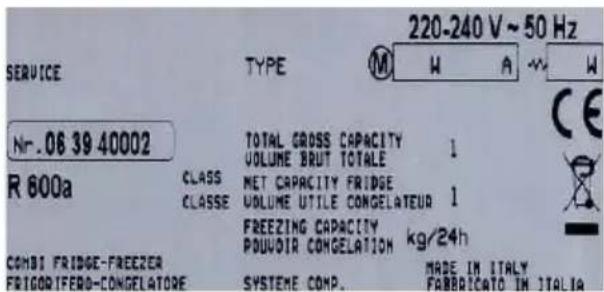
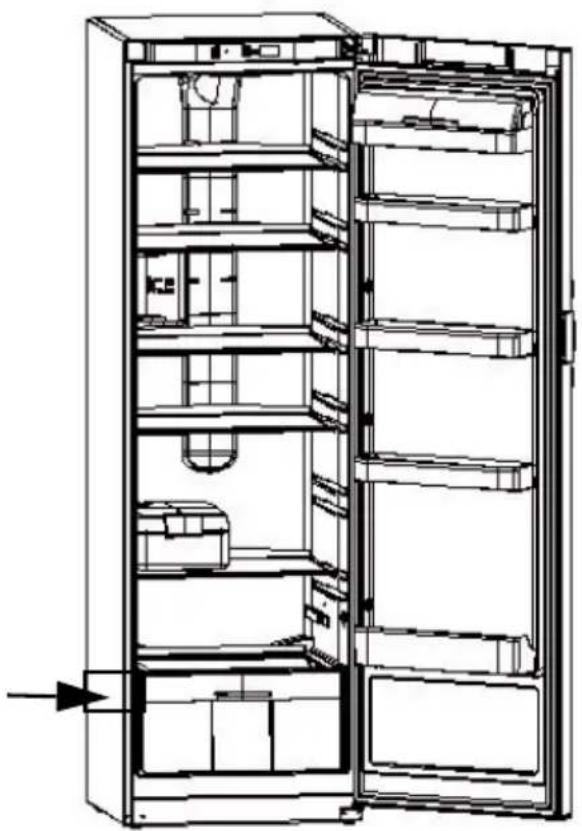
In compliance with the latest legislation concerning environmental protection, your appliance does not contain any CFCs. Instead it uses a gas called R600a. The exact type of refrigerant used in your appliance is also clearly indicated on the identification plate inside your appliance's refrigerator section, low down on the left-hand wall.
R600a is a non-polluting gas that does not harm the ozone layer and whose contribution to the greenhouse effect is virtually zero.
ENVIRONMENTAL PROTECTION
This appliance's packaging material is recyclable. Help recycle it and protect the environment by dropping it off in the municipal receptacles provided for this purpose.
Your appliance also contains a great amount of recyclable material. It is marked with this label to indicate that in countries that are a members of the European Union the used appliances should not be mixed with other waste. This way, the appliance recycling organised by your manufacturer will be done under the best possible conditions, in compliance with European Directive 2002/96/EC on Waste Electrical and Electronic
Equipment. Contact your town hall or your retailer for the used appliance collection points closest to your home.
We thank you doing your part to protect the environment.
BIOCARE - anti-bacterial walls
This is a specific coating on the lining of your refrigerator consisting of silver ions, which prevent bacteria from developing.
The anti-bacterial coating does not require any particular treatment and remains active throughout your appliance's operating life.
However, you must clean your appliance regularly. See the section on "Cleaning your appliance".
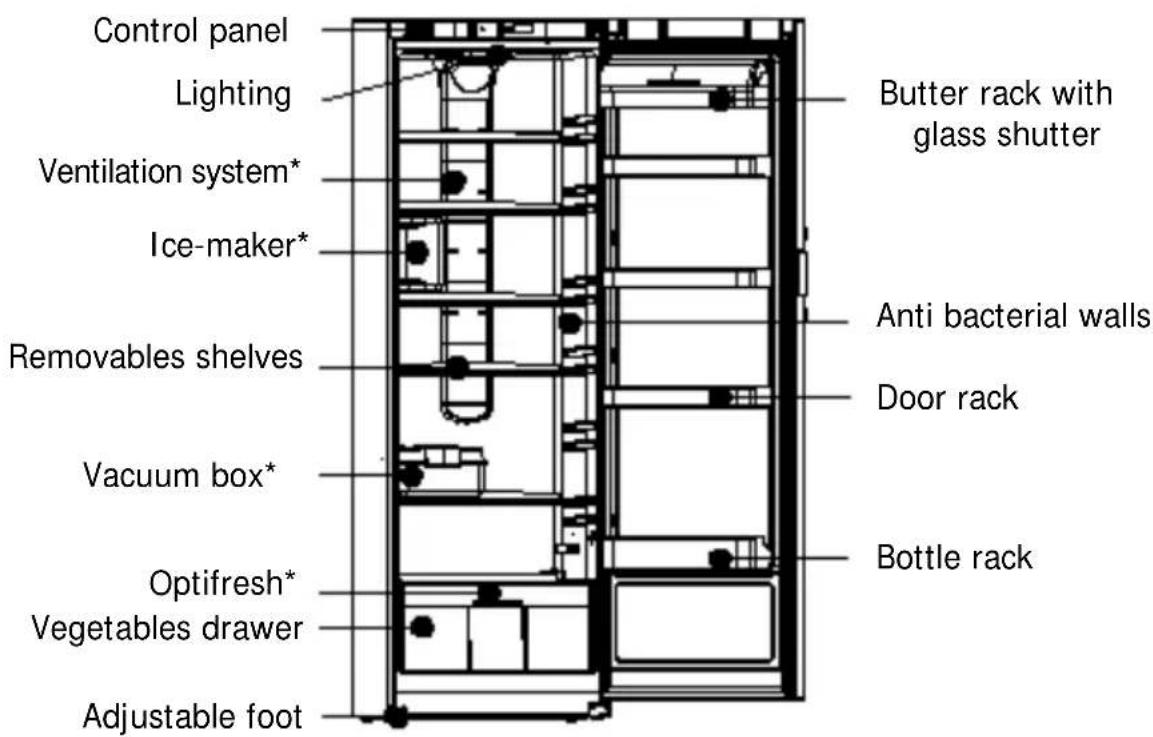
* depending on the model
This guide to installing and using your fridge is applicable to several models. There may be slight differences between your appliance's details and features and those described here.
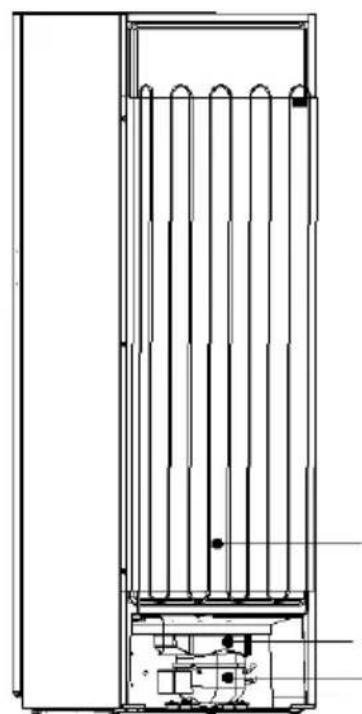
Condenser
Water collection tank Motor
Reversing the direction the door opens
EN
The doors normally open to the left (hinges on the right); if you wish to open the door to the right, you can modify the direction in which it opens by following the instructions below. To ensure correct installation, please scrupulously follow the directions and the sequence of operations below:
- Gently lay the appliance on its back.
- Unscrew the bottom screw (A) and remove it from the door. (drawing R1).
- Remove the hinge pin (keep the plastic spacers inserted on the pin).
- Screw the pin in the left hole (B) of the hinge and insert the plastic spacers.
- Unscrew the screw and remove the door rotation stop plate (C), turn it and insert it in the left slot on the bottom of the door, making the shorter part protrude. Block the plate with the screw (D) (drawing R2).
- Open the door at a 45 degree angle (E) and, gently pushing it toward the bottom (F), remove the top hinge pin (drawing R3).
- Remove the top pin on the left (H) (drawing R4).
- Remove the plate from the upper right hand part of the door (I) and insert it in the slot on the left.
- Insert the pin in the hole in the niche on the right on the top of the door.
- Remove the plate covering the top hinge and unscrew the hinge (M) (drawing R5).
- Remove the plate covering the left part of the top, rotate it and insert it in the slot where you removed the hinge (N).
- Position and fasten the hinge in the upper left part of the appliance and insert the cover plate.
- Insert the door in the left hinge, holding it open at a 45 degree angle and close the door.
- Insert the bottom hinge in the door using the spacers and fasten it with the screws.
- Stand up the appliance.

Wait two hours before restarting your appliance.

Reversing the direction the door opens
EN
Handle reversibility
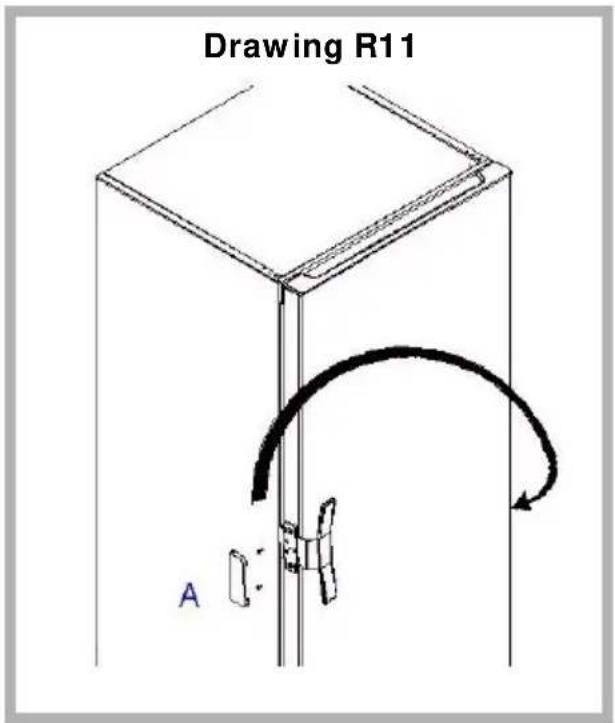
- If present, remove the plastic cover (A) (drawing R11).
- Unscrew the handle from the left side and reposition it on the right.
- Using the handle as reference, drill fastening holes (2.5 mm in diameter).
- Attach the handle using self-tapping screws.
- If the door already has holes on both sides:
- Before repositioning it on the right, remove the hole plugs.
- Attach the handle and insert the hole plugs on the left.

Your appliance must be installed in compliance with the instructions given in this "Operating and installation instructions manual" in order to keep your food under optimum conditions and with optimal energy consumption.
- The appliance should be installed in a dry, well-ventilated room.
- Avoid balconies, verandas, and patios: the excessive heat in summer and the cold in winter could prevent your appliance from functioning properly, or may even damage it.
- Do not place your appliance near a heat source such as an oven or radiator.
- Your appliance has been designed for optimum functioning at a certain ambient temperature; it is designed for a particular "climate class". This climate class is clearly indicated on the identification plate situated on the inside of your appliance, low down on the left wall. Outside of this temperature range, the performance of your appliance may be reduced.
| Climate Class Ambient temperature |
| N +16°C to +32°C |
| N-ST +16°C to +38°C |
| N-T +16°C to +43°C |
| SN +10°C to +32°C |
| SN-ST +10°C to +38°C |
| SN-T +10°C to +43°C |
| ST +18°C to +38°C |
| T +18°C to +43°C |
- Maintain a minimum distance between your appliance and the other units: 3 to 5cm at the sides, or 10cm if your appliance is close to a wall, and 10cm above to ensure good circulation of air all around the appliance.
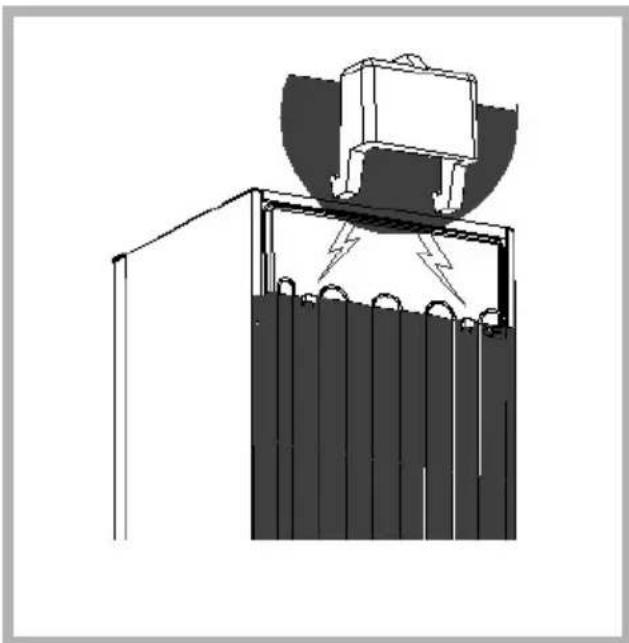
- Position the appliance at a suitable distance from the wall using the spacers provided in the accessories packet. The spacers should be mounted on the back of the appliance (see Drawing).

Once you have installed your appliance, adjust its feet so that it is tilting backwards slightly: this helps the door to close correctly.

Before placing any food in your appliance, clean it inside and out with a bicarbonate of soda solution (1 dessertspoon of bicarbonate to 4 litres of water). Do not use alcohol, scouring powder or detergents, which could damage the surfaces. See the section on "Cleaning your Appliance".
Warning!
- For appliances approximately 180cm in height:
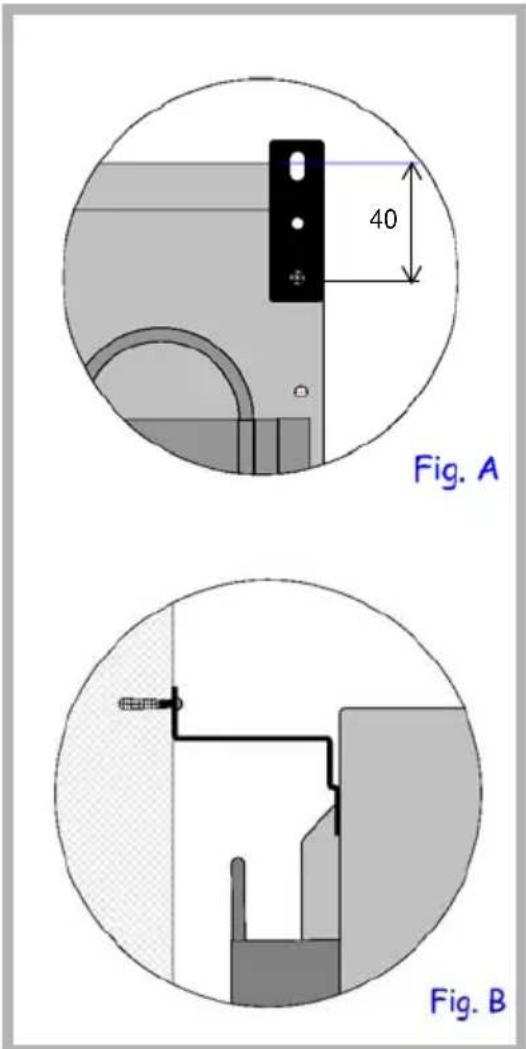
to ensure your appliance's stability and prevent it from possibly toppling over, you must use the anti-toppling clamps supplied with the accessories. Figures A and B show how to install these clamps: they must be fixed in the corners on the back of the appliance using the screws supplied with the accessories and also fixed to the wall, behind the refrigerator using a wall fixing specially selected by the user to suit the type of wall (e.g. an expanding plug).
For your own safety, you must comply with the instructions given below.
The electrical installation must comply with Standard NF C * 15-100, in particular concerning the Earth.
Three-core flex 3 × 2.5 ~mm^2 , 230V single-phase connected to:
- A 20A single-phase 230V - 50Hz supply
- An ELCB and an individual fuse (10 or 16A depending on the model)
We cannot be held responsible for any incident caused by faulty electrical installation.
Recommendations for the electrical installation of your appliance:
- Do not use extension leads, adaptors, or socket strips.
- Always make sure your circuit is earthed.
- The socket must always remain accessible, yet be out of the reach of children.
If you have any doubts, contact your installer.
Your appliance is compliant with European Directives CEE/ 73/23 (low voltage directive), CEE/ 89/336 (electromagnetic compatibility) and CEE/ 96/57 (energy efficiency) as well as their modifications.
If the appliance has been delivered to your home in a horizontal position, stand it upright and then wait 2 hours before plugging it in. A small amount of oil may have flowed into the refrigeration circuit, and you must allow time for this to flow back towards the motor before connecting the appliance. Failure to do so may damage the appliance.
Carry out an initial cleaning operation (see the section on "Installing your appliance") before connecting your appliance to the electrical supply. Disconnect your appliance prior to performing any maintenance operation. Grasp the plug directly, instead of pulling on the power cable.
"In case of damage, the supply cord must be replaced by the technical assistance service or a person with a similar title, in order to prevent any risk."
Operation of the electronic system
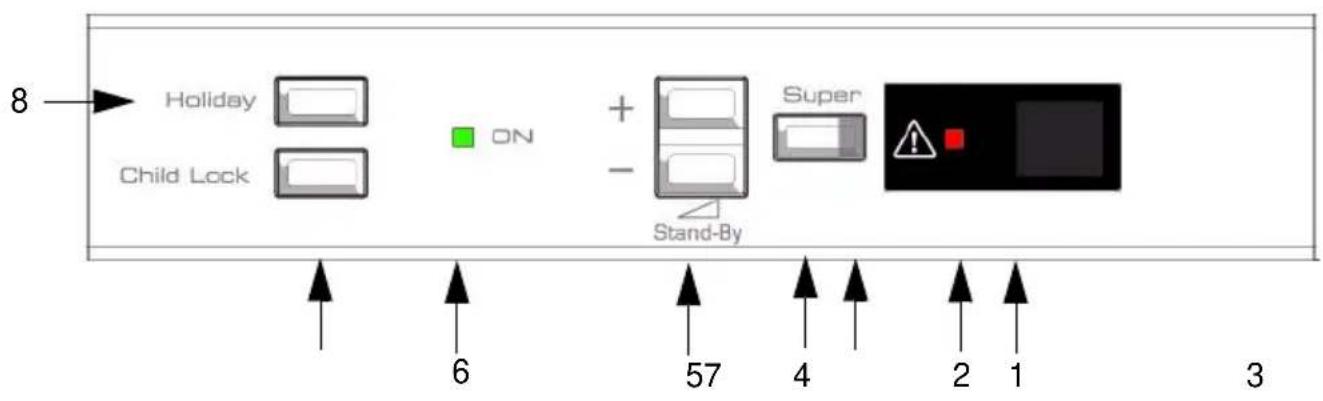
The control panel on the front of your appliance at the top comprises:
- 1) LCD screen display: temperature indication
- 2) red indicator light: temperature and open door alarm
- 3) super orange LED: indicates that the fast freeze function is working
- 4) super button: press to switch on/switch off the Super freeze function
- 5) buttons: + / -
- 6) green led: ON
- 7) child lock button: safety feature for children
-8) button holidays
Setting the temperature
When you put your appliance into operation, set the refrigerator temperature to a moderate setting of 5^ .
Switching on/ switching off the appliance
The appliance can be switched on or off using the + / - buttons, which also serve to adjust the temperature.
Starting and adjusting the appliance
EN
Meaning of the symbols and functions that may appear on your screen
| 88 | Setting the temperature • Setting to the degree close to 1 to 9°C. Use the "+" buttons to adjust the tempera- rature (5). |
| ON light • The ON light (7) turns on when the appliance is switched on. | |
| 88 | Fast Cooling function • This feature temporarily lowers the refrigerator temperature to more quickly reach the ideal food preservation temperature (after the door was left open for a long period of time or due to more products). • If your appliance has an adjustable temperature or is a ventilated model (see § ventilated refrigerator), the ventilator will start when you switch on the fast cooling function. • To switch on the fast cooling function, press the Super button (4). The orange light will turn on and SC will appear on the digital display. To switch off the function, press and hold the Super button for at least 2 seconds (4). |
| 88 | Holidays function • This enables you to leave the refrigerator running while you are away, keeping the temperature at around 14°C to avoid bad smells developing and reducing your electricity consumption. • The symbol Ho appears instead of the refrigerator temperature when the function is activated. • To switch on the function, press the Holiday button (8). The letters Ho will appear on the digital display. • To switch off the Holiday function, press the Holiday button (8) and the letters Ho will disappear from the display. |
| 88 | "Child Lock" function • This feature prevents changes inadvertently made to appliance settings. • When this function is activated, the symbol appears instead of the refrigerator temperature. • To switch on the function, press and hold down the "Child Lock" button (7) for at least 3 seconds. The letters CL will appear on the digital display. • To switch off the function, press and hold down the "Child Lock" button (7) for at least 3 seconds and the letters CL will disappear from the display. |
WARNING
| A | Open door alarm ·An audible beep will let you know that your refrigerator door has been open for at least 60 seconds. ·At the same time, the warning light will switch on. ·To make the beep stop, press any button (+/-) or close the door. The light will remain on until the door is closed. |
| B | ·If this signal appears instead of the temperature, it means that the temperature sensor are probably defective. ·A safety procedure starts automatically to ensure that the appliance can operate but the Technical Assistance Department must be called. |
| B | ·If this letter appears in place of the temperature, it means that there is a problem with the electricity supply. An automatic testing procedure is initiated for 8 minutes and then normal operation resumes. |
ATTENTION

Your refrigerator's internal temperature is strictly dependent on the ambient temperature, how frequently the appliance's door are opened and the amount and the temperature of the food you have placed in the refrigerator. You must therefore regularly check the temperature indicator on your refrigerator and adjust the temperature setting if necessary.

The temperatures that appear on the screen correspond to the requested temperatures and not the actual temperatures.
This guide to installing and using your fridge-freezer is applicable to several models. Your appliance is equipped with one or other of these functions. You can check very quickly by comparing your refrigerator to the illustrations on this page.
Your appliance is equipped with a cold air ventilation system:
- Mixed cold (A): the fan mixes the air providing greater temperature homogeneity and avoiding condensation forming on the glass shelves.
- Regulated cold (B): a distribution column directs the air to every level, providing a very homogeneous temperature and avoiding any condensation forming on the shelves.
Apart from these everyday advantages, we recommend that you use the fan:
- When the climatic conditions are extreme (e.g. a heat wave).
- If you have just placed a large amount of food in your appliance's.
To start the fan:
- Appliance without electronics: press the ON button (Drawing C)
- Appliance with electronics: this function is initiated by electronic system on the control panel (See the symbols table in the section "Switching on and adjusting the appliance").
The fan does not operate continuously. When it starts up depends on the refrigerator's internal temperature. It is therefore quite normal for the fan not to operate sometimes when the Start button has been correctly pressed.
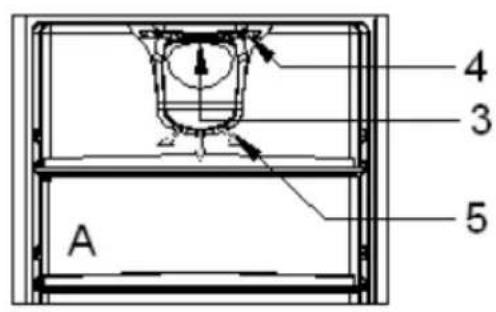
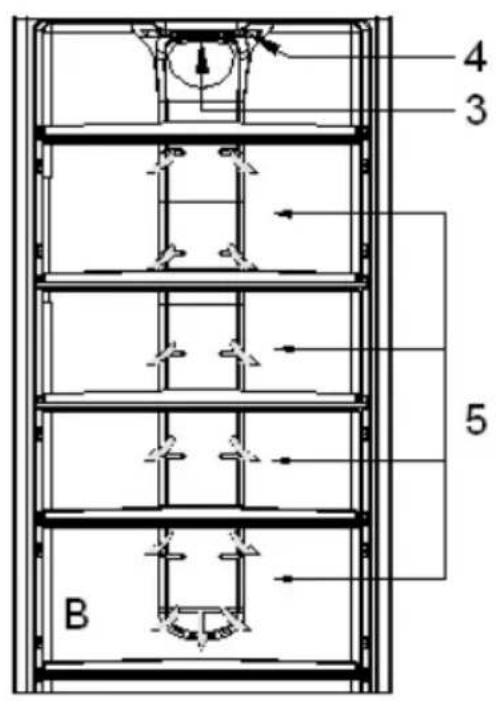
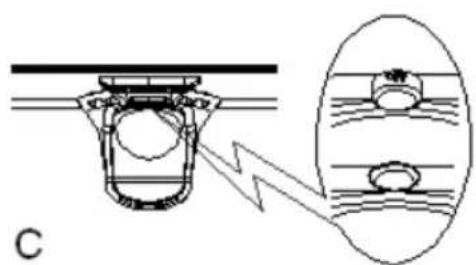
A. Model with mixed cold
B. Model with regulated cold
C. Detail of the Start/Stop button
3. Start/Stop button
4. Air suction
5. Air distribution
Preparing food for the refrigerator
EN
Before placing food in your appliance:
Carefully wrap fresh foods: they will then keep their flavour, colour, humidity content and freshness. You also avoid the taste of some foods contaminating the taste of others. Only vegetables, fruit and salad vegetables can be stored in the vegetable compartment without being packed.
Let hot dishes and drinks cool down outside the appliance.
Remove the cardboard packs from around yoghurt pots.
Check the consume-by dates on the products you have bought. You should not exceed these.
Arranging food in your refrigerator

The temperature inside your refrigerator is not uniform. Some areas are colder than others and you must store your food in the appropriate areas according to their type to ensure that they can be kept safely.
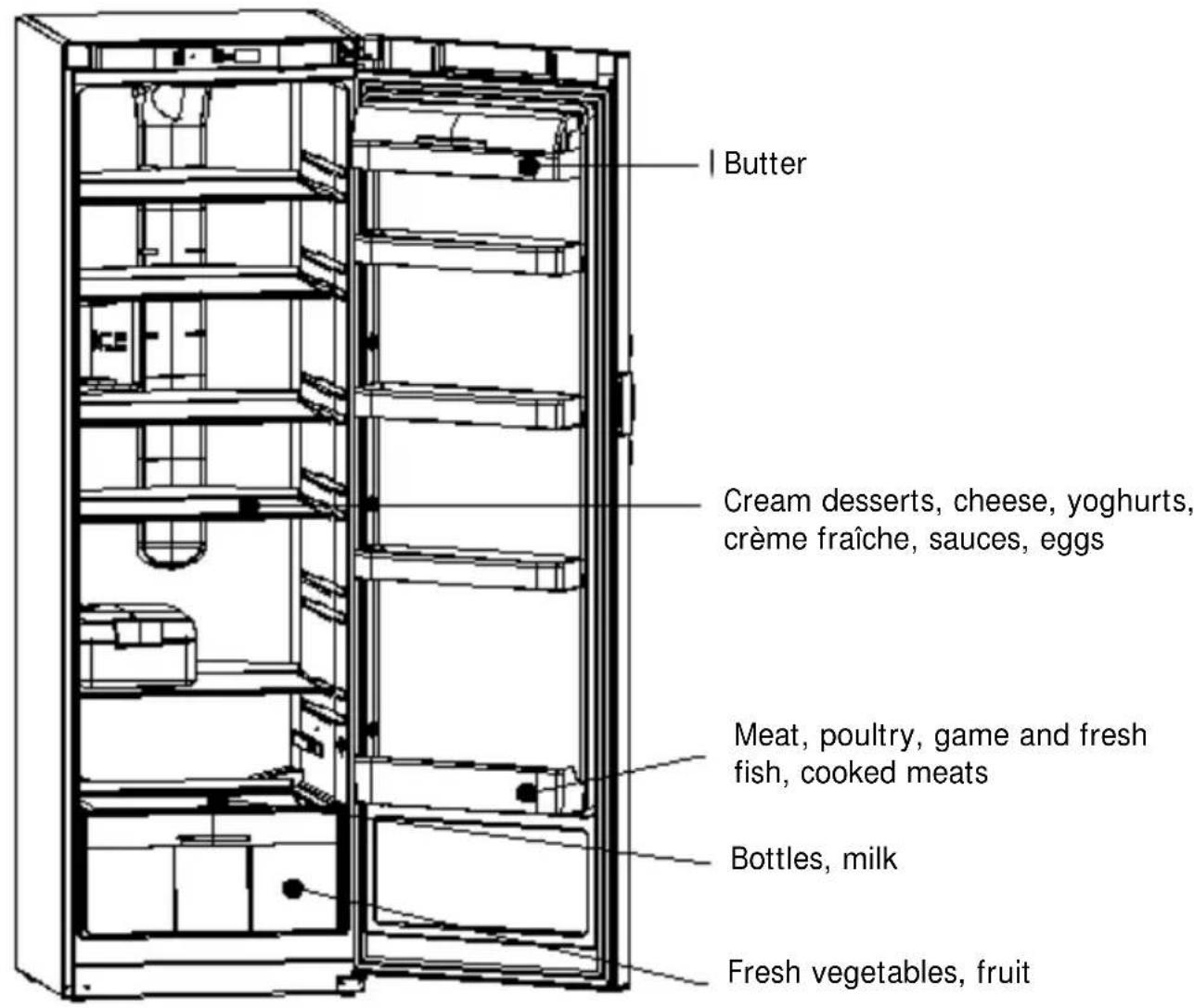
Arranging food in your refrigerator
EN
Leave a space between the food items to allow the air to circulate freely and avoid different products contaminating each other.
Do not put packages and food in contact with the wall at the back of the appliance: this is a particularly cold and damp area of the appliance and water droplets and frost condense there as part of your refrigerator's normal operation.
Automatic defrosting
The refrigerator section of your appliance defrosts fully automatically. The water created by defrosting flows to a collection tank situated over the motor. The heat the motor releases evaporates the contents of this tank.
It is quite normal for droplets of water or frost to appear on the wall at the back of your refrigerator. This is a particularly cold and damp area in your appliance and water droplets and frost condense out as part of your appliance's normal operation. This frost is removed regularly during your refrigerator's automatic defrosting phases.
Ongoing maintenance of your appliance
EN

Disconnect your appliance prior to performing any maintenance operation. Grasp the plug directly, instead of pulling on the power cable.
Cleaning your appliance
We recommend that you clean and disinfect your appliance regularly for improved hygiene and to keep your food completely safe.
Remove all the food from the appliance. Place it in isothermic bags or wrap it in newspaper and store it in a cool place.
Clean your appliance inside and out with a bicarbonate of soda solution (1 dessertspoon of bicarbonate to 4 litres of water). Do not use alcohol, scouring powder or detergents, which could damage the surfaces.

Do not use a high-pressure steam cleaner. The very hot steam could damage the surfaces and the electrical circuits; you would expose yourself to a risk of electrocution.
Rinse with water, dry with a cloth.
Periodically check that the drain hole for the defrosting water is not blocked and clean it with a stick as shown in the Drawing.
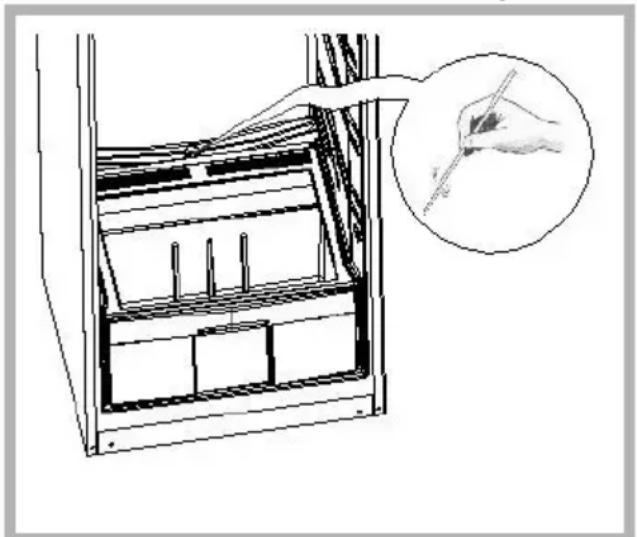
Don't forget to clean the condenser from time to time: this is at the back of the appliance (see the section on "Description of your appliance"). Use a dry paintbrush to do this or, better yet, your vacuum cleaner.
Reconnect your appliance, and adjust the refrigerator's thermostat if necessary, as shown in the section on.
Wait 3 or 4 hours before placing the food back in your appliance.
Ongoing maintenance of your appliance
EN
Humidity filter
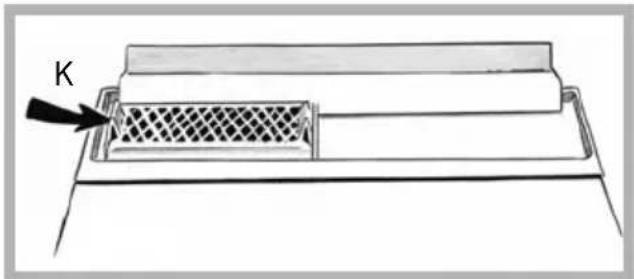
Under the vegetable tray's glass shelf, there is a filter, which controls the level of humidity, keeping it at the optimum level for preserving such foodstuffs.
To clean this filter: remove the top of the compartment, remove the lid and then remove the "K" filter and wash it under running water.
Changing the light bulb
Disconnect your appliance
-
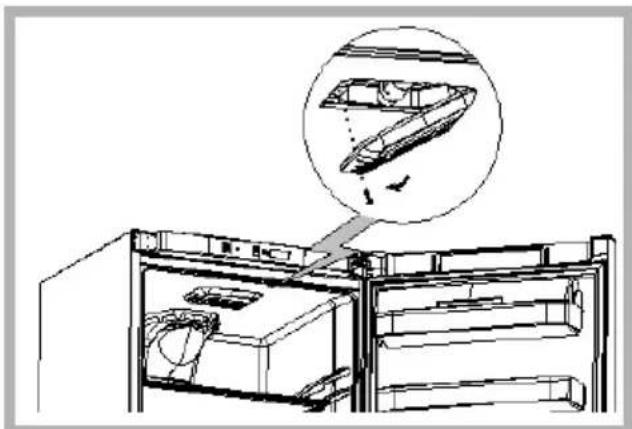
Unscrew the screw holding the interior light in place
-
Remove the interior light and replace the bulb with another of the same type (15 WATTS max.). Refit the interior light and screw it in place.
Normal operating noises
So that the selected temperature remains constant, your appliance regularly switches off its motor. The resultant noises are quite normal operating noises. They reduce automatically as soon as your refrigerator reaches the desired temperature. These noises are as follows:
| NOISE CAUSE | |
| Buzzing | Coming from the motor. This buzzing may briefly be louder when the motor starts. |
| Gargling or slight buzzing | Coming from circulation of the refrigerant in your refrigerator's pipes. |
| Clicks | These can always be heard when the thermostat turns the motor on or off. |
| Slight background noise | If your appliance is fitted with a fan (depending on the model), the air circulating inside your appliance makes a slight background noise. |
Inconveniences or minor breakdowns
Certain problems may appear when you are using your appliance. Before calling the after-sales service, use the guide below to see if you can resolve the problem yourself:
| PROBLEM ADVICE | |
| Unusual noises | - check the adjustment of the feet of your appliance and its stability. - check that it is not touching a wall. - check that all the movable parts(trays,racks,etc.)are securely in place. - check that the bottles or containers you havepla appliance are not touching each other. |
| The refrigerator does not get cold enough | - check that the thermostat is correctly set as indicated in the section on "Adjusting your refrigerator's temperature". - if you have put a large amount of food in your refrigerator at one time,ensure that you readjust the thermostat as shown in the section on "Adjusting your refrigerator's temperature". - be careful not to open your appliance's door too often,and not to leave it open. |
| Your appliance does not get cold at all | - check that the thermostat is not in the (0) position. - check that your appliance is connected to the electrical supply. - check that the circuit-breaker for your house has not cut out and that the fuse has not blown or been unscrewed. |
| Frost forms inside your appliance | - be careful not to open your appliance's door too often, and not to leave it open. |
| The external walls are warm | - this is quite normal. It stops condensation forming on the outside of your appliance. |
| Drops of water appear on your appliance's external wall | - When your home's heating is not on (for example in spring and autumn) and the ambient air is humid,some condensation may form on your appliance's outside walls. This is not dangerous at all and your appliance continues to operate quite correctly. |
| Droplets of water or ice forms on the appliance's rear wall | - this is quite normal. This is a particularly cold and damp area of the appliance and droplets of water and frost can form here when your appliance is operating normally. This frost is regularly eliminated during your refrigerators automatic defrosting cycles. |
| Droplets stagnate at the back of the appliance | - check that the drain hole is not blocked. If it is, release it with a stick or a metal wire as shown in the section in "Ongoing maintenance of your appliance". |
| The door is difficult to open | - it is normal for the door to offer some resistance to being opened,particularly when you have just shut it: a slight underpressure forms in your appliance to ensure the door seals perfectly. All you have to do is wait a few seconds before re-opening. |
| The light inside the refrigerator is out | - check that the thermostat is not in the (0) position. - check that your appliance is connected to the electrical supply. - check that the circuit-breaker for your house has not cut out and that the fuse has not blown or been unscrewed. - check that the bulb has not burnt out, and refer to the section "changing the light bulb". |
After sales service
EN
Any maintenance on your equipment should be undertaken by:
-
either your dealer,
-
or another qualified mechanic who is an authorized agent for the brand appliances.
When making an appointment, state the full reference of your equipment (model, type and serial number). This information appears on the manufacturer's nameplate attached to your equipment.