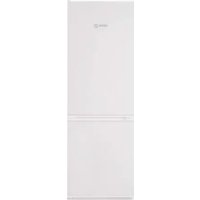
FCT682 - Refrigerator FAGOR - Free user manual and instructions
Find the device manual for free FCT682 FAGOR in PDF.



| Product type | Combined refrigerator-freezer |
| Brand | Fagor |
| Model | FCT682 |
| Dimensions (H x W x D) | 178 x 60 x 65 cm (estimated) |
| Weight | Approximately 70 kg (estimated) |
| Power supply | 220-240 V, 50 Hz, grounded plug |
| Refrigerant | R600A (environmentally friendly) |
| Refrigerator capacity | Approximately 250 L (estimated) |
| Freezer capacity | Approximately 100 L (estimated) |
| Climate class | N-ST (temperate to subtropical) |
| Recommended refrigerator temperature | 4°C |
| Recommended freezer temperature | -18°C (freezing at -24°C recommended) |
| Main functions | Quick cooling, Holiday, ECO, Quick Cooling, Super Cool |
| Defrost type | Automatic (No Frost) – to be confirmed on the model |
| Interior lighting | E14 bulb, 220-240V, 15/25W |
| Active carbon filter | Integrated, lifespan 6 months |
| S.P.A. accessory (humidity) | Optional, maintains humidity in the vegetable drawer |
| Number of doors | 2 (refrigerator and freezer) |
| Door reversibility | Yes, possibility to change the opening direction |
| Noise level | Approximately 40 dB (estimated) |
| Energy consumption | Energy class A+ to A++ (estimated) |
| Maintenance and cleaning | Interior cleaning with water and baking soda; rear grille to be vacuumed once a year |
| Safety | Open door alarm, freezer temperature alarm, child lock on some models |
| Spare parts and repairability | Bulb, carbon filter, hinges; repair by qualified after-sales service |
Frequently Asked Questions - FCT682 FAGOR
User questions about FCT682 FAGOR
0 question about this device. Answer the ones you know or ask your own.
Ask a new question about this device
Download the instructions for your Refrigerator in PDF format for free! Find your manual FCT682 - FAGOR and take your electronic device back in hand. On this page are published all the documents necessary for the use of your device. FCT682 by FAGOR.
USER MANUAL FCT682 FAGOR
Very important: Read this manual carefully before using your refrigerator.
This manual is designed with texts corresponding to drawings.

Identification

Identify the model of your refrigerator ("a", "b", "c", "d", "e", "f") by comparing the control panel with the illustrations.
1
Installation
1.1 Unpacking. Remove all protective elements.
1.2 Placement. Place the refrigerator away from heat sources and protect it from direct sunlight in order to conserve energy.
Do not install the refrigerator in the open air or where it is exposed to rain.
Air should be able to circulate behind the refrigerator. Leave 25mm between the rear of the refrigerator and the wall. Do not enclose the space between the refrigerator and the floor or ceiling with any object.
Level the refrigerator to prevent vibration and noise. Remember that if the refrigerator is situated next to a wall or cupboard, it could make some noise.
In addition, make sure that the trays are correctly placed and position the containers with a space between them to prevent vibration.
1.3 Connecting to power. Let the refrigerator sit in a upright position for at least 2 hours before connecting it. Check the information on the specifi cation plate (220-240V with ground wire) (1.3.1, 1.3.2).
Do not use adapters or extension leads.
Prevent the cord from coming in contact with the motor or getting trapped beneath it.
1.4 Changing the side that the door opens from. Disconnect the refrigerator from the power outlet and empty the inside of the door.
Remove the screws (1.4.1) and take out the top
hinge and the rotation bushing with the aid of a screwdriver (1.4.2).
Disconnect by pressing the connector tab. (1.4.3). Remove the refrigerator door (1.4.4). Remove the controls with a screwdriver, prying it away using the grooves placed for that purpose (1.4.5).
Make a notch for the cable on the opposite side, as marked on the casing (1.4.6). Remount the control panel passing the cable through the notch you made (1.4.7)
Remove the screw cover from the centre hinge, loosen the screws and remove the hinge (1.4.8). Move the freezer door up (1.4.9).
Loosen the screws of the lower hinge and remove it. Change the position of the hinge axis and place it on the opposite side.
Place the lower freezer handle on the refrigerator door and the lower refrigerator handle on the freezer door, rotated 180^ . Place the vertical handles on the opposite side rotating them 180^ (1.4.11).
Rotate the self-closures and place the one from the refrigerator on the freezer and vice versa (1.4.12).
Position the freezer door (1.4.13) and attach the central hinge (1.4.14). Position the refrigerator door (1.4.15).
Place the closing cap in the space for the top hinge on the opposite side (1.4.16). Press the connector to plug it into the door (1.4.17).
Fit the top hinge and the rotation bushing, threading the excess cable into the control panel (1.4.18), and screw in the screws (1.4.19).
2
Operation

2.1 Switching on the refrigerator. Press ON-OFF (2.1.1), ① (2.1.3) or the plus + or - keys until you see a number in the display (2.1.2). The Mini LCD models lock automatically (2.1.3). To unlock, press any key for 3 seconds.
2.2 Selecting the compartment. In combination refrigerators, the refrigeration compartment and the freezer compartment operate independently. On model a, the two compartments work together
2.3 Temperature selection. Turn the control (2.3.1, 2.3.2) or press the +, - keys, first for the freezer compartment and then for the refrigerator compartment (2.3.3), or press for the freezer compartment and the refrigerator compartment (2.3.4, 2.3.5).
Once the temperature is selected, you can see the current temperature of the compartment with the lighted indicator (2.3.6) or by pressing the + - , T° or T' keys of the appropriate compartment for 5 seconds. The compartment temperature will blink. This function is not available on model .
Recommendation: The recommended temperature for the refrigeration compartment is 4 and the freezer compartment 19 already frozen food. If you want to freeze, the recommended temperature is -24
Remember that the interior temperature depends on the temperature of the environment, placement, and frequency with which the door is opened.
2.4 Refrigerator functions.
Rapid cooling mode: This function sets refrigeration to the coldest temperature for 6 hours. It should be used if you put a large quantity of food in the refrigerator.
To activate and deactivate: Press (2.4.2) or (2.4.3).
Holiday mode: The vacation function is very useful when the refrigerator will not be used for a long period of time, but you want to keep food in the freezer. With this function, your refrigerator will use little power and smells won't develop in its interior. Model does not have this function.
Warning: To use this function, the refrigerator door must be closed.
To activate and deactivate: Press HOLIDAY (2.4.4) or the + keys until you see on the display (2.4.5) or seconds (2.4.6). To cancel, repeat this operation. Some models allow the refrigeration compartment to be shut off.
Press ON-OFF (2.4.7), or the +, - (2.4.8) or T° (2.4.9), keys, until no number can be seen.
2.5 Freezer functions.
Rapid cooling mode: This function sets the coldest freezer temperature for 52 hours. The function should be activated 24 hours before putting a large quantity of food in the freezer.
To enable and disable this function: Hold down SUPER for 3 seconds (2.5.1), press SUPER (2.5.2, 2.5.3), or × (2.5.4).
Quick cooling function: Place the bottle(s) in the freezer and hold down for a few seconds, until the icon appears on the display (2.5.5). The freezer will cool down for 15 minutes. The function will then be complete and will flash on the display and a beep will sound for 20 minutes. The alarm can be disabled by pressing any button. If there is a power outage and this function is cut off, when the power returns the function will be considered finished and the beep will sound.
ECO function: The ECO function allows the freezer to remain at a stable temperature of -17 ^ C providing signifi cant power savings. This function continues to run even if the electricity supply is cut off.
To enable / disable it, press ECO (2.5.6).
Connecting / disconnecting the freezer. Press ON-OFF key (2.5.7, 2.5.8), the +, - keys (2.5.9) until no temperatura can be seen on the display, or for 3 seconds (2.5.10). Shutting off the freezer also shuts off the refrigeration comopartment.
2.6 Usage recommendations.
- Don't leave the door open more time than necessary and don't put hot foods in the refrigerator. This will provide the most efficienl use of the refrigerator and avoid increasing power consumption.
If your refrigerator is of the NO FROST variety, don't block the ventilation grille and try leave space between food items so that air circulates around them. - Don't put carbonated drinks or glass bottles containing liquid in the freezer, they can burst.
- Store food in hermetically sealed containers to prevent drying.
- Do not eat extremely cold ices or food as they can produce burns in the mouth.
3
Maintenance and cleaning

3.1 Interior cleaning. To clean the interior, use a sponge or cloth soaked in water with bicarbonate in order to prevent odours developing. In no case use steam cleaning machines, solvents, or abrasive detergents.
3.2 Exterior cleaning. Do not clean the screens with a steam cleaning machine.
It is advisable to clean the back vent once a year with a vacuum cleaner.
3.3 Cleaning the accessories. Accessories are not suitable for automatic dishwashers. Clean them by hand with a sponge or cloth.
3.4 Changing the lamp. In the case that the lamp goes out: disconnect the refrigerator. Remove the cover by pressing the tab (3.4.1, 3.4.3) and remove the burnt out lamp (3.4.2, 3.4.4). Replace it with another with the same type of thread, E14, 220-240V, 15/25W or according to fixture instructions.
3.5 Changing the carbon filter. The refrigerator may incorporate a carbon filter that absorbs the odours of certain foods and retains microorganisms (fungus and bacteria) circulating in the air.
The fi iter keeps its properties for 6 months. After that time, it is recommended to replace it. Its location varies based on model.
To activate the fi lter: Press the tab and remove the cover to access the fi lter (3.5.1, 3.5.3). Separate the fi lter from the tab (3.5.2, 3.5.4) and remove the seals (3.5.5).
Press the BIOFILTER viewer until hearing a click (3.5.6) and in a few seconds the duration scale will become coloured. Place the new filter in the original location.
Keep the old fi iters and the replacements out of the reach of children: Ingesting a large quantity could be dangerous.
Don't get the fi Iter wet, as it will lose it properties.
3.6 S.P.A. salus per aquam (optional)
Your refrigerator may incorporate the S.P.A. accessory which maintains a constant level
of humidity in the vegetable compartment, preventing drying.
It is located in the vegetable compartment drawer separator. It consists of a receptacle with a pouring container and a fullness level indicator. When the S.P.A. needs water, the level will become hidden. Take out the container (3.6.2) and use it to refill the receptacle.
The fi iter should be changed every 2 years (3.6.4).

Diagnostics

4.1 Door open. If the door stays open for more than 2 minutes, an alarm will sound and the refrigerator light will go off. The alarm is disconnected when the door is closed.
4.2 Freezer not cold enough.
If the temperature of the freezer is unusually high, a warning light will appear (4.2.1, 4.2.2) or a blinking icon (4.2.3) as well as a beeping alarm. Press SUPER or to manually shut off the beeping (4.2.4, 4.2.5, 4.2.6). Press SUPER to switch off the beeper manually (4.2.4, 4.2.5, 4.2.6).
The first time the refrigerator is connected, the son or the warning light will appear, but the alarm won't sound.
4.3 Loss of electrical power
Open the refrigerator doors as little as possible. When the power returns, check if the frozen food has thawed.
4.4 Normal refrigerator noises
It is perfectly normal for your refrigerator to make certain noises while it is running and you should not worry about them.
- The coolant gas can make a bubbling sound as it circulates.
- The compressor may make humming or tapping sounds, especially at start-up.
-
The expansion and contraction of material used may make clicking or creaking sounds.
-
The air that moves the freezer ventilator may generate a light background sound.
Don't try to repair the refrigerator. Call technical service.
5
Safety

- Keep the ventilation grille uncovered.
- Be careful not to damage refrigeration circuits.
- Don't use electrical devices in the interior of the refrigerator, unless they are recommended by the manufacturer.
- Don't use mechanical devices or means other than those recommended by the manufacturer to speed up the thawing process.
- This appliance is not intended for use by people (including children) whose physical, sensory, or mental capacities are reduced or who lack experience or knowledge, except under supervision or after receiving instruction regarding use of the appliance from a person responsible for their safety. Use by children should be supervised to prevent them playing with the appliance.
- If the power cable is damaged, it should be replaced by the manufacturer, by their after sales service, or by personnel similarly qualified in order to prevent dangerous situations.

The environment

This refrigerator was designed with environmental conservation in mind.
The appliance operates with coolant R600A, which does not damage the environment.
Respect the environment. Use the recommended temperatures for each compartment. They will depend on the mode you need for effcient use of your refrigerator.
Disconnect the refrigerator or set it to holiday mode when you will not be using it for a prolonged period. You will reduce power consumption and save energy.
Avoid leaving the doors open more time than necessary. It causes an increase in power use.
Waste management of electrical and electronic appliances.
The symbol indicates that the appliance must not be disposed of in traditional bins for domestic waste.
Deliver your refrigerator to a special collection centre.
Recycling domestic appliances prevents negative impacts on health and the environment and helps save energy and resources.
For more information, contact your local authorities or the establishment where you purchased your refrigerator.
koelcompartmentuitschakelen
2.5 Pekimbipa60tbMOp03nIbHOroOTdeneHnA
PeknM 6bICTPO OXJaXeHn. PnB KJIIOHeHm 3TOrO peKIMa B MOpO3INbHOM OTJeHnB T TeHne 52 Yacob 6ydt NIOepeKINBaTcB 60Jee Hn3Ka TEmNepaTypa. DAnHbI peKIM peKOMeHdyTeC BKNIOuATb 3a 24 YacaToTORo, KaK B MOpO3INbHoe OTJeHne 6ydt NOMEeHO 60JIbWoE KOJIueCTBO npOyKTOB.
ДяВКIOUChENIи BBIKIOUChENI: HaxKaTи ydePxMBA Tb 3ceKyHd SUPER (2.5.1),Ии HaxKaTb S06ER 2.5.3),Ии ※ (2.5.4).
Pexim 6bictporo oxlaqdeHn (quick cooling).
IomeCTtB 6ytbIKy INI 6ytbIKN B MOpO3nblHnK I HaxaTb KHOKNY 念 , ydepXnBaee HaxaToH HeCKoJIbKO CEkyH, nokaHa DnCnlee He NoBtCn O603NaHeHne (2.5.5).B MOpO3nblHnke 6yDet OececNeuBaTcR INTEHCNBHe OXJAXDeHne B TeChHe 15 MNHT; NO npOeCTBm 3TOrO nepNoDa paBoTa B 3OM pexIMe 3aBePunTC, IN 6O3NaHeHne 6yDet MInrAeB C nOdaeH 3ByKOBOrO CNHana B TeChHe 20 MNHT. IOnaCy 3ByKOBOrO CNHana MOxHO OTKnIOHTb, HaxaB NIObYIO KHOKNy. Ecnn paBoTa XONODINbHnKa B 3Tom pexIMe 6yDet npepBaHa n3- 3aOTKnIOUeHN 3NEKTPONTAHn, TO Nocne BO3O6HOBnEHnN 3NEKTPONTAHn PEXIM 6yDet CHTaTcR 3aBepSeHHbIM, IN 6yDet nOdaH 3ByKOBOr CNHAn.
PexMM 3KO.PexMM 3KO (ECO) no3boJAE TnoJIepKINBaT B MOpO3HbHNke NoCToHHyTO TempeaTypy -17°C npn CyIeCTBeHHO 3KOHOOMN 3JEKTPo3Heprm. XoIOdINbHK npdoJXkaET pa60TaTB 3TOM pexIMe I nocne OTKIOUHeH NJEKTPoNTaHnR.
ДЯВКЛHOUeHIN BBKJIHOUeHIN 3TOROpeKIMa ИСОЛьзYeTcK HONKaECO (2.5.6).
BkIIOHHe/HbIKIOHcHMe MOpO3nIbHorO OTJeHHeHn HaxKaTb KHOINyON-OFF (2.5.7, 2.5.8), KHOIN+ - (2.5.9) ydepxinBaHx HaxKaTbIMN Do NcHcE3HOBeHN Bn3yAn3aun TempePaTybl Ha DmCnIee, INI
db TeueHne 3 cekyHd (2.5.10).Pocne BbIKIIOUeHHMOPo3NlBHO OTeJeHnTaKKe BbIKIOHaETCXAJOIDINbHbO NTcEK.
2.6 PekomeHdaun no 3KcnJyataun.
He depknte DBePcIb OTKpbITbIMn 60nbue Heo6xOJIMMO BpemeH, Hne KlaDnTe B XoIoJNbHKn RopHnpe npOyKbI n mUy. 5NaorDaap 3TOMy XOIOJNbHnK 6BydET NcNtB3OBaTbC 60nbue 3OpceKTHBHOCTbIO, N Bbl N36ExnTe NOBbIeHHOro NOTpe6JIeHnA 3NeKTPO3Heprn.
EcnBawxOnoJbHmK OChaueH cyHKnnei NO FROST, He 3aropaxmbaTe BeHTnlaUHOHBie OTBepTnI N OCTaBnIte HEKOTope IpocTaPcHCTBO MEXy npOyKTAMM, DaBaB BO3MOXHOCTb BO3dyxu LnpkyIpOBaTb MExMy HMM.
He KlaIInTe B MOpO3NlbHoe OTeJeHne 6yTbIKN C ra3nPoBaHHbIMn HAnITKAMn INCTeKJIaHHbIe 6yTbIKN C XIKIOCTbHO, TAK KAk OHN MOrYT B3OpBaTbCRA.
Bo 36eKaHHe BbCyuBaHnI npOyKToB KnaDInTe Hx BOIOINbHnB REpMeTnuecknx EMKoCTX.
He yonotpe6nIte ouheNb xoIoHoe MOpoxeHHoe n CnIbHO 3amOpoxeHHble npOdyKTbl, TaK KaK 3TO MOXeT Bbl3BaTb OKOu pTa.
3
HnctKa n yXoJ

3.1. YHCTKa BHYTpEHnHex Yacte. IINYHCTKn BHYTpEHnHex Yacte INCNOJb3yIte ry6ky INN TpRkcy, YBnaXHeHHyO Cna6bIM BOHNbIM pactBOPOM CoIbI, YTO6bl YcTpaHITb HEnPnATHbIe 3aIaxn. KaTeOpUneCKn 3anpeuzaetc npImeHrTb IINYHCTKn Pnp6bpIc NapOBou YHCTKO, pactBopNTeIN N abpa3nHBIe MOIOUne cpeDCTBa.
3.2. HApYxHbIx Yacte. 3aIpeuaeTc npMmHaTb np6opbl c napoBOn YCTKo DnI YCTKn DnCnEeB. PekomEnHyETcOdNpa3BroD YCTNTb nbJIecOCOM 3aDHIO peWetKy.
3.3. YnCTKa npHaJnxHocTe. 3aPpeaaetc yNCTnTb npHaJnxHocTn B NocyDOMoeHuBX MaunHax. PekomeHnyETc pyHna YnCTKa C NOMOuIry6KN IIN TpAKn.
3.4. 3aMeHa IaMNoCH. EcHn IaMNoCHa nepeCTana CBETb: OTKIIIOHTb XOLOINbHNK OT CETN. CHrTb KpbIiKy, HaxKaB Ha «R3bIcK» (3.4.1, 3.4.3), n N3BJIeYb Hepa6oTaIOUy IaMIOChy (3.4.2, 3.4.4). 3aMeHITb ee HOBOI aHaIOrIHORO TINOpa3Mepa (E14, 220-240 B, 15/25 BT) INI B COOTBETCBM C yKa3aHnHMn IO OCBeUeHIO.
3.5. 3aMeHa yroIbHoro fIbItpa.B xOIOJINbHnke MoKet
IMetbCy yOrnbHbI OINbTp, KOTOpBn NORNoaET NOCTOPOHHe 3aJaxN, O6pa3yEmbIe HeKOTOpbIMN IPOdyKTAMN, IN YJIaBnBaEe MTNKpOoPraHn3MbI (rpn6Kn IBaKTePN) n3 UInPKylnpyUoero Bo3Dyxa.
CboiCTBaФnIbTpacoXpaHHTcJIuMbOppeJeHHoe BpemR,OKOIO6MecAUEB.PoNCTeueHN3TOrO BPemEH peKOMeHdyETc3aMeHNTbФnIbTp.MecTopacIOJoxHe MePbTpTa3aBNCITOTMOJIEN.
JI BKNIOHHeHn HnIbTpHaXaTb HAnKtB H3bHOK N CHATb KpbIky, TTo6bl nOlyuHTb DoCTyn K PnIbTpY (3.5.1, 3.5.3).OTdEnITb PmIbTp OT KpbIuKn (3.5.2,3.5.4) n CHATb yNIOTHHeHn (3.5.5).
HaxkabnBn3np BIOFILTERdoJnerKoroUeNka(3.5.6),I uepe3 HeckoJIbKO CeKyHd Urkana DInTeJIbHOCTn HaHcHT OkpaunBaTbCy.TaHOBITbΦINbTp BHaJaNbHoe nIOJoxKeHne.

N3HoueHHBie H CMeHHbIe PnJIbTpbl Heo6XoHMo XpaHTb B HeOCTyHOM IINr DeTeIM MeTe. IOnaJaHHe 3HaHTeJIbHbIX KOnIYeCTb MaTePnAna φnJIbTpBa OprAHm3 MoKET 6bITb OnaChbIM.
He donyckaTe HAMOKaHnA FmIbTpTa, TaK KaK OH MOKeT yTpATNb CBOU CBOICTBa.
3.6 OnuHaJIbHaI cyHKuaS.P.A. (salus per aquam, «3dopOBBe uepe3 Body)
BaX xOIOINbHnK MoXe6bITb OCHaUeH yCTPOIcTBOM S.P.A., KOTOPoe IIOJIepKINBAeT NOCTOHNbI yPoBeHb BnaXHOCTN BOTCEKe IIN OBOUeI N ppyKTOB, IN 6NaIOrApA 3tOMy IpeDnTBPauaIaeTcN Xx BbCyUINBaHne.
OHO haoNTCB pa3dienHIOeI nepeoropOnke HUka
DnOBoUeH n pkyTob (3.6.1).YCTpOJCTBO COCTOHT N3
pe3epByapa co CINHBbIM cocydom u Yka3aTeMe yPOBHe
3aONHeHH.B cIyae ecn S.P.A.Tpebyetc BOda,
yPOBeHb ONyCKaETc DO Tex nop, NOKa He CKpoETc
H3BNeKeTe cocyd (3.6.2) IN BOCNOb3yITecb IM dIra
HaONHeHH pe3epByapa (3.6.3).
Yepe3KaKdIbe 2 roDa cHJIbTp peKOMeHN dyetyc 3aMeHATb (3.6.4).

Функци КОHTpoJЯ COCTOHHN XOLOdINbHnKa

4.1 OtkpbitaDbepa.EcnI DbepaocTaetcOtKpblToB 60Jee Yem 2 MInHybI, XoNoDnIbHnK NoaET 3ByKOBoCnHaI, aOCBeUeHHe XoNoDnIbHoro OTDeHEnBaBkIOuHaTc. Iocne 3aKpbHnIBepuI NoaCa nHaI pKePkaaetc.
4.2 HeoctatoHbXoIOB B MOpO3nJbHOM OTdeJeHm
- ECIN TEMNepaTypa B MOPO3HbHom OTdeneHn HEPMaJIbHO BbICKa, NOaETc CBETOBON CnHaJ (4.2.1, 4.2.2), INI Mraet CmB0N (1.2.3)), IN (B CBOIO OuepeDb) NOaETc IpepbIBnCTbI 3BYKOBoI CNHaJ. INI OTKIOUeHn 3BYKOBOr CnHaJa BpyHyo HaxMITE SUPER INI ① (4.2.4, 4.2.5, 4.2.6).
- PnI IepBOM BKJIOHcHm Ipi6Opa NOBJIeTcN CIMBOJ WnCBTOB CNIH, OHaKO 3ByKOBo CNIHn He nOdaeTc.
4.3 OTKJIIOUChHe 3JIeKTPoNITaHn
OTkpBbAaTe DBepeUxONoDnBnHa KaK MoXHo peKe HEnpoDoJnxTeJIbHei. Pocne TOro KaK B CeTn ChOBa NOBHTcHnPaRJaXeHne, PpOBepbTe, He pa3MOp03NInCb JIN pOdyKTbl.
4.4 HopmaJIbHbIe yMbI npn pa6Ote xonoJbHnka
BoBpempa60TbXoJIoUInbHnKMOKeTn3daBaTb pIyMoB,KOTOpBleAIBJIOTcHOPMaJIbHbIMABJIeHNEM,IN3-3a HIXHECTOHTBeCNOKOUTbcR.
- PnI UpKpyJUxN XJaAreHTo n KoHTypam MoKet BO3HikKaTb Wym 6yprHeHJ.
- Pn pa6oTe KOMPpeccopa MoKeT 6bITb CbIuHO JxKKaHne N/INN JERKoe NOCTyKInBaHne, OcOBeHNO npi ERO BKJIOUeHN.
- Pn pacunpeHm n CkaTm NcIOJIb3yeMbIX MaTePnaIOB MOrTy IN3dAbaTbCn XpyCT mNn NOTpeCKnBaHne.
-ДИЖЕНBEO3Iyxa3aCHETpa0bIBeHTIWITOPaMOKET DaBaTb He6oBbW O pOHOBb W yM.

He nbIaTecb CAMOCTeJIbHO OTPMOHTPOBaTb np6op. Pn BO3HKnHOBeHm HcnpaBHOCTn 6paTtEcB CnyX6y TexHneCKo IOpDepKKn PO TeJefoHy

IpaBnlaTexHnK6e3oNaChOCTu

- He 3aropaxnBaIte BENTINIAIOHHyo peWETKy.
CobioJaoaIteOCTOpoxHocTb,HTo6bIHeNOBpeiNTbKoHTyp oxnaXdEHH.
He noIb3yItec 3JIeKTPnueckmIM npIbOpamn BHTpn XOIOINbHnka,ecJIN TOJIbKO INCIOJIb3OBaHne ONpeJeHHO npIbOpab He peKOMEHNoBaHO n3ROTOBtEnEM.
He nIb3yTe MexaHueckne yctpoCTBa n IpOuepeCTBa, 3a NCKIOHeHnEM peKoMeHIOBaHHbIXN3ROTOBtTelem, DInr YCKOpEHn IPOCeCa pa3MopaxnBaHn.
JaHbI np6Op He npEHa3HaueH dIg 3KcNpyaTunn Iuamn (B TOM uCNE DeTBM) C OpraHueHHbIMn f3nuecknM, CEHCOPHBIMn UyMCTBeHHbIMN BO3MOXHOCTAMn, a TaKKe Iuamn, He IMeHOUmm DOCTaTOHOrO ONbITA n 3HaHm. P0JIb3OBaHne np6Opom TAKIM JUNaM pa3peuaeTcR TOJbKO IOI pINCMOTPOM JUNa, OTBETCTBEHHORo 3a TEXHky 6eONaCHOCTn, INIIOcNe pNOBeDEHN M COOTBETCTBYOUeTo IHCTpykTaXa IIO kCNlyataUN. PIn EKnLYaTaN mnp6Op a DeTBMn 3a HIMN HeoBXoDmO npICMaTPNBaTb, He N03BOJIR INpaTb c np6Opom.
B Cnyae NOBpeXeHnCeTeBO rHypa ero Heo6xOIM0 3aMeHnTb.Bo n36exHaHne BO3HKnHOBeHn OaChbIX cIyuaqnn 3TO dONJKe H DeLaTb N3rTOBHTeNb,ero Cnyk6a NocIepoJaXHOrO 6cNlyKNaBHn NRIN NIO, IMHeOJIee COOTBeTCTByUOuy KBaINOpNKauHIO.

Okpykaouca cpea

B KOHCTpyKmN 3TOrO xoJOnIbHnKa yUTeHbI Tpe6OBaHn I acNeKtbl, CBraaHHbIe C 3aunTOI OKpyKaIOuSe Cpebl.
B np6ope nCnoNb3yeTc xlaDareHT R600A, KOTpbI ABnRETC 3KoJOnrHueckn 6e3BpeHbIM.
3a60TbTeCb 6okpykaioe cpe. Co6IIOaIte peKOMHaUNI NO yPOBHIO TEMNepaTypbI B KaKdOM OTcKeB 3aBNCIMoCTn OT peKIma, Heo6xoDnMOrO dIra 3ΦΦeKTuBHoi 3KcIIyataun XoJOniNbHnKa.
EcnxOIOINbHnK He 6yET NcNOJb3OBaTbCnHa npOTXKeHN nnTeBHO nepNoDa BpeMeHN, OTKnIOHTe ERO OT CEtNnn BKIOHTe peKIM «OTnyck». Snaorapr 3ToMBy Bbl COkpaTne nOTpeBHeHme 3JIeKtpo3HeprnN IO6ecNeHtne ee 3KOHOMIO.
CTapaTecb He IepKaTaB DBePcIb OTKpbITbIMN OJbWe, cEM 3TO Heo6xOdmo, NocKoJIbKy 3TO pINBOJNT K NOBbIeHOMy pacxOdy 3JIeKTPO3Heprn.
06paueHne c 0tpa6oTaBmM MaTePnAnamM 3NeKtpnuecknx N 3NeKtpOnHbIX np6opOB.
0603haeHHe Yka3bIbaet Ha To, YTO daHHbI np6Op HeJIb3A Bbl6paCbIBaTb B 06blHbIE KOHTeINHepbl DnB 6bITOBbIX OTXoDOb.
IIO nCTeueHn cpoKa 3Kcnpnyatauynx XONoDnBnK CneDyET CdaTb B CNEuaNbHbI NyHKT npHeMa.
NOBTOHNApepa60TKa 6bITOBbIX 3NEKTPoPn6OpOB
NO3BOJAEI PpeIOTBpATNTb He6NaIopPnRTHbIe NocNeDCTBn
INI 3DOPOBbN OKpyKaIOUeI CpeDbI, a TaKKe C3KOHOMNTb
3HeprnIO n pecypcbI.
IINI NOLUyeHnI DOnONHnTEbHOH INHcOpMaUNO6paTNTecB CooTBETCTByIOUne OprAHBi CBOe CTpaHBi/perNoHa IINTOPOBOE PpeDnPnTHe, B KOTOPOM Bbl Ipno6peN XOJDNILbHNK.
Návod k použiti
Velmi dulezite: Pred pouzitim chladnicky si prectete celv navod k pouziti.
jaiy jay aaiy jie ybi gaiy jiy
eill 8
:J 19. yill p, 4yll pll g c yll o rall
C yll gall yiy j J .g .j yd all
2440j J Jiaiwlj
jol jlc a l l jol al qie i Y
jll jk jc g a jgl
2.4
:
Jiayjia jia jia jia jia jia jia jia jia jia jia jia jia jia jia jia jia jia jia jia jia jia jia jia jia jia jia jia jia jia jia jia jia jia jia jia jia jia jia jia
.
ECO ECO
17-0g
E 1
1
.(6.5.2)ECO jol bai/
:Jall Jll
2j = 1
Jiawei zilai 2.6
a 1
J 1
aill 1
s
Saaabbl jnnnnaa ajjgill k
b_i = 4ab - 2b
y 1
j 1
- 点 A1,A2 皆是
Lalal yolai jilie a j
y 2

3
3.1
gcll lll 1
sall sall pall aaii iii
aaii jyj 1y jia J
a.b.c. d.e.g. f. g.
3.2
J 1
auiy
aill 1j j1 aii 3.3
a aaa aaa aa aaa aaa aaa aaa aaa
()
a_1 = 90% = 90%
6 1200000000000000000000000000000000000000000000
yj.0jial 0a yjao jia jilai alldyu juy
iDill 100 go 400
Jgssllbll ggeil 1e biai: jill
(3.5.3,3.5.1)
.(3.5.5)aaaball all jby (3.5.4
(3.5.6)
a a
1
j 1
Jia 12 Jglua
1
jilai jii
laie aill jaoeaa
()a3.6
y
ybi ysi gnsi 1e biaill 1e cluy sll
aeg aeg g aeg aeg
4.16 21
g.(3.6.1)
gall jll jol calil ① j%SUPERlal
- Operation
- Refrigerator functions.
- Freezer functions.
- Usage recommendations.
- 3
- Maintenance and cleaning
- Diagnostics
- 5
- Safety
- The environment
- This refrigerator was designed with environmental conservation in mind.
- Waste management of electrical and electronic appliances.
- Pekimbipa60tbMOp03nIbHOroOTdeneHnA
- PekomeHdaun no 3KcnJyataun.
- HnctKa n yXoJ
- OnuHaJIbHaI cyHKuaS.P.A. (salus per aquam, «3dopOBBe uepe3 Body)
- Функци КОHTpoJЯ COCTOHHN XOLOdINbHnKa
- OTKJIIOUChHe 3JIeKTPoNITaHn
- HopmaJIbHbIe yMbI npn pa6Ote xonoJbHnka
- Okpykaouca cpea
- B KOHCTpyKmN 3TOrO xoJOnIbHnKa yUTeHbI Tpe6OBaHn I acNeKtbl, CBraaHHbIe C 3aunTOI OKpyKaIOuSe Cpebl.
- 06paueHne c 0tpa6oTaBmM MaTePnAnamM 3NeKtpnuecknx N 3NeKtpOnHbIX np6opOB.
- Návod k použiti
Brand : FAGOR
Model : FCT682
Category : Refrigerator