EasyManual
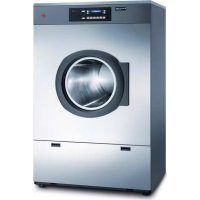
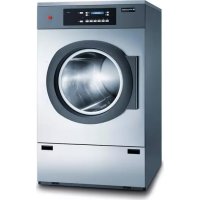
Spirit topLine TC 8330 U - Tumble drier Schulthess - Free user manual and instructions
Find the device manual for free Spirit topLine TC 8330 U Schulthess in PDF.



User questions about Spirit topLine TC 8330 U Schulthess
0 question about this device. Answer the ones you know or ask your own.
Ask a new question about this device
Download the instructions for your Tumble drier in PDF format for free! Find your manual Spirit topLine TC 8330 U - Schulthess and take your electronic device back in hand. On this page are published all the documents necessary for the use of your device. Spirit topLine TC 8330 U by Schulthess.
USER MANUAL Spirit topLine TC 8330 U Schulthess
Operating instructions for professional condensing dryers

Follow the safety instructions!

Only use drier after first reading
these instructions!

Produkte-Nr.
Directive Machines 2006/42/CE
EC Declaration of conformity
Manufacturer:
Hereby declares that the dryers:
| Type: | Spirit TopLine TA 8320 | Spirit TopLine TC 8330 |
| Prod. No. | 8320.1...X | 8330.1.X |
are in conformity with the relevant provisions of the
Machinery Directive 2006/42/EC
are in conformity with the provisions of the following other EC-Directives
Electromagnetic compatibility 2004/108/EC
Wolthausen, December 2009
Manager Research & Development
H.-P. Caderas
Product Manager
Chere cliente, cher client
We are pleased that you have chosen a Schulthess dryer. Your new dryer is the result of many years of development work. The highest quality requirements, both in development and manufacture, guarantee a long lifetime. Its design meets all the current and future demands of modern laundry care. It offers you a varied and individual choice of programmes.
Sparing use of energy and short drying times help to ensure that you can use your dryer as economically as possible.
Please read these instructions carefully to enable you to use all the possibilities and advantages of your new dryer. Please note in particular the chapter «Safety information» and the enclosed guarantee and customer services booklet.
We hope you will be very happy with your new Schulthess machine.
Yours,
Off
Volume 1
Volume 2
Volume 3
| Used symbols 54 |
| Waste disposal advicePackaging from your new machine 54Disposal of your old machine 54 |
| Safety informationGeneral safety information 54Observe before start-up 54Observe when drying 54/55When transporting your machine 55 |
| How to dry correctly and environmentally friendlySorting the laundry 55Load 55Tips for drying 55Do not dry the following fabrics in themachine 55 |
| Machine description ▶Control and display area 56 ▶Programme buttons 56 | |
| Start up | |
| Preparation | 57 |
| Opening the door | 57 |
| Closing the door | 57 |
| Drying | |
| Programme survey | 58/59 |
| Drying | 60 |
| Selecting standard programme | 60 |
| Selecting special programme | 60 |
| Selecting additional functions | 60 |
| Changing the programme before the start | 60 |
| Adding laundry | 60 |
| Starting the programme | 60 |
| Programme progress/Programme status | 60 |
| Adding more laundry | 60 |
| Interrupting the programme | 60 |
| Programme end | 60 |
| Removing the laundry | 61 |
| Cleaning the filter | 61 |
| Switching off the machine | 61 |
| Additional functions | |
| Easy care | 61 |
| Mixed laundry | 61 |
| Time selection | 61 |
| Gentle drying | 61 |
| Fast forward | 61 |
| Basic settings | |
| >Drying level | 62 |
| >Crease protection | 62 |
| >Time | 62 |
| > | Language |
| >Extended basic settings | |
| >Child lock | 62 |
| >Button memory | 62 |
| >Reduced mains power | 62 |
| >LCD Brightness | 62 |
| >LCD Contrast | 62 |
| >Summer noise level | 63 |
| ▷ Standby function | 63 | |
| ▷ Optical interface | 63 | |
| ▷ Default language | 63 | |
| Cleaning and Maintenance | ||
| ▷ Cleaning the air cooler | 63 | |
| ▷ Cleaning the moisture sensor | 64 | |
| ▷ Cleaning filter support | 64 | |
| ▷ Cleaning the machine | 64 | |
| ▷ Emptying for frost protection or transport | 64 | |
| Cash Card | ||
| ▷ Inserting the Cash Card 65 | ||
| ▷ Removing the Cash Card | 65 | |
| ▷ Selecting the drying programme | 65 | |
| ▷ Displays during the programme sequence | 65 | |
| ▷ Programme end | 65 | |
| ▷ Re-crediting | 65 | |
| ▷ Transferring remaining values | 65 | |
| Problems | ||
| ▷ Error messages on the display | 65/66 | |
| ▷ Troubleshooting | 66 | |
| Customer services | ||
| ▷ Product and serial numbers | 65 | |
| Guarantee | 67 | |
| Notes | 67 | |
Safety information and warnings
indicates work steps which must be executed one after the other
- enumerations, general useful hints
Waste Disposal Advice
Packaging from your new machine
Dispose of all packaging materials properly.
Packaging materials are not toys.
Processing and reuse saves raw materials and reduces waste volumes.
The packaging can be returned to the retailer or supplier. All packaging materials used are environmentally friendly and reusable. All card is made of 80 - 100% recycled paper.
Wood is not chemically treated. Films are made of polyethylene (PE), banding is made of polypropylene (PP).
These materials are pure hydrocarbon compounds and are recyclable.
Disposal of your old machine
Worn out machines should be made unusable:
After unplugging the machine or after an electrician has removed the connection, cut through and remove the mains cable. Destroy or remove the door lock so that playing children cannot become locked in and put their lives at risk.
Components from your old machine must not be re-used. The old machine contains valuable materials which should be sent for recycling.
Please ensure that your old machine is disposed of properly.
Please do not keep your old machine and under no circumstances dispose of it in your normal waste.
Additional information on the recycling of this product can be obtained from your commune, your waste disposal contractor or the shop in which you bought the product.
In this way you can help to ensure environmentally friendly disposal and/or recycling methods.
Safety Information
This machine meets the string
electronic devices. It is not intended for use by persons (including children) with reduced physical, sensory or mental capabilities, or lack of experience and knowledge. Please observe the safety instructions in these operating instructions and the appurtenant mounting instructions.
General safety information:
Do not climb on the machine.
Do not sit, lean or support yourself on the loading door (it could tip!).
Under no circumstances spray the machine with water or clean it with a steam cleaner.
If the appliance is not used for a longer period of time, it must be disconnected from the power supply.
Touch the power plug with dry hands only. Only pull the plug, do not pull the cable.
Repair work may only be executed by qualified and trained personnel and defective components may only be replaced with original spare parts by Schulthess.
Incorrect repairs may cause considerable damage and risks to the user. Modifications to the appliance are only admissible after consultation with the manufacturer.
Detergents and laundry care agents must be kept out of children's reach.
Observe before start-up:
Read the enclosed documents carefully before using your dryer. They contain important information on the installation, use and safety of the machine. Keep the documents safe for other users or subsequent owners.
Have the machine installed according to the mounting instructions by qualified and trained personnel. Do not plug in a machine with visible damage.
The lint must not to be allowed to accumulate around the tumble dryer.
Observe when drying:
Before starting a drying programme make sure that there is no foreign body or maybe a trapped animal in the drum.
Dry clean laundry in the dryer only.
The tumbler dryer is not to be used if chemicals have been used for cleaning. Items that have been soiled with substances such as cooking oil, acetone, alcohol, petrol, kerosene, spot removers, turpentine, waxes and wax removers should be washed in hot water with an extra amount of detergent before being dried in the tumble dryer.
Items such as foam rubber (latex foam), shower caps, waterproof textiles, rubber backed articles and clothes or pillows fitted with foam rubber pads should not be dried in the tumble dryer.
Fabric softeners, or similar products, should be used as specified by the fabric softener instructions.
A drying procedure should always end with fully completed cooling-off, so that the laundry remains at a temperature that does not damage them. If the drying procedure is ended prematurely without cooling-off, all of the laundry must be removed quickly and spread out so that the heat can be given off. Here one should be aware that the laundry can cause burns upon contact with skin due to its temperature and moisture. Appropriate hand protection is therefore to be worn.
Keep pets away from the machine.
Only use the machine in the home for drying textiles.
Do not reach into the rotating drum after the end of the programme.
When transporting your machine:
Take care when transporting the machine! (risk of injury!) Do not lift the machine by the fittings on the front!
How to dry correctly and environmentally friendly
Sorting the laundry
Pay attention to the drying symbols on your fabrics.

Dry at normal temperature.

Dry at low temperature

Do not tumble dry.
Dry textiles only which have been washed in water. To achieve even drying results, sort the laundry by fabric type and desired level of dryness.
Load
- Your dryer will be most environmentally friendly and economical if you fill the machine with the maximum laundry load. (See chapter «Programme survey»)
- Do not exceed the maximum load, because overfilling affects the drying result and severely creases the laundry.
- Remove as much water as possible from the laundry before drying by spinning in a washing machine or spin dryer. The higher the spin speed, the shorter the drying time and lower the energy consumption.
- You should also spin easy care laundry.
Tips for drying
- Do up all zips, hooks and eyes. Button up duvet covers and pillowcases. Tie together loose belts, apron strings etc.
- Remove easy care laundry from the dryer in a slightly damp state if possible (Select target dryness «Light Drying») and allow to finish drying in the air. Over drying causes creases.
- Shake the laundry slightly and place it loosely into the drum, mix big and small textiles.
- Laundry which is still too damp after drying a load of widely varying fabrics can be dried further using the programme «Time drying».
- Knitted fabrics, e.g. jersey underwear, can shrink slightly during drying. Do not use the «Extra Dry» programme for these fabrics.
- Dry sensitive fabrics such as silk and synthetic curtains with the special programme «Synthetics» only: creasing.
- Dry wool or textiles containing wool with the special programme «Wool Finish» only: risk of felting!
- If one single piece is to be dried in the dryer, it will be dried more evenly by adding additional pieces as ballast, e.g. two (dry) terry towels.
Do not dry the following fabrics in the machine:
- Dripping wet laundry: waste of energy! (Spin laundry again)
Do not dry laundry in the machine which was treated with inflammable solvents, e.g. with stain remover or spirit vinegar (explosion hazard!).
Do not dry textiles in the dryer which contain any foam rubber or have been in contact / covered with setting lotion, nail polish remover or similar agents (fire hazard!).
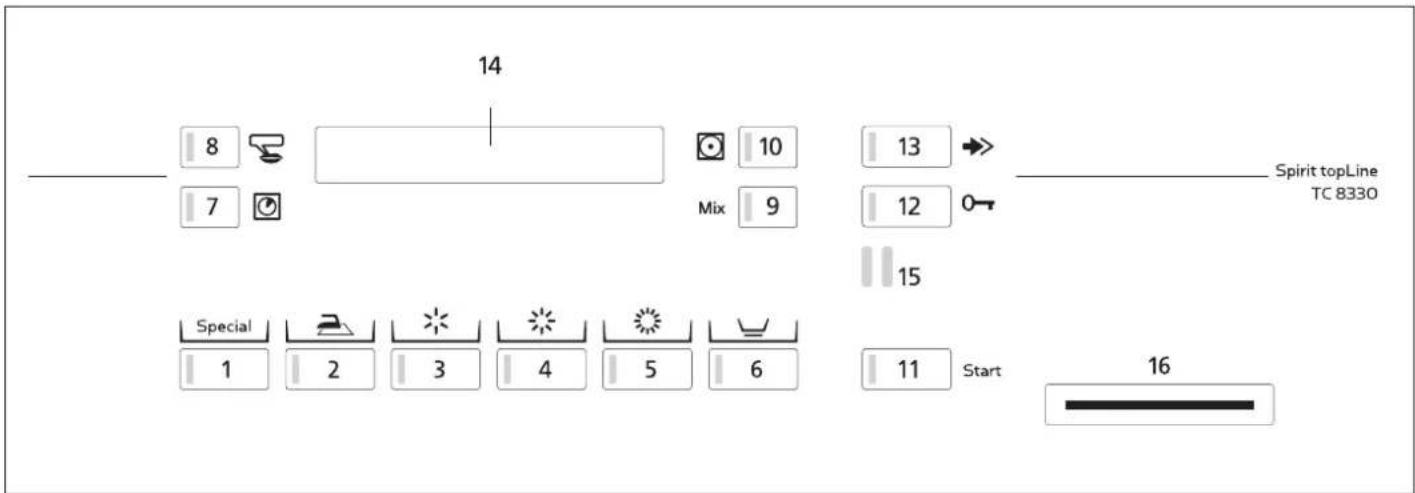
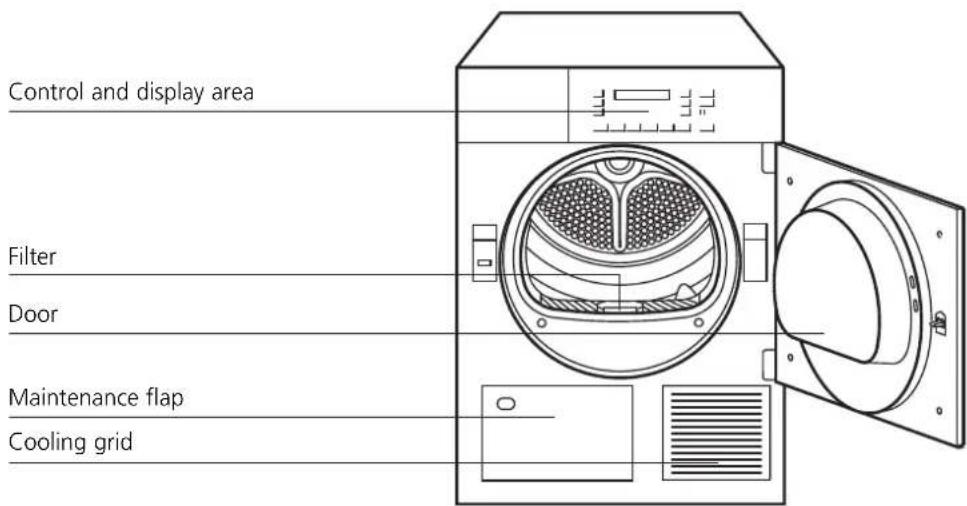
Control and display area
Programmes
1 Special programmes
2 Iron dry
3 Light dry
4 Cabinet dry
5 Extra dry
Additional functions
6 Easy care
7 Time selection
8 Select-language
9 Mixed laundry
0 Gentle drying
11 Programme start
12 Open door
13 Fast forward
Displays
14 Display
Interfaces
15 SCS-Schulthess Control System
(PC interface for customer services)
16 Module opening for the cash card (Option)
Start-up

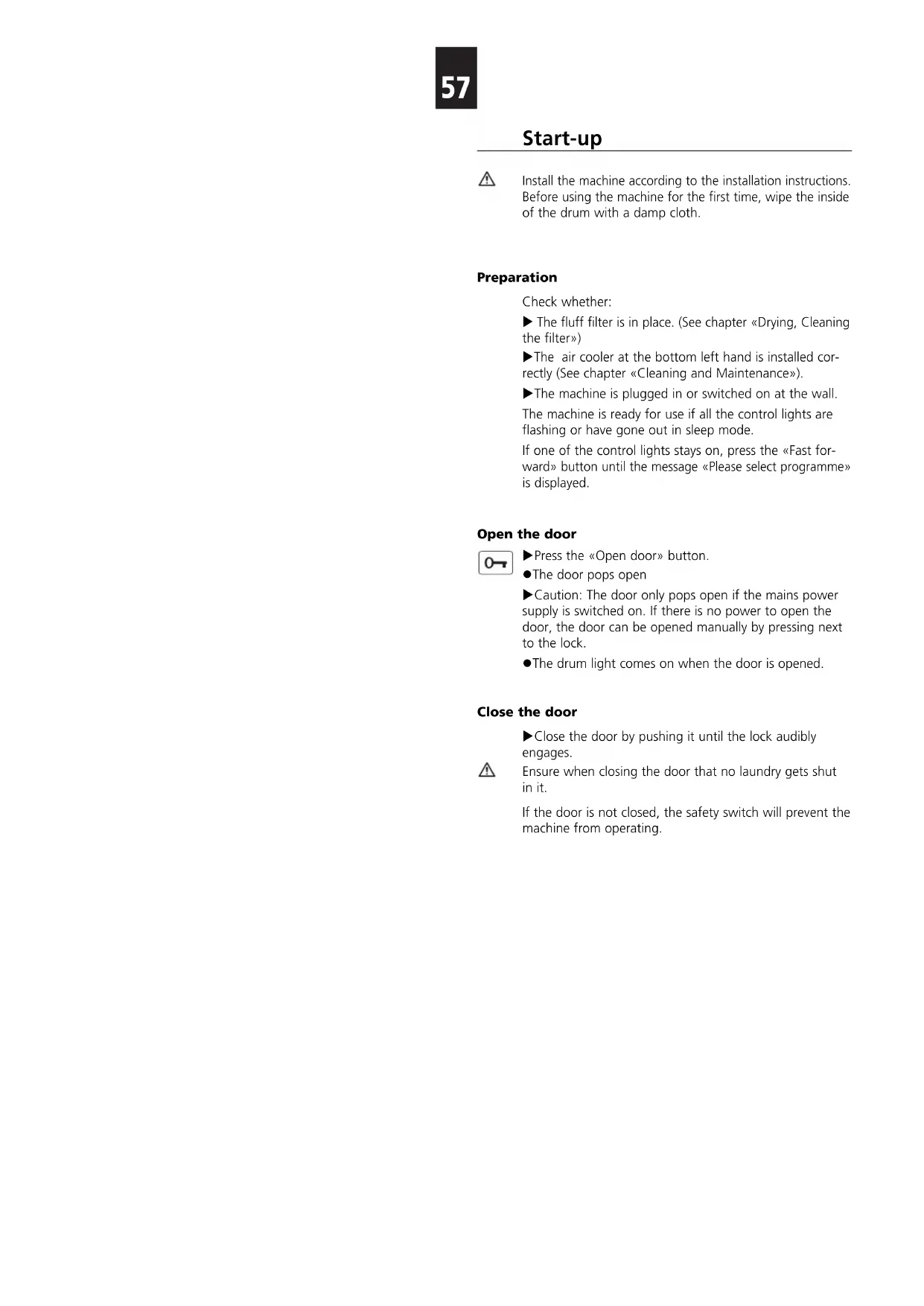
Install the machine according to the installation instructions. Before using the machine for the first time, wipe the inside of the drum with a damp cloth.
Preparation
Check whether:
The fluff filter is in place. (See chapter «Drying, Cleaning the filter»)
The air cooler at the bottom left hand is installed correctly (See chapter «Cleaning and Maintenance»).
The machine is plugged in or switched on at the wall. The machine is ready for use if all the control lights are flashing or have gone out in sleep mode.
If one of the control lights stays on, press the «Fast forward» button until the message «Please select programme» is displayed.
Open the door

Press the «Open door» button.
The door pops open
Caution: The door only pops open if the mains power supply is switched on. If there is no power to open the door, the door can be opened manually by pressing next to the lock.
The drum light comes on when the door is opened.
Close the door
- Close the door by pushing it until the lock audibly engages.
Ensure when closing the door that no laundry gets shut in it.
If the door is not closed, the safety switch will prevent the machine from operating.
Always check the care symbols on the fabrics
| Care Symbol | Max. load | Textile/Wash Type | Programme drying target | Programme selection button | Spun in washing machine at rpm | Approx. power cons. kWh Min. | Approx. duration | |
| Boil and coloured wash, cotton or linen | ||||||||
| 7 kg | Bed and table linen, towels, t-shirts, polo shirts, work wear | for laundry to be ironed | Iron dry | 14001200 | 2,63,3 | 4151 | ||
| T-shirts, polo shirts, dresses, trousers, work wear, underwear | for laundry which will not be ironed or only lightly ironed | Light dry | 14001200 | 3,33,8 | 5363 | |||
| Flannels, tea towels and towels, bed linen, underwear, cotton socks | for laundry which will not be ironed | Cabinet dry | 14001200 | 3,54,1 | 5766 | |||
| Towelling bathrobs and bed linen no underwear or socks | for particularly thick or multilayered fabrics | Extra dry | 14001200 | 3,84,4 | 6374 | |||
| Easy care (non-iron) laundry made of synthetic and mixed fibres and cotton with non-iron trim, e.g. viscose, cupro, modal, polyester | ||||||||
| 3.5 kg | Trousers, dresses, skirts, shirts | for laundry to be ironed | Iron dry | + 800600 | 1,01,3 | 2733 | ||
| Trousers, dresses, skirts, shirts, blouses, corsetry, leggings, sportswear with large proportion of synthetic fibres | for laundry which will not be ironed or only lightly ironed | Light dry | + 800600 | 1,21,5 | 2935 | |||
| Over shirts, blouses, sportswear, bed and table linen, tracksuits | for laundry which will not be ironed | Cabinet dry | + 800600 | 1,41,6 | 3339 | |||
| Anoraks, covers | for particularly thick or multilayered fabrics | Extra dry | + 800600 | 1,72,0 | 4351 | |||
| Mixed laundry made of cotton and easy care fibres | ||||||||
| 3.5 kg | Trousers, dresses, skirts, shirts | for laundry to be ironed | Iron dry | + Mix800600 | 1,51,7 | 3942 | ||
| Trousers, dresses, skirts, shirts, blouses, corsetry, leggings, sportswear with large proportion of synthetic fibres | for laundry which will not be ironed or only lightly ironed | Light dry | + Mix800600 | 1,92,2 | 4952 | |||
| Over shirts, blouses, sportswear, bed and table linen, tracksuits | for laundry which will not be ironed | Cabinet dry | + Mix800600 | 2,02,3 | 5558 | |||
| Anoraks, covers | for particularly thick or multilayered fabrics | Extra dry | + Mix800600 | 2,42,7 | 6163 | |||
| For temperature sensitive fabrics press the additional «Gentle Drying» button! | ||||||||
| The power consumption values and programme durations given are guidelines determined under standard conditions. Fluctuations of up to 10% are possible. The programme will be correspondingly longer for machines with reduced mains power. | ||||||||
Always check the care symbols on the fabrics
| Care Symbol | Max. load | Textile/Wash Type | Programme drying target | Programme selection button | Spun in washing machine at rpm | Approx. power cons. kWh | Approx. duration Min. | |
| Special programmes | ||||||||
| 7 kg | ● Bed linen | ● Cotton sheets, stretch-fit sheets, duvet covers, pillowcases etc. Please button up duvet covers and pillowcases. | Bed linen Cabinet dry | 1x Special | max. 1400 3,8 73 | |||
| 7 kg | ● Terry towels | ● Cotton terry towelling, bath towels., bathrobes etc. Cabinet dry | Terry towels | 2x Special | max. 1400 3,9 63 | |||
| 1,5 kg | ● Reconditioning | ● The laundry is aired without adding additional temperature. | Reconditioning Time drying 3x + cold 20 -90 min. | Special | ||||
| 7 kg | ● Boil and coloured wash | ● The laundry is dried for the set time period without checking the residual moisture. | Time drying warm 20-150 min. | 4x + Special | ||||
| 3,5 kg | ● Easy care | ● The laundry is dried for the set time period without checking the residual moisture. | Time drying warm 20-150 min. | 4x + Special | ||||
| 3,5 kg | ● Shirts/blouses | ● Shirts and blouses are dried «Iron dry». The programme reduces creasing, is gentle to the laundry and facilitates ironing. | Shirts/blouses Iron dry | 5x Special | 400 | 1,9 | 50 | |
| 4,5 kg | ● Jeans | ● Jeans are dried completely. | Jeans Cabinet dry | 6x Special | 800 600 | 3,8 94 4,4 | 105 | |
| 2,3 kg | ● Synthetics | ● Drying of silk, delicates, lingerie, curtains and the likes | Synthetics Cabinet dry | 7x Special | 200 | 2,0 95 | ||
| 3,5 kg | ● Machine-washable wool | ● The laundry becomes more fluffy, but is not dried. Remove the laundry immediately after the programme has ended and place it on a flat terry towel for drying. | Wool finish Tumble Dry (only part-dried) | 8x Special | 800 | 0,1 | 5 | |
| 2,3 kg | ● Outdoor clothing | ● To dry outdoor clothing, down jackets, etc. | Outdoor Cabinet dry | 9x Special | 600 | 1,9 66 | ||
| 2,3 kg | ● Impregnation | ● After impregnation in the washing machine, we recommend to fix the impregnation in the laundry. | Impregnation Extra dry | 10x Special | 600 | 1,8 58 | ||
| △ | For temperature sensitive fabrics press the additional «Gentle Drying» button! | |||||||
| The power consumption values and programme durations given are guidelines determined under standard conditions. Fluctuations of up to 10% are possible. The programme will be correspondingly longer for machines with reduced mains power. | ||||||||
Selecting standard programmes
The electronic sampling system continually checks the current level of dryness of your laundry and automatically stops the programme when it reaches the specified level of dryness.

Press the programme button corresponding to the desired drying level.
The control light for the selected programme lights up.
For easy care fabrics, select the additional «Easy care» function.
For mixed items select the additional function «Mixed laundry».
Selecting special programmes
Using the special programmes, certain textiles can be dried especially adapted to the laundry.
Tip the button repeatedly until the desired programme appears on the display (see programme survey).
Selecting additional functions


By selecting one or more additional functions, you can tailor your drying programme to the specifics of your laundry (see chapter additional functions).
Changing a programme before the start
Press the desired programme button again.
- All control lights for the available additional functions flash again and all settings are deleted.
Select any additional functions.
Adding laundry
Only dry fabrics which have been washed with water in the dryer.
Place the laundry loosely in the drum, mixing large and small items
Starting the programme

Start
Press the start button.
The control light is illuminated and the programme starts automatically.
If the child lock is activated:
Hold the start button down and press the fast forward button.
Programme progress / Programme status


- With the moisture controlled programmes the dampness of the laundry is continually monitored by an electronic sampling system.
The programme time remaining is displayed.
This remaining time is recalculated several times during drying, so the effective programme end will therefore vary by a few minutes.
For time programmes, the time remaining to the end of the programme is displayed.
Adding more laundry
This is possible at any time.
Press the door open button.
Wait for the drum to stop.
Add your laundry.
Close the door again.
Press the start button.
If the child lock is activated:
Hold down the start and fast forward button at the same time.
The drying process is continued
Interrupting the programme
Interrupt the programme by pressing the fast forward button repeatedly, until «programme end» appears on the display.
If the child lock is activated:
Hold the start button down.
Simultaneously tip the fast forward button.
Programme end
The programme end is indicated by the display value 00:00h, the display of «Programme End» as well as a flashing control light.
An audible signal.
(only if summer function is switched on)
The drum continues to rotate periodically after the programme has ended to prevent the laundry from creasing (only if crease protection has been switched on, for 30 or 60 minutes).
The washing should be taken out now at the latest.
Removing the laundry

Press the door open button.
The drum light comes on.
Remove the laundry.
Clean the filter.
Cleaning the filter
When fabrics are used, the fibres are rubbed (laundry fluff), which are released when the fabrics are dried, collecting in the filter on the inside of the door. The fluff filter must therefore be cleaned after every use.
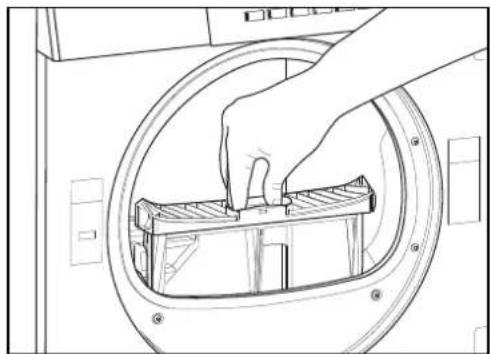
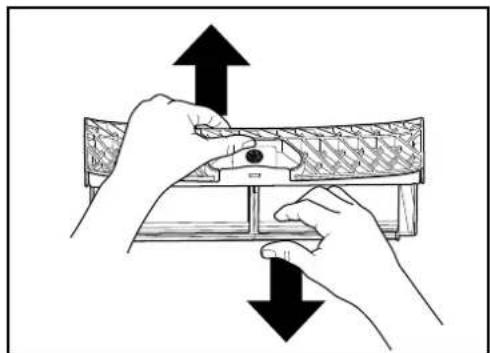
- Press the «Open door» button.
- Pull out filter and open it.
- Rub your hand over the filter and remove the fluff. It may happen that a supposedly proper cleaned filter becomes impermeable, due to a fine, invisible coat remaining in the filter meshes. Hold the filter with one flat surface upwards and pour a little water on to it. If it is impermeable, clean the filter with a brush under running water.
Switching off the machine
Close the door.
Switch the machine off at the wall.
- If there is not wall switch, the display field will automatically go out after 4 min. and the dryer will switch to standby mode (only if the standby function is switched on).
Additional Functions
By selecting one or more additional functions, you can tailor your drying programme to the specifics of your laundry. These additional functions are only active for this one drying programme.
Easy care

For easy care fabrics made of synthetic or mixed fibres, and cotton with a non-iron finish.
Mixed laundry

For mixed items containing easy care fabrics made of synthetic or mixed fibre as well as cotton.
Time selection

If you have chosen a time-controlled drying programme from the special programmes you can set the length of the programme with the «Time selection» button. The drying time required depends on the type and amount of laundry and how damp it is.
Press the programme button.
The Time selection control light flashes and the minimum drying time is displayed.
Select the drying time by repeatedly pressing the button.
Gentle drying

With sensible textiles, the button «Gentle drying» can be pushed. The temperature is reduced.
Fast forward

The programme can be shortened or interrupted by pressing the fast forward button.
Basic Settings
The machine has basic settings from the factory. It can be adapted to the user's individual needs either when first used or later using the following functions.
The basic settings can only be changed if no dry programme is running. To change a basic setting, it is first necessary to hold the programme button pressed and then press the fast forward button. The corresponding function is shown on the digital display. The display changes when the fast forward button is pressed repeatedly with the programme button held down.
The basic settings on your machine may be blocked. However, the time setting and language selection functions are available.
Example:
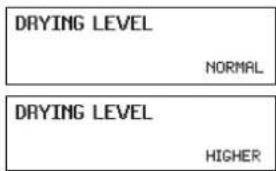
Function switched off
Function switched on
Drying level (ex factory NORMAL)

When this function is switched on, the level of dryness for the moisture controlled programmes (cabinet and extra dry) is slightly increased and the laundry will be slightly drier.
Crease protection (ex factory 30MIN)

When this function is switched on, the crease protection phase begins at the end of the programme.
Time (the time is not set ex factory)

The hours can be set using the button and the minutes using the button.
Language (ex factory GERMAN)
To change language press repeatedly the select-language button or press

This setting is temporarily valid for the selected programme and reverts back to the default language a few minutes after completion of the programme.
(See «Extended basic settings/Default language»)
Extended basic settings

By pressing these three buttons at the same time, the display shows the extended basic settings.
Repeatedly pressing the button shows the possible settings.
Pressing the button allows the settings to be changed.
Pressing the button ends the display of the settings.
Child lock (ex factory OFF)
Select «Extended basic settings»!
The child lock is to prevent accidental starting, changing or deletion of a programme by small children.
Start a programme with the child lock switched on:

Hold the start button down and press the fast forward button.
Button memory (ex factory OFF)
Select «Extended basic settings»!
With switched on memory button function, the special programme last used is stored and appears again as first on the display when next pressing the button.
Following this, the consecutive programmes can then be selected through repeatedly pressing the button.
This way, a frequently used special programme can be called up with only one press of the button.
With switched off function the «Bed linen» programme appears as first.
Reduced mains power (ex factory OFF)
Select «Extended basic settings»!
If the mains voltage is reduced, the programme times will be extended accordingly.
Off = 400V3N 5,1kW / 10AT
On = 400V 2N ~ 3,7kW / 10AT
On = 23 0V 1N ~ 2,3 kW / 10AT
On = 230V 1N ~ 3,7kW / 16AT
LCD Brightness (ex factory 150)
Select «Extended basic settings»!
The button can be used to alter the brightness or text on the display.
LCD Contrast (ex factory 26)
Select «Extended basic settings»!
The button can be used to alter the contrast on the display.
Summer noise level (ex factory Volume 2)
Select «Extended basic settings»!
With the Alarm setting switched on, a signal sounds at regular intervals at the end of the programme. The level can be adjusted in 3 levels.
Off
Level 1
Level 2
Level 3
Standby function (ex factory ON)
Select «Extended basic settings»!
When the standby function is switched on, the controls switch off when no drying programme is running in energy saving mode. All displays are dark.
Optical interface (ex factory OFF)
Select «Extended basic settings»!
If the optical interface (SCS) is switched on, customer services can communicate with the machine by PC.
Default language (ex factory GERMAN)
Select «Extended basic settings»!
If another language is temporarily selected via the select-language button button or the buttons and
4 minutes after programme end, in standby mode or after a long standstill, the setting reverts back to the default language.
Cleaning and Maintenance
Cleaning the air cooler
The air cooler should be cleaned after every 10th drying procedure.
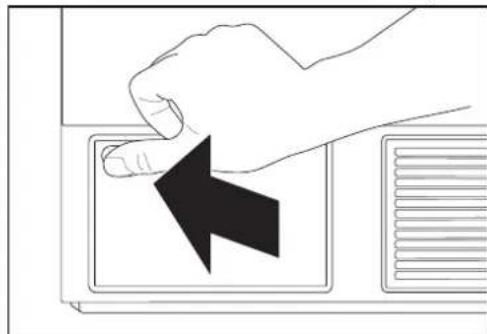
- Press the button to release the maintenance flap.
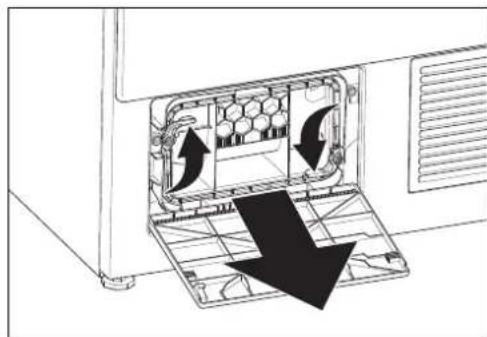
- Turn the two closing levers in the indicated direction against each other.
3.Pull out the air cooler.
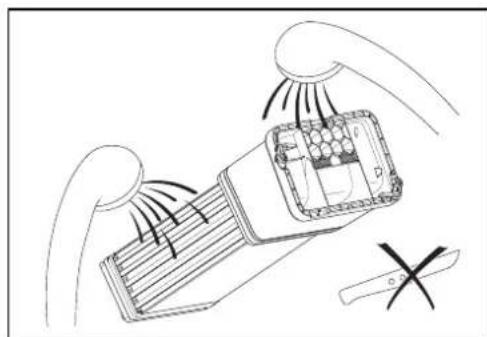
- Rinse the air cooler thoroughly under running water and allow to drain
- Replace the air cooler. The handle must be at the bottom. Turn the lock levers back again to lock.
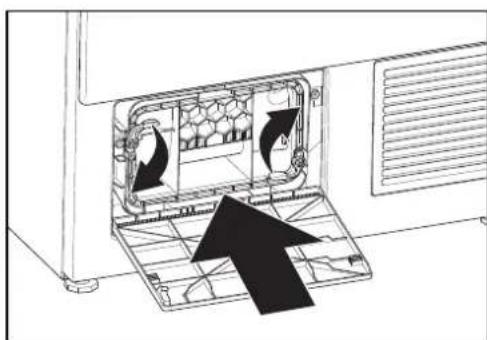
- Push the upper left edge of the maintenance flap until the lock engages.
64
Cleaning the moisture sensor
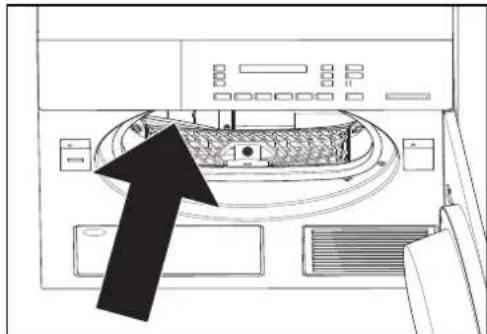
After longer operation, small deposits (lime, fabric refiner) can form on the front inner side of the drum on both sides of the longish moisture sensors.
With moisture controlled programmes, this can result in the desired level of dryness not being reached. Wipe deposits away with a cloth soaked in vinegar.
Emptying for frost protection or transport
If the machine is in a room susceptible to frost or is to be transported, it must be completely emptied.
- Select any drying programme.
- Press the start button. Any condensed water remaining in the machine will then be pumped into the drain pipe.
- Stop the programme after around 5 minutes using the fast forward button and empty the condensed water container again.
Cleaning the filter support
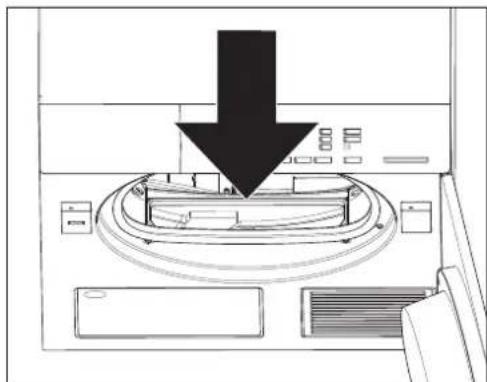
- From time to time it is necessary to remove fluffs that have accumulated inside the filter support. To do so, use a vacuum cleaner or a cleaning brush.
- Run the pipe of the vacuum cleaner or the brush around the opening for the fluff filter. Remove any residual fluff.
- Replace the filter properly
- Close the door.
Cleaning the machine
Ensure that the power supply is switched off before any cleaning, care or maintenance work.
Under no circumstances spray the machine with water or clean it with a steam cleaner.
Do not use solvents! These substances can damage parts of the machine, produce poisonous vapour and carry the risk of explosion!
Casings and control areas should only be cleaned with soap or a commercially available, solvent-free, non-abrasive cleaning product.
Cash Card
Inserting the Cash Card
Insert the Cash Card with the symbol facing upwards. In the display will appear in succession the amount stored on the Cash Card, the amount on account which will be deducted, as well as the new Cash Card balance. Any remaining credit balance stored in the appliance will be set off.
Removing the Cash Card
Selecting and starting the drying programme
▶Select the drying programme
Select the additional functions
Start the programme
Displays during the programme sequence
BOIL/COLOURED WASH 00:35h
CREDIT 2.60
During the drying programme, the remaining time and the remaining credit balance are displayed alternately.
Programme end
When the drying programme is completed, the remaining amount is stored in the appliance under the appropriate Cash Card. This remaining credit balance will be set off at the next drying cycle. The programme end is displayed by the display value 00:00h as well as the flashing control lamp «Open door».
Re-crediting

Re-crediting of the remaining credit balance is best made at the end of a washing day.
- Insert the Cash Card. The amount stored on the Cash Card will appear in the digital display.
Re-credit by pressing the fast run button. In the digital display will appear in sequence the display the remaining credit balance which will be credited, as well as the new Cash Card balance.
Remove the Cash Card.
Re-crediting can always be made only to that Cash Card from which the amount was originally deducted.
Remaining value transfer
If there is not an adequately high remaining amount available on a Cash Card to pay for the booking on account, this will be displayed by the whistle signal and by the flashing display with the message saldo to small. By inserting a second Cash Card, the difference can be paid.
Problems

Repairs, alterations or intervention on electronic equipment should only be carried out by qualified specialists. Inexpert repairs can cause considerable damage and risk to the user.

Only original spare parts should be used for repairs.
Error messages on the display
If the following error messages are displayed, the programme can be restarted by pressing the start button once the error has been rectified.
«CHILD LOCK ACTIVE»
Hold the start button down and press the fast forward button (see chapter «Basic settings»).
«PLEASE CLOSE DOOR»
Push door closed until lock engages.
Condensate water pump is not running.
Check if the water discharge hose is bent or the water discharge provided by the customer is clogged.
A signal tone will arise and the programme will continue running.
The error message «Check heating level» will occur in the display and will be displayed until the end of the programme. Please press the start button once and then the «Fast forward» button several times until the message «Programme end» is displayed.
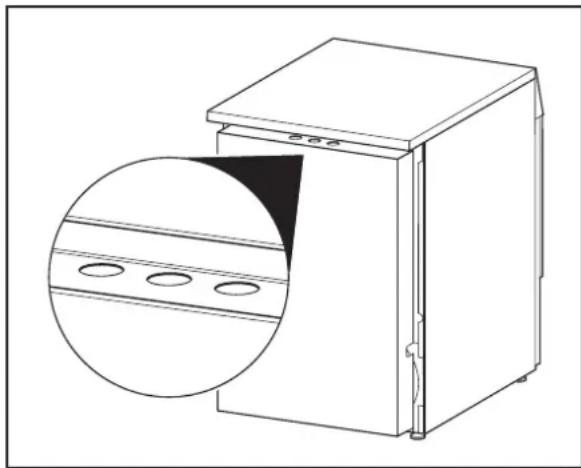
- Check whether all the temperature switches are switched on. Push with your finger once around all 3 round rubber seals (see diagram). If the problem is not fixed after doing this once, inform customer services.
If the machine displays an F - error message:
Interrupt the programme using the fast forward button and select a new programme.
If error messages appear repeatedly:
- Switch off the power for around 1 minute and switch it back on again. (Pull out the plug or switch off at the wall).
The machine is ready for use again when the programme control lights flash.
Select a new programme.
If an error message appears again:
Make a note of the error message.
Unplug the machine or switch it off at the wall.
- Notify customer services.
Error messages (Cash Card)
The following error messages are connected with the Cash Card.
«CARD UPSIDE DOWN»
- Insert the Cash or Wash Card with the symbol facing upwards.
Use a charged Cash Card.
The Cash Card being used is not permitted. Notify the person responsible for the facility.
"CASH CARD TAKEN OUT TOO QUICKLY"
Wait 5 seconds until the amount on account has been deducted and the new Cash Card balance appears.
Troubleshooting
Other minor faults, which you can rectify yourself.
The machine does not start after pressing a programme button:
- Check whether the mains power is switched on at the wall and the plug is in.
Check whether all the fuses are intact or the safety switch has tripped.
The display is dark:
The machine is in standby mode. No error. To operate the machine press any button.
The machine does not start:
The start button has not been pressed.
Start time preselect has been set. Only starts at the preselected start time.
The machine cannot be switched on, display remains dark even after pressing a button:
- Check whether the mains power is switched on at the wall and the plug is in.
Check whether all the fuses are intact or the safety switch has tripped. - Mains blockage, generally at noon. Operate the machine after the mains blockage has ended.
The drying target was not achieved:
When warm, laundry feels more moist than it actually is! Remove the laundry from the dryer and let it cool. When still moist:
Clean filter (See chapter «Drying, Cleaning the filter»).
Increase degree of drying (see chapter «Basic settings»)
Clean moisture sensor (see chapter «Cleaning and Maintenance»).
The individual laundry piece does not reach the set drying target:
If one single piece is to be dried in the dryer, it will be dried more evenly by adding additional pieces as ballast, e.g. two (dry) terry towels.
The drying takes too long:
Clean filter (See chapter «Drying, Cleaning the filter»).
Power failure (note lock times of EW).
The laundry is not dry after the maximum possible settings:
▶ Drum is overloaded (see chapter «Programme survey»).
Laundry not sufficiently spun.
Insufficient room ventilation (open a window or door).
The filter is blocked with fluff (See chapter «Drying, Cleaning the filter»).
Clean air cooler (see chapter «Cleaning and Maintenance»).
Drum lighting does not work:
Faulty light bulb. For safety reasons, the lamp should only be replaced by customer services or a specialist.
Dampness in the room increases significantly:
The room does not have sufficient ventilation. Ensure adequate ventilation.
Door does not open:
If no power is available to open the door, you can open the door manually by pressing next to the door lock.
Washing is wrapped up:
▶Use special programmes «bed clothes» or «towelling».
Customer Services
Before you call customer services, check whether you can rectify the problem yourself (see chapter «Problems»). If advice is required, costs may be incurred if a service technician is required, even during the guarantee period.

If you cannot rectify a problem yourself, unplug the machine or switch it off at the wall and call customer services.
Dial the central customer services number (see back cover). You will be automatically connected to the customer services branch for your region.
Give customer services product and serial numbers. You will find this information on the type label on the inside of the door.
Note the numbers for your machine here:
Product No.:
Serial No.:
Guarantee
Guarantee 1 year.
Notizen / Notes / Note