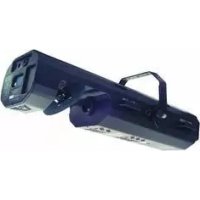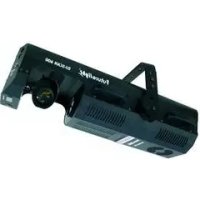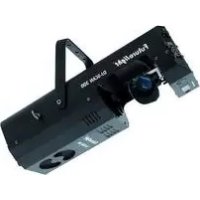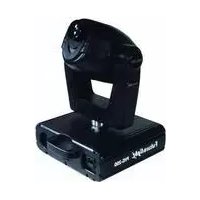
PHS200 - Effect machine Futurelight - Free user manual and instructions
Find the device manual for free PHS200 Futurelight in PDF.


| Product type | Moving Head Spot projector |
| Brand | Futurelight |
| Model | PHS-200 |
| Power supply | 230 V AC, 50 Hz |
| Power consumption | 400 W |
| Compatible lamp | MSD/HSD 250 or MSD 250/2 (GY-9.5) |
| DMX control | 8 channels, 3-pin XLR connector |
| Operating modes | Stand Alone, Master/Slave, DMX, Audio control |
| Color wheel | 9 dichroic colors + white, rainbow effect |
| Gobo wheel | 7 rotating gobos + open, shake function |
| Beam angle | 13° |
| Pan movement | 360° (2.0 s) |
| Tilt movement | 265° (1.5 s) |
| Strobe | 1 to 10 flashes/s |
| Dimensions (L x W x H) | 380 x 330 x 450 mm |
| Net weight | 15 kg |
| Max. ambient temperature | 45 °C |
| Safety distance (objects) | 0.5 m |
| Fuse | T 4 A, 250 V |
| Cleaning | Lens: weekly; fan: monthly; interior: annually |
Frequently Asked Questions - PHS200 Futurelight
User questions about PHS200 Futurelight
0 question about this device. Answer the ones you know or ask your own.
Ask a new question about this device
Download the instructions for your Effect machine in PDF format for free! Find your manual PHS200 - Futurelight and take your electronic device back in hand. On this page are published all the documents necessary for the use of your device. PHS200 by Futurelight.
USER MANUAL PHS200 Futurelight
natural_image
Technical line drawing of a mechanical device with no visible text or symbolsMULTI-LANGUAGE-INSTRUCTIONS
Inhaltsverzeichnis
Table of contents
Sommaire
Contenido
Deutsch
EINFÜHRUNG 4
SAFETY INSTRUCTIONS....27
OPERATING DETERMINATIONS....29
DESCRIPTION OF THE DEVICE 30
Features 30
Overview 31
INSTALLATION 32
Installing/Replacing the lamp 32
Lamp adjustment.... 33
Inserting/Exchanging gobos.... 33
Rigging 34
DMX-512 connection / connection between fixtures.... 37
Connection with the mains 38
OPERATION....38
Stand Alone operation.... 38
DMX-controlled operation 38
Addressing 38
DMX-protocol 39
Control Board 41
Main functions 42
CLEANING AND MAINTENANCE 47
Replacing the fuse 48
TECHNICAL SPECIFICATIONS....49
Français
INTRODUCTION 50
INSTRUCTIONS DE SÉCURITÉ 50
EMPLOI SELON LES PRESCRIPTIONS 52
DESCRIPTION DE L'APPAREIL 53
Features 53
You can find the latest update of this user manual in the Internet under:
natural_image
Technical line drawing of a mechanical assembly with mounting base and central component (no text or symbols)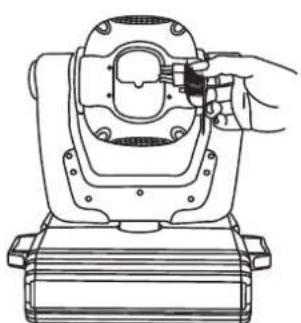
natural_image
Line drawing of a mechanical device with a hand adjusting its component (no text or symbols)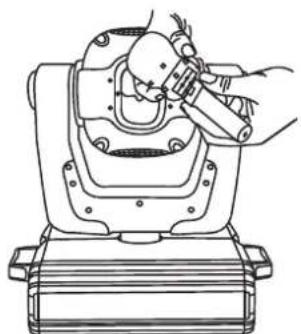
natural_image
Technical line drawing of a mechanical device with hands operating it (no text or symbols)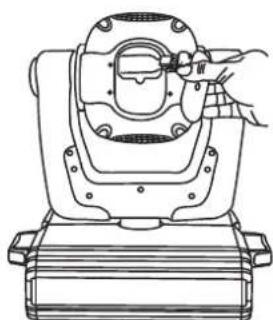
natural_image
Line drawing of a mechanical device with a hand operating the center (no text or symbols)natural_image
Technical line drawings of two mechanical gear assemblies with no visible text or symbolsDeutsch
Lampenjustierung
natural_image
Technical line drawing of a mechanical assembly with three identical components mounted on a truss structure (no text or symbols)natural_image
Mechanical assembly diagram showing a clamp device being inserted into a housing (no text or symbols present)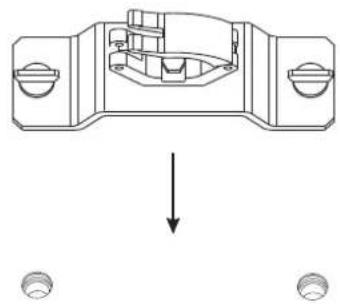
natural_image
Mechanical assembly diagram showing a component with two ports and a downward arrow indicating force or direction (no text or symbols)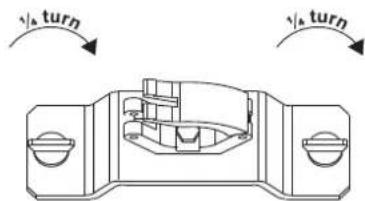

Keep this device away from rain and moisture! Unplug mains lead before opening the housing!
For your own safety, please read this user manual carefully before you initially start-up.
Every person involved with the installation, operation and maintenance of this device has to
- be qualified
- follow the instructions of this manual
- consider this manual to be part of the total product
- keep this manual for the entire service life of the product
- pass this manual on to every further owner or user of the product
- download the latest version of the user manual from the Internet
INTRODUCTION
Thank you for having chosen a FUTURELIGHT PHS-200. You will see you have acquired a powerful and versatile device.
Unpack your PHS-200.
SAFETY INSTRUCTIONS
CAUTION!
Be careful with your operations. With a dangerous voltage you can suffer a dangerous electric shock when touching the wires!
This device has left our premises in absolutely perfect condition. In order to maintain this condition and to ensure a safe operation, it is absolutely necessary for the user to follow the safety instructions and warning notes written in this user manual.

Important:
Damages caused by the disregard of this user manual are not subject to warranty. The dealer will not accept liability for any resulting defects or problems.
English
If the device has been exposed to drastic temperature fluctuation (e.g. after transportation), do not switch it on immediately. The arising condensation water might damage your device. Leave the device switched off until it has reached room temperature.
Please make sure that there are no obvious transport damages. Should you notice any damages on the A/C connection cable or on the casing, do not take the device into operation and immediately consult your local dealer.
This device falls under protection-class I. The power plug must only be plugged into a protection class I outlet. The voltage and frequency must exactly be the same as stated on the device. Wrong voltages or power outlets can lead to the destruction of the device and to mortal electrical shock.
Always plug in the power plug last. The power plug must always be inserted without force. Make sure that the plug is tightly connected with the outlet.
Never let the power-cord come into contact with other cables! Handle the power-cord and all connections with the mains with particular caution! Never touch them with wet hands, as this could lead to mortal electrical shock.
Never modify, bend, strain mechanically, put pressure on, pull or heat up the power cord. Never operate next to sources of heat or cold. Disregard can lead to power cord damages, fire or mortal electrical shock.
The cable insert or the female part in the device must never be strained. There must always be sufficient cable to the device. Otherwise, the cable may be damaged which may lead to mortal damage.
Make sure that the power-cord is never crimped or damaged by sharp edges. Check the device and the power-cord from time to time.
If extension cords are used, make sure that the core diameter is sufficient for the required power consumption of the device. All warnings concerning the power cords are also valid for possible extension cords.
Always disconnect from the mains, when the device is not in use or before cleaning it. Only handle the power-cord by the plug. Never pull out the plug by tugging the power-cord. Otherwise, the cable or plug can be damaged leading to mortal electrical shock. If the power plug or the power switch is not accessible, the device must be disconnected via the mains.
If the power plug or the device is dusty, the device must be taken out of operation, disconnected and then be cleaned with a dry cloth. Dust can reduce the insulation which may lead to mortal electrical shock. More severe dirt in and at the device should only be removed by a specialist.
There must never enter any liquid into power outlets, extension cords or any holes in the housing of the device. If you suppose that also a minimal amount of liquid may have entered the device, it must immediately be disconnected. This is also valid, if the device was exposed to high humidity. Also if the device is still running, the device must be checked by a specialist if the liquid has reduced any insulation. Reduced insulation can cause mortal electrical shock.
There must never be any objects entering into the device. This is especially valid for metal parts. If any metal parts like staples or coarse metal chips enter into the device, the device must be taken out of operation and disconnected immediately. Malfunction or short-circuits caused by metal parts may cause mortal injuries.
During the initial start-up some smoke or smell may arise. This is a normal process and does not necessarily mean that the device is defective.
Danger of burning! Never install the device on a highly flammable surfaces (e.g. fair carpet)!
Caution: During the operation, the housing becomes very hot.
Do not switch the device on and off in short intervals as this would reduce the lamp's life.

HEALTH HAZARD!
Never look directly into the light source, as sensitive persons may suffer an epileptic shock (especially meant for epileptics)!
Keep away children and amateurs!
Never leave this device running unattended.
OPERATING DETERMINATIONS
This device is a moving-head spot for creating decorative effects. This product is only allowed to be operated with an alternating current of 230 V, 50 Hz and was designed for indoor use only.
This device is designed for professional use, e.g. on stages, in discotheques, theatres etc.
Lighting effects are not designed for permanent operation. Consistent operation breaks will ensure that the device will serve you for a long time without defects.
Do not shake the device. Avoid brute force when installing or operating the device.
Never lift the fixture by holding it at the projector-head, as the mechanics may be damaged. Always hold the fixture at the transport handles.
When choosing the installation-spot, please make sure that the device is not exposed to extreme heat, moisture or dust. There should not be any cables lying around. Please make sure that the unit cannot be touched or bumped. You endanger your own and the safety of others!
This device must never be operated or stockpiled in sourroundings where splash water, rain, moisture or fog may harm the device. Moisture or very high humidity can reduce the insulation and lead to mortal electrical shocks. When using smoke machines, make sure that the device is never exposed to the direct smoke jet and is installed in a distance of 0.5 meters between smoke machine and device. The room must only be saturated with an amount of smoke that the visibility will always be more than 10 meters.
The ambient temperature must always be between -5^ C and +45^ C. Keep away from direct insulation (particularly in cars) and heaters.
The relative humidity must not exceed 50 % with an ambient temperature of 45^ C.
This device must only be operated in an altitude between -20 and 2000 m over NN.
Never use the device during thunderstorms. Over voltage could destroy the device. Always disconnect the device during thunderstorms.
The symbol ·s m determines the minimum distance from lighted objects. The minimum distance between light-output and the illuminated surface must be more than this value.
The device must only be installed on a non-flammable surface. In order to safeguard sufficient ventilation, leave 50 cm of free space around the device. Please note that heat-sensitive objects may be deformed or damaged by the emitted heat.
Make sure that the area below the installation place is blocked when rigging, derigging or servicing the fixture.
For overhead use (mounting height >100 cm), always fix the fixture with an appropriate safety-rope. Fix the safety-rope at the correct fixation points only. The safety-rope must never be fixed at the transport handles!
Only operate the fixture after having checked that the housing is firmly closed and all screws are tightly fastened.
English
The lamp must never be ignited if the objective-lens or any housing-cover is open, as discharge lamps may expose and emit a high ultraviolet radiation, which may cause burns.
The maximum ambient temperature T_a = 45^ C must never be exceeded.
Operate the device only after having become familiarized with its functions. Do not permit operation by persons not qualified for operating the device. Most damages are the result of unprofessional operation!
Please use the original packaging if the device is to be transported.
Please consider that unauthorized modifications on the device are forbidden due to safety reasons!
Never remove the serial barcode from the device as this would make the guarantee void.
If this device will be operated in any way different to the one described in this manual, the product may suffer damages and the guarantee becomes void. Furthermore, any other operation may lead to dangers like short-circuit, burns, electric shock, lamp explosion, crash etc.
DESCRIPTION OF THE DEVICE
Features
Mini-Moving-Head
- DMX-controlled operation or stand alone operation with Master/Slave-function
- 48 preprogrammed scenes in Program Run for stand alone operation
• Number of scenes in Program Run can be changed individually - The scenes in Program Run can be modified via the Control Board or via an external controller and loaded into the memory
- 8 built-in programs can be called up via DMX-controller
• Sound-controlled via built-in microphone
• 9 brilliant, dichroic colours plus white - Switchable colour change (mode 1: only full colours, mode 2: colour-change at every position)
- Rainbow-effect with adjustable speed in both directions
• Gobo-wheel with 7 rotating gobos plus open - With gobo-shake function
- Manual focus
- Strobe-effect with 1-10 flashes per second
- Mechanic dimmer
- Positioning within 360^ Pan and 265^ Tilt
• Lightbeam with 13° radiation angle - Control-Board with 4-digit display and foil-keyboard for adjusting the DMX-starting address, Pan/Tilt-Reverse, Program, Reset, lamp on/off
• For MSD/HSD 250 or MSD 250/2 lamp - DMX-control via every standard DMX-controller
English
Overview
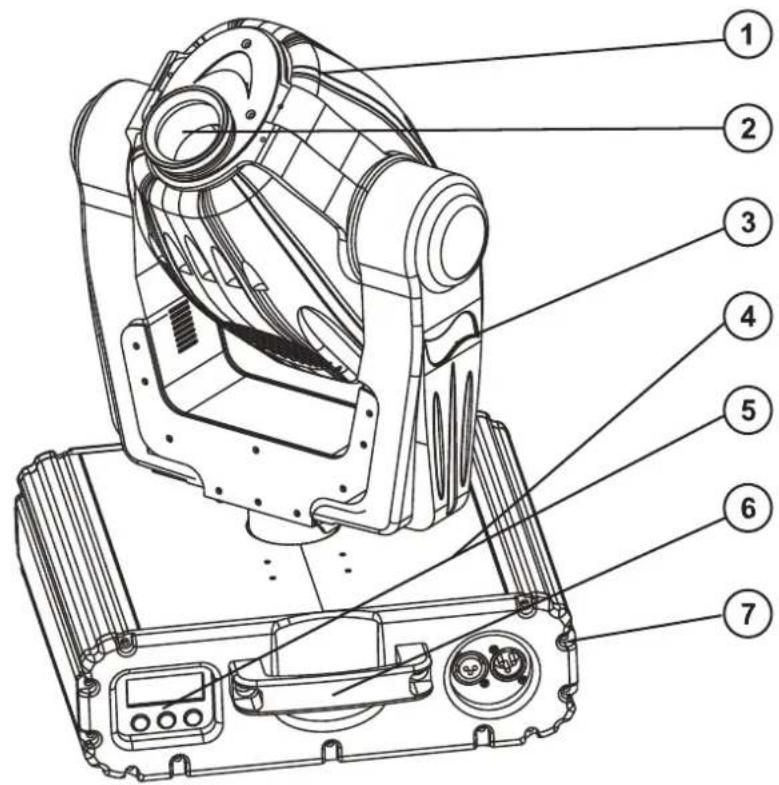
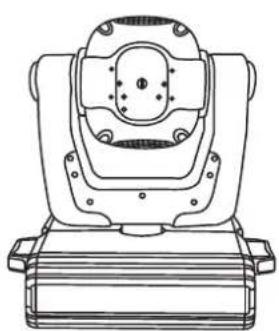
(1) Projector head
(2) Objective-lens
(3) Yoke
(4) Base
(5) Control Board
(6) Carrying handle
(7) Housing screw
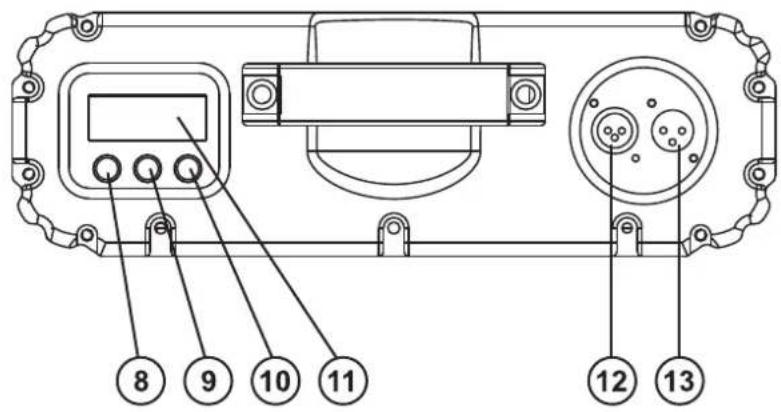
(8) Enter-button
(9) Exit/Down-button
(10) Up-button
(11) Display
(12) DMX-Out socket
(13) DMX-In socket
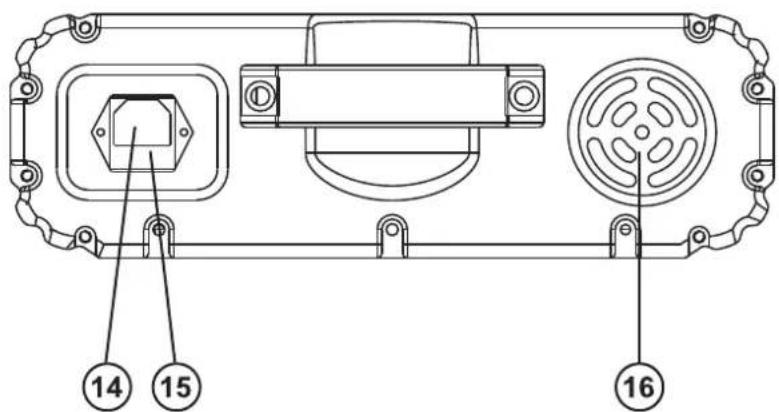
(14) Power supply
(15) Fuseholder
(16) Ventilation fan
INSTALLATION
Installing/Replacing the lamp
DANGER TO LIFE!
Only install the lamp with the device switched off! Unplug from mains before!
For the installation, you need one MSD/HSD 200 GY-9.5, MSD/HSD 250 GY-9.5 or MSD 250/2 GY-9.5 lamp.
The lamp must only be changed when wearing appropriate protective clothing (protection glasses, protection gloves, helmet with sight, leather apron).

CAUTION!
The lamp has to be replaced when it is damaged or deformed due to the heat!
The lamp life given by the manufacturer must never be exceeded. This is why you need to take notes on the operational time of the lamp or check the operating hour meter regularly and replace the lamp in time.
Keep exchanged lamp in a protective container and remove accordingly.
During the operation, the lamp reaches temperatures of up to 600°C.
Before replacing the lamp, unplug mains lead and let the lamp cool down (approx. 10 minutes).
During the installation do not touch the glass-bulbs bare-handed! Please follow the lamp manufacturer's notes!
Do not install lamps with a higher wattage! Lamps with a higher wattage generate temperatures the device was not designed for. Damages caused by non-observance are not subject to warranty.
Procedure:
natural_image
Technical line drawing of a mechanical assembly with mounting brackets and central housing (no text or symbols)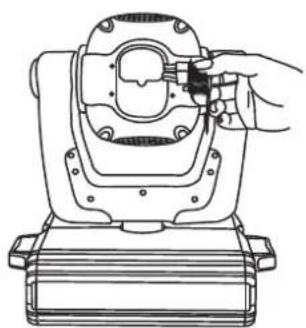
natural_image
Line drawing of a mechanical device with a hand adjusting a component (no text or symbols)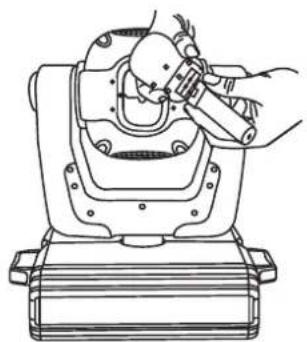
natural_image
Technical line drawing of a mechanical device with hands operating it (no text or symbols present)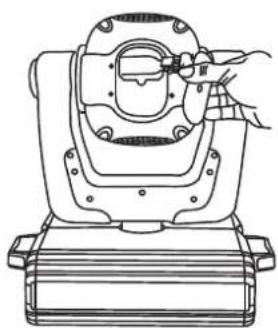
natural_image
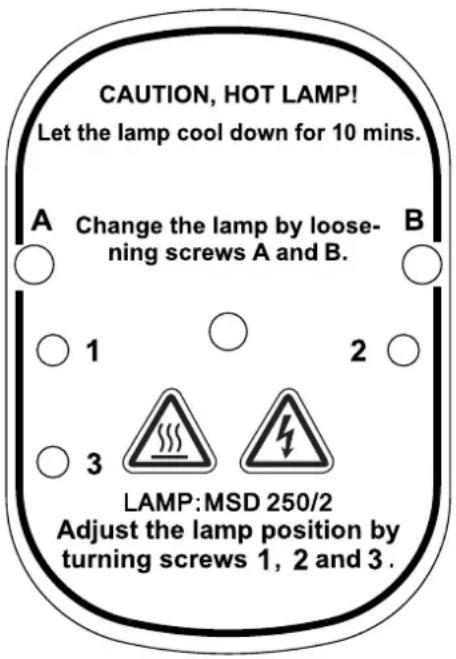
Line drawing of a mechanical device with a hand adjusting its top component (no text or symbols)Step 1: Unscrew the fixation screws A, B of the lamp cover and remove it.
Step 2: Unscrew the knurled-head screws of the lamp holder and remove it.
Step 3: If replacing the lamp, remove the old lamp from the lamp holder.
Step 4: Insert the lamp into the lamp holder.
Step 5: Replace the lamp holder and tighten the knurled-head screws.
Step 6: Adjust the lamp as described under lamp adjustment.
Step 7: Replace the lamp cover and tighten the fixation screws.

Do not operate this device with opened cover!
English
Lamp adjustment
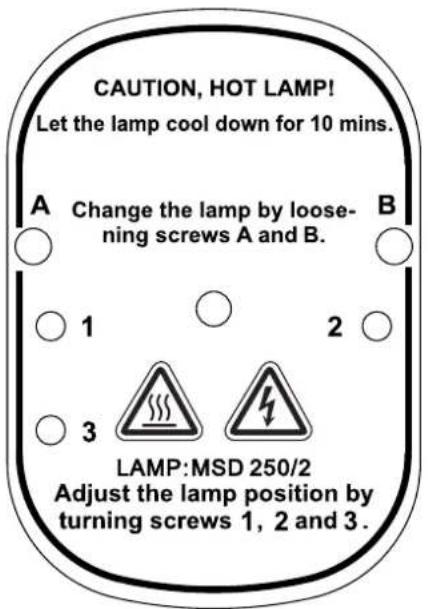
The lampholder is aligned at the factory. Due to differences between lamps, fine adjustment may improve light performance. Strike the lamp, open the shutter and the iris, set the dimmer intensity onto 100 % and focus the light on a flat surface (wall). Center the hot-spot (the brightest part of the beam) using the 3 adjustment screws "1, 2, 3". Turn one screw at a time to drag the hot-spot diagonally across the projected image. If you cannot detect a hot-spot, adjust the lamp until the light is even.
To reduce a hot-spot, pull the lamp in by turning all three screws "1, 2, 3" clockwise 14 -turn at a time until the light is evenly distributed.
If the light is brighter around the edge than it is in the center, or if light output is low, the lamp is too far back in the reflector. "Push" the lamp out by turning the screws "1, 2, 3" counterclockwise 14 -turn at a time the light is bright and evenly distributed.
Inserting/Exchanging gobos

DANGER! Install the gobos with the device switched off only. Unplug from mains before!

If you wish to use other forms and patterns as the standard-gobos, or if gobos are to be exchanged, please follow the instructions below:

CAUTION! Never unscrew the screws of the rotating gobo as the ball bearing will otherwise be opened!

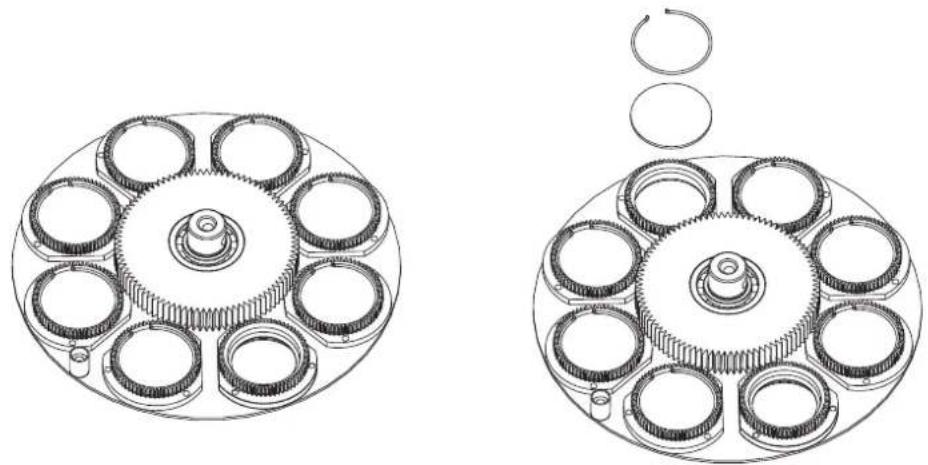
Remove the fixation-ring with an appropriate tool. Remove the gobo and insert the new gobo. Press the fixation-ring together and insert it in front of the gobo.
When installing metal gobos, please make sure that the mirror-inverted side points away from the lamp. When installing glass-gobos, please make sure that the coated side points to the lamp.
natural_image
Technical line drawings of two mechanical gear assemblies with no visible text or symbolsRigging

DANGER TO LIFE!
Please consider the EN 60598-2-17 and the respective national norms during the installation! The installation must only be carried out by an authorized dealer!
The installation of the projector has to be built and constructed in a way that it can hold 10 times the weight for 1 hour without any harming deformation.
The installation must always be secured with a secondary safety attachment, e.g. an appropriate catch net. This secondary safety attachment must be constructed in a way that no part of the installation can fall down if the main attachment fails.
When rigging, derigging or servicing the fixture staying in the area below the installation place, on bridges, under high working places and other endangered areas is forbidden.
The operator has to make sure that safety-relating and machine-technical installations are approved by an expert before taking into operation for the first time and after changes before taking into operation another time.
The operator has to make sure that safety-relating and machine-technical installations are approved by an expert after every four year in the course of an acceptance test.
The operator has to make sure that safety-relating and machine-technical installations are approved by a skilled person once a year.
Procedure:
The projector should be installed outside areas where persons may walk by or be seated.
IMPORTANT! OVERHEAD RIGGING REQUIRES EXTENSIVE EXPERIENCE, including (but not limited to) calculating working load limits, installation material being used, and periodic safety inspection of all installation material and the projector. If you lack these qualifications, do not attempt the installation yourself, but instead use a professional structural rigger. Improper installation can result in bodily injury and/or damage to property.
The projector has to be installed out of the reach of people.
If the projector shall be lowered from the ceiling or high joists, professional trussing systems have to be used. The projector must never be fixed swinging freely in the room.
Caution: Projectors may cause severe injuries when crashing down! If you have doubts concerning the safety of a possible installation, do NOT install the projector!
Before rigging make sure that the installation area can hold a minimum point load of 10 times the projector's weight.

DANGER OF FIRE!
When installing the device, make sure there is no highly-inflammable material (decoration articles, etc.) within a distance of min. 0.5 m.

CAUTION!
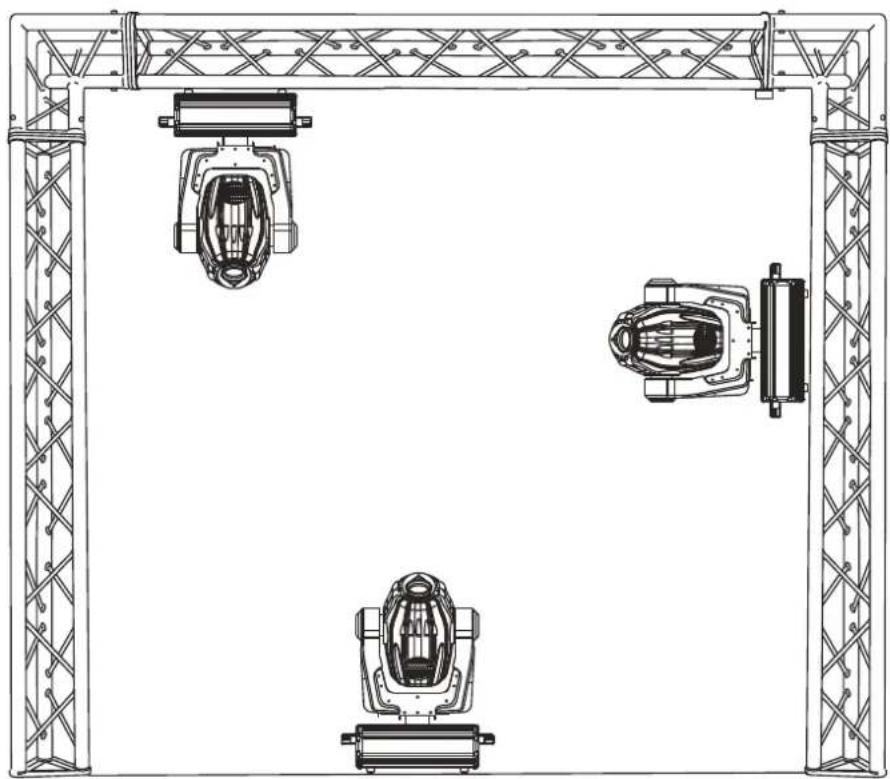
Use 2 appropriate clamps to rig the fixture on the truss. Follow the instructions mentioned at the bottom of the base. Make sure that the device is fixed properly! Ensure that the structure (truss) to which you are attaching the fixtures is secure.

The Moving-Head can be placed directly on the stage floor or rigged in any orientation on a truss without altering its operation characteristics (see the drawing).
English
natural_image
Technical line drawing of a mechanical assembly with three identical components mounted on a truss structure (no text or symbols)The fixture's base enables to be mounted in two ways.
For overhead use (mounting height >100 cm), always install an appropriate safety bond.
You must only use safety bonds complying with DIN 56927, quick links complying with DIN 56926, shackles complying with DIN EN 1677-1 and BGV C1 carbines. The safety bonds, quick links, shackles and the carbines must be sufficiently dimensioned and used correctly in accordance with the latest industrial safety regulations (e. g. BGV C1, BGI 810-3).
Please note: for overhead rigging in public or industrial
areas, a series of safety instructions have to be followed that this manual can only give in part. The operator must therefore inform himself on the current safety instructions and consider them.
The manufacturer cannot be made liable for damages caused by incorrect installations or insufficient safety precautions!
Install the safety bond by inserting the quick link in the hole on the bottom of the base Pull the safety bond over the trussing system etc. Insert the end in the quick link and tighten the fixation screw.
The maximum drop distance must never exceed 20 cm.
A safety bond which already hold the strain of a crash or which is defective must not be used again.

DANGER TO LIFE!
Before taking into operation for the first time, the installation has to be approved by an expert!
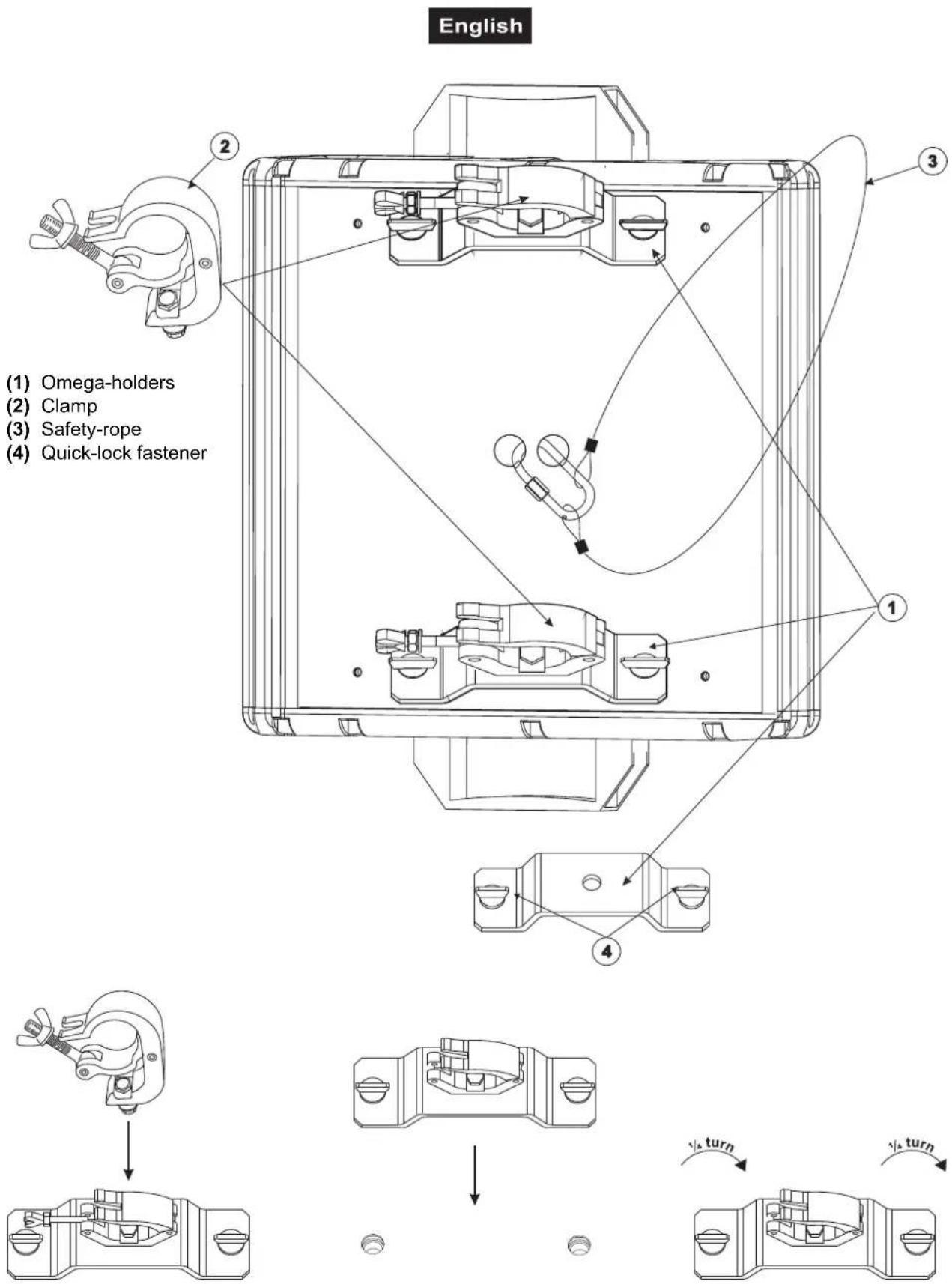
Screw one clamp each via a M12 screw and nut onto the Omega-holders.
Insert the quick-lock fasteners of the first Omega-holder into the respective holes on the bottom of the device. Tighten the quick-lock fasteners fully clockwise. Install the second Omega-holder.
DMX-512 connection / connection between fixtures
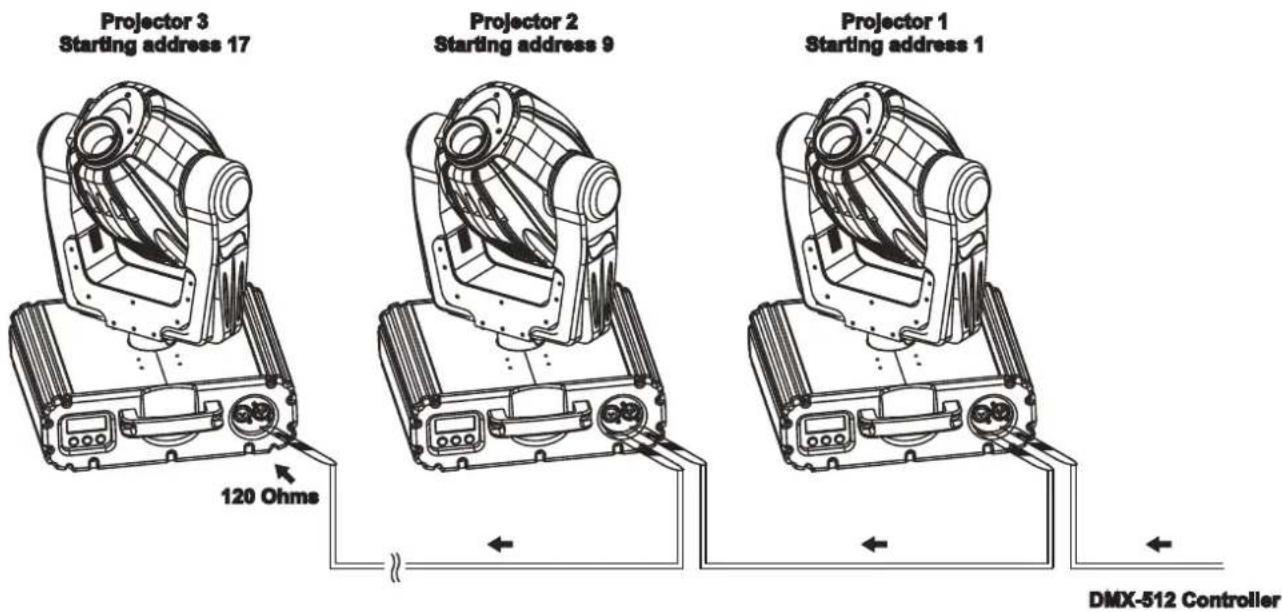

The wires must not come into contact with each other, otherwise the fixtures will not work at all, or will not work properly.


Please note, the starting address depends upon which controller is being used.

Only use a stereo shielded cable and 3-pin XLR-plugs and connectors in order to connect the controller with the fixture or one fixture with another.
Occupation of the XLR-connection:
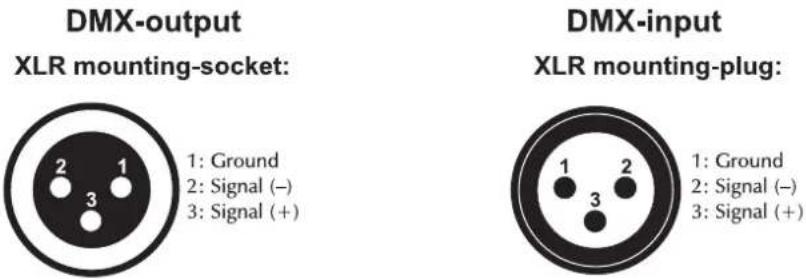
If you are using controllers with this occupation, you can connect the DMX-output of the controller directly with the DMX-input of the first fixture in the DMX-chain. If you wish to connect DMX-controllers with other XLR-outputs, you need to use adapter-cables.
Building a serial DMX-chain:
Connect the DMX-output of the first fixture in the DMX-chain with the DMX-input of the next fixture. Always connect one output with the input of the next fixture until all fixtures are connected.
Caution: At the last fixture, the DMX-cable has to be terminated with a terminator. Solder a 120 Ω resistor between Signal (−) and Signal (+) into a 3-pin XLR-plug and plug it in the DMX-output of the last fixture.
English
Connection with the mains
Connect the device to the mains with the enclosed power supply cable.
The occupation of the connection-cables is as follows:
| Cable Pin International | ||
| Brown Live L | ||
| Blue Neutral N | ||
| Yellow/Green Earth | [DWZB] | |
The earth has to be connected!
If the device will be directly connected with the local power supply network, a disconnection switch with a minimum opening of 3 mm at every pole has to be included in the permanent electrical installation.
The device must only be connected with an electric installation carried out in compliance with the IEC-standards. The electric installation must be equipped with a Residual Current Device (RCD) with a maximum fault current of 30 mA.
Lighting effects must not be connected to dimming-packs.
OPERATION
After you connected the effect to the mains, the PHS-200 starts running. During the Reset, the motors are trimmed and the device is ready for use afterwards.
Stand Alone operation
In the Stand Alone mode, the PHS-200 can be used without controller. Disconnect the PHS-200 from the controller and call the internal program.
- Press [ENTER] for 3 seconds to enter the main menu "MODE" (display flashing)
- Press [ENTER] and select "RUN" by pressing [UP] button.
- Press [ENTER] and select "AUTO" by pressing [UP] button.
- Press [ENTER] and select "ALONE" by pressing [UP] button.
- Press [ENTER] to confirm, the display shows "AU-A".
- Press[EXIT/DN] in order to return to the main menu.
Please refer to the instructions under Control Board, Main functions, menus Run and Edit.
DMX-controlled operation
You can control the projectors individually via your DMX-controller. Every DMX-channel has a different occupation with different features. The individual channels and their features are listed under DMX-protocol.
Addressing
The Control Board allows you to assign the DMX starting address, which is defined as the first channel from which the PHS-200 will respond to the controller.
Please, be sure that you don't have any overlapping channels in order to control each PHS-200 correctly and independently from any other fixture on the DMX-chain.
If several PHS-200 are addressed similarly, they will work synchronically.
Press the Up/Down-buttons for setting the desired starting address. Now you can start operating the PHS-200 via your lighting controller.
English
Note:
The modes of DMX 512 data and lamp are shown via the display:
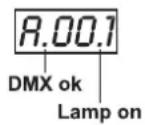
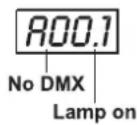
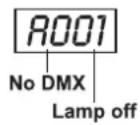
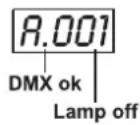
- After switching on, the device will automatically detect whether DMX 512 data is received or not. If the data is received, the display will show "A.001" with the actually set address. If there is no data received at the DMX-input, the display will flash "A001" with the actually set address.
This situation can occur if:
- the 3 PIN XLR plug (cable with DMX signal from controller) is not connected with the input of the device.
- the controller is switched off or defective, if the cable or connector is defective or the signal wires are swap in the input connector.
Note:
It's necessary to insert the XLR termination plug (with 120 Ohm) in the last lighting in the link in order to ensure proper transmission on the DMX data link.
- If the lamp is on, the display will show "A00.1" with the actually set address. If the lamp is off, the display will show "A001" with the actually set address.
DMX-protocol
Control channel 1 - Horizontal movement (Pan) (within 360°)
Push slider up in order to move the head horizontally (PAN).
Gradual head adjustment from one end of the slider to the other (0-255, 128-center). The head can be stopped at any position you wish.
Control channel 2 - Vertical movement (Tilt) (within 265°)
Push slider up in order to move the head vertically (TILT).
Gradual head adjustment from one end of the slider to the other (0-255, 128-center). The head can be stopped at any position you wish.
Control channel 3 - Pan/Tilt-speed
| Decimal Hexad. Percentage S/F Feature | |||||||
| 0 | 0 00 | 00 0 | % 0% | S M | Maximum | speed | |
| 1 | 225 | 01 E | 1 0% | 88% F | Decreasing | speed | |
| 226 | 235 | E2 | EB | 89% | 92% | S | Blackout with Pan/Tilt-movement |
| 236 | 245 | EC | F5 | 93% | 96% | S | Blackout with colour-change |
| 246 | 255 | F6 | FF | 96% | 100% | S | No function |
Control channel 4 - Colour-wheel
Linear colour change following the movement of the slider. In this way you can stop the colour-wheel in any position. You need to activate this function via control channel 8.
| Decimal Hexad. Percentage S/F Feature | |||||||
| 0 | 19 | 00 | 13 | 0% | 7% S Open | / white | |
| 20 | 39 | 14 | 27 | 8% | 15% | S Red | |
| 40 | 59 | 28 | 3B | 16% | 23% S Blue | ||
| 60 | 79 | 3C | 4F | 24% | 31% | S Dark green | |
| 80 | 99 | 50 | 63 | 31% | 39% | S Kelly green | |
| 100 | 119 | 64 | 77 | 39% | 47% | S Salmon pink | |
| 120 | 139 | 78 | 8B | 47% | 55% | S Light yellow | |
| 140 | 159 | 8C 9F | 55% 6 | 2% S Green | |||
| 160 | 179 | A0 | B3 | 63% | 70% S Pink | ||
| 180 | 199 | B4 | C7 7 | 1% 78% | S Light blue | ||
| 200 | 255 | C8 | FF | 78% | 100% | F Forwards rainbow effect with decreasing speed | |
Control channel 5 - Rotating gobo-wheel
| Decimal Hexad. Percentage S/F Feature | |||||||
| 0 | 13 00 | 0D | 0% | 5% S Open | |||
| 14 | 27 0E | 1B | 5% | 11% S Rot. gobo 1 | |||
| 28 | 41 1C | 29 | 11% | 16% S Rot. gobo 2 | |||
| 42 | 55 2A | 37 | 16% | 22% S Rot. gobo 3 | |||
| 56 | 69 3B | 45 | 22% | 27% S Rot. gobo 4 | |||
| 70 | 83 46 | 53 | 27% | 33% S Rot. gobo 5 | |||
| 84 | 97 54 | 61 | 33% | 38% S Rot. gobo 6 | |||
| 98 | 115 | 62 | 73 38% | 45% S Rot. gobo 7 | |||
| 116 | 135 | 74 | 87 | 45% | 53% | F | Gobo 1 shake with increasing speed |
| 136 | 155 | 88 | 9B | 53% | 61% | F | Gobo 2 shake with increasing speed |
| 156 | 175 | 9C | AF 6 | 1% 69% F Gobo 3 | shake with increasing speed | ||
| 176 | 195 | B0 | C3 | 69% | 76% | F | Gobo 4 shake with increasing speed |
| 196 | 215 | C4 | D7 7 | 7% 84% F Gobo 5 | shake with increasing speed | ||
| 216 | 235 | D8 | EB | 85% | 92% | F | Gobo 6 shake with increasing speed |
| 236 | 255 | EC | FF | 93% | 100% | F | Gobo 7 shake with increasing speed |
Control channel 6 - Gobo rotation
| Decimal Hexad. Percentage S/F Feature | |||||||
| 0 | 7 00 | 07 | 0 | % 3% | $ No rotation | ||
| 8 | 127 | 08 | 7F | 3% | 50% | F | Forwards gobo rotation with decreasing speed |
| 128 | 135 | 80 | 87 50 | 50% | 53% S No | rotation | |
| 136 | 255 | 88 | FF | 53% | 100% | F | Backwards gobo rotation with increasing speed |
Control channel 7 - Shutter, strobe
| Decimal Hexad. Percentage S/F Feature | |||||||
| 0 | 31 00 | 1F | 0% 12% S Shutter closed | ||||
| 32 | 63 | 20 | 3F | 13% | 25% | S | Close – open |
| 64 | 159 | 40 | 9F | 25% | 62% | F | Strobe-effect with increasing speed |
| 160 | 191 | A0 | BF | 63% | 75% | S | No function (shutter open) |
| 192 | 223 | C0 | DF | 75% | 87% | F | Random strobe-effect with increasing speed |
| 224 | 255 | E0 | FF | 88% | 100% | S | No function (shutter open) |
Control channel 8 - Switching the lamp, Reset, internal programs
| Decimal Hexad. Percentage S/F Feature | |||||||
| 0 | 31 00 | 1F | 0% 12% | S No | mal | colour-change | |
| 32 | 63 | 20 | 3F | 13% | 25% | S | Colour-change at every position |
| 64 | 79 40 | 4F | 2 | 5% 31% | S Lamp on | ||
| 80 | 95 50 | 5F | 3 | 1% 37% | S Reset | ||
| 96 | 111 | 60 | 6F | 38% | 44% | S | Internal program 1 |
| 112 | 127 | 70 | 7F | 44% | 50% | S | Internal program 2 |
| 128 | 143 | 80 | 8F | 50% | 56% | S | Internal program 3 |
| 144 | 159 | 90 | 9F | 56% | 62% | S | Internal program 4 |
| 160 | 175 | A0 | AF | 63% | 69% | S | Internal program 5 |
| 176 | 191 | B0 | BF | 69% | 75% | S | Internal program 6 |
| 192 | 207 | C0 | CF | 75% 81% | S Internal | program 7 | |
| 208 | 223 | D0 | DF | 82% 87% | S Internal | program 8 | |
| 224 | 239 | E0 | EF | 88% | 94% | S | Lamp off |
| 240 | 255 | F0 | FF | 94% | 100% | S | No function |
Control Board
The Control Board offers several features: you can simply set the starting address, switch on and off the lamp, run the pre-programmed program or make a reset.
The main menu is accessed by pressing the Enter-button for 3 seconds until the display starts flashing. Browse through the menu by pressing the Up-button. Press the Enter-button in order to select the desired menu. You can change the selection by pressing the Up-button. Confirm every selection by pressing the Enter-button. You can leave every mode by pressing the Exit/DN-button. The functions provided are described in the following sections.
Default settings shaded.
| Main menu | Sub menu Extension Display Function | ||||
| 0 | M O | ADDR | VALU A001 ~ SLAV ON/OFF | AXXX DMX address setting (SLAV) Slave setting | |
| EBOC ON/OFF | Change DMX address via external controller | ||||
| D RUN | AUTO ALON | (AU-A) | Automatic Program Run in Stand Alone | ||
| MAST (AU-M) | Automatic Program Run as Master | ||||
| SOUN ALON | (SO-A) | Sound-controlled Program Run in Stand Alone | |||
| MAST (SO-M) | Sound-controlled Program Run as Master | ||||
| DISP | VALU | D-00 ~ D-30 (DXX) D-00 | Display the DMX 512 value of each channel | ||
| RDIS ON/OFF | Reverse display | ||||
| CLDI | ON/OFF Shut off LED display | ||||
| 1 | LAMP | OPEN | ON/OFF Lamp on/off | ||
| ONLI | ON/OFF | Lamp on/off via controller | |||
| DELA | D-00 ~ D-59, D-15 | Delay lamp on | |||
| 2 | SET | RPAN | ON/OFF | Pan Reverse | |
| RTIL | ON/OFF | Tilt Reverse | |||
| REST | ON/OFF | Reset | |||
| LODA | ON/OFF | Restore factory settings | |||
| VER | V-1.0~V-9.9 | Software version | |||
| 3 | ADJU | LADJ | ON/OFF | Lamp adjustment | |
| TEST | T-01 ~ T-30 | Test function of each channel | |||
| 4 | TIME | MATI | 0000~9999 (hours) | Fixture running time | |
| LATI | 0000~9999 (hours) | Lamp running time | |||
| CLMT | ON/OFF | Service-function | |||
| CLLT | ON/OFF | Clear lamp time | |||
| 5 | EDIT | STEP | S-01 ~ S-48 | Steps of Program Run | |
| SC01 ~ SC48 | C01 ~ C30 | 01XX (00~FF) 30XX (00~FF) | Edit the channels of each scene | ||
| TIME (sec.) | I -- X (1~9) | Time for each scene | |||
| CNIN | ON/OFF | Edit program via controller | |||
Main functions

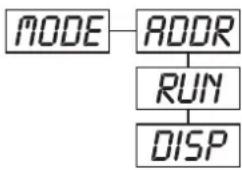
MODE - Main menu 0
flowchart
graph TD
    A["MODE"] --> B["ADDR"]
    B --> C["RUN"]
    C --> D["DISP"]
◆ Press [ENTER] for 3 seconds to enter the main menu "MODE" (display flashing)
◆ Press [ENTER] and select "ADDR", "RUN" or "DISP" by pressing [UP] button.
◆ Press [ENTER] for selecting the desired sub menu.
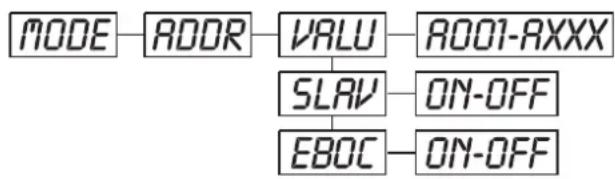
ADDR - DMX address setting, Slave setting
flowchart
graph LR
    A["MODE"] --> B["ADDR"]
    B --> C["VALU"]
    C --> D["AO01-AXXX"]
    C --> E["SLAV"]
    E --> F["ON-OFF"]
    E --> G["EBOC"]
    G --> H["ON-OFF"]
VRLU - DMX address setting
With this function, you can adjust the desired DMX-address via the Control Board.
♦ Select "VALU" by pressing [UP] button.
◆ Press [ENTER], adjust the DMX address by pressing [UP] or [EXIT/DN].
◆ Press [ENTER] to confirm.
◆ Press [EXIT/DN] in order return to main menu.
SLRV - Slave setting
With this function, you can define the device as slave.
♦ Select "SLAV" by pressing [UP] button.
◆ Press [ENTER], the display shows "ON" or "OFF".
◆ Press [UP] to select “ON” if you wish to enable this function or “OFF” if you don’t.
◆ Press [ENTER] to confirm.
◆ Press [EXIT/DN] in order to return to the main menu.
EBOC - DMX address setting via controller
With this function, you can adjust the desired DMX-address via an external controller.
♦ Select "EBOC" by pressing [UP] button.
◆ Press [ENTER], the display shows "ON" or "OFF".
◆ Press [UP] to select "ON" if you wish to enable this function or "OFF" if you don't.
◆ Press [ENTER] to confirm.
◆ Press [EXIT/DN] in order to return to the main menu.
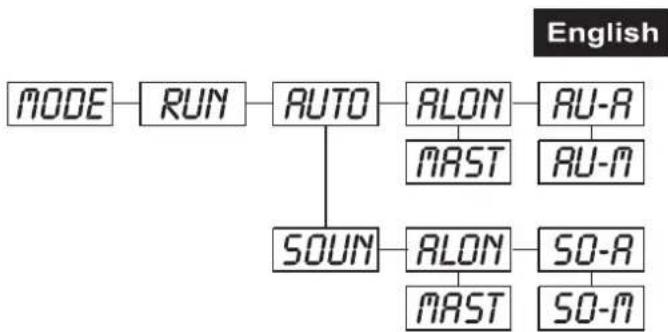
RUN - Program Run, Master setting
With the function "RUN", you can run the internal program. You can set the number of steps under Step. You can edit the individual scenes under Edit. You can run the individual scenes either automatically (AUTO), i.e. with the adjusted Step-Time or sound-controlled (SOUN). The selection "ALON" means Stand Alone-mode and "MAST" that the device is defined as master.
flowchart
graph TD
    A["MODE"] --> B["RUN"]
    B --> C["AUTO"]
    C --> D["ALON"]
    D --> E["AU-A"]
    C --> F["SOUN"]
    F --> G["ALON"]
    G --> H["SO-A"]
    G --> I["SO-M"]
    D --> J["MAST"]
    E --> K["AU-M"]
    G --> L["MAST"]
    I --> M["SO-M"]
♦ Select "AUTO" or "SOUN" by pressing [UP].
◆ Press [ENTER] for selecting the desired extension menu.
♦ Select "ALON" or "MAST" by pressing [UP].
◆ Press [ENTER] to confirm.
◆ Press [EXIT/DN] in order to return to the main menu.
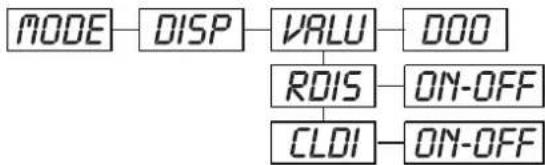
DISP
- Display the DMX-value, Reverse display, Shut off LED display
flowchart
graph LR
    A["MODE"] --> B["DISP"]
    B --> C["VALU"]
    C --> D["DOO"]
    C --> E["ROIS"]
    E --> F["ON-OFF"]
    E --> G["CLDI"]
    G --> H["ON-OFF"]
VALU - Display the DMX 512 value of each channel
With this function you can display the DMX 512 value of each channel.
◆ Select "VALU" by pressing [UP].
◆ Press [ENTER] to confirm; the display shows "D-00". In this setting, the DMX-adjustment of every channel will be displayed.
- Press [UP] in order to select the desired channel. If you select “D-14” the display will only show the DMX-value of the 14 ^th channel.
◆ Press [ENTER] to confirm.
◆ The display shows "DXXX", "X" stands for the DMX-value of the selected channel.
◆ Press [ENTER] or [EXIT/DN] to exit.
R015
- Reverse display
With this function you can rotate the display by 180^ .
♦ Select "rDIS" by pressing [UP].
◆ Press [ENTER], the display shows "ON" or "OFF".
- Press [UP] to select "ON" if you wish to enable this function or "OFF" if you don't; the display will rotate by 180°.
◆ Press [ENTER] or [EXIT/DN] to exit.
CLOI - Shut off LED display
With this function you can shut off the LED display after 2 minutes.
♦ Select "CLDI" by pressing [UP].
◆ Press [ENTER], the display shows "ON" or "OFF".
◆ Press [UP] to select "ON" if you wish to enable this function or "OFF" if you don't.
◆ Press [ENTER] or [EXIT/DN] to exit.
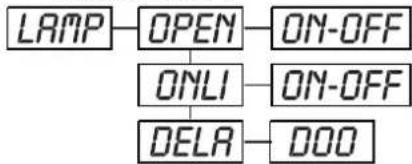
LAMP
- Main menu 1
flowchart
graph TD
    A["LAMP"] --> B["OPEN"]
    B --> C["ON-OFF"]
    B --> D["ONLI"]
    D --> E["ON-OFF"]
    D --> F["DELA"]
    F --> G["DOO"]
◆ Press [ENTER] for 3 seconds to enter the main menu (display flashing).
◆ Press [UP] to select "LAMP".
English
OPEN - Lamp on/off
With this function you can switch the lamp on or off via the Control Board.
♦ Select "OPEN" by pressing [UP] button.
◆ Press [ENTER], the display shows“ON” or “OFF”.
◆ Press [UP] to select “ON” if you wish to switch on the lamp or “OFF” if you wish to switch off the lamp.
◆ Press [ENTER] to confirm.
◆ Press [EXIT/DN] in order to return to the main menu.
ONLI - Lamp on/off via external controller
With this function you can switch the lamp on or off via an external controller.
♦ Select "ONLI" by pressing [UP] button.
◆ Press [ENTER], the display shows "ON" or "OFF".
◆ Press [UP] to select “ON” if you wish to enable this function or “OFF” if you don’t.
◆ Press [ENTER] to confirm.
◆ Press [EXIT/DN] in order to return to the main menu.
DELA - Delay lamp on
With this function you can delay the lamp ignition.
♦ Select "DELA" by pressing [UP] button.
◆ Press [ENTER] to confirm; the display shows “D-00”. In this setting, the lamp will be ignited immediately.
◆ Press [UP] to select the desired delay between "00" and "FF" minutes. If you select "D-03" the lamp will be ignited after 3 minutes.
◆ Press [ENTER] to confirm.
◆ Press [EXIT/DN] in order to return to the main menu.
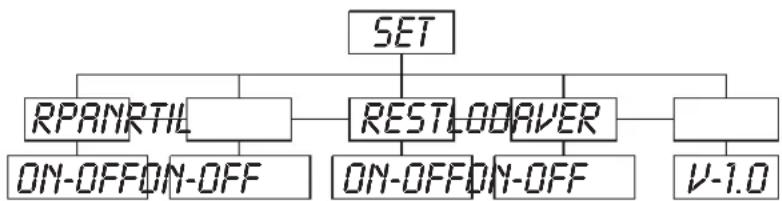
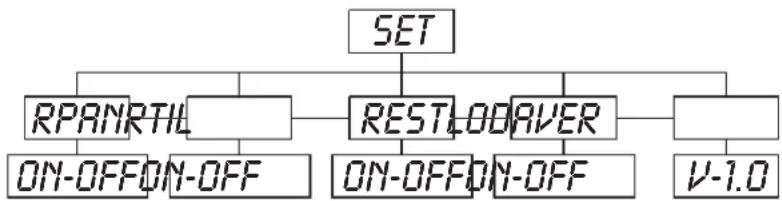
SET - Main menu 2
flowchart
graph TD
    A["SET"] --> B["RPANRTIL"]
    A --> C["RESTLODAVER"]
    A --> D["V-1.0"]
    B --> E["ON-OFF ON-OFF"]
    C --> F["ON-OFF ON-OFF"]
◆ Press [ENTER] for 3 seconds to enter the main menu (display flashing).
◆ Press [UP] to select "SET".
RPRN - Pan Reverse
With this function you can reverse the Pan-movement.
♦ Select "rPAN" by pressing [UP] button.
◆ Press [ENTER], the display shows "ON" or "OFF".
◆ Press [UP] to select “ON” if you wish to enable this function or “OFF” if you don’t.
◆ Press [ENTER] or [EXIT/DN] to exit.
RTIL - Tilt Reverse
With this function you can reverse the Tilt-movement.
♦ Select "rTIL" by pressing [UP] button.
◆ Press [ENTER], the display shows "ON" or "OFF".
◆ Press [UP] to select “ON” if you wish to enable this function or “OFF” if you don’t.
◆ Press [ENTER] or [EXIT/DN] to exit.
REST - Reset
With this function you can Reset the device via the Control Board.
♦ Select "rEST" by pressing [UP] button.
◆ Press [ENTER], the display shows "ON" or "OFF".
◆ Press [UP] to select “ON” if you wish to enable this function or “OFF” if you don’t.
◆ Press [ENTER] or [EXIT/DN] to exit.
English
LODR - Restore factory settings
With this function you can restore the factory settings of the device. All settings will be set back to the default values (shaded). Any edited scenes will be lost.
♦ Select "LODA" by pressing [UP] button.
◆ Press [ENTER], the display shows“ON” or “OFF”.
◆ Press [UP] to select "ON" if you wish to enable this function or "OFF" if you don't.
◆ Press [ENTER] to confirm.
◆ Press [EXIT/DN] in order to return to the main menu.
VER - Software version
With this function you can display the software version of the device.
♦ Select "VER" by pressing [UP] button.
◆ Press [ENTER], the display shows "V-X.X", "X.X" stands for the version number, e.g. "V-1.0", "V-2.6".
◆ Press [ENTER] or [EXIT/DN] in order to return to the main menu.
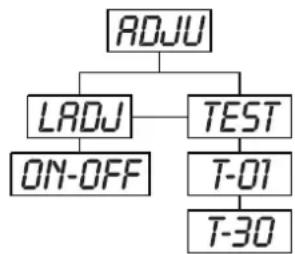
ADJU - Main menu 3
flowchart
graph TD
    A["ADJU"] --> B["LADJ"]
    A --> C["TEST"]
    B --> D["ON-OFF"]
    C --> E["T-01"]
    C --> F["T-30"]
◆ Press [ENTER] for 3 seconds to enter the main menu (display flashing).
◆ Press [UP] to select “ADJU”.
LADJ - Lamp adjustment
With this function you can adjust the lamp via the Control Board. The shutter opens and the lamp can be adjusted. In this mode, the device will not react to any control signal.
♦ Select "LADJ" by pressing [UP] button.
◆ Press [ENTER], the display shows“ON” or “OFF”.
◆ Press [UP] to select "ON" if you wish to enable this function or "OFF" if you don't.
◆ Press [ENTER] to confirm.
◆ Press [EXIT/DN] in order to return to the main menu.
TEST - Test function of each channel
With this function you can test each channel on its (correct) function.
♦ Select "tEST" by pressing [UP] button.
◆ Press [ENTER], the display shows "T-XX", "X" stands for the channel number.
◆The current channel will be tested.
♦ Select the desired channel by pressing [UP] button.
◆ Press [ENTER] or [EXIT/DN] to exit.
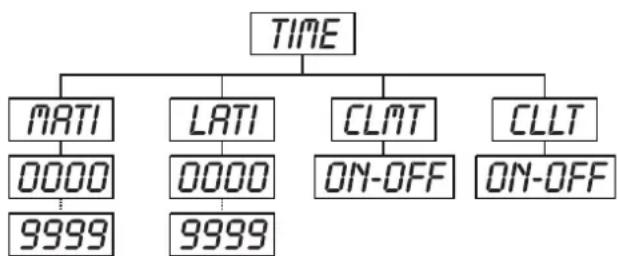
TIME - Main menu 4
flowchart
graph TD
    A["TIME"] --> B["MATI"]
    A --> C["LATI"]
    A --> D["CLMT"]
    A --> E["CLLT"]
    B --> F["0000"]
    C --> G["0000"]
    D --> H["ON-OFF"]
    E --> I["ON-OFF"]
    F --> J["9999"]
    G --> K["9999"]
English
◆ Press [ENTER] for 3 seconds to enter the main menu (display flashing).
◆ Press [UP] to select "TIME".
MATI - Fixture running time
With this function you can display the running time of the device.
◆ Select "MATI" by pressing [UP] button.
◆ Press [ENTER], the display shows "XXXX", "X" stands for the number of hours.
◆ Press [ENTER] or [EXIT/DN] to exit.
LRTI - Lamp running time
With this function you can display the running time of the lamp.
♦ Select "LATI" by pressing [UP] button.
◆ Press [ENTER], the display shows "XXXX", "X" stands for the number of hours.
◆ Press [ENTER] or [EXIT/DN] to exit.
CLLT - Clear lamp time
With this function you can clear the running time of the lamp. Please clear the lamp time every time you replace the lamp.
♦ Select "CLLT" by pressing [UP] button.
◆ Press [ENTER], the display shows "ON" or "OFF".
◆ Press [UP] to select "ON" if you wish to enable this function or "OFF" if you don't.
◆ Press [ENTER] to confirm.
◆ Press [EXIT/DN] in order to return to the main menu.
flowchart
graph TD
    A["EDIT"] --> B["STEP"]
    B --> C["S-01"]
    B --> D["S-48"]
    C --> E["SC01"]
    D --> E
    E --> F["C-01"]
    F --> G["0100"]
    F --> H["01FF"]
    E --> I["C-30"]
    I --> J["3000"]
    I --> K["30FF"]
    E --> L["TIME"]
    L --> M["T--1"]
    L --> N["T--9"]
    E --> O["CNIN"]
    O --> P["ON-OFF"]
    E --> Q["SC48"]
    Q --> R["C-01"]
    R --> S["0100"]
    R --> T["01FF"]
    Q --> U["C-30"]
    U --> V["3000"]
    U --> W["30FF"]
    Q --> X["TIME"]
    X --> Y["T--1"]
    X --> Z["T--9"]
    Q --> AA["CNIN"]
    AA --> AB["ON-OFF"]
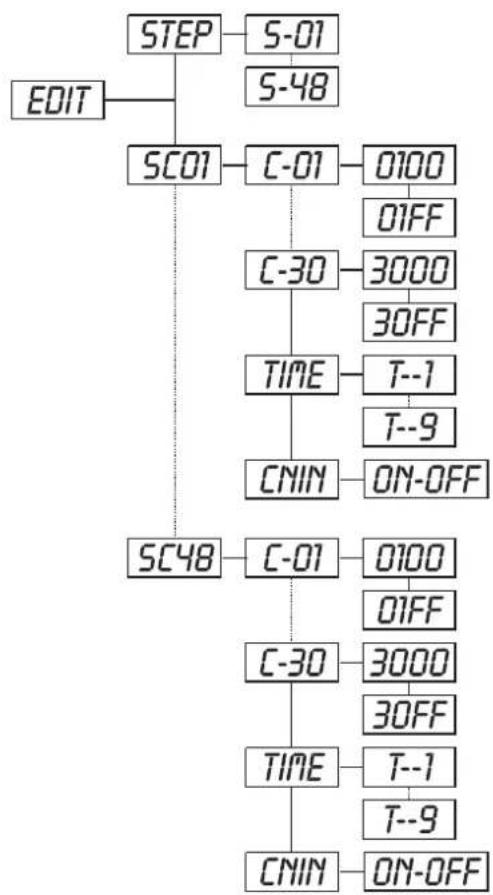
Edit - Main menu 5
◆ Press [ENTER] for 3 seconds to enter the main menu (display flashing).
◆ Press [UP] to select "EDIT".
STEP - Define the number of steps in Run
With this function you can define the number of steps in the Program Run.
♦ Select "STEP" by pressing [UP] button.
◆ Press [ENTER], the display shows "S-XX", "X" stands for the total amount of steps you want to save, so you can call up to 48 scenes in "RUN". For example if the "XX" is 05, it means that "RUN" will run the first 5 scenes you saved in "EDIT".
◆ Press [ENTER] to save and exit.
SCO1 - Editing the channels of the individual scenes
With this function you can edit the program to be called up in Run.
a) Editing via the Control Board
◆ Select "SC01" by pressing [UP] button.
◆ Press [ENTER], the display shows "SCXX", "X" stands for the scene no. to be edited.
◆ Change the scene no. by pressing [UP].
◆ Press [ENTER], the display shows "C-XX", "XX" stands for the channel no. Such as "C-01", it means you are editing channel 1 of the selected scene.
◆ Select the channel no. you would like to edit by pressing [UP].
◆ Press [ENTER] to enter editing for the selected channel, the fixture reacts to your settings. The display shows the DMX value of the edited channel. Such as “11XX”, it stands for channel 11 of the current scene, the DMX value is XX, XX is a hexadecimal number value “01-FF”.
◆ Adjust the desired DMX value by pressing [UP] or [EXIT/DN].
◆ Press [ENTER] in order to edit other channels of this scene.
English
◆ Repeat steps 5-9 until you finish setting all the DMX values for all channels of this scene.
◆ Once all the channels completed, the display will flash “tIME”.
◆ Press [ENTER] to edit the time needed, the display shows "t--X", "X" stands for the time needed to run the current scene, value "1-9". For example, "t--2" means you need 2 seconds to run the current scene.
♦ Adjust the desired time by pressing [UP].
◆ Press [ENTER] to save the settings for the scene you are editing, the display will change to the next scene automatically.
◆ Repeat step 3-14 to edit and other scenes, you can edit and save a maximum of 48 scenes.
◆ Press [EXIT/DN] to exit. The number of steps can be defined under “STEP” and the scenes can be called up under “RUN”
b) Editing via the external controller
◆ Call up the first scene in your controller now.
◆ Select "SC01" by pressing [UP] button.
◆ Press [ENTER], the display shows "SC01".
◆ Press [ENTER], the display shows “C-01”.
♦ Select "CNIN" by pressing [UP].
◆ Press [ENTER], the display shows "OFF".
◆ Press [UP], the display shows "ON".
◆ Press [ENTER], the display shows "SC02". You successfully downloaded the first scene.
♦ Adjust the Step-time as described above under point 12.
◆ Call up the second scene in your controller now.
◆ Repeat steps 5-11 until all desired scenes are downloaded.
◆ Press [EXIT/DN] to exit. The number of steps can be defined under “STEP” and the scenes can be called up under “RUN”
CLEANING AND MAINTENANCE
The operator has to make sure that safety-relating and machine-technical installations are inspected by an expert after every four years in the course of an acceptance test.
The operator has to make sure that safety-relating and machine-technical installations are inspected by a skilled person once a year.
The following points have to be considered during the inspection:
1) All screws used for installing the devices or parts of the device have to be tightly connected and must not be corroded.
2) There must not be any deformations on housings, fixations and installation spots (ceiling, suspension, trussing).
3) Mechanically moved parts like axles, eyes and others must not show any traces of wearing (e.g. material abrading or damages) and must not rotate with unbalances.
4) The electric power supply cables must not show any damages, material fatigue (e.g. porous cables) or sediments. Further instructions depending on the installation spot and usage have to be adhered by a skilled installer and any safety problems have to be removed.
DANGER TO LIFE!
Disconnect from mains before starting maintenance operation!
We recommend a frequent cleaning of the device. Please use a moist, lint-free cloth. Never use alcohol or solvents!

CAUTION!
The lens has to be replaced when it is obviously damaged, so that its function is impaired, e. g. due to cracks or deep scratches!
The objective lens will require weekly cleaning as smoke-fluid tends to building up residues, reducing the light-output very quickly. The cooling-fans should be cleaned monthly.
English
The gobos may be cleaned with a soft brush. The interior of the fixture should be cleaned at least annually using a vacuum-cleaner or an air-jet.
The dichroic colour-filters, the gobo-wheel and the internal lenses should be cleaned monthly.
To ensure a proper function of the gobo-wheel, we recommend lubrication in six month intervals. The quantity of oil must not be excessive in order to avoid that oil runs out when the gobo-wheel rotates.
There are no serviceable parts inside the device except for the lamp and the fuse. Maintenance and service operations are only to be carried out by authorized dealers.
Please refer to the instructions under "Installing/Replacing the lamp".
Replacing the fuse
If the lamp burns out, the fine-wire fuse of the device might fuse, too. Only replace the fuse by a fuse of same type and rating.
Before replacing the fuse, unplug mains lead.
Procedure:
Step 1: Unscrew the fuseholder on the rearpanel with a fitting screwdriver from the housing (anti-clockwise).
Step 2: Remove the old fuse from the fuseholder.
Step 3: Install the new fuse in the fuseholder.
Step 4: Replace the fuseholder in the housing and fix it.
Should you need any spare parts, please use genuine parts.
If the power supply cable of this device becomes damaged, it has to be replaced by a special power supply cable available at your dealer.
Should you have further questions, please contact your dealer.
TECHNICAL SPECIFICATIONS
| Power supply: 230 V AC, 50 Hz ~ | |
| Power consumption: 400 W | |
| DMX-control-channels: 8 | |
| DMX-512-connection: 3-pin XLR | |
| Flash-rate: 10 Hz | |
| Colour-wheel: 9 dichroic filters and open | |
| Rotating gobo-wheel: 7 gobos and open | |
| Outside diameter of the gobos: 25 mm | |
| Image diameter of the gobos: 20 mm | |
| Maximum PAN-movement 360°: in 2.0 s | |
| Maximum TILT-movement 265°: in 1.5 s | |
| Length of base: 380 mm | |
| Width of yoke: 330 mm | |
| Height (head horizontal): 450 mm | |
| Weight (net): | 15 kg |
| Maximum ambient temperature T_a : | 45°C |
| Maximum housing temperature T_B (steady state): | 85°C |
| Min.distance from flammable surfaces: | 0.5 m |
| Min.distance to lighted object: | 0.5 m |
| Fuse: | T 4 A, 250 V |
| Accessory: | |
| SYLVANIA BA250/2SE D 90V/250W GY9.5 8500K | No. 89106120 |
| GE CSD250/2 95V/250W GY-9.5 2000h 8500K | No. 89106100 |
| PHILIPS MSD250/2 90V/250W GY-9.5 2000h | No. 89106115 |
| OSRAM HSD250/80 90/250W GY9.5 3000h 8000K | No. 89106210 |
| FUTURELIGHT CP-240 controller | No. 51834265 |
| FUTURELIGHT CP-256/64 controller 16bit | No. 51834288 |
| FUTURELIGHT CP-512/64 controller 16bit | No. 51834295 |
| FUTURELIGHT CP-1024 controller 16bit | No. 51834310 |
| Wizard-512 USB DMX-Software + Interface | No. 51860102 |
| Wizard-1024 USB DMX-Software + Interface | No. 51860110 |
| FUTURELIGHT DES-3 DMX-terminator 3-pin | No. 51834001 |
| Flightcase for 2x PHS-200w/rollers/brakes | No. 51836857 |
Please note: Every information is subject to change without prior notice. 06.12.2007 ©
MODE D'EMPLOI
Futurelight®
PHS-200
Pro-Head-Spot
ATTENTION!
natural_image
Technical line drawing of a mechanical assembly (no text or symbols)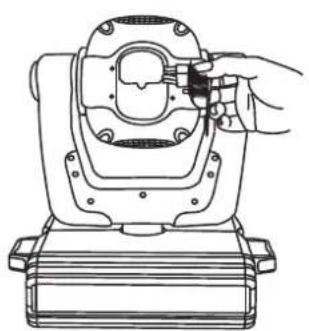
natural_image
Line drawing of a mechanical assembly with a hand adjusting a component (no text or symbols)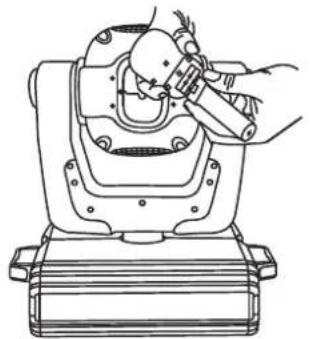
natural_image
Line drawing of a mechanical device with a hand operating the lever (no text or symbols)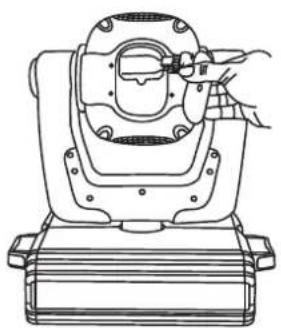
natural_image
Technical line drawing of a mechanical device with a hand adjusting a component (no text or symbols)natural_image
Technical line drawings of two mechanical gear assemblies with no visible text or symbolsnatural_image
Technical line drawing of a mechanical assembly with three identical components mounted on a truss structure (no text or symbols)
SET - Menu principal 2
flowchart
graph TD
    A["SET"] --> B["RPANRTIL"]
    A --> C["RESTLODAVER"]
    A --> D["V-1.0"]
    B --> E["ON-OFF ON-OFF"]
    C --> F["ON-OFF ON-OFF"]
natural_image
Four technical line drawings of a mechanical device with hands operating or adjusting components (no text or symbols present)natural_image
Technical line drawings of two mechanical gear assemblies with no visible text or symbolsnatural_image
Technical line drawing of a mechanical assembly frame with three identical components mounted on a truss structure (no text or symbols)
SET - Menu principal 2
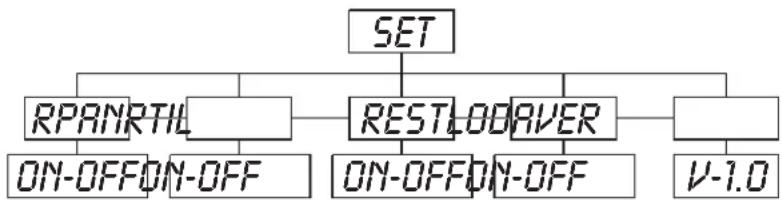
flowchart
graph TD
    A["SET"] --> B["RPANRTIL"]
    A --> C["RESTLODAVER"]
    A --> D["V-1.0"]
    B --> E["ON-OFF/ON-OFF"]
    C --> F["ON-OFF/ON-OFF"]