Congress 100 - Phone DORO - Free user manual and instructions
Find the device manual for free Congress 100 DORO in PDF.



| Product type | Amplified landline telephone with advanced functions |
| Brand | Doro |
| Model | Congress 100 |
| Power supply | Via telephone line (no battery) |
| Compatibility | Analog PSTN lines, PABX compatible |
| Dialing | Voice frequencies (DTMF) and pulse (decadic) |
| Speed dial memory | 10 numbers (0-9), max 21 digits per number |
| Redial function | Yes, dedicated key |
| Mute function | Yes, dedicated key |
| Hold function | Yes, dedicated key with LED |
| Handset amplifier | Yes, for hearing aid (T mode) |
| Headset jack | Yes, at the back of the phone |
| Headset key | Yes, to answer/hang up without handset |
| Handset/headset volume adjustment | Yes, via + and - keys |
| Ringtone | 3 melodies (A, B, C) with 3 volume levels (low, normal, high) + off |
| Ringing indicator light | Yes, LED |
| Message waiting indicator | Yes, switchable (LED+, LED-, HV surge) |
| Recall key | Adjustable timing: 100 ms, 300 ms, 600 ms (default 300 ms) |
| Additional terminal connection | Yes, socket marked TERMINAL |
| Dimensions | Approximately 22 x 18 x 7 cm (estimate) |
| Weight | Approximately 500 g (estimate) |
| Care and cleaning | Clean with a soft, dry cloth. Do not use abrasive or liquid products. |
| Safety | Use in a dry environment. Disconnect during storms. |
| Spare parts and repairability | Contact customer service or an authorized installer. Batteries (not applicable here) are not covered. |
| Warranty | 2 years from date of purchase (invoice or receipt required) |
Frequently Asked Questions - Congress 100 DORO
User questions about Congress 100 DORO
0 question about this device. Answer the ones you know or ask your own.
Ask a new question about this device
Download the instructions for your Phone in PDF format for free! Find your manual Congress 100 - DORO and take your electronic device back in hand. On this page are published all the documents necessary for the use of your device. Congress 100 by DORO.
USER MANUAL Congress 100 DORO
6 Memory button
7 Hold button and LED
8 Headset button and LED
9 Store/Mute button and LED
10 Number keys 0-9, x, #
11 Ring/Message Wait Indicator
François
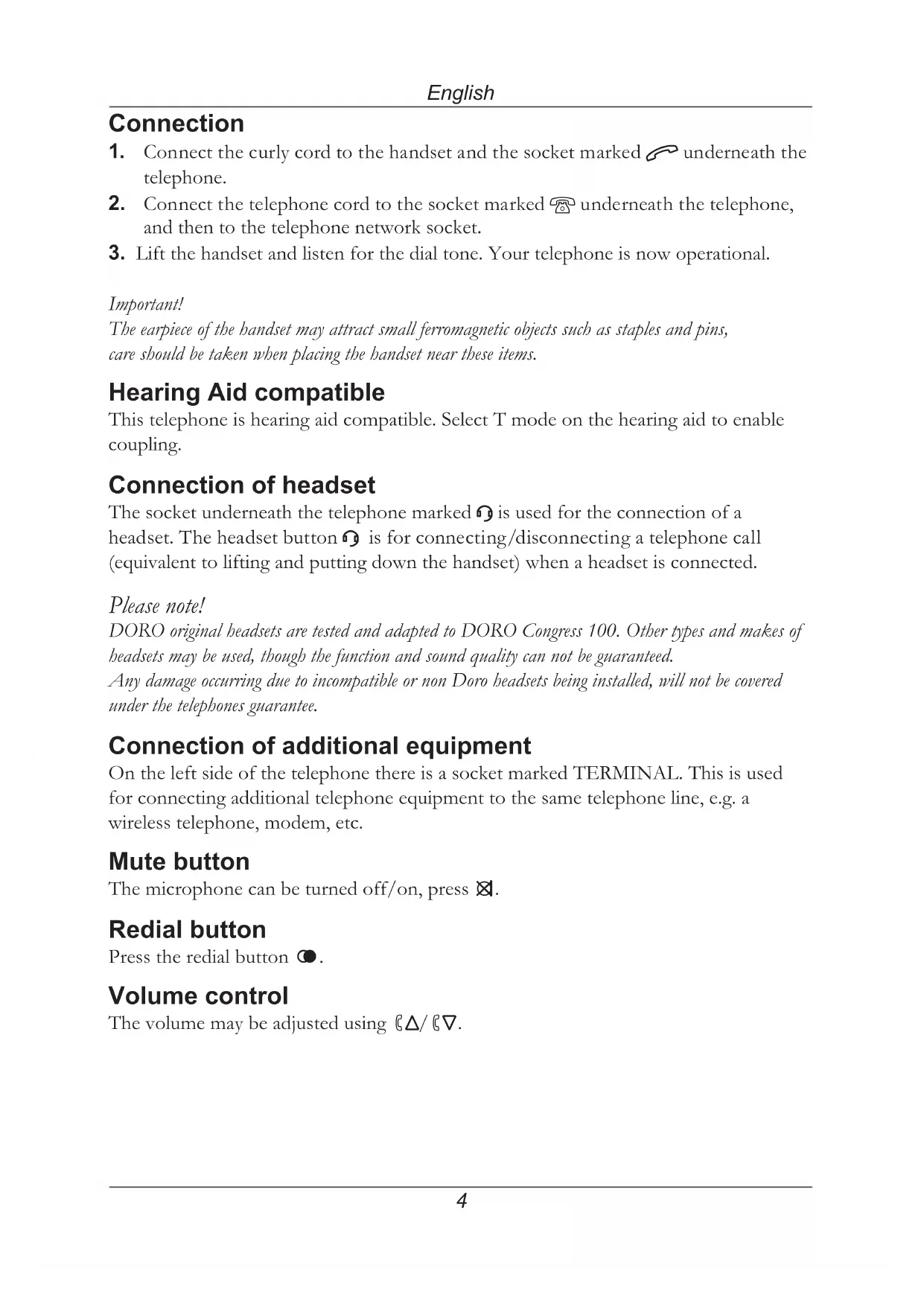
- Connect the curly cord to the handset and the socket marked underneath the telephone.
- Connect the telephone cord to the socket marked underneath the telephone, and then to the telephone network socket.
- Lift the handset and listen for the dial tone. Your telephone is now operational.
Important!
The earpiece of the handset may attract small ferromagnetic objects such as staples and pins, care should be taken when placing the handset near these items.
Hearing Aid compatible
This telephone is hearing aid compatible. Select T mode on the hearing aid to enable coupling.
Connection of headset
The socket underneath the telephone marked is used for the connection of a headset. The headset button is for connecting/disconnecting a telephone call (equivalent to lifting and putting down the handset) when a headset is connected.
Please note!
DORO original headsets are tested and adapted to DORO Congress 100. Other types and makes of headsets may be used, though the function and sound quality can not be guaranteed.
Any damage occurring due to incompatible or non Doro headsets being installed, will not be covered under the telephones guarantee.
Connection of additional equipment
On the left side of the telephone there is a socket marked TERMINAL. This is used for connecting additional telephone equipment to the same telephone line, e.g. a wireless telephone, modem, etc.
Mute button
The microphone can be turned off/on, press .
Redial button
Press the radial button .
Volume control
The volume may be adjusted using /
On Hold
Press the hold button h to place a call on hold. The LED next to the button will illuminate. The call can be resumed by pressing the hold button again or from another telephone connected to the same line.
Memory
This telephone has 10 indirect memories (0-9).
Storing numbers
- Lift the handset, press (ignore the dialling tone).
- Press 0.
- Press desired location 0-9.
- Enter the phone number (max 21 digits).
- Press and replace the handset.
Calling using memory locations
- Lift the receiver (or press the headset button) and wait for a dialling tone.
- Press memory button 0.
- Select memory location by pressing any of the number keys 0-9.
A pause may be inserted into the telephone number by pressing P.
Ringer
- Lift the receiver (ignore the dialling tone) and press the store button and
- Select ring signal by pressing the number keys 0-9 in accordance with the table below.
- Press store button and replace the receiver. The ring signal is now set.
Melody type Key/level
Melody A 1=Low, 2=Normal, 3=High
Melody B. 4=Low, 5=Normal, 6=High
Melody C. 7=Low, 8=Normal, 9=High
Off* 0
- If the key O is selected, the ring signal will be turned off until the next time the receiver is lifted. After that, the ring signal will revert to the previous setting.
Technical information
Some selector switches are located in a compartment on the underside of the telephone.
These switches control technical parameters for connection to PBX equipment.
You remove the lid by pressing a small screwdriver (max. 2,5mm ) or similar in the hole to the right of the lid.
IMPORTANT NOTE: These switches should only be adjusted by qualified personnel.
Recall time
Selection of 100 / 300 / 600ms timed loop break for recall functionality.
The standard setting is 100ms for UK/Australia and 600ms for New Zealand.
Tone/Pulse ( / )
Selection of either dialling method depending on PBX.
Message Waiting Indicator
Some PBX systems have a function called Message Waiting.
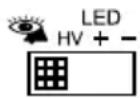
On the under side of the telephone is a switch marked (MW), this is used to select one of the following options: LED+, LED-, Visual Ring Indicator () and high voltage (HV).
By selecting the appropriate option for your system the telephone will indicate if there are any voice mail messages available.
This function operates differently depending on the PBX system in question therefore please contact your system administrator for more information.
If the unit is not connected through a PBX please select ring indication ( ).
Declaration of conformity
Doro declares that the apparatus Doro Congress 100 complies with the essential requirements and other relevant positions of Directive 1999/5/EC, 2002/95/EC. A copy of the Declaration of Conformity can be found at www.doro.com/dofc
Troubleshooting
Check that the telephone cord is undamaged and properly plugged in.
Disconnect any additional equipment that may be connected.
If the problem is resolved the fault is with the other equipment.
Test the equipment on a known working line, if the product works then the fault is with the line.
If you are still experiencing difficulties, contact the Technical helpline.
Guarantee
This product is guaranteed for a period of 12 months from the date of purchase. Proof of purchase is required for any service or support required during the guarantee period. This guarantee shall not apply to a fault caused by an accident or a similar incident or damage, liquid ingress, negligence, abnormal usage, not reasonably maintained or any other circumstances on the purchaser's part. Furthermore, this guarantee shall not apply to a fault caused by a thunderstorm or any other voltage fluctuations. This guarantee does not in any way affect your statutory rights. (As a matter of precaution, we recommend disconnecting the telephone during a thunderstorm.)
UK
If you cannot resolve the fault using the faultfinder section, technical support is available by -email on tech@doro-uk.com
-premium rate telephone number: 0905 895 0854, calls cost 50 pence per minute (prices correct at the time of publication).
You can also contact us in writing (regarding any Spares or Technical query):
Customer Services
Doro UK Ltd
1 High Street
Chalfont St Peter
Buckinghamshire
SL9 9QE.
Further contact details are available on our website: www.doro-uk.com.
Australia and New Zealand
Products permitted for connection to the telephone network are marked with in Australia and INTELEPERMID. These marks indicate the
products comply with the regulations and can be used without concern in the country of purchase.
If you believe this product is malfunctioning, please refer to the relevant section and/or consult the troubleshooting guide in this manual to ensure that you have followed the instructions carefully. As an alternative you can visit our web site for FAQ's or send an e-mail for a prompt reply.
Guarantee
This product is guaranteed for a period of 12 months from the date of purchase. Should you experience difficulties with the product, please contact us for assistance. If the product is then found to be faulty you will be asked to return it directly to us with a copy of the purchase receipt. This guarantee shall not apply to a fault caused by an accident or a similar incident or damage, liquid ingress negligence, abnormal usage, not reasonably maintained or any other circumstances on the purchaser's part. Furthermore, this guarantee shall not apply to a fault caused by a thunderstorm or lightning, excessive or any other voltage fluctuations or faults on the telephone line. (As a matter of precaution, we recommend disconnecting the telephone during a thunderstorm).
This guarantee does not affect your statutory rights.
AUSTRALIA NEW ZEALAND
DORO Australia Pty Ltd Atlas Gentech (NZ) Limited
PO Box 6760 Private Bag 14927
Baulkham Hills BC NSW 2153 Panmure
Australia Auckland
New Zealand
Consumer Support Consumer Support
Ph: Ph: 1300 885 023 Ph: 0900-500-25 (Toll Call)
Fax: (02) 8853-8489 Fax: (09) 574-2722
Email: support@doro.com.au Email: support@atlasgentech.co.nz
Web site: www.doro.com.au
REN (RN for New Zealand)
The REN (Ringer Equivalence Number) or (RN) is of significance only if you wish to connect more than 1 telephone to your telephone line. A standard telephone line has a maximum REN capacity of 3 (RN of 5). It is possible to connect 3 devices with a REN of 1 (RN of 1) with no degradation to the product's performance. Exceeding this limit may cause the volume of the ringer in any phone to decrease or not ring at all.
ALLPRODUCTS
The grant of a Telepermit for any item of terminal equipment indicates only that Telecom has accepted that the item complies with the minimum conditions for connection to its network. It indicates no endorsement of the product by Telecom, nor does it provide any sort of warranty. Above all, it provides no assurance that any item will work correctly in all respects with another item of Tele permitted equipment of a different make or model, nor does it imply that any product is compatible with all of Telecom's network services.
This equipment shall not be set to make automatic calls to the Telecom "111" Emergency Service.
This equipment may not provide for the effective hand-over of a call to another device connected to the same line.
This equipment should not be used under any circumstances that may constitute a nuisance to other Telecom Customers.
Raccordement
ODCINEK GWARANCYJNY NR 1
pieczecsklepu
ODCINEK GWARANCYJNY NR 2
pieczecsklepu
doro
ODCINEK GWARANCYJNY NR 3
doro
ODCINEK GWARANCYJNY NR 4
doro
ODCINEK GWARANCYJNY NR 5
pieczecsklepu