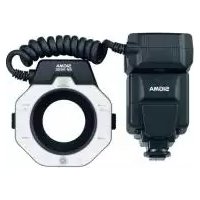
EM140 DG Macro Flash NikoniTTL - Flash SIGMA - Free user manual and instructions
Find the device manual for free EM140 DG Macro Flash NikoniTTL SIGMA in PDF.



| Brand | Sigma |
| Model | EM140 DG Macro Flash NikoniTTL |
| Product type | Macro electronic flash with TTL control |
| Guide number (100 ISO/m) | 14 |
| Power supply | 4 AA alkaline, Ni-Cd or Ni-MH batteries |
| Recycling time | Approx. 4 s (alkaline), 3 s (Ni-Cd/Ni-MH) |
| Auto power off | Yes (after approx. 90 s) |
| Color temperature | Daylight (color films) |
| Weight | 430 g |
| Dimensions (control module) | 76.7 x 136.2 x 82.4 mm |
| Dimensions (flash module) | 126.6 x 128.8 x 30.5 mm |
| Flash modes | TTL/BL, TTL, Manual (M), Stroboscopic (Multi), Wireless remote flash |
| AF assist lamp | Yes, activated by LAMP button (20 s) |
| Flash exposure compensation | From +1.0 to -3.0 EV in 1/3 EV steps |
| Rear curtain sync | Yes (depending on camera) |
| FV lock | Yes (compatible with D70, F6) |
| Modeling flash | Yes |
| Number of reflectors | 2 (left and right, can be used separately) |
| Included macro adapters | 55 mm and 58 mm diameter |
| Optional macro adapters | 52 mm, 62 mm, 72 mm, 77 mm diameter |
| Camera compatibility | Nikon SLR digital and film cameras with hot shoe |
| Maintenance and cleaning | Soft, damp cloth; no solvents |
| Safety | Do not disassemble, avoid contact with eyes, do not use in explosive atmosphere |
| CE warranty | Compliant with European standards |
Frequently Asked Questions - EM140 DG Macro Flash NikoniTTL SIGMA
User questions about EM140 DG Macro Flash NikoniTTL SIGMA
0 question about this device. Answer the ones you know or ask your own.
Ask a new question about this device
Download the instructions for your Flash in PDF format for free! Find your manual EM140 DG Macro Flash NikoniTTL - SIGMA and take your electronic device back in hand. On this page are published all the documents necessary for the use of your device. EM140 DG Macro Flash NikoniTTL by SIGMA.
USER MANUAL EM140 DG Macro Flash NikoniTTL SIGMA
日本語
オートパワーオフ機構について
発光部の取り付け方
Thank you for purchasing the Sigma Electronic FlashMacro EM-140 DG. The advanced features of this flashgun allow you to enjoy AF Macro photography. Depending on the camera model, functions and operation may vary. Please read this instruction booklet carefully. To add to your enjoyment of photography, the flash has a variety of features. To make the most of all these features, and to get the maximum performance and enjoyment from your flash, please read this instruction booklet, together with your camera's instruction manual, before using the flash, and keep it handy for future reference. (This Flashgun is exclusive to Nikon SLR cameras)
PRECAUTIONS
In order to avoid causing any damage or injury, please read this instruction manual very careful paying attention to the cautionary signs below, before using the flash.
Please take special note of the two cautionary signs below.

Warning !!
Using the product disregarding this warning sign might cause serious injury or other dangerous results.

Caution!!
Using the product disregarding this caution sign might cause injury or damage.

Symbol denotes the important points, where warning and caution are required.
Symbol contains information regarding the actions that must be avoided.

Warning !!

This flash contains high voltage circuits. To avoid electric shock or burns, do not attempt to disassemble the flash. If the outside shell of the unit is broken or cracked, do not touch the mechanism inside.

Do not fire the flash close to eyes. Otherwise the bright light could damage the eyes. Keep at least 1m/3feet distance between face and the flash unit, when taking a picture with flash.

Do not touch the synchro terminal of your camera when the flash is attached to hot shoe. High voltage circuitry could cause electric shock.

Never use your camera in an environment where flammable, burnable, gas, liquids or chemicals etc, exist. Otherwise, it might cause fire or explosion.

Caution !!

Do not use this flash unit on any camera other than the Nikon NA series cameras; otherwise the flash may damage the circuitry of these cameras.

This flash unit is not waterproof. When using the flash and camera in the rain or snow or near water, keep it from getting wet. It is often impractical to repair internal electrical components damaged by water.

Never subject the flash and camera to shock, dust, high temperature or humidity. These factors might cause fire or malfunctioning of your equipment.

When the flash is subjected to sudden temperature change, as when the flash unit is brought from a cold exterior to warm interior, condensation might form inside. In such a case, place your equipment in a sealed plastic bag before such a change, and do not use the flash unit, until it reaches room temperature.

Do not store your flash in a drawer or cupboard etc., containing naphthalene, camphor or other insecticides. These chemicals will have negative effects on the flash unit.

Do not use a thinner, Benzene or other cleaning agents to remove dirt or finger prints from tl component. Clean with a soft, moistened cloth.

For extended storage, choose a cool dry place, preferably with good ventilation. It is recommended that the flash be charged and fired several times a month, to maintain proper capacitor functioning.
Flash Unit
1.Left Flashtube
-
Right Flashtube
-
Auxiliary Light
-
Release Tab
-
MacroFlash Adapter
Controller Unit
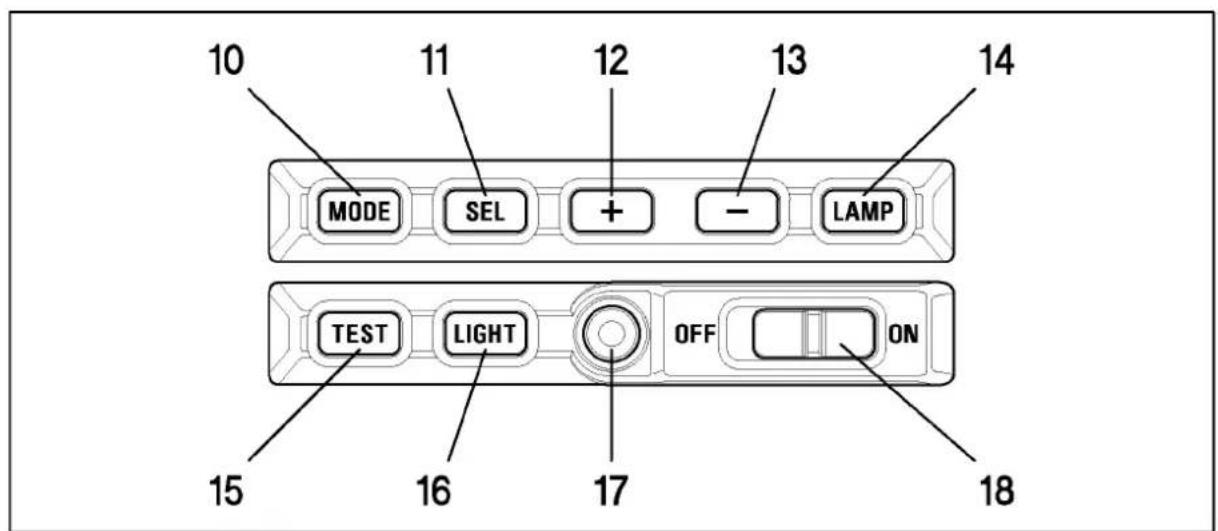
6.LCD Panel 7.Battery Cover 8.Shoe Ring 9.Shoe 10.MODE Button 11.SEL SELECT Button
12.+ Increment Button 13.- Decrement Button 14.LAMP Button 15.TEST Button
- LIGHT Button 17. Ready Light 18. Power Switch
LENS USABILITY
Although this Flash is designed specifically for Macro lenses (MACRO 50mm F2.8 EX DG, MACRO 105mm F2.8 EX DG, etc.) it is also possible to use it with other lens types, however please pay attention to the following points.
◆ Front part or other parts of some lenses rotate while focusing, and also attaching the ring flash to such lenses would affect focusing mechanism of your camera, possibly resulting in malfunction. Please use Manual Focus only with such lenses.
◆∅55mm, and ∅58mm filter MacroFlash Adapters are bundled with your flashgun. If you want to attach your flashgun to a lens which has a different filter size then please purchase separately a MacroFlash Adapter. (Only ∅52mm, ∅62mm, ∅72mm, ∅77mm macroflash adapters are available).
◆ Depending on the lens' focal length or the distance to subject or another reason, it is possible that your image might be affected by vignetting. Please take some test shoots first to be sure that your setting is not causing vignetting.
CAMERA MODELS AND FUNCTIONS
This flash can be used with cameras, which are given below.
D2 Series, D70, D1 Series, D100, F6, F5, F4 Series, F3 Series (*), F100, F90X/N90S Series, F90/N90 Series, F80 Series, F70D/N70, U/F65/N65, F60D/N60, F50D/N50, F-801S/N8008S, F-801/N8008, F601M, F-601/N6006, F501/N2020, F401X, F401S/N4004S, F-401/N4004, F-301, N2000, FA, FE10, FE-2, FG, FM10, New FM2, Pronea 600i
(*) It is necessary to use adapter for connection.
This instruction book is used for the following lens types. (Please check your lens.)
| With Built-in CPU Nikon Lenses | D Type Lenses, G Type Lenses, IX Nikor Lenses, Except D type AF lens (does not include F3AF), Ai-P type lens |
| Without Built-in CPU Nikon Lenses | Ai-S, Ai, Series E lens |
ABOUT THE BATTERY
This flash unit uses four “AA” type Alkaline dry cell batteries or Ni-Cad, Ni-MH, rechargeable batteries. Manganese batteries can also be used but as they have a shorter life than Alkaline batteries, we do not recommend using them. Please replace batteries if it takes more than 30 seconds to light the Ready Lamp.
◆ To assure proper electrical contact, clean the battery terminals before installing the batteries
◆ NiCad batteries do not have standardized contacts. If you use NiCad batteries, please confirm that the battery contacts touch the battery compartment properly.
◆ To prevent battery explosion, leakage or overheating, use four new AA batteries of the same type and brand. Do not mix the type or new and used batteries.
Do not disassemble or short-circuit batteries, or expose them fire or water; they may explode. Also, do not recharge the batteries other than Ni-Cd rechargeable batteries.
When the flash will not be used for an extended period of time, remove the batteries from the flash, to avoid the possibility of damage from leakage.
◆ Battery performance decreases at low temperatures. Keep batteries insulated when using the flash in cold weather.
◆ As with any flash, it is recommended you carry spare batteries when on a long trip, or when photographing outdoors in cold weather.
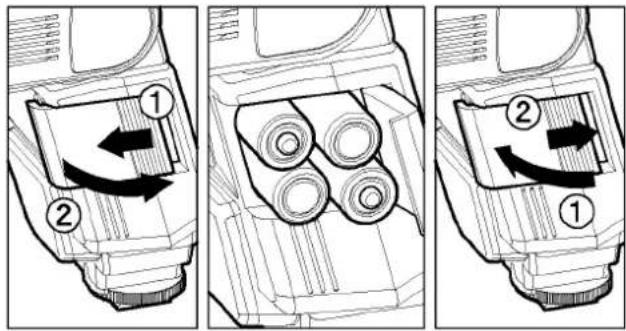
- Be sure to set the Power Switch to the off position then slide, the battery cover in the direction of the arrow to open.
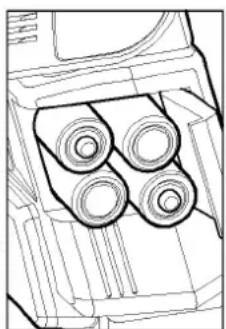
- Insert four AA size batteries into the battery chamber. Be sure the + and - ends of the batteries are aligned according to the diagram in the chamber.
- Close the cover.
- Slide the Power Switch to the ON position. After few seconds, the Ready Lamp will light, indicating that the flash unit can be fired.
- Please press the "Test Button" to be sure that the flash is working properly.
AUTO POWER OFF
To conserve battery power, the flash unit automatically turns itself off when the flash is not used within approximately 90 seconds. To turn the flash on again, depress the "TEST" button or the camera shutter button, halfway. Please note that, "Auto Power Off" mechanism does not work with wireless TTL flash mode, normal slave flash, and designated slave flash modes.
ERROR INDICATION
If the battery power is not sufficient or there is electric information error between the camera and flash unit, the "Flash Coverage Angle" will blink on the LCD panel. When this occurs, turn the power switch off and on. If it still blinks, after this procedure, check the battery power.
ATTACHING THE CONTROLLER UNIT
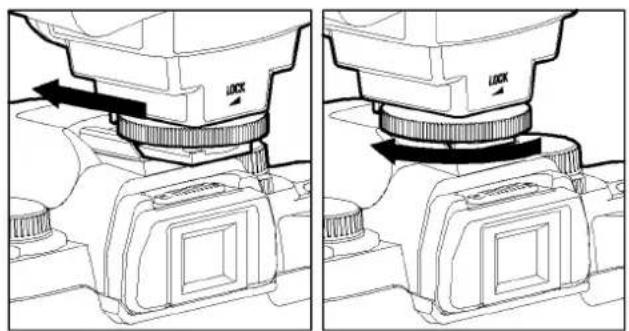
Be sure turn off the Power Switch. Then insert the Shoe Base into the hot shoe on the camera and turn the Shoe Locking Ring until it is tight.
When you attach or remove the flash, grasp the bottom of the flash to prevent damage to the shoe foot and camera's hot shoe.
◆ If the camera's built-in flash is set in up position, please close it before you attach the flash unit.
◆ To remove the flash, rotate the shoe-locking ring in the opposite direction of ◀LOCK mark, until it stops.
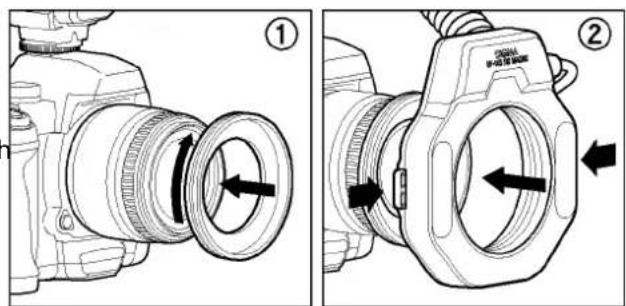
ATTACHING THE FLASH UNIT
- Attach the MacroFlash adapter to the lens' filter tread.
- While pressing the left and right release tabs on both sides of the holder, place the flash unit over the adapter, then release both tabs.
◆ You can adjust the position by rotating the flash unit.
◆ Press the release tab when you detach the unit from the lens.
LCD PANEL ILLUMINATION
When you press the LIGHT button, the LCD panel will illuminate for about 8 seconds. The illumination stays on longer than 8sec, if you press the LIGHT button once again.
AUXILIARY LIGHT
If LAMP button on the Flash Units is pushed, the auxiliary light will emit for 20 seconds. In a dark place, it will be easy to focus by using the auxiliary light. This function is very convenient when composing pictures where auto focus does not operate well or where focus adjustment in manual is difficult.
◆ If the shutter button is depressed it will stop working.
TTL mode can provide correct exposure for subject, and will control the amount of flash.
◆ Please refer to <
◆ TTL function does not work, in the case of Cameras F3 series, FM10, New FM2, FE10.
-
Set the exposure mode of the camera. (However, depending on the camera, exposure setting may vary). Please refer to Camera's Instruction manual.
-
Slide the Flash's power switch to the ON position.
- Select TTL/BL or TTL by pressing the MODE button.
When you use Digital SLR Camera, please do not fail to select TTL/BL. CLS compatible models are controlled by i-TTL exposure system. CLS incompatible models are controlled by D-TTL exposure system. In both cases, the character "d" (digital) will be displayed on the LCD panel.
◆ In the case of cameras; F6, F5, F4 series, F100, F90X/F90/F80 (N90S/N90/N80) series, F70D/N70, F810S/N8008S, F801/ N8008S and Pronea 600i. TTL/BL or TTL can be selected. However, Nikon cameras, other than those on the above list can select only TTL.
- Focus on the subject.
- Confirm the Ready Light and press the shutter release button.
When the camera does not receive the appropriate exposure for the subject, the TTL/BL or TTL mark on the LCD panel will appear for 5 seconds after shooting, which shows that the flash power is not enough for this situation. Please re-take a closer distance or use a wider aperture.
When the flash is fully charged, the ready light in the camera's viewfinder will appear. If it does not appear, shutter of the camera may operate at a slow shutter speed without triggering the flash.
<
| Camera | Lens Type | Exp. Mode | Metering | TTL System | Note |
| F6, F5F100F90X/N90ser.F80/N80ser.F70D/N70 | D Type | All Modes | All Modes | 3-D Multi-Sensor BL | Can switch to TTL Mode. With F5, F100, F80, series Cameras spot metering system is always TTL. |
| AF lens other than D type | All Modes | All Modes | Multi-Sensor BL | ||
| Without Built in CPU | A/M Modes | Center-weighted, Spot Metering | Center Weighted / Spot Fill-Flash | ||
| F4 SeriesF-801S/N8008SF-801/N8008F65/N65Pronea 600i | With Built-in CPU | All Modes | Matrix Pattern | TTL BL | Can switch to TTL Mode. TTL BL can work with only F4 series, AF F3, Ai-S, Ai, Series E lens. Spot metering system of F4 is always TTL. Pronea 600i will be TTL, when exposure mode is “M”. Center Weighted BL cannot work. |
| Center-weighted, Spot Metering | Center Weighted / Spot Fill-Flash | ||||
| Without Built-in CPU | A/M Modes | Center-weighted, Spot Metering | Center Weighted/Spot Fill-Flash | ||
| F601/N6006F-601M | With Built-in CPU | All Modes | Matrix Pattern | TTL BL | Spot Metering cannot use with F-601M |
| Center-weighted, Spot Metering | Center Weighted / Spot Fill-Flash | ||||
| Without Built-in CPU | A/M Modes | Center-weighted, Spot Metering | Center Weighted / Spot Fill-Flash | ||
| F60D/N60F50D/N50F-401X/4004S | With Built-in CPU | P/S A/M | TTL BL | If exposure mode is “M”, it will be Center Weighted/Spot Fill-Flash | |
| Without Built-in CPU | M | Center Weighted / Spot Fill-Flash | |||
| F501/N2020F301/N2000 | Built-in CPU lens,Ai-S, Ai, Series E, AF F3 Lens | P | TTL Programmed | ||
| A/M | TTL | ||||
| Except above lenses | A/M | TTL | |||
| F401S/N4004SF401/N4004 | With Built-in CPU | P/S | TTL Programmed | ||
| A/M | TTL | ||||
| Without Built-in CPU | M | TTL | |||
| FA, FE2FG, F3 | With Built-in CPU; Without Built-in CPU | A/M | TTL |
When you use Digital SLR cameras, functions will vary depending on the lens type and combinations of exposure modes, same as F5 and F100 group. (However, all TTL exposure functions will be the D-TTL (i-TTL) system).
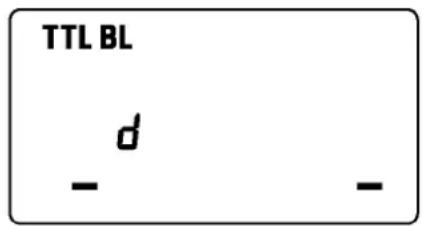
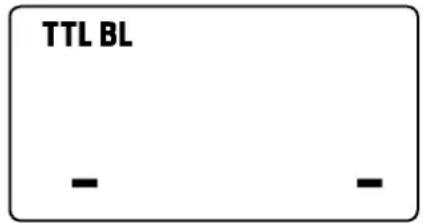
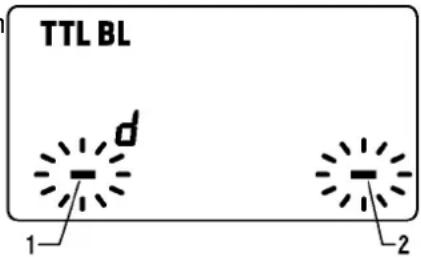
It is possible to give the three dimensional effect to your pictures by firing only one side of the flash.
-
In the TTL/BL(TTL) mode, press the SEL button to make the Flash Unit display blink.
-
By pressing the + button, the left flashtube will fire, and by pressing the - button, the right flashtube will fire. (Only the firing side will blink on the flash unit display)
-
Press the SEL button several times to stop the blinking.
◆ After shooting please press \$EL button and then the + or - button. By doing this flash unit will be set to default mode, display will show both sides.
LIMITS OF CONTINUOUS SHOOTING
To prevent overheating of the flash's circuitry, please do not use your Flash unit for at least 10 minutes after using the number of flash exposures, shown in the below table have been made in quick succession.
| Mode | Number of Flash Exposures |
| TTL, M(1/1,1/2) | 15 Continuous Flash Shots |
| M(1/4, 1/8) | 20 Continuous Flash Shots |
| M(1/16-1/32) | 40 Continuous Flash Shots |
| Multi | 10 Cycle |
Manual flash provides adjustment of desired flash intensity (flash output level).
◆ The shooting in Manual Mode requires a very advanced technique. We recommend you use the Auto mode. When using Manual Flash photography, first take some test shots. It will be beneficial to use a flash meter device for determining the exposure.
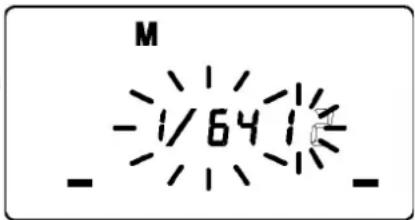
◆ Flash intensity of left and right tubes can be set between 1/1\~1/64. It is also possible to set without firing one of them.
-
Set the camera's exposure mode to M.
-
Press the MODE button on the flash unit to select M.
-
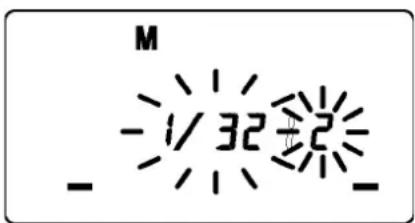
Press the SEL button. (The flash intensity display of the left flashtube blinks).
-
Press the + or - button to set the left flashtube output level. (If " -- " is displayed, the left flashtube will not fire).
-
Press the SEL button. (The flash intensity display of right flashtube will blink).
-
Press the + or - button to set the right flashtube output level. (If “--” is displayed, the right flashtube will not fire).
-
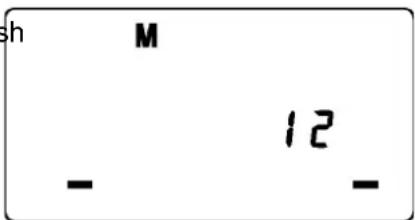
Press the SEL button to stop the indicator blinking.
◆ If the flash output level values of both tubes are the same, the flash output level will be displayed. When the different flash intensity is set, the flash output level will not be displayed on the LCD.
◆ Regarding Guide Number, please refer to the [Table.1] on the last page.
◆ You can calculate the correct exposure by using the following formula: Guide Number “GN” / Flash to Subject Distance = F-stop
FV LOCK (D70,F6 only)
“FV” lock mode allows you to choose exposure for the part of the viewfinder, and lock it in, before taking the picture.
◆ You cannot set this function on the flashgun directly. For details please refer to your camera's instruction manual.
You can compensate the exposure by changing the flash power level.
Intentional exposure compensation of the EM-140 DG NA-iTTL flash's power level
◆ Dedicated exclusively to Digital SLR Cameras, F6, F5, F4 series, F100, F90/N90, F90X/N90S, F80/F80 series, F70D, U/F65/N65, F801S/N800S, F801/N8008, F601M, F601/N6006 and Pronea 600i only.
◆Cameras with EV compensation capability allow you to make exposure compensation on either the EM-140 DG NA-iTTL or the camera (or both). If you use both controls, exposure is modified by the sum total of both exposure compensation values, and will affect the background exposure.
◆ If your camera is an F601 / N6006 series camera, set the exposure compensation by operating the camera's synchronization mode.
- It can be set at 1/3 stop increments from +1.0 stops to -3.0 stops.
- Press the MODE button to select the TTL/BL (TTL) mode.
- Press the SEL button to make the compensation amount indicator 37 blink.
- Press the + button and - button to set the compensation amount.
- Press the SEL button to make the compensation amount indicator stop blinking.
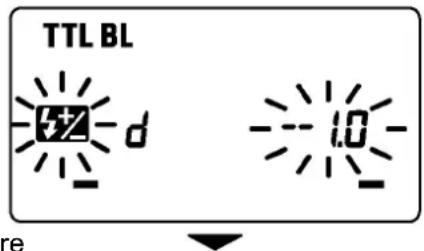
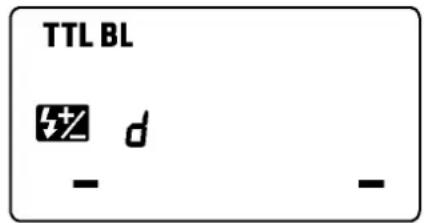
Intentional exposure compensation of the EM-140 DG NA-iTTL flash's power level and background
◆This function can be used except F3 series, FM10, New FM2 and FE10.
Use your camera's exposure compensation control button or dial to make exposure compensation to both foreground and background. (Please refer to your camera's instruction)
Exposure compensation on the M mode
On the M mode, you can change the aperture value on the camera, or change the flash power level, after setting the exposure compensation.
REAR-CURTAIN SYNCHRONIZATION
When you photograph a moving subject with slow synchronization, usually the furrow of the subject will be exposed in front of the subject. The ordinary flash light will fire when the first shutter curtain is fully opened, thus the subject will be exposed from the time flash is fired to the time the shutter is closed (This is front curtain synchronization). When you use rear curtain synchronization, the flash will fire just before the rear curtain begins to close, and the subject will be exposed by ambient light from the time the shutter opens until the flash fires. As a result, the furrow of the subject will therefore be recorded behind the subject, creating a more natural effect.
◆ It can be used with cameras providing rear-curtain sync. only.
◆ You cannot set this function on the flashgun directly. For details please refer to your camera's instruction manual.
◆ The LCD panel on the flash will indicate ▶ mark, when the “Second-curtain synchronization” function is set.
MODELING FLASH
If you use the Modeling flash, you can check the lighting and shadow effects, before you take the picture.
- Press the MODE button and select the mode.
- Press the + button or - button several times to make the MODEL icon on the LCD panel appear.
- Confirm that the flash is charged, then press the TEST button to fire.
MULTI FLASH MODE
While the shutter is open, the flash will fire repeatedly. By doing so a series of images of the subject will be exposed in one frame. A dark background with a bright subject shows more effectively in this mode. It is possible to set the firing frequency between 1Hz and 100Hz. Up to 90 flashes can be fired continuously. The maximum number of flashes varies, depending on the flash guide number and firing frequency settings. (Please refer to table3 on the last page).
- Set the camera's exposure mode to M mode, and set the F number
-
Press the MODE button until the Multi-flash mode appears
-
Press the SEL button until the flash firing frequency starts to blink.
- Press the + or - button to set the desired flash frequency value.
- After pressing the SEL button again, the flash power level will blink.
- Press the + or - button to set the desired power level.
- Press the SEL button again, the number of flashes will blink.
- Press the + or - button to set the desired number of flashes.
- Press the SEL button again, the display will stop blinking.
- When the ready light of the flash is illuminated, the unit is ready to use.
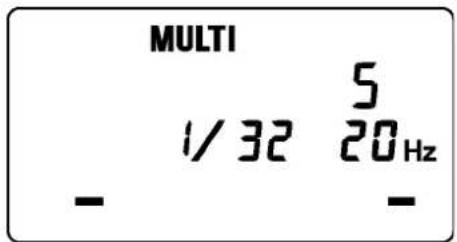
Note: Please set the shutter speed longer than; Number of Flashes you want ÷ Firing Frequency
WIRELESS FLASH (D70, F6 only)
It is possible to use Wireless Flash photography if this flash unit is used as the master, and EF-500 DG SUPER NA-iTTL as the slave light source.
◆ In this instruction, we call a flash unit, which is attached to the camera body "Master unit", and we call a flash unit at a remote position "Slave unit".
◆ Set the distance between master and slave units less than 5 meters.
◆Concerning the slave flash settings, please refer to slave flash's instruction manual (wireless photography section).
WIRELESS i-ETTL FLASH
In this Wireless i-TTL Autoflash function, the camera automatically calculates the correct exposure.
Slave Unit Setting
- Follow the slave unit's instruction manual and set the group number to 3.
- Place the Slave Unit at the desired position.
Master Unit Setting - Press the MODE button to select the mark.
- After you confirm that both master and slave units are fully charged you can take the picture.
◆ Wireless i-TTL Auto Flash photography, FV lock and rear-curtain synchronization can be used together. After setting Wireless photography, please operate it according to each feature. Operation of the slave unit is not necessary.
![TTL [1] - -](/content/2026/02/367857/images/313b5fda4483634dab4d62da840a7eeba8da9296f3e936c23e7feb2bf8e5d44a.jpg)
Wireless Manual Flash
You can manually set the wireless manual flash with the master unit. To determine the proper flash exposure, use a hand held flash meter.
Slave Unit's Setting
- Follow the slave unit's instruction manual and set the group number to 3.
- Place the Slave Unit at the desired position.
Master Unit's Setting
-
Press the MODE button to select the mark.
-
Press and hold the SEL button for more than 2 seconds to make the mode indicator blink.
-
Press the MODE button on the flash unit to select M.
-
Press the SEL button. The flash mode will be displayed.
-
Press the SEL button once more and follow the procedure of Manual Flash, to set up each flash output amount.
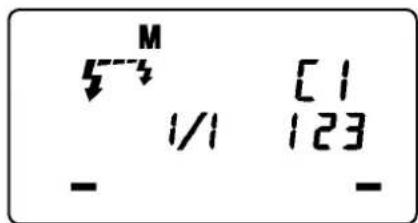
◆ Changing the mode cancels the setting.
Setting the Slave unit's group number 1 will control leftflash tube (1) and group number 2 will control rightflash tube (2).
Slave Unit's Setting
- Follow the slave unit's instruction manual and set the group number to 3.
- Place the Slave Unit at the desired position.
MasterUnit's Setting
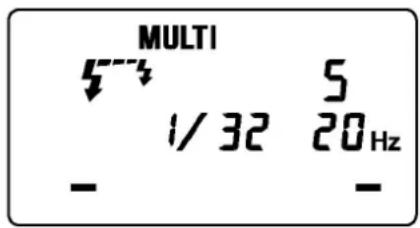
- Press the MODE button to select the 5 mark.
- Press and hold the SEL button for longer than 2 seconds to make the mode indicator blink.
- Press the MODE button on the flash unit to select MULTI.
- Press the SEL button to stop the mode indicator blinking.
- Press SEL button once again, and follow the procedure of Multi Flash to set up each flash output amount.
◆ Changing the mode cancels the setting.
Channel Setting
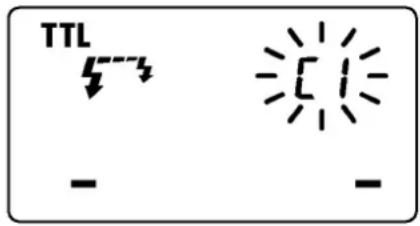
In case other photographers are using Wireless Flash mode near you, your flash may be connected with anther person's flash unit and therefore may fire. In these circumstances, set a different channel for your flash from that of the other person's flash unit.
- In any of the Wireless modes, press the SEL button several times to make the channel indicator blink.
- Press the + or - button to set the channel number. (C1 \~ C4)
- Press the SEL button to make the indicator stop blinking.
- Follow the slave unit's instruction manual and set the channel number the same as the master unit.
SPECIFICATIONS
Guide Number : 14 ISO 100/m (when the flash is fired at full power)
Power Source : AA Alkaline Battery or AA NiCd Battery or AA Ni-Mh Battery x 4pcs
Recycling Time : about 6.0 sec. (Alkaline batteries)
: about 4.0 sec. (Ni-Cd, Ni-MH Nickel-Metal Hydride)
Angle of Coverage : Vertical / Horizontal 80 degrees
Weight : 430g (without batteries)
Dimensions (Controller) : 76.7mm×136.2mm×82.4mm
Dimensions (Flash Unit) : 126.6mm×128.8mm×30.5mm
DEUTSCH
Beleuchtung der LCD
F-601/N6006, F501/N2020, F401X, F401S/N4004S, F-401/N4004, F-301, N2000, FA, FE10, FE-2, FG, FM10, New FM2, Pronea 600I
MISE EN VEILLE AUTOMATIQUE
natural_image
Technical line drawing of a mechanical assembly with two views showing a lock mechanism (no text or symbols present)MISE EN PLACE DU MODULE FLASH
RETRO ECLAIRAGE DE L'ECRAN LCD
FLASH SANS FIL MANUEL
natural_image
Technical line drawing of a mechanical component with three circular features (no text or symbols)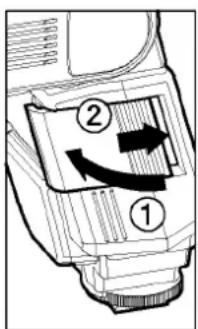
FLASH MANUAL INALÁMBRICO
natural_image
Technical line drawing of a mechanical assembly with two views showing internal components (no text or symbols)ILLUMINAZIONE DEL DISPLAY LCD
MODALITÀ WIRELESS i-TTL
FLASH WIRELESS IN MANUALE
自動關閉電源
手動調控閃光操作無線遙控閃光
閣下可按個人意欲設定主控燈作無線控遥閃光。可利用手持閃燈測光錶以確定恰當的閃燈曝光值
設定從屬閃燈
The CE Mark is a Directive conformity mark of the European Community (EC).