USER MANUAL Classe 10 RANCILIO
natural_image
Line drawing of a Rancilo coffee machine with multiple leavers and control panel (no text or symbols)
CLASSE 10 USB / S / RE
First of all, thank you for choosing RANCILIO
We are confident that the product you have purchased will meet all your expectations just as all our other products are designed to do. The product that you are about to use is the outcome of painstaking research and tests.
Rancilio guarantees the equipment we have supplied to you, is the most functional, safe and satisfactory of its kind to be found on the market, in regards to both its design and its efficiency.
This booklet of instructions, which outlines the correct use and maintenance will help you to get the best possible service out of your machine. We trust you will find our explanations clear and we may continue, in the future, to count you among our esteemed customers.
ES
Treatment of waste from electric/electronic equipment
Disposition of the product in accordance with current regulations concerning differentiated waste disposal in dedicated waste disposal areas.
Do not treat as simple urban waste.
For any information please contact the manufacturer at the address specified in the user manual.

The product complies with the requirements of the new directives introduced for the environmental safeguard and must be disposed of appropriately at the end of its life cycle.
MOD. RE
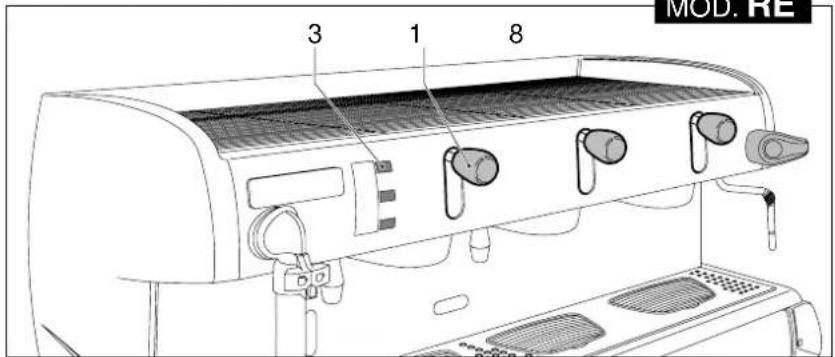
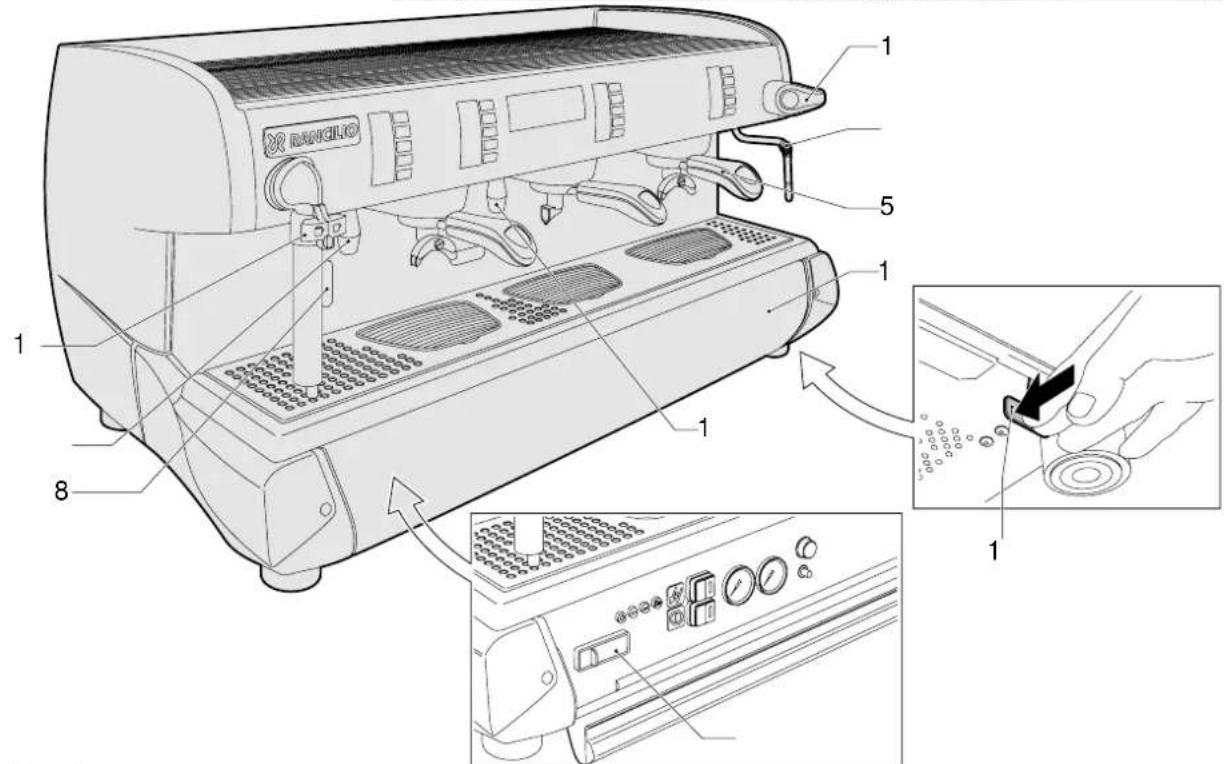
Fig. 3
natural_image
Illustration of hands assembling a bolt and wrench with a wrench, no text or symbols present
natural_image
Illustration of a hand pouring liquid into a mug inside a microwave oven, with arrows indicating rotation (no text or symbols)
natural_image
Illustration of a hand holding a tool interacting with a mechanical component (no text or symbols visible)
IT ITALIANO 12-29
FR FRANCAIS 30-47
DE DEUTSCH 48-65
EN ENGLISH 66-83
ES ESPAÑOL 84-101
PT PORTUGUÊS 102-119
SCHEMI ELETTRICI
SCHEMAS ELECTRIQUES
SCHALTPLÄNE
WIRING DIAGRAMS
ESQUEMAS ELECTRICOS
ESQUEMAS ELÉTRICOS
SCHEMI IDRAULICI
SCHÉMAS HYDRAULIQUES
HYDRAULIKPLÄNE
HYDRAULIC DIAGRAMS
ESQUEMAS HIDRÁULICOS
ESQUEMAS HIDRÁULICOS

11.2.2. Pulizia iSteam 29
11.2.2. Pulizia iSteam
other
| Category | Value |
|---|---|
| HOT | 100 |
| G1 | 100 |
| G2 | 100 |
| G3 | 100 |
| Δ1 | 200 |
| Δ2 | 200 |
| Δ3 | 200 |
| Δ2 | 150 |
| Δ3 | 150 |
| Δ3 | 150 |
| Δ2 | 250 |
| Δ3 | 250 |
| Δ2 | 250 |
| Δ3 | 250 |
The values in the table are explicitly labeled as '4-TEA' above each row. The values in the table below are explicitly labeled as 'G1', 'G2', and 'G3'.
flowchart
graph TD
    A["SELECTION LANGUE"] --> B["RESET REGENERATION DES RESINES"]
    A --> C["BUZZER"]
    A --> D["MONTRE"]
    B --> E["+"]
    C --> F["+"]
    D --> G["+"]
    E --> H["ITALIANO"]
    F --> I["ENGLISH"]
    G --> J["ESPAÑOL"]
    H --> K["FRANCAIS"]
    I --> L["DEUTSCH"]
    J --> M["PORTUGUES"]
    K --> N["+"]
    L --> O["+"]
    M --> P["+"]
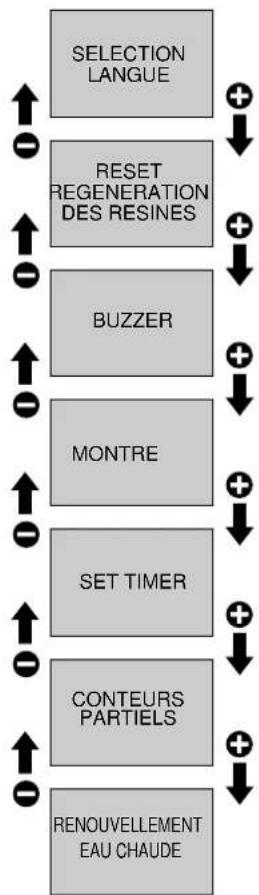
flowchart
graph TD
    A["SELECTION LANGUE"] --> B["RESET REGENERATION DES RESINES"]
    B --> C["BUZZER"]
    C --> D["MONTRE"]
    D --> E["SET TIMER"]
    E --> F["CONTEURS PARTIELS"]
    F --> G["RENOUVELLEMENT EAU CHAUBE"]
    G --> H["↑"]
    H --> I["←"]
    I --> J["↑"]
    J --> K["←"]
    K --> L["↑"]
    L --> M["←"]
    M --> N["↑"]
    N --> O["←"]
    O --> P["↑"]
    P --> Q["←"]
    Q --> R["↑"]
    R --> S["←"]
    S --> T["↑"]
    T --> U["←"]
    U --> V["↑"]
    V --> W["←"]
    W --> X["↑"]
    X --> Y["←"]
    Y --> Z["↑"]
    Z --> AA["←"]
    AA --> AB["↑"]
    AB --> AC["←"]
    AC --> AD["↑"]
    AD --> AE["←"]
    AE --> AF["↑"]
    AF --> AG["←"]
    AG --> AH["↑"]
    AH --> AI["←"]
    AI --> AJ["↑"]
    AJ --> AK["←"]
    AK --> AL["↑"]
    AL --> AM["←"]
    AM --> AN["↑"]
    AN --> AO["←"]
    AO --> AP["↑"]
    AP --> AQ["←"]
    AQ --> AR["↑"]
    AR --> AS["←"]
    AS --> AT["↑"]
    AT --> AU["←"]
    AU --> AV["↑"]
    AV --> AW["←"]
    AW --> AX["↑"]
    AX --> AY["←"]
    AY --> AZ["↑"]
    AZ --> BA["←"]
    BA --> BB["↑"]
    BB --> BC["←"]
    BC --> BD["↑"]
    BD --> BE["←"]
    BE --> BF["↑"]
    BF --> BG["←"]
    BG --> BH["↑"]
    BH --> BI["←"]
    BI --> BJ["↑"]
    BJ --> BK["←"]
    BK --> BL["↑"]
    BL --> BM["←"]
    BM --> BN["↑"]
    BN --> BO["←"]
    BO --> BP["↑"]
    BP --> BQ["←"]
    BQ --> BR["↑"]
    BR --> BS["←"]
    BS --> BT["↑"]
    BT --> BU["←"]
    BU --> BV["↑"]
    BV --> BW["←"]
    BW --> BX["↑"]
    BX --> BY["←"]
    BY --> BZ["↑"]
11.2.2. Reinigung iSteam....65
8 Dampfhahn "C-LEVER":
Programmiertastatur
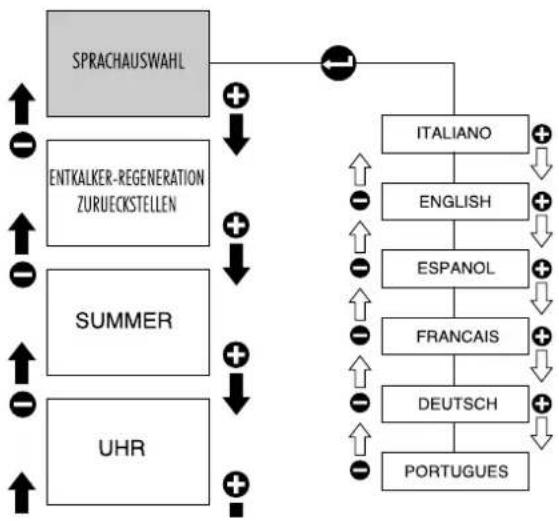
flowchart
graph TD
    A["SPRACHAUSWAHL"] --> B["ENTKALKER-REGENERATION ZURUECKSTELLEN"]
    A --> C["SUMMER"]
    A --> D["UHR"]
    A --> E["ITALIANO"]
    E --> F["ENGLISH"]
    E --> G["ESPAÑOL"]
    E --> H["FRANÇAIS"]
    E --> I["DEUTSCH"]
    E --> J["PORTUGUES"]
    C --> K["+"]
    D --> L["+"]
    E --> M["+"]
    F --> N["↓"]
    G --> O["↓"]
    H --> P["↓"]
    I --> Q["↓"]
    J --> R["↓"]
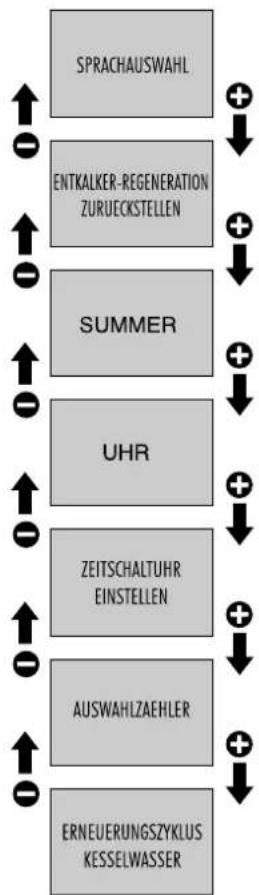
flowchart
graph TD
    A["SPRACHAUSWAHL"] --> B["ENTKALKER-REGENERATION ZURUECKSTELLEN"]
    B --> C["SUMMER"]
    C --> D["UHR"]
    D --> E["ZEITSCHALTUHR EINSTELLEN"]
    E --> F["AUSWAHLZAEHLER"]
    F --> G["ERNEUERUNGSZYKLUS KESSELWASSER"]
    G --> H["+"]
    H --> I["↓"]
    I --> J["+"]
    J --> K["↓"]
    K --> L["+"]
    L --> M["↓"]
    M --> N["+"]
    N --> O["↓"]
    O --> P["+"]
    P --> Q["↓"]
    Q --> R["+"]
    R --> S["↓"]
    S --> T["+"]
    T --> U["↓"]
    U --> V["+"]
    V --> W["↓"]
    W --> X["+"]
    X --> Y["↓"]
    Y --> Z["+"]
    Z --> AA["↓"]
    AA --> AB["+"]
    AB --> AC["↓"]
    AC --> AD["+"]
    AD --> AE["↓"]
    AE --> AF["+"]
    AF --> AG["↓"]
    AG --> AH["+"]
    AH --> AI["↓"]
    AI --> AJ["+"]
    AJ --> AK["↓"]
    AK --> AL["+"]
    AL --> AM["↓"]
    AM --> AN["+"]
    AN --> AO["↓"]
    AO --> AP["+"]
    AP --> AQ["↓"]
    AQ --> AR["+"]
    AR --> AS["↓"]
    AS --> AT["+"]
    AT --> AU["↓"]
    AU --> AV["+"]
    AV --> AW["↓"]
    AW --> AX["+"]
    AX --> AY["↓"]
    AY --> AZ["+"]
    AZ --> BA["↓"]
    BA --> BB["+"]
    BB --> BC["↓"]
    BC --> BD["+"]
    BD --> BE["↓"]
    BE --> BF["+"]
    BF --> BG["↓"]
    BG --> BH["+"]
    BH --> BI["↓"]
    BI --> BJ["+"]
    BJ --> BK["↓"]
    BK --> BL["+"]
    BL --> BM["↓"]
    BM --> BN["+"]
    BN --> BO["↓"]
    BO --> BP["+"]
    BP --> BQ["↓"]
    BQ --> BR["+"]
    BR --> BS["↓"]
    BS --> BT["+"]
    BT --> BU["↓"]
    BU --> BV["+"]
    BV --> BW["↓"]
    BW --> BX["+"]
    BX --> BY["↓"]
    BY --> BZ["+"]
    BZ --> CA["↓"]
    CA --> CB["+"]
    CB --> CC["↓"]
    CC --> CD["+"]
    CD --> CE["↓"]
    CE --> CF["+"]
    CF --> CG["↓"]
    CG --> CH["+"]
    CH --> CI["↓"]
    CI --> CJ["+"]
    CJ --> CK["↓"]
    CK --> CR["+"]
    CR --> CS["↓"]
    CS --> CT["+"]
    CT --> CU["↓"]
    CU --> CV["+"]
    CV --> CW["↓"]
    CW --> CX["+"]
    CX --> CY["↓"]
    CY --> CZ["+"]
    CZ --> DA["↓"]
    DA --> DB["+"]
    DB --> DC["↓"]
    DC --> DD["+"]
    DD --> DE["↓"]
    DE --> DF["+"]
    DF --> DG["↓"]
    DG --> DH["+"]
    DH --> DI["↓"]
    DI --> DJ["+"]
    DJ --> DK["↓"]
W22 EV kalt 4-TEA Kurzschluss
W23 EV kalt 4-TEA unterbrochen
W24 EV heiss 4-TEA Kurzschluss
W25 EV heiss 4-TEA unterbrochen
The operations marked with this symbol are to be undertaken exclusively by an installation technician

The operations marked with this symbol are to be undertaken by the user.
EN ENGLISH
CONTENTS
Machine identification data 67
-
General safety rules 67
-
Description 68
2.1. Specifications and composition....68
2.2. Machine equipment....68
2.3. Mechanical protective devices 69
2.4. Electric safety devices 69
2.5.Aerial noise 69
2.6. Vibrations 69
- Technical data 69
3.1. Dimensions and weights....69
- Use 69
4.1. Precautionary measures....70
- Transport 70
5.1. Packaging 70
5.2. Inspection on receipt....70
- Installation 70
6.1.Connections to be made by the user ..... 70
6.1.1. Water and gas supply 70
6.1.2. Electric supply....71
6.2. Preliminary operations 71
6.3. Installation and first-time start-up ..... 71
- Operation 72
7.1. Controls....72
7.2. Control instruments....73
7.3. Starting up....73
- Use 73
8.1. Preparing coffee....73
8.2. Preparing cappuccino 74
8.3. Heating a beverage....74
8.4. Preparing tea, camomile, etc....74
8.5. Machines with iSteam automatic system..75
8.5.1. Heating Milk or a Drink (iSteam) 75
8.5.2. Preparing Frothed Milk (iSteam)....75
- Adjustments and settings of the dose ..... 75
9.1. Models USB 75
9.1.1. Adjusting the dose....75
9.1.2. Adjusting the quantity of hot water ..... 75
9.2. Programming (Mod.USB)....76
9.2.1. Selecting the display language 76
9.2.2. Softener regeneration 77
9.2.3. Buzzer....77
9.2.4. Clock....77
9.2.5. Set Timer....78
9.2.6. Selection counts....78
9.2.7. Procedure for replacing the water inside the boiler with fresh water. 79
9.3. Displaying 79
9.3.1. Warming up phase....79
9.3.2. Operating mode 79
9.4. Operating safety devices 80
9.5. The cup-warmer....80
9.6. List of malfunctions 80
9.7. List of warning....80
-
Load & show 81
-
Maintenance 82
11.1.Daily 82
11.2.Weekly 82
11.2.1. Washing of the coffee groups....82
11.2.2. Cleaning iSteam 83
11.3. Regular-interval maintenance and repairs 83
11.3.1.Renewal of water in the boiler....83
-
Stopping the machine 83
-
Troubleshooting and possible remedies 83
VERSIONS: 2 - 3 - 4 GROUPS
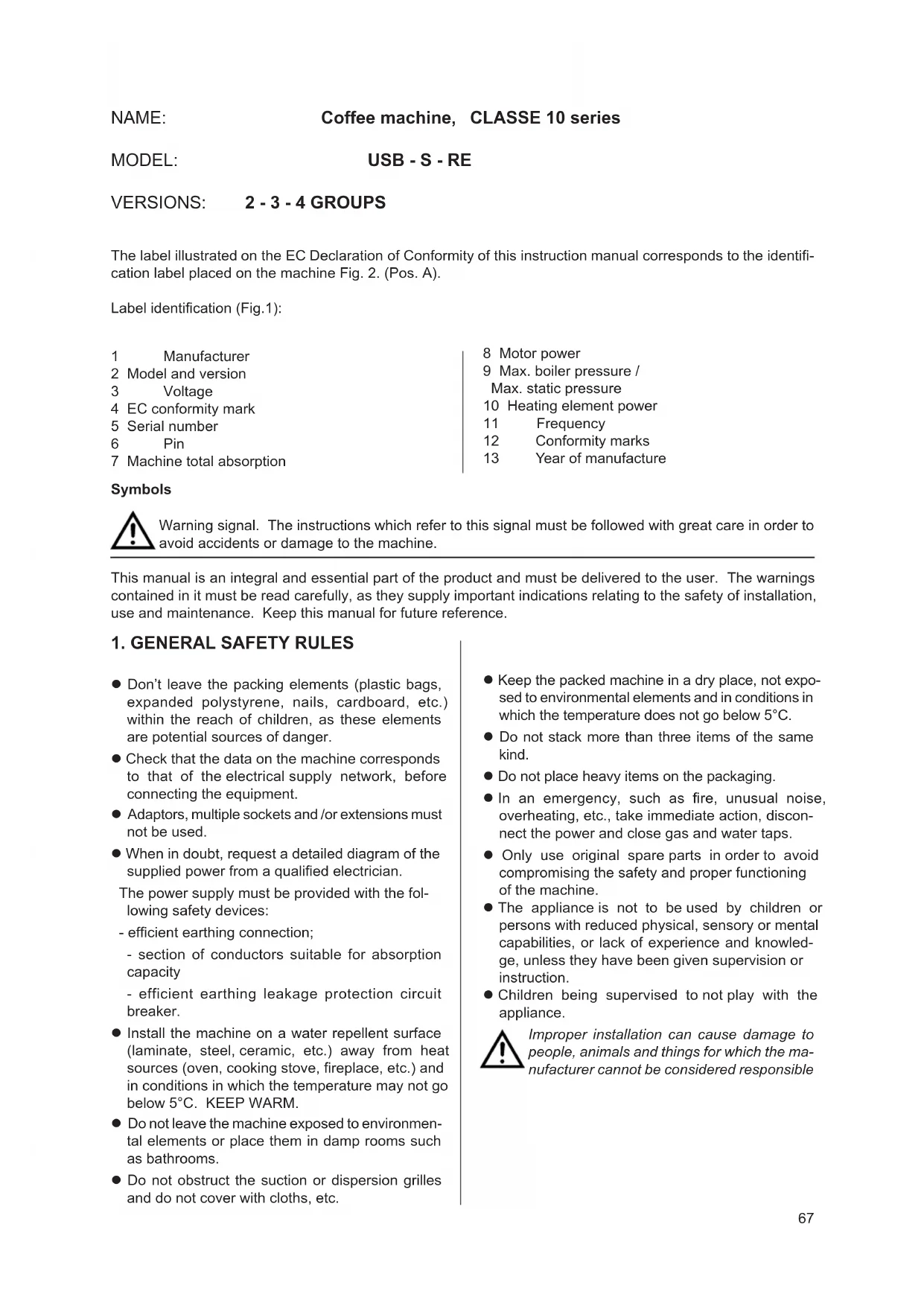
The label illustrated on the EC Declaration of Conformity of this instruction manual corresponds to the identification label placed on the machine Fig. 2. (Pos. A).
Label identification (Fig.1):
1 Manufacturer
2 Model and version
3 Voltage
4 EC conformity mark
5 Serial number
6 Pin
7 Machine total absorption
8 Motor power
9 Max. boiler pressure /
Max. static pressure
10 Heating element power
11 Frequency
12 Conformity marks
13 Year of manufacture
Symbols

Warning signal. The instructions which refer to this signal must be followed with great care in order to avoid accidents or damage to the machine.
This manual is an integral and essential part of the product and must be delivered to the user. The warnings contained in it must be read carefully, as they supply important indications relating to the safety of installation, use and maintenance. Keep this manual for future reference.
1. GENERAL SAFETY RULES
- Don't leave the packing elements (plastic bags, expanded polystyrene, nails, cardboard, etc.) within the reach of children, as these elements are potential sources of danger.
- Check that the data on the machine corresponds to that of the electrical supply network, before connecting the equipment.
- Adaptors, multiple sockets and /or extensions must not be used.
- When in doubt, request a detailed diagram of the supplied power from a qualified electrician.
The power supply must be provided with the following safety devices:
- efficient earthing connection;
- section of conductors suitable for absorption capacity
- efficient earthing leakage protection circuit breaker.
- Install the machine on a water repellent surface (laminate, steel, ceramic, etc.) away from heat sources (oven, cooking stove, fireplace, etc.) and in conditions in which the temperature may not go below 5°C. KEEP WARM.
- Do not leave the machine exposed to environmental elements or place them in damp rooms such as bathrooms.
- Do not obstruct the suction or dispersion grilles and do not cover with cloths, etc.
- Keep the packed machine in a dry place, not exposed to environmental elements and in conditions in which the temperature does not go below 5°C.
- Do not stack more than three items of the same kind.
- Do not place heavy items on the packaging.
- In an emergency, such as fire, unusual noise, overheating, etc., take immediate action, disconnect the power and close gas and water taps.
- Only use original spare parts in order to avoid compromising the safety and proper functioning of the machine.
● The appliance is not to be used by children or persons with reduced physical, sensory or mental capabilities, or lack of experience and knowledge, unless they have been given supervision or instruction.
● Children being supervised to not play with the appliance.

Improper installation can cause damage to people, animals and things for which the manufacturer cannot be considered responsible
2. DESCRIPTION
The machines in the CLASSE 10 series have been designed to prepare express coffee and hot beverages.
A positive-displacement pump inside the machine powers the heater in which the water is heated. By pressing the appropriate buttons, water is supplied to the spouts in the form of hot water or steam, according to needs.
The hot water used to make drinks comes from the boiler and is mixed directly with cold water from the water outlet.
The machine is composed of a steel carrying structure on which the mechanical and electrical components are fitted. These are completely covered with panels made of aluminium.
The beverages are dispensed at the front of the machine, where all the buttons, control devices and dispensers are to be found.
There is a cup-warming plate on the top of the machine.
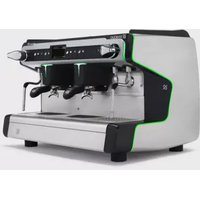
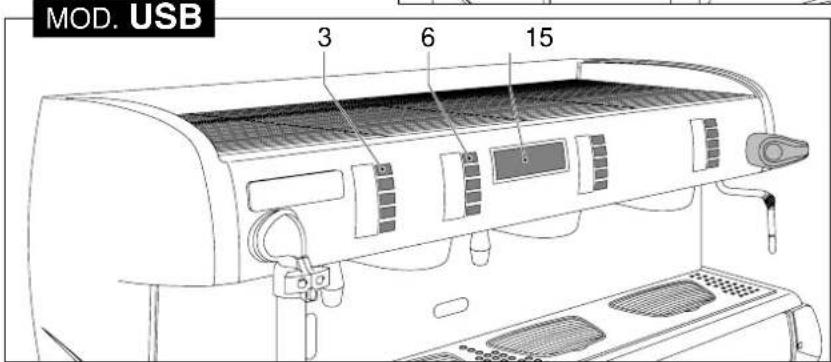
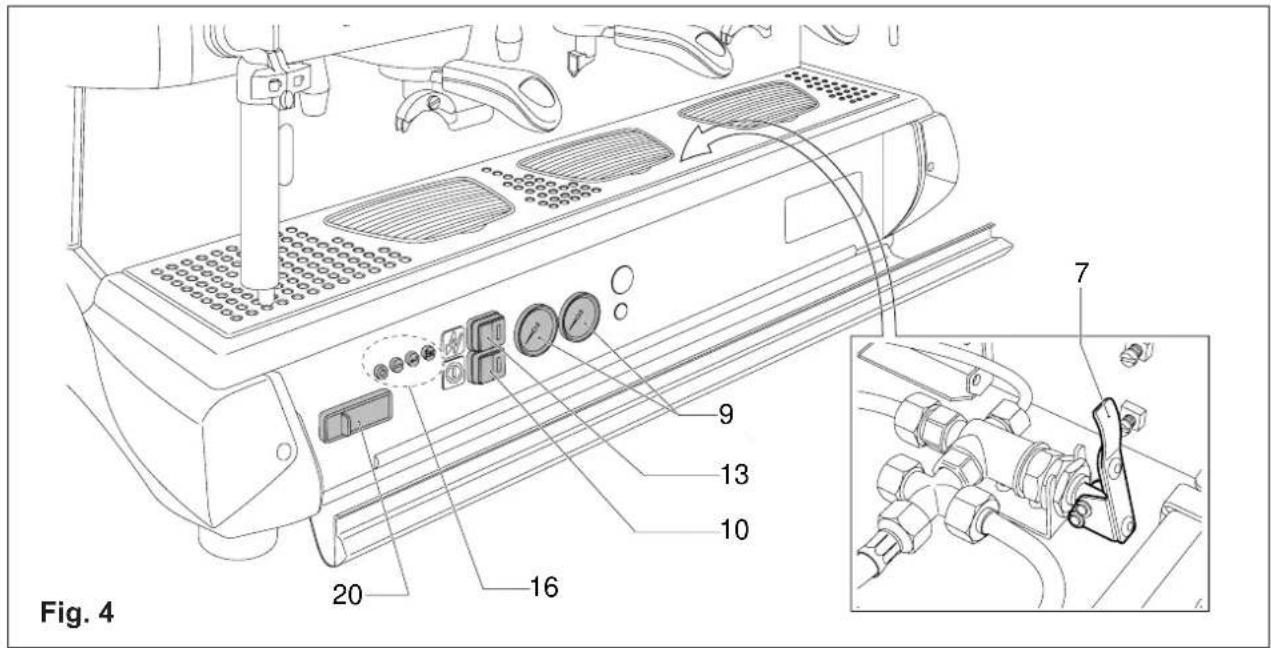
2.1. Specifications and composition (Fig.3 - 4)
| A B C D E F |
| USB | - ok 2 - 3 - 4 2 2 ok |
| S | ok - 2 - 3 - 4 2 2 ok |
| RE | ok - 2 - 3 - 4 2 2 ok |
Legend:
A Semiautomatic system; manual dispensing start and stop.
B Automatic system; electronic control of coffee and hot water doses dispensed.
C N. of coffee dispensing units.
D N. of steam spouts.
E N. of hot water spouts.
F Operating with economizer.
Gas heating, on request.
1 Steam tap (C-LEVER)
2 Steam spout
3 Function/service button panel
4 Hot water spout thermoregular
5 Coffee dispensing unit
6 Coffee dispensing button panel (mod.S - USB)
7 Manual water supply tap
8 Level indicator
9 Gauge
10 Power on-off switch and led
11 Gas lighter (on specific models)
12 Valved gas tap (on specific models)
13 Switch and boiler resistance engagement light.
14 Bottom unit door for access to controls
15 Display (mod. UDB)
16 Programming panel (mod. USB)
17 Hot water spout
18 Dispenser control lever (mod.RE)
19 Unit door opening lever
20 USB connection
21 iSteam dispenser nozzle
2.2. Machine equipment
2 GROUPS 3 GROUPS 4 GROUPS
| 1 dose filter holder | 1 | 1 | 1 |
| 2 dose filter holder | 2 | 3 | 4 |
| Filters | 3 | 4 | 5 |
| 1 mt. supply pipe | 1 | 1 | 1 |
| 1,5 mt. supply pipe | 1 | 1 | 1 |
| 1,5 mt. drainage pipe | 1 | 1 | 1 |
| Pipe connections | 1 | 1 | 1 |
| Blind disks for cleaning | 2 | 3 | 4 |
| Doser and presser | 1 | 1 | 1 |
| Instruction manual | 1 | 1 | 1 |
| Brush | 1 | 1 | 1 |
Models equipped with gas connections (when applied).
2.3. Mechanical protective devices
The machine is equipped with the following protective devices:
- complete panelling protection of all the parts subject to heat and of the steam and hot water supplier;
- cup-warmer plate supplied with a tray to collect spilt liquids;
- work surface provided with grill and tray to collect spilt liquids;
● expansion valve in the hydraulic system and valve on the boiler to avoid overpressure;
● nonreturn valve on the hydraulic system to avoid flowing back to the main supply.
2.4. Electric safety devices
The safety devices provided are:
- 12V low tension push buttons an the USB control key panel;
● thermal protection on the pump motor;
- gas failure thermocouple and thermocouple thermostat automatically closing gas tap;
● safe resistance thermal;
● Electronic safety devices.
2.5. Aerial noise
Noise level in the working place does not usually exceed 70dB(A).
2.6. Vibrations
The machine is supplied with rubber vibration damping feet. In normal working conditions, the machine does not produce vibrations harmful to the operator and the environment.
3. TECHNICAL DATA
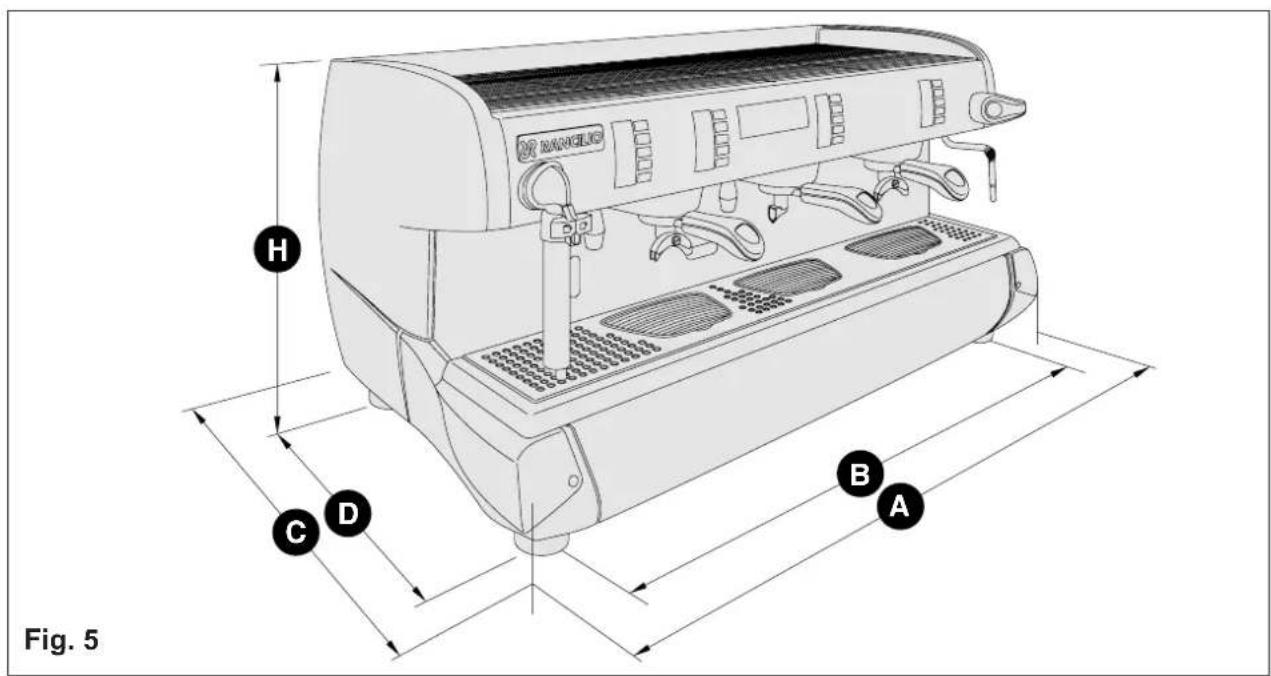
3.1. Dimensions and weights (Fig.5)
2 GROUPS 3 GROUPS 4 GROUPS
| A mm 780 1020 1260 |
| B mm 700 940 1180 |
| C mm 540 540 | 540 | | |
| D mm 470 470 | 470 | | |
| H mm 530 530 | 530 | | |
| Boiler capacity in litr. | 11 | 16 | 22 |
| Machine weight kg | 76 | 94 | 112 |
| Water inlet | 3/8" | 3/8" 3/8" | |
| ∅mm drainage | 14 | 14 | 14 |
| Packaging |
| Volume m3 | 0,44 0,55 | 0,67 | |
| Dimensions L x P x H mm | 910x670x720 | 1150x670x720 | 1390x670x720 |
| Gross weight kg | 91 | 111 | 134 |

You'll find all the technical data on electric connection, on the machine identification label Fig. 1.
Machines provided with gas heating have a standard connection kit to carry out the following connections with:
- direct stiff pipe;
- copper and double cone pipe;
- rubber support.

Gas connections must be made in compliance with the safety regulations in force in the relative country.
4. USE
The machine have been designed, manufactured and protected to be used to make express coffee and hot beverages (tea, cappuccino, etc.). Any other use is to be considered unsuitable and therefore dangerous.

The manufacturer cannot be held responsible for any damage caused to people or things due to unsuitable, erroneous or irrational use of the machine.
The operator must always follow the indications contained in this manual. In the case of a failure or if the machine is not working properly, switch it off and do not attempt any direct repair. Refer exclusively to a service centre.
The user must not:
- touch the hot surfaces and dispensing areas;
- place liquids containers on the machine;
- put his hands under the spouts during use;
● transport the machine or carry out maintenance operations when the plug is connected or when the machine is hot;
- wash the machine with water or steam jet;
- dip completely or partially the machine in water;
- use the machine if the cable is damaged;
- touch the machine when his hands or feet are wet or damp;
- use the machine when there are children in its proximity;
- allow the machine to be used by children or unfit people;
- obstruct the suction or dispersal grilles with cloth or any other thing;
● do not use the machine when wet or very damp.
4.1. Precautionary measures
This machine may only be used with foodstuffs. It cannot be used for heating liquids or grinding any other kind of product that could damage and pollute it.

The manufacturer cannot be held responsible for damage to people or things caused by unsuitable, erroneous or irrational use.
5. TRANSPORT
5.1. Packaging
The machine is delivered in a strong cardboard box with internal protection.
The packaging bears symbols which must be observed during handling and stocking of the item.

Always keep the package in a vertical position during transport. Do not turn it over or lay it on its side and avoid bumping and exposure to atmospheric agents.
5.2. Inspection on receipt
Check that the machine received corresponds to the one indicated on the delivery note, including any accessories.
Check that it has not been damaged during transport and, if so, inform the forwarder and our customer service office immediately.

The packing elements (plastic bags, expanded polystyrene, nails, cardboard, etc.) must not be left within reach of children as they are potential sources of danger. Do not dispose of the packing elements in the environment; consign them to firms authorized for their disposal.

6. INSTALLATION
The appliance is only to be installed in locations where use and maintenance is led to trained personnel.
The machines are fitted with height adjustable feet.
The support surface shall be levelled, dry, smooth, steady and stable and at such a height that the cup-warming surface is at over 150 cm from ground. Do not use water jets or install where water jets are used.
In order to guarantee normal operation, the machine must be installed in areas that the environmental temperature is between +5°C ÷ +32°C end humidity of not over 70% .
It does not need to be anchored to the surface and it does not require any technical operations to dampen vibrations in order to operate properly.
It is recommended to leave the area around the machine free to facilitate its use and the performance of any maintenance operations.
If the machine is wet or very damp, wait until it is completely dry before installing or using it. It is always necessary to request an accurate control to qualified service people in order to find any possible damage to the electric components.
Reserve an area near the machine for the installation of the coffee grinding and dosage machine (see relevant documentation).
The machine is usually equipped with a water softener, type DP2 or DP4, which must be connected by the user in compliance with the laws in force. Should a different softener be installed, refer to the documentation of the relevant product.
A dreg drawer should be fitted by the installer.

6.1. Connections to be made by the user
Hook-up must be carried out by qualified personnel in full accordance with federal, state and local regulations.

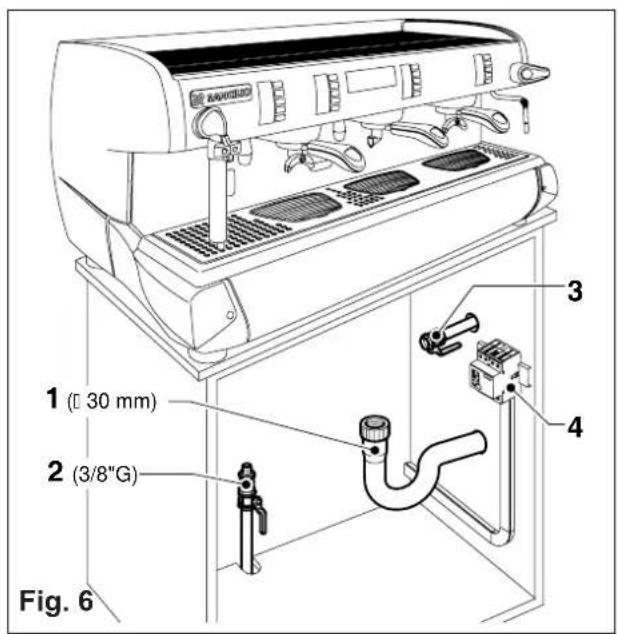
Water and gas supply (Fig.6)

This equipment is to be installed to comply with the applicable federal, state or local plumbing codes.

Make sure that the maximum supply pressure does not exceed 6.5 bar; otherwise, install a pressure reducer.
Connections must be installed close to the machine.
1) Water drainage pipe 1, having a minimum internal diameter of 30 mm, equipped with a water-trap accessible for inspection.
2) Water supply pipe 2, with a 3/8"G cut-off tap.
Water supplies to the machine must be suitable for consumption by man and for human uses, in compliance with all the laws in force in the installation site. The installation technician is required to get confirmation from the final owner and/or user of the system
that the water meets all the foregoing requirements. For machine installation it is necessary to use all the components and/or parts supplied on issue with the machine. Should it ever be necessary to use other parts and/or components, the installation technician is required to verify that said other parts and/or components are suitable for contact with water for human consumption/drinking water. The technician in charge of installation is required to perform all the hydraulic connections so that they are totally compliant to all the related rules, regulations and provisions in force in the installation site on hygiene, hydraulic system safety and environmental protection.

The machine with gas heating must be installed in compliance with current local laws.
3) Gas supply pipe 3, with a cutoff tap.

For additional information on machines equipped with supplementary gas heating options, please consult the user's manual provided together with the gas kit, supplied on issue with the machine.
4) Main switch
5) Softener

6.1.2. Electric supply
The machine is supplied ready for connection according to the required electrical specifications. Before connecting the machine ensure that the plate details comply with those of the electric distribution network.
The electrical connection cable must be directly connected to the connection provided according to current legislation. Ensure that the earthing system is efficient and in compliance with current legal requirements.
The earthing system and the lightening protection system must be realized in accordance with the provisions of current legislation.
For the supply network use a cable in compliance with standards with protective conductor (earthing wire). For three-phase power use a cable with 5 conductors (3 phases + neutral + earth).
For single phase power supply use a cable with 3 conductors (phase + neutral + earth).
In both cases it is necessary to provide an automatic differential switch (Fig. 6) at the start of the power cable, complete with magnetic release elements in accordance with the identification plate details (Fig. 1). The contacts must have an opening of equal or over 3 mm and with dispersed current protection of 30 mA.
Remember that each machine must be fitted with its own safety elements.

WARNING:
Should the power supply cable be damaged it is to be replaced by the manufacturer or by its technical assistance service or by person with equivalent qualification, in order to prevent any risks.

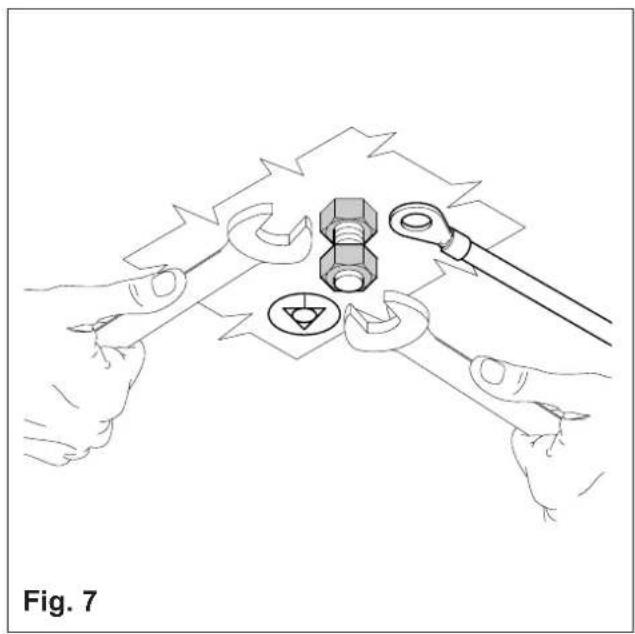
6.2. Preliminary operations (Fig.7) POTENTIAL-EQUALIZING CONNECTION
This connection, which is the one called for by several norms, avoids electrical potential differences, building up between any equipment that may be installed in the same room. There is a terminal clip on the under side of the base of the machine to which an external potential-equalizing wire should be connected.
This connection is ABSOLUTELY NECESSARY and must be made right after the machine is installed. Use a wire whose cross-sectional area conforms to the existing norms.

6.3. Installation and first-time start-up
- Position the machine unit onto the horizontal surface provided for that purpose and adjust the base feet to ensure that the machine is stable and that vibrations are limited.
Before connecting, thoroughly wash the mains water pipes:
- Leave the water supply taps running at full pressure for several minutes.
- Connect to the mains water supply.
- Connect the machine up to the power supply mains.
- Connect the gas pipe
Thoroughly wash all the water pipes of the machine:
- Leave the water supply taps running at full pressure.
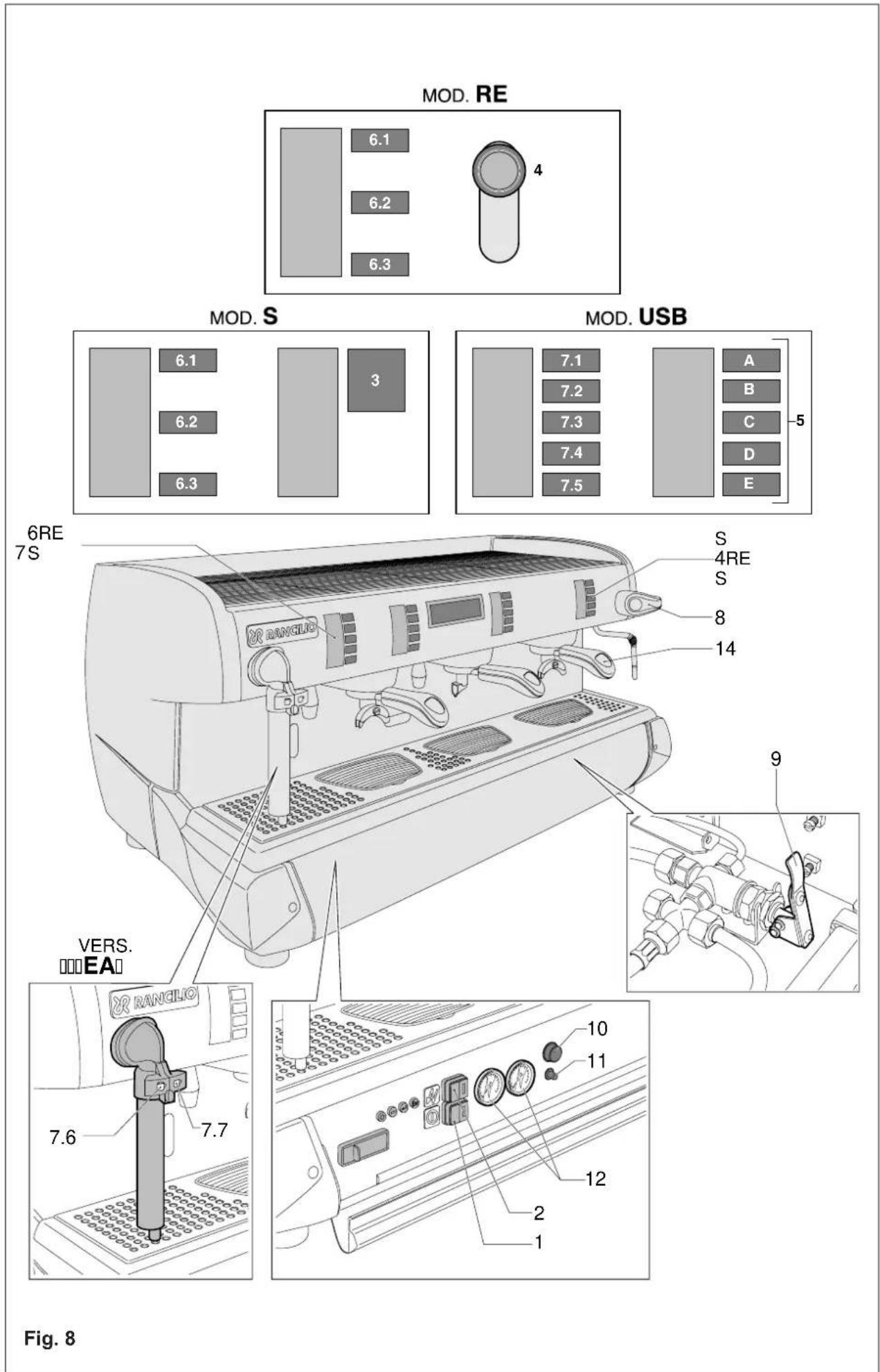
- Switch on main switch 1 (Fig.8): wait until the boiler fills up to the level set.
- Boiler resistance switch2 (Fig.8) to begin heating the water in the boiler.
- Once standard machine work conditions have been reached with the machine in “ready for operation” mode, switch the machine off and empty all the water filled into the water circuit the first time, thereby eliminating any possible initial impurities.
- Fill the machine up with water again and set it into standard operation mode.
-
Once the "ready for operation" status is reached:
-
Connect the filter-holders to the dispenser units (without coffee); operate each group head in order to allow the water to escape for about one minute.
- Dispense hot water until at least 2 liters of water have been dispensed from the 1-group or 2-groups compact, 5 liters from the 2-groups machines, 8 liters from the 3-groups machines and 11 liters from the 4-groups machines.
- Open each steam dispensing point for 1 whole minute.
Once installation is terminated, the installation technician MUST issue an installation report.
7. OPERATION
7.1. Controls (Fig.8)
1 Main switch
Two-position switch with led.
Turn on the switch (led on) the machine is turned (apart from the boiler) and the pump is turned on to fill the boiler;
2 Boiler resistance switch
Two-position switch with led.
On activating the switch (the led comes on) and power is supplied to the resistance for the boiler water.
3 Coffee dispensing switch (mod.S)
Two-position switch:
With switch ON, coffee is dispensed;
With switch OFF, dispensing of coffee is interrupted.
4 Dispenser control lever (mod.RE)
Move the lever downward to start dispensing coffee.
To stop dispensing, move the lever upward.
5 Coffee Dispensing Electronic Panel (mod. USB)
Five buttons with relative led:
A Press the button for a second, led on, release button; a small coffee is dispensed.
The led turns off and dispensing ceases.
B Press the button for a second, led on, release the button; two small coffees ar dispensed from the same unit.
The led turns off and dispensing ceases.
C Press the button for a second, led on, release the button; a big cup of coffee is dispensed.
The led turns off and dispensing ceases.
D Press the button for a second, led on, release the button; two big cups of coffee are dispensed from the same unit.
The led turns off and dispensing ceases.
E Press the button for a second, led on, release the button; coffee is continuously dispensed.
Press the button for a second, led off, release button; continuous dispensing of coffee ceases.
To interrupt brewing once the operation has been activated with buttons A-B-C-D, press the same button again or press E.
Each time a coffee is dispensed, the LED of the relative button lights up.
If pressed for approx. 8 sec., the dose quantity programming function is accessed.
During dose programming, the LED of the 5th button flashes rapidly.
If the dose is supplied irregularly or the volumetric counter is malfunctioning, the LED of the pressed button flashes dispensing the dose on a time basis.
6 Hot Water and Cup-Warmer Panel (mod.S-RE)
6.1 Cup-warmer switch with two positions:
With switch ON, the LED flashes and the cup warmer resistance is energized.
With switch OFF, the LED switches off and the resistance is de-energized.
6.2 Two-position hot water switch (thermoregulated):
With switch ON, the LED flashes and thermoregulated hot water is dispensed.
With switch OFF, the LED switches off and dispensing stops.
6.3 Hot water switch (picking up directly from the boiler) with two positions:
With switch ON, the LED flashes and hot water is dispensed directly from the boiler.
With switch OFF, the LED switches off and dispensing stops.
7 Hot Water and Function Panel (mod.USB)
This panel features 5 buttons and 5 LEDs consisting of the following:
1 cup-warmer button (7.1)
2 buttons for dispensing hot water (7.2 - 7.3)
3 keys for dispensing hot water blended with the temperature control function (7.3 - 7.4 - 7.5)
7.1 The Cup Warmer
The function provides for 4 setting levels of resistance heating strength:
off, minimum, medium, maximum (pls. consult par. 9.5).
7.2 Hot water
When the button is pressed, hot water is dispensed directly from the boiler for the set time or until the button is pressed again.
If the key is kept pressed in for 2 seconds, the dispensing flow becomes continuous and it will stop only if the key is pressed in again.
The dispensing flow is anyway stopped automatically after 30 sec.
7.3 - 7.4 - 7.5 Hot water blended with the temperature control function (4-TEA)
Pressing on any one of the keys will start dispensing of the temperature-controlled water for the set amount of time, or until the key is pressed in again.
During this dispensing cycle, the pump starts up. The default programming of the 3 keys provides for different water temperatures, ranging between 85° C (7.3) and 60° C (7.5). The temperatures and the dispensing times can anyway be programmed. It is also possible to set a dispensing option providing cold water taken directly from the water mains line.
If the key is kept pressed in for 2 seconds, the dispensing flow becomes continuous and it will stop only if the key is pressed in again. The dispensing flow is anyway stopped automatically after 30 seconds.
7.6 Foamed milk
Press the button to excite the steam and emulsion delivery electromagnetic valves until the programmed temperature and froth level are reached or until the function is switched off.
7.7 Steamed milk
Pressing the key excites the steam distribution electro-valves until the programmed temperature is reached or until the same is pressed again.
Safety Devices
Dispensing cannot be carried out if the machine has not reached the operating pressure or temperature at least once, and each time that the boiler pressure drops too much.
8 Steam supply handwheel "C-LEVER":
Rotating the turn-knob upwards will open the tap; the turn-knob will remain in open position to allow for a continuous steam supply. To close the tap, turn the turn-knob back into its horizontal position. Rotating the turn-knob downwards provides for instant steam supply. Once it is released, the turn-knob will go back into its horizontal position and the steam supply is instantly stopped.
9 Supplementary manual water filling tap positioned under the discharge basin.
Press down to fill the boiler.
10 Valved gas power tap (models with gas heating).
Open: vertical position;
Closed: turn 90° in clockwise direction.
Firing button: press down firmly to give off the spark to light the gas for the burner.
7.2. Control instruments (Fig.8)
12 Gauge with mobile needle on a fixed dial with a double scale.
Visual control of the pump (manometer on the left-hand side) and of the boiler pressure (manometer on the right-hand side)
13 Minimum and maximum water level indicator.
Visual control of water level in boiler.
14 Control window (models with gas heating).
Visual control of lighting and functioning of the flame of the gas burner.


7.3. Starting up
● Turn on the water supply tap 2 Fig.6.
- Turn the main switch 1; the pump is activated, filling the boiler.
- When the water reaches the correct level, the pump stops.
Turn the main switch 2 to begin heating the water in the boiler then turn each one until water begins to flow from them.
- Wait for the machine to reach its working pressure and to reach the correct thermal balance.
Models with gas (Fig.8)
● Turn on the water supply tap 2 (Fig.6).
● Turn on the gas tap 3 (Fig.6).
- Turn the main switch 1; the pump is activated, filling the boiler.
- When the correct level is reached, the pump stops. Turn the switch 2.
- Turn the gas tap 10 to the vertical open position and hold down the incorporated button, at the same time repeatedly press hard on the piezoelectric button 11 until the spark lights the gas flame (carry out this operation looking through window 14). Hold the tap button 10 down for approx. 30 seconds to allow the safety system to keep the flame lighted. If the flame goes out, repeat the operation.

Should the flame not light up, avoid insisting and close the gas tap by turning it 90° in a clockwise direction.
- Wait until the machine reaches its working pressure and until the correct thermal balance is achieved.

8. USE
WATER CHANGES: at the start of each daily activity and anyway always after machine stop periods longer than 8 hours, it is necessary to change 100% of the water contained in the circuits via the points appropriately provided on the machine for the purpose.
USING THE STEAM WAND: Before using the steam wand, it is always necessary to flush out all the residual steam condensate for at least 2 minutes.
The machine has a top shelf on which the cups are kept and heated, ready for use.
This is very important to obtain good coffee as the pre-warmed cup stops the coffee from growing cold too quickly.
8.1. Preparing coffee
- Unclamp the filter-holder from the dispensing unit and knock any grouts out into the drawer especially provided for this purpose, taking care not to damage the rim of the filter.
-
Use the filter for 1 or 2 coffees, according to need.
-
Fill the filter with the measure of coffee, level it off and press it down gently with the presser.
- Remove any ground coffee that has stuck to the rim of the filter while pressing.

If ground coffee is left on the rim of the filter, a leaktight seal is not ensured, with consequent leaking of water and coffee grounds.
- Lock the filter-holder into the dispensing unit firmly to obtain a leaktight seal.
- Place the cups under the spouts and start pouring using control 3 - 4 or button panel 5 according to model (Fig.9).
- When the coffee has been poured, leave the filter-holder attached to the dispensing unit until the next coffee is required.

When pouring, beware of the hot parts of the machine, especially the coffee dispensing units, the steam and hot water spouts. Do not put your hands for any reason under the units and the spouts when they are operating. The grinding of the coffee beans is of fundamental importance to the making of good coffee, and the granular texture of the resulting grounds should be such that it takes 25-30 seconds to produce the beverage. If the coffee is ground too coardsely the coffee will be pale in colour and weak in flavour, with only a very small amount of white cream, and if the grounds are too fine, the coffee will be dark with no cream. Good coffee can only be made if the beans are freshly and uniformly ground (only possible when the blades of the coffee grinder are sharp) and are then measured out into the correct quantities (roughly 6 grams per measure).
The importance of freshly ground coffee beans is due to the fact that once ground, they rapidly lose their aromatic qualities, and fats present in the beans go rancid.
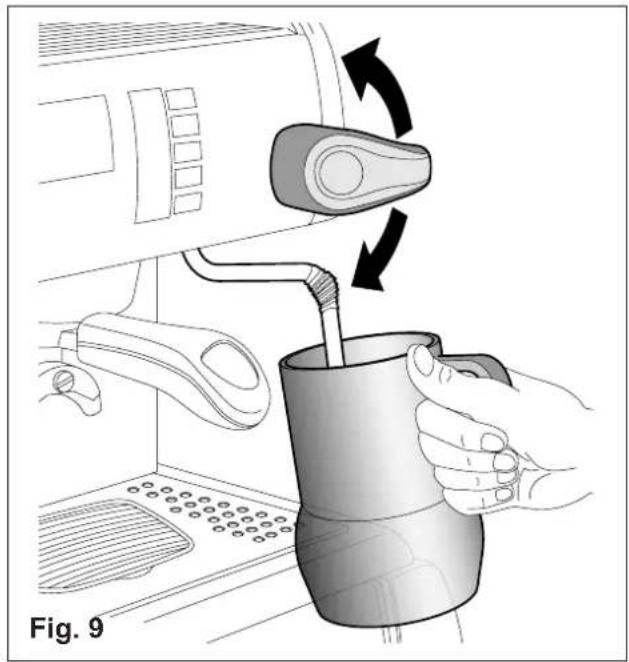
8.2. Preparing cappuccino (Fig.9)
● Make cup of cappuccino with the express coffee.
- Use a high and narrow jug, half-filled with milk.
- Place the jug under the spout so that the nozzle touches the bottom.
- Turn on the steam tap and lower the jug so that the nozzle is almost at the surface of the milk to create the froth.
- Turn off the steam tap and pour the milk into the cup.

Immediately after carrying out this operation, clean the spout with a sponge or a clean cloth so that the milk does not dry on it. Be careful as the spout is hot and may burn your hand.
8.3. Heating a beverage
- Immerse the steam spout into the liquid to be heated.
- Gradually turn on the steam tap 8 Fig.8; the steam that bursts in the liquid heats it to the desired temperature.
- Turn off the steam tap when the desired temperature has been reached.

Immediately after carrying out this operation, clean the spout with a sponge or clean cloth. Be careful as the spout is hot and may burn your hand
8.4. Preparing tea, camomile, etc.
- Place the jug under the hot water spout and use the delivery control according to the model (Fig.8). When the desired quantity has been obtained, turn off the switch.
- Add the beverage desired.
Models USBFor these models, hot water is dispensed in specific measures (see paragraph 9, adjusting the dose of hot water).
To dispense hot water in different quantities, proceed as follows:
- Hold down the delivery control 7.2 o 7.3 o 7.4 o 7.5 (Fig.8) for at least four seconds then release the button; the machine continuously delivers water.
- When the desired measure has been obtained, press the button E again to interrupt delivery.
When the dose of hot water is being delivered electronically, delivery can be interrupted by pressing the button 7.3.
When purified water is used, these beverages often assume a darker colour.
Should the user prefer a lighter coloured drink, draw fresh water from an ordinary tap and proceed with the heating phase as described in point 8.3.
8.5. Machines with iSteam automatic system (Fig.8) (only Mod. USB)
8.5.1 Heating Milk or a Drink (iStema)
- Immerse the wand in the drink
● Press button 7.7 on the keypad (Fig.8)
● The display will show the temperature of the drink
- Press button 7.7 again to stop heating at the desired temperature.
- Wait for dispensing at the programmed temperature to stop automatically, otherwise press key 7.7 in again to stop the drink-heating function manually.
Should heating the drink above the set temperature be required, hold key 7.7 pressed in.
The steam dispenser nozzle will continue supplying steam until a maximum temperature of approx. 90° C is reached, or until the key is released again.
8.5.2. Preparing Frothed Milk (iSteam)
- Immerse the wand in a container containing at least 250 cc of milk (the sensor must be at least 3 cm below the water level).
To obtain best results, use refrigerated milk ( ≤ 5°C ) - ( ≤ 41°F )
- Press button 7.6 on the keypad (Fig.8)
● The display shows the temperature of the milk.
- Press button 7.6 again to stop the machine at the desired temperature and emulsion level.
- Wait for dispensing at programmed temperature and at programmed cream level to stop automatically, otherwise press key 7.6 in again to stop the drink emulsion function manually
9. ADJUSTMENT AND SETTING OF THE DOSE
9.1. Models USB
It is possible to adjust the dose of coffee and hot water dispensed by electronically controlled models. (If the function is enabled)
9.1.1. Adjusting the dose
The quantity of coffee and hot water dispensed can be adjusted using the button panel or the hot water controls.
1 Press the button E on any button panel and hold it down for 8-10 seconds until water stops flowing from the dispensing unit and the led of the continuons button on the first button panel on the left begins flashing.
The following page displaying the services selection keypad and the coffee selection will come up on screen.
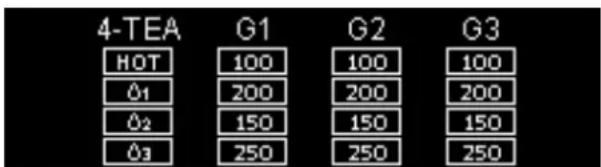
2 It is necessary to act as to make 1 or 2 cups in order to reach the correct coffee amount adjustment in the cup.
3 Put the filter-holder (with ground coffee) on the left unit and the cup under the spout.
4 Operate the selected button (i.e. button A for one small cup).
5 One the required coffee amount in the cup has been reached, press the stop button A. Coffe will stop pouring and the microprocessor will store the dose.
The screen will display the impulses relative to the completed dose and a data box will highlight that it has been stored into the system.
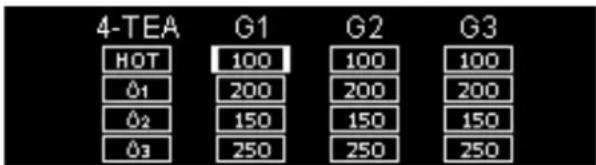
6 Press the continuous button E again; the led will go out and the machine will store the new quantity.
7 Make the coffee and check the cup amount in order to check that programming is correct.
If some doses have to be changed (A-B-C-D), once at point 5 repeat the instructions in points 3-4-5 for each dose, remembering to use the filter-holder with relevant filter and freshly ground coffee.
Then carry out point 6 and repeat point 7 to check all changed doses.
If all units are to be programmed with the same doses, the selection of coffee doses is finished. If the dosage of another unit is to be changed (1-2-3-4 doses), proceed as indicated in the above-mentioned point 1-7, using only the button panel of the selected unit.
9.1.2. Adjusting the quantity of hot water
Proceed as follows:
1 Press the continuous E button on any button panel and hold down for 8-10 seconds until water stops flowing from the dispensing unit and the led of the E button on the first button panel on the left starts flishing. The machine is ready to accept quantity variations.
2 Put a cup or a jug to receive the water under the water spout 17 (Fig.3).
3 Push the delivery button 7.2.
4 Once the required amount is reached, press the button 7.2 again. Water will stop pouring and the microprocessor will store the dose.
- To adjust the water dose for the dispensing beak 4 (Fig. 3), carry out the same steps using either key 7.3 or 7.4 or 7.5. Temperature-controlled water is not dispensed during this phase.
5 Once adjusted, press the stop-continuous button E on any button panel; the led will go out and the machine will store the new quantity.
6 Pour out doses of hot water to check that programming is correct.
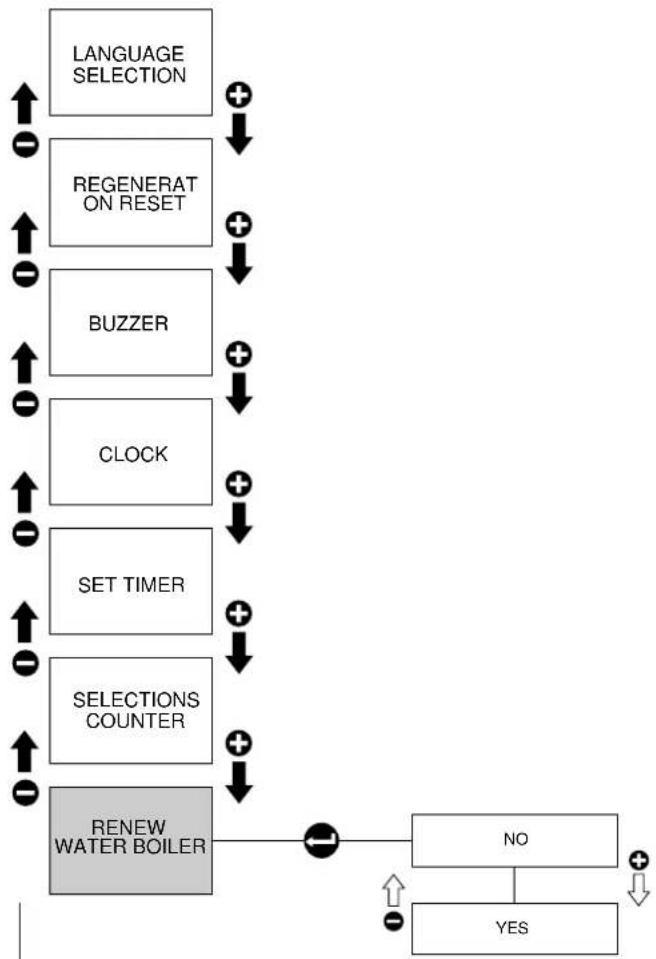
9.2. Programming (Mod.USB)

Warning!
The bottom hatch door (fig.3 - item14) will close itself automatically.
Be careful with your hands when accessing the controls located in the machine's bottom section.
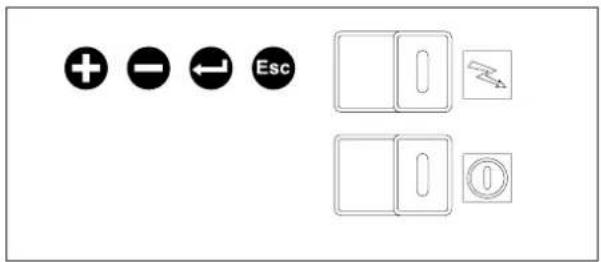
Programming Panel
This panel features 4 buttons with the following functions:
- Button with "+" sign
to scroll through the menu items or to increase the sizes.
- Button with "-" sign
to scroll through the menu items or to increase the sizes.
- Button with "enter" sign
To enter the programming menu. Or to confirm entries
- Button with "esc" sign
To quit the menu or to quit programming mode.
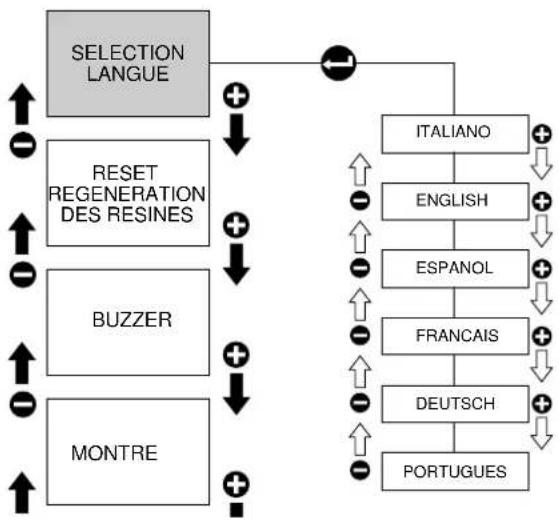
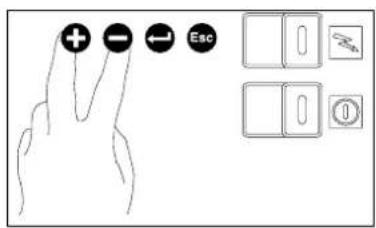
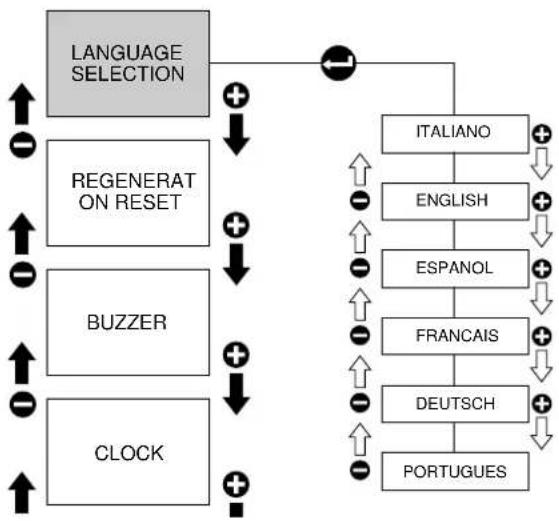
When the “+” and “-” buttons are pressed for approximately 2 seconds, the “bartender” programming menu is activated. This menu contains the following submenus:
To move from one submenu to another, press "+" or "-" . To enter in a submenu, press "enter", while to quit, press "esc". When a submenu is accessed, the editable value is displayed and changes can be made to it by pressing on the "+" or "-" keys. If you make changes, these must be confirmed by pressing "enter" until you quit the submenu. If you do not wish to save your changes, press "esc".
flowchart
graph TD
    A["LANGUAGE SELECTION"] --> B["REGENERAT ON RESET"]
    A --> C["BUZZER"]
    A --> D["CLOCK"]
    B --> E["+"]
    C --> F["+"]
    D --> G["+"]
    E --> H["ITALIANO"]
    F --> I["ENGLISH"]
    G --> J["ESPAÑOL"]
    H --> K["FRANCAIS"]
    I --> L["DEUTSCH"]
    J --> M["PORTUGUES"]
    K --> N["+"]
    L --> O["+"]
    M --> P["+"]
    style A fill:#ccc
    style B fill:#ccc
    style C fill:#ccc
    style D fill:#ccc
    style E fill:#fff
    style F fill:#fff
    style G fill:#fff
    style H fill:#fff
    style I fill:#fff
    style J fill:#fff
    style K fill:#fff
    style L fill:#fff
    style M fill:#fff
    style N fill:#fff
    style O fill:#fff

flowchart
graph TD
    A["LANGUAGE SELECTION"] --> B["REGENERAT ON RESET"]
    B --> C["BUZZER"]
    C --> D["CLOCK"]
    D --> E["SET TIMER"]
    E --> F["SELECTIONS COUNTER"]
    F --> G["RENEW WATER BOILER"]
    G --> H["+"]
    H --> I["↓"]
    I --> J["+"]
    J --> K["↓"]
    K --> L["+"]
    L --> M["↓"]
    M --> N["+"]
    N --> O["↓"]
    O --> P["+"]
    P --> Q["↓"]
    Q --> R["+"]
    R --> S["↓"]
    S --> T["+"]
    T --> U["↓"]
    U --> V["+"]
    V --> W["↓"]
    W --> X["+"]
    X --> Y["↓"]
    Y --> Z["+"]
    Z --> AA["↓"]
    AA --> AB["+"]
    AB --> AC["↓"]
    AC --> AD["+"]
    AD --> AE["↓"]
    AE --> AF["+"]
    AF --> AG["↓"]
    AG --> AH["+"]
    AH --> AI["↓"]
    AI --> AJ["+"]
    AJ --> AK["↓"]
    AK --> AL["+"]
    AL --> AM["↓"]
    AM --> AN["+"]
    AN --> AO["↓"]
    AO --> AP["+"]
    AP --> AQ["↓"]
    AQ --> AR["+"]
    AR --> AS["↓"]
    AS --> AT["+"]
    AT --> AU["↓"]
    AU --> AV["+"]
    AV --> AW["↓"]
    AW --> AX["+"]
    AX --> AY["↓"]
    AY --> AZ["+"]
    AZ --> BA["↓"]
    BA --> BB["+"]
    BB --> BC["↓"]
    BC --> BD["+"]
    BD --> BE["↓"]
    BE --> BF["+"]
    BF --> BG["↓"]
    BG --> BH["+"]
    BH --> BI["↓"]
    BI --> BJ["+"]
    BJ --> BK["↓"]
    BK --> BL["+"]
    BL --> BM["↓"]
    BM --> BN["+"]
    BN --> BO["↓"]
    BO --> BP["+"]
    BP --> BQ["↓"]
    BQ --> BR["+"]
    BR --> BS["↓"]
    BS --> BT["+"]
    BT --> BU["↓"]
    BU --> BV["+"]
    BV --> BW["↓"]
    BW --> BX["+"]
    BX --> BY["↓"]
    BY --> BZ["+"]
    BZ --> CA["↓"]
    CA --> CB["+"]
    CB --> CC["↓"]
    CC --> CD["+"]
    CD --> CE["↓"]
    CE --> CF["+"]
    CF --> CG["↓"]
    CG --> CH["+"]
    CH --> CI["↓"]
    CI --> CJ["+"]
    CJ --> CK["↓"]
    CK --> CR["+"]
    CR --> CS["↓"]
    CS --> CT["+"]
    CT --> CU["↓"]
    CU --> CV["+"]
    CV --> CW["↓"]
    CW --> CX["+"]
    CX --> CY["↓"]
    CY --> CZ["+"]
    CZ --> DA["↓"]
    DA --> DB["+"]
    DB --> DC["↓"]
    DC --> DD["+"]
    DD --> DE["↓"]
    DE --> DF["+"]
    DF --> DG["↓"]
    DG --> DH["+"]
    DH --> DI["↓"]
    DI --> DJ["+"]
    DJ --> DK["↓"]
    DK --> DL["+"]
    DL --> DJ
9.2.1. Selecting the Display Language
This menu allows you to select the language to be used to show and messages on the display. You can select among the following languages: Italian, English, Spanish, French, German and Portuguese.
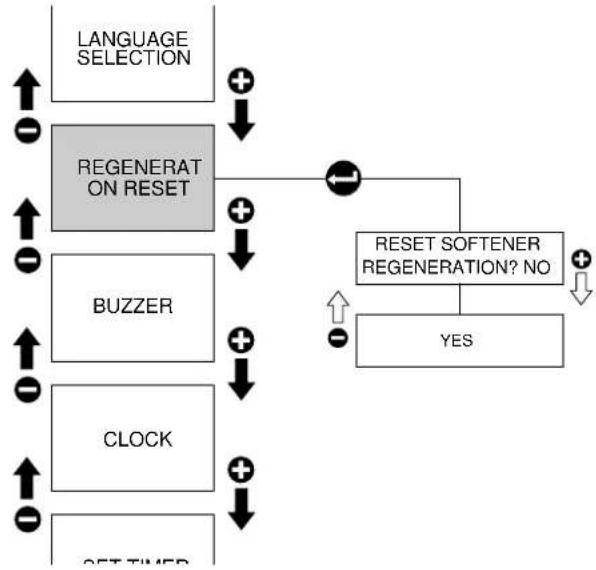
9.2.2. Softener regeneration
If the function is enabled, you can select "Reset" N (no) or Y (yes)- by pressing keys "+" or "-" . Press "enter" to confirm.
flowchart
graph TD
    A["LANGUAGE SELECTION"] --> B["REGENERAT ON RESET"]
    B --> C["BUZZER"]
    C --> D["CLOCK"]
    D --> E["SET-TIMER"]
    B --> F["RESET SOFTENER REGENERATION? NO"]
    F --> G["YES"]
    G --> H["+"]
    G --> I["↓"]
    H --> J["+"]
    I --> K["↓"]
    J --> L["↑"]
    K --> M["↑"]
    L --> N["↑"]
    M --> O["↑"]
    N --> P["↑"]
    O --> Q["↑"]
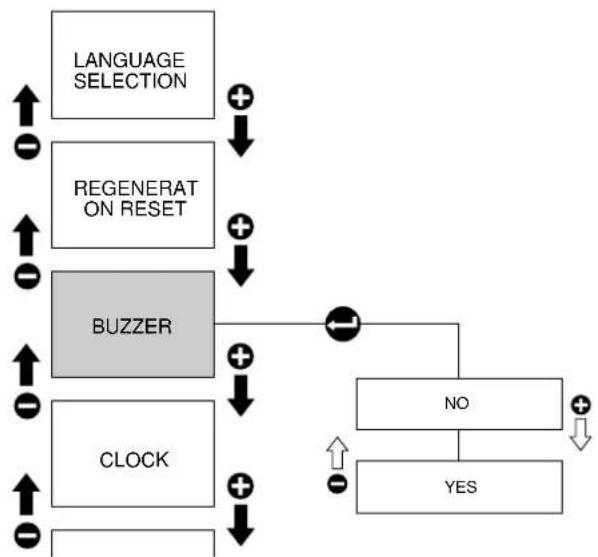
9.2.3. Buzzer
If you enable this function, whenever you press a button you will hear a beep.
flowchart
graph TD
    A["LANGUAGE SELECTION"] --> B["REGENERAT ON RESET"]
    B --> C["BUZZER"]
    C --> D["CLOCK"]
    D --> E["NO"]
    E --> F["YES"]
    F --> G["+"]
    F --> H["↓"]
    C --> I["+"]
    C --> J["↓"]
    D --> K["+"]
    D --> L["↓"]
    style A fill:#f9f,stroke:#333
    style B fill:#f9f,stroke:#333
    style C fill:#ccc,stroke:#333
    style D fill:#ccc,stroke:#333
    style E fill:#fff,stroke:#333
    style F fill:#fff,stroke:#333
    style G fill:#fff,stroke:#333
    style H fill:#fff,stroke:#333
    style I fill:#fff,stroke:#333
    style J fill:#fff,stroke:#333
    style K fill:#fff,stroke:#333
    style L fill:#fff,stroke:#333
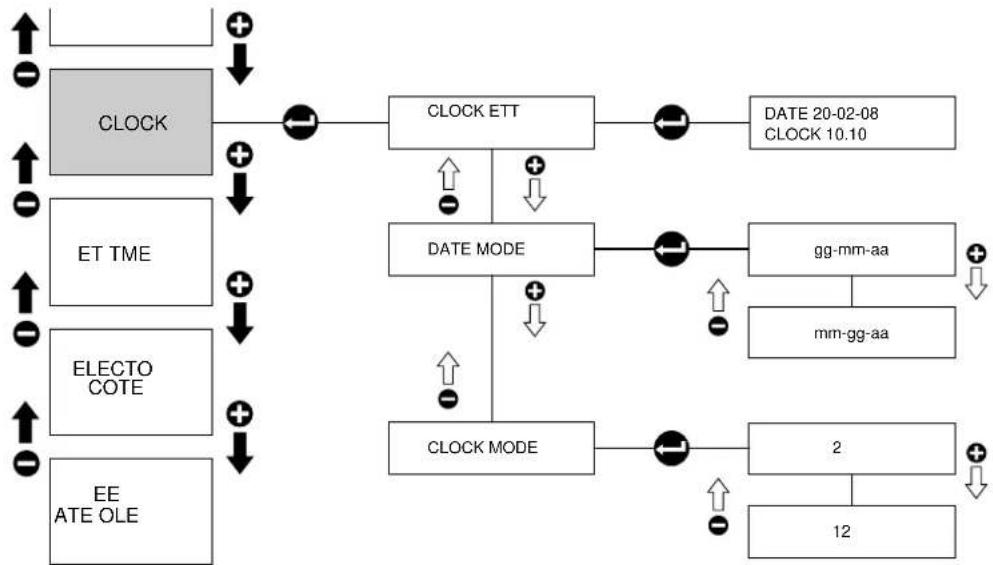
9.2.4. Clock
Sub-menu to set date, time and mode (24 hours ou 12 hours for the time, dd/mm/yy or mm/dd/yy for the date).
flowchart
graph TD
    A["CLOCK"] --> B["CLOCK ETT"]
    B --> C["DATE 20-02-08\nCLOCK 10.10"]
    D["ET TME"] --> E["DATE MODE"]
    F["ELECTO COTE"] --> G["CLOCK MODE"]
    H["EE ATE OLE"] --> I["CLOCK MODE"]
    I --> J["2"]
    I --> K["12"]
    B --> L["+/-"]
    E --> M["+/-"]
    G --> N["+/-"]
    I --> O["+/-"]
    style A fill:#ccc
    style D fill:#ccc
    style F fill:#ccc
    style H fill:#ccc
    style B fill:#ccc
    style E fill:#ccc
    style G fill:#ccc
    style I fill:#ccc
    style J fill:#ccc
    style K fill:#ccc
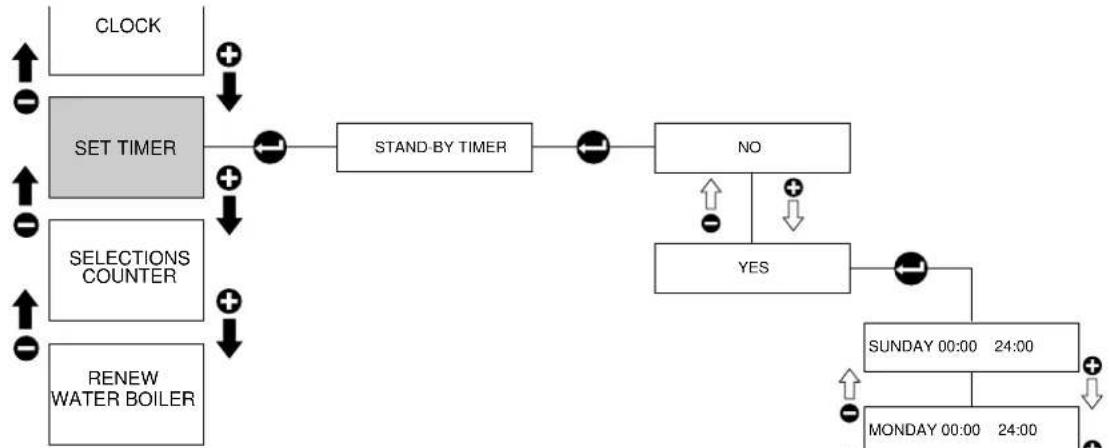
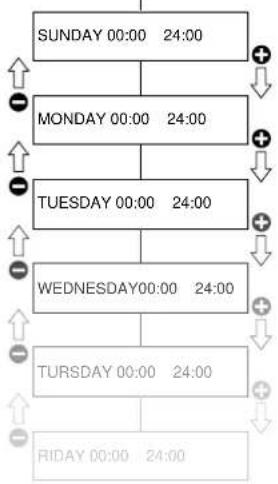
9.2.5. Set Timer
This menu allows you to set the automatic switching ON and OFF times of the machine. It has the following submenus:
- Enable/disable function
- Set the time the machine switches ON and the number of working hours for every day of the week.
When the timer function is selected, if the machine is OFF, press the "Esc" buttons on the programming keypad (for at least 3 seconds) to switch the machine ON; the machine remains ON until the next timed switching OFF or until you press the same controls again (for at least 3 seconds).
flowchart
graph TD
    A["CLOCK"] --> B["SET TIMER"]
    B --> C["STAND-BY TIMER"]
    C --> D["NO"]
    D --> E["YES"]
    E --> F["SUNDAY 00:00 24:00"]
    F --> G["MONDAY 00:00 24:00"]
    G --> H["RENEW WATER BOILER"]
    H --> I["SELECTIONS COUNTER"]
    I --> J["SET TIMER"]
    J --> K["STAND-BY TIMER"]
    K --> L["NO"]
    L --> M["YES"]
    M --> N["SUNDAY 00:00 24:00"]
    N --> O["MONDAY 00:00 24:00"]
When the timer function is selected, if the machine is ON, press the "Esc" buttons on the programming keypad (for at least 3 seconds) to switch the machine OFF; the machine remains OFF until the next timed switching ON or until you press the same controls again (for at least 3 seconds).
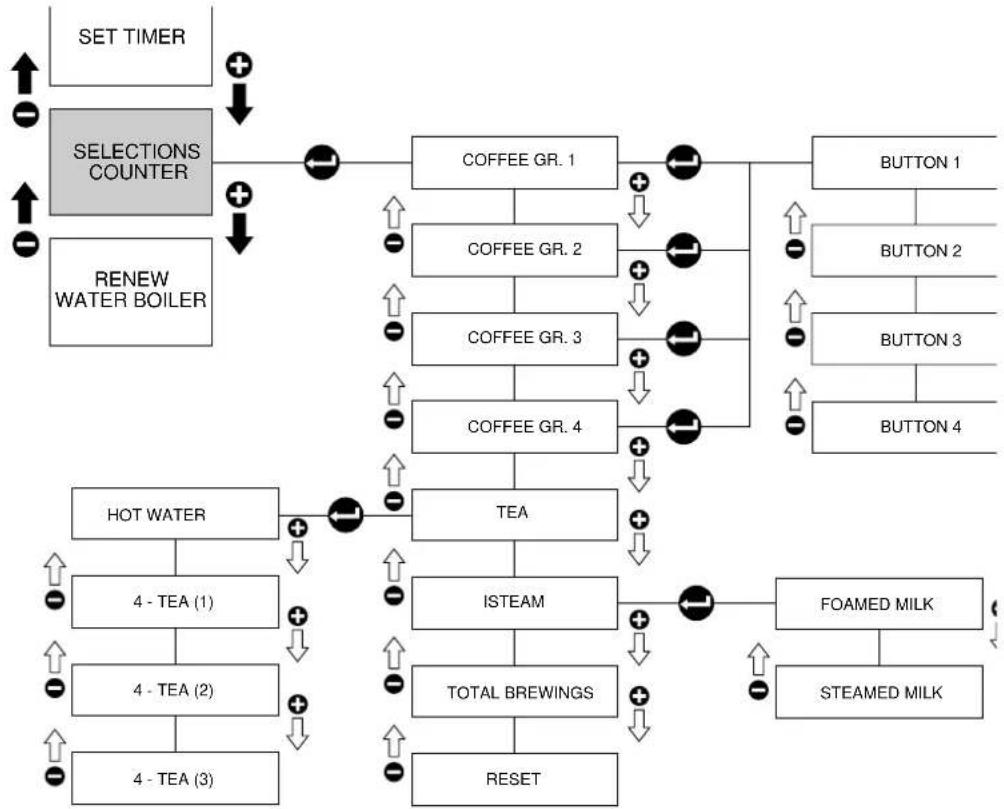
9.2.6. Selection counts
This displays the counts for each coffee group, the water group, the TSC group and the total of the counters. It also asks you whether you wish to reset the counters or not.
If enabled to the counting of output, the number of the coffees and water output is accounted for the and the 5th key on the coffee keyboard operates as Stop dose only.
flowchart
graph TD
    A["SUNDAY 00:00 24:00"] --> B["MONDAY 00:00 24:00"]
    B --> C["TUESDAY 00:00 24:00"]
    C --> D["WEDNESDAY 00:00 24:00"]
    D --> E["TURSDAY 00:00 24:00"]
    E --> F["RIDAY 00:00 24:00"]
flowchart
graph TD
    A["SET TIMER"] --> B["SELECTIONS COUNTER"]
    B --> C["COFFEE GR. 1"]
    B --> D["COFFEE GR. 2"]
    B --> E["COFFEE GR. 3"]
    B --> F["COFFEE GR. 4"]
    C --> G["TEA"]
    D --> G
    E --> G
    F --> G
    G --> H["STEAM"]
    H --> I["TOTAL BREWINGS"]
    H --> J["RESET"]
    K["FTOAMED MILK"] --> L["STEAMED MILK"]
    M["HOT WATER"] --> N["4 - TEA (1)"]
    M --> O["4 - TEA (2)"]
    M --> P["4 - TEA (3)"]
    Q["RENEW WATER BOILER"] --> R["COFFEE GR. 1"]
    Q --> S["COFFEE GR. 2"]
    Q --> T["COFFEE GR. 3"]
    Q --> U["COFFEE GR. 4"]
    V["BUTTON 1"] --> W["BUTTON 2"]
    V --> X["BUTTON 3"]
    V --> Y["BUTTON 4"]
9.2.7. Procedure for replacing the water inside the boiler with fresh water
Hot water is emptied out from the nozzle spout Fig.3 – item 8, until the boiler is empty. When emptied, fresh water is filled in automatically until the set level is reached.
During the final phase, the boiler is heated up until the set pressure is reached.
During the boiler water emptying-out operations, the boiler level control and resistance functions are OFF.
For water removal, we recommend the insertion of a tube leading from the nozzle spout directly into the discharge drain. This to avoid water squirts. ESC can be pressed at any time to interrupt the cycle.

WARNING: Water may spill out during the automatic cycle. Beware of skin burning hazards!
9.3. Displaying
9.3.1. Warming Up Phase
During the warming up phase, the following message is displayed:
"Machine not ready"
Until the set pressure is reached.
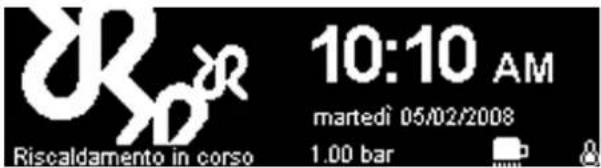
The following messages are also displayed, concerning:
"Please make the regenerate softener", if the function is enabled and the set values have been reached (this message will be then repeated every hour until it is reset)
"Please make the service time", if the function is enabled and the set values have been reached (this message will be then repeated every hour until it is reset)
9.3.2. Operating Mode
Once the temperature/pressure is reached, the date, the current time and the pressure data will stay on display (for 20 sec.) and flash alternatively to the customisation logos.

flowchart
graph TD
    A["LANGUAGE SELECTION"] --> B["REGENERAT ON RESET"]
    B --> C["BUZZER"]
    C --> D["CLOCK"]
    D --> E["SET TIMER"]
    E --> F["SELECTIONS COUNTER"]
    F --> G["RENEW WATER BOILER"]
    G --> H["NO"]
    H --> I["YES"]
    I --> J["+"]
    J --> K["↓"]
    K --> L["↑"]
    L --> M["←"]
    M --> N["↑"]
    N --> O["←"]
    O --> P["↑"]
    P --> Q["←"]
    Q --> R["↑"]
    R --> S["←"]
    S --> T["↑"]
    T --> U["←"]
    U --> V["↑"]
    V --> W["←"]
    W --> X["↑"]
    X --> Y["←"]
    Y --> Z["↑"]
    Z --> AA["←"]
    AA --> AB["↑"]
    AB --> AC["←"]
    AC --> AD["↑"]
    AD --> AE["←"]
    AE --> AF["↑"]
    AF --> AG["←"]
    AG --> AH["↑"]
    AH --> AI["←"]
    AI --> AJ["↑"]
    AJ --> AK["←"]
    AK --> AL["↑"]
    AL --> AM["←"]
    AM --> AN["↑"]
    AN --> AO["←"]
    AO --> AP["↑"]
    AP --> AQ["←"]
    AQ --> AR["↑"]
    AR --> AS["←"]
    AS --> AT["↑"]
    AT --> AU["←"]
    AU --> AV["↑"]
    AV --> AW["←"]
    AW --> AX["↑"]
    AX --> AY["←"]
    AY --> AZ["↑"]
    AZ --> BA["←"]
    BA --> BB["↑"]
    BB --> BC["←"]
    BC --> BD["↑"]
    BD --> BE["←"]
    BE --> BF["↑"]
    BF --> BG["←"]
    BG --> BH["↑"]
    BH --> BI["←"]
    BI --> BJ["↑"]
    BJ --> BK["←"]
    BK --> BL["↑"]
    BL --> BM["←"]
    BM --> BN["↑"]
    BN --> BO["←"]
    BO --> BP["↑"]
    BP --> BQ["←"]
    BQ --> BR["↑"]
    BR --> BS["←"]
    BS --> BT["↑"]
    BT --> BU["←"]
    BU --> BV["↑"]
    BV --> BW["←"]
    BW --> BX["↑"]
    BX --> BY["←"]
    BY --> BZ["↑"]
    BZ --> CA["←"]
    CA --> CB["↑"]
    CB --> CC["←"]
    CC --> CD["↑"]
    CD --> CE["←"]
    CE --> CF["↑"]
    CF --> CG["←"]
    CG --> CH["↑"]
    CH --> CI["←"]
    CI --> CJ["↑"]
    CJ --> CK["←"]
    CK --> CR["↑"]
    CR --> CS["←"]
    CS --> CT["↑"]
    CT --> CU["←"]
    CU --> CV["↑"]
    CV --> CW["←"]
    CW --> CX["↑"]
    CX --> CY["←"]
    CY --> CZ["↑"]
    CZ --> DA["←"]
    DA --> DB["↑"]
    DB --> DC["←"]
    DC --> DD["↑"]
    DD --> DE["←"]
    DE --> DF["↑"]
    DF --> DG["←"]
    DG --> DH["↑"]
    DH --> DI["←"]
    DI --> DJ["↑"]
    DJ --> DK["←"]
    DK --> DL["↑"]
    DL --> DJ
During dispensing, the following is displayed:
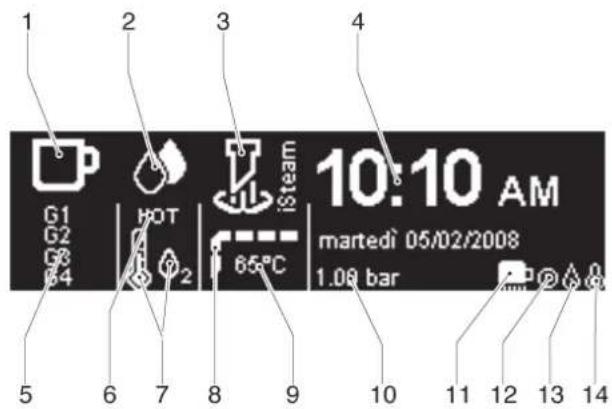
1 Coffee dispensing symbol
2 Hot water dispensing symbol
3 iSteam dispensing symbol
4 Date and time
5 Selected coffee dispensing group
6 Hot water dispensing
7 Type of hot water blending (4-TEA)
8 Milk warm-up display
9 Milk instant-temperature
10 Boiler pressure
11 Cup heater symbol
12 Set-time symbol
13 Water charge symbol
14 Boiler resistance ON symbol
If one of the two time/doses control functions are activated, the coffee symbol space will instead display:
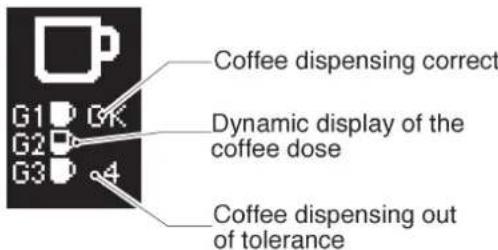
otherwise:
"Brewing time"
For energy saving purposes, the display will reduce its luminosity after one hour of continuous inactivity without dispensing anything. After two hours of continuous inactivity without dispensing anything, it will switch itself off altogether.
9.4. Operating Safety Devices
When the coffee maker is switched ON, it checks whether there is enough water in the boiler.
9.4.1. If the water level is inadequate, the machine tops up the level automatically. If this does not take place within a set period, the boiler filling operation is discontinued and a warning message is displayed:
"G01 Water missing"
9.4.2. If the water presence check result is positive, the boiler heating resistances are enabled.
If the set pressure is not reached within a specific time, the power supply to the heating resistances is cut off and a warning message is shown on the display:
"G02 Boiler Pressure low"
9.4.3. If the safety device for slow dispensing intervenes, the LED of the dispensing button must flash until the end of dispensing.
The boiler safety devices can be reset by switching the machine OFF and then back ON again
9.5 .The Cup-Warmer
By pressing the relative button, the display shows
the following:

Depending on the darkened segments it indicates the selected power status of the cup-warmer resistances (min - med - max - off).
passing from one level to the next is performed by pressing on the cup-warmer key.
9.6. List of malfunctions
The system electronics are capable of diagnosing the following failures by displaying the relative error codes on screen:
Because they are serious, these errors will stop and block machine operations.
G00 Check CPU
G01 Water missing
G02 Boiler Pressure low
G03 Boiler probe shorted
G04 Interrupted boiler probe
G05 Connection IDS
G06 Regen. softener
G07 Maintenance
G08 Cleaning interrupted
G09 24V Group 1 shorted
G10 24V Group 2 shorted
G11 24V Group 3 shorted
G12 24V Group 4 shorted
G13 24V Func. Group shorted
G14 12V Capacitive level shorted
G15 12V Transducer shorted
G16 2V Flowmeter shorted
G17 5V ext shorted
G18 12V sk power shorted
G19 Boiler Over Pressure
Failures G06-7-8- will not block the machine functions and are displayed on the error codes log..
9.7 List of warning
The system electronics are capable of diagnosing the following failures by displaying the relative error code on screen (which will come flashing on alternatively to the customisation logos).
Because they are not serious, these errors will allow the machine to keep running.
We nevertheless recommend that you contact the Technical Service Department in order to settle the problem as quickly as possible.
W01 Interr. flowmeter Group 1
W02 Interr. flowmeter Group 2
W03 Interr. flowmeter Group 3
W04 Interr. flowmeter Group 4
W05 iSteam probe shorted
W06 Interr. iSteam probe
W07 Check data
W08 Maintenance
W09 Water softener
W10 Run the coffee cleaning cycle
W11 Check the clock
W12 EV Group 1 shorted
W13 Interr. EV Group 1
W14 EV Group 2 shorted
W15 Interr. EV Group 2
W16 EV Group 3 shorted
W17 EV Group 4 shorted
W18 EV Autofill shorted
W19 Interr. EV Autofill
W20 EV Hot water shorted
W21 Interr. EV Hot water
W22 EV cold 4-TEA shorted
| W23 | Interr. EV cold 4-TEA |
| W24 | EV hot 4-TEA shorted |
| W25 | Interr. EV hot 4-TEA |
| W26 | EV steam iSteam shorted |
| W27 | Interr. EV steam iSteam |
| W30 | EV air iSteam shorted |
| W31 | Interr. EV air iSteam |
| W32 | Check the message file |
| W33 | Check USB |
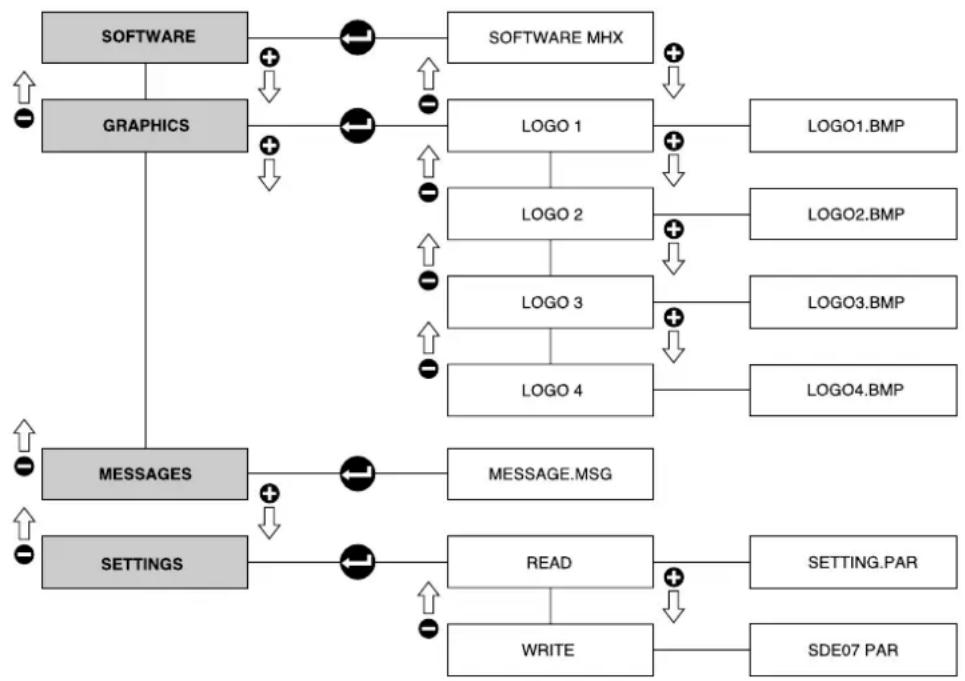
10. LOAD & SHOW
Inserting a USB key into port 20 (fig. 3) will automatically upload the LOAD & SHOW interface, through which it is possible to perform the following operations:
- Machine software: software updating procedures.
- Graphics: uploading of any static or dynamic customisation logos**.
- Messages: updating of the machine messages (provides new language upload options).
- Parameters: enables uploading of another machine's parameters or downloading parameters - currently in use on Class 10.
Note:
- The files that need to be uploaded must be copied directly onto the USB key, without first putting them into a folder.
- Never switch the machine off during the upload procedure.
flowchart
graph TD
    A["SOFTWARE"] --> B["LOGO 1"]
    C["GRAPHICS"] --> D["LOGO 2"]
    D --> E["LOGO 3"]
    E --> F["LOGO 4"]
    G["MESSAGES"] --> H["MESSAGE.MSG"]
    I["SETTINGS"] --> J["READ"]
    J --> K["SETTING.PAR"]
    J --> L["SDE07 PAR"]
    B --> M["LOGO1.BMP"]
    D --> N["LOGO2.BMP"]
    E --> O["LOGO3.BMP"]
    F --> P["LOGO4.BMP"]
    J --> Q["WRITE"]
    Q --> R["SDE07 PAR"]
\*\* Features of the logos that can be uploaded
Static logo
Up to 4 static logos can be displayed on the Class 10.
In order to be uploaded into the machine system, the logos must have the following features:
- bitmap image (.bmp)
- 240x64 pixel resolution
- 2-colour image (1 bit)
Dynamic logo
One animated logo can be displayed on the Class 10.
In order to be uploaded into the machine system, said logo must have the following features:
- bitmap image (.bmp)
- Max. 1280x64 pixel resolution
- 2-colour image (1 bit)

11. MAINTENANCE

Maintenance operations have to be carried out when the machine is off and cold and the plug is disconnected. Some particular operations have to be effected when the machine is operating.
Do not clean the machine by using metal or abrasive devices, such as steel wool, metal brushes, needles, etc. or general detergents (alcohol, solvents, etc.)
When necessary, use special detergents for coffee machines that can be bought in specialized service centres.
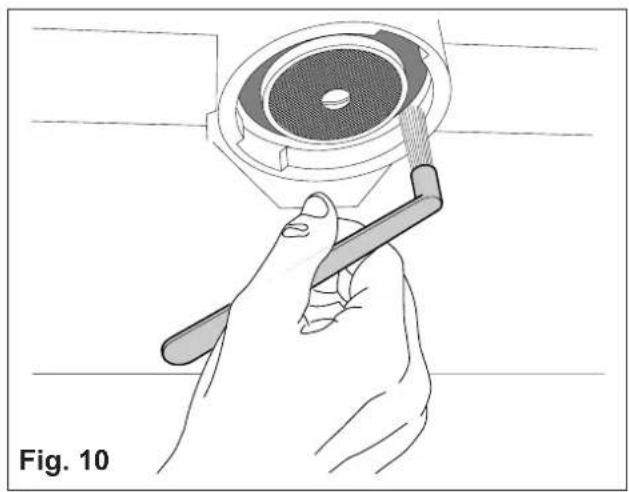
11.1. Daily (Fig.10)
Use a clean cloth or sponge that does not leave hairs or fluff (preferably cotton or linen).
- Carefully clean the outside surface, following the grain of the satin finish on the parts in stainless steel.
- Clean the steam and hot water spouts and check that the nozzles are not encrusted (if they become encrusted, be careful not to deform or damage them).
- Clean the spray units and the seals under the casing of the delivery units using the special brush supplied.
- Remove the filter-holders and remove the filter and the clamp which secures the filter, use a brush to remove any coffee deposits and rinse with hot water in order to dissolve any grease deposits.
11.2. Weekly

Operations to be carried out with the machine operative and under pressure.
- Place the supplied blind filter in the filter-holder, put in a spoonful of detergent in powder for coffee machines and fit the filter-holder in the unit to be cleaned.
- Press the coffee dispensing button and draw water for approx. 30 seconds.
- Stop and start dispensing several times until clean water comes out of the discharge unit tube.
- Remove the filter-holder, take out the blind filter and insert a normal one. Replace the filter-holder on the unit and rinse by drawing water several times.
● Make a coffee to eliminate any unpleasant taste.
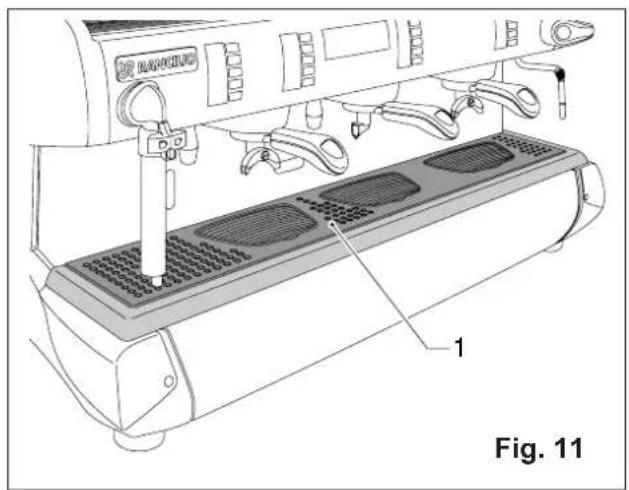
Cleaning the filters and delivery heads (Fig.11)
Operation to be carried out when the machine is off and cold.
● Prepare a solution of 4 sachets of detergent powder Code 69000124 dissolved in a litre of boiling water in a stainless steel, plastic or glass recipient (NOT ALUMINIUM OR IRON).
- Remove the filters and immerse them with the filter holders in the prepared solution, leaving them for at least 10/20 minutes (all night is better).
- Remove them from the container and rinse them thoroughly in running water.
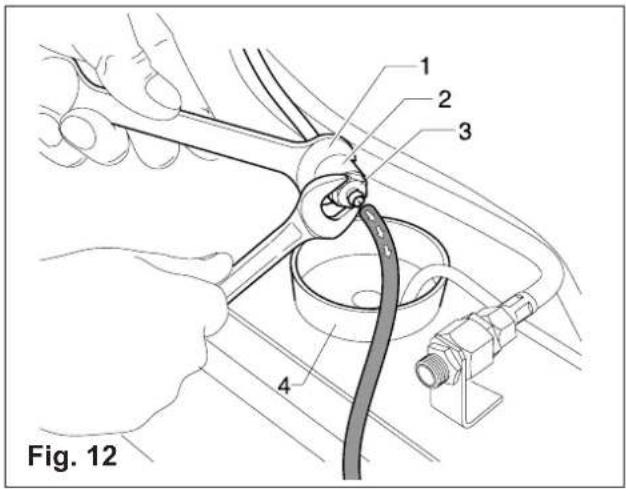
- Remove the cup rack 1 (Fig.12), slide out the drip tray and clean them both.
- Check and clean the drainage sump 4 (Fig.14), removing any sludge with the help of a spoon.
11.2.1 Washing of the coffee groups
At the fixed time, if the automatic washing (par.2.6) mode is enabled, a message on the display requests to wash the coffee groups.
Keep "ENTER" button pressed to start washing until the display shows:
Coffee Cleaning Cycle
Start cleaning cycle
Group?
press
If you press "enter" within 10 seconds, the following cycle starts (if you do not leave this menu automatically):
- The display shows:
Coffee Cleaning Cycle
Insert the blind
filters then
press
- When you press "enter", the cleaning cycle starts and the display shows:
Coffee Cleaning Cycle
CLEANING RUNNING
The machine carries out n. 10 cycles as follows:
- Starts dispensing from the groups for 10 sec.
- Pauses for 10 sec.
At the end of the 10 cycles, the display reads:
Coffee Cleaning Cycle
Remove the
filterholders
press
If you press "enter" the display shows:
RINSE RUNNING
The machine carries out n. 2 cycles as follows:
- Starts dispensing from the groups for 30 sec.
- Pauses for 30 sec.
Keeping “esc” pressed for 2 seconds, during the cycle the current washing phase will stop and the next phase will take place.
It is advisable to always complete the rinsing cycle to remove any detergent residues.
N.B. In the washing and rinsing phases the groups are operated alternatively.
In any case the washing of the coffee groups can be enabled whenever necessary according to the previously described procedure.
11.2.2. Cleaning iSteam
- Clean the iSteam nozzle frequently with a sponge or damp cloth. Make sure to clean the lower parts.
- Check to make sure that the sprayer is not clogged or partially clogged with crusts and residues (if a crust removal operation is necessary, be very careful not to deform or damage the sprayer)

11.3. Regular-interval maintenance and repairs
During all maintenance / repair operations, the components used must be warranted to maintain all the machine's hygiene and safety requirements. Using the machine's original spare parts constitute an effective warranty.
After repair or component replacement operations involving parts coming into contact with water and/or food, it is necessary to run the machine washing procedure as specified under the installation and first-time start-up section herein.
Have been fitted with economizers which do not draw water from the boiler to make hot water, the water in the boiler need only to be renewed from time to time.
11.3.1. Renewal of water in the boiler (Fig.12)
To be carried out only by qualified personnel.
- Turn off the machine and wait for the pressure in the boiler to diminish (gauge needl on "0").
- Insert a rubber hose into the hose-end fitting (3) (Fig.12)
- Use the wrench (1) to immobilize the fitting (2) and loosen the hose-end fitting (3).
- Allow the water to flow out completely; then, close the fitting (3) and remove the rubber hose.
● Refill the boiler (paragraph 7.3.).

Whenever descaling operations are necessary, ensure that only specific products suitable for parts contacting water for public, human consumption are used. Make sure that all the relative product instructions are carefully observed and complied with at all times.
12. STOPPING THE MACHINE A - Temporary stop
- Carry out cleaning and maintenance operations.
● Wind up the cable and fasten it to the machine with sticky tape.
- Cover the machine and place it in a dry room. Do not leave it exposed to atmospheric agents and do not allow it to be touched by children or unift persons.
To disconnect from the main power supply, consult qualified personnel.
B - Definitive stop
- Besides carrying out the operations necessary for a temporary stop, cut off the cable, pack the machine in cardboard, polystyrene or other packing material and consign it to firms authorized for its disposal or to second-hand goods dealers.
13. TROUBLESHOOTING AND POSSIBLE REMEDIES

Check operations to be carried out by the user with the plug disconnected.
For any type of problem or inconvenience not specifically indicated, disconnect the plug and contact our service centre without attempting any direct repairs.
A) The machine does not start:
- check that the plug is connected;
- In case of power failure wait for the power to return and check if the earth leakage protection circuit breaker or the main switch is on;
- check the condition of the plug and the supply cable; if damaged have them replaced by qualified personnel.
B) There is water under the machine:
- check that the drainage tray is not obstructed.
C) Slow dispensing:
- check that the filters and delivery heads are clean;
- check that the coffee is not too finely ground.
D) Irregular steam delivery:
- check that the nozzles are not obstructed.
IT ITALIANO 12-29
FR FRANCAIS 30-47
DE DEUTSCH 48-65
EN ENGLISH 66-83
ES ESPAÑOL 84-101
PT PORTUGUÊS 102-119
SCHEMI ELETTRICI
SCHEMAS ELECTRIQUES
SCHALTPLÄNE
WIRING DIAGRAMS
ESQUEMAS ELECTRICOS 120-125
ESQUEMAS ELÉTRICOS
SCHEMI IDRAULICI
SCHÉMAS HYDRAULIQUES
HYDRAULIKPLÄNE
HYDRAULIC DIAGRAMS
ESQUEMAS HIDRÁULICOS 126-128
ESQUEMAS HIDRÁULICOS

1 Interruptor general
flowchart
graph TD
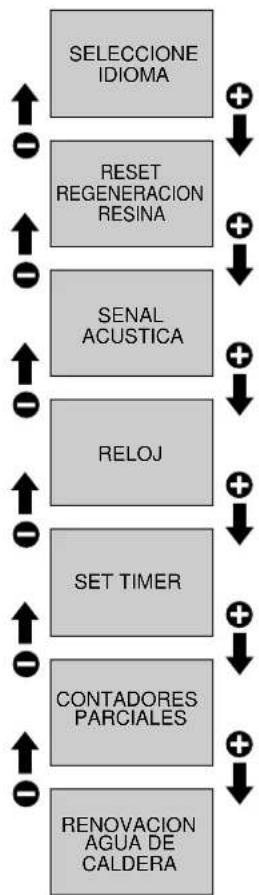
    A["SELECCIONE IDIOMA"] --> B["RESET REGENERACION RESINA"]
    A --> C["SENAL ACUSTICA"]
    A --> D["RELOJ"]
    B --> E["+"]
    C --> F["+"]
    D --> G["+"]
    E --> H["ITALIANO"]
    F --> I["ENGLISH"]
    G --> J["ESPAÑOL"]
    H --> K["FRANCAIS"]
    I --> L["DEUTSCH"]
    J --> M["PORTUGUES"]
    K --> N["+"]
    L --> O["+"]
    M --> P["+"]
    style A fill:#ccc
    style B fill:#fff
    style C fill:#fff
    style D fill:#fff
    style E fill:#fff
    style F fill:#fff
    style G fill:#fff
    style H fill:#fff
    style I fill:#fff
    style J fill:#fff
    style K fill:#fff
    style L fill:#fff
    style M fill:#fff
    style N fill:#fff
    style O fill:#fff
flowchart
graph TD
    A["SELECCIONE IDIOMA"] --> B["RESET REGENERACION RESINA"]
    B --> C["SENAL ACUSTICA"]
    C --> D["RELOJ"]
    D --> E["SET TIMER"]
    E --> F["CONTADORES PARCIALES"]
    F --> G["RENOVACION AGUA DE CALDERA"]
    G --> A
W23 EV fria 4-TEA open
flowchart
graph TD
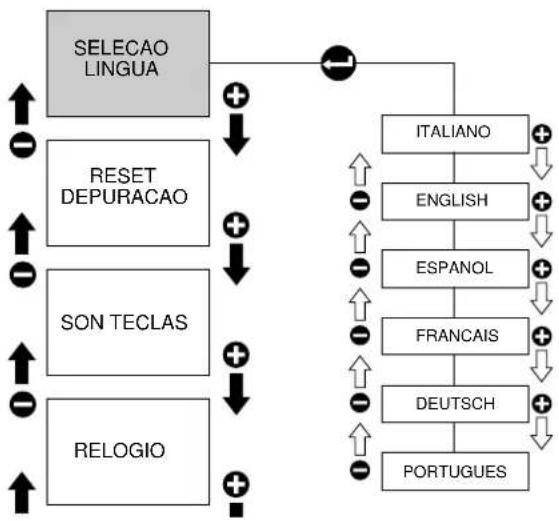
    A["SELECAO LINGUA"] --> B["RESET DEPURACAO"]
    A --> C["SON TECLAS"]
    A --> D["RELOGIO"]
    B --> E["+"]
    C --> F["+"]
    D --> G["+"]
    E --> H["ITALIANO"]
    F --> I["ENGLISH"]
    G --> J["ESPAÑOL"]
    H --> K["FRANCAIS"]
    I --> L["DEUTSCH"]
    J --> M["PORTUGUES"]
    K --> N["+"]
    L --> O["+"]
    M --> P["+"]
    style A fill:#ccc
    style B fill:#ccc
    style C fill:#ccc
    style D fill:#ccc
    style E fill:#fff
    style F fill:#fff
    style G fill:#fff
    style H fill:#fff
    style I fill:#fff
    style J fill:#fff
    style K fill:#fff
    style L fill:#fff
    style M fill:#fff
    style N fill:#fff
    style O fill:#fff
flowchart
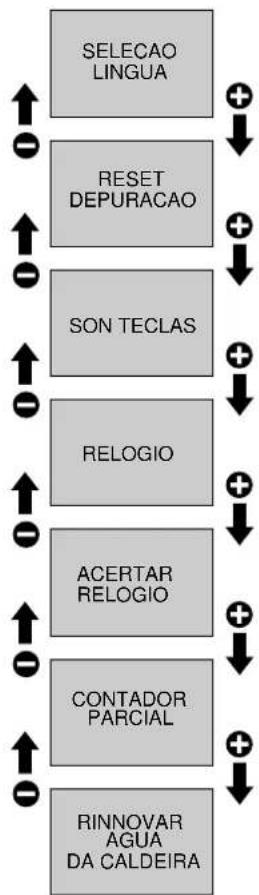
graph TD
    A["SELECAO LINGUA"] --> B["RESET DEPURACAO"]
    B --> C["SON TECLAS"]
    C --> D["RELOGIO"]
    D --> E["ACERTAR RELOGIO"]
    E --> F["CONTADOR PARCIAL"]
    F --> G["RINNOVAR AGUA DA CALDEIRA"]
    A -->|+| H
    B -->|+| I
    C -->|+| J
    D -->|+| K
    E -->|+| L
    F -->|+| M
    G -->|+| N
W08 Executar Manutencao
W09 Executar regeneracao resinas
W23 EV Fria 4-TEA Aberta
| W24 | EV Quente 4-TEA curto |
| W25 | EV Quente 4-TEA Aberta |
| W26 | EV Vapor iSteam curto |
| W27 | EV Vapor iSteam Aberta |
| W30 | EV Ar iSteam curto |
| W31 | EV Ar iSteam Aberta |
| W32 | Controlar messagem |
| W33 | Controlar USB |
10. LOAD & SHOW
M = MARRONE MARRON BRAUN BROWN MARRON MARROM
N = NERO NOIR SCHWARZ BLACK NEGRO PRETO
B = BLU BLEU BLAU BLUE AZUL AZUL
BI = BIANCO BLANC WEISS WHITE BLANCO BRANCO
V = VERDE VERT GRUEN GREEN VERDE VERDE
GV = GIALLO-VERDE JAUNE-VERT GELB-GRUEN YELLOW-GREEN AMARILLO-VERDE AMARELO-VERDE
BIN = BIANCO-NERO BLANC-NOIR WEISS-SCHWARZ WHITE-BLACK BLANCO-NEGRO BRANCO-PRETO
BIB = BIANCO-BLU BLANC-BLEU WEISS-BLAU WHITE-BLUE BLANCO-AZUL BRANCO-AZUL
VI = VIOLA VIOLET VIOLET VIOLETT VIOLETA ROXO
R = ROSSO ROUGE ROT RED ROJO VERMELHO
200-240 3V\~ mod. USB COLLEGAMENTO-RACCORDEMENT-VERBINDUNG-CONNECTION-CONEXIÓN-LIGAÇÃO
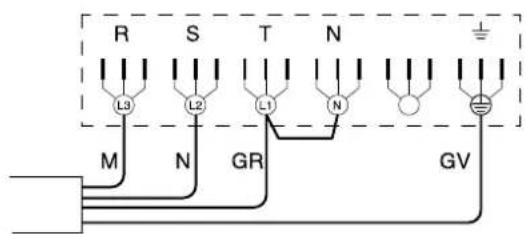
1) Connect cable as shown in the picture.
2) Disconnect the light blue cables (neutral) from electric resistance and insulate them.
3) Connect boiler electric resistance according to the diagram below.
info@ranciliogroup.com
www.rancilio.com
www.egrocoffee.com
Worldwide Branch Locations
SPAIN
Rancilio Espana, s.a.
Gran Vía de Carlos III, 84 3 a
Edificio Trade
08028 Barcelona Spain
Ph. +34 902 884 275
Ph. +34 934 923 414
Fax +34 93 496 57 01
www.rancilio.com
info@rancilio.es
PORTUGAL
Rancilio Portugal Lda
Rancilio North America Inc.
8102 S.Lemont Rd. #1200
Woodridge, IL 60517 USA
Ph. +1 630 427 1703
Fax +1 630 427 1713
www.rancilio.com
info@rancilio-na.com
Asian Market Access HK Ltd
601 Tak Woo House
17-19 D'aguilar Street Central
Hong Kong
Ph. +852 2521 7839
Fax +852 2521 5787
www.rancilio.com