WG2418 - Scale TRISTAR - Free user manual and instructions
Find the device manual for free WG2418 TRISTAR in PDF.



User questions about WG2418 TRISTAR
0 question about this device. Answer the ones you know or ask your own.
Ask a new question about this device
Download the instructions for your Scale in PDF format for free! Find your manual WG2418 - TRISTAR and take your electronic device back in hand. On this page are published all the documents necessary for the use of your device. WG2418 by TRISTAR.
USER MANUAL WG2418 TRISTAR
WG-2418
3'03" – 7'10" in 1"-Schritten
Glass Infrared Body Fat and Water Scale
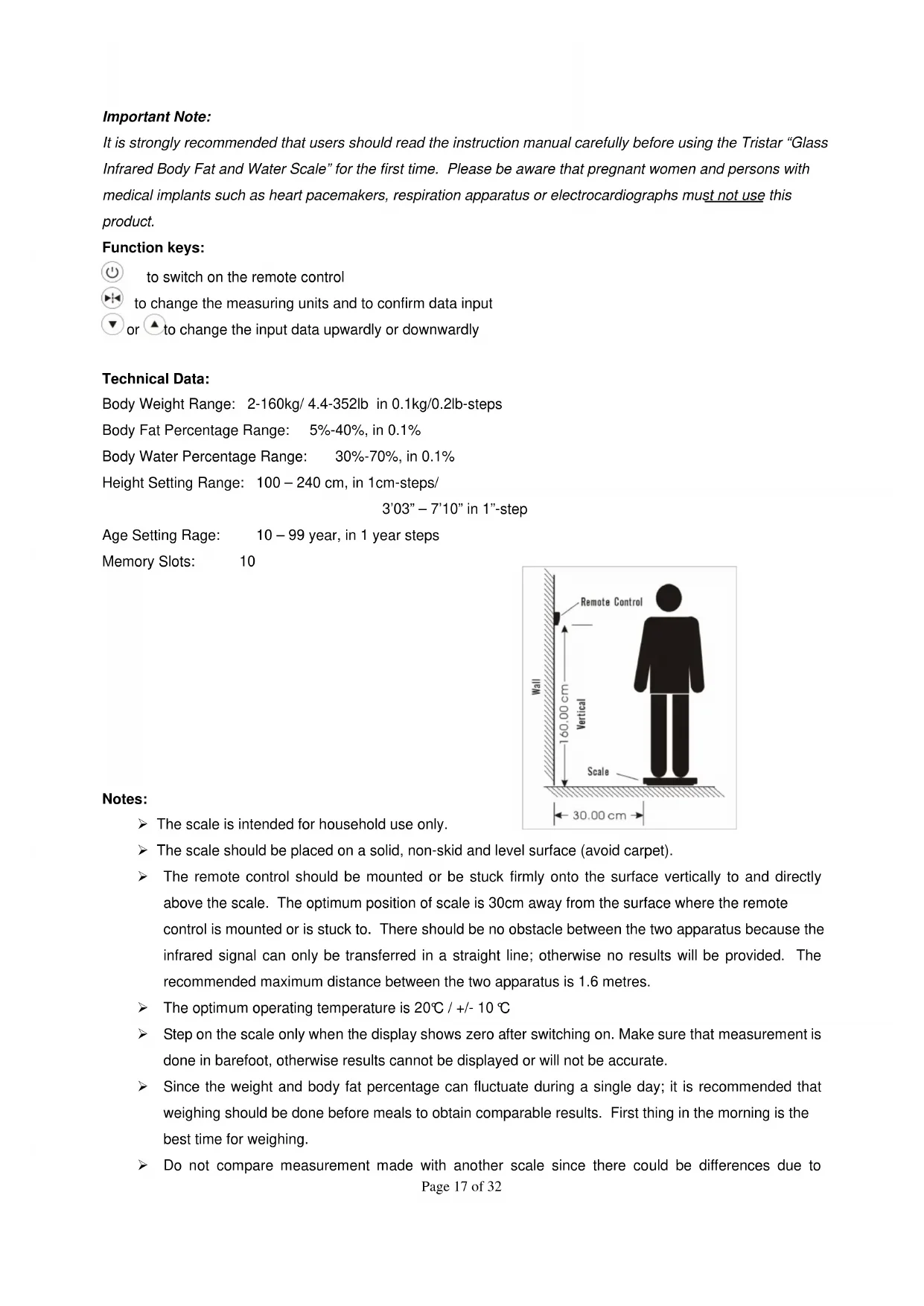
Important Note:
It is strongly recommended that users should read the instruction manual carefully before using the Tristar "Glass Infrared Body Fat and Water Scale" for the first time. Please be aware that pregnant women and persons with medical implants such as heart pacemakers, respiration apparatus or electrocardiographs must not use this product.
Function keys:

to switch on the remote control

to change the measuring units and to confirm data input

▲ to change the input data upwardly or downwardly
Technical Data:
Body Weight Range: 2-160kg/4.4-352lb in 0.1kg/0.2lb-steps
Body Fat Percentage Range: 5%-40%, in 0.1%
Body Water Percentage Range: 30%-70%, in 0.1%
Height Setting Range: 100 – 240 cm, in 1cm-steps/
$$ 3 ^ {\prime} 0 3 ^ {\prime \prime} - 7 ^ {\prime} 1 0 ^ {\prime \prime} \text { in } 1 ^ {\prime \prime} \text {-step } $$
Age Setting Rage: 10 – 99 year, in 1 year steps
Memory Slots: 10
Notes:
The scale is intended for household use only.
The scale should be placed on a solid, non-skid and level surface (avoid carpet).
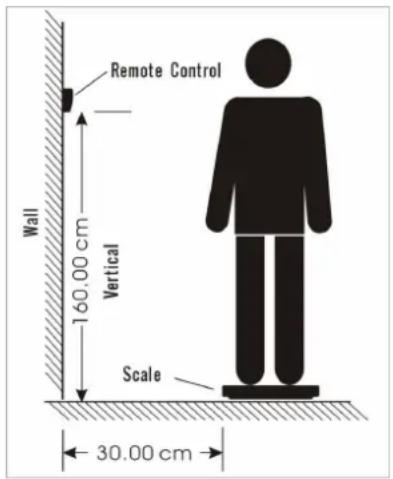
The remote control should be mounted or be stuck firmly onto the surface vertically to and directly above the scale. The optimum position of scale is 30cm away from the surface where the remote control is mounted or is stuck to. There should be no obstacle between the two apparatus because the infrared signal can only be transferred in a straight line; otherwise no results will be provided. The recommended maximum distance between the two apparatus is 1.6 metres.
The optimum operating temperature is 20°C / +/- 10°C
Step on the scale only when the display shows zero after switching on. Make sure that measurement is done in barefoot, otherwise results cannot be displayed or will not be accurate.
Since the weight and body fat percentage can fluctuate during a single day; it is recommended that weighing should be done before meals to obtain comparable results. First thing in the morning is the best time for weighing.
Do not compare measurement made with another scale since there could be differences due to
manufacturing tolerances.
Inserting/ Changing Batteries:
The battery compartments of the scale and the remote control are both situated on the back. Before the first use, open the battery compartments of both the scale and the remote control and insert four new “AAA” batteries and two new “AAA” batteries respectively in the right polarity.
When “☐” or “☐” displays on the screen, it means the batteries of the remote control or of the scale are almost exhausted respectively. Please replace with new batteries. If the figures appear and remain unchanged on the display, re-insert the batteries and restart the scale.
Important:
When you change your batteries, be careful!!! You must dispose the batteries according to the regulations. Dispose them in an appropriate place in order to assure their recycling and the protection of the environment.
Use of Electronic Infrared Body Fat and Water Scale
The body fat and water scale has two different operating modes:
• Body weight measuring only
• Body weight measuring with body fat and water analysis.
- Body weight measuring:
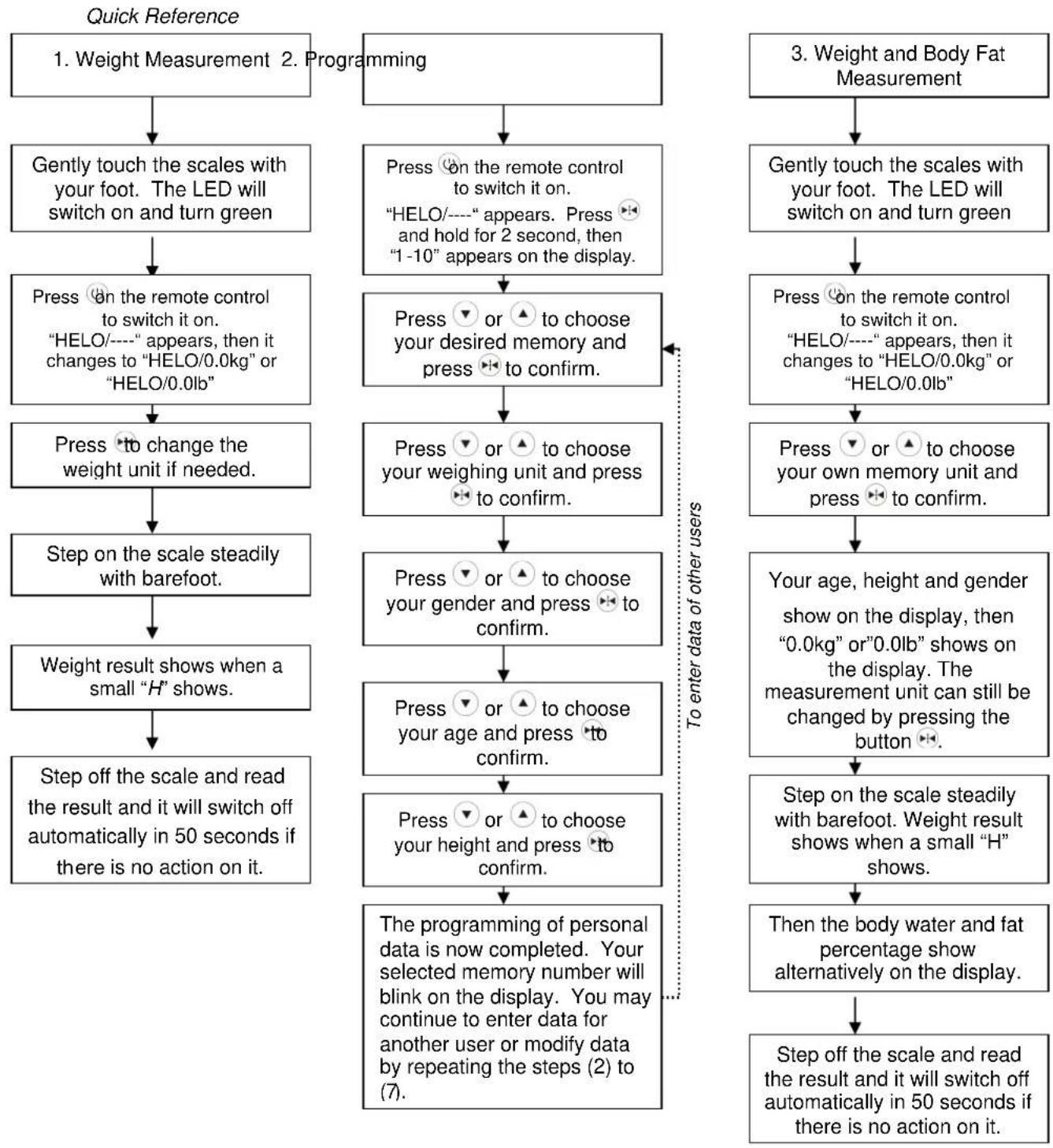
(1) Gently touch the scale with your foot. The red LED display lights up. After approximately 2 seconds, the LED turns green.
(2) Press the button to switch on the remote control, then "HELO/----" appears on the display. After approximately 2 seconds, "HELO/0.0kg" or "HELO/0.0lb" will appear on the display. The scale is now ready for use.
(3) Press the button once only to change the measurement unit between kg (kilograms) and lb (British pounds).
(4) Stand still with barefoot on the scale and the measurement will begin.
When your weight is successfully established, a small “” will show on the display.
(5) If you remain on the scale, it will switch off after approximately 60 seconds. When you step off the scales, the reading will return to "HELO/0.0kg" or "HELO/0.0lb". The scale is ready for weighing again.
(6) If a weight over 160kg or 352lbs is loaded onto the scale, "O-Ld" will be shown on the display.
-
Programming of the personal data
-
Press the button to switch on the remote control, then "HELO/----" appears on the display. Press the button and hold it for 3 seconds, then "1-10" appears on the display. Release the button and a memory number blinks on the display.
- Press the buttons ▼ or ⬆ to choose your desired memory slot. For example you may wish to use memory “1” in your household and you partners may choose number “2”. Confirm your selection by
pressing the button ⏻.
- Press the buttons or to choose your desired weight unit. "kg" and "lb" are available for the selection. Confirm your selection by pressing the button
- Press the buttons or to choose your gender. The symbol denotes female and the symbol denotes male. Confirm your selection by pressing the button
- Press the buttons or to choose your age. Confirm your selection by pressing the button.
- Press the buttons or to choose your height. Confirm your selection by pressing the button. If "kg" is chosen as measurement unit, height will be shown in terms of "cm". If "lb" is chosen, height will be shown in terms of "foot and inches".
- The programming of personal data is now completed. Your selected memory number will blink on the display. You may continue to enter data for another user or modify data by repeating the steps (2) to (7).
-
Otherwise, after the memory number flashes for approximate 20 seconds, the remote control will switch off automatically, or you can switch it off manually by pressing the button after data entry.
-
Body weight measuring with body fat and water analysis:
-
Gently touch the scale with your foot. The red LED display lights up. After approximately 2 seconds, the LED turns green
- Press the button to switch on the remote control, then "HELO/----" appear on the display. After approximately 2 seconds, "HELO/0.0kg" or "HELO/0.0lb" will appear on the display. The scale is now ready for use.
- Press the buttons or to find your own memory number and press to confirm. Your gender, age and height will be show on display. When "0.0kg" or "0.0lb" appears, the scale is ready for use. The weight unit can still be changed by pressing the button
- Stand still with barefoot on the scale and the measurement will start. When your weight is successfully established, a small “H” will be shown on the display, then “0000” should blinks on the display. After approximate 2 seconds, your body water and fat percentage will be shown on the display, indicates the percentage of your body which is water and indicates the percentage of your body which is fat. Step off the scale to read the result of measurement.
-
After displaying your weight, body water and fat percentage for a few seconds, the scale will show "HELO/0.0kg" or "HELO/0.0lb" and turn to body weight measuring mode automatically. the scale will switch off automatically in approximate 50 seconds if there is no action on it or you can switch it off by pressing the button "manually.
-
Maintenance Care:
-
The scale should never get wet.
○ Only clean the scale with a soft cloth and natural cleaning products. - Batteries should be removed from the battery compartments if the scale is not going to be used for a period of time.
- Do not strike the scale with hard and sharp objects and avoid strong vibration.
- Do not attempt to disassemble or repair the scale by yourself.
Appendix:
It is essential to understand that our body fat is not harmful. It is the excess in body fat that causes many of the health
problems. Fat functions to protect our organs, storing vitamins and energy and regulate our body temperature. You can only understand your real fitness level by knowing your body fat content. Depending on the age and gender, different body fat contents are considered to be healthy. The figure below is intended as a reference for your personal fitness profile only, if any doubt, please seek medical advice:
Standard Body Fat Percentage (For reference only)
| Age Female Male | ||||||||||||
| Thin | Normal | High | Over | Thin | Normal | High | Over | |||||
| 15 – 39 | 14 – 21 | 22 – 27 | 28 – | 32 | 33 – | 40 | 10 – 18 | 19 – 24 | 25 – 30 | 31 – 40 | ||
| 40 – 55 | 15 – 22 | 23 – 28 | 29 – | 33 | 34 – | 40 | 11 – 19 | 20 – 25 | 26 – 31 | 32 – 40 | ||
| 56 – 70 | 16 – 23 | 24 – 29 | 30 – | 34 | 35 – | 40 | 12 – 20 | 21 – 26 | 27 – 32 | 33 – 40 | ||
Water is the second most important nutrient, besides oxygen, that the body needs in order to function. Water plays a vital role in nearly every function of the body. It helps to regulate body temperature, to carry nutrients throughout the body, to moisturize and purify the skin, to improve the digestive process, to eliminate waste, to lubricate and cushion joints and so on... Lack of water may cause a concentration build-up of toxins in the body fluid. Depending on age and gender, different body water content is considered to be healthy. The figure below is intended as a reference for your personal fitness profile only, if any doubt, please seek medical advice:
Standard Body Water Percentage (For reference only)
| Age | Female | Male |
| 15 – 39 | 52-55 | 55-60 |
| 40 – 70 | 45-48 | 50-55 |
Troubleshooting
Possible Faults and Their Remedies:
| Indication | Reason | Remedy |
| Err | The body fat percentage or the body water percentage cannot be detected. | Check foot contact and make sure stepping on barefoot. |
| Batteries of remote control /scale exhausted. | Replace them with new ones. | |
| 0-Ld | Maximum carrying capacity exceeded. | Maximum carrying capacity is 16 0kg or 352lb |
flowchart
graph TD
A["1. Weight Measurement"] --> B["Gently touch the scales with your foot. The LED will switch on and turn green"]
B --> C["Press on the remote control to switch it on.<br>"HELO/----" appears, then it changes to "HELO/0.0kg" or "HELO/0.0lb""]
C --> D["Press to change the weight unit if needed."]
D --> E["Step on the scale steadily with barefoot."]
E --> F["Weight result shows when a small "H" shows."]
F --> G["Step off the scale and read the result and it will switch off automatically in 50 seconds if there is no action on it."]
H["2. Programming"] --> I["Press on the remote control to switch it on.<br>"HELO/----" appears. Press and hold for 2 second, then "1-10" appears on the display."]
I --> J["Press or to choose your desired memory and press to confirm."]
J --> K["Press or to choose your weighing unit and press to confirm."]
K --> L["Press or to choose your gender and press to confirm."]
L --> M["Press or to choose your age and press to confirm."]
M --> N["Press or to choose your height and press to confirm."]
N --> O["The programming of personal data is now completed. Your selected memory number will blink on the display. You may continue to enter data for another user or modify data by repeating the steps (2) to (7)."]
P["3. Weight and Body Fat Measurement"] --> Q["Gently touch the scales with your foot. The LED will switch on and turn green"]
Q --> R["Press on the remote control to switch it on.<br>"HELO/----" appears, then it changes to "HELO/0.0kg" or "HELO/0.0lb""]
R --> S["Press or to choose your own memory unit and press to confirm."]
S --> T["Your age, height and gender show on the display, then "0.0kg" or "0.0lb" shows on the display. The measurement unit can still be changed by pressing the button."]
T --> U["Step on the scale steadily with barefoot. Weight result shows when a small "H" shows."]
U --> V["Then the body water and fat percentage show alternatively on the display."]
V --> W["Step off the scale and read the result and it will switch off automatically in 50 seconds if there is no action on it."]
Guidelines for protection of the environment
This appliance should not be put into the domestic garbage at the end of its useful life, but must be disposed of at a central point for recycling of electric and electronic domestic appliances. This symbol on appliance, instruction manual and packaging puts your attention to this important issue. The materials used in this appliance can be recycled. By recycling used domestic appliances you contribute an important push to the protection of our environment. Ask your local authorities for information regarding the point of recollection..