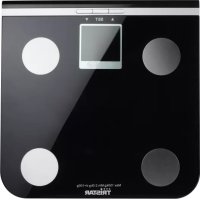
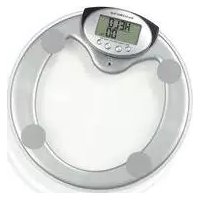
TRISTAR WG-2419 - Scale

WG-2419 - Scale TRISTAR - Free user manual and instructions

Find the device manual for free WG-2419 TRISTAR in PDF.

📄 23 pages English EN Download 💬 AI Question 10 questions ⚙️ Specs
Notice TRISTAR WG-2419 - page 11
Pick your language and provide your email: we'll send you a specifically translated version.
Product type Kitchen scale
Brand TriStar
Model WG-2419
Maximum capacity 5 kg
Accuracy 1 g
Units of measurement g, kg, lb, oz
Tare function Yes
Display Backlit LCD
Power supply 2 AAA batteries (not included)
Dimensions (L x W x H) 20 x 15 x 2 cm
Net weight 300 g
Platform material Tempered glass
Automatic shut-off Yes, after 2 minutes of inactivity
Overload indicator Yes
Low battery indicator Yes
Care and cleaning Clean with a damp cloth, do not immerse
Safety instructions Do not use with liquids, avoid shocks
Spare parts and repairability Standard batteries, repair not foreseen by the manufacturer
General information Household use only, room temperature

Frequently Asked Questions - WG-2419 TRISTAR

How to change the batteries of the TriStar WG-2419 scale?
Open the battery compartment located under the scale. Insert 2 AAA batteries respecting the polarity (+/-). Close the lid. If the display shows nothing, check that the batteries are in good condition.
What is the maximum capacity of the scale?
The maximum capacity is 5 kg. Do not exceed this limit to avoid damaging the scale. An overload indicator appears if exceeded.
How to use the tare function?
Place an empty container on the scale, then press the TARE button to reset the display to zero. Then add the ingredients. The net weight is displayed without the container.
How to clean the scale?
Use a soft slightly damp cloth to clean the glass surface. Never immerse the scale in water and avoid abrasive products. Dry thoroughly after cleaning.
My display shows 'Lo' or blinks. What to do?
The 'Lo' message indicates that the batteries are low. Replace both batteries with new ones. If the problem persists, check the contacts in the battery compartment.
Is the scale accurate?
Yes, the accuracy is 1 g for measurements up to 5 kg. For best accuracy, place the scale on a flat and stable surface, and avoid drafts.
How to switch between units (g, lb, oz)?
Press the UNIT button to switch from g to kg, lb, oz as needed. The active unit is displayed on the screen.
The scale turns off by itself. Is that normal?
Yes, the scale has an automatic shut-off after about 2 minutes of inactivity to save batteries. To reactivate, place an object on the platform.
What to do if the display is unstable?
Check that the scale is on an even and firm surface. Avoid vibrations or drafts. If the problem persists, replace the batteries. An unstable display may also be due to overload.
Can I use the scale for liquid measuring?
Yes, by using a suitable container. Use the tare function to ignore the container weight. Do not pour liquid directly onto the platform to avoid damage.

User questions about WG-2419 TRISTAR

0 question about this device. Answer the ones you know or ask your own.

Ask a new question about this device

The email remains private: it is only used to notify you if someone responds to your question.

No questions yet. Be the first to ask one.

Download the instructions for your Scale in PDF format for free! Find your manual WG-2419 - TRISTAR and take your electronic device back in hand. On this page are published all the documents necessary for the use of your device. WG-2419 by TRISTAR.

USER MANUAL WG-2419 TRISTAR

WG - 2419

Opmerkingen:

Niet laten vallen

Two safety symbols: a warning triangle and a fire extinguisher with a cross (no text or labels)

Maximum weegvermogen is 150 kg.

Simple line drawing of a hand placed on a flat surface (no text or symbols)

Diagram showing a hand pressing a button with directional arrows, indicating a process or action.

Diagram showing a hand pressing a button labeled 'UNLESS' with a black arrow indicating downward motion.

Diagram showing a hand pressing a button with control buttons labeled '100% 3V' and '200% 3V', with a downward arrow indicating action.

The scale is intended for scaling body weight and household use only.

Warning symbols including a triangular warning triangle, a sun icon with a cross, and a document with an 'X' symbol.

The optimum operating temperature is 20degrees Celsius; ±10%

Two warning symbols: a triangular warning triangle and a broken document with stars (no text or labels)

Never drop

Warning symbol and safety warning icon: triangular warning triangle with exclamation mark, broken-out electrical fuse with cross symbol (no text or labels)

Never wash it with corrosive liquid
Warning symbol and warning icon with exclamation mark, indicating alert or hazard

Never use in pollution or high EMI (ElectroMagnetic interference) areas.

Warning symbols and pictograms: warning triangle, falling person with water drop, falling object with drop drop, and cross symbol

Beware of slippery platter/not with wet feet.
Two gray icons: a warning triangle and a cross symbol, both without any readable text or labels.

The scale should be placed on a firm and level surface (avoid carpet).

Warning symbol, warning icon, and error bar with magnified view showing '150mm' and cross mark

Maximum weighting capacity is 150 kg

Simple line drawing of a hand pressing down on a square base (no text or symbols)

Clean the scale with soft cloth

Technical Data:

Max./Min. capacity: 150kg(330 lb)/3kg(6.6 lb)
Graduation: 100g(0.2 lb)
LCD: 75x35mm(2.9"x1.4")
Tempered glass platform: 285x285x6mm
Batteries: 2xCR2430

Use of Bathroom Scale

Simple diagram of a device with four vertical supports and a central control panel (no text or symbols)

Diagram showing a hand pressing a button with numeric input fields and a downward arrow indicating action or movement.

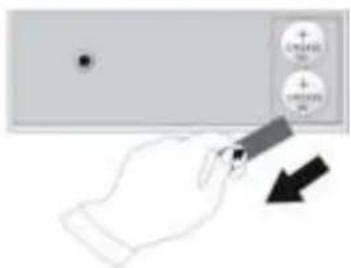
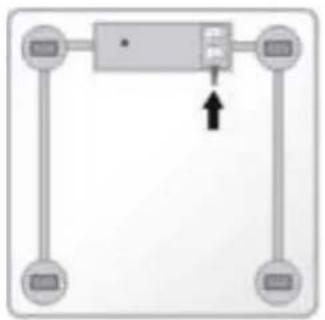
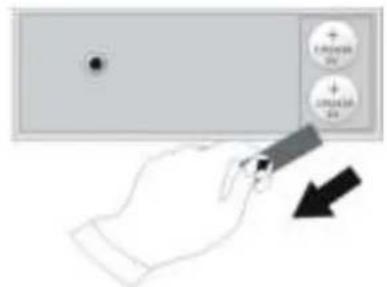
The battery compartments of the scale are situated on the back. Before the first use, open the battery compartments of the scale and pull out the protective slip

Simple line drawing of two rectangular blocks with a black X symbol on the right block (no text or labels)

Put the scale on a firm and level surface

Auto On 75.2

  1. As soon as you stand on the scale or press the platform, the scale will switch on automatically.

75.2 Auto Off

  1. Stand steadily on the scale, it will switch on automatically and show the weight. The weight value will go to steady and be locked, when the unit appears following the weight value, and this is the result. For about 5 seconds after the unit appears, it will shut off automatically.

Changing units

Simple diagram of a four-position mechanical or electrical component with no text or symbols

Hand cursor icon pointing at a button (no text or symbols)

0:0.0 0.0 0.0

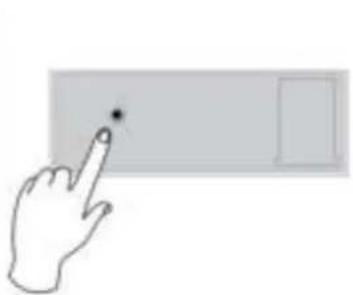
You can change the units among kg, lb, st by pressing the button on the back of the scale when it is power on.

Inserting/ Changing Batteries:

TRISTAR WG-2419 - Inserting/ Changing Batteries: - 1

Hand holding a device with a circular button labeled '10000' and an arrow pointing to it, indicating a function or action.

The battery compartments of the scale are situated on the back. Before the first use, open the battery compartments of the scale and insert two new CR2430 Lithium batteries respectively in the right polarity. When - LO - displays on the screen, it means batteries are almost worn out, please replace new batteries. Important:When you change your batteries, be careful!! You must eliminate the batteries according to the rules in force. Dump them in an appropriate place in order to assure their recycling and the protection of environment.

Tips about Body composition

Body composition reflects the internal structure of human body development. Different internal structure, so the mechanism movement differs, furthermore, certain proportion between each composition is required, so the normal physiology mechanism can last. Once some proportion discords, the normal physiology mechanism is destroyed; it will impede the human body's normal growth and health.

Body composition also shows the body status, physique characteristics and stature, in which fat composition reveals the fat or thin level. Therefore, it has great significance on the formulating fatness standard and shape appraisal.

★★★★★

Note:

Pulire la bilancia con un panno soffice

Dati Tecnici:
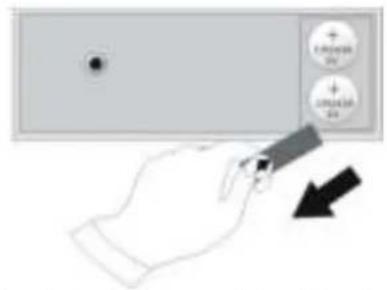
Diagram showing a hand pressing a button with 'ON/OFF' and 'ON/OFF' labels, indicating action or control.

Nunca a deixe cair

Warning symbol and safety warning icon: triangular warning sign with exclamation mark, plus water spray with cross (no text or symbols)

Diagram showing a hand pressing a button on a device with control buttons labeled 'Control' and 'Adjust', indicating a process or action.

LIGAR AUTOMÁTICO

75.2

Simple geometric shape with a rectangle above a solid gray rectangle (no text or symbols)

DESLIGAR AUTOMÁTICO

Colocar/Mudar as pilhas:

TRISTAR WG-2419 - Colocar/Mudar as pilhas: - 1

Hand holding a device with a numeric display and an arrow pointing to it, indicating a measurement or action.

Guidelines for protection of the environment
TRISTAR WG-2419 - Guidelines for protection of the environment - 1

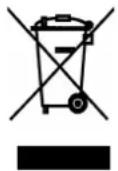
This appliance should not be put into the domestic garbage at the end of its useful life, but must be disposed of at a central point for recycling of electric and electronic domestic appliances. This symbol on appliance, instruction manual and packaging puts your attention to this important issue. The materials used in this appliance can be recycled. By recycling used domestic appliances you contribute an important push to the protection of our environment. Ask your local authorities for information regarding the point of recollection..
Manual assistant
Powered by Anthropic
Waiting for your message
Product information

Brand : TRISTAR

Model : WG-2419

Category : Scale