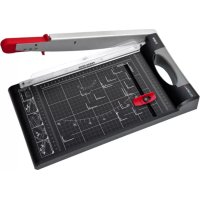
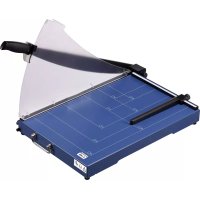
G 3310 - Paper cutter OLYMPIA - Free user manual and instructions
Find the device manual for free G 3310 OLYMPIA in PDF.



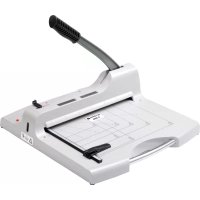
| Product type | Paper cutter (guillotine) arm-operated |
| Brand | Olympia |
| Model | G 3310 |
| Dimensions (L x W x H) | 445 x 270 x 63 mm |
| Weight | 1.2 kg |
| Cutting length | 330 mm |
| Maximum cutting capacity | 10 sheets (standard paper) |
| Blade material | Stainless steel |
| Blade type | Fixed blade with cutting arm |
| Support surface | Visual markings in cm (lines, angles, graduations) |
| Positioning rail | Movable with locking device |
| Pressure bar | Transparent with finger guard |
| Safety | Cutting arm lock, finger guard, rubber feet |
| Intended use | Paper, cards, photo paper, laminated sheets |
| Maintenance | Do not lubricate or sharpen the blade; clean with a dry cloth |
| Warranty | 24 months (subject to proof of purchase) |
| Included accessories | Instruction manual |
| General information | For home and office use |
Frequently Asked Questions - G 3310 OLYMPIA
User questions about G 3310 OLYMPIA
0 question about this device. Answer the ones you know or ask your own.
Ask a new question about this device
Download the instructions for your Paper cutter in PDF format for free! Find your manual G 3310 - OLYMPIA and take your electronic device back in hand. On this page are published all the documents necessary for the use of your device. G 3310 by OLYMPIA.
USER MANUAL G 3310 OLYMPIA
natural_image
Close-up of a black Olympus 311P printer with grid pattern and handle (no visible text or symbols)Exemption From Liability 12
Intended Use....12
Features 12
Operating Elements....13
Operation 14
Guarantee....16
Français FR BE CH
Bild 1
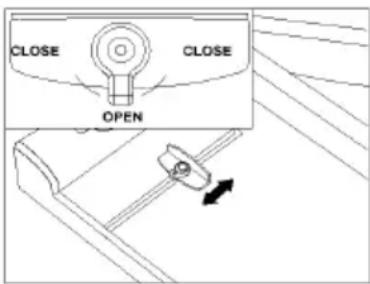
Bild 2
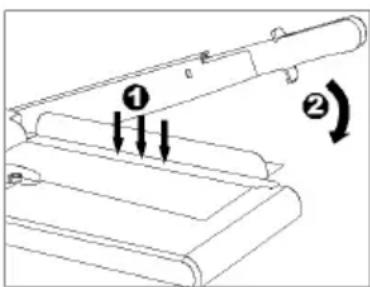
Bild 3
Bild 4
natural_image
Line drawing of a hand pressing a circular component into a rectangular device (no text or symbols)Bild 5
Garantie
Please observe the following to ensure the guillotine is used reliably and safely:
1 Read this manual thoroughly and observe the instructions and information in it when operating the machine.
2 Keep this operating manual in a safe place for future reference.
3 Before starting to use the device, set it down on a level, stable working base.
4 Never take hold of the knife blades when carrying the device or putting it away.
5 Use both hands to operate the device.
6 Keep loose clothing, ties, jewellery, long hair and other loose objects away from the cutting unit.
Risk of injury!
7 The device has been exclusively designed to cut paper.
8 Before cutting, remove any staples or paper clips from the document.
9 The cutting blade must be neither greased nor ground.
10 The device must not be used if the blade is damaged.
11 Pay attention not to cut your fingers.
Avoid contact with the cutting blade at all times.
12 Keep the device out of the reach of children.
13 Children and minors may only use the device under the supervision of an adult.
14 The device is not intended to cut fingernails.
Exemption From Liability
We cannot guarantee that the information which relates to the technical properties of the product or to the product itself contained in this document is correct. The product and, where applicable, its accessories, described in this document are subject to constant improvement and further development. For this reason, we reserve the right to modify components, accessories, technical specifications and related documentation of the product described herein at any time without notice.
Intended Use
This cutting unit may only be used to cut paper, card, photo paper and laminating foil.
Any other use is considered unintended use.
Unauthorised modifications or reconstructions are not permitted.
Never cut any materials with a metallic or glass content.
Remove any paper clips and staples before cutting.
Never exceed the maximum cutting capacity (max. 10 sheets).
Features
For cutting photos, card, printouts or laminated paper perfectly to size.
• Guillotine including pressing rail with finger protection
- Visual positioning aids in cm (lines, angles, scale)
- Rubber footpads for secure, non-slip base
• Maximum cutting capacity: Maximum 10 sheets simultaneously.
• Dimensions: 445x270x63 mm (LxWxH)
- Weight: 1.2 kg
• Cutting length: 330 mm
Operating Elements
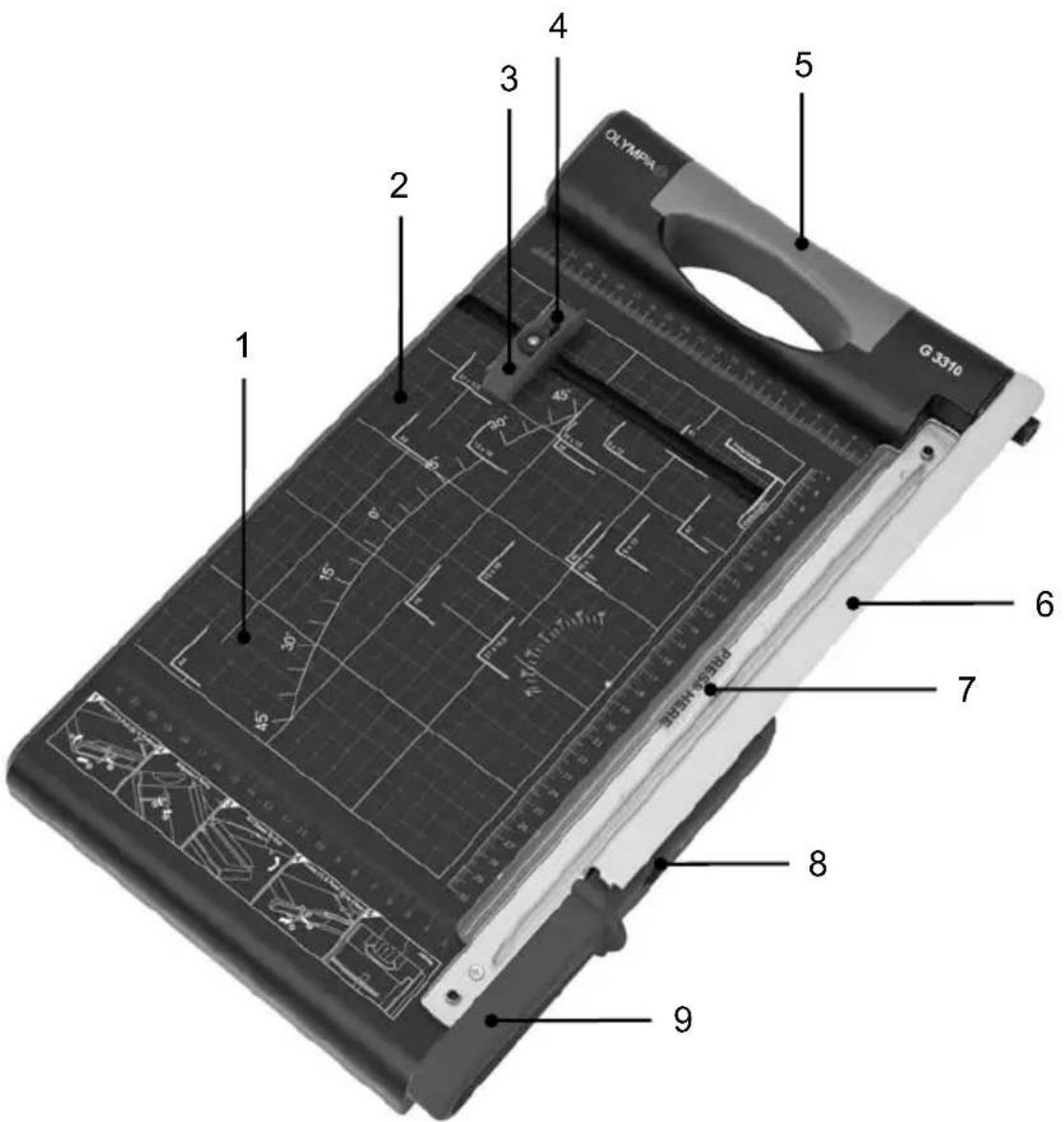
1 Base for paper
2 Visual positioning aid (aligning marks)
3 Adjustable positioning rail
4 Lock for paper aligning rail
5 Carrying handle
6 Guillotine blade (made of stainless steel)
7 Transparent pressing rail with finger protection
8 Guillotine arm lock
9 Handle for guillotine arm
Operation
-
Place the guillotine on a stable, level base with the guillotine side facing up.
-
The guillotine arm is locked on the cutting unit. Proceed as follows to unlock the guillotine arm:
-
Press the arm lock downwards (Fig. 1/1).
- At the same time, pull the guillotine arm towards you using the handle (Fig. 1/2).
- Move the guillotine arm upwards (Fig. 1/3).
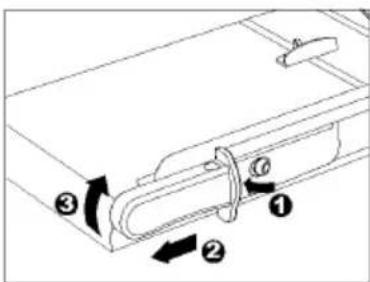
Fig. 1
-
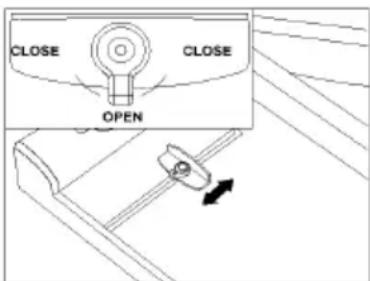
Adjust the aligning rail to the position you require (Fig. 2):
-
Release the aligning rail's locking mechanism by turning it to OPEN.
- Slide the aligning rail to the position necessary.
- Turn the locking mechanism back to CLOSE. There are two positions provided: turn to the right or to the left.
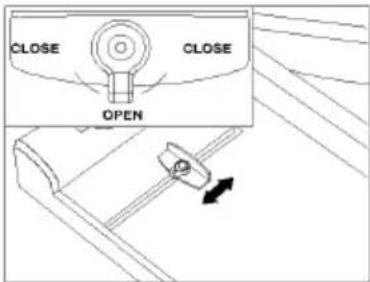
Fig. 2
-
Proceed as follows to make a cut:
-
Move the guillotine arm upwards.
- Slide the material to be cut under the pressing rail and align it to the aligning marks on the base. Slide it against the aligning rail, if necessary.
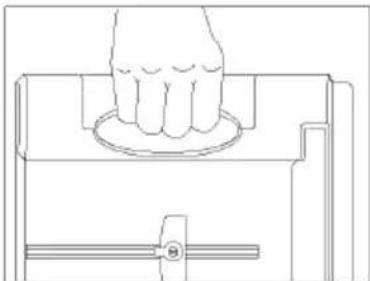
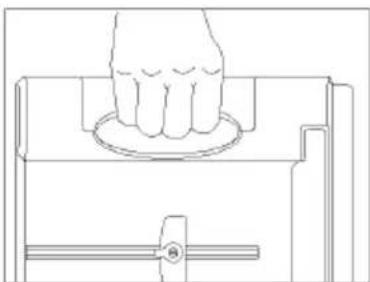
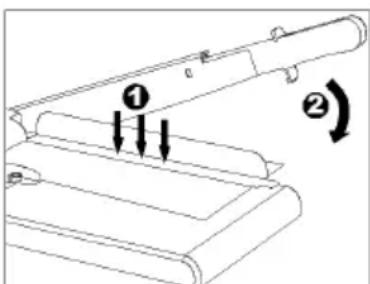
- Press down with one hand on the pressing rail to clamp the material to be cut (Fig. 3/1).
- Use the other hand to move the guillotine arm down and cut the material (Fig. 3/2).
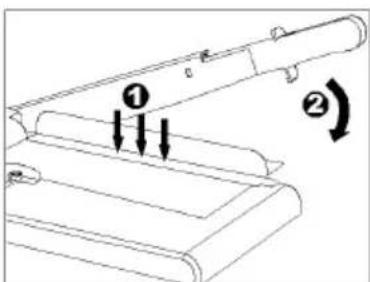
Fig. 3
-
For reasons of safety, lock the guillotine arm again after finishing your work:
-
Move the guillotine arm down as far as possible.
- Press the arm lock downwards (Fig. 4/1).
- At the same time, slide the guillotine arm to the rear using the handle (Fig. 4/2).
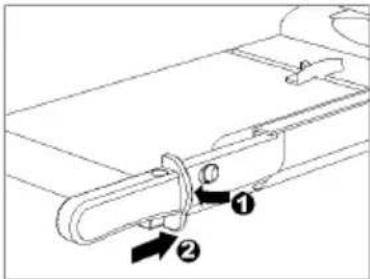
Fig. 4
- In order to transport the guillotine, carry it by the handle.
Note: Prior to transporting it, ensure that the guillotine arm is locked.
natural_image
Line drawing of a hand pressing down on a circular component, with no text or symbols presentFig. 5
Guarantee
It is essential to retain this guarantee!
Dear Customer,
We are pleased that you have chosen the Olympia guillotine. Should a technical problem arise with regard to the equipment, please observe the following points:
- The period of guarantee for the equipment is 24 months.
- It is essential to keep the purchase receipt and original packing.
- The first line of action if a problem occurs is to contact our hotline.
+49 180 5 007514 (0.14 € per minute via the German landline)
Our expert personnel can frequently provide help over the phone.
- However, if the problem cannot be solved via telephone, please send the equipment to the following address in its original packing:
Servicecenter Hattingen
Repairs under the terms of guarantee can only be completed when the purchase receipt is enclosed.
We are sorry for any inconvenience.
Yours faithfully
Olympia Business Sys-
tems
Vertriebs GmbH
Consumables
If the cutting blade becomes worn, please contact our service hotline.
Fig. 1
Fig. 2
Fig. 3
Fig. 4
natural_image
Line drawing of a hand pressing down on a circular component, with no text or symbols presentFig. 5
Garantie
Olympia Business Systems
Vertriebs GmbH
Matériel d'usage
Figura 1
Figura 2
Figura 3
Figura 4
natural_image
Line drawing of a hand pressing a circular component on a rectangular device (no text or symbols)Figura 5
Garantía
Afb. 1
Afb. 2
Afb. 3
Afb. 4
natural_image
Line drawing of a hand pressing a circular component on a rectangular device (no text or symbols)Afb. 5
Garantie
Figura 1
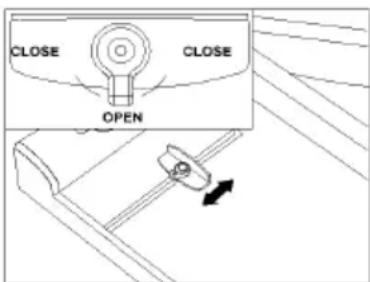
Figura 2
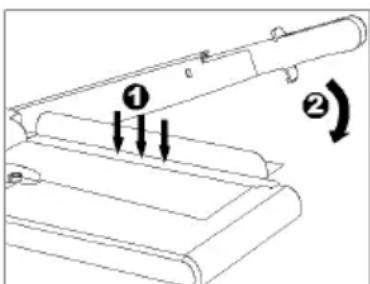
Figura 3
Figura 4
natural_image
Line drawing of a hand pressing a circular component into a rectangular device (no text or symbols)Figura 5
Garanzia
obr. 1
obr. 2
obr. 3
obr. 4
natural_image
Line drawing of a hand pressing down on a circular component, with no text or symbols presentobr. 5
Záruka
PROSÍM, BEZPODMÍNEČNĚ USCHOVEJTE!
Milá zákaznice,
Milý zákazníku,

Brand : OLYMPIA
Model : G 3310
Category : Paper cutter