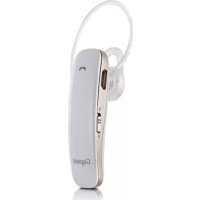
ZX830 - Earphones GIGASET - Free user manual and instructions
Find the device manual for free ZX830 GIGASET in PDF.



| Product Type | Bluetooth Headset Handsfree Kit |
| Brand | Gigaset |
| Model | ZX830 |
| Dimensions (earpiece) | 50 × 15 × 10.5 mm |
| Weight | 8.5 g |
| Battery Type | Li-polymer, 85 mAh |
| Charging Time | Approximately 2 hours |
| Talk Time | Up to 8.5 hours |
| Standby Time | Up to 180 hours |
| Bluetooth Range | Approximately 10 m |
| Bluetooth Frequency | 2.402 - 2.480 GHz |
| Bluetooth Version | V4.0 + EDR |
| Supported Bluetooth Profiles | HSP, HFP, A2DP, AVRCP |
| NFC | Yes, 13.56 MHz |
| Number of Connectable Devices | Up to 8 pairings, 2 simultaneous phones |
| Main Functions | Handsfree calls, music listening, dual phone, NFC, call management (hold, reject, callback) |
| Power Supply | Charging via Micro-B USB port, 5V/300mA power adapter or 5V/350mA vehicle adapter |
| Maintenance and Cleaning | Wipe with a damp or antistatic cloth; do not use cleaning products or a dry cloth |
| Safety | Gradual volume, do not open the device, use original charger, follow instructions (airplanes, vehicles, medical devices) |
| Warranty | 24 months (wear parts: 6 months); proof of purchase required |
Frequently Asked Questions - ZX830 GIGASET
User questions about ZX830 GIGASET
0 question about this device. Answer the ones you know or ask your own.
Ask a new question about this device
Download the instructions for your Earphones in PDF format for free! Find your manual ZX830 - GIGASET and take your electronic device back in hand. On this page are published all the documents necessary for the use of your device. ZX830 by GIGASET.
USER MANUAL ZX830 GIGASET
1.1 Content of the Package 16
- General Description 17
- First steps. 17
3.1 Quick guide 17
3.2 Adjusting the headset 17
3.3 Status LED. 18
3.4 Charging the built-in batteries 18
-
Overview of Functions 19
-
Technical Data 21
- Appendix 22
6.1 Service 22
6.2 Warranty 23
6.3 Environment 24
6.4 Authorisation. 24
6.5 Care of your Device 24
sommaire
Notice: Read the safety information and the operating instructions carefully before use.
Warning: This product may contain small parts and must be kept out of reach of children.
Electronic Devices
In order to prevent electromagnetic interference, please switch off the headset if you are required to do so by the relevant signage.
Note: Most modern electronic devices are sensitive to electromagnetic interference (EMI) if they are not adequately shielded or appropriately designed, or are otherwise configured to provide electromagnetic compatibility.
Aircraft
Switch off the headset on board aircraft. Using this headset may interfere with the electronic systems of the aircraft.
Vehicles
Please always observe the relevant road safety regulations when driving vehicles.
Medical devices
The function of medical devices may be affected. Please observe the technical conditions of the relevant area, e.g. doctor's surgery.
Charging device
Only use the plug-in mains unit which is included in the scope of delivery. Do not use any other plug-in mains units, as these may damage the device and the batteries. Ensure that the voltage of the plug socket corresponds to that of the mains unit. Damaged mains units must only be replaced with an original spare part.
Storage
Please store the headset so that it cannot be bent or damaged. Otherwise there is a risk of injury to the user.
Batteries may explode if they are exposed to direct sunlight, fire, or other high temperatures, such as can occur in vehicles.
Service and Repair
The device and mains unit must not be opened, as this may result in electric shocks. Do NOT attempt to remedy the problem yourself if a device malfunctions. In this case, please contact the Gigaset hotline. Do not use a defective device, as it could interfere with other radio services.
Any attempt to remove any part of the headset results in the loss of the warranty.
1. Safety Information
Headsets ay emit sounds with a high volume and high frequency. Such sounds may cause permanent hearing loss. The volume may depend on the conditions under which the device is used. Please familiarise yourself with the following safety precautions before using the headset.
Carry out the following steps before using this product:
Set the volume to the minimum before putting on the headset.
Put on the headset and adjust it to a comfortable volume.
While using this product:
Set the volume as low as possible and avoid using the headset in a noisy environment, in which you could be tempted to increase the volume.
1.1 Content of the Package
Bluetooth headset
Ear clip
USB headphone connection cable (Micro-B USB)
USB charging cable (USB A-> Micro-B USB)
Mains charger unit with USB A socket
Vehicle charging cable with USB A socket
2. General Description
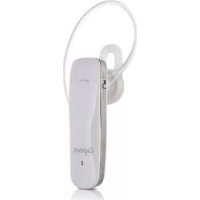
The Gigaset ZX830 is a Bluetooth and NFC (Near Field Communication) capable, wireless hands-free headset for use with Gigaset telephones, mobile phones and other portable devices which are equipped with the headset or hands-free Bluetooth profile.
3. First steps
3.1 Quick guide
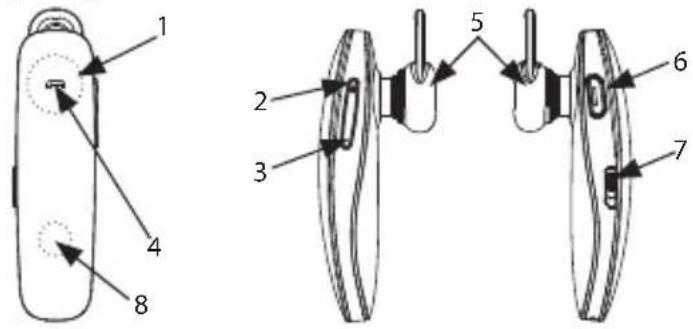
| 1 | Multi-function key 5 Earphone | ||
| 2 | Volume + and audio title - 6 | Micro-B USB charging socket and headphone connection | |
| 3 | Volume - and audio title + 7 On/Off switch | ||
| 4 | Status LED (red/blue) 8 NFC antenna |
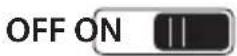
Power"Off"Power"On"

3.2 Adjusting the headset
The lightweight and comfortable Gigaset ZX830 is suitable for both ears. Please adjust the headset as shown in the following illustrations.
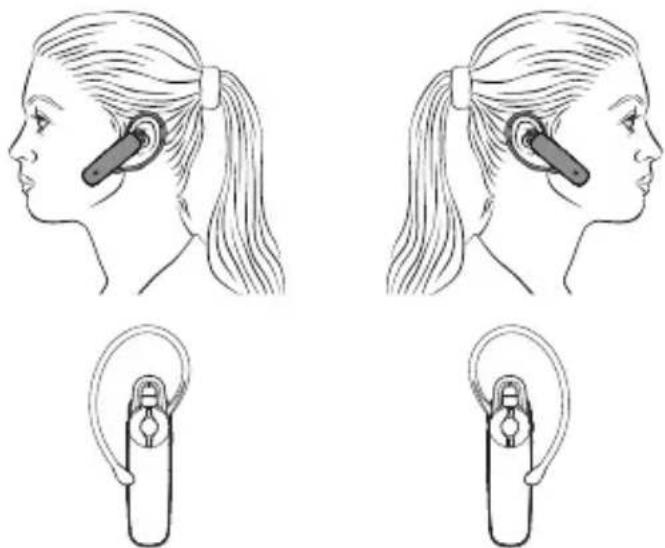
Wearing on left ear Wearing on right ear
3.3 Status LED
| Headset status LED colour Status | ||
| Off Red Flames 1x | ||
| On Blue Flames 3x | ||
| Pairing mode Red-b | Blue Alternate flashing | |
| Pairing Blue Flames | 3x | |
| Standby mode Blue | Flashes 3x every 3 seconds | |
| Ringing Blue Flames | 1x every 3 seconds | |
| Active call Blue Flames | 1x every 3 seconds | |
| Charging Red Illuminates constantly | ||
| Charging complete | Blue Illuminates constantly | |
3.4 Charging the built-in batteries
The Gigaset ZX830 is equipped with a built-in battery, which must be fully charged before using the headset. Charging takes about 2 hours. You can charge the headset either with the mains charger unit or the vehicle adapter or via a USB port, e.g on your PC.
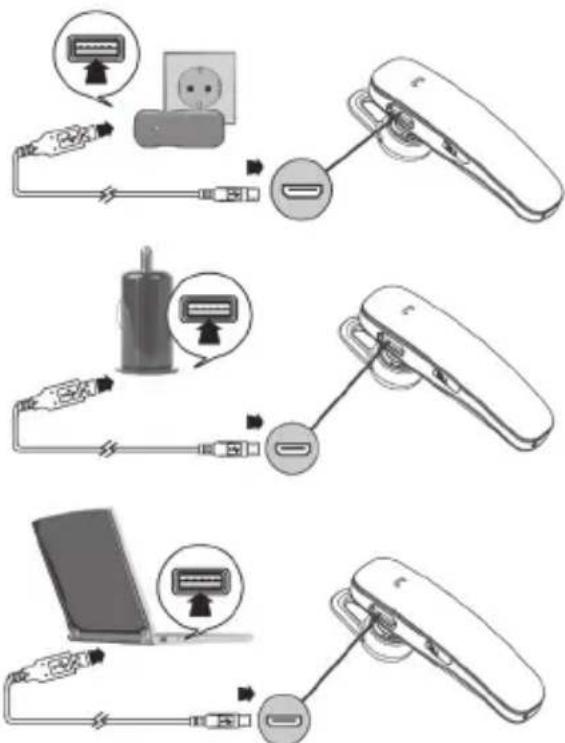
Note:
Take care that the USB plug is in the correct position and do not use force. Use the USB symbol on the plug and in the illustration above as a guide. The headset must be switched on in order to charge it. Set the sliding switch to the ON (bottom) position to start the charging process.
The headset cannot be used while it is being charged.
4. Overview of Functions
| Press briefly Press for less than 1 second |
| Press for a long time Press for longer than 1.5 seconds |
| Hold Press for longer than 4.5 seconds |
| Multi-function key Multi-function key (MFK) |
| Key (+) Increase volume / Previous title |
| Key (−) Reduce volume / Next title |
Telephone mode:
Pair the headset with a telephone via Bluetooth
Before you can use your headset for telephoning, you must connect it to your telephone. Pairing establishes a secure connection between your telephone and the unique code of your headset. This procedure only needs to be carried out once.
1 To switch the headset to pairing mode, push the switch (7) to the ON (bottom) position and hold down the multi-function key (1). The LED starts to flash red/blue.
2 Search for the headset in the Bluetooth menu of your telephone. You can find the details for doing this in the instruction manual for your telephone.
3 After the search is complete, a list of the devices which have been found is displayed.
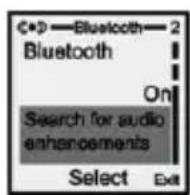
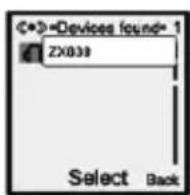
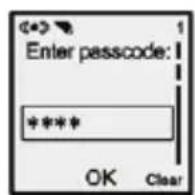
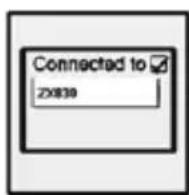
4 Select the entry ZX830 and enter the PIN (0000), when you are prompted to do so. If the pairing was successful, the LED indicator (res/blue) changes its status and fl ashes blue.
5 If your mobile phone is equipped with NFC (Near Field Communication), activate this function on your mobile phone. On the headset, push the sliding switch to the ON (bottom) position, hold down the multi-function key (the LED starts to flash red/ blue) and hold the headset against the area of the NFC antenna of your mobile phone, which is usually at the rear. Confirm the connection to the mobile phone. You may have to enter the PIN "0000" on the mobile phone.
After this (as long as NFC and Bluetooth are activated) you only need to briefly bring the two devices into contact (in the area of the NFC antenna) in order to establish a connection.
Note: You can connect your headset to up to eight Bluetooth devices. If you connect a ninth device, the oldest pairing is deleted. You can use the headset with 2 telephones simultaneously.
1 Pair the headset with the first telephone as described above and then switch off the headset.
2 Switch the headset on again and pair it with the second telephone. Please keep the Bluetooth function switched on for both telephones.
3 Switch the headset off and then on again. The blue LED flashes
4 The headset should now connect to both telephones.
Using the second earphone to listen in stereo
If you wish to use the stereo function of your headset, you only need to connect the second earphone to the USB socket of your headset.
Please note that you are not allowed to use the stereo function when driving.
Accepting a further call (waiting call) during an active call
Hold down the multi-function key for 2 seconds to accept the second call. The first call remains connected. Press the multifunction key for 2 seconds to switch between the calls. You can end the current call by briefly pressing the multi-function key. The other call remains active and can be ended by briefly pressing the key a second time.
Overview of Telephone Functions
| Headset function | Headset status | Key Audio | response |
| Switching on Off Set the switch | to the "On" position | "Power On" | |
| Switching off On | Set the switch to the "Off" position | "Power Off" | |
| Pairing Off Hold the | multi-function key pressed for a long time | "Pairing" | |
| Paired On "Paired" | |||
| No connection | "Your device is disconnected" | ||
| Accepting an incoming call | Incoming call | Briefly press the multi-function key | |
| Rejecting an incoming call | Incoming call | Hold the multi-function key pressed for a long time | |
| Accepting an incoming call during an active call | Active call/Call waiting | Hold the multi-function key pressed for a long time | |
| Switching between the active and the passive call | Active call/Passive call | Hold the multi-function key pressed for a long time | |
| Ending the call | Active call Briefly press the multi-function key | ||
| Redialling the last number | Standby Hold | the multi-function key pressed for a long time | "Last number redial" |
| Playing music/ Pause | Music playing | Briefly press the multi-function key | |
| Increasing the volume | Music playing/ Active call | Briefly press the + key | |
| Reducing the volume | Music playing/ Active call | Briefly press the - key | |
| Previous title Music playing | Press the + key for a long time | ||
| Next title Music playing | Press the - key for a long time | ||
| Low charge "Battery low" | |||
Some of the described functions may not be supported, depending on the telephone used.
5. Technical Data
| Battery type /Capacity / Dimensions | Li-Polymer/85mAh/ 4×10×30 mm |
| External mains unit Input: 10 | 0-240 V/AC Output: 5V · 300mA DC |
| Vehicle charging adapter Input: 12-24V/DC Output: 5V · 350mA (USB A socket) | |
| Charging time 2 hours | |
| Charging voltage 5V | |
| Charging current 300 +/- 50 mA | mA |
| Call time up to 8.5 hours | |
| Standby time up to 180 hours | |
| Range ~10 m | |
| Frequency 2.402 - 2.480 GHz | |
| Weight | 8.5 g |
| Dimensions | 50×15×10.5 mm |
| Bluetooth | V4.0 + EDR/Profile: HSP/HFP/A2DP/AVRCP |
| NFC | 13.56 MHz |
| Ambient conditions in operation | 0°C to +50°C |
6.1 Service
Do you have any questions? As a Gigaset customer, you benefit from our extensive service. You can obtain rapid help in these operating instructions and on the Service pages of our Gigaset online portal.
Please register your Gigaset product immediately after purchasing it, so that we can quickly help you if you have any questions or warranty claims. In your password-protected personal area you can manage your personal details and contact our Customer Service by email.
Our staff are available by telephone if you have any further questions or require personal assistance:
United Kingdom
www.qiqaset.com/service
For repairs, guarantee or warranty claims:
Service Hotline:
Sun. 11 pm - Fri. 11 pm continuously under 084503 18190
(local call cost charge)
We must point out that Gigaset products which are not purchased by an authorised dealer in the country may possibly not be fully compatible with the national standard.
If the device or accessories are not used according to this information, the information in the instructions for use or the product itself, this may affect guarantee or warranty claims (repair or replacement of the product).
In order to make guarantee or warranty claims, the purchaser of the product is requested to enclose the proof of purchase, which includes the date of purchase and details of the purchased product.
6.2 Warranty
Regardless of any claims against the vendor, the consumer (customer) is granted a warranty of durability under the conditions stated below:
New devices and their components, which reveal defects due to manufacturing and/or material faults within 24 months of the date of purchase shall, at the discretion of Gigaset Communications, be replaced with a device which corresponds to the state-of-the-art or shall be repaired, free of charge. This warranty of durability applies to wearing parts (e.g. batteries, keyboards, housing) for a period of six months from the date of purchase.
This warranty does not apply if the fault is due to improper handling and/or failure to observe the manuals.
This warranty does not include services (e.g. installation, configuration, software downloads) which are performed by the authorised dealer or by the customer. Manuals and any software which is supplied on a separate, enclosed data carrier are also excluded from the warranty.
Proof of purchase with the date of purchase is deemed to be evidence for the warranty. Warranty claims must be made within two months of discovery of the cause for the warranty claim.
- Replaced devices or their components, which are returned to Gigaset Communications in the context of replacement become the property of Gigaset Communications.
This warranty only applies to new devices which are purchased in the European Union. The warrantor for devices purchased in United Kingdom is Gigaset Communications UK Limited, 2 White Friars, Chester, CH1 1NZ.
Further, or other claims from this manufacturer's warranty are excluded. Gigaset Communications shall not be liable for interruptions to business, loss of profits, loss of data or software or other information which is installed by the customer. Backup of the latter is the responsibility of the customer. This exclusion of liability does not apply in case of mandatory liability, e.g. under the Product Liability Act, in case of willful action or gross negligence or due to injury to life and limb or health, or due to the breach of significant contractual obligations. Claims for damages due to the breach of significant contractual obligations is however restricted to foreseeable damage which is typical for the contract insofar as this does not involve gross negligence or injury to life or limb or health, or liability under the Product Liability Act.
Performance of a service under warranty does not extend the warranty period.
Except in the case of a warranty claim, Gigaset Communications reserves the right to invoice the customer for the replacement or repair. Gigaset Communications will inform the customer of this in advance.
A change to the regulations for the burden of proof to the detriment of the customer is not associated with the above regulations.
Please address any warranty claims to Gigaset Communications. The telephone number can be found in these operating instructions.
6.3 Environment
Our environmental statement
We at Gigaset Communications GmbH are aware of our social responsibility. That is why we actively take steps to create a better world. In all areas of our business - from product planning and production to sales and waste of disposal - following our environmental conscience in everything we do is of utmost importance to us.
Learn more about our earth-friendly products and processes online at www.gigaset.com .
Environmental management system

Gigaset Communications GmbH is certified pursuant to the international standards ISO 14001 and ISO 9001.
ISO 14001 (Environment): Certified since September 2007 by TÜV SÜD Management Service GmbH.
ISO 9001 (Quality): Certified since 17/02/1994 by TÜV SÜD Management Service GmbH.
Disposal
Batteries should not be disposed of in general household waste. Observe the local waste disposal regulations, details of which can be obtained from your local authority.
All electrical and electronic products should be disposed of separately from the municipal waste stream via designated collection facilities appointed by the government or the local authorities.
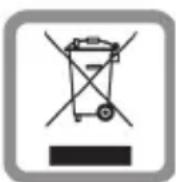
This crossed-out wheeled bin symbol on the product means the product is covered by the European Directive 2002/96/EC.
The correct disposal and separate collection of your old appliance will help prevent potential
negative consequences for the environment and human health. It is a precondition for reuse and recycling of used electrical and electronic equipment.
For more detailed information about disposal of your old appliance, please contact your local council refuse centre or the original supplier of the product.
6.4 Authorisation
This device is intended for use within the European Economic Area and Switzerland. If used in other countries, it must first be approved nationally in the country in question. Country-specific requirements have been taken into consideration.
We, Gigaset Communications GmbH, declare that this device meets the essential requirements and other relevant regulations laid down in Directive 1999/5/EC.
A copy of the Declaration of Conformity is available at this Internet address: www.gigaset.com/docs.
C∈0682
6.5 Care of your Device
Wipe the device with a damp cloth or an anti-static cloth. Do not use solvents or cleaning agents or microfibre cloths. Never use a dry cloth. This may cause a static charge.
6.1 Assistance Service Clients
© Gigaset Communications GmbH 2013
Subject to availability.
All rights reserved. Rights of modification reserved.
www.gigaset.com

A31008-N1163-R101-1-X119

- sommaire
- Electronic Devices
- Aircraft
- Vehicles
- Medical devices
- Charging device
- Storage
- Service and Repair
- Safety Information
- Carry out the following steps before using this product:
- While using this product:
- Content of the Package
- General Description
- First steps
- Quick guide
- Adjusting the headset
- Status LED
- Charging the built-in batteries
- Note:
- Overview of Functions
- Telephone mode:
- Pair the headset with a telephone via Bluetooth
- Using the second earphone to listen in stereo
- Accepting a further call (waiting call) during an active call
- Technical Data
- Service
- United Kingdom
- Warranty
- Environment
- Our environmental statement
- Environmental management system
- Disposal
- Authorisation
- C∈0682
- Care of your Device
- Assistance Service Clients
Brand : GIGASET
Model : ZX830
Category : Earphones