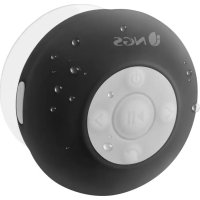
Roller Splash - Docking station NGS - Free user manual and instructions
Find the device manual for free Roller Splash NGS in PDF.



| Product Type | Docking station / Bluetooth speaker |
| Brand | NGS |
| Model | Roller Splash |
| Connectivity | Bluetooth |
| Main functions | Bluetooth audio playback, hands-free calling, FM radio |
| Power supply | Rechargeable battery via USB cable |
| Charging indicator | Red LED (charging), turns off (full charge) |
| Battery life | About 8 minutes in search mode, then auto-off |
| Battery type | Rechargeable lithium-ion (built-in) |
| Charging port | Mini USB with waterproof cover |
| Water protection | Splash resistant, do not immerse |
| Speaker | Built-in |
| Microphone | Built-in for hands-free function |
| Controls | Buttons: power on/off, play/pause, volume, navigation, call, FM mode |
| LED indicator | Blue for Bluetooth mode (variable flashing) |
| Maintenance and cleaning | Clean the exterior after use in a damp room; close the waterproof cover properly |
| Recycling | Do not dispose of with household waste; follow the WEEE directive |
| Certification | Compliant with directive 1999/5/EC |
Frequently Asked Questions - Roller Splash NGS
User questions about Roller Splash NGS
0 question about this device. Answer the ones you know or ask your own.
Ask a new question about this device
Download the instructions for your Docking station in PDF format for free! Find your manual Roller Splash - NGS and take your electronic device back in hand. On this page are published all the documents necessary for the use of your device. Roller Splash by NGS.
USER MANUAL Roller Splash NGS
for Tablets & Phones

NGS
tablets & phones

natural_image
Circular icon with concentric rings and directional arrows, no text or symbols presentROLLER SPLASH
USER'S MANUAL
ENGLISH | FRANÇAIS | ESPAÑOL | DEUTSCH | ITALIANO | PORTUGUÊS | POLSKI
WWW.NGS.EU



for Tablets & Phones
ROLLER SPLASH
WATER RESISTANT BLUETOOTH SPEAKER + FM RADIO
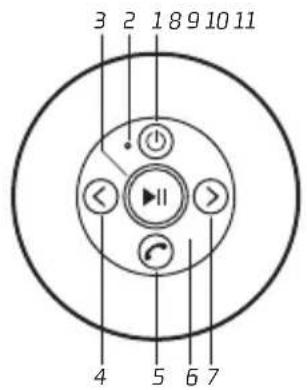
OVERVIEW

1 button
2 Mode / Charging LED
3 button
4 button
5 button
6 MIChole

natural_image
Circular diagram with concentric dotted lines and a central curved symbol, no text or labels present.7 button
8 Speaker
9 Cupule lock
10 Vacuum cupule
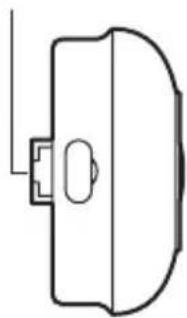
11 Mini USB socket
12 Rubber seal cover

natural_image
Simple line drawing of a door handle with a handle and handle (no text or symbols)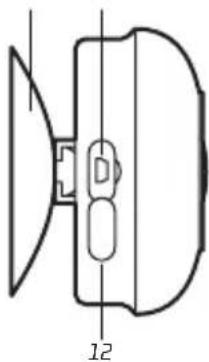
natural_image
Pure technical line drawing of a mechanical component with no text or symbolsUSER'S MANUAL
CHARGING THE BLUETOOTH SPEAKER
- Open the rubber seal cover (12).
- Connect the Bluetooth speaker's mini USB socket (11) with the computer's USB port through USB cable.
- The charging LED (2) will turn ON in red light; the rechargeable battery is in charging.
- The charging LED (2) red light will turn OFF when the rechargeable battery is fully charged.
- Disconnect the USB cable, and close the rubber seal cover (12) when it is done.
BLUETOOTH SPEAKER PAIRING / RECONNECTING
- Press the button (1), a message sound; "beep" will announce from speaker and the mode LED (2) will blinking in blue; the device is turned ON and goes into searching / paring / reconnect mode for pair.
- Now, turn ON the Bluetooth function on your mobile phone.
- Search for "NGS Roller Splash" and select it to pair (for first time pairing or pairing a new mobile device).
- The Bluetooth speaker will be reconnecting automatically if your mobile phone has been paired (Depend on the of mobile phone's type and configuration, manual reconnection may require on some devices).
-
If pairing is successful, a message sound; "beep" will announce from speaker and the mode LED (2) light will switch to slow blink in blue (once per 2 seconds).
-
Press the button (1) to turn OFF the Bluetooth speaker.
Note: During in searching / pairing mode, the Bluetooth speaker will power OFF automatically in 8 minutes if no device is connected.
BLUETOOTH SPEAKER CONTROL FUNCTION
- In playing music, press ▶button (3) to pause music, press it once again to play.
- Press and hold the >button (7) to increase the volume level.
- Press and hold the <button (4) to decreases the volume level.
- Press the >button (7) to play next music file.
- Press the <button (4) to play previous music file.
HAND FREE FUNCTION
- When there is an incoming call;
- The ringing sound will up and the playing music will pause automatically.
- Press button (5) to pick up the call if you want.
- Now you have hand free function with the Bluetooth speaker.
- Press button (5) again to hand up the call when finished. And,
- The paused music will start to play automatically.
Tip: Speak to the MIC hole (6) direct with distance in 30 cm to get the best speakerphone performance when necessary.
USER'S MANUAL
REDIAL FOR LAST CALL FUNCTION
- To redial for last called number by the Bluetooth speaker, even it is in music playing mode.
- Press twice the button (5) to enter into redial function, the playing will pause and switch to hand free function for redial.
- Press the button (5) again to hang up the redial call.
FM FUNCTION
- Press and hold the button (5) about 2\~3 seconds, the Bluetooth speaker will send tone sound "beep" and enter the FM mode.
- Press and hold the ▶button (3) about 2\~3 seconds will enter auto scan mode, the speaker will search and store radio signal auto.
- Press the >button (7) to play next radio channel.
- Press the <button (4) to play previous radio channel.
- Press and hold the >button (7) to increase the volume level.
- Press and hold the <button (4) to decrease the volume level.
- Press and hold the button (5) about 2\~3 seconds, the Bluetooth speaker will send tone sound "beep" and enter the Bluetooth mode.
WATERPROOF HANDLING
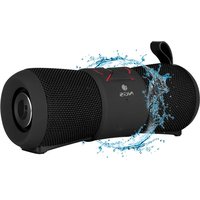
- The Bluetooth speaker can handle a brief jet of water on its surface. However, it should never be operated under running water and under no circumstance it should never be fully immersed in water.
- Before use the shower Bluetooth speaker in bathroom, make sure that the waterproof rubber seal cover (12) it tighten closed at the right position.
- After used in bathroom, always wipe the outside of the cabinet thoroughly if it becomes wet with moisture or water splashes. This will help to prevent the internal parts of the unit from entry of water and possible moisture damage.
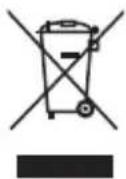
If at any time in the future you should need to dispose of this product please note that:
Waste electrical products should not be disposed of with household waste. Please recycle where facilities exist.
Check with your Local Authority or retailer for recycling advice.
(Waste Electrical and Electronic Equipment Directive)

HEREBY, LURBE GRUP S.A, DECLARES THAT THIS SPEAKER IS IN COMPLIANCE WITH THE ESSENTIAL REQUIREMENTS AND OTHER RELEVANT PROVISIONS OF DIRECTIVE 1999/5/EC.


for Tablets & Phones
ROLLER SPLASH
HAUT-PARLEUR BLUETOOTH
RÉSISTANT À L'EAU
+ RADIO FM
APERÇU GENERAL

1 Bouton
2 Voyant LED de Mode / Chargement
3 Bouton ▶II
4 Bouton <
5 Bouton
6 Prise du micro

natural_image
Circular diagram with concentric dotted lines and a central curved symbol (no text or labels)natural_image
Simple line drawing of a door handle with a handle and handle (no text or symbols)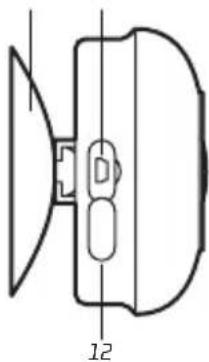
natural_image
Pure technical diagram of a mechanical component with no text or symbolsCHARGEMENT DU HAUT-PARLEUR BLUETOOTH
for Tablets & Phones
ROLLER SPLASH
ALTAVOZ BLUETOOTH
RESISTENTE AL AGUA
+ RADIO FM
natural_image
Circular diagram with concentric dotted layers and a central C-shaped symbol (no text or labels)natural_image
Simple line drawing of a door handle with a handle and handle (no text or symbols)
natural_image
Pure technical line drawing of a mechanical component with no text or symbolsCARGA DEL ALTAVOZ BLUETOOTH
for Tablets & Phones
ROLLER SPLASH
BLUETOOTH LAUTSPRECHER
WASSERBESTÄNDIG
+ RADIO FM
ALLGEMEINE PRESENTATION
natural_image
Circular diagram with concentric dotted layers and a central C-shaped symbol (no text or labels)natural_image
Simple line drawing of a door handle with a handle and handle (no text or symbols)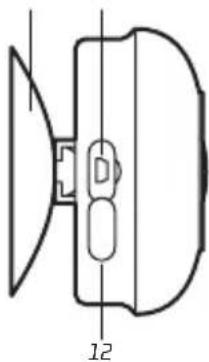
natural_image
Pure technical line drawing of a mechanical component with no text or symbolsAUFLADEN DES BLUETOOTH LAUTSPRECHERS
for Tablets & Phones
ROLLER SPLASH
ALTOPARLANTE BLUETOOTH
RESISTENTE ALL'ACQUA
+ RADIO FM
natural_image
Circular diagram with concentric dotted layers and a central C-shaped symbol (no text or labels)natural_image
Simple line drawing of a door handle with a handle and handle (no text or symbols)
natural_image
Pure technical line drawing of a mechanical component with no text or symbolsINSTRUZIONI D'USO
RIRICARICA DELL'ALTOPARLANTE BLUETOOTH
for Tablets & Phones
ROLLER SPLASH
REPRODUTOR BLUETOOTH
RESISTENTE A AGUA
+ RADIO FM
APRESENTAÇÃO GERAL

natural_image
Circular diagram with concentric dotted layers and a central C-shaped symbol (no text or labels)7 Botão>
8 Reprodutor
9 Tranca da cúpula
10 Cúpula de vácuo
11 Tomada mini USB
12 Coberta com junta de borracha
natural_image
Simple line drawing of a door handle with a handle and handle (no text or symbols)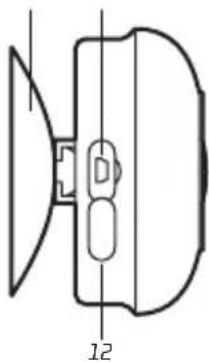
natural_image
Pure technical line drawing of a mechanical component with no text or symbolsfor Tablets & Phones
ROLLER SPLASH
WODOODPORNY GŁOŚNIK
BLUETOOTH
+ RADIO FM
CECHY OGÓLNE

natural_image
Circular diagram with concentric dotted layers and a central C-shaped symbol (no text or labels)natural_image
Simple line drawing of a door handle with a handle and handle (no text or symbols)
natural_image
Pure technical diagram of a mechanical component with no text or symbolsPODREĘCZNIK UŻYTKOWNIKA
ŁADOWANIE GŁOŚNIKA BLUETOOTH
- ROLLER SPLASH
- USER'S MANUAL
- CHARGING THE BLUETOOTH SPEAKER
- BLUETOOTH SPEAKER PAIRING / RECONNECTING
- BLUETOOTH SPEAKER CONTROL FUNCTION
- HAND FREE FUNCTION
- REDIAL FOR LAST CALL FUNCTION
- FM FUNCTION
- WATERPROOF HANDLING
- CHARGEMENT DU HAUT-PARLEUR BLUETOOTH
- CARGA DEL ALTAVOZ BLUETOOTH
- AUFLADEN DES BLUETOOTH LAUTSPRECHERS
- INSTRUZIONI D'USO
- RIRICARICA DELL'ALTOPARLANTE BLUETOOTH
- APRESENTAÇÃO GERAL
- PODREĘCZNIK UŻYTKOWNIKA
- ŁADOWANIE GŁOŚNIKA BLUETOOTH
Brand : NGS
Model : Roller Splash
Category : Docking station