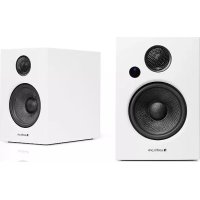
Addon T12 - Speaker AUDIO PRO - Free user manual and instructions
Find the device manual for free Addon T12 AUDIO PRO in PDF.


User questions about Addon T12 AUDIO PRO
0 question about this device. Answer the ones you know or ask your own.
Ask a new question about this device
Download the instructions for your Speaker in PDF format for free! Find your manual Addon T12 - AUDIO PRO and take your electronic device back in hand. On this page are published all the documents necessary for the use of your device. Addon T12 by AUDIO PRO.
USER MANUAL Addon T12 AUDIO PRO
Thank you for choosing swedish Audio Pro. We have delivered innovative audio products since 1978, with strong focus on good music experiences in your home.
Addon T12 is more than just a wireless speaker. It's combined audio and acoustical knowledge into one versatile speaker.
Enjoy your music with Addon T12!
www.audiopro.com | www.audiopro.se
www.facebook.com/audiopro
© Audio Pro AB Sverige
Audio Pro, Audio Pro logotypen, 'a' symbolen, ach acebass' ar registrarnde varumarken av Audio Pro AB, Sverige. Alla ralligheter reserverade. Audio Pro follen en policy on ständig Produktutveckling. Spokifikationer kon andur an tøgande meddeiand.
Audio Pro AB Sweden
Audio Pro, the Audio Pro logo, the 'a' symbol, and ace-boss® are all registered trademarks of Audio Pro AB, Sweden. All rights reserved. Audio Pro follows a policy of continuous advancement in development. Specifications may be changed without notice.
AirPlay, the AirPlay logo, iPhone, iPod, iPod classic, iPod nano, iPod shuffle, iPod touch, iPad and Safari are trademarks of Apple Inc., registered in the U.S. and other countries.
Google, the Google logo, Google Apps, Android, Android Market, Google Places, Google Maps, YouTube, Google Navigation, Google Calendar, Gmail and Google Search are trademarks of Google Inc. The Android robot is created and shared by Google and used according to the Creative Commons 3.0 Attribution License.
2012 CSR plc and its group companies.
The aptX® mark and the aptX logo are trade marks of CSR plc or one of its group companies and may be registered in one or more jurisdictions.
ENGLISH
SPECIFICATIONS
Type: Powered stereo loudspeaker system, 2 way bass reflex cabinet Amplifier: 2 × 55W
Tweeter: 0.75" soft dome with dual chamber
Wooler: 4.5"
Frequency range: 45 - 25.000 Hz
Crossover frequency: 2.800 Hz
Dimensions: H: 220 mm W: 150 mm D: 195 mm
Inputs: Bluetooth standard V4.0 + EDR with apt-X codec,
1x3.5mm,1xOptical digital (PCM only)
Outputs: SUB OUT, USB DC OUT/5V 1000mA
BOX CONTENTS
2 x Addon T12 Speakers
1 x Remote control
1xManual
1xPower cable
1 x 4 meter speaker cable
1x3.5mm stereocable
SYSTEM REQUIREMENTS
In order to be able to utilise apt-X, the transmitter (e.g. mobile telephone or tablet) must have apt-X. Otherwise no sound enhancement will be achieved.




The lightning Bash with arrowhead symbol, within an equilateral triangle, is intended to alert the user to the presence of simulated "sangoverge" voltage with the power of 1000 V. The shock wave generated by lightning can constitute a risk of allergic shock to persons.

The explanation point within an equilateral triangle is intended to alert the user to the presence of important operating and maintenance [servicing] instructions in the literature accompanying the appliance.
WARNING:
TO USE THE RISK OF FIRE AND EARTH AS A COMPREHENSIVE MEASURE TO ASSESS THE APPARENTS TO RAIN OR MOISTURE.
CAUTION:
TO REDUCE THE RISK OF ELECTRIC SHOCK,DO NOT REMOVE COVER FOR BACKI. NO USER SERVICEABLE PARTS INSIDE. REFER SERVICING TO QUALIFIED SERVICE PERSONNEL.
IMPORTANT SAFETY INSTRUCTIONS
-
Read these instructions.
-
Head and wrist injuries
-
below all instances
-
Do not use this property near water.
-
Clean only with dry cloth
-
Operating temperature [°C] 5-40
H
-
Do not block any cancellation openings. Fill in accordance with the
-
Minimum distances around the apparatus for sufficient ventilation, 10cm.
-
The ventilation should not be impeded by covering the ventilation openings with items, such as newspapers, table-clorons, curtains, etc. 11. De not install near any heat sources such as radiators, heat registers, stoves.
or other apparatus (including amplifiers) that produce host
-
Predict the propagation chain from being wailed on or pinched individually, by using the convergence receptacles, and the point where they are from.
-
Only use attachments/accessories specified by the manufacturer. 14. Unplug this apparatus during lightning storms or when unused for long periods of time.
-
Refer all servicing to qualified service personnel. Servicing is required when the apparatus has been damaged in any way, such as power-warply cord or plug is damaged, liquid has been spilled or water has entered the apparatus. If the apparatus has been damaged, it is assumed to return in a moisture, does not operate normally, or has been chopped.
-
Damage Requiring Service
Unplig the apparatus from the wall outlet and refer servicing to qualified service personnel under these following conditions:
A. When the power-supply cord or plug is damaged
B. If liquid has been spilled, or objects have fallen into the ground,
opporous, 2.4%
C. If the apparatus has been exposed to rain or water, D. If the apparatus does not mount properly by fall?
- In the approrficate does not specify themally by following the operating instructions. Adjust only those controls that are
covered by the operating instructions as an improper adjustment of other operating parameters. The patient was treated with a local anaesthetic by qualified technician to restore the apparatus to its normal operation.
E. If the apparatus has been dropped or damaged in any way, and E. When the apparatus exhibits a distinct shape in accordance with
I will use this opportunity to join a road for savings
- Object and Liquid Entry
Newer push objects of any kind into the apparatus through openings as they may touch dangerous voltage points or short-out parts that could result in a fire or electric shock. The apparatus shall not be exposed to dripping or spashing and no objects filled with liquids, such as voves shall be placed on the apparatus. No naked flame sources such as lighted candles etc., should never be placed on the apparatus.
- Batteries
Always consider the environmental issues and follow local regulations when disposing of batteries.
- The power supply and power cord for this apparatus is intended for indoor use only.
ENJOY YOUR ADDON T12
BLUETOOTH 4.0 WITH APT-X - WIRELESS MUSIC PLAYER
With Bluetooth® technology you can enjoy wireless streaming of music from your smartphone, tablet or computer. Bluetooth gives you the freedom to move around your home with all your music directly in your hand. The advantage with aptX technology is that the sound quality via Bluetooth is significantly better than A2DP Bluetooth.
CONNECT MULTIPLE AUDIO SOURCES
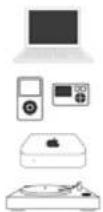
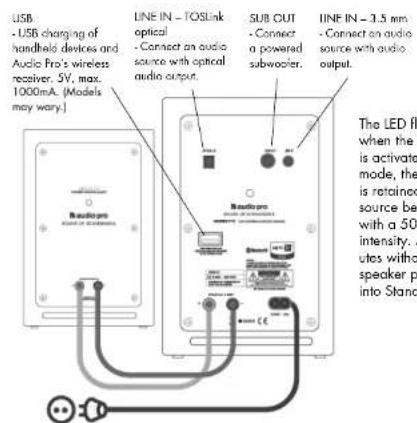
Addon T12 is a versatile speaker. Apart from being an excellent wireless speaker, we wanted it to be able to be used in many ways. That is why we equipped Addon T12 with several connection possibilities. Connect any audio source that has audio output [e.g., a headphones [jack] or an optical output (e.g. Apple AirPort Express, Sonos, Hardisk-Player, Streaming Player, CD-Player, Dockingstation, Sat/Cable Receiver) to one of the two audio inputs.
Let Addon T12 help your flat screen TV produce fantastic sound. Simply connect Addon T12 to your TV with an
optical TOSLink cable and your TV experience will sound as good as it looks.
ADD AN POWERED SUBWOOFER FOR EXTRA BASS
The versatility of Addan T12 is further evidenced by the subwoofer jack for the connection of a powered subwoofer. Subwoofer are one of the cornerstones of Audio Pro, and the company was in fact started in 1978 with a revolutionary powered subwoofer. By connecting a powered subwoofer you achieve an additional dimension of deep bass for all your music. Get ready to party!
COMBINE WITH AUDIO PRO'S WIRELESS NETWORK
Audio Pro is a pioneer of wireless hi-R audio with its award-winning speaker series Living. Addon T12 can be combined with existing Living wireless speakers. Simply connect an Audio Pro wireless receiver to Addon T12 and you are ready for a truly frisrate wireless multi-room sound experience!

BASIC FUNCTIONS
REAR CONNECTIONS
REMOTE CONTROL
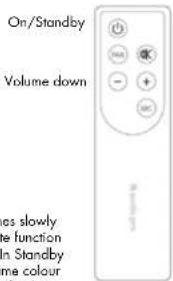
Mute function Pairing button
Volume up
Select audio source
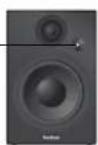
The LED on the
speaker shows
Blue for Bluetooth
Green for 3.5mm and Red for TC5Link optical.
PAIR YOUR DEVICE WITH ADDON T12
-
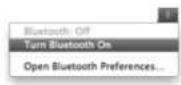
Activate Bluetooth in your device (smartphone, tablet or computer).
-
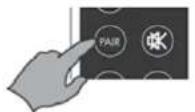
Ensure that the audio source is Bluetooth and that the LED is showing blue. Press the PAIR button on the remote control.
-
The LED on Addon T12 starts to flash rapidly. Select "ADDON T12" in the list of Bluetooth devices that have been located. The LED now shows a solid blue light. Done!
Open a music service and enjoy wireless music playing.
Please see below regarding individual devices' Bluetooth use.
You only need to port your smartphone/computer with Addon T12 once, after which the device will be included in the list of your Bluetooth devices.
USING DEVICES WITH BLUETOOTH
IPHONE/IPAD/IPOD TOUCH
First pair your iOS device with Addon T12. Open a music service [Spotify, WIMP, LastFM, etc.]. Locate the AirPlay icon in the music service. Select your Addon T12 speaker in the list. Press "play" to play your music.
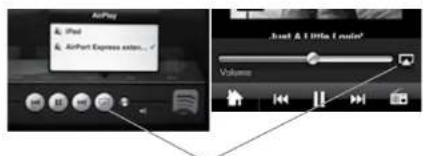
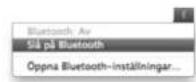
Press this symbol to select Bluetooth device.

ANDROID DEVICES
Read the manual for your telephone or tablet for instructions about how to activate Bluetooth in your particular device.

MAC OR PC
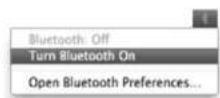
Most computers have built-in Bluetooth that enables the wireless playing of music directly from your computer to Addon T12. Search for "Bluetooth" in your computer's help function to see how it works with your particular operating system.
Please note: When you turn on the speaker it will search for already paired devices. If Addon T12 finds such a device it will automatically connect to the already paired device. Addon T12 can remember up to 6 paired devices.
CONNECT MULTIPLE AUDIO SOURCES
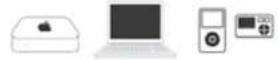
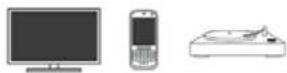
Audio via 3.5 mm analogue or Optical TOSLink Connect other audio sources that have audio output (e.g., a headphone (jack or an optical output) by cable to Addan T2. For example: MP3 player, Airport Express, CD player, mobile telephone, iPhone/iPad/iPad dock, TV, record player, Sonas, Harddisk-Player, Streaming-Player, Dockingstation, Sat/Cable Receiver.

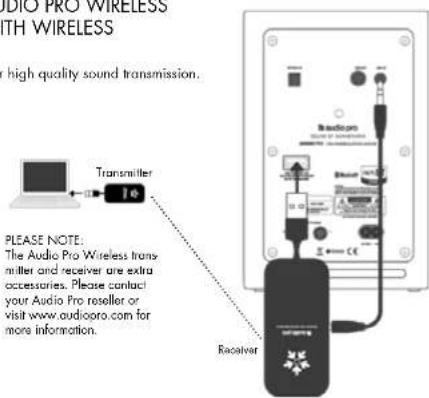
COMBINE ADDON T12 WITH AUDIO PRO WIRELESS HIGH QUALITY, HI-FI AUDIO WITH WIRELESS TRANSMITTER AND RECEIVER
The USB dongles create a wireless network for high quality sound transmission.
With Audio Pro wireless transmitter
and receiver you can also:
- have an unlimited number of receivers for sound in several rooms
- have up to 3 different transmitters for different audio sources in different rooms
- send wireless music from your PC or Mac to your stereo
- combine audio with all the speakers in the wireless Living series.
VOLUME SETTINGS
Each audio source [Bluetooth, Line 1 and Line 2] stores separate volume settings in its memory. This means that you can have a high volume when using Bluetooth and can then regulate the volume on the device from which you are playing music. If you change audio source to Line 1 or Line 2, they will have the last chosen volume setting stored in their memory.
OPTIONS
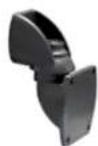
WB201 wall bracket for wall mounting.

Bluetooth

Line 1

Line 2
MORE ABOUT USING BLUETOOTH
- BLUETOOTH ACTIVATION
Select Bluetooth as the input source by pressing "SRC" (Source) on the remote control until the LED on Addon T12 turns blue. Bluetooth is now activated, with a flashing blue light if no device is connected, and a solid blue light if a device is connected. Addon T12 will now automatically search for paired devices for 3 minutes, and the LED will rapidly flash blue during the search. Addon T12 will locate devices within range that have previously been connected and will connect them automatically. If no devices are located within 3 minutes, Addon T12 will revert to Standby status. Please see the "Pair your device with Addon T12" section for information about how to pair new devices with Addon T12.
2.AUTO CONNECTION
If a device is moved outside the range of Addon T12 (approx. 10 metres without obstacles), that device is disconnected. The device is automatically connected again when it is moved back within range. Addon T12 can memorise up to 6 devices and always starts by searching for the last device to have been connected. If Addon T12 has been connected to devices A-B-C-D-E-F in that order, device F is given first priority, while device A is given last priority. Every time Addon T12 starts up, it will perform an auto connection of devices within its range.
Please note:
- Auto connection will not function if Addon T12 is turned off via the main power switch at the rear of the unit.
- If a seventh device is connected, device A's address will no longer be memorised.
-
Always start Bluetooth in your smartphone/computer first, and then start Addon T12 for auto connection.
-
If the "PAIR" button is pressed while Bluetooth is selected as the audio source, Addon T12 will perform a new search for 3 minutes during which the LED will rapidly flash blue.
TROUBLESHOOTING
With the help of Bluetooth technology, Bluetooth compatible devices can easily be connected to each other over a short wireless connection.
- A Bluetooth device could cause sound-related or technical faults, depending on use, in the following cases:
- When some part of the body is in contact with the receiving/transmitting system for the Bluetooth devices or Addon 12.
- Electrical variations due to obstacles in the form of walls, corners, etc.
- Exposure to electrical disruptions from devices within the same frequency band, for example medical equipment, microwave ovens and wireless networks.
- Place Adder T12 and the Bluetooth device close to each other during the pairing process.
- The greater the distance between Addon T12 and the Bluecooth device, the poorer the quality will be. If the distance exceeds the 10m of the device, the device will be replaced.
- In areas with poor reception, the Bluetooth connection might not work as well as it should.
-
The Bluetooth connection only works when it is near the device. The connection is automatically broken if the Bluetooth device moves outside the range area. The sound quality may even deteriorate within that area due to obstacles such as walls or doors.
-
This wireless device may cause electrical disruptions during use.
- You do not need to enter the PIN codes [password] when connecting the Bluetooth device to T12. If the window for entering the PIN code is discovered, you should enter <0.0001> .
- You cannot connect to a Bluetooth device that only supports the HF area function here [hand text].
- Additon 112 cannot search or connect correctly in the following cases:
- If there is a strong electric field around Additon 112.
- If the Bluetooth device is turned off, it is not available or does not function as it should.
Please note that items such as, for example, microwave events, wireless network适配器, fluorescent lights and gas cookers use the same frequency range as the Bluetooth device, which could lead to electrical disturbances.
SVENSKA
SPECIFICATIONER
Typ: Aktiv stereohögtalarsystem med 2-vags basreflex
of pd men get her 50% ofintersets . After 20 min
Finishing: Lira 20 mm utap signal agar bogolar
enneristondbylagel.
LED-lamp pan pa
hogehtalaren lyser
3a for Bluetooth,
n for 3.5mm och
Rd for TOSLink optisk
PARADINENHETMEDADDONT12
-
Aktivera Bluetooth i din enchet (smartphone, surfplattal eller dator).
-
Se till att luidkalla ar Bluetooth, LED lyser blatt.
Tryck pa PAIR-knappen pa fjärkrontrollen.
- LED pá Addon T12 börjar blinka blatt snabbl.
Valj "ADDON T12" i Istan over Bluetooth enheter som hittas.
- Cm n Bnntn nnnn nnnn nn nnnn nnnn nnnn nnnn nnnn nnnn nnnn nnnn nnnn nnnn nnnn nnnn nnnn nnnn nnnn nnnn nnnn nnnn nnnn nnnn nnnn nnnn nnnn nnnn nnnn nnnn nnnn nnnn nnnn nnnn nnnn nnnn nnnn nnnn
tungeneraen den skg.
- Oservora at exompalis mikrovoagaugnar, trdloa narkws -
Enries:Bluethoath standard V4.0+EDR with aptX code,
1x3.5mm,1xTOSLink optique [seulement PCM]
-
Useqces Instructions.
-
Consorvaz cos Instruchons.
-
Rspocatos los averlssements
-
Solve 82 lessons instructions.
-
Find the root of x .
-
Ntusniz-210 can oporatior of ploymnion on Tane 4. Ntusniz-210 is unipolar over on cifferon
-
Temperature of gasificationment: entre 5 e 40°C
Humidie:30% a 90% [ans condensation]
Jia Ado and Hongliang Jiao, Wangzhou Hospital
USB-longus.5V, print
1000mA.Mollitt scot
OPTICAL IN
[O]
tune in mind
SUBOUT
Luna
Bassokai
LINEIN-3.5mm
1.4.2.1.1
0
Paal/valmiustila
In order to be able to utilise aptX, the transmitter (e.g. mobile telephone or tablet) must have aptX. Otherwise no sound enhancement will be achieved.

Connect other audio sources that have audio output (e.g. a headphones [jack or an optical output] by cable to Adden T12. For example: MP3 player, Airport Express, CD player, mobile telephone, iPhone/iPad/iPod dock, TV, record player, Sonos, Hard disc Player, Streaming Player, Docking station, Sat/Cable Receiver. Connect otras Fuentes con calidad de audio por cable al Addon T12. Por example: reproducredores de Mp3, iPhone/iPad/iPod dock, TV Sonos, Reproducror de streaming...
FANTASTICO SONIDO PARA TU TV
Audio mediatinge entada de 3,5 mm o entada Optica TOSLink Connect other audio sources that have audio output (e.g. a headphone jack or an optical output) by cable to Addon T12. For example: MP3 player, Airport Express, CD player, mobile telephone, iPhone/iPad/iPad dock TV, record player, Sonos, Hard disc-Player, Streaming Player, Docking station, Sat/Cable Receiver. Connect other fuentes con salle de audio por cable al Addon T12. Por exemple: reproducores de Mp3, iPhone/iPad/ iPad dock, TV Sonas, Reproducror de streaming...