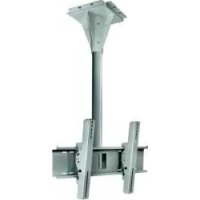
ECMU02CS - Flat screen mount Peerless-AV - Free user manual and instructions
Find the device manual for free ECMU02CS Peerless-AV in PDF.



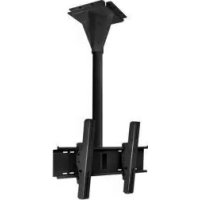
| Product Type | Outdoor Ceiling Flat Panel Mount |
| Brand | Peerless-AV |
| Model | ECMU02CS |
| Compatible Screen Size | 32" to 65" |
| Maximum Load Capacity | 200 lb (90.7 kg) |
| Wind Resistance | Up to 90 mph (145 km/h) |
| Material | Steel |
| Installation Type | Solid Concrete Ceiling |
| Tilt | Adjustable from -5° to 15° in 5° increments (IncreLok™ system) |
| Included Parts | Ceiling plate, column support, adapter housing, adapter plate, adapter brackets, expansion anchors, screws, bolts, hex key |
| Required Tools | Drill, 10 mm drill bit, level, Phillips screwdriver, 4 mm hex key |
| Maintenance | Minimum annual inspection; after winds >90 mph |
| Cleaning | Clean with a soft, dry cloth; avoid abrasive products |
| Safety | Safety clamp; controlled tightening (max torque 4.5 Nm) |
| Warranty | 5-year limited; 1-year against corrosion |
| Usage | Outdoor only |
Frequently Asked Questions - ECMU02CS Peerless-AV
User questions about ECMU02CS Peerless-AV
0 question about this device. Answer the ones you know or ask your own.
Ask a new question about this device
Download the instructions for your Flat screen mount in PDF format for free! Find your manual ECMU02CS - Peerless-AV and take your electronic device back in hand. On this page are published all the documents necessary for the use of your device. ECMU02CS by Peerless-AV.
USER MANUAL ECMU02CS Peerless-AV
Installation and Assembly:
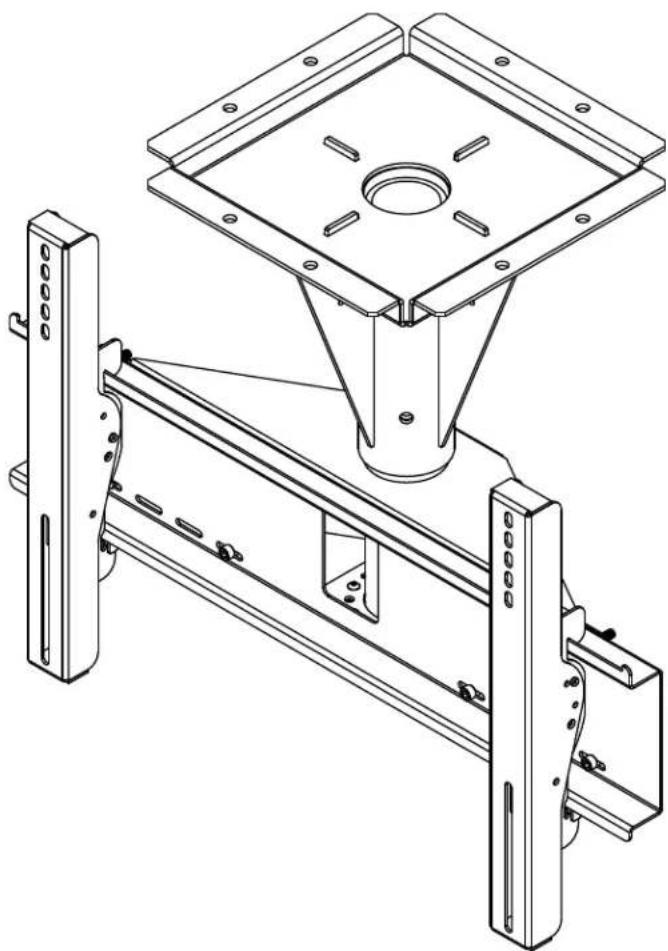
Wind Rated Concrete Ceiling Tilt Mount for 32" - 65" Outdoor Flat Panel Displays
Models: ECMU-01-C, ECMU-01-C-S, ECMU-02-C, ECMU-02-C-S, ECMU-03-C, ECMU-03-C-S, ECMU-04-C, ECMU-04-C-S
natural_image
Technical line drawing of a mechanical assembly with mounting brackets and a central square component (no text or symbols)

Max UL Load Capacity: 200 lb (90.7 kg)
Max Wind Rating: 90 mph, elevation 200 ft, Category D
WARNING
- Do not begin to install your Peerless product until you have read and understood the instructions and warnings contained in this Installation Sheet. If you have any questions regarding any of the instructions or warnings, for US customers please call Peerless customer care at 1-800-865-2112, for all international customers, please contact your local distributor.
- This product should only be installed by someone of good mechanical aptitude, has experience with basic building construction, and fully understands these instructions.
- Due to outdoor environmental conditions such as strong wind gusts, heavy snow, hail, rain, etc. The environmental enclosure, together with its mount, extension tube and hardware, must be inspected at least once a year, and immediately following any time winds exceed 90 mph. A qualified installer or inspector must check for signs of rust, loose fasteners, bent metal, etc. If evidence of excessive wear, deterioration or any unsafe condition is observed, this product must be taken out of service immediately. Direct all inquiries to customer care if you have any questions.
- Make sure that the supporting surface will safely support the combined load of the equipment and all attached hardware and components.
- Never exceed the Maximum UL Load Capacity. See page one.
• Always use an assistant or mechanical lifting equipment to safely lift and position equipment. - Tighten screws firmly, but do not overtighten. Overtightening can damage the items, greatly reducing their holding power.
- This product was designed for use with other outdoor products only.
- This product was designed to be installed on the following wall construction only;
WALL CONSTRUCTION HARDWARE REQUIRED
Tools Needed for Assembly
- phillips screwdriver, 3/16" allen wrench
- drill
- 3/8" (10 mm) drill bit
- level
Table of Contents
Parts List....3
Installation to Solid Concrete Surface 4
Installing Tilt Brackets....6
Mounting and Removing Flat Panel Screen....7
Before you begin, make sure all parts shown are included with your product.
| Parts List | ECMU-01-C | ECMU-01-C-S | |
| ECMU-02-C | ECMU-02-C-S | ||
| ECMU-03-C | ECMU-03-C-S | ||
| ECMU-04-C | ECMU-04-C-S | ||
| Description Qty. Part # Part # Model # Part # | |||
| A | ceiling plate | 1 | 061-T1306 061-7306 |
| B | support column | 1 | see chart see chart |
| C | concrete expansion anchor | 8 | 5M9-381-H03 5M9-381-H03 |
| D | adapter box | 1 | 061-T1264 061-7264 ECMU-02-C-S |
| E | 5/16"-18 x 1" socket screw | 4 | 520-5035 520-5035 |
| F | 7/16" x 4" hex head bolt | 3 | 520-5014 520-5014 |
| G | 7/16" nylock nut | 3 | 530-5003 530-5003 |
| H | adapter plate | 1 | 061-T125 8 061-7258 |
| I | 1/4-20 x .75" socket screw | 8 | 520-5034 520-5034 |
| J | left tilt bracket | 1 | 061-T1383 061-7383 |
| K | right tilt bracket | 1 | 061-T1382 061-7382 |
| L | security allen wrench | 1 | 560-9646 560-9646 |
| M | M6 x 12 mm socket pin screw | 4 | 520-5023 520-5023 |
| N | M6 x 25 mm socket pin screw | 4 | 520-5024 520-5024 |
| O | M8 x 15 mm socket pin screw | 4 | 520-5026 520-5026 |
| P | M6 x 20 mm socket pin screw | 4 | 520-5025 520-5025 |
| Q | M8 x 25 mm socket pin screw | 4 | 520-5027 520-5027 |
| R | washer | 4 | 540-501 4 540-5014 |
| Support Column (B) | |
| ECMU-01-C 061-T1266 | |
| ECMU-01-C-S 061-7266 | |
| ECMU-02-C 061-T1267 | |
| $1-7267 | |
| ECMU-03-C 061-T1268 | |
| ECMU-03-C-S 061-7268 | |
| ECMU-04-C 061-T1269 | |
| ECMU-04-C-S 061-726 | 9 |
Parts may appear slightly different than illustrated.
WARNING
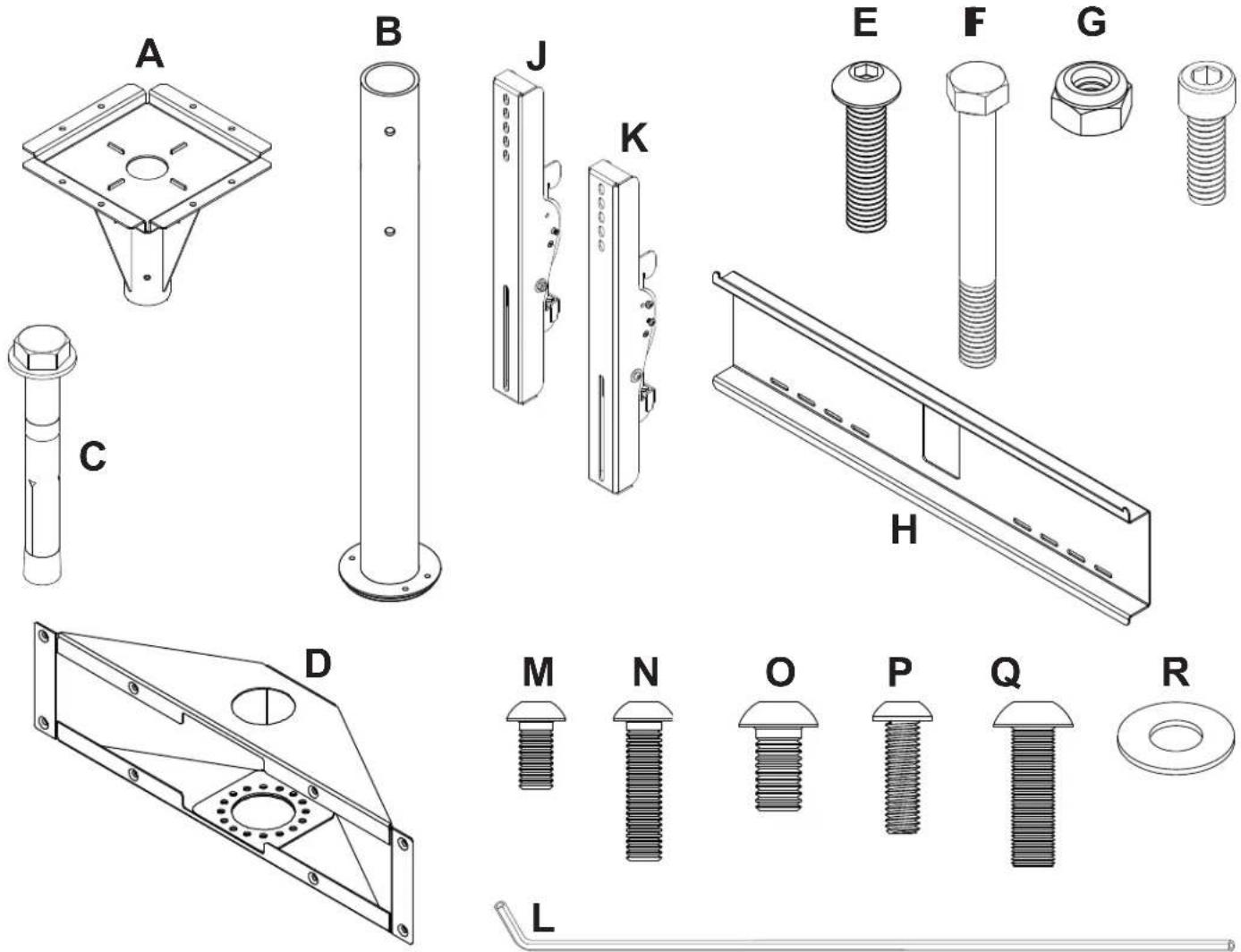
- Concrete must be 3000 psi density minimum. Lighter density concrete may not hold concrete anchor.
- Make sure that the supporting surface will safely support the combined load of the equipment and all attached hardware and components.
- Never tighten in excess of 35 ft. • Ib (47 N.M.).

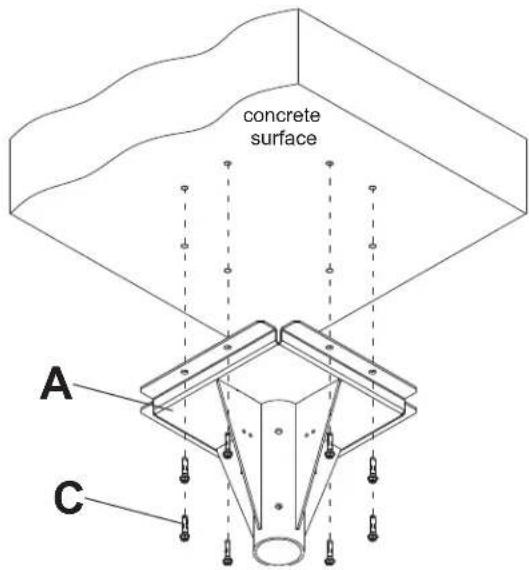
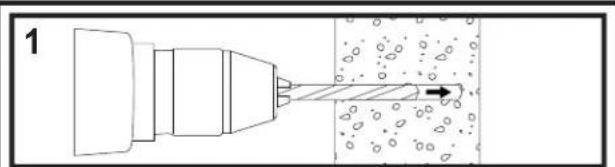
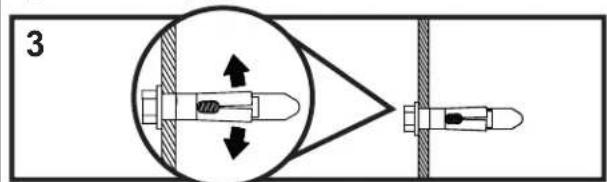
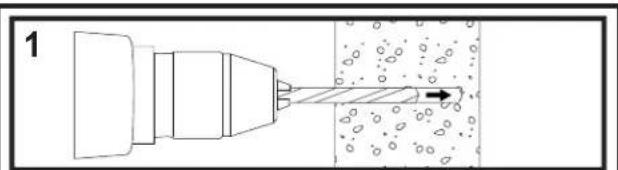
Use ceiling plate (A) as a template to mark eight mounting holes on concrete ceiling. Drill eight 3/8" (10 mm) dia. pilot holes to a minimum depth of 3" (76 mm). Place ceiling plate over mounting holes and secure with eight concrete expansion anchors (C) as shown below. Tighten all fasteners.
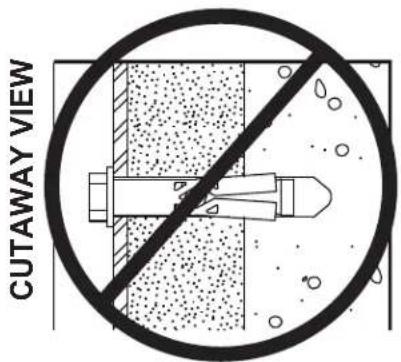
WARNING
• Always attach concrete expansion anchors directly to load-bearing concrete.
- Never attach concrete expansion anchors to concrete covered with plaster, drywall, or other finishing material.
natural_image
Diagram of a mechanical tool interacting with a surface, showing motion direction (no text or symbols)Drill 3/8" (10 mm) dia. holes.
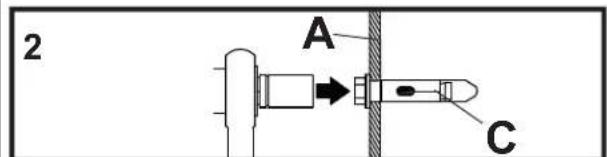
Place ceiling plate (A) over holes and secure with concrete expansion anchors (C)
natural_image
Diagram showing a mechanical or optical setup with a central component, directional arrows, and a separate device (no text or symbols present)Tighten all fasteners. Tighten to 35 ft. • Ib (47 N.M.) maximum torque.
2
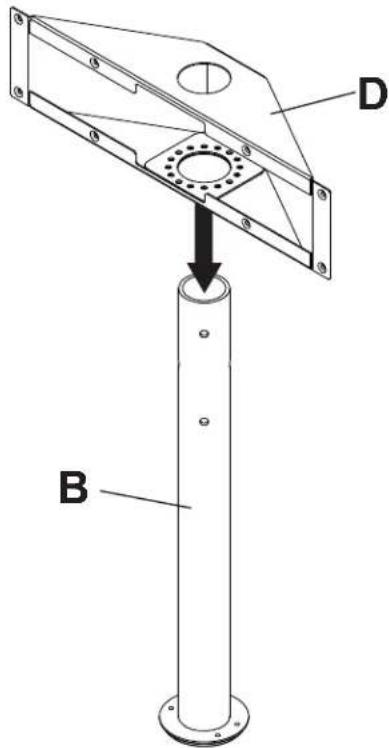
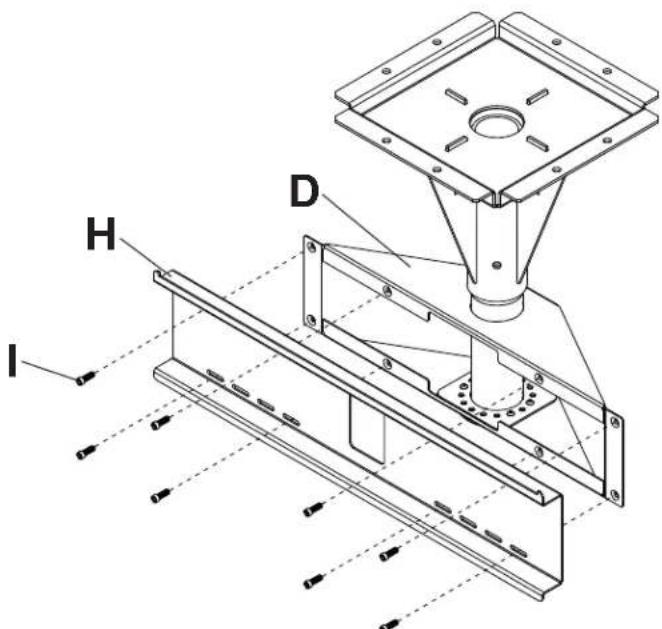
Place adapter box (D) onto support column (B) as shown.
3
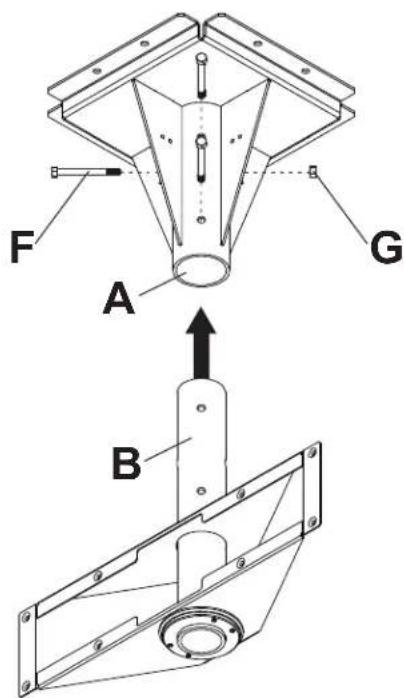
Insert support column (B) into ceiling assembly (A). Align holes of support column with holes of ceiling assembly and secure using three 7/16" x 4" bolts (F) and three 7/16" nuts (G) as shown.
4
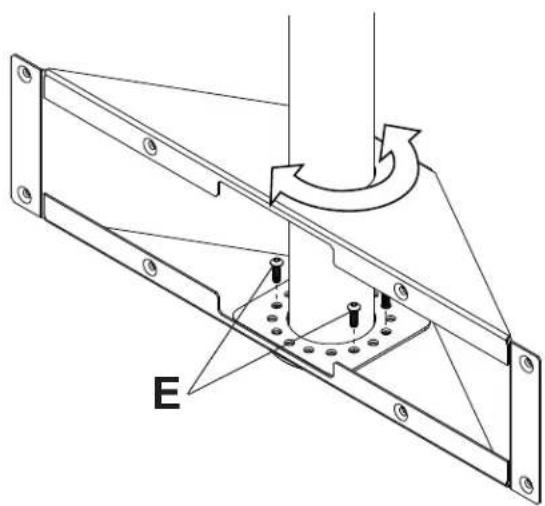
Adjust swivel to desired position as shown. Secure adapter box to support column with four 1" socket screws (E) using a 3/16" allen wrench as shown.
5
Attach adapter plate (H) to adapter box (D) with eight 3/4" socket screws (I) using a 3/16" allen wrench as shown.
Installing Tilt Brackets
WARNING
- Tighten screws so adapter brackets are firmly attached. Do not tighten with excessive force. Overtightening can cause stress damage to screws, greatly reducing their holding power and possibly causing screw heads to become detached. Tighten to 40 in. • Ib (4.5 N.M.) maximum torque.
- If screws don't get three complete turns in the screen inserts or if screws bottom out and bracket is still not tightly secured, damage may occur to screen or product may fail.

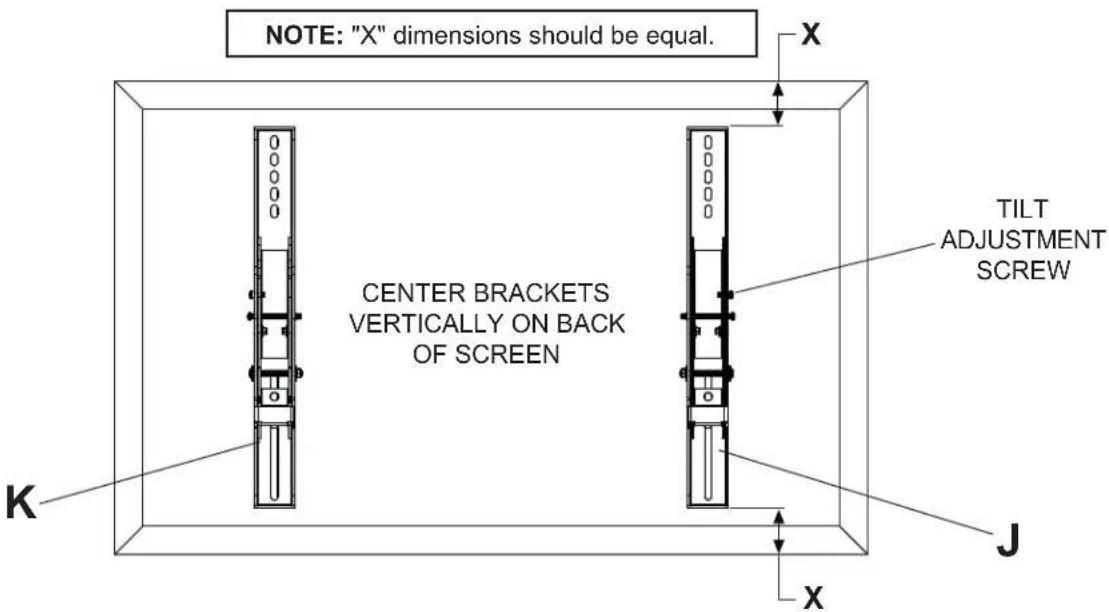
To prevent scratching the screen, set a cloth on a flat, level surface that will support the weight of the screen. Place screen face side down. If screen has knobs on the back, remove them to allow the adapter brackets to be attached. Place adapter brackets (J,K) on back of screen, align to holes, and center on back of screen as shown below. Attach the adapter brackets to the back of the screen using the appropriate combination of screws and washers and as shown in step 6-1.
NOTE: Top and bottom mounting holes on screen must be used for attaching brackets.
NOTE: Be sure to attach tilt brackets with tilt adjustment screw facing outward as shown below.
Verify that all holes are properly aligned, and then tighten screws using allen wrench (L).

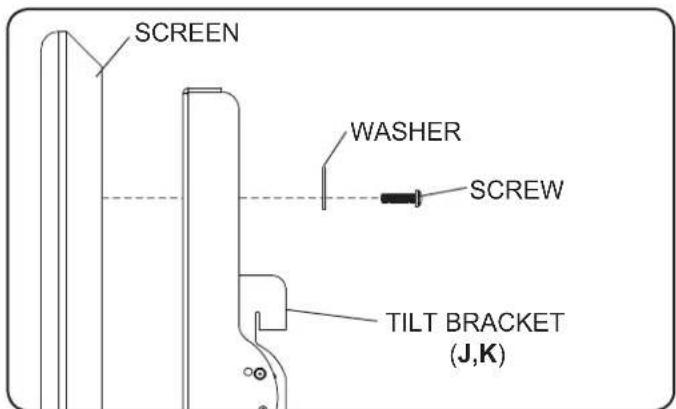
Begin with the shortest length screw, hand thread through washer and tilt bracket into screen as shown. Screw must make at least three full turns into the mounting hole and fi t snug into place. Do not over tighten. If screw cannot make three full turns into the screen, select a longer length screw from the baffled fastener pack. Repeat for remaining mounting holes, level brackets and tighten screws.
Mounting and Removing Flat Panel Screen
WARNING
• Always use an assistant or mechanical lifting equipment to safely lift and position the fl at panel screen.
- Do not tighten screws with excessive force. Overtightening can cause damage to mount. Tighten screws to 40 in. • lb (4.5 N.M.) maximum torque.
- Be careful not to pinch fingers when pushing screen from the bottom.

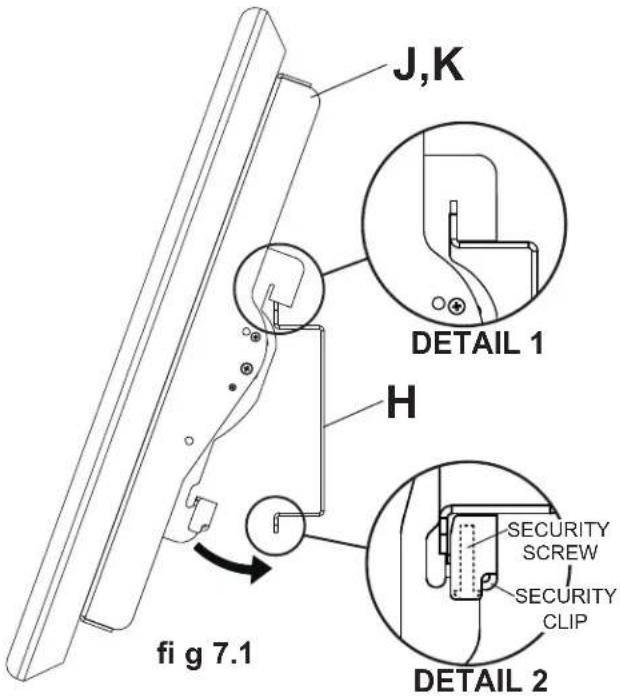
Mounting Screen: Hook tilt brackets (J,K) onto adapter plate (H) and swing screen in as shown in fi g. 7.1. NOTE: If the security clip does not clear the bottom of the adapter plate, loosen the security screw with allen wrench (L). Tilt bracket hooks must fully engage adapter plate as shown in detail 1. Tighten security screw using allen wrench (L) until security clip sits firmly against bottom of adapter plate.
NOTE: Be sure security clip is secured to bottom of adapter plate as shown in detail 2.
Removing Screen: Loosen security screw from security clip until the screen is able to swing freely, and lift screen off of mount.
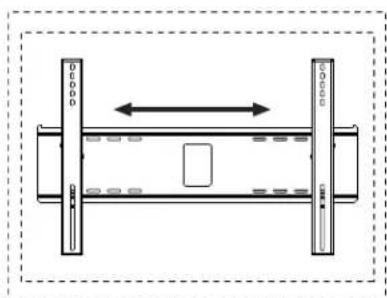
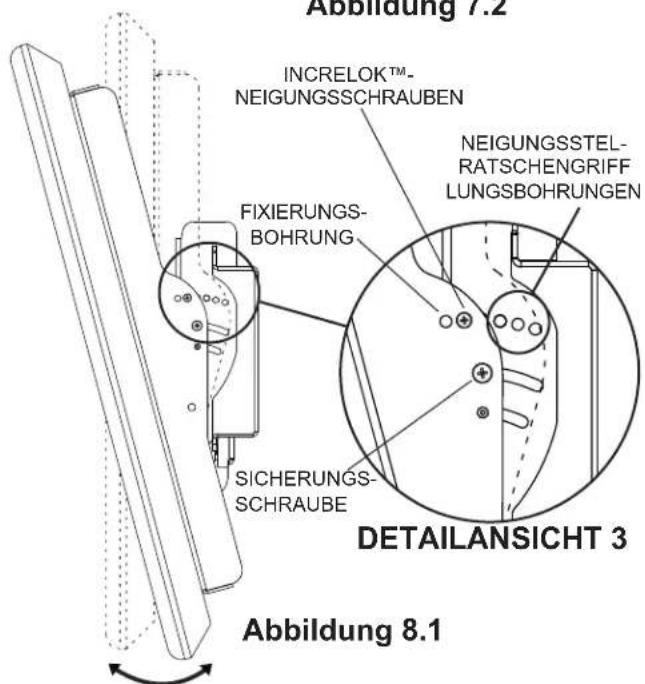
Screen Adjustment: Screen can be adjusted horizontally by loosening security screw three full turns using allen wrench (L). Adjust screen as shown in figure 7.2. Tighten security screw.
natural_image
Pure schematic diagram of a mechanical or electrical component with no text, numbers, or symbolsfi g 7.2
Adjusting the Tilt Angle of the Flat Panel Screen

NOTE: Choosing and setting tilt position may be easier before placing screen onto wall mount.
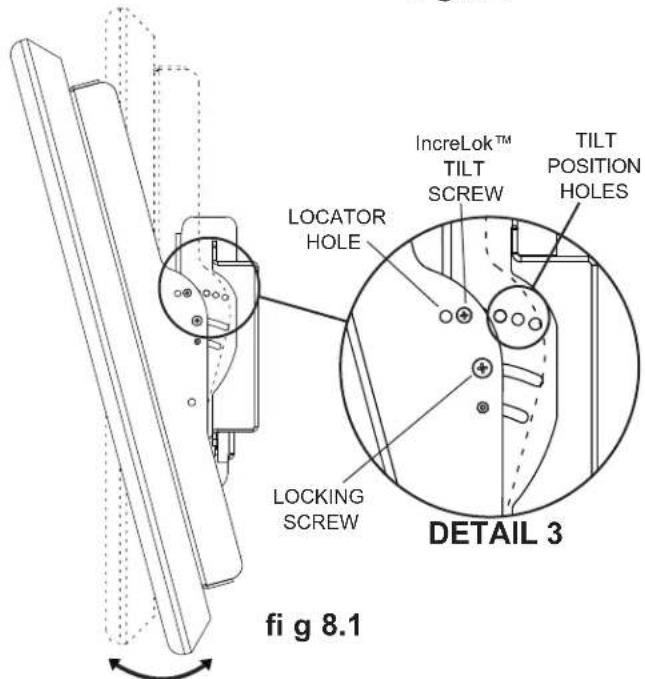
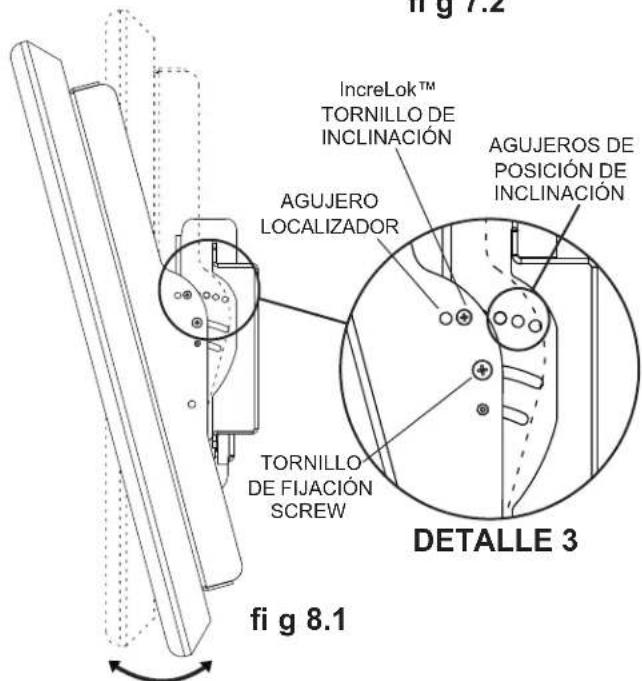
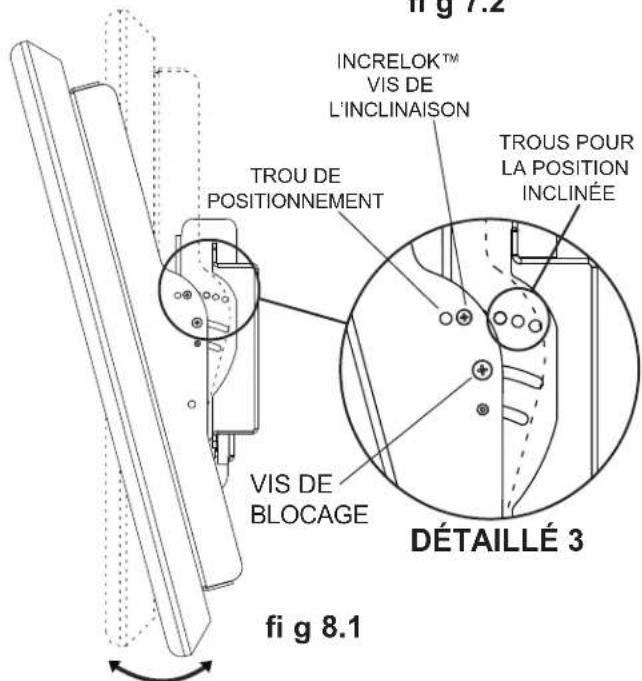
INCRELOK™: The screen can be locked into a pre-set tilt position of -5°, 0°, 5°, 10° or 15°. Use locator hole to find tilt position hole and tilt screen to align holes. Tighten IncreLok™ tilt screws on both tilt brackets as shown in detail 3.
Tighten locking screw to lock down tilt position.
natural_image
Technical line drawing of a mechanical assembly with mounting brackets and a central square component (no text or symbols)

natural_image
Diagram showing a tool interacting with particles in a container (no text or symbols)natural_image
Diagram of a mechanical or electrical component with two vertical supports and a central rectangular block, no text or symbols present.fi g 7.2
natural_image
Technical line drawing of a mechanical assembly with mounting brackets and a central square component (no text or symbols)

Installation de support adaptatuers ....20
▲ AVERTISSEMENT
natural_image
Diagram showing a tool interacting with particles in a container (no text or symbols)natural_image
Technical line drawing of a mechanical assembly with two vertical components and a central rectangular component (no text or symbols)fi g 7.2
natural_image
Technical line drawing of a mechanical assembly with mounting brackets and a central square component (no text or symbols)

⚠️ ACHTUNG
natural_image
Diagram of a mechanical tool interacting with a surface, showing motion direction (no text or symbols)natural_image
Diagram of a mechanical or electrical component with two vertical bars and a central rectangle, no text or symbols present.Abbildung 7.2
Peerless Industries, Inc. establishes a warranty period of five years for products manufactured or supplied by Peerless. This period commences from the date of sale of the product to the original consumer, but will in no case last for more than six years after the date of the product's manufacture. During the warranty period such products will be free from defects in material and workmanship, provided they are installed and used in compliance with the instructions established by Peerless Industries, Inc. Subject to applicable legal requirements, during the warranty period Peerless will repair or replace, or refund the purchase price of, any such product which fails to conform with this warranty.
Any other warranties prescribed by the law which may apply with respect to such products also are limited in duration to the warranty period specified in this Limited Five-Year Warranty.
This warranty does not cover damage caused by (a) service or repairs by the customer or a person who is not authorized for such service or repairs by Peerless Industries, Inc., (b) the failure to utilize proper packing when returning the product, (c) incorrect installation or the failure to follow Peerless' instructions or warnings when installing, using or storing the product, or (d) misuse or accident, in transit or otherwise, including in cases of third party actions and force majeure.
In no event shall Peerless be liable for incidental or consequential damages or damages arising from the theft of any product, whether or not secured by a security device which may be included with the product.
This Limited Five-Year Warranty is in lieu of all other warranties, expressed or implied, and is the sole remedy with respect to product defects. No retailer, dealer, distributor, installer or other person is authorized to modify or extend this warranty or impose any obligation on Peerless in connection with the sale of any product manufactured or supplied by Peerless.
This warranty gives specific legal rights, and you may also have other rights provided by the national legislation of the country in which you purchased such product.

www.peerlessmounts.com
© 2008 Peerless Industries, Inc.
LIMITED ONE-YEAR WARRANTY
Limited one-year warranty on corrosion.

www.peerlessmounts.com
© 2008 Peerless Industries, Inc.
GARANTIE DE CINQ ANS
www.peerlessmounts.com
© 2008 Peerless Industries, Inc.
GARANTIE DE UNO AÑO
www.peerlessmounts.com
© 2008 Peerless Industries, Inc.
GARANTÍA LIMITADA DE CINCO AÑOS
www.peerlessmounts.com
© 2008 Peerless Industries, Inc.
GARANTÍA LIMITADA DE UN ANNÉE
www.peerlessmounts.com
© 2008 Peerless Industries, Inc.
BESCHRÄNKTEN FÜNFJÄHRIGEN GARANTIE
www.peerlessmounts.com
© 2008 Peerless Industries, Inc.
BESCHRÄNKTEN EINJÄHRIGEN GARANTIE
www.peerlessmounts.com
© 2008 Peerless Industries, Inc.


- Installation and Assembly:
- Wind Rated Concrete Ceiling Tilt Mount for 32" - 65" Outdoor Flat Panel Displays
- WARNING
- WALL CONSTRUCTION HARDWARE REQUIRED
- Tools Needed for Assembly
- Table of Contents
- Installing Tilt Brackets
- Mounting and Removing Flat Panel Screen
- Adjusting the Tilt Angle of the Flat Panel Screen
- ▲ AVERTISSEMENT
- ⚠️ ACHTUNG
- LIMITED ONE-YEAR WARRANTY
- GARANTIE DE CINQ ANS
- GARANTIE DE UNO AÑO
- GARANTÍA LIMITADA DE CINCO AÑOS
- GARANTÍA LIMITADA DE UN ANNÉE
- BESCHRÄNKTEN FÜNFJÄHRIGEN GARANTIE
- BESCHRÄNKTEN EINJÄHRIGEN GARANTIE
Brand : Peerless-AV
Model : ECMU02CS
Category : Flat screen mount