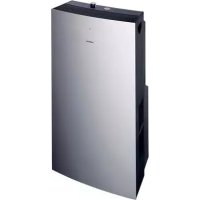
S1RKM09102 - Air conditioner SIEMENS - Free user manual and instructions
Find the device manual for free S1RKM09102 SIEMENS in PDF.


| Product type | Mobile monobloc air conditioner |
| Brand | Siemens |
| Model | S1RKM09102 |
| Power supply | 220-240 V, 50 Hz, 10 A fuse |
| Cooling consumption | 1180 W |
| Heating consumption | 1800 W |
| Cooling capacity (ASHRAE) | 2500 W |
| Main functions | Air conditioning (max and silent), heating, dehumidification, air purification |
| Filters | Washable basic filter + set of purifying filters (ref. S1 RKZ 09013) |
| Filter cleaning | Wash the basic filter with running water, dry and replace. Replace the purifying filters every year. |
| Appliance cleaning | Cloth or sponge with warm water and mild detergent. Do not use hot water (>40°C), bleach, gasoline, acids. |
| Hot air exhaust | Hot air exhaust hose (max length 140 cm) with diffuser and suction cup. Possible fixed installation with window pass-through accessory (ref. S1 RKZ 06009). |
| Safety | Safety indicator light showing water level in internal tank. Protection against immediate restart of compressor (3-minute delay). |
| Spare parts and accessories | Purifying filter (S1 RKZ 09013), window pass-through (S1 RKZ 06009), water drain hose, caps. |
| General information | Mobile unit with casters. Operating temperature: cooling 20-35°C, dehumidification 18-35°C, heating -5 to 30°C. Warranty according to distributor. |
Frequently Asked Questions - S1RKM09102 SIEMENS
User questions about S1RKM09102 SIEMENS
0 question about this device. Answer the ones you know or ask your own.
Ask a new question about this device
Download the instructions for your Air conditioner in PDF format for free! Find your manual S1RKM09102 - SIEMENS and take your electronic device back in hand. On this page are published all the documents necessary for the use of your device. S1RKM09102 by SIEMENS.
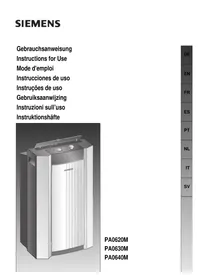
USER MANUAL S1RKM09102 SIEMENS
natural_image
3D rendering of a white industrial air purifier unit with ventilation grilles and ventilation grilles (no visible text or symbols)S1 RKM 09102
natural_image
Abstract graphic with a black arrow pointing upward, overlaid on a grid background (no text or symbols)natural_image
Close-up of a plug inserted into a small electronic device with a cable, placed on a tiled floor (no text or symbols visible)natural_image
Illustration of a door hinge with a metal clip attached, showing structural details (no text or symbols)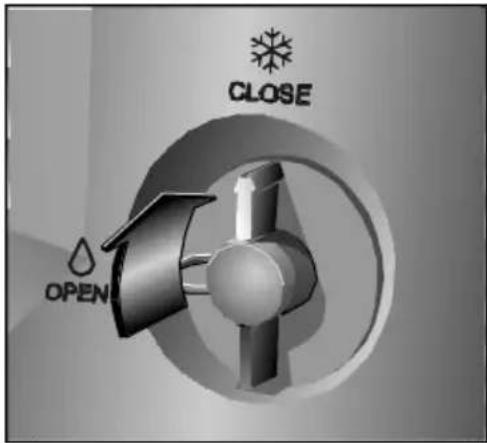
natural_image
3D rendering of a bathtub with a pipe inserted, showing mechanical components and a close-up inset (no text or symbols)natural_image
Illustration of a glass door with a coiled cable inserted, showing no text or symbolsFestinstallation
natural_image
Technical illustration of a mechanical component with curved pipe connection (no text or symbols)natural_image
Circular dial indicator with snowflake, droplet, and flame symbols (no text or numbers)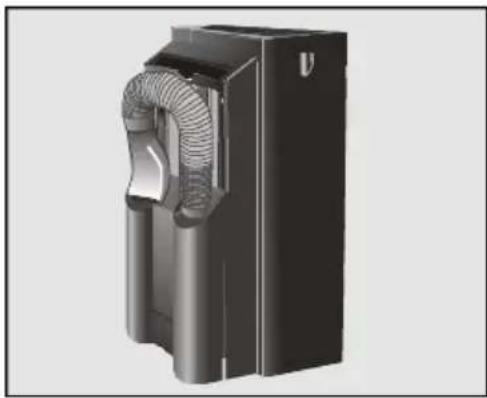
natural_image
3D rendering of a black industrial fan or housing component with coiled ducts and ventilation slots (no text or symbols visible)Entfeuchten
natural_image
3D rendering of a bucket with a pipe inserted, showing internal components and a close-up inset (no text or symbols)natural_image
3D rendering of a black industrial device with coiled duct and housing (no text or symbols visible)Luftreinigung
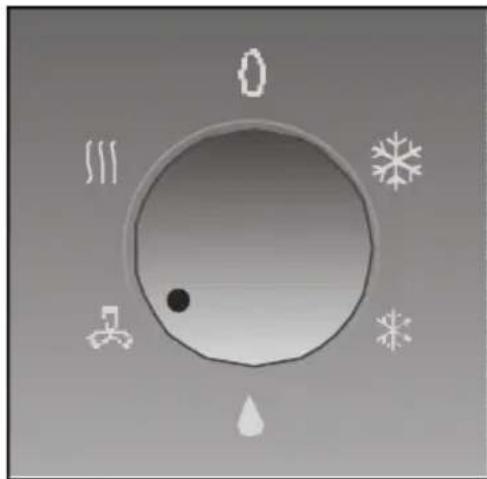
natural_image
Circular diagram with snowflake, droplet, and gear symbols around it (no text or labels)Achtung!
natural_image
3D rendering of a mechanical device with internal components and airflow direction arrows (no text or symbols)natural_image
3D mechanical component with a grid structure and downward arrow indicating force or motion (no text or symbols)Disposal of packaging 18
Disposal of your old appliance ....18
Before connecting your new appliance ....18
Your new appliance
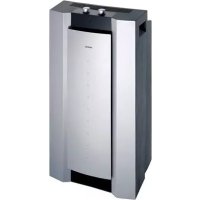
Description of your appliance ....19
Control panel ....20
Requirements for Use
Requirements for use....21
Transportation requirements....21
Instructions for Use
Temperature control ....22
Ways of releasing air outdoors....23
Heating 24
Dehumidification 24
Air purification ....25
Cleaning and Maintenance
Cleaning 26
Prior to use at change of season....26
Technical Service / Warranty....27
Things that can save you from making unnecessary phone calls ....28
Technical Information ......29
Important Information
Disposal of packaging
Disposal of your old appliance
Before connecting your new appliance

natural_image
Abstract graphic with a black arrow pointing downward, overlaid on a grid background (no text or symbols)☐ Respect the environment when disposing of the material your appliance comes packed in.
☐ Our products are all carefully packed for transportation purposes. The packaging is designed to not harm the environment. All the materials used in the production of this packaging are environmentally friendly or can be re-used.
□ Recycling the material your appliance comes packed in helps contribute to the conservation of raw materials and reduces the amount of waste produced in the world.
☐ It may be possible to return packaging to the establishment that supplied you with your appliance. Contact them for more information.
□ Unplug your old appliance from the mains electricity supply and cut the power cable.
☐ Appliances of this kind contain refrigerants which need to be disposed of in accordance with current regulations.
☐ Do not dispose of your old appliance yourself. Get in touch with your local council or other competent body for information about how best to dispose of it.
☐ Read the instructions book before using your appliance for the first time. It contains important information, not only concerning use, but maintenance and personal safety as well.
□ Keep this instructions book. It may be useful for later owners.
☐ Do not turn a damaged appliance on.
☐ Your appliance must be assembled and connected in accordance with the assembly instructions and current regulations. If these instructions are not observed, you run the risk of losing your warranty.
☐ All our appliances are made in accordance with present-day safety regulations. Only technicians instructed in these matters are authorised to repair them. Your safety is at stake.
☐ Make sure that the drainage plugs are properly inserted. They may have come lose during transportation
Your new appliance
Description of your appliance
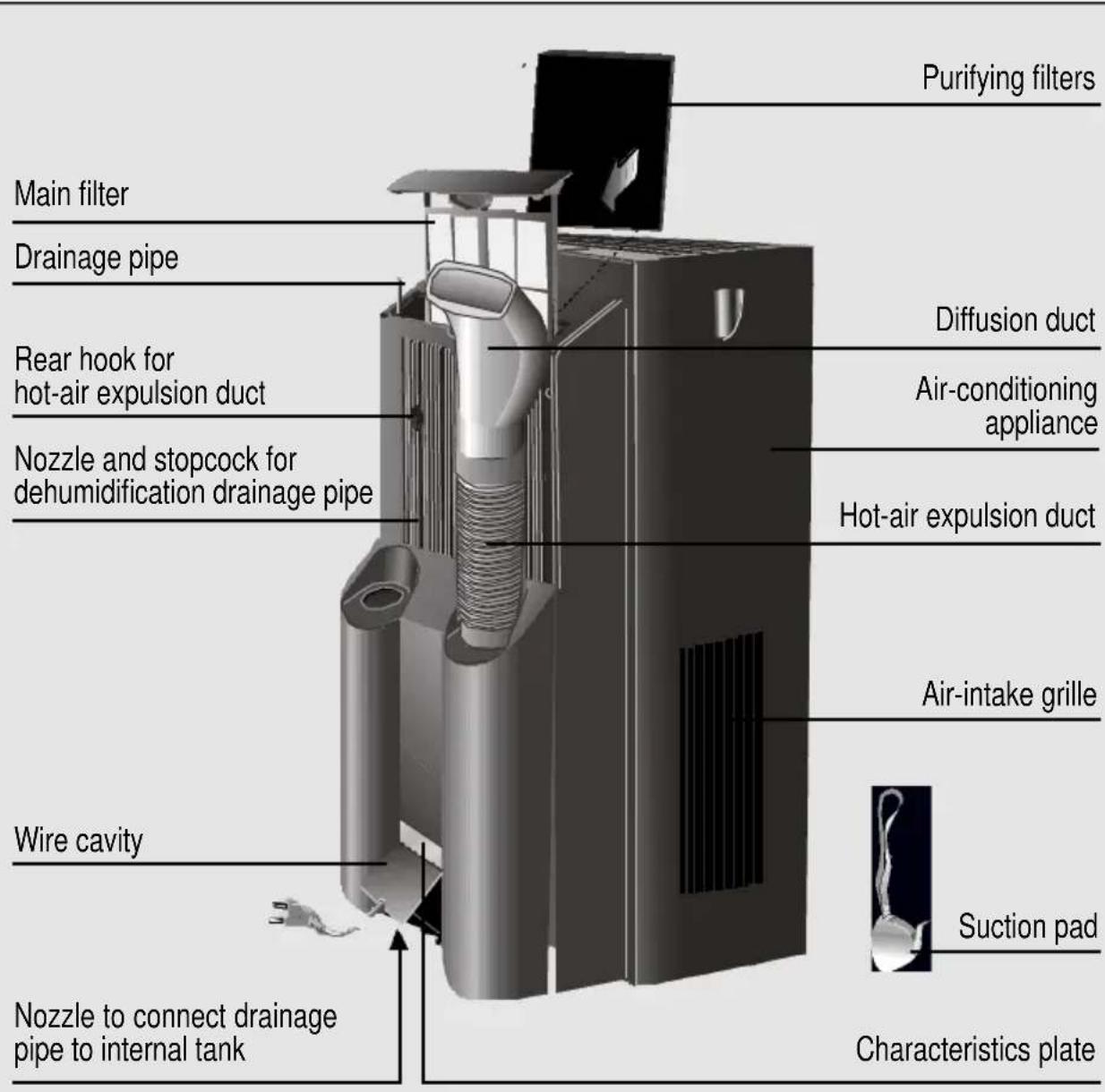
Control panel
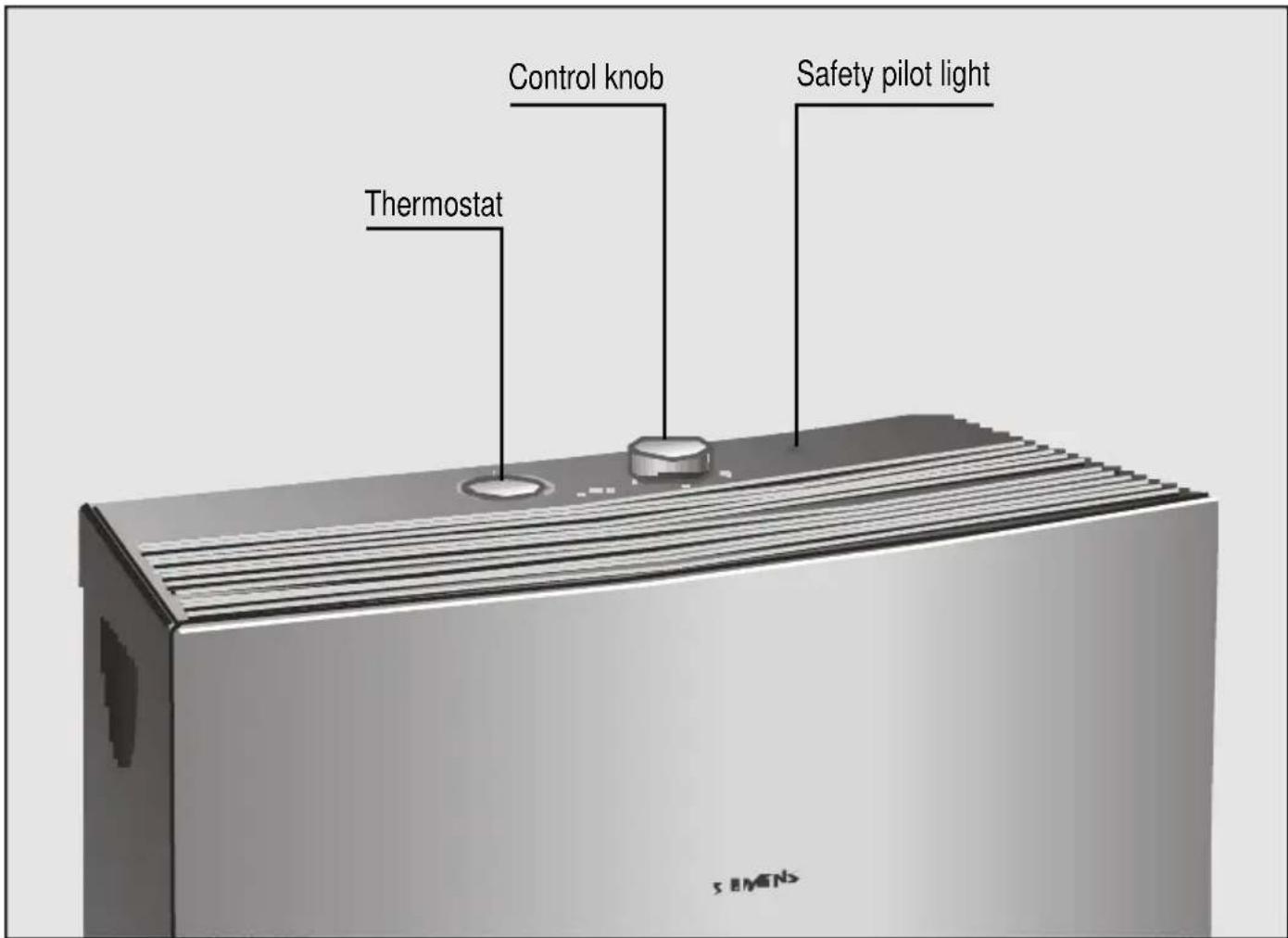
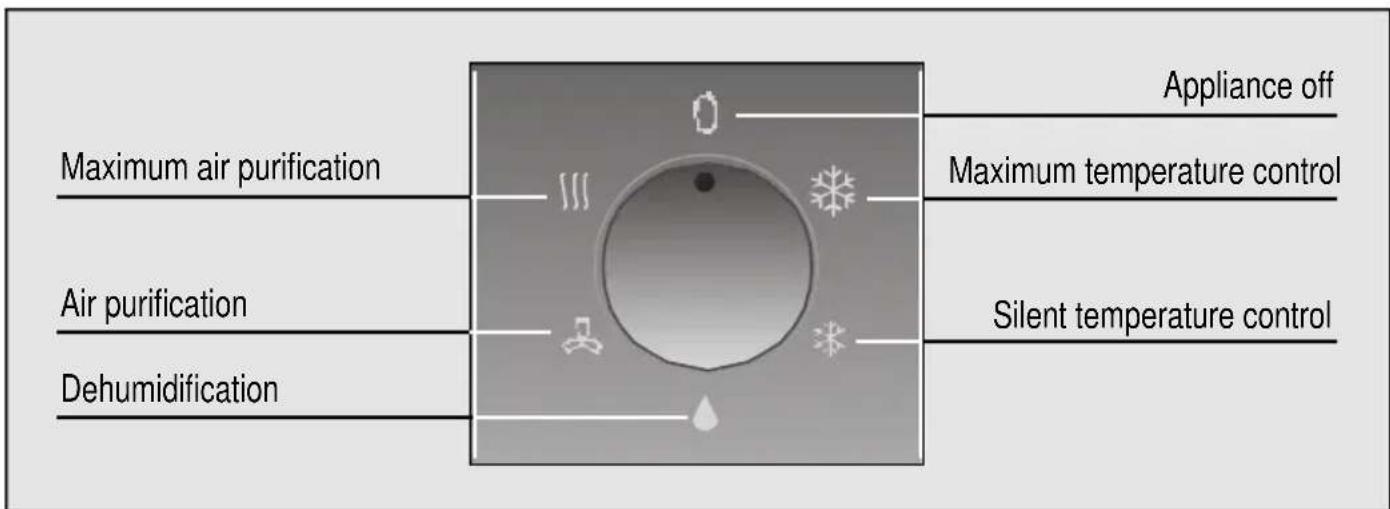
Requirements for Use
Requirements for use
☐ This appliance must be connected to a 220/240 V 50 Hz mains electricity supply using an earthed plug.
☐ It must be protected with a 10 A slow-action fuse.
☐ Should an extension lead be needed, this lead must be at least 1,5 mm ^2 per terminal thick, no more than 25 m. long and earthed.
☐ There is a cavity at the back of the appliance for the mains electricity supply connection wire.
☐ Do not allow water to enter the appliance.
☐ Do not block the air inlets or outlets on your appliance, especially when used for heating.
Should the mains electricity supply wire be damaged in any way, it must only be replaced with a wire of similar characteristics. Get in touch with the manufacturer, after-sales service or similarly qualified person.
Warning!
If the appliance is turned off and then turned back on again, there is a 3-minute interval before the compressor starts up again. This interval is necessary in order for the appliance to work properly.
Transportation requirements
natural_image
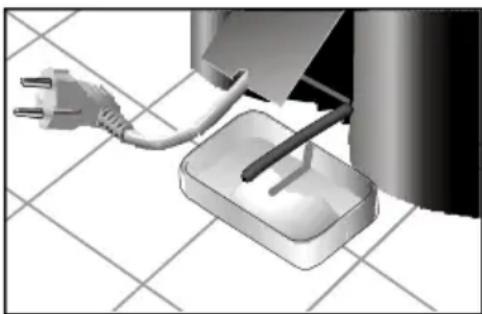
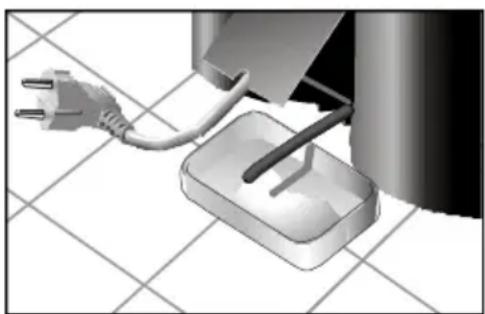
Close-up of a power plug connected to a small rectangular device on a tiled floor (no text or symbols visible)There are castors fitted on your appliance to make moving it easier. If it is necessary to tilt your appliance in order to move it, then the internal water tank must be drained first. To do this, connect drainage pipe to stopcock at the bottom of the appliance.
Warning!
Be particularly careful when transporting this unit. There is a water drainage pipe on the bottom of the appliance which may break if knocked.
Instructions for Use
Temperature control
natural_image
Illustration of a door hinge with a coiled hose inserted into the window (no text or symbols)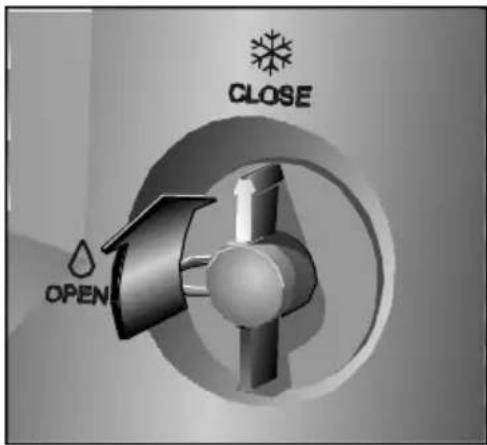
natural_image
3D rendering of a bathtub with a pipe and bucket, showing mechanical components (no text or symbols visible)□ Plug your appliance in.
☐ Lead the hot-air expulsion duct outdoors.
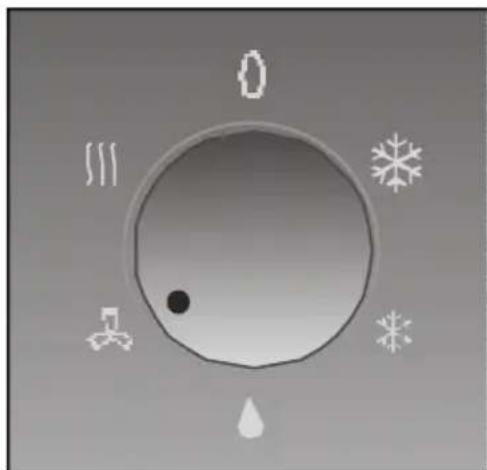
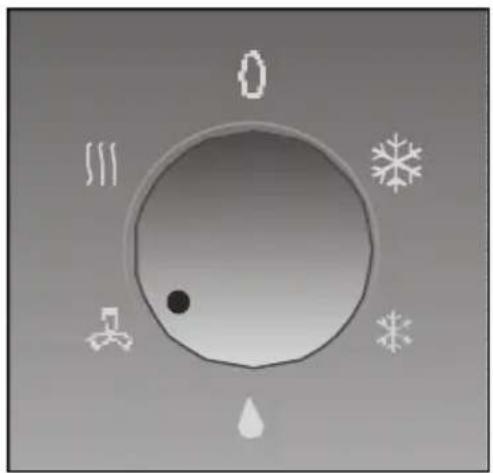
□ Set to maximum ✗ or silent ✗, temperature control.
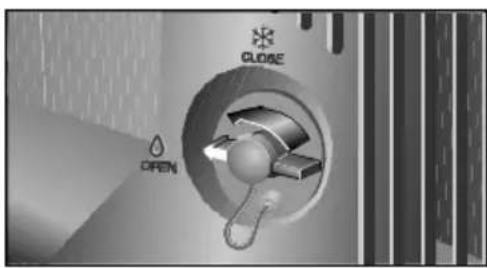
□ Turn the drainage stopcock to the cooling position.
☐ Set the thermostat to the desired temperature. Should the appliance turn itself off by thermostat, it will not come back on again until room temperature goes up 2-3°C.
The appliance lowers the temperature and dries the air in the room at the same time in order to create ideal air conditions.
Condensed water formed during air conditioning evaporates automatically and is expelled outdoors, together with hot air, through the hot-air expulsion duct. In conditions of extreme humidity, the appliance accumulates water in an internal tank.
When the water in this tank reaches a certain level, safety pilot light comes on, indicating that the tank needs to be emptied.
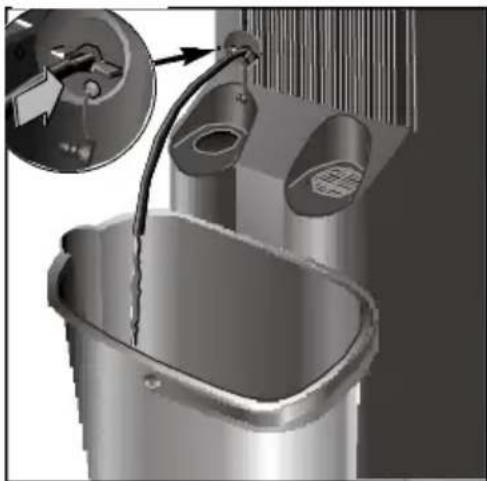
☐ Turn the appliance off and wait 10 minutes for the safety systems to reset.
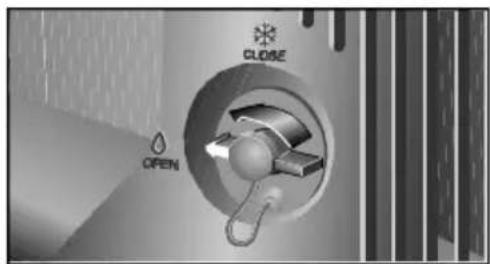
☐ Turn drainage stopcock 90° in an anti-clockwise direction.
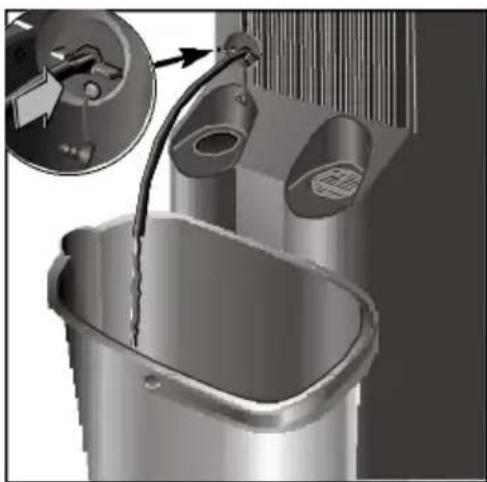
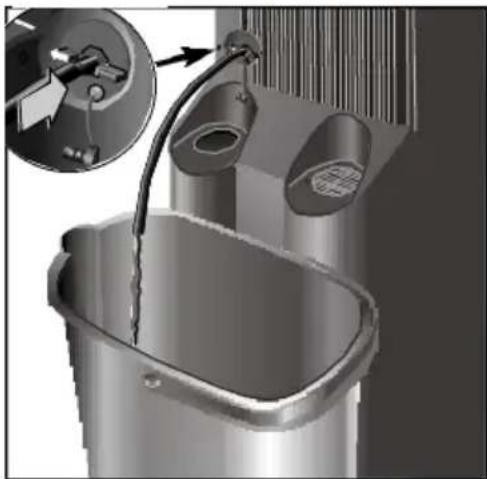
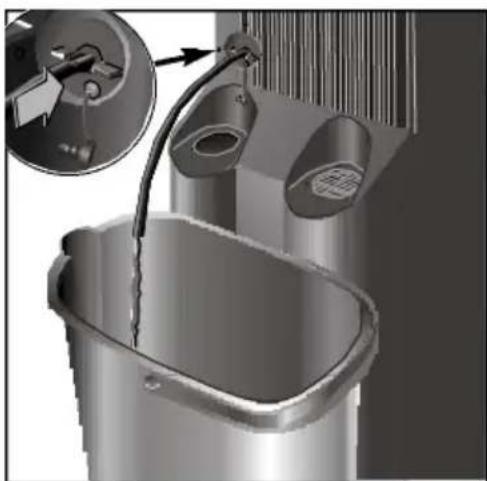
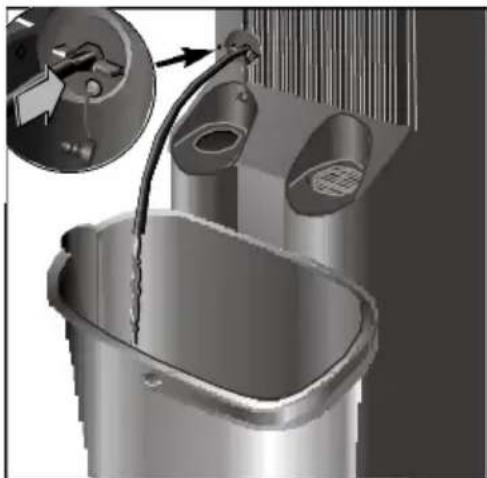
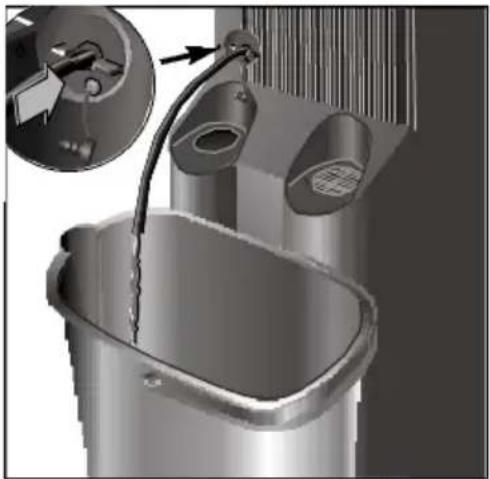
□ Remove the plug from stopcock 10 and insert drainage pipe.
☐ Place a bowl at the drainage pipe outlet to collect the condensed water in.
☐ Set the appliance to either the temperature control or dehumidification position.
Warning!
Do not forget to put the plug back in place on the drainage stopcock and to turn the stopcock 90° in a clockwise direction before setting the appliance to the temperature control setting. The appliance will shed water if you fail to do so.
You have now removed all the excess water from the system and can turn the appliance back on and use as normal.
Ways of releasing air outdoors
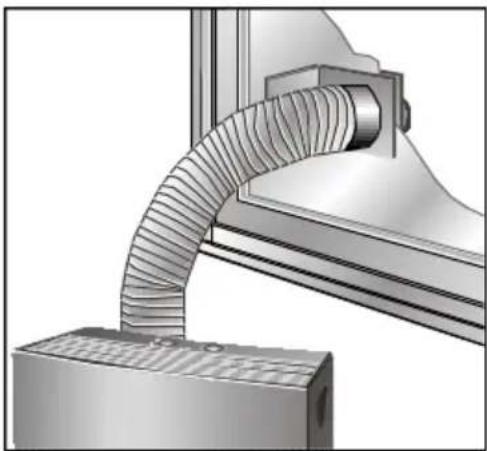
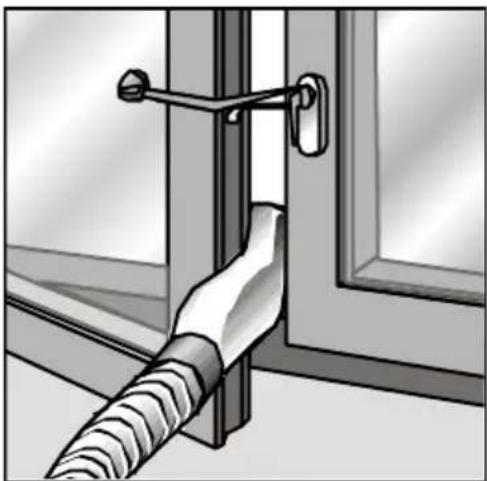
Temporary installation
natural_image
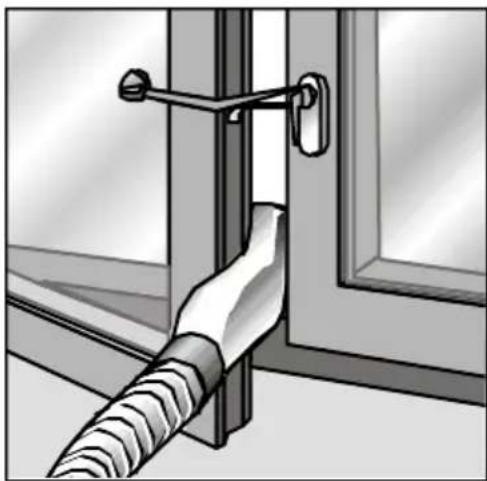
Illustration of a door hinge with a coiled cable inserted into the glass (no text or symbols)□ Connect the diffusion duct to the hot-air expulsion duct.
☐ Open the window slightly and feed the diffusion duct through the gap.
☐ Close the window as much as possible and secure it in place using the suction pad provided.
Permanent installation The ap
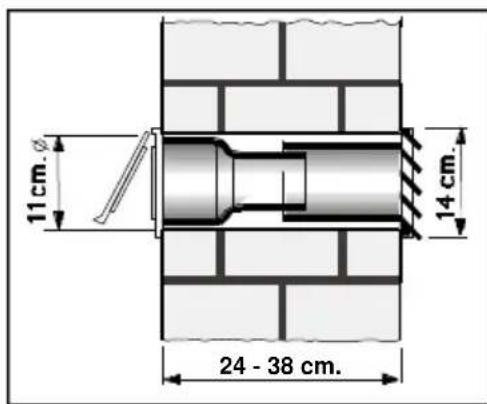
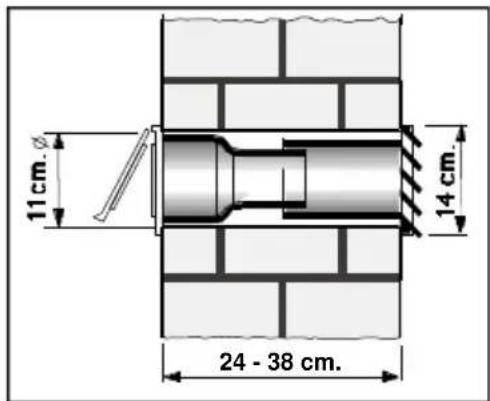
oppliance can be installed on a permanent basis using window/wall Optional Accessory, reference S1 RKZ 06009, available from your supplier.
☐ A hole must be made in the wall and the wall accessory fitted in order to expel hot air.
□ Store the diffusion duct away and connect the air expulsion duct to the accessory.
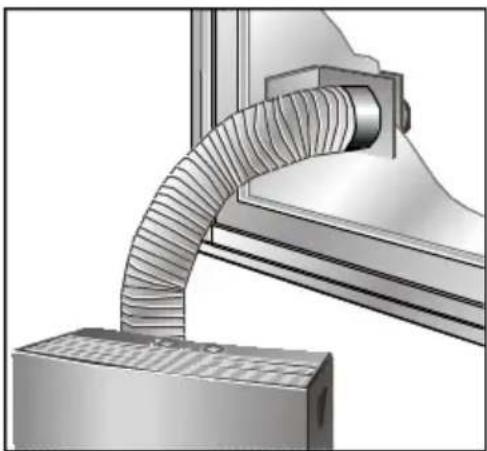
☐ Only the transparent end section of the accessory is used when air is to be expelled through a window on a permanent basis. A 10.5-cm. diameter hole must be made in the glass in order to fit the accessory.
natural_image
Technical illustration of a mechanical component with curved ribbed structure and base plate (no text or symbols)N.B.
- Do not extend the hot-air expulsion duct more than necessary (maximum length: 140 cm.).
- There must be a distance of at least 70 cm. between the floor and the end of the duct.
- Do not bend the duct too sharply when positioning it.
This can impede proper hot-air expulsion, which may reduce cooling efficiency.
Heating
natural_image
Circular dial indicator with snowflake, droplet, and thermometer symbols (no text or numbers)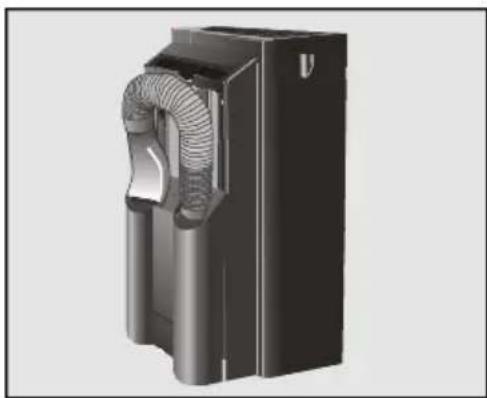
natural_image
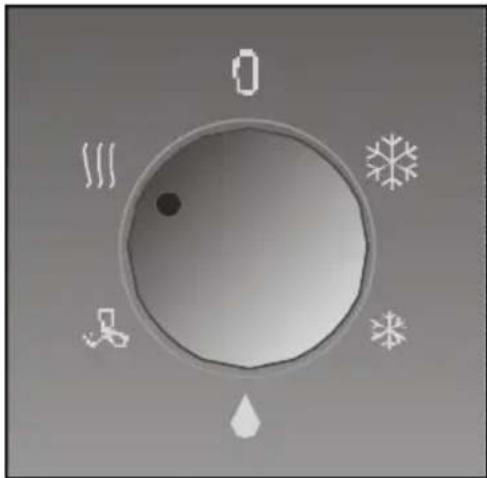
3D rendering of a black industrial fan or housing component with internal ventilation ducts (no text or symbols visible)At this setting III the appliance heats the air in the room and filters it at the same time.
☐ Put the expulsion duct in storage position.
□ Set to heating function.
Warning!
Do not obstruct the air inlets and outlets on your appliance.
☐ Set the thermostat to the desired temperature. Once this temperature has been reached, the appliance will turn itself off automatically. It will come back on again when the temperature falls 2-3°C.
Dehumidification
natural_image
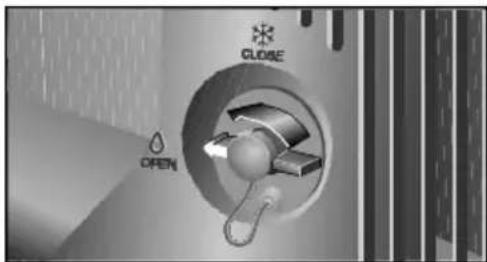
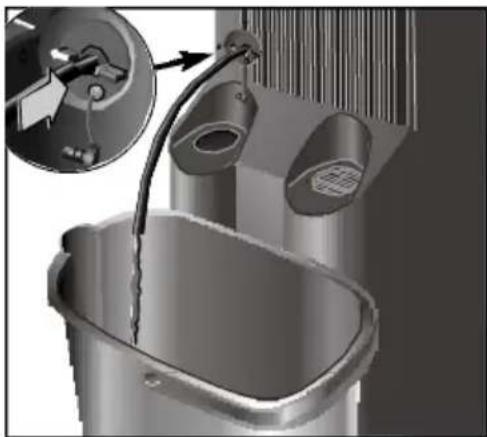
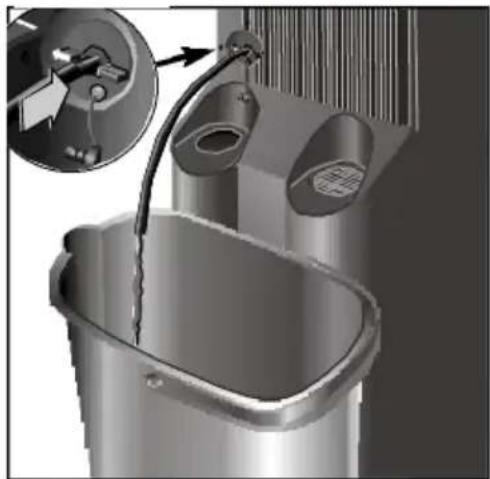
3D rendering of a bucket with a pipe inserted, showing mechanical components and a close-up inset (no text or symbols)When set to , the appliance removes humidity from the atmosphere. It does not, however, control the temperature.
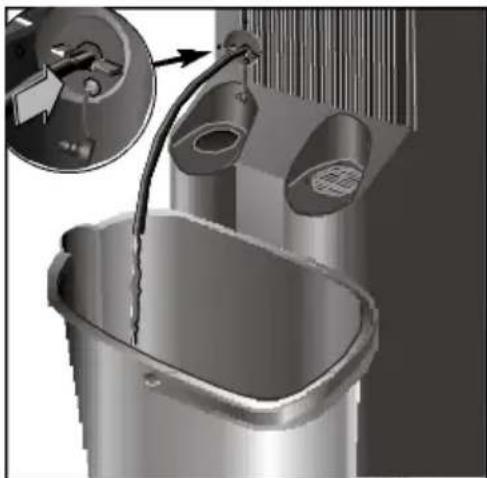
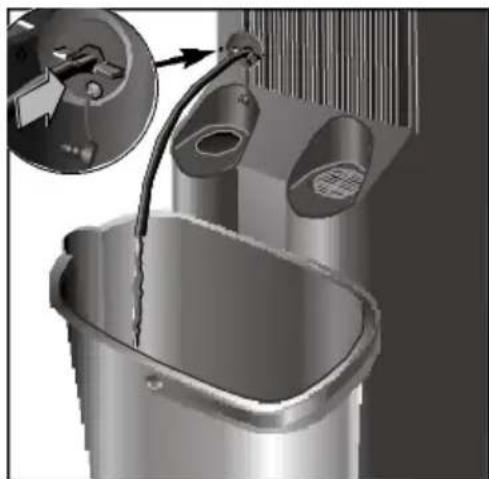
☐ Turn drainage stopcock 90° in an anti-clockwise direction.
☐ Remove stopcock plug and insert drainage pipe. stored in the main filter compartment.
☐ Place a bowl at the drainage pipe outlet to collect the condensed water in.
☐ Put the air extraction duct in storage position.
□ Set control knob to dehumidification position ^.
☐ The amount of water removed from the air can reach as much as 30 liters/24 hours, depending on atmospheric conditions.
natural_image
3D rendering of a black industrial device with coiled duct and housing (no text or symbols visible)Air purification
natural_image
Circular dial indicator with snowflake, droplet, and gear symbols (no text or numbers)Warning!
- Do not forget to put the plug back in place on the drainage stopcock and to turn the stopcock 90° in a clockwise direction before setting the appliance to the temperature control setting. The appliance will shed water should you fail to do so.
- Always remember that in order for the dehumidification function to work properly, ambient temperature must be at least 18^ C .
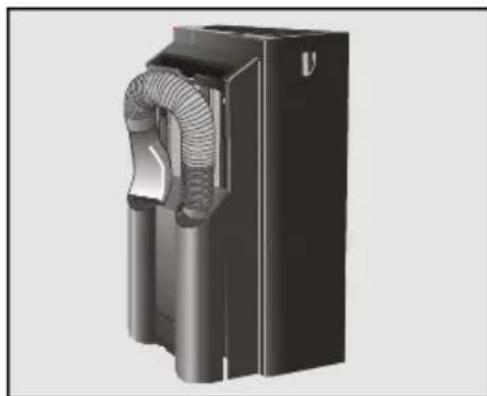
The air inside a room is circulated through a set of purifying filters when the appliance is set to this function.
☐ The appliance comes with a main filter with a double active purifying filter. This special filter is for:
- Smells and smoke.
- Pollen, bacteria and dust.
☐ Put the air expulsion duct in storage position.
□ Set to purification function ✗.
□ When the appliance or the model is fitted with optional filters, we recommend you leave the optional filters in position regardless of the desired function setting (cooling, dehumidification, air purification). The appliance purifies the air more efficiently in this way.
Cleaning and Maintenance
Cleaning
natural_image
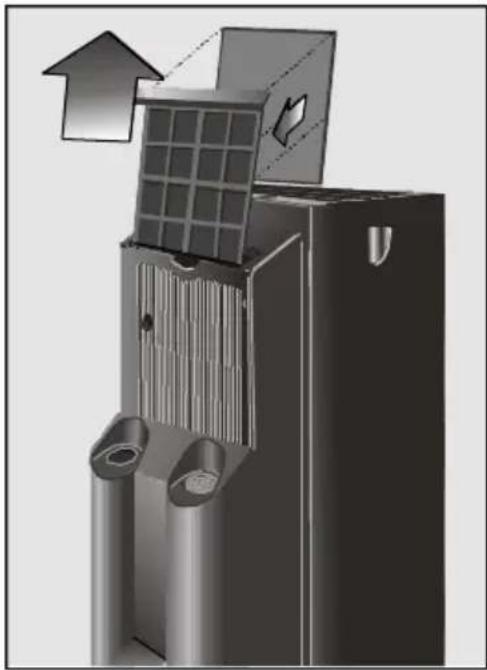
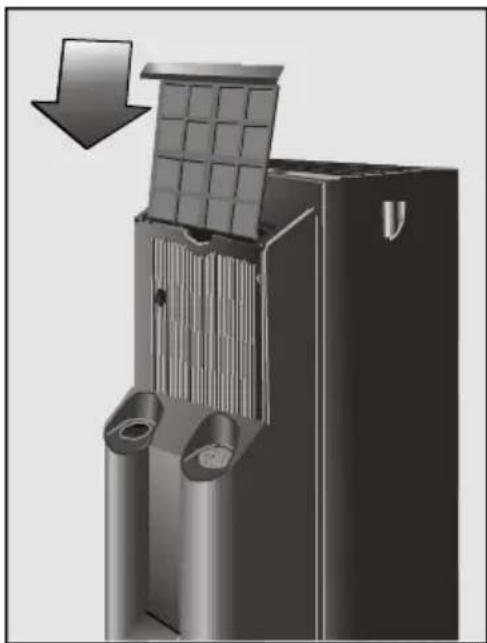
3D technical illustration of a mechanical component with internal structure and directional arrows (no text or symbols)☐ The appliance is equipped with a main air filter. This filter must be removed, washed with water, dried and refitted on a regular basis.
☐ The set of purifying filters reference S1 RKZ 09013, must be replaced with a new set every year in order to work efficiently. Contact your supplier.
☐ The filters must be fitted as shown in figures.
☐ Place only one set of filters onto fixture to avoid affecting cooling efficiency.
☐ The appliance can be cleaned with a cloth or sponge, warm water and mild detergent.
□ Never use hot water (more than 40°C), bleach, petrol-based products, acids or brushes when cleaning your appliance. Prevent water entering the appliance.
☐ Do not clean your appliance with a hose.
natural_image
3D rendering of a mechanical component with a grid structure and directional arrow (no text or symbols)Prior to use at change of season
□ Clean the air filter.
☐ Then clean the casing and grilles if necessary.
Technical Service / Warranty
Technical service
Should your appliance fail to work properly and all the instructions for use and installation (especially the section headed "Requirements....") have been carefully observed, then remember that our Technical Service Network is at your full disposal.
When contacting the Technical Service, quote the model code (E-NR) and the appliance's factory number (FD). This information can be found on characteristics plate.
Warranty
The conditions of warranty depend on the relevant Supplier in a particular country. Contact the establishment where you purchased your appliance for more information and quote the appliance model and factory number. The receipt of purchase for the appliance must be produced prior to any work carried out under warranty.
The following procedures can help you solve a number of small problems and save you from contacting our Technical Service unnecessarily.
If after performing the procedures described the problem persists or happens again, then contact our Technical Service.
Things that can save you from making unnecessary phone calls
What to do if ...
... the appliance doesn't work ...
☐ Make sure that the appliance is plugged in properly.
□ Make sure that the control knob is not set to "off"●.
☐ Make sure that there is power in the mains electricity supply and all the fuses are in working order.
☐ Set the thermostat to a lower temperature.
... the appliance doesn't work and the safety pilot light comes on ...
Place the appliance on a flat surface. If the pilot light still doesn't go out, then empty the appliance's internal water tank. (See instructions for Temperature Control).
... the safety pilot light comes on frequently ...
☐ Make sure that the drainage stopcock is set to the right position.
... the appliance fails to cool the air properly ...
□ Make sure that the connections on hot-air expulsion duct are in working order.
☐ Make sure that the expulsion duct is not excessively bent or longer than 140 cm.
☐ Make sure that drainage stopcock is set to the temperature control position.
☐ Use the suction pad to make the opening on the window as small as possible.
☐ Lower blinds if available to reduce direct sunlight.
... the appliance makes a lot of noise ...
☐ Make sure that the air extraction duct is properly fitted onto the appliance.
□ Make sure that the appliance's air inlets and outlets are free from obstruction.
☐ If the noise sounds like water flowing, then this is due to the pump which circulates water around the system so as to enhance the efficiency of the appliance.
Any other kind of fault or repair work must be dealt with by a specialised technician. Contact your authorised supplier, the after-sales service or the Technical Service Network.
Technical Information
Technical information
Consumption when set to maximum cooling ....1.180W
Consumption when set to heating function 1.800W
Fuse....10 A
Cooling capacity * 2.500W
Operating range
- Temperature control......min. 20°C - max. 35°C
- Dehumidification ....min. 18°C - max. 35°C
- Heating......min. -5°C - max. 30°C
* Ashrae 128
Index
Observations Importantes
Mise au rebut de l'emballage ....31
natural_image
Abstract graphic with a black arrow pointing downward, overlaid on a grid background (no text or symbols)Conditions de transport
natural_image
Close-up of a plug inserted into a small appliance with a cable, placed on a tiled floor (no text or symbols visible)natural_image
Illustration of a glass door with a coiled cable inserted into the opening (no text or symbols)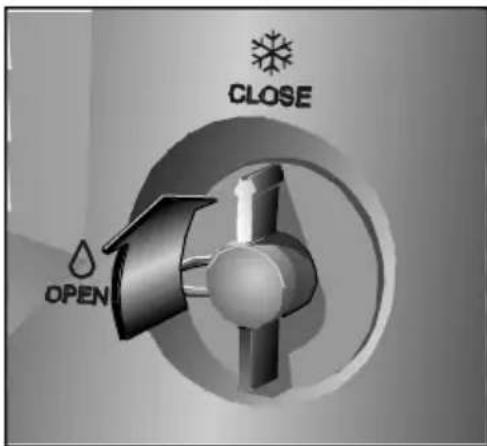
natural_image
3D rendering of a stainless steel bucket with a pipe inserted, showing internal components and a close-up view of the handle (no text or symbols visible)natural_image
Illustration of a glass door with a metal clip attached to the wall, showing no text or symbols.natural_image
Mechanical assembly diagram showing a curved pipe inserted into a housing (no text or symbols visible)Remarques :
natural_image
Circular dial indicator with snowflake, droplet, and warning symbols (no text or numbers)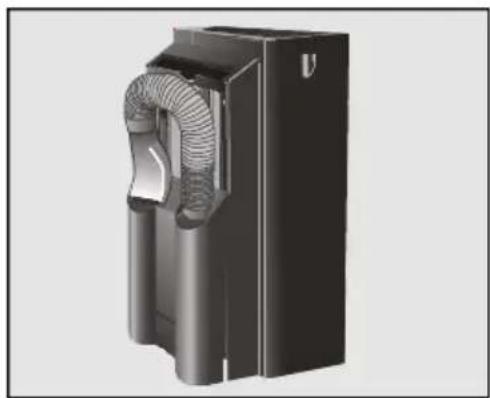
natural_image
3D rendering of a black industrial fan or compressor unit with visible internal blades and housing (no text or symbols)Déshumidification
natural_image
3D rendering of a bucket with water flowing through a pipe, showing mechanical components and a close-up inset (no text or symbols)natural_image
3D rendering of a black industrial air duct or fan component with coiled ducts and ventilation duct (no text or symbols visible)natural_image
Circular dial indicator with white icons around it, no text or symbols presentAttention!
natural_image
3D illustration of a mechanical device with internal components and directional arrows (no text or symbols)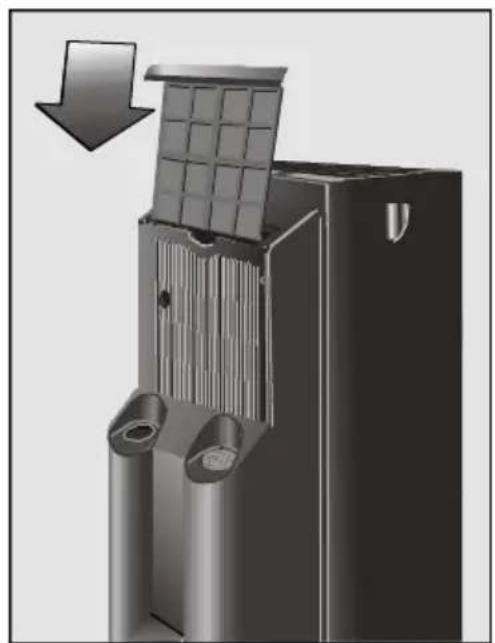
natural_image
3D mechanical component diagram showing a grid structure with an arrow indicating downward motion (no text or symbols)natural_image
Abstract graphic with a black arrow pointing downward, overlaid on a grid background (no text or symbols)natural_image
Close-up of a power plug connected to a small rectangular socket on a tiled floor (no text or symbols visible)natural_image
Illustration of a glass door with a coiled cable inserted into the opening, showing no text or symbols.
natural_image
3D rendering of a stainless steel bucket with a pipe inserted, showing internal components and a close-up inset (no text or symbols)natural_image
Illustration of a glass door with a coiled cable inserted into the opening, showing no text or symbols.natural_image
Mechanical assembly diagram showing a curved pipe inserted into a housing component (no text or symbols visible)Attentie
natural_image
Circular dial indicator with snowflake, droplet, and thermometer symbols (no text or numbers)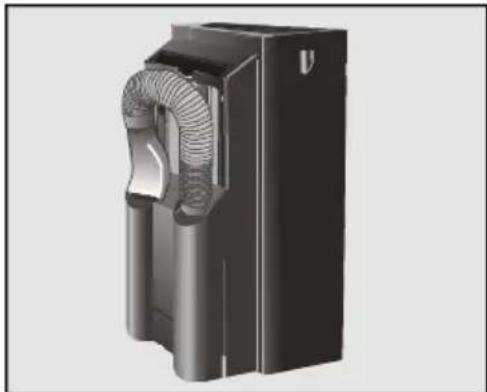
natural_image
3D rendering of a black industrial fan or compressor unit with ventilation ducts (no text or symbols visible)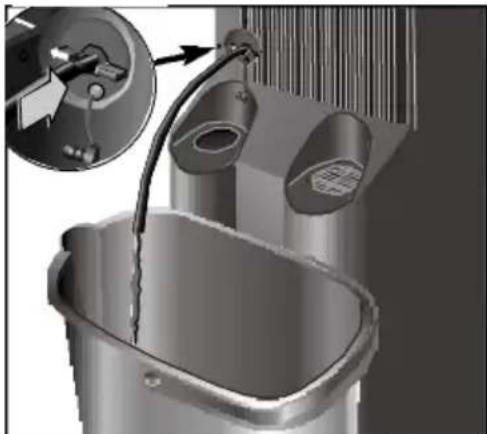
natural_image
3D rendering of a bathtub with a pipe inserted, showing internal components and a magnified inset (no text or symbols)natural_image
3D rendering of a black industrial device with coiled duct and cylindrical housing (no text or symbols visible)natural_image
Circular diagram with snowflake, droplet, and gear symbols around a central dot (no text or labels)Attentie!
natural_image
3D rendering of a mechanical component with internal structure and upward arrow indicator (no text or symbols)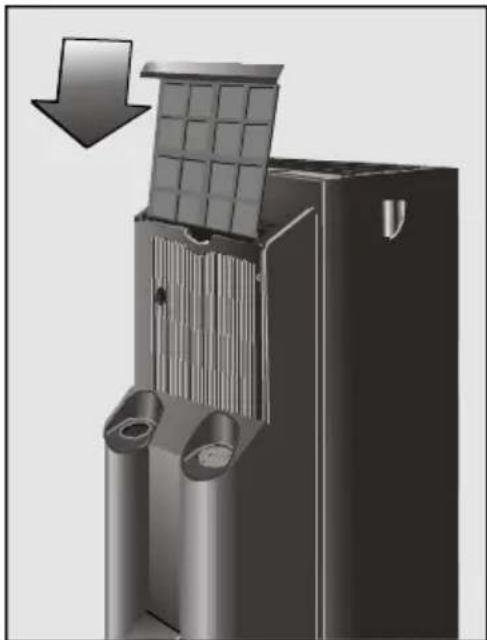
natural_image
3D rendering of a mechanical component with a grid structure and directional arrow (no text or symbols)natural_image
Abstract graphic with a black arrow pointing downward, overlaid on a grid background (no text or symbols)natural_image
Close-up of a plug inserted into a socket with a power outlet, placed on a tiled floor (no text or symbols visible)natural_image
Illustration of a glass door with a coiled cable inserted into the opening (no text or symbols)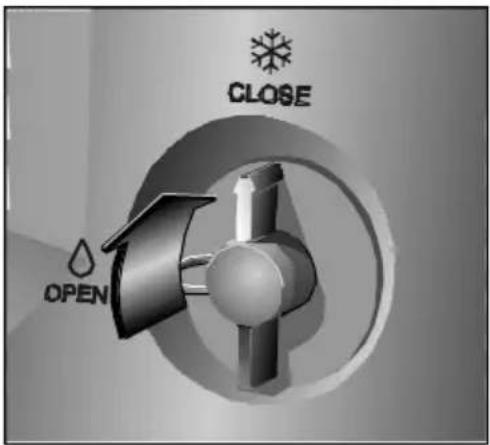
natural_image
3D rendering of a stainless steel bucket with a pipe inserted, showing internal components and a close-up inset (no text or symbols)natural_image
Illustration of a door hinge with a coiled cable inserted into the window (no text or symbols)natural_image
Mechanical assembly diagram showing a curved pipe inserted into a housing (no text or symbols visible)N.B.:
natural_image
Circular dial indicator with snowflake, droplet, and warning symbols (no text or numbers)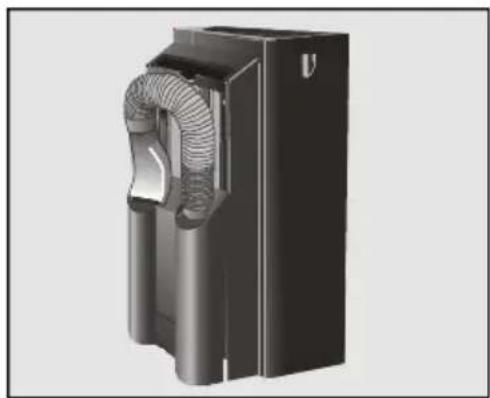
natural_image
3D rendering of a black industrial fan or duct assembly with internal mesh structure (no text or symbols visible)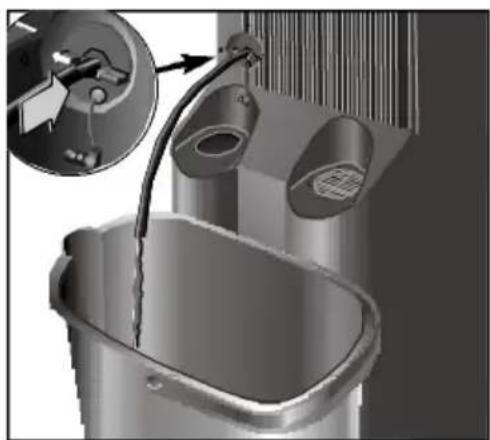
natural_image
3D rendering of a bathroom sink with faucet and toilet, showing mechanical components (no text or symbols)natural_image
3D rendering of a black industrial air duct or fan component with coiled ducts and ventilation slots (no text or symbols visible)natural_image
Circular diagram with snowflake, droplet, and gear symbols around a central dot (no text or labels)Attenzione!
natural_image
3D illustration of a mechanical device with internal components and directional arrows (no text or symbols)natural_image
3D rendering of a mechanical component with a grid structure and directional arrow (no text or symbols)natural_image
Abstract 3D rendering of two metallic cylindrical objects with a black arrow pointing downward on a grid background (no text or symbols)natural_image
Close-up of a plug inserted into a small electronic device with wires, placed on a tiled floor (no text or symbols visible)natural_image
Illustration of a door hinge with a metal clip attached, showing structural details (no text or symbols)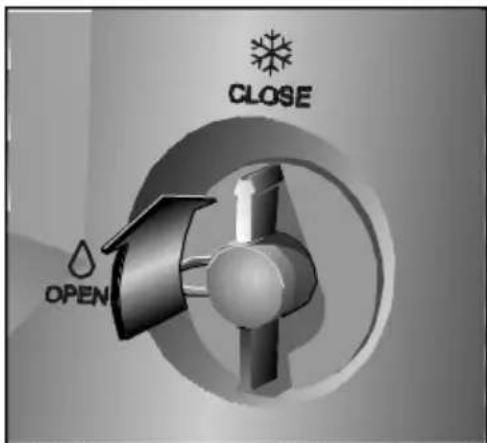
natural_image
3D rendering of a stainless steel bucket with a pipe and valve, showing mechanical components (no text or symbols visible)natural_image
Illustration of a door hinge with a metal clip attached, showing structural details (no text or symbols)natural_image
Mechanical assembly diagram showing a curved pipe inserted into a housing component (no text or symbols visible)Notas:
natural_image
Circular dial indicator with snowflake, droplet, and thermometer symbols (no text or numbers)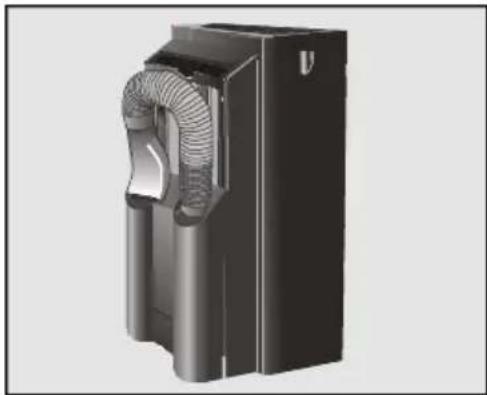
natural_image
3D rendering of a black industrial fan or housing component with visible ductwork and ventilation duct (no text or symbols)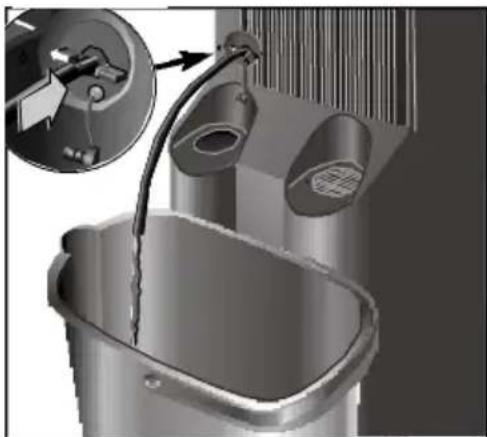
natural_image
3D rendering of a bathtub with an open faucet and a close-up inset showing the handle (no text or symbols visible)natural_image
3D rendering of a black industrial device with coiled duct and housing (no text or symbols visible)natural_image
Circular diagram with directional symbols (no text or labels)¡Atención!
natural_image
3D rendering of a mechanical device with internal components and airflow direction arrows (no text or symbols)natural_image
3D rendering of a mechanical component with a grid structure and downward arrow indicating motion (no text or symbols)natural_image
Abstract graphic with a black arrow pointing upward next to two metallic cylindrical objects on a grid background (no text or symbols)natural_image
Close-up of a plug inserted into a small electronic device with wires, placed on a tiled floor (no text or symbols visible)natural_image
Illustration of a glass door with a coiled cable inserted into the opening (no text or symbols)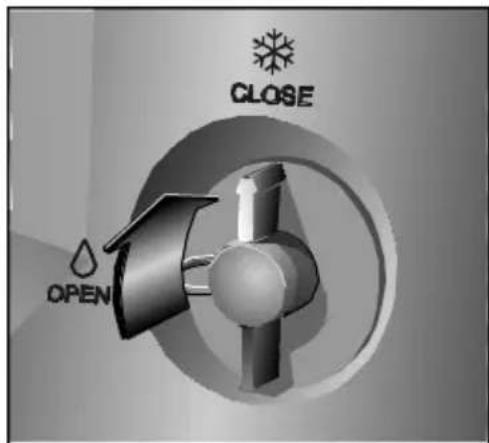
natural_image
3D rendering of a bucket with water being poured into a basin, showing mechanical components and a close-up inset (no text or symbols)natural_image
Illustration of a glass door with a coiled cable inserted into the opening, showing no text or symbols.natural_image
Technical illustration of a mechanical component with a curved pipe or duct assembly (no text or symbols visible)Notas:
natural_image
Circular dial indicator with snowflake, droplet, and thermometer symbols (no text or numbers)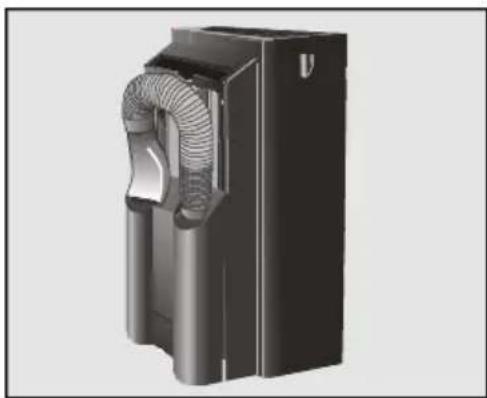
natural_image
3D rendering of a black industrial fan or compressor unit with visible internal ductwork and ventilation slots (no text or symbols)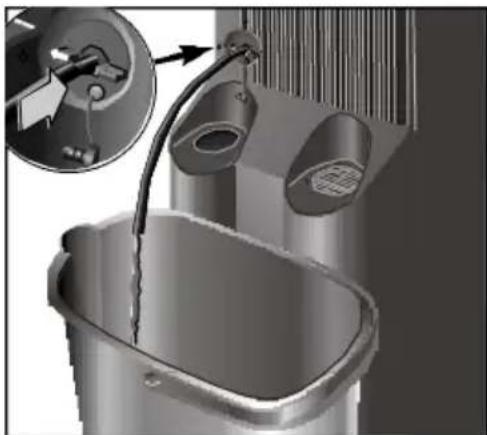
natural_image
3D rendering of a bathtub with two hanging fixtures and an inset showing a close-up of the interior (no text or symbols visible)natural_image
3D rendered mechanical component with internal mesh structure (no visible text or symbols)Purificação do ar
natural_image
Circular diagram with snowflake, droplet, and gear symbols (no text or labels)Atenção!
natural_image
3D technical illustration of a mechanical component with internal structure and directional arrows (no text or symbols)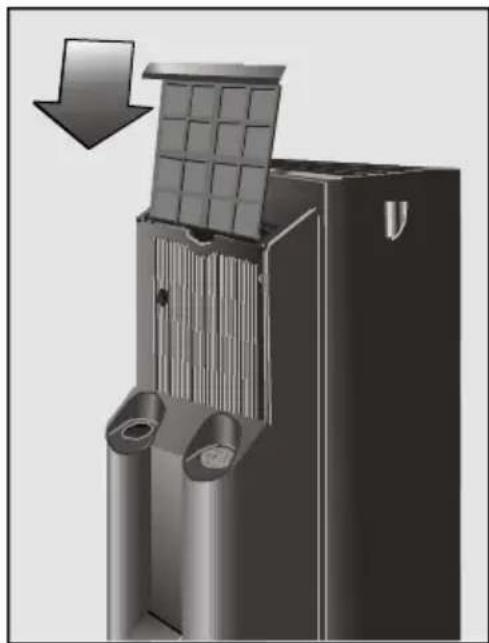
natural_image
3D rendering of a mechanical component with a grid structure and directional arrow (no text or symbols)

- Entfeuchten
- Achtung!
- Your new appliance
- Requirements for Use
- Instructions for Use
- Cleaning and Maintenance
- Important Information
- Disposal of packaging
- Disposal of your old appliance
- Before connecting your new appliance
- Description of your appliance
- Control panel
- Warning!
- Transportation requirements
- Temperature control
- Ways of releasing air outdoors
- N.B.
- Heating
- Dehumidification
- Air purification
- Cleaning
- Prior to use at change of season
- Technical Service / Warranty
- Technical service
- Warranty
- Things that can save you from making unnecessary phone calls
- What to do if ...
- Technical Information
- Index
- Observations Importantes
- Conditions de transport
- Remarques :
- Déshumidification
- Attention!
- Attentie
- Attentie!
- N.B.:
- Attenzione!
- Notas:
- ¡Atención!
- Atenção!
Brand : SIEMENS
Model : S1RKM09102
Category : Air conditioner